
CrystalSky - Drone DJI - Free user manual and instructions
Find the device manual for free CrystalSky DJI in PDF.


| Product Type | High brightness aerial photography monitor |
| Brand | DJI |
| Model | CrystalSky CS785 / CS785U / CS550 |
| Dimensions (CS785/CS785U) | Without battery: 208.6 × 147.8 × 17 mm; with battery: 208.6 × 147.8 × 34.75 mm |
| Dimensions (CS550) | Without battery: 153.76 × 84.94 × 19 mm; with battery: 153.76 × 84.94 × 39.6 mm |
| Weight (CS785/CS785U) | Approximately 425 g (without battery) |
| Weight (CS550) | Approximately 228 g (without battery) |
| Intelligent battery | LiPo, 7.6 V, 4,920 mAh, 37.39 Wh, weight approx. 170 g |
| Power / Charging | WCH2 charging hub, compatible with DJI Inspire 2, Phantom 4 chargers, etc. |
| Touchscreen | IPS, 7.85" (CS785) or 5.5" (CS550), resolution 2048×1536 (CS785) or 1920×1080 (CS550) |
| Brightness | CS785: 1,000 cd/m²; CS785U: 2,000 cd/m²; CS550: 1,000 cd/m² |
| Internal storage | CS785: 64 GB ROM; CS785U: 128 GB ROM; CS550: 32 GB ROM |
| Operating system | Android 5.1 |
| Built-in apps | DJI GO and DJI GO 4 |
| Connectivity | Wi-Fi 2.4 / 5.2 / 5.8 GHz, Bluetooth, GPS/GLONASS, 4G (external module) |
| Ports | HDMI (4K output), USB 2.0, Micro USB, USB Type-C high-speed, micro-SD slot (max 128 GB), headphone jack |
| Built-in sensors | Gyroscope, compass, ambient light sensor, microphone |
| Main functions | Gimbal and camera control, telemetry display, maps, DJI store, content sharing |
| Drone compatibility | DJI Mavic, Osmo (except Mobile), Inspire, Phantom 3 (Pro/Advanced), Phantom 4, Matrice |
| Operating temperature | -20 to 40 °C |
| Maintenance | Clean metal contacts with a dry, clean cloth |
| Available spare parts | Intelligent battery WB37, WCH2 charging hub, mounting bracket, sunshade |
Frequently Asked Questions - CrystalSky DJI
User questions about CrystalSky DJI
0 question about this device. Answer the ones you know or ask your own.
Ask a new question about this device
Download the instructions for your Drone in PDF format for free! Find your manual CrystalSky - DJI and take your electronic device back in hand. On this page are published all the documents necessary for the use of your device. CrystalSky by DJI.
USER MANUAL CrystalSky DJI
Congratulations on purchasing your new DJI ^™ product. The information in this document affects your safety and your legal rights and responsibilities. Read this entire document carefully to ensure proper configuration before use. Failure to read and follow instructions and warnings in this document may result in serious injury to yourself or others, damage to your DJI product, or damage to other objects in the vicinity. This document and all other collateral documents are subject to change at the sole discretion of DJI. For up-to-date product information, visit http://www.dji.com and click on the product page for this product.
By using this product, you hereby signify that you have read this disclaimer and warning carefully and that you understand and agree to abide by the terms and conditions herein. You agree that you are solely responsible for your own conduct while using this product, and for any consequences thereof. You agree to use this product only for purposes that are proper and in accordance with all applicable laws, rules, and regulations, and all terms, precautions, practices, policies and guidelines DJI has made and may make available. DJI accepts no liability for damage, injury or any legal responsibility incurred directly or indirectly from the use of this product. The user shall observe safe and lawful practices including, but not limited to, those set forth in this document.
DJI is a trademark of SZ DJI TECHNOLOGY CO., LTD. (abbreviated as “DJI”) and its affiliated companies. Names of products, brands, etc., appearing in this document are trademarks or registered trademarks of their respective owner companies.
Warning
- The Charging Hub is only compatible with the DJI specified Charger. DO NOT attempt to use the Charging Hub with any other battery charger.
- The Charging Hub is only compatible with the DJI specified Intelligent Battery. DO NOT attempt to use the Charging Hub with any other battery.
- Ensure to press the Battery Release Button before remove the battery.
- DO NOT attempt to touch the metal terminals on the Power Adapter.
- Clean the metal terminals with a dry, clean cloth if there is any noticeable buildup of dirt.
Introduction
CrystalSky™ is designed specifically for aerial photography and can display a clear image under different lighting conditions with built-in light-sensitive sensor. Support DJI MAVIC™, OSMO™ series (Osmo Mobile excluded), INSPIRE™ series, PHANTOM™ 4 series, Phantom 3 series (Phantom 3 Professional, Phantom 3 Advanced) and MATRICE™ series.* Use the built-in DJI GO™/DJI GO 4 app to control the gimbal, camera and other features of your flight system. The app also comes with a map, a store, and a user center for configuring your aircraft and sharing your content.
* Support for DJI devices will be added as testing and development continues. Visit the DJI CrystalSky product page on dji.com for a complete list.
In the Box
CrystalSky Monitor ×1
Intelligent Battery ×2(CS785/CS785U) or ×1(CS550)
Intelligent Battery Charging Hub (WCH2) ×1
CrystalSky User Guide ×1
Intelligent Battery Safety Guidelines ×1
Mounting Bracket (Optional) ×1
Hood (Optional) ×1
* Optional parts can be purchased separately at the official DJI Online Store.
Overview
CrystalSky Monitor
- HDMI Port
Output HDMI video signal.
- USB Port
Supported extended device, e.g. U disk.
- Micro SD Card Slot
Provides extra storage space for the display device, maximum card size is 128 GB.
- Micro USB Port
Use a Micro USB cable to connect to the remote controller when in use, or to the PC to configure parameters via DJI ASSISTANT™ 2. To update aircraft firmware, please use the USB OTG cable.
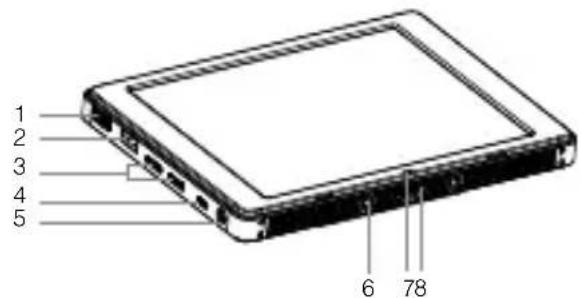
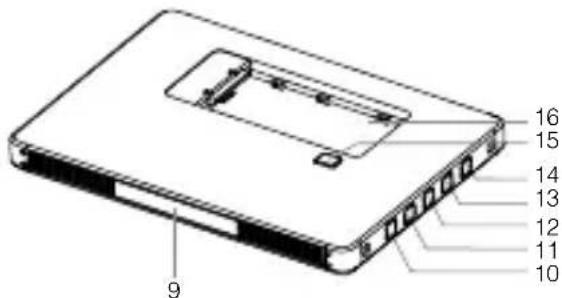
CS785 (Highlight version) /
CS785U (Ultra-bright version)
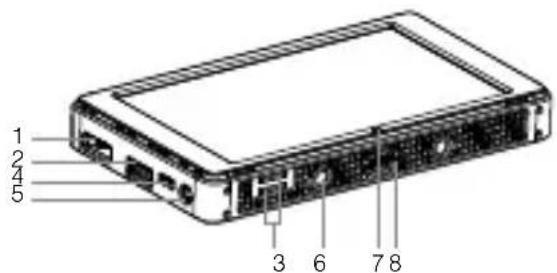
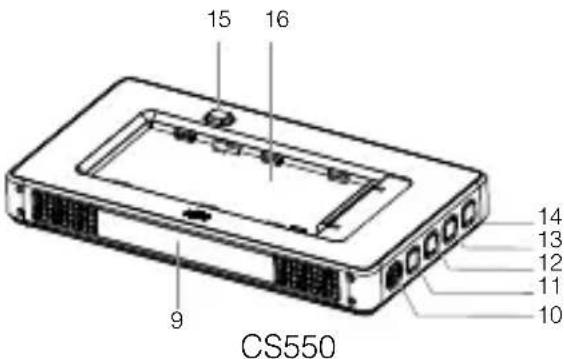
-
Headphone Jack
-
Mounting Screw Hole
-
Light-sensitive Port Built-in light-sensitive sensor.
-
Type-C USB2.0 HS Port
-
Built-in GNSS
-
Power Button
-
Custom Button
-
Setting Button
-
Custom Button
-
Back Button
-
Battery Release Button
-
Battery Slot
Usage
Charging the Battery
Use the Inspire 2 charger for illustration.*
Place the battery into the standard charging hub, and connect connector B of the battery charger to the charging hub, then connect the battery charger to a power outlet (100-240V, 50/60Hz). The Charging Hub will intelligently charge batteries in sequence according to battery power levels from high to low. The buzzer will begin beeping when charging is complete. Remove the battery or turn off the Buzzer Switch to stop it.
The Status LED blinks green when charging and turns solid green when fully charged.
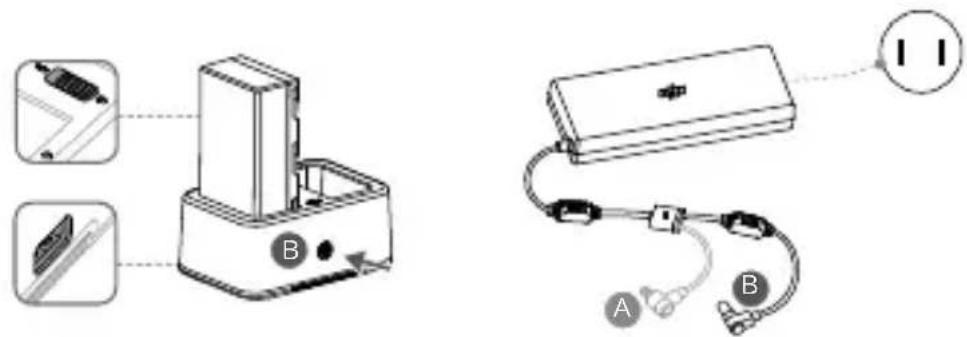

DO NOT charge the Intelligent Flight battery together with the Intelligent Battery when using the Inspire 2, Phantom 4 charger or Inspire 2 Car Charger.

- USB power supply port can be used to charge a mobile device of 5V/2A. - Refer to the Charging Hub (WCH2) User Guide for more details.
Mounting the Battery
Put the battery into the Battery Slot, then slide it to the end until you hear a click.
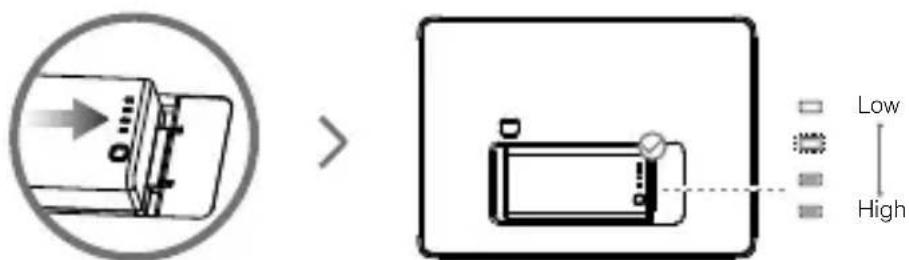
Press the Battery Level Button once to check the battery level.

- Press the Battery Release Button before removing the battery. - The Intelligent Battery can charge the built-in battery after mounting, which may reduce the operation time of the Intelligent Battery. The built-in battery can keep the monitor standby for a short period without the Intelligent Battery, so you can start the monitor fast once get the Intelligent Battery mounted.
*Use the CrystalSky CS785 for installation illustration.
Mounting the Monitor
natural_image
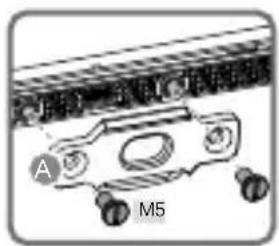
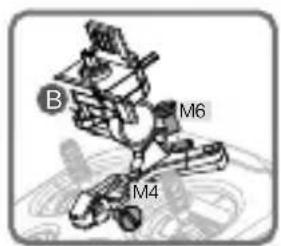
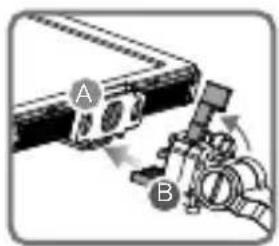
Mechanical component diagram showing a bracket with labeled parts A and M5 (no readable text or symbols beyond labels)Mount Part A of the Mounting Bracket's to the Monitor.

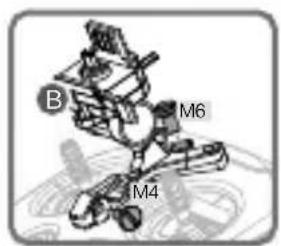
Mount Part B to the Remote Controller.

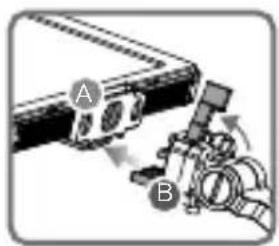
Ensure that Part B is unlocked. Install Part B into Part A.
natural_image
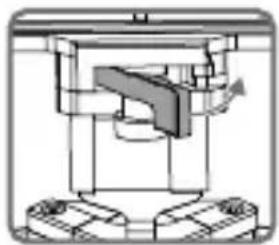
Mechanical assembly diagram showing a clamping mechanism with no visible text or symbolsLock the Mounting Bracket.

natural_image
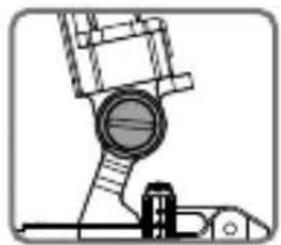
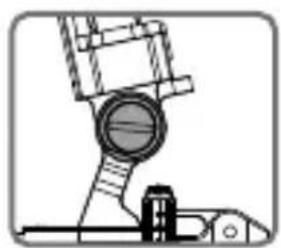
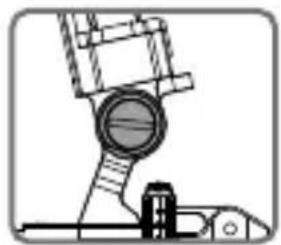
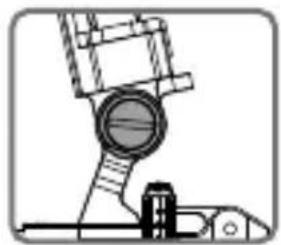
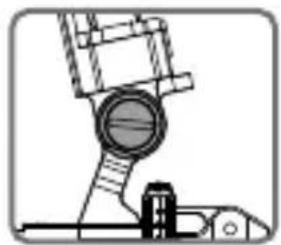
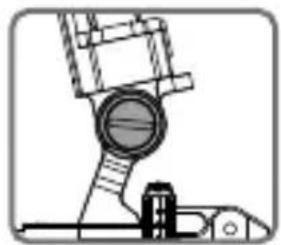
Mechanical assembly diagram showing a piston and crankshaft mechanism (no text or labels)Use a coin to adjust the tightness of the pitch axis.

natural_image
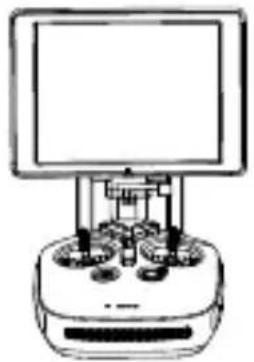
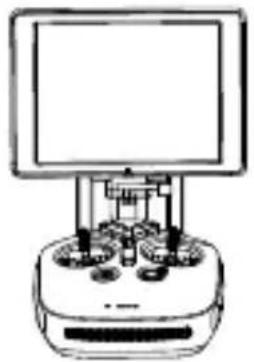
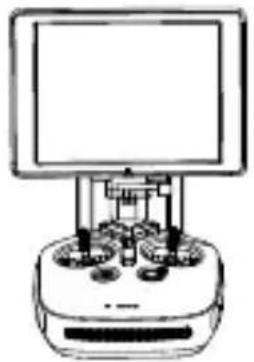
Line drawing of a vintage electronic device with a monitor and control panel (no text or symbols)
DO NOT obstruct the built-in GNSS during use.
Connect the Monitor
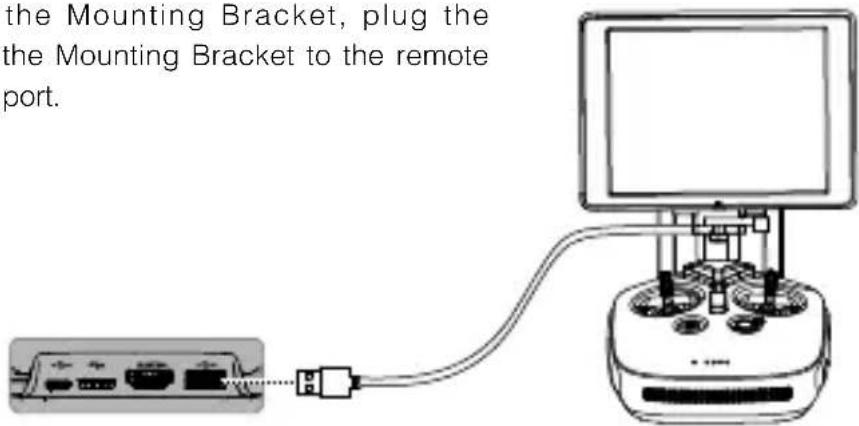
When using the Mounting Bracket, plug the connector on the Mounting Bracket to the remote controller USB port.
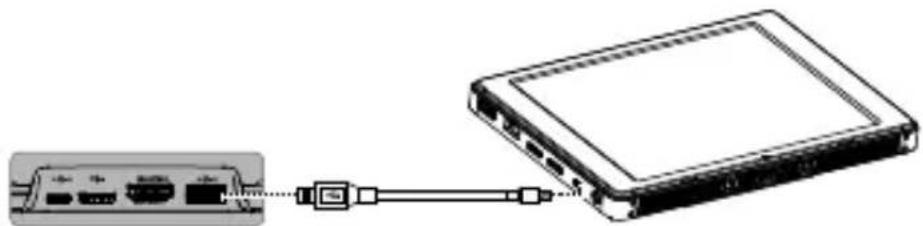
When using without the Mounting Bracket, connect the Monitor to the remote controller via a Micro USB cable.
natural_image
Diagram showing a device connected to a network interface via cable (no text or symbols present)
DO NOT use the Type-C USB 2.0 HS port and Micro USB ports as the Micro USB port will not work.
DJI GO/GO 4 App
Press the Power Button until the Monitor powers on, then enter the DJI GO/GO 4 app. Use the built-in DJI GO/DJI GO 4 app to control the gimbal, camera and other features of your flight system. The app also comes with a map, a store, and a user center, for configuring your aircraft and sharing your content.
mZ
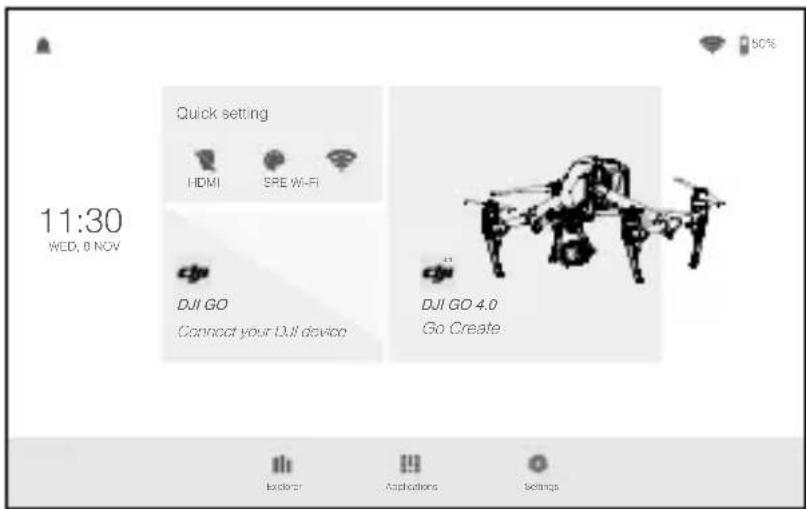
* This image is for reference only. Please refer to the actual user interface.
Specifications
| Monitor | ||
| Model CS785/ CS785U CS550 | ||
| Weight Approx. 425 g Approx. 228 g | ||
| Dimensions (without battery) | 208.6×147.8×17 mm 153.76×84 | 94×19 mm |
| Dimensions (with battery) | 208.6×147.8×34.75 mm 153.76× | 84.94×39.6 mm |
| Touch Screen | 7.85', IPS screen, supporting multi-point touch | 5.5', IPS screen, supporting multi-point touch |
| Resolution 2048×1536 1920×1080 | ||
| Brightness | CS785: 1000 cd/m2CS785U: 2000 cd/m2 | 1000 cd/m2 |
| Storage | CS785: ROM 64GBCS785U: ROM 128GB | ROM 32GB |
| Built-in App DJI GO, DJI GO 4 | ||
| Operating System Android 5.1 | ||
| Ports | HDMI (Supported 3840×2160 output), Dual SD card slots, USB, Micro USB, Type-C USB2.0 HS | |
| Network | WIFI frequency band: 2.4GHz, 5.2GHz&5.8GHz*Protocol: 802.11b, 802.11g, 802.11n (HT20), 802.11aSupports 4G dongle | |
| EIRP (dBm) | 2.4GHz: <20dBm (CE); <30dBm (FCC)5GHz: <14dBm (CE); <23dBm (FCC) | |
| GNSS GPS/GLONASS | ||
| Built-in Modules | Gyroscope, Compass, Speaker, Light-sensitive Sensor, Microphone | |
| Built-in Battery 980 mAh, 3.7 V | |
| 4K Decoding Capability H.264: 4K30p, H.265: 4K60p | |
| Operating Temperature Range | -4° to 104° F (-20° to 40°C) |
| Compatible DJI Products** | Mavic, Osmo series (Osmo Mobile excluded), Inspire, Matrice, Phantom 3 (Phantom 3 Professional, Phantom 3 Advanced) and Phantom 4 series |
| Intelligent Battery | |
| Model WB37-4920mAh-7.6V | |
| Capacity 4920 mAh | |
| Voltage 7.6 V | |
| Battery Type LiPo battery | |
| Energy 37.39 Wh | |
| Max Charging Power 55 W | |
| Operating Temperature Range | -4° to 104° F (-20° to 40°C) |
| Storage Temperature | Less than 3 months: -18.4° to 104° F (-28°C to 45°C)More than 3 months: 71.6° to 86° F (22°C to 30°C) |
| Charging Temperature 41° to 104° F (5° to 40°C) | |
| Net Weight Approx. 170 g | |
| Dimensions 90×45×26 mm | |
| Charging Hub | |
| Model WCH2 | |
| Input Voltage 17.3 - 26.2 V | |
| Output Voltage and Current | 8.7 V, 6 A; 5 V, 2 A |
| Compatible Battery Charger | Inspire 2 Battery Charger (IN2C180)Inspire 2 Battery Charger (ADE018)Inspire 2 Car Charger (C6S90-2)Inspire 1 Battery Charger (A14-100P1A)Inspire 1 Battery Charger (ADE018)Inspire 1 Car Charger (C6S90)Phantom 4 Series Battery Charger (PH4C100)Phantom 4 Car Charger (C6S90)Phantom 3 Professional Battery Charger (ADE019)Phantom 3 Car Charger (C4S90)Phantom 3 57W Battery Charger (A14-057N1A) ***Osmo 57W Battery Charger (A14-057N1A) *** |
| Weight 138 g | |
| Operating Temperature 41° to 104° F (5° to 40°C) | |
| Charging Time 71 min (Single) | |
* To comply with local regulations, the operation frequencies of both 5.2GHz and 5.8GHz are not available in some countries.
** Mounting Bracket should be purchased separately from the official DJI Online Store if used with Mavic and Osmo.
***The 57 W battery charger does not supply enough power to charge batteries and other devices connected to the USB port simultaneously. DO NOT use the USB port to charge another device when charging batteries.
免责声明和警告

短按一次电量按键,可查看电池电量。

natural_image
Mechanical assembly diagram showing a clamping mechanism with no visible text or symbols锁好扣子 使用硬币调节

natural_image
Mechanical assembly diagram showing a piston and lever mechanism (no text or labels)俯仰角度松紧度

natural_image
Line drawing of a vintage electronic device with a monitor and control panel (no text or symbols)
使用时,切勿阻挡内置 GNSS 模块。
连接显示屏
natural_image
Diagram of a device connected via cable to a monitor, showing ports and connectors (no text or symbols)natural_image
Diagram showing a device connected to a network interface (no text or symbols visible)

短按一次電量按鈕,可查看電池電量。

natural_image
Mechanical component diagram showing a bracket with labeled parts A and M5 (no readable text or symbols beyond labels)將支架 A 零組件 安裝到顯示幕

安装部件 B 到遥控器

natural_image
Mechanical assembly diagram showing a clamping mechanism with no visible text or symbols鎖好鎖扣 使用硬幣調整俯仰軸鬆緊度

natural_image
Mechanical assembly diagram showing a piston and crankshaft mechanism (no text or labels)
natural_image
Line drawing of a vintage electronic device with a monitor and control panel (no text or symbols)
使用時,切勿阻擋內建 GNSS 模組。
連接顯示幕
natural_image
Diagram of a device connected via cable to a monitor, showing ports and connectors (no text or symbols)natural_image
Diagram showing a device connected to an Ethernet port via cable (no text or symbols present)*該圖僅作為範例,請以實際顯示為準。
產品規格
| 顯示幕 | ||
| 型號 CS785/CS785U CS550 | ||
| 重量 約425g約228g | ||
| 尺寸(不含電池) | 208.6×147.8×17mm | 153.76×84.94×19mm |
| 尺寸(含電池) | 208.6×147.8×34.75mm | 153.76×84.94×39.6mm |
| 觸控螢幕 | 7.85'、IPS螢幕、支援多點觸控 | 5.5'、IPS螢幕、支援多點觸控 |
| 解析度 2048×1536 | 1920×1080 | |
| 亮度 | CS785: 1000 cd/m2CS785U: 2000 cd/m2 | 1000 cd/m2 |
| 儲存空間 | CS785: ROM 64GBCS785U: ROM 128GB | ROM 32GB |
| 內建應用程式 DJI GO、DJI GO 4 | ||
| 作業系統 Android 5.1 | ||
| 連接埠 | HDMI (支援3840×2160輸出)、雙SD卡槽、USB、Micro USB、Type-C USB2.0 HS | |
| 網路 | WIFI頻段: 2.4GHz、5.2GHz及5.8GHz*協議: 802.11b、802.11g、802.11n (HT20)、802.11a支援4G網卡 | |
| EIRP(dBm) | 2.4GHz: <20 dBm (CE); <30 dBm (FCC)5GHz: <14 dBm (CE); <23 dBm (FCC) | |
| GNSS GPS/GLONASS | ||
| 內建模組 陀螺儀、指南針、揚聲器、光敏感測器、麥克風 | ||
| 內建電池 980 mAh, 3.7 V | ||
| 4K 解碼能力 H.264; 4K30p; H.265: 4K60p | ||
| 操作溫度 -20°C至40°C | ||
| 適用DJI產品** Mavic, Osmo系列(不含Osmo Mobile除外)、Inspire、Matrice、 Phantom 3 ( Phantom 3 Professional、 Phantom 3 Advanced )和 Phantom 4 系列 | ||
| 智能電池 | ||
| 型號 WB37-4920mAh-7.6V | ||
| 容量 4920 mAh | ||
| 電壓 7.6 V | ||
| 電池類型 鋰離子電池 | ||
| 能量 37.39 Wh | ||
| 最大充電功率 55 W | ||
| 操作溫度 -20°C至40°C | ||
| 存放環境溫度 存放時間小於3個月: 28°C至45°C 存放時間大於3個月: 22°C至30°C | ||
| 充電環境溫度 5°C至40°C | ||
| 電池整體重量 約170 g | ||
| 尺寸 90×45×26 mm | ||
| 充電管家 | ||
| 型號 WCH2 | ||
| 輸入電壓 17.3-26.2 V | ||
| 輸出電壓電流 8.7 V, 6 A、5 V, 2 A | ||
| 適用充電器型號 Inspire 2 標配充電器 (IN2C180) Inspire 2 充電器 (ADE018) Inspire 2 車用充電器 (C6S90-2) Inspire 1 標配充電器 (A14-100P1A) Inspire 1 充電器 (ADE018) Inspire 1 車用充電器 (C6S90) Phantom 4 標配充電器 (PH4C100) Phantom 4 車用充電器 (C4S90-4) Phantom 3 Professional 標配充電器 (ADE019) Phantom 3 車用充電器 (C4S90) Phantom 3 57W充電器(A14-057N1A)*** Osmo 57W充電器(A14-057N1A)*** | ||
| 重量 138 g | ||
| 操作溫度 5°C至40°C | ||
| 充電時間 71分鐘(單個) | ||

natural_image
Mechanical assembly diagram showing a clamping mechanism with no visible text or symbols取り付けブラケットをロックします

natural_image
Mechanical component diagram showing a piston and crankshaft mechanism (no text or labels)natural_image
Line drawing of a vintage electronic device with a monitor and control panel (no text or symbols)
natural_image
Diagram showing a device connected via cable to a server rack (no text or symbols visible)

natural_image
Mechanical assembly diagram showing a clamping mechanism with no visible text or symbols마운팅 브라켓을 잠갑니다.

natural_image
Mechanical component diagram showing piston and crankshaft assembly (no text or labels)natural_image
Line drawing of a vintage electronic device with a monitor and control panel (no text or symbols)
natural_image
Diagram showing a device connected to a network interface via a cable (no text or symbols present)
모델 WB37-4920mAh-7.6V
용량 4920mAh
전압 7.6V
배터리 유형 LiPo 배터리
에너지 37.39Wh
최대 충전 전력 55W

natural_image
Mechanical component diagram showing a bracket with labeled parts A and M5 (no readable text or symbols beyond labels)natural_image
Mechanical assembly diagram showing a clamping mechanism with no visible text or symbolsnatural_image
Mechanical component diagram showing a piston and crankshaft mechanism (no text or labels)natural_image
Line drawing of a vintage electronic device with a monitor and control panel (no text or symbols)
natural_image
Diagram showing a device connected via cable to a server rack (no text or symbols visible)

natural_image
Mechanical assembly diagram showing a clamping mechanism with no visible text or symbolsnatural_image
Mechanical component diagram showing a piston and crankshaft mechanism (no text or labels)natural_image
Line drawing of a vintage electronic device with a monitor and control panel (no text or symbols)
natural_image
Diagram showing a device connected via cable to a server chassis (no text or symbols present)

natural_image
Mechanical assembly diagram showing a clamping mechanism with no visible text or symbolsnatural_image
Mechanical assembly diagram showing a piston and crankshaft mechanism (no text or labels)natural_image
Line drawing of a vintage electronic device with a monitor and control panel (no text or symbols)
natural_image
Diagram showing a device connected via cable to a server chassis (no text or symbols visible)

natural_image
Mechanical assembly diagram showing a clamping mechanism with no visible text or symbolsnatural_image
Mechanical assembly diagram showing a piston and connecting rod (no text or labels)natural_image
Line drawing of a vintage electronic device with a monitor and control panel (no text or symbols)
natural_image
Diagram showing a device connected to a network interface via a cable (no text or symbols present)
T
Intelligent Battery ×2 (CS785/CS785U) of ×1 (CS550)
Intelligent Battery Charging Hub (WCH2) ×1

natural_image
Mechanical assembly diagram showing a clamping mechanism with no visible text or symbolsVergrendel de montagesteun.
natural_image
Mechanical assembly diagram showing a piston and crankshaft mechanism (no text or labels)natural_image
Line drawing of a vintage electronic device with a monitor and control panel (no text or symbols)
natural_image
Diagram showing a device connected to a network interface via a cable (no text or symbols present)

natural_image
Mechanical assembly diagram showing a clamping mechanism with no visible text or symbolsnatural_image
Mechanical component diagram showing piston and crankshaft assembly (no text or labels)natural_image
Line drawing of a vintage electronic device with a monitor and control panel (no text or symbols)
natural_image
Diagram showing a device connected via cable to a server chassis (no text or symbols visible)

natural_image
Mechanical component diagram showing a bracket with labeled parts A and M5 (no readable text or symbols beyond labels)natural_image
Diagram showing a mechanical device with labeled components A and B, no readable text or symbols present.natural_image
Mechanical assembly diagram showing a clamping mechanism with no visible text or symbolsnatural_image
Pure mechanical diagram showing a piston-cylinder assembly without any text, numbers, or symbolsnatural_image
Line drawing of a vintage electronic device with a monitor and control panel (no text or symbols)
natural_image
Diagram showing a device connected via cable to a server chassis (no text or symbols visible)
FCC Regulatory Statement
This device complies with Part 15 of the FCC Rules. Operation is subject to the following two conditions: (1) This device may not cause harmful interference, and (2) This device must accept any interference received, including interference that may cause undesired operation.
Any changes or modifications not expressly approved by the party responsible for compliance could void the user's authority to operate the equipment.
Notice:
This equipment has been tested and found to comply with the limits for a Class B digital device, pursuant to Part 15 of the FCC Rules. These limits are designed to provide reasonable protection against harmful interference in a residential installation. This equipment generates, uses and can radiate radio frequency energy and, if not installed and used in accordance with the instructions, may cause harmful interference to radio communications. However, there is no guarantee that interference will not occur in a particular installation.
If this equipment does cause harmful interference to radio or television reception, which can be determined by turning the equipment off and on, the user is encouraged to try to correct the interference by one or more of the following measures:
• Reorient or relocate the receiving antenna.
- Increase the separation between the equipment and receiver.
- Connect the equipment into an outlet on a circuit different from that to which the receiver is connected.
- Consult the dealer or an experienced radio/TV technician for help.
FCC Radiation Exposure Statement
This equipment complies with FCC radiation exposure limits set forth for an uncontrolled environment. This transmitter must not be co-located or operate in conjunction with any other antenna or transmitter. This equipment has been tested and meets the FCC RF exposure guidelines. During testing, device radios were set to their highest transmission levels and placed in positions that simulate normal use. Operate the device according to the manual to keep compliance.
IC RSS Regulatory Statement
This device complies with Industry Canada license-exempt RSS standard(s). Operation is subject to the following two conditions:
(1) this device may not cause interference, and
(2) this device must accept any interference, including interference that may cause undesired operation of the device.
This equipment complies with IC radiation exposure limits set forth for an uncontrolled environment. This transmitter must not be co-located or operating in conjunction with any other antenna or transmitter.
Cet appareil est
SZ DJI TECHNOLOGY CO., LTD. hereby declares that this device is in compliance with the essential requirements and other relevant provisions of the RED Directive.
A copy of the EU Declaration of Conformity is available online at www.dji.com/euro-compliance
EU contact address: DJI GmbH, Industriestrasse. 12, 97618, Niederlauer, Germany.
Environmentally friendly disposal

Old electrical appliance must not be disposed of together with the residual waste, but have to be deposed of separately. The disposal at the communal collection point via private person is for free. The owner of old appliance is responsible to bring the appliances to these collecting point or to similar collection points. With this little personal effort, you contribute to recycle
valuable raw materials and the treatment of toxic substances.
KCC Warning Statement
To prevent possible hearing damage, do not listen at high volume levels for long periods.
- Warning
- Introduction
- In the Box
- Overview
- CrystalSky Monitor
- Usage
- Charging the Battery
- Mounting the Battery
- Mounting the Monitor
- Connect the Monitor
- DJI GO/GO 4 App
- 免责声明和警告
- 连接显示屏
- 連接顯示幕
- FCC Regulatory Statement
- Notice:
- FCC Radiation Exposure Statement
- IC RSS Regulatory Statement
- Cet appareil est
- Environmentally friendly disposal
- KCC Warning Statement
Brand : DJI
Model : CrystalSky
Category : Drone