
IAN 91210 - Wall socket SILVERCREST - Free user manual and instructions
Find the device manual for free IAN 91210 SILVERCREST in PDF.


| Product Type | Wireless Remote Control Socket Set |
| Brand | SilverCrest |
| Model | IAN 91210 |
| Number of Sockets | 4 (2 standard FSE B 20-A, 2 dimmer FSD B 20-A) |
| Remote Control Model | FSS B 20-A |
| Rated Voltage | 230 V~, 50 Hz |
| Max Load (Standard Socket) | 16 A / 3600 W |
| Max Load (Dimmer Socket) | 1.25 A / 280 W |
| Standby Power Consumption | < 0.7 W |
| Transmission Frequency | 433.92 MHz |
| Range | Up to approx. 40 m (optimal conditions) |
| Remote Control Battery | 12 V (type A23) |
| Number of Channels | 4 (A, B, C, D) |
| Master ON/OFF | Yes (on remote) |
| Child Protection | Integrated (shuttered sockets) |
| Manual ON/OFF Button | Yes (per socket) |
| Learn Function | Yes (for pairing) |
| LED Indicators | Power status (on/off/dimming) |
| Guarantee | 3 years |
| Usage | Indoor only |
Frequently Asked Questions - IAN 91210 SILVERCREST
User questions about IAN 91210 SILVERCREST
0 question about this device. Answer the ones you know or ask your own.
Ask a new question about this device
Download the instructions for your Wall socket in PDF format for free! Find your manual IAN 91210 - SILVERCREST and take your electronic device back in hand. On this page are published all the documents necessary for the use of your device. IAN 91210 by SILVERCREST.
USER MANUAL IAN 91210 SILVERCREST
natural_image
Color palette bar with grayscale swatches and a black crosshair on the right (no text or symbols)Introduzione
Uso conforme....Pagina 18
Consumo in stand-by: < 0,7 W
Frequenza
Scope of supply Page 38
Control elements ...... Page 38
Technical data Page 38
Safety
Safety advice...... Page 39
Advice on use of dimmer radio-controlled socket (FSD B 20-A) ...... Page 40
Setting up
Preparing the remote control (FSS B 20-A) Page 40
Setting up the remote-controlled socket (FSE B 20-A) Page 40
Setting up the remote-controlled dimmer socket (FSD B 20-A) ...... Page 41
Meanings of the LED operating status display...... Page 42
Setting-up operation
Using the dimmer radio-controlled socket (FSD B 20-A)...... Page 42
Using the radio-controlled socket (FSE B 20-A)...... Page 43
Using the remote-control (FSS B 20-A)......Page 43
Trouble-shooting Page 43
Cleaning Page 44
Disposal Page 44
Guarantee and service
Guarantee Page 45
Service address...... Page 45
Declaration of conformity....Page 5
Manufacturer.... Page 45
Introduction
Electrical Sockets
- Introduction
- Proper handling
The radio-controlled socket set is suitable for switching electrical equipment on and off by remote control. It also supports the dimmer function for the lamps described in these instructions. The dimmer radio-controlled socket is not designed for use with energysaving light bulbs and fluorescent lamps. Any alterations to this device are not in accordance with regulations and could represent significant risk of accidents. The manufacturer does not accept liability for any damage caused through the device not being used in accordance with the regulations. This device is not intended for commercial use.
- Scope of supply
After you have unpacked this set, please check to make sure all the contents are complete.
2 Remote-controlled sockets FSE B 20-A
2 Remote-controlled sockets with dimmer function FSD B 20-A
1 4-channel remote control FSS B 20-A
1 Battery 12 V (for remote control)
1 Set of operating instructions
Control elements
Remote control (fig. A):
1 Power indicator light
2 Channel ON / OFF button Channel A, B, C, D
3 Master ON/OFF switch
4 Battery compartment lid
Remote-controlled socket (fig. B):
5 Manual ON/OFF button
6 LED power indicator
7 LEARN button
8 Child protection socket
- Technical data
Remote control FSS B 20-A:
Battery: A23, 12 V
Transmission
frequency: 433.92 MHz
Licensing: The system is lic- censed for general use, is free of charge and does not require regis- tration.
Range: Depending on the circumstances approx. 40 m under optimum circumstances.
Radio-controlled sockets FSE B 20-A and FSD B 20-A:
Rated voltage: 230V\~50Hz
Breaking capacity: FSE B 20-A:
16A 3.600W
Introduction / Safety
FSD B 20-A:
1.25A 280W
Standby power
consumption: < 0,7W
Transmission
frequency: 433.92 MHz
Advice: The radio-controlled sockets FSE B 20-A and FSD B 20-A each have a child protection socket 8, which significantly increases safety at home. The contacts are protected in such a way that children cannot stick needles or other sharp objects into them and thus get an electric shock. Nevertheless, please keep the device out of the reach of children at all times.
● Safety

Safety advice
Read these operating instructions and safety advice carefully. Look at the diagram page and familiarise yourself with all functions of the device before starting it up for the first time.
Avoid danger to life from electric shock!
- Only connect the radio-controlled sockets to earthed 230 V\~ domestic sockets.
- At all costs, avoid exposure to damp and extreme temperatures.
■ Only use the radio-controlled sockets in enclosed spaces. They are not suitable for outdoor use.
■ Despite the child protection socket 8, please keep the device out of the reach of children at all times.
- Avoid overloading the device. Overloading can cause a fire hazard or damage to the device. The maximum capacity is approx. 3.600 W (FSE B 20-A) per radio-controlled socket or 280 W (FSD B 20-A).
- Please contact the service department immediately operational faults arise.
- Do not open the device on any account. All necessary repairs should only be carried out by the service department or a specialist electrical workshop.
Before cleaning always disconnect the device from the mains supply. In this case always remove the radio-controlled electrical outlet socket from the mains wall socket and remove all plugs from the device.
- Do not have one radio-controlled electrical outlet socket inserted behind the other.
- Do not use any additional child protection devices for the radio-controlled sockets. The connection between the plug and the radio-controlled socket could be impaired and risk from overheating then arises. The radio-controlled sockets already have a child protection device which prevents children from putting any objects into the socket.
■ Make sure that the connected radio-controlled electrical outlet sockets are freely accessible and not covered by other objects.
Safety / Setting up
■ If the device malfunctions, switch it off immediately.
These instructions are a component of the device. If you pass the device on to a third party, these instructions must also be handed on.
● Advice on use of dimmer radio-controlled socket (FSD B 20-A)
Use the remote-controlled dimmer socket FSD B 20-A only for the following lamps:
- 230V\~ light bulbs 20-280 W
-230V \~ high-voltage halogen bulbs 20-280W
Do not use the dimmer / remote-controlled electrical outlet socket for energy-saving lamps, fluorescent lamps, lamps with their own dimmers and lamps with transformers, except for incandescent and halogen lamps with electronic transformers (12V/20-50W). Do not use any other consumers. This may damage the connected consumers and the remote-controlled sockets.
- Setting up
● Preparing the remote control (FSS B 20-A) (fig. A)
- Open the battery compartment on the back of the remote control by
pushing away the battery compartment cover 4 downwards. Insert a 12 V battery. Make sure you fit the battery the right way round (polarity).
- Press one of the ON / OFF buttons 2 or 3 to test whether the remote control works; if it does, the power indicator light will come on 1.
- Setting up the remote-controlled socket (FSE B 20-A) (fig. B)
-
Insert the remote-controlled socket into an earthed household socket and switch it on with the ON / OFF switch 5. The LED operating status display 6 will come on.
-
Point the remote control at the remote-controlled socket at a distance of approx. 50 cm.
-
Press the LEARN button 7 of the remote-controlled socket for approx. 3 seconds and release it again. The LED operating status display 6 will flash for approx. 10 seconds. While it is flashing, press the desired ON button of the channel ON/OFF button 2 (A, B, C or D) of the remote control. The LED operating status display 6 will now shine permanently. You can now switch a connected consumer on or off using the remote control.
-
Repeat this procedure with the other remote-controlled socket.
-
You can switch several remote-controlled sockets on and off at the same time using the ON / OFF but-
Setting up
ton 2 of one channel. In addition, you can programme six remote controls one after the other and use them for individual receivers. This means you can switch one appliance on and off from up to six different places.
-
In this case, synchronise every remote-controlled socket with the channel of the remote control.
-
The coding of the remote control is maintained when you change the battery.
-
If you disconnect the remote-controlled socket from the power supply, the codings will be permanently stored.
-
In order to delete the codings again, press the LEARN button 7 longer than 6 seconds until the LED operating status display 6 starts to flash. All codings will now be deleted.
-
Avoid interference: Make sure that the distance between the various remote-controlled sockets is approx. 50 cm.
-
Every remote-controlled socket also has a manual ON / OFF switch 5. You can switch the remote-controlled socket on and off without using the remote control. The LED operating status display 6 will indicate whether the remote-controlled socket is in the ON / OFF mode.
- Setting up the remote-controlled dimmer socket (FSD B 20-A) (fig. B)
-
Insert the remote-controlled socket into an earthed household socket and switch it on with the ON / OFF switch 5.
-
Point the remote control at the remote-controlled socket at a distance of approx. 50 cm.
-
Press the LEARN button 7 of the remote-controlled socket for approx. 3 seconds and release it again. The LED operating status display 6 will flash for approx. 10 seconds. While it is flashing, press the desired ON button of the channel ON / OFF button 2 (A, B, C or D) of the remote control. The LED operating status display 6 will now shine permanently. You can now switch a connected consumer on or off using the remote control.
-
The coding of the remote control will be maintained even when you change the battery.
-
When you unplug the remote-controlled sockets from the power supply, the codings will be stored permanently.
-
Avoid interference: Make sure that the distance between the various remote-controlled sockets is approx. 50 cm.
-
In order to delete the codings again, press the LEARN button 7 longer than 6 seconds until the LED operating status display 6 starts to flash. All codings will now be deleted.
Setting up / Setting-up operation
- Every remote-controlled socket also has a manual ON / OFF switch 5. You can switch the remote-controlled socket on and off without using the remote control. The LED operating status display 6 will indicate whether the remote-controlled socket is in the ON / OFF mode.
● Meanings of the LED operating status display
Remote-controlled socket without dimmer FSE B 20-A:
☐ The LED operating status display 6 will shine when the remote-controlled socket is switched on.
☐ The LED operating status display 6 will not shine when the remote-controlled socket is switched off.
Remote-controlled socket with dimmer FSD B 20-A:
☐ The LED operating status display 6 will shine when the remote-controlled socket is switched on.
☐ The LED operating status display 6 will not shine when the remote-controlled socket is switched off.
☐ The LED operating status display 6 will flash when the dimmer function has been activated.
- Setting-up operation
● Using the dimmer radio-controlled socket (FSD B 20-A) (fig. B)
- Insert the remote-controlled socket into an earthed household socket and switch it on with the ON / OFF switch 5.
- Switch the lamp on. The radio-controlled socket can only carry out its function when the lamp to be dimmed is switched on.
- Press the manual ON / OFF button 5 to switch the remote-controlled socket on directly at the appliance. The LED operating status display 6 will shine. Alternatively, you can also switch the remote-controlled socket on using the remote control (See "Using the remote control FSS B 20-A").
- Press the manual ON / OFF button 5 to switch the remote-controlled socket off directly on the appliance. The LED operating status display 6 will go out. Alternatively, you can also switch the remote-controlled socket off using the remote control (See "Using the remote control FSS B 20-A").
Adjusting the dimmer function on remote-controlled socket (FSD B 20-A):
- Press the ON / OFF button 5 down. The lamp will switch itself on and the dimming process will start.
Setting-up operation
- Release the manual ON / OFF button 5 when you have got the amount of brightness you desire; this setting will then be stored.
Adjusting the dimmer function with remote control (FSS B 20-A):
- Press the ON button 2 on the appropriate channel (e.g. A). The lamp will go on.
- To dim, press the ON button 2 again. The dimming process will now start.
-
Press the ON button 2 again when you have the amount of light you wish to have. This setting will now be stored.
-
Press the manual ON / OFF button 5 to switch the remote-controlled socket on directly on the appliance. The LED operating status display 6 will shine. Alternatively, you can also switch the remote-controlled socket on using the remote control (See "Using the remote control FSS B 20-A").
- Press the manual ON / OFF button 5 to switch the remote-controlled socket off directly on the appliance. The LED operating status display 6 will go out. Alternatively, you can also switch the remote-controlled socket off using the remote control (See "Using the remote control FSS B 20-A").
● Using the radio-controlled socket (FSE B 20-A) (fig. B)
- Put the radio-controlled socket into any shuttered socket and connect the appliance you want to operate.
- Switch the electrical appliance on. The radio-controlled socket can only perform its switching function when the device to be controlled is switched on.
ATTENTION! FIRE HAZARD!
Do not attach any appliances which could cause fires or other damaged if left unattended when switched on. The maximum load of every radio-controlled socket is approx. 3.600 W. Any overload could cause a risk of fire or damage to the device.
● Using the remote-control (FSS B 20-A) (fig. A)
- Use the button ON / OFF2 for the channel whose device you would like to switch on or off. The remote control controls up to 4 radio-controlled sockets (individually, in groups, or all at the same time).
- Use the ALL-ON / OFF button 3 to switch all radio-controlled sockets on or off at the same time.
- Trouble-shooting
If the remote control does not work, please check the following points:
Setting-up operation / Cleaning / Disposal
| Problem | The operating indicator 1 on the remote control device illuminates but there is no reaction |
| Remedy | Check that the current output from the battery is adequate. If necessary insert a new battery. |
| Problem | No indicator light 1 on remote control when pressing “ON” or “OFF” |
| Remedy | Check that the battery has been put in correctly.Check that the battery has good contact with the clamps, if need be press it onto them. |
| Problem | No reaction from consumer |
| Remedy | Check that the appliance is switched on.Assign a new code to the radio-controlled socket (see “Setting up the remote-controlled socket”, Point 3 or “Setting up the remote-controlled dimmer socket”, Point 3).Check - by walking closer to it - that the range is correct for the desired location. |
| Problem | Range is too small |
| Remedy | For large ranges, ensure that as few walls and as little furniture as possible are in the way of the remote control and the radio-controlled socket.If the range is too small at times, the reason could be a remote control which works on a similar frequency. Whenever this remote control is active, the range declines (e.g. wireless headphones, radio-controlled movement alarms, radio gongs etc.). |
- Cleaning
■ Ensure that no liquids get into the inside of the device. Use a soft cloth to clean the housing. Never use petroleum, solvents or cleaners which corrode plastics.
Before cleaning, always disconnect the radio-controlled socket from the wall socket and remove all power plugs from the device.
- Disposal
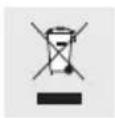
Electricalappliances must not be disposed of with domestic waste.
Disposal / Guarantee and service
In accordance with Council Directive 2002/96/EC on waste electrical and electronic equipment (WEEE), used electrical appliances, lighting equipment and batteries have to be collected separately and recycled in an environmentally friendly way. Enquire at your city council or local government regarding the possibilities of disposing of electronic waste in a correct and environmentally friendly way.
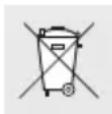
Environmentaldamage through incorrect disposal of the batteries!
Batteries should not be disposed of with domestic waste. They may contain toxic heavy metals and are subject to hazardous waste treatment rules and regulations. That is why you should dispose of used batteries at a local collection point.
● Guarantee and service
- Guarantee
This appliance comes with a 3-year guarantee commencing on the date of purchase. Please keep your receipt as proof of purchase. The appliance has been produced to the highest standards and thoroughly checked before dispatch. The guarantee only applies to faults in materials or workmanship when used properly. The guarantee lapses in cases of unauthorized tampering. This guarantee does not restrict your legal rights. If you wish to make a claim under the
guarantee, please telephone the service centre. Only by doing so can we ensure that your appliance is returned free of charge.
- Service address
BAT, Lindenstraße 35, 72074 Tübingen, Germany E-mail: exp@bat-tuebingen.com Service Tel.: +49 (0) 1805 - 720 741 (14 cents / min. from a German landline telephone; mobile phones will be charged at a max. rate of 42 cents / min.)
For further information, we recommend you visit the service section / FAQs of our home page www.dvw-service.com.
●Declaration of conformity
A manufacturer's Declaration of Conformity is included with the product.
Manufacturer
BAT Lindenstraße 35 72074 Tübingen Germany
