
PLS 48 B1 - Soldering iron PARKSIDE - Free user manual and instructions
Find the device manual for free PLS 48 B1 PARKSIDE in PDF.


| Product Type | Soldering Iron |
| Model | PLS 48 B1 |
| Brand | Parkside |
| Power Consumption | 48 W |
| Input Voltage | 230 V ~ 50 Hz |
| Temperature Range | 200-450 °C (adjustable) |
| Heating Time | Approx. 30 seconds |
| Tip Type | Interchangeable copper tip |
| Stand Included | Yes, with sponge |
| Dimensions (L x W x H) | Approx. 26 x 8 x 13 cm |
| Weight | Approx. 0.45 kg |
| Cable Length | Approx. 1.2 m |
| Safety Features | Heat-resistant handle, anti-slip grip, tip guard |
| Overheat Protection | Yes, auto shut-off after 30 min inactivity (estimated) |
| Compliance | CE, RoHS |
| Spare Parts Availability | Tips, heating element, stand (via Parkside service) |
| Cleaning | Use damp sponge, avoid abrasive cleaners |
| Storage | Keep in dry place, unplug after use |
Frequently Asked Questions - PLS 48 B1 PARKSIDE
User questions about PLS 48 B1 PARKSIDE
0 question about this device. Answer the ones you know or ask your own.
Ask a new question about this device
Download the instructions for your Soldering iron in PDF format for free! Find your manual PLS 48 B1 - PARKSIDE and take your electronic device back in hand. On this page are published all the documents necessary for the use of your device. PLS 48 B1 by PARKSIDE.
USER MANUAL PLS 48 B1 PARKSIDE
SOLDERING STATION PLS 48 B1
GB II
SOLDERINGSTATION
Operation and Safety Notes
SE
LÖDSTATION, INSTÄLLBAR
Before reading, unfold the page containing the illustrations and familiarise yourself with all functions of the device.
FI
GB / IE Operation and Safety Notes Page 5
| FI Käyttö- ja turvaohjeet Sivu 21 | |||
| SE Bruksanvisning och säkerhetsanvisningar Sidan 35 | |||
| DK Brugs- og sikkerhedsanvisninger Side 49 | |||
| FR / BE Instructions d’utilisation et consignes de sécurité Page 63 | |||
| NL/BE Bedienings- en veiligheidsinstructies | Pagina | 79 | |
| DE/AT/CH Bedienungs- und Sicherheitshinweise | Seite | 95 | |
natural_image
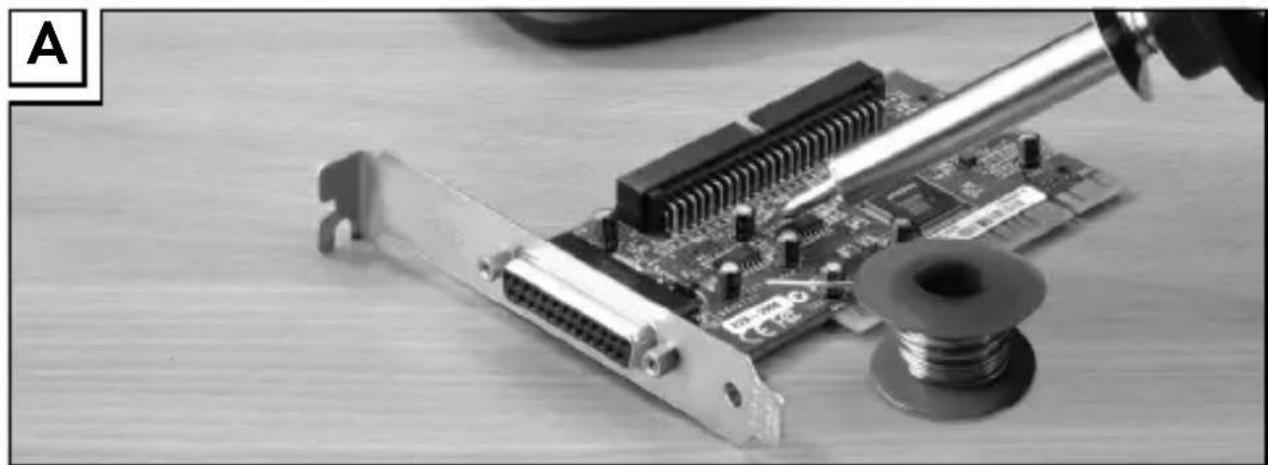
Close-up of a computer motherboard with a soldering iron and a spool, no visible text or symbols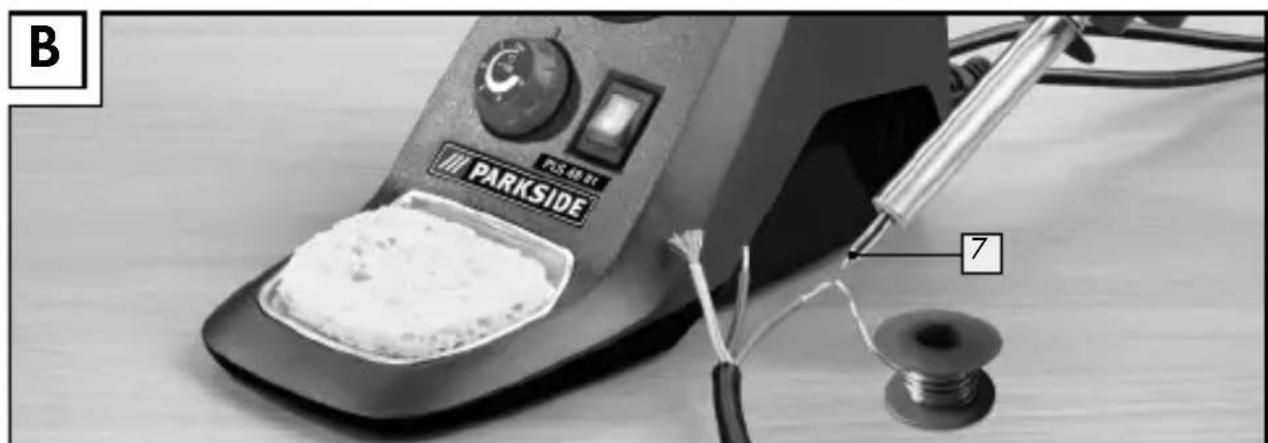
natural_image
Close-up of a parkside electric soldering machine with a cloth sample and a spool, no visible text or symbols on the device itself.Table of contents
Introduction
Proper use......Page 6
Features and equipment....Page 7
Included items ...... Page 7
Technical information......Page 7
Safety advice
-
Workplace safety......Page 8
-
Electrical safety......Page 8
-
Personal safety......Page 9
-
Careful handling and use of electrical power tools...... Page 11
Original accessories/attachments Page 11
Before first use
Inserting / replacing soldering tips...... Page 12
Using the product
Switching on / off and setting the temperature...... Page 12
Solder sponge....Page 14
Soldering Page 14
Maintenance and cleaning......Page 15
Service centre Page 15
Warranty Page 16
Disposal Page 17
Translation of the original declaration of conformity / Manufacturer......Page 18
Soldering station PLS 48 B1
- Introduction
We congratulate you on the purchase of your new device. You have chosen a high quality product. The instructions for use are part of the product. They contain important information concerning safety, use and disposal. Before using the product, please familiarise yourself with all of the safety information and instructions for use. Only use the unit as described and for the specified applications. If you pass the product on to anyone else, please ensure that you also pass on all the documentation with it.
- Proper use
The appliance is intended for electronic soldering for leisure and DIY purposes. It is suitable for applications such as soldering work, welding and gluing plastics and the application of decorations. Use the device only as described and for the indicated purposes. The device is not intended for commercial use. Any other use or modification to the device shall be considered as improper use and could give rise to considerable dangers. The manufacturer will not accept liability for loss or damage arising from improper use.
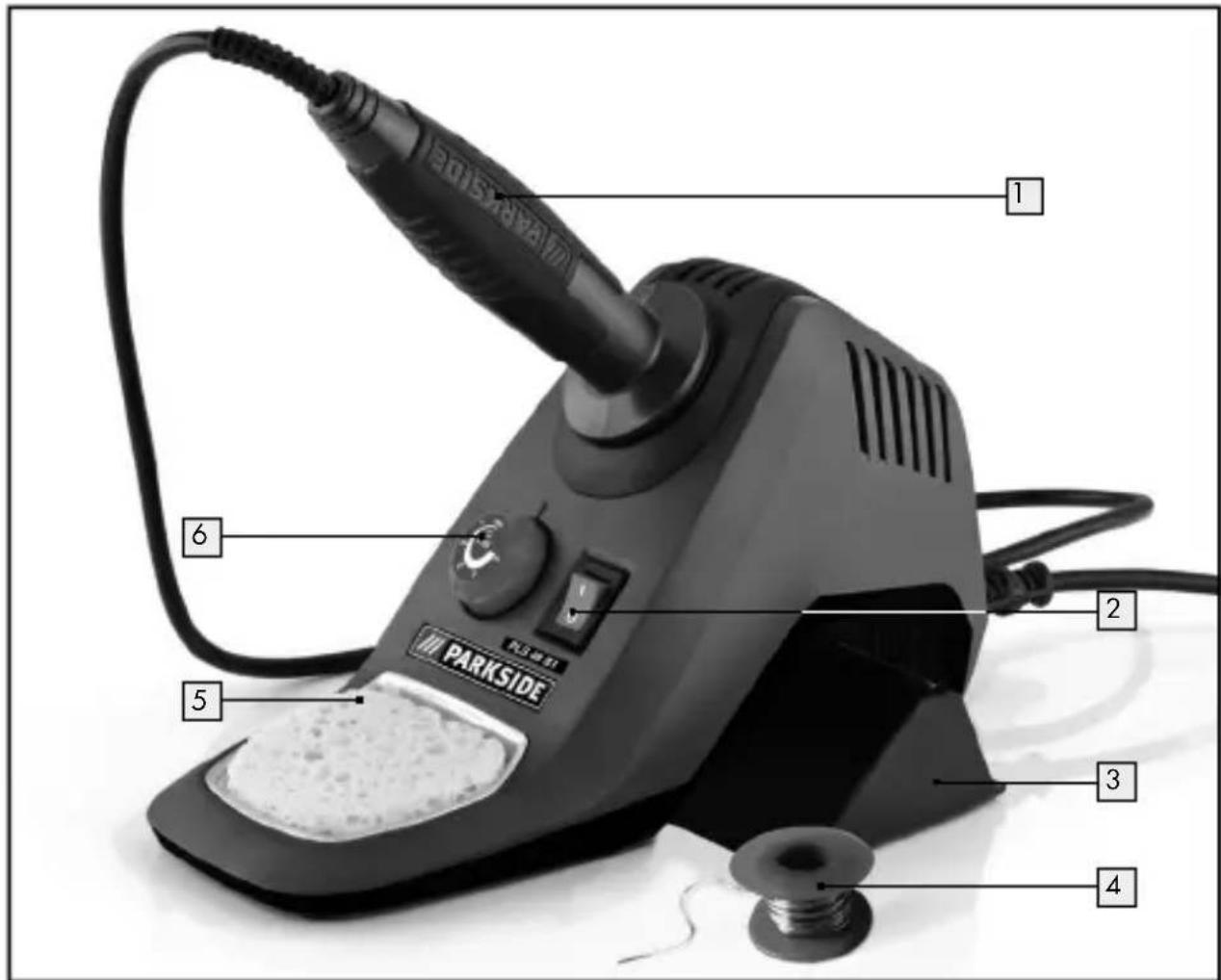
● Features and equipment
1 Soldering pencil
2 ON/OFF switch
3 Accessory compartment
4 Tin solder
5 Solder sponge
6 Temperature regulator
7 Soldering tip
- Included items
1 Soldering station with PLS 48 B1 soldering pencil includes 2 standard soldering tips (1 x mounted)
1 Tin solder, ∅ 1.0 mm, 10 g
1 Tin solder, ∅ 1.5 mm, 10 g
1 Solder sponge
1 Operating instructions
● Technical information
Electricity supply: 230V\~
Frequency: 50 Hz
Power consumption: 48 W
Temperature range: 100–500 °C
Mains lead: 1.85 m from the mains plug to the station
1.00 m from the soldering pencil to the station
●Safetyadvice

CAUTION! Failure to observe the instructions and advice given below may result in electric shock, fire and/or serious injury.
1. Workplace safety
a) Keep your working area clean and well lit. Untidy or poorly lit working areas can lead to accidents.
b) Do not work with the device in potentially explosive environments in which there are inflammable liquids, gases or dusts. Electrical power tools create sparks, which can ignite dusts or fumes.
c) Keep children and other people away while you are operating the electrical tool. Distractions can cause you to lose control of the device.
2. Electrical safety
To avoid danger to life from electric shock:
a) The mains plug on the device must match the mains socket. The plug must not be modified in any way. Do not use an adapter plug with devices fitted with a protective earth. Unmodified plugs and matching sockets reduce the risk of electric shock.
b) Keep the device away from rain or moisture. Water entering an electrical device increases the risk of electric shock.
c) Use a residual current device (RCD) for protection if operating the electrical power tool in a moist environment is unavoidable. The use of an RCD reduces the risk of electric shock.
d) Do not use the mains lead for any purpose for which it was not intended, e.g. to carry the device, to hang up the device or to pull the mains plug out of the mains socket. Keep the mains lead away from heat, oil, sharp edges or moving parts of the device. Damaged or tangled mains leads increase the risk of electric shock.
e) Do not operate the device if the mains lead or mains plug is damaged.
WARNING! A damaged mains lead presents a serious danger to life from electric shock.
f) Always keep the mains lead out of the operating area and run it away from the rear of the device.
g) Always pull out the mains plug if you are about to leave the device unattended or wish to carry out any tasks on the device.
3. Personal safety
a) This appliance can be used by children aged from 8 years and above and persons with reduced physical, sensory or mental capabilities or lack of experience and knowledge if they have been given supervision or instruction concerning use of the appliance in a safe way and understand the hazards involved. Children shall not play with the appliance. Cleaning and user maintenance shall not be made by children without supervision.
b) Remain alert at all times, watch what you are doing and always proceed with caution. Do not use the device if you are tired or under the influence of drugs,
alcohol or medication. One moment of carelessness when using the device can lead to serious injury.
■ DANGER OF BURNS! Never touch the hot soldering tip or the molten solder. You could suffer burn injuries. Always let the device cool before you replace components on the device, clean it or check its condition.
■ After use let the soldering pencil cool down in air only. Under no circumstances quench the tip in water!
■ CAUTION! DANGER OF FIRE! Place the soldering pencil down only in the special multifunctional holder or on a fire-resistant pad.
- Place the soldering pencil in the multifunctional holder during pauses in your work.
- Keep the device away from combustible material.
■ Never leave the device switched on and unattended.
CAUTION! DANGER OF INJURY! Keep your hands away from the hot workpiece. The heat from soldering can be conducted through the workpiece.
- Avoid placing the hot soldering tip in contact with the plastic parts of the multifunctional holder. Failure to observe this advice may result in damage to the device.
If a dangerous situation arises, pull the mains plug immediately out of the mains socket.
CAUTION! DANGER OF POISONING! Do not breathe air contaminated with soldering fumes.
- When working with the device for long periods do not allow the fumes from soldering to build up. They may be hazardous to health. Always provide adequate ventilation of your working area. In addition, it is recommended that you wear protective gloves, a face mask and a protective apron.
Do not eat, drink or smoke in rooms where soldering is carried out. Otherwise your hands may transfer any adhering traces of lead via food or cigarettes into your body.
■ Always wash your hands immediately after soldering.
- Do not dispose of soldering waste with the household rubbish.
Soldering waste must disposed of as special waste.
4. Careful handling and use of electrical power tools
a) When not in use always ensure that electrical power tools are kept out of reach of children. Do not let anyone use the device if he or she is not familiar with it or has not read the instructions and advice. Electrical power tools are dangerous when they are used by inexperienced people.
b) Look after the device carefully. Check for broken parts or parts that are damaged to the extent they detrimentally affect the functioning of the device. Have any damaged parts repaired before you use the device. Many accidents have their origins in poorly maintained electrical tools.
● Original accessories/attachments
■ Use only the accessories detailed in the operating instructions. The use of attachments or accessories other than those recommended here could lead to you suffering an injury.
● Before first use
- Inserting / replacing soldering tips
CAUTION! DANGER OF BURNS! Never allow the soldering pencil to heat up without a soldering tip.
■ Remove a soldering tip only when the device has been switched off and the soldering tip has cooled.
☐ Turn the soldering tip out to replace it.
You must 'tin', i.e. thinly coat with solder, the soldering tip 7 before using the soldering station for the first time and before using a new soldering tip.
To do this follow these steps:
☐ Insert the mains plug into a mains socket and press the ON / OFF switch 2 into position "I".
☐ Turn the thermostat 6 to 3 and wait until the device has heated up. Then let something solder until a thin cohesive film melts off the soldering tip.
● Using the product
- Switching on / off and setting the temperature
Switching on and setting the temperature:
☐ Insert the mains plug into a mains socket and press the ON / OFF switch 2 into position "1".
☐ Turn the temperature control 6 to set the temperature you wish to have.
Problems will occur during soldering if an unsuitable solder wire used. The right soldering temperature must be achieved to produce perfect soldering. If the temperature is too low the solder does not flow enough and causes contamination of the solder at the joint, a so-called “cold joint”. At too high a temperature, the flux (flowing aid) burns and the solder does not flow. The high temperatures may also damage the workpiece.
The temperature settings suitable for most soldering tasks are given below. The precise settings may vary, depending on the solder and the manufacturer.
Level min = room temperature
Setting 1 = approx. 100 ^ - warming up stage and for solder with a low melting point
Setting 2 = 200 °C melting point of most common soft solders
Setting 3 = 300 °C normal operating temperature, e.g. for using lead-free solder
Setting 4 = 400 °C high soldering temperature, e.g. for desoldering small soldered joints
Setting 5 = 500 °C maximum soldering temperature, e.g. for desoldering large soldered joints
Switching off:
Note: After use always replace the soldering pencil 1 into the holder.
☐ Press the ON / OFF switch 2 into setting "0".
If the device is not being used, pull the mains lead out of the mains socket.
Using the product
- Solder sponge
CAUTION! The hot soldering tip 7 must never be placed in contact with a dry solder sponge 5, otherwise the solder sponge may be damaged.
☐ The solder sponge 5 is used to clean soldering tips.
□ Moisten the solder sponge 5 before you use it.
- Soldering

If inhaled, vapours may cause headaches and fatigue as well as other symptoms.
- The soldering pencil has a rated output of 48 watts and is therefore ideal for electronics soldering (see Figs. A, B).
- The design of the soldering pencil makes it especially suitable for use where access is difficult or for fine soldering work.
□ Clean the soldering tip 7 on the moist solder sponge 5
After cleaning the tip 7 it must be "tinned" (coated with solder). This is done by melting solder on to the hot soldering tip 7
☐ Guide the soldering tip 7 to the intended joint site and heat the joint.
Place the solder (with flux) between the joint site and the tip to melt it.
☐ Continue to feed further solder until the whole joint has a covering of solder.
☐ Then quickly remove the soldering tip in order to avoid overheating the molten solder.
☐ Allow the solder to harden while not subjecting it to vibration or movement.
Note: The flux is either already contained in the solder or applied separately.
Ask the advice of the retailer when buying solder in order to choose the most suitable solder for your intended purpose.
Attachments and applications:
ATTENTION! Do not carry out any special changes or repairs to the electrics or other parts. Exceptions are permitted if the person carrying out such changes or repairs is qualified or trained to do so.
Try every application out on surplus material and see if you get the effect you wish to have. This means you will avoid damaging the item you wish to work on.
● Maintenance and cleaning
WARNING! RISK OF INJURY! Before you carry out any work on the device always pull the mains plug out of the mains socket and allow the device to cool.
□ Clean the device after you have finished using it.
☐ Use a cloth and a little mild detergent for cleaning the device.
☐ In no circumstances use sharp objects, or petrol, solvents or cleaning agents that might attack plastic.
☐ Do not allow any liquids to enter the inside of the device.
● Service centre
WARNING! Have your device repaired only by qualified specialist personnel using original manufacturer parts only. This will ensure that your device remains safe to use.
WARNING! If the plug or mains lead needs to be replaced, always have the replacement carried out
by the manufacturer or his service centre. This will ensure that your device remains safe to use.
Note: Spare parts not listed (e.g. carbon brushes, switches) can be ordered through our call centre.
- Warranty
The warranty for this appliance is for 3 years from the date of purchase. The appliance has been manufactured with care and meticulously examined before delivery. Please retain your receipt as proof of purchase. In the event of a warranty claim, please make contact by telephone with our Service Department. Only in this way can a post-free despatch for your goods be assured.
The warranty covers only claims for material and manufacturing defects, but not for transport damage, for wearing parts or for damage to fragile components, e.g. buttons or batteries. This product is for private use only and is not intended for commercial use.
The warranty is void in the case of abusive and improper handling, use of force and internal tampering not carried out by our authorized service branch. Your statutory rights are not restricted in any way by this warranty.
The warranty period will not be extended by repairs made unter warranty. This applies also to replaced and repaired parts. Any damage and defects extant on purchase must be reported immediately after unpacking the appliance, at the latest, two days after the purchase date.
Repairs made after the expiration of the warranty period are subject to payment.
GB
Service Great Britain
Tel.: 0871 5000 720
(0.10 GBP/Min.)
e-mail: kompernass@lidl.co.uk
IAN 102652
IE
Service Ireland
Tel: 1890 930 034
(0.08 EUR/Min. (peak)
0.06 EUR/Min. (off peak))
e-mail: kompernass@lidl.ie
IAN 102652
- Disposal

The packaging is wholly composed of environmentally-friendly materials that can be disposed of at a local recycling centre.
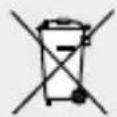
Do not dispose of electrical devices with the household rubbish!
In accordance with European Directive 2012 / 19 / EU (covering waste electrical and electronic equipment) and its transposition into national
Disposal / Translation of the original declaration ... / ...
legislation, worn out electrical devices must be collected separately and taken for environmentally compatible recycling.
Contact your local refuse disposal authority for more details of how to dispose of your worn-out devices.
● Translation of the original declaration of conformity / Manufacturer CC
We, KOMPERNASS HANDELS GMBH, the person responsible for documents: Mr Semi Uguzlu, BURG STRASSE 21, 44867 BOCHUM, GERMANY, hereby declare that this product complies with the following standards, normative documents and EU directives:
EU Low Voltage Directive (2006/95/EC)
Electromagnetic Compatibility (2004 / 108 / EC)
RoHS Directive (2011/65/EU)
Applicable harmonized standards
EN 60335-2-45/A2:2012
EN 60335-1:2012
EN 62233:2008
EN 55014-1/A2:2001
EN 55014-2/A2:2008
EN 61000-3-2/A2:2009
EN 61000-3-3:2013
Translation of the original declaration of conformity / ...
Type / Machine designation:
Soldering station PLS 48 B1
Date of manufacture (DOM): 07-2014
Serial number: IAN 102652
Bochum, 31.07.2014
Semi Uguzlu
- Quality Manager -
We reserve the right to make technical modifications in the course of further development.
Johdanto
Date of manufacture (DOM): 07-2014
Sarjanumero: IAN 102652
Date of manufacture (DOM): 07-2014
Fourniture......Page 65
Donnees techniques......Page 65
Elimination......Page 76
Directive CE Basse tension (2006/95/EC)
RoHS Directive (2011/65/EU)
Date of manufacture (DOM) : 07-2014
Semi Uguzlu
Soldeerstation PLS 48 B1
Inleiding
Soldeerstation PLS 48 B1
Date of manufacture (DOM): 07-2014
Serienummer: IAN 102652
Bochum, 31.07.2014
Semi Uguzlu
Semi Uguzlu
KOMPERNASS HANDELS GMBH
BURGSTRASSE21
44867BOCHUM
GERMANY
Last Information Update · Tietojen tila · Informationsstatus
Tilstand af information · Version des informations · Stand van de informatie · Stand der Informationen: 07/2014
Ident.-No.: PLS48B1072014-FI/SE/DK/BE/NL


- SOLDERING STATION PLS 48 B1
- SOLDERINGSTATION
- LÖDSTATION, INSTÄLLBAR
- FI
- Table of contents
- Introduction
- Safety advice
- Before first use
- Using the product
- Maintenance and cleaning......Page 15
- Translation of the original declaration of conformity / Manufacturer......Page 18
- - Introduction
- - Proper use
- ● Features and equipment
- - Included items
- ● Technical information
- ●Safetyadvice
- Workplace safety
- Electrical safety
- Personal safety
- Careful handling and use of electrical power tools
- ● Original accessories/attachments
- ● Before first use
- - Inserting / replacing soldering tips
- To do this follow these steps:
- ● Using the product
- - Switching on / off and setting the temperature
- Switching on and setting the temperature:
- Switching off:
- - Solder sponge
- - Soldering
- Attachments and applications:
- ● Maintenance and cleaning
- ● Service centre
- - Warranty
- GB
- IE
- - Disposal
- Disposal / Translation of the original declaration ... / ...
- ● Translation of the original declaration of conformity / Manufacturer CC
- Applicable harmonized standards
- Translation of the original declaration of conformity / ...
- Type / Machine designation:
- Date of manufacture (DOM): 07-2014
- Serial number: IAN 102652
- Johdanto
- Sarjanumero: IAN 102652
- Date of manufacture (DOM) : 07-2014
- Soldeerstation PLS 48 B1
- Inleiding
- Serienummer: IAN 102652
- KOMPERNASS HANDELS GMBH
Brand : PARKSIDE
Model : PLS 48 B1
Category : Soldering iron