
STV 45 B1 - Fan SILVERCREST - Free user manual and instructions
Find the device manual for free STV 45 B1 SILVERCREST in PDF.


| Product type | Tower fan |
| Brand | SilverCrest |
| Model | STV 45 B1 |
| Power supply | 220 – 240 V ~ 50 Hz |
| Power consumption | 45 W |
| Protection class | II |
| Remote control battery | CR2025 (3 V) |
| Maximum airflow rate | 28,6 m³/min |
| Standby power consumption | 0,1 W |
| Sound power level | 60 dB(A) |
| Maximum air velocity | 3,7 m/s |
| Service value | 0,7 (m³/min)/W |
| Number of speeds | 3 levels (low, medium, high) |
| Oscillation function | 90° (left-right pivot) |
| Timer | 1 to 7 hours (adjustable in 1-hour steps) |
| Special modes | Natural mode (variable airflow), Sleep mode (gradual reduction) |
| Controls | Touch panel + infrared remote control |
| Display | LED screen with operating icons |
| Cleaning | Damp cloth, vacuum cleaner for dust; do not immerse |
| Warranty | 3 years (France and Belgium) |
Frequently Asked Questions - STV 45 B1 SILVERCREST
User questions about STV 45 B1 SILVERCREST
0 question about this device. Answer the ones you know or ask your own.
Ask a new question about this device
Download the instructions for your Fan in PDF format for free! Find your manual STV 45 B1 - SILVERCREST and take your electronic device back in hand. On this page are published all the documents necessary for the use of your device. STV 45 B1 by SILVERCREST.
USER MANUAL STV 45 B1 SILVERCREST
natural_image
Black cylindrical electronic device with a flat top and side base (no visible text or symbols)TURMVENTILATOR STVD 45 A1 TOWER FAN STVD 45 A1 VENTILATEUR COLONNE STVD 45 A1
GB Operating instructions TOWER FAN
natural_image
Diagram of a mechanical component with directional arrows indicating movement or force (no text or symbols)natural_image
Technical line drawing of a mechanical component with a circular hole and a separate U-shaped housing (no text or symbols)262728
- Overview 17
- Intended purpose 18
- Safety information 18
- Items supplied 21
- Assembling the device 21
- Remote control 21
- Display overview 22
- Operation 23
8.1 Putting the device into operation and switching it off 23
8.2 Setting blower level.... 23
8.3 Swivel function (90° oscillation) 23
8.4 Setting the timer.... 24
8.5 Selecting nature mode 24
8.6 Selecting sleep mode.... 24
-
Cleaning 25
-
Storage 25
- Disposal 25
- Technical specifications 26
- Warranty of the HOYER Handel GmbH 27
1. Overview
1 Operating panel
2 Display
3 Holder for the remote control
4 Button for switching on/off nature or sleep mode
5 Button for switching device on / to standby mode
6 Button for switching blower level (3-speed)
7 Button for switching swivel function on/off
8 Button for timer function
9 Remote control
10 Button for switching device on / to standby mode
11 Button for switching swivel function on/off
12 Button for switching blower level (3-speed)
13 Button for timer function
14 Button for switching on/off nature or sleep mode
15 Battery compartment
16 Tower fan
17 Cable spool
18 Base
19 Mains power cable with mains plug
20 Back half of base
21 Front half of base
22 Guide for mains power cable
Thank you for your trust!
Congratulations on your new tower fan.
For safe handling of the device and in order to get to know the entire range of features:
- Read these user instructions thoroughly prior to initial use.
- Above all, observe the safety information!
- The device should only be used as described in this copy of the user instructions.
- Keep this copy of the user instructions for reference.
- If you pass the device on to someone else, please include this copy of the user instructions. The user instructions are a part of the product.
We hope you enjoy your new tower fan!
2. Intended purpose
The tower fan is suitable for circulating air in dry indoor spaces.
The device is designed for private, domestic use. The device must only be used indoors. This device must not be used for commercial purposes.
3. Safety information
Warnings
If necessary, the following warnings are used in this copy of the user instructions:

DANGER! High risk: failure to observe this warning may result in injury to life and limb.
WARNING! Moderate risk: failure to observe this warning may result in injury or serious material damage.
CAUTION: low risk: failure to observe this warning may result in minor injury or material damage.
NOTE: circumstances and specifics that must be observed when handling the device.
Instructions for safe operation
- This device can be used by children from the age of 8 and people with restricted physical, sensory or intellectual abilities or people without adequate experience and/or understanding, if they are supervised or instructed on how to use this device safely and if they are aware of the resulting dangers. Children must not play with the device. Cleaning and user maintenance must not be carried out by children without supervision.
- If the mains power cable of this device should become damaged, it must be replaced by the manufacturer, the manufacturer's customer service department or a similarly qualified specialist, in order to avoid any hazards.
- This device is not intended to be operated using an external timer or a separate remote control system.
- The remote control requires a CR2025 (3V) battery.
- Be sure to observe the correct polarity when inserting the battery.
- DANGER OF EXPLOSION Batteries must not be charged or re-activated by other means, nor must they be dismantled, thrown into a fire or short-circuited.
- The connection terminals of the remote control must not be short-circuited.
- Remove the batteries from the remote control if you do not intend to use the remote control for a prolonged period of time, or if the battery runs out of power. The battery might leak and damage the remote control.
- Do not subject batteries to extreme conditions, e.g. do not place the remote control on radiators or expose it to direct sunlight. Otherwise, there is an increased danger of batteries leaking.
- If battery acid has leaked, avoid contact with the skin, eyes and mucous membranes. In case of contact with the acid, rinse the affected area at once with plenty of clean water and seek medical assistance immediately.
- Batteries can be life-threatening if swallowed. Therefore you should store batteries out of the reach of young children. If a battery has been swallowed, medical assistance must be sought immediately.
- New and used batteries must be kept away from children.
- If you suspect that the batteries could have been swallowed or have gotten into any body cavities, immediately seek medical assistance.
- Batteries must be properly disposed of after use.

DANGER for children!
- Packing materials are not children's toys. Children should not be allowed to play with the plastic bags. There is a risk of suffocation.
- Keep the device out of the reach of children.

DANGER to and from pets and livestock!
Electrical devices can represent a danger to pets and livestock. In addition, animals can also cause damage to the device. For this reason you should keep animals away from electrical devices at all times.

DANGER! Risk of electric shock due to moisture!
- The device, the mains power cable and the mains plug must not be immersed in water or any other liquids.
- Protect the device from moisture, water drops and water splashes: failure to observe this instruction may result in an electrical shock hazard.
- If liquid gets into the device, disconnect the mains plug immediately. Have the device checked before reusing.
- Never touch the device with wet hands.
- If the device has fallen into water, pull out the mains plug immediately, and only then remove the device from the water. Do not use the device again, and have it checked by a specialist workshop.

DANGER! Risk of electric shock!
- Do not use the device if the device or the mains power cable has any visible damage, or if the device has previously been dropped.
- Only connect the mains plug to a properly installed and easily accessible wall socket whose voltage corresponds to the specifications on the rating plate. The wall socket must still be easily accessible after the device is plugged in.
- Ensure that the mains power cable cannot be damaged by sharp edges or hot points.
- When using the device, ensure that the mains power cable cannot be trapped or crushed.
- The device is not fully disconnected from the power supply, even after it is switched off. In order to fully disconnect it, pull out the mains plug.
- When removing the mains plug from the wall socket, always pull on the plug and never the cable.
- Pull the mains plug out of the wall socket, ...
... if there is a fault, ... when you are not using the device, ... before you clean the device and ... during thunderstorms.
- To avoid any hazard, do not make modifications to the product.
- During operation, completely unwind the mains power cable, to prevent overheating and the cable from melting.
- When using an extension cable, this must correspond to the applicable safety regulations.
WARNING! Risk of material damage!
- Never place the device on hot surfaces (e.g. hot plates) or near to heat sources or open fire.
- Only use the original accessories.
- Do not clean using sharp objects or abrasive cleaning agents.
4. Items supplied
1 tower fan 16
1 base (consisting of 2 parts) 18
1 remote control 9 with battery inserted
1 copy of the user instructions
Unpacking
- Remove all parts from the packaging.
- Check that all parts are present and intact.
5. Assembling the device
Before the device can be switched on, the base 18 must be assembled:
-
Figure A: put the back half of the base 20 and the front half of the base 21 together. Ensure that the connection audibly clicks into place.
-
Pull the mains power cable 19 through the opening in the middle of the base 18.
-
Figure B: align the guide pin on the underside of the tower fan 16 with the hole in the base 18. Press the base onto the tower fan. Ensure that the connection audibly clicks into place.
-
Figure C: clamp the mains power cable 19 into the guide for the mains power cable 22.
-
Select a location which complies with the safety information (see "Safety information" on page 18). Ensure that it is stable.
6. Remote control
The remote control 9 is supplied with a CR2025 (3V) battery inserted. Before switching on, remove the plastic strip from the remote control.
Changing the battery in the remote control

DANGER!
- There is a danger of explosion if the battery is not correctly replaced. Replace only with the same or an equivalent type.
natural_image
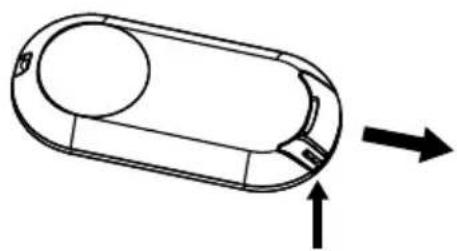
Diagram of a mechanical component with directional arrows indicating movement or force (no text or symbols)- Press the small lever on the side of the battery compartment 15 gently in the direction of the middle, and then pull the battery compartment out of the remote control 9 in the direction of the arrow.
natural_image
Technical line drawing of a mechanical component with a circular housing and a separate U-shaped bracket (no text or symbols)-
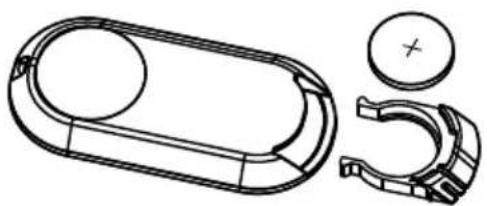
Replace the old battery with a new one. The positive pole (+) of the battery must be pointing upwards.
-
Slide the battery compartment 15 into the remote control 9.
7. Display overview
262728
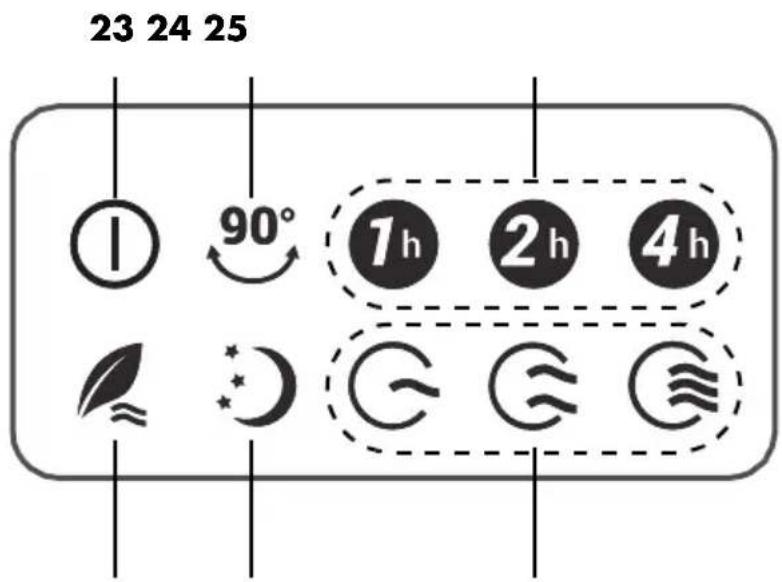
23 IsIdisplayed ...
... when the device is switched to standby mode, and ... when the device is switched on.
24 Swivel function is switched on.
25 1h 2h 4h One or more symbols may be displayed when the timer function is switched on.
26 G G G Blower level is displayed when the device is switched on.
G: low speed
G: medium speed
C: highest speed
27 Is displayed when sleep mode is activated.
28 Is displayed when nature mode is activated.
8. Operation
The device can be operated using the buttons on the operating panel 1 or using the remote control 9. The buttons and functions are identical. In the following, operation using the remote control is described.
8.1 Putting the device into operation and switching it off
- Insert the mains plug 19 into a mains socket corresponding to the technical data. All the symbols in the display 2 light up once. The symbol ① 23 indicates standby mode.
- Press the button ① 10 to switch the device on. An audio signal sounds. The device starts ...
... for a few seconds at the highest blower level and then switched to the blower level that was set before it was switched off, ... with the swivel function active, if this was switched on before the device was switched to standby mode.
NOTE: if the device is disconnected from the mains, the selected settings are lost.
-
Press the button ① 10 in order to switch the device to standby mode. An audio signal sounds. The symbol ① 23 indicates standby mode.
-
Pull out the mains plug 19 in order to switch the device off.
8.2 Setting blower level
The device has three blower levels. With the blower levels you can choose how quickly the device circulates the air in the room.
- When the device is switched on, repeatedly press the button ⚙ 12. The display 2 will show one of the following symbols:
- G: l o w s p
- : medium speed
- : highest speed
8.3 Swivel function (90° oscillation)
The device has a swivel function. It causes the device to swivel to and fro, thus distributing the escaping air more evenly in the room.
- Switch the swivel function on by pressing the button for the swivel function
^90^ 11. The display 2 will show the symbol 24 ^90^ . - Switch the swivel function off by pressing the button for the swivel function 90° 11 again.
8.4 Setting the timer
The device has a timer that allows you to set the device to run for between 1 and 7 hours. After this period is completed, the device switches to standby mode.
- When the device is switched on, repeatedly press the button Ⓤ 13. Each time you press it, one hour is added. The display 2 shows one or more of the following symbols:
- : 1'hour runtime
- : 2 ^h hours runtime
- : 4 hours runtime
A runtime of 3 hours is displayed as e.g. 7^th 2^th .
- After the set time is completed, the device switches to standby mode.
8.5 Selecting nature mode
An air flow that increases and decreases imitates natural wind. This mode can also be set using the timer.
- Select the desired blower level.
- Press the button 14 until the display 2 shows the symbol 28. The device now operates alternating at intervals between all blower levels. The higher the speed selected, the more intervals will operate at the higher air flow.
8.6 Selecting sleep mode
NOTE: in this mode, the device switches to the lowest blower level but not to standby mode. For switching off after a certain period, you can additionally use the timer (see "Setting the timer" on page 24).
Sleep mode reduces the air flow of the switched on device over time. This mode can also be set using the timer.
- Select the desired blower level.
- Press the button 14 until the display 2 shows the symbol 27. If any other blower level is set than the lowest speed, it is reduced by one speed setting after approx. each half hour.
9. Cleaning
In order to enjoy your device for a long time, you should regularly clean it.

DANGER! Risk of electric shock!
- Before cleaning, pull out the mains plug 19.
- Never immerse the device in water.
- Do not let water or cleaning agent run into the device.
WARNING! Risk of material damage!
- Do not clean using sharp objects or abrasive cleaning agents.
Remote control
- Clean the remote control 9 with a dry cloth.
Device
- Carefully remove coarse dust deposits with a vacuum cleaner.
- Clean the outside of the device with a damp cloth. You can also use a little detergent.
- Use a cloth dampened in clear water for wiping afterwards.
- Do not use the device until it is completely dry again.
10. Storage
- Place the remote control 9 into the holder 3. If not in use for an extended period, remove the battery.
- Pull out the mains plug 19 if not using the device for an extended period.
- Wind the mains power cable 19 around the cable spool 17.
11. Disposal
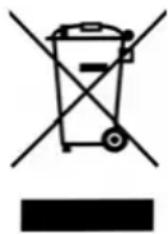
This product is subject to the provisions of European Directive 2012/19/EC. The symbol showing a wheelie bin crossed through indicates that the product requires separate refuse collection in the European Union. This applies to the product and all accessories marked with this symbol. Products identified with this symbol may not be discarded with normal household waste, but must be taken to a collection point for recycling electric and electronic appliances.
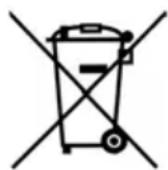
Batteries must not be discarded with your household waste. Spent batteries must be disposed of properly. Special containers are available for this purpose in shops selling batteries and at municipal collection points.
natural_image
Symbol of a trash bin crossed with a diagonal line and a black rectangle below (no text or labels)(Rechargeable) batteries marked with the following letters contain harmful substances such as: Cd (cadmium), Hg (mercury), Pb (lead).
This recycling symbol marks e.g. an object or parts of the material as valuable for recycling. Recycling helps to reduce the consumption of raw materials and protect the environment.

Packaging
When disposing of the packaging, make sure you comply with the environmental regulations applicable in your country.
12. Technical specifications
| Model: STVD 45 A1 | |
| Mains voltage: 220 - 240 V ~ 50 Hz | |
| Protection class: II | |
| Battery for the remote control: CR | 2025 (3V) |
| Power rating: 45 W | |
| Designation | Symbol | Value | Unit |
| Maximum volume flow | F 28.6 | m^3/min | |
| Fan power consumption | P 40.2 W | ||
| Service value | SV 0.7 | (m^3/min)/W | |
| Power consumption in standby mode | P_SB | 0.1 | W |
| Fan sound power level | I_WA | 60 dB(A) | |
| Maximum speed | c 3.7 m/s | ||
| Measurement standard for service value | IEC 60879:2019 | ||
Symbols used
 | Double insulation |
 | Geprüfte Sicherheit (certified safety). Devices must comply with the generally acknowledged rules of technology and the German Product Safety Act (Produkt-sicherheitsgesetz - ProdSG). |
 | With the CE marking, HOYER Handel GmbH declares the conformity with EU guidelines. |
 | This symbol reminds you to dispose of the packaging in an environmentally friendly manner. |
 | Recyclable materials: cardboard (except corrugated cardboard) |
| ~ | AC voltage |
 | It is a recyclable product which is subject to an extended producer responsibility and for which the rules of waste separation apply. |
Subject to technical modifications.
13. Warranty of the HOYER Handel GmbH
Dear Customer,
your device is provided with a 3 year warranty starting with the purchase date. In the event of product defects, you are entitled to statutory rights against the vendor. These statutory rights are not restricted by our warranty presented in the following.
Warranty conditions
The warranty period starts with the purchase date. Please keep the original purchase receipt in a safe place. This document is required to verify the purchase.
If within three years from the purchase date of this product a material or factory defect occurs, the product will be repaired or replaced by us – at our discretion – free of charge to you, or the purchase price will be refunded. This warranty implies that within the period of three years the defective device and the purchase receipt are presented, including a brief written description of the defect and the time it occurred.
If the defect is covered by our warranty, the repaired or a new product will be returned to you. No new warranty period starts with a repair or replacement of the product.
Warranty period and statutory claims for defects
The warranty period is not extended when the warranty has been claimed. This also applies to replaced and repaired parts. Any damages and defects already existing at the time of purchase must be reported immediately upon unpacking. Repairs arising after the expiration of the warranty period are subject to a charge.
Warranty coverage
The device was produced carefully according to strict quality guidelines and tested diligently prior to delivery. The warranty applies to material or factory defects.
Excluded from the warranty are wear parts subject to normal wear and damages to fragile parts, e.g. switches, batteries, lamps or other parts manufactured from glass.
This warranty expires if the product is damaged, not used as intended or not serviced. For the proper operation of the product, all instructions listed in the operating instructions must be observed carefully. Any form of use and handling that is advised against in the operating instructions or warned against must always be avoided.
The product is only intended for private and not for commercial use. In the case of incorrect and improper treatment, use of force and interventions not performed by our authorised Service Centre, the warranty shall cease.
Handling in case of a warranty claim
In order to ensure prompt processing of your matter, please observe the following notes:
- Please keep the article number
IAN: 361696_2007 and the purchase receipt as a purchase verification for all inquiries.
- The article number can be found on the rating plate, an engraving, the title page of your instructions (in the bottom left), or as a label on the rear or underside of the device.
- If faulty operation or other defects occur, first contact the Service Centre listed in the following by telephone or email.
- Then, you are able to send a product reported as defective free of charge to the service address specified to you, including the purchase receipt and the information on the defect and when it occurred.
At www.lidl-service.com you can download this and many other manuals, product videos and installation software.
This QR code takes you directly to the Lidl Service website (www.lidl-service.com), where you can enter the article number (IAN)
361696_2007 to open your user instructions.

Service Centre
GB Service Great Britain
Tel.: 0800 404 7657
E-Mail: hoyer@lidl.co.uk
IE Service Ireland
Tel.: 1890 930 034
(0,08 EUR/Min., (peak))
(0,06 EUR/Min., (off peak))
E-Mail: hoyer@lidl.ie
MT Service Malta
Tel.: 80062230
E-Mail: hoyer@lidl.com.mt
CY Service Cyprus
Tel.: 8009 4409
E-Mail: hoyer@lidl.com.cy
IAN: 361696_2007

Supplier
Please note that the following address is no service address. First contact the aforementioned Service Centre.
HOYER Handel GmbH
Tasköprüstraße 3
22761 Hamburg
GERMANY
Sommaire
natural_image
Simple line drawing of a rounded rectangular object with an arrow indicating direction (no text or symbols)natural_image
Technical line drawing of a mechanical component with a circular hole and a separate inset showing a plus symbol (no text or labels)natural_image
Simple line drawing of a rounded rectangular object with an arrow indicating direction (no text or symbols)natural_image
Technical line drawing of a mechanical component with a circular hole and a separate inset showing a plus symbol (no text or labels)natural_image
Diagram of a mechanical component with directional arrows indicating movement or force (no text or symbols)natural_image
Technical line drawing of a mechanical component with a circular top and a separate curved bracket (no text or symbols)natural_image
Simple line drawing of a rounded rectangular object with an arrow indicating direction (no text or symbols)natural_image
Technical line drawing of a mechanical component with a circular hole and a separate U-shaped bracket (no text or symbols)262728
23 Zobrazí se, ...
natural_image
Symbol of a trash bin with crossed lines indicating no waste or restriction, and a solid black rectangle below (no text or labels)natural_image
Diagram of a device casing with directional arrows indicating movement or force (no text or symbols)natural_image
Technical line drawing of a mechanical component with a circular hole and a separate curved bracket (no text or symbols)262728
23 Sd zobrazuje, ...
natural_image
Symbol of a trash bin crossed with a diagonal line and a horizontal bar below (no text or labels)natural_image
Simple line drawing of a mechanical component with directional arrows indicating movement (no text or symbols)natural_image
Technical line drawing of a mechanical component with a circular hole and a separate inset showing a plus symbol (no text or labels)262728
23 Se muestra...
natural_image
Diagram of a mechanical component with directional arrows indicating movement (no text or symbols)natural_image
Technical line drawing of a mechanical component with a circular housing and a separate U-shaped bracket (no text or symbols)262728
23 Vises, ...
natural_image
Symbol of a trash bin crossed with a diagonal line and a black rectangle below (no text or labels)- TURMVENTILATOR STVD 45 A1 TOWER FAN STVD 45 A1 VENTILATEUR COLONNE STVD 45 A1
- Overview
- Thank you for your trust!
- Intended purpose
- Safety information
- Warnings
- Instructions for safe operation
- DANGER for children!
- DANGER to and from pets and livestock!
- DANGER! Risk of electric shock due to moisture!
- DANGER! Risk of electric shock!
- WARNING! Risk of material damage!
- Items supplied
- Unpacking
- Assembling the device
- Remote control
- Changing the battery in the remote control
- DANGER!
- Display overview
- Operation
- Putting the device into operation and switching it off
- Setting blower level
- Swivel function (90° oscillation)
- Setting the timer
- Selecting nature mode
- Selecting sleep mode
- Cleaning
- Remote control
- Device
- Storage
- Disposal
- Packaging
- Technical specifications
- Warranty of the HOYER Handel GmbH
- Warranty conditions
- Warranty period and statutory claims for defects
- Warranty coverage
- Excluded from the warranty are wear parts subject to normal wear and damages to fragile parts, e.g. switches, batteries, lamps or other parts manufactured from glass.
- Handling in case of a warranty claim
- Service Centre
- Supplier
- Sommaire
- * C = = = =
Brand : SILVERCREST
Model : STV 45 B1
Category : Fan