
Palma 30.3067.10 - Environmental Thermometer TFA - Free user manual and instructions
Find the device manual for free Palma 30.3067.10 TFA in PDF.


| Product type | Radio-controlled pool thermometer |
| Brand | TFA |
| Model | Palma 30.3067.10 |
| Base station dimensions | 70 x 23 (56) x 98 mm |
| Base station weight | 65 g (device only) |
| Pool transmitter dimensions | 81 x 81 x 151 mm |
| Pool transmitter weight | 146 g (device only) |
| Base station power supply | 2 AAA 1.5 V batteries (not included, use alkaline batteries) |
| Pool transmitter power supply | 2 AAA 1.5 V batteries (not included, use alkaline batteries) |
| Indoor measurement range | -10 °C to +60 °C (14 °F to 140 °F) |
| Water measurement range (transmitter) | -20 °C to +60 °C (-4 °F to 140 °F) |
| Resolution | 0.1 °C |
| Accuracy | ±1 °C (from 0 to 50 °C), ±2 °C beyond |
| Radio frequency | 433 MHz |
| Range | Approximately 60 meters (open field) |
| Measurement depth | 120 mm |
| Main functions | Ambient temperature, wireless water temperature, max/min values, up to 3 transmitters, channel selection, °C/°F display |
| Maintenance and cleaning | Soft damp cloth; do not use solvents or abrasive agents |
| Safety | Keep batteries out of reach of children; do not short-circuit, dismantle, or recharge batteries; mount the transmitter carefully to prevent water ingress |
| Spare parts and repairability | Additional transmitters available (ref. 30.3240.10 for pool, ref. 30.3215.02 for outdoor); do not repair yourself; contact the seller |
| General information | CE certified and compliant with WEEE directive; manual downloadable on TFA website |
Frequently Asked Questions - Palma 30.3067.10 TFA
User questions about Palma 30.3067.10 TFA
0 question about this device. Answer the ones you know or ask your own.
Ask a new question about this device
Download the instructions for your Environmental Thermometer in PDF format for free! Find your manual Palma 30.3067.10 - TFA and take your electronic device back in hand. On this page are published all the documents necessary for the use of your device. Palma 30.3067.10 by TFA.
USER MANUAL Palma 30.3067.10 TFA
natural_image
Technical diagram of a circular mechanical component with internal components and a separate right-side schematic element (no text or labels)PALMA – Wireless pool thermometer

Thank you for choosing this instrument from TFA.
1. Before you use this product
- Please make sure you read the instruction manual carefully.
This information will help you to familiarize yourself with your new device, to learn all of its functions and parts, to find out important details about its first use and how to operate it and to get advice in the event of a malfunction. - Following and respecting the instructions in your manual will prevent damage to your instrument and loss of your statutory rights arising from defects due to incorrect use.
- We shall not be liable for any damage occurring as a result of non following of these instructions. Likewise, we take no responsibility for any incorrect readings or for any consequences resulting from them.
- Please take particular note of the safety advice!
- Please keep this instruction manual safe for future reference.
2. Delivery contents
- Wireless pool thermometer (base station)
• Pool sensor (30.3240.10) - Instruction manual
3. Range of application and all the benefits of your new instrument at a glance
- For pool and pond
• Water temperature wireless (433 MHz), distance range of up to 60 m (open field) - Pool sensor with 120 mm measuring depth
- Indoor temperature
• Maximum and minimum values - Expandable up to 3 sensors
4. For your safety
- This product is exclusively intended for the range of application described above. It should only be used as described within these instructions.
- Unauthorized repairs, alterations or changes to the product are prohibited.
PALMA – Wireless pool thermometer


Caution! Risk of injury:
- Keep these devices and the batteries out of reach of children.
- Batteries contain harmful acids and may be hazardous if swallowed. If a battery is swallowed, this can lead to serious internal burns and death within two hours. If you suspect a battery could have been swallowed or otherwise caught in the body, seek medical help immediately.
- Batteries must not be thrown into a fire, short-circuited, taken apart or recharged. Risk of explosion!
- Low batteries should be changed as soon as possible to prevent damage caused by leaking. Never use a combination of old and new batteries together, nor batteries of different types.
- Wear chemical-resistant protective gloves and safety glasses when handling leaking batteries.

Important information on product safety!
- Do not expose the devices to extreme temperatures, vibrations or shocks.
- Attention: assemble the pool sensor carefully according to the instructions, so that no water can penetrate the device.
- Protect the base station from moisture.
5. Elements
5.1 Base station (Receiver)
A: Display (Fig. 1):
A 1: Indoor temperature
A 2: Battery symbol for the base station
A 3: Actual water temperature
A 4: Reception symbol for the pool sensor
A 5: Channel number
A 6: Maximum/minimum water temperature
A 7: Battery symbol for pool sensor
A 8: Maximum/minimum indoor temperature
PALMA – Wireless pool thermometer

B: Buttons (Fig. 1):
B 1: °C/°F button B 2: CLEAR button
B 3: CH button B 4: MAX/MIN button
C: Housing (Fig. 2):
C 1: Wall mounting hole C 2: Battery compartment
C 3: Stand (fold out)
5.2 Pool sensor (Fig. 3):
D 1: Display D 2: Lid
D 3: Body D 4: Fastening rope
5.2.1 Pool sensor (Fig. 4):
D 5: Screw cover
D 6: Transparent lid
D 7: Silicone sealing ring
D 8: LCD display
D 9: Battery container
D 10: Body
D 11: Temperature sensor
D 12: °C/°F switch
D 13: CH switch for channel selection
- Getting started
6.1 Insert the batteries
- Place the instruments on a table at a distance of about 1.5 meters from each other. Avoid being close to possible sources of interference such as electronic devices and radio equipment.
6.2 Installation of the base station
- Remove the protective film from the display.
- Open the battery compartment and insert two new AAA 1.5 V batteries, polarity as illustrated.
- All segments will be displayed briefly.
PALMA – Wireless pool thermometer

- On the upper display of the base station appears the indoor temperature.
- On the lower display appears “- - , - °C”.
- The reception symbol for the pool sensor flashes. The base station will scan for 3 minutes the outdoor values. You can install the pool sensor during this time.
- Close the battery compartment again.
6.3 Installation of the pool sensor
- Open the cover in the direction of the arrow and remove the display element.
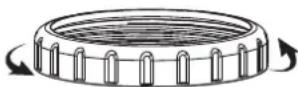
- Carefully pull the battery container out of the body and insert 2 × AAA 1.5 volt batteries with the correct polarity.
- Push the battery container back into the housing. Insert the double-sided aids into the slots.

natural_image
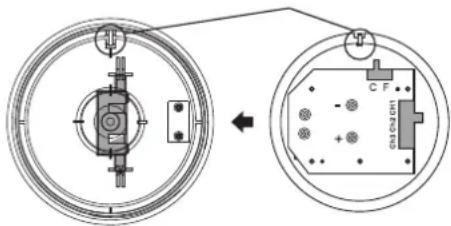
Technical diagram of a circular mechanical component with internal components and a separate rectangular block (no text or symbols)- The °C/°F switch and the CH switch for channel selection are located on the circuit board on the back of the display.
- Use the °C/°F switch to change between °C (Celsius) or °F (Fahrenheit) as temperature unit (default °C).
- The switch for channel selection is at position 1 (default).
PALMA – Wireless pool thermometer

- Attach the display element by inserting the retaining lug into the slot provided.
- Close the cover carefully.
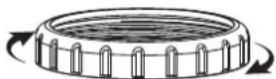
- Pay attention to the sealing ring.
- On the display of the pool sensor appear the channel number 1 and the temperature.
- Immediately after assembling the pool sensor, the display may occasionally show -50 °C or an error message. Wait a few minutes for the transmitter to adjust.
6.4 Outdoor values reception
- After the batteries are inserted, the measuring values of the pool sensor will be transmitted to the base station. If the reception of the outdoor values fails, “- - ,- °C” appears on the lower display of the base station. Check the batteries and try it again. Check if there is any source of interference.
- You can also start the outdoor transmitter search manually later on (for example when the outdoor transmitter is lost or the batteries are changed).
- Hold the CH button on the base station for three seconds. “- - , - °C” appears on the lower display. The reception symbol for the pool sensor flashes. The base station will scan the outdoor values.
PALMA – Wireless pool thermometer

7. Maximum/Minimum function
- Press the MAX/MIN button.
• MAX appears on the display. - You can now get the highest value for the indoor and pool temperature.
- Press the MAX/MIN button again.
• MIN appears on the display. - You can now get the lowest value for the indoor and pool temperature. Press the MAX/MIN button again to return to normal mode.
- Press the CLEAR button during the highest or lowest values are displayed. The values will be deleted and reset to the current state.
8. °C/°F display change
- Press the °C/°F button in normal mode on the base station to change between °C (Celsius) or °F (Fahrenheit) as temperature units.
9. Positioning and fixing of the base station and the pool sensor
- The base station can be placed onto any flat surface with the foldable leg or wall mounted at a chosen location with the mounting hole, both found at the back of the unit. Make sure to avoid the vicinity of any source of interference such as computer screens, TV sets or solid metal objects.
- The pool sensor floats on the water surface and measures the temperature in a water depth of about 120 mm. You can fix the pool sensor by the added fastening rope.
- Once the desired location is chosen, check whether the transmission from the pool sensor to the base station is possible (transmission range of up to 60m in open areas). Within solid walls, especially ones with metal parts, the transmission range can be reduced considerably.
- If necessary choose another position for the base station.
9.1 Additional transmitters, optional available
- For having more than one external transmitter, select different channels for each sensor with the switch (1-3) during set-up. The new transmitter will be received automatically by the base station.
PALMA – Wireless pool thermometer

- You can also start the search for the transmitter manually. Choose with the CH button on the base station the corresponding channel and press und hold the CH button for three seconds. “- - ,- °C” appears on the lower display. The reception symbol for the transmitter flashes.
- Press the CH button on the base station to display sequentially the outdoor values for the desired transmitters. Press the CH button again after the last registered channel and a circle symbol will appear. On the lower display the values of the installed transmitters are displayed in sequence. To deactivate the function press the CH button again.
- With the MAX/MIN button you can recall the highest and lowest temperature values for all installed transmitters.
10. Care and maintenance
- Clean the devices with a soft damp cloth. Do not use solvents or scouring agents.
- Remove the batteries if you do not use the devices for a long period of time.
10.1 Battery replacement
- Change the base station batteries, when the battery symbol appears on the display of the indoor temperature.
- Change the batteries of the pool sensor, when the battery symbol appears on the lower display next to the pool temperature.
- Please note: When the batteries are changed, the contact between the transmitter and the base station must be restored – so always insert new batteries into both devices or start the manual search for the transmitter.
11. Troubleshooting
Problem Solution
No indication on Ensure the batteries' polarities are the base station/ correct
pool sensor Change the batteries
PALMA – Wireless pool thermometer

No reception → No pool sensor installed of the pool sensor → Check the batteries of pool sensor Display “---” (do not use rechargeable batteries!)
→ Restart the pool sensor and the base station according to the manual
→ Start the manual search for the pool sensor: Press and hold the CH button on the base station
→ Choose another place for the base station
→ Reduce the distance between the pool sensor and the base station
→ Check if there is any source of interference
Incorrect display → Change the batteries on the base station
Incorrect display → Wait a few minutes on pool sensor immediately after assembly
Indication: LL.L / HH.H → Outside measuring range
If your device fails to work despite these measures, contact the retailer where you purchased the product.
12. Waste disposal
This product has been manufactured using high-grade materials and components which can be recycled and reused.

Never dispose of empty batteries and rechargeable batteries with ordinary household waste.
As a consumer, you are required by law to take them to your retail store or to an appropriate collection site depending on national or local regulations in order to protect the environment.
The symbols for the contained heavy metals are:
Cd=cadmium, Hg=mercury, Pb=lead
PALMA – Wireless pool thermometer


This product is labelled in accordance with the EU Waste Electrical and Electronic Equipment Directive (WEEE).
Please do not dispose of this product in ordinary household waste. As a consumer, you are required to take end-of-life devices to a designated collection point for the disposal of electrical and electronic equipment, in order to ensure environmentally-compatible disposal.
13. Specifications
Base station
Measuring range indoor
Temperature -10°C...+60°C (14°F...140°F)
Resolution 0.1°C
Accuracy ±1 °C @ 0... 50 °C, otherwise ±2°C
Power consumption 2 x 1,5 V AAA batteries (not included) Use alkaline batteries
Dimensions 70 x 23 (56) x 98 mm
Weight 65 g (device only)
Pool sensor
Temperature -20°C...+60°C (-4°F...140°F)
Resolution 0.1°C
Accuracy ±1 °C @ 0... 50 °C, otherwise ±2°C
Measuring depth 120 mm
Range max. 60 m (open field)
Transmission frequency 433 MHz
Maximum
radio-frequency power < 10mW
Power consumption 2 x 1,5 V AAA batteries (not included) Use alkaline batteries
PALMA – Wireless pool thermometer

Dimensions 81 x 81 x 151 mm
Weight 146 g (device only)
Additional transmitters Cat.Nr.: 30.3240.10
(pool temperature).
Cat.Nr.: 30.3215.02
(outdoor temperature)
No part of this manual may be reproduced without written consent of TFA Dostmann. The technical data are correct at the time of going to print and may change without prior notice.
The latest technical data and information about this product can be found in our homepage by simply entering the product number in the search box.
EU Declaration of conformity
Hereby, TFA Dostmann declares that the radio equipment type 30.3067 is in compliance with Directive 2014/53/EU. The full text of the EU declaration of conformity is available at the following Internet address: www.tfa-dostmann.de/service/downloads/ce
www.tfa-dostmann.de
natural_image
Technical diagram of a circular mechanical component with internal features and a separate rectangular block (no text or symbols)natural_image
Technical diagram of a circular mechanical component with internal components and a separate rectangular component (no text or symbols)natural_image
Technical diagram showing a circular component with internal components and an open inset view of a mechanical or electronic component (no text or symbols)natural_image
Technical diagram of a circular mechanical component with internal components and a separate rectangular block (no text or symbols)natural_image
Technical diagram of a circular mechanical component with internal components and a separate right-side schematic element (no text or labels)
- PALMA – Wireless pool thermometer
- Before you use this product
- Delivery contents
- Range of application and all the benefits of your new instrument at a glance
- For your safety
- Caution! Risk of injury:
- Important information on product safety!
- Elements
- Base station (Receiver)
- A: Display (Fig. 1):
- Outdoor values reception
- Maximum/Minimum function
- °C/°F display change
- Positioning and fixing of the base station and the pool sensor
- Additional transmitters, optional available
- Care and maintenance
- Battery replacement
- Troubleshooting
- Problem Solution
- Waste disposal
- Specifications
- Base station
- Pool sensor
- EU Declaration of conformity
- www.tfa-dostmann.de
Brand : TFA
Model : Palma 30.3067.10
Category : Environmental Thermometer