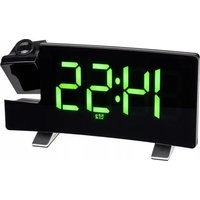
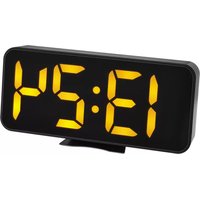
60.5015 V2 - Alarm Clock TFA - Free user manual and instructions
Find the device manual for free 60.5015 V2 TFA in PDF.


Pick your language and provide your email: we'll send you a specifically translated version.
| Product type | Alarm clock radio |
| Brand | TFA |
| Model | 60.5015 V2 |
| Dimensions (L x H x D) | 150 x 80 x 80 mm |
| Weight | 300 g |
| Main power | 230 V ~ 50 Hz |
| Backup power | 2 AAA batteries (not included) |
| Radio function | FM stereo |
| Display | LED display |
| Time setting | Automatic RDS or manual |
| Alarm | Radio or buzzer with snooze function |
| Alarm graduation | Progressive |
| Sleep timer | Sleep timer |
| Backlight | Yes, adjustable |
| Auxiliary input | 3.5 mm jack socket |
| Maintenance and cleaning | Soft dry cloth, do not use abrasive products |
| Safety | Do not expose to water or moisture |
| Operating temperature | 0 °C to 40 °C |
| Package contents | Alarm clock radio, power adapter, user manual |
Frequently Asked Questions - 60.5015 V2 TFA
How to set the time on the TFA 60.5015 V2?
Press and hold the SET button for 2 seconds, use ▼ / ▲ to adjust the hours, press SET again for minutes, then confirm.
How to set the alarm?
Press the ALARM button once, set the hour with ▼ / ▲, press ALARM for minutes, then activate the alarm by pressing ALARM ON/OFF.
How to use the snooze function?
When the alarm sounds, press SNOOZE to repeat the alarm after 9 minutes. You can also press any key to stop the alarm.
How to tune a radio station?
Press MODE to select radio. Use ▼ / ▲ for automatic search or press and hold for manual search. Stations can be stored automatically.
How to memorize a radio station?
Tune to the desired station, press MEM (or PRESET) and choose a location from 1 to 10 with ▼ / ▲. Confirm by pressing MEM.
The alarm clock radio does not turn on, what to do?
Check that the power adapter is plugged in correctly. If using batteries, replace them. If the problem persists, consult the manual.
How to turn off the radio or alarm?
To turn off the radio, press MODE until the time is displayed. To disable the alarm, press ALARM ON/OFF until the alarm icon disappears.
How to adjust the display brightness?
Press the DIMMER (or LIGHT) button to cycle through brightness levels: high, medium, low.
Can I connect an external device?
Yes, use the AUX IN (3.5 mm jack) to connect an MP3 player or smartphone. Select AUX mode with the MODE button.
How to clean the device?
Unplug the device. Use a soft dry cloth to clean the surface. Do not use liquid or abrasive products. Avoid moisture.
User questions about 60.5015 V2 TFA
0 question about this device. Answer the ones you know or ask your own.
Ask a new question about this device
No questions yet. Be the first to ask one.
Download the instructions for your Alarm Clock in PDF format for free! Find your manual 60.5015 V2 - TFA and take your electronic device back in hand. On this page are published all the documents necessary for the use of your device. 60.5015 V2 by TFA.
USER MANUAL 60.5015 V2 TFA

Manual assistant
Powered by Anthropic
Waiting for your message
Product information
Brand : TFA
Model : 60.5015 V2
Category : Alarm Clock