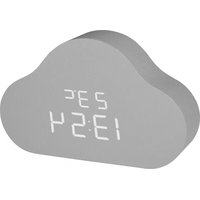
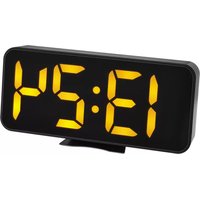
Clocco Cloud 60.2040.15 - Alarm Clock TFA - Free user manual and instructions
Find the device manual for free Clocco Cloud 60.2040.15 TFA in PDF.


Pick your language and provide your email: we'll send you a specifically translated version.
| Product type | Clock radio |
| Brand | TFA |
| Model | Clocco Cloud 60.2040.15 |
| Dimensions (W x H x D) | 20 x 10 x 12 cm |
| Weight | 300 g |
| Main power supply | Mains 230 V AC, 50 Hz |
| Backup power supply | CR2032 button cell battery (included) |
| Display | Backlit LED, adjustable |
| Radio bands | FM (87.5-108 MHz) and AM (520-1710 kHz) |
| Radio presets | 20 stations |
| Alarm function | Dual alarm with snooze |
| Alarm source | Radio or beep |
| Gradual alarm | Yes, increasing volume |
| Built-in speaker | 5 W |
| Headphone jack | Yes, 3.5 mm jack |
| Brightness adjustment | Yes, multiple levels |
| Night light function | Yes, timer 30/60/90 min |
| Ambient temperature | Displayed (indoor) |
| Maintenance | Soft, dry cloth, do not use chemical products |
| Protection rating | IP20 (indoor use only) |
| Safety information | Do not open, do not expose to moisture or heat sources |
| Warranty | 2 years |
| Certifications | CE, RoHS |
| Included accessories | Mains adapter, CR2032 battery, user manual |
Frequently Asked Questions - Clocco Cloud 60.2040.15 TFA
How to set the alarm on the TFA Clocco Cloud 60.2040.15?
To set the alarm, press the Alarm button until the digits flash. Use the + and - buttons to adjust the hour. Repeat for minutes. Press Alarm again to confirm. You can choose the source (radio or beep) by pressing Alarm Source.
How to enable or disable the snooze function?
When the alarm sounds, press the Snooze button (usually on top) to repeat the alarm after 9 minutes. To completely deactivate the alarm, press the Alarm On/Off button or hold Alarm down.
How to set the time manually?
Press and hold the Time Set button until the time flashes. Use the + and - keys to set the hour, then minutes. Press Time Set again to confirm. The time sets automatically via DCF signal if available.
How to search for radio stations?
Press Radio to turn on the radio. Use the Scan button to start an automatic station search. Press + or - for manual search. To memorize a station, hold one of the preset buttons (1-5) down.
How to adjust the display brightness?
Press the Dim or Light button repeatedly to cycle through brightness levels (high, medium, low, off). Some models allow a night light timer.
What to do if the time flashes after a power outage?
Flashing time indicates that the backup battery is discharged or missing. Replace the CR2032 button cell battery at the back of the device and set the time again manually.
How to clean the clock radio?
Unplug the device before cleaning. Use a soft, dry or slightly damp cloth. Never use solvents or abrasive products to avoid damaging the surface.
Can I use the clock radio without a battery?
Yes, the device operates on mains power. The battery is only needed to retain the time and settings in case of power outage. Without battery, you will have to reprogram everything after a power failure.
How to use the night light function?
Press the Sleep button to activate the night light. Each press increases the duration (30, 60, 90 minutes) or turns it off. The radio or display will turn off after the selected time.
What to do if the radio picks up no stations?
Check that the antenna (often a built-in wire) is fully extended and oriented for better reception. Keep the device away from interference sources such as TVs or smartphones. Try a manual search on a known frequency.
User questions about Clocco Cloud 60.2040.15 TFA
0 question about this device. Answer the ones you know or ask your own.
Ask a new question about this device
No questions yet. Be the first to ask one.
Download the instructions for your Alarm Clock in PDF format for free! Find your manual Clocco Cloud 60.2040.15 - TFA and take your electronic device back in hand. On this page are published all the documents necessary for the use of your device. Clocco Cloud 60.2040.15 by TFA.
USER MANUAL Clocco Cloud 60.2040.15 TFA

Manual assistant
Powered by Anthropic
Waiting for your message
Product information
Brand : TFA
Model : Clocco Cloud 60.2040.15
Category : Alarm Clock