30.5041 - Measuring equipment TFA - Free user manual and instructions
Find the device manual for free 30.5041 TFA in PDF.


Pick your language and provide your email: we'll send you a specifically translated version.
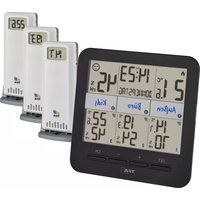
| Product type | Wireless weather station with outdoor sensor |
| Dimensions (indoor station) | 108 x 108 x 22 mm |
| Weight (indoor station) | 150 g |
| Indoor station power supply | 2 AA batteries (1.5 V) |
| Outdoor sensor power supply | 2 AAA batteries (1.5 V) |
| Main functions | Indoor and outdoor temperature, humidity, DCF radio-controlled reception, alarm, weather trend, moon phase |
| Transmission range | Up to 100 m in open field |
| Transmission frequency | 868 MHz |
| Display | Backlit LCD |
| Maintenance and cleaning | Clean with a soft, dry cloth. Do not use solvents or abrasive cleaners. |
| Safety | Use only recommended type of batteries. Observe polarity. Do not expose to moisture or direct heat sources. |
| Spare parts and repairability | Replaceable outdoor sensor. Standard batteries available commercially. |
| General information | Manual available in several languages. 2-year warranty. |
Frequently Asked Questions - 30.5041 TFA
How to install the outdoor sensor?
Place the outdoor sensor sheltered from the weather, at a maximum distance of 100 m from the indoor station. Use the included wall mount or attach it with double-sided adhesive tape.
What to do if the station does not display outdoor temperature?
Check that the outdoor sensor batteries are correctly inserted and not depleted. Ensure the sensor is within range (less than 100 m) and that no metal obstacle interferes. You can force a new search by pressing the TX button on the station.
How to set the time manually?
The time sets automatically via DCF reception. If reception is poor, you can set it manually by holding down the SET button for 3 seconds, then using the ▲ and ▼ buttons to adjust the values.
What do the weather trend icons mean?
The icons indicate the trend: sunny (stable), cloudy (variable) or rainy (declining). They are based on atmospheric pressure variations measured by the station.
How to activate the backlight?
Press the LIGHT button on the back of the station to turn on the backlight for a few seconds. On some models, the backlight can be permanent if the station is plugged into a power outlet (adapter optional).
What batteries to use for the indoor station?
Use two alkaline AA batteries (1.5 V). Do not use rechargeable batteries, as their voltage is lower (1.2 V) and could impair operation.
How to interpret the moon phase symbol?
The station displays the current moon phase as an icon: new moon, waxing crescent, first quarter, etc. This calculation is based on the built-in date.
What to do if the display is blurry or partial?
Check that the batteries are in good condition and properly inserted. If the problem persists, remove the batteries for 10 seconds to reset the station, then reinsert them.
Can I connect multiple outdoor sensors?
This model only supports one outdoor sensor. To add additional sensors, you need a multi-point compatible station.
How to clean the station?
Use a soft, slightly damp cloth. Never use chemical products or solvents. Wipe immediately to avoid water marks.
User questions about 30.5041 TFA
0 question about this device. Answer the ones you know or ask your own.
Ask a new question about this device
No questions yet. Be the first to ask one.
Download the instructions for your Measuring equipment in PDF format for free! Find your manual 30.5041 - TFA and take your electronic device back in hand. On this page are published all the documents necessary for the use of your device. 30.5041 by TFA.
USER MANUAL 30.5041 TFA
Manual assistant
Powered by Anthropic
Waiting for your message
Product information
Brand : TFA
Model : 30.5041
Category : Measuring equipment