
MMC1500SCX - Food processor GORENJE - Free user manual and instructions
Find the device manual for free MMC1500SCX GORENJE in PDF.


| Product Type | Food Processor with Mixer, Blender, Meat Grinder, and Food Processor Attachments |
| Model | MMC1500SCX |
| Brand | Gorenje |
| Power Supply | 220-240V, 50/60Hz (earthed plug required) |
| Speed Settings | 12 variable speeds (01 to 12) plus pulse (P) |
| Bowl Capacity | Stainless steel bowl, 4.5L (approx.) |
| Maximum Running Time | 30 minutes continuous; rest 15 minutes between uses |
| Noise Level | 78 dB(A) |
| Weight | Approximately 6.5 kg |
| Dimensions (WxDxH) | Estimated 25 x 35 x 38 cm |
| Main Functions | Mixing, whisking, kneading, blending, chopping, slicing, shredding, mincing, sausage making |
| Included Attachments | Dough hook, whisk, mixer blade, blender jar, food processor bowl with discs, meat grinder with plates, sausage horn, pusher |
| Display | Digital touch display with speed and time indicators, scale function |
| Scale Function | Built-in scale with Tare and ON/OFF, up to 2 kg capacity |
| Overheat Protection | Automatic shutdown if motor overheats, restarts after cooling |
| Safety Features | Head-up button automatically stops motor; child safety lock; non-slip feet |
| Materials | Stainless steel bowl, glass blender jar, plastic housing with die-cast metal base |
| Care and Cleaning | Detachable parts dishwasher safe (top rack); motor unit wipe with damp cloth only |
| Warranty | 2 years (EU), subject to terms |
| Repairability | Spare parts available via Gorenje service centers; user replaceable accessories |
Frequently Asked Questions - MMC1500SCX GORENJE
User questions about MMC1500SCX GORENJE
0 question about this device. Answer the ones you know or ask your own.
Ask a new question about this device
Download the instructions for your Food processor in PDF format for free! Find your manual MMC1500SCX - GORENJE and take your electronic device back in hand. On this page are published all the documents necessary for the use of your device. MMC1500SCX by GORENJE.
USER MANUAL MMC1500SCX GORENJE
MMC1500SCX
SL Instructions for use ....4
HR; BIH Instructions for use 11
SRB MNE BIH Instructions for use 18
- Press the head lift button. The head will automatically rise, as shown in figure 1. Then push the mixing rod upward and
Mixer
Installation:
Press the lid into place. Place the bowl into the appliance.
I. Turn the inner lid counterclockwise.
Assembly (see figure A):
Blender
Assembly:
Assembling the food chopper:
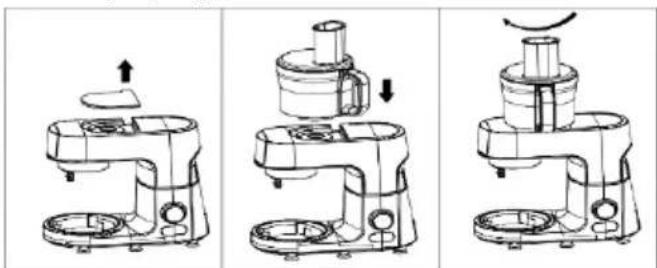
Assembly (see figure A):
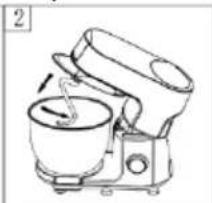
- Press the head lift button, the head will automatically rise, this time the device is in a power-off state as shown in figure 1.
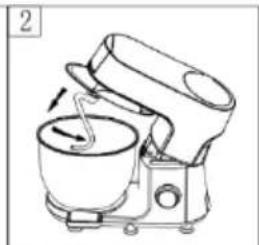
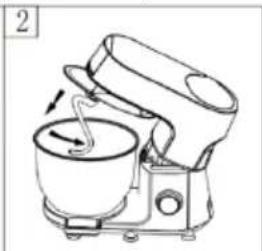
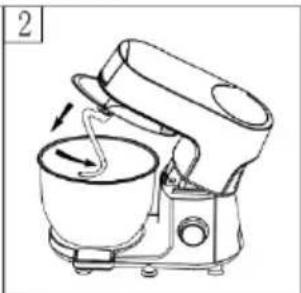
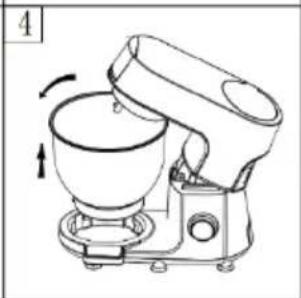
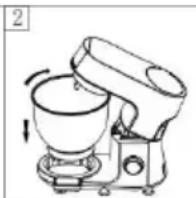
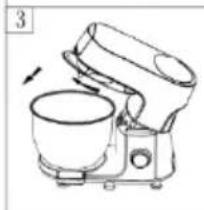
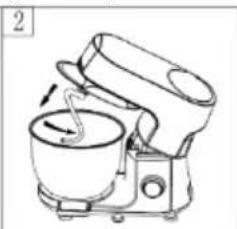
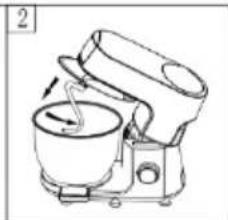
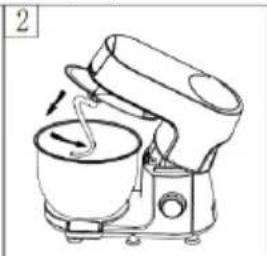
- Place the stainless steel bowl on the product below the opening, lower it, and then turn it clockwise until it can no longer turn, as shown in Figure 2.
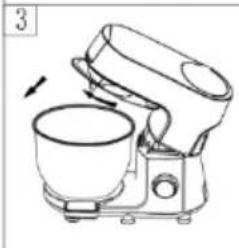
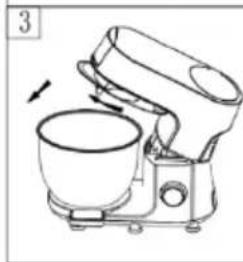
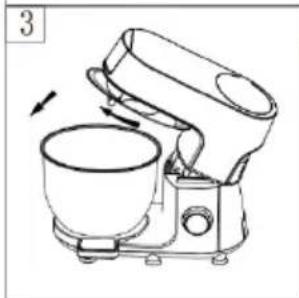
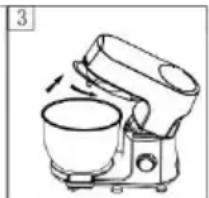
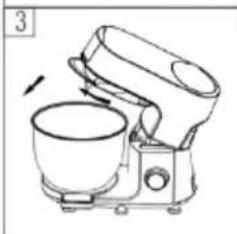
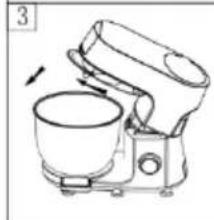
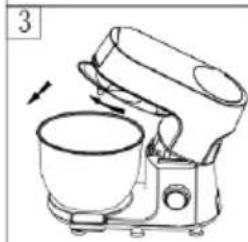
- Place the transparent lid on the head, and then turn it clockwise until it can no longer turn, as shown in Figure 3.
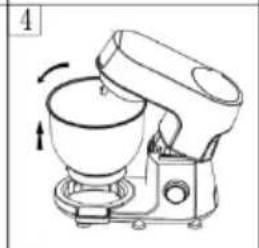
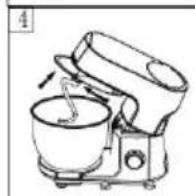
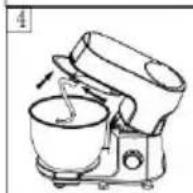
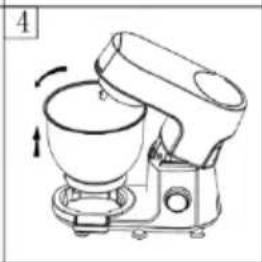
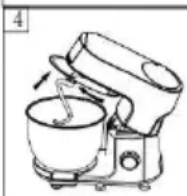
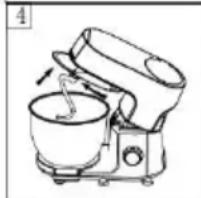
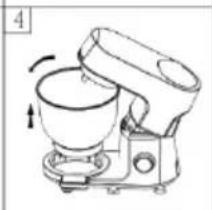
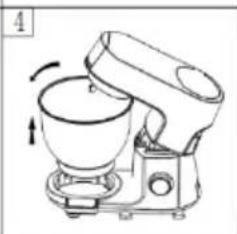
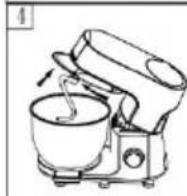
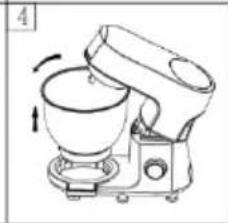
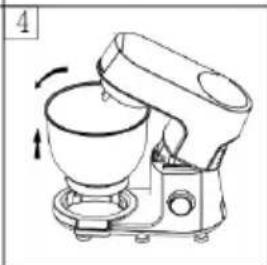
- Insert the notch at the top end of the mixing attachment into the drive shaft, then push the mixing attachment upward and turn it counterclockwise until it can no longer turn, as shown in Figure 4.
- After installing the above parts, press the head button again.
- Press the head lift button, the head will automatically rise, as in Figure 1, then firmly press the mixing attachment upward and turn it clockwise to the protrusion of the drive shaft, and then you can directly remove the mixing attachment. As in Figure 2
- Turn the transparent lid counterclockwise until it can no longer turn, the lid can be removed as shown in Figure 3.
FUNCTION OF SWITCH BUTTONS
Blender
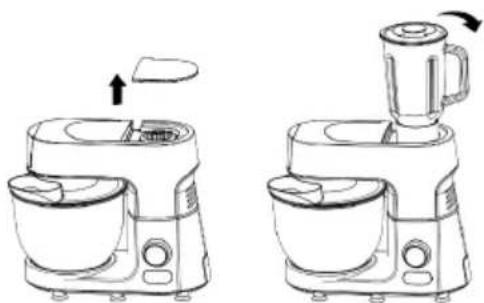
Installation:
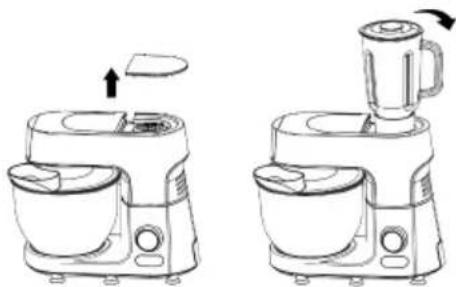
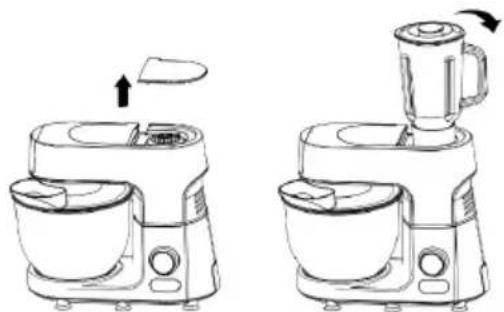
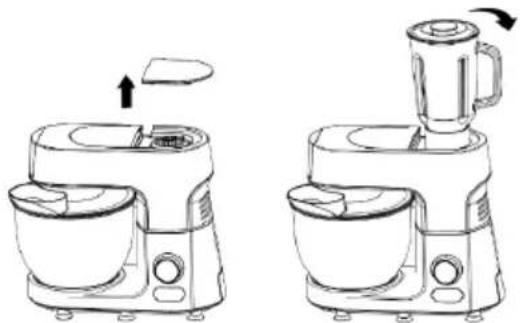
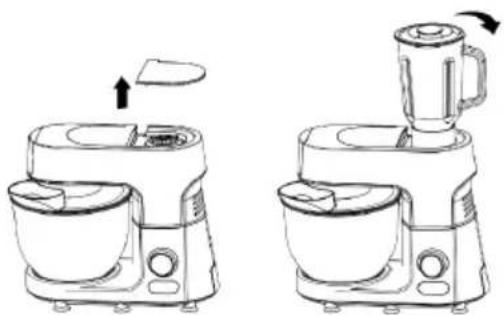
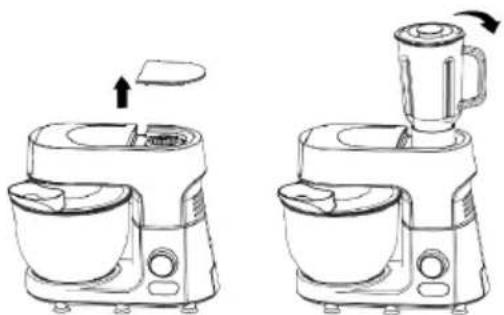
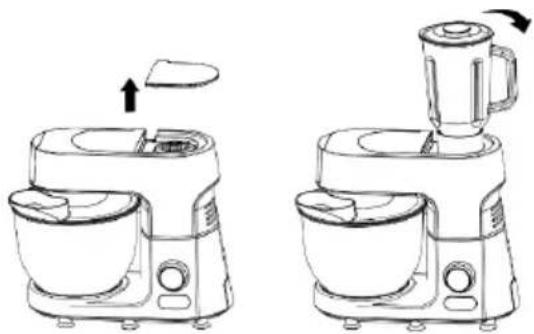
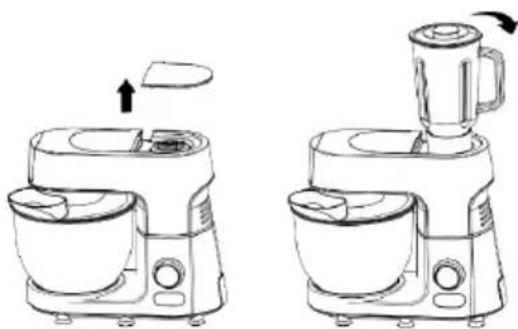
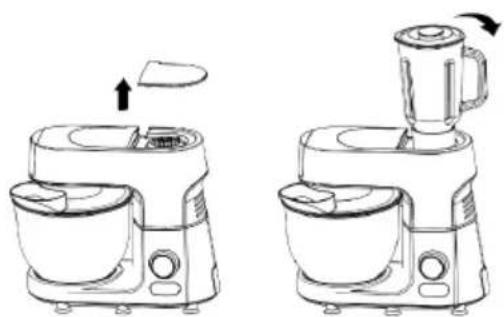
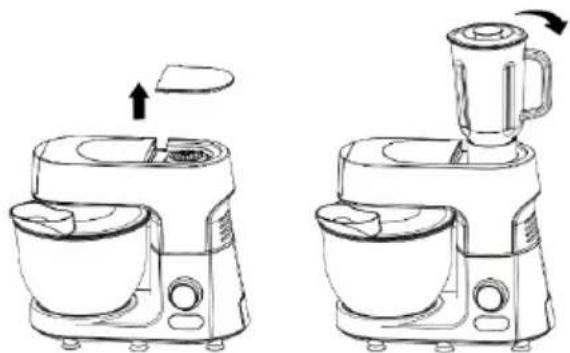
- Lower the device head to a horizontal position, the head lift button automatically rises and locks the head. Open the top lid.
- Hold the handle of the glass jar at the outlet on the device and turn it clockwise until it can no longer turn. Point the sausage coming out of the device at the baking tray. Then cut the sausage into pieces/strips and spread them over the baking tray. Cut the fruit into small pieces, put it into the mixing bowl, add an appropriate amount of water or milk and other liquids, and cover with the lid.
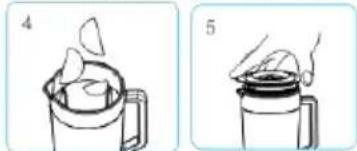
Press the lid into place. Place the jar on the base.
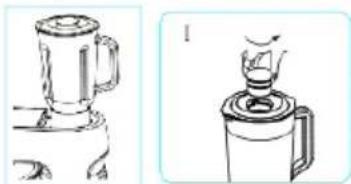
Tips: While the motor is running, if you want to add ingredients, you can:
I. Turn the inner lid of the lid counterclockwise.
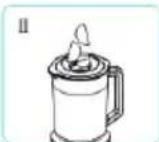
II. Add ingredients to the jar through the opening in the lid.
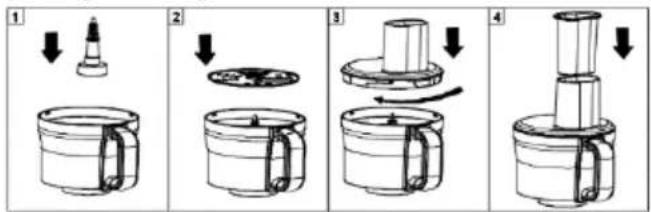
Place the upper connector into the bowl, then insert the blade part (the front and back sides are for chopping and slicing; the blades are sharp, be careful not to injure your hands), then place the bowl lid according to the instructions, turning it clockwise to lock the lid, and put on the pusher.
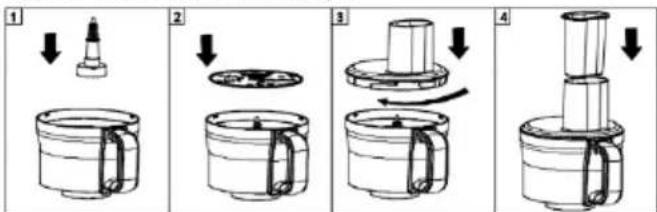
Installing the food chopper:
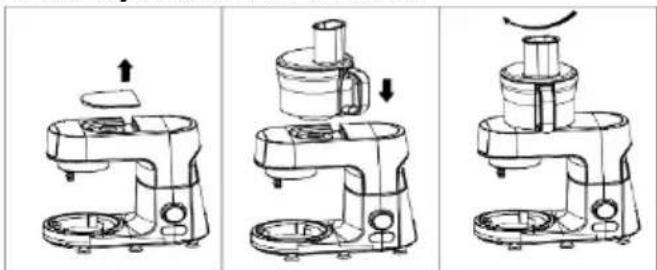
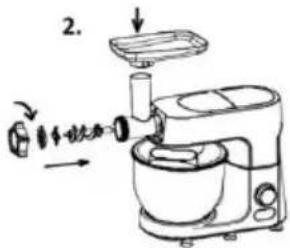
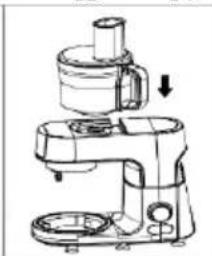
- Place the appliance on a smooth work surface, keep the surface clean and tidy, and position the control panel facing the user. 2. Remove the top cover on the left side of the appliance to access the lower connector of the food chopper.
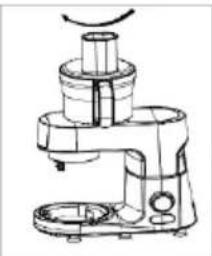
- Install the food chopper onto the lower connector and tighten it clockwise (see assembly diagram above).
- Cut ingredients into small pieces and place them evenly in the bowl.
- Turn on the appliance and select the appropriate speed, use the pusher to push
food as needed.
- When the ingredients reach the desired consistency, press the stop switch. Turn off the power.
Disassembling the food chopper
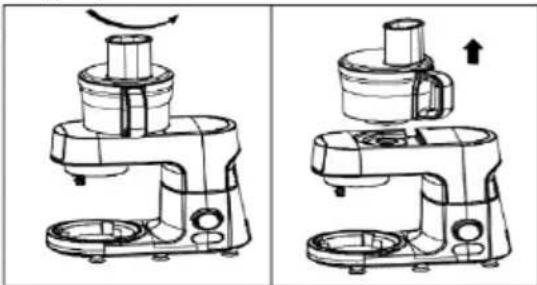
- Before using the food chopper, read the instructions carefully and keep them for future reference.
- The blade is sharp; be careful when handling the blade and cutting plate to avoid cuts. (When disassembling and cleaning, always hold the top handle with your hand; do not touch the blade directly with your hand.)
- Always remove the blade before pouring food out of the bowl.
- Be careful when removing the blade or when cleaning food from the blade.
- It is strictly forbidden to use the chopper to grind meat with the T-tube for meat grinding or to mix dough with the mixing hook at the same time.
- Never push food directly into the chopper with your fingers. Use the large or small pusher.
- Always disconnect the power supply in the following situations:
- When installing or removing the food chopper or other attachments. •After use
- Do not remove the top cover of the chopper before the head has completely stopped.
- When using the blender head, do not put too many ingredients in the mixing bowl. Pour them out in time and mix again for better results.
- When using the blender head, make sure the ingredients do not exceed the MAX mark in the blender jar for better mixing results.
- Never touch the moving parts of the appliance with your hands.
- Do not force food into the chopper.
- This food chopper must not be used for crushing ice (hard objects) to avoid damage (if you need to crush ice, you can use the glass juice jar for crushing ice).
- Do not open the top cover of the food chopper abruptly during use (if you need to open the top cover, press the stop switch or disconnect the power supply to stop the appliance).
- Do not allow children or persons with disabilities
to operate the appliance.
Blender
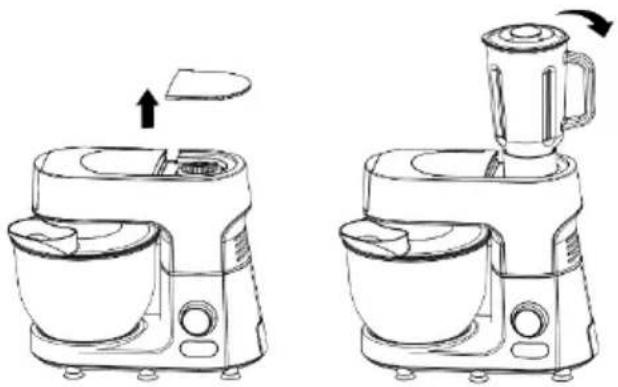
Installation:
- Top cover (food processor)
- Top cover (blender)
- Food processor connector
- Blender connector
- Body housing
- Speed control switch (rotating)
- START STOP button
- Release button for multifunction head
- Scale display
- Release button for grinder
- Removable cover for mincer power outlet
- Food doser on transparent cover
- Stainless steel bowl
- Whisk
- Mixer blade
- Dough hook
ACCESSORIES:
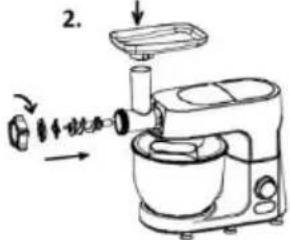
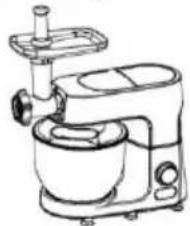
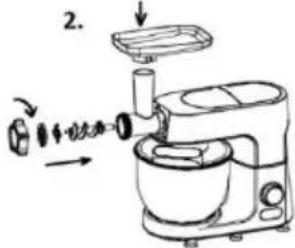
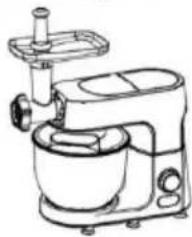
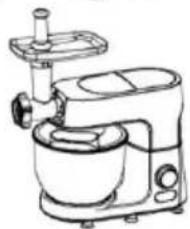
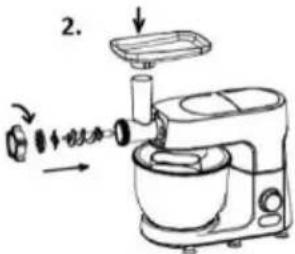
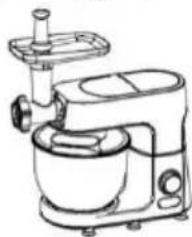
Meat grinder:
- Fixing ring
- Cutting knife (fine)
- Cutting knife (medium)
- Knife
- Snake
- Cutter housing
- Food tray
- Pusher
- Stuffing tube
- Kubbe kit
- Blender
Food processor:
- Pusher of chopper
- Chopper lid
- Shredding / slicing blade
- Cutting fries blade
- Chopping blade
- Motor shaft (axle)
- Chopper bowl
Danger
Do not immerse the motor unit in water nor rinse it under the tap.
Warning
- Carefully read the instructions before using your appliance.
- Switch off the appliance before fitting and removing the attachment.
- Keep your fingers away from moving parts and the opening on the attachment.
- Only use the appliance for its intended domestic use. The manufacturer will not accept any liability if the appliance is subject to improper use or failure to comply with these instructions.
- Check that the voltage rating of the appliance matches that of your electrical system.
- Any connection error will nullify the guarantee.
- The appliance must be plugged into an earthed electrical socket.
- If you have to use an electrical extension lead, it must be earthed and you should make sure that no one can trip over it.
- Unplug the appliance as soon as you have finished using it and before cleaning it.
- Don't use your attachment and/or appliance if it has been damaged. Contact an approved service centre.
- Any work on the appliance other than normal care and cleaning by the customer must be carried out by an approved service centre.
- Do not immerse the appliance, the power cord or the plug in water or in any other liquid.
- Do not allow the power cord to hang within the reach of children,
to come close to or into contact with hot parts of your appliance, any other source of heat or any sharp edge.
- Switch off the appliance and disconnect it from power supply before changing accessories or approaching any moving parts.
- Do not touch the whisk, mixer blade or kneading hook while the appliance is in operation.
- Only use one attachment at a time.
- Do not operate the appliance continuously for more than 24 minutes at a time. Allow 15 minutes rest before next use.
- Appliances can be used by persons with reduced physical, sensory or mental capabilities or lack of experience and knowledge if they have been given supervision or instruction concerning use of the appliance in a safe way and if they understand the hazards involved.
- Children should be supervised to ensure that they do not play with the appliance.
- If the supply cord is damaged, it must be replaced by the manufacturer, service agent or a similarly qualified person, in order to avoid a hazard.
- This appliance may not be used by children. Keep the appliance and its cord out of reach of children. Children may not play with the appliance.
- Children may not clean the appliance or perform user maintenance tasks on it without supervision.
- This appliance is intended to be used in household and similar applications.
- There is a potential injury from misuse. Please handle it with care.
- Care should be taken when handling the sharp cutting blades, emptying the bowl and during cleaning.
- WARNING: AFTER DETACHING THE ACCESSORY, DO NOT TOUCH THE MOVING SHAFT.
- Be careful if hot liquid is poured into the blender as it can be ejected out of the appliance due to a sudden steaming.
- Always disconnect the appliance from the supply if it is left unattended and before assembling, disassembling or cleaning.
- The appliance should cool down to room temperature after each process.
- Noise level: 78 dB(A)
- During mixing, please don't use the scraper or other tools to concentrate the material in the mixing container, it may cause involvement or injury.
- Be sure to press the display to make sure the product is turned off and unplugged before installing, removing, or cleaning accessories, or injury may result.
- The machine motor comes with overheating protection, when the machine overheats, it will automatically stop running until it cools down before running again.
- When one of the output ports is operating, please make sure to remove the parts or components that are connected to the other output ports and be installed a protective cover.
- Do not use the product unsupervised, if you do have to leave, turn off the switch or unplug it first.
- Do not plug the machine into the power supply without installing the required accessories.
- Danger of overloading! Do not use the accessories and the mixing function at the same time.
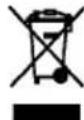
This appliance is marked according to the European directive 2012/19/EU on Waste Electrical and Electronic Equipment (WEEE). This guideline is the frame of a European-wide validity of return and recycling on Waste Electrical and Electronic Equipment.
Caution
Always place the appliance on a flat, stable surface.
Do not use the citrus press longer than 24 minutes without interruption.
This appliance is intended for household use only.
Never use any accessories or parts from other manufacturers unless they are authorized by Gorenje. In case you use these accessories, the warranty will be canceled.
Before use
Clean all detachable parts before using the appliance for the first time (see chapter 'Cleaning').
Make sure the appliance is assembled properly (see chapter 'General description') before you plug it in the wall socket.
Put the plug in the wall socket.
Using the appliance
The standard parts of this machine are composed of dough hook, whisk, beater and stainless steel bowl, totaling four parts.
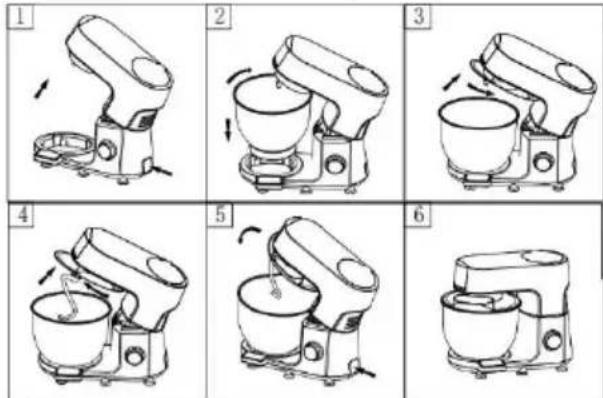
Installation (refer to figure A):
- Press the head-up button, the head will automatically pop up, this time the machine is in a state of power failure as shown in Figure 1.
- Put the bottom of the stainless steel pot pot nail against the product below the gap, put down, and then turn clockwise clockwise until it can not be rotated, as shown in Figure 2.
- Put the transparent pot cover on the head, and then turn clockwise until it can not be rotated as shown in Figure 3.
- Insert the notch at the top end of the stirring rod into the drive shaft and then force the stirring rod upwards and turn it counterclockwise until it cannot turn as shown in Fig. 4.
- After installing the above parts, press the head button again.
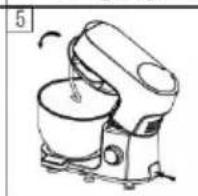
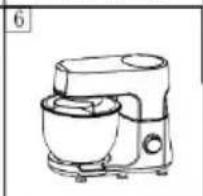
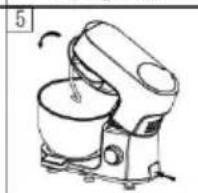
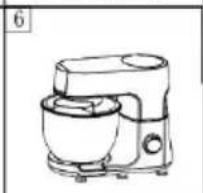
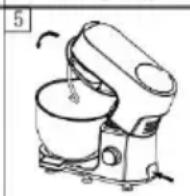
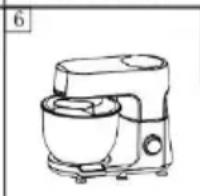
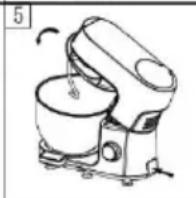
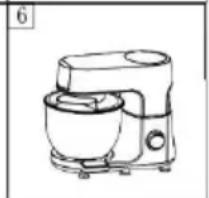
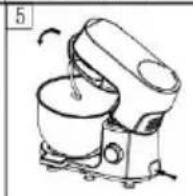
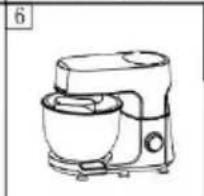
Press the head gently back to the original position, so that the product can start to work as shown in Figure 5-6.
Disassembly (refer to Figure B)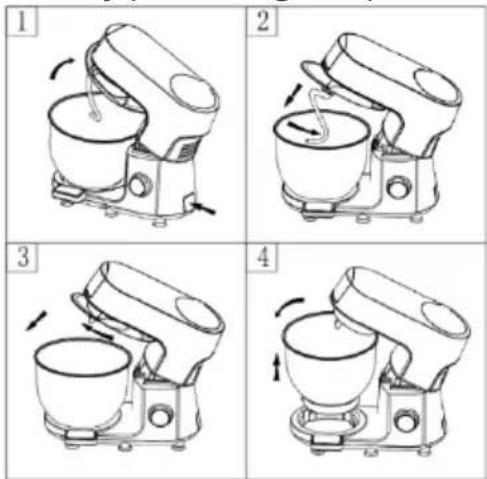
- Press the head up button, the head will pop up automatically, as in Fig. 1, then press the stirring stick firmly upward and rotate it clockwise to the drive shaft bump, then you can directly remove the stirring stick. As Figure 2
- Turn the transparent lid counterclockwise until it cannot be turned further, then remove the lid as shown in Figure 3.
SWITCH KNOB DISPLAY FUNCTION
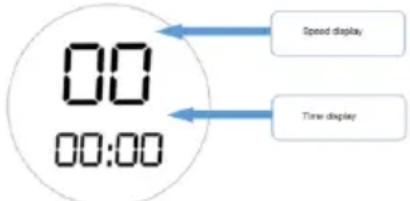
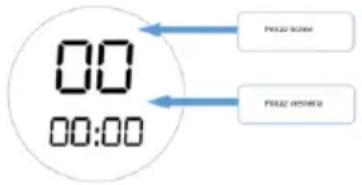
- When the power is turned on, the speed position displays "00" and the time displays "PUSH". The speed and time display lights flash.
- Press the display, the product starts with default speed 1. At the same time, the timer starts. Rotate the speed control knob to select the speed. During use, even if the speed is changed, the timer continues until the display is pressed again or the speed is switched back to "00", at which point the product stops working.
- Rotate the speed control knob to select the desired speed, then press the display; the product will start at that speed.
- The speed control knob can rotate 360 degrees, with settings "01" through "12". "12" is the maximum speed, "01" is the minimum speed.
- If the product is running and the head-up button is pressed suddenly, the product will raise its head automatically and the display will show "E1". In this case, press the head-up button again, then press the head down, and long-press the display to restart the product normally. Alternatively, if the motor is blocked due to overloading, the display will also show "E1". Remove some ingredients and long-press the display to restart. The maximum running time is 30 minutes; after 30 minutes, the product stops automatically.
SCALE DISPLAY FUNCTION

- After turning on the power, touch the "ON/OFF" button; the weighing display will light up and the weighing function will start.
- Place the pan directly on the base, then touch the "Tare" button to zero the weight. Then place the desired material directly on the base to be weighed.
MIXER BLADE/WHISK/DOUGH HOOK
- Place the product in a safe, stable, clean, and dry location.
- Hold the head of the machine with one hand and press the head-up button with the other hand; the head will lift automatically. You can assist with your hand to lift it to the maximum position and install the transparent lid.
- Follow the stirring bar installation method described above to install the required stirring bars to the designated position.
- Place the stainless steel pan in the designated position and lock it clockwise.
- Load the items to be stirred. Do not overload; refer to the attached table for the machine's maximum load capacity.
- When ready, press the product head down to lock it (the head-up button pops up automatically) and bring the product head back to the horizontal position.
- Rotate the rotation knob to set the desired speed, then press the START/STOP button.
- Adjust the speed knob as required.
- When the mixture has reached the desired level of mixing, press the display to turn off the product and unplug it from the power supply.
- Turn the stainless steel pan counterclockwise and remove it from the machine.
- Remove the mixture from the pot.
- For cleaning of parts, refer to the method described in "Cleaning and Maintenance".
| Accessory | Food | Maximum amount | Operation time | Speeds | Preparation |
| Whisk | Cream (38% fat) | 500 ml | 10 minutes | 5-6 | / |
| Egg white | 12 pcs | 3 minutes | 5-6 | / | |
| Dough hook | Flour | 1500 g | Operation 1 minute and 30 seconds at MIN speed, and then 3 minutes and 30 seconds at I speed. Don't operate the appliance for more than 5 minutes. | / | |
| Salt | 10 g | ||||
| Yeast | 20 g | ||||
| Sugar | 10 g | ||||
| Water(43°C) | 750 ml | ||||
| Lard | 30 g | ||||
| Mixer blade | Flour | 200 g | 5 minutes | 3-4 | / |
| Caster sugar | 200 g | ||||
| Margarine | 200 g | ||||
| Eggs | 4 pcs | ||||
| Slicing/shredding discs | Ccarrots | 400 g | 15 seconds | 4 | / |
| Potatoes | 400 g | 15 seconds | 4 | / | |
| Onions | 400 g | 15 seconds | 4 | / | |
Mincing meat - tips and warnings
- Make sure the cutting edges of the cutter unit are pointing outwards.
- Make sure the notch of the grinding disc fits onto the projection of the cutter housing.
- Never use frozen meat!
- Do not overload the appliance during use by pushing too much meat into the cutter housing.
- Cut the meat into 10cm-long, 2cm-thick strips.
- Remove bones, gristles, and sinews as much as possible.
- Put the prepared meat on the feeding tray.
- Press the on/off button to switch the appliance on.
- Use the pusher to gently push the meat into the cutter housing.
- For steak tartare, mince the meat with the medium grinding disc twice.
![graph TD A["1. Top mixing bowl with ① head"] --> B["2. Stacking cup with lid"] B --> C["3. Packaging with brush and bulb"] C --> D["End"]](/content/2026/05/855705/images/82e099207ad740ad3d08a3698d4045624207502950847ef87f78f970bb2f0e60.jpg)
Making sausages - tips and warnings
Always mince the meat first.
- Let the sausage skin soak in lukewarm water for 10 minutes. Then slide the wet skin onto the sausage horn. Do not block the air outlet grooves of the horn.
- Put the minced meat on the feeding tray. Press the speed control switch to switch the appliance on.
- If the skin gets stuck on the sausage horn, wet it with some water.
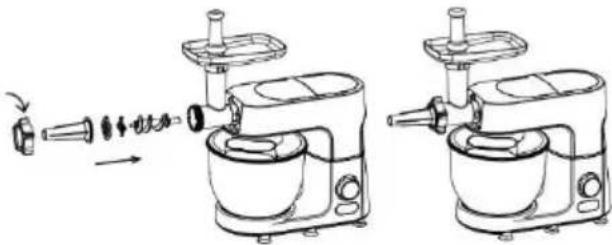
Blender
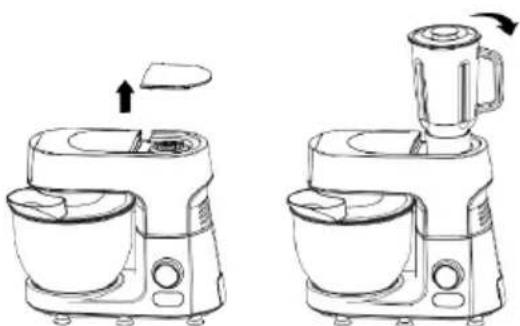
Installation:
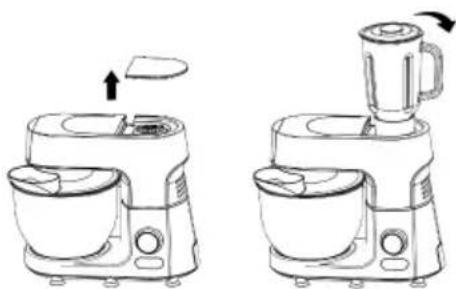
- Lower the machine head to a horizontal position, the head-up knob automatically pops up and locks the head. Open the top cover.
- Hold the glass jar handle into the output port on the machine and turn clockwise until it cannot be turned.
Guide the dough sausage coming out of the appliance onto a baking plate. Then cut the sausage into slices or strips and distribute them over the baking plate.
Cut the fruits into small pieces, put them into the mixing cup, add the right amount of water or milk and other liquids, and cover the lid.
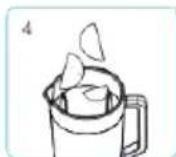
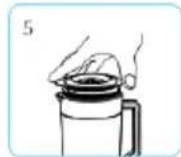
Press the lid into place.
Install the jar onto the base.
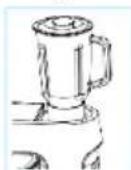
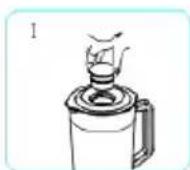
Tips: While the motor is running, if you want to add ingredients you can:
I: Turn the inner lid off the lid in the direction of anticlockwise
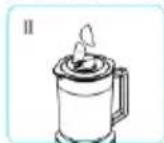
II. Add the ingredients into the jar through the opening in the lid
After you have done you work, push "START / STOP button", unplug the appliance, and pour out the content.
Attention:
- Before installing the juice cup, please make sure the product is disconnected from the power supply.
- P-speed operation can not stay for a long time, you can repeat the operation many times.
- Please do not idle the glass for more than 30 seconds.
- Please do not add more than the capacity of the ingredients.
- The juice cup is made of glass, do not use more than 40 °C water scalding.
Food processor
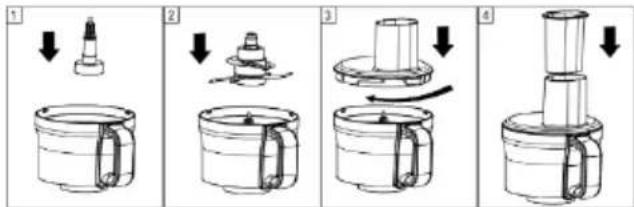
The upper connector into the cup, and then loaded with a knife plate (front and back are respectively shredding, slicing function, slicing knife sharp, be careful to hurt your hands), then the lid of the cup to the right point of the instructions to rotate clockwise to lock the lid, put on the pusher cup.
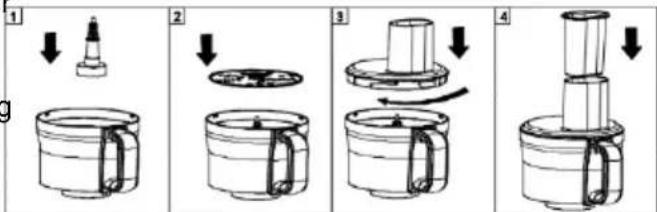
Installation food processor
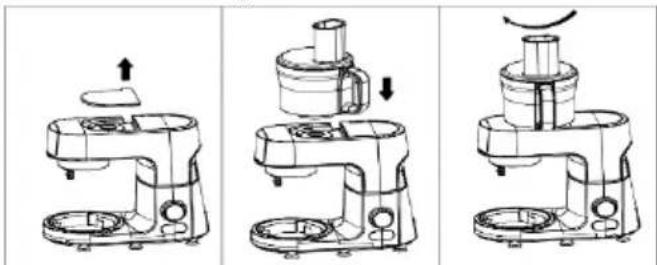
- Place the machine on a smooth operating surface, keep the surface clean and tidy, and position the control panel facing the user.
- Remove the top cover on the left side of the machine to expose the food processor lower clutch connector.
- Install the food processor onto the lower clutch connector and tighten it clockwise (see assembly illustration above).
- Cut ingredients into chunks and place them evenly
into the mixing cup.
- Turn on the machine and select the appropriate speed. Use the pusher to advance the food when needed.
- When the ingredients have reached the desired consistency, press the switch to stop. Turn off the power.
Disassemble the food processor.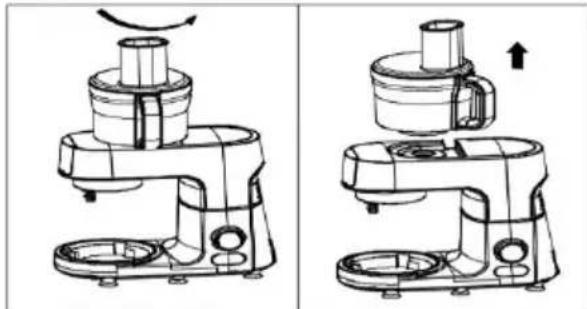
- Before using our food processor, please read this manual carefully and keep it for future reference.
- The blade is sharp. Please be careful when handling the chopping blade and disk to avoid cuts. (When disassembling and cleaning, be sure to hold the top handle with your hand and do not touch the blade directly.)
- Be sure to remove the blade before pouring out the food from the mixing cup.
- Be careful when removing the blade or when cleaning food from the blade.
- It is strictly prohibited to use the food processor to grind meat with the meat grinder attachment or to mix dough with the mixing hook at the same time.
- Never push food directly into the food processor with your fingers. Use the large or small pusher.
- Be sure to turn off the power in the following situations:
- When installing or removing the food processor or other accessories.
- After use.
- Do not remove the top cover of the food processor before the cutter head has completely stopped.
- When using the blender head, the food in the blending cup should not be too full. Please pour it out and re-blend it in order to achieve a better blending effect.
- When using the blender head, please make sure the food in the blender cup is not higher than the maximum scale (MAX) in the blender cup to achieve a better blending effect.
- Never touch the running parts of the machine with your hands.
- Do not use brute force to forcefully push food in the food processor.
- This food processor should not be used to beat ice (hard objects), so as not to damage the food processor. (If you need to beat ice, you can choose the glass juice cup to beat ice.)
- Do not suddenly open the top cover of the food processor during use. (If you need to open the top cover
of the food processor, please press the switch of the machine to stop, or cut off the power, so that the machine stops working.)
- Do not allow children or incapacitated persons to operate the machine.
- Improper use of the food processor may result in damage to the machine or processor.
- When the food processor is damaged, do not continue to use it. Please repair or replace it at an appropriate location.
Cleaning
Unplug the appliance.
Never immerse the motor unit in water or put it under running water. Wipe it with a soft dry or slightly damp cloth.
For easier cleaning, quickly rinse the accessories after use. Completely dismantle the mixer attachment. Handle the blades with care, as some have sharp cutting edges.
If your accessories are discoloured by food (carrots, oranges etc.), rub them gently with a kitchen towel dipped in cooking oil and then clean in the usual way.
Environment
This marking indicates that this product should not be disposed of with other household waste throughout the EU. To prevent possible harm to the environment or human health from uncontrolled waste disposal, recycle it responsibly to promote the sustainable reuse of material resources. To return your used device, please use the return and collection systems or contact the retailer where the product was purchased. They can take this product for environmentally safe recycling.
Guarantee & service
If you need information or if you have a problem, please contact the Gorenje Customer Care Centre in your country (you find its phone number in the worldwide guarantee leaflet). If there is no Customer Care Centre in your country, go to your local Gorenje dealer or contact the Service department of Gorenje domestic appliances.
For personal use only!
GORENJE
WISHES YOU A LOT OF PLEASURE WHEN USING YOUR APPLIANCE
We reserve the right to any modifications!
Blender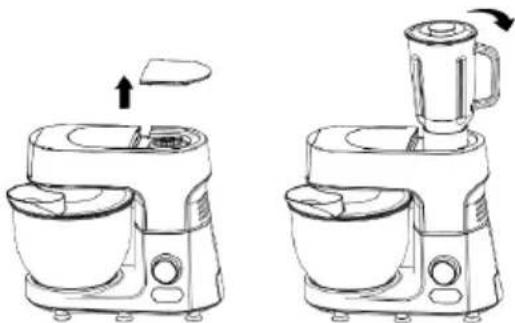
Installation:
Blender
Installation:
Blender
Assembly:
Place the lid on top.
Blender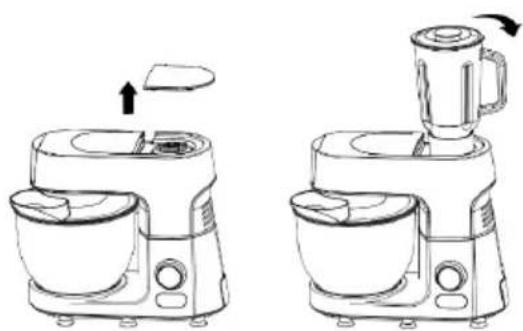
Installation:
Insert the upper connector into the cup, then load it with the knife plate (front and back are respectively for shredding and slicing functions; the slicing knife is sharp, be careful not to hurt your hands). Then, following the instructions, rotate the lid of the cup clockwise to lock it, and put on the pusher cup.
Blender
Installation:
Blender
Installation:
Blender
Setup:
Blender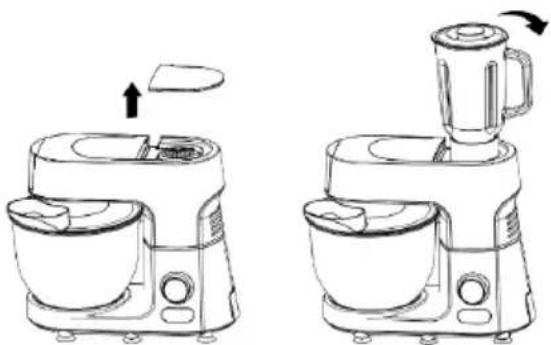
Installation:
Blender
Installation
Blender
Assembly:
Blender
Assembly:


- MIXER
- INSTALLATION
- ASSEMBLY (SEE FIGURE A)
- BLENDER
- ASSEMBLY
- ASSEMBLING THE FOOD CHOPPER
- FUNCTION OF SWITCH BUTTONS
- INSTALLING THE FOOD CHOPPER
- DISASSEMBLING THE FOOD CHOPPER
- ACCESSORIES
- MEAT GRINDER
- FOOD PROCESSOR
- DANGER
- WARNING
- CAUTION
- BEFORE USE
- USING THE APPLIANCE
- INSTALLATION (REFER TO FIGURE A)
- SWITCH KNOB DISPLAY FUNCTION
- SCALE DISPLAY FUNCTION
- MIXER BLADE/WHISK/DOUGH HOOK
- MINCING MEAT - TIPS AND WARNINGS
- MAKING SAUSAGES - TIPS AND WARNINGS
- ALWAYS MINCE THE MEAT FIRST
- ATTENTION
- INSTALLATION FOOD PROCESSOR
- CLEANING
- ENVIRONMENT
- GUARANTEE & SERVICE
- FOR PERSONAL USE ONLY
- GORENJE
- WISHES YOU A LOT OF PLEASURE WHEN USING YOUR APPLIANCE
- WE RESERVE THE RIGHT TO ANY MODIFICATIONS
- SETUP
Brand : GORENJE
Model : MMC1500SCX
Category : Food processor