
RS3 DUO WIDE - Caméra auto Navitel - Free user manual and instructions
Find the device manual for free RS3 DUO WIDE Navitel in PDF.


| Product Type | Dashcam (Car Camera) |
| Model | Navitel RS3 DUO WIDE |
| Dimensions (approx.) | 120 mm x 60 mm x 40 mm (each unit) |
| Weight (approx.) | 150 g (main unit), 120 g (rear camera) |
| Power Supply | 12-24V DC via car cigarette lighter adapter; built-in rechargeable battery |
| Main Functions | Front and rear full HD recording, wide-angle lenses, loop recording, G-sensor, parking mode, WDR, GPS built-in |
| Resolution | Front: 2560x1440p; Rear: 1920x1080p |
| Field of View | Front: 170°; Rear: 140° |
| Display | 3.0-inch IPS touchscreen |
| Storage | MicroSD card up to 256GB (Class 10 or higher) |
| Maintenance & Cleaning | Clean lens with soft dry cloth; avoid water and extreme temperatures |
| Safety | Secure mounting using included suction bracket; do not install near airbags |
| Spare Parts & Repairability | No user-serviceable parts; contact Navitel support for repairs |
| General Information | Comes with front and rear cameras, power cable, mount, GPS module, user manual |
Frequently Asked Questions - RS3 DUO WIDE Navitel
User questions about RS3 DUO WIDE Navitel
0 question about this device. Answer the ones you know or ask your own.
Ask a new question about this device
Download the instructions for your Caméra auto in PDF format for free! Find your manual RS3 DUO WIDE - Navitel and take your electronic device back in hand. On this page are published all the documents necessary for the use of your device. RS3 DUO WIDE by Navitel.
USER MANUAL RS3 DUO WIDE Navitel
natural_image
Black remote camera with digital display showing Earth and ocean background (no visible text or symbols)NAVITEL RS3 DUO WIDE
Portable Video Recorder
CZ
Úvod
Vážený zákazníku!
Thank you for purchasing this NAVITEL® product.
NAVITEL RS3 DUO WIDE is a multifunctional high-definition DVR with many functions and features that are described in this User Manual. Please read the manual carefully before using the device and keep it for future reference.
EN
natural_image
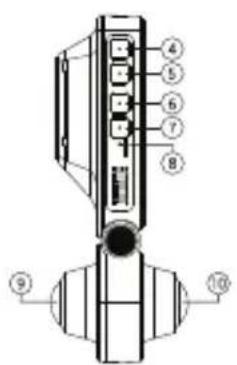
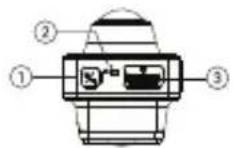
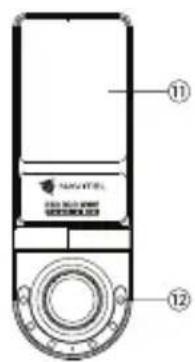
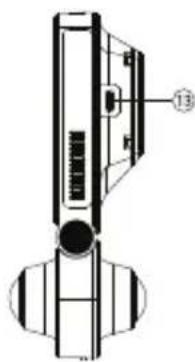
Technical line drawing of a mechanical device with no visible text or symbolsDevice layout
- Power button 8. Reset button
- Microphone 9. Main camera
- MicroSD card slot 10. In-cabin camera
- Menu button 11. Display
- OK button 12. IR projector
- Up button 13. USB-C port
- Down button
Package contents
• DVR NAVITEL RS3 DUO WIDE • Microfiber cloth
- Windscreen mount
- User manual
- Car charger 12/24 V
- Gift voucher
- Card reader
- Warranty card
- Electrostatic film
Specifications
| Main camera | Camera sensor GC4653 2K |
| Video resolution 2560×1440 | |
| View angle 240° | |
| Aperture F=2.2 | |
| In-cabin camera | Camera sensor GC4653 2K |
| Video resolution 2560×1440 | |
| View angle 240° | |
| Aperture F=2.2 | |
| Processor V39 | |
| Display 2" | |
| Video format MP4 | |
| Image format JPG | |
| MicroSD-card capacity Max. 512 GB | |
| Charging port USB-C | |
| Battery 280 mAh | |
| Power 5 V, 2 A | |
| Microphone/Speaker Supported | |
| G-sensor Supported | |
| Languages | English, Hungarian, Spanish, Italian, German, Polish, Romanian, Russian, Slovak, Ukrainian, French, Czech, Vietnamese |
Note. Package contents, appearance, technical specifications that do not affect the overall functionality of the device are subject to change without prior notice.
Note. The built-in battery is designed only to record emergency events in parking mode and to turn off the device correctly when there is no power. For full operation of the device in any mode, a constant power connection is required.
Installation
- Put the microSD card into the DVR. Use a high-speed SD card (Class U3 or above); capacity should be within 8-512 GB.

• To avoid malfunctions of the DVR and/or SD-card, don't insert and remove SD-card during DVR operation.
- Before using a microSD card, please format it inside the DVR to avoid data errors. For formatting the SD-card in Menu mode select Format SD-card and confirm it.
- Secure the device on the windshield with the holder.
- Connect the car charger to the cigarette lighter socket.
- Connect the car charger to the DVR.
- Adjust the camera position.
- Check whether the device is installed correctly. Turn the DVR on, video recording will start automatically.
Precautions
• Use only the original charger adapter. Using another adapter may negatively affect the device's battery. Use accessories only approved by manufacturer.
- Permissible ambient temperature in operating mode: 0 to +35 °C. Storage temperature: +5 to +45 °C. Relative humidity: 5% to 90% without condensation (25 °C).
- Keep the device away from fire sources to avoid explosion or fire.
- Do not expose the device to physical impacts.
- Avoid contacting the device with sources of electromagnetic radiation.
- Keep the lens clean. Do not use chemicals or detergents to clean the product; always turn off the device before cleaning.
- Strictly follow the laws and regulatory acts of the region where the device is used. This device can not be used for illegal purposes.
- Do not disassemble or repair device by yourself. In case of device failure, contact the service center.
NAVITEL s.r.o. hereby declares that the device NAVITEL RS3 DUO WIDE is compatible with the European directive EMC 2014/30/EU.
Buttons
| Button Functions | |
| Power Press and hold for 3 seconds to turn the device on or off. | |
| Menu | In Standby mode press to enter Settings.In Video Recording mode press to lock the file. Press again to unlock.In Settings press to go back to previous menu section. |
| OK | In Video Recording mode press to turn microphone on/off.In Standby mode press to enter View mode. |
| Up | In Video Recording mode press to take a photo.In Standby mode press to display image from the main and/or in-cabin camera.In View mode press to select previous media file. |
| Down | In Video Recording mode press to stop recording and enter Standby mode.In Standby mode press to start recording.In View mode press to select next media file. |
| Reset If the device is not responding, press to reset. | |
Note. The built-in in-cabin camera is specially optimized for continuous recording in difficult low-light conditions inside the car. The built-in infrared illuminator turns on and off automatically depending on lighting conditions. When switching from one operating mode to another, slight color distortion may occur, which does not significantly affect image quality. In a number of situations the LEDs of the infrared illuminator may glow. This is normal and is required to ensure better quality video recording in difficult lighting conditions.
The up-to-date version of the user manual is available on the website https://navitel.com in the section Technical support > Instructions > Documentation.
Bevezetés
Tisztelt Ügyfelünk!
NAVITEL s.r.o. hereby declares that the device NAVITEL RS3 DUO WIDE is compatible with the European directive EMC 2014/30/EU.
Butoane


Brand : Navitel
Model : RS3 DUO WIDE
Category : Caméra auto