
VN-5500PC - Voice recorder OLYMPUS - Free user manual and instructions
Find the device manual for free VN-5500PC OLYMPUS in PDF.



| Product type | Digital voice recorder |
| Brand | OLYMPUS |
| Model | VN-5500PC |
| Dimensions | 102 (L) x 37 (D) x 18.8 (H) mm |
| Weight | 64.8 g (with batteries) |
| Power supply | 2 AAA (LR03) batteries or 2 rechargeable Ni-MH batteries (BR401) |
| Battery life | Approx. 37 h (alkaline) / 25 h (Ni-MH) |
| Microphone | Electret condenser microphone (mono) |
| Speaker | Built-in dynamic speaker ø 23 mm |
| Memory capacity | 512 MB (internal) |
| Recording modes | HQ, SP, LP |
| Maximum recording time | Approx. 35 h (HQ), 69 h (SP), 221 h (LP) |
| Number of folders | 5 folders (A, B, C, D, E) with up to 200 files each |
| Connectivity | USB, microphone jack (mono ø3.5 mm), earphone jack (mono ø3.5 mm) |
| PC compatibility | Windows 2000/XP/Vista, Mac OS X 10.2.8 to 10.5 |
| Audio formats | WMA |
| Special functions | VCVA (voice-activated recording), Low-Cut filter (VN-6500PC), fast playback, slow playback, repeat |
| Maintenance and cleaning | Clean with a dry cloth; do not use organic solvents; avoid heat, humidity and dust |
| Safety | Use at moderate volume to protect hearing; do not disassemble the device; keep out of reach of children |
| Spare parts and repairability | Optional accessories: BU-400 charger, BR401 batteries, KA333 connection cable, ME52/ME15 microphones, E20 earphones, ST26 neck strap, TP7 telephone pickup. Do not repair yourself; contact customer service |
| General information | Compliant with CE standards; do not dispose of with household waste (WEEE) |
Frequently Asked Questions - VN-5500PC OLYMPUS
User questions about VN-5500PC OLYMPUS
0 question about this device. Answer the ones you know or ask your own.
Ask a new question about this device
Download the instructions for your Voice recorder in PDF format for free! Find your manual VN-5500PC - OLYMPUS and take your electronic device back in hand. On this page are published all the documents necessary for the use of your device. VN-5500PC by OLYMPUS.
USER MANUAL VN-5500PC OLYMPUS
Thank you for purchasing an Olympus Digital Voice Recorder. Please read these instructions for information about using the product correctly and safely. Keep the instructions handy for future reference. To ensure successful recordings, we recommend that you test the record function and volume before use.
text_image
Labeled diagram of a mobile phone with numbered parts for identification
text_image
① A B C D E ② U HI LO VCGA HQ SP LP ③ S F G 000 MB ④ OK 000/1888 ⑤ LZZ ⑥ ⑦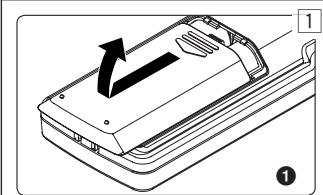
natural_image
Diagram of a device casing with an arrow indicating direction, labeled with number 1 (no text or symbols on the diagram itself)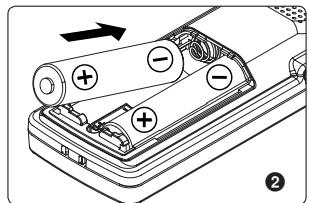
natural_image
Diagram of a battery pack with two batteries and an arrow indicating direction (no text or symbols)
natural_image
Diagram of a device's internal structure with arrows indicating movement or force (no text or symbols)
text_image
HOLD2
8







Introduction
- This manual is a basic version. Please refer to the complete advanced manual either from the stored data in the [OL_MANUAL] folder of the recorder or download the data from the OLYMPUS website.
- The contents of this document may be changed in the future without advanced notice. Contact our Customer Support Center for the latest information relating to product names and model numbers.
- The utmost care has been taken to ensure the integrity of the contents of this document. In the unlikely event that a questionable item, error, or omission is found, please contact our Customer Support Center.
- Any liability for passive damages or damage of any kind occurred due to data loss incurred by a defect of the product, repair performed by the third party other than Olympus or an Olympus authorized service station, or any other reason is excluded.
Trademarks and registered trademarks:
• Microsoft, Windows and Windows Media are registered trademarks of Microsoft Corporation.
• Macintosh is the trademark of Apple Inc.
Safe and Proper Usage
Before using your new recorder, read this manual carefully to ensure that you know how to operate it safely and correctly. Keep this manual in an easily accessible location for future reference.
- The warning symbols indicate important safety related information. To protect yourself and others from personal injury or damage to property, it is essential that you always read the warnings and information provided.
Getting Started
Identification of Parts
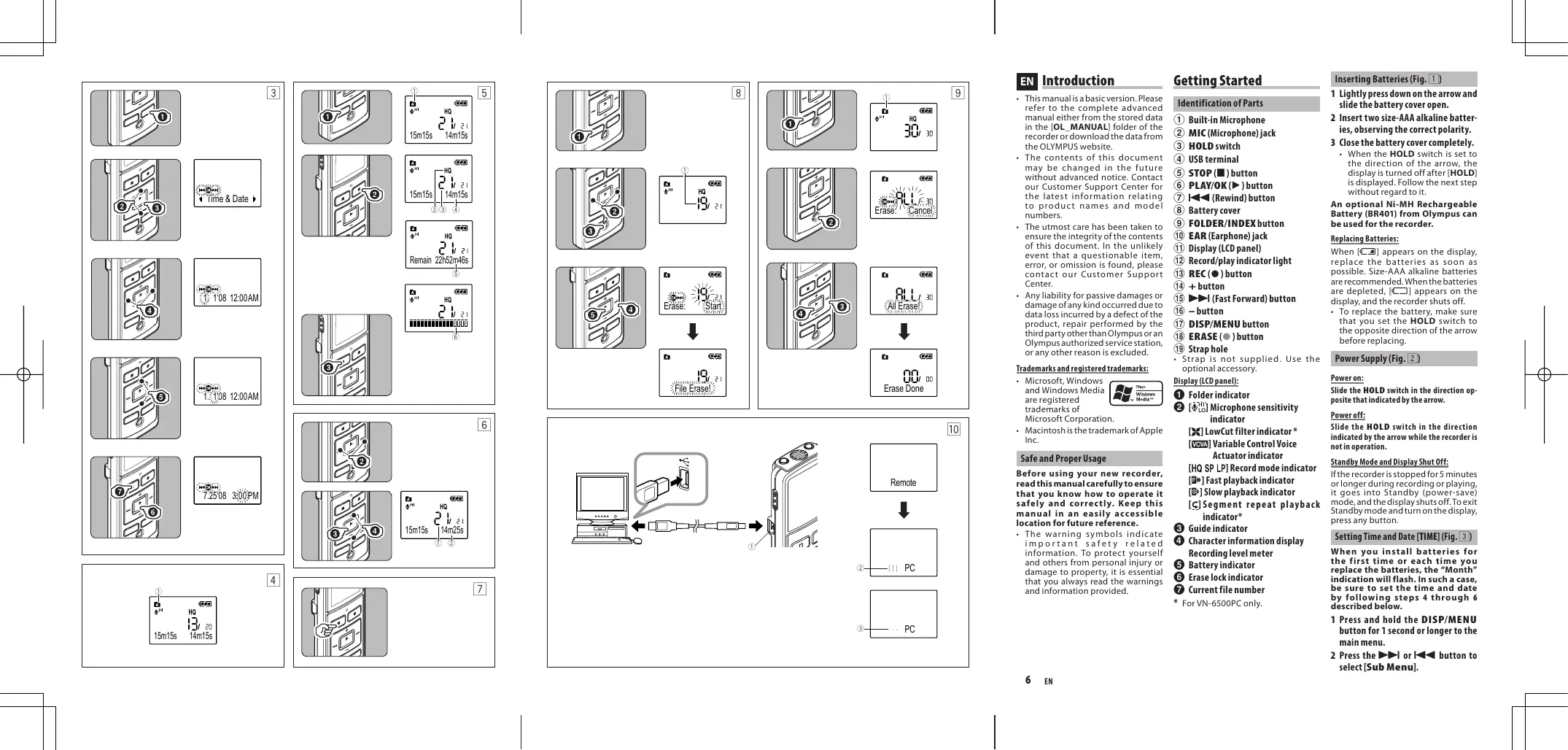
① Built-in Microphone
② MIC (Microphone) jack
③ HOLD switch
④ USB terminal
⑤ STOP (■) button
⑥ PLAY/OK (▶) button
⑦ ◀◀◀ (Rewind) button
⑧ Battery cover
⑨ FOLDER/INDEX button
⑩ EAR (Earphone) jack
⑪ Display (LCD panel)
⑫ Record/play indicator light
⑬ REC (●) button
⑭ + button
⑮ ▶▶▶I (Fast Forward) button
⑯ - button
⑰ DISP/MENU button
⑱ ERASE (●) button
⑲ Strap hole
- Strap is not supplied. Use the optional accessory.
Display (LCD panel):
1 Folder indicator
2 [_LO^HI] Microphone sensitivity indicator
[✗] LowCut filter indicator *
[VCVA] Variable Control Voice Actuator indicator
[HQ SP LP] Record mode indicator
[F] Fast playback indicator
[S▶] Slow playback indicator
[⊆] Segment repeat playback indicator*
③ Guide indicator
④ Character information display
Recording level meter
⑤ Battery indicator
6 Erase lock indicator
7 Current file number
* For VN-6500PC only.
Inserting Batteries (Fig. 1)
1 Lightly press down on the arrow and slide the battery cover open.
2 Insert two size-AAA alkaline batteries, observing the correct polarity.
3 Close the battery cover completely.
- When the HOLD switch is set to the direction of the arrow, the display is turned off after [HOLD] is displayed. Follow the next step without regard to it.
An optional Ni-MH Rechargeable Battery (BR401) from Olympus can be used for the recorder.
Replacing Batteries:
When [☐] appears on the display, replace the batteries as soon as possible. Size-AAA alkaline batteries are recommended. When the batteries are depleted, [☐] appears on the display, and the recorder shuts off.
- To replace the battery, make sure that you set the HOLD switch to the opposite direction of the arrow before replacing.
Power Supply (Fig. 2)
Power on:
Slide the HOLD switch in the direction opposite that indicated by the arrow.
Power off:
Slide the HOLD switch in the direction indicated by the arrow while the recorder is not in operation.
Standby Mode and Display Shut Off:
If the recorder is stopped for 5 minutes or longer during recording or playing, it goes into Standby (power-save) mode, and the display shuts off. To exit Standby mode and turn on the display, press any button.
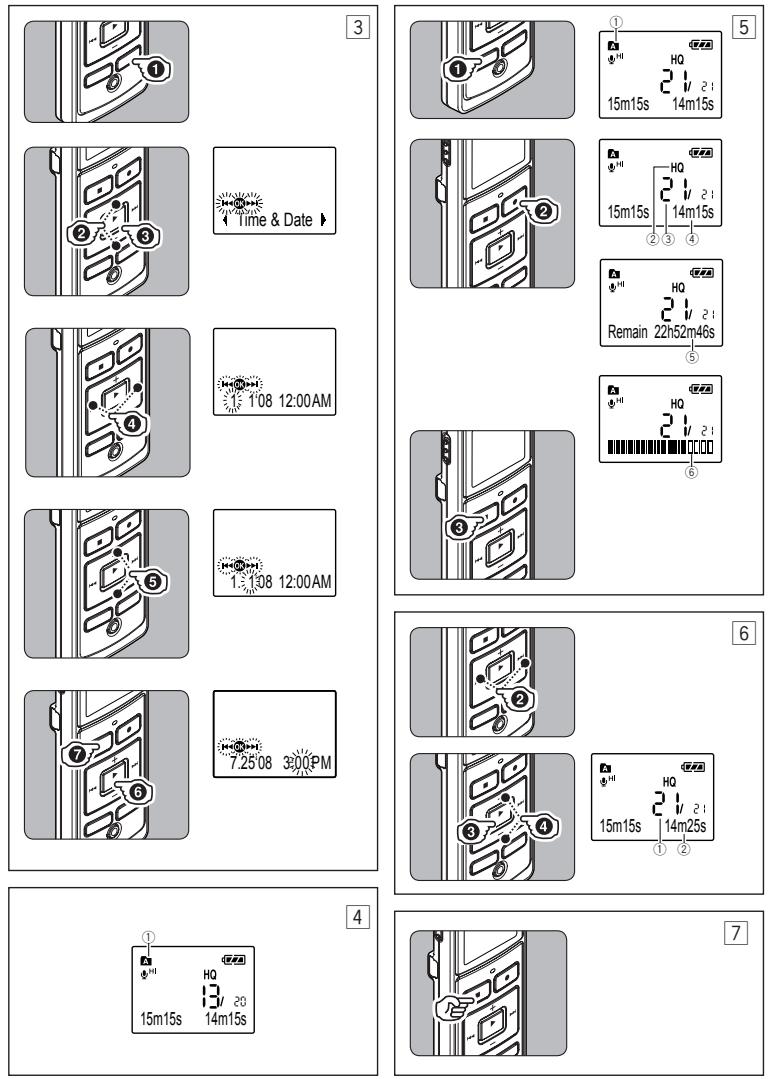
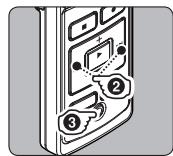
Setting Time and Date [TIME] (Fig. 3)
When you install batteries for the first time or each time you replace the batteries, the "Month" indication will flash. In such a case, be sure to set the time and date by following steps 4 through 6 described below.
1 Press and hold the DISP/MENU button for 1 second or longer to the main menu.
2 Press the ▶▶▶ or ▶◀◀ button to select [Sub Menu].
3 Press the PLAY/OK (▶) button.
- [Time & Date] appears on the display, and [OK] flashes.
4 Press the ▶▶l or l◀◀ button to select the item to set.
- Select the item from "Month", "Day", "Year", "Hour" and "Minute" with a flashing point.
5 Press the + or - button to set.
- Follow the same steps by pressing the ▶▶▶ or ◀◀◀ button to elect the next item, and press the + or – button to set.
6 Press the PLAY/OK (▶) button to complete the setup screen.
- The clock will start from the set date and time.
- Press the PLAY/OK (▶) button according to the time signal.
7 Press the STOP (■) button to close the menu mode.
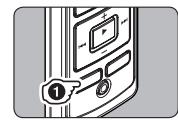
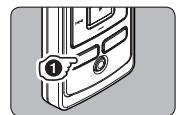
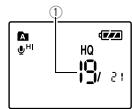
Notes on the Folders (Fig. 4)
The recorder provides five folders, [A], [B], [C], [D] and [E]. To change the folder selection, press the FOLDER/INDEX button while the recorder is stopped. Up to a total of 200 files can be recorded in each folder. ① Current folder
Recording (Fig. 5)
1 Press the FOLDER/INDEX button to select the desired folder.
2 Press the REC (●) button to start recording.
- The record/play indicator light turns red, and recording starts.
3 Press the STOP (■) button to stop recording.
- New recordings are saved as the last file in the folder.
① Current folder
② Current recording mode
③ Current file number
④ Recording time
⑤ Remaining recording time
⑥ Recording level meter
Playback (Fig. 6)
1 Press the FOLDER/INDEX button to select the desired folder.
2 Press the ▶▶l or l◀◀ button to select the file to playback.
3 Press the PLAY/OK (▶) button to start playback.
- The record/play indicator light turns green, and the elapsed playing time is indicated on the display.
4 Press the + or - button to select the proper sound volume.
- The display shows the volume level. You can choose between [00] to [30]. ① Current file number ② Playing time
To Stop: (Fig. 7)
Press the STOP (■) button.
- The recorder stops in the middle of the file being played.
Erase
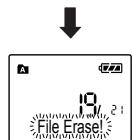
Erasing One File at a Time (Fig. 8)
1 Press the FOLDER/INDEX button to select folder.
2. Press the ▶▶▶ or ◀◀◀ button to select the file to be erased.
① File to be erased
3 Press the ERASE (●) button.
4 Press the ▶▶l button to select [Start].
5 Press the PLAY/OK (▶) button.
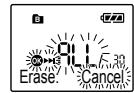
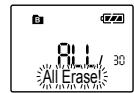
Erase All Files from a Folder (Fig. 9)
1 Press the FOLDER/INDEX button to select the folder to be erased.
① Folder to be erased
2 Press the ERASE (●) button twice.
3 Press the ▶▶l button to select [Start].
4 Press the PLAY/OK (▶) button.
Notes:
- An erased file cannot be restored.
- The file set to erase lock will not be erased.
- Completion of erasing may take several seconds. Do not attempt to remove, replace battery or attempt any other functions on the voice recorder during this period because data may be corrupted.
Other Functions
Connecting to Your PC (Fig. 10)
Apart from using this unit as a recorder, you can use it as an external memory for your computer, as a storage device.
- The audio files recorded by this recorder can be played back on your computer using Windows Media Player. You can also transfer the WMA files downloaded with Windows Media Player to your recorder and enjoy them (excluding files with copyright protection).
1 Connect the recorder's USB terminal to a PC USB port or USB hub.
- Once [Remote] is displayed, you can save or read the data.
2 Transfer the audio files to your computer.
- Connect the recorder to your computer and launch Explorer.
- The recorder will be recognized as a removable disk.
• Each of the five folders is named as DSS_FLDA, B, C, D and E. The audio files are saved in these folders. - All the audio files recorded by this recorder will be in WMA format.
i.e.: VN-6500PC: VN_650001.WMA VN-5500PC: VN_550001.WMA VN-3500PC: VN_350001.WMA - If you are using Windows 2000, Windows Media Player must be installed on the PC.
3 Click [ ] on the task bar located at the lower-right corner of the screen. Click [ Safely Remove Hardware].
① USB terminal
② Sending the date
③ Receiving the data
Using the recorder on your PC
| Windows | Operating System:Microsoft Windows 2000/XP/Vista (Standard Installation) |
| Compatible PC's:Windows PC's equipped with more than one free USB port | |
| Macintosh | Operating System:Mac OS X 10.2.8 ~ 10.5 (Standard Installation) |
| Compatible PC's:Apple Macintosh series equipped with more than one free USB port |
The support service will not cover if your PC has been updated from Windows 95 or 98 to Windows 2000/XP/Vista. Any failure on a self-modified PC will not be covered under the operational warranty.
Notes:
- NEVER disconnect the USB while the record/play indicator light is flashing in red. If you do so, the data may be destroyed.
• Refer to the user's manual for your PC regarding the USB port or USB hub on your PC. - As the noise may cause adverse effects on electronics devices nearby the recorder, unplug the earphone when you connect the recorder to a PC.
General Precautions
Read this manual carefully to ensure that you know how to operate it safely and correctly. Keep this manual in an easily accessible location for future reference.
- The warning symbols indicate important safety related information. To protect yourself and others from personal injury or damage to property, it is essential that you always read the warnings and information provided.
Warning regarding data loss:
- Recorded content in memory may be destroyed or erased by operating mistakes, unit malfunction, or during repair work.
- For important recorded content, we recommend you to write it down some where or make a back-up by downloading to a PC.
- Any liability for passive damages or damage of any kind occurred due to data loss incurred by a defect of the product, repair performed by the third party other than Olympus or an Olympus authorized service station, or any other reasons is excluded from Olympus's liability.
For safe and correct Usage
- Use your earphones only after sufficiently reducing the volume of the earphones, otherwise hearing impairment and/or hearing disorders may occur.
- Do not use your earphone at a high volume for an extended period of time as hearing impairment and/or hearing disorders may occur.
- Be sure to stop the recorder before replacing the batteries. Unloading the batteries while the recorder is in use may corrupt the file.
- Do not leave the recorder in hot, humid locations such as inside a closed automobile under direct sunlight or on the beach in the summer.
- Do not store the recorder in places exposed to excessive moisture or dust.
- Do not use organic solvents such as alcohol and lacquer thinner to clean the unit.
- Do not place the recorder on top of or near electric appliances such as TVs or refrigerators.
- Avoid sand or dirt. These can cause irreparable damage.
- Avoid strong vibrations or shocks.
- Do not disassemble, repair or modify the unit yourself.
- Do not operate the unit while operating a vehicle (such as a bicycle, motorcycle, or go-cart).
- Keep the unit out of the reach of children.
Batteries
Warning:
- Batteries should never be exposed to flame, heated, short-circuited or disassembled.
- Do not attempt to recharge alkaline, lithium or any other non-rechargeable batteries.
- Never use any battery with a torn or cracked outer cover.
- Keep batteries out of the reach of children.
- If you notice anything unusual when using this product such as abnormal noise, heat, smoke, or a burning odor:
① remove the batteries immediately while being careful not to burn yourself, and;
② call your dealer or local Olympus representative for servicing.
Specifications
Recording medium:
Built-in flash memory
Overall frequency:
VN-6500PC, VN-5500PC:
HQ mode: 200 to 13,000 Hz
SP mode: 200 to 7,000 Hz
LP mode: 200 to 3,000 Hz
VN-3500PC:
HQ mode: 200 to 13,000 Hz
SP mode: 200 to 7,000 Hz
LP mode: 200 to 3,000 Hz
Recording time:
VN-6500PC, VN-5500PC: 512 MB
HQ mode: Approx. 35 hours 20 minutes
SP mode: Approx. 69 hours 35 minutes
LP mode: Approx. 221 hours 30 minutes
VN-3500PC: 128 MB
HQ mode: Approx. 8 hours 40 minutes
SP mode: Approx. 17 hours 10 minutes
LP mode: Approx. 54 hours 40 minutes
- The above-noted recording times indicate times after deletion of the manual data stored in the recorder.
- The manual data can be deleted by connecting to a computer and deleting or by formatting the recorder. For details, please
see "Formatting the Recorder [Format]".
- Before deleting the data, please make a backup file of the PDF data of the manual.
Microphone:
Electret Condenser Microphone (monaural)
Speaker:
Built-in ø 23 mm round dynamic speaker
Maximum power:
250 mW
Maximun headphone output:
≤ 150 mV (according to EN 50332-2)
Wide band characteristic headphone output:
75 mV ≤ (according to EN 50332-2)
Earphone jack (monaural):
ø 3.5 mm diameter, impedance 8 Ω
Microphone jack (monaural):
ø 3.5 mm diameter, impedance 2 kΩ
Power supply:
Two AAA (LR03) batteries or Two Ni-MH rechargeable batteries
Continuous battery:
Alkaline batteries:
Approx. 37 hours
Ni-MH rechargeable batteries:
Approx. 25 hours
Dimensions:
102 (L) x 37 (W) x 18.8 (T) mm
Weight: 64.8 g (including battery)
- Battery life is measured by Olympus. It varies greatly according to the type of batteries used and the conditions of use.
- Your recorded contents are for your personal use or pleasure only. It is prohibited to record copyrighted material without permission of the copyright holders according to copyright law.
- Specifications and design are subject to change without notice for improvement of performance.
Accessories (Optional)
Ni-MH Rechargeable Battery
Charger: BU-400 (Europe only)
Ni-MH Rechargeable Battery: BR401
Connecting cord (Earphone jack ↔
Microphone jack): KA333
Noise-Cancellation microphone: ME52
Electret condenser microphone: ME15
Dual monaural earphone: E20
Telephone pickup: TP7
Neck Strap: ST26

"CE" mark indicates that this product complies with the European requirements for safety, health, environment and customer protection.

This symbol [crossed-out wheeled bin WEEE Annex IV] indicates separate collection of waste electrical and electronic equipment in the EU countries.
Please do not throw the equipment into the domestic refuse. Please use the return and collection systems available in your country for the disposal of this product.
Applicable Product: VN-6500PC, VN-5500PC, VN-3500PC

This symbol [crossed-out wheeled bin Directive 2006/66/EC Annex II] indicates separate collection of waste batteries in the EU countries. Please do not
throw the batteries into the domestic refuse. Please use the return and collection systems available in your country for the disposal of the waste batteries.
BG
Въведение
Built-in flash memory
Fréquence générale
VN-6500PC, VN-5500PC :
:VN-6500PC, VN-5500PC
13,000 Hz tv 200 :HQ tvn
7,000 Hz tv 200 : SQ tv
3,000 Hz tv 200 : LP tvn
:VN-3500PC
13,000 Hz tv 200 :HQ tvn
7,000 Hz tv 200 :SQ tvn
3,000 Hz tv 200 : LP tvn
:תְקַרָה לִי
VN-6500PC, VN-5500PC: 512 MB
הכלה 20ה 35:HQ
הכלה 35הע 69:SP
הכלה 30הכלה 221:LP
VN-3500PC: 128 MB
הכלה 40ה 8:HQ
הכלה 10הכלה 17:SP
Kijelző (LCD panel):
(in base a EN 50332-2)
Jack auricolari (mono):
diametro ∅ 3,5 mm, impedenza 8 Ω
Display (LCD-scherm):
[Time & Date] (afb. 3)
* Kun for VN-6500PC.
Sette inn batterier (Fig. 1)
Notas sobre as pastas (Fig. 4)
* Len pre model VN-6500PC.
Vision House 19 Colonial Way Watford Herts WD24 4JL
Phone (switchboard): +44 (0) 1923 831000
http://www.olympus.com
REP. OFFICE OLYMPUS C&S
blvd. Bulgaria 88, entr. 2, fl . 1, ap. 3, 1404 Sofi a, Bulgaria
Tel./Fax: + 359 2 854 84 14, http://www.olympus.bg
OLYMPUS C&S, SPOL. S.R.O.
OLYMPUS HUNGARY KFT.
1382 Budapest 62, Pf. 838, Tel.: +36 1 250 9377
POLYPHOTO S.P.A.
Via C. Pavese 11/13 20090 Opera/Milano,
Tel.: (02) - 530021
OLYMPUS LITHUANIA UAB
Seskines 55A, Vilnius, LT - 07159 Lithuania
Tel.: +370 5 233 00 21
OLYMPUS LATVIA SIA
Vienibas gatve 87 b, LV-1004 Riga,
Tālr.: +371 762 33 34
OLYMPUS NEDERLAND B.V.
Industrieweg 44, 2382 NW Zoeterwoude
Tel.: 0031 (0)71-5821888, http://www.olympus.nl
OLYMPUS BELGIUM N.V.
Boomsesteenweg 77, 2630 Aartselaar
Tel: (03) 870 58 00
OLYMPUS NORGE A/S
Postboks 119 Kjelsås, 0411 Oslo
Tel. +47 23 00 50 50 · Fax: +47 23 00 50 80
OLYMPUS POLSKA SP. Z O.O.
MGT EDUCATIONAL S.R.L
Bd. Ficusului nr. 40, scara B, et. 2, Sector 1,
013975 Bucuresti,
Tel.: 021-2328894, Fax: 021-2328899, http://www.mgt.ro
OLYMPUS D.O.O.
Đorđa Stanojevića 12, 11070 Beograd
Tel.: 011 2222-914, http://www.olympus.co.yu
OLYMPUS SK SPOL. S R.O.
(Premises/Goods delivery) Wendenstrasse 14-18, 20097 Hamburg, Germany. Tel. +49 (0)40-237730
(Letters) Postfach 10 49 08. 20034 Hamburg, Germany.
http://www.olympus-europa.com
OLYMPUS UK LTD.
Vision House 19 Colonial Way Watford Herts WD24 4JL. Tel. +44 (0)1923 831000
http://www.olympus.co.uk