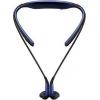
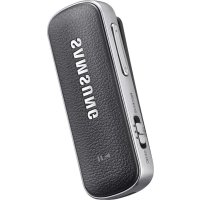
USER MANUAL LEVEL U BLUETOOTH HEADSET SAMSUNG
Please read this manual before using the device to ensure safe and proper use.
- Images may differ in appearance from the actual product. Content is subject to change without prior notice.
- Before using the headset, make sure it is compatible with your device.
Instructional icons

Warning: situations that could cause injury to yourself or others

Caution: situations that could cause damage to your device or other equipment

Note: notes, usage tips, or additional information
Getting started
Package contents
Check the product box for the following items:
- Headset
- Quick start guide

- The items supplied with the device and any available accessories may vary depending on the region or service provider.
- The supplied items are designed only for this device and may not be compatible with other devices.
- Appearances and specifications are subject to change without prior notice.
- You can purchase additional accessories from your local Samsung retailer. Make sure they are compatible with the device before purchase.
- Use only Samsung-approved accessories. Using unapproved accessories may cause performance problems and malfunctions that are not covered by the warranty.
- Availability of all accessories is subject to change depending entirely on manufacturing companies. For more information about available accessories, refer to the Samsung website.
Device layout
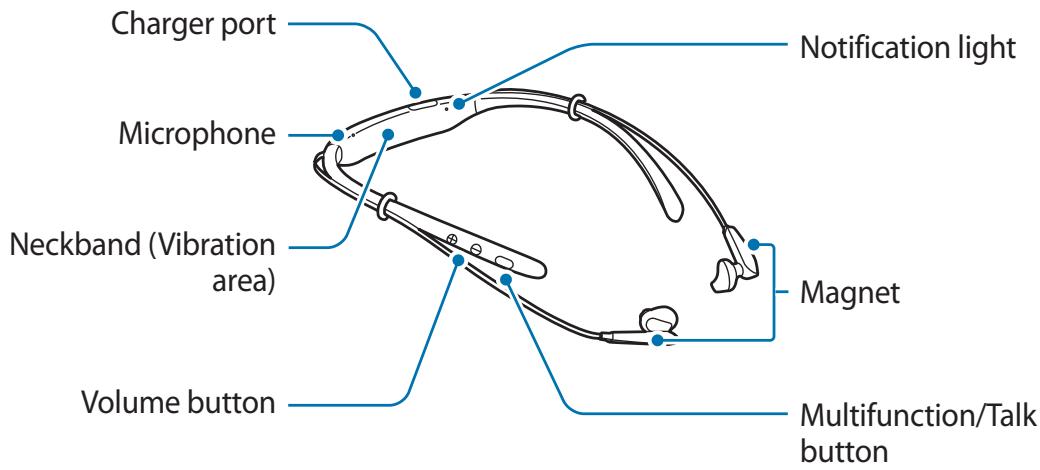
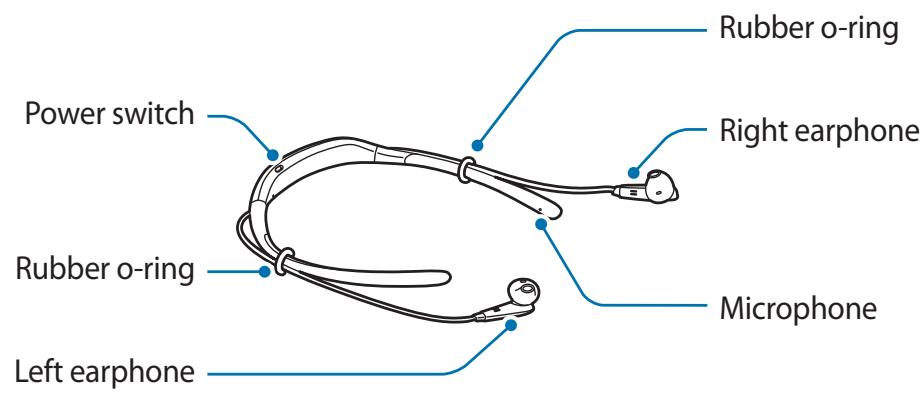
| Name | Function |
| Power switch | • Slide to turn the headset on or off. |
| Multifunction/Talk button | • Press to answer or end calls.
• Press to play or pause multimedia files.
• Press to reconnect devices when the connection is lost.
• Press twice to skip to the next file during media playback.
• Press and hold for one second to reject a call or to launch S Voice.
• Press and hold for three seconds to enter Bluetooth pairing mode. |
| Volume button | • Press to adjust the volume during a call or media playback.
• Press and hold the Volume (-) button to skip to the next file during media playback.
• Press and hold the Volume (+) button to skip to the previous file during media playback.
• Press and hold the Volume buttons (+ and -) simultaneously for about a second to turn the vibration feature on or off. |

If the vibration feature is turned off when you restart the headset, the feature will be turned on automatically.
Charging the battery
Charge the battery before using the headset for the first time or when the headset has been unused for extended periods.

Use only Samsung-approved chargers and cables. Unapproved chargers or cables can cause the battery to explode or damage the headset.

If the battery is completely discharged, the headset cannot be turned on immediately when the charger is connected. Allow a depleted battery to charge for a few minutes before turning on the headset.
Open the charging port cover and connect the headset to a charger.
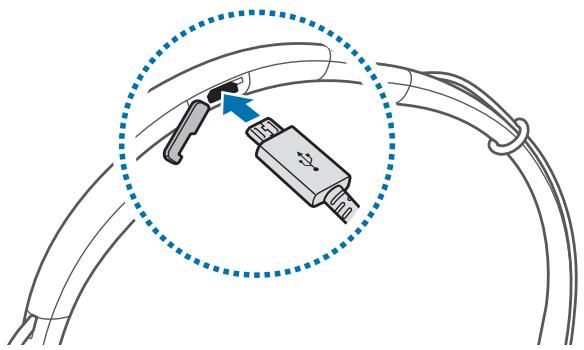

Connecting the charger improperly may cause serious damage to the headset. Any damage caused by misuse is not covered by the warranty.

- Chargers are sold separately.
- The headset can be used while it is charging, but it may take longer to fully charge the battery.
- While charging, the headset may heat up. This is normal and should not affect the headset's lifespan or performance. If the battery gets hotter than usual, the charger may stop charging.
- If the headset is not charging properly, take the headset to a Samsung Service Centre.
After fully charging, disconnect the headset from the charger.

- To save energy, unplug the charger when not in use. The charger does not have a power switch, so you must unplug the charger from the electric socket when not in use to avoid wasting power. The charger should remain close to the electric socket and easily accessible while charging.
- The socket-outlet shall be installed near the equipment and shall be easily accessible.
Turning the headset on and off
Slide the Power switch to turn on or off the headset.
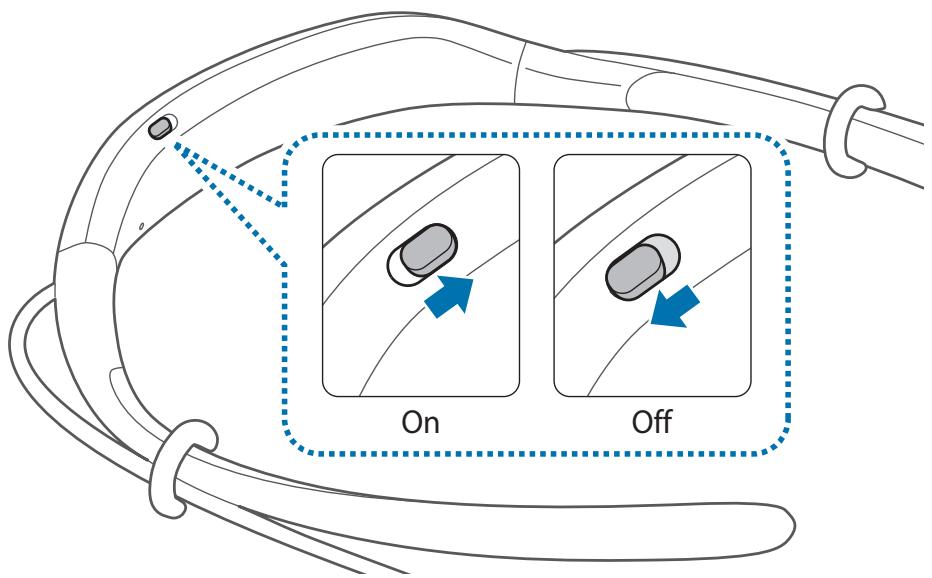

Follow all posted warnings and directions from authorised personnel in areas where the use of wireless devices is restricted, such as aeroplanes and hospitals.
Notification light identification
The notification light alerts you to the headset's status.
| Status | Colour |
| Power on | • Flashes blue three times |
| Power off | • Flashes red three times |
| Bluetooth pairing mode | • Flashes red and blue |
| Connected via Bluetooth | • Quickly flashes blue three times |
| Incoming call | • Flashes blue |
| Charging | • Continuously on red |
| Fully charged | • Continuously on blue |
| During use or in sleep mode | • Off |

- If the notification light does not work as described, disconnect the charger from the headset and reconnect it.
- The notification light may work differently depending on the connected device.
Connecting via Bluetooth
Bluetooth
About Bluetooth
Bluetooth is a wireless technology standard that uses a 2.4 GHz frequency to connect to various devices over short distances. It can connect and exchange data with other Bluetooth enabled devices, such as mobile devices, computers, printers, and other digital home appliances, without connecting via cables.
Notices for using Bluetooth
- To avoid problems when connecting your headset to another device, place the devices close to each other.
- Ensure that your headset and the other Bluetooth device are within the Bluetooth connection range (10 m). The distance may vary depending on the environment the devices are used in.
- Ensure that there are no obstacles between the headset and a connected device, including human bodies, walls, corners, or fences.
- Do not touch the Bluetooth antenna of a connected device.
- Bluetooth uses the same frequency as some industrial, scientific, medical, and low power products and interference may occur when making connections near these types of products.
- Some devices, especially those that are not tested or approved by the Bluetooth SIG, may be incompatible with the headset.
- Do not use the Bluetooth feature for illegal purposes (for example, pirating copies of files or illegally tapping communications for commercial purposes).
Connecting to other devices
This headset is compatible with Bluetooth-enabled devices.
1 Headset Slide the Power switch to turn on the headset. 2 Headset Press and hold the Multifunction button for three seconds to enter Bluetooth pairing mode.
When you turn on the headset for the first time, it automatically enters Bluetooth pairing mode.
3 Other device Activate the Bluetooth feature and search for Bluetooth devices.
For more information, refer to the other device's user manual.
4 Other device Tap Samsung Level U from the list.
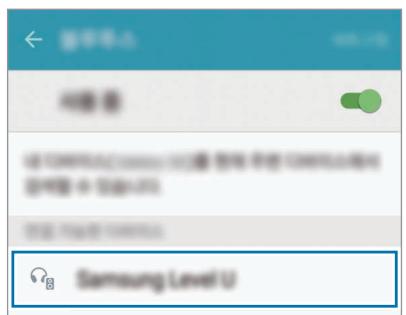

- If the Bluetooth connection fails or the other device cannot locate the headset, remove the device's information from the other device's list. Then, try to connect again.
- If the headset does not work properly, restart it or try to pair the devices again.
- The Bluetooth connection range and sound quality may vary depending on the connected devices.
Connecting additional devices
The headset can connect to up to two Bluetooth-enabled devices at the same time. When you connect the headset to two devices, the last device you connect is recognized as the primary device. The other device is recognized as the secondary device.
1. Connect the headset to a device via Bluetooth. 2. Press and hold the Multifunction button for three seconds to re-enter Bluetooth pairing mode.
The first device will be disconnected.
3. Connect the headset to a second device. 4. Reconnect the headset to the first device.

This feature may not be supported on some devices.
Reconnecting or disconnecting the devices
Reconnecting the devices
When your headset is disconnected from the device due to the distance between the devices, bring the devices closer together to pair them again.
If the connection is lost due to a problem with the connected device, press the Multifunction button on the headset. You can also access the Bluetooth menu on the connected device to pair them again.
Disconnecting the devices
Press and hold the Multifunction button for three seconds. Then, the connection ends and the headset enters Bluetooth pairing mode.
You can also end the connection by turning off the headset. When you turn on the headset again and the devices are in range, the headset automatically connects with the most recently paired device.
Using the headset
Wearing the headset

The headset contains magnets in its earbuds. The American Heart Association (US) and the Medicines and Healthcare Products Regulatory Agency (UK) both warn that magnets can affect the operation of implanted pacemakers, cardioverters, defibrillators, insulin pumps or other electro medical devices (collectively, "Medical Device") within the range of 15 cm (6 inches). If you are a user of any of these Medical Devices, DO NOT USE THE HEADSET UNLESS YOU HAVE CONSULTED WITH YOUR PHYSICIAN.

- Do not store your headset near magnetic fields. Magnetic stripe cards, including credit cards, phone cards, passbooks, and boarding passes, may be damaged by magnetic fields.
- Do not bend or twist the headset excessively.
- Do not apply excessive pressure to the headset.
- Do not pull on any part of the headset excessively.
1 Select the earbud tip for the left or right ear.
Each earbud tip is marked with L for the left ear and R for the right ear.
2 Cover the latch at the bottom of the earphone with the earbud tip.
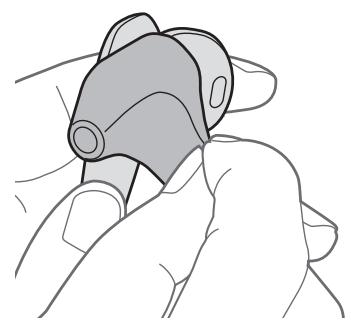
3 Hold the bottom of the earphone and cover the rest of the earphone with the earbud tip. Follow this procedure for the other earphone.
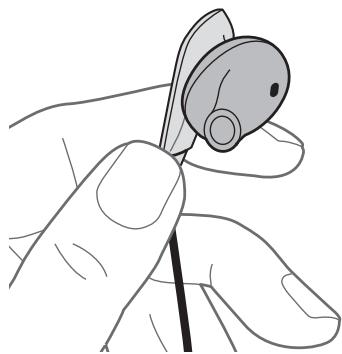

- Do not put the earphones in your ears without earbud tips.
- Do not pull the earbud tip excessively. The earbud tip may tear.
4 Wear the headset as shown in the image below. You can reposition the rubber o-rings.
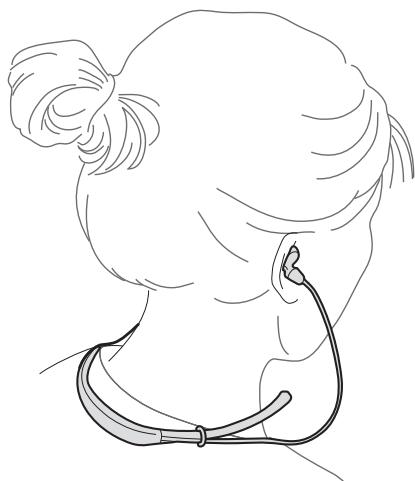

Do not pull the rubber o-rings excessively. The rings may tear.
Wearing and connecting the headset
Wearing the headset
Insert the earphones into your ears or wear the headset around your neck while the earphones are not connected to each other.
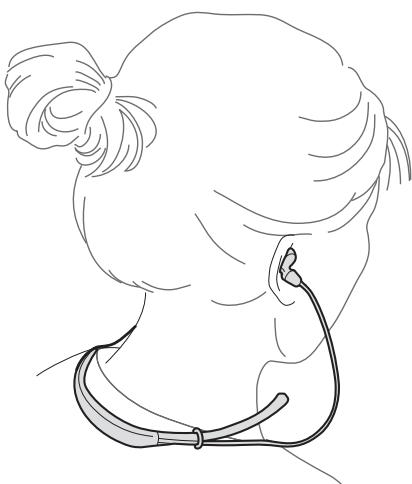
Connecting the earphones
Connect the earphones to each other using the built-in magnets.
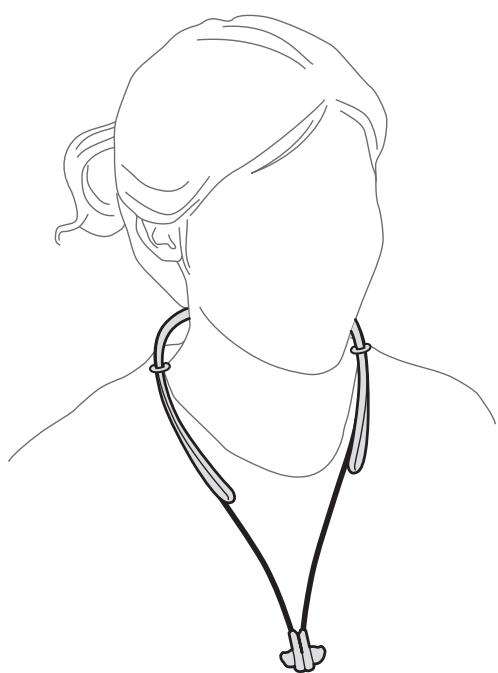

The earphones may not connect properly depending on the shape of the provided earbud tips. Ensure that the earphones are correctly connected.
Using the headset
Various features are available when the headset is connected to another device.

The following descriptions are based on a Samsung mobile device running Android 5.0. Some features may not be available depending on the connected device.
Calling features
Answering a call
When a call comes in while you are wearing the headset, the headset will beep and vibrate. Press the Talk button to answer the call.

- When the headset is connected to two devices and both devices receive calls simultaneously, you can only answer the primary device's call.
- When you play a multimedia file from one device, you can still answer calls from the other device.
Rejecting a call
Press and hold the Talk button for one second.
Adjusting the volume
Press the Volume button.
Switching sound output
Use the connected device's call features to switch call audio between the headset and the device.
Ending a call
Press the Talk button.
Control media playback, such as music and videos, using the Multifunction button.
Press the Multifunction button. The most recently-played music file will play automatically in the default music app installed on the connected device.
During playback, press the Multifunction button to pause playback. To resume playback, press the Multifunction button again.

When two connected devices are simultaneously playing multimedia files, the headset will stream from the device that started playing a file first. When you pause the currently-playing file, the file playing on the other device will play automatically.
Press the Multifunction button twice or press and hold the Volume (-) button to skip to the next file during playback.
Press and hold the Volume (+) button to skip to the previous file during playback.
Adjusting the volume
Press the Volume button.
Launching S Voice
Press and hold the Multifunction button for one second. The S Voice app will launch on the connected device.

This feature is available only with Samsung mobile devices supporting the S Voice app.
Using Samsung Level
On the connected device, download the Samsung Level app from Google Play Store or Galaxy Apps. With the app, you can check the remaining battery power and adjust the volume. You can also set the headset to notify you via voice notification or vibrate when you have notifications on the connected device. For more information, refer to the app's help menu.

The Samsung Level app is compatible with Samsung mobile devices running Android operating system 4.2.2 or later. Depending on your device's specifications, some features may not work on your headset.
Appendix
Troubleshooting
Before contacting a Samsung Service Centre, please attempt the following solutions.
Your headset does not turn on
When the battery is completely discharged, your headset will not turn on. Charge the battery completely before turning on the headset.
The battery does not charge properly (For Samsung-approved chargers)
Ensure that the charger is connected properly.
If the problem is still not resolved, contact a Samsung Service Centre.
Another Bluetooth device cannot locate your headset
- Ensure that your headset is in Bluetooth pairing mode.
- Restart your headset and search for the headset again.
- Ensure that your headset and the other Bluetooth device are within the Bluetooth connection range (10 m).
If the tips above do not solve the problem, contact a Samsung Service Centre.
Your headset is not connected to another device
- Ensure that the device you wish to connect with supports the Bluetooth wireless feature.
- Ensure that your headset and the other Bluetooth device are within the maximum Bluetooth range (10 m).
Bluetooth connection is often disconnected
- If there are obstacles between the devices, the operating distance may be reduced.
- Ensure that your headset and the other Bluetooth device are within the maximum Bluetooth range (10 m).
- When using the headset with other Bluetooth devices, the connection may be affected by electromagnetic waves. Use the headset in environments with fewer wireless devices present.
You cannot hear others speaking
- Adjust the device volume.
- Adjust the volume on the connected device when you cannot hear sounds on your headset at full volume.
Sound echoes during a call
Adjust the volume by pressing the Volume button or move to another area.
Others cannot hear you speaking on a call
- Ensure that you are not covering the built-in microphone.
- Ensure that the microphone is close to your mouth.
Audio quality is poor
- Wireless network services may be disabled due to issues with the service provider's network. Ensure to keep the headset away from electromagnetic waves.
- Ensure that your headset and the other Bluetooth device are within the maximum Bluetooth range (10 m).
The headset works differently as described in the manual
- Available functions may differ depending on the connected device.
- Some features cannot be used when two devices are connected with the headset at the same time.
The battery depletes faster than when first purchased
- When you expose the headset or the battery to very cold or very hot temperatures, the useful charge may be reduced.
- The battery is consumable and the useful charge will get shorter over time.
Removing the battery
- To remove the battery, you must visit an authorised service centre with the provided instructions.
- For your safety, you must not attempt to remove the battery. If the battery is not properly removed, it may lead to damage to the battery and device, cause personal injury, and/or result in the device being unsafe.
- Samsung does not accept liability for any damage or loss (whether in contract or tort, including negligence) which may arise from failure to precisely follow these warnings and instructions, other than death or personal injury caused by Samsung's negligence.
1 Remove the rubber cover from the left side of the neckband by pulling it from the end of the left neckband. Then, remove the left neckband. 2 Separate the earphone cable from the neckband cover. 3 Remove the neckband cover. 4 Disconnect the battery connector. 5 Lift the battery and cut the cables. 6 Remove the battery.
Copyright
Copyright © 2015 Samsung Electronics
This manual is protected under international copyright laws.
No part of this manual may be reproduced, distributed, translated, or transmitted in any form or by any means, electronic or mechanical, including photocopying, recording, or storing in any information storage and retrieval system, without the prior written permission of Samsung Electronics.
Trademarks
SAMSUNG and the SAMSUNG logo are registered trademarks of Samsung Electronics. - Bluetooth® is a registered trademark of Bluetooth SIG, Inc. worldwide. - All other trademarks and copyrights are the property of their respective owners.
Blackbushe Business Park
Saxony Way, Yateley, Hampshire
GU46 6GG, UK
29.04.2015
Copyright © 2015 Samsung Electronics
Blackbushe Business Park
Saxony Way, Yateley, Hampshire
GU46 6GG, UK

2015.04.29
Copyright © 2015 Samsung Electronics
Blackbushe Business Park
Saxony Way, Yateley, Hampshire
GU46 6GG, UK

2015.04.29
Stephen Colclough / EU Representative
Copyright © 2015 Samsung Electronics
Blackbushe Business Park
Saxony Way, Yateley, Hampshire
GU46 6GG, UK

2015.04.29
Stephen Colclough / EU Representative
Copyright © 2015 Samsung Electronics
Blackbushe Business Park,
Saxony Way, Yateley, Hampshire
GU46 6GG, UK

2015.04.29
Copyright © 2015 Samsung Electronics
Blackbushe Business Park
Saxony Way, Yateley, Hampshire
GU46 6GG, UK
2015.04.29
Copyright © 2015 Samsung Electronics
Blackbushe Business Park
Saxony Way, Yateley, Hampshire
GU46 6GG, UK
2015.04.29
(Date of issue)
Shlodogh
Stephen Colclough / EU Representative
Turn on the device.
If the device does not turn on, it may turn on. If the device does not turn on, press and hold the Power button to turn it on.
The battery does not charge properly (for chargers approved by Samsung)
Make sure the charger is plugged in correctly.
If the problem persists, contact the Samsung service center.
The Bluetooth device cannot connect to the speaker.
Bluetooth adapter cannot be opened for listening.
- Repeat the procedure to connect via Bluetooth.
- Restart the devices and try again. The speaker and the other Bluetooth device must be within the Bluetooth connection range (10 m).
If the indicator light does not resolve the problem, contact the Samsung service center.