
DB-62G - Radio Clas Ohlson - Free user manual and instructions
Find the device manual for free DB-62G Clas Ohlson in PDF.


| Product Type | DAB+ Radio with FM |
| Brand | Clas Ohlson |
| Model | DB-62G |
| Article Numbers | 18-8410-1,-2,-3 / 38-6539-1,-2,-3 |
| Power Supply Mains | 100-240V 50/60Hz, Output 6V 0.8A via adaptor |
| Battery Operation | 4 x AAA/LR03 batteries |
| Dimensions | 11 x 5.3 x 11 cm |
| Weight | 300 g |
| Display | Yes, with station and menu information |
| Aerial | Extendable FM aerial |
| Headphone Socket | 3.5 mm |
| Preset Stations | 10 presets |
| Frequency Bands | DAB (Band III) and FM (87.5-108 MHz) |
| Controls | Dial/Select, Info/Menu, Volume +/-, On/Off |
| Safety | Do not open, avoid water, adequate ventilation, indoor use only |
| Cleaning | Lightly moistened cloth, mild agents only |
| Disposal | Follow local regulations |
Frequently Asked Questions - DB-62G Clas Ohlson
User questions about DB-62G Clas Ohlson
0 question about this device. Answer the ones you know or ask your own.
Ask a new question about this device
Download the instructions for your Radio in PDF format for free! Find your manual DB-62G - Clas Ohlson and take your electronic device back in hand. On this page are published all the documents necessary for the use of your device. DB-62G by Clas Ohlson.
USER MANUAL DB-62G Clas Ohlson
natural_image
Illustration of a black radio device with antenna and speaker, no text or symbols visibleArt.no
18-8410-1,-2,-3
38-6539-1,-2,-3
Model
DB-62G
DB-62G
Ver. 20140611
clas ohlson
DAB+ Radio
Art.no 18-8410-1, -2, -3 Model DB-62G
38-6539-1, -2, -3 DB-62G
Please read the entire instruction manual before using the product and then save it for future reference. We reserve the right for any errors in text or images and any necessary changes made to technical data. In the event of technical problems or other queries, please contact our Customer Services (see address details on the back).
Safety
- The appliance should not be taken apart or modified. Never try to open the casing. The casing houses dangerous current-carrying non-insulated components. Contact with these can lead to fire or electric shock.
- Do not cover the appliance. Adequate ventilation, with a distance of at least 10 cm between ventilation ports and surrounding surfaces, is necessary to prevent the appliance from overheating.
- The appliance must only be connected to a standard domestic 100–240 V, 50/60 Hz electrical supply.
- Make sure that the power socket that the adaptor is connected to is easily accessible, since this is the only way to completely disconnect the DAB radio from the electrical system.
- Place the appliance on a stable, flat surface.
- Never place any source of naked flames (wax candles, tea lights, etc.) on or close to the appliance.
- Do not place the appliance where there is a risk of it falling into water or other liquid. Do not place any objects which contain liquid onto the appliance such as vases, drinks, etc.
- Do not place the appliance in constant sunlight or near naked flames such as wood stoves, lit candles, etc.
- Place the appliance in such a way that there is no risk of people tripping over its mains lead.
- This appliance is for indoor use only.
- Never subject the appliance to high temperature, dust, heavy vibration, impacts, humidity or moisture.
- Do not abuse the mains lead. Do not pull on the mains lead; grip the adapter and pull it out of the socket when disconnecting the appliance from the mains. Make sure that the mains adaptor does not come into contact with heat, sharp edges or is crushed in any way.
- Unplug the mains adaptor from the wall socket during thunderstorms or if the appliance is not to be used for a long time.
-
The standby switch on the appliance does not completely disconnect it from the mains. To completely disconnect the appliance from the mains, the mains adaptor must be unplugged from the wall socket.
-
Protect your hearing. To prevent possible hearing damage, do not listen at high volumes levels for long periods.
- Do not use the appliance if it or its mains lead is damaged in any way.
• The appliance should only be repaired by qualified service personnel. - It is completely normal for the appliance to become warm during use.
- The mains lead must be changed if damaged. This is to prevent the risk of electric shock or fire and should only be carried out by the manufacturer, authorised service facility or a qualified tradesman.
- Do not insert any foreign objects into the openings in the appliance. Doing so may increase the risk for electric shock.
- Never let children play with the appliance.
Buttons and functions
- Display
- [DIAL/SELECT] On/off, tune into a station, select the sub-menu
- [INFO/MENU] Access the main menu. Info: details of station, time display.
- Aerial
- [◀ + ] Increase the volume
- [◀ - ] Decrease the volume. If the volume is decreased to 0, the word "MUTE" will be displayed.
- 3.5 mm headphone socket
- Mains adaptor socket
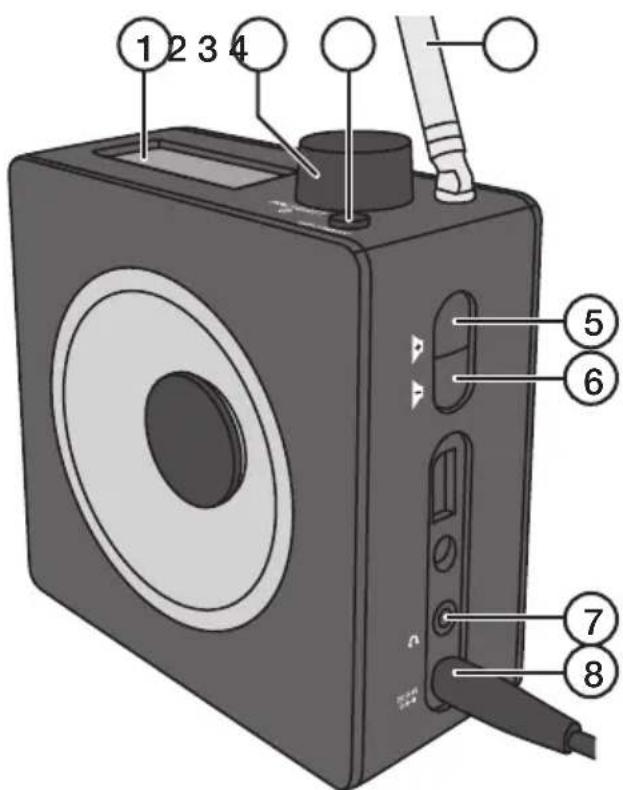
Operating instructions
Battery operation
- Remove the battery cover on the bottom of the appliance.
- Lay the battery removal ribbon on the bottom of the battery holder.
- Insert 4 × AAA/LR03 batteries. Note the polarity markings in the battery holder to ensure correct battery insertion.
- Refit the battery cover.
Mains adaptor operation
Connect the adaptor to the DC power socket (8) and to an available power point.
Switching the radio on and off
- Fully extend the FM aerial (4).
- Press [DIAL/SELECT] to turn the radio on. The first time the radio is turned on, it will perform a full automatic search for DAB stations. "FULL SCAN" is shown on the display. Once the scan has finished, the radio will select and play the DAB station that comes first in alphabetical order. Turn [DIAL/SELECT] to select another of the saved stationed. If no DAB stations are found, "NO SERV" will be shown on the display.
- Press and hold in [↓DIAL/SELECT] to turn the radio off.
Selecting FM or DAB radio mode
- Press [↓DIAL/SELECT] to turn the radio on.
- Press and hold in [ INFO/MENU ] until "DAB/FM" is shown on the display.
- Press [↓DIAL/SELECT] to change from FM mode to DAB mode or from DAB mode to FM depending which frequency band is active.
Scanning for DAB stations
If the radio has not automatically tuned in and saved DAB stations when the radio was first turned on, an automatic or manual scan can be performed as instructed below in the Menu navigation - DAB mode sub-menu section.
Scanning for FM stations
Automatic scan
- Select FM mode as explained above.
- Press and hold in [↓DIAL/SELECT] until the radio starts scanning the frequency band automatically.
- Press the button again to continue the scan once a station has been found.
Manual scan
- Select FM mode as explained above.
- Turn [∅DIAL/SELECT] to tune into a favourable station.
Menu navigation
There are a number of sub-menus depending on which frequency band is active.
FM mode sub-menu
- Press [↓DIAL/SELECT] to turn the radio on.
- Select FM mode as explained above.
-
Press and hold in [ INFO/MENU ] until "DAB/FM" is shown on the display.
-
Turn [∅DIAL/SELECT] clockwise to come to the menus as follows:
| Main menu Sub-menu | |
| DAB/FM No sub-menu, only toggling between DAB and FM when [💡 DIAL/SELECT ] is pressed | |
| PRESET (saved stations) RECALL (listen to a saved station) | |
| AUDIO SET AUTO (the radio automatically selects stereo or mono) | |
| VERSION No sub-menu, only firmware information | |
| RESET (return to default factory settings) | YES |
| NO | |
- Press [⏻ DIAL/SELECT] when the selected menu is displayed to come to the sub-menu.
- Turn [↓DIAL/SELECT] to select a sub-menu.
- Press [↓DIAL/SELECT] to confirm selection in the sub-menu and return to FM radio mode.
DAB mode sub-menu
- Press [↓DIAL/SELECT] to turn the radio on.
- Select DAB mode as explained above.
- Press and hold in [ INFO/MENU ] until "DAB/FM" is shown on the display.
- Turn [∅DIAL/SELECT] clockwise to come to the menus as follows:
| Main menu Sub-menu | |
| DAB/FM No sub-menu, only toggling between DAB and FM when [IMAGE] is pressed | |
| PRESET (saved stations) RECALL (listen to a saved station) | |
| FULL SCAN (automatic scanning for DAB radio stations) | No sub-menu, FULL SCAN starts when [IMAGE] is pressed |
| MANUAL (manual scanning for DAB radio stations) | No sub-menu, DAB frequencies are displayed when [IMAGE] is pressed. Press [IMAGE] when the respective frequency, turn the knob to tune in. |
| VERSION No sub-menu, only firmware information | |
| RESET YES | |
| NO | |
- Press [↓DIAL/SELECT] when the selected menu is displayed to come to the sub-menu.
- Turn [↓DIAL/SELECT] to select a sub-menu.
- Press [↓DIAL/SELECT] to confirm selection in the sub-menu and return to FM radio mode.
Saving radio station presets
The radio has 10 preset station slots for your favourite stations.
- Tune into the station which you wish to save.
- Press and hold in [INFO/MENU] until "DAB/FM" is shown on the display.
- Press [∅DIAL/SELECT] until "PRESET" appears on the display.
- Press [↓DIAL/SELECT] to come to the "RECALL" and "SAVE" sub-menus.
- Press [DIAL/SELECT] until "SAVE" appears on the display.
-
Press [↓DIAL/SELECT] to confirm. The display will show "EMPTY PX" (X represents the preset slot 1–10).
-
Turn [↓DIAL/SELECT] to select a preset slot.
-
Press [ ∅DIAL/SELECT ] to confirm. The display will show "X SAVED" which means that the station has been saved on the indicated preset slot.
Listening to preset radio stations
- Press and hold in [INFO/MENU] until "DAB/FM" is shown on the display.
- Press [∅IAL/SELECT] until "PRESET" appears on the display.
- Press [↓DIAL/SELECT] to come to the "RECALL" and "SAVE" sub-menus.
- Turn [DIAL/SELECT] until "RECALL" appears on the display.
- Press [↓DIAL/SELECT] to confirm. The display will show preset slot "1".
- Turn [↓DIAL/SELECT] to select a preset slot.
- Press [↓DIAL/SELECT] to confirm.
Factory reset
Note: All of your settings and stored presets will be lost when the radio is reset.
- Press and hold in [INFO/MENU] until "DAB/FM" is shown on the display.
- Turn [∅DIAL/SELECT] until "RESET" appears on the display.
- Press [↓DIAL/SELECT] to come to the "YES" and "NO" sub-menus.
- Turn [∅IAL/SELECT] until "YES" appears on the display.
- Press [DIAL/SELECT] to confirm.
Care and maintenance
• Always unplug the adaptor from the wall socket before cleaning the appliance.
- Clean the appliance using a lightly moistened cloth. Use only mild cleaning agents, never solvents or corrosive chemicals.
- Unplug the adaptor and remove the batteries if the appliance is not to be used for an extended period. Keep the appliance dry and free from dust.
Troubleshooting guide
| The radio won't turn on. • | Make sure that the adaptor and mains lead are intact and undamaged.Make sure that the mains adaptor and its lead are properly connected both to a wall socket and the radio.Check that the wall socket is live.The batteries might be dead. Replace if necessary. |
| No sound. • Check the volume. | Check that the MUTE function is not activated. |
| Poor radio reception. • Move the radio to another location.Perform a factory reset, refer to the Factory reset section above. |
Disposal
This product should be disposed of in accordance with local regulations. If you are unsure how to proceed, contact your local council.
Specifications
Mains adaptor
Input 100–240 V, 50/60 Hz
Output 6 V, 0.8 A
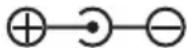
Radio
Batteries 4 × AAA/LR03
Size 11 × 5.3 × 11 cm
Weight 300 g
DAB-radio
Art.nr 18-8410-1, -2, -3 Modell DB-62G
38-6539-1, -2, -3 DB-62G
Postal 10 – 13 Market Place
Kingston Upon Thames
Surrey
KT1 1JZ
Deutschland
- DAB+ Radio
- Safety
- Buttons and functions
- Operating instructions
- Battery operation
- Mains adaptor operation
- Switching the radio on and off
- Selecting FM or DAB radio mode
- Scanning for DAB stations
- Scanning for FM stations
- Automatic scan
- Manual scan
- Menu navigation
- FM mode sub-menu
- DAB mode sub-menu
- Saving radio station presets
- Listening to preset radio stations
- Factory reset
- Care and maintenance
- Troubleshooting guide
- Disposal
- Specifications
- Mains adaptor
- Radio
- DAB-radio
- Deutschland
Brand : Clas Ohlson
Model : DB-62G
Category : Radio