
TA-855 - Radio Clas Ohlson - Free user manual and instructions
Find the device manual for free TA-855 Clas Ohlson in PDF.


| Product Type | USB FM Clock Radio |
| Brand | Clas Ohlson |
| Model | TA-855 |
| Dimensions | 23 × 14 × 13 cm |
| Power Supply | 230 V AC, 50 Hz |
| Output Power | 5 W |
| Frequency Range | FM 87.50–108 MHz |
| Remote Control Battery | 1 × CR2025 (included) |
| Alarm Function | Yes, with snooze (9 min) and multiple alarm types (USB, buzzer, radio) |
| USB Playback | Yes, supports USB devices (not U3) |
| AUX Input | 3.5 mm jack for external audio sources |
| Equalizer Presets | 6 settings (in USB mode) |
| Mute Function | Yes, press [MUTE] to toggle |
| Display | Digital display with backlight |
| Remote Control | Yes, with standy, mode, volume, EQ, alarm, etc. |
| Ventilation Requirements | Keep at least 15 cm clearance around ventilation openings |
| Indoor Use Only | Yes |
| Cleaning | Use a soft, dry cloth; avoid alcohol, ammonia, benzene |
| Disposal | Dispose according to local regulations |
| Included Accessories | Remote control (battery included), telescopic aerial |
| Safety Certification | Product should only be repaired by qualified technicians |
Frequently Asked Questions - TA-855 Clas Ohlson
User questions about TA-855 Clas Ohlson
0 question about this device. Answer the ones you know or ask your own.
Ask a new question about this device
Download the instructions for your Radio in PDF format for free! Find your manual TA-855 - Clas Ohlson and take your electronic device back in hand. On this page are published all the documents necessary for the use of your device. TA-855 by Clas Ohlson.
USER MANUAL TA-855 Clas Ohlson
Art.no
38-4823
Model
TA-855
Ver. 20130429
clas ohlson
USB FM Clock Radio
Art.no 38-4823 Model TA-855
Please read the entire instruction manual before use and save it for future reference. We reserve the right for any errors in text or images and for making any necessary technical changes to this document. If you should have any questions concerning technical problems please contact our Customer Services.
Safety
• This product should only be repaired by qualified service technicians.
• The product should not be taken apart or modified.
- Do not cover the product. Adequate ventilation with a distance of at least 15 cm between ventilation openings and the surrounding area is necessary to prevent overheating.
- Remove the batteries if the device is not to be used for a long time. This prevents the batteries from leaking.
- The product should not be taken apart or modified. Certain exposed parts inside the casing carry dangerous current. Touching these can lead to fire or electric shock.
• The product is designed for indoor use only.
- Never subject the product to high temperature, dust, heavy vibration, impacts, humidity or moisture.
- Do not place the product where there is a risk of it falling into water or other liquid. Do not place any objects which contain liquid on the product, e.g. flower vases or fizzy drinks.
- Disconnect the device from the power supply by unplugging it from the wall socket. The product's plug should be easily accessible.
Product description
Trendy desktop radio with remote control. USB port and 3.5 mm input jack for e.g. MP3 players. Alarm clock. 230 V. Display backlight.
Buttons and functions
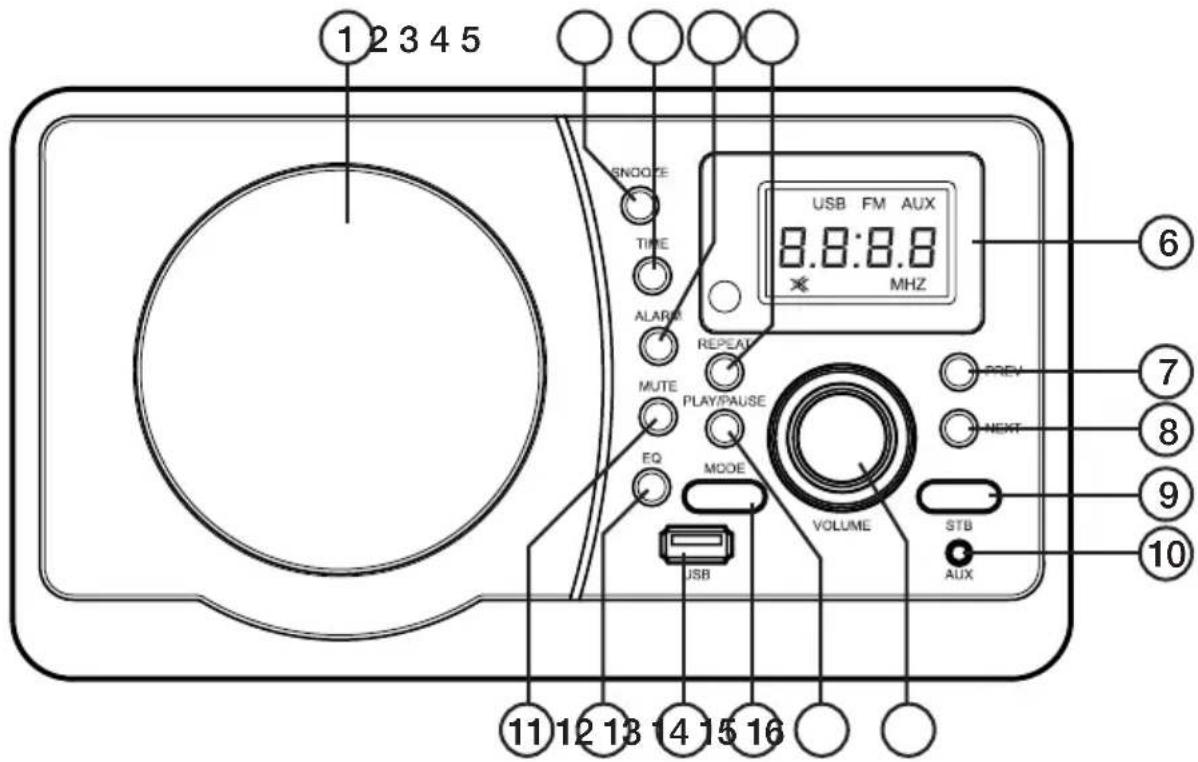
- Speaker
- [SNOOZE] Snooze settings
- [TIME] Time settings
- [ALARM] Alarm settings
- [REPEAT] Repeat selector
- Digital display
- [PREV] Previous track
- [NEXT] Next track
- [STB] Standby
- 3.5 mm AUX jack
- [MUTE] Volume off
- [EQ] Equalizer settings
- USB port
- [MODE] Mode selector
- [PLAY/PAUSE] - Play/pause control
- [VOLUME] Volume control
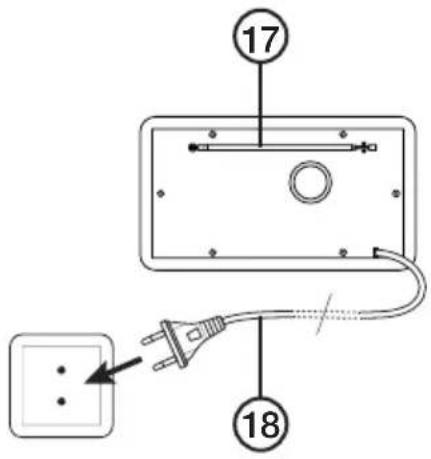
- Telescopic aerial
- Mains lead
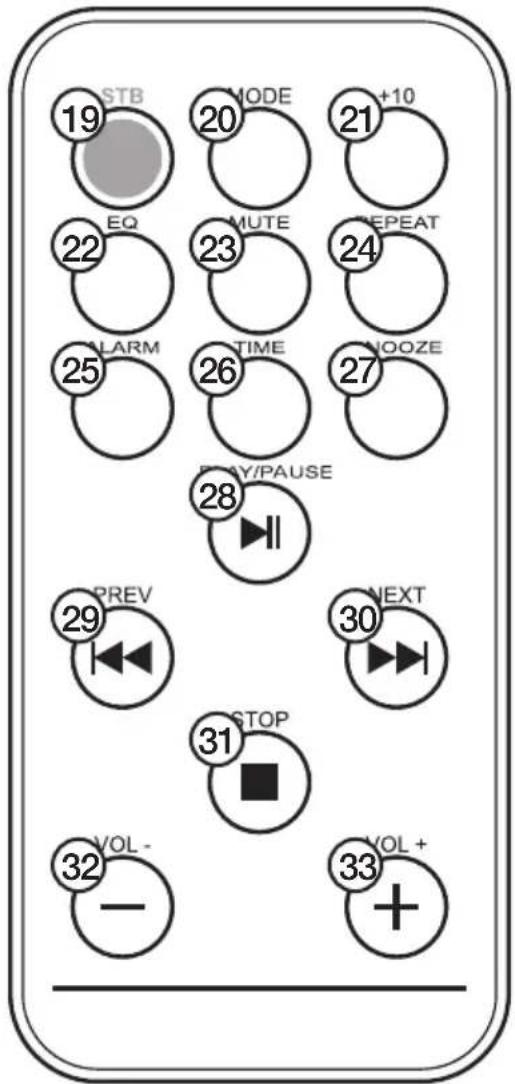
Remote control
- [STB] Standby
- [MODE] Mode selector
- [ + 10 ] Ten track advance
- [EQ] Equalizer settings
- [MUTE] Volume off
- [REPEAT] Repeat selector
- [ALARM] Alarm settings
- [TIME] Time settings
- [SNOOZE] Snooze settings
- [PLAY/PAUSE] - Play/pause control
- [PREV] Previous track
- [NEXT] Next track
- [STOP] Stops playback
- [VOL - ] Lower volume
- [VOL + ] Raise volume
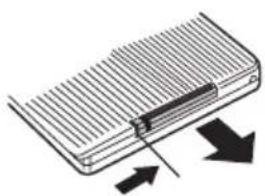
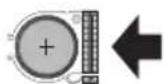
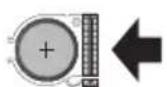
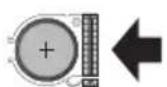
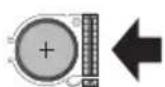
Inserting the remote control batteries
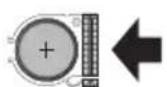
- Slide the cover to the right and pull out the battery compartment.
- Insert 1 × CR2025 batteries (included).
- Refit the battery holder.
natural_image
Diagram of a heat exchanger or cooling device with heat flow arrows indicating direction (no text or symbols)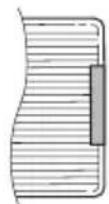
Getting started
Turning the device on
- Connect the mains lead to a wall socket.
- Press [STB] to turn the device on.
Setting the time
- Press [MODE] until the time display appears.
- Press [TIME] for approx 2 seconds until the hours display begins to flash.
- Press [PREV] or [NEXT] to change the hours.
- Press [TIME] again to advance to the minutes setting.
- Press [PREV] or [NEXT] to change the minutes.
- Press [TIME] for approx 2 seconds to confirm your settings and exit.
Setting the alarm time
- Press [MODE] until the time appears.
- Press [ALARM] for approx 2 seconds until the hours display begins to flash.
- Press the [PREV] or [NEXT] buttons to change the hours.
- Press [ALARM] again to advance to the minutes setting.
- Press the [PREV] or [NEXT] buttons to change the minutes.
- Press [ALARM] for approx 2 seconds to confirm.
Turning the alarm on/off
- Press [ALARM] for approx 2 seconds until the hours display begins to flash.
- Press [ALARM] twice until "OFF" appears.
- Press the [PREV] or [NEXT] buttons to select either ON or OFF.
- Press [ALARM] for approx 2 seconds to confirm.
Selecting alarm type
- Press [ALARM] for approx 2 seconds until the hours display begins to flash.
- Press [ALARM] three times until "U" appears.
- Press the [PREV] or [NEXT] to select between "U" (USB), "bb" (buzzer) or "R" (radio).
- Press [ALARM] for approx 2 seconds to confirm.
Note:
- Pressing [SNOOZE] once the alarm sounds will pause it for 9 minutes. Pressing any other button will turn off the alarm until the next day.
- If no button is pressed when the alarm sounds, it will sound for 1 minute and pause for 5 minutes. This cycle will repeat three times if no button is pressed during this time. After three cycles the alarm will turn off until the next day.
• The alarm will not be activated if the device is turned off.
Using the radio
- Extend the aerial fully.
- Press [MODE] until the radio display appears.
- Press [PREV] or [NEXT] to find a station.
- Press [PREV] or [NEXT] for about 2 seconds to start the automatic scan. The search stops when a station has been found.
USB
- Connect a USB device to the USB port.
- The device will switch to USB mode automatically.
- Playback should now start automatically from the device.
- Press the [PREV] or [NEXT] buttons to change tracks.
- Press and hold [PREV] or [NEXT] to advance or go back ten tracks. This function is controlled by [+10] on the remote.
- Press [REPEAT] successively to change between random (RAND), single repeat (SING), repeat folder (FOLD) or repeat all (ALL).
- If you remove the USB the device will automatically revert to radio mode.
Note: USB devices with the U3 feature will not work with this device.
3.5 mm AUX jack
You can connect an external audio source to the device by using a 3.5 mm lead (not included).
- Press [MODE] until "AUX" appears.
- Connect the external device to the 3.5 mm jack.
Settings
• Use the volume control knob to set the volume.
- Press [EQ] to set the equalizer in USB mode. There are six available settings.
- Press [MUTE] to shut off the volume. Press again to turn on the volume.
Care and maintenance
Use a soft, dry cloth to clean the device. Do not use cleaning fluids which contain alcohol, ammonia, benzene or abrasives that can cause damage to the casing.
Disposal
This product should be disposed of in accordance with local regulations. If you are unsure how to proceed, contact your local authority.
Specifications
Power supply 230 V AC, 50 Hz
Output power 5 W
Remote control batteries 1 × CR2025 (included)
Size 23 × 14 × 13 cm
Frequency range FM 87.50–108 MHz
natural_image
Diagram of a heat exchanger or cooling device with heat flow arrows indicating direction (no text or symbols)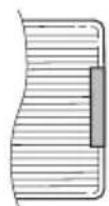
Att komma igång
Starta apparaten
natural_image
Diagram of a heat exchanger or cooling device with heat flow arrows indicating direction (no text or symbols)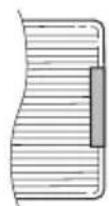
Kom i gang
Starte apparatet
natural_image
Diagram of a heat exchanger or cooling device with heat flow arrows indicating direction (no text or symbols)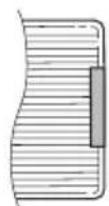
Käytön aloittaminen
Taajuusalue 87.50–108 MHz (FM)
natural_image
Diagram of a heat exchanger or cooling device with heat flow arrows indicating direction (no text or symbols)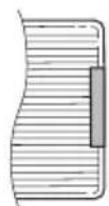
Inbetriebnahme
Gerät einschalten
Postal 10 – 13 Market Place
Kingston Upon Thames
Surrey
KT1 1JZ
Deutsch
- USB FM Clock Radio
- Safety
- Product description
- Buttons and functions
- Remote control
- Inserting the remote control batteries
- Getting started
- Turning the device on
- Setting the time
- Setting the alarm time
- Turning the alarm on/off
- Selecting alarm type
- Note:
- Using the radio
- USB
- mm AUX jack
- Settings
- Care and maintenance
- Disposal
- Specifications
- Att komma igång
- Starta apparaten
- Kom i gang
- Starte apparatet
- Käytön aloittaminen
- Inbetriebnahme
- Gerät einschalten
- Deutsch
Brand : Clas Ohlson
Model : TA-855
Category : Radio