
MP-K100 - Radio Clas Ohlson - Free user manual and instructions
Find the device manual for free MP-K100 Clas Ohlson in PDF.


| Product Type | Portable Radio |
| Brand | Clas Ohlson |
| Model | MP-K100 |
| Dimensions (approx.) | 200 x 120 x 60 mm |
| Weight (approx.) | 500 g |
| Power Supply | 3 x AA batteries (not included) or AC adapter (6V DC) |
| Frequency Bands | AM (MW) and FM |
| Tuning Method | Analog dial with indicator |
| Speaker | Built-in, 77 mm dynamic |
| Headphone Output | 3.5 mm stereo jack |
| Volume Control | Rotary knob |
| Power LED Indicator | Red LED when on |
| Antenna | Telescopic FM rod antenna |
| Care and Cleaning | Wipe with a soft, dry cloth. Do not use harsh chemicals. |
| Safety Warnings | Do not expose to water or moisture. Keep away from children under 3 years. |
| Spare Parts / Repairability | Batteries and AC adapter are user-replaceable. No other spare parts available. |
| General Information | Portable AM/FM radio suitable for indoor and outdoor use. |
Frequently Asked Questions - MP-K100 Clas Ohlson
User questions about MP-K100 Clas Ohlson
0 question about this device. Answer the ones you know or ask your own.
Ask a new question about this device
Download the instructions for your Radio in PDF format for free! Find your manual MP-K100 - Clas Ohlson and take your electronic device back in hand. On this page are published all the documents necessary for the use of your device. MP-K100 by Clas Ohlson.
USER MANUAL MP-K100 Clas Ohlson
Kitchen clock radio with MP3
Köksklockradio med MP3
natural_image
Line drawing of a front panel with buttons and dials (no text or symbols)Model/Modell/Malli: MP-K100
Model/Modell/Malli: MP-K100-UK
Kitchen clock radio with MP3
Art. no. 38-2353/18-8001, model MP-K100/MP-K100-UK
Please read the entire instruction manual before using and save it for future reference. We apologise for any text or photo errors and any changes of technical data.
If you have any questions concerning technical problems please contact our Customer Service Department (see address on reverse.)
Table of contents
Safety
Buttons and functions
Getting started
Use
Care and maintenance
Waste disposal
Specifications
Safety
- Never open the casing as certain unprotected components are live. Physical contact with these may cause an electric shock.
- The product must not be placed so that it can fall into water or other fluids. Never place the product next to objects which can cause water or other fluids to wash over the product, e.g. a vase or can of pop.
- Ensure that the product ventilation openings are free so that air can circulate freely.
- Use only the intended or recommended power cable for the appliance.
Buttons and functions


- Setting the time
- Setting the alarm/Switching off alarm
- Setting the hour
- Setting the minutes
- Selector switch (ON(OFF/AUTO)
- Sound switch
- Indicator for MP3 playback
- Timer on/off (Count Down)
- Volume control
- Frequency selector
-
▶II - Start/Pause playback (MP3)
-
|◀◀ - Next track (MP3)
- ▶▶| - Next save (MP3)
- Memory card connection (SD/MMC)
- Frequency band selector AM/FM (Under the lid)
- Lid
- Loudspeakers
- Time display
- Battery lid
- Wire aerial
- Table stand
Getting started
Assembly under a kitchen cupboard
Using the mounting plate, the appliance can be mounted under a kitchen cupboard. The mounting plate is fastened with quick fit fasteners on the upper side of the appliance.
Assembly using spacer rings

Assembly without spacer rings
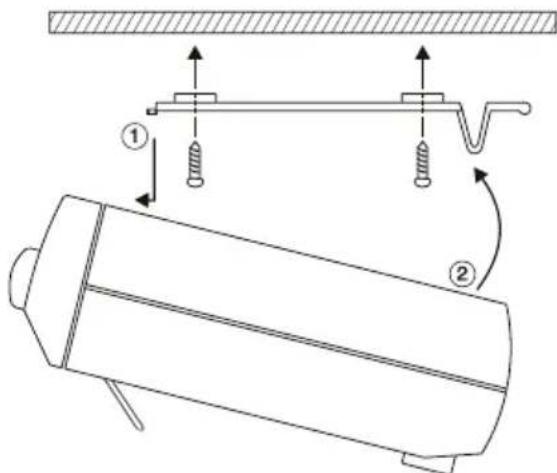
- Remove the mounting plate from the appliance by simultaneously pressing both of the locking devices and lifting the mounting plate.
- Fasten the mounting plate as displayed in the picture, with or without the spacer rings. Use the longer screws together with the spacer rings.
- Fasten the appliance onto the mounting plate by sliding it onto the hooks (1) before folding the appliance upwards until the locking devices (2) have secured the appliance.
- Carry this out in the reverse order to unfasten the appliance.
Table placement
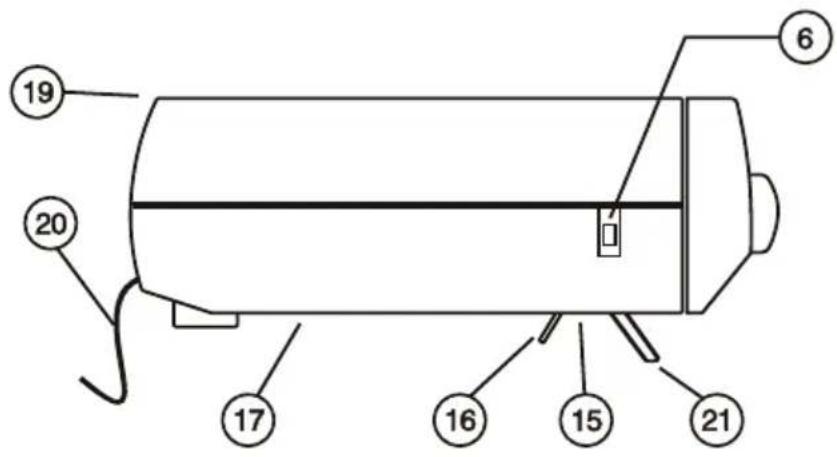
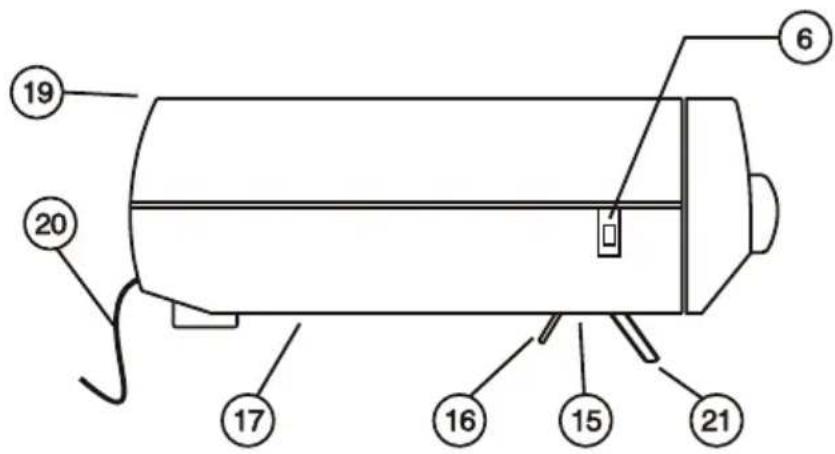
Fold out both of the supports if the appliance is to be placed on a flat surface.
Table use

natural_image
Simple line drawing of a cylindrical object resting on a surface, no text or symbols presentReserve battery
The clock radio has a reserve function using a battery. 1.9 V battery (not included) has to be installed to ensure that your settings are not lost during a power failure.
Put the batteries in:
- Remove the battery lid on the rear side of the appliance by pushing it straight back.
- Lift the battery contact and put 1 6LR61-battery in.
- Replace the battery lid and connect the power cable to the socket.
Please note! Always remove the battery if the appliance is not going to be used for a long time.
Use
Setting time
- Press the button Setting the time (1) while repeatedly pressing the button Setting the hour (3) to set the hour.
- Press the button Setting the time (2) while repeatedly pressing the button Setting the minutes (4) to set the minutes.
Listening to the radio
- Switch the selector switch (5) to the "ON" position and the sound selector (6) to the "RADIO" position.
- Adjust the volume using the volume control (9).
- Set the required frequency using the frequency selector (10).
- Place the wire aerial in a suitable spot to ensure the best reception possible.
- To switch the radio off, turn the selector switch (5) to the "OFF" position.
Playing MP3 files from a memory card
The appliance can play MP3 files which are on a SD/MMC memory card. The appliance supports memory cards up to 1 Gb.
- Switch the selector switch (5) to the "ON" position and the sound selector (6) to the "MP3" position".
- Stick a SD or MMC memory card containing MP3 files in the memory card connection (14). Playback of MP3 files starts automatically and the MP3 indicator goes on.
- Adjust the volume using the volume control (9).
- Use I ◀◀ and ▶▶I to choose the previous or next track.
- Press ▶|| to pause or resume playback.
- To switch the MP3 playback off, turn the selector switch (6) to the "OFF" position.
Note If the memory card contains files which are not MP3 files these can disturb or stop playback. Therefore ensure that there are only MP3 files on the memory card.
Timer (countdown)
The countdown time can be set between 1 minute and 1 hour and 59 minutes.
- Switch the selector switch (5) to the "OFF" position for a silent countdown or "ON" if you want to listen to the radio or MP3 files at the same time (see sections Listening to the radio and MP3 file playback).
- Set the Timer selector (8) in the "COUNT DOWN" position. The clock changes to the countdown position and starts counting down from 59 minutes (the display shows "0:59").
- To increase the countdown time, press the button used for setting hours once (3). The time increases by an hour.
- To decrease the countdown time, press the button used for setting minutes once or several times (4) until the required time has been reached.
Setting the alarm
- Press the button Setting the alarm (1) while repeatedly pressing the button Setting the hour (3) to set the hour.
- Press the button Setting the alarm (2) while repeatedly pressing the button Setting the minutes (4) to set the minutes.
- Switch the selector switch (5) in the "AUTO" position to activate the alarm.
Choose the alarm sound
- Alarm signal: Set the sound selector (6) in the "BUZZ" position.
- Radio: Set the required radio channel (see chapter Listening to the radio) and switch the selector switch (6) to the "RADIO" position.
- MP3: Prepare the appliance for MP3 playback (see section MP3 file Playback) and switch the sound selector (6) to the "MP3" position.
Switching the alarm off
- When the alarm goes off, switch the selector switch (5) to the "OFF" position to switch the alarm off.
Care and maintenance
Wipe with a soft, slightly damp cloth. Do not use solvents or strong detergents.
Disposal
Disposal of this product must be carried out in accordance with local regulations. If you are unsure of how to proceed, contact your local council.
Specifications
Voltage 230 V AC, 50 Hz
Type of battery (backup) 1 6LR61 (not included).
Radio frequency area FM 88 – 108 MHz
Maximum memory size SD/MMC 1 GB (FAT16/FAT32))
Köksklockradio med MP3
Art.nr 38-2353/18-8001, modell MP-K100/MP-K100-UK
Montering utan distansringar

natural_image
Simple line drawing of a cylindrical object resting on a surface with a hatched base (no text or symbols)
- Tidsinnstilling
- Still inn alarmen/Skru av alarmen
- Timeinnstilling
- Minuttinnstilling
- Funksjonsomkobler (ON/OFF/AUTO)
- Lydomkobler
- Indikering for MP3-avspilling
- Timer av/på (Count Down)
- Volumkontroll
- Frekvensvelger
- I ◀◀◀ - Foregående spor (MP3)
- ▶▶▶I - Neste spor (MP3)
- Tilkobling for minnekort (SD/MMC)
- Frekvensomkobler AM/FM (Under luken)
- Luke
- Høyttaler
- Tidsvisning
- Batteriluke
- Trådantenne
-
Bordstativ
-
▶II - Start/Pause avspillingen (MP3)
Kom i gang
natural_image
Simple line drawing of a cylindrical object resting on a surface with a hatched base (no text or symbols)Batterireserve
natural_image
Simple line drawing of a cylindrical object resting on a horizontal surface (no text or symbols)Paristovarmennus
For consumer contact, please visit
www.clasohlson.co.uk and click on
customer service.
INTERNET www.clasohlson.co.uk


- Kitchen clock radio with MP3
- Art. no. 38-2353/18-8001, model MP-K100/MP-K100-UK
- Table of contents
- Safety
- Buttons and functions
- Getting started
- Assembly under a kitchen cupboard
- Assembly using spacer rings
- Assembly without spacer rings
- Table placement
- Table use
- Reserve battery
- Put the batteries in:
- Use
- Setting time
- Listening to the radio
- Playing MP3 files from a memory card
- Timer (countdown)
- Setting the alarm
- Choose the alarm sound
- Switching the alarm off
- Care and maintenance
- Disposal
- Specifications
- Köksklockradio med MP3
- Art.nr 38-2353/18-8001, modell MP-K100/MP-K100-UK
- Montering utan distansringar
- Kom i gang
- Batterireserve
- Paristovarmennus
Brand : Clas Ohlson
Model : MP-K100
Category : Radio