
BT-202 - Radio Clas Ohlson - Free user manual and instructions
Find the device manual for free BT-202 Clas Ohlson in PDF.


| Product Type | FM Radio with Bluetooth |
| Brand | Clas Ohlson |
| Model | BT-202 |
| Dimensions | 13 x 13 x 4.5 cm |
| Weight | 370 g (without batteries) |
| Power Supply | Mains adaptor: 100-240 V, 50/60 Hz, output 6 V DC, 600 mA; or 4 x AA/LR6 batteries (not included) |
| Battery Type | 4 x AA/LR6 (sold separately) |
| Radio Frequency | FM 87.5–108 MHz |
| Bluetooth | Yes, Bluetooth pairing with external devices |
| AUX Input | 3.5 mm AUX IN socket |
| Preset Stations | 10 FM presets (P01-P10) |
| Clock | 12/24 hour display, settable |
| Display | LCD display with indicators for AUX, PM, BT, FM |
| Controls | On/off, source, set/mem/m+, volume up/down, previous/next |
| Safety Features | Automatic disconnect via mains plug; standby switch does not fully disconnect |
| Care Instructions | Wipe with damp cloth using mild cleaning agents; avoid solvents |
| Operating Temperature | Do not expose to high temperatures, moisture or impact |
| Replaceable Batteries | Yes, user-replaceable AA batteries |
| Mains Adaptor | Included (100-240 V, 50/60 Hz, output 6 V DC, 600 mA) |
| Warranty | Not specified in manual |
Frequently Asked Questions - BT-202 Clas Ohlson
User questions about BT-202 Clas Ohlson
0 question about this device. Answer the ones you know or ask your own.
Ask a new question about this device
Download the instructions for your Radio in PDF format for free! Find your manual BT-202 - Clas Ohlson and take your electronic device back in hand. On this page are published all the documents necessary for the use of your device. BT-202 by Clas Ohlson.
USER MANUAL BT-202 Clas Ohlson
FM Radio with Bluetooth
FM-radio med Bluetooth
FM-radio, jossa Bluetooth
FM Radio with Bluetooth
Art.no 38-6892, 38-6893 Model BT-202
Please read the entire instruction manual before using the product and then save it for future reference. We reserve the right for any errors in text or images and any necessary changes made to technical data. In the event of technical problems or other queries, please contact our Customer Services (see address details on the back).
Safety
- The radio should not be taken apart or modified. Never try to open the casing of the radio. The casing houses dangerous current-carrying non-insulated components. Contact with these can lead to fire or electric shock.
- Do not cover the radio. Adequate ventilation with a distance of at least 10 cm to surrounding objects is necessary to prevent the radio from becoming too warm.
- The radio must only be connected to a standard domestic 100–240 V, 50/60 Hz electrical supply.
- Make sure that the power socket that the adaptor is connected to is easily accessible, since this is the only way to completely disconnect the product from the electrical system.
- The radio should be placed on a stable, flat surface.
- Never place any source of naked flames (wax candles, tea lights, etc.) on or close to the radio.
- Do not place the radio in an unstable position where there is a risk that it may fall into water or other liquids. Do not place any objects containing liquid onto the radio such as vases, drinks, etc.
- Do not place the radio in constant sunlight or near naked flames such as wood stoves, lit candles, etc.
- Position the radio where there is no risk of people tripping over the mains lead of the adaptor.
- Never subject the radio to high temperatures, dust, heavy vibration, impacts, humidity or moisture.
- Do not abuse the mains adaptor or its lead. Make sure that the mains adaptor and its lead do not come into contact with heat, sharp edges or is crushed in any way.
- Unplug the mains adaptor from the wall socket during thunderstorms or if the radio is not to be used for a long time.
- The standby switch on the radio does not completely disconnect it from the mains. To completely disconnect the radio from the mains, the mains adaptor must be unplugged from the wall socket.
- Protect your hearing. Listening on high volume for prolonged periods can lead to permanent hearing loss.
- Do not use the radio if it, the mains lead or adaptor is damaged in any way.
- The radio should only be repaired by qualified service personnel.
- It is completely normal for the radio to become warm during use.
- Do not insert any foreign objects into the openings in the radio. Risk of electric shock.
- Do not let children play with the radio.
Buttons and functions
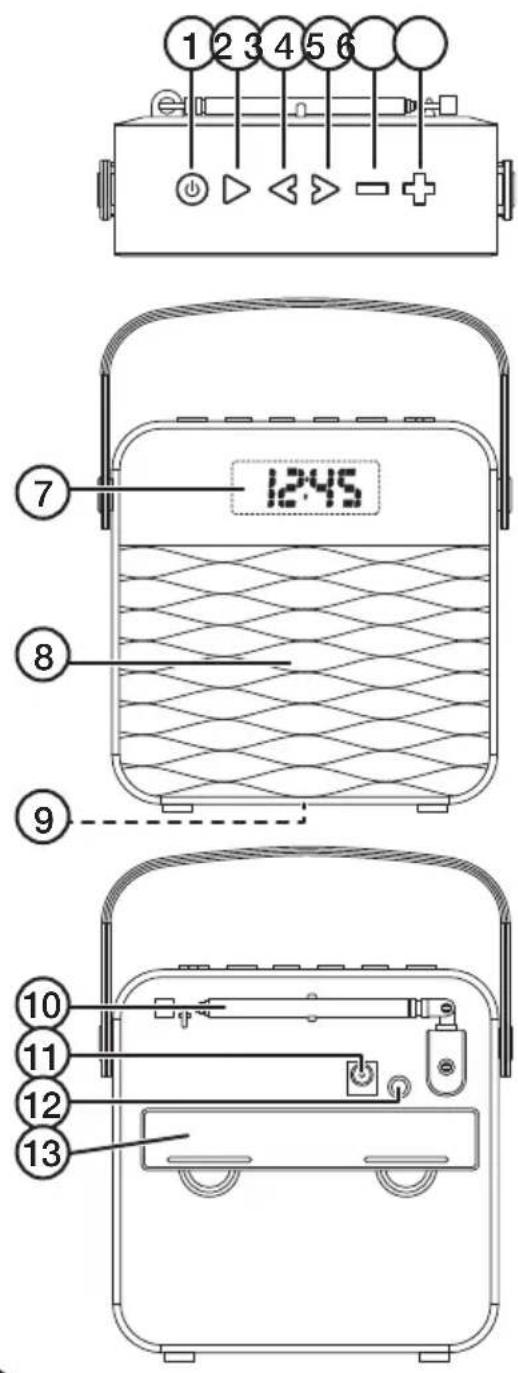
- [SOURCE] On/off, function selector
- [▷ SET/MEM/M+ ] Settings, play/pause, Bluetooth connection
- [◀] Go down in frequency band, go back in the playlist
- [▷] Go up in the frequency band, go forwards in the playlist
- [ ] Lower the volume
- [+] Raise the volume
- Display
- Speaker
- LED indicator for Bluetooth connection
- Aerial
- Mains adaptor socket
- AUX IN socket (3.5 mm)
- Battery cover
LCD display
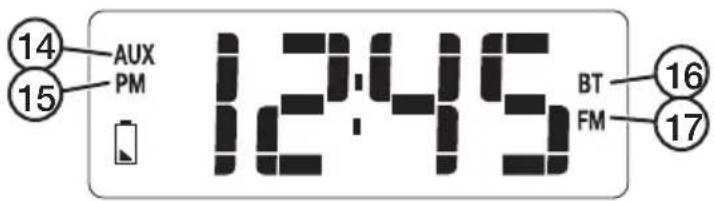
- "AUX" indicates that an external device is selected as the playback source
- "PM" indicates that the 12-hour time display has been selected and that it is afternoon.
- "BT" Indicates that Bluetooth has been chosen as the playback source.
- "FM" Indicates that FM radio has been chosen as the playback source
Operating instructions
Battery operation
Note: Never mix old and new batteries and never mix rechargeable batteries with non-rechargeable batteries.
- Remove the battery cover (13) on the back of the radio.
- Lay the battery removal ribbon on the bottom of the battery holder.
- Insert 4 × AA/LR6 batteries (sold separately). Note the polarity markings on the bottom of the battery holder to ensure correct insertion.
- Refit the battery cover.
- The display turns off a few seconds after the radio is switched on in order to save battery power.
Mains adaptor operation
- Connect the adaptor to the adaptor socket (11) and to an available power point.
- The display will stay on for as long as the radio is powered by the mains adaptor and is switched on.
On/off
- Press [ &SOURCE ] once, the radio enters the playback mode it was in when it was last switched off.
- Select the playback mode by pressing the [ ◎ SOURCE ] button repeatedly in quick succession.
- Hold in [ ◎ SOURCE ] for 2 seconds to turn the power off.
Setting the clock
With the radio turned off, hold in [SET/MEM/M+] until "24" flashes on the display. Press [or [to select 12- or 24-hour clock mode.
- Press [▷ SET/MEM/M+] again, the hours will flash. Press or hold in [◀] or [▶] to set the hours.
- Press [▷ SET/MEM/M+] again, the minutes will flash. Press or hold in [◀] or [▶] to set the minutes.
- Press [▷ SET/MEM/M+] again to exit the settings mode.
FM radio
- Fully extend the FM aerial (10).
- Switch the radio on and press [ 🔊 SOURCE ] again to select FM radio as the playback source. "FM" appears on the display.
- Press [◀] or [▶] repeatedly in quick succession to select the radio frequency. You can also hold in one of the buttons until the radio starts to scan for the nearest radio station up or down the frequency band. Release the button once the radio has begun to scan.
- When the radio has found a station and you wish to change to another station, you can hold in one of the buttons again to search again.
- Set the desired volume using [ ] or [+]
- Change the angle of the aerial or move the radio if the reception is poor.
Saving station presets
- Switch the radio on and press [SOURCE] again to select FM radio as the playback source. "FM" appears on the display.
- Tune into a station using the instructions above.
- The radio has 10 station presets. Hold in [▷ SET/MEM/M+] until one of the station preset slots "P01-P10" flashes.
- Press [◀] or [▶] to select a preset slot.
- Press [▷ SET/MEM/M+] again to save the station on the current preset slot.
Selecting existing presets
Press [▷SET/MEM/M+ ] to select the desired preset station.
Connecting an external Bluetooth device
- Switch the radio on and press [ &SOURCE ] again to select Bluetooth as the playback source. "BT" appears on the display and the Bluetooth indicator (8) flashes quickly.
- Activate Bluetooth on the device to be paired with the radio.
- The radio will appear on your device as BT-202, select it and pair it with your device. Refer to the instruction manual of your device for further clarification if you are unsure.
- Once pairing has been successful, the radio will beep and the LED will flash slowly.
- Start playback on your device. Set the desired volume levels both on your device and the radio. Other playback settings can now be controlled using the controls on the radio or the external device.
Note:
- If you are prompted to enter a PIN code on your device, you should enter 0000 (four zeroes). Certain devices may also require you to approve the connection.
- If you have connected a mobile phone to the radio via Bluetooth and receive a call whilst you are listening to music, the music will be switched off automatically. Once the call has been ended, music playback will be resumed (if your phone settings enable this).
Changing Bluetooth device
If you wish to change one Bluetooth playback source device for another:
- Turn off the Bluetooth connection on the first device.
- Hold in [▷ SET/MEM/M+] until the Bluetooth indicator flashes quickly.
- Connect the new device as instructed above.
Connecting an external device via the AUX IN socket
- Switch the radio on and press [◎ SOURCE] again to select AUX-IN as the playback source. "AUX" appears on the display.
- Plug an audio cable with a 3.5 mm connector into the AUX-IN socket (12) and connect the other end to the external device.
- Start playback on the device.
- Check and adjust the volume level on the connected device and the radio.
- Other playback settings should be controlled from the external device.
Note: It is not possible to control playback (change tracks, etc) from the radio when a device is connected via the AUX-IN socket.
Care and maintenance
- Clean the radio by wiping it with a damp cloth. Use only mild cleaning agents, never solvents or corrosive chemicals.
- Unplug the mains adaptor and remove the batteries if the radio is not to be used for an extended period.
- The radio should be stored in a dry, dust-free environment out of the reach of children.
Responsible disposal
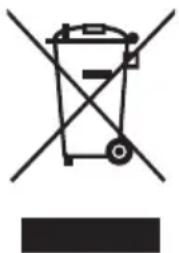
This symbol indicates that this product should not be disposed of with general household waste. This applies throughout the entire EU. In order to prevent any harm to the environment or health hazards caused by incorrect waste disposal, the product must be handed in for recycling so that the material can be disposed of in a responsible manner. When recycling your product, take it to your local collection facility or contact the place of purchase. They will ensure that the product is disposed of in an environmentally sound manner.
natural_image
Symbol of a trash bin crossed with no text or numbers, representing waste sorting or disposal (no text present)Specifications
Radio
Frequency range 87.5–108 MHz
Batteries 4 × AA/LR6 (sold separately)
Size 13 × 13 × 4.5 cm
Weight 370 g (without batteries)
Mains adaptor
In 100–240 V, 50/60 Hz
Out 6 V DC, 600 mA
Troubleshooting guide
| The radio will not switch on. | Check the batteries and change them if necessary.Make sure that the mains adaptor and lead are intact and properly connected to both the electrical socket and the radio.Is there power at the wall socket being used? |
| Poor or non-existent radio reception. | Make sure that the aerial is fully extended.Try changing the angle of the aerial.Move the radio to another location. |
| No sound from the connected device. | Check the volume level on both the radio and the connected device.If using the AUX-IN:Check that the cable connecting the device and the radio is undamaged and properly connected.Is the radio in AUX-IN mode?If using Bluetooth:Make sure that the Bluetooth connection is correct.Test the playback from your external device before connecting it.Try playback using another file. The file you are attempting to play may be damaged.Pull the plug from the wall socket to disconnect the Bluetooth radio completely from the mains. Insert the plug back into the wall socket.Things to consider:Other wireless equipment using the same frequency band can reduce the transmission range.The range of all wireless equipment depends on the type of obstacles located between the transmitter and the receiver (e.g. a concrete wall will interfere with the signal more than a plasterboard wall).If you experience problems, try the following:Turn off any other existing wireless equipment to check whether this is the cause of the problem. Reposition the wireless equipment, shorten the distance between the transmitter and the receiver or reduce the number of obstacles (walls, furniture, etc.) between them. |
| If none of the above works, try resetting the radio to its default factory settings. | Remove the batteries and unplug the mains adaptor. Wait for at least 5 minutes. Refit the batteries and reconnect the mains adaptor. Turn the radio on again. |
FM-radio med Bluetooth
Art.nr 38-6892, 38-6893 Modell BT-202
natural_image
Symbol of a trash bin crossed with no text or labels, accompanied by a solid black rectangle below (no text or symbols present)Specifikationer
Radio
Frekvensområde 87,5–108 MHz
Batterier 4 × AA/LR6 (säljs separat)
Mått 13 × 13 × 4,5 cm
Vikt370 g (utan batterier)
Batterieliminator
In 100–240 V, 50/60 Hz
Ut 6 V DC, 600 mA
Felsökningsschema
natural_image
Symbol of a trash bin crossed out by two diagonal lines, with no text or labels present.Spesifikasjoner
Radio
Frekvensområde 87,5–108 MHz
Batterier 4 × AA/LR6 (selges separat)
Mål 13 × 13 × 4,5 cm
Vekt 370 g (uten batterier)
Batterieliminator
Inn 100–240 V, 50/60 Hz
Ut 6 V DC, 600 mA
Feilsøking
natural_image
Symbol of a trash bin crossed with no text or numbers, representing waste sorting or disposal (no text present)Tekniset tiedot
Radio
Taajuusalue 87,5–108 MHz
natural_image
Symbol of a trash bin crossed with no text or labels, accompanied by a black rectangular block below (no readable text or symbols)Technische Daten
Radio
Declaration of Conformity
This declaration of conformity is issued under the sole responsibility of the manufacturer.
FM Radio with Bluetooth
38-6892, 38-6893
BT-202
has been manufactured in full compliance with the requirements of the RE-directive 2014/53/EU and relevant harmonized standards
har tillverkats i full överensstämmelse med kraven i 2014/53/EU och relevanta harmoniserade standarder / har blitt produsert i full overensstemmelse med kravene i 2014/53/EU og relevante harmoniserte standarder / on valmistettu noudattaen kokonaisuudessaan koskevan direktiivin 2014/53/EU ja asiaankuuluvat yhdenmukaistetut standardit / hat in voller Übereinstimmung mit den Anforderungen der 2014/53/EU und einschlägigen harmonisierten Normen hergestellt wurde.
Reference to harmonized standards used, or reference to the specifications in which declaration of conformity is declared:
Hänvisning till de harmoniserade standarder som använts eller hänvisningar till de specifikationer som försäkran om överensstämmelse deklareras: / Referere til harmoniserte standarder som brukes, eller henvisninger til spesifikasjonene der samsvarserklæring er erklärt: / Viittaus yhdenmukaistettuihin standardeihin tai viittaus eritelmiin, jossa vaatimustenmukaisuusvakuutus on julistettu: / Referenz verwendet harmonisierten Normen oder Bezugnahme auf die Spezifikationen, in der Konformitätserklärung wird erklärt:
Article 3.1a (Health): EN 62479:2010
Article 3.1a (Safety) EN 60065:2014
Article 3.1b (EMC): EN 301489-1 v2.1.1
EN 301489-17 v3.1.1
EN 55032:2015
EN 55035:2017
EN 61000-3-2:2014
EN 61000-3-3:2013
Article 3.2 (Radio): EN 300328 v2.1.1
EN 303345 v1.1.7
Signed for and on behalf of:
Henrik Alfredsson
Technical Manager
Postal 10 – 13 Market Place
Kingston Upon Thames
Surrey
KT1 1JZ
Deutschland
Kundenservice Hotline: 040 2999 78111
E-Mail: kundenservice@clasohlson.de
Homepage
www.clasohlson.de
- FM Radio with Bluetooth
- Safety
- Buttons and functions
- LCD display
- Operating instructions
- Battery operation
- Mains adaptor operation
- On/off
- Setting the clock
- FM radio
- Saving station presets
- Selecting existing presets
- Connecting an external Bluetooth device
- Note:
- Changing Bluetooth device
- Connecting an external device via the AUX IN socket
- Care and maintenance
- Responsible disposal
- Specifications
- Radio
- Mains adaptor
- Troubleshooting guide
- FM-radio med Bluetooth
- Specifikationer
- Batterieliminator
- Felsökningsschema
- Spesifikasjoner
- Tekniset tiedot
- Technische Daten
- Declaration of Conformity
- Deutschland
Brand : Clas Ohlson
Model : BT-202
Category : Radio