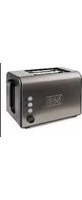
BXTO900E - Toaster BLACK & DECKER - Free user manual and instructions
Find the device manual for free BXTO900E BLACK & DECKER in PDF.


| Brand | Black & Decker |
| Model | BXTO900E (also BXTOA900E, BXTO1000E, BXTO1500E) |
| Product Type | Toaster |
| Number of Slots | 2 |
| Power Source | 220-240 V, 50-60 Hz |
| Power Consumption | Approximately 800-1200 W |
| Dimensions (approx.) | 30 x 20 x 20 cm |
| Weight | About 1.5 kg |
| Functions | Toasting, Defrost, Reheat, Cancel |
| Browning Control | Adjustable toast selection knob (7 levels) |
| Extra Features | Cord storage under base, removable crumb tray |
| Safety Features | Automatic shut-off, non-slip feet, cool-touch exterior |
| Material | Plastic housing with metal heating elements |
| Cord Length | Approximately 0.8 m |
| Color | Black |
| Included Accessories | Crumb tray; for BXTOA900E: plier |
| Cleaning | Wipe with damp cloth; empty crumb tray regularly |
| Warranty | Standard 2 years (subject to local regulations) |
Frequently Asked Questions - BXTO900E BLACK & DECKER
User questions about BXTO900E BLACK & DECKER
0 question about this device. Answer the ones you know or ask your own.
Ask a new question about this device
Download the instructions for your Toaster in PDF format for free! Find your manual BXTO900E - BLACK & DECKER and take your electronic device back in hand. On this page are published all the documents necessary for the use of your device. BXTO900E by BLACK & DECKER.
USER MANUAL BXTO900E BLACK & DECKER
natural_image
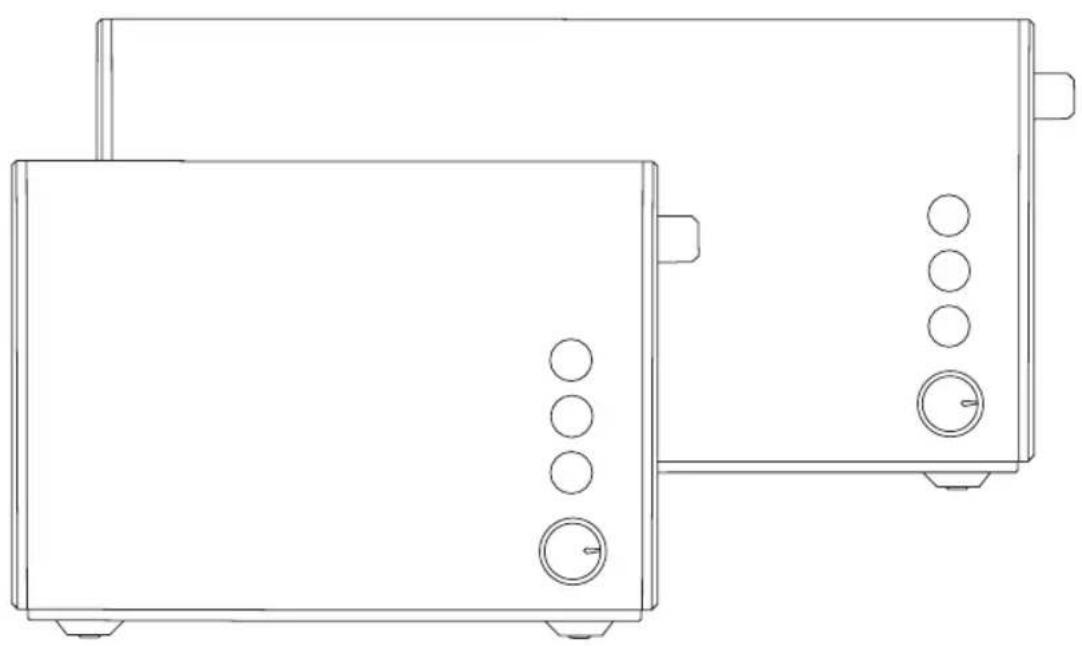
Line drawing of a pair of kitchen appliances, one front view and one side view with control knobs (no text or symbols)BXTOA900E-BXTO900E-BXTO1000E-BXTO1500E
www.blackanddecker.eu
BXTO900E / BXTOA900E
BXTO1000E
natural_image
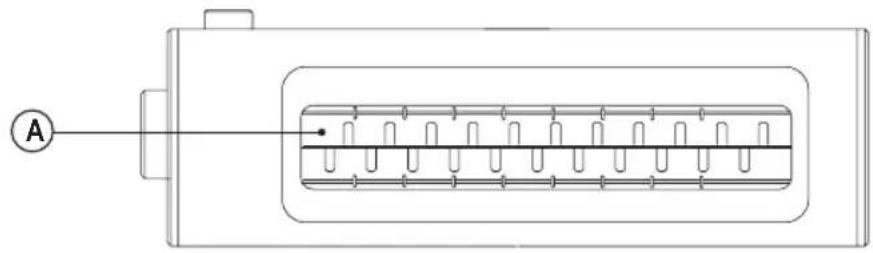
Technical line drawing of a rectangular device with internal components and an external connection point labeled A (no text or symbols present)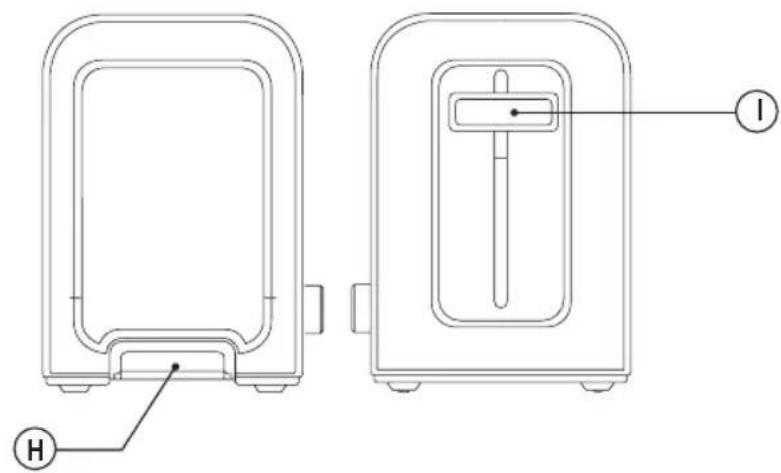
BXTO1500E
natural_image
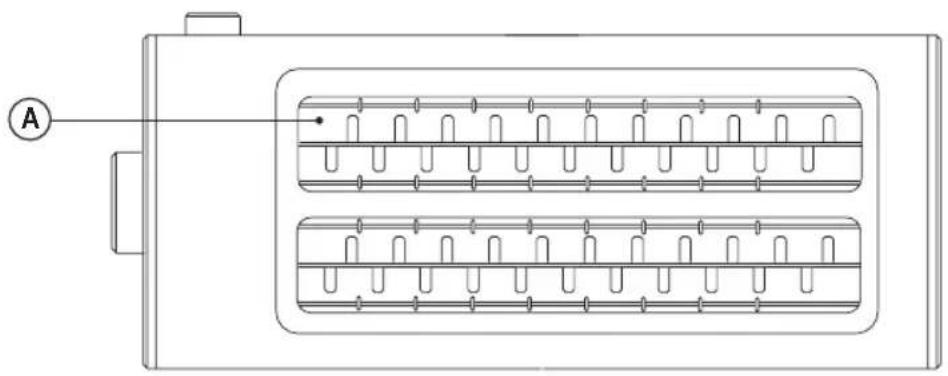
Technical line drawing of a rectangular electronic component with internal slots and a labeled point A (no text or symbols beyond label)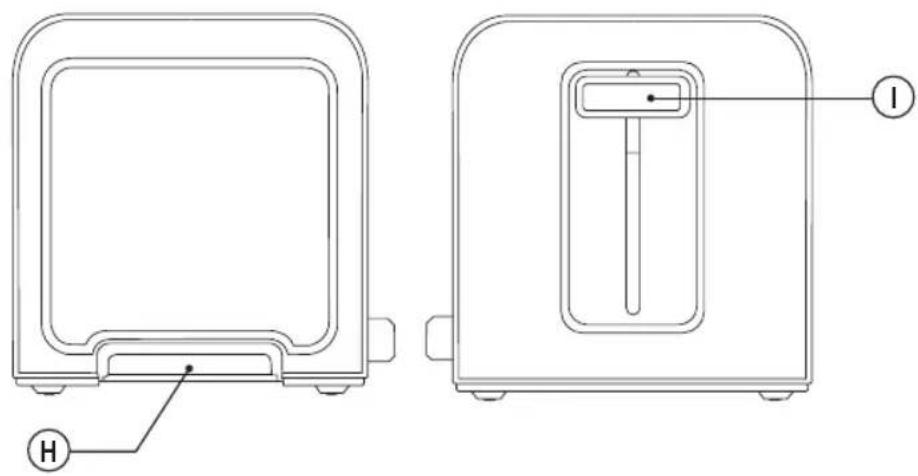
TOASTER
BXTOA900E, BXTO900E, BXTO1000E, BXTO1500E
Dear customer,
Many thanks for choosing to purchase a BLACK+DECKER brand product.
Thanks to its technology, design and operation and the fact that it exceeds the strictest quality standards, a fully satisfactory use and long product life can be assured.
SAFETY ADVICE AND WARNINGS
◆ Read these instructions carefully before switching on the appliance and keep them for future reference. Failure to follow and observe these instructions could lead to an accident.
◆ Clean all the parts of the product that will be in contact with food, as indicated in the cleaning section, before use.
- This appliance can be used by children aged from 8 years and above and persons with reduced physical, sensory or mental capabilities or lack of experience and knowledge if they have been given supervision or instruction concerning use of the appliance in a safe way and understand the hazards involved.
◆ Cleaning and user maintenance shall not be made by children unless they are older than 8 and supervised.
◆ Keep the appliance and its cord out of reach of children less than 8 years of age.
◆ This appliance is not a toy. Children should be supervised to ensure that they do not play with the appliance.
◆ The temperature of the accessible surfaces may be high when the appliance is in use.
- Do not use the appliance in association with a programmer, timer or other device that automatically switches it on.
◆ Bread can catch fire therefore the appliance must not be used near to inflammable materials such as curtains, furniture, etc.
If the supply cord is damaged, it must be replaced by the manufacturer, its service agent or similar qualified person in order to avoid a hazard.
◆ This appliance is for household use only, not professional, industrial use.
- Ensure that the voltage indicated on the rating label matches the mains voltage before plugging in the appliance.
- Connect the appliance to a outlet with an earth socket withstanding a minimum of 10 amperes.
- The appliance's plug must fit into the mains socket properly. Do not alter the plug. Do not use plug adaptors.
- Do not force the power cord. Never use the power cord to lift up, carry or unplug the appliance.
♦ Do not wrap the power cord around the appliance.
◆ Do not clip or crease the power cord.
Do not allow the power cord to hang or to come into contact with the hot surfaces of the appliance.
ENGLISH
(Original instructions)
◆ Check the state of the power cord. Damaged or tangled cables increase the risk of electric shock.
◆ Do not touch the plug with wet hands.
◆ Do not use the appliance if the cable or plug is damaged.
If any of the appliance casings breaks, immediately disconnect the appliance from the mains to prevent the possibility of an electric shock.
Do not use the appliance if it has fallen on the floor, if there are visible signs of damage.
◆ The appliance is not suitable for outdoor use.
Do not place the appliance on hot surfaces, such as cooking plates, gas burners, ovens or similar.
◆ Place the appliance on a horizontal, flat, stable surface, suitable for withstanding high temperatures and away from other heat sources and contact with water.
♦ CAUTION: In order to prevent overheating do not cover the appliance.
Use and care:
- Do not use the appliance if the tray is not properly fitted underneath the heating element.
Do not use the appliance if its accessories are not properly fitted. - Do not use the appliance if the on/off switch does not work.
◆ Do not move or transport the appliance while in use. - Do not turn the appliance over while it is in use or connected to the mains.
◆ Store this appliance out of reach of children and/or persons with reduced physical, sensory or mental capabilities or lack of experience and knowledge.
◆ Do not store the appliance if it is still hot. - Never leave the appliance connected and unattended if is not in use. This saves energy and prolongs the life of the appliance.
◆ Never leave the appliance unattended while in use:
Service:
◆ Any misuse or failure to follow the instructions for use renders the guarantee and the manufacturer's liability null and void.
DESCRIPTION
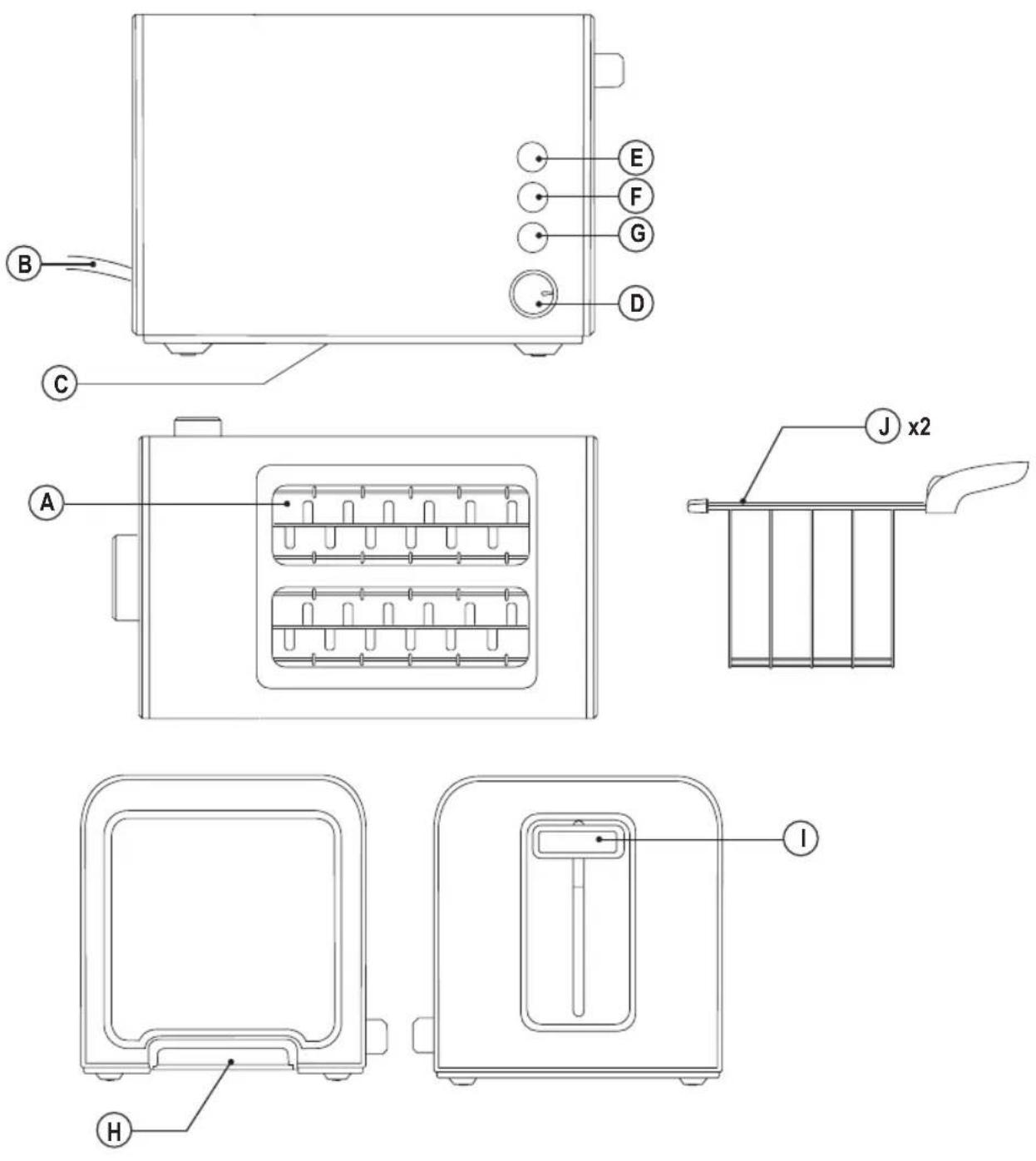
A Toaster Slots
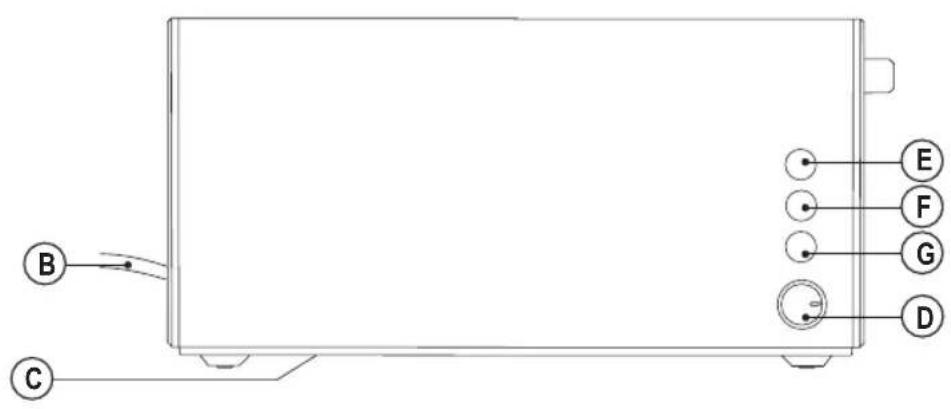
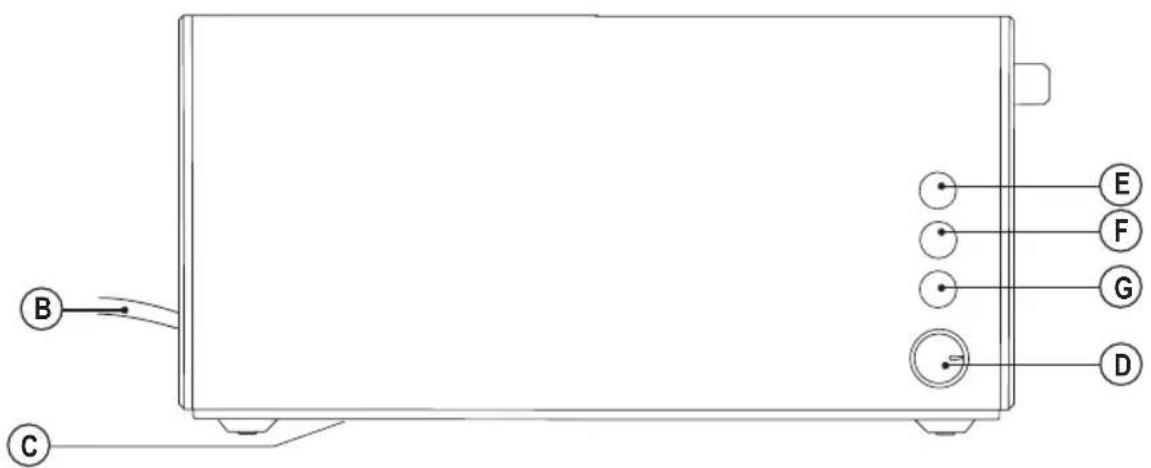
B Power Cord
C Cable Storage
D Toast Selection Knob
E Defrost Button
F Reheat Button
G Cancel Button
H Crumb Tray
I Loading lever
J Plier (*)
(*) Only available in the model BXTOA900E.
If the model of your appliance does not have the accessories described above, they can also be bought separately from the Technical Assistance Service.
INSTRUCTIONS FOR USE
Before use:
◆ Make sure that all products' packaging has been removed.
◆ Before using this product for the first time, it is advisable to test it without bread.
Before using the product for the first time, clean the parts that will come into contact with food in the manner described in the cleaning section.
Some parts of the appliance have been lightly greased. Consequently, the first time the appliance is used a light smoke may be detected. After a short time, this smoke will disappear.
Use (BXTO900E, BXTO1000E, BXTO1500E models):
◆ Extend the cable completely before plugging it in.
◆ Connect the appliance to the mains.
◆ Put the slice/slices of bread into the appliance.
◆ Use the select knob (D) to reach the desired toasting level.
◆ Start the appliance by sliding the loading lever (I) down until a “click” is heard.
◆ After the selected toasting time the appliance will switch off automatically.
(Original instructions)
ENGLISH
Use (BXTOA900E model):
◆ Extend the cable completely before plugging it in.
◆ Connect the appliance to the mains.
◆ Put the slice/slices of bread into the plier (J).
◆ Take the plier (J) by the handle and place it into the toaster slots (A)
◆ Use the select knob (D) to reach the desired toasting level.
- Start the appliance by sliding the loading lever (I) down until a “click” is heard.
- After the selected toasting time the appliance will switch off automatically.
◆ Remove the plier (J), by the handle, from the appliance to take the toast.
Cancel function (common for all models):
- The cancel function allows the interruption of the use of the appliance. To do this, press the button (G).
Reheat function (BXTO900E, BXTO1000E, BXTO1500E models):
The reheat function is for reheating previously toasted bread. To do this, place the toast, move the loading lever (I) down and press the corresponding function button (F).
Reheat function (BXTOA900E):
- The reheat function is for reheating previously toasted bread. To do this, place the toast inside the plier,
◆ Place the plier inside toaster slots (A) move the loading lever (I) down and press the corresponding function button (F).
Defrost function (BXTO900E, BXTO1000E, BXTO1500E models):
◆ The defrost function is for defrosting slices of bread.
If you want to defrost, set the toast selector knob (D) to minimum position. Place the frozen slice of bread, move the loading lever (I) down and press the corresponding function button (E):
If in addition to defrosting, you want to toast, place the selector knob (D) in the desired position. Place the frozen slice bread, move the loading lever (I) down and press the corresponding function button (E). The toasting time will increase, offering a level of toasting similar to that normally obtained with unfrozen bread.
Defrost function (BXTOa900E):
◆ The defrost function is for defrosting slices of bread.
If you want to defrost, set the toast selector knob (D) to minimum position. Place the frozen slice of bread inside the Plier, place the Plier into the toaster slot (A) move the loading lever (I) down and press the corresponding function button (E):
If in addition to defrosting, you want to toast, place the selector knob (D) in the desired position. Place the frozen slice bread into the plier, place the plier into the toaster slot (A) move the loading lever (I) down and press the corresponding function button (E). The toasting time will increase, offering a level of toasting similar to that normally obtained with unfrozen bread.
Once you have finished using the appli- ance:
◆ Unplug the appliance from the mains.
◆ Put the cable back in the cable housing.
- Clean the appliance.
Cable compartment
- This appliance has a cable compartment situated on its underside.
CLEANING
◆ Disconnect the appliance from the mains and allow it to cool before undertaking any cleaning task.
- Clean the equipment with a damp cloth with a few drops of washing-up liquid and then dry.
Do not use solvents, or products with an acid or base pH such as bleach, or abrasive products, for cleaning the appliance.
- Never submerge the appliance in water or any other liquid or place it under running water.
- It is advisable to clean the appliance regularly and remove any food remains.
If the appliance is not in good condition of cleanliness, its surface may degrade and inexorably affect the duration of the appliance's useful life and could become unsafe to use.
Crumb tray:
- This appliance has a tray which allows the crumbs to be caught inside the appliance.
◆ Remove the appliance's tray.
◆ Empty the contents of the tray.
◆ Gently shake the appliance to remove any other remaining crumbs from inside the appliance.
◆ Replace the tray inside the appliance.

ENGLISH
(Original instructions)
ANOMALIES AND REPAIR
Take the appliance to an authorized technical support service if product is damaged or other problems arise. Do not attempt to disassemble or repair the appliance yourself as this may be dangerous.
For EU product versions and/or in case that it is requested in your country:
Ecology and recyclability of the product
The materials of which the packaging of this appliance consists are included in a collection, classification and recycling system. Should you wish to dispose of them, use the appropriate public recycling bins for each type of material.
- The product does not contain concentrations of substances that could be considered harmful to the environment.
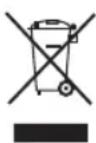
This symbol means that in case you wish to dispose of the product once its working life has ended; take it to an authorized waste agent for the selective collection of Waste from Electric and Electronic Equipment (WEEE).
This appliance complies with Directive 2014/35/EU on Low Voltage, Directive 2014/30/EU on Electromagnetic Compatibility, Directive 2011/65/EU on the restrictions of the use of certain hazardous substances in electrical and electronic equipment and Directive 2009/125/EC on the ecodesign requirements for energy-related products.
Grille-pain
BXTOA900E, BXTO900E, BXTO1000E, BXTO1500E
Cher Client,
Funzione Scalda (BXTO900E, BXTO1000E, BXTO1500E models):
Funzione Scongelamento (BXTO900E, BXTO1000E, BXTO1500E models):
Utilização (BXTO900E, BXTO1000E, BX-TO1500E models):
Função Reaquecer (BXTO900E, BX-TO1000E, BXTO1500E models):
Função Descongelar (BXTO900E, BX-TO1000E, BXTO1500E models):
Utilizare (modelele BXTO900E, BXTO1000E, BXTO1500E):
Funcția de reîncălzire (modelele BXTO900E, BXTO1000E, BXTO1500E):
Funcția de decongelare (modelele BX-TO900E, BXTO1000E, BXTO1500E):
ENGINEERING AND TECHNOLOGY FOR LIFE, S.L.
Avda. Barcelona s/n
Oliana, 25790, Spain

- TOASTER
- BXTOA900E, BXTO900E, BXTO1000E, BXTO1500E
- Dear customer,
- SAFETY ADVICE AND WARNINGS
- ENGLISH
- (Original instructions)
- Use and care:
- Service:
- DESCRIPTION
- INSTRUCTIONS FOR USE
- Before use:
- Use (BXTO900E, BXTO1000E, BXTO1500E models):
- Use (BXTOA900E model):
- Cancel function (common for all models):
- Reheat function (BXTO900E, BXTO1000E, BXTO1500E models):
- Reheat function (BXTOA900E):
- Defrost function (BXTO900E, BXTO1000E, BXTO1500E models):
- Defrost function (BXTOa900E):
- Once you have finished using the appli- ance:
- Cable compartment
- CLEANING
- Crumb tray:
- ANOMALIES AND REPAIR
- For EU product versions and/or in case that it is requested in your country:
- Ecology and recyclability of the product
- Cher Client,
- Funzione Scalda (BXTO900E, BXTO1000E, BXTO1500E models):
- Funzione Scongelamento (BXTO900E, BXTO1000E, BXTO1500E models):
- Utilização (BXTO900E, BXTO1000E, BX-TO1500E models):
- Função Reaquecer (BXTO900E, BX-TO1000E, BXTO1500E models):
- Função Descongelar (BXTO900E, BX-TO1000E, BXTO1500E models):
- Utilizare (modelele BXTO900E, BXTO1000E, BXTO1500E):
- Funcția de reîncălzire (modelele BXTO900E, BXTO1000E, BXTO1500E):
- Funcția de decongelare (modelele BX-TO900E, BXTO1000E, BXTO1500E):
Brand : BLACK & DECKER
Model : BXTO900E
Category : Toaster