
TR1200SB - Toaster BLACK & DECKER - Free user manual and instructions
Find the device manual for free TR1200SB BLACK & DECKER in PDF.


| Product Type | 2-Slice Toaster |
| Model Number | TR1200SB |
| Brand | Black & Decker |
| Color | Stainless Steel / Black |
| Dimensions (Approx.) | 12 x 8 x 8 inches |
| Weight | 2.5 lbs |
| Power Rating | 850 W |
| Voltage / Frequency | 120 V / 60 Hz |
| Number of Slots | 2 |
| Browning Control | 7-level rotary dial |
| Functions | Toast, Bagel, Defrost, Cancel |
| Self-Centering Racks | Yes |
| High-Lift Lever | Yes |
| Cancel Button | Yes |
| Auto-Shutoff | Yes |
| Cool-Touch Exterior | Yes |
| Crumb Tray | Removable, pull-out |
| Cord Length | 36 inches |
| Cleaning | Wipe exterior with damp cloth; empty crumb tray regularly |
| Safety Features | Auto-shutoff, cool-touch body, non-slip feet |
| Warranty | Limited 2-year warranty |
| Included Accessories | None |
Frequently Asked Questions - TR1200SB BLACK & DECKER
User questions about TR1200SB BLACK & DECKER
0 question about this device. Answer the ones you know or ask your own.
Ask a new question about this device
Download the instructions for your Toaster in PDF format for free! Find your manual TR1200SB - BLACK & DECKER and take your electronic device back in hand. On this page are published all the documents necessary for the use of your device. TR1200SB by BLACK & DECKER.
USER MANUAL TR1200SB BLACK & DECKER
For online customer service
and to register your product, go to
www.prodprotect.com/applica
natural_image
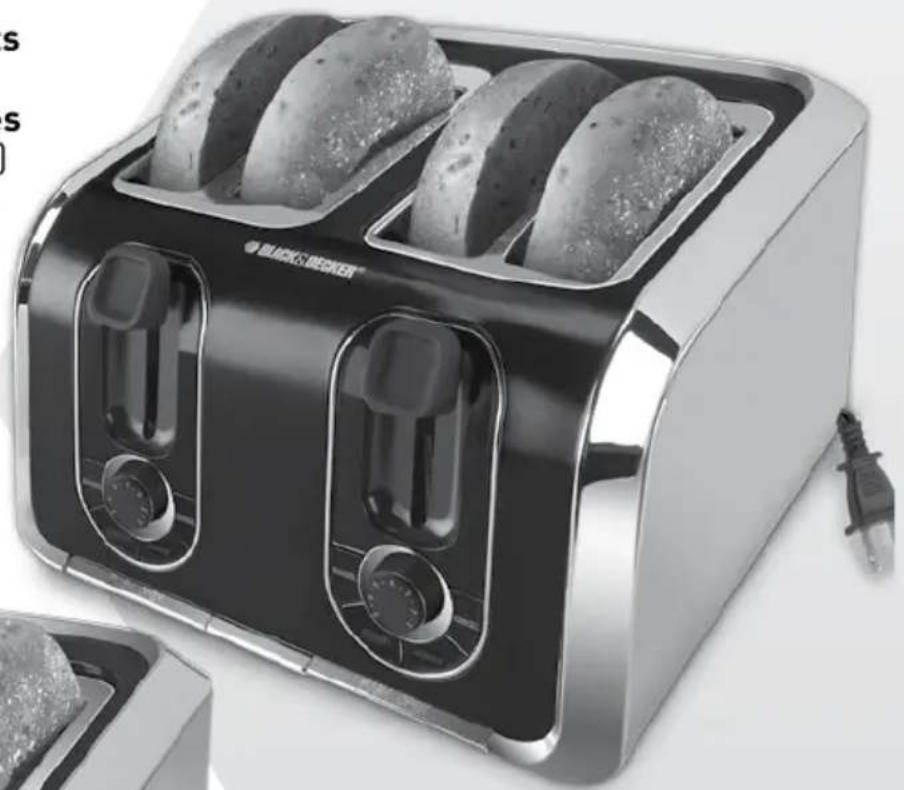
Black and white photo of a 3rd-order toaster with four round food rolls, no visible text or symbols on the device itself.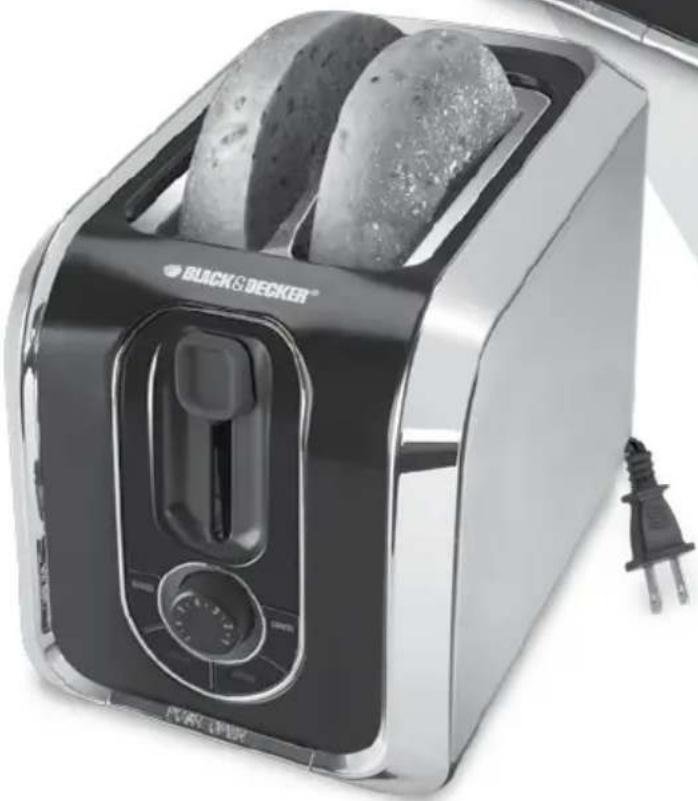
natural_image
Black and white photo of a Panasonic 30-inch toaster with two round food items, no visible text or symbols on the device itself.MODELS/MODELOS
○ TR1200SB
○ TR1400SB
Please Read and Save this Use and Care Book
IMPORTANT SAFEGUARDS
When using electrical appliances, basic safety precautions should always be followed, including the following:
○ Read all instructions.
○ Do not touch hot surfaces. Use handles or knobs.
To protect against electrical shock, do not immerse cord, plug, or appliance in water or other liquid.
○ Close supervision is necessary when any appliance is used by or near children.
○ Unplug from outlet when not in use and before cleaning. Allow to cool before putting on or taking off parts.
Do not operate any appliance with a damaged cord or plug or after the appliance malfunctions or has been damaged in any manner. Return the appliance to an authorized service facility for examination, repair, or adjustment. Or, call the toll-free number on the cover of this manual.
- The use of accessory attachments not recommended by the appliance manufacturer may cause injuries.
○ Do not use outdoors.
○ Do not let cord hang over edge of table or counter or touch hot surfaces.
- Do not place on or near a hot gas or electric burner or in a heated oven.
To disconnect, turn any control to OFF, then remove plug from wall outlet.
○ Do not use appliance for other than intended use.
O Oversized foods, metal foil packages, or utensils must not be inserted in a toaster, as they may create a fire or risk of electric shock.
○ A fire may occur if the toaster is covered or touching flammable material, including curtains, draperies, walls and the like, when in operation.
○ Do not attempt to dislodge food when toaster is plugged in.
SAVE THESE INSTRUCTIONS.
This product is for household use only.
POLARIZED PLUG (120V Models Only)
This appliance has a polarized plug (one blade is wider than the other). To reduce the risk of electric shock, this plug is intended to fit into a polarized outlet only one way. If the plug does not fit fully into the outlet, reverse the plug. If it still does not fit, contact a qualified electrician. Do not attempt to modify the plug in any way.
TAMPER-RESISTANT SCREW
Warning: This appliance is equipped with a tamper-resistant screw to prevent removal of the outer cover. To reduce the risk of fire or electric shock, do not attempt to remove the outer cover. There are no user-serviceable parts inside. Repair should be done only by authorized service personnel.
ELECTRICAL CORD
a) A short power-supply cord (or detachable power-supply cord) is to be provided to reduce the risk resulting from becoming entangled in or tripping over a longer cord.
b) Longer detachable power-supply cords or extension cords are available and may be used if care is exercised in their use.
c) If a long detachable power-supply cord or extension cord is used,
1) The marked electrical rating of the detachable power-supply cord or extension cord should be at least as great as the electrical rating of the appliance,
2) If the appliance is of the grounded type, the extension cord should be a grounding-type 3-wire cord, and
3) The longer cord should be arranged so that it will not drape over the countertop or tabletop where it can be pulled on by children or tripped over.
Note: If the power supply cord is damaged, it should be replaced by qualified personnel; in Latin America, by an authorized service center.
Product may vary slightly from what is illustrated.
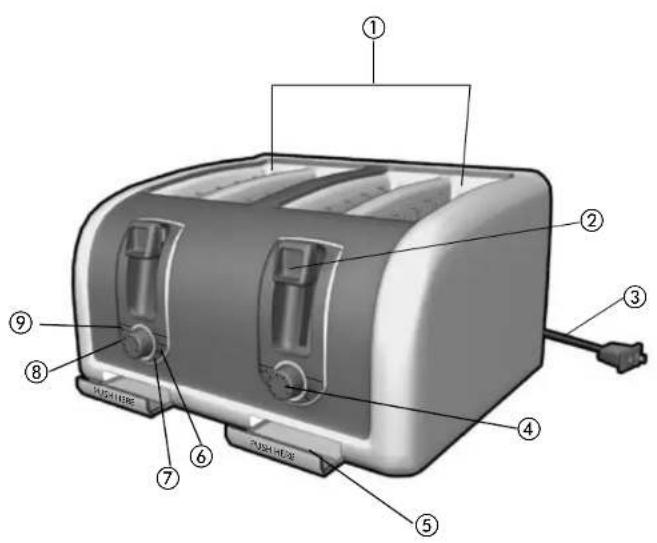
- Wide slots with self-adjusting guides
- Toast control lever
- Retractable cord
- Toast shade selector
† 5. Slide-out crumb tray(s) (TR1400SB) (Part # TR1200-01) (Part # TR1400-01)
- CANCEL button
- REHEAT button
- FROZEN button
- BAGEL button
Note: indicates consumer replaceable/removable parts
CONTROL PANEL
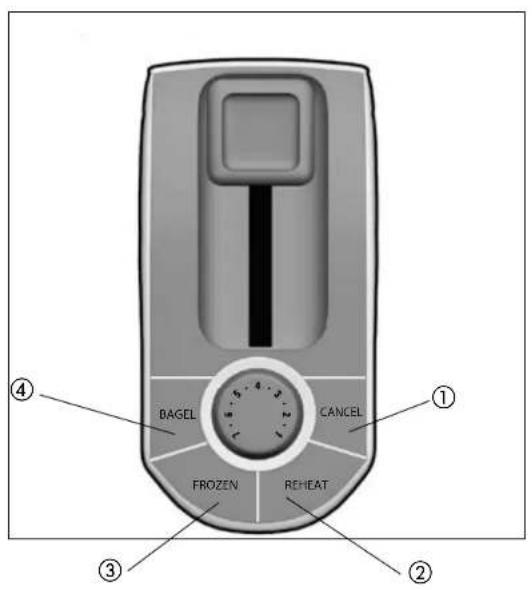
- CANCEL button
- REHEAT button
- FROZEN button
- BAGEL button
How to Use
This product is for household use only.
GETTING STARTED
- Remove all packing material, labels and any stickers.
- Remove and save literature.
• Please go to www.prodprotect.com/applica to register your warranty.

natural_image
Hand holding a tool interacting with a car door (no visible text or symbols)- Place slide out crumb tray(s) into slots located in front of the toaster (A).
- Place toaster on a flat, level surface, where the top of the unit has enough space for the heat to flow without damaging the cabinets or walls.
- Remove tie from cord and unwind.
• Plug unit into electrical outlet.

natural_image
Close-up of a gray electronic device with a 18-inch top control knob and a dial (no visible text or symbols)USING YOUR TOASTER
Be sure to make selections for each slot immediately after pressing the toast control lever (B).
- Adjust the toast shade selector to the desired setting (1 through 7).
Note: When using for the first time, select setting 4. Re-adjust the setting to suit your personal preference on successive toasting operations.
Hint: When toasting thin sliced breads, use a lighter setting than you would normally select. - Place sliced bread or other foods into the slots and press the toast control lever down until it locks into place (C). The bread guides will automatically adjust to hold the food in place.
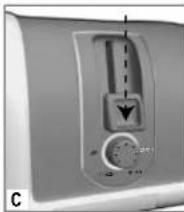
Note: The CANCEL button illuminates automatically whenever the toast control lever is pressed and remains lit until the toasting cycle is finished or the CANCEL button is pressed.
- When selecting BAGEL, FROZEN or REHEAT function, you must press the toast control lever before selecting one of these settings.
- When toasting is complete, the toast control lever goes up and the unit shuts off.
BAGEL FUNCTION
This function toasts bagels or English muffins crispy on the cut side and warm on the outside.
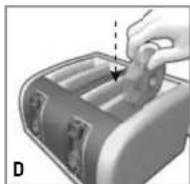
- Adjust the toast shade selector to the desired setting (1 through 7).
- Insert the bagel into the slot with the cut side towards the inside of the toaster (D).

natural_image
Close-up of a kitchen air conditioner panel with control knob and indicator lights (no text or symbols visible)- Press the toast control lever down until it locks into place; then press the BAGEL button (E). The bread guides will automatically adjust to hold the bagel slices in place.
Note: The BAGEL button and the CANCEL button illuminate until the toast cycle is complete or until the CANCEL button is pressed.
Important: If the wrong button is selected, press the CANCEL button and re-select the desired cycle.
- When toasting is complete, the toast control lever goes up and the unit shuts off.
FROZEN FUNCTION
Use to thaw and toast frozen bread, bagels, waffles and pastries.
- Adjust the toast shade selector to the desired setting (1 through 7).
- Insert the food to be toasted into the slot or slots.
- Press the toast control lever down until it locks into place.

natural_image
Close-up of a kitchen air conditioner unit with control buttons and a vertical indicator (no visible text or symbols)- Press FROZEN (for bread and waffles) or FROZEN and BAGEL buttons (F). The buttons illuminate (including the CANCEL button) until the defrosting and toasting are complete or until the CANCEL button is pressed.
Note: If the wrong button is selected, press the CANCEL button and re-select the desired cycle.
5. When toasting is complete, the toast control lever goes up and the unit shuts off.
REHEAT FUNCTION
Use to warm foods that have been toasted and have cooled.
- Insert previously toasted food into slot.
Note: Do not reheat foods with butter or any other toppings.
- There is no need to adjust the toast shade selector.
- Press the toast control lever down until it locks into place.
- Press the REHEAT button.
Note: If the wrong button is selected, press the CANCEL button and re-select the desired cycle.
- When reheating is complete, the toast control lever goes up and the unit shuts off.
HELPFUL HINTS
- For quick foods, such as pop tarts and frozen waffles, follow the instructions on the box.
• For best toasting results, be sure to keep the crumb tray clean. - This toaster has a built-in toast control lever rise. If toasted food does not clear the top of the toaster use the toast control lever to raise the food for easy removal.
- Never stick a fork or fingers into the toaster slot.
- If food becomes jammed, unplug the unit, then raise and lower the toast control lever to loosen the jammed food.
- Never use metal utensils to lift food from the toaster or to free jammed food.
• To interrupt toasting at any time, press the CANCEL button.
TROUBLESHOOTING
| PROBLEM POSSIBLE CAUSE SOLUTION | ||
| Unit is not heating or stops heating. | Electrical outlet is not working or toaster is unplugged. | Check to make sure outlet is working. Unplug unit and re-insert plug. Test toaster by selecting a setting and depressing the toast control lever with nothing in the toaster. |
| Second toasting is too dark. | Setting on toast is too dark. | If doing repeated toasting in the toaster, you may want to select a shade slightly lighter than the previous setting. |
| Bread is jammed. The | bread may be too thick. | Most breads, pastries and bagels will fit into the slot, however, occasionally the bread may be too thick. Simply remove from the toaster and slice thinner. |
| Toast is too light or too dark. | You may have changed the shade selector and need to re-adjust the setting. | Simply reset the shade selector to the desirable setting for the function you wish to use. |
| You smell burnt food or smoke is coming out when toaster is being used. | Remnants of food in crumb tray. | Refer to the directions in CARE AND CLEANING section of this booklet. Make sure the crumb tray is empty and wiped clean. Check to make sure no large crumbs are caught in the slot. Turn unplugged unit upside down over the sink and shake to remove crumbs. |
Care and Cleaning
This product contains no user serviceable parts. Refer service to qualified service personnel.
CLEANING
Always unplug the cord from the electrical outlet and allow the toaster to cool before cleaning. Do not immerse the toaster in water.
Crumb Tray(s) (TR1400SB)

- To open, push the crumb tray tab located in front of the toaster. Then pull it out (G).
- Dispose of crumbs and wash the tray in warm, sudsy water.
Note: The tray is not dishwasher safe. You can remove stubborn spots with a nylon mesh pad.
- Be sure to dry thoroughly before slipping the tray back into the toaster.
Cleaning Outside Surfaces
Important: The unit gets hot. Allow the toaster to cool completely before cleaning.
- Wipe the exterior with a damp cloth or sponge and dry with a paper towel.
- Do not use strong cleaners or abrasives that may scratch surfaces and never spray cleaners directly onto the toaster.
EXTENDING AND RETRACTING THE CORD
- The retractable cord reel is operated by a spring which rewinds the cord automatically.
- It is fitted with a ratchet, making it very easy to extend and retract the cord.
To extend the cord:

- Pull on the cord gently until desired length has been reached (H).
Note: Extend the cord and lock it at anytime the ratchet is heard.
- Allow the reel to slowly retract the cord until it locks into place.
To retract the cord:
- Pull on the cord gently until the ratchet isn't heard.
- Then allow the reel to slowly retract the cord.
NEED HELP?
For service, repair or any questions regarding your appliance, call the appropriate 800 number on cover of this book. Please DO NOT return the product to the place of purchase. Also, please DO NOT mail product back to manufacturer, nor bring it to a service center. You may also want to consult the website listed on the cover of this manual.
Two-Year Limited Warranty
(Applies only in the United States and Canada)
What does it cover?
- Any defect in material or workmanship provided; however, Applica's liability will not exceed the purchase price of product.
For how long?
• Two years after date of purchase.
What will we do to help you?
- Provide you with a reasonably similar replacement product that is either new or factory refurbished.
How do you get service?
• Save your receipt as proof of date of sale.
- Visit the online service website at www.prodprotect.com/applica, or call toll-free 1-800-231-9786, for general warranty service.
• If you need parts or accessories, please call 1-800-738-0245.
What does your warranty not cover?
• Damage from commercial use
• Damage from misuse, abuse or neglect
• Products that have been modified in any way
• Products used or serviced outside the country of purchase
• Glass parts and other accessory items that are packed with the unit
• Shipping and handling costs associated with the replacement of the unit
- Consequential or incidental damages (Please note, however, that some states do not allow the exclusion or limitation of consequential or incidental damages, so this limitation may not apply to you.)
How does state law relate to this warranty?
- This warranty gives you specific legal rights. You may also have other rights that vary from state to state or province to province.
BLACK&DECKER. is a trademark of The Black & Decker Corporation, Towson, Maryland, USA
Made in People's Republic of China Printed in People's Republic of China
natural_image
Close-up of a hand pressing down on a car door component (no visible text or symbols)natural_image
Close-up of a gray electronic device with a display screen and control knob (no visible text or symbols)USANDO SU TOSTADORA
natural_image
Close-up of a kitchen refrigerator with a control panel and indicator lights (no visible text or symbols)natural_image
Close-up of a digital air conditioner unit with control dial and indicator lights (no visible text or symbols)natural_image
Close-up of a mechanical control panel with a dial indicator and a downward arrow, no visible text or symbols.servicente@servicenter.cl
Colombia
PLINARES
Avenida Quito # 88A-09
Bogotá, Colombia
San Jose, Costa Rica
Tel.: [506] 257-5716 / 223-0136
Ecuador
Col. Centro, Cuauhtemoc,
México, D.F
Tel. 01 800 714 2503
Nicaragua
ServiTotal
City Market Nivel Plaza Local 153
Diagonal Hotel Melia,
Caracas.
Tel. (582) 324-0969
www.applicaservice.com
servicio@applicamail.com
Col. Chapultepec Morales, Mexico D.F
Deleg. Miguel Hidalgo
CP 11570
MEXICO
C.U.I.T No. 30-69729892-0
Importado por / Imported by:
APPLICA MANUFACTURING, S. DE R. L. DE C. V.
Presidente Mazarik No111, 1er Piso
Col. Chapultepec Morales, Mexico D.F
Deleg. Miguel Hidalgo
CP 11570
MEXICO

- Please Read and Save this Use and Care Book
- IMPORTANT SAFEGUARDS
- SAVE THESE INSTRUCTIONS.
- POLARIZED PLUG (120V Models Only)
- TAMPER-RESISTANT SCREW
- ELECTRICAL CORD
- How to Use
- GETTING STARTED
- USING YOUR TOASTER
- BAGEL FUNCTION
- FROZEN FUNCTION
- REHEAT FUNCTION
- HELPFUL HINTS
- Care and Cleaning
- CLEANING
- Cleaning Outside Surfaces
- Important: The unit gets hot. Allow the toaster to cool completely before cleaning.
- EXTENDING AND RETRACTING THE CORD
- To retract the cord:
- NEED HELP?
- Two-Year Limited Warranty
- (Applies only in the United States and Canada)
- What does it cover?
- For how long?
- What will we do to help you?
- How do you get service?
- What does your warranty not cover?
- How does state law relate to this warranty?
- USANDO SU TOSTADORA
- Colombia
- Ecuador
- Nicaragua
- Importado por / Imported by:
Brand : BLACK & DECKER
Model : TR1200SB
Category : Toaster