
Noctivid 8x42 - Binoculars LEICA - Free user manual and instructions
Find the device manual for free Noctivid 8x42 LEICA in PDF.


| Product Type | Binoculars |
| Brand | Leica |
| Model | Noctivid 8x42 |
| Magnification | 8x |
| Objective Diameter | 42 mm |
| Exit Pupil | 5.25 mm |
| Twilight Factor | 18.33 |
| Light Transmission | 92% |
| Field of View at 1000 m | 135 m |
| Minimum Focus Distance | Approximately 1.80 m |
| Diopter Compensation | ± 4 dpt / -5 dpt |
| Eyecup for Eyeglass Wearers | Yes |
| Eyecup | Adjustable and removable, 4 clicks |
| Adjustable Interpupillary Distance | 56 - 74 mm |
| Focus | Internal via central wheel |
| Operating Temperature | -25°C to 55°C |
| Storage Temperature | -40°C to 85°C |
| Waterproof | Up to 5 m depth |
| Dimensions (L x H x D) | 124 x 59 x 153 mm |
| Weight | Approximately 853 g |
| Body Material | Waterproof magnesium filled with nitrogen |
| Maintenance and Cleaning | Running water, soft cloth, avoid alcohol |
| Safety | Do not look at the sun, do not use while walking |
| Spare Parts | Available through Leica customer service (eyecups, caps, strap) |
| Package Contents | Binoculars, strap, case, caps, cloth, manual, warranty card, certificate |
Frequently Asked Questions - Noctivid 8x42 LEICA
User questions about Noctivid 8x42 LEICA
0 question about this device. Answer the ones you know or ask your own.
Ask a new question about this device
Download the instructions for your Binoculars in PDF format for free! Find your manual Noctivid 8x42 - LEICA and take your electronic device back in hand. On this page are published all the documents necessary for the use of your device. Noctivid 8x42 by LEICA.
USER MANUAL Noctivid 8x42 LEICA
Note:
ADJUSTING THE EYECUPS
SCALE MARKINGS
Product Support / Software Support
Am Leitz-Park 5
35578 Wetzlar
Germany
Phone: +49(0)6441-2080-111 /-108
Fax: +49(0)6441-2080-490
info@leica-camera.com /
software-support@leica-camera.com
LEICA CUSTOMER CARE
You are a curious observer or an avid nature lover?
The long range optical products by Leica make looking at everything as exciting as never before.
We wish you a great deal of fun and success with your new Leica Noctivid binoculars.
We recommend reading these instructions carefully so that you will understand all its functions completely.
SCOPE OF DELIVERY
- Binoculars
- Carrying strap
- Carrying case
- Eyepiece cap
- 2 lens caps with adapter rings
- Cleaning cloth
- Instructions
- Guarantee Card
- Test certificate
PART DESIGNATIONS
1 Eyecups
Position
Turned out for use without eyeglasses
Position
Turned in for use with eye glasses

Eyelets for the carrying strap

Central focusing unit
TABLE OF CONTENTS
Scope of Delivery....13
Part Designations....13
Areas of Use 15
Attaching carrying strap and eyepiece cap .....15
Mounting the lens caps....15
Adjusting the eyecups....16
Adjusting the interocular distance .....17
Focusing/Diopter adjustment 17
Scale reading....18
Care/cleaning 19
Accessories 20
Spare parts....20
Troubleshooting....21
Technical Specifications....22
Leica Service Addresses 23
Important Health Warning:
- Never look directly at the sun or other bright sources of light through your binoculars! Non-compliance may lead to serious damage to your eyes!
- Do not use your binocular while walking! You might not see obstacles in your way!
AREAS OF USE
Leica Noctivid binoculars come with a hermetically sealed, nitrogen-filled magnesium housing. You don't have to worry about your binoculars getting wet when using it outdoors. Leica Noctivid binoculars are waterproof to a depth of 5 m. The nitrogen filling prevents condensation forming on the internal optics.
ATTACHING CARRYING STRAP AND EYEPIECE CAP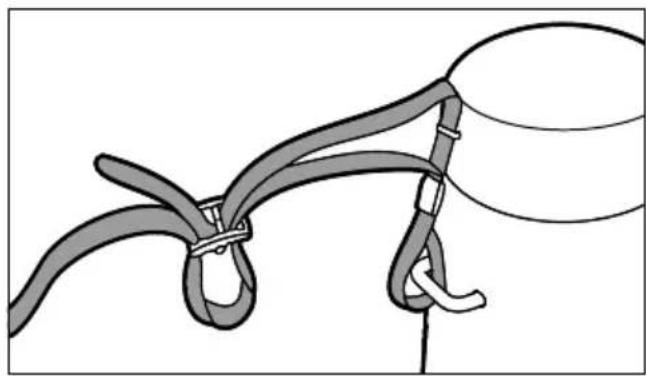
Note:
If you want to attach the eyepiece cap to the carrying strap, you will have to do that at the time of attaching the carrying strap to the binoculars.
MOUNTING THE LENS CAPS
You need to push the adapter rings over the lenses of the binoculars before you can fit the lens caps. Make sure that the recesses in the adapters are pointing towards the body and touch the lower bridge of the binoculars. The adapter rings should lie flush against the front of the rubber coating. You can now attach the actual lens caps by pushing their elongated tabs through the matching opening on the adapter rings. The caps click into the housing of the lenses and cover them.
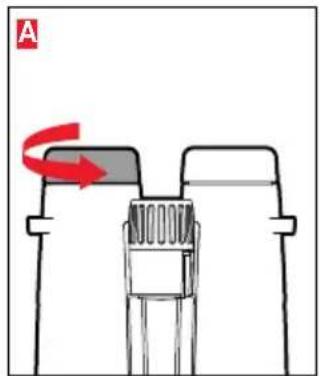
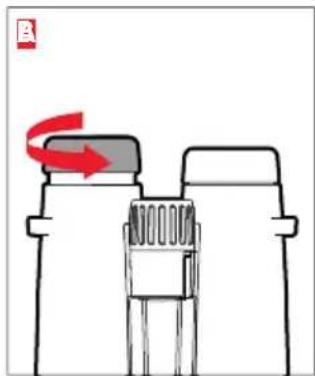
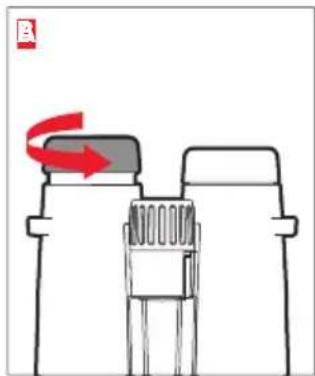
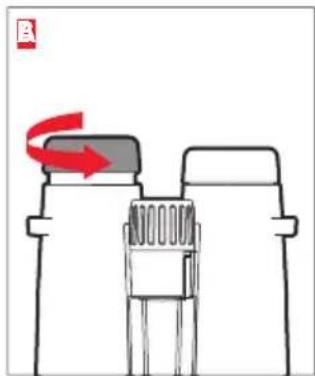
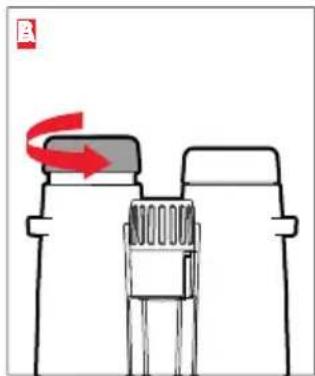
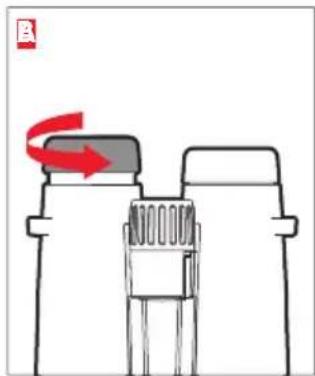
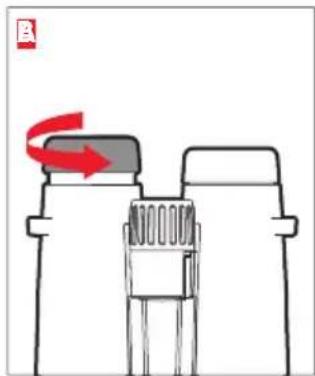
The eyecups 1 are adjusted by turning them and will lock securely in the selected position. They can be removed to thoroughly clean the eyepieces.
For use with eyeglasses, the eyecups should be turned in clockwise to the end position (Figure A).
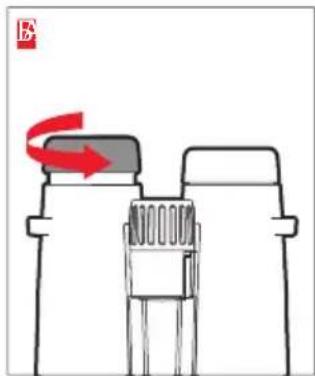
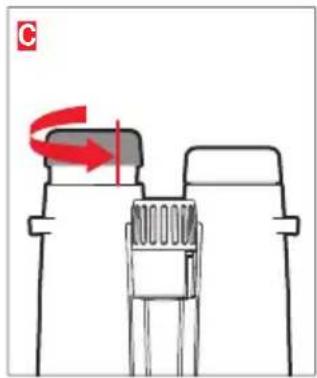
Turn them counter-clockwise for viewing without eyeglasses. There are three setting options to adjust to your pupil positions (Figures B, C).
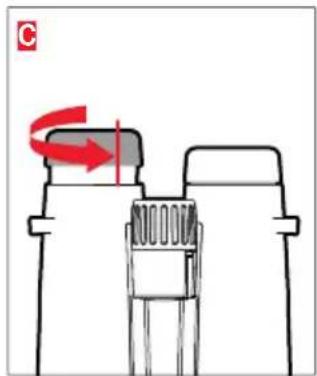
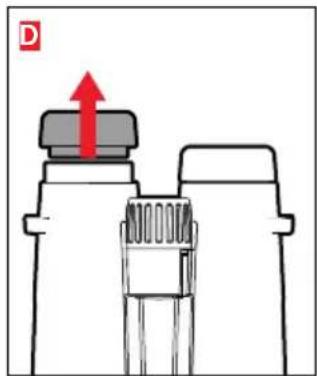
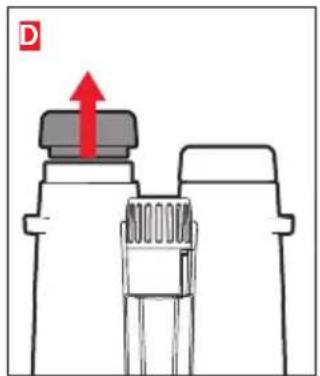
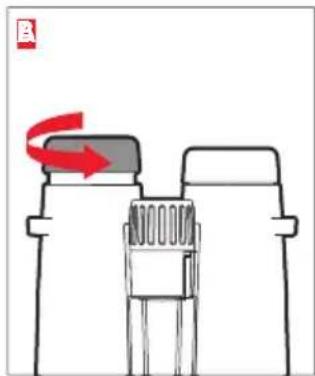
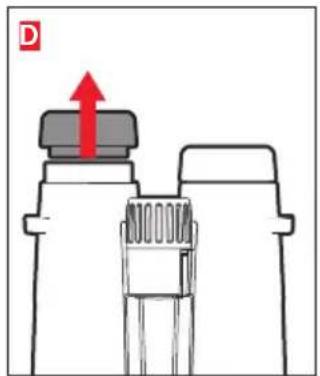
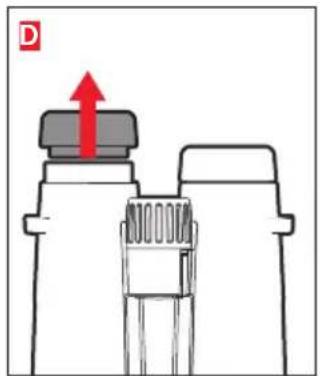
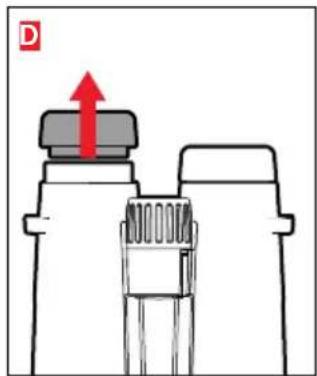
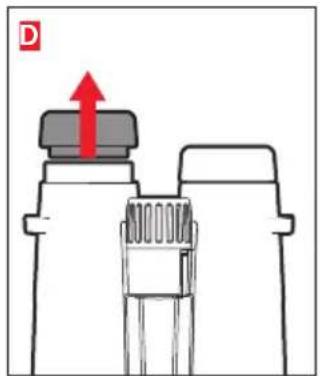
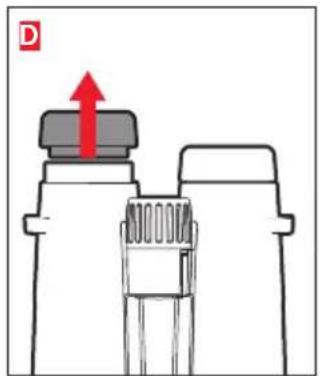
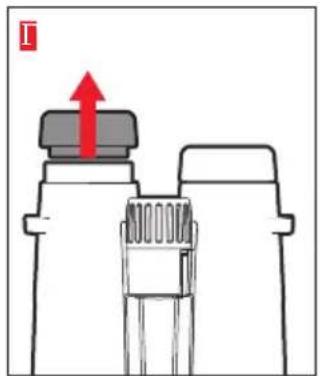
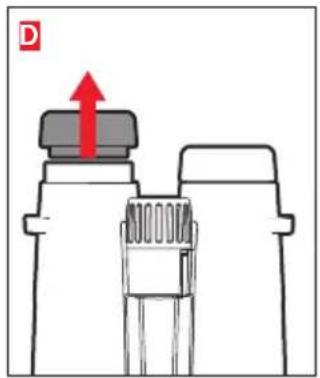
If the eyepieces are heavily soiled, we recommend removing the eyecups for cleaning (Figure D).
The eyecups have a loss protection lock. To unlock, turn them counter-clockwise a little further until they pass their fully extended position (Figure C) and move back down a little. The eyecups can then be removed (Figure D).
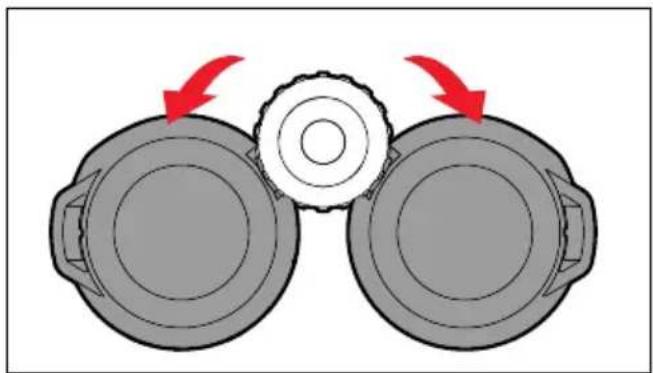
Adjust the interocular distance by moving the binoculars on the pivot axis. Ensure that the right-hand and left-hand fields of view merge into one circular image.
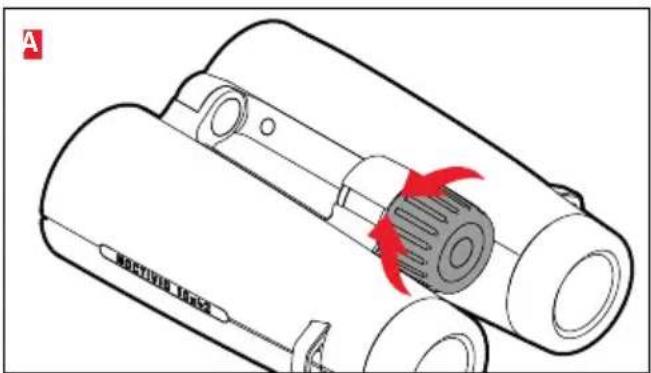
FOCUSING/DIOPTER ADJUSTMENT
With the Leica Noctivid binoculars, focusing on objects at varying distances is done using the central focusing unit (Figure A).
The diopter setting feature to compensate differences between right and left eyesight is integrated into this unit.
In order to set the diopter, focus first on a specific object using your left eye only. Remember that object and do not change your position.
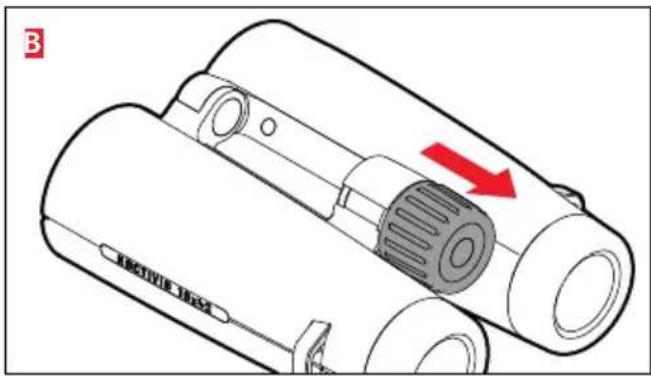
Next, pull the central focusing unit's wheel up slightly (Figure B).
Then focus on the same object using your right eye only.
Finally, push the wheel back down which locks your diopter setting. This setting is only necessary once per user.
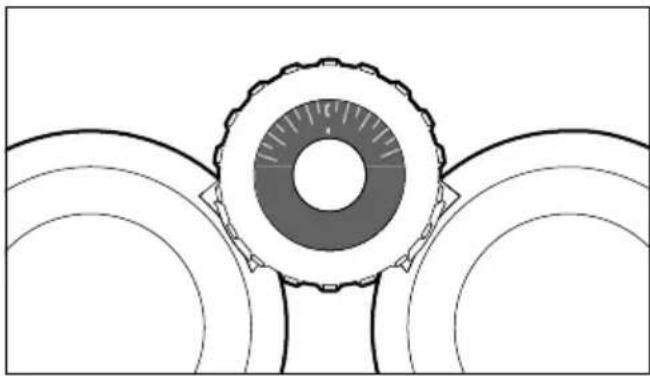
SCALE READING
You can see your personal diopter setting in the scale window on top of the central focusing unit. The value shown on the scale, i.e. the increment between two long lines represents approximately one diopter difference between the left and right eye.
Should the binoculars be used by several persons who change the setting, readjusting a setting is simple using the initially determined scale value.
CARE/CLEANING
Your Leica Noctivid binoculars require no special care. Coarse dirt particles like sand can be removed with a soft brush or simply blown off. Fingerprints, etc. on lenses and eyepieces can be removed with a soft, clean chamois or lint-free cloth. In case of severe dirt on the device, e.g. on the eyecups, the binoculars can be rinsed under running water. Salt water should also be rinsed away. Water stains on the lenses and eyepieces are best removed with a moist cloth. Any moisture inside the focusing unit (visible in the scale window) will dry faster with the central focusing unit's wheel 3 unlocked.
Do not use alcohol or chemical cleaning solutions on the binoculars.
Important:
Do not apply pressure when wiping heavily soiled lens surfaces. They have a highly scratch-resistant coating, but sand or salt crystals on the lens may still cause permanent damage.
ACCESSORIES
Please visit the Leica Camera AG website for information on the extensive range of accessories for Leica Noctivid binoculars:
www.leica-camera.com
SPARE PARTS
Please contact our Customer Care department or your national Leica representative if you ever need spare parts like eyecups, caps or carrying straps. The relevant addresses are listed on your Guarantee Card.
TROUBLESHOOTING
| Problem Cause Remedy | ||
| The view through the binoculars is not perfectly circular. | a) The binoculars are not adjusted to your specific interocular distance. | a) Move the two binocular tubes on the pivot axis. |
| b) Your pupils are not in line with the exit pupils of the binoculars. | b) Try adjusting the positions of your head and eyes in conjunction with the position of the binoculars. | |
| c) The position of the eyecups does not match the distance between your eyes (interocular distance). | c) Adjust the settings: Turn the eyecups in when using eyeglasses; without eyeglasses: turn the eye cups outward. | |
| d) The positions of the left and right eyecup differ. | d) Move both eyecups into the same position. | |
| Moisture inside the scale window | e focusing unit wheel was not correctly locked while rinsing the binoculars under running water. | Unlock the focusing unit wheel and allow moisture to dry out. There is no danger the device could be damaged. |
TECHNICAL SPECIFICATIONS
| LEICA NOCTIVID 8 X 42 LEICA NOCTIVID 10 X 42 | ||
| Magnification 8x 10x | ||
| Lens diameter 42mm 42mm | ||
| Exit pupil 5.25mm 4.2mm | ||
| Twilight factor 18.33 20.5 | ||
| Light transmission 92% 92% | ||
| Subjective viewing angle/visual field at 1,000m | 59.5°/135m | 61°/112m |
| Exit pupil position 19mm 19mm | ||
| Closest focusing distance (at 0 diopter) | approx. 1.8m | approx. 1.8 m |
| Diopter adjustment/at∞ | ± 4dpt./-5dpt. | ± 4dpt./-5dpt. |
| Eyepiece for eyeglass users | yes yes | |
| Eyecup | Adjustable and removable with 4 click-lock steps | |
| Adjustable interocular distance | 56-74mm | |
| Focusing | Internal focusing via central wheel | |
| Working/storage temperature | -25°-55°/-40°-85° | |
| Waterproofing | Waterproof to 5m depth | |
| Dimensions (W x H x D) | 124 x 59 x 153mm | |
| Weight | approx. 853g | approx. 863g |
LEICA PRODUCT SUPPORT
The Product Support department at Leica Camera AG can provide you with an answer to any technical questions relating to Leica products either in writing, on the telephone or by e-mail. Alternatively, you can send us your questions using the contact form on the Leica Camera AG homepage.
Leica Camera AG
Product Support / Software Support
Am Leitz-Park 5
35578 Wetzlar
Germany
Phone: +49 (0)6441-2080-111 /-108
Fax: +49 (0)6441-2080-490
info@leica-camera.com /
software-support@leica-camera.com
LEICA CUSTOMER CARE
Please contact the Customer Care department at Leica Camera AG or your national Leica representative for maintenance or repair requests (a list of addresses is provided on your Guarantee Card).
Leica Camera AG
Customer Care
Am Leitz-Park 5
35578 Wetzlar
Germany
Phone: +49(0)6441-2080-189
Fax: +49(0)6441-2080-339
customer.care@leica-camera.com
FOREWORD
Note:
ADJUSTING THE EYECUPS
ADJUSTING THE INTERPUPILLARY DISTANCE
FOCUSING / DIOPTER COMPENSATION
GRADUATIONS
MALFUNCTIONS AND SOLUTIONS
Product Support / Software Support
Am Leitz-Park 5
35578 Wetzlar
Germany
Tel.: +49(0)6441-2080-111 /-108
Fax: +49(0)6441-2080-490
info@leica-camera.com/
software-support@leica-camera.com
LEICA CUSTOMER CARE
Note:
SETTING THE EYECUPS
SETTING THE FOCUS / DIOPTER COMPENSATION
SCALE DATA
Product support / software support
Am Leitz-Park 5
35578 Wetzlar
Germany
Phone: +49(0) 6441-2080-111 /-108
Fax: +49(0) 6441-2080-490
info@leica-camera.com /
software-support@leica-camera.com
LEICA CUSTOMER CARE
Note:
ADJUSTING THE EYECUPS
DIOPTER SCALE
Product Support / Software Support
Am Leitz-Park 5
35578 Wetzlar
Germany
Phone: +49(0)6441-2080-111 /-108
Fax: +49(0)6441-2080-490
info@leica-camera.com /
software-support@leica-camera.com
LEICA CUSTOMER CARE
Note:
ADJUSTING THE RUBBER EYECUPS
SCALE DETAILS
Product Support / Software Support
Am Leitz-Park 5
35578 Wetzlar
Germany
Note:
ADJUSTING THE EYECUPS
ADJUSTING THE INTERPUPILLARY DISTANCE
ADJUSTING THE FOCUS/DIOPTER COMPENSATION
SCALE INFORMATION
Note:
SCALE READINGS
MEMO
Adjusting the eyecup
Adjusting the interpupillary distance
Focusing/Diopter adjustment
About the scale display


- NOTE
- ADJUSTING THE EYECUPS
- SCALE MARKINGS
- LEICA CUSTOMER CARE
- SCOPE OF DELIVERY
- PART DESIGNATIONS
- TABLE OF CONTENTS
- IMPORTANT HEALTH WARNING
- AREAS OF USE
- MOUNTING THE LENS CAPS
- FOCUSING/DIOPTER ADJUSTMENT
- SCALE READING
- CARE/CLEANING
- IMPORTANT
- ACCESSORIES
- SPARE PARTS
- LEICA PRODUCT SUPPORT
- FOREWORD
- ADJUSTING THE INTERPUPILLARY DISTANCE
- FOCUSING / DIOPTER COMPENSATION
- GRADUATIONS
- SETTING THE EYECUPS
- SETTING THE FOCUS / DIOPTER COMPENSATION
- SCALE DATA
- DIOPTER SCALE
- ADJUSTING THE RUBBER EYECUPS
- SCALE DETAILS
- ADJUSTING THE FOCUS/DIOPTER COMPENSATION
- SCALE INFORMATION
- SCALE READINGS
- MEMO
- ADJUSTING THE EYECUP
- ABOUT THE SCALE DISPLAY
Brand : LEICA
Model : Noctivid 8x42
Category : Binoculars