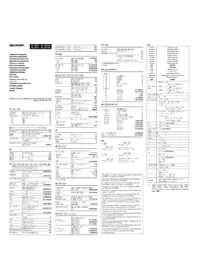
USER MANUAL EL-2901PIII SHARP
Notes for handling Lithium batteries:
CAUTION
Danger of explosion if battery is incorrectly replaced.
Replace only with the same or equivalent type recommended by the manufacturer.
Dispose of used batteries according to the manufacturer's instructions.
The socket outlet shall be installed near the equipment and shall be easily accessible.
Caution!
This equipment complies with the requirements of Directives 89/336/EEC and 73/23/EEC as amended by 93/68/EEC.
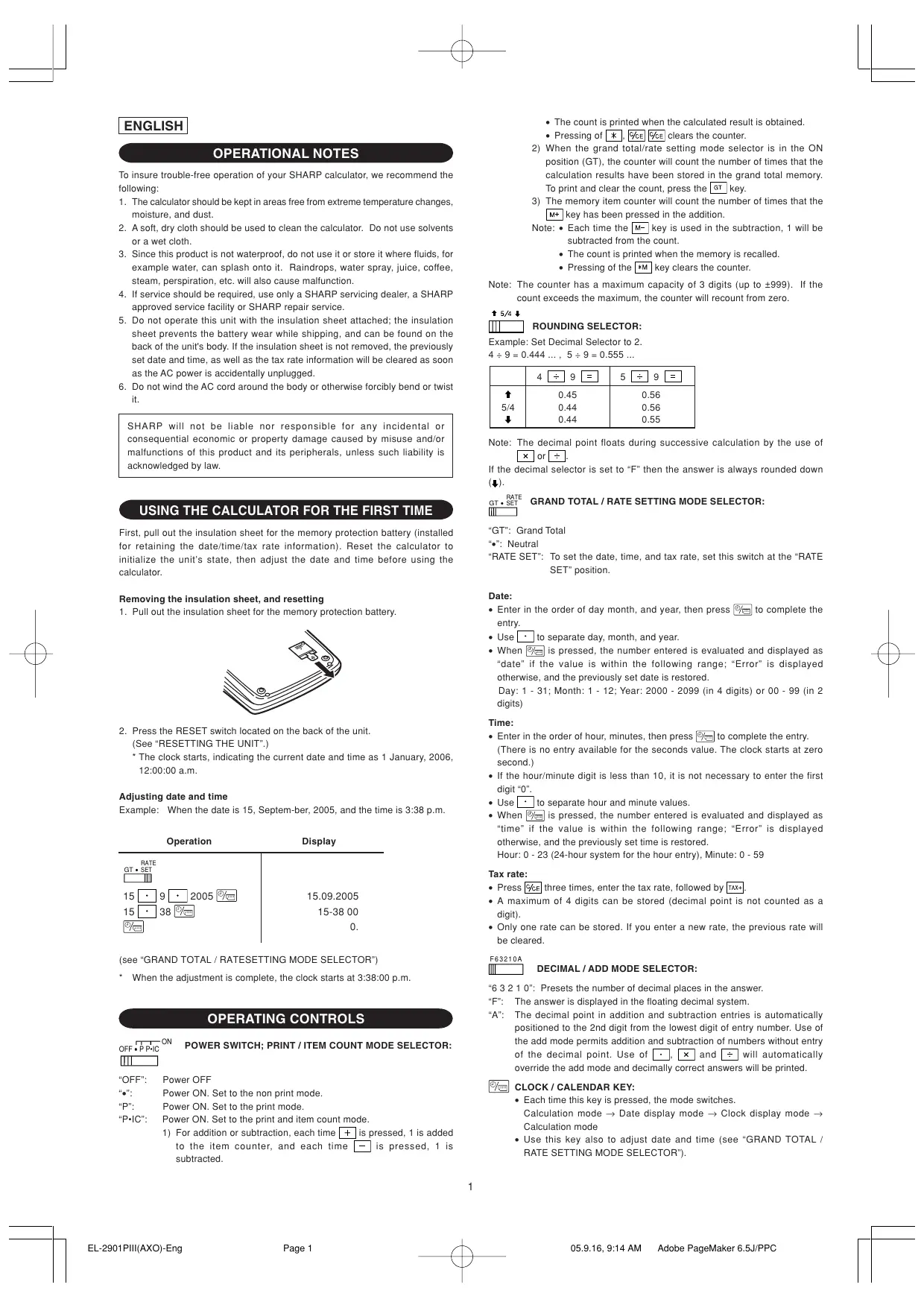
To insure trouble-free operation of your SHARP calculator, we recommend the following:
- The calculator should be kept in areas free from extreme temperature changes, moisture, and dust.
- A soft, dry cloth should be used to clean the calculator. Do not use solvents or a wet cloth.
- Since this product is not waterproof, do not use it or store it where fluids, for example water, can splash onto it. Raindrops, water spray, juice, coffee, steam, perspiration, etc. will also cause malfunction.
- If service should be required, use only a SHARP servicing dealer, a SHARP approved service facility or SHARP repair service.
- Do not operate this unit with the insulation sheet attached; the insulation sheet prevents the battery wear while shipping, and can be found on the back of the unit's body. If the insulation sheet is not removed, the previously set date and time, as well as the tax rate information will be cleared as soon as the AC power is accidentally unplugged.
- Do not wind the AC cord around the body or otherwise forcibly bend or twist it.
SHARP will not be liable nor responsible for any incidental or consequential economic or property damage caused by misuse and/or malfunctions of this product and its peripherals, unless such liability is acknowledged by law.
USING THE CALCULATOR FOR THE FIRST TIME
First, pull out the insulation sheet for the memory protection battery (installed for retaining the date/time/tax rate information). Reset the calculator to initialize the unit's state, then adjust the date and time before using the calculator.
Removing the insulation sheet, and resetting
- Pull out the insulation sheet for the memory protection battery.
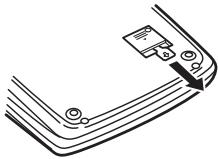
- Press the RESET switch located on the back of the unit.
(See "RESETTING THE UNIT".)
* The clock starts, indicating the current date and time as 1 January, 2006, 12:00:00 a.m.
Adjusting date and time
Example: When the date is 15, September, 2005, and the time is 3:38 p.m.
| Operation | Display |
| |
| 15 • 9 • 2005 | 15.09.2005 |
| 15 • 38 | 15-38 00 |
| 0. |
(see "GRAND TOTAL / RATESETTING MODE SELECTOR")
* When the adjustment is complete, the clock starts at 3:38:00 p.m.
OPERATING CONTROLS
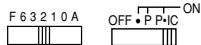
OFF • P • IC ON POWER SWITCH; PRINT / ITEM COUNT MODE SELECTOR:
"OFF": Power OFF
"•": Power ON. Set to the non-print mode.
"P": Power ON. Set to the print mode.
"P•IC": Power ON. Set to the print and item count mode.
1) For addition or subtraction, each time the [+] key is pressed, 1 is added to the item counter, and each time the [-] key is pressed, 1 is subtracted.
- The count is printed when the calculated result is obtained.
- Pressing the [*], [%], or [CE] key clears the counter.
2) When the grand total/rate setting mode selector is in the ON position (GT), the counter will count the number of times that the calculation results have been stored in the grand total memory. To print and clear the count, press the GT key.
3) The memory item counter will count the number of times that the M+ key has been pressed in the addition.
Note: • Each time the M- key is used in the subtraction, 1 will be subtracted from the count.
- The count is printed when the memory is recalled.
- Pressing the [*M] key clears the counter.
Note: The counter has a maximum capacity of 3 digits (up to ±999). If the count exceeds the maximum, the counter will recount from zero.
↑ 5/4 ↓

ROUNDING SELECTOR:
Example: Set Decimal Selector to 2.
4 ÷ 9 = 0.444…, 5 ÷ 9 = 0.555…
| 4 ÷ 9 = | 5 ÷ 9 = |
| ↑ | 0.45 | 0.56 |
| 5/4 | 0.44 | 0.56 |
| ↓ | 0.44 | 0.55 |
Note: The decimal point floats during successive calculation by the use of × or ÷.
If the decimal selector is set to "F" then the answer is always rounded down (↓).

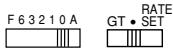
GRAND TOTAL / RATE SETTING MODE SELECTOR:
"GT": Grand Total
“●”: Neutral
"RATE SET": To set the date, time, and tax rate, set this switch at the "RATE SET" position.
Date:
- Enter in the order of day month, and year, then press Ⓞ to complete the entry.
- Use □ to separate day, month, and year.
- When 2 is pressed, the number entered is evaluated and displayed as "date" if the value is within the following range; "Error" is displayed otherwise, and the previously set date is restored.
Day: 1 - 31; Month: 1 - 12; Year: 2000 - 2099 (in 4 digits) or 00 - 99 (in 2 digits)
Time:
- Enter in the order of hour, minutes, then press ☐ to complete the entry. (There is no entry available for the seconds value. The clock starts at zero second.)
- If the hour/minute digit is less than 10, it is not necessary to enter the first digit "0".
- Use □ to separate hour and minute values.
- When 2/ is pressed, the number entered is evaluated and displayed as "time" if the value is within the following range; "Error" is displayed otherwise, and the previously set time is restored.
Hour: 0 - 23 (24-hour system for the hour entry), Minute: 0 - 59
Tax rate:
- Press % three times, enter the tax rate, followed by + .
- A maximum of 4 digits can be stored (decimal point is not counted as a digit).
- Only one rate can be stored. If you enter a new rate, the previous rate will be cleared.
F63210A
DECIMAL / ADD MODE SELECTOR:
"6 3 2 1 0": Presets the number of decimal places in the answer.
“F”: The answer is displayed in the floating decimal system.
“A”: The decimal point in addition and subtraction entries is automatically positioned to the 2nd digit from the lowest digit of entry number. Use of the add mode permits addition and subtraction of numbers without entry of the decimal point. Use of ·, × and ÷ will automatically override the add mode and decimally correct answers will be printed.

CLOCK / CALENDAR KEY:
- Each time this key is pressed, the mode switches.
Calculation mode → Date display mode → Clock display mode → Calculation mode
- Use this key also to adjust date and time (see "GRAND TOTAL / RATE SETTING MODE SELECTOR").
PAPER FEED KEY
→ LAST DIGIT CORRECTION KEY
NON-ADD / SUBTOTAL KEY:
Non-add – When this key is pressed right after an entry of a number in the Print mode, the entry is printed on the left-hand side with the symbol “#”. This key is used to print out numbers not subjects to calculation such as code, date, etc.
Subtotal - Used to get subtotal(s) of additions and/or subtractions. When pressed following the + or - key, the subtotal is printed with the symbol “◇” and the calculation may be continued.
By pressing this key even in the Non-print mode, the displayed number is printed without any symbol.
- When the POWER SWITCH; PRINT / ITEM COUNT MODE SELECTOR is set “•”, “P” or “P•IC” position, and Date or Clock is displayed, press this key to print the displayed contents, including “#” symbol, from the left side of the paper roll.
Example:
Date printing
(when the date is 15 September, 2005)
Clock printing
(when the time is 10:30 a.m.)
(when the time is 6:25 p.m.)
- When the Date / Clock printing is complete, the Calculation mode is restored.
C/CE CLEAR / CLEAR ENTRY KEY:
Press this key twice, followed by + , to print the set tax rate.
* TOTAL KEY
= EQUAL KEY
+/- CHANGE SIGN KEY:
Changes the algebraic sign of a number (i.e., positive to negative or negative to positive).
*M RECALL AND CLEAR MEMORY KEY
◇M RECALL MEMORY KEY
TAX+ TAX-INCLUDING KEY
TAX- PRE-TAX KEY
AVG AVERAGE KEY:
Used to calculate the average.
GT GRAND TOTAL KEY
COST COST PRICE ENTRY KEY:
Press this key to enter the cost price.
SELL SELLING PRICE ENTRY KEY:
Press this key to enter the selling price.
MGN MARGIN ENTRY KEY:
Press this key to enter the margin.
DISPLAY SYMBOLS:
M : Appears when a number is in the memory.
- : Appears when a number is negative.
• : Appears when a number is in the grand total memory.
E : Appears when an overflow or other error is detected.
INK ROLLER REPLACEMENT
If printing is blurry even when the ink roller is in the proper position, replace the roller.
Ink roller: Type EA-772R
WARNING
APPLYING INK TO WORN INK ROLLER OR USE OF UNAPPROVED INK ROLLER MAY CAUSE SERIOUS DAMAGE TO PRINTER.
1) Set the power switch to OFF.
2) Remove the printer cover. (Fig. 1)
3) Hold the top of the ink roller and remove the roller by pulling it toward you and then upward. (Fig. 2)
4) Install the new ink roller in the correct position. Make sure that the roller is securely in place. (Fig. 3) 5) Put back the printer cover.
Fig. 1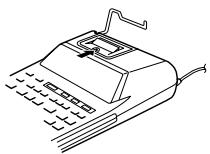
Fig. 2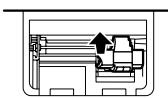
Fig. 3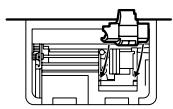
Cleaning the printing mechanism
If the print becomes dull after long time usage, clean the printing wheel according to the following procedures:
1) Remove the printer cover and the ink roller. 2) Install the paper roll and feed it until it comes out of the front of the printing mechanism. 3) Put a small brush (like a tooth brush) lightly to the printing wheel and clean it by pressing [↑]. 4) Put back the ink roller and the printer cover.
Note: • Do not rotate the printing mechanism manually, this may damage the printer.
PAPER ROLL REPLACEMENT
Never insert paper roll if torn. Doing so will cause paper to jam. Always cut leading edge with scissors first.
1) Insert the leading edge of the paper roll into the opening. (Fig. 1) 2) Turn the power on and feed the paper by pressing [↑]. (Fig. 2) 3) Lift the attached metal paper holder up and insert the paper roll to the paper holder. (Fig. 3)
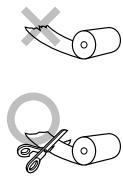
Fig. 1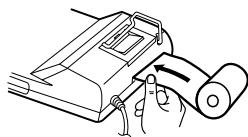
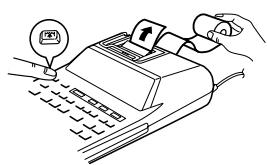
Fig. 2
Fig. 3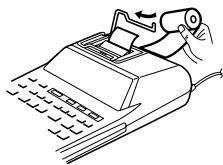
DO NOT PULL PAPER BACKWARDS AS THIS MAY CAUSE DAMAGE TO PRINTING MECHANISM.
ERRORS
There are several situations which will cause an overflow or an error condition. When this occurs, “E” will be displayed. The contents of the memory at the time of the error are retained.
If an “0·E” is displayed at the time of the error, “----” will be printed in red and % must be used to clear the calculator.
Also, in rare cases, printing may stop midway and the indication "E" appear on the display. This is not a malfunction but is caused when the calculator is exposed to strong electromagnetic noise or static electricity from an external source. Should this occur, press the CCE key and then repeat the calculation from the beginning.
Error conditions:
- When the integer portion of an answer exceeds 12 digits.
- When the integer portion of the contents of the memory or grand total memory exceeds 12 digits. (Ex. *M 9999999999999 M+ 1 M+)
- When any number is divided by zero. (Ex. 5 ÷ 0 =)
REPLACEMENT OF BATTERY FOR MEMORY PROTECTION
Time for battery replacement
Life of the memory protection battery is approximately 2,500 hours at 25°C (77°F) with the power plug not connected to the socket.
* When the memory protection battery is weak, the date/time setting is initialized (1/1/2006, 12:00:00 a.m.).
Verify the date/time setting in the date/clock display mode when connecting the power plug to the socket.
If the date/time setting is modified or incorrect, promptly replace the memory protection battery with a new one.
(The life of the pre-installed battery may be shorter than expected because of the time the calculator spends during shipment.)
Method of battery replacement
Use one lithium battery (CR2032).
Caution: Replacing the battery will clear the date and time settings, and the stored tax rate.
1) Turn the power switch "OFF" and unplug the power supply plug from the outlet. 2) Remove the battery cover on the back of the unit. (Fig. 1) 3) Remove the exhausted battery and install one new lithium battery. Wipe the battery well with a dry cloth and place the plus “+” side upward. (Fig. 2) 4) Replace the battery cover by reversing the removal procedure. 5) Press the RESET switch on the back of the unit (See "RESETTING THE UNIT").
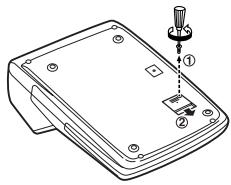
Fig. 1
Fig. 2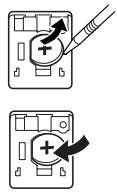
After battery replacement
- Connect the power supply plug to an outlet and turn the power switch "ON". Check that "0." is displayed. If "0." is not displayed, remove the battery, reinstall it, and check the display again.
- Readjust date, time, and tax rate settings.
- On the battery replacement date label found on the back of the unit, write down the month and year when the battery is replaced, as a reference for the next battery replacement.
Precautions on battery use
- Do not leave an exhausted battery in the equipment.
- Do not expose the battery to water or flame, and do not take it apart.
- Store batteries out of the reach of small children.
SPECIFICATIONS
Operating capacity: 12 digits
Power supply:
Operating: AC: 220V-230V, 50Hz
Memory backup: 3V — (DC) (Lithium battery CR2032 × 1)
Memory Protection Battery lifespan:
About 2,500 hours (While at 25° C ( 77° F), and the power plug is not connected to the socket.)
CLOCK SECTION
Accuracy: Within ±90 seconds per month average (at 25°C(77°F))
Items to be displayed: day, month, year, hour, minute, second
Items to be printed: day, month, year, hour, minute
Time system: 24 hour
PRINTING SECTION
Printer: Mechanical printer
Printing speed: Approx. 2.1 lines/sec.
(At temperature 25°C (77°F), when “741•9 + ” is printed. The printing speed will vary with the number of rows and the figure types to be printed.)
Printing paper: 57 mm(2-1/4") - 58 mm(2-9/32") wide 80 mm(3-5/32") in diameter (max.)
Operating temperature: 0°C – 40°C (32°F – 104°F)
Power consumption: 51 mA
Dimensions: 193 mm (W) × 255 mm (D) × 60.5 mm (H)
(7-19/32" (W) × 10-1/32" (D) × 2-3/8" (H))
Weight: Approx. 1.02 kg (2.25 lb.) (with battery)
Accessories:
1 lithium battery(installed), 1 battery replacement date label (attached on the unit's back body), 1 paper roll, 1 ink roller (installed), and operation manual
WARNING
THE VOLTAGE USED MUST BE THE SAME AS SPECIFIED ON THIS CALCULATOR. USING THIS CALCULATOR WITH A HIGHER VOLTAGE THAN THAT WHICH IS SPECIFIED IS DANGEROUS AND MAY RESULT IN A FIRE OR OTHER TYPE OF ACCIDENT CAUSING DAMAGE. WE ARE NOT RESPONSIBLE FOR ANY DAMAGE RESULTING FROM USE OF THIS CALCULATOR WITH A VOLTAGE OTHER THAN THAT WHICH IS SPECIFIED.
RESETTING THE UNIT
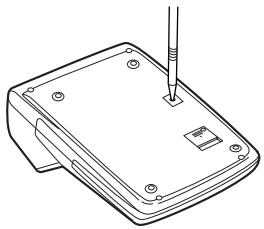
Strong impacts, exposure to electrical fields, or other unusual conditions may render the unit inoperative, and pressing the keys will have no effect. If this occurs, you will have to press the RESET switch on the bottom of the unit.
The RESET switch should be pressed only when:
- an abnormal event occurs and all keys are disabled.
Notes:
- Pressing the RESET switch will clear the date and time settings, the tax rate setting, and the contents of memory.
- Use only a ballpoint pen to press the RESET switch. Do not use anything breakable or anything with a sharp tip, such as a needle.
- After pressing the RESET switch, connect the power supply plug to an outlet. Turn the power switch "ON" and check that "0." is displayed.
GERMAN
OPERATING INSTRUCTIONS
(when the date is September 15, 2005)
Time printing
Fig. 2
Fig. 3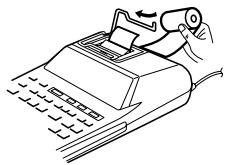
DO NOT PULL PAPER BACK, AS THIS MAY CAUSE DAMAGE TO THE PRINT MECHANISM.
ERROR
(Example *M 9999999999999 M+ 1 M+)
Fig. 1
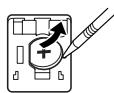
Fig. 2
FRENCH
PRECAUTIONS
Fig. 2
Fig. 3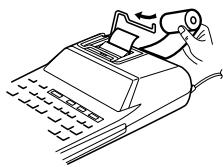
DO NOT PULL THE PAPER BACKWARD AS THIS MAY DAMAGE THE PRINTING MECHANISM.
ERRORS
Fig. 1
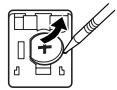
Fig. 2
SPANISH
OPERATING NOTES
Fig. 2
Fig. 3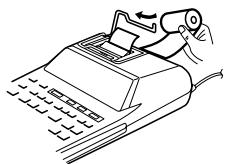
Fig. 1
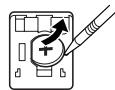
Fig. 2
ITALIAN
OPERATING NOTES
# NO KEY SUM / SUBTOTAL:
TAX+ KEY INCLUDE TAX
TAX- KEY BEFORE TAX
Fig. 2
Fig. 3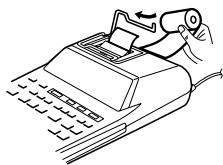
DO NOT PULL THE PAPER BACKWARDS, AS THIS COULD CAUSE DAMAGE TO THE PRINTING MECHANISM.
ERRORS
Fig. 1
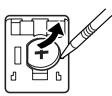
Fig. 2
SWEDISH
INSTRUCTIONS FOR USE
DECIMAL SELECTOR / ADDITION MODE:
MEMORY RECALL AND CLEAR KEY

MEMORY RECALL KEY

TAX INCLUDED TOTAL KEY

TAX EXCLUDED TOTAL KEY

AVERAGE KEY:
Figure 2
Figure 3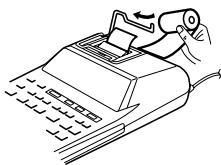
NEVER PULL THE PAPER BACKWARD AS THIS MAY CAUSE DAMAGE TO THE PRINTING MECHANISM.
ERROR
(e.g., *M 9999999999999 M+ 1 M+)
Figure 1
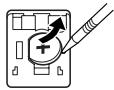
Figure 2
After battery replacement
DUTCH
→ CORRECTION TEST FOR LAST DIGIT
% NON-ADD / SUBTOTAL KEY:
MGN PROFIT MARGIN ENTRY KEY:
Fig. 2
Fig. 3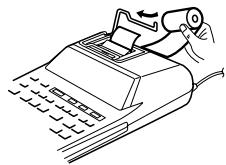
DO NOT PULL THE PAPER BACKWARDS AS THIS COULD RESULT IN DAMAGE TO THE PRINTING MECHANISM.
ERRORS
Fig. 1
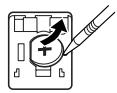
Fig. 2
PORTUGUESE
OPERATING NOTES
MEMORY RECALL AND CLEAR KEY

MEMORY RECALL KEY

Fig. 2
Fig. 3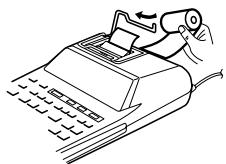
DO NOT PULL THE PAPER BACKWARDS, AS THIS MAY DAMAGE THE PRINTING MECHANISM.
ERRORS
Fig. 1
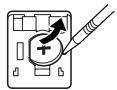
Fig. 2
FINNISH
NOTES ON USE
4÷ 9 = 0.444... ,5÷ 9 = 0.555
| 4 ÷ 9 = | 5 ÷ 9 = |
| ↑ | 0.45 | 0.56 |
| 5/4 | 0.44 | 0.56 |
| ↓ | 0.44 | 0.55 |
Fig. 2
Fig. 3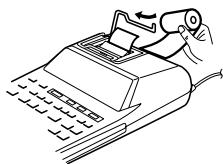
DO NOT PULL THE PAPER BACKWARDS, AS THIS MAY DAMAGE THE PRINTING MECHANISM.
ERRORS
Fig. 1
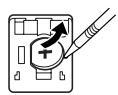
Fig. 2
CALCULATION EXAMPLES
- Set the decimal selector as specified in each example. The rounding selector should be in the "5/4" position unless otherwise specified.
- The grand total/rate setting mode selector should be in the "•" position (off) unless otherwise specified.
- The print / item count mode selector should be in the "P" position unless otherwise specified.
- Press % CE % CE prior to beginning any calculation.
- If an error is made while entering a number, press % CE or → and enter the correct number.
- After entering a value, press COST, SELL or MGN to activate the Cost/Sell/Margin Calculation mode. In case of performing different calculation tasks, % CE % CE key must be pressed first to cancel the Cost/Sell/Margin mode.
- Example procedures are listed in following manner unless otherwise specified.
| A. 5 × 2 + 12 = |
|
| 5 × | 5. | 5• × |
| 2 = | | 2• = |
| | 10• * |
| 10. | |
| + | 10. | 10• + |
| 12 + | 22. | 12• + |
| * | | 002········································································································································································································· |
| | 22• * |
B. (10+2)×5=

| 10 + | 10. | 10• + |
| 2 + | 12. | 2• + |
| × | 12. | 12• × |
| 5 = | | 5• = |
| | 60• * |
| 60. | |
CONSTANT / CONSTANT / CONSTANT CALCULATIONS / CONSTANTS / CONSTANT / CONSTANT CALCULATIONS / CONSTANT / CONSTANT / CONSTANT
A. 62.35 × 11.11 = ① 62.35 × 22.22 = ②

| 62.35 × 11.11 = | 62.35 | 62•35 ×11•11 =692•7085 * 1 |
| 692.7085 |
| 22.22 = | | 22•22 =1•385•417 * 2 |
| 1,385.417 |
B. 11.11 ÷ 77.77 = ① 22.22 ÷ 77.77 = ②

| 11.11 ÷ 77.77 = | 11.11 | 11•11 ÷ 77•77 =0•14285714285 * 1 |
| 22.22 = | 0.14285714285 | 22•22 =0•28571428571 * 2 |
| 0.28571428571 | |
PERCENT / PERCENT / PERCENTAGE / PERCENTAGES / PERCENTAGE / PERCENTAGE CALCULATION / PERCENTAGE / PERCENTAGE / PERCENTAGE
A. 100 × 25% =

| 100 ×25 % | 100. | 100• ×25• %25•00 * |
| 25.00 | |
B. (123 ÷ 1368) × 100 =

| 123 ÷ 1368 % | 123. | 123 · ÷1·368 · %8·99 * |
| 8.99 | |
ITEM COUNT CALCULATION / CALCULATION WITH THE ITEM COUNTER / CALCULATION OF ITEM COUNT / CALCULATION OF ITEM COUNT / CALCULATION OF ITEM COUNT / CALCULATION WITH THE ITEM COUNTER / CALCULATION WITH THE ITEM COUNTER / CALCULATION OF ITEM COUNT / ITEM COUNTER
| Bill No.Rechnung Nr.Facture n°N° de facturaNumero di fatturaFakturanr.Rekeningnr.N° da faturaLaskunr. | Number of billsAnzahl der RechnungenNbre de facturesCantidad de facturasNumero delle fattureAntal fakturorAantal rekeningenNúmero de faturasLaskujen lukumäärä | AmountBetragMontantImporteImportoBeloppBedragQuantiaMäärä |
| 1 | 1 | 100.55 |
| 2 | 1 | 200.00 |
| 3 | 1 | 200.00 |
| 4 | 1 | 400.55 |
| 5 | 1 | $500.65 |
| Total / Summe / TotalTotal / Totale / SvarTotaal / Total / Summa | (a) | (b) |
| %CE | %CE | | |
| 100.55 | + | 100.55 | 100•55 + |
| 200 | + | 300.55 | 200•00 + |
| + | 500.55 | 200•00 + |
| 400.55 | + | 901.10 | 400•55 + |
| 500.65 | + | 1,401.75 | 500•65 + |
| * | | 005•········································································································································································································· |
| | 1,401.75 | 1•401•75 * (b) |
GRAND TOTAL / ENDSUMME / TOTAL GÉNÉRAL / TOTAL GLOBAL / TOTALE GENERALE / SLUTSVAR / EINDTOTAAL / TOTAL GERAL / KOKONAISSUMMA
100 + 200 + 300 =
+) 300 + 400 + 700 =
Grand total / Endsumme / Total général / Total global / Totale generale / Slutsvar / Eindtotaal / Total geral / Kokonaissumma
| F 6 3 2 1 0 A | RATEGT • SETOFF • P • ICON |
| GT | | | |
| 100 + | 100. | 100• + | |
| 200 + | 300. | 200• + | |
| 300 + | 600. | 300• + | |
| * | | 600• ** | 1 |
| 600• | | |
| 300 + | 300• | 300• + | |
| 400 + | 700• | 400• + | |
| 500 + | 1,200• | 500• + | |
| * | | 1·200• ** | 2 |
| 1,200• | | |
| GT | | 1·800• ** | 3 |
| 1,800. | | |
MEMORY / SPEICHER / MÉMOIRE / MEMORIA / MEMORIA / MINNE / GEHEUGEN / MEMÓRIA / MUISTILASKENTA
46 × 78 = ①
+) 125 ÷ 5 = ②
-) 72 × 8 = ③
Total / Summe / Total
Total / Totale / Svar ④
Totaal / Total / Summa
| *3 | *M | | |
| 46 | × | 46. | 46• × |
| 78 | M+ | | 78• = |
| | 3,588.M | 3·588• +M 1 |
| 125 | ÷ | 125.M | 125• ÷ |
| 5 | M+ | | 5• = |
| | 25.M | 25• +M 2 |
| 72 | × | 72.M | 72• × |
| 8 | M- | | 8• = |
| | 576.M | 576• -M 3 |
| ◇M | | 3·037• ◇M 4 |
| | 3,037.M | |
| *M | | 3·037• *M |
| | 3,037. | |
*3 : Press *M to clear the memory before starting a memory calculation. *3 : Vor dem Beginn einer Speicherberechnung drücken Sie M , um den Speicher zu löschen. *3 : Effacer le contenu de la mémoire ( M ) avant de procéder à un calcul avec mémoire. *3 : Apretar *M para cancelar la memoria antes de empezar a efectuar un cálculo con memoria. *3 : Premere *M per cancellare la memoria prima di iniziare un calcolo con memoria. *3 : Tryck på *M för att tömma minnet innan minnesräkning startas. *3 : Voordat u begint met het maken van een geheugenberekening drukt u op *M om het geheugen te wissen. *3 : Pressione *M para limpar a memória antes de começar um cálculo com memória. *3 : Tyhjennä muisti painamalla näppäintä *M ennen muistilaskun aloittamista.
TAX RATE CALCULATIONS BERECHNUNGEN DER STEUERRATE CALCULS DE TAXE CÁLCULOS CON EL TIPO DE IMPUESTO CALCOLO DELL'ALIQUOTA D'IMPOSTA RÄKNING MED SKATTESATS BELASTINGBEREKENINGEN CÁLCULOS COM UMA TAXA DE IMPOSTO VEROPROSENTTILASKELMAT
| EXAMPLE 1: | Set a 5% tax rate. Calculate the total amount for adding a 5% tax to 800. |
| BEISPIEL 1: | Geben Sie eine Steuerrate von 5% ein. Berechne den Gesamt-betrag bei Addition von 5% Steuern auf800. |
| EXEMPLE 1: | Choisir une taxe de 5%. Calculer le montant d'un article à 800 avec cette taxe. |
| EJEMPLO 1: | Fijar el tipo de impuesto al 5%. Calcular la cantidad total resultante de añadir el impuesto del 5% a800. |
| ESEMPIO 1: | Impostare il 5% di aliquota d'imposta. Calcolare l'imposta del 5% su 800e calcolare il totale. |
| EXEMPEL 1: | Ställ in en skattesats på 5%. Beräkna summan när 5% skatt läggs till beloppet800. |
| VOORBEELD 1: | Stel een 5% belastingtarief in. Bereken het totaalbedrag bij 5% belasting op 800. |
| EXEMPLO 1: | Defina uma taxa de imposto de 5%. Calcule a quantia total adicionando um imposto de 5% a800. |
| ESIMERKKI 1: | Aseta 5 % veroprosentti. Laske vero 800$:sta ja veron sisältävä summa. |

| RATEGT • SET | | |
| RATEGT • SET | | |
| %CE %CE %CE 5TAX+ | 5. | |
| RATEGT • SET | 5.000 | ···5·000 % |
| RATEGT • SET | | |
| 800 TAX+ | | 800···40·840· |
| 840. | |
| EXAMPLE 2: | Perform two calculations using 840 and525, both of which already include tax. Calculate the tax on the total and the total without tax. (tax rate: 5%) |
| BEISPIEL 2: | Zwei Berechnung mit 840 und525 ausführen, die beide jeweils den Steueranteil enthalten. Berechne die Steuern für die Gesamtsumme und die Gesamt-summe ohne Steuern. (Steuerrate ist 5%) |
| EXEMPLE 2: | Réalise duex calculs en utilisant 840 et525, les deux incluant déjà la taxe. Calcule la taxe sur le total et le total sans la taxe. (taux de la taxe: 5%) |
| EJEMPLO 2: | Realice dos cálculos utilizando 840 y525, los cuales ya incluyen impuesto. Calcule et impuesto sobre el total y el total sin impuesto. (Tasa de impuestos: 5%) |
| ESEMPIO 2: | Eseguire due calcoli usando i valori 840 e 525, entrambi con tasse incluse. Calcolare le tasse che sono incluse nel totale e il totale senza tasse. (Aliquota d'imposta: 5%) |
| EXEMPEL 2: | Utför två beräkningar med 840 och525, vilka båda redan inkluderar skatt. Beräkna skatten på summan samt summan utan skatt. (skattesats: 5%) |
| VOORBEELD 2: | Voer twee berekeningen uit met 840 en525; beide bedragen zijn inclusief belasting. Bereken de belasting op het totaal en het totaal zonder belasting. (Belastingtarief: 5%) |
| EXEMPLO 2: | Realize dois cálculos usando as quantias 840 e525, as quais incluem um imposto. Calcule o imposto sobre o total e o total sem imposto. (Taxa de imposto: 5%) |
| ESIMERKKI 2: | Suoritetaan kaksi laskutoimitusta käyttämällä lukuja 840ja 525, joista kummassakin on jo vero. Laske vero kokonaissummasta ja ilman veroa oleva arvo (veroprosentti 5%). |

| 840+ | 840. | 840• + |
| 525+ | 1,365. | 525• + |
| TAX- | | 1:365• |
| | ···65• - |
| | 1:300• |
| 1,300. | |
COST / SELL / MARGIN CALCULATION BERECHNUNG VON EINKAUFSPREIS, VERKAUFSPREIS UND GEWINNSPANNE CALCUL DE ACHAT / VENTE / MARGE CÁLCULO DE COSTES / VENTAS / MÁRGENES CALCOLO DI COSTI / VENDITE / MARGINI BERÄKNING AV KOSTNAD / FÖRSÄLJNING / MARGINAL INKOOPPRIJS / VERKOOPPRIJS / WINSTMARGE BEREKENINGEN CÁLCULO DE CUSTO / VENDA / MARGEM OMAKUSTANNUSHINNAN / MYYNTIHINNAN / VOITTOMARGINAALIN LASKENTA
| EXAMPLE 1: | Determine the cost price for 30% margin when the selling price is set at 500.1 Selling Price 2 Margin 3 Cost price |
| BEISPIEL 1: | Berechnen Sie den Einkaufspreis für eine Gewinnspanne von 30%, wenn der Verkaufspreis auf500 festgelegt ist.1 Verkaufspreis 2 Gewinnspanne3 Einkaufspreis |
| EXEMPLE 1: | Déterminez le prix d'achat pour une marge bénéficiaire de 30% lorsque le prix de vente est de 500.1 Prix de vente 2 Marge bénéficiaire3 Prix d'achat |
| EJEMPLO 1: | Determine el precio de coste para un margen del 30% cuando el precio de venta es de 500 euros.1 precio de venta 2 margen3 precio de coste |
| ESEMPIO 1: | Calcolare il prezzo di costo per un margine del 30% con un prezzo di vendita di 500.1 Prezzo di vendita 2 Margine3 Prezzo di costo |
| EXEMPEL 1: | Beräkna självkostnadspriset för en marginal på 30% när försäljnings-priset är fast på $500. |
EXAMPLE 2: Determine the selling price for 30% margin when the cost price is set at $350.
① Cost price ② Margin ③ Selling Price
① Inkoopprijs ② Winstmarge
③ Verkoopprijs
EXAMPLE 3: Determine the margin when the cost price is set at 350, and the selling price at500.
① Cost price ② Selling Price ③ Margin
Also, obtain the margin when the cost price is set to $250.
Then Average Sales = $131.20 /
Then Average Sales = $131.20 /
| * | | |
| 12315 | + | 123.15 | 123•15 + |
| 118 | • + | 241.15 | 118•00 + |
| 13158 | + | 372.73 | 131•58 + |
| 12502 | + | 497.75 | 125•02 + |
| 15825 | + | 656.00 | 158•25 + |
| * | | 005········································································································································································································· |
| | | 656•00 * |
| | | |
| AVG | | 131•20 ΔG |
| | 131.20 | |
FOR GERMANY ONLY
Environmental protection
Attention: Your product is marked with this symbol. It means that used electrical and electronic products should not be mixed with general household waste. There is a separate collection system for these products.
Attention: If you want to dispose of this equipment, please do not use the ordinary dust bin!
Used electrical and electronic equipment must be treated separately and in accordance with legislation that requires proper treatment, recovery and recycling of used electrical and electronic equipment.
Following the implementation by member states, private households within the EU states may return their used electrical and electronic equipment to designated collection facilities free of charge*. In some countries* your local retailer may also take back your old product free of charge if you purchase a similar new one. *) Please contact your local authority for further details.
If your used electrical or electronic equipment has batteries or accumulators, please dispose of these separately beforehand according to local requirements.
By disposing of this product correctly you will help ensure that the waste undergoes the necessary treatment, recovery and recycling and thus prevent potential negative effects on the environment and human health which could otherwise arise due to inappropriate waste handling.
2. In other Countries outside the EU
If you wish to discard this product, please contact your local
authorities and ask for the correct method of disposal.
For Switzerland: Used electrical or electronic equipment can be returned free of charge to the dealer, even if you don't purchase a new product. Further collection facilities are listed on the homepage of www.swico.ch or www.sens.ch.
1. In the European Union
If the product is used for business purposes and you want to discard it:
Please contact your SHARP dealer who will inform you about the take-back of the product. You might be charged for the costs arising from take-back and recycling. Small products (and small amounts) might be taken back by your local collection facilities.
For Spain: Please contact the established collection system or your local authority for take-back of your used products.
2. In other Countries outside the EU
If you wish to discard of this product, please contact your local authorities and ask for the correct method of disposal.