NEsT 5P P 6201 - Uncategorized Pentagram - Free user manual and instructions
Find the device manual for free NEsT 5P P 6201 Pentagram in PDF.


| Product Type | Switching Hub (Switch) |
| Brand | Pentagram |
| Model | NEsT 5P P 6201 |
| Ports | 5 x RJ-45 (10/100 Mbps) with Auto MDI/MDIX |
| Transmission Speed | 10/100 Mbps (Auto-Negotiation) |
| Duplex Mode | Half/Full Duplex |
| Standards | IEEE 802.3 (10Base-T), IEEE 802.3u (100Base-TX), IEEE 802.3x (Flow Control) |
| Switching Method | Store-and-Forward |
| Packet Filtering/Forwarding Rate | 10 Mbps: 14,880 pps; 100 Mbps: 148,800 pps |
| Flow Control | Back-pressure (Half Duplex), IEEE 802.3x (Full Duplex) |
| Power Supply | External adapter 9V AC, 1A |
| Power Consumption | Max 4W |
| Dimensions (W x D x H) | 104 x 69 x 28 mm |
| Weight | Approx. 0.2 kg (estimated) |
| LED Indicators | Power (PWR), Link/Activity (LINK/ACT) per port |
| Cabling | UTP Cat. 3, 4 or 5 (10Base-T), Cat. 5 (100Base-TX) |
| Auto-Crossover | Yes (Auto MDI/MDIX) |
| Installation | Plug-and-Play, no configuration required |
| Operating Environment | Indoor use only |
| Maintenance | Clean with a dry cloth, keep away from moisture |
| Safety | Low voltage device, comply with local electrical regulations |
| Reparability | No user-serviceable parts; contact support for issues |
| Included Accessories | Power adapter, Quick installation manual |
Frequently Asked Questions - NEsT 5P P 6201 Pentagram
User questions about NEsT 5P P 6201 Pentagram
0 question about this device. Answer the ones you know or ask your own.
Ask a new question about this device
Download the instructions for your Uncategorized in PDF format for free! Find your manual NEsT 5P P 6201 - Pentagram and take your electronic device back in hand. On this page are published all the documents necessary for the use of your device. NEsT 5P P 6201 by Pentagram.
USER MANUAL NEsT 5P P 6201 Pentagram
NOTE! All information and technical data are subject to change without previous notice and/or indication of such changes in this manual.
Copyright © 2007 PENTAGRAM
All rights reserved, duplication and copying forbidden.

Copyright © 2007 PENTAGRAM
Copyright © 2007 PENTAGRAM
Copyright © 2007 PENTAGRAM
Copyright © 2007 PENTAGRAM
Copyright © 2007 PENTAGRAM
Quick installation manual
Thank you for purchasing our switching hub PENTAGRAM NEsT 5P. We believe it will meet your expectations and will serve you well.
In this manual we will describe the most important issues related to the device and its installation.
A switching hub, or switch, for short, is a device which makes it possible to connect several computers into a network. Using our device, you will be able to share data with other users very quickly. The network connection will help you to work more efficiently, and to play the newest computer games supporting multi-player mode with your friends. A switch differs from an ordinary hub in a way that its performance is higher, and it reduces network load. The increased performance and reduced network load is gained by port switching, i.e. sending data only to target computers (an ordinary hub sends data to all the computers in a network, thus significantly slowing down transfers).
Installation and operation of the switching hub PENTAGRAM NEsT 5P is easy. As the device supports major standards, it allows to create a new network or extend an existing one with ease.
Box contents
- PENTAGRAM NEsT 5P (P 6201)
- Adapter 9 V AC, 1 A
- Quick installation manual
Requirements
• Computers with NICs working in one of the supported standards (10Base-T, 100Base-TX)
• Network cables UTP cat. 3, 4 or 5 (10 Mbps), UTP cat. 5 (100 Mbps), with RJ-45 connectors.
Device functions
- Every port supports the autocrossover function (MDI/MDI-X), enabling fast connection of the switch with other devices or computers.
- Store and Forward function additionally increases bandwidth by filtering wrong packets.
- Speed autonegotiation for each port individually.
- Support for flow control modes – back-pressure (half duplex) and IEEE802.3x (full duplex), in order to prevent errors when transmitting and receiving data with different speeds.
- Signal diodes allow for quick determination of network operation status.
- No user configuration needed. Just plug it in and work. The switch will automatically set transmission speed and mode for individual ports depending on the connected devices (e.g. PC/printer).
- Support for full duplex mode helps to double the effective network bandwidth.
Technical data
| Transmission speeds 10 Mbps, 100 Mbps (autonegotiation) | |
| Transmission modes | 10/100 Mbps half duplex, full duplex (autonegotiation) |
| Supported standards | IEEE 802.3: 10Base-TIEEE 802.3u: 100Base-TXIEEE 802.3x: Flow-Control support |
| Interface | 5 switchable ports RJ-45, with automatic crossover detection (Auto MDI-MDIX) |
| Cabling/connectors | RJ-45 (10Base-T) – UTP cat. 3, 4 or 5RJ-45 (100Base-TX) – UTP cat. 5 |
| Signalling diodes Power feed (PWR), port link/activity (LINK/ACT) | |
| Filtering/Packet forwarding (pps – packets per second) | 10 Mbps: 14,880 pps / 14,880 pps100 Mbps: 148,800 pps / 148,800 pps |
| Power consumption Max. 4 W | |
| Power feed External power adapter 9 V AC, 1 | A |
| Dimensions 104 x 69 x 28 | |
Device external look
Front panel
On the device front panel, there are diodes displaying the status of the device and individual ports. One diode (PWR) shows the device power status, 5 diodes (LINK/ACT) show the status of individual ports' operation.
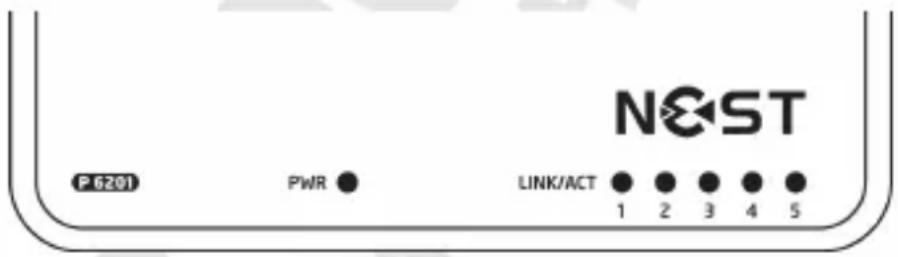
| Name Color Function | ||
| PWR Green On: the power is on | ||
| LINK/ACT Green | On: link with other device | |
| Blinking: data transfer |
Back panel
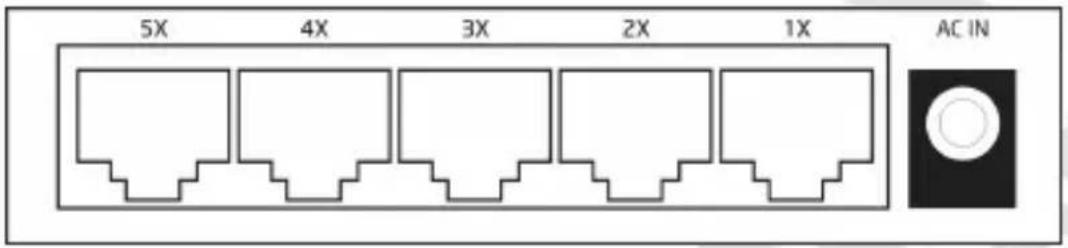
On the back panel, there are RJ-45 ports for connecting computers and other network devices through network cables and power connector.
Device operation
-
Connect the power adapter (supplied) to the power connector on the back panel of the device, then connect the power adapter to an electrical socket.
-
Connect the computers and other network devices to the RJ-45 connectors on the back panel through network cables (not supplied). You may connect any port of the device to another switch (Uplink).
Half duplex and full duplex
PENTAGRAM NEsT 5P supports half and full duplex modes in 10Base-T and 100Base-TX modes.
Half duplex – data cannot be sent and received simultaneously. They are sent after the reception has finished.
Full duplex – data can be sent and received simultaneously. This mode doubles the channel bandwidth.
Full duplex transmission is possible:
- Between devices connected directly (e.g. switch-switch, switch-PC)
- When both devices support full duplex mode
- When both devices work in the same autonegotiation mode (e.g. autonegotiation–autonegotiation, or no autonegotiation–no autonegotiation.)
Autonegotiation
Each device port has a link speed autonegotiation function. It allows to choose the best available speed for each separate port during connection with other device.
The table represents the modes in which the switch will work after connection with various devices.
| Operation mode of the connected device Operation mode of PENTAGRAM switch |
| 100 Mbps no autonegotiation 100 Mbps (100Base-TX half duplex) |
| 100 Mbps with autonegotiation 200 Mbps (100Base-TX full duplex) |
| 10 Mbps no autonegotiation 10 Mbps (10Base-T half duplex) |
| 10 Mbps with autonegotiation 20 Mbps (10Base-T full duplex) |

(IEC61000-4-2:1995 + A1:1998 +A2:2000, IEC61000-4-3:2002 + A1:2002,
IEC61000-4-4:1995 A1:2000 + A2:2001, IEC61000-4-5:1995 + A1:2000,
IEC61000-4-6:1996 +A1:2000, IEC61000-4-8:1993 +A1:2000, IEC61000-4-11:1994 +A1:2000)
Brand : Pentagram
Model : NEsT 5P P 6201
Category : Uncategorized