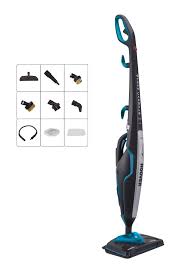
CA2IN1D - Vacuum Cleaner HOOVER - Free user manual and instructions
Find the device manual for free CA2IN1D HOOVER in PDF.


| Product type | 2-in-1 steam mop (steam vacuum) |
| Brand | HOOVER |
| Model | CA2IN1D |
| Power supply | Mains 230 V ~ 50 Hz, 13 A (UK plug) |
| Power | Approx. 1500 W (estimated) |
| Water tank capacity | Approx. 350 ml (estimated) |
| Weight | Approx. 2.5 kg (estimated) |
| Dimensions (L x W x H) | Approx. 110 x 25 x 20 cm (estimated) |
| Color | Not specified (typically white/grey) |
| Main functions | Steam cleaning for hard floors, portable function with accessories, steam adjustment (Low, Medium, High), use on carpets with specific support |
| Included accessories | Triangular brush, cleaning brush, conical nozzle, hose, curved nozzle, round brush, small metal brush, large metal brush, window squeegee, small cloth, microfiber pad, carpet and rug support |
| Heating time | Approx. 30 seconds |
| Runtime per full tank | Up to 25 minutes (continuous use) |
| Maintenance and cleaning | Microfiber pad machine washable at max 40°C (no bleach or fabric softener). Descaling recommended with distilled or demineralised water. |
| Safety | Switch off and unplug before maintenance. Do not use without microfiber pad. Do not add chemicals. Overheat protection (built-in thermostat). |
| Spare parts and consumables | Microfiber pads (AC36 35601693) available. Use only Hoover parts. |
| Warranty | According to conditions of the country of sale, upon presentation of the invoice. |
| General information | Manufactured according to ISO 9001 standard. Compliant with European Directives 2006/95/EC, 2004/108/EC, 2011/65/EU. Do not dispose of with household waste, recycle at appropriate facility. |
Frequently Asked Questions - CA2IN1D HOOVER
User questions about CA2IN1D HOOVER
0 question about this device. Answer the ones you know or ask your own.
Ask a new question about this device
Download the instructions for your Vacuum Cleaner in PDF format for free! Find your manual CA2IN1D - HOOVER and take your electronic device back in hand. On this page are published all the documents necessary for the use of your device. CA2IN1D by HOOVER.
USER MANUAL CA2IN1D HOOVER
This appliance should only be used for domestic cleaning, as described in this user guide. Please ensure that this guide is fully understood before operating the appliance.
Do not leave the appliance plugged in. Always switch off and remove the plug from the socket after use, or before cleaning the appliance or any maintenance task.
This appliance can be used by persons with reduced physical, sensory or mental capabilities or lack of experience and knowledge if they have been given supervision or instruction concerning use of the appliance in a safe way and understand the hazards involved. Children shall not play with the appliance.
Keep the appliance out of reach of children when it is energized or cooling down.
The appliance is not to be used if it has been dropped, if there are visible signs of damage or if it is leaking.
If the power cord is damaged stop using the appliance immediately. To avoid a safety hazard, an authorised Hoover service engineer must replace the power cord.
This appliance must be earthed.
The appliance shall not be left unattended while it is connected to the supply mains.
Do not use your appliance out of doors.
Use only attachments, consumables or spares recommended or supplied by Hoover.
Do not use the appliance to clean or direct steam towards animals, people or plants.
Liquid or steam must not be directed towards equipment containing electrical components, such as the interior of ovens.
Unplug the cleaner and switch off before filling the water container. Do not fill over the MAX mark. The filling aperture must not be opened during use.

Danger of Scalding.

Surfaces are liable to get very hot during use. Avoid contact with steam.
Do not stand on or wrap the cord around arms or legs when using your appliance.
Do not position the appliance above you when cleaning the stairs.
When using the cleaning tools ensure to always steady the appliance with your other hand. This will ensure that the appliance does not fall while in use.
Do not handle the plug or appliance with wet hands.
Do not run over the power cord when using your appliance or remove the plug by pulling on the power cord.
Do not continue to use your appliance if it appears faulty.
Hoover service: To ensure the continued safe and efficient operation of this appliance we recommend that any servicing or repairs are only carried out by an authorised Hoover service engineer.
Do not immerse the appliance in water or other liquids.
Do not use detergents or liquids other than water inside the appliance.
For UK and Ireland only: This appliance has a 13 amp mains plug. If you need to change the fuse in the mains plug, use a 13amp ASTA (BS1362) fuse.
The Environment
The symbol on this appliance indicates that this appliance may not be treated as household waste. Instead it must be handed over to the applicable collection point for the recycling of electrical and electronic equipment. Disposal must be carried out in accordance with local environmental regulations for waste disposal.
For more detailed information about treatment, recovery and recycling of this appliance, please contact your local city office, your household and waste disposal service or the shop where you purchased the appliance.

This appliance complies with the European Directives 2006/95/EC, 2004/108/EC and 2011/65/EU.
HOOVER Limited, Pentrebach, Merthyr Tydfil, Mid Glamorgan, CF48 4TU, UK
GETTING TO KNOW YOUR CLEANER
A. Steam Release Trigger
B. Handle Assembly
C. Upper&Lower Cord Storage Hooks
D. Power Cord
E. Handheld Release Button
F. Handheld Steam Release Trigger
G. Cleaner Main Body
H. Triangular Brush Release Pedal
I. Triangular Brush
I2 Floor Head*
J. Handle Fix Location
K. Variable Steam Release Control Slider Low, Medium & High
L. Power On Indicator Light (Metallic Red)
M. Steam Ready Light ( Green )
N. Power On/Off Button
O. Clean Water Tank
P. Clean Water Tank Release Button
Q. Conic Tool
R. Hose
S. Curved Nozzle
T. Round Brush
U. Small Metal Brush
V. Big Metal Brush
W. Window Squeegee
X. Small Cloth
Y. Textile Pad
Z. Carpet Glider
AA. Carpet Glider Release Pedal
AB. Bolt
ASSEMBLING YOUR CLEANER
Remove all components from the packaging.
- Line up the ergonomic handle to the main body of the cleaner and fix in position with the supplied Bolt. [1,2]
- Assemble the main body of the cleaner to the Triangular Brush. [3]
- Assemble the main body of the cleaner to the floor Head or assemble the Triangular Brush into the Floor Head*. [4]
USING YOUR CLEANER
- Release the clean water tank by sliding the water release button upwards and remove tank from cleaner main body. [5]
- Pull the cap on the Water Tank to open. [6]
- Fill the clean water tank with cold tap water. Replace cap [7] and refit water tank. Do not add any chemicals, detergents or perfumes to the clean water tank.
NOTE: In order to significantly reduce mineral build-up and prolong the life of your steam mop the use of distilled or de-mineralized water in the unit is highly recommended.
4. Attach a Textile Pad to the base of the Floor Head. [8]
IMPORTANT: Always unplug the cleaner when adding water or changing a Textile Pad.
NOTE: Wash the Textile Pad prior to use to remove any lint.
STEAM CLEANING HARD FLOORS
NOTE: Always sweep or vacuum the floor prior to use to remove any loose dirt or debris.
IMPORTANT: Do not use the cleaner without a Textile Pad attached to the Floor Head.
NOTE: Do not use the Carpet Glider when cleaning hard floors.
- Plug the steam cleaner into the main power. Press the power on/off button, the power on light (red) will illuminate.
- After a few seconds the steam ready light (green) will illuminate indicating the cleaner is ready for use.
- Decline the cleaner by placing a foot on the floor head and lowering the main body towards the floor. [11]
- To produce steam press the Steam Trigger Button. [12]
- Move the cleaner slowly backwards and forwards paying particular attention to high traffic areas. [13]
- Variable steam release control are used to select Low, Medium or High volume of steam, depending on your specific cleaning requirement. [14]
Steam cleaning hard floor - intensive clean
Use the triangular floor brush for hard floors that require deep cleaning. Please note that there is no mop and the area will have to be dried separately.
NOTE: Always sweep or vacuum the floor prior to use to remove any loose dirt or debris.
- Remove the triangular floor brush from the floor head by pressing the release pedal at the rear of the floor head. [15]
- Plug the steam cleaner into the main power. The power on light (red) will illuminate. After a few seconds the green Steam Ready light will illuminate indicating the cleaner is ready for use.
- Recline the cleaner by placing a foot on the floor brush and lowering the main body
GB
towards the floor. [16]
- To produce steam press the trigger release button. [12]
- Variable steam release control are used to select Low, Medium or High volume of steam, depending on your specific cleaning requirement. [14]
- Move the cleaner slowly backwards and forwards paying particular attention to high traffic areas. [17]
METHODS OF USE FOR HANDHELD STEAM CLEANER
- Unplug the cleaner from the mains power and ensure the unit has cooled.
- Push the release button on the main body to take out the handheld. [19]
- Pull the cap on the Water Tank to open. [6]
- Fill the clean water tank with cold tap water. Replace cap [7] and refit water tank. Do not add any chemicals, detergents or perfumes to the clean water tank.
- Plug the steam cleaner into the main power. Press the power on/off button, the power on light (red) will illuminate.[18]
- After a few seconds the steam ready light (green) will illuminate indicating the cleaner is ready for use.
- To produce steam press Steam Trigger Button (Handheld). [20]
- Variable steam release control are used to select Low, Medium or High volume of steam, depending on your specific cleaning requirement. [14]
NOTE: in order to significantly reduce mineral build-up and prolong the life of your steam mop the use of distilled or de-mineralized water in the unit is highly recommended.
IMPORTANT: Always unplug the cleaner when removing the Floor Head or handle. Always ensure the cleaner has fully cooled down before removing the Floor Head.
ACCESSORIES
NOTE: Accessories can only be attached on the handheld steam cleaner.
IMPORTANT: Inspect the seal on the steam nozzle before each use, if the seal is missing or damaged, do not use the appliance, please contact the authorized Hoover service.
Attaching the hose and the nozzles to the handheld steam cleaner
1.Fit the Hose to Steam nozzle of handheld unit and rotate clockwise until hose is locked in position and secure.
2. Attach Conic Tool to the nozzle on the hose. Insert and rotate clockwise until Conic Tool is in locked position and secure.
3.Fit other small accessories to Conic Tool, Insert and rotate clockwise until it is locked in position and secure.
Window Squeegee and Utility Head [21]
The Window squeegee is to be installed on the Steam nozzle of handheld unit and is
used for cleaning windows, mirrors and other smooth glass surfaces. Fit Small Cloth on Window Squeegee on. Choose the steam intensity setting appropriate for the fabric you are steaming.
Conic Tool Use on heavily soiled areas such as showers, kitchens.
Round Brush Use on stubborn grease and grime.
Small Metal Brush For oven grills and racks.
Big Metal Brush For oven grills and racks.
IMPORTANT: ensure that the hose and accessories are securely fastened before using the handheld steam cleaner, if steam escapes from the joint that means the hose and accessories are not correctly fitted, allow the unit to cool then remove and re-fit the hose and accessories.
CLEANER MAINTENANCE
IMPORTANT: ALWAYS ENSURE THE CLEANER HAS FULLY COOLED DOWN BEFORE PERFORMING ANY MAINTENANCE TASKS.
Empty the Water Tank
- Unplug the cleaner from the mains power and ensure the unit has cooled.
- Release the clean water tank by sliding the water release button upwards and remove tank from cleaner main body. [5]
3.Pull the cap on the Water Tank to open. [6] - Empty any excess water from the tank. Replace the cap and return to the cleaner.
Removing and cleaning the Textile Pad
- Unplug the cleaner from the mains power and ensure the unit has cooled.
2.If necessary remove the Carpet Glider, then peel the Textile Pad from the Floor Base.
3.Wash the Textile Pad in a washing machine with a mild detergent at Max temperature 40^ .
IMPORTANT: Do not use bleach or fabric softener when washing the Textile Pad.
TROUBLE SHOOTING
Should you have a problem with the product, complete this simple user checklist before calling your local Hoover service.
The steam cleaner will not switch on.
- Check the unit is plugged in.
- Check the power cord.
The steam cleaner is not producing steam.
GB
- There may be no water in the clean water tank.
- You may not wait for enough time when switch on.
The Textile Pad won't pick up dirt.
- The cleaning pad may already be saturated with dirt and needs to be washed.
Refer to the Maintenance section.
CLEANING FAQs
When is Steam capsule 2in1 ready? In approximately 30 seconds.
Can I use Steam capsule 2in1 on all floor surfaces? On all hard floors like marble, ceramic, stone, linoleum, sealed hardwood floors and parquet.
Does Steam capsule 2in1 emit steam automatically? No, to produce steam you should press Steam Trigger Button under the handle.
Can I put detergents or other chemicals inside the tank? No, you would damage the product.
What if in the city where I live the water is very hard? You can use filtered water or distilled or de-mineralized water, it's highly recommended.
How long will one tank of water last before needing to be refilled? Up to 25 minutes if you press continuously the trigger.
Is the mop washable? Yes, it can be washed by hand or in the washing machine with a mild detergent at Max temperature 40^ . Do not use bleach or fabric softener.
How often should I replace the mop? It depends on different factors above all how hard the floor is. The best way to understand when to change the mop is when the mop is still dirty after having washed it or if you notice that it doesn't perform like before.
IMPORTANT INFORMATION
Hoover spares and Consumables
Always replace parts with genuine Hoover spares. These are available from your local Hoover dealer or direct from Hoover. When ordering parts always quote your model number.
Consumables
Microfiber Pads (X2) AC36 35601693
Quality
Hoover's factories have been independently assessed for quality. Our products are made using a quality system which meets the requirements of ISO 9001.
Your Guarantee
The guarantee conditions for this appliance are as defined by our representative in the country in which it is sold. Details regarding these conditions can be obtained from the dealer from whom the appliance was purchased. The bill of sale or receipt must be produced when making any claim under the terms of this guarantee.
Subject to change without notice.
INSTRUCTIONS DE SECURITE D'UTILISATION
Wanner is Steam capsule 2in1CLAar? In ca. 30 seconden.
This appliance must be earthed.
VEDLIKEHOLD AV STØVSUGEREN
VIKTIG: PASS ALLTID PÅ AT INGEN FORM FOR VEDLIKEHOLD UTFFRES FØR RENSEREN ER HELT NEDKJOLT.
INNAN DU BÖRJAR RENGÖRING
Maktpo npapawkai kepaynevikno xnpno [21]
Ta maKtpa npapaoovv npoopiocovtai va tonoeTNOuV oTo akpoouio aTuou movadw xEipoc kai xpnoiopoivvtaia tvk aOapiou ualonivakw, kaepotwv kai aawv leiw yauivw Epiaveuw. Tonoetne eva miKpO navi oTo maKtpo npapuropw. EInleTe Tnv katalnn pUoiom Evtaonc atouyto uqmaoun ou atmuTE.
Kwivko epyaaleio Xpnoiopoioinote To e Evtova aeipouevc, pioxc, ownoc vtouc kai kouce. Tpoyyu npouptao Xpnoiopoioinote tn oeknpouc lnapouc ekedc kai moutoupec.
Mikpn metaaikn bouptoa Tia ykpi aoupvw kai oxapc.
MHCTPYKlIINIPO TEXHNIKE BE3OPIAHOCTN
Данныnpиборпpe徳нэчehТолькдяДOMaшHERO
ИСПОЛьЗOBAHЯВСоOTВЕТСВИСОПИСАнEM,ПРИBEДЕНHBIM
ВНаCTОДЧЕМPyKOBODCTBE ПОЛьЗOBATEЛ.ПрждчЕМ
ПпСТУПNTБКЭКСПУATAЦNДaHHorOБыTOBOгэЛКТрОпрИбОра,
уБeДИТECBВ TOM,ЧTOВbl NOHIMaTeHACTOIQUEpyKOBODCTBO.
He octablaIte np60p BKIOUeHHbIM B pO3eTKy. Pocne nCPOJb3OBaHnI nnpePeOuNCTKoI nn O6cnyKINBaHnEM BCErDa BblHMaJITe BNkY n3 pO3eTKn.
He cToIte Ha npOBoJe n He HAmTaBbAaTe erO Ha pyKu nn Hory B npOceCse nCpOJIb3OBaHnna npi6opa.
He pa3meuaiTe np6op naicobov Bvpeym y6opkn lectnui.
Pn nncnoB3OBAHnn npncnoc6JeHn JIy OunCTKn BTOPOB CBO6oHNo pyKoB CERda npndepKuBaIte cam npnbop. 3To nomoraet He dOnyCTnTb naeHn np6bopa B pOuece 3KcnpyaTaun.
He BbITaIBaIe/BcTaBIAIte BnIKy I He pa6oTaIe c np6opom MOKpbIMn pyKaMn.
He nepebo3nte cBoi np6op uepe3 npoBOd nHTaHnI He TAHnte 3a npoBOD, BbIHMaBnKy I3 pO3eTKN.
B cnyuae HeNCnpaBHOCTn He cIeDyET npoJOnjKaTb NOlb3OBaTbcr np6Opom.
CepBnchA cyx6a Hoover: IJRA oecneueHn npoOJXntelbHO, 6e3onacHOn n 300EKTINBHOn pa60TbI DaHHoro 6bITOBORO 3JIeKTPoPnp6opa IIO6o BnD peMOHTa peKOMeHdyETc npOu3BOuNTb TOJbKO CpeunajnCTOM ABTOPN3OBaHHORO cepBnCHoro ceHTpa Hoover.
He onyckaTe npnbOp B Body nIpyrne JxndKocTn.
He noIb3yIeTcB uNCTaUIMn CpeIcTBaMn I He 3aJIbAitE pyrIe XnIkoCTn, KpOme BOdbl, B npu6Op.
ToIbko IraBennko6pntaHnn n IpIaHn: DaHHbI prn6op OcnaaetcA cTeBoB BnIKoN 13 A. Ppr Heo6xOIMocTn 3aMeHbI ppeOxApaHnTeJI B BnIke NcNoJIb3yIte ppeOxApaHnTeJI TnPa ASTA (BS1362) 13 A.
Okpykaioua cepa:
CnMBOJHa DaHHom npu6ope yka3bIaet Ha To, YTO ero HeJIb3a ytunl3npOBAt B MecTe C 6byTobIMN OTXODAMN.ErO Heo6xOJIMMO cdaBaT B COOTBeTCTBByUOJIN PnyHK TpNiema DJa DaJIbHeJWeJpepa60TK 3JeKTPnuecknx N JLeKTPOnHBix UacteY. Ytunl3aJIN DOJXHa npoBoiHTbcra B COOTBeTCTBm C MeCTHbIMN ppiPoDOOxApaNTeJBHbIMN PpaBInAmn PO yTuIN3aUIMN OTXODOB.3a 60Jee NoDpo6HOH INΦOpMaJne N O6paSeHHcO C daHNbIM npu6Opom, erO yTuIN3aUIMN npepa6OTke O6paTteCB MecThbIe OprAhbl BNaCTN, B Cnyk6y yTuIN3aUIMN OTXODOB INL B MaRa3NH, rDe Bbl PpiO6peJI nnAHhBn Ppi6Op.

TEXHINCHECKOE OBCJNYXUBAHNE IIJIIECOCA
BHNMAHNE! NPEE INPOBEDEHENEM TEXHNUECKOTO OBCJYKUBAHIO IbIIECOCA YBEINTECb B TOM, YTO OH IOJIHOCTbO OXJAIDNCL.
Ouictnte pe3epByap c rpa3HOI BOoH.
1.BbInbTe BnIky n3 pOzETKn IdoJntTeCb, noka npi6Op oCtbiHET.
2.CHIMMITE pe3epByap dny uNCTOy BOdbI, noTAYB pbUar BblNycka BOdbI BBepx, n y6epnte pe3epByap c rnaBHorO kOpnyca nbJIneCoca. [5]
3.BbIyHnTe np6ky n3 pe3epByapa dny chctoB Odbi. [6]
4.YdaJIte IIO6oI n3IINeK BOdBi n3 pe3epByapa. NocTaBbTe Ha MeCTO KOJIpaOK i BepHInTe B nbIneCoc.
Charne uOuHCTKa TkaHeBOI NOJIOXKU
1.BbHbTe Bnky n3 po3eKn ndoxJnteCb, noka np6op octbHET.
2.Ecn Heo6xOIMo, Chmnte Hacay dJa KOBpa N 3aTe M Chmnte TkaHeByIO NOJIOKky C HaCaN.
3.BbIcTnpaIte TkaHeByIO NOILOXky B CTnpaJIbHOI MaUHHe C MArKIM YNCTraIIm CpeIcTBOM npI TempeType He 6OJIe 40^
BHNMAHNE! Pn cTnpke TkaHeBoi NOIIOXKn He IcNoIb3yIte OT6eINBaTeIb nn ONOJaCKNBATeJIb.