
SKHO 40 A1 - Uncategorized SILVERCREST - Free user manual and instructions
Find the device manual for free SKHO 40 A1 SILVERCREST in PDF.


| Product Type | Bluetooth On-Ear Headphones |
| Brand | SilverCrest |
| Model | SBK 40 A1 (also known as SKHO 40 A1) |
| Dimensions (W x H x D) | Approx. 175 x 193 x 73 mm |
| Weight | Approx. 160 g |
| Power Supply | 5 V DC via micro-USB; built-in rechargeable lithium polymer battery (3.7 V, 500 mAh, 1.85 Wh) |
| Charging Time | Approx. 3.5 hours |
| Operating Time (Music & Phone) | Approx. 10 hours at medium volume |
| Standby Time | Approx. 380 hours |
| Wireless Standard | Bluetooth 4.1 |
| Supported Profiles | A2DP, AVRCP, HSP, HFP |
| Wireless Range | Approx. 10 m |
| Frequency Band | 2402 – 2480 MHz |
| Max. Transmitted Power | < 20 mW |
| Operating Temperature | 5 °C to 35 °C |
| Storage Temperature | 0 °C to 40 °C |
| Humidity (Operating) | 10% – 70% (no condensation) |
| Key Features | Multipoint connection (connect to two devices); built-in microphone; AUX input (3.5 mm); adjustable headband |
| Controls | Play/pause, volume, track skip, call management, pairing |
| Safety Features | Hearing damage warning; automatic shutdown; low battery indicator |
| Maintenance & Cleaning | Switch off and unplug before cleaning; use slightly damp cloth and mild cleaner; avoid moisture ingress |
| Disposal | Do not dispose with household waste; recycle as electronic waste per directive 2012/19/EU |
| Warranty | 3 years from date of purchase |
| Included Accessories | Charging cable (micro-USB to USB-A), AUX cable (3.5 mm), instructions |
Frequently Asked Questions - SKHO 40 A1 SILVERCREST
User questions about SKHO 40 A1 SILVERCREST
0 question about this device. Answer the ones you know or ask your own.
Ask a new question about this device
Download the instructions for your Uncategorized in PDF format for free! Find your manual SKHO 40 A1 - SILVERCREST and take your electronic device back in hand. On this page are published all the documents necessary for the use of your device. SKHO 40 A1 by SILVERCREST.
USER MANUAL SKHO 40 A1 SILVERCREST
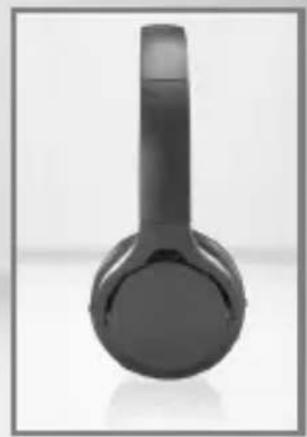
BLUETOOTH® ON-EAR HEADPHONES SBK 40 A1
GB
BLUETOOTH® ON-EAR HEADPHONES
Operation and safety notes
FI
BLUETOOTH®-KUULOKKEET
GB Operation and safety notes Page 5
Warnings and symbols used......Page 6
Introduction......Page 8
Intended use......Page 8
Trademark notices......Page 10
Scope of delivery....Page 10
Parts description......Page 10
Technical data......Page 11
General safety instructions......Page 12
Safety instructions for built-in rechargeable batteries....Page 16
Before use ......Page 17
Charging the battery Page 17
Using the headphones......Page 18
Connecting the headphones to a second Bluetooth® device......Page 19
Clearing paired devices Page 20
Putting on the headphones......Page 21
Headphones button functions for music playback......Page 21
Headphones button functions as a headset......Page 23
Connecting the headphones through AUX cable....Page 25
Cleaning......Page 26
Storage when not in use....Page 26
Troubleshooting......Page 26
Disposal Page 28
Simplified EU declaration of conformity....Page 29
| Warnings and symbols usedThese instructions for use contain the following warnings: | |
 | DANGER! This symbol, in combination with the signal word “Danger”, indicates a life-threatening situation which, if disregarded, could result in deadly injuries. |
 | WARNING! This symbol, in combination with the signal word “Warning”, indicates a dangerous situation which, if disregarded, may cause serious injuries. |
 | CAUTION! This symbol, in combination with the signal word “Caution”, indicates a hazard with a low level of risk, which, if disregarded, could result in minor or moderate injuries. |
 | ATTENTION! This symbol with the signal word “Attention” indicates possible damage to property. |
 | NOTE: This symbol with the signal word “Note” provides further useful information. |
 | WARNING! EXPLOSION HAZARD! A warning with this symbol and the words “WARNING! EXPLOSION HAZARD!” indicates a possible risk of explosion. Failure to follow such a warning can result in serious injuries or death and possible property damage. Follow the instructions in this warning to avoid danger to life, serious injury or property damage. |
 | This mandatory sign indicates to wear suitable protective gloves! Follow the instructions of this warning to avoid hand injuries caused by objects or contact with hot or chemical materials. |
 | A warning with this sign indicates to prevent possible hearing damage, do not listen at high volume level for long period. |
Bluetooth® On-Ear Headphones SBK 40 A1
Introduction

We congratulate you on the purchase of your new product. You have chosen a high-quality product. The instructions for use are part of the product. They contain important information concerning safety, use, and disposal. Before using the product, please familiarize yourself with all of the safety information and instructions for use. Only use the product as described and for the specified applications. If you pass the product on to anyone else, please ensure that you also pass on all the documentation with it.
Intended use
These Bluetooth® headphones (hereinafter referred to as "product") are consumer electronics intended to render audio transmitted from a smartphone, computer, or similar playback devices via Bluetooth connection. The product is also suitable as a headset for mobiles; the mobile or the computer must support Bluetooth® 4.1 standard to do so.
The buttons built into the product allow you to select the piece of music from the playlist selected on the playback device. They are further used to adjust the volume of the product.
The headphones may be paired with two different devices (e.g., mobile and computer) at the same time to, for example, use both the telephone features of the mobile and the audio features of the computer. The built-in rechargeable battery allows for cordless operation.
This product was designed for personal use.
It must not be used for commercial purposes. Any other use is considered improper. Any claims resulting from improper use or due to unauthorized modification of the product will be considered unwarranted. Any such use is at your own risk.
A warning with this sign indicates that to prevent possible hearing damage, do not listen at high volume levels for long periods.

NOTE
A note provides additional information to improve product use.
Trademark notices
- USB is a registered trademark of USB Implementers Forum, Inc. The Bluetooth® word mark and logos are registered trademarks owned by Bluetooth SIG, Inc., and any use of such marks by OWIM GmbH & Co. KG is under license.
- The SilverCrest trademark and trade name are the property of their respective owners.
Any other names and products may be trademarks or registered trademarks of their respective owners.
Scope of delivery
NOTE: Remove all packaging material and check the contents of the packaging for completeness. Please contact the dealer if parts are missing or damaged.
1 Bluetooth® Headphones
1 Charging cable
1 Instructions for use
1 AUX cable (3.5 mm jack plug)
Parts description
| 5 | Micro-USB charging socket |
| 6 | Microphone |
| 7 | Button |
| 8 | Button |
| 9 | Speakers with ear pads |
| 10 | AUX IN |
| 11 | USB type A plug |
| 12 | AUX cable |
| 13 | Micro-USB plug |
| 14 | Quick start guide |
| 15 | Set of instructions for use |
- Technical data
Operating voltage: 5V (direct current) Direct current via USB charging socket Built-in rechargeable battery: 3.7 V rechargeable lithium polymer battery, 500 mAh, 1.85 Wh
Charging time: approx. 3.5 hours
Operating time
(music & phone): approx. 10 hours (at medium volume)
Standby time: approx. 380 hours
Wireless standard: Bluetooth® 4.1
Supported profiles: A2DP, AVRCP, HSP, HFP
Range: approx. 10 m
Dimensions: approx. 175 mm x 193 mm x 73 mm (w x h x d)
Weight: approx. 160 g
Operating temperature: 5 °C–35 °C
Humidity (no condensation): 10%–70%
Storage temperature: 0 °C–40 °C
Frequency band: 2402 MHz–2480 MHz
Max. transmitted power: < 20 mW
Wideband characteristic
voltage (WBCV): 130 mV ±10%
● General safety instructions
Before using the product, please familiarise yourself with all of the safety instructions and instructions for use! When passing this product on to others, please also include all the documents!
WARNING! DANGER TO LIFE AND RISK OF ACCIDENT FOR INFANTS AND CHILDREN!
DANGER
Risk of suffocation! Never leave children unsupervised with the packaging material. The packaging material poses a suffocation hazard. Children frequently underestimate the dangers. The packaging material is not a toy.
This product may be used by children age 8 years and up, as well as by persons with reduced physical, sensory or mental capacities or lacking experience and/or knowledge, so long as they are supervised or instructed in the safe use of the product and understand the associated risks. Do not allow children to play with the product. Cleaning and user maintenance should not be performed by children without supervision. The product is not a toy.
Danger due to diminished perception. Do not use the headphones while driving a vehicle or riding a bicycle, operating machinery, or in other situations, where diminished perception caused by ambient noise could endanger you or others. Also observe the laws and regulations of the country in which you use the headphones.
RISK OF PROPERTY DAMAGE
This product does not contain any parts which can be serviced by the user. The rechargeable battery cannot be replaced. - Keep the product away from moisture, dripping and splash water! - Do not place burning candles or other open fire on or next to the product.

Danger due to diminished perception. Do not use
the headphones while driving a vehicle or riding a bicycle, operating machinery, or in other situations,
where diminished perception caused by ambient noise could endanger you or others. Also observe the laws and regulations of the country in which you use the headphones.
- Check the product before every use! Discontinue use if any damage to the product or the charging cable is detected! If you notice smoke or unusual noise or odour, switch the product off immediately and remove the USB cable. ■ Sudden temperature changes may cause condensation inside the product. In this case, allow the product to acclimate for some time before using it again to prevent short circuits!
- Do not operate the product near heat sources, e.g. radiators or other devices emitting heat!
- Do not throw the product into fire and do not expose to high temperatures.
WARNING
- Do not try to open the product! It has no internal parts requiring maintenance.
⚠ WARNING – Radio interference
Switch the product off on airplanes, in hospitals, service rooms, or near medical electronic systems. The wireless signals transmitted could impact the functionality of sensitive electronics. Keep the product at least 20 cm from pacemakers or implantable cardioverter defibrillators, as the electromagnetic radiation may impair
the functionality of pacemakers. The radio waves transmitted could cause interference in hearing aids. Do not place the product near flammable gasses or potentially explosive areas (e.g. paint shops) with the wireless components on, as the radio waves emitted can cause explosions and fire. The range of the radio waves varies by environmental conditions. In the event of wireless data transmission, unauthorized third parties receiving the data cannot be excluded. OWIM GmbH & Co KG is not responsible for interference with radios or televisions due to unauthorized modification of the product. OWIM GmbH & Co KG further assumes no liability for using or replacing cables and products not distributed by OWIM. The user of the product is fully responsible for correcting interference caused by such unauthorized modification of the product, as well as replacement of such products.
A warning with this symbol indicates that excessive sound pressure or volumes from headphones or earphones can lead to hearing damage. Always adjust the volume to a pleasant, not too loud level. If you have adjusted the volume of the headphones to be too high and use that for an extended period, it can damage the listener's hearing.

Safety instructions for built-in rechargeable batteries
■ Never open the product; repairs may only be carried out by qualified personnel.

CAUTION! RISK OF EXPLOSION! Do not throw the product into fire.
- Avoid extreme environmental conditions and temperatures that could affect rechargeable batteries, e.g. radiators or direct sunlight. If rechargeable batteries have leaked, avoid con-

tact with skin, eyes, and mucous membranes with the chemicals! Flush the affected areas immediately with water and seek medical attention!
- Do not cover the product during operation or charging. Otherwise, the product can overheat. This product contains a rechargeable battery that can lead to fire, explosion, or leakage of hazardous substances in case of incorrect application.
- Before use
Before use, verify the package contents are complete and undamaged!
- Charging the battery
☐ The battery must be charged prior to first use.
☐ The LED 4 will flash red and headphones sound an acoustic signal when the battery is drained. The battery should then be charged as soon as possible.
Plug the micro-USB plug 13 on the charging cable into the micro-USB charging socket 5 on the headphones! Plug the USB type A plug 11 on the charging cable into the USB port on a PC or a USB adapter (not included).
Note: The LED 4 will remain red whilst charging. Once the battery is fully charged, the LED 4 will remain blue.
Once charging has completed, remove the micro-USB plug 13 from the headphones.
- Using the headphones
☐ Connect the headphones with a communication device. Place the headphones near a switched on communication device (e.g. mobile or computer). Pairing with a new Bluetooth® device: Hold the 📁 button 7 for approx. 3 seconds to turn on the product until the LED 4 flashes red and blue and acoustic signal sounds. This indicates the headphones are now in pairing mode, which remains active for 5 minutes. The headphones will switch off if they do not detect a Bluetooth® device to connect to and acoustic signal sounds. Now connect your communication device (mobile phone or computer) via Bluetooth® with the headphones. Please refer to the notes in the instructions for your communication device. Select the entry "SBK 40 A1" from the list of devices detected by your computer or mobile. Once the connection has been established, the LED 4 will briefly flash blue twice every 3 seconds. ☐ Please note, your communication device must support Bluetooth® Standard 4.1 to use all options.
If you come into range of the paired device with the headphones switched on, a Bluetooth® connection will automatically be established.
☐ You may need to approve the connection on the communication device. Please refer to the instructions for use of the communication device on this topic!
☐ If you leave the range of your communication device with your headphones, the LED 4 will flash blue once every 2 seconds. If the connection is not restored within 5 minutes, the headphones will switch off.
☐ The headphones may be manually switched off by holding the ⏻ button 7 for 3 seconds until acoustic signal sounds and the LED 4 goes out.
Connecting the headphones to a second Bluetooth® device
The headphones may be connected to two Bluetooth® communication devices at the same time. If the headphones are already connected to a device, follow the steps below to connect to the second device:
□ Activate multipoint mode by pressing and holding button 8 for approx. 3 seconds. Acoustic signal sounds. The first
communication device (mobile phone or computer) is disconnected.
Now connect to the second communication device via Bluetooth® with the headphones. Please refer to the notes in the instructions for your communication device. Select the entry "SBK 40 A1" from the list of devices detected by your computer or mobile. The second communication device is connected.
Briefly press button 8 and acoustic signal sounds. The first communication device is connected again. Now, both communication devices are connected to the headphones simultaneously.
- Clearing paired devices
In paired mode (the LED will briefly flash blue twice every 3 seconds), press and hold the ✕ button 8 for 3 seconds until an acoustic signal sounds. The headphones are now in pairing mode. The LED flashes red and blue. Simultaneously press and hold button 8 and the + button 2 for approximately 2 seconds, and two beeps will sound.
The memory in the headphones is cleared. After clearing the paired memory, it will not automatically connect to the device you used before; you need to pair again manually.
Putting on the headphones
The headphones can be adjusted to fit your head size if necessary: the speakers 9 are secured to the band with a rail for this purpose. Adjust them to ensure optimal comfort.
Please note the markings "L" (left) and "R" (right) on the inside of the band immediately above the speakers. Put on the headphones so the control buttons are on the right.
Headphone button functions for music playback
Start a playlist on your playback device. First turn the volume of the playback device to minimum, then put on the headphones. You can adjust the headphone volume with the control buttons. Music is played back through the speakers 9.
There are 5 control buttons. These control the following functions:
| Button Function | |
 | - Press and hold to switch the device on / off. |
 | - Press once to play / stop music playback. |
 | - Press once to increase the volume by one level. One signal tones will sound when the maximum volume has been reached.- Press and hold approx. 2 seconds to skip to the next track. |
 | - Press once to reduce the volume by one level.- One signal tone will sound when the minimum volume has been reached.- During playback, press and hold approx. 2 seconds to skip back to the beginning of current title.- Repeatedly press and hold approx. 2 seconds to jump to the previous track. |
| Button Function | |
 | - In paired mode (LED 4 flash blue twice every 3 seconds), press and hold for approx. 3 seconds and acoustic signal sounds to change to pairing mode to allow another communication device for connection.- In pairing mode (LED 4 flash red and blue), briefly press and acoustic signal sounds to connect to the previous paired communication device again. |
Headphone button functions as a headset
You may also use the headphones for telephone calls when used with a communication device that supports this function. If your communication device supports the Bluetooth® standard 4.1, you will be able to use the following functions:
*These functions must be supported by your mobile service provider.
| Function Action | |
| Answer/end call | Briefly press the ▶button 1 |
| Ignore call | Hold the ▶button 1 approx.2 seconds until two beep sounds |
| Redial | Briefly press the ▷□ button 1 twice |
| Increase volume | Briefly Press +» button 2 (one signal tone will sound when the maximum volume has been reached) |
| Reduce volume | Briefly Press ← button 3 (one signal tone will sound when the minimum volume has been reached) |
| Send the call from the headphones to the mobile | Briefly press the ▷□ button 1 twice |
| Send the call from the mobile to the headphones | Briefly press the ▷□ button 1 twice |
| End the current call and answer call waiting* | Briefly press the ▷□ button 1 |
| Switch between two calls (toggle)* | Hold the ▷□ button 1 approx. 2 seconds until it beeps. |
When there is an incoming call, the LED 4 will briefly flash blue four times per second.
- The ringer and the caller's voice are rendered through the speakers 9.
- Music playback is automatically paused when a call is received. The microphone 6 records your voice.
- Music continues after the call has been ended.
Note: No headset function while using AUX cable 12.
- Connecting the headphones through AUX cable
☐ Insert the AUX cable (3.5 mm) 12 into the AUX IN 10 and the other 3.5 mm jack plug into the 3.5 mm jack connection socket of your playback device. ☐ Start a playlist on your playback device. You can only adjust the music volume on the playback device.
Note: Music playback via AUX cable takes priority over music playback via Bluetooth®. Music playback from a Bluetooth® source is therefore interrupted once the AUX cable 12 is plugged into the AUX IN 10.
- Cleaning
ATTENTION
Potential damage to the product!
■ Switch the product off and remove all plugs before cleaning! - Be sure moisture does not enter the product during cleaning to prevent damage to the product and related repairs. ☐ Only clean the product with a slightly dampened cloth and a mild spray!
● Storage when not in use
Store the product in a dry environment, protected from dust and direct sunlight. ☐ To prevent battery deterioration, at longer storage the rechargeable battery has to be charged regularly.
- Troubleshooting
● = Fault ◎ = Possible cause O = Action
- No functions
Battery drained.
○ Recharge the battery as described in "Charging the battery".
● No Bluetooth connection
Error operating the headphones.
○ Switch the headphones off and on again.
- Communication device error.
Separate the connection to the headphones and connect again.
Check if other devices using Bluetooth standard 4.1 work with the communication devices.
Bluetooth® connection error.
○ Move closer to the devices connected via Bluetooth®.
Remove the AUX cable 12 from the headphones.
No sound
The headphones volume is set to Minimum.
Press the button 2 to increase the volume.
Error operating the communication device.
○ Increase the volume on the playback device.
Bluetooth® connection error.
○ Move closer to the devices connected via Bluetooth®.
○ Disconnect Bluetooth® and reconnect.
● Unable to use all functions
- Communication device error.
- Verify your communication device supports all functions.
- Disposal
Packaging:
The packaging is made of environmentally friendly materials, which may be disposed of through your local recycling facilities.
Product:
Contact your municipality for information on how to dispose of your worn-out product.
The adjacent symbol of a crossed out dustbin on wheels indicates this product is subject to directive 2012/19/EU. This directive states at the end of the life this product
must not be disposed of through regular household refuse but must
be returned to special collection sites, recycling depots or waste management companies.
This disposal is free of charge to you.
Protect the environment and dispose of properly.
The product is recyclable, subject to extended manufacturer responsibility, and collected separately.
The built-in rechargeable battery cannot be removed for disposal. Return the product completely to a collection site for used electronics.
- Simplified EU declaration of conformity
Hereby, OWIM GmbH & Co. KG, Stiftsbergstraße 1, DE-74167 Neckarsulm, GERMANY declares that the product (Bluetooth® On-Ear Headphones SBK 40 A1, HG05014A, HG05014B, HG05014C, HG05014D) is in compliance with Directive 2014/53/EU and 2011/65/EU.
The full text of the EU declaration of conformity is available at the following internet address: www.owim.com
- Warranty
The product has been manufactured to strict quality guidelines and meticulously examined before delivery. In the event of product defects you have legal rights against the retailer of this product. Your legal rights are not limited in any way by our warranty detailed below.
The warranty for this product is 3 years from the date of purchase. Should this product show any fault in materials or manufacture within 3 years from the date of purchase, we will repair or replace it – at our choice – free of charge to you.
The warranty period begins on the date of purchase. Please keep the original sales receipt in a safe location. This document is required as your proof of purchase. This warranty becomes void if the product has been damaged, or used or maintained improperly.
The warranty applies to defects in material or manufacture. This warranty does not cover product parts subject to normal wear, thus possibly considered consumables (e.g. batteries) or for damage to fragile parts, e.g. switches, rechargeable batteries or glass parts.
CE
1 ▷ button 2 + button 3 button 4 LED
5 Micro-USB charging connector 6 Microphone 7 - button 8 button
| 9 | Pehmustetutkaiuttimet |
| 10 | AUX-tulo |
| 11 | USB-A-pistoke |
| 12 | AUX-johto |
DANGER OF PROPERTY DAMAGE


- BLUETOOTH® ON-EAR HEADPHONES SBK 40 A
- BLUETOOTH® ON-EAR HEADPHONES
- BLUETOOTH®-KUULOKKEET
- WARNINGS AND SYMBOLS USED......PAGE
- INTRODUCTION......PAGE
- GENERAL SAFETY INSTRUCTIONS......PAGE
- BEFORE USE ......PAGE
- USING THE HEADPHONES......PAGE
- CLEANING......PAGE
- STORAGE WHEN NOT IN USE....PAGE
- TROUBLESHOOTING......PAGE
- DISPOSAL PAGE
- SIMPLIFIED EU DECLARATION OF CONFORMITY....PAGE
- INTRODUCTION
- INTENDED USE
- NOTE
- TRADEMARK NOTICES
- SCOPE OF DELIVERY
- PARTS DESCRIPTION
- TECHNICAL DATA
- ● GENERAL SAFETY INSTRUCTIONS
- WARNING! DANGER TO LIFE AND RISK OF ACCIDENT FOR INFANTS AND CHILDREN
- DANGER
- RISK OF PROPERTY DAMAGE
- WARNING
- ⚠ WARNING – RADIO INTERFERENCE
- SAFETY INSTRUCTIONS FOR BUILT-IN RECHARGEABLE BATTERIES
- BEFORE USE
- CHARGING THE BATTERY
- USING THE HEADPHONES
- CONNECTING THE HEADPHONES TO A SECOND BLUETOOTH® DEVICE
- CLEARING PAIRED DEVICES
- PUTTING ON THE HEADPHONES
- HEADPHONE BUTTON FUNCTIONS FOR MUSIC PLAYBACK
- HEADPHONE BUTTON FUNCTIONS AS A HEADSET
- CONNECTING THE HEADPHONES THROUGH AUX CABLE
- CLEANING
- ATTENTION
- POTENTIAL DAMAGE TO THE PRODUCT
- ● STORAGE WHEN NOT IN USE
- TROUBLESHOOTING
- NO FUNCTIONS
- ● NO BLUETOOTH CONNECTION
- NO SOUND
- ● UNABLE TO USE ALL FUNCTIONS
- DISPOSAL
- PACKAGING
- PRODUCT
- THIS DISPOSAL IS FREE OF CHARGE TO YOU
- SIMPLIFIED EU DECLARATION OF CONFORMITY
- WARRANTY
- DANGER OF PROPERTY DAMAGE
Brand : SILVERCREST
Model : SKHO 40 A1
Category : Uncategorized