
DEH-M6156ZH - Car stereo PIONEER - Free user manual and instructions
Find the device manual for free DEH-M6156ZH PIONEER in PDF.


| Product type | Car stereo with CD player and RDS tuner |
| Brand | Pioneer |
| Model | DEH-M6156ZH |
| Dimensions (chassis) | 178 (W) × 50 (H) × 160 (D) mm |
| Dimensions (face) | 190 (W) × 60 (H) × 11.8 (D) mm |
| Weight | 1.5 kg |
| Power supply | 13.2 V DC (10.8 – 16.0 V allowable) |
| Maximum current consumption (+B) | 15 A or less (without accessories) |
| Current consumption (ACC) | 1 A or less (without accessories) |
| Maximum output power | 30 W × 4 |
| Continuous output power | 20 W × 4 (DIN453241, +B = 14.4 V) |
| Load impedance | 4 Ω (4 – 8 Ω allowable) |
| Bass adjustment | ±12 dB (100 Hz) |
| Treble adjustment | ±12 dB (10 kHz) |
| CD player | Compact Disc Digital Audio, response 5 Hz – 20 kHz (±1 dB), S/N ratio 94 dB, dynamic range 92 dB |
| FM tuner | 87.5 – 108 MHz, usable sensitivity 12 dBµV (mono S/N 30 dB) |
| MW tuner | 531 – 1602 kHz, sensitivity 26 dBµV (S/N 20 dB) |
| LW tuner | 153 – 281 kHz, sensitivity 28 dBµV (S/N 20 dB) |
| RDS functions | AF (alternative frequency search), TA (traffic announcements), PTY (program type), NEWS, ALARM |
| Anti-theft function | 5-digit code (card supplied), deactivation by entering code |
| Display and clock | LCD display, time setting, 12/24 h cycle, synchronization |
| Disc maintenance | Clean with soft cloth from center to edge, avoid scratches and heat |
| Compliance | EMC directives 89/336/EEC and 93/68/EEC, laser class 1 |
Frequently Asked Questions - DEH-M6156ZH PIONEER
User questions about DEH-M6156ZH PIONEER
0 question about this device. Answer the ones you know or ask your own.
Ask a new question about this device
Download the instructions for your Car stereo in PDF format for free! Find your manual DEH-M6156ZH - PIONEER and take your electronic device back in hand. On this page are published all the documents necessary for the use of your device. DEH-M6156ZH by PIONEER.
USER MANUAL DEH-M6156ZH PIONEER
Thank you for purchasing this product. Before attempting operation, be sure to read this manual.
Fig. 1 ~ Fig. 4 3
Precautions 4
Button Illustrations 4
Canceling the Anti-Theft Function 5
Basic Operations 5
Using the Radio 8
Using the CD Player 14
Playing CD Changer 15
Specifications 17
TABLE DES MATIÈRES
- This product complies with the EMC Directives (89/336/EEC, 92/31/EEC) and CE Marking Directive (93/68/EEC).
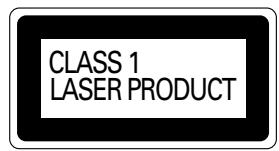
- A "CLASS 1 LASER PRODUCT" label is affixed to the top of the player.
When the battery has been replaced
- When the power supply is started up after replacing the battery, etc., frequency settings and other stored information are lost. In this case, frequencies, etc., should be entered into the memory once again.
In case of trouble
If any problem should occur with this unit, inquire at the outlet where it was purchased. Do not attempt to take this unit apart or to repair it yourself.
Advice
- For optional units other than a CD changer, refer to their respective Owner's Manuals.
BUTTON ILLUSTRATIONS
The buttons used are shown for each item.
There are 2 ways of pressing a button, as indicated by the following illustrations.

Quick press and release immediately.

Press and hold for at least 0.5 seconds.
- The two numbers in the picture: 0.5 and 2, mean to press and hold those buttons for at least 0.5 or 2 seconds.
The anti-theft function prevents operation of this unit unless you enter the five-digit code number indicated on the attached ANTI-THEFT card. While the anti-theft function is operating, [13] flashes.
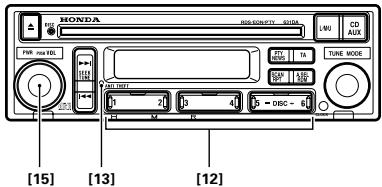
- Press button [15], and power to this unit switches ON. (Display shows "CODE".)
- Input the five-digit anti-theft code number with buttons [12] to cancel the anti-theft function.
Advice
- If you enter the wrong five-digit anti-theft code number a beep sounds three times to indicate an error. Repeat the process, entering the correct number.
- If you enter an incorrect anti-theft code number 10 times in a row, code number input is not possible for an hour. After an hour has passed, enter the correct number.
- Be sure to store your ANTI-THEFT card in a safe place.
If you forget your code number, contact your nearest HONDA dealer.
BASIC OPERATIONS
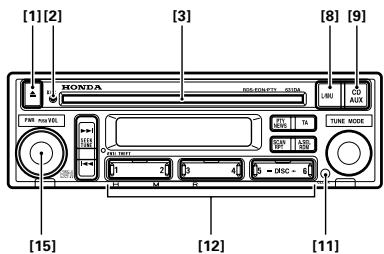
SWITCHING POWER ON
Radio [8]

[15]

When button [8] is pressed, the radio power is turned on. To turn off, press button [15].
CD PLAYER
[1] [9] [15] When a CD is inserted in the disc slot [3], it is loaded and starts playing automatically. It can be stopped by pressing button [15], and restarted by pressing button [9]. To remove the CD, press button [1].
Advice
- When the proper Honda CD changer (MD player) (sold separately) is used, pressing button [9] will alternate between CD and CD changer (MD player) playback.
CD CHANGER
(MD PLAYER) [9]

[15]

- The proper Honda CD changer (MD Player) (sold separately) is required to play CDs (MDs).
Playing of a CD (MD) is started by pressing button [9], and stopped by pressing button [15].
Advice
- When a CD is loaded, pressing button [9] will alternate between CD and CD changer (MD Player) playback.
SWITCHING POWER ON ... [15]
![PIONEER DEH-M6156ZH - SWITCHING POWER ON ... [15] - 1](/content/2025/01/76218/images/82aeb92d7c44d4951b780a365e6016eb631646122028f8648c8c1b2cf078356a.jpg)
If button [15] is pressed when the power is off, the power supply of the source before power was turned off is turned on.
ADJUSTING VOLUME [15]
The volume is increased by turning dial [15] to the right, and decreased by turning it to the left. (Display shows "VOL 0" ~ "VOL 40".)
Advice
- When driving, a volume level should be selected that allows sounds outside the vehicle to be heard.
ADJUSTING AUDIO [10]
Press button [10] to switch to the mode in which you want to make the adjustment, and turn the dial to make the adjustment. The adjustment mode changes each time the dial is pressed, as shown below.
![PIONEER DEH-M6156ZH - ADJUSTING AUDIO [10] - 1](/content/2025/01/76218/images/9a515fc16700aa2a33b46ba67d10887c715ff5f52059bafb40106fd0d915cd74.jpg)
Advice
- When bass, treble, balance and fader adjustments are made, even if maximum or minimum levels are set, a beep will be heard at the center position. The adjustment mode is canceled approximately 5 seconds after an adjustment is made.
Adjusting Bass
Select the bass adjustment mode. Bass intensity is gradually increased by turning dial [10] to the right, and decreased by turning dial [10] to the left. (Display shows "BASS -6" ~ "BASS +6".)
Adjusting Treble
Select the treble adjustment mode. Treble intensity is gradually increased by turning dial [10] to the right, and decreased by turning dial [10] to the left. (Display shows "TREB -6" ~ "TREB +6".)
Adjusting the Fader
Select the fader adjustment mode. The balance is gradually changed to front speaker sound only, by turning dial [10] to the right, and to rear speaker sound only, by turning it to the left. (Display shows "FAD F+9" ~ "FAD R+9".)
Adjusting Balance
Select the balance adjustment mode. The balance is gradually changed to left speaker sound only, by turning dial [10] to the left, and to right speaker sound only, by turning it to the right. (Display shows "BAL L+9" ~ "BAL R+9".)
Advice
- When a two-speaker system is used, you should set "FAD C".
TIME DISPLAY/SETTING
Displaying the time [11]
![PIONEER DEH-M6156ZH - Displaying the time [11] - 1](/content/2025/01/76218/images/f9d17875920f52bddeaa6ee6994b90ce17d74aa944f6967bb6bd4923a42d336b.jpg)
Press button [11] and the time is displayed.
To cancel the display, press button [11] again.
In the initial setting, the time is displayed.
Advice
- If the time is not adjusted, time indications continue flashing.

[12]
Setting the Hours ....[11] [12]
While pressing the [11] button, press button [12] 1 to set the hour.
Setting the Minutes
[11] [12]
[11] [12]
While pressing button [11], press button [12] 2 to set the minute. When you release button [11], the second count begins from 00 seconds.
Synchronizing with the time
announcement [11] [12]
While pressing button [11], press button [12] 3 to reset the minute and second indications to zero.
Example: When synchronizing between 11:30 and 12:29.
SWITCHING BETWEEN 12 HOUR AND 24 HOUR TIME DISPLAYS
[12] [15]
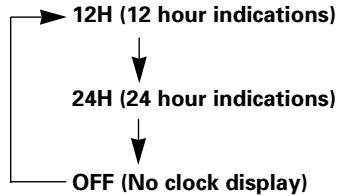
- Press button [15] for 2 seconds or longer to select the function setting mode.
- Each time you press button [12] 5, the display changes as shown below.
Advice
- If you do not perform an operation within 5 seconds of selecting the function setting mode, the function setting mode is canceled.
- You can also cancel the function setting mode by pressing button [15].
- Even if power to this unit is switched OFF, time indications continue to be displayed unless switched OFF.
OTHER FUNCTION
Illumination
The radio illumination is linked to the car light switch, and the button area lights up when the car lights are turned on.
Advice
[2] lights when a CD is loaded.
USING THE RADIO
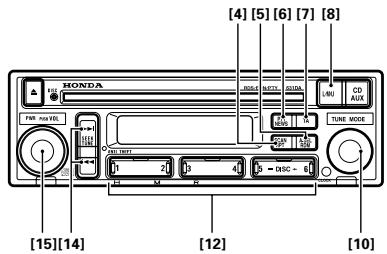
LISTENING TO
THE RADIO [8] [15]
When button [8] is pressed, the radio power is turned on and the Band ⑧ and Frequency ⑨ are displayed. To turn the radio off, press button [15].
CHANGING THE BAND [8]
The band is selected by pressing button [8] repeatedly. Each time the button is pressed, the band changes in the following order:
![PIONEER DEH-M6156ZH - CHANGING THE BAND [8] - 1](/content/2025/01/76218/images/a62924595f5adb0e9c4b5457a27a090cb9b59f79c8bc71a76a062b9ca6236532.jpg)
AUTOMATIC TUNING ....[14]
Pressing button [14] or for less than 0.5 seconds selects Seek Tuning.
Pressing button [14] or for 0.5 seconds or longer lets you skip broadcast stations while the button is pressed. Seek Tuning resumes when you stop pressing the button.
Advice
- Pressing button [14] or again during Seek Tuning cancels Seek Tuning.
MANUAL TUNING [10]
This is useful for tuning in to a station with a very weak signal that cannot be picked up with automatic tuning.
Turning the tuning dial [10] clockwise or counterclockwise raises or lowers the frequency one step at a time.
MEMORIZING STATIONS (PRESET MEMORY)
A selected station is memorized in one of buttons [12].
Memorizing a Station [12]
Choose one of buttons [12], and hold it down until you hear a beep (about 2 seconds). The preset number ⑦ will light, and the station will be memorized in the chosen button.
Advice
- The radio cannot be heard while the button is being held down.
Recalling a Station [12]
When the button [12] is pressed again after a station has been memorized, the radio will be tuned to the station stored in that button. The number of the pressed button lights in ⑦ on the display.
SEEK SCAN [4]
![PIONEER DEH-M6156ZH - SEEK SCAN [4] - 1](/content/2025/01/76218/images/2386bfc1cbe5a48732a384e889b70eaf2787055542b896cdfe29993533ab1d7a.jpg)
Pressing button [4] starts Seek Tuning operation. When a station broadcasting a strong signal is detected, that station is received for 5 seconds. If you do not press a button within 5 seconds, Scan continues to search for the next station and "SCAN" ⑤ is displayed. If you find a station you want to listen to, press button [4] to cancel Scan.
Advice
- If you cancel Scan when Seek Tuning stops for 5 seconds, that station is received.
- If you cancel Scan during Seek Tuning, the station received before Scan operation began is received.
- If there is an RDS interruption, Scan is canceled.
AUTO SELECT [5]
![PIONEER DEH-M6156ZH - AUTO SELECT [5] - 1](/content/2025/01/76218/images/58764d646f741f33b74bd30e6a058f7ee8e917a6fb14bc5a4d79bf429d1d1db1.jpg)
[8]
![PIONEER DEH-M6156ZH - AUTO SELECT [5] - 2](/content/2025/01/76218/images/4ddfba1580c25e7463cdefda3f6f4362550b937856639db2674e5b8e2c9f72f2.jpg)
Broadcasts of high output stations can be memorized in button [12] of UKW band according to the following procedure.
- Press button [5] to start automatic memorization of high output stations. Through automatic memorization operation, "A.SEL" ④ is displayed. (A.SEL flashes ④)
Advice
- There is no audio output in automatic memorizing operation.
-
When automatic memorization is started with U1/U2 band, the same is performed for UKW band that is automatically switched on to follow U1 and U2 bands.
Automatic memorization cannot be activated for MW and LW bands. -
With completion of general automatic memorization, the radio receives broadcast of the highest output station.
Advice
- When the set fails in finding the especially highest output station out of memorized stations, "0" appears on the display.
- In the case memorized stations are five or less in number, the display indicates "0" when button [13] in which no station is memorized is pressed.
OTHER FUNCTIONS
Stereo Indicator
When the radio is tuned to an FM stereo station, "ST" ⑥ will be displayed.
USING RDS FUNCTIONS
What is RDS?
RDS (Radio Data System) is a system for transmitting data signals along with FM programs. These data signals, which are inaudible, provide a variety of features such as: program service name, program type display, traffic announcement standby, automatic tuning, and program type tuning, intended to aid radio listeners in tuning to a desired station.
- RDS services may not be provided by all stations.
- RDS functions, like AF and TA, are only active when your radio is tuned to RDS stations.
PROGRAM SERVICE NAME DISPLAY
Displays the name of the network/ station when you tune in a station providing RDS services.
When you tune in to a RDS station, the frequency display automatically changes to the name of the network/station after a few seconds.
DISPLAYING BROADCASTSTATION INDICATIONS
[12] [15]
You can switch broadcast station display ON/OFF.
- Press button [15] for 2 seconds or longer to select the function setting mode.
2.Each time you press button [12] 3, broadcast station display switches ON/OFF.
Advice
- Some broadcast stations may transmit multiple PS broadcasts consecutively. If this happens, precise PS display may not be possible.
AF FUNCTION [12]
![PIONEER DEH-M6156ZH - AF FUNCTION [12] - 1](/content/2025/01/76218/images/648ff78daf70159996ac1559b6c74e934f2ca7f0412d71e32d7dc5a2758316a3.jpg)
[15]
![PIONEER DEH-M6156ZH - AF FUNCTION [12] - 2](/content/2025/01/76218/images/c0a8262846f3f870536dfb9c891ab4ed0994fd2c691e8d9149fa1a447fa6edb5.jpg)
AF (Alternative Frequencies search) function lets you set the receiver to search for other frequencies within the same network organization as the currently frequency. When the current frequency cannot be properly received, or another frequency in the network can provide better reception, AF mutes the sound of the radio and automatically retunes to the more suitable frequency.
Advice
- When you recall preset stations, the tuner may update the preset after searching a new frequency from that station's "AF" list.
- The preset number does not appear in the display if the "RDS" data for the station received is different from the originally memorized RDS station.
- When "AF" is searching for the next frequency, muting may be temporarily interrupted by another program.
- The tuner will only tune RDS stations when you use "AUTOMATIC TUNING" tuning or "AUTO SELECT" function with the AF function on.
To activate the AF function
- Press button [15] for 2 seconds or longer to select the function setting mode.
- Each time you press button [12] 1, the AF function switches ON/OFF. "AF" is set ON by default.
PI SEARCH FUNCTION
[12]

[15]
If the receiver cannot find a suitable alternative frequency or the radio signal is too weak for proper reception. "SEARCH" appears in the display, and the receiver searches for another frequency broadcasting the same, or related program.
During "SEARCH", the sound of the radio will be muted somewhat longer than for AF search. Muting is released after "SEARCH", even if the radio could not find the same, or related program, and returns to the previous frequency.
PI Search
If the tuner fails to locate a suitable alternative frequency or if the broadcasting signal is too weak for proper reception, the PI Search will automatically start.
Auto PI Search (for preset station)
When preset stations cannot be recalled, as when traveling long distances, the product can be set to perform PI Search also during preset recall. The default setting for Auto PI Search is OFF.
To activate the Auto PI Search function
- Press button [15] for 2 seconds or longer to select the function setting mode.
- Each time you press button [12] 4, Auto PI Search switches ON/OFF.
REG FUNCTION
[12] [15]
In the case of AF, which lets you set the tuner to re-tune frequencies automatically, REG (regional) lets you limit the list of alternative frequencies to stations broadcasting regional programs.
Regional programming and regional networks are organized differently by each country (i.e., they may change by the hour, state, or broadcast area).
To activate the REG function
- Press button [15] for 2 seconds or longer to select the function setting mode.
2.Each time you press button [12] 2, the REG function switches ON/OFF.
Advice
- When you recall preset stations with REG ON, the preset number will not appear in the display if the tuner receives a regional station different from the originally memorized one.
- ON/OFF switching of REG is effective for all bands in common.
TA FUNCTION [7] TA (Traffic Announcement standby) function lets you set the system to switch automatically to traffic announcements as they are broadcast when you are tuned to a TP or EON TP station, whether you are listening to the radio,CD or CD changer.
Advice
- TP stations are stations that broadcast traffic information. The "TP" ② indicator lights up when you tune a TP station.
- EON TP stations are stations that carry information which cross references TP stations. "TP" indication ② is on also when the radio is tuned to an EON TP station.
To activate the TA function
Press the [7] button. ("TA" ① lights in the display.) The tuner begins waiting for traffic announcements.
To turn off the TA function
Press the [7] button again. ("TA" ① goes out from the display.) TA function is turned off.
Advice
- The system switches back to the original source after traffic announcement reception.
- The tuner only stops at TP or EON-TP stations when you use SEEK tuning with the TA function ON.
- The tuner only stores TP or EON-TP stations when you use AUTO SELECT function with the TA function ON.
PTY (PROGRAM TYPE)
HOW TO DISPLAY RECEIVED STATION PTY INDICATIONS
Press button [6] and PTY indications for the currently received station are displayed. Press button [6] again to cancel the display.
Advice
- When no PTY code is output from the station being received, "NONE" appears on the display.
PTY SEARCH FUNCTION
[6] [10] [12] [14] After you select the program type you desire, the tuner searches for a station broadcasting the same PTY code as the program type you selected.
To select the desired PTY code
- Press button [6] to select the PTY group selection mode.
- Each time you turn dial [10] clockwise/counterclockwise, the PTY changes.
Selecting by PTY group
- Press button [6] to select the PTY group selection mode.
- Select a PTY group with a [12] button.
To activate PTY Search
- Press button [6] to select the PTY group selection mode. PTY setting mode is activated with indication of the PTY code currently selected.
- During PTY setting mode (continues for 5 seconds approximately), Press the or side of button [14] to search a station that is putting desired PTY on the air.
Advice
- Perform each step within 5 seconds. If more than 5 seconds elapse between operations, the PTY mode is canceled.
- Some stations may broadcast program contents that are different from their PTY code.
- If there is no station to meet a desired PTY as a result of PTY search, "NO RDS" is displayed for about 10 seconds and the receiver returns to the original station.
PTY List
| Button | 1 | 2 | 3 | 4 | 5 | 6 |
| PTY Group | INFO | POP | CLASSIC | OTHER M | CULTURE | VARIED |
| PTY | NEWS INFO WEATHER FINANCE TRAVEL | POP MUS ROCK MUS EASY MUS | L. CLASS CLASSICS | OTHER MUS JAZZ COUNTRY NATION M OLDIES FOLK MUS | AFFAIRS EDUCATE CULTURE SCIENCE SOCIAL A RELIGION DOCUMENT | SPORT Drama VARIED CHILDREN PHONE IN LEISURE |
Advice
Selecting by PTY
You can specify a particular PTY mode more precisely.
- In the PTY group selection mode, select the desired PTY group.
- Press the selected PTY group button and the button in [12] with the same number for 2 seconds or more.
A beep indicates the PTY selection mode has been selected.
- Press the same [12] button to select the desired PTY.
- Perform PTY Search by pressing the 1 or 2 side of button [14].
NEWS:News.
INFO : General information and advice.
WEATHER: Weather reports / Meteorological information.
FINANCE : Stock market reports,
TRAVEL:Travel programs,not for announcements about traffic problem.
POP MUS : Popular music.
ROCK MUS : Contemporary modern music.
EASY MUS : Easy listening music.
L. CLASS : Light classical music.
CLASSICS : Serious classical music.
OTHER MUS : Other types of music. which can't be categorized.
JAZZ: Jazz music based programs.
COUNTRY: Country music based programs.
NATION M: National music based programs.
OLDIES: Oldies music. "Golden age" based programs.
FOLK MUS : Folk music based programs.
AFFAIRS : Current affairs.
EDUCATE : Educational programs.
CULTURE: Programs concerned with any aspect of national or regional culture.
SCIENCE: Programs about nature, science and technology.
SOCIAL A : Social affairs programs.
RELIGION : Religion affairs programs or services.
DOCUMENT: Documentary programs.
SPORT:Sports programs.
DRAMA : All radio plays and serials.
VARIED : Light entertainment programs.
CHILDREN : Children's programs.
PHONE IN : Phone in based programs.
LEISURE: Programs about hobbies and recreational activities.
HOW TO ADJUST THE TA VOLUME
During traffic announcement reception, the volume automatically changes to an adjustable preset level so you can easily hear the traffic announcement. When using this function for the first time, you can listen to traffic information at the preset volume level "VOL 9" set by factory on shipment. If you adjust the volume while listening to the traffic announcement, the new volume will be stored in the memory. The next time a traffic announcement is received, the volume will change to the adjusted level.
TP ALARM FUNCTION
If "TP" ② indication is left in off-status continuously for 1 minute (due to a weak signal), a beeping alarm will sound to tell you to tune in another TP station.
(TA flashes ①)
Advice
- If "TP" ② indication again goes out after reception recovered from failure condition, alarm again beeps. Moreover, alarm beeps when you try to access tuning or preset operation after "TA" was tuned on or in the case "TP" ② indication is not turned on.
- In CD or CD changer mode, the tuner automatically tunes to the strongest TP station in the area and stands by for a traffic announcement immediately after "TP" ② indication goes out. So you won't miss any traffic announcements while continuing to listen to the CD or CD changer.
NEWS INTERRUPT
FUNCTION [6]
![PIONEER DEH-M6156ZH - FUNCTION [6] - 1](/content/2025/01/76218/images/182cc50eef0dc21c63702fa68a7fcfada04b3b82a2ad2a233f8eb0f4810c08b5.jpg)
Press button [6] for 2 seconds or longer and the "NEWS" ③ indication goes ON.
When the FM station (selected last) puts a newscast on the air for another type of program, operation of CD or CD changer is interrupted and the radio is activated to receive the newscast. On the other hand, when broadcast program is changed from news to another kind of program or when reception of broadcast discontinues for 10 seconds or more (for reason of weak signal, etc.), this function automatically restores sound source to the original as it was output before activation of this function.
When tuned to FM, leaving this function ON automatically switches you to another station in the same network as soon as a newscast begins on that station.
Advice
Volume level for receiving FM newscast is the same as it was set for TA.
- Besides the NEWS INTERRUPT function, this unit has another interrupt function called the TA function (this unit's interrupt functions automatically switch the operation mode from CD/CD changer play to FM reception), and a PTY ALARM function. Operation priority is PTY ALARM followed by TA and then NEWS in that order. If you desire to activate the other interrupt function for that currently in activation, turn off the currently activated interrupt function. The other interrupt function is automatically activated to enable you to listen to FM broadcast on its channel.
PTY ALARM
ALARM is a special PTY code for emergency announcements, such as natural disasters. When the radio alarm code is received "ALARM" lights in the display and the volume changes. When the station stops broadcasting the alarm, the system returns to its previous source.
TUNING STEPS
When using tuning dial [10], the tuning step for the FM band is 50kHz . However, if you select Seek Tuning with button [14] or the tuning step changes to 100kHz when the AF or TA mode is activated.
USING THE CD PLAYER
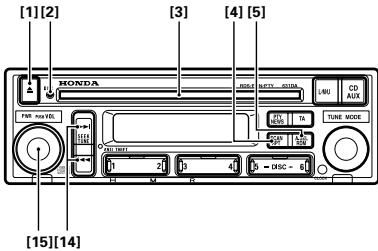
BEFORE USING THE CD PLAYER
Disc Selection and Care
- Play only CDs bearing the Compact Disc Digital Audio mark.

-
Check all CDs before playing, and discard cracked, scratched or warped discs.
-
Be sure to use round shape disc's only for this unit and never use any other special shape discs. Use of special shape disc's may cause damage to the mechanism.


- Wipe dirty or damp discs outward from the center with a soft cloth.
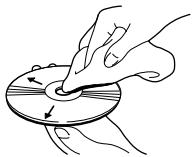
- Avoid touching the recorded (iridescent) surface when handling discs.
- Store discs in their cases when not in use.
Precaution:
- Keep discs out of direct sunlight and high temperatures.
- Do not affix labels or apply chemicals to discs.
- Condensation may collect inside the player when using the heater in cold weather, interfering with playback. Turn it off for an hour or so and wipe damp discs with a soft cloth.
Road shocks may interrupt CD playback.
LISTENING
TO A CD [1] [15]
When a CD is inserted in the disc slot [3], CD play starts. Disc indicator [2] and track number ③ are displayed. Playback is stopped by pressing button [15]. To remove the CD, press button [1].
TRACK SELECTION (TRACK NUMBER SEARCH) [1]
Press the I or side of button [14] for a moment (less than 0.5 seconds), then press the button repeatedly until you reach the track you want to play.
Advice
- If you press the button for longer than 0.5 seconds, fast forward/rewind will operate, and it will not be possible to perform a track number search.
FAST FORWARD
AND REVERSE [14]

Press the or side of button [14] until you hear a beep (0.5 seconds or more).
Advice
- Playback can be heard during fast-forwarding or rewinding.
- Fast-forwarding or rewinding is performed only as long as the button is pressed.
REPEATED PLAYING OF THE SAME TRACK
(REPEAT PLAY) [4] Press button [4] while the track you want to repeat is playing, and "RPT" ⑩ will light. To cancel this setting, press button [4] again, and "RPT" ⑩ will disappear.
RANDOM PLAY [5]
![PIONEER DEH-M6156ZH - RANDOM PLAY [5] - 1](/content/2025/01/76218/images/3082758342787ebe1eafb1447d3745528ab46a31a071101fa63ac4da5aebdee7.jpg)
If you press button [5], Random Play is selected and "RDM" ⑪ lights. To cancel this setting, press button [5] again, and "RDM" ⑪ disappears.
PLAYING CD CHANGER
- The proper Honda CD changer (sold separately) is required to play CDs.
- Since the CD changer can be operated in the same way though there are some differences in indication between them, the following explains operation of the CD changer by way of example.
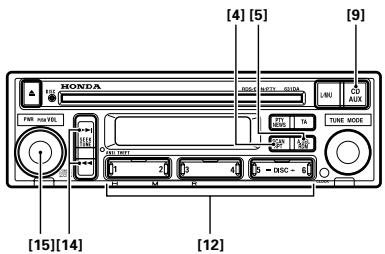
LISTENING
TO A CD [9]

[15]
When button [9] is pressed, CD playback starts and the disc number ⑧, track number ⑨ appear on the display. Playback is stopped by pressing button [15].
Advice
- When a CD is inserted in the disc slot, pressing button [9] will alternate between CD and CD changer.
- If there is no magazine in the CD changer, "CD EJECT" will appear on the display.
- When two or more CD changers are connected, press button [9] to select a desired one. The number of selected changer appears in 16.
SELECTING A DISC [12]
Pressing buttons [12] 5 or 6, you can switch discs.
Advice
- There is a delay of several seconds before the music starts after pressing the button, due to the disc changeover operation.
TRACK SELECTION (TRACK NUMBER SEARCH) [14]
Press the 14 or 15 side of button [14] for a moment (less than 0.5 seconds), then press the button repeatedly until you reach the track you want to play.
Advice
- If you press the button for longer than 0.5 seconds, fast forward/rewind will operate, and it will not be possible to perform a track number search.
FAST FORWARD
AND REVERSE [14]
Press the 1 or side of button [14] until you hear a beep (0.5 seconds or more).
![PIONEER DEH-M6156ZH - AND REVERSE [14] - 1](/content/2025/01/76218/images/bbe8a2e6316b90187aad04afc9be57ab9186062f13a6b3aa2bf1a7641f2d15fd.jpg)
Advice
- Playback can be heard during fast-forwarding or rewinding.
- Fast-forwarding or rewinding is performed only as long as the button is pressed.
REPEATED PLAYING OF THE SAME TRACK
(REPEAT PLAY) [4]
![PIONEER DEH-M6156ZH - (REPEAT PLAY) [4] - 1](/content/2025/01/76218/images/c1644fd42bbfd0e377310e1aaf2fd16e943a7d99a69abee5a723efb208c41dfd.jpg)
Press button [4] while the track you want to repeat is playing, and "RPT" ⑭ will light. To cancel this setting, press button [4] again, and "RPT" ⑭ will disappear.
RANDOM PLAY [5]
![PIONEER DEH-M6156ZH - RANDOM PLAY [5] - 1](/content/2025/01/76218/images/f67d492b5e8b8e91f88033a684faca9efb19803346c3b8f77539decdd41b5757.jpg)
If you press button [5], tracks on the disc are played in random order and "RDM" ⑤ lights. To cancel this setting, press button [5] again, and "RDM" ⑤ disappears.
CD HEAT INDICATOR
This is displayed to warn against possible damage when the inside of the CD player or CD changer overheats. CD player or changer functions are automatically halted when this indicator is lit. Be sure to switch off the power at this time, and leave to cool down before playing a CD again.
SPECIFICATIONS
GENERAL
Power source 13.2 V DC (10.8 - 16.0 V allowable)
Grounding system Negative type
Max. current consumption
+B 15 A or less (When no slave is connected)
ACC 1 A or less (When no slave is connected)
Dimensions (chassis) 178 (W) × 50 (H) × 160 (D) mm
(nose) 190 (W) × 60 (H) × 11.8 (D) mm
Weight 1.5 kg
AMPLIFIER
Maximum power output 30 W x 4
Continuous power output 20 W x 4
(DIN453241, +B = 14.4 V)
Load impedance 4Ω (4-8Ω allowable)
Tone controls (bass) ±12 dB (100 Hz)
treble) 12 dB (10 kHz)
CD PLAYER
System Compact disc audio system
Usable discs Compact disc
Signal format .. Sampling frequency: 44.1 kHz
Number of quantization bits: 16; linear
Frequency characteristics 5-20,000 Hz (±1 dB)
Signal-to-noise ratio 94 dB (1 kHz) (IEC-A network)
Dynamic range 92 dB (1 kHz)
Number of channels 2 (stereo)
FM TUNER
Frequency range 87.5 - 108 MHz
Usable sensitivity 12 dBf (mono. S/N: 30 dB)
50 dB quieting sensitivity 16 dBf (mono)
S/N ratio 70 dB (IEC-A network)
Distortion 0.3% (at 65 dBf, 1 kHz, stereo)
Stereo separation 40 dB (at 65 dBf, 1 kHz)
MW TUNER
Frequency range 531-1,602 kHz
Usable sensitivity 26 dBuV (S/N: 20 dB)
Selectivity 50 dB (±9 kHz)
LWTUNER
Frequency range 153-281 kHz
Usable sensitivity 28 dBuV (S/N: 20 dB)
Selectivity 50 dB (±9 kHz)
Note:
Specifications and the design are subject to possible modification without notice due to improvements.
PRECAUTIONS
CLASS 1 LASER PRODUCT
INDICATIONS DES STATIONS PTY
RECUES [6]
Avis
(LECTURE REPETEE) [4]
(LECTURE REPETEE) [4]
COUNTRY:Programme fur Country-Music.
NATION M:Programme fur landesbezogene Musik.
(WIEDERHOLTE WIEDERGABE)
(WIEDERHOLTE WIEDERGABE)
[4]
INSCHAKELEN VAN HET APPARAAT
Radio [8] [15]
TP WAARSCHUWINGSTONEN
CLASS 1 LASER PRODUCT
(agudos) ±12 dB (10 kHz)
REPRODUCTOR DE CD
CLASS 1 LASER PRODUCT
SINTONIA MANUAL [10]
94 dB (1 kHz) (Network IEC-A)
Gamma dinamica 92 dB (1 kHz)
CLASS 1 LASER PRODUCT
VIKTIGT!
(Froken Ur) [11] [12]
VAXLING MELLAN 12-TIMMARS OCH 24-TIMMARS TIDSVISNING
[12]

[15]