
3SA05 - Grinder ENERGIZER - Free user manual and instructions
Find the device manual for free 3SA05 ENERGIZER in PDF.


| Product type | Cordless angle grinder (grinder) |
| Brand | Energizer |
| Model | 3SA05 |
| Intended use | Grinding, roughing, polishing, sanding (with appropriate accessories) |
| Power supply | 20 V DC lithium-ion battery |
| No-load speed | 8,000 rpm |
| Number of speeds | 1 |
| Disc diameter | 125 mm |
| Compatible battery type | Energizer 3BP2 (2.0 Ah) or 3BP4 (4.0 Ah) |
| Recommended charger | Energizer 3CH1 (input 220-240 V~, output 2.2 A) |
| Charging time (2.0 Ah battery) | 1 hour |
| Dimensions (L×W×H, estimated) | 30 × 12 × 10 cm |
| Weight (without battery, estimated) | 1.8 kg |
| Included accessories | 1 grinding disc 125 mm, auxiliary handle, wrench |
| Safety | Adjustable guard, spindle lock, auxiliary handle, lock-off switch |
| Maintenance | Regular cleaning of ventilation slots, no lubrication required |
| Repairability | Spare parts available from Energizer after-sales service |
| Warranty | 2 years (according to applicable law) |
| Standards | CE |
Frequently Asked Questions - 3SA05 ENERGIZER
User questions about 3SA05 ENERGIZER
0 question about this device. Answer the ones you know or ask your own.
Ask a new question about this device
Download the instructions for your Grinder in PDF format for free! Find your manual 3SA05 - ENERGIZER and take your electronic device back in hand. On this page are published all the documents necessary for the use of your device. 3SA05 by ENERGIZER.
USER MANUAL 3SA05 ENERGIZER
Energizer® POWERTOOLS
natural_image
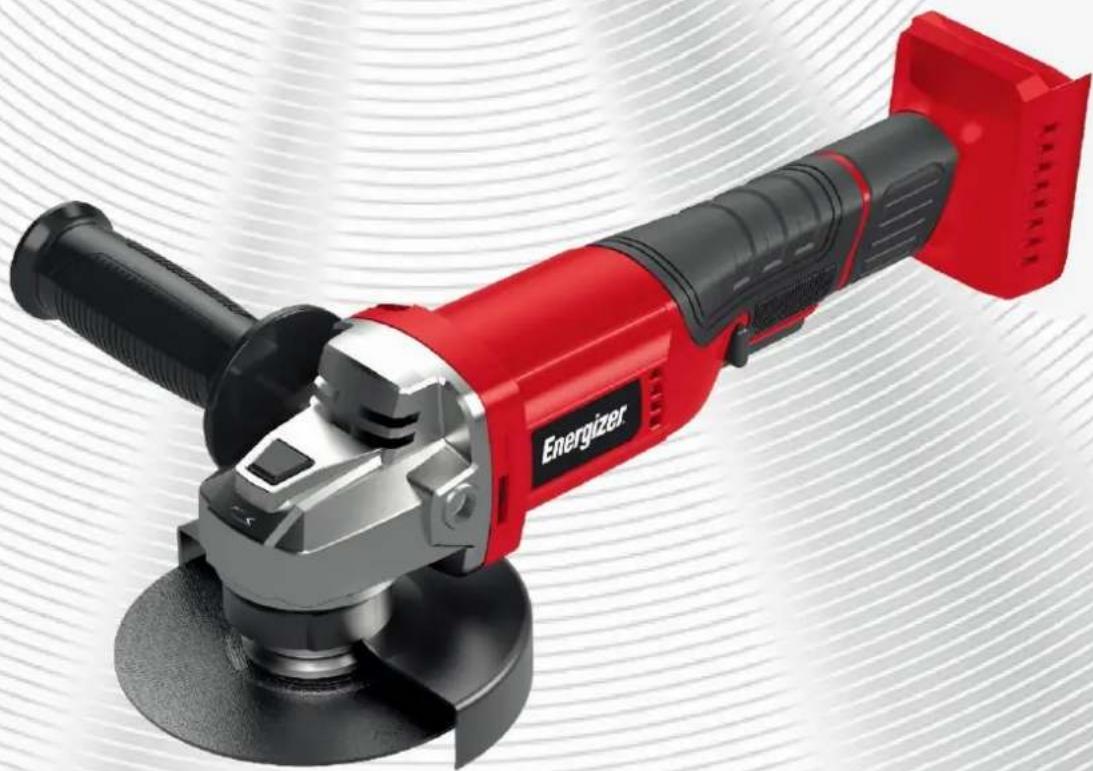
Red and black electric grinder with gray base, displayed against a white striped background (no text or symbols visible on the device itself)TM
CAUTION: Read the instructions before using the product.
http://www.energizeyourdevice.com
1. UTILISATION PRÉVUE
This product is intended exclusively for non-professional use for dry sanding of wood, plastic, putty and paintling surfaces or varnished. This product is not suitable for sanding plaster-based substrates.
This product is not intended for commercial use. The generally recognized accident prevention regulations and the security provided must be observed. Only perform the work described in this manual. Any other use is inappropriate. The manufacturer declines all responsibility for damage resulting from such use.

WARNING! Read this manual and general safety instructions carefully before using the appliance, for your own safety. Your power tool should only be passed on together with these instructions.
2. SAFETY INSTRUCTIONS
GENERAL SAFETY WARNINGS FOR POWER TOOLS

WARNING Read all safety warnings, instructions, illustrations, and specifications provided with this power tool. Failure to follow the instructions listed below may cause electric shock, fire, and/or serious injury.
Keep all warnings and instructions for future reference.
The term "power tool" in warnings refers to your power tool Mains powered (with power cord) or your battery-operated power tool (without power cord).
Work area security
- Keep the work area clean and well-lit. Messy or dark areas are prone to accidents.
- Do not operate power tools in explosive atmospheres, such as in the presence of flammable liquids, gases, or dust. Power tools produce sparks that can ignite dust or fumes.
- Keep children and bystanders away while using the power tool. Distractions can cause you to lose control of the tool.
Electriciy safety
- Do not expose power tools to rain or wet conditions. Water ingress into the interior of a power tool increases the risk of electric shock.
Personal Safety
- Stay alert, look at what you are doing, and use common sense in your use of the power tool. Do not use a power tool when you are tired or under the influence of drugs, alcohol or medication. A moment of inattention while using a power tool can result in serious injury.
- Use personal protective equipment. Always wear eye protection. Personal protective equipment such as dust masks, non-slip safety shoes, helmets or hearing protection used for the appropriate conditions reduces injuries.
- Avoid untimely starting. Make sure the switch is in the off position before plugging the tool into the mains and/or battery pack, picking it up, or wearing it. Carrying power tools with your finger on the switch or plugging in power tools with the switch in the on position is a source of accidents.
- Don't rush. Keeping an appropriate position and balance at all times. This allows for better control of the power tool in unexpected situations.
- Dress appropriately. Do not wear loose clothing or jewelry. Keep hair and clothing away from moving parts. Loose clothing, jewelry, or long hair can be caught in moving parts.
Power Tool Use and Maintenance
- Do not force the power tool. Use the right power tool for your application. The right power tool does the job better and more safely at the speed for which it was built.
- Do not use the power tool if the switch does not allow you to switch from on to off and vice versa. Any power tool that cannot be controlled by the switch is dangerous and needs to be repaired.
- Remove the battery pack before making any adjustments, changing accessories, or before storing the power tool. Such preventive safety measures reduce the risk of accidental starting of the power tool.
- Keep stationary power tools out of the reach of children and do not allow anyone unfamiliar with the power tool or these instructions to operate it. Power tools are dangerous in the hands of novice users.
- Observe maintenance of power tools and accessories. Check for misalignment or jamming of moving parts, broken parts, or any other condition that may affect the operation of the power tool. In case of damage, have the power tool repaired before using it. Many accidents are caused by poorly maintained power tools.
- Keep cutting tools sharp and clean. Properly maintained cutting tools with sharp cutting parts are less likely to jam and are easier to control.
- Use the power tool, accessories and blades, etc., in accordance with these instructions, taking into account the working conditions and the work to be performed. Using the power tool for operations other than intended can lead to dangerous situations.
Use of battery-operated tools and precautions for use
- Only charge with the charger specified by the manufacturer. A charger that is suitable for one type of battery pack may create a fire hazard when used with another type of battery pack.
- Use power tools only with specifically designated battery packs. The use of any other battery pack may create a risk of injury and fire.
- When a battery pack is not in use, keep it away from any other metal objects, such as paper clips, coins, keys, nails, screws, or other small objects that may cause a connection from one terminal to another. Shorting the terminals of a battery together can cause burns or fire.
- When a battery pack is not in use, keep it away from any other metal objects, such as paper clips, coins, keys, nails, screws, or other small objects that may cause a connection from one terminal to another. Shorting the terminals of a battery together can cause burns or fire.
-
When a battery pack is not in use, keep it away from any other metal objects, such as paper clips, coins, keys, nails, screws, or other small objects that may cause a connection from one terminal to another. Shorting the terminals of a battery together can cause burns or fire.
-
Under poor conditions, liquid may be ejected from the battery; avoid contact. In case of accidental contact, clean with water. If the liquid comes into contact with the eyes, seek medical help in addition. Liquid ejected from batteries can cause irritation or burns.
- Do not use a battery pack or battery-operated tool that has been damaged or modified. Damaged or modified batteries may behave unpredictably causing fire, explosion, or risk of injury.
- Do not expose a battery pack or battery-operated tool to fire or excessive temperature. Exposure to fire or a temperature above 130^ can cause an explosion.
- Follow all charging instructions and do not charge the battery pack or battery-operated tool outside the temperature range specified in the instructions. Improper charging or at temperatures outside the specified range of temperatures may damage the battery and increase the risk of fire.
Maintenance
- Have the power tool serviced by a qualified repairer using only identical replacement parts. This ensures that the safety of the power tool is maintained.
- Never perform maintenance on damaged battery packs. Maintenance of battery packs should only be performed by the manufacturer or authorized service providers.
SPECIAL SAFETY INSTRUCTIONS
Safety warnings common for grinding, sanding, wire brushing, polishing or abrasive cutting-off operations:
- This power tool is intended to function as a grinder and cut-off tool. Read all safety warnings, instructions, illustrations and specifications provided with this power tool. Failure to follow all instructions listed below may result in electric shock, fire and/or serious injury.
- Operations such as sanding, wire brushing and polishing are not recommended to be performed with this power tool. Operations for which the power tool was not designed may create a hazard and cause personal injury.
- Do not use accessories which are not specifically designed and recommended by the tool manufacturer. Just because the accessory can be attached to your power tool, it does not assure safe operation.
- The rated speed of the accessory must be at least equal to the maximum speed marked on the power tool. Accessories running faster than their rated speed can break and fly apart.
- The outside diameter and the thickness of your accessory must be within the capacity rating of your power tool. Incorrectly sized accessories cannot be adequately guarded or controlled.
- Threaded mounting of accessories must match the grinder spindle thread. For accessories mounted by flanges, the arbour hole of the accessory must fit the locating diameter of the flange. Accessories that do not match the mounting hardware of the power tool will run out of balance, vibrate excessively and may cause loss of control.
- Do not use a damaged accessory. Before each use inspect the accessory such as abrasive wheels for chips and cracks, backing pad for cracks, tear or excess wear, wire brush for loose or cracked wires. If the power tool or accessory is dropped, inspect for damage or install an undamaged accessory. After inspecting and installing an accessory, position yourself and bystanders away from the plane of the rotating accessory and run the power tool at maximum no-load speed for one minute. Damaged accessories will normally break apart during this test time.
- Wear personal protective equipment. Depending on application, use face shield, safety goggles or safety glasses. As appropriate, wear dust mask, hearing protection, gloves and workshop apron capable of stopping small abrasive or workpiece fragments. The eye protection must be capable of stopping flying debris generated by various operations. The dust mask or respirator must be capable of filtrating particles generated by your operation. Prolonged exposure to high intensity noise may cause hearing loss.
- Keep bystanders a safe distance away from the work area. Anyone entering the work area must wear personal protective equipment. Fragments of workpiece or of a broken accessory may fly away and cause injury beyond immediate area of operation.
- Hold the power tool by insulated gripping surfaces only when performing an operation where the cutting accessory may contact hidden wiring or its own cord. Cutting accessory contacting a "live" wire may make exposed metal parts of the power tool "live" and could give the operator an electric shock.
- Position the cord clear of the spinning accessory. If you lose control, the cord may be cut or snagged and your hand or arm may be pulled into the spinning accessory.
- Never lay the power tool down until the accessory has come to a complete stop. The spinning accessory may grab the surface and pull the power tool out of your control.
- Do not run the power tool while carrying it at your side. Accidental contact with the spinning accessory could snag your clothing, pulling the accessory into your body.
- Regularly clean the power tool's air vents. The motor's fan will draw the dust inside the housing and excessive accumulation of powdered metal may cause electrical hazards.
- Do not operate the power tool near flammable materials. Sparks could ignite these materials.
- Do not use accessories that require liquid coolants. Using water or other liquid coolants may result in electrocution or shock.
FURTHER SAFETY INSTRUCTIONS FOR ALL OPERATIONS
Kickback and Related Warnings
Kickback is a sudden reaction to a pinched or snagged rotating wheel, backing pad, brush or any other accessory. Pinching or snagging causes rapid stalling of the rotating accessory which in turn causes the uncontrolled power tool to be forced in the direction opposite of the accessory's rotation at the point of the binding.
For example, if an abrasive wheel is snagged or pinched by the workpiece, the edge of the wheel that is entering into the pinch point can dig into the surface of the material causing the wheel to climb out or kick out. The wheel may either jump toward or away from the operator, depending on direction of the wheel's movement at the point of pinching. Abrasive wheels may also break under these conditions.
Kickback is the result of power tool misuse and/or incorrect operating procedures or conditions and can be avoided by taking proper precautions as given below.
- Maintain a firm grip on the power tool and position your body and arm to allow you to resist kickback forces. Always use the auxiliary handle, if provided, for maximum control over kickback or torque reaction during start-up. The operator can control torque reactions or kickback forces, if proper precautions are taken.
- Never place your hand near the rotating accessory. Accessory may kickback over your hand.
- Do not position your body in the area where power tool will move if kickback occurs. Kickback will propel the tool in direction opposite to the wheel's movement at the point of snagging.
- Use special care when working corners, sharp edges etc. Avoid bouncing and snagging the accessory. Corners, sharp edges or bouncing have a tendency to snag the rotating accessory and cause loss of control or kickback.
- Do not attach a saw chain woodcarving blade or toothed saw blade. Such blades create frequent kickback and loss of control.
SPECIFIC SAFETY INSTRUCTIONS FOR ANGLE GRINDERS
- Check that the maximum speed indicated on the grinding disc corresponds to the maximum speed of the machine. The speed of the machine must not exceed the value on the grinding disc.
- Make sure that the dimensions of the grinding disc correspond to the specifications of the machine.
- Make sure that the grinding disc has been mounted and fastened properly. Do not use reducing rings or adapters to make the grinding disc fit properly.
- Treat and store grinding discs in conformance with the supplier's instructions.
- Do not use the machine for grinding workpieces with a maximum thickness exceeding the maximum grinding depth of the grinding disc.
• Do not use grinding discs for deburring. - When grinding discs have to be mounted on the thread of the spindle, make sure that the spindle has sufficient thread. Make sure that the spindle is sufficiently protected and does not touch the grinding surface.
- Before use, inspect the grinding disc for any damage. Do not use grinding discs which are cracked, ripped or otherwise damaged.
• Before use, let the machine run idle for 30 seconds. - Immediately switch off the machine in case of abnormal vibrations or occurrence of another defect. Carefully inspect the machine and grinding disc before switching the machine on again.
- Make sure that sparks do not put people into danger or that they contact highly flammable substances.
- Make sure that the workpiece is sufficiently supported or clamped. Keep your hands away from the surface to be cut.
- Always wear safety goggles and hearing protection. If desired or required also use another kind of protection like for example an apron or helmet.
- Ensure that mounted wheels and points are fitted in accordance with the manufacturer's instructions.
- Ensure that blotters are used when they are provided with the bonded abrasive product and when they are required.
• If a guard is supplied with the tool never use the tool without such a guard. - For tools intended to be fitted with threaded hole wheel, ensure that the thread in the wheel is long enough to accept the spindle length.
- Ensure that ventilation openings are kept clear when working in dusty conditions.
| CE | Conforms to relevant safety standards. |
 | To reduce the risk of injury, the user must read and understand this manual before using this product. |
 | Wear eye protection. |
 | Do not dispose of old appliances with domestic rubbish. |
3. YOUR PRODUCT
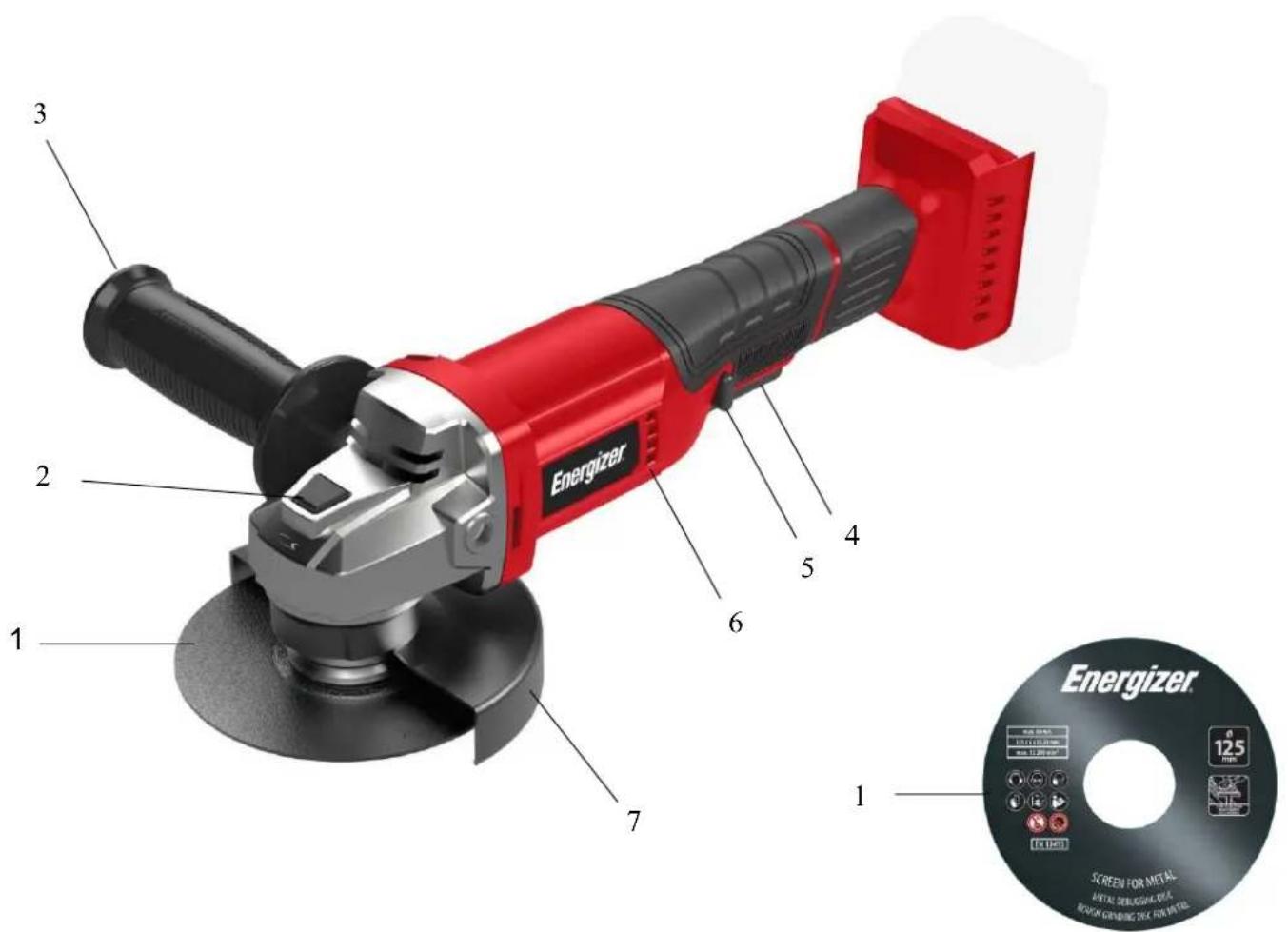
- Grinding disc included
- Spindle lock button
- Auxiliary handle
-
On/Off switch
-
Spindle lock button
- Air vents
- Guard

CAUTION: Battery is not included.
4. TECHNICAL DETAILS
| Power supply | 20V d.c. |
| Rotation speed | 8000 tr/min |
| Number of speeds | 1 |
| Disc diameter | 125 mm |
| Battery type (no included) | Energizer 3BP2 / 3BP420V d.c. 2.0Ah / Lithium-ion20V d.c. 4.0Ah / Lithium-ion |
| Charger type (no included) | Energizer 3CH1Input 220-240V~ 50-60Hz,Output 2.2A |
| Charge time | 1H for 2.0Ah battery |
| Included Accessories | x1 disk 125mm |
5. USE
CAREFUL! Always disconnect the battery from the product before making any adjustments or attaching accessories.
FITTING THE AUXILIARY HANDLE
The auxiliary handle can be attached to the angle grinder in 2 different positions: left and right.
REPLACING THE GRINDING DISC


Beware – a disc which has been used may be very hot!
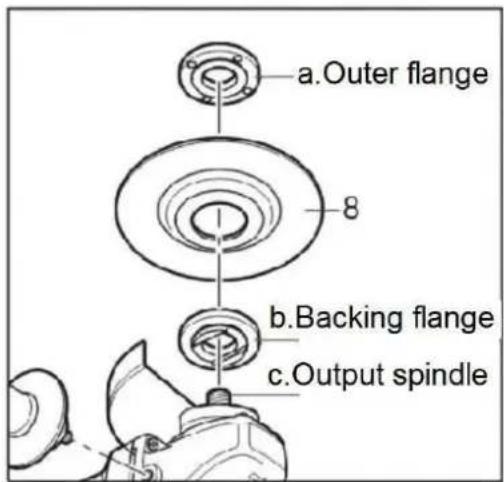
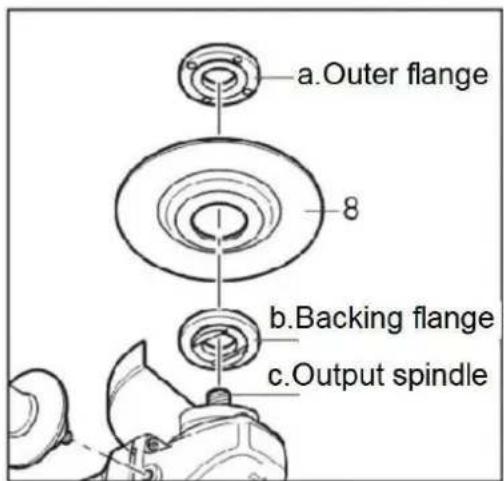
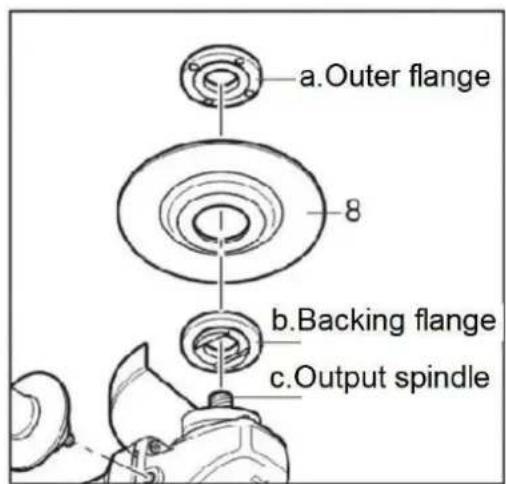
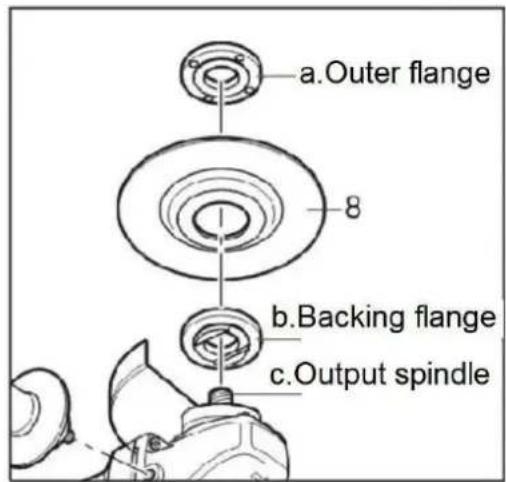
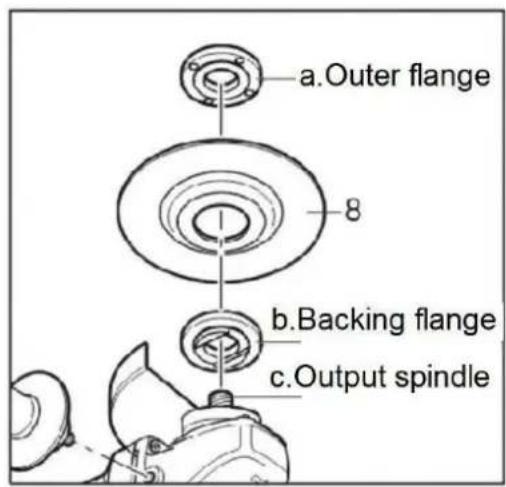
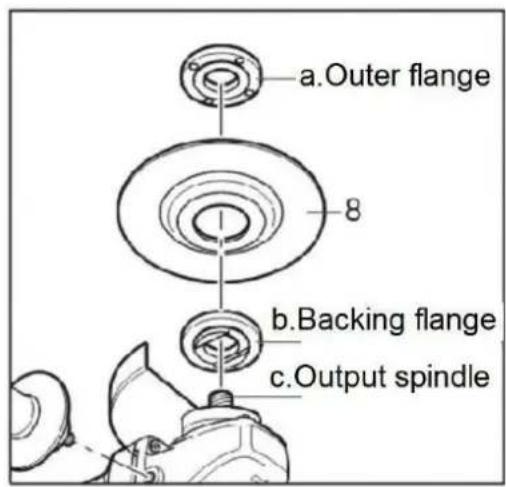
- Depress and hold down the spindle lock button (2) to secure the spindle.
- Turn the shaft until it locks.
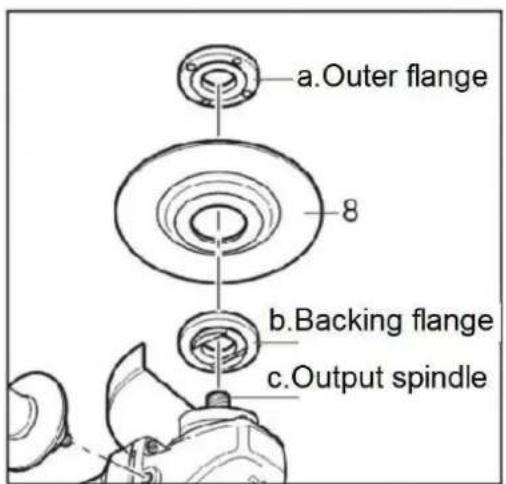
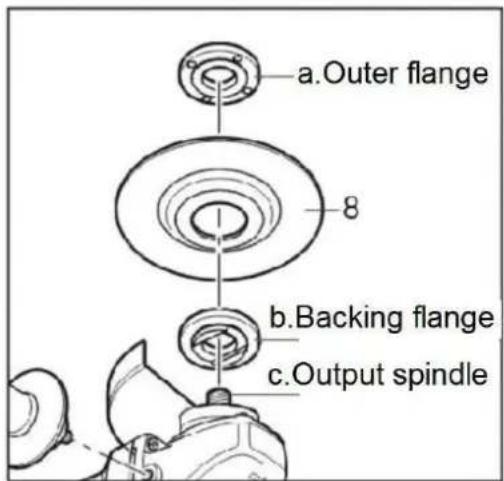
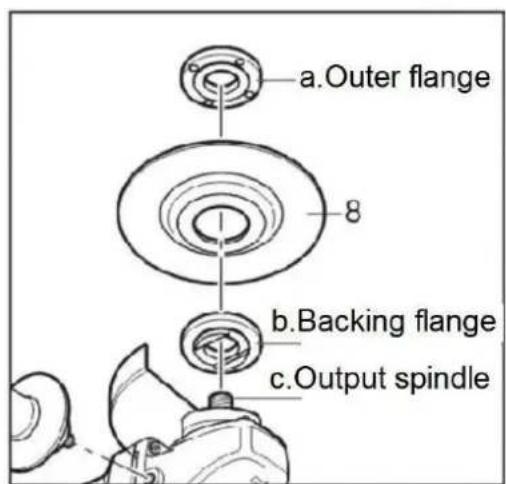
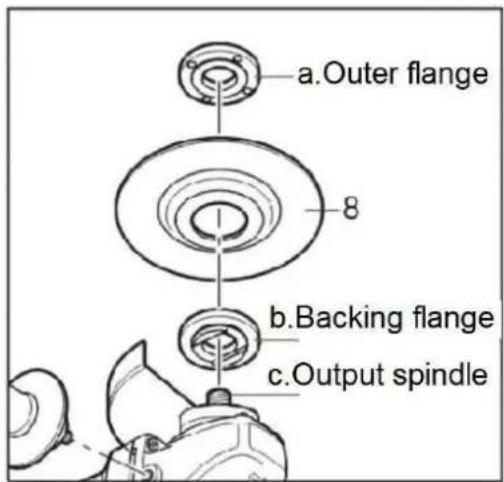
- Remove the outer flange (a) and backing flange (b) by using the two-hole spanner provided.
- Fit the desired disc (8) on the spindle and replace the outer flange and backing flange. Release the spindle lock.

Important! Only ever press the spindle lock when the motor and grinding spindle at astandstill!
You must keep the spindle lock pressed while you change the wheel!
SWITCHING ON / OFF
Before engage the ON/OFF switch button, check that the grinding disc is properly fitted and run smoothly, the outer flange is well tightened.
Connect the battery pack onto the angle grinder body.
OPERATION MODES
Grinding
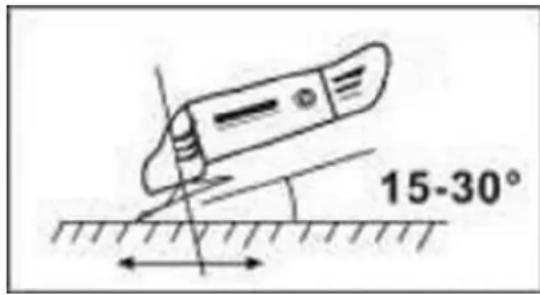
Hold the handle and auxiliary handle firmly and switch on. Avoid blocking the ventilation slots with your hand, as this may cause the grinder to overheat. Let the disc reach full speed. Apply the grinder to the item.
Maximum effect is achieved when the grinder is held at an angle of 15-30^ in relation to the item. Move the grinder gently along the item. Give the grinder time to work. It is rarely necessary to press the disc hard against the surface to be worked. Sparks can occur in the motor compartment during use. This is normal and does not mean the grinder is defective. Switch off the grinder after use.
6. MAINTENANCE AND STORAGE

Always disconnect the battery pack from the angle grinder before making any investment or attaching any accessories.
CLEANING
1) Cleaning
- Keep the ventilation slots of the machine clean to prevent overheating of the engine.
- Regularly clean the machine housing with a soft cloth, preferably after each use.
- Keep the ventilation slots free from dust and dirt.
- If the dirt does not come off, use a soft cloth moistened with soapy water.

Never use solvents such as petrol, alcohol, ammonia water, etc. These solvents may change the plastic parts.
2) Lubrication
The machine does not require any specific lubrication.
STORAGE
- Thoroughly clean the whole machine and its accessories.
- Store it out of the reach of children, in a stable and secure position, in a cool and dry place, avoid too high and too low temperatures.
- Protect it from exposure to direct sunlight. Keep it in the dark, if possible.
- Don't keep it in plastic bags to avoid humidity build-up.
7. DISPOSAL
Electrical products should not be discarded with household products. According to the European Directive 2012/19/EU on waste electrical and electronic equipment and its implementation into national law, electrical products used must be collected separately and disposed of at collection points provided for this purpose. Talk with your local authorities or dealer for advice on recycling.
1. VERWENDUNGSZWECK
two-hole spanner : Spannschlüssel

ALGEMENE VEILIGHEIDSWAARSCHUWINGEN VOOR
ELEKTRISCH GEREEDSCHAP







Energizer® POWERTOOLS
©2024 Energizer. Energizer and certain graphic designs are trademarks of Energizer Brands, LLC and related subsidiaries and are used under license by Avenir Telecom. All other brand names are trademarks of their respective owners. Neither Avenir Telecom nor Energizer Brands is affiliated with the respective owners of their trademarks.
Customer service: support@energizeyourdevice.com
- Energizer® POWERTOOLS
- UTILISATION PRÉVUE
- SAFETY INSTRUCTIONS
- GENERAL SAFETY WARNINGS FOR POWER TOOLS
- Work area security
- Electriciy safety
- Personal Safety
- Power Tool Use and Maintenance
- Use of battery-operated tools and precautions for use
- Maintenance
- SPECIAL SAFETY INSTRUCTIONS
- FURTHER SAFETY INSTRUCTIONS FOR ALL OPERATIONS
- Kickback and Related Warnings
- SPECIFIC SAFETY INSTRUCTIONS FOR ANGLE GRINDERS
- YOUR PRODUCT
- TECHNICAL DETAILS
- USE
- FITTING THE AUXILIARY HANDLE
- REPLACING THE GRINDING DISC
- Beware – a disc which has been used may be very hot!
- Important! Only ever press the spindle lock when the motor and grinding spindle at astandstill!
- SWITCHING ON / OFF
- OPERATION MODES
- Grinding
- MAINTENANCE AND STORAGE
- Always disconnect the battery pack from the angle grinder before making any investment or attaching any accessories.
- CLEANING
- 1) Cleaning
- Never use solvents such as petrol, alcohol, ammonia water, etc. These solvents may change the plastic parts.
- 2) Lubrication
- STORAGE
- DISPOSAL
- VERWENDUNGSZWECK
- ALGEMENE VEILIGHEIDSWAARSCHUWINGEN VOOR
- ELEKTRISCH GEREEDSCHAP
Brand : ENERGIZER
Model : 3SA05
Category : Grinder