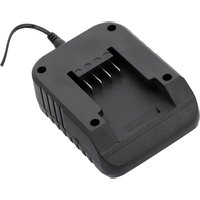
YT-828503 - Battery charger Yato - Free user manual and instructions
Find the device manual for free YT-828503 Yato in PDF.


| Brand | Yato |
| Model | YT-828503 |
| Product type | Battery charger for 18 V batteries |
| Input voltage | 28 V DC (cigarette lighter socket) |
| Output voltage (battery) | 21.5 V DC |
| Output voltage (USB) | 5 V DC |
| Output current (battery) | 2 A |
| Output current (USB) | 2 A |
| Compatible batteries | YT-82842, YT-82843, YT-82844, YT-82845, YT-828461, YT-828462, YT-828463, YT-828464, YT-828465 |
| Number of charging slots | 1 |
| Protection | IPX0 |
| Recommended charging temperature | +20°C |
| Additional functions | Charging of mobile devices via USB port, power supply from vehicle electrical system |
| Battery types | Li-ion 18 V |
| Indicators | Charge indicator |
| Charging time (battery YT-828461) | 1 h 10 |
| Charging time (battery YT-828462) | 1 h 40 |
| Charging time (battery YT-828463) | 2 h 15 |
| Charging time (battery YT-828464) | 3 h 20 |
| Charging time (battery YT-828465) | 5 h 00 |
| Usage | Indoor only |
| Standards | CE, WEEE |
| Maintenance and cleaning | Unplug before cleaning; wipe with a dry cloth |
| Safety instructions | Do not modify the plug, do not charge other batteries, do not expose to moisture |
Frequently Asked Questions - YT-828503 Yato
User questions about YT-828503 Yato
0 question about this device. Answer the ones you know or ask your own.
Ask a new question about this device
Download the instructions for your Battery charger in PDF format for free! Find your manual YT-828503 - Yato and take your electronic device back in hand. On this page are published all the documents necessary for the use of your device. YT-828503 by Yato.
USER MANUAL YT-828503 Yato
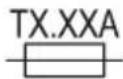
Melt fuse - slow-blow
This symbol indicates that waste electrical and electronic equipment (including batteries and storage cells) cannot be disposed of with other types of waste. Waste equipment should be collected and handed over separately to a collection point for recycling and recovery, in order to reduce the amount of waste and the use of natural resources. Uncontrolled release of hazardous components contained in electrical and electronic equipment may pose a risk to human health and have adverse effects for the environment. The household plays an important role in contributing to reuse and recovery, including recycling of waste equipment. For more information about the appropriate recycling methods, contact your local authority or retailer.
Short-circuit-proof isolation transformer
Switched-mode power supply
Schaltnetzteil
DC connector polarity
Polaritate conector c.c
YT-828500, YT-828501, YT-828502, YT-828503, YT-828504
I N S T R U K C J A O B S Ł U G I
PRODUCT OVERVIEW
The charger allows charging YATO 18V system batteries. The charging current is adapted to the characteristics of the cells, extending battery life. The correct, reliable, and safe operation of the appliance depends on its proper use, therefore:
Read the entire manual before the first use of the appliance and keep it for future reference.
The supplier shall not be liable for any damage resulting from failure to comply with the safety instructions and recommendations specified in this instructions manual.
GENERAL SAFETY CONDITIONS
The charger can only be used to charge YATO 18V system batteries with following part numbers: YT-82842, YT-82843, YT-82844, YT-82845, YT-828461, YT-828462, YT-828463, YT-828464, YT-828465.
It is prohibited to modify the charger socket to fit the battery.
It is prohibited to charge batteries other than those listed in the instruction manual. Charging any other type of battery can lead to an
EN
electrical shock hazardous to health and life and/or cause a fire.
The device may be used by children over 8 years of age and by persons with reduced physical, sensory and mental capabilities or by persons without experience or knowledge if they are supervised or if they have been given instructions for safe use and information about the risks involved.
Unsupervised children must not be allowed to carry out cleaning and maintenance.
When charging, the battery must be in a well-ventilated area and it is recommended to charge the battery at the room temperature of +20°C.
Before charging the battery, read and follow the charging instructions supplied by the manufacturer with the battery.
The charger is designed for indoor operation and exposure to moisture including precipitation is prohibited.
After charging, first disconnect the charger plug from the power socket and then disconnect the battery from the charger.
Never leave the charger connected to the mains supply. Always pull the power cord plug from the socket.
Observe the polarity symbols of the charger and battery.
Make sure that the mains power supply parameters comply with the ones shown on the charger's nameplate before connecting the charger's power cord plug.
Do not smoke or approach the charger or battery with fire.
Before each use, check the condition of the charger, including the power cord and the charging cables. If any faults are noticed, do not use the charger. Damaged cords and cables must be replaced with new ones at the manufacturer's authorised service centre.
EN
Make sure that the power cord plug has been disconnected from the mains socket before carrying out maintenance on the charger.
Keep the charger out of reach of unauthorised persons, especially children. Make sure that the charger is out of the reach of unauthorised persons, especially children, also during operation.
USING THE CHARGER
YT-828498 / YT-828499 / YT-828500 / YT-828501
Slide the battery into the charger socket (I).
Plug the charger into a mains socket.
There is an indicator light near the battery socket to indicate charger operation as described in the table "Charging status indication". When charging is complete, unplug the power adapter from the mains socket. Slide the battery out of the charging station by pressing and holding the battery latch button, then slide the battery out of the charger socket.
YT-828502
Slide the battery into the charger socket (I).
Plug the charger into a mains socket.
On the control panel located on the left side of the charger, there are indicator lights to indicate charger operation as described in the table "Charging status indication". The intelligent charger will automatically adjust the appropriate charging current to the type of battery being charged. The lights on the right-hand side of the charger indicate with what amperage the battery is being charged (low, medium or high), allowing the
EN
approximate charging time of the battery to be estimated. The higher the current, the shorter the battery charging time. When charging process is complete, unplug the power adapter from the mains socket. Slide the battery out of the charging station by pressing and holding the battery latch button, then slide the battery out of the charger socket.
YT-828503 / YT-828504
Charging the battery from the vehicle's electrical socket (cigarette lighter socket)
Slide the battery into the charger socket (I).
Insert the plug of the power cable into the charger socket. Connect the charger's power cable to the vehicle's electrical socket. There is an indicator light in the charger's housing to indicate charger operation as described in the table "Charging status indication". When charging is complete, unplug the power cable from the vehicle's electrical socket, disconnect the cable from the charger. Slide the battery out of the charging station by pressing and holding the battery latch button, then slide the battery out of the charger socket.
Charging the battery from the solar panel (only on model no. YT-828504) The charging performance from a solar panel depends on the amount of sunlight, the positioning of the panel, as well as factors such as cloud cover and the shading level.
Caution! The best charging performance can be achieved when the solar panel is fully exposed to sunlight under cloudless sky. The panel should be clean of contaminants such as dirt and dust. The surface of the panel should not be obscured and the location should not be shaded.
Slide the battery into the charger socket (I).
Insert the plug of the solar panel cable into the charger socket. There is an indicator light in the charger's housing to indicate charger operation as described in the table "Charging status indication". When charging is complete, remove the solar panel plug from the charger socket. Slide the battery out of the charging station by pressing and holding the battery latch button, then slide the battery out of the charger socket.
Charging mobile devices from an 18 V battery - YT-828503 and YT-828504 models only
Slide the battery into the charger socket (I).
Connect the mobile device charging cable to the USB socket on the charger. Insert the cable plug into the charging socket of the mobile device. Press the mobile device charging switch. The charging process will start. The power supply efficiency of the socket has been defined in the technical data table. When charging is complete, remove the USB plug from the charger's USB socket and then disconnect from the device charged. Slide the battery out of the charging station by pressing and holding the battery latch button, then slide the battery out of the charger socket.
Charging mobile devices from the vehicle's electrical system (cigarette lighter socket) - only YT-828503 and YT-828504
Insert the plug of the power cable into the charger socket. Connect the charger's power cable to the vehicle's electrical socket. Connect the mobile device charging cable to the USB socket. Insert the cable plug into the charging socket of the mobile device. Press the mobile device charging switch. The charging process will start. The power supply efficiency of the socket has been defined in the technical data table. When charging is complete, disconnect the plug from the USB socket of the product and then from the charged device. Remove the power cable plug from the charger's socket. Disconnect the power cable from the vehicle's electrical socket.
Charging mobile devices from a solar panel (YT-828504 only)
Caution! The charging performance from a solar panel depends on the amount of sunlight, the positioning of the panel, as well as factors such as cloud cover and the shading level. The best charging performance can be achieved when the solar panel is fully exposed to sunlight under cloudless sky. The panel should be clean of contaminants such as dirt and dust. The surface of the panel should not be obscured and the location should not be shaded.
Insert the plug of the solar panel cable into the charger socket. Connect the mobile device charging cable to the USB socket. Insert the cable plug into the charging socket of the mobile device. Press the mobile device charging switch. The charging process will start. The power supply efficiency of the socket has been defined in the technical data table. When charging is complete, disconnect the plug from the USB socket of the product and then from the charged device. Disconnect the plug of the solar panel cable from the charger socket.
EN
CHARGING STATUS INDICATION
YT-828498, YT-828499
| Green colour Red colour Operating status | |
| continuous light waiting to be charged | |
| continuous light charging | |
| continuous light battery charged | |
YT-828500, YT-828501, YT-828502, YT-828503, YT-828504
| Green colour Yellow colour* Red colour Operating status | |||
| waiting to be charged | |||
| blinking charging | |||
| continuous light battery charged | |||
| blinking battery overheated | |||
| continuous light | battery defective | ||
| blinking | charger overheated | ||
| continuous light | charger defective | ||
*only for model no. YT-828502
TECHNICAL DATA
EN
| Parameter Unit Value | ||||||||
| Part No. YT - 828498 YT-828499 YT-828500 | YT-828501 YT-828502 YT-828503 | YT-828504 | ||||||
| Input voltage [V] 200-240 ~ 200-240 ~ 200-240 ~ 200-240 ~ 200-240 ~ 200-240 ~ 200-240 ~ 200-240 ~ 200-240 ~ 200-240 ~ 200-240 ~ 200-240 ~200-240 ~ 200-240 ~ 200-240 ~ 200-240 ~ 200-240 ~ 200-240 ~ 200-240 ~ 200-240 ~ 200-240 ~ 200-240 ~ 200-240 ~ 12-28 DC | 12-28 DC | |||||||
| Mains frequency [Hz] 50 / 60 | 50 / 60 50 / 60 | |||||||
| Rated current | [A] | 2.0 | 2.0 | 2.0 | 4.0 | 2.5 | - | - |
| Insulation class | II | II | II | II | II | - | - | |
| Protection rating | IPX0 | IPX0 | IPX0 | IPX0 | IPX0 | IPX0 | IPX0 | |
| Output voltage | [V] | 21.5 DC | 21.5 DC | 21.5 DC | 21.5 DC | 21 DC | 21.5 DC / 5 DC | 21.5 DC / 5 DC |
| Output current | [A] | 2.2 | 2.4 x 2 | 4.5 | 4.5 x 2 | 12 | 2 / 2 | 2 / 2 |
| Battery charging time | Vehicle / solar charger* | |||||||
| YT-828461 | [h:m] | 1:00 | 1:00 | 0:35 | 0:35 | 0:35 | 1:10 | 1:10 / 1:10* |
| YT-828462 | [h:m] | 1:30 | 1:30 | 0:40 | 0:40 | 0:24 | 1:40 | 1:40 / 1:40* |
| YT-828463 | [h:m] | 2:00 | 2:00 | 0:55 | 0:55 | 0:32 | 2:15 | 2:15 / 2:15* |
| YT-828464 | [h:m] | 3:00 | 3:00 | 1:18 | 1:18 | 0:36 | 3:20 | 3:20 / 3:20* |
| YT-828465 | [h:m] | 4:30 | 4:30 | 2:00 | 2:00 | 0:54 | 5:00 | 5:00 / 5:00* |
*Battery charging time when the solar panel is fully exposed to sunlight under cloudless sky.
PRODUKTBESCHREIBUNG
B E D I E N U N G S A N L E I T U N G
DE
YT-828500, YT-828501, YT-828502, YT-828503, YT-828504
YT-828500, YT-828501, YT-828502, YT-828503, YT-828504
YT-828500, YT-828501, YT-828502, YT-828503, YT-828504
YT-828500, YT-828501, YT-828502, YT-828503, YT-828504
YT-828500, YT-828501, YT-828502, YT-828503, YT-828504
YT-828503, YT-828504
YT-828500, YT-828501, YT-828502, YT-828503, YT-828504
YT-828500, YT-828501, YT-828502, YT-828503, YT-828504
YT-828500, YT-828501, YT-828502, YT-828503, YT-828504
YT-828500, YT-828501, YT-828502, YT-828503, YT-828504
YT-828500, YT-828501, YT-828502, YT-828503, YT-828504
CARACTÉRISTIQUES DU PRODUIT
YT-828500, YT-828501, YT-828502, YT-828503, YT-828504
YT-828500, YT-828501, YT-828502, YT-828503, YT-828504
YT-828500, YT-828501, YT-828502, YT-828503, YT-828504
YT-828500, YT-828501, YT-828502, YT-828503, YT-828504
YT-828500, YT-828501, YT-828502, YT-828503, YT-828504
YT-828500, YT-828501, YT-828502, YT-828503, YT-828504
YT-828500, YT-828501, YT-828502, YT-828503, YT-828504
| Zelena Žuta* Crvena Status posla | |||
| čekanje na punjenje | |||
| pulsiranje punjenje | |||
| kontinuirano svjetlo baterija je napunjena | |||
| pulsiranje baterija se pregrijava | |||
| kontinuirano svjetlo baterija je oštećena | |||
| pulsiranje pregrijavanje punjača | |||
| kontinuirano svjetlo punjač oštećen | |||


Brand : Yato
Model : YT-828503
Category : Battery charger