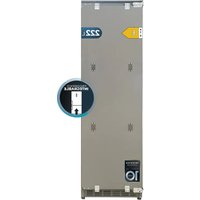
Bolero CoolMarket UF BI-D 222 - Freezer CECOTEC - Free user manual and instructions
Find the device manual for free Bolero CoolMarket UF BI-D 222 CECOTEC in PDF.


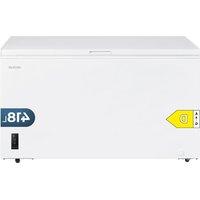
| Product type | Integrated Freezer Total No Frost |
| Brand | Cecotec |
| Model | Bolero CoolMarket UF BI-D 222 |
| Power supply | 220-240 V~, 50 Hz, 1 A |
| Climate class | SN, N, ST, T (10 °C to 43 °C) |
| Refrigerant gas | R600a (56 g) |
| Insulation | Cyclopentane |
| Freezer capacity | Not specified (built-in type) |
| Dimensions (H x W x D) | Approximately 222 cm x 54.6 cm x variable depth (built-in) |
| Weight | Not specified |
| Touch screen | Touch control panel with temperature indicators |
| Operating modes | Smart, Fast Freezing, Vacation, manual setting -15 °C to -24 °C |
| Open door alarm | Yes, after 60 seconds |
| High temperature alarm | Yes, if freezer > -1 °C |
| Defrosting | Automatic (Total No Frost) |
| Door reversal | Possible (depending on model) |
| Built-in installation | Yes, with required ventilation |
| Cleaning | Baking soda and hot water solution |
| Interior lighting | LED, efficiency class G (replacement by technician) |
| Warranty | Legal warranty, Cecotec after-sales service at +34 963 21 07 28 |
| Country of manufacture | China, designed in Spain |
| Spare parts | Contact official after-sales service for original parts |
Frequently Asked Questions - Bolero CoolMarket UF BI-D 222 CECOTEC
User questions about Bolero CoolMarket UF BI-D 222 CECOTEC
0 question about this device. Answer the ones you know or ask your own.
Ask a new question about this device
Download the instructions for your Freezer in PDF format for free! Find your manual Bolero CoolMarket UF BI-D 222 - CECOTEC and take your electronic device back in hand. On this page are published all the documents necessary for the use of your device. Bolero CoolMarket UF BI-D 222 by CECOTEC.
USER MANUAL Bolero CoolMarket UF BI-D 222 CECOTEC
natural_image
Front view of a rectangular industrial or storage unit with four central blocks and mounting brackets (no visible text or symbols)Safety instructions 12
-
Parts and components 111
-
Before use 111
-
Installation 112
-
Operation 115
-
Instructions on food storage 118
-
Cleaning and maintenance 119
-
Troubleshooting 120
-
Technical specifications 123
-
Disposal of old electrical and electronic
appliances 124
-
Technical support and warranty 125
-
Copyright 125
-
Simplified Declaration of Conformity 125
SOMMAIRE
EU01_100597 Bolero CoolMarket 1D BI-D 306 Grey E EU01_100598 Bolero CoolMarket UF BI-D 222 Grey E
EN • The coding in this manual is generic and applies to all code variants of the appliance.
Read these instructions thoroughly before using the appliance. Keep this instruction manual for future reference or new users.
- It is important to make sure all users are familiar with the operation and safety features of the appliance to prevent faults and unnecessary accidents.
- Make sure that the mains voltage in your house matches the voltage stated on the rating label of the appliance.
- This appliance can be used by children aged 8 and above and people with reduced physical, sensory, or mental capabilities or lack of experience and knowledge, as long as they have been given supervision or instruction concerning the use of the appliance in a safe way and understand the hazards involved. Children must not play with the device. The cleaning and maintenance of the appliance should not be carried out by children without supervision.
- Keep the packaging material away from children, as there is a risk of suffocation.
- WARNING: if the interior light is damaged, contact the official Cecotec Technical Support Service. Do not attempt to repair it yourself (interior light only available on certain models).
- WARNING: when positioning the appliance, make sure the power cable does not get trapped or damaged. A crushed or damaged plug may heat up and cause a fire.
- Make sure the appliance plug is accessible after installation.
- Do not place food directly against the air outlet on the interior of the appliance.
- Keep the ventilation openings clear from obstructions.
- Do not place carbonated or fizzy drinks in the freezer compartment, as this creates pressure in the container, which could explode and damage the appliance.
- WARNING: do not use mechanical appliances or other means to accelerate the defrosting process other than those recommended by Cecotec.
- WARNING: do not damage the refrigeration circuit.
- If the cable is damaged, it must be replaced by the manufacturer, the supplier, or qualified personnel to avoid hazards.
- WARNING: do not use electrical devices inside the appliance.
- We recommend you check the power cable regularly to detect any sign of possible damage. Do not use the appliance if the cable is damaged.
- To avoid injuries or death caused by electric shock, do not use the appliance with your hands wet or over a wet surface.
- Do not use this appliance with an extension cord or a multi-socket adaptor. Make sure the appliance is plugged in directly to a power supply.
- When positioning the appliance, make sure there is enough free space at the rear, as it is the main heat outlet. This will allow for adequate ventilation.
- Do not place hot food or drinks in the appliance, allow them to cool to room temperature.
- Do not place any other appliance on the refrigerator and do not wet it.
- Do not store explosive substances such as aerosols or flammable propellants in this appliance.
- This appliance is designed for domestic use only and is not intended for bars, restaurants, farmhouses, hotels, motels, and offices.
- WARNING: to avoid any risk due to the instability of the appliance, you must install it according to the instructions.
- This appliance has a built-in earthed plug. Make sure the power supply in your house is properly earthed.
- Wait 5 minutes after a power failure before turning the appliance back on. Otherwise, the compressor may get damaged.
- This appliance is not intended to be operated by means of an external timer or separate remote-control system.
- Always handle the appliance carefully to avoid any damage on it.
- Frozen food can cause frostbites if consumed right after removing it from the freezer compartment.
- Do not remove or touch items in the freezer compartment with your hands wet, as it could cause skin abrasions or frost/freeze burns.
- Never use the base, drawers, or door as support.
- Do not overload the door shelves or place too much food on the drawers to prevent items from falling off and damaging the appliance.
- WARNING: do not attach multi-socket adaptors or multiple power supplies to the rear part of the appliance.
- To avoid food contamination, please follow the instructions below:
- Opening the door for a long period of time may cause a significant increase in temperature in the appliance compartments.
- Regularly clean the surfaces that come into contact with food and with the accessible draining systems.
- Store raw meat and fish in proper containers in the freezer, so they do not come into contact with or leak on other food.
- The two-star compartments are suitable for storing pre-frozen food, storing or making ice cream, and making ice cubes.
- Compartments with one, two, or three stars are not suitable for freezing fresh food.
- If the appliance is not going to be used or be empty for a long period of time, switch it off, allow it to defrost, clean it, dry it, and leave the doors open to prevent interior mould growth.
- Before carrying out any maintenance and cleaning task, turn off the appliance and unplug it.
- It is advisable to wait for at least four hours before connecting the appliance to allow oil to flow through the compressor.
- Air must flow around the appliance. Lack of air leads to overheating. To achieve good ventilation, follow the installation instructions.
- Whenever possible, the back of the appliance should not be too close to the wall or cabinet to prevent it from touching or reaching hot parts (the compressor and the condenser). To avoid risk of fire, follow the installation instructions.
- Avoid exposing the appliance to direct sunlight and keep it away from heat sources.
- The cabinet where the refrigerator is installed must be well-ventilated.
- Do not place the appliance in a damp place or a place prone to splashing water. Water splashes and dirt should be cleaned with a soft cloth to prevent rusting.
- Make sure that the mains plug is accessible after installation of the appliance.
- All electrical work required to maintain this appliance must be carried out by a qualified electrician.
- Use the appliance only for the purposes described in this manual. Incorrect or improper use can damage the appliance and be dangerous for the user.
Temperature range
- The appliance temperature range information can be found on its marking. It indicates the optimum room temperature for proper operation of the appliance.
| Climate range | Optimum room temperature |
| SN From +10 °C | to +32 °C |
| N From +16 °C to +32 °C | |
| ST From +16 °C | to +38 °C |
| T From +16 °C to +43 °C | |
Note:
- Taking into account the limiting values of the room temperature range for the climates for which the appliance is designed and that internal temperatures may be affected by factors such as the location of the appliance, room temperature and frequency of door opening, it may be necessary to modify the setting of any temperature control device according to these factors.
- If the appliance is operated in an environment other than the specified climate type (i.e. beyond the rated ambient temperature range), it may not be able to maintain the desired indoor temperatures.
Refrigerant
- Isobutane refrigerant (R600a), contained within the refrigeration circuit of the appliance, is a natural gas with a high level of environmental compatibility; however, it is flammable. Make sure that no components of the refrigeration circuit have been damaged during the transport
and installation of the appliance.
- WARNING: the refrigerant and the insulator gas are flammable. When disposing of the device, only dispose of it at an authorised waste-disposal facility. Do not expose it to flames.
- WARNING: the appliance contains refrigerant and gases in the insulation. The appliance and gases must be disposed of professionally, as they may cause injuries to eyes or ignition. Make sure the refrigeration-circuit pipe is not damaged before disposing of it correctly.
This symbol means: warning, risk of fire/flammable materials. -
If the refrigeration circuit is damaged:
-
Avoid open flames and sources of ignition.
- Completely air the room where the appliance is located.
INSTRUCTIONS DE SÉCURITÉ
EU01\_100597 Bolero CoolMarket 1D BI-D 306 Grey E
EU01\_100598 Bolero CoolMarket UF BI-D 222 Grey E
EU01\_100597 Bolero CoolMarket 1D BI-D 306 Grey E
Panel de control. Fig. 7
EU01\_100598 Bolero CoolMarket UF BI-D 222 Grey E
Panel de control. Fig. 8
EU01\_100597 Bolero CoolMarket 1D BI-D 306 Grey E
Fig. 1 key:
- Glass tray
- Crisper drawer cover
- Crisper drawer
- Variable temperature zone top drawer
- Variable temperature zone bottom drawer
- Door shelves
EU01\_100598 Bolero CoolMarket UF BI-D 222 Grey E
Fig. 2 key:
- Glass tray
- Drawer cover
- Top drawer
- Bottom drawer
- Door shelves
NOTE:
- The graphics in this manual are schematic representations and may not exactly match the product.
- The internal setting may vary depending on the refrigerator model.
- To optimise energy savings, position the drawers and shelves in the refrigerator as shown in figures 1 and 2.
2. BEFORE USE
- This appliance is packaged in a way as to protect it during transport. Take the appliance out of its box and remove all packaging materials. You can keep the original box and other packaging elements in a safe place to prevent damage to the appliance if you need to transport it in the future. If you wish to dispose of the original packaging, make sure all packaging materials are recycled accordingly.
- Make sure all parts and components are included and in good conditions. If there is any piece missing or in bad conditions, contact the official Cecotec Technical Support Service immediately.
- Once installed, allow the refrigerator to stand for at least four hours before switching it on.
- It is recommended to clean the inside of the appliance before starting it up. To do this,
ENGLISH
use a solution of baking soda and warm water and then dry the inside of the refrigerator thoroughly. The refrigerator may give off a peculiar smell when it is opened for the first time. This smell will disappear as the appliance cools down.
- The first time you start the appliance; it will run at an initial Smart mode temperature (depending on the model).
- If the appliance is switched off, wait at least 7 minutes before switching it on again to avoid unnecessary damage to the compressor.
- Never store flammable or explosive objects, acids or corrosive alkaline substances in the appliance.
- The appliance preserves food by cooling the bottom wall of the refrigerator. It is therefore normal for ice or frost to accumulate on this surface. After a while, this adhering layer of frost melts and is drained out through a small drain hole at the back of the refrigerator. The presence of frost on the rear does not mean that the refrigerator is not working properly.
Box content
- Freezer / Refrigerator
- Instruction manual
Do not remove the serial number of the appliance in order to keep a correct traceability of it in case of assistance.
3. INSTALLATION
Installation preparation
- Never install the appliance near heat sources, such as heaters or cookers, or in damp places.
- At least two people are required to transport and install the appliance safely.
- When lifting the appliance, the edges may be somewhat sharp. Use appropriate protective equipment for transport and installation.
- Make sure that the cooling system at the rear of the appliance does not touch the wall. The greater the separation distance, the better.
- The appliance must be installed in a well-ventilated place. Be sure to leave enough space at the top of the appliance to allow air to escape and to maintain an adequate depth distance between the back of the appliance and the wall.
- Do not tilt the appliance more than 40°.
Ventilation
When installing any refrigeration appliance that can be built into a kitchen unit, it is essential to take ventilation into account. Good ventilation around the appliance is essential for the heat generated by the refrigerator to dissipate properly. Lack of ventilation can lead to premature
compressor failure, excessive power consumption, total system failure and may void the product warranty. When installing this type of built-in appliances in the kitchen furniture, please observe the following instructions:
- Leave some ventilation openings at the rear of the cabinet to allow air to enter.
- Drill a hole in the plinth at the bottom of the refrigerator and fit a ventilation grille. Another option is to cut a small part of the plinth to allow air to enter the appliance.
- The top of the cabinet shall be provided with a ventilation opening to the room. Recommended size of the ventilation opening: 500 x 40 mm. If the cabinet does not allow air to enter around the appliance, a ventilation grille in the plinth or other ventilation system must be installed to ensure that air can circulate naturally.
- Sufficient space must also be left between the rear of the cabinet and the appliance so that cold air can circulate to the condenser.
- For the appliance to work properly, it is important that the top of the refrigerator is not completely blocked. For most appliances it is advisable to leave a distance of 40-50 mm.
- To allow air to enter the compressor and heat exchanger, a ventilation opening must be made in the base of the cabinet.
- As a general rule, the more air that can flow in and out, the more efficiently the appliance will work.
Installation instructions
Note: All measurements in the figures are shown in mm.
1.- Power socket
Use a properly earthed power socket and connect the refrigerator within 24 hours of installation.
2.- Pre-installation inspection
Check that the floor is completely flat and level, the internal dimensions of the cabinet, the decorative panel and the baseboard.
Figure 3 shows the dimensions of the refrigerator and cabinet in mm.
Fig. 3 key:
B.- The top board must be 3 mm shorter than the side board.
NOTE: If the width of the cabinet is greater than 546 mm, the space will need to be filled.
3.- Adjusting the refrigerator
Adjust the position of the refrigerator in the cabinet with the feet at the bottom, until the gap between the appliance and the cabinet is about 5 mm.
ENGLISH
4.- Fixing the decorative panel on the door
- Fix the latch on the back of the door panel with a screw.
- Fit the panel on the door in the correct direction (Fig. 4).
Fig. 4 key:
A Latch direction
B Model EU01_100598 Bolero CoolMarket UF BI-D 222 Grey E
C Model EU01_100597 Bolero CoolMarket 1D BI-D 306 Grey E
D Top view of decorative door panel
E Cabinet side panel
F Door panel
G Top board
H Latch location line
NOTE: The door panel should cover the top board.
- Adjust the panel until all corners are at the same level, then secure the panel with the 4 hinges.
Figure 5 shows the dimensions of the baseboard.
Fig. 5 key:
A Baseboard
B Baseboard ventilation opening
C Decorative door panel
D Refrigerator baseboard
NOTE: The refrigerator has its own baseboard, if you need another one, it must match the dimensions shown.
5.- Refrigerator assembly
- Open the refrigerator and then fix the hinge to the side of the cabinet.
- Fix the bracket to the other side of the cabinet.
- Fix the top board to the ceiling of the cabinet.
- Install the baseboards.
Changing the door opening direction (depending on the model)
Remove the screws from the hinges with a screwdriver and reinstall the hinges in their reverse position as shown in figure 6.
After changing the opening direction of the door, it is normal for the gasket to be compressed and slightly harder. With the door closed, use a hairdryer to apply a little heat to the gasket. The heat will, little by little, expand the rubber until it has reached the required shape, filling the
space between the door and the body of the refrigerator. Avoid using the hair dryer too close to the appliance, as this may damage the gasket. A distance of about 10 cm is enough. When finished, allow the gasket and door to cool before touching them. Once this is done, the gasket will return to its original shape.
4. OPERATION
EU01\_100597 Bolero CoolMarket 1D BI-D 306 Grey E
Control panel. Fig. 7
- Power and mode selection button
- Holiday mode icon
- Fast Cooling icon
- Smart mode icon
- Temperature indicator display
- Refrigerator-compartment indicator light
- Variable temperature compartment indicator light
- Temperature setting button
- Temperature zone selection button
1.- Switching on/off the refrigerator compartment
Press the button (9) to select the refrigerator compartment, the display (5) will show the selected temperature. Press and hold the temperature setting button (8) until you hear a beep, then the refrigerator compartment will stop cooling, and the display (5) will show.
Press and hold the temperature setting button (8) again until you hear a beep. The display (5) will show and the refrigerator compartment will start working again.
2.- Setting the temperature of the refrigerator compartment
Press the button (9) to select the refrigerator compartment, its indicator light will turn on and the display (5) will show and flash. You can now select the desired temperature by pressing the temperature setting button (8). The temperature range can be adjusted from 2 to 8 °C.
3.- Setting the temperature of the variable temperature compartment
Press the button (9) to select the variable temperature compartment, its indicator light will turn on and the display (5) will show and flash. You can now select the desired temperature by pressing the temperature setting button (8). The temperature range can be adjusted from -7 to 5 °C.
ENGLISH
4.- Smart mode
Press the mode selection button (1) to select the Smart mode. The indicator light (4) will come on. The refrigerator will operate in Smart mode.
In Smart mode, the temperature of the refrigerator compartment is automatically set to 5^ .
In Smart mode, the temperature of the variable temperature compartment is automatically set to 0 °C .
NOTE: These temperatures are fixed and cannot be changed.
5.- Fast Cooling mode
Press the mode selection button (1) to select the Fast Cooling mode. The indicator light (3) will come on. The refrigerator will operate in Fast Cooling mode.
The Fast Cooling mode will be deactivated when the temperature of the refrigerator compartment reaches 2^ C.
The Fast Cooling mode will be deactivated when the temperature of the variable temperature compartment reaches -7 °C.
Warning: If you store fruit and vegetables in the variable temperature compartment, do not operate the Fast Cooling mode or set the temperature below 2 ^ , or the food will be spoiled.
NOTE: This mode is suitable for the appliance to quickly reach an optimal temperature after a power failure, preventing food waste.
6.- Holiday mode
Press the mode selection button (1) to select the Holiday mode. The indicator light (2) will come on. The refrigerator will operate in Holiday mode.
In Holiday mode, the temperature of the refrigerator compartment is automatically set to -7 ^ . In Holiday mode, the temperature of the variable temperature compartment is automatically set to -7 ^ .
NOTE: These temperatures are fixed and cannot be changed.
4.- Switching off the appliance
Press and hold the mode selection button (1) for 5 seconds. The display (5) will show "OF"-88 and the appliance will switch off. Press and hold the button (1) again for 5 seconds and the appliance will run again.
EU01\_100598 Bolero CoolMarket UF BI-D 222 Grey E
Control panel. Fig. 8
- Power and mode selection button
- Holiday mode icon
- Fast Freezing icon
- Smart mode icon
- Temperature indicator display
- Freezer compartment icon
- Temperature setting button
- Temperature zone selection button
1.- Setting the temperature of the freezer compartment
Press the button (8) to select the freezer compartment, the display (5) will show -88 and flash. You can now select the desired temperature by pressing the temperature setting button (7). The temperature range can be adjusted from -15 to -24 °C.
2.- Smart mode
Press the mode selection button (1) to select the Smart mode. The indicator light (4) will come on. The freezer will operate in Smart mode.
In Smart mode, the freezer compartment temperature is automatically set to -18^ .
NOTE: This temperature is fixed and cannot be changed.
Press the mode selection button (1) to select the Fast Freezing mode. The indicator light (3) will come on. The freezer will operate in Fast Freezing mode.
The Fast Freezing mode will be deactivated when the temperature of the freezer compartment reaches -24 °C.
NOTE: This mode is suitable for the appliance to quickly reach an optimal temperature after a power failure, preventing food waste.
4.- Holiday mode
Press the mode selection button (1) to select the Holiday mode. The indicator light (2) will come on. The freezer will operate in Holiday mode.
In Holiday mode, the freezer compartment temperature is automatically set to -15^ .
NOTE: This temperature is fixed and cannot be changed.
ENGLISH
5.- Switching off the appliance
Press and hold the mode selection button (1) for 5 seconds. The display (5) will show "OF" and the appliance will switch off. Press and hold the button (1) again for 5 seconds and the appliance will run again.
88
Defrost
Models with "Total No Frost" system are designed to prevent the formation and accumulation of excessive ice and/or frost inside the appliance. Under normal use, it should not be necessary to periodically defrost the refrigerator / freezer system.
Please note: if you regularly find a large accumulation of ice, frost or water puddles in the freezer compartment, it is likely that the door is not sealing properly. This could be due to a faulty door seal or an incorrectly installed or too heavy decorative door.
5. INSTRUCTIONS ON FOOD STORAGE
NOTE: The temperature inside the refrigerator/freezer is not completely homogeneous; it may vary in different zones due to various factors.
Refrigerator compartment
- Close bottles and liquid containers tightly.
- Do not put hot or freshly cooked food directly into the refrigerator. Let hot food cool down to room temperature before putting it in the refrigerator compartment.
- Make sure that food is not in contact with the back wall of the refrigerator, as this can lead to frost formation and possible condensation problems.
- Be sure to wash the food and dry it thoroughly before placing it in the refrigerator.
- Wrap or cover food before placing it in the refrigerator. This will help prevent moisture loss, keep food fresh and prevent odours.
- When storing foods in the refrigerator, sort them according to their expiration day. Place foods that will be expiring soon at the front of the shelves to prevent them from spoiling if the door is left open by accident for an extended period of time.
- Do not overload the refrigerator with food. Make sure to leave enough space between the different foods so that cold air can circulate properly.
- Defrosting frozen foods in the refrigerator compartment will help maintain a low temperature and save energy.
- Separate raw meats from cooked products by using different shelves. This will prevent cross-contamination caused by the contact of raw meat juices with other foods.
Freezer compartment
- The freezer compartment is designed for freezing fresh food, storing deep-frozen products and making ice cubes.
ENGLISH
- Do not put hot or warm foods directly into the freezer. Allow them to cool to room temperature before storing.
- When storing frozen foods, follow the storage instructions on the packaging. If it does not contain any specific information, the food must be consumed within three months from the date of purchase.
- Divide food into small portions and package them separately (ideally not exceeding 1 kg). This will reduce freezing time and improve food quality after thawing.
- Wrap or cover food properly before placing it in the refrigerator. To prevent the film wrappings from sticking together, make sure they are completely dry.
- Before freezing food, label it indicating the type of product, freezing date and expiration date.
- Once thawed, food cannot be refrozen. Thaw only the necessary amount of food to avoid wastage.
- Do not place bottled or canned beverages in the freezer, as they may explode.
- Do not exceed the maximum amount of food to be frozen.
Food storage
The refrigerator compartment is designed for short-term storage of food, i.e. food that will be consumed soon. Although this compartment can maintain very low temperatures, it is not recommended for long-term food storage. When distributing food in the refrigerator, keep in mind that the temperature tends to vary between the different zones. Therefore, each type of food must be stored in a specific zone.
6. CLEANING AND MAINTENANCE
- Always unplug the appliance from the mains socket before performing any cleaning or maintenance task.
- Use a solution of baking soda and warm water to clean the inside of the refrigerator. Do not use detergents or abrasive cleaning products. Then rinse and dry the inside of the refrigerator thoroughly.
- Remove the compartment shelves and door shelves and clean them with soap and water. Do not wash them in the dishwasher.
- If the unit is not to be used for an extended period of time, unplug it and clean it. Leave doors slightly ajar to prevent mould growth and development of unpleasant smells.
Note: If you notice a lot of ice or puddles of water forming in the freezer compartment, the door is probably not sealed properly. Check that the gasket is not damaged and that the door is properly installed.
ENGLISH
Replacing the light bulb (depending on the model)
Note: Only a qualified technician can change the light bulb.
7. TROUBLESHOOTING
Before contacting the official Cecotec Technical Support Service, please refer to the following troubleshooting table.
| The appliance does not work | Check that the appliance is connected to the power socket. |
| Make sure that the fuses are not blown. | |
| Check that the refrigerator is turned on. | |
| Check that the socket is working properly. To do this, plug another electrical appliance into the socket. | |
| The device does not work normally | Make sure that you have not overload the refrigerator with food. |
| Check that the thermostat is set to a suitable temperature. | |
| Make sure the door is properly closed. | |
| Make sure that the cooling system at the rear of the appliance has not accumulated dust and is not touching the wall. | |
| Make sure that you leave enough space around the appliance for good ventilation. | |
| The device vibrates or makes noise | Make sure that the appliance is levelled and installed on a stable surface. |
| Check that there is sufficient clearance between the walls and the appliance and that nothing is resting on it. | |
| It is normal for the refrigerant gas in the refrigerator to emit a slight bubbling or gurgling sound, even when the compressor is not running. | |
| The warning alarm has been activated | Check that the doors are properly closed. The alarm will be activated if the door remains open for more than 60 seconds. |
| A layer of ice has formed on the bottom of the refrigerator wall. | It is normal for ice to form on the bottom of the refrigerator wall. This does not affect the correct functioning of the appliance. |
| Make sure that no food touches the back wall of the refrigerator. | |
| Check that there is some resistance when opening the appliance door. If it opens easily, the door gasket may need to be replaced. | |
| Check that the door gasket is not deformed, dirty or damaged. If you notice a malfunction and are unable to fix it yourself, please contact the official Cecotec Technical Support Service to have the gasket replaced. | |
| This may also be due to improperly installed doors. | |
| Too much ice has formed in the freezer | Check that there is some resistance when opening the appliance door. If it opens easily, the door gasket may need to be replaced. |
| Check that the door gasket is not deformed, dirty or damaged. If you notice a malfunction and are unable to fix it yourself, please contact the official Cecotec Technical Support Service to have the gasket replaced. | |
| This may also be due to improperly installed doors. | |
| The interior light bulb does not work | Contact the official Cecotec Technical Support Service. |
| The compressor runs for a long time or starts and stops frequently. | This happens when:- The appliance is used for the first time.- The room temperature is too high.- The appliance is not well-ventilated.- The door is not properly closed.- The door is opened frequently or for a long time.- There is a large amount of food inside.- The selected temperature is too low. |
| The inner temperature is not low enough. | - The selected temperature is too high.- The door is not properly closed.- The door is opened frequently or for a long time.- The appliance is exposed to direct sunlight or is too close to heat sources such as stoves, ovens, etc.- Ventilation is poor, or ventilation openings are dirty or blocked. |
ENGLISH
If none of these situations match your problem, do not attempt to disassemble or repair the appliance by yourself. Repairs carried out by unqualified people may result in injury or serious malfunctions. Contact the official Cecotec Technical Support Service. The repair must be carried out by an authorised technician and you must only use original spare parts.
Unauthorised self-maintenance or maintenance will affect the safe use of the product and the application of the warranty policy.
NOTE:

Any electrical repairs to this appliance must conform to local and/or state laws. Please contact the official Cecotec Technical Support Service in case of doubt and before carrying out any of the above operations. Always disconnect the appliance from the power supply first.
Error codes
This appliance beeps when the refrigerator is not working properly. When the sensors detect a fault, the corresponding error code is shown on the temperature display. Even if the appliance continues to cool, it is advisable to contact the official Cecotec Technical Support Service.
| Error code Error | |
| E1Fault of the refrigerator compartment sensor | |
| E2Fault of the freezer compartment sensor | |
| E4 Defrosting heating element sensor fault | |
| E6Communication error between PCB and control panel | |
| E7 Fan fault | |
When any of the above error codes appears, no beeping will be emitted by the appliance but will only be shown on the display.
High freezer temperature alarm (only on certain models)
If the refrigerator detects that the freezer compartment temperature is above -1^ , the alarm will be activated automatically, and the compartment temperature display will start flashing. Press any icon to cancel the alarm. The temperature display will remain lit until the freezer reaches a temperature below -1^ .
8. TECHNICAL SPECIFICATIONS
| Product Bolero Cool | Market 1D BI-D 306 Grey E |
| Reference EU01_100597 | |
| QR code |  |
| Rated voltage 220 - 240 V~ | |
| Rated frequency 50 Hz | |
| Rated current 1A | |
| Climate class (*) N, SN, ST, T | |
| Refrigerant R600a (40 g) | |
| Insulator Cyclopentane | |
This appliance features a light source with an energy efficiency grade G.
(*) Refrigerator intended for use at room temperatures between 10 °C and 43 °C.
ENGLISH
| Product Bolero Cool | Market UF BI-D 222 Grey E |
| Reference EU01_100598 | |
| QR code |  |
| Rated voltage 220 - 240 V~ | |
| Rated frequency 50 Hz | |
| Rated current 1A | |
| Climate class (*) N, SN, ST, T | |
| Refrigerant R600a (56 g) | |
| Insulator Cyclopentane | |
This appliance features a light source with an energy efficiency grade G.
(*) Refrigerator intended for use at room temperatures between 10 °C and 43 °C.
Technical specifications may change without prior notification to improve product quality. Made in China | Designed in Spain
9. DISPOSAL OF OLD ELECTRICAL AND ELECTRONIC APPLIANCES
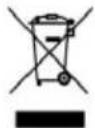
This symbol indicates that, according to the applicable regulations, the appliance and/or batteries must be disposed of separately from household waste. When this product reaches the end of its shelf life, you should dispose of the cells/batteries/accumulators and take them to a collection point designated by the local authorities.
For detailed information on how to properly dispose of electrical and electronic appliances and/or batteries, consumers should contact their local authorities.
Compliance with the above guidelines will help protecting the environment.
10. TECHNICAL SUPPORT AND WARRANTY
Cecotec shall be liable to the end user or consumer for any lack of conformity that exists at the time of delivery of the product under the terms, conditions and deadlines established by the applicable regulations.
Repairs should be carried out by qualified personnel.
If at any moment you detect any problem with your product or have any doubt, do not hesitate to contact the official Cecotec Technical Support Service at +34 96 321 07 28.
11. COPYRIGHT
The intellectual property rights over the texts in this manual belong to CECOTEC INNOVACIONES, S.L. All rights reserved. The contents of this publication may not, in whole or in part, be reproduced, stored in a retrieval system, transmitted, or distributed by any means (electronic, mechanical, photocopying, recording or similar) without the prior authorization of CECOTEC INNOVACIONES, S.L.
12. SIMPLIFIED DECLARATION OF CONFORMITY
CE Cecotec Innovaciones hereby declares that this appliance complies with the essential requirements and other relevant provisions of the regulations applicable in the European Union. This appliance has been designed, manufactured and tested to meet the required safety and quality standards. The full text of the EU Declaration of Conformity can be found on the following website:
https://cecotec.es/es/information/declaration-of-conformity
FRANÇAIS
1. PIÈCES ET COMPOSANTS
EU01\_100597 Bolero CoolMarket 1D BI-D 306 Grey E
Image 1
EU01\_100598 Bolero CoolMarket UF BI-D 222 Grey E
Image 2
EU01\_100597 Bolero CoolMarket 1D BI-D 306 Grey E
EU01\_100598 Bolero CoolMarket UF BI-D 222 Grey E
EU01\_100597 Bolero CoolMarket 1D BI-D 306 Grey E
EU01\_100598 Bolero CoolMarket UF BI-D 222 Grey E
EU01\_100597 Bolero CoolMarket 1D BI-D 306 Grey E
Bedienfeld. Abb. 7
EU01\_100598 Bolero CoolMarket UF BI-D 222 Grey E
Bedienfeld. Abb. 8
https://storececotec.de/de/information/declaration-of-conformity
1. PARTI E COMPONENTI
EU01\_100597 Bolero CoolMarket 1D BI-D 306 Grey E
EU01\_100598 Bolero CoolMarket UF BI-D 222 Grey E
B Modello EU01_100598 Bolero CoolMarket UF BI-D 222 Grey E
C Modello EU01_100597 Bolero CoolMarket 1D BI-D 306 Grey E
EU01\_100597 Bolero CoolMarket 1D BI-D 306 Grey E
EU01\_100598 Bolero CoolMarket UF BI-D 222 Grey E
https://storececotec.it/it/information/declaration-of-conformity
1. PEÇAS E COMPONENTES
EU01\_100597 Bolero CoolMarket 1D BI-D 306 Grey E
EU01\_100598 Bolero CoolMarket UF BI-D 222 Grey E
EU01\_100597 Bolero CoolMarket 1D BI-D 306 Grey E
Painel de controlo. Fig. 7
EU01\_100598 Bolero CoolMarket UF BI-D 222 Grey E
Painel de controlo. Fig. 8
EU01\_100597 Bolero CoolMarket 1D BI-D 306 Grey E
Legende figuur 1:
EU01\_100598 Bolero CoolMarket UF BI-D 222 Grey E
Legende figuur 2:
EU01\_100597 Bolero CoolMarket 1D BI-D 306 Grey E
Bedieningspaneel. Fig. 7
EU01\_100598 Bolero CoolMarket UF BI-D 222 Grey E
Bedieningspaneel. Fig. 8
7. PROBLEEMOPLOSSING
https://cecotec.es/es/information/declaration-of-conformity
1. CZĘŚCI I KOMPONENTY
EU01\_100597 Bolero CoolMarket 1D BI-D 306 Grey E
Legenda Rysunku 1:
EU01\_100598 Bolero CoolMarket UF BI-D 222 Grey E
Legenda rysunku 2:
EU01\_100597 Bolero CoolMarket 1D BI-D 306 Grey E
EU01\_100598 Bolero CoolMarket UF BI-D 222 Grey E
EU01\_100597 Bolero CoolMarket 1D BI-D 306 Grey E
EU01\_100598 Bolero CoolMarket UF BI-D 222 Grey E
EU01\_100597 Bolero CoolMarket 1D BI-D 306 Grey E
EU01\_100598 Bolero CoolMarket UF BI-D 222 Grey E
https://cecotec.es/es/information/declaration-of-conformity
EU01\_100598 Bolero CoolMarket UF BI-D 222 Grey E
EU01\_100598 Bolero CoolMarket UF BI-D 222 Grey E
Kontrol paneli Şema 8
EU01\_100597 Bolero CoolMarket 1D BI-D 306 Grey E
Υπόμνημα Εικόνας 1:
EU01\_100598 Bolero CoolMarket UF BI-D 222 Grey E
Υπόμνημα Εικόνας 2:
EU01\_100597 Bolero CoolMarket 1D BI-D 306 Grey E
EU01\_100598 Bolero CoolMarket UF BI-D 222 Grey E
EU01\_100597 Bolero CoolMarket 1D BI-D 306 Grey E
EU01\_100598 Bolero CoolMarket UF BI-D 222 Grey E
EU01\_100597 Bolero CoolMarket 1D BI-D 306 Grey E
Panell de control. Fig. 7
EU01\_100598 Bolero CoolMarket UF BI-D 222 Grey E
Panell de control. Fig. 8
https://cecotec.es/ca/information/declaration-of-conformity
MAGYAR
EU01\_100597 Bolero CoolMarket 1D BI-D 306 Grey E
EU01\_100598 Bolero CoolMarket UF BI-D 222 Grey E
EU01\_100597 Bolero CoolMarket 1D BI-D 306 Grey E
Vezérlőpult. Ábra 7
EU01\_100598 Bolero CoolMarket UF BI-D 222 Grey E
Vezérlöpult. Ábra 8
EU01\_100597 1D BI-D 306 E
1: للكشلا قروطسأ
EU01\_100597 1D BI-D 306 E
https://cecotec.es/es/information/declaration-of-conformity
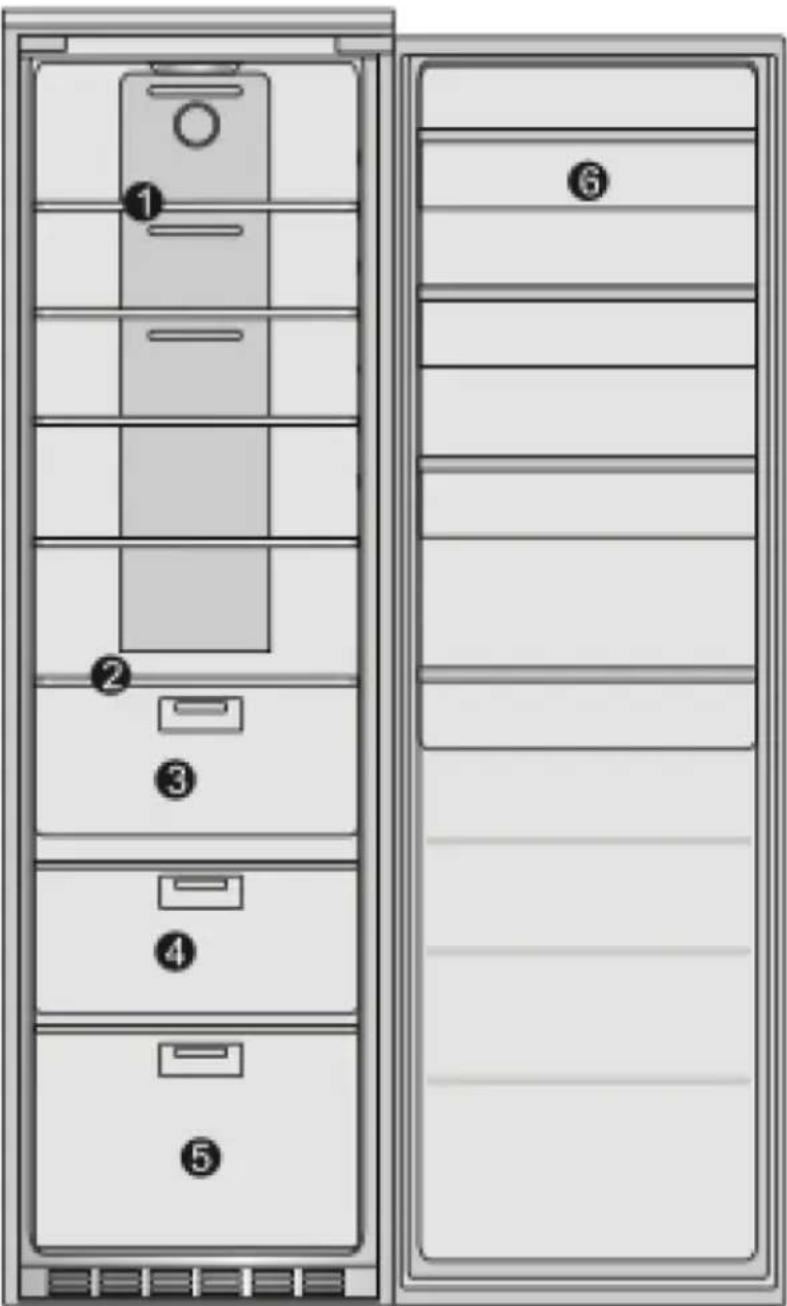
Fig./Img./Abb./Afb./Rys.1
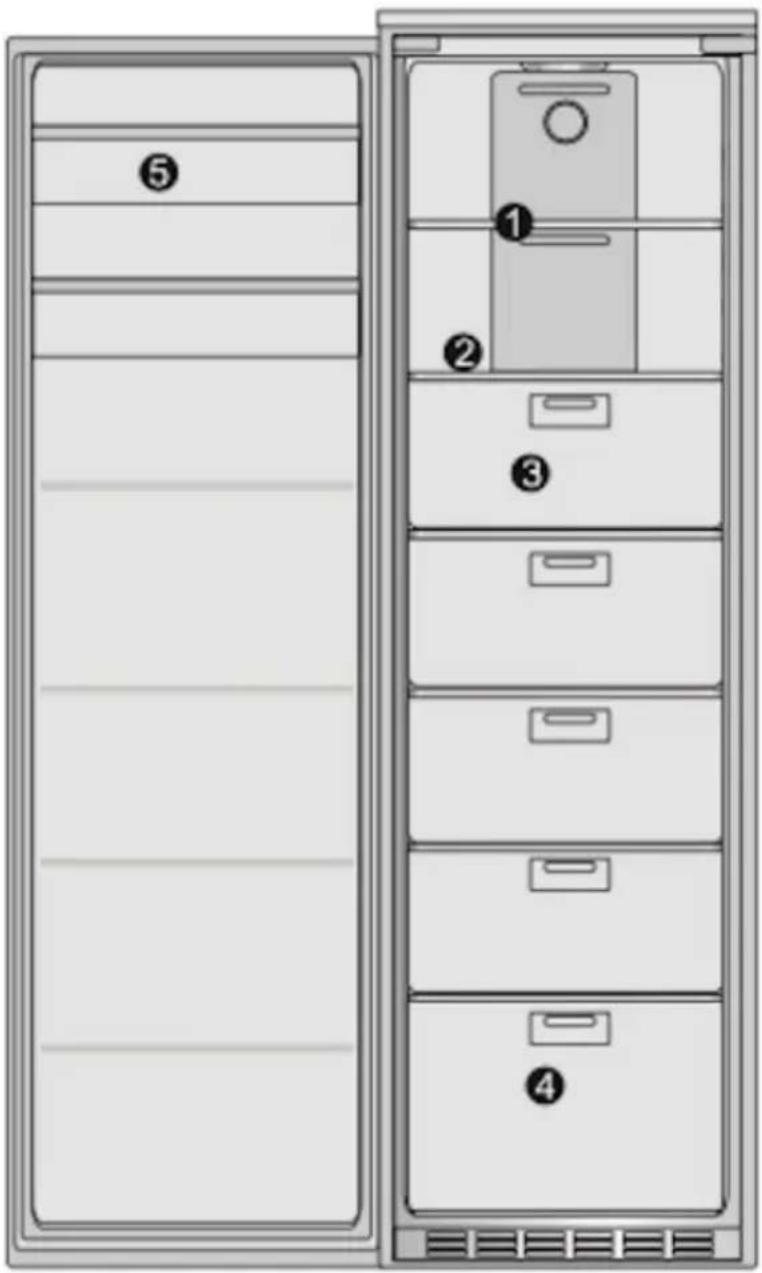
Fig./Img./Abb./Afb./Rys.2
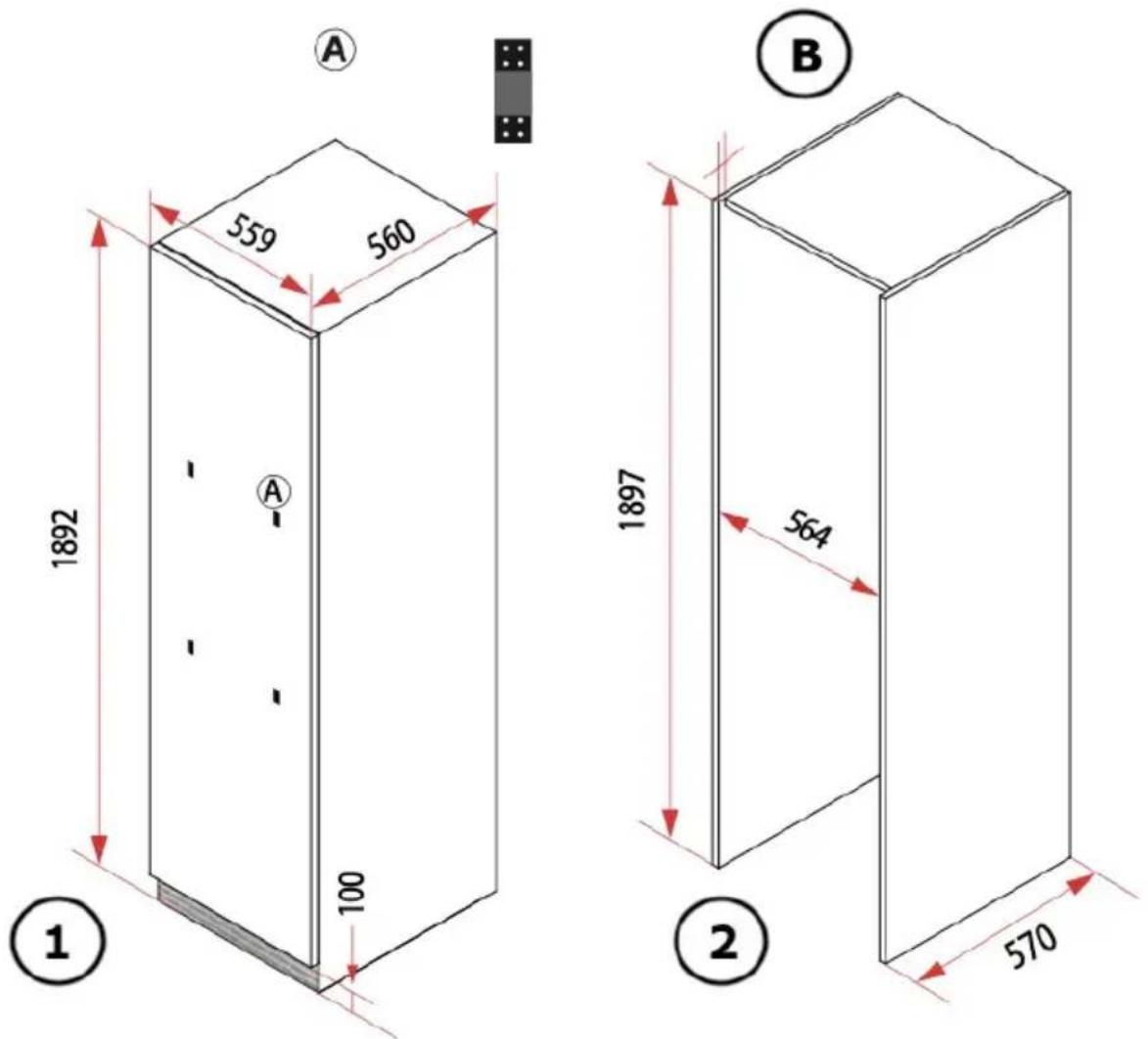
Fig./Img./Abb./Afb./Rys. 3
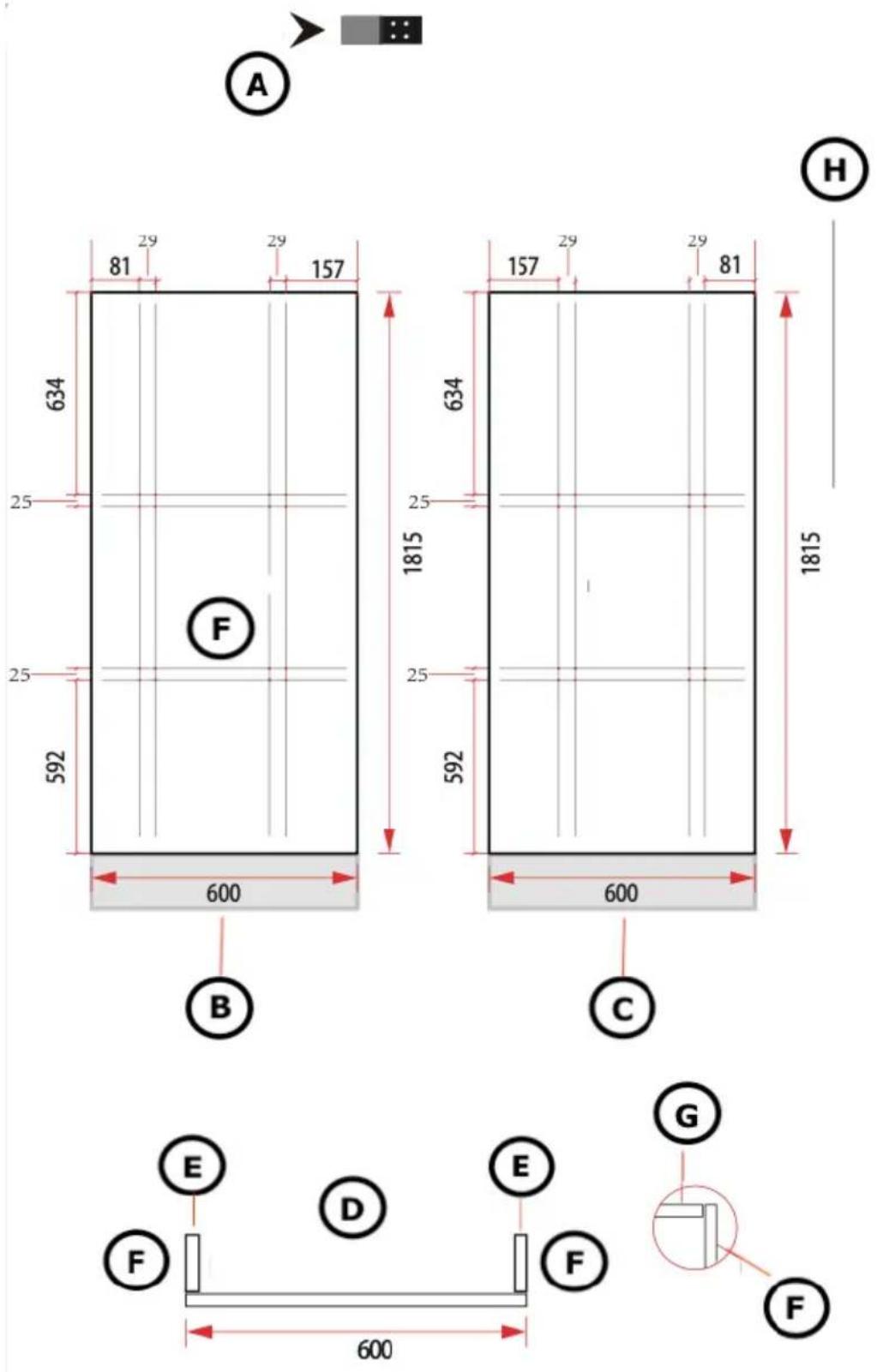
Fig./Img./Abb./Afb./Rys. 4
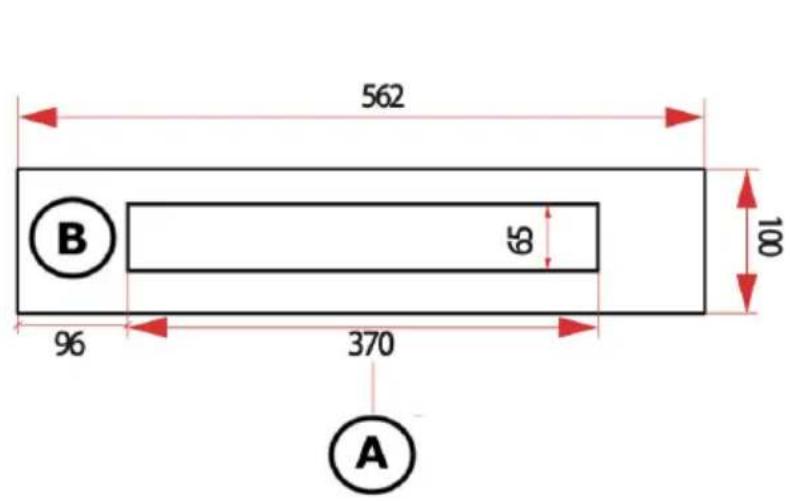
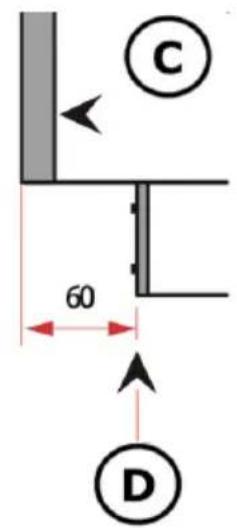
Fig./Img./Abb./Afb./Rys.5
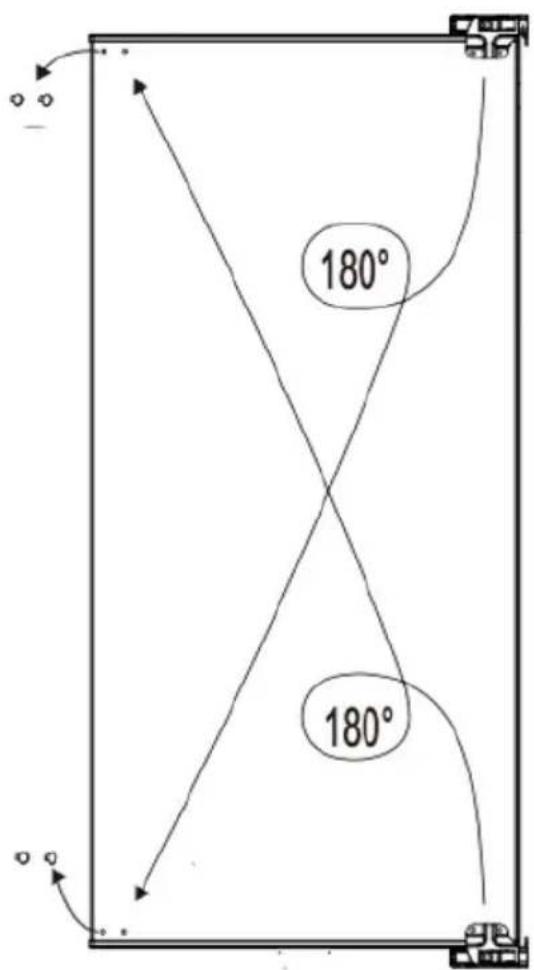
Fig./Img./Abb./Afb./Rys. 6

Fig./Img./Abb./Afb./Rys.7
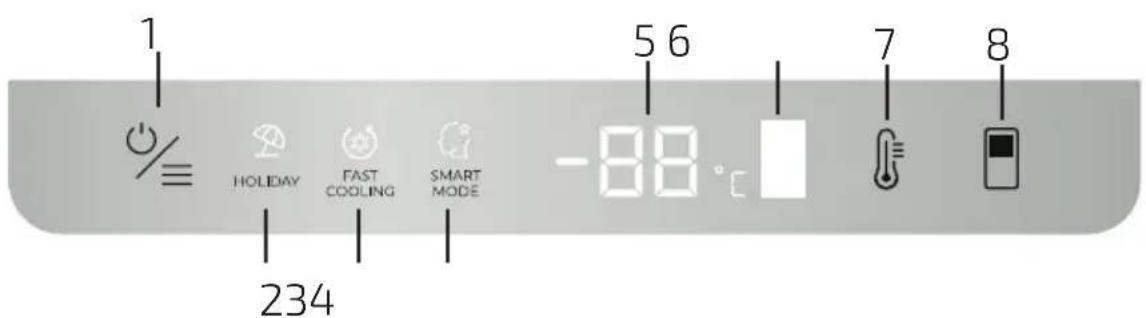
Fig./Img./Abb./Afb./Rys. 8
www.cecotec.es
- SOMMAIRE
- Temperature range
- Note:
- Refrigerant
- INSTRUCTIONS DE SÉCURITÉ
- EU01\_100597 Bolero CoolMarket 1D BI-D 306 Grey E
- EU01\_100598 Bolero CoolMarket UF BI-D 222 Grey E
- Panel de control. Fig. 7
- Panel de control. Fig. 8
- Fig. 1 key:
- Fig. 2 key:
- BEFORE USE
- ENGLISH
- Box content
- INSTALLATION
- Installation preparation
- Ventilation
- Installation instructions
- 1.- Power socket
- 2.- Pre-installation inspection
- 3.- Adjusting the refrigerator
- Changing the door opening direction (depending on the model)
- OPERATION
- Control panel. Fig. 7
- 1.- Switching on/off the refrigerator compartment
- 2.- Setting the temperature of the refrigerator compartment
- 3.- Setting the temperature of the variable temperature compartment
- 4.- Smart mode
- 5.- Fast Cooling mode
- 6.- Holiday mode
- 4.- Switching off the appliance
- Control panel. Fig. 8
- 1.- Setting the temperature of the freezer compartment
- 2.- Smart mode
- 4.- Holiday mode
- 5.- Switching off the appliance
- Defrost
- INSTRUCTIONS ON FOOD STORAGE
- Refrigerator compartment
- Freezer compartment
- Food storage
- CLEANING AND MAINTENANCE
- Replacing the light bulb (depending on the model)
- TROUBLESHOOTING
- Error codes
- High freezer temperature alarm (only on certain models)
- TECHNICAL SPECIFICATIONS
- DISPOSAL OF OLD ELECTRICAL AND ELECTRONIC APPLIANCES
- TECHNICAL SUPPORT AND WARRANTY
- COPYRIGHT
- SIMPLIFIED DECLARATION OF CONFORMITY
- FRANÇAIS
- PIÈCES ET COMPOSANTS
- Image 1
- Image 2
- Bedienfeld. Abb. 7
- Bedienfeld. Abb. 8
- PARTI E COMPONENTI
- PEÇAS E COMPONENTES
- Painel de controlo. Fig. 7
- Painel de controlo. Fig. 8
- Legende figuur 1:
- Legende figuur 2:
- Bedieningspaneel. Fig. 7
- Bedieningspaneel. Fig. 8
- PROBLEEMOPLOSSING
- CZĘŚCI I KOMPONENTY
- Legenda Rysunku 1:
- Legenda rysunku 2:
- Kontrol paneli Şema 8
- Υπόμνημα Εικόνας 1:
- Υπόμνημα Εικόνας 2:
- Panell de control. Fig. 7
- Panell de control. Fig. 8
- MAGYAR
- Vezérlőpult. Ábra 7
- Vezérlöpult. Ábra 8
- EU01\_100597 1D BI-D 306 E
Brand : CECOTEC
Model : Bolero CoolMarket UF BI-D 222
Category : Freezer