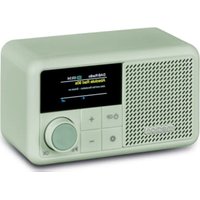
S66822 (MD 44822) - Hi-fi system MEDION - Free user manual and instructions
Find the device manual for free S66822 (MD 44822) MEDION in PDF.


| Brand | MEDION |
| Model | S66822 (MD 44822) |
| Product type | Portable hi-fi system |
| Dimensions (W x H x D) | 130 x 75 x 91 mm |
| Weight | 423 g |
| Power supply | Built-in rechargeable battery via USB-C (DC IN 5V 1A) |
| Standby power consumption | < 1 W |
| Output power | 1 x 2 W RMS |
| Protection rating | IPX1 (protection against vertically falling water droplets) |
| Radio | DAB+ (Band III) and FM (87.5-108 MHz) |
| Number of radio presets | 40 DAB + 40 FM |
| Bluetooth | Version 5.3, A2DP and AVRCP profiles, range up to 10 m |
| AUX input | 3.5 mm jack socket |
| Sleep timer | Yes, adjustable duration |
| Alarm | 2 independent alarms with snooze |
| Equalizer | Preset sound profiles |
| Display | Screen with date and time, adjustable backlight |
| Cleaning | Soft dry cloth; avoid solvents and chemicals |
| Storage | Cool and dry place; recharge battery every 2 months if unused |
| Safety | Do not open the housing; avoid moisture, extreme temperatures, and open flames |
| Spare parts and repairability | Use only authorized spare parts and accessories; contact customer service |
| General information | Multilingual manual available; MEDION after-sales service |
Frequently Asked Questions - S66822 (MD 44822) MEDION
User questions about S66822 (MD 44822) MEDION
0 question about this device. Answer the ones you know or ask your own.
Ask a new question about this device
Download the instructions for your Hi-fi system in PDF format for free! Find your manual S66822 (MD 44822) - MEDION and take your electronic device back in hand. On this page are published all the documents necessary for the use of your device. S66822 (MD 44822) by MEDION.
USER MANUAL S66822 (MD 44822) MEDION
DAB+/FM Radio
Radio DAB+/FM
DAB+/FM-radio
Radio DAB+/FM
Radio DAB+/FM
DAB+/FM radio
MEDION S66822 (MD 44822)
Inhaltsverzeichnis
DE
- Information about this user manual ....101
1.1. Explanation of symbols ...... 101 FR - Proper use ....101
- General safety instructions .... 102 NL
- Package contents 103
- Device overview ...... E304
- Setting up the device 106
6.1. Battery operation/charging the device 106 IT
6.2. Adjusting the antenna .....106 - Getting started
7.1. Switch the device on/off....106
7.2. Setting the menu language....107 - Sound 107
8.1. Loudness....107
8.2. Equaliser 107 - DAB+/FM radio 107
9.1. Tuning the stations....107
9.2. Storing and selecting stations 107 - Bluetooth® mode 108
10.1. Connecting Bluetooth devices ....108
10.2. Control....108 - Playback on the AUX jack 108
- Sleep timer and alarm 109
12.1. Sleep timer....109
12.2. Alarm....109 - Settings in the menu .... 110
- Cleaning....111
- Storing the device when not in use....111
- Troubleshooting .... 111
- Disposal 112
- EU declaration of conformity.... 112
- Trademark information 112
- Technical specifications....113
- Service information....114
- Legal Notice 115
1. Information about this user manual

Thank you for choosing our product. We hope you enjoy using this device.
Please read the safety instructions and the user manual carefully before using the device for the first time. Note the warnings on the device and in the user manual.
Always keep the user manual close to hand. If you sell the device or give it away, please ensure that you also pass on this user manual. It is an essential component of the product.
1.1. Explanation of symbols
If a block of text is marked with one of the warning symbols listed below, the hazard described in that text must be avoided to prevent the potential consequences described there from occurring.

DANGER!
Warning: risk of fatal injury!

WARNING!
Warning: risk of possible fatal injury and/or serious irreversible injuries!

CAUTION!
Warning: risk of possible minor and/or moderate injuries!

NOTICE!
Follow these instructions to prevent damage to the device!

More detailed information about using the device!
WARNING!
Warning: risk of electric shock!
WARNING!
Warning: danger due to loud volume!
IP X7 Protection class specification
- Protection against dripping water that falls vertically (dripping water)
2. Proper use
Your device is intended for music and sound playback from DAB+/FM radio programmes via Bluetooth® and connected external devices.
Please note that we shall not be liable in cases of improper use.
Any other use is considered improper and can cause personal injury or property damage.
3. General safety instructions
■ This device is not intended for use by people (including children) with reduced physical, sensory or mental abilities or by those without experience and/or knowledge, unless they are supervised by a person responsible for their safety or they have been instructed in its use by that person.
■ Children must be supervised to ensure they do not play with this device.
- Keep the device and its accessories out of the reach of children.
■ Cleaning and user maintenance on the device must not be carried out by children.
■ Before using the device for the first time, check the device for damage. A defective or damaged radio may not be used.
■ Do not place containers filled with liquid, e.g. vases, on or near the device, and protect all the parts from dripping or sprayed water.
Such containers may tip over and the liquid may impair the electrical safety of the device.
■ Never open the device housing and do not push objects inside the device through the slots and openings.
■ Do not use the device outdoors.
■ Do not expose the device to extreme conditions. Avoid:
– high humidity or wet conditions
- extremely high or low temperatures
- direct sunlight
- naked flames.
■ Do not use the device in potentially explosive atmospheres. This includes petrol stations, fuel storage areas and areas where solvents are processed, for example. This device must also not be used in areas with particle-laden air (for example flour or wood dust).
■ Do not modify the device without our prior consent.
■ Only use replacement parts or accessories that we have supplied or approved.
■ Check the device and the connection cable for damage before using the device for the first time, and after each use.
■ Do not use the device if the device shows visible signs of damage.
4. Package contents

DANGER!
Risk of choking and suffocation!
There is a risk of choking and suffocation due to swallowing or inhaling small parts or plastic wrap.
- Keep the plastic packaging out of the reach of children.
■ The packaging material is not a toy!
▶ Check the package contents to ensure that all items are included and in perfect condition. If anything is missing or damaged, please contact us within 14 days of purchase.
The following items are supplied with your product:
- DAB+ radio
- USB-C charging cable
- Documentation
5. Device overview
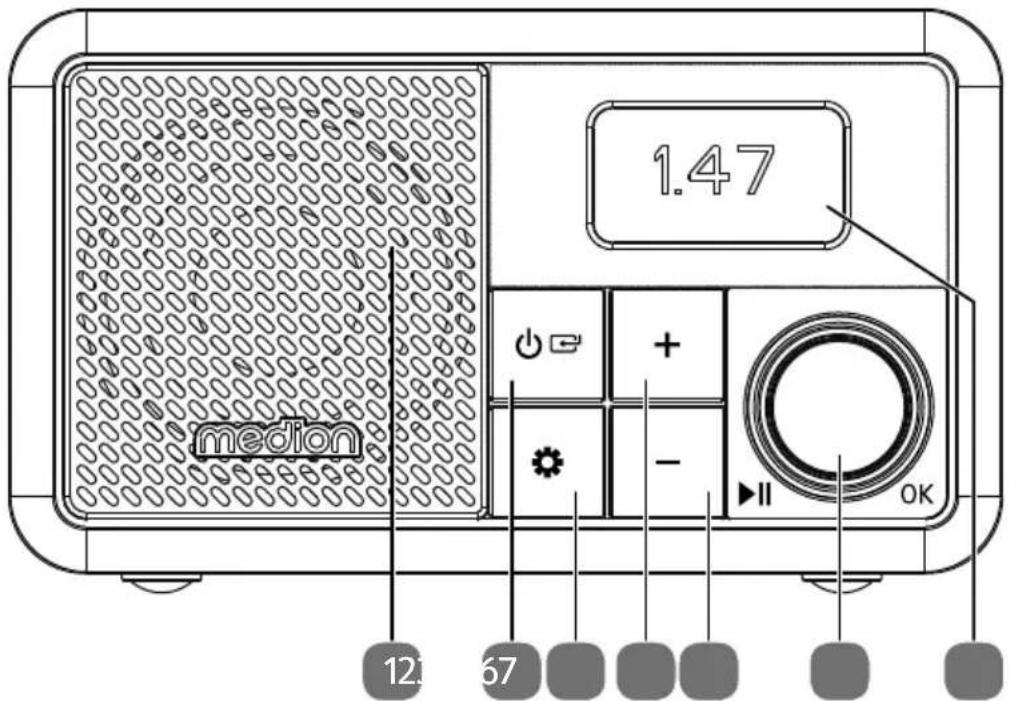
Fig. 1 - FRONT VIEW
- Speaker
- ⏻ - Switch on the device, switch to standby mode;
← - Select operating mode
-
⚙ – Open/close menu; return to the menu
-
-
- Station list upwards; menu upwards; play next track
-
-
-
- Station list downwards; menu downwards; play previous track
-
- ▶ II – Start/pause playback;
In menus: Confirm selection;
Turn: Adjust volume; in menus: up/down
- Backlight
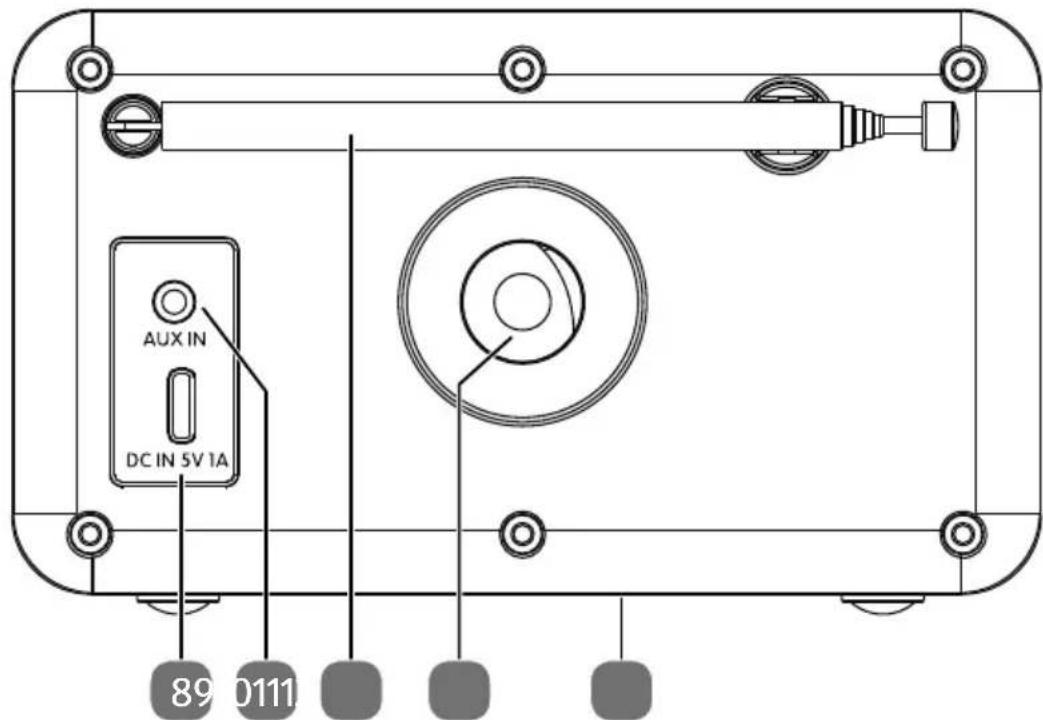
Fig. 2 - BACK VIEW
- DC IN 5V1A – Connection for USB-C charging cable
- AUX IN – Connection for external device
- Telescopic antenna
- Opening for subwoofer
- Type plate (on the underside)
6. Sett ing up the device

NOTICE!
Risk of damage!
Major changes in temperature or fluctuations in humidity can cause moisture to build up within the device due to condensation – this can cause an electrical short circuit.
■ After transporting the device, wait until it has reached ambient temperature before switching it on.
■ When setting up the device:
- Leave a sufficient gap in relation to other objects, and check that the ventilation slots are not covered in order to ensure that there is always sufficient ventilation;
- Do not place the device close to magnetic fields (e.g. television sets or other loudspeakers).
▶ Operate the device on a stable, level and vibration-free surface to prevent the device from falling.
6.1. Batt ery operation/charging the device

WARNING!
Risk of explosion!
Rechargeable batteries may contain combustible materials. If handled incorrectly, rechargeable batteries can leak, become very hot, ignite or even explode, which could damage your device and/or your health.
■ Charge the battery only with the originalthe factory. accessory (USB charging cable).
■ Recharge flat batteries immediately to prevent damage.
■ Do not expose the device to direct sunlight, heat or fire.
■ The rechargeable battery is an integral component of the device, which means users cannot replace it themselves.
The device is fitted with an integrated rechargeable battery. If no charging cable is connected, the device is powered by the integrated rechargeable battery.
▶ To charge the battery, connect a USB-C charging cable to the DC IN 5V1A port.
The charge process is shown on the display.

If you do not need to use the device for a long period of time, take it out of operation. To do this, unplug the USB-C charging cable.
6.2. Adjusting the antenna
▶ Fully extend the telescopic antenna on the back of the device.

The telescopic antenna should be fully extended to ensure good signal reception and good sound quality. When adjusting the telescopic antenna, the stations may have to be searched again (see "9.1. Tuning the stations" on page 107).
7. Getting started
When using the device for the first time, the radio starts in DAB mode with a station search. The date and time are set automatically. The display language is set to German at
7.1. Switch the device on/off
▶ Press and hold the button to switch on the device.
▶ To switch the device to standby mode, press and hold the ⏻ button.
The display shows the time and, if applicable, the set alarm times.
7.2. Sett ing the menu language
The device is switched on.
▶ Press the button to open the menu.
▶ Only in the radio operating modes: Use the controller to select the System settings menu and press the OK controller.
▶ Use the controller to select Language and press the OK controller.
Now use the controller to select the desired language and press the OK controller.
▶ To exit the menu again, press the button.
8. Sound
8.1. Loudness
▶ Turn the controller to adjust the volume (louder to the right, quieter to the left).
8.2. Equaliser
The sound can be changed with two predefined sound patterns.
▶ Press the button to open the menu.
▶ Only in the radio operating modes: Use the controller to select the System settings menu and press the OK controller.
▶ Use the controller to select Equaliser and press the OK controller
Now use the controller to select the required sound pattern and press the OK controller.
▶ To exit the menu again, press the button.
9. DAB+/FM radio
This device can receive both DAB and FM radio stations. Select the required radio mode:
▶ Press the button several times until the required radio operating mode DAB Radio or FM Radio is shown on the display.
9.1. Tuning the stations
DAB radio
▶ Press the - or + button to open the station list.
▶ Press the - or + button several times to select the required station.
▶ Press the OK controller to play the station.
The radio station name is shown on the display.
FM radio
▶ Press the - or +button to set the radio frequency manually.
or
▶ Press the OK controller to start the station search.
The search stops at the next station found.
9.2. Storing and selecting stations
Stations are stored separately in the memory lists for DAB and FM radio.
9.2.1. Storing stations
▶ Tune the radio station.
▶ Press the button to open the menu.
▶ Use the controller to select Preset save and press the OK controller.
▶ Use the controller to select the memory slot.
▶ Press the OKcontroller to save the station.
9.2.2. Automatic station search with storage (FM only)
▶ Press and hold the OK controller until the search starts.
All stations found are stored in the memory slots one after the other.

Station lists that have already been saved are overwritten when this function is carried out.
9.2.3. Retrieving stored stations
▶ Press the button to open the menu.
▶ Use the controller to select Preset recall and press the controller OK.
Now use the controller to select the memory slot.
▶ Press the OK controller to play the station.
10. Bluetooth® mode
You can use Bluetooth to wirelessly play tracks from external devices (e.g. mobile phones with Bluetooth) on this device.
▶ Press the button several times until Bluetooth is shown on the display.
The DAB radio is in pairing mode when Pairing is shown on the display.
10.1. Connecting Bluetooth devices
▶ Enable the Bluetooth function on your external device and then pair the devices. Refer to the user manual for your device for more information. The name of the DAB radio is "MD 44822".
Pairing is complete when a confirmation tone sounds and Connected is shown on the display. If you want to end the Bluetooth transmission,
press and hold the OK controller on the DAB radio until a confirmation tone sounds and Pairing is shown on the display.
or
- disconnect the connection on the external device.
10.2. Control
You can control how tracks are played and the volume on your external device and on the DAB radio.
The following options are available:
▶ Adjust the volume by turning the controller.
▶ Press the II controller to start or pause playback.
▶ Press the - button once to skip to the previous track.
▶ Press the + button to skip to the next track.

What functions are available is dependent on your external device and the software in use. Some functions may be displayed on the external device's display.
11. Playback on the AUX jack
There is a 3.5 mm jack labelled AUX IN on the back of the device. Playback is controlled via the external device.
▶ Plug the connection cable with a 3.5 mm jack plug (not included in the scope of delivery) into the connection.
▶ Press the button on the device several times until AUX is shown on the display. The display shows AUX in.
▶ Adjust the volume by turning the controller. Playback is controlled exclusively via the external device.
12. Sleep timer and alarm
12.1. Sleep timer
If you select the sleep timer function, the device switches off automatically after a defined period of time.
▶ Press the button to open the menu.
▶ Only in the radio operating modes: Use the controller to select the System Settings menu and press the OK controller.
▶ Use the controller to select the Sleep and press the OK controller.
▶ Use the controller to select the duration of the sleep timer and press the OK controller.
The device switches off after the preset time.
▶ To exit the menu again, press the button.
▶ To switch off the sleep timer prematurely, open the menu again as described above and select the duration Off.
12.2. Alarm
The device has two alarm times that can be set independently of each other.
▶ Press the button to open the menu.
▶ Only in the radio operating modes: Use the controller to select the System Settings menu and press the OK controller.
▶ Use the controller to select Alarm and press the OK controller
Now use the controller to select the required alarm 1 or 2 and press the OK controller.
Set the alarm in the following submenu:
▶ Turn the control knob to navigate through the menus. Confirm the items with OK. 🔗 takes you back to the previous menu.
- Alarm: Switching the alarm clock on or off
– Frequency: Select the frequency of the alarm - Wake Up Time: Setting the alarm time
- Source: Setting the type of alarm clock
– Duration: Set how long the alarm clock should sound
- Volume: Set the volume of the alarm clock.
When you have configured all the settings, press the ⚙ button several times to exit the menu.

The alarm symbol and the number of the activated alarm 1 and/or 2 appear on the display.
12.2.1. Ending alarm tone
When the alarm sounds, press
the OK controller to start the snooze function. The alarm then sounds again after 10 minutes. The remaining time is shown on the display. You can repeat the alarm by pressing the OK controller again.
or
▶ Press the button to end the alarm and activate it for the following day.
13. Sett ings in the menu
If you want to configure settings for the radio operating modes, first select the operating mode DAB RADIO or FM RADIO mode. Different settings can be configured depending on the selected operating mode.
▶ Press the button to open the menu.
▶ Use the controller to select the menu and press the OK controller.
▶ Briefly press the button again to return to the previous menu.
| Menu name Description | ||
| Station List (DAB operating mode only) | ||
| Display station list | ||
| Station Search | ||
| Automatic station search | ||
| Preset Recall | ||
| Play stored station | ||
| Preset Save | ||
| Storing stations | ||
| Manual Tune (DAB operating mode only) | ||
| Set frequency manually | ||
| Prude Invalid (DAB mode only) | ||
| Yes | Delete all DAB stations that cannot be received in the current region. | |
| No | ||
| DRC (DAB operating mode only) | ||
| High | Dynamic Range Control (DRC): compression selection; default setting: off | |
| Low | ||
| Off | ||
| Scan Setting (FM operating mode only) | ||
| Strong Stations Only | Select whether to search for all (even weak) or only strong stations. | |
| All Stations | ||
| System Settings | ||
| Equaliser | Select sound profile, see “8.2. Equaliser” on page 107. | |
| Brightness Timeout | On Level | Set the time until the display dims when no operation is performed. |
| Set the desired maximum display lighting intensity. | ||
| Dim Level | Set the desired display lighting intensity for the dimming. | |
| Sleep | Setting the sleep timer, see “12.1. Sleep timer” on page 109 | |
| Alarm | Setting the alarm clock, see “12.2. Alarm” on page 109 | |
| Time/Date Set Time | Time/Date | Manually set the time and date |
| Auto Update | Choose whether the date and time are set automatically via the DAB or FM signal. Automatic adjustment takes place daily between 4 and 5 AM. | |
| Set 12/24 Hour | Set the 12-hour or 24-hour time format. | |
| Set Date Format | Set the date format. | |
| Language | Set language, see “7.2. Setting the menu language” on page 107. | |
| Factory Reset | Reset to factory settings | |
| Software Version | Display of software version | |
14. Cleaning
Only use a dry, soft cloth to clean the device. Do not use chemical solutions or cleaning products because these may damage the device's surface and/or markings.
15. Storing the device when not in use
If you do not intend to use the device over a longer period of time, store it in a cool, dry place and make sure that it is protected from dust and extreme temperature fluctuations.
Charge the battery approx. every 2 months if it is not used for a long period to avoid deep discharge.
16. Troubleshooting
If a fault occurs, first see whether you can resolve the problem yourself. You might find this overview useful.
| Fault Possible cause Corrective action | ||
| No sound The current volume is set too low. | Increase the volume. | |
| When the device is connected via AUX or Bluetooth: The volume of the external device is too low. | ||
| No or poor radio reception | The station signals are too weak. | Adjust the frequency of the stations. Move the radio to a different location or change the direction of the aerial to improve the reception, if necessary. |
| No function The battery is discharged. Connect the | USB-C charging cable and charge the battery. Check the charging progress in the display. | |
17. Disposal

PACKAGING
The product has been packaged to protect it from damage in transit. The packaging is made of materials that can be recycled in an environmentally friendly manner.
DEVICE
The device is equipped with one integrated rechargeable battery. At the end of its service life, do not dispose of the device with normal household rubbish. Instead, contact your local authority to find out how to dispose o
18. EU declaration of conformity
MEDION AG hereby declares that the radio equipment type MD 44822 complies with the Directive 2014/53/EU [(RE Directive), as well as the Directive 2009/125/EC (ecodesign Directive) and the Directive 2011/65/EU (RoHS Directive)]. The complete EU declaration of conformity is available at: www.medion.com/conformity.
19. Trademark information
The Bluetooth ® word mark and logos are registered trademarks of Bluetooth SIG, Inc. and are used by the manufacturer under licence.
The USB ™ word mark and logos are registered trademarks of the USB Implementers Forum, Inc. and are used by the manufacturer under licence.
Other trademarks are the property of their respective owners.
20. Technical specifications
| Device | |
| Power consumption in standby mode < 1 W | |
| Output power 1x 2 watt RMS | |
| IP PROTECTION CLASS IPX1 | |
| Radio | |
| FM band 87.5–108 MHz | |
| DAB band III 174.928–239.200 MHz | |
| RDS Yes | |
| Station memory 40 (DAB), 40 (FM) | |
| Bluetooth | |
| Version 5.3 | |
| Profile A2DP, AVRCP | |
| Range | Up to 10 metres (without obstacles) |
| Frequency range | 2402–2480 MHz |
| Maximum transmission power | < 10 dBm |
| Connections for external functions | |
| FM antenna | Telescopic antenna |
| AUX | 3.5 mm jack |
| USB output voltage | 5 V——max. 1 A |
| Environmental conditions | |
| Temperatures | In operation: 5 °C to +35 °C |
| Not in operation: 5 °C to +35 °C | |
| Humidity | In operation: < 80% |
| Not in operation: < 80% | |
| Dimensions/weight | |
| Dimensions (W × H × D) Approx. 130 × 75 × 91 | mm |
| Weight Approx. 423 g | |
CE
21. Service information
Please contact our Customer Service team if your device ever stops working the way you want or expect it to. There are several ways for you to contact us:
- In our Service-Community, you can meet other users, as well as our staff, and you can exchange your experiences and pass on your knowledge there.
You will find our Service-Community at community.medion.com.
• Alternatively, use our contact form at www.medion.com/contact. - You can also contact our Service team via our hotline or by post.
| Opening times Hotline number UK | |
| Mon – Fri: 08.00 – 20.00Sat – Sun: 10.00 – 16.00 | 0333 3213106 |
| Service address | |
| MEDION Electronics Ltd.120 Faraday Park, Faraday Road, DorcanSwindon SN3 5JF, WiltshireUnited Kingdom | |
You can download this and many other sets of operating instructions from our service portal at www.medionservice.com.
We have stopped providing printed copies of our warranty terms and conditions as part of our commitment to sustainability, but you can access the warranty terms and conditions on our service portal.
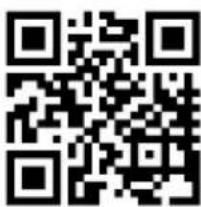
You can also scan the QR code on the side of the screen, to download the operating instructions onto your mobile device from the service portal.
22. Legal Notice
Copyright 2024
Date: 06. September 2024
All rights reserved.
These operating instructions are protected by copyright.
Mechanical, electronic and any other forms of reproduction are prohibited without the written permission of the manufacturer.
Copyright is owned by the company:
MEDION AG
Am Zehnthof 77
45307 Essen
Germany
Please note that you cannot use the address above for returns. Please always contact our Customer Service team first.
DE
FR
NL
ES
IT
EN
- Inhaltsverzeichnis
- Information about this user manual
- Explanation of symbols
- DANGER!
- WARNING!
- CAUTION!
- NOTICE!
- IP X7 Protection class specification
- Proper use
- General safety instructions
- Package contents
- Risk of choking and suffocation!
- Device overview
- Sett ing up the device
- Risk of damage!
- Batt ery operation/charging the device
- Risk of explosion!
- Adjusting the antenna
- Getting started
- Switch the device on/off
- Sett ing the menu language
- Sound
- Loudness
- Equaliser
- DAB+/FM radio
- Tuning the stations
- DAB radio
- FM radio
- Storing and selecting stations
- Storing stations
- Automatic station search with storage (FM only)
- Retrieving stored stations
- Bluetooth® mode
- Connecting Bluetooth devices
- Control
- Playback on the AUX jack
- Sleep timer and alarm
- Sleep timer
- Alarm
- Ending alarm tone
- Sett ings in the menu
- Cleaning
- Storing the device when not in use
- Troubleshooting
- Disposal
- PACKAGING
- DEVICE
- EU declaration of conformity
- Trademark information
- Technical specifications
- CE
- Service information
- Legal Notice
Brand : MEDION
Model : S66822 (MD 44822)
Category : Hi-fi system