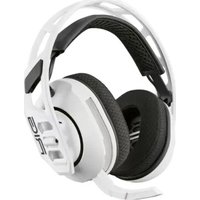
RIG 600 MAX HS - Headphones Nacon - Free user manual and instructions
Find the device manual for free RIG 600 MAX HS Nacon in PDF.


| Product type | Wireless audio headset |
| Brand | NACON |
| Model | RIG 600 MAX HS |
| Dimensions (approx.) | 200 x 180 x 80 mm |
| Weight (approx.) | 250 g |
| Connection type | Wireless (USB-C 2.4 GHz dongle + Bluetooth) |
| Frequency band | 2,402 – 2,480 GHz |
| EIRP Power | < 13 dBm |
| Power supply | Rechargeable lithium-ion battery |
| Charging | USB-C, charging time approx. 2 hours |
| Battery life | Up to 24 hours |
| Operating modes | Gaming (USB-C dongle), Duo (dongle + Bluetooth), Bluetooth only |
| Mute function | Flip-to-mute (raising microphone cuts sound) |
| Volume control | Built-in volume wheel |
| Multifunction button | Play/pause, calls, voice assistant |
| Headband size | 3 sizes: S, M, L (adjustable) |
| Companion app | RIG 600 MAX (Android/iOS) – audio customization |
| Compatibility | PS5, PC, Bluetooth devices |
| Protection rating | Not specified |
| Package contents | Headset, USB-C dongle, USB-C charging cable, documentation |
| Warranty | 1 year (outside EU) / 2 years (EU and UK) |
| Care and cleaning | Wipe with a soft, dry cloth. Do not use liquids. |
| Spare parts and repairability | Battery not user-replaceable. Contact NACON support. |
| Safety | Built-in hearing protection, battery compliant with standards |
| General information | Manufactured by NACON, distributed under license from Sony Interactive Entertainment |
Frequently Asked Questions - RIG 600 MAX HS Nacon
User questions about RIG 600 MAX HS Nacon
0 question about this device. Answer the ones you know or ask your own.
Ask a new question about this device
Download the instructions for your Headphones in PDF format for free! Find your manual RIG 600 MAX HS - Nacon and take your electronic device back in hand. On this page are published all the documents necessary for the use of your device. RIG 600 MAX HS by Nacon.
USER MANUAL RIG 600 MAX HS Nacon
Set up and basics for PS5® console 4
Set up for PC 4
Charging your headset 5
Power on or off 6
Adjust volume 6
Mute 6
The different modes 6
Game mode 6
- Dual mode 6
- Bluetooth mode 6
How to switch modes 6
How to pair your headset 7
- USB-C dongle 7
- Bluetooth 8
Multi-function button 8
How to customize your experience 8
Safety 9
Support 10
1 Fit
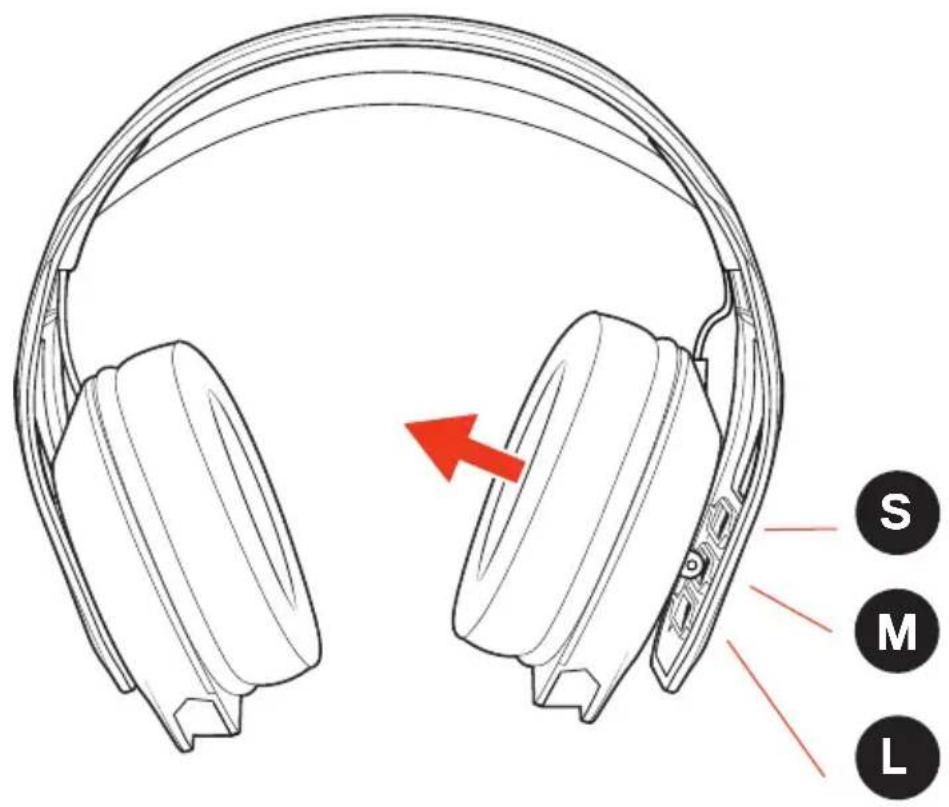
Snap the left and right earcups into the headband to configure the best fit and sound.
The headband adjusts to three sizes (small, medium, large) by moving the earcups.
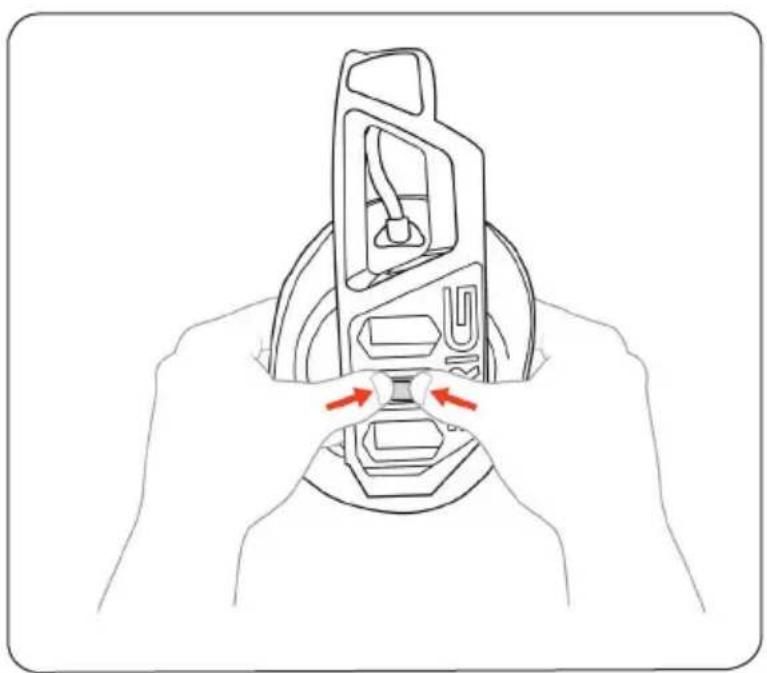
To remove an earcup, press the earcup post to detach it from the headband.
I Set up and basics
Set up for your PS5® console
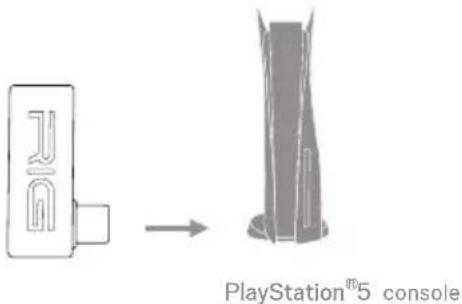
Connect your dongle to the USB-C port of your PS5 console.
Setup for PC
- Connect your dongle to the USB-C port of your PC or laptop.
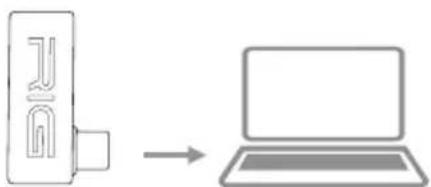
Attention: If you do not have a USB-C port on your PC, you will need to use a USB-C to USB Adaptor.
Charging your Headset
Only use the cable provided with the headset and charge the headset directly from your PS5® console or PC.
It takes around 2 hours to fully charge the headset.
Note the following battery power indications:
Red LED - low battery and is charging
Yellow LED - medium battery and is charging
Green LED - high battery and is charging
LED Off - the battery is fully charged

Power on or off
Press and hold the on/off button for 3 s.
I Adjust volume
Increase or decrease the volume using the volume dial. When maximum volume is reached, you will hear a prompt tone indicator.
Mute
The microphone is a flip to "mute":
If the microphone arm is down, it is active.
- If the microphone arm is up, it is muted.
The different wireless modes
Your headset has 3 different modes of communication:
Game mode
This mode only communicates with the USB-C dongle.
Bluetooth connection is disabled so you will not be disturbed while gaming.
- Dual mode:
This mode has a dual connection with the USB-C dongle and the Bluetooth device at the same time.
Note that if you receive a call, the audio from the USB-C dongle will stop and you will hear the incoming call.
- Bluetooth mode:
This mode only communicates with your Bluetooth device.
How to switch modes?
To switch from one mode to another, press the mode button once. After three single presses, the headset mode will return to the first mode.
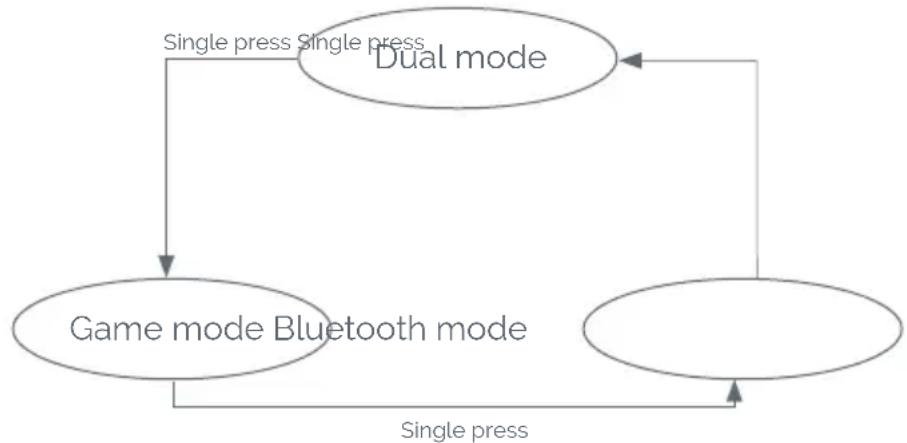
To skip the next mode, double press the mode button.
How to pair your headset?
- USB-C dongle:
If you need to do a new pairing for any reason, make sure:
- The USB-C dongle is connected to your console or PC.
- Turn off the headset.
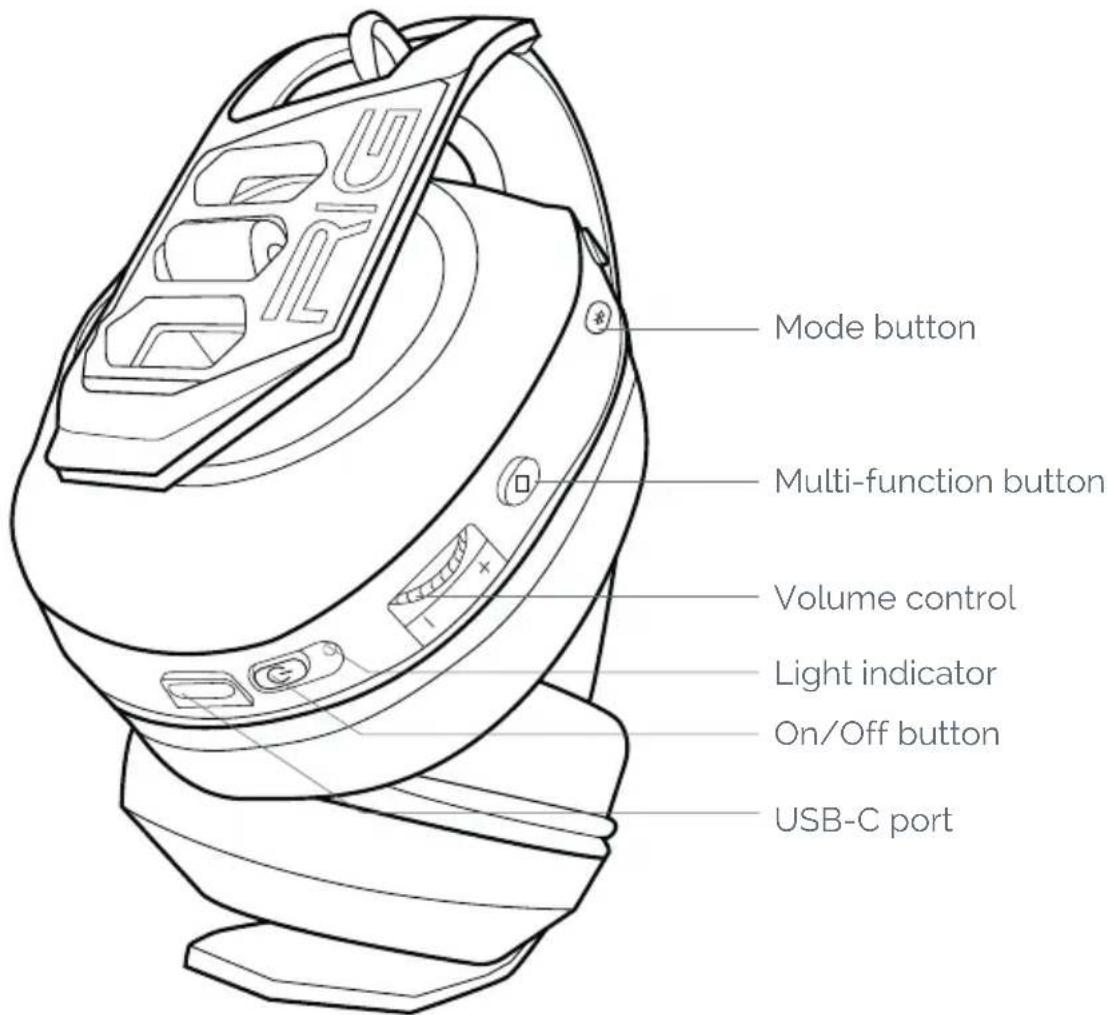
Press and hold the On/Off button for more than 6 s to hear the prompt voice say "Pairing USB". The headset LED will flash purple during the pairing process.
When pairing is successful, you will hear the prompt voice say:
- "Connected" in Game mode.
- "USB connected" in Dual mode.
When pairing is unsuccessful, you will hear the prompt voice say: "USB pairing failed".
In this case, repeat the pairing process, making sure the conditions above are met.
EN/
- Bluetooth:
To pair your headset with a Bluetooth device, make sure to:
- Press and hold the Mode button for more than 6 s, until you hear the prompt voice say: "Pairing Bluetooth". The headset's LED will flash blue during the pairing process.
- Open the Settings menu on your mobile device and go to the Bluetooth setting. Then, turn on the Bluetooth connection. Look for RIG 600 MAX in the list of devices and connect to it.
If pairing is successful, you will see the message on your device but you will also hear a prompt voice say through the headset:
- "Bluetooth connected" in Dual mode,
- "Connected" in Bluetooth mode.
When pairing is unsuccessful, you will hear the prompt voice say: "Bluetooth pairing failed".
In this case, turn off your device's Bluetooth connection and power off the headset. Then, repeat the pairing process, making sure the above conditions are met.
WARNING: When in Dual mode, your headset is connected to both a USB-C dongle and a Bluetooth device. However, one communication will take priority over the other.
If you answer an incoming call, for instance, the communication with the USB-C dongle will stop and the incoming call will be heard.
When the call is complete, the headset will automatically switch back to the USB-C dongle.
Multi-function button
With a single press of this button, you can:
- Play/Pause your music when your communication is activated.
- Answer an incoming call when your communication is activated.
Your headset remembers the last connected Bluetooth device, so you won't need to set it up again, even if you switch modes or power on/off your headset.
With a short press (3 s) of this button, you can:
- Activate your mobile device's voice assistant, when connected to Bluetooth.
- Reject a call.
How to customize your experience?
If you want to go deeper into your headset customization, please download the Companion APP RIG 600 MAX from Google Play (for Android devices) and App Store (for iOS devices).
The app will enable you to:
-
Customize up to 3 audio profiles quickly using the Classic mode, or more precisely through the Expert mode:
-
Your microphone gain.
- Your microphone monitoring level.
- Activate ear protection which limits the maximum volume of the headset.
- Your equalizer settings (with pre-set configurations).
- Define the default mode when you power on your headset.
-
Reduce the prompt tones and voice interaction during headset use.
-
Visualize tutorials to know how the APP and headset work.
- Test your headset via a test mode to check that all buttons, microphone and speakers are working as they should.
- Choose your prompt voice language (from the 6 supported languages).
- Set the power off timer when there are no communication activities (headset with USB-C dongle & Bluetooth devices).
- Get important information about your headset and Bluetooth device.
- Get support via the FAQ and from our Customer Service.
Safety
Please read the safety guide for important safety, charging, battery and regulatory information before using your new headset.
WARNING: Risk of explosion if the battery is replaced by an incorrect type.
- Battery cannot be subjected to high or low extreme temperatures, low air pressure at high altitude during use, storage or transportation.
- Replacement of a battery with an incorrect type that can result in an explosion or the leakage of flammable liquid or gas.
- Disposal of a battery into fire or a hot oven, or mechanically crushing or cutting of a battery that can result in an explosion.
- Leaving a battery in an extremely high temperature environment that can result in an explosion or the leakage of flammable liquid or gas.
- A battery subjected to extremely low air pressure that may result in an explosion or the leakage of flammable liquid or gas.
- The headset and dongle unit shall not be supplied by a power source exceeding 15W (i.e. 5V 3A).
EN/
Support
NACON offers a one year Limited (North America, Australia and New Zealand), two years Limited (EU and UK) and one year Limited (all other countries and regions) warranty. Please be aware that you may have other rights depending on the laws of the state or country where the product was purchased. We strongly advise you to keep your receipt of purchase in order to prove the date of purchase of this product. For warranty terms and conditions, visit our web site at
www.nacongaming.com
Email: support.fr@naongaming.com
COMPLIANCE
EN. The EIRP power values and the Frequency bands relating to this product, identified in the list below, comply with the requirements of Directive
2014/53/EU:
EIRP: RIG 600 MAX - <13 dBm
Frequency band: (2,402 ~ 2,480) GHz
Reporting Security Issues (UK & AU only)
Nacon is committed to ensuring the security of its customers by protecting their personal information from unwarranted disclosure. If you feel that there is, or has been, a security issue then please follow this process:
1) Information on how to report security issues
Please email Nacon at support.fr@nacongaming.com with the following information:
Product name;
Date of purchase;
- Location of purchase;
Details of the issue;
- The location the vulnerability, or security concern, was discovered;
- The detailed description of the steps needed to reproduce the
vulnerability or security concern which may include screen shots;
We will acknowledge at 7 working days and keep status update until the issue fixed.
You will receive an acknowledgement, of the security issue report, as soon as practicable and status updates until the resolution of the reported security issue.
Please use the email title: `Security issue'
2) Information on minimum security periods
Security updates will be for 2 years from the date of purchase or follow the warranty stated on the packaging.
This process is free of charge to the end user.
3) Disclosure to third parties
If the issue reported affects a third-party vendor, or library, then Nacon reserves the right to forward the relevant details to that party without giving prior notice.

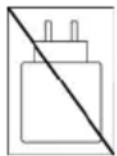
The power delivered by the charger must be between min 1.9 watts required by the radio equipment, and max 2.5 watts in order to achieve the maximum charging speed.
(1) This headset uses the 2.4 GHz frequency range. If PS5® consoles or other products are using the same frequency, they may interfere with each other.
(2) Nacon validated operability between PlayStation®5 consoles (CFI-1000, 2000, 7000 series) and this headset.
(3) As for PlayStation®5 consoles (CFI-1000 series), it is recommended to insert the USB dongle of this headset to the USB port on the front of the PlayStation®5 console.
This product shall not be connected to power supply source exceeding 15W.
ECODESIGN
This product is in compliance with ecodesign requirements of the commission regulation (EU) 2023/826.
| Max. Power Consumption | 2.5W |
| Power Consumption (Off Mode) | < 0.5W |
| Power Consumption (Low Power Mode) | < 0.5W |
| Off Mode / Standby Mode Activated | < 20 mins |
| Power Consumption (Networked Standby Mode) | < 2.0W |
| Networked Standby Mode Activated | < 20 mins |
| External Adapter Requirement | When using an external adapter, the output voltage/current of the external adapter should not exceed 5V 500mA.. |
| Activation and Deactivation of Wireless Network | Refer to user manual procedures for activation and deactivation of wireless network. |
MANUFACTURER / FABRICANT :
NACON - 396 - 466 Rue de la Voyette, CRT2 - 59273 Fretin, France
DISTRIBUTORS / DISTRIBUTERS :
Nacon Gaming Inc.
1124 8TH Street, Kirkland, WA 98033 USA
Nacon Pty. Ltd.
Level 2/20 Bond Street, Sydney NSW 2000
Australia
SUPPORT:
FRANCE, support.fr@naongaming.com
UK, support@naongaming.com Tel: +44 08081010970
Mail: support.de@naongaming.com
BELGIQUE, support.be@naongaming.com
NEDERLAND, support.nl@naongaming.com
ESPANA, support.es@naongaming.com
Tel: +34 900993359
ITALIA, support.it@naongaming.com
Tel: +39 800172494
USA/CANADA, support.us@naongaming.com
AUSTRALIA, support.us@naongaming.com
RIG
NACONGAMING.COM
©2025 NACON. NACON and RIG are trademarks of NACON. Registered in the US and other countries, All trademarks are the property of their respective owners. "PlayStation", "PS5", and "PlayStation Shapes Logo (gradated)" are registered trademarks or trademarks of Sony Interactive Entertainment Inc. All other trademarks are the property of their respective owners. Manufactured and distributed under license from Sony Interactive Entertainment Inc. or its affiliates.
Licensed for sale in the European Union, United Kingdom, Australia, New Zealand & United States, Manufactured by Nacon. All trademarks belong to their respective owners.
RIG 600 MAX HS
GUIDE D'UTILISATION
FR/
Sommaire
EN. The EIRP power values and the Frequency bands relating to this product, identified in the list below, comply with the requirements of Directive
2014/53/EU:
EIRP: RIG 600 MAX - <13 dBm
Frequency band: (2,402 ~ 2,480) GHz
1124 8TH Street, Kirkland, WA 98033 USA
Nacon Pty. Ltd.
Level 2/20 Bond Street, Sydney NSW 2000 Australia
SUPPORT:
FRANCE, support.fr@nacongaming.com
UK, support@naongaming.com
Tel: +44 08081010970
Mail: support.de@naongaming.com
BELGIQUE, support.be@naongaming.com
NEDERLAND, support.nl@naongaming.com
ESPANAsupport.es@naongaming.com Tel:+34900993359
ITALIA, support.it@naongaming.com
Tel:+39 800172494
USA/CANADA, support.us@naongaming.com
AUSTRALIA, support.us@naongaming.com
RIG
NACONGAMING.COM
Email: support.de@naongaming.com
COMPLIANCE
EN. The EIRP power values and the Frequency bands relating to this product, identified in the list below, comply with the requirements of Directive
2014/53/EU:
EIRP: RIG 600 MAX - <13 dBm
Frequency band: (2,402 ~ 2,480) GHz
MANUFACTURER/FABRICANT:
NACON - 396 - 466 Rue de la Voyette, CRT2 - 59273 Fretin, France
DISTRIBUTORS / DISTRIBUTERS :
Nacon Gaming Inc.
1124 8TH Street, Kirkland, WA 98033 USA
Nacon Pty. Ltd.
Level 2/20 Bond Street, Sydney NSW 2000
Australia
SUPPORT:
FRANCE, support.fr@nacongaming.com
UK, support@naongaming.com Tel: +44 08081010970
BELGIQUE, support.be@naongaming.com
NEDERLAND, support.nl@naongaming.com
ESPANA, support.es@naongaming.com
Tel.: +34 900993359
ITALIA, support.it@naongaming.com
Tel: +39 800172494
USA/CANADA, support.us@naongaming.com
AUSTRALIA, support.us@naongaming.com
RIG
NACONGAMING.COM
- "Connected" in spelmodus.
- "USB connected" in dual-modus
- "Bluetooth connected" in Dual-modus,
- "Connected" in Bluetooth-modus.
EN. The EIRP power values and the Frequency bands relating to this product, identified in the list below, comply with the requirements of Directive
2014/53/EU:
EIRP: RIG 600 MAX - <13 dBm
Frequency band: (2,402 ~ 2,480) GHz
1124 8TH Street, Kirkland, WA 98033 USA
Nacon Pty. Ltd.
Level 2/20 Bond Street, Sydney NSW 2000 Australia
SUPPORT:
FRANCE, support.fr@nacongaming.com
UK, support@naongaming.com
Tel: +44 08081010970
Mail: support.de@naongaming.com
BELGIQUE, support.be@naongaming.com
NEDERLAND, support.nl@naongaming.com
ESPANA, support.es@naongaming.com
Tel. +34 900993359
ITALIA, support.it@naongaming.com
Tel:+39 800172494
USA/CANADA, support.us@naongaming.com
AUSTRALIA, support.us@naongaming.com
RIG
NACONGAMING.COM
EN. The EIRP power values and the Frequency bands relating to this product, identified in the list below, comply with the requirements of Directive
2014/53/EU:
EIRP: RIG 600 MAX - <13 dBm
Frequency band: (2,402 ~ 2,480) GHz
1124 8TH Street, Kirkland, WA 98033 USA
Nacon Pty. Ltd.
Level 2/20 Bond Street, Sydney NSW 2000 Australia
SUPPORT:
FRANCE, support.fr@nacongaming.com
UK, support@naongaming.com
Tel: +44 08081010970
Mail: support.de@naongaming.com
BELGIQUE, support.be@naongaming.com
NEDERLAND, support.nl@naongaming.com
ESPANAsupport.es@naongaming.com Tel:+34 900993359
ITALIA, support.it@naongaming.com
Tel:+39 800172494
USA/CANADA, support.us@naongaming.com
AUSTRALIA, support.us@naongaming.com
RIG
NACONGAMING.COM
EN. The EIRP power values and the Frequency bands relating to this product, identified in the list below, comply with the requirements of Directive
2014/53/EU:
EIRP: RIG 600 MAX - <13 dBm
Frequency band: (2,402 2,480) GHz
1124 8TH Street, Kirkland, WA 98033 USA
Nacon Pty. Ltd.
Level 2/20 Bond Street, Sydney NSW 2000 Australia
SUPPORT:
FRANCE, support.fr@nacongaming.com
UK, support@naongaming.com
Tel: +44 08081010970
Mail: support.de@naongaming.com
BELGIQUE, support.be@naongaming.com
NEDERLAND, support.nl@naongaming.com
ESPANAsupport.es@naongaming.com
Tel. +34 900993359
ITALIA, support.it@naongaming.com
Tel:+39 800172494
USA/CANADA, support.us@naongaming.com
AUSTRALIA, support.us@naongaming.com
RIG
NACONGAMING.COM
EN. The EIRP power values and the Frequency bands relating to this product, identified in the list below, comply with the requirements of Directive
2014/53/EU:
EIRP: RIG 600 MAX - <13 dBm
Frequency band: (2,402 2,480) GHz
1124 8TH Street, Kirkland, WA 98033 USA
Nacon Pty. Ltd.
Level 2/20 Bond Street, Sydney NSW 2000 Australia
SUPPORT:
FRANCE, support.fr@nacongaming.com
UK, support@naongaming.com
Tel: +44 08081010970
Mail: support.de@naongaming.com
BELGIQUE, support.be@naongaming.com
NEDERLAND, support.nl@naongaming.com
ESPANAsupport.es@naongaming.com Tel:+34900993359
ITALIA, support.it@naongaming.com
Tel:+39 800172494
USA/CANADA, support.us@naongaming.com
AUSTRALIA, support.us@naongaming.com
RIG
NACONGAMING.COM
EN. The EIRP power values and the Frequency bands relating to this product, identified in the list below, comply with the requirements of Directive
2014/53/EU:
EIRP: RIG 600 MAX - <13 dBm
Frequency band: (2,402 2,480) GHz
1124 8TH Street, Kirkland, WA 98033 USA
Nacon Pty. Ltd.
Level 2/20 Bond Street, Sydney NSW 2000 Australia
SUPPORT:
FRANCE, support.fr@nacongaming.com
UK, support@naongaming.com
Tel: +44 08081010970
Mail: support.de@naongaming.com
BELGIQUE. support.be@naongaming.com
NEDERLAND, support.nl@naongaming.com
ESPANA, support.es@naongaming.com
Tel: +34 900993359
ITALIA, support.it@naongaming.com
Tel:+39 800172494
USA/CANADA, support.us@naongaming.com
AUSTRALIA, support.us@naongaming.com
RIG
NACONGAMING.COM
- Fit
- I Set up and basics
- Setup for PC
- Charging your Headset
- Power on or off
- I Adjust volume
- Mute
- The different wireless modes
- How to switch modes?
- How to pair your headset?
- EN/
- Multi-function button
- How to customize your experience?
- Safety
- Support
- COMPLIANCE
- Reporting Security Issues (UK & AU only)
- 1) Information on how to report security issues
- 2) Information on minimum security periods
- 3) Disclosure to third parties
- ECODESIGN
- MANUFACTURER / FABRICANT :
- DISTRIBUTORS / DISTRIBUTERS :
- SUPPORT:
- RIG
- NACONGAMING.COM
- RIG 600 MAX HS
- FR/
- Sommaire
- MANUFACTURER/FABRICANT:
Brand : Nacon
Model : RIG 600 MAX HS
Category : Headphones