RIG 800HD - Headphones Nacon - Free user manual and instructions
Find the device manual for free RIG 800HD Nacon in PDF.



| Product type | Wireless gaming headset |
| Brand | Nacon |
| Model | RIG 800HD |
| Compatibility | PlayStation 4, Xbox One, PC (via USB adapter with optical output) |
| Connectivity | Wireless via dedicated USB adapter |
| Microphone type | Directional adjustable microphone with privacy mode (mute by lifting boom) |
| Battery life | Up to 24 hours (full charge in about 4h30) |
| Weight | Approximately 300 g |
| Dimensions | Approximately 200 x 200 x 100 mm |
| Materials | Durable plastic, memory foam |
| Audio functions | Adjustable equalization (4 modes: Pure, Seismic, Intense, Vocal) and microphone control (sidetone) |
| Volume controls | Two separate buttons: game/chat volume and main volume |
| Power | Built-in rechargeable lithium-ion battery |
| Maintenance and cleaning | Wipe with a soft, dry cloth. Do not use liquids or immerse. |
| Safety | Do not force the microphone boom beyond upper and lower limits |
| General information | Manufactured under license from Dolby Laboratories. Patents pending. |
Frequently Asked Questions - RIG 800HD Nacon
User questions about RIG 800HD Nacon
0 question about this device. Answer the ones you know or ask your own.
Ask a new question about this device
Download the instructions for your Headphones in PDF format for free! Find your manual RIG 800HD - Nacon and take your electronic device back in hand. On this page are published all the documents necessary for the use of your device. RIG 800HD by Nacon.
USER MANUAL RIG 800HD Nacon
Adjust mic monitoring
Support 7
Setup and basics
Your adapter comes pre-paired to your headset. After you adjust and charge your headset and configure your adapter, power on your headset and it's ready to go.
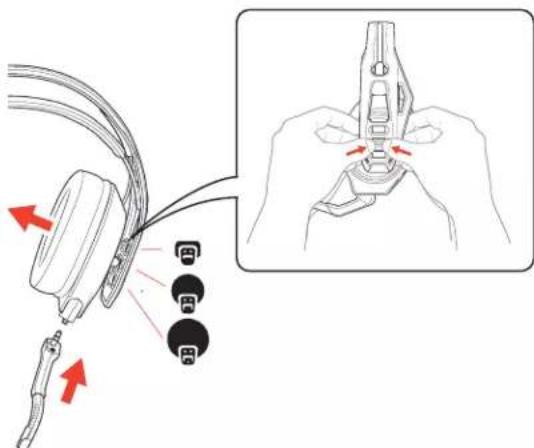
Fit Your headset components easily snap into the headset frame to configure the best fit and sound.
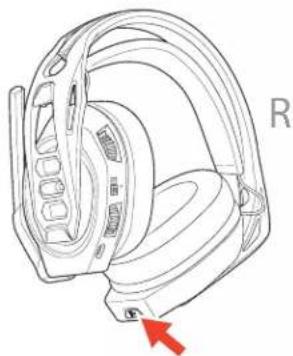
The headband adjusts to three sizes (small, medium, large) by moving the earcups. To remove an earcup, press the earcup to detach it from the headband.
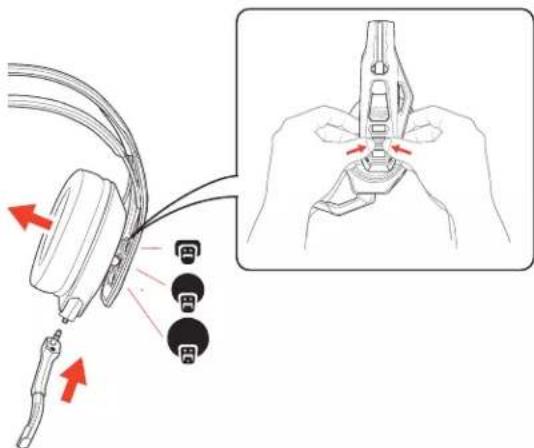
NOTE Headband style may vary.
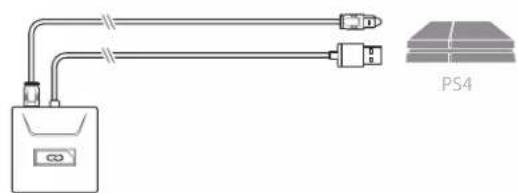
Setup PS4 PS4
1 Connect your adapter to your system.
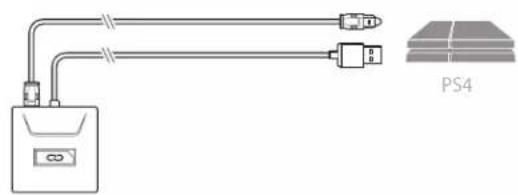

2 Power on your PS4 and Check for updates
3 Go to Settings > Sound and Screen > Audio Output Settings > Select Digital Out (Optical)
4 Go to Settings > Devices > Audio Devices > Output Devices Select Plantronics RIG800XX
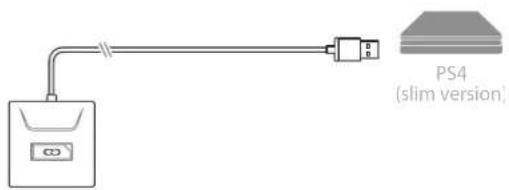
PS4 (slim version)
1 Connect your adapter to your system.
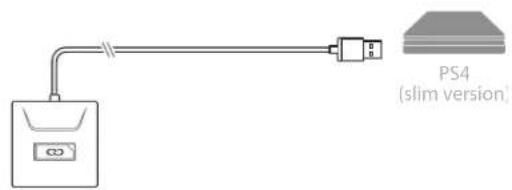

2 Power on your PS4 and Check for updates
3 Go to Settings > Devices > Audio Devices > Output Devices Select Plantronics RIG800XX
4 Go to Settings > Devices > Audio Devices > Output to headphones > All audio
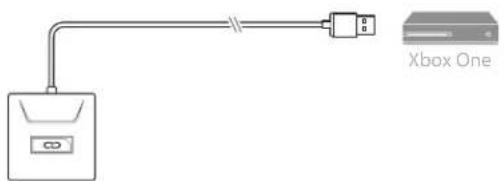
Setup Xbox One
1 Connect your adapter to your system.
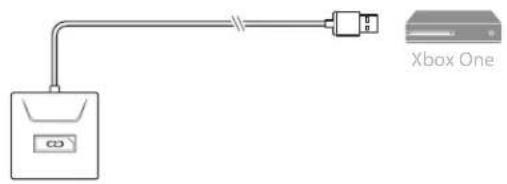

2 Power on your Xbox One and Check for updates
3 Go to Display and Sound > Kinect and Devices > Device Options > Assign
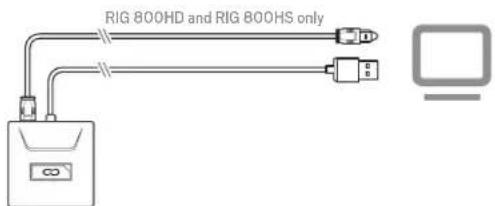
Setup PC
1 Connect your adapter to your system.
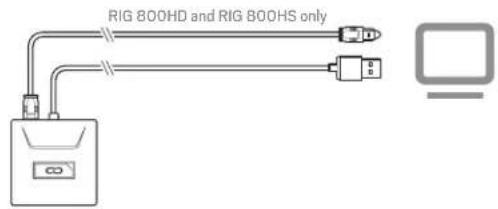

IMPORTANT Optical cable connection is only for RIG 800HD and RIG 800HS.
2 RIG 800HX and RIG 800LX only: Ensure the switch on the back of the adapter is set to «PC.»
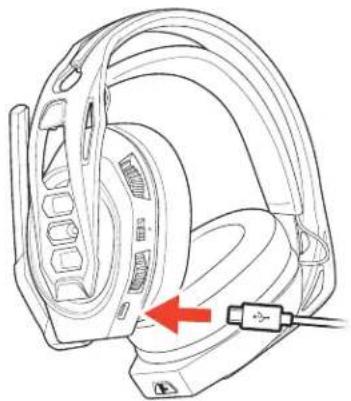
Charge
It takes up to 4.5 hours to fully charge your headphones. The headset LED is red while charging and turns off when complete.
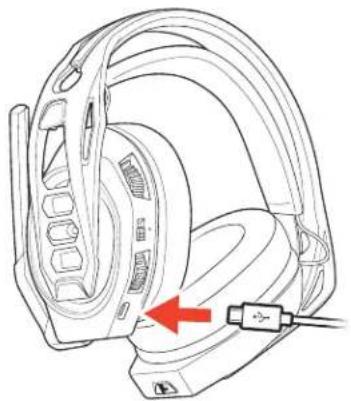
04:30:00 = 180%
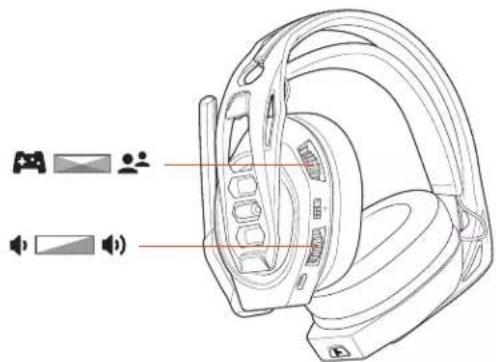
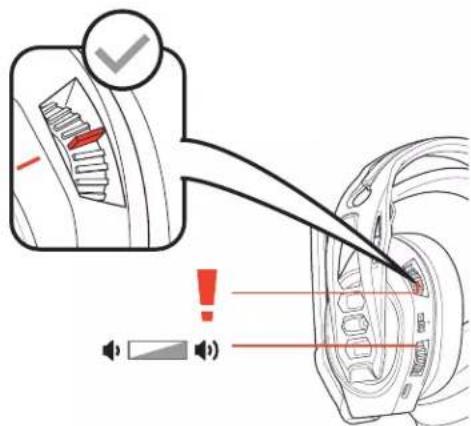
Adjust volume 1 To increase or decrease the game and chat volume, adjust the top headset dial.
2 To increase or decrease the master volume, adjust the bottom headset dial.
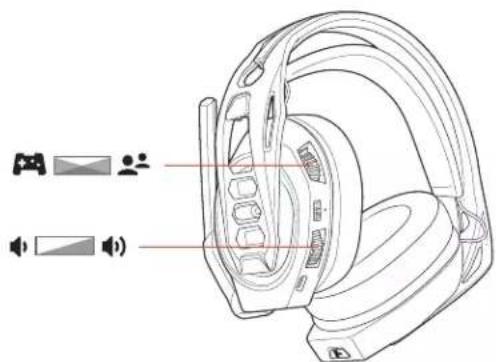
IMPORTANT For the PS4 (slim version), set the top headset dial in the middle; game and chat remain balanced. Use the bottom headset dial to increase or decrease the master volume.
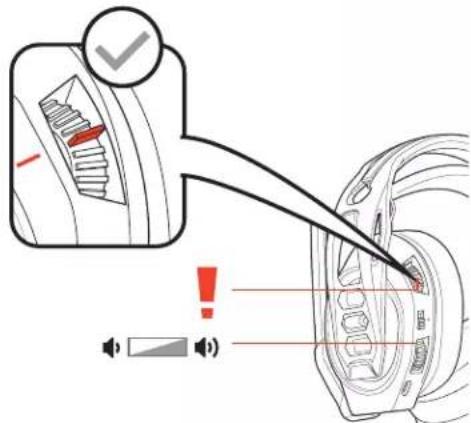
Mute
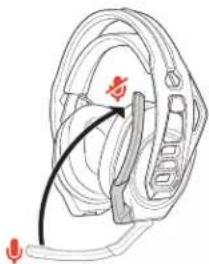
Lift the boom to a full stop to mute the microphone.
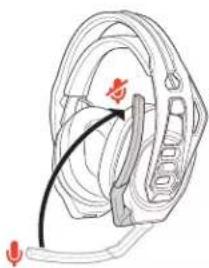
CAUTION Do not force the boom past its upper or lower limits.
Set EQ
Cycle through the EQ modes by tapping the EQ button.
| Tap the EQ button and hear EQ mode | |
| one tone | Pure EQ is our signature sound |
| two tones | Seismic EQ boosts bass |
| three tones | Intensify EQ focuses on detail sounds |
| four tones | Vocal EQ emphasizes vocal frequencies |
Adjust mic monitoring
Press and hold the Mute button to cycle through mic monitoring levels. Mic monitoring lets you hear your own voice in the headset.
Press and hold the Mute button and hear
Mic monitoring level
one
tone
None
two tones
Low
three tones
High
Support
NEED MORE HELP?
www.naongaming.com

nacon
NACONG GAMING, Inc
10400 NE 4thStreet, Suite 500,
Bellevue, WA 98004 USA
(+1) 800-617-0174
Headquarter
NACON
©2020 NACON. NACON and RIG are trademarks of NACON. registered in the US and other countries. Manufactured under license from Dolby Laboratories, Dolby and the double-D symbol are registered trademarks of Dolby Laboratories. All other trademarks are the property of their respective owners.
Patents pending
208788-06 (05.20)
RIG
Serie RIG 800
Guide d'utilisation
FR
Sommaire
10400 NE 4thStreet, Suite 500
Bellevue, WA 98004 USA
(+1) 800-617-0174
Headquarter
NACON
Cycle through the EQ modes by tapping the EQ button.
10400 NE 4thStreet, Suite 500
Bellevue, WA 98004 USA
(+1) 800-617-0174
Headquarter
NACON
10400 NE 4thStreet, Suite 500
Bellevue, WA 98004 USA
(+1) 800-617-0174
Headquarter
NACON
10400 NE 4thStreet, Suite 500
Bellevue, WA 98004 USA
(+1) 800-617-0174
Headquarter
NACON
10400 NE 4thStreet, Suite 500
Bellevue, WA 98004 USA
(+1) 800-617-0174
Headquarter
NACON
HacpoKa JnIy IcNoJb3ObaHnC Xbx One
HactpoKaJnIyNcIOJIb3OBAHnC PC
3apnka
PerynnpobkA ypOBH rpoMkoCTN
OTKJIIOUeHHe 3Byka
HacTPOIka 3KBAJIaI3epa
HactpoKa MOHTOpnHa MUKpOfoHa
Iopdepekk
HactpoIka n OCHOBhIe CBeDeHnA
Perynupobka
AanTep noctabJareTc copjxehHbIM c raphHTypoi. Nocle BInOJIHeHn HaCTpoKu 3apAnr rapHTypbI KOnHpyaun aanTepa BKIOUHTe raphHTypy, u OHa 6ydt roTOBa K pa6ote.
BnaOapnpoCTote KpenneHnKOMnoHeHtOB Ha Kapkac rapHnTpbye MoXHO nERKO OtperynpoBaTb Ira o6ecneueHn Hau6onee yD6horo nNooxeHn HauNpywero 3ByaHn.
OrolOBbe MoXHO OTperpyHnPOBaT NOI OH IN 3 Tpex pa3MepoB (MaJIeHbKNI, cpeHNI, 6OJIbWOn) NytEM NpeMeueHInaWeK HAYWHNKOB. YTo6bI CHrTb aWky HAYWHNKOB C OOrJIOBBa, CNeJeYt HaxaTb Ha Hee.
NPMMEYAHNE TUN ORJIOBBMOKET OTNIUATbCRA.
HacpoKa nHa nCnoB3OBAHn c PS4
PS4 1 PoioknouHTe aanTep K cntMe.
2 BknoTe PS4 n Bb6epnte Check for updates (PpOBepntb HauHne o6HOBHeH)
3 Ipeennte B pa3en Settings (HacptpoKn) >Sound and Screen (38yK n 3kpan) > Audio Output Settings (HaCPTPOKn BBIOda ayDno) >Bb6epnte Digital Out (Optical) (LINΦpOBoB BBOID (ontTneckn))
4 IpeenIte B pa3den Settings (HacTpoiKn) > Devices (YcTpoiCTBa) > Audio Devices (AynocyctpoiCTBa) > Output Devices (YcTpoiCTBa BBIOda) BB6epnte Plantronics RIG800XX
PS4 (komnakTha Bepcn)
1 PoiKKnOuHTe aanTep K cnCTeme.

2 BkHouHTe PS4 n BB6epuTe Check for updates (PiobepuTb HAnuye 06HOBHeH)
3 IpeiIte B pa3en Settings (HacTpoK) > Devices (YcTpoCTBa) > Audio Devices (AynocTpoCTBa) > Output Devices (YcTpoCTBa BBIOda) BB6epnte Plantronics RIG800XX
4 Ipeennte Bpa3en Settings (HacpoKn) > Devices (YcpoctBa) > Audio Devices (AynocptpoCTba) > Output to headphones (BbBOd Ha HayuHKn) > All audio (Bce ayno)
1 PnoknHouHTe aanTepeK cnCTeMe.
HactpoKa dny nCnOJIb3OBAHnC Xbox One

2 BkHouTe Xbox One n Bb6epnte Check for updates (PpOBeptb HAnuue o6HOBneHn)
3 NpeuNTe B pa3dien Display and sound (KpaH 3Byk) > Kinect and devices (Kinect u yctpoiCTBa) > Device Options (NapaMeTpbl yctpoiCTBa) > Assign (Ha3HaHTb)
HacpoKa dna nCNoJb3ObaHn c PC
1 POnkIIOUHTe aAaNTep K CnCTeMe.

BHIMAHHE! IopKnIOueHne c nOmoBIO ONTNUeCKoRo Ka6eI npEycMOtpeHo TOnbKO dRIG 800HD n RIG 800HS.
2 Tonbko RIG 800HX n RIG 800LX: y6eintecb, yto nepeknouateIb Ha 3aHHe naneIaanTepa yctahOBnHa PC (PK).
3apnka
IOnHnA 3apAnKa AKKyMylTopa HayuHnKOB 3aHmMaetdo4,5YacOB.Bo Bpem3apAnk CBToIOoHbI INDnKaTOp raphNtpybI ropnt KpaChbIM,a no ee 3aBepWeHn BBkHouaeTcA.
04:30:00 = 10%
Peryu npOBka ypoBn rpoMkoCTN
1 YBeHnHTb HmYMeHbWntb rPOMKoCTb 3ByKOBOrO cOnpOBoXdEHHa Irpbl NcTa MoXHO C NOMOuBEO BepxHero peryIaTopaHa rapHnType.
2 YBeHnHTb HmYMeHbHNTb 06uH yPoBHe b rPOMKoCTM MOXHO C NOMOUIBO HIXKHEROperyIaTopa Ha rapHHType.
BHIMAHHE! PS4 (KOMnakThaBepcn): yctahOBITE BepxHn peryIaTOp Ha rapHHType no UeHTpy; 3BykoBoe cnpoBoXdHeNe uRpbI uHaTa ocTaOcTOc C6anaHCnpoBaHHbIM.ДЯ yBeInuHEnu INyUmeHbUeHn O6Iero ypoBn rpoMKoCTN nCNoJb3yTe HxHn peryIaTOp Ha rapHNType.
OTKIIIOUeHne 3Byka
YTo6bIOTKJIQUHTb3BYK MKNPOΦOHa, NOHIMMITE WtAHrY MKNPOΦOHa Do ynpa.
OCTOPOXHO He nbTaTaeTcB nepemeaTb WtAHry MKNPOoHa daNbwe npedeHbHoro BepxHrero nn HxHrero noloxehn.
HaCToPoiKa 3KbAlaN3epa
Pekmbkbaan3epa moxho nepeknouatb c nomoo kHONK 3kbaan3epa.
10400 NE 4th Street, Suite 500,
Bellevue, WA 98004 USA
(+1) 800-617-0174
Headquarter
NACON
10400 NE 4thStreet, Suite 500
Bellevue, WA 98004 USA
(+1) 800-617-0174
Headquarter
NACON
10400 NE 4th Street, Suite 500,
Bellevue, WA 98004 USA
(+1) 800-617-0174
Headquarter
NACON
2020 NACON. NACON & RIG是默默默默默默默默默默默默默默默默默默默默默默默默默默默默默默默默默默默默默默默默默默默默默默默默默默默默默默默默默默默默默默默默默默默默默默默默默默默默默默默默默默默默默默默默默默默默默默默默默默默默
高他
208788-18 (06.20)