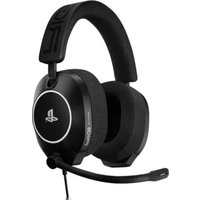
R5 PRO HS - Headphones Nacon - Free user manual and instructions
Find the device manual for free R5 PRO HS Nacon in PDF.


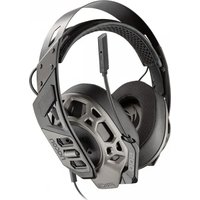
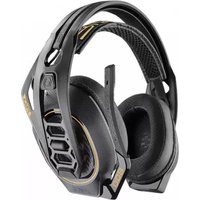
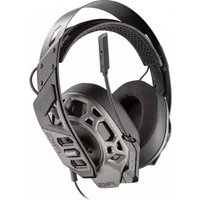
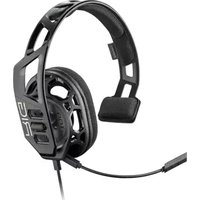
| Product type | Gaming headset with microphone |
| Dimensions | 185 x 220 x 78 mm |
| Weight | 333 g |
| Power supply | Wired via 3.5 mm jack |
| Speaker type | 40 mm graphene-coated |
| Frequency response (speaker) | 20 Hz - 40 kHz |
| Sensitivity (speaker) | 117.5 dB ±2 dB at 1 kHz |
| Impedance (speaker) | 32 ohms |
| Harmonic distortion | < 0.5% THD |
| Microphone type | Unidirectional |
| Frequency response (microphone) | 50 Hz - 15 kHz |
| Sensitivity (microphone) | -11 dBV (0 dB=1V/Pa at 1 kHz) |
| Impedance (microphone) | 2.2 kOhms |
| Connector | 3.5 mm TRRS jack |
| Cable length | 1.5 m |
| Main features | Volume control on cable, microphone mute when flipped up, interchangeable ear cups and earpads |
| Maintenance and cleaning | Clean with a soft, dry cloth, do not use chemicals |
| Safety | Use at moderate volume to protect hearing |
| Spare parts and repairability | Custom ear cups and replaceable earpads (sold separately) |
| General information | Brand: Nacon - Model: R5 PRO HS |
Frequently Asked Questions - R5 PRO HS Nacon
User questions about R5 PRO HS Nacon
0 question about this device. Answer the ones you know or ask your own.
Ask a new question about this device
Download the instructions for your Headphones in PDF format for free! Find your manual R5 PRO HS - Nacon and take your electronic device back in hand. On this page are published all the documents necessary for the use of your device. R5 PRO HS by Nacon.
USER MANUAL R5 PRO HS Nacon
• Fitting the mod-plates 3
- Adjusting the headset 4
- Connecting the headset to your device 5
- Controlling the volume 5
Using the microphone 6
Replacing the ear cushions and mod-plates 6
- Removing the ear cushions from the headset 6
- Replacing the mod-plates 7
Technical specifications 8
Support 9
I HEADSET SETTINGS
Fitting the mod-plates
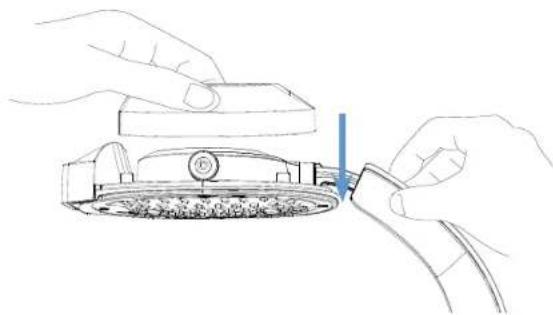
The mod-plates feature a SNAP•LOCK system which ensures that they stay in place during use and are easy to remove/replace. The mod-plates are interchangeable between the right and left ear-cups.
- Position the mod-plate so that the RIG logo is facing the headset, as shown in the below image.
natural_image
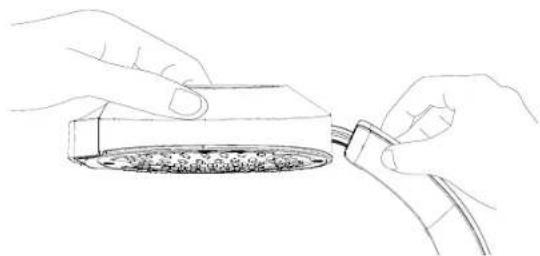
Line drawing of hands using a tool to adjust or install a mechanical component (no text or symbols visible)- Place the mod-plate over the ear-cup so that the SNAP+LOCK system connects and fits securely in place.
natural_image
Line drawing of two hands inserting a small object into a container (no text or symbols)- Repeat the process to fit the mod-plates on both sides of the headset.
EN/EN/
Adjusting the headset
natural_image
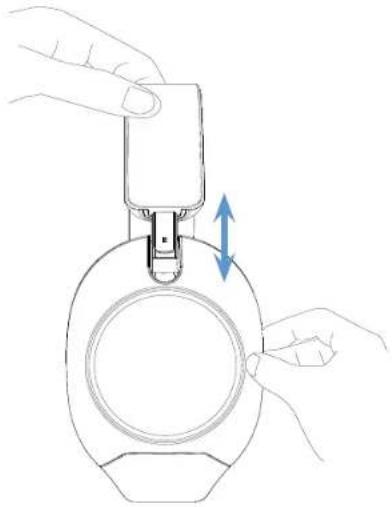
Line drawing of a hand holding a mechanical device with a blue double-headed arrow indicating rotation (no text or symbols)The headset can be adjusted as follows:
- Hold the headband and ear-cup as shown in the above image.
- Slide the ear-cup up & down to adjust the size.
- Repeat the action on the other ear-cup.
Connecting the headset to your device
Your headset comes with a 1.5 m cable with a 3.5 mm male connector. It allows you to connect it to any device with a 3.5 mm female connector.
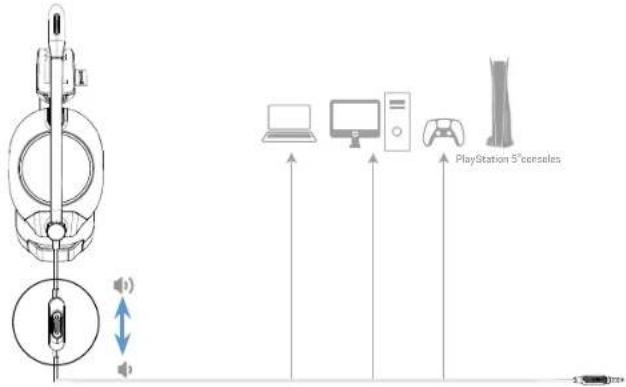
Controlling the volume
The cable has an in-line volume control. To adjust the volume, slide the switch up or down to increase or decrease it. Note that there is a position lock when the maximum volume is selected.
EN/EN/
I USING THE MICROPHONE
The headset has a microphone mute function. To activate it, rotate the microphone upwards as shown in the below image.
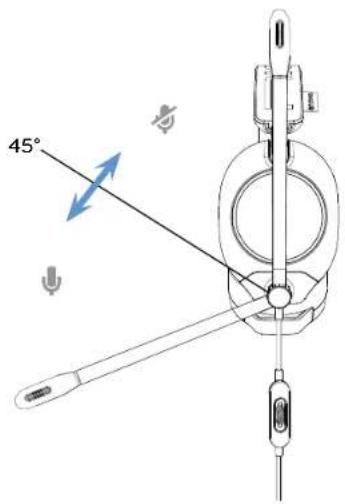
I REPLACING THE EAR CUSHIONS AND MOD-PLATES
Your headset has modular ear cushions and mod-plates.
Removing the ear cushions from the headset
Hold the ear-cup in one hand and with your other hand grip one side of the ear cushion and peel it away from the ear-cup.
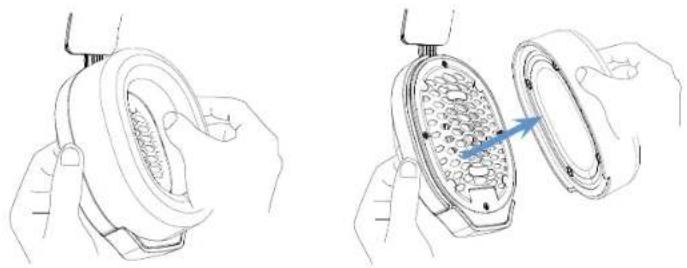
natural_image
Illustration of hands holding a circular device with internal components, showing a close-up of the interior (no text or symbols)6
Replacing the mod-plates
- Remove the ear cushions from the headset.
- Grip each side of the mod-plate and pull it away from the ear-cup as shown in the below images.
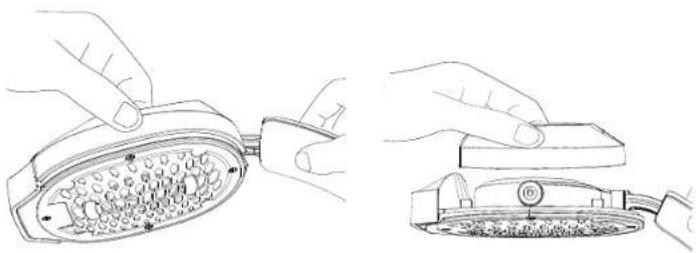
natural_image
Line drawing showing hands installing a component on a device, with no visible text or symbols- To fill new mod-plates, follow the steps in the "Fitting the mod-plates" section.
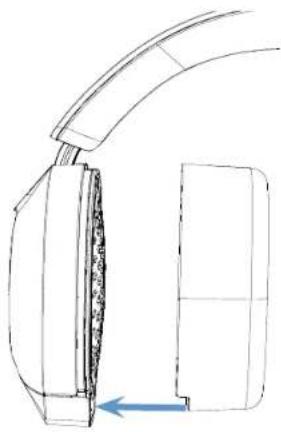
- Replace your ear cushions so that the notch is pointing downwards to properly secure the ear cushion to the ear-cup.
natural_image
Technical line drawing of a mechanical component with a blue arrow indicating direction (no text or symbols)7
EN / EN /
I TECHNICAL SPECIFICATIONS
• Product dimensions: 185x220x78 mm.
• Net weight of headset: 333 g.
HEADPHONES:
- Driver Type: 40 mm Graphene Coated.
• Freq. Response: 20 Hz - 40 kHz.
• Sensitivity: 117.5 dB ±2 dB @ 1 kHz.
• Impedance: 32 Ohms.
• Harmonic Distortion: <0.5% THD. - Connector Type: 3.5 mm TRRS.
MICROPHONE:
- Polar Pattern: Uni-directional.
• Freq. Response: 50 Hz - 15 kHz. - Sensitivity: -11 dBV, 0 dB-1V/Pa @ 1 kHz.
• Impedance: 2.2K ohms.
• Diaphragm Size: 6 mm.
• Cable Length: 1.5 m.
I SUPPORT
MANUFACTURER / FABRICANT :
NACON - 396 - 466 Rue de la Voyette, CRT2 - 59273 Fretin, France
1124 8TH Street, Kirkland, WA
98033 USA
SUPPORT :
FRANCE, nacongaming.com/contact
UK, support@nacongaming.com
Tel.: +44 08081010970
support.be@nacongaming.com
NEDERLAND
support.nl@nacongaming.com
ESPAÑA,
support.es@nacongaming.com
Tel:+34 900993359
ITALIA,
support.it@nacongaming.com
Tel:+39 800172494
UNITED STATES / CANADA,
support.us@nacongaming.com
(English/French/Spanish)
Tel.:1-833-622-6687
RIG
NACONGAMING.COM
RIG
R5 PRO HS
GUIDE DE L'UTILISATEUR
Sommaire
Réglage du casque 3
natural_image
Line drawing of hands installing or adjusting a mechanical component with a blue arrow indicating the process (no text or symbols present)natural_image
Illustration of a hand holding a small object with a blue double-headed arrow indicating vertical motion (no text or symbols)natural_image
Line drawings of hands holding a circular device with internal components, showing three views (no text or symbols)natural_image
Line drawings showing hands installing a component into a device, with an upward arrow indicating motion (no text or symbols present)1124 8TH Street, Kirkland, WA 98033 USA
SUPPORT :
UK, support@nacongaming.com
Tel.: +44 08081010970
support.be@nacongaming.com
NEDERLAND,
support.nl@nacongaming.com
ESPAÑA,
support.es@nacongaming.com
Tel.: +34 900993359
ITALIA,
support.it@nacongaming.com
Tel:+39 800172494
UNITED STATES,
support.us@nacongaming.com
(English/French/Spanish)
Tel.: 1-833-622-6687
RIG
NACONGAMING.COM
RIG
R5 PRO HS
BENUTZERHANDBUCH
Inhaltsverzeichnis
natural_image
Line drawing of hands installing or adjusting a mechanical component with a blue arrow indicating the process (no text or symbols present)natural_image
Line drawing of hands installing a device into a circular container with a blue double-headed arrow indicating motion (no text or symbols)natural_image
Line drawing of hands holding a car tire, no text or symbols present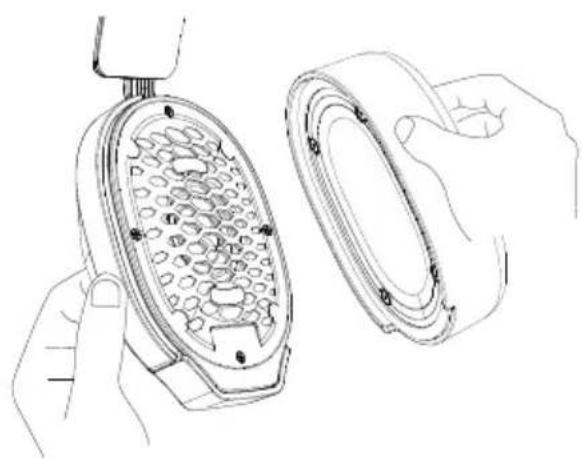
natural_image
Line drawing of hands holding a small appliance with a grid-patterned lid (no text or symbols)Austausch der Cover
natural_image
Line drawings showing hands installing a component into a device, with an upward arrow indicating motion (no text or symbols present)1124 8TH Street, Kirkland, WA 98033
USA
SUPPORT :
UK, support@nacongaming.com
Tel.: +44 08081010970
support.be@nacongaming.com
NEDERLAND,
support.nl@nacongaming.com
ESPAÑA,
support.es@nacongaming.com
Tel.: +34 900993359
ITALIA,
support.it@nacongaming.com
Tel:+39 800172494
UNITED STATES,
support.us@nacongaming.com
(English/French/Spanish)
Tel.: 1-833-622-6687
RIG
NACONGAMING.COM
RIG
R5 PRO HS
GEBRUIKERSHANDLEIDING
Inhoudsopgave
natural_image
Line drawing of hands installing or adjusting a mechanical component with a blue arrow indicating the process (no text or symbols present)natural_image
Line drawing of two hands inserting a plug into a circular component (no text or symbols)natural_image
Line drawing of hands installing a mechanical component with a blue double-headed arrow indicating motion (no text or symbols)natural_image
Line drawing of hands holding a circular object with internal mesh structure (no text or symbols)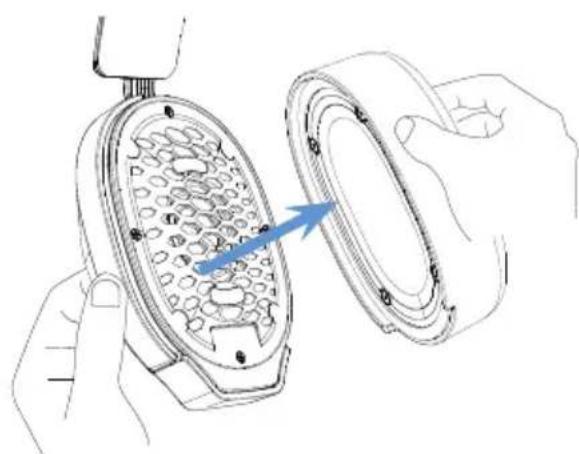
natural_image
Illustration of hands holding a device with a magnified view showing internal components (no text or symbols)natural_image
Line drawings showing hands installing a device into a grid-patterned device (no text or symbols present)natural_image
Technical line drawing of a mechanical component with a blue arrow indicating direction (no text or symbols)I TECHNISCHE SPECIFICATIES
1124 8TH Street, Kirkland, WA 98033 USA
SUPPORT :
FRANCE, nacongaming.com/contact
UK, support@nacongaming.com
Tel.: +44 08081010970
support.be@nacongaming.com
NEDERLAND,
support.nl@nacongaming.com
ESPAÑA,
support.es@nacongaming.com
Tel.: +34 900993359
ITALIA,
support.it@nacongaming.com
Tel.:+39 800172494
UNITED STATES / CANADA,
support.us@nacongaming.com
(English/French/Spanish)
Tel.: 1-833-622-6687
RIG
NACONGAMING.COM
RIG
R5 PRO HS
GUÍA DEL USUARIO
Contenido
natural_image
Line drawing of hands installing or adjusting a mechanical component with a blue arrow indicating the process (no text or symbols present)natural_image
Illustration of a hand holding a small object with a blue double-headed arrow indicating vertical motion (no text or symbols)natural_image
Line drawings of hands holding a circular object with internal components, showing three views (no text or symbols)natural_image
Line drawings showing hands installing a component into a device, with an upward arrow indicating motion (no text or symbols present)1124 8TH Street, Kirkland, WA 98033 USA
SUPPORT :
UK, support@nacongaming.com
Tel.: +44 08081010970
support.be@nacongaming.com
NEDERLAND,
support.nl@nacongaming.com
ESPAÑA,
support.es@nacongaming.com
Tel.: +34 900993359
ITALIA,
support.it@nacongaming.com
Tel:+39 800172494
UNITED STATES,
support.us@nacongaming.com
(English/French/Spanish)
Tel.: 1-833-622-6687
RIG
NACONGAMING.COM
natural_image
Line drawing of hands installing or adjusting a mechanical component with a blue arrow indicating the process (no text or symbols present)natural_image
Illustration of a hand holding a small object with a blue double-headed arrow indicating motion (no text or symbols)natural_image
Line drawings of hands holding a device with internal components, showing three views (no text or symbols)natural_image
Line drawings showing hands installing a component into a device, with an upward arrow indicating motion (no text or symbols present)1124 8TH Street, Kirkland, WA 98033 USA
SUPPORT :
UK, support@nacongaming.com
Tel.: +44 08081010970
support.be@nacongaming.com
NEDERLAND,
support.nl@nacongaming.com
ESPAÑA,
support.es@nacongaming.com
Tel.: +34 900993359
ITALIA,
support.it@nacongaming.com
Tel:+39 800172494
UNITED STATES,
support.us@nacongaming.com
(English/French/Spanish)
Tel.: 1-833-622-6687
RIG
NACONGAMING.COM
RIG
R5 PRO HS
GUIA DO UTILIZADOR
Summary
natural_image
Line drawing of hands installing or adjusting a mechanical component with a blue arrow indicating the process (no text or symbols present)natural_image
Illustration of a hand holding a small object with a blue double-headed arrow indicating vertical motion (no text or symbols)natural_image
Line drawings of hands holding a circular device with internal components, showing three views (no text or symbols)natural_image
Line drawings showing hands installing a component into a device, with an upward arrow indicating motion (no text or symbols present)1124 8TH Street, Kirkland, WA 98033 USA
SUPPORT :
UK, support@nacongaming.com
Tel.: +44 08081010970
support.be@nacongaming.com
NEDERLAND,
support.nl@nacongaming.com
ESPAÑA,
support.es@nacongaming.com
Tel.: +34 900993359
ITALIA,
support.it@nacongaming.com
Tel:+39 800172494
UNITED STATES,
support.us@nacongaming.com
(English/French/Spanish)
Tel.: 1-833-622-6687
RIG
NACONGAMING.COM
RIG
R5 PRO HS
INSTRUKCJA DLA UŻYTKOWNIKA
PL/
SPIS TREŚCI
natural_image
Line drawing of hands installing or adjusting a mechanical component with a blue arrow indicating the process (no text or symbols present)natural_image
Illustration of a hand holding a small object with a blue double-headed arrow indicating vertical motion (no text or symbols)natural_image
Line drawings of hands holding a circular device with internal components, showing three views (top, front, side) without any text or symbols.natural_image
Line drawings showing hands installing a device component with an upward arrow, no text or symbols presentNacon Gaming Inc. 1124 8TH Street, Kirkland, WA 98033 USA
SUPPORT :
support.be@nacongaming.com
NEDERLAND,
support.nl@nacongaming.com
ESPAÑA,
support.es@nacongaming.com Tel.: +34 900993359
ITALIA,
support.it@nacongaming.com Tel:+39 800172494
UNITED STATES,
support.us@nacongaming.com (English/French/Spanish) Tel.: 1-833-622-6687
RIG
NACONGAMING.COM
- I HEADSET SETTINGS
- Fitting the mod-plates
- Connecting the headset to your device
- Controlling the volume
- EN/EN/
- I USING THE MICROPHONE
- I REPLACING THE EAR CUSHIONS AND MOD-PLATES
- Removing the ear cushions from the headset
- Replacing the mod-plates
- EN / EN /
- I TECHNICAL SPECIFICATIONS
- HEADPHONES:
- MICROPHONE:
- I SUPPORT
- MANUFACTURER / FABRICANT :
- SUPPORT :
- RIG
- R5 PRO HS
- GUIDE DE L'UTILISATEUR
- Sommaire
- Réglage du casque 3
- BENUTZERHANDBUCH
- Inhaltsverzeichnis
- Austausch der Cover
- GEBRUIKERSHANDLEIDING
- Inhoudsopgave
- I TECHNISCHE SPECIFICATIES
- GUÍA DEL USUARIO
- Contenido
- GUIA DO UTILIZADOR
- Summary
- INSTRUKCJA DLA UŻYTKOWNIKA
- PL/
- SPIS TREŚCI
Brand : Nacon
Model : R5 PRO HS
Category : Headphones