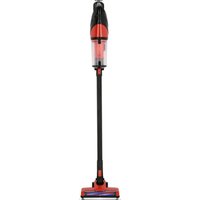
67120 - Vacuum Cleaner Lund - Free user manual and instructions
Find the device manual for free 67120 Lund in PDF.


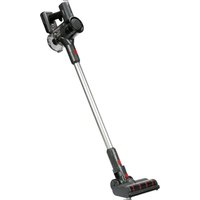
| Product type | Cordless cyclonic stick vacuum |
| Brand | Lund |
| Model | 67120 |
| Intended use | Domestic only, for hard floors and carpets |
| Rated voltage | 22.2 V DC |
| Rated power | 120 W |
| Electrical protection class | II |
| Dust tank capacity | 1 L |
| Weight | 0.8 kg |
| Battery type | Li-ion |
| Battery capacity | 2.2 Ah |
| Battery voltage | 22.2 V DC |
| Charger - input voltage | 100-240 V~, 50/60 Hz |
| Charger - rated power | 24 W |
| Charger - output voltage | 27 V DC |
| Charger - output current | 500 mA |
| Operating modes | Economy (Eco) and Maximum performance (Max) |
| Included accessories | Tube, turbo brush, 3-in-1 crevice brush nozzle, charging dock |
| Filter type | Internal paper filter + external plastic filter |
| Filter maintenance | Regular cleaning; do not wash in dishwasher; dry completely before reuse |
| Battery storage | Temperature 0-30°C, humidity 50%, charge at ~70% for long term |
| Number of battery cycles | Approximately 500 charge-discharge cycles |
Frequently Asked Questions - 67120 Lund
User questions about 67120 Lund
0 question about this device. Answer the ones you know or ask your own.
Ask a new question about this device
Download the instructions for your Vacuum Cleaner in PDF format for free! Find your manual 67120 - Lund and take your electronic device back in hand. On this page are published all the documents necessary for the use of your device. 67120 by Lund.
USER MANUAL 67120 Lund
natural_image
Black vacuum cleaner with extended handle and control panel (no visible text or symbols)CE
natural_image
Product catalog image showing various household appliances including a vacuum cleaner, power adapter, and tool holder (no text or labels visible)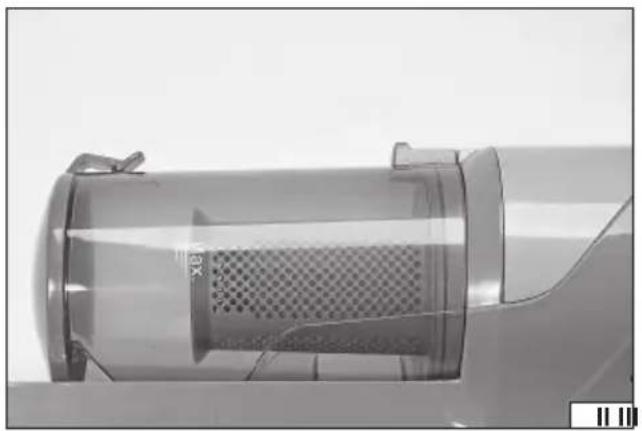
natural_image
Close-up of a transparent cylindrical device with a mesh chamber, no visible text or symbols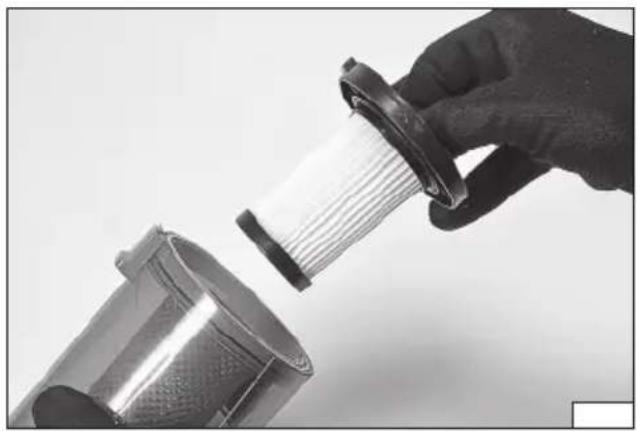
natural_image
Close-up of a hand holding a cylindrical device with a meshed internal structure, next to a metallic cylindrical component (no text or symbols visible)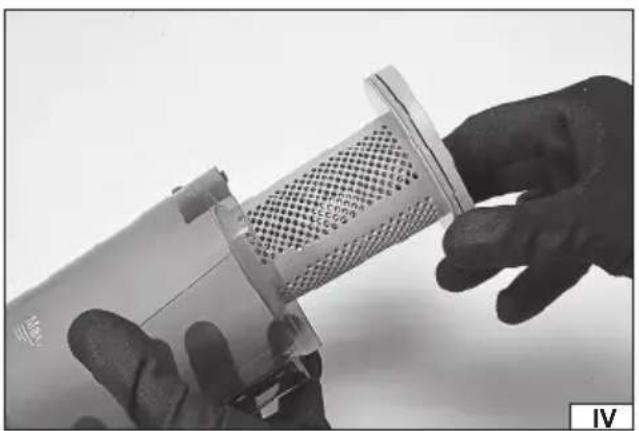
natural_image
Close-up of hands holding a small cylindrical device with a mesh grille (no visible text or symbols)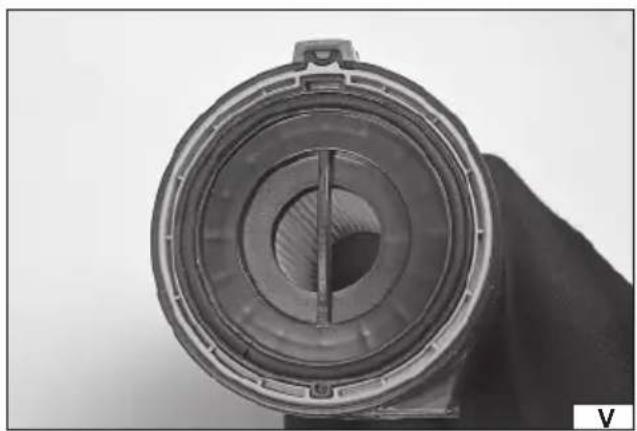
natural_image
Close-up of a cylindrical mechanical component with concentric rings and a central slot, held by a hand (no visible text or symbols)natural_image
Close-up of a hand holding a transparent vacuum cleaner with mesh chamber (no visible text or symbols)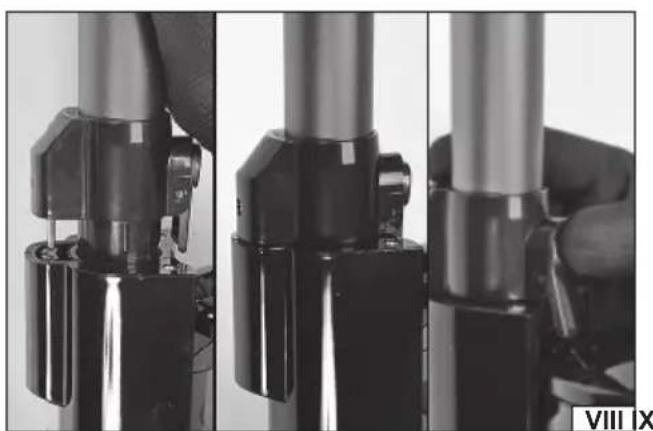
natural_image
Close-up of mechanical components with no visible text or symbols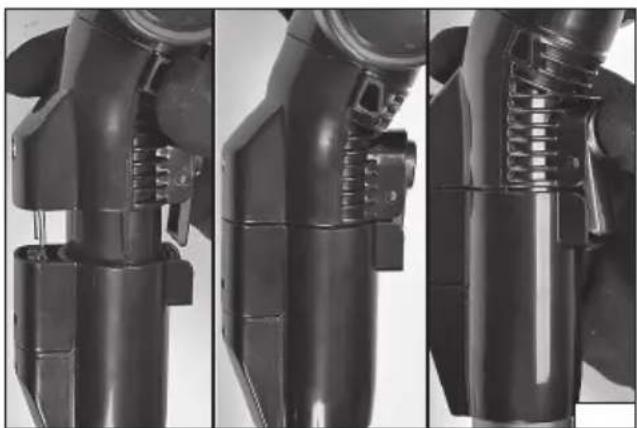
natural_image
Three-panel technical illustration of a robotic arm joint, showing internal components and structural details (no text or symbols)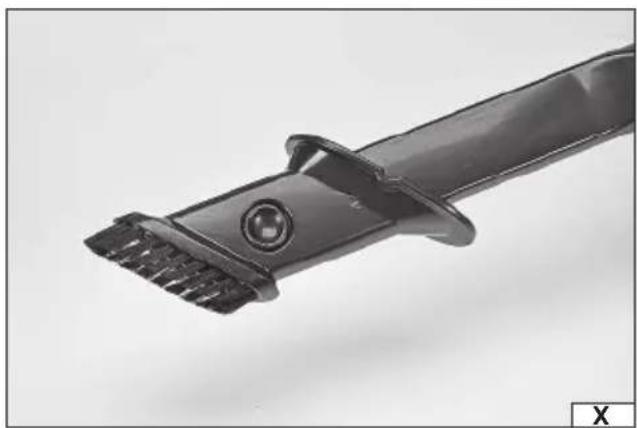
natural_image
Close-up of a black hair clip with textured bristles and a circular head (no text or symbols visible)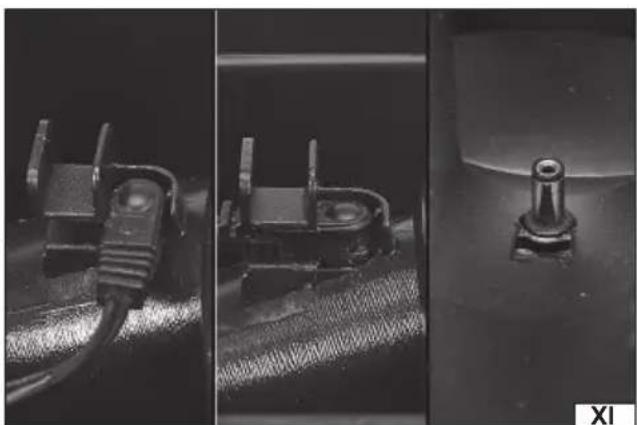
natural_image
Three-panel black-and-white photo showing mechanical components: a coiled cable, a rectangular component with circular features, and a cylindrical housing (no visible text or symbols)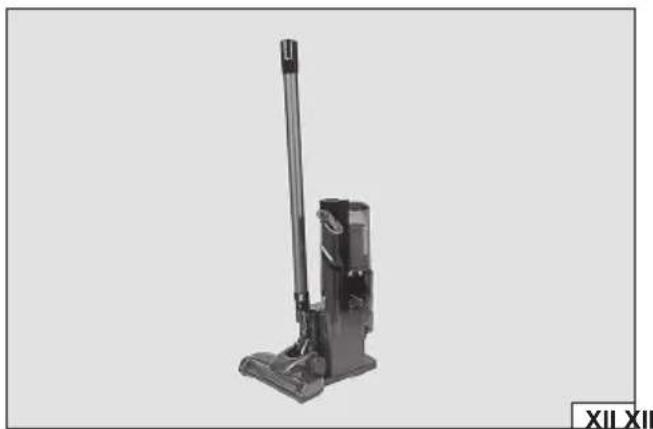
natural_image
Black vacuum cleaner with lever and base, no visible text or symbols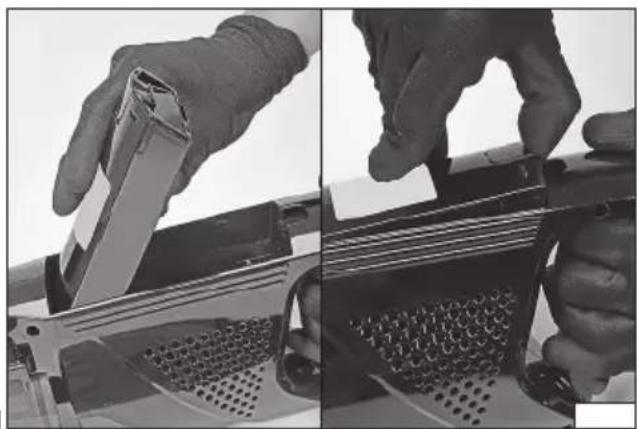
natural_image
Close-up of hands using a tool to adjust or install a metal grater (no visible text or symbols)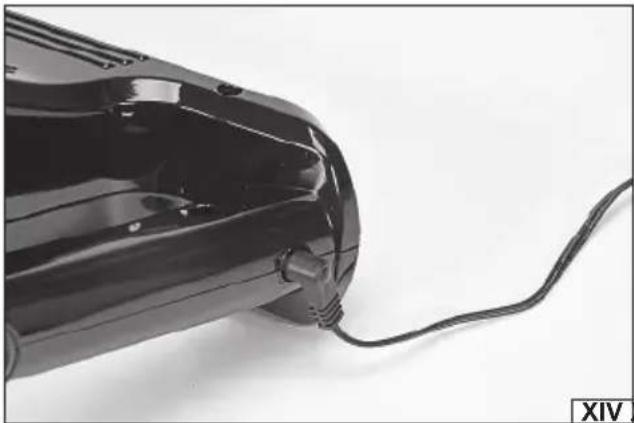
natural_image
Close-up of a black electric shaver with a coiled cable, no visible text or symbols
natural_image
Close-up of a mechanical component with a black arrow indicating a process or transformation (no visible text or symbols)PL
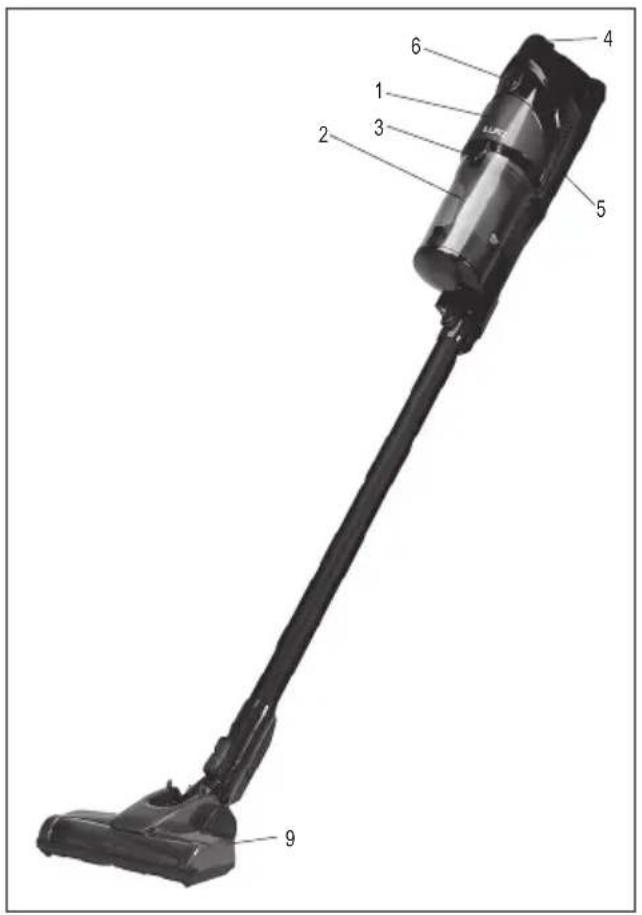
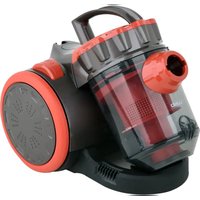
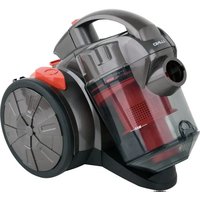
- vacuum cleaner
- dust container
- container lock button
- ON/OFF Switch
- battery
- battery charge indicator
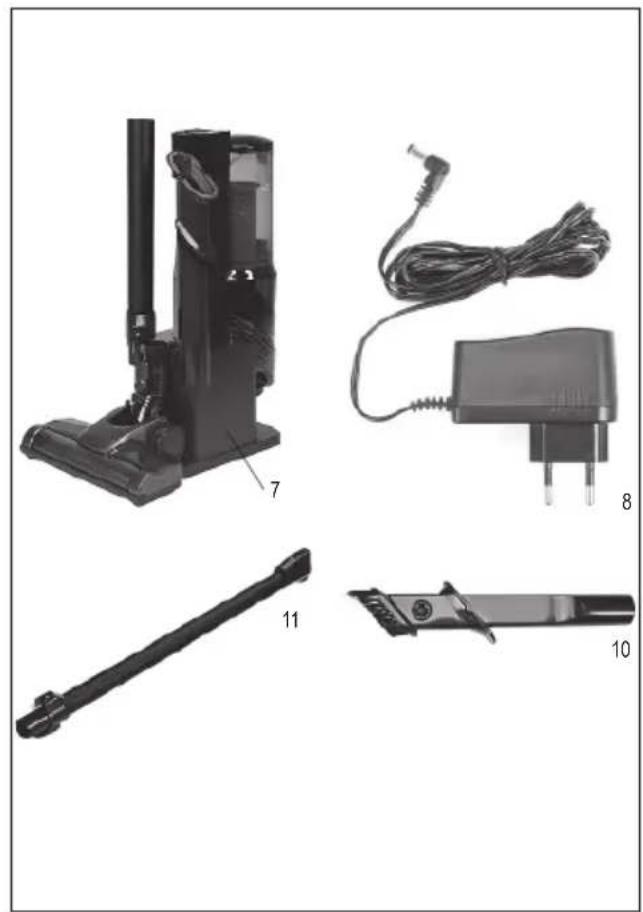
- docking station
- charger
- turbo brush
- crevice brush
- pipe
DE
Read the operating instruction
Second class of insulation
This symbol indicates that waste electrical and electronic equipment (including batteries and storage cells) cannot be disposed of with other types of waste. Waste equipment should be collected and handed over separately to a collection point for recycling and recovery, in order to reduce the amount of waste and the use of natural resources. Uncontrolled release of hazardous components contained in electrical and electronic equipment may pose a risk to human health and have adverse effects for the environment. The household plays an important role in contributing to reuse and recovery, including recycling of waste equipment. For more information about the appropriate recycling methods, contact your local authority or retailer.
APPLIANCE CHARACTERISTICS
The cyclone vacuum cleaner is used to clean hard floors and carpets with an air stream. The vacuum cleaner does not require dust bags. The air stream is set in a swirling motion inside the vacuum cleaner's container, which allows to separate the sucked in impurities. The product is designed for domestic use only and may not be used in commercial applications. The correct, reliable, and safe operation of the appliance depends on its proper use, so:
Reading and keeping the entire manual before the first use of the appliance.
The supplier shall not be held liable for any damage resulting from failure to observe the safety regulations and recommendations specified in this manual.
ACCESSORIES
The vacuum cleaner is supplied with additional accessories in the form of a pipe and brushes for various purposes.
SAFETY INSTRUCTIONS
CAUTION! Read all of the following instructions. Failure to do so may result in electric shock, fire, or personal injury.
FOLLOW THE INSTRUCTIONS BELOW
Do not use the product in an explosive environment containing flammable liquids, gases, or vapours. Do not place the appliance near any heat or fire sources. Connect the appliance only to the power network with the voltage and frequency indicated on the nameplate of the appliance. The plug of the power cord must match the power socket. Do not modify the plug. Do not use any power adapters to adapt the plug to the socket. An unmodified plug, which matches the socket, reduces the risk of an electric shock. After each application, unplug the power cord from the power socket. Avoid direct contact with grounded surfaces such as piping, radiators and refrigerators. Grounding of the body increases the risk of an electric shock. The appliance is intended for indoor use only. Do not expose the appliance to any precipitation or moisture. If water and moisture enters the appliance, the risk of an electric shock is significantly increased. Do not immerse the product in water or any other liquid. Do not obstruct the ventilation openings and make sure they are clear. Obstructed and/or clogged ventilation openings may cause the appliance to overheat. This can lead to damage to the appliance or cause fire or electric shock. Do not overload the power cord. Do not use the power cord to carry, connect, or disconnect the plug from the power socket. Avoid any contact between the power cord and heat sources, oil, sharp edges, and moving parts. Damage to the power cord increases the risk of an electric shock. If the power cord is damaged (e.g. it is cut, its insulation is melted), immediately unplug it from the wall socket, and return it to an authorised service facility. It is not allowed to use the product with a damaged power cord. It is not allowed to have the power cord repaired. It must be changed for a new one at an authorized service centre. When using extension cords, use extension cords with power parameters such as those shown on the appliance's nameplate. The cross-section of the extension wires shall not be less than the cross-section of the wires of the power cord of the appliance. This should be checked on the insulation of the power cord and the extension cord, or contact the manufacturer of the appliance and/or the extension cord. If you notice any damage to any part of the appliance, you must discontinue using it. In this case, the appliance must be taken to an
EN
authorised service centre or replaced by yourself, if this is permitted by the user's manual. Turn off the appliance and unplug the power cord from the wall socket before you start any work on replacing, cleaning, or adjusting. Switch off the appliance before replacing the accessories and unplug the power cord from the socket. This appliance may be used by children of at least 8 years of age and by persons with reduced physical, mental abilities and persons with no experience or knowledge of the appliance, if supervised or instructed on its safe use so that the risks associated with it were understandable. Children should not play with the appliance. Children should not be allowed to clean or maintain the product without supervision. The appliance is intended for home use only. Do not use the vacuum cleaner on people and animals, do not put the inlet of the suction nozzles near eyes and ears. Do not pass through the power cord with the vacuum cleaner, do not stand on the power cord. This can damage the cable and cause electrical shock. Check the condition of the vacuum cleaner filters before each use. It is forbidden to use the vacuum cleaner without filters or with damaged filters. Before each use, check the passability of the hose, pipes and suction nozzles. If a decrease in suction power or increased noise is noticed during operation, the passability of the above mentioned elements and the level of filling of the dust container must be checked. Do not vacuum cigarette butts, matches, hot ashes. Avoid pulling in sharp objects such as needles, nails, pins or staples. Do not vacuum water or other liquids. Do not vacuum wet waste. Do not vacuum fine dust, e.g. flour, gypsum, printer toner, etc. Do not use the vacuum cleaner for cleaning industrial waste, e.g. sawdust, debris, metal filings, etc. The vacuum cleaner must not be used in a dust extraction system where the dust is generated during operation of other tools, e.g. grinding, cutting, polishing, etc. When vacuuming, static charges may occur on the appliance. This is normal, especially when cleaning in low humidity conditions. In order to minimise this phenomenon, it is necessary to periodically touch the grounded, metal objects around the house, e.g. radiators, with the pipe and to increase the humidity in the room to be cleaned.
OPERATING THE APPLIANCE
CAUTION! Turn off the appliance and unplug the power cord from the socket during all equipment assembly and disassembly activities.
Appliance assembly and disassembly
Take the vacuum cleaner, the dust container and accessories out of the packaging and remove all packaging components. Install the dust container.
Before first use, make sure that the container has all components and is correctly assembled.
If the container is mounted on a vacuum cleaner, it must be removed. Slide the lock lever with your finger and then remove the container from the vacuum cleaner (II).
Remove the internal paper filter from the container (III) and then the external plastic filter (IV). The filters have properly shaped guides, which facilitate the correct installation of the filters in the container (V). Check the condition of each filter and the condition of the gasket in the paper filter base to ensure that no components are damaged. The container has a snap-on lid on the front, make sure it is closed. The lid is opened by pulling back the latch (VI).
Attach the container with the closed lid and the installed filters to the vacuum cleaner. Lock the recess in the container's bottom part onto the housing hook (VII) and then snap the rear part of the container into the housing.
A correctly installed container cannot be removed otherwise than by pulling back the lock lever.
Installation of accessories
Insert the pipe or the crevice brush into the opening in the vacuum cleaner housing underneath the dust container (VIII).
The pipe has electrical contacts which are used to transfer power to the turbo brush. The pipe must be installed in such a manner that the contacts reach the socket and the lock snaps into place to prevent unintentional disconnection of the pipe, and the ratchet mech-
EN
anism can be heard. The pipe can be disconnected by lifting and holding the lock latch and then pulling the pipe out of the opening. The crevice brush does not require electrical connection and locking. Attention! When detaching the tube or brush, do not try to rotate it, but just slide it out of the holder.
Fix the selected brush at the other end of the pipe (IX). Mounting is done by sliding the end of the pipe into the inside of the opening or brush. Similarly to the installation of the pipe, care must be taken to ensure that the brush is electrically connected and locked. The brush is disconnected in the same manner as the pipe.
Purpose of the accessories
Pipe - a fixed-length pipe which allows you to extend the length of the vacuum cleaner, making it possible to clean larger areas comfortably. The pipe is also used to power the turbo brush.
Turbo brush - universal brush for cleaning both carpets and all types of hard floors. Thanks to the additional rotating brush it is possible to effectively clean hair and fur entangled in the carpet pile.
3 in 1 crevice brush - allows for cleaning in narrow crevices. The brush is equipped with a double-sided cover with long and short bristles. Slide the cover onto the end of the brush so that the cover opening locks with the brush latch (X).
Docking station - allows you to set the vacuum cleaner on the floor during storage. The charger plug can be attached to the base of the station as shown in the picture (XI). If the charger is plugged into a socket, placing the vacuum cleaner in the station will cause the battery to begin charging automatically. The docking station also allows the attachment of a turbo brush, the pipe and the crevice brush (XII).
Charging the Battery
Make sure that the battery is correctly installed in the vacuum cleaner. Slide the battery with a part of its housing into the battery compartment (XIII), then slide it in completely into the battery compartment and secure it with the latch.
Plug the charger plug into the vacuum cleaner charging socket (XIV) or slide the vacuum cleaner into the docking station with the charger plug installed.
The charge indicator will light up LEDs successively. Initially, the LED lights pulsate and then change to a constant light. The charging is completed if all three LEDs are lit up constantly. The vacuum cleaner should be under supervision throughout the charging process. Immediately after charging is complete, disconnect the charger from the mains and the vacuum cleaner from the charger. If a docking station is used for charging, disconnect the charger from the mains.
WARNING! Leaving the vacuum cleaner with a fully charged battery connected to the charger will lead to irreparable damage to the battery and may cause fire or electric shock.
It is not possible to use a vacuum cleaner for cleaning while charging the battery.
Safety instructions for battery charging
Caution! Before starting charging, make sure that the charger body, cord and plug are not cracked or damaged. It is forbidden to use a defective or damaged charger! Use only the supplied accessory charger to charge the batteries. Use of another charger may result in fire or damage to the device. The battery should only be charged in a closed, dry room, protected against unauthorised access, especially by children. Do not use the charger without the constant supervision of an adult! If you need to leave the room where the vacuum cleaner is being charged, disconnect the charger from the mains by removing the charger plug from the socket. If smoke, odours, etc. are escaping from the charger, remove the charger plug from the socket immediately! The product is supplied with an uncharged battery and should therefore be charged according to the procedure described in the manual before use. Li-ion (lithium-ion) batteries do not have the so-called “memory effect”, which allows them to be recharged at any time. However, it is recommended to discharge the battery during normal operation and then charge it to full capacity. If, due to the nature of work, it is not possible to use the battery in such a manner every time, it should be done at least every several work cycles. Never discharge the batteries by closing the battery contacts, as this will cause irreparable damage! Also, do not check the battery charge status by closing the contacts and checking sparking.
Battery storage
If possible, it is recommended to disconnect the battery from the product for storage. Proper storage conditions will help to extend the life of the battery. The battery lasts for about 500 charge-discharge cycles. Store the battery in a temperature range from 0 to 30 degrees Celsius at a relative humidity of 50%. To store the battery for a longer period of time, it should be charged to approx. 70% of its capacity. In case of prolonged storage, the battery should be periodically charged once a year. Do not over-discharge the battery as this will shorten its life and may cause irreparable damage. During storage, the battery will gradually discharge due to leakage. The self-discharge process depends on the storage temperature, the higher the temperature, the faster the discharge process. If the batteries are stored incorrectly, the electrolyte may leak. In case of leakage, secure the leak with a neutralising agent, in case of electrolyte contact with eyes, rinse eyes thoroughly with water, and seek medical attention immediately. It is forbidden to use the device with a damaged battery. If the battery is completely used, return it to a specialist waste disposal centre.
Transport of batteries
Lithium-ion batteries are treated as hazardous materials according to legal regulations. The user of the device can transport the product with the battery and the batteries themselves by land. Additional conditions do not have to be met. If you entrust transport to third parties (e.g. courier service), follow the regulations for the transport of hazardous goods. Before shipping, please contact
EN
a qualified person. It is forbidden to transport damaged batteries. During transport, the disassembled batteries should be removed from the product, the exposed contacts should be secured, e.g. sealed with insulation tape. Protect the batteries in the packaging in such a way that they do not move inside the packaging during transport. National regulations for the transport of hazardous materials must also be observed.
Using the device
After installing the dust container and the selected accessories, make sure that the battery has been correctly installed in the vacuum cleaner. Press the ON/OFF switch. The battery indicator LEDs and the operating mode LED will light up. The vacuum cleaner has two modes of operation: economical and maximum efficiency. Economical mode allows for the extension of the operating time with one battery charge and for quieter operation. Maximum efficiency mode gives you maximum performance at the cost of shorter operation time with one battery charge and more noise during operation. The operating modes are changed by pressing the switch. The vacuum cleaner always starts in the economical operation mode, the "Eco" LED will light up. Pressing the switch again will activate the maximum efficiency mode, the "Eco" LED will turn off and the "Max" LED will turn on. Pressing the switch again will turn the vacuum cleaner off, all LEDs will go out.
Control the amount of impurities in the container during operation. The container has an indicator of the maximum level of impurities marked "Max". Place the container vertically with the lid downwards and check the amount of impurities. Empty the container, if necessary.
MAINTENANCE AND STORAGE
CAUTION! Never immerse the vacuum cleaner in water or other liquids. Doing so may result in electric shock.
After cleaning, turn off the vacuum cleaner with the switch, disconnect the power cord plug from the socket, disconnect the accessories and proceed with maintenance.
Disconnect the dust container from the vacuum cleaner. Open the lower cover of the container and discharge the waste collected in the container. Open the top cover, remove both filters. Clean the container with a damp, soft cloth, then dry with a dry cloth or allow to dry.
Warning! It is forbidden to use the vacuum cleaner with a wet or damp filter. This can result in electric shock.
The plastic filter can be rinsed under running, lukewarm water. Next dry with a dry cloth and allow to dry completely. Wait at least 24 hours after placing the filter in a well-ventilated place at room temperature.
Do not wash filters in mechanical dishwashers and do not dry them with a stream of hot air. This can cause deformation of the plastic material used for the construction of the filter. Avoid exposing the filters to direct sunlight.
No other part of the vacuum cleaner must be exposed to water. Gently tap the internal filter to shake off larger impurities. In the case of excessive contamination, replace the filter with a new one.
Clean the remaining parts of the vacuum cleaner with a cloth slightly soaked in water, then dry or allow to dry.
To clean the turbo brush shaft, disconnect the brush from the pipe or the vacuum cleaner, then slide the roller lock (XV) located on the underside of the brush, dismantle the roller, clean it and reinstall it in the brush in the order reverse to that of disassembly. The vacuum cleaner can be stored in the docking station. If the charger plug has been inserted into the docking station, make sure that the charger is not connected to the power supply while the vacuum cleaner is in storage. The accessories can be connected or disconnected from the vacuum cleaner for storage.
TECHNICAL PARAMETERS
| Parameter Units Value | ||
| Catalogue No. 67120 | ||
| Rated voltage [VDC] 22.2 | ||
| Rated power [W] 120 | ||
| Electrical protection class II | ||
| Dust container capacity [I] | 1 | |
| Weight | [kg] | 0.8 |
| Battery | ||
| - type | Li-ion | |
| - capacity | [Ah] 2.2 | |
| - rated voltage | [VDC] 22.2 | |
| Charger | ||
| - rated supply voltage | [V~] | 100 - 240 |
| - rated frequency | [Hz] | 50/60 |
| - rated power | [W] | 24 |
| - rated output voltage [VDC] | 27 | |
| - rated output current | [mA] | 500 |
| - electrical protection class | II |
GERÄTEBESCHREIBUNG
- PL
- DE
- APPLIANCE CHARACTERISTICS
- ACCESSORIES
- SAFETY INSTRUCTIONS
- FOLLOW THE INSTRUCTIONS BELOW
- EN
- OPERATING THE APPLIANCE
- Appliance assembly and disassembly
- Installation of accessories
- Purpose of the accessories
- Charging the Battery
- Safety instructions for battery charging
- Battery storage
- Transport of batteries
- Using the device
- MAINTENANCE AND STORAGE
- GERÄTEBESCHREIBUNG
Brand : Lund
Model : 67120
Category : Vacuum Cleaner