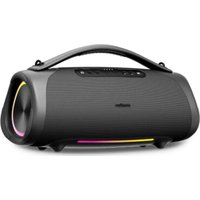
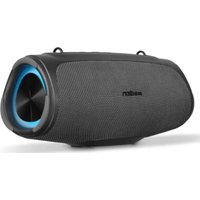
USER MANUAL LIFE P66896 (MD 43896) MEDION
natural_image
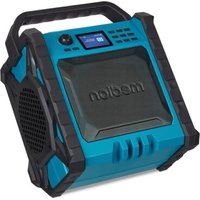
Blue and black portable electronic device with 'medion' branding, no visible text or symbols on body
Premium Bluetooth® Baustellenradio
Premium Radio de chantier Bluetooth®
Premium Bluetooth® Bouwradio
Premium Radio para obras con Bluetooth®
Premio Radio da cantiere Bluetooth®
Premium Bluetooth® Job Site Radio
MEDION LIFE P66869 (MD 43896)
Inhaltsverzeichnis
DE
natural_image
Line drawing of a person standing beside a mechanical device with a wavy line indicating motion or vibration (no text or symbols)
natural_image
Line drawing of a person standing near a device emitting a wavy line, with no text or symbols present.
natural_image
Line drawing of a person standing beside a mechanical device with a wavy line indicating motion or vibration (no text or symbols)
Abb. 3 - Installation verticale
natural_image
Line drawing of a person standing near a device emitting a wavy line, with no text or symbols present.
www.medion.com/conformity.
WAARSCHUWING! Explosiegevaar!
natural_image
Line drawing of a person standing beside a mechanical device with motion lines, no text or symbols present
natural_image
Line drawing of a person standing near a device with a wavy line extending from it, no text or symbols present
natural_image
Line drawing of a person standing beside a mechanical device with motion lines, no text or symbols present
natural_image
Line drawing of a person standing near a device with motion lines indicating motion (no text or symbols)
natural_image
Line drawing of a person standing beside a mechanical device with a wavy line indicating motion (no text or symbols)
natural_image
Line drawing of a person standing near a device with a wavy line extending from it, no text or symbols present
- Information about this user manual ....123
1.1. Explanation of symbols ...... 123 FR
-
Proper use 123
-
General safety instructions .... 124 NL
-
General safety instructions for batteries ....125
-
Package contents 126
-
Device parts 127
-
Getting started 129
7.1. Water spray protection 129
7.2. Setting up the device....129
7.3. Mains connection....130
7.4. Charging the device / battery operation....130
7.5. Adjusting the antenna....130
7.6. Switching the device on/off 130
7.7. Setting the volume....130
7.8. Equaliser 131
- Radio mode....131
8.1. Automatic station search (DAB only)....131
8.2. Select a station from the station list (DAB only)....131
8.3. Storing stations automatically (FM only) 132
8.4. Searching for stations manually (FM only)....132
8.5. Storing stations 132
8.6. Preset station selector 132
8.7. Radio settings....132
- Bluetooth® mode 133
9.1. Connecting Bluetooth ^® devices for the first time....134
9.2. Start/pause playback....134
9.3. Track selection....134
- Connecting an external playback device....135
10.1. Charging the playback device 135
- Settings 135
11.1. Sleep timer function.... 137
11.2. Alarm.... 137
- Cleaning and storage....138
12.1. Cable spool .... 138
-
Troubleshooting ....139
-
Disposal....140
-
Technical specifications....141
-
EU declaration of conformity 141
-
Trademark information 142
-
Service information.... 142
-
Legal notice.... 143

Thank you for choosing our product. We hope you enjoy using this device.
Please read the safety instructions and the user manual carefully before using the device for the first time. Note the warnings on the device and in the user manual.
Always keep the user manual close to hand. If you sell the device or give it away, please ensure that you also pass on this user manual. It is an essential component of the product.
1.1. Explanation of symbols
If a block of text is marked with one of the warning symbols listed below, the hazard described in that text must be avoided to prevent the potential consequences described there from occurring.

DANGER!
Warning: risk of fatal injury!

WARNING!
Warning: risk of possible fatal injury and/or serious irreversible injuries!

NOTICE!
Follow these instructions to prevent damage to the device!

More detailed information about using the device

Follow the instructions in the user manual!
IP 54 Protection class specification
• Protection against harmful quantities of dust
• Protection against splashing water on all sides
2. Proper use
The site radio is used to play audio material via Bluetooth or AUX and for radio reception (DAB+ and FM).
The specified reception frequency range represents the technical possibilities of the device. Information received outside this range may not be used or further distributed. The respective national laws must be observed.
Please note that we shall not be liable in cases of improper use.
Any other use is considered improper and can cause personal injury or property damage.
3. General safety instructions
KEEP THIS USER MANUAL IN A SAFE PLACE
■ Comply with all the information in this user manual, especially the safety instructions.
■ Only use replacement parts or accessories that we have supplied or approved.
■ Do not modify the device without our consent and do not use any auxiliary equipment that we have not approved or supplied.
■ Do not open the device housing. The device housing does not contain any parts that require cleaning or maintenance.
■ Unplug the device during a thunderstorm or if you are not going to use it for a long period of time.
■ If the device or connection cable is damaged, remove the plug from the mains socket immediately. This also applies if liquids or foreign objects have penetrated inside the device.
■ The mains plug is the separating device and must always be accessible.
■ Do not use the product at high volumes for long periods of time. Select a moderate volume setting to avoid hearing damage.
■ LCD screens contain liquid that can cause skin irritation and poisoning. If the liquid gets into your eyes, mouth or on your skin, rinse the affected areas with water and consult a doctor.
■ Protect the product from rain or moisture. Water ingress can increase the risk of electric shock.
■ This product is not suitable for use by persons (including children) with reduced physical, sensory or mental capabilities, or lack of experience and knowledge, unless they are supervised or have received instruction concerning use of the product by a person responsible for their safety. Children must be supervised to ensure that they do not play with the product. Store the product out of reach of children.
■ Do not use the device in potentially explosive atmospheres. This includes petrol stations, fuel storage areas and areas where solvents are processed. This device must also not be used in areas with particle-laden air (for example, flour or wood dust).
■ Protect the radio from heat
and fire. Do not leave it in a hot place, e.g. in the immediate vicinity of a heat source, in direct sunlight or inside a vehicle parked in direct sunlight. Otherwise there is a risk of fire, explosion and injuries.
4. General safety instructions for batteries
The site radio is equipped with a built-in rechargeable battery for supplying power to external playback devices such as smartphones or MP3 players. Please note the following:

WARNING!
Risk of explosion!
There is a risk of explosion if the rechargeable battery is replaced incorrectly. Replace batteries only with the same or equivalent type.
■ Do not throw the device into a fire, and do not short-circuit it or dismantle it.
■ The site radio should not be left unattended while it is being charged.
5. Package contents

DANGER!
Risk of choking and suffocation!
Packaging film can be swallowed or used improperly, creating a risk of choking and suffocation.
- Keep all packaging materials used (bags, pieces of polystyrene, etc.) out of the reach of children.
■ Do not let children play with the packaging material.
Remove the product from the packaging and remove all packaging material.
▶ Check your purchase to ensure that all items are included and in perfect condition. If anything is missing or damaged, please contact us within 14 days of purchase. In the event of damage, only use the device after consultation with customer services.
The following items are supplied with your product:
- Site radio
• Magnetic storage tray (already installed)
- Short manual
6. Device parts
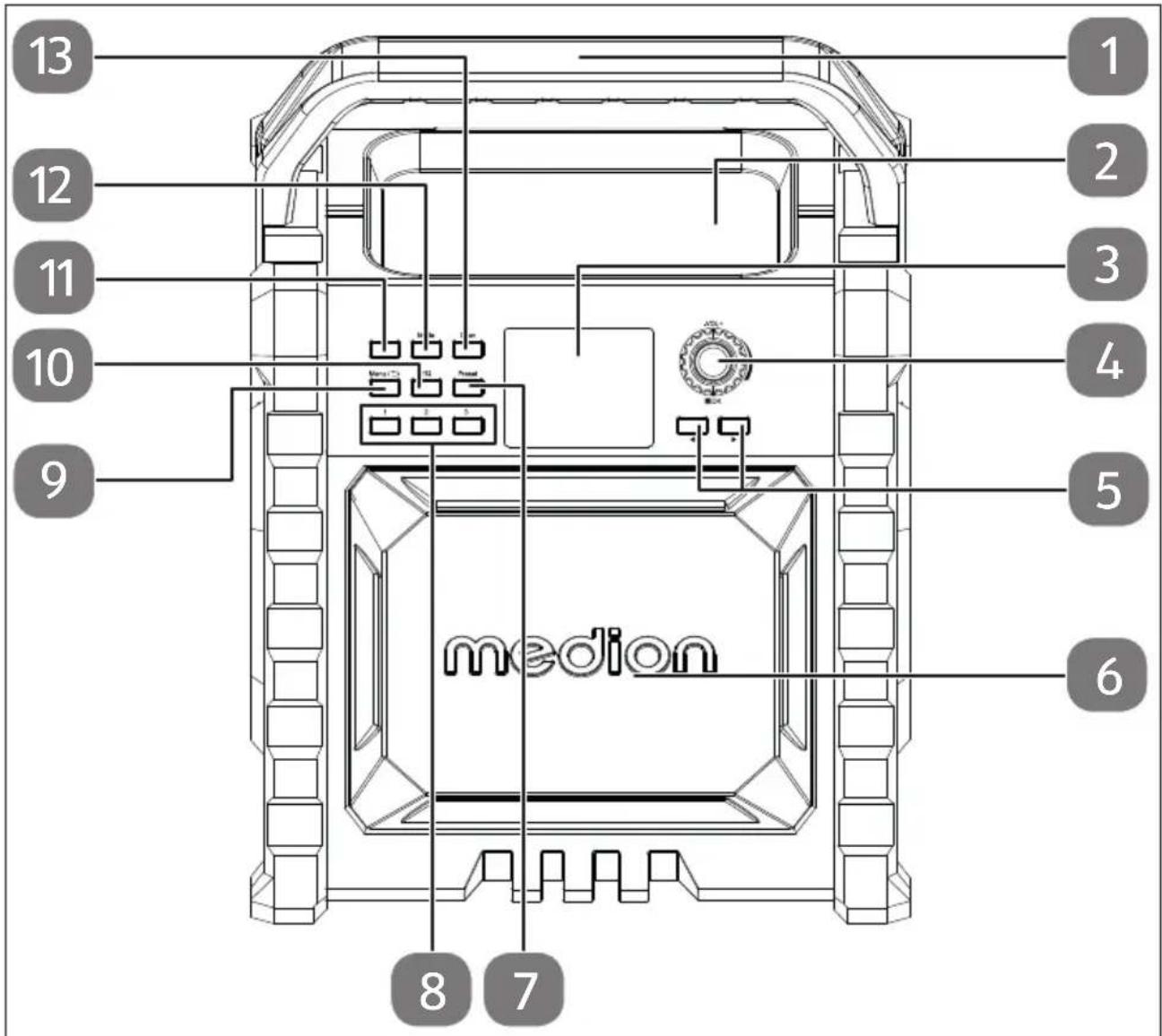
Abb. 1 - Front view
- Carry handle
- Magnetic storage tray (e.g. for screws)
- Display
-
- VOL + — Decrease/increase vol-
ume

OK — Start/pause playback /
confirm menu selection
- ▶ — Next track, navigate in the menu, perform station search
◀ — Previous track, navigate in the menu, perform station search
-
Speaker
-
PRESET — Store/call up station
- Station memory slot 1–3
- MENU/ ←— Back
Call up menu
- EQ — Equalizer
- ⏻ — Switch device on/off
- MODE — Select operating mode
- SCAN — Start automatic station search
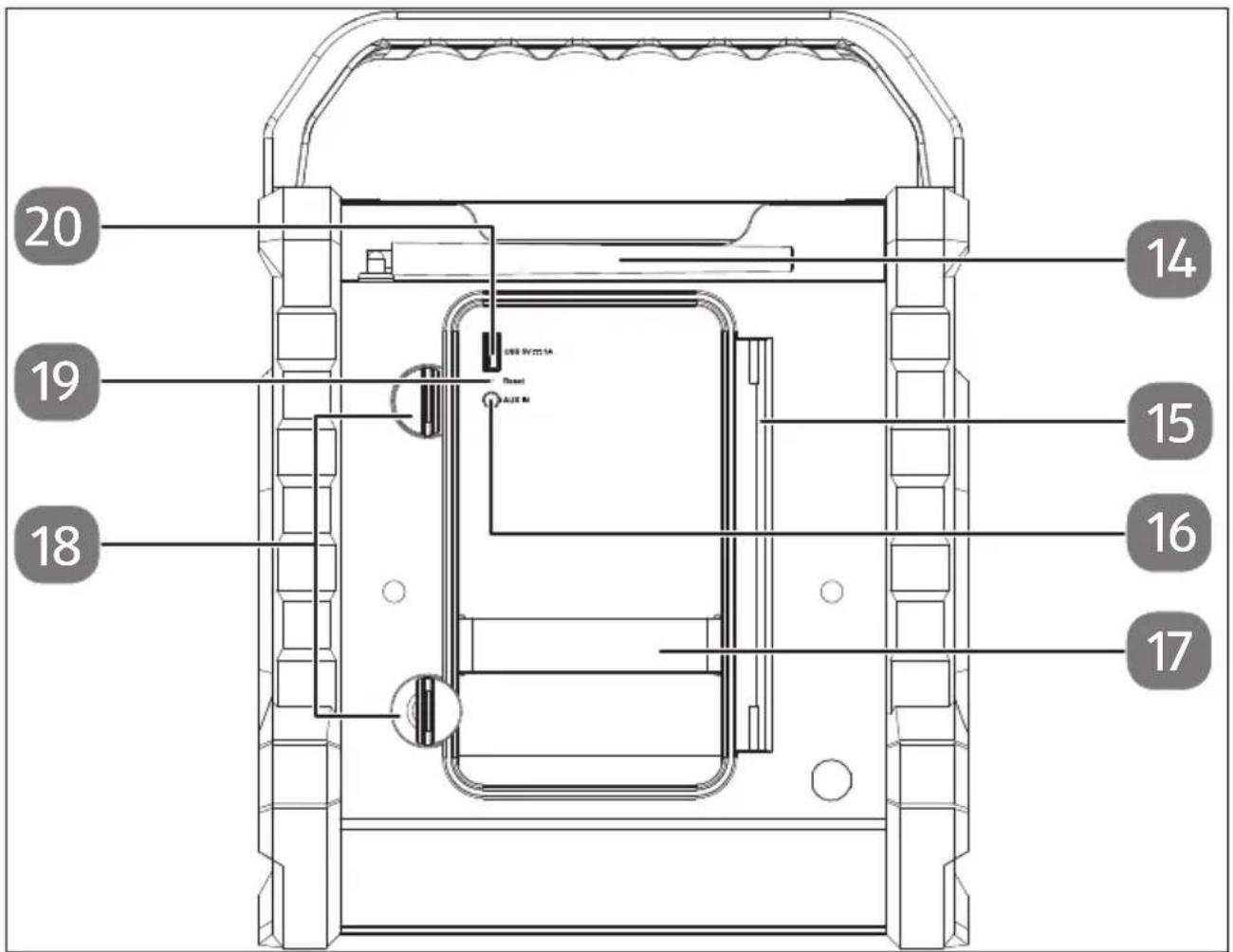
Abb. 2 - Rear view
- Antenna
- Storage compartment with lid and integrated cable spool
-
AUX IN — Audio connector for external device
-
Rubber mount for e.g. smartphones
- Catch for closing the storage compartment lid
- RESET — Reset the device
- USB 5V --- 1A — USB Type A charging port for external devices
7. Getting started
7.1. Water spray protection

NOTICE!
Risk of damage!
Risk of damage to the device if installed incorrectly
■ Please note that protection against water spray is only guaranteed when the storage compartment is closed and the side radio is stored in an upright (normal) position.
7.2. Setting up the device
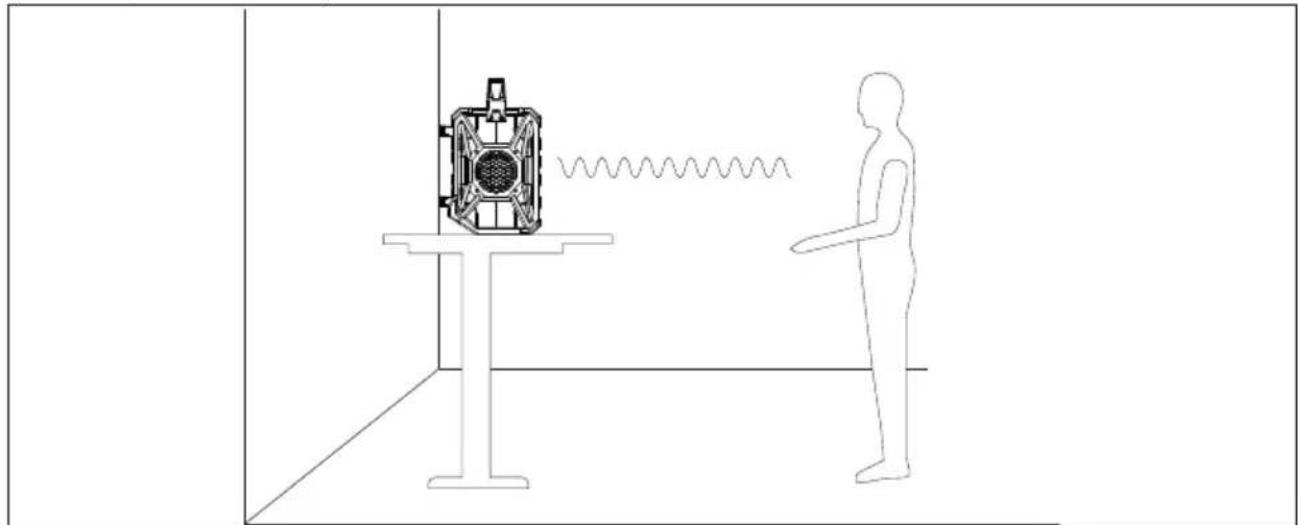
If you set up the speaker at body height (e.g. on tables, cupboards, shelves or similar), then you can place it directly on the relevant surface.
natural_image
Line drawing of a person standing beside a mechanical device with a wavy line indicating motion (no text or symbols)
Abb. 3 - Level installation
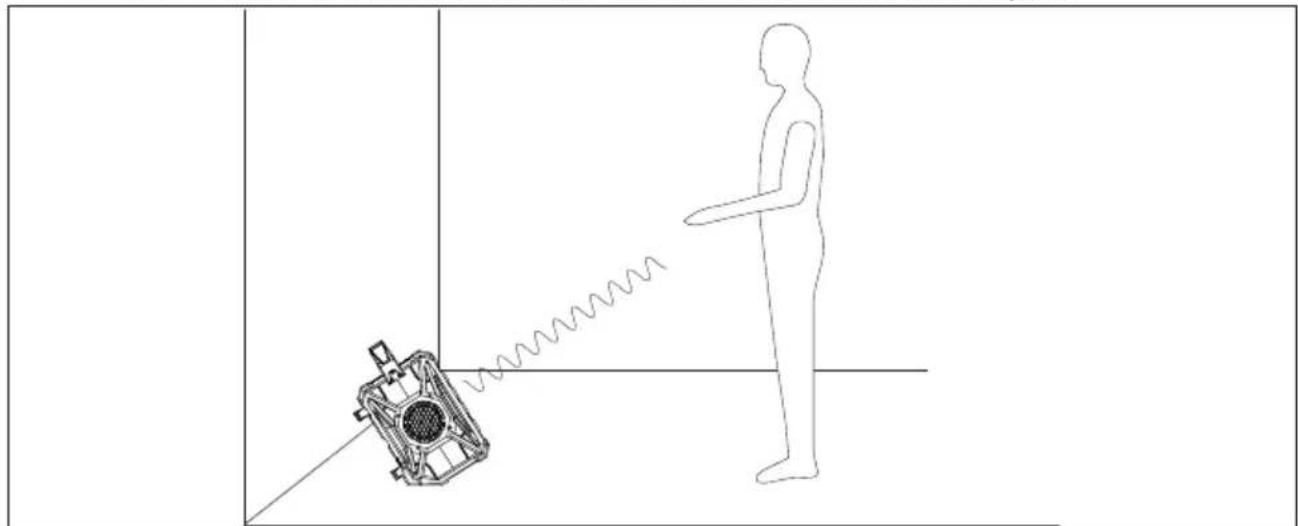
If the speaker is to be set up on the floor, you have the option angling the device backwards slightly and setting it up at a slight angle.
To enable this, the circumferential bumper on the bottom rear side is angled.
natural_image
Line drawing of a person standing near a mechanical device emitting a wavy line, with no text or symbols present.
Abb. 4 - Angled installation
7.3. Mains connection
Connect the mains cable.
▶ Only connect the site radio to a properly installed, earthed and fused socket. The local mains voltage must correspond to the technical specifications for the device.

If you do not need to use the device for a long period of time, please take it out of operation. To do so, pull the mains plug out of the socket.
7.4. Charging the device / battery operation

Only charge the device when it is dry and indoors. Ensure that the device is completely dry before charging.
To extend the battery life, disconnect the device from the external power source when the battery is fully charged.
The device can also be operated without an external power source via the integrated rechargeable battery.
If the battery charge level is too low, the battery symbol on the display flashes and the speaker automatically switches off.
During the charging process, flashing bars on the battery symbol indicate the charge level.
As soon as the battery is fully charged, the battery symbol lights up with a plug.
7.5. Adjusting the antenna
For radio reception, fold up the rod antenna integrated on the back and arrange it for the best reception.
7.6. Switching the device on/off
▶ Press the button to switch on the radio.
Press the button again to switch the device into standby mode. Standby is shown on the display followed by the time.
▶ Press and hold the button until Power Off is shown on the display to switch off the radio.
7.7. Setting the volume
- When the device is in use, turn the - VOL + controller towards - to decrease the volume.
When the device is in use, turn the - VOL + controller towards + to increase the volume.
The volume set is briefly shown on the display.
7.8. Equaliser
▶ During operation, press the EQ button to open the settings menu
▶ Use the dial to select one of the pre-programmed equaliser settings: call up Normal, Classic, Jazz, Pop, Rock, Speech and My EQ.
7.8.1. Equaliser sett ings
You can use the My EQ Setup menu option to customise the bass and treble.
As described in the previous section, select the My EQ Setup option and confirm your selection with OK.
Now use the dial to select which setting (bass or treble) you want to change.
▶ Press OK to confirm your selection.
▶ Use the dial to set the desired value and confirm with the OK button.
8. Radio mode
This device can receive both DAB and FM radio stations. Select the required radio mode:
▶ Fold up the antenna and align it for optimum reception.
▶ Switch on the device.
▶ Press the MODE button on the device repeatedly until you have reached radio mode. Digital Radio or FM is shown on the display.

The antenna symbol with the current reception strength is shown on the display. In general, the more vertical bars are displayed, the stronger the signal and the better the reception.
8.1. Automatic station search (DAB only)

When the device is used for the first time, the site radio automatically performs a station search for digital radio stations. The received stations are stored in alphabetical order.
You can start a complete search at any time using the SCAN button.
8.2. Select a station from the station list (DAB only)
▶ Press the ◀ or ▶, button to open the list of stations.
▶ Use the dial to select a station.
▶ Then press the OK button to select and use the station.
8.3. Storing stations automatically (FM only)
You can save up to 40 FM stations automatically.
▶ Press the SCAN button, the automatic station search starts.
All stations found are stored by frequency.
8.4. Searching for stations manually (FM only)
▶ Press the ◀ or ▶ button several times as needed until the required frequency is set. The frequency increases or decrease by 0.05 MHz with each press.
8.5. Storing stations
You can store up to 40 stations.
▶ Press the or ▶ button several times as needed until the required frequency is set or select the required DAB stations from the station list.
▶ Press and hold the PRESET button. The display shows the overview of memory slots 1-40.
▶ Use the dial to select a memory slot from 1–40.
▶ Press the OK button to save the station to this slot.

If there is already a station in the selected memory slot, this is deleted and replaced by the new selection.
8.6. Preset station selector
▶ Press the PRESET button, the station frequency flashes.
▶ Use the dial to select a memory slot from 1–40.
▶ Press OK to confirm your selection.
▶ Memory slots 1–3 can be selected directly using the three memory slot buttons.
8.7. Radio settings
You have various setting and control options in the two radio modes.
▶ Press the MENU button to open the settings menu.
▶ Use the dial to select the required menu option.
▶ Confirm this and all further selections using the OK button.
| Menu name Description | |
| Station List (DAB operating mode only) |
| List of all stations that can be received |
| Scan (DAB operating mode only) |
| Automatic station search |
| Manual Scan (DAB operating mode only) |
| Manual search of a transponder from the default list |
| Prune Invalid (DAB operating mode only) |
| NO | Delete all DAB stations that cannot be received in the current region. |
| YES |
| DRC (DAB operating mode only) |
| Off | Dynamic Range Control (DRC): compression selection; default setting: off |
| Low |
| High |
| Scan Setting (FM operating mode only) |
| Strong Stations Only | Select whether to search for all (even weak) or only strong stations. |
| All Stations |
| Audio Setting (FM operating mode only) |
| Stereo Allowed | Select whether to play mono or stereo sound (only for sound playback through headphones). |
| Forced Mono |
9. Bluetooth® mode
▶ Press the MODE button once or several times until Bluetooth is shown on the display.
9.1. Connecting Bluetooth ^® devices for the first time
▶ Switch on Bluetooth mode as described above. The radio is in pairing mode.
▶ Enable the Bluetooth function on your external device as well.
▶ Perform pairing on the external device. Refer to the user manual for your external device for more information. The name of the audio system is "MEDION MD 43896".
When the beep sounds, pairing is complete and the external device can be used on the site radio.
▶ If you want to stop data transfer via Bluetooth, switch off the Bluetooth function on the external device or press the MODE button to switch to a different mode.
▶ Press and hold the OK button to interrupt the current Bluetooth connection. A beep sounds and pairing is disconnected.
Known external devices, which have already been paired once, will be connected again automatically in the future. It is not necessary to pair the devices again. To reconnect, simply activate Bluetooth mode on both devices.

To achieve optimal volume control, increase the volume on the external device to the maximum and then control the volume on the device.
9.2. Start/pause playback

Control playback using the external audio device or the buttons on the radio.
▶ Briefly press the OK and start playing tracks.
▶ To pause playback, press the OK button again. Playback is paused.
▶ Pressing the OK button again resumes playback.
9.3. Track selection
▶ Press the ◀ button to skip back to the start of the track that is currently being played.
▶ Press the button twice in quick succession to return to the previous track.
▶ Press the button to skip to the next track.
10. Connecting an external playback device
You can use the AUX IN jack to connect an external playback device (for example a smartphone or MP3 player).

To achieve optimal volume control, increase the volume on the external device to the maximum and then control the volume on the device.
▶ Switch on the site radio.
▶ Press the MODE button and select the Aux input mode.
▶ Switch on the external device.
▶ Unlock the storage compartment door on the back of the site radio.
To do this, twist the two catches.
▶ Open the storage compartment door.
Insert a 3.5 mm jack cable into the AUX IN jack on the site radio.
Insert the other connector on the jack cable into the AUX output on your external device.
▶ Start audio playback on your external device.
Place the external device inside the storage compartment door. To aid storage, there is a rubber band in the storage compartment, which you can use to clamp the device.
▶ Close the storage compartment door.
- Lock the storage compartment door.
To do this, twist the two catches
10.1. Charging the playback device
There is also a USB Type A port in the storage compartment that you can use to power the external device during playback or charge the external device.
To do this, connect the external device to the USB port and the USB port on your external device using a suitable USB cable.
11. Settings
The following operating options remain the same in the various settings menus:
▶ Press the MENU button to open the settings menu.
▶ Use the dial to select the System Settings menu and press OK to open the menu.
▶ Use the or ▶ buttons to select the setting that you would like to change.
▶ Press OK to open the required menu item.
▶ Use the ◀ or ▶ buttons to make the required settings.
▶ Press the OK button to confirm the settings.
Press the button to go back one menu item.
| Menu name Description | |
| System |
| Sleep | Setting the sleep timer, see section “11.1. Sleep timer function” on page 137 |
| Alarm | Setting the alarm, see section “11.2. Alarm” on page 137 |
| Equaliser | Select a pre-set equaliser setting Normal, Classic, Jazz, Pop, Rock, Speech, My EQ |
| My EQ Setup | You can configure the equaliser settings manually here. |
| Time/Date Set Time/Date | Manually set the time and date |
| Auto Update |
| Set 12/24 Hour |
| Set Date Format |
| Clock Style |
| Backlight Timeout | Select a time period after which the display is dimmed. |
| On Level |
| Dim Level |
| Language | Select the menu language |
| Factory Reset | Reset to factory settings |
| Software Update | Use this menu item to update the radio firmware. |
| Software Version | Display of software version |
11.1. Sleep timer function
You can use the sleep timer function to define a period of time after which the radio should switch off automatically.
▶ Switch on the radio.
▶ Select the required operating mode using the MODE button.
▶ Call up the system menu and the Sleep setting
▶ Use the dial to select the required switch-off time (15; 30; 45; 60 or 90 minutes).
▶ Press the OK button to confirm the settings.
▶ To deactivate a sleep timer, select the Off option.
▶ Press the controller to confirm the setting.

The activated sleep timer is shown on the display with the 90 symbol and the remaining time.
11.2. Alarm
The device has two alarm memories (Alarm1 and Alarm2) that can be set independently of each other.
▶ Switch on the radio.
▶ Call up the system menu and the Alarm setting
▶ Press OK to open the option.
▶ Use the dial to select Alarm 1 or Alarm 2.
▶ Press OK to start setup.
▶ Use the dial to select all settings one after the other and confirm each selection by pressing OK.
An overview of the settings can be found in the following table:
| Setting Option | |
| Alarm On; off | |
| Frequency Once; Weekday; Weekend; Daily |
| Wake Up time Hour; Minutes | |
| Source Buzzer; Digital Radio; FM |
| Preset(only for Digital Radio and FM) | Last Listened (DAB and FM)Station frequency selection (FM only)Saved station selection |
| Duration 15; 30; 45; 60; 90; 120 |
| Loudness 1–16 | |

The symbol is shown on the display with the number of the respective alarm.
12. Cleaning and storage
■ Before cleaning, pull the mains adapter out of the mains socket.
■ Use a soft, dry cloth to clean the device. Avoid the use of chemical solutions and cleaning products because these may damage the device surface and/or the labels on it.
■ If the device is not going to be used for a long period of time, pull the plug out of the mains socket.
In the event of storage for a longer period of time, charge the device regularly to prevent the rechargeable battery from becoming completely discharged.
12.1. Cable spool
▶ Use the cable spool on the back of the device and attach the cable to secure it.
13. Troubleshooting
| PROBLEM POSSIBLE CAUSE REMEDY | |
| The device cannot be switched on. | · The battery may be dead.· The mains adapter is not connected properly. | ▸ Ensure that the mains adapter is properly connected. |
| The device switches off when it is in use. | · The battery may be dead. | ▸ Operate the device via the mains adapter or charge the battery. |
| No or poor radio reception | · The station signals are too weak. | ▸ Adjust the frequency of the stations.▸ If necessary, change the location of the radio.▸ Re-align the antenna.▸ Extend the antenna fully. |
| No sound · The volume is set too low. | ▸ Increase the volume as required. |
DE
FR
NL
ES
IT
EN
14. Disposal

PACKAGING
Your device has been packaged to protect it from damage in transit. The packaging is made of materials that can be recycled in an environmentally friendly manner.
DEVICE
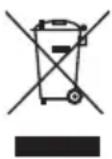
The device is equipped with one integrated rechargeable battery. At the end of its service life, do not dispose of the device with normal household rubbish. Instead, contact your local authority to find out how to dispose of the device in an environmentally friendly manner at collection points for electrical and electronic scrap.
RECHARGEABLE BATTERIES
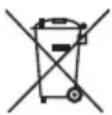
Do not dispose of used rechargeable batteries with household rubbish. Rechargeable batteries must be disposed of correctly. Retailers that sell batteries and local collection points provide containers in which you can dispose of them. Contact your local waste disposal company or your local authority for more information.
In connection with the sale of rechargeable batteries or the supply of equipment containing batteries, we are obliged to draw your attention to the following:
As the end user, you are legally required to return used rechargeable batteries.
The crossed-out wheelie bin symbol means that the rechargeable batteries must not be disposed of with household rubbish.
- Technical specifications
| Radio |
| Output power 30 W RMS | |
| UKW frequency band 87.5–108 MHz | |
| DAB band III 174.928–239.200 MHz | |
| RDS Yes | |
| Station memory 40 (DAB), 40 (FM) | |
| Bluetooth version V 5.4 | |
| Bluetooth operating frequency 2,402–2,480 MHz | |
| Bluetooth max. transmission power < 10 dBm | |
| Environmental conditions In operation: 0°C ~ +35°C < 90% humidityNot in operation: -10°C ~ +55°C< 90% humidity | |
| Protection class IP54 (only with closed storage compartment) | |
| Dimensions (W x H x D) | Approx. 265 x 215 x 344 mm |
| Weight | Approx. 3.8 kg |
| Power consumption in standby mode | < 1 W |
| Rechargeable battery |
| Manufacturer | Shenzhen Watec New Energy Technology Co. Ltd. |
| Model | SZWATEC-18650-2550-4S1P |
| Output voltage | 14.4 V, 2550 mAh, 36.72 Wh |

MEDION AG hereby declares that the radio equipment type complies with the Directive 2014/53/EU [(RE Directive), Directive 2011/65/EU (RoHS Directive) and Regulation EU2023/1542 (Batteries Directive)]. The complete EU declaration of conformity is available at: www.medion.com/conformity.
The Bluetooth ^® word mark and logos are registered trademarks of Bluetooth SIG, Inc. and are used by Medion AG under license.
Other trademarks are the property of their respective owners.
Please contact our Customer Service team if your device ever stops working the way you want or expect it to. There are several ways for you to contact us:
- In our Service-Community, you can meet other users, as well as our staff, and you can exchange your experiences and pass on your knowledge there.
You will find our Service-Community at community.medion.com.
• Alternatively, use our contact form at www.medion.com/contact.
- You can also contact our Service team via our hotline or by post.
| Opening times Hotline number UK |
| Mon – Fri: 08.00 – 20.00Sat – Sun: 10.00 – 16.00 | 1 0333 3213106 |
| Service address |
| MEDION Electronics Ltd.120 Faraday Park, Faraday Road, DorcanSwindon SN3 5JF, WiltshireUnited Kingdom |
You can download this and many other sets of operating instructions from our service portal at www.medionservice.com.
We have stopped providing printed copies of our warranty terms and conditions as part of our commitment to sustainability, but you can access the warranty terms and conditions on our service portal.
You can also scan the QR code on the side of the screen, to download the operating instructions onto your mobile device from the service portal.
19. Legal notice
Copyright 2024
Date: 12. September 2024
All rights reserved.
These operating instructions are protected by copyright.
Mechanical, electronic and any other forms of reproduction are prohibited without the written permission of the manufacturer.
Copyright is owned by the company:
MEDION AG
Am Zehnthof 77
45307 Essen
Germany
Please note that you cannot use the address above for returns. Please always contact our Customer Service team first.
DE
FR
NL
ES
IT
EN