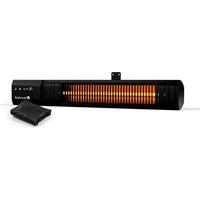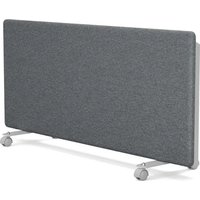
Therma Touch - Heating Blumfeldt - Free user manual and instructions
Find the device manual for free Therma Touch Blumfeldt in PDF.


User questions about Therma Touch Blumfeldt
0 question about this device. Answer the ones you know or ask your own.
Ask a new question about this device
Download the instructions for your Heating in PDF format for free! Find your manual Therma Touch - Blumfeldt and take your electronic device back in hand. On this page are published all the documents necessary for the use of your device. Therma Touch by Blumfeldt.
USER MANUAL Therma Touch Blumfeldt
natural_image
Abstract green circular logo with three curved segments (no text or symbols)
natural_image
Abstract green circular logo with two leaf-like shapes (no text or symbols)
natural_image
Abstract green circular logo with three leaf-like shapes forming a Y-shape (no text or symbols)text_image
QR code image containing encoded data, no visible human-readable textINHALT
Technische Daten 3
natural_image
Close-up of a metallic mechanical component with a circular annotation highlighting a small feature, no visible text or symbols.natural_image
Technical line drawing of two mechanical components with mounting holes and a handle (no text or symbols)text_image
180mm 375mmtext_image
A (min) B C (min) 375mm 180mm 295mm minnatural_image
Technical line drawing of a mechanical component with cross-sectional view and mounting detail (no text or symbols)natural_image
Close-up of a mechanical component with a circular annotation highlighting a specific feature (no text or symbols visible)FREISTEHENDE INSTALLATION
natural_image
Simple diagram showing sun, moon, and light symbols with directional arrows (no text or labels)Tastensperre
PRODUKTINFORMATIONEN
natural_image
Symbol of a trash bin with crossed lines indicating no waste or discharge, and a solid black rectangle below (no text or labels)Berlin Brands Group UK Limited
PO Box 42
272 Kensington High Street
London, W8 6ND
Großbritannien
Dear Customer,
Congratulations on purchasing this equipment. Please read this manual carefully and take care of the following hints to avoid damages. Any failure caused by ignoring the items and cautions mentioned in the instruction manual are not covered by our warranty and any liability. Scan the QR code to get access to the latest user manual and other information about the product.
text_image
QR code image containing encoded data, no visible human-readable textCONTENTS
Technical Specifications 17
Safety Instructions 18
Wall-mounted Installation 20
Free-standing Installation 22
Function Overview 23
Operation 25
Programme Mode Operation 26
Product Information 29
Disposal Considerations 30
Manufacturer & Importer (UK) 30
TECHNICAL SPECIFICATIONS
| Article number 10046 | 526, 10046527, 100465258 |
| Power supply 220-240 | V~ 50-60 Hz |
| Power 2000 W | |
| Mounting wall -mounted/ free-standing | |
SAFETY INSTRUCTIONS
- Check that the voltage indicates on the data plate corresponds with that of the local network before connecting the appliance to the mains power supply.
- If the supply cord is damaged, it must be replaced by a qualified engineer in order to avoid a hazard.
- The heater must not be positioned directly under the power socket.
- Keep furniture, curtains and other flammable material at least 1 meter away from the appliance.
- Keep out of reach of children and do not allow them to operate this appliance.
- This appliance is intended for household use only and should not be used for industrial purposes.
- Do not operate this appliance after a malfunction or after being damaged in any way.
- Repairs to electrical appliances should only be performed by a qualified electrician.
- Improper repairs may place user at serious risk.
- Do not run the mains cable under carpets, rugs, etc.
- Do not allow the mains cable to hang over sharp edges or come in contact with hot surfaces.
- In order to avoid overheating, do not cover the heater.
- Do not use this heater with a programmer, timer, separate remote control system or any other device that switches the heater on automatically, since a fire risk exists if the heater is covered or positioned incorrectly.
- Never immerse the product in water or any other liquid for any reasons.
- Do not use this heater in the immediate surroundings of a bath, a shower or a swimming pool.
- Do not use the appliance outdoors.
- Do not use if you have wet hands.
- Never use the appliance on or near hot surfaces.
- If the supply cord is damaged, it must be replaced by the manufacturer, its service agent or similarly qualified persons in order to avoid a hazard.
- Before cleaning the appliance, make sure it is unplugged from the power and that it is completely cooled.
- Do not clean the appliance with abrasive chemicals.
- Never use accessories that are not recommended or supplied by the manufacturer. It could cause danger to the user or damage to the appliance.
- This device may be only used by children 8 years old or older and persons with limited physical, sensory and mental capabilities and / or lack of experience and knowledge, provided that they have been instructed in use of the device by a responsible person who understands the associated risks.
- Children of less than 3 years should be kept away unless continuously supervised.
- Children aged from 3 years and less than 8 years shall only switch on/off the appliance provided that it has been placed or installed in its intended normal operating position and they have been given supervision or instruction concerning use of the appliance in a safe way and understand the hazards involved. Children aged from 3 years and less than 8 years shall not plug in, regulate and clean the appliance or perform user maintenance.
- Children should be supervised to ensure that they do not play with the appliance.
CAUTION
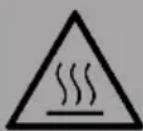
Risk of burns! Some parts of this product can become very hot and cause burns. Particular attention has to be given where children and vulnerable people are present.
- Always ensure the heater is plugged into a suitable socket, one that is tested for outdoor use.
- To disconnect heater, turn controls to OFF, then remove plug from socket. Do not unplug by pulling on the power cable.
- Always unplug the unit and ensure the unit is completely cold before moving, cleaning or storing.
- This heater is intended for domestic use only and should not be used commercially for contract purposes. Any alternative use, not recommended by the manufacturer, may result in fire, electric shock, or injury to persons.
- The use of attachments on the heater is not recommended.
- The heater must not be located immediately below a socket outlet.
- Do not use this heater with a programmer, timer, separate remote-control system or any other device that switches the heater on automatically, since a fire risk exists if the heater is covered or position incorrectly.
- Do not use this heater in the immediate surroundings of a bath, a shower or a swimming pool.
WALL-MOUNTED INSTALLATION
Note: Prior to drilling the wall, ensure there are no cables or pipes within the wall and ensure that the mounting screws are fixed firmly to guarantee that the heater is safely mounted to the wall.
- Choose a wall on which there is enough space. The heater should be positioned observing the minimum clearances stated around the heater.
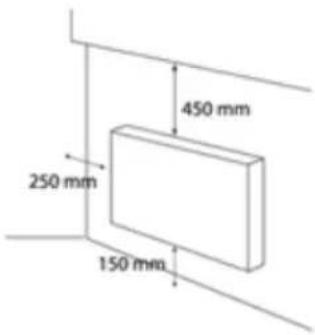
text_image
450 mm 250 mm 150 mm- Unscrew the two screws used to fix the wall brackets.
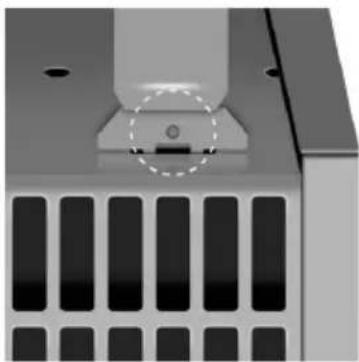
natural_image
Close-up of a metallic mechanical component with a circular feature and grid pattern (no text or symbols visible)- Pull out the top bar by pressing firmly both upper parts slotted into the rear housing.
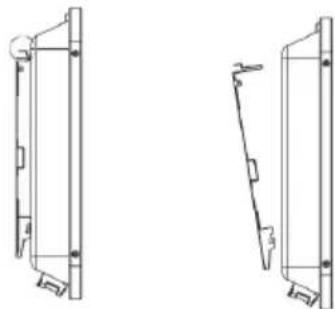
natural_image
Technical line drawing of two mechanical components with mounting holes and a handle (no text or symbols)- Slide down the wall bracket in order to remove it from the rear housing.
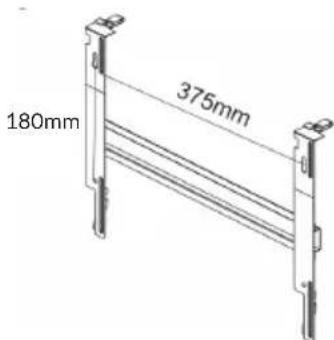
text_image
180mm 375mm-
Fix the wall brackets securely to the wall through the 4 screw holes provided.
-
Raise the heater to upright position; Present the heater and engage 2 slots of the bottom parts of the wall brackets in the wall heater's rear enclosure then pull up the heater. Then press the upper parts of the wall bracket to lock the device.
-
Screw the two screws to fix the wall mounting brackets.
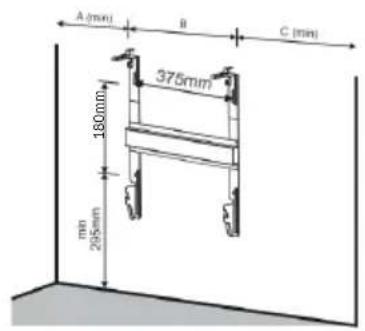
text_image
A (min) B C (min) 375mm 180mm 295mm min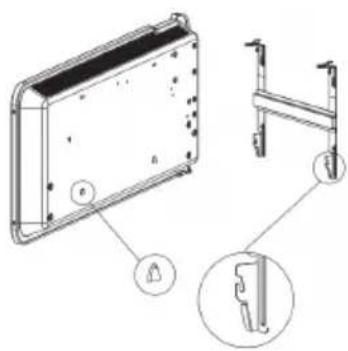
natural_image
Technical line drawing of a rectangular device with mounting holes and a side panel, showing internal components (no text or symbols)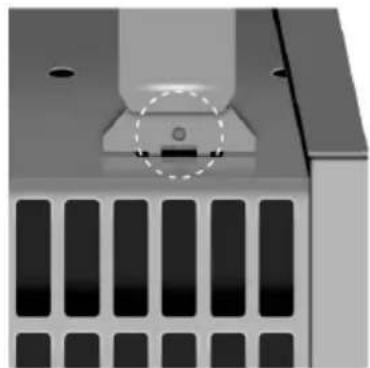
natural_image
Close-up of a mechanical component with a circular annotation highlighting a specific feature (no text or symbols visible)FREE-STANDING INSTALLATION
- Attach the two castor-wheel brackets to the underneath of the heater (see ①) using the eight M4x8 mm screws (four in each bracket). The longer side of the bracket goes at the back of the heater (see ②).
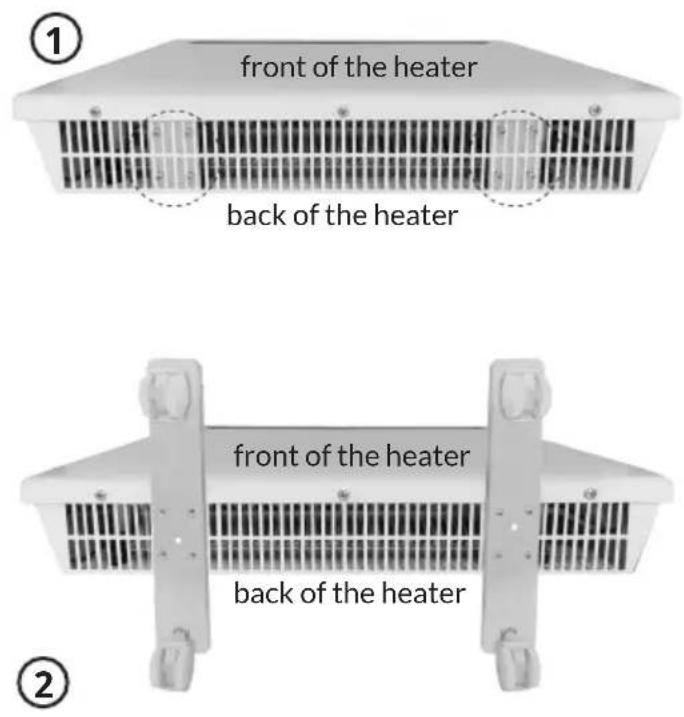
text_image
front of the heater back of the heater front of the heater back of the heaterFUNCTION OVERVIEW
Control panel
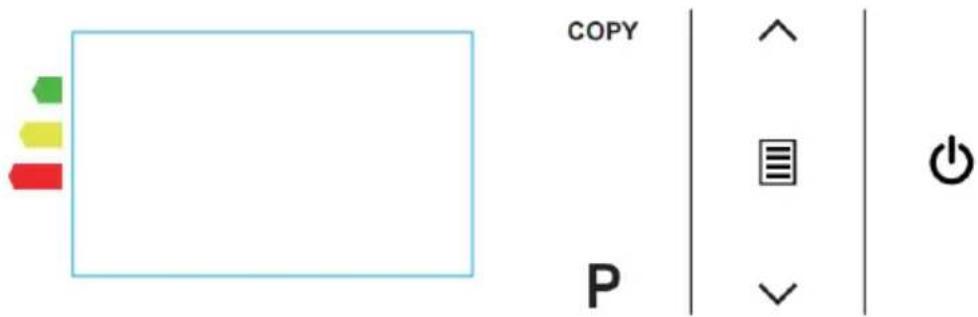
text_image
COPY PButtons description
| Symbol on control keys | Function |
| Main power switch | |
| On/Off key | |
| COPY | Program Copy key |
| P | Program mode |
| Mode key | |
| UP key, to set the temperature or the time.Long pressing the button for 3 seconds will change auto when setting temperature. | |
| DOWN key, to set the temperature or the time. Long pressing the button for 3 seconds will change auto when setting temperature. | |
| Symbol on LCD display | Function |
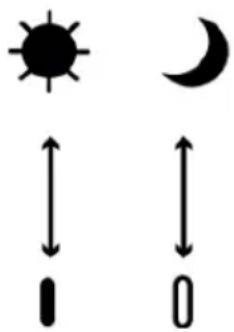
 | Comfort Mode (Temperature range 5-35 °C) |
| ECO Mode = Comfort Mode - 3.5 °C | |
| Anti-Frost Mode (Temperature at 7 °C) | |
| Heating indicator | |
| Programming mode (set the heater with program) | |
| Keypad lock function | |
| Open window function. | |
| CPY | COPY symbol after you press COPY button |
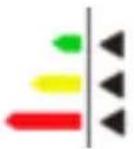 | Behavioral indicator, to raise awareness of the risk of over consumption during setting the temperature:Green (recommended, normal consumption): below 19.5°C.Yellow (high consumption): from 19.5 °C to 24.0 °C.Red (very high consumption): above 24.0 :°C. |
OPERATION
1. Power on
Power on the heater by pressing the main power switch to "I" position on the right side. Then heater is in standby mode.
2. ON/OFF
Press the On/Off key on the control panel and the heater will now enter into comfort mode. The LCD screen will display the set temperature.
3. Mode Selection
Comfort Mode:
Press Mode key to choose comfort mode. In this mode, you can press the UP key and the DOWN key to set the desired temperature from 5-35 °C, the temperature will change auto by long pressing for 3 seconds. After you select the temperature on comfort mode, wait a few seconds the temperature on the screen will flash then remain constant, the temperature is now set.
The behavioral indicator raises awareness of the risk of over consumption. The arrow indicating the color changes depending on the set temperature:
- Green (recommended, normal consumption): below 19.5 °C.
- Yellow (high consumption): from 19.5 °C to 24.0 °C.
- Red (very high consumption): above 24.0 °C.
ECO Mode
In ECO mode, you cannot set the temperature. The heater will decrease 3.5^ C from comfort temperature. For example, if you set 19^ C as the comfort temperature, the ECO mode temperature is Comfort minus 3.5^ C, that is 15.5^ C.
Anti-Frost Mode
The temperature is 7^ C and you cannot set the temperature.
4. Preset mode: P1, P2, P3, P4
The display will show the pre-set modes number from P1 to P4.
| P1 From | 0H to 5H: Eco modeFrom 6H to 8H: Comfort ModeFrom 9H to 15H: Eco modeFrom 16H to 23H: Comfort Mode |
| P2 From | 0H to 5H: Eco modeFrom 6H to 8H: Comfort ModeFrom 9H to 11H: Eco modeFrom 12H to 13H: Comfort ModeFrom 14H to 15H: Eco modeFrom 16H to 23H: Comfort Mode |
| P3 From | 0H to 7H: Eco modeFrom 8H to 23H: Comfort Mode |
| P4 From | 0H to 2H: Comfort ModeFrom 3H to 9H: Eco modeFrom 10H to 23H:Comfort Mode |
PROGRAMME MODE OPERATION
You can program the working mode for each hour of the day for a week. When the first time enter the P mode, you will need to set the current day and the time first.
- Press Mode Key until P appears the screen
- Press P key to enter into Program setting with Day symbol 1 (i.e. 1=Monday, 2=Tuesday, etc) flashing.
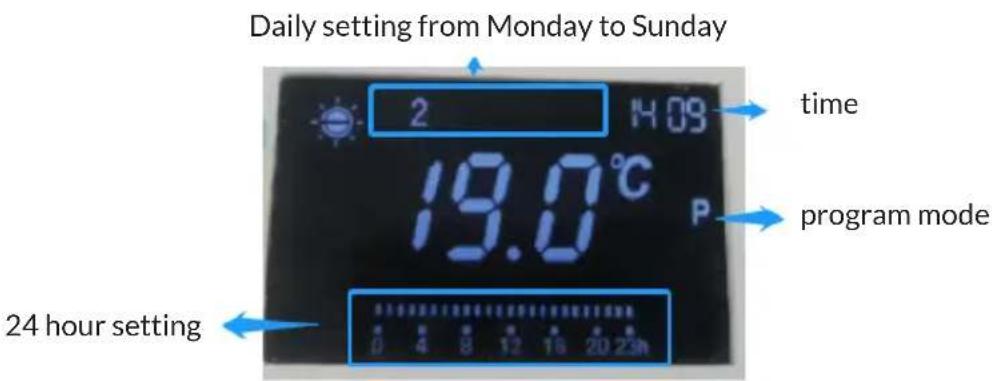
text_image
Daily setting from Monday to Sunday 2 H:09 time 19.0°C P program mode 24 hour setting 0 4 8 12 16 20 23hCurrent day selection
- Set the current day 1 to 7 (ie. 1=Monday, 2=Tuesday, etc) with the UP (∧) key or the DOWN (∨) key.
- Press "P" key again to confirm.
Setting the time
- After pressing P key to confirm the selected day, the hour position digit will flash, set the current hour by pressing the UP key or the DOWN key.
- Press P key again to confirm the hour.
- The minutes will now flash and set the minute by by pressing the UP key or the DOWN key.
- Press P key again to confirm the minutes.
Setting mode selection for each hour for a week
After you have set the time, then enter the 24 hour 7 day week setting.
- The number 1 is indicating that the setting for Monday of the week are being programmed.
- Press Mode key repeatedly until the required working mode(Comfort or ECO) is displayed for this hour period.
- Press the up key to move to the next hour segment with Hour information on display.
- Press P key to save the setting for the Monday and move to Tuesday of the week with number 2 appear.
- Repeat the step 2 to 4 to set all 7 days in the week.
Copy function
Press COPY button to copy the program after you finish the setting for the whole day with Copy symbol.
Press the UP key to choose the day you want to copy and then press COPY to copy the program for the whole day and COPY symbol will disappear.
When all seven days have been programmed, press P key again and the heater will run as programmed.
natural_image
Simple weather icons showing sun, moon, and day (no text or symbols)Keypad lock function
Long press the UP and the DOWN key for 3 seconds, the function key on the control panel will be locked and the lock symbol will display in the screen. Repeat to unlock the keypad.
Remark: the ON/OFF button on control panel will never lock.
Brightness of display
60 seconds after the last operation, the display will be off. It will light up if any operations are carried out.
PRODUCT INFORMATION
| Model identifier: 10046526, 10046527, 100465258 | |||||
| Item Symbol Value Unit Type of heat input, for electric storage local space heaters | |||||
| Heat output | |||||
| Nominal heat output | P_nom | 2 kW M | Manual heat | charge control, with integrated thermostat | No |
| Minimum heat output (indicative) | P_min | N/A kW | Manual heat | charge control with room and/or outdoor temperature feedback No | |
| Maximum continuous heat output | P_max | 2 kW E | Electronic heat | charge control with room and/or outdoor temperature feedback No | |
| Auxiliary electricity consumption | -Fan assisted heat | output | No | ||
| At nominal heat output | el_max | 0 kW Type of heat | output/room temperature control (select one) | ||
| At minimum heat output | el_min | 0 kW Single stage | heat output and no room temperature control | No | |
| In standby mode | el_SB | 0 W Two or more | manual stages, no room temperature control | No | |
| With mechanic thermostat room temperature control | No | ||||
| With electronic room temperature control No | |||||
| Electronic room temperature control plus day timer No | |||||
| Electronic room temperature control plus week timer | Yes | ||||
| Other control options (multiple selections possible) | |||||
| room temperature control, with presence detection No | |||||
| room temperature control, with open window detection | Yes | ||||
| with distance control option | No | ||||
| with adaptive start control | No | ||||
| with working time limitation | No | ||||
| with black bulb sensor | No | ||||
| Contact details | Chal-Tec GmbH, Wallstraße 16, 10179, Berlin, Germany | ||||
DISPOSAL CONSIDERATIONS
natural_image
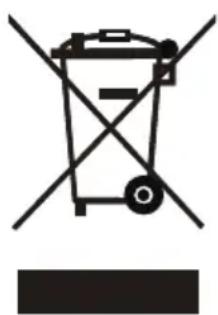
Symbol of a trash bin with crossed lines indicating no waste or discharge, and a solid black rectangle below (no text or labels)If there is a legal regulation for the disposal of electrical and electronic devices in your country, this symbol on the product or on the packaging indicates that this product must not be disposed of with household waste. Instead, it must be taken to a collection point for the recycling of electrical and electronic equipment. By disposing of it in accordance with the rules, you are protecting the environment and the health of your fellow human beings from negative consequences. For information about the recycling and disposal of this product, please contact your local authority or your household waste disposal service.
MANUFACTURER & IMPORTER (UK)
Manufacturer:
Chal-Tec GmbH, Wallstrasse 16, 10179 Berlin, Germany.
Importer for Great Britain:
Berlin Brands Group UK Limited
PO Box 42
272 Kensington High Street
London, W8 6ND
United Kingdom
Chère cliente, cher client,
text_image
QR code image containing encoded data, no visible human-readable textSOMMAIRE
Fiche technique 31
Installation murale 34
Installation autonome 36
natural_image
Close-up of a metallic mechanical component with a circular annotation highlighting a small feature, no visible text or symbols.natural_image
Technical line drawing of two mechanical components with mounting holes and a handle (no text or symbols)text_image
180 mm 375mmnatural_image
Technical line drawing of a rectangular electronic device with mounting holes and a side view showing internal components (no text or symbols)natural_image
Close-up of a mechanical component with a circular annotation highlighting a small feature, no visible text or symbols.INSTALLATION AUTONOME
natural_image
Simple diagram showing sun, moon, and light symbols with directional arrows (no text or labels)INFORMATIONS SUR LE PRODUIT
natural_image
Symbol of a trash bin with crossed lines and a horizontal bar below (no text or labels)Berlin Brands Group UK Limited
Boîte postale 42
272 Kensington High Street
Londres, W8 6ND
Royaume-Uni
Gentile cliente,
text_image
QR code image containing encoded data, no visible human-readable textINDICE
natural_image
Close-up of a metallic mechanical component with a circular annotation highlighting a small feature, no visible text or symbols.natural_image
Technical line drawing of two mechanical components with mounting holes and a handle (no text or symbols)text_image
180mm 375mmnatural_image
Technical line drawing of a mechanical component with two views: front view and side view (no text or symbols)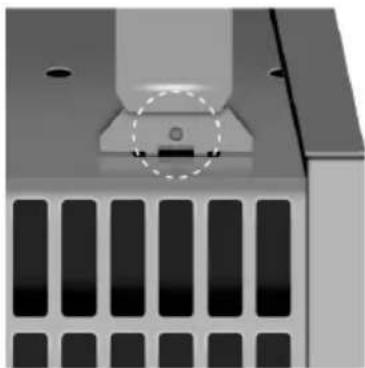
natural_image
Close-up of a mechanical component with a circular annotation highlighting a specific feature (no text or symbols visible)IT
natural_image
Simple weather icons showing sun, moon, and day (no text or symbols)natural_image
Symbol of a trash bin with crossed lines indicating no waste or discharge, and a solid black rectangle below (no text or labels)Berlin Brands Group UK Limited
PO Box 42
272 Kensington High Street
Londra, W8 6ND
United Kingdom
Estimado cliente:
text_image
QR code image containing encoded data, no visible human-readable textÍNDICE
Datos técnicos 59
natural_image
Close-up of a metallic mechanical component with a circular annotation highlighting a small feature, no visible text or symbols.natural_image
Technical line drawing of two mechanical components with mounting holes and a handle (no text or symbols)text_image
180 mm 375mmtext_image
A (min) B C (min) 375mm 180 mm 295mm minnatural_image
Technical line drawing of a mechanical component with two views: front view and side view (no text or symbols)natural_image
Close-up of a mechanical component with a circular annotation highlighting a small feature, no visible text or symbols.natural_image
Simple weather icons showing sun, moon, and day (no text or symbols)natural_image
Symbol of a trash bin with crossed lines indicating no waste or restriction, and a solid rectangle below (no text or labels)Berlin Brands Group UK Limited
272 Kensington High Street
Londres, W8 6ND
Reino Unido
Geachte klant,
text_image
QR code image containing encoded data, no visible human-readable textINHOUD
Technische specificaties 73
natural_image
Close-up of a metallic mechanical component with a circular annotation highlighting a small feature, no visible text or symbols.natural_image
Technical line drawing of two mechanical components with mounting holes and a handle (no text or symbols)text_image
180 mm 375mmtext_image
A (min) B C (min) 375mm 180 mm 295mm minnatural_image
Technical line drawing of a mechanical component with two views: front view and side view (no text or symbols)natural_image
Close-up of a mechanical component with a circular annotation highlighting a specific feature (no text or symbols visible)VRIJSTAANDE INSTALLATIE
natural_image
Simple weather icons showing sun, moon, and day (no text or symbols)Kinderslot functie
natural_image
Symbol of a trash bin with crossed lines indicating no waste or discharge, and a solid black rectangle below (no text or labels)Berlin Brands Group UK Limited
PO Box 42
272 Kensington High Street
London, W8 6ND
Verenigd Koninkrijk