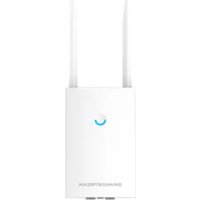
GWN7664E - Wi-Fi Access Point GRANDSTREAM - Free user manual and instructions
Find the device manual for free GWN7664E GRANDSTREAM in PDF.


| Brand | Grandstream |
| Model | GWN7664E |
| Product Type | Wi-Fi 6 Access Point |
| Wi-Fi Standard | 802.11ax (Wi-Fi 6) |
| Frequency Bands | Dual band 2.4 GHz and 5 GHz |
| Max Data Rate | Up to 6 Gbps |
| Radio Technology | MU-MIMO 4x4:4, OFDMA |
| Concurrent Clients | Over 1000 |
| Network Ports | 2 x 2.5 Gbps RJ45 Ethernet ports with PoE+ |
| Power Supply | PoE+ 802.3at (25 W minimum) |
| Management Method | Web interface, GWN.Cloud, GWN Manager, or controller-less |
| Advanced Features | QoS, captive portal, mesh network, low latency |
| Wireless Security | WPA2/WPA3, 802.1X authentication |
| Antennas | Internal, sophisticated anti-interference design |
| Mounting | Wall or ceiling (kit included) |
| Operating Temperature | 0 °C to 50 °C |
| Operating Humidity | 10% to 95% RH (non-condensing) |
| Package Contents | Access point, mounting brackets, screws, anchors, installation guide |
| Maintenance and Cleaning | Clean with a dry soft cloth. Do not use chemicals. |
| Repairability | Do not open. Contact authorized support for repairs. |
Frequently Asked Questions - GWN7664E GRANDSTREAM
User questions about GWN7664E GRANDSTREAM
0 question about this device. Answer the ones you know or ask your own.
Ask a new question about this device
Download the instructions for your Wi-Fi Access Point in PDF format for free! Find your manual GWN7664E - GRANDSTREAM and take your electronic device back in hand. On this page are published all the documents necessary for the use of your device. GWN7664E by GRANDSTREAM.
USER MANUAL GWN7664E GRANDSTREAM
Grandstream Networks, Inc.
126 Brookline Ave, 3rd Floor
Boston, MA 02215. USA
Tel: +1 (617) 566 - 9300
www.grandstream.com

| BE | BG | CZ | DK | DE | EE | IE | EL | LI |
| ES | FR | HR | IT | CY | LV | LT | LU | CH |
| HU | MT | NL | AT | PL | PT | RO | SI | TR |
| SK | FI | SE | NO | IS | UK | UK(NI) |
In the UK and EU member states, operation of 5150-5350 MHz is restricted to indoor use only.
For Certification, Warranty and RMA information, please visit www.grandstream.com
EU Agent
Picus Advisors Ltd
Taivalmaki 9F1-02200 Espoo, FINLAND
https://www.picus.fi
Note: For European Union only

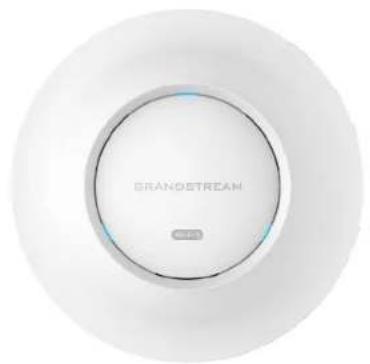
natural_image
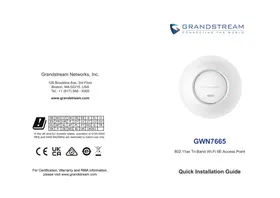
Close-up of a white circular device with 'BRANOSTREAM' branding and a small indicator light on the top (no other text or symbols visible)GWN7664E
High-Performance AX6000 Wi-Fi 6 Access Point
Quick Installation Guide
Content
English....1
简体中文....7
Español....9
Français....15
Deutsch....21
Italiano....27
Português....33
Русский....39
EN
OVERVIEW
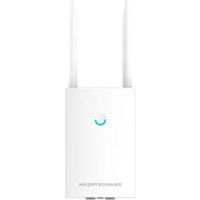
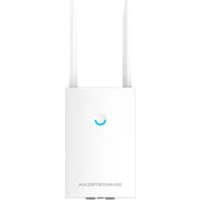
The GWN7664E is a powerful, enterprise-grade 802.11ax Wi-Fi 6 access point, ideal for small-to-medium sized businesses, multiple floor buildings, residential settings and commercial locations. It offers dual-band 4x4:4 MU-MIMO with OFDMA technology and a sophisticated internal antenna design for stronger anti-interference, more stable connection, delivering up to 6 Gbps wireless throughput and expanded Wi-Fi coverage range. The GWN7664E is supported by GWN.Cloud and GWN Manager, Grandstream's cloud and on-premise Wi-Fi management platform that and makes managing your network or several networks across multiple locations easier than ever before. It also uses a controller-less network management architecture in which the controller is embedded within the product's web user interface for easy administration of locally deployed Wi-Fi APs. The GWN7664E is the ideal Wi-Fi AP for voice-over-Wi-Fi deployments and offers a seamless connection with Grandstream's Wi-Fi capable IP phones. With support for advanced QoS, low-latency real-time applications, mesh networks, captive portals, 1000+ concurrent clients and dual 2.5 Gigabit network ports with PoE+, the GWN7664E is an ideal Wi-Fi access point for business-grade wireless network deployments with medium-to-high user density.
PRECAUTIONS
- Do not attempt to open, disassemble, or modify the device.
- Do not expose this device to temperatures outside range of 0 °C to 50 °C for operating and -10 °C to 60 °C for storage.
- Do not expose the GWN7664E to environments outside of the following humidity range: 10-95% RH (non-condensing).
- Do not power cycle your GWN7664E during system boot up or firmware upgrade. You may corrupt firmware images and cause the unit to malfunction.
PACKAGE CONTENTS
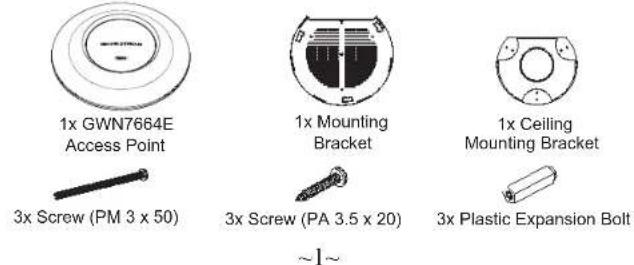

3x M3 NUT

1 x Quick Installation Guide
GWN7664E PORTS
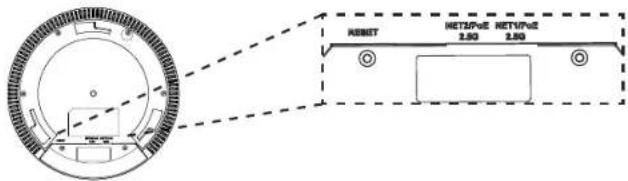
| Port Description | |
| NET/POE 2.5G | 2x 2.5 Gbps Ethernet RJ45 port supporting PoE+. |
| RESET Factory | reset button.Press for 7 seconds to reset factory default settings. |
POWERING AND CONNECTING THE GWN7664E
GWN7664E can be powered on using PoE+ switch using following steps:
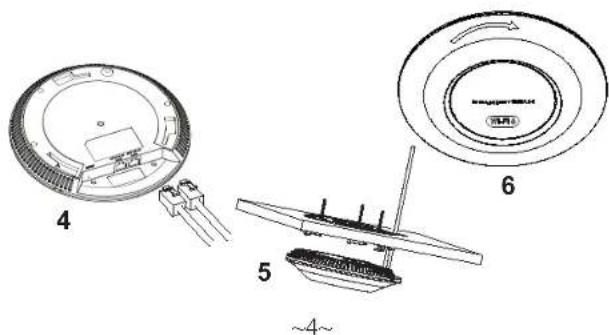
Step 1: Plug a RJ45 Ethernet cable into the network port of GWN7664E.
Step 2: Plug the other end into the uplink port of the power over Ethernet (PoE+) switch.
Note: It's recommended to power the unit using the 802.3at standard (PoE+) or a PSE device with more than 25W.
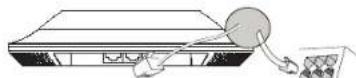
Network Port
RJ45 Ethernet Cable to power over Ethernet (PoE+) Switch
HARDWARE INSTALLATION
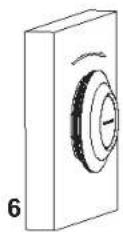
GWN7664E can be mounted on the wall or ceiling, Please refer to the following steps for the appropriate installation.
\~2\~
Wall Mount
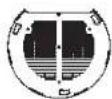
- Position the mounting bracket at the desired location on the wall with the arrow pointing up.
- Use a pencil to mark the four mounting holes (screw holes DIA 5.5mm, reticle hole DIA 25mm).
- If your Ethernet cable feeds through the wall, then cut or drill a circle approximately 18mm in diameter.
- Insert screw anchors into the 5.5mm holes. Attach the mounting bracket to the wall by inserting the screws into the anchors.
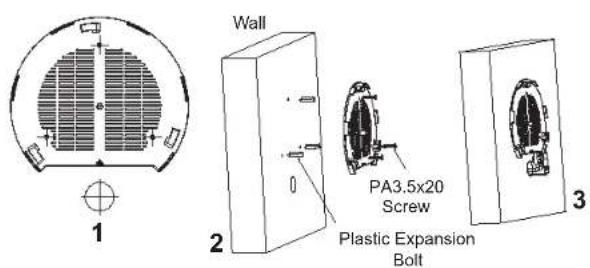
- Connect the ethernet cable (RJ45) to the correct ports of your GWN7664E.
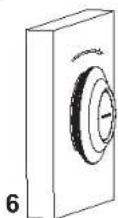
- Align the arrow on the GWN7664E AP with the arrow on the locking tab of the mounting bracket and ensure that your GWN is firmly seated on the mounting bracket.
- Turn the GWN clockwise until it locks into place and fits the locking tab.
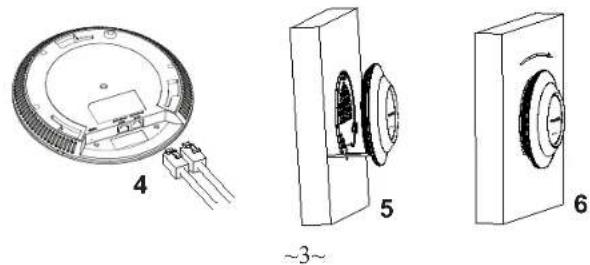
Ceiling Mount
Note: Ceiling mounting is recommended for optimal coverage performance.
- Remove the ceiling tile.
- Place the ceiling backing plate in the center of the ceiling tile and mark the mounting screw holes (screw holes DIA 5.5mm, reticle hole DIA 25mm).
- Insert the screws through the mounting bracket.
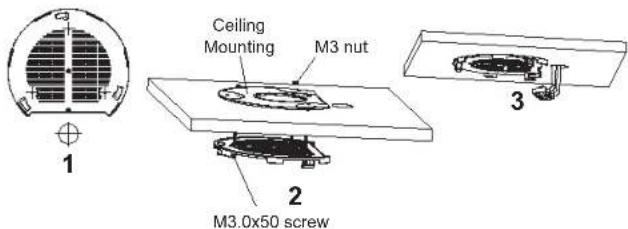
- Connect th Ethernet cable (RJ45) to the correct ports of your GWN7664E.
- Align the arrow on the GWN7664E with the arrow on the locking tab of the mounting bracket and ensure that your GWN is firmly seated on the mounting bracket and connect the network and power cables.
- Turn the GWN clockwise until it locks into place and fits the locking tab.
CONNECT TO GWN7664E DEFAULT Wi-Fi NETWORK
GWN7664E can be used as standalone access point out of box, or after factory reset with Wi-Fi enabled by default.
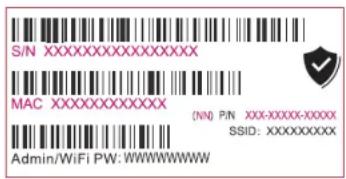
After powering the GWN7664E and connecting it to the network, GWN7664E will broadcast a default SSID based on its MAC address GWN[MAC's last 6 digits] and a random password.
Note: GWN7664E's default SSID and password information are printed on the MAC tag of the unit.
ACCESSING THE CONFIGURATION INTERFACE
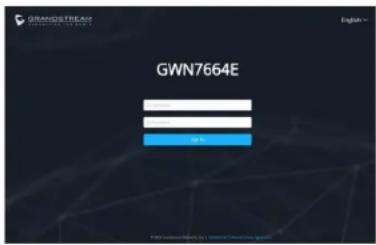
A computer connected to the GWN7664E's SSID, or to the same network as the GWN7664E can discover and access its configuration interface using one of the below methods:
Method 1: Discover GWN7664E using its MAC Address
- Locate the MAC address on the MAC tag of the unit, which is on the underside of the device, or on the package.
- From a computer connected to same network as the GWN7664E, type in following address using GWN7664E's MAC address on your browser: https://gwn_
.local
Example: If a GWN7664E has the MAC address C0:74:AD:8B:4E:28, this unit can be accessed by typing https://gwn_c074ad8b4e28.local on the browser.
Method 2: Discover GWN7664E using GWN Discovery Tool
- Download and install GWN Discovery Tool from the following link: http://www.grandstream.com/tools/GWNDiscoveryTool.zip
-
Open the GWN DiscoveryTool, and click on Scan.
-
The tool will discover all GWN76XX Access Points connected on the network showing their MAC and IP addresses.
- Click on Manage Device to be redirected directly to the GWN7664E's configuration interface, or type in manually the displayed IP address on your browser.
- Enter username and password to login. (The default administrator username is "admin" and the default random password can be found at the sticker on the GWN7664E).
Notes:
- Make sure that the GWN7664E is not already paired with another GWN76xx Access Point as slave, GWN Router, GWN Cloud, or GWN Manager, otherwise the configuration interface cannot be accessed
- If the GWN7664E is already paired, make sure to unpair it first, or do a factory reset.
- It is customer's responsibility to ensure compliance with local regulations for frequency bands, transmit power and others.
- To manage GWN7664E over cloud, please refer to https://www.gwn.cloud.
The GNU GPL license terms are incorporated into the device firmware and can be accessed via the Web user interface of the device at my_device_ip/gpl.license. It can also be accessed here: http://www.grandstream.com/legal/open-source-software To obtain a CD with GPL source code information please submit a written request to info@grandstream.com
Refer to online documents and FAQ for more detailed information: http://www.grandstream.com/our-products
概述概述
natural_image
Three technical diagrams showing mechanical components with no visible text or symbolsMontura de Techo
CONECTAR AL GWN7664E CON LA RED WI-FI PRE- DETERMINADA
http://www.grandstream.com/tools/GWNDiscoveryTool.zip
Nota:
http://www.grandstream.com/our-products
FR
PRESENTATION
CONNEXION AU RESEAU WI-FI PAR DEFAULT DU GWN7664E
ACCEDER A L'INTERFACE DE CONFIGURATION
http://www.grandstream.com/legal/open-source-software
natural_image
Technical diagram of a circular electronic component with labeled parts, showing internal structure and terminal connections (no text or symbols present)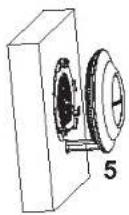
\~23\~
Deckenmontage
\~24\~
VERBINDEN SIE SICH MIT DEM VOREIN- GESTELLTEN Wi-Fi-NETZWERK DES GWN7664E
Bemerkung:
natural_image
Technical drawings of three electronic components: a circular component with labeled parts, a mechanical housing, and a rectangular device (no text or symbols present)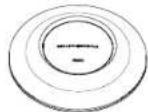
Access Point GWN7664E
Suporte de Montagem
natural_image
Technical diagram of a circular electronic component with internal components and labeled parts (no readable text or symbols)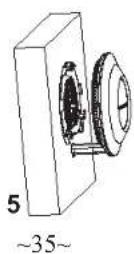
Montagem no Teto
CONECTAR À REDE WI-FI PADRÃO DO GWN7664E
http://www.grandstream.com/our-products
\~40\~
- GWN7664E
- Content
- EN
- OVERVIEW
- PRECAUTIONS
- POWERING AND CONNECTING THE GWN7664E
- HARDWARE INSTALLATION
- Wall Mount
- Ceiling Mount
- CONNECT TO GWN7664E DEFAULT Wi-Fi NETWORK
- ACCESSING THE CONFIGURATION INTERFACE
- Method 1: Discover GWN7664E using its MAC Address
- Method 2: Discover GWN7664E using GWN Discovery Tool
- Notes:
- 概述概述
- Montura de Techo
- CONECTAR AL GWN7664E CON LA RED WI-FI PRE- DETERMINADA
- http://www.grandstream.com/tools/GWNDiscoveryTool.zip
- Nota:
- FR
- PRESENTATION
- CONNEXION AU RESEAU WI-FI PAR DEFAULT DU GWN7664E
- ACCEDER A L'INTERFACE DE CONFIGURATION
- Deckenmontage
- VERBINDEN SIE SICH MIT DEM VOREIN- GESTELLTEN Wi-Fi-NETZWERK DES GWN7664E
- Bemerkung:
- Montagem no Teto
- CONECTAR À REDE WI-FI PADRÃO DO GWN7664E
Brand : GRANDSTREAM
Model : GWN7664E
Category : Wi-Fi Access Point