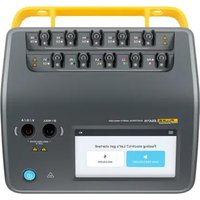
ESA715 - Measuring equipment FLUKE - Free user manual and instructions
Find the device manual for free ESA715 FLUKE in PDF.


| Product Type | Electrical Safety Analyzer for Medical Devices |
| Brand | Fluke Biomedical |
| Model | ESA715 |
| Power Supply | 90-264 V ac, 47-63 Hz, up to 20 A depending on region |
| Main Functions | Electrical safety verification, ECG and respiration waveform simulation (arrhythmias, apnea), tests according to IEC 60601-1, IEC 62353, AN/NZS 3551, NFPA 99/AAMI ES1, EN 50678/EN 50699 |
| Intended Use | Periodic preventive maintenance by qualified technicians, no patient contact |
| Safety Compliance | IEC 61010-1: Overvoltage Category II, Pollution Degree 2; IEC 61010-2-034: Measurement CAT III 300 V |
| Protection Rating | IP40 (except equipment output) |
| Operating Temperature | 0 to 35 °C |
| Operating Humidity | 10% to 90% non-condensing |
| Storage Temperature | -20 to +60 °C |
| Storage Humidity | 5% to 95% non-condensing |
| Maximum Altitude | 5000 m (100-127 V ac) / 2000 m (200-240 V ac) |
| Display | Color screen with intuitive user interface |
| Connectivity | OneQA on PC for test procedures |
| Maintenance and Cleaning | Clean with a dry cloth. Repair only by an authorized service provider. |
| Spare Parts and Repairability | Use only specified spare parts. Have repairs done by an authorized service provider. |
| Safety of Use | Do not use on patients. Observe dangerous voltage warnings. Disconnect before opening. |
| Symbols on the Device | Warning, dangerous voltage, consult documentation, power button, fuse |
Frequently Asked Questions - ESA715 FLUKE
User questions about ESA715 FLUKE
0 question about this device. Answer the ones you know or ask your own.
Ask a new question about this device
Download the instructions for your Measuring equipment in PDF format for free! Find your manual ESA715 - FLUKE and take your electronic device back in hand. On this page are published all the documents necessary for the use of your device. ESA715 by FLUKE.
USER MANUAL ESA715 FLUKE
natural_image
Line drawing of a device front panel with buttons and display (no text or symbols)ESA710/ESA712/ESA715
Electrical Safety Analyzer
Quick Guide

natural_image
Two app icons: a blue play button and a black lightning bolt (no text or symbols)Introduction
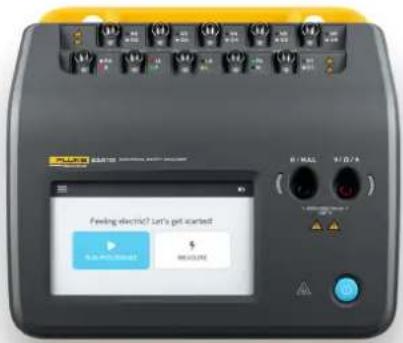
The Fluke Biomedical ESA710, ESA712 and ESA715 Electrical Safety Analyzers are designed to verify the electrical safety of medical devices. They allow users to test equipment against various domestic and international safety standards, including IEC 60601-1, IEC 62353, AN/NZS 3551, NFPA 99/AAMI ES1, EN 50678/EN 50699 (standards available depend on the analyzer model).
Getting started
There are two ways of working with the analyzer:
- Run a procedure. A procedure is a set of measurements and tasks that are defined in advance, using OneQA on a PC. Visit OneQA.com to learn more.
- Perform a measurement session. Select between several measurement types directly on the screen.

natural_image
Circular icon with a question mark, no text or symbols presentWant to learn more?
You can read the user manual on the analyzer screen. From the menu, select Help to open the user manual.
Visit flukebiomedical.com for any technical support and more information, such as user manuals, specifications and instruction videos. On the website you will also find tips on which accessories you can use with your analyzer.
Intended use
The ESA710/ESA712/ESA715 (the product) is intended for use by trained service technicians to perform periodic preventative maintenance on a wide range of equipment. The testing procedures are menu-driven, and simple to operate.
The product is an electronic signal source and measurement device for verifying compliance with electrical safety standards. It also provides simulation of ECG and respiratory patterns, including arrhythmias and apnea, to verify equipment signal connections.
The intended user is a trained biomedical equipment technician who performs periodic preventative maintenance checks. Users can be associated with hospitals, clinics, original equipment manufacturers and independent service companies that repair and service equipment.
The product is intended to be used in the laboratory environment, outside of the patient care area, and is not intended for use on patients, or to test devices while connected to patients. This product is not intended to be used to calibrate medical equipment. It is intended for over-the-counter use.
Safety information
Read the safety information and all instructions before you use the ESA710/ESA712/ESA715 (the product).
A Warning identifies hazardous conditions and actions that could cause bodily harm or death.
A Caution identifies conditions and actions that could harm the product, the equipment under test, or cause permanent loss of data.
Warning
To prevent possible electrical shock, fire, or personal injury:
- Read all safety information before you use the product.
- Carefully read all instructions.
- Do not connect the product to a patient or equipment connected to a patient. The product is intended for equipment evaluation only and should never be used in diagnostics, treatment or in any other capacity where the product would come in contact with a patient.
- Do not alter the product and use only as specified, or the protection supplied by the product can be compromised.
- Do not use the product around explosive gas, vapor, or in damp or wet environments.
- Use this product indoors only.
- Replace the mains power cord if the insulation is damaged or if the insulation shows signs of wear.
- Use only the mains power cord and connector approved for the voltage and plug configuration in your country and rated for the product.
- Examine the case before you use the product. Look for cracks or missing plastic. Carefully look at the insulation around the terminals.
- Do not put the product where access to the mains power cord is blocked.
- Connect an approved three-conductor mains power cord to a grounded power outlet.
- Do not use the product if it is altered or damaged.
- Do not use the product if it operates incorrectly.
- Do not use test leads if they are damaged. Examine the test leads for damaged insulation.
- Do not touch metal parts of the device under test (DUT) during analysis. The DUT should be considered an electrical shock hazard when connected to the Product as some tests involve high voltages, high currents, and/or the removal of DUT earth bond.
- Use the correct terminals, function, and range for measurements.
- Use Product-approved Measurement Category (CAT), voltage, and amperage-rated accessories (probes, test leads, and adapters) for all measurements.
-
Do not apply more than the rated voltage, between the terminals or between each terminal and earth ground.
-
Do not exceed the Measurement Category (CAT) rating of the lowest-rated individual component of a product, probe, or accessory.
- Remove all probes, test leads, and accessories that are not necessary for the measurement.
- Keep fingers behind the finger guards on the probes.
- Do not touch voltages >30 V ac rms, 42 V ac peak, or 60 V dc.
- Turn the product off and remove the mains power cord. Stop for two minutes to let the power assemblies discharge before you open the fuse door.
- Do not operate the product with covers removed or the case open. Hazardous voltage exposure is possible.
- Use only specified replacement parts.
- Use only specified replacement fuses.
- Have an authorized service provider repair the product.
- Do not use the 15 A cable to power devices in excess of 15 A. Doing so may overload the installation.
- Do not use in close proximity to strong magnetic fields (for example an MRI machine).
-
Do not touch the applied part/ECG terminals when adjacent red warning indicators are blinking or continuously illuminated. These terminals source potentially hazardous voltage in these conditions.
-
Remove the null post adapter from the /Null terminal after a test lead zero is performed. The /Null terminal becomes potentially hazardous during some of the test conditions. Use only cables with correct voltage ratings.
- Connect the factory supplied three-conductor line power cord to a properly grounded power outlet.
- Do not use a two-conductor adapter or extension cord; this will break the protective ground connection.
Caution
- Measure a known voltage first to make sure that the product operates correctly.
General specifications
Power (region dependent) ^1 90-132 V ac, 20 A MAX, 47-63 Hz
90-132 V ac & 180-264 V ac, 15 A MAX, 47-63 Hz
90-132 V ac & 180-264 V ac, 10 A MAX, 47-63 Hz
90-132 V ac & 180-264 V ac, 16 A MAX, 47-63 Hz
Safety standard compliance....IEC 61010-1: Overvoltage category II, pollution degree 2 IEC 61010-2-034: Measurement CAT II 300 V
Ingress protection IP40 per IEC 60529, excluding equipment outlet
Operating temperature....0 to +35 °C (+50 to +95 °F)
Operating humidity 10-90 %, non-condensing
Storage temperature....-20 to +60 °C (-4 to +140 °F)
Storage humidity.... 5-95 %, non-condensing
Battery charging temperature ....+8 to +28 °C (+46 to +82 °F)
Altitude....100-127 V ac mains voltage and ≤ 150 V on input jacks: ≤ 5000 m
200-240 V ac mains voltage and ≤ 300 V on input jacks: ≤ 2000 m
Symbols
Symbols applicable to the product and user manual.
For a full list of applicable product symbols, please visit: www.flukebiomedical.com/resource/certification-sheets.
| Symbol | Description |
| WARNING. RISK OF DANGER. | |
| WARING. HAZARDOUS VOLTAGE. Risk of electric shock. | |
| 1 | Consult user documentation. |
| 1 | Power button |
| Fuse |

natural_image
Two app icons: a blue play button and a black lightning bolt (no text or symbols)Einführung
natural_image
Circular icon with a question mark in the center, no text or symbols present.
natural_image
Two app icons: a blue play button and a black lightning bolt (no text or symbols)Introducción
natural_image
Circular icon with a question mark in the center, no text or symbols present.¿Quiere saber más?

natural_image
Two app icons: a blue play button and a black lightning bolt (no text or symbols)Introduction
natural_image
Circular icon with a question mark symbol inside, no text or labels present.www.flukebiomedical.com/resource/certification-sheets.

natural_image
Two app icons: a blue play button and a black lightning bolt (no text or symbols)Introduzione
natural_image
Circular icon with a question mark symbol, no text or labels present
natural_image
Two app icons: a blue play button and a black lightning bolt (no text or symbols)はじめに
natural_image
Circular icon with a question mark, no text or symbols present詳細はこちら

natural_image
Two app icons: a blue play button and a black lightning bolt (no text or symbols)Wprowadzenie
natural_image
Circular icon with a question mark, no text or symbols presentwww.flukebiomedical.com/resource/certification-sheets.

natural_image
Two app icons: a blue play button and a black lightning bolt (no text or symbols)Introdução
natural_image
Circular icon with a question mark, no text or symbols presentQuer saber mais?

natural_image
Two app icons: a blue play button and a black lightning bolt (no text or symbols)简介
natural_image
Circular icon with a question mark, no text or symbols present要了解更多信息?
www.flukebiomedical.com/resource/certification-sheets。
©2025 Fluke Biomedical. FBC-141, March 2025, Rev. 2, 5/25
Brand : FLUKE
Model : ESA715
Category : Measuring equipment