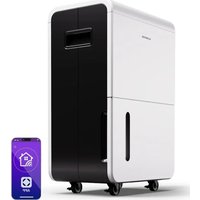
DryFy Grand Smart 70 - Air purifier Klarstein - Free user manual and instructions
Find the device manual for free DryFy Grand Smart 70 Klarstein in PDF.


| Product Type | Air Dehumidifier |
| Brand | Klarstein |
| Model | DryFy Grand Smart 70 |
| Dehumidification Capacity (30°C, 80% RH) | 70 L/day |
| Power Supply | 220-240 V~, 50 Hz |
| Refrigerant | R290 (Propane) |
| Operating Modes | Automatic, Continuous, Timer |
| Fan Speed | Low (LO) and High (HI) |
| Remote Control | Via Klarstein app (Wi-Fi 2.4 GHz) |
| Digital Display | Humidity, timer, error codes |
| Water Tank | Removable with full level indicator |
| Continuous Drainage | Possible (hose included, Ø 11 mm) |
| Air Filter | Washable (clean with warm water) |
| Housing Cleaning | Soft, damp cloth |
| Safety | Flammable refrigerant, automatic shut-off when tank full |
| Operating Temperature Range | 5 °C to 38 °C |
| Displayed Humidity Range | 20 % to 95 % RH |
| Error Codes | E1 (temperature sensor), E2 (humidity sensor) |
| Special Indications | TL (<5°C), TH (>38°C), LO (<20%), HI (>92%) |
| Wi-Fi Connection | 2.4 GHz band only |
| Mobile App | Klarstein (iOS and Android) |
| Included Accessories | Drain hose, user manual |
Frequently Asked Questions - DryFy Grand Smart 70 Klarstein
User questions about DryFy Grand Smart 70 Klarstein
0 question about this device. Answer the ones you know or ask your own.
Ask a new question about this device
Download the instructions for your Air purifier in PDF format for free! Find your manual DryFy Grand Smart 70 - Klarstein and take your electronic device back in hand. On this page are published all the documents necessary for the use of your device. DryFy Grand Smart 70 by Klarstein.
USER MANUAL DryFy Grand Smart 70 Klarstein
ONNNNNNNNNNNNNNNNNNNNNNNNNNNNNNNNNNNNNNNNNNNNNNNNNNNNNNNNNNNNNNNNNNNNNNNNNNNNNNNNNNNNNNNNNNNNNNNNNNNNNNNNNNNNNNNNNNNNNNNNNN
KLARSTEIN
10045544 10045545 10046435

www.klarstein.com

Berlin Brands Group UK Limited
PO Box 42
272 Kensington High Street
London, W8 6ND
United Kingdom
Congratulations on purchasing this equipment. Please read this manual carefully and take care of the following hints on installation and use to avoid technical damages. Any failure caused by ignoring the items and cautions mentioned in the operation and installation instructions are not covered by our warranty and any liability. Scan the QR code to get access to the latest user manual and more product information.

CONTENTS
Technical Data 17
Safety Instructions 18
Product Overview 21
Operating Instructions 22
Operation 23
Device Control by Smartphone 25
Maintenance 27
Troubleshooting 28
Safety precautions on servicing 29
Disposal Considerations 31
Declaration of Conformity 31
TECHNICAL DATA
| Item number 10045544 | 10045545 10046435 | |
| Power supply 220-240 V~ 50 Hz | ||
| Cooling capacity (at 30 °C, 80% RH) 55 | L/d 70 L/d | |
SAFETY INSTRUCTIONS
1.1 Before you begin
The dehumidifier is used to remove excessive moisture from the air. The resulting reduction in relative humidity protects buildings and their contents from the adverse effects of excess humidity.
The environmentally friendly R290 is used as the refrigerant. R290 has no damaging influence on the ozone layer (ODP), a negligible greenhouse effect (GWP) and is available worldwide. Because of its efficient energy properties, R290 is highly suitable as a coolant for this application. Special precautions must be taken into consideration due to the coolant's high flammability.
Symbols from the unit and user manual
| This unit uses a flammable refrigerant. If refrigerant leaks and comes in contact with fire or heating part, it will create harmful gas and there is risk of fire. | |
| Read the USER MANUAL carefully before operation. | |
| Further information is available in the USER MANUAL, SERVICE MANUAL, and the like. | |
| Service personnel are required to carefully read the USER MANUAL and SERVICE MANUAL before operation. |
1.1 The following should always be observed for safety
- This appliance can be used by children aged from 8 years and above and persons with reduced physical, sensory or mental capabilities or lack of experience and knowledge if they have been given supervision or instruction concerning use of the appliance in a safe way and understand the hazards involved. Children shall not play with the appliance. Cleaning and user maintenance shall not be made by children without supervision.
- The unit is designed only for use with R-290 (propane) gas as the designated refrigerant.
- The refrigerant loop is sealed. Only a qualified technician should attempt to service!
- Do not discharge the refrigerant into the atmosphere.
R-290 (propane) is flammable and heavier than air.
- It collects first in low areas but can be circulated by the fans.
- If propane gas is present or even suspected, do not allow untrained personnel to attempt to find the cause.
- The propane gas used in the unit has no odor.
- The lack of smell does not indicate a lack of escaped gas.
- If a leak is detected, immediately evacuate all persons from the store, ventilate the room and contact the local fire department to advise them that a propane leak has occurred.
- Do not let any persons back into the room until the qualified service technician has arrived and that technician advises that it is safe to return to the store.
- No open flames, cigarettes or other possible sources of ignition should be used inside or in the vicinity of the units.
- Component parts are designed for propane and non-incentive and non-sparking. Component parts shall only be replaced with identical repair parts.
FAILURE TO ABIDE BY THIS WARNING COULD RESULT IN AN EXPLOSION, DEATH, INJURY AND PROPERTY DAMAGE
2. For your safety
Please read this manual carefully and fully understand before operating your dehumidifier.
Operational precautions
To reduce the risk of fire, electric shock or injury to persons or property:
- If the supply cord is damaged, it must be replaced by the manufacturer, its service agent or similarly qualified persons in order to avoid a hazard.
- The appliance shall be disconnected from its power source during maintenance.
- Always operate the unit from a power source of equal voltage, frequency and rating as indicated on the product identification plate.
Always use a power outlet that is grounded. - Unplug the power cord when cleaning or when not in use.
- Do not operate with wet hands. Prevent water from spilling onto the unit.
- Do not immerse or expose the unit to rain, moisture or any other liquid.
- Do not leave the unit running unattended. Do not tilt or turn over the unit.
- Do not unplug while the unit is operating.
- Do not unplug by pulling on the power cord.
- Do not use an extension cord or an adapter plug.
- Do not put objects on the unit.
- Do not climb or sit on the unit.
- Do not insert fingers or other objects into the air outlet.
- Do not touch the air inlet or the aluminum fins of the unit.
- Do not operate the unit if it is dropped, damaged or showing signs of product malfunction.
- Do not clean the appliance with any chemicals.
-
Ensure the unit is far away from fire, inflammable, or explosive objects.
-
The unit shall be installed in accordance with national wiring regulations.
- Do not use means to accelerate the defrosting process or to clean, other than those recommended by the manufacture.
- The appliance shall be stored in a room without continuously operation sources (for example: open flames, an operating gas appliance or an operating electric heater).
- The appliance shall be stored so as to prevent mechanical damage from occurring.
- Do not piece or burn, even after use.
- Be aware that refrigerants may not contain an odour.
- Pipe-work shall be protected from physical damage and shall not be installed in an unventilated space, if that space is smaller than 4m^2
Compliance with national gas regulations shall be observed. - Keep any required ventilation openings clear of obstruction.
- The appliance shall be stored in a well-ventilated area where the room size corresponds to the room area as specified for operation.
Any person who is involved with working on or breaking into a refrigerant circuit should hold a current valid certificate from an industry-accredited assessment authority, which authorizes their competence to handle refrigerants safely in accordance with an industry, recognized assessment specification.
Servicing shall only be performed as recommended by the equipment manufacturer. Maintenance and repair requiring the assistance of other skilled personnel shall be carried out under the supervision of the person competent in the use of flammable refrigerants.
If you don't understand something or need help, please contact the dealer services
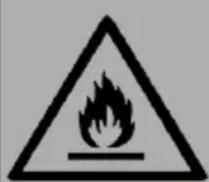
WARNING Risk of explosion, injury or death
This unit uses a flammable refrigerant. If the refrigerant leaks and comes in contact with fire or heating part, it will create harmful gas and there is risk of fire.
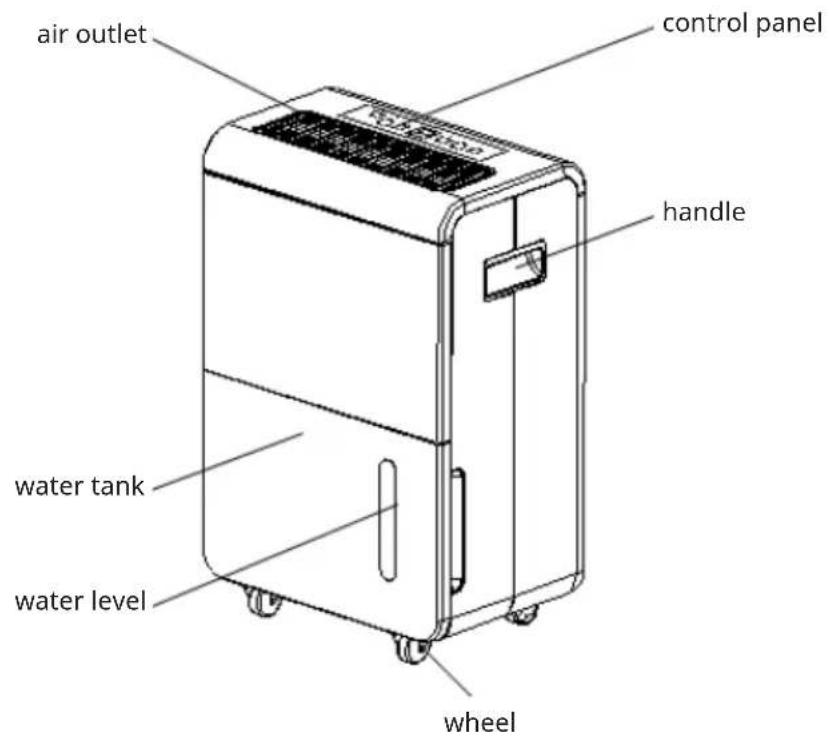
Front
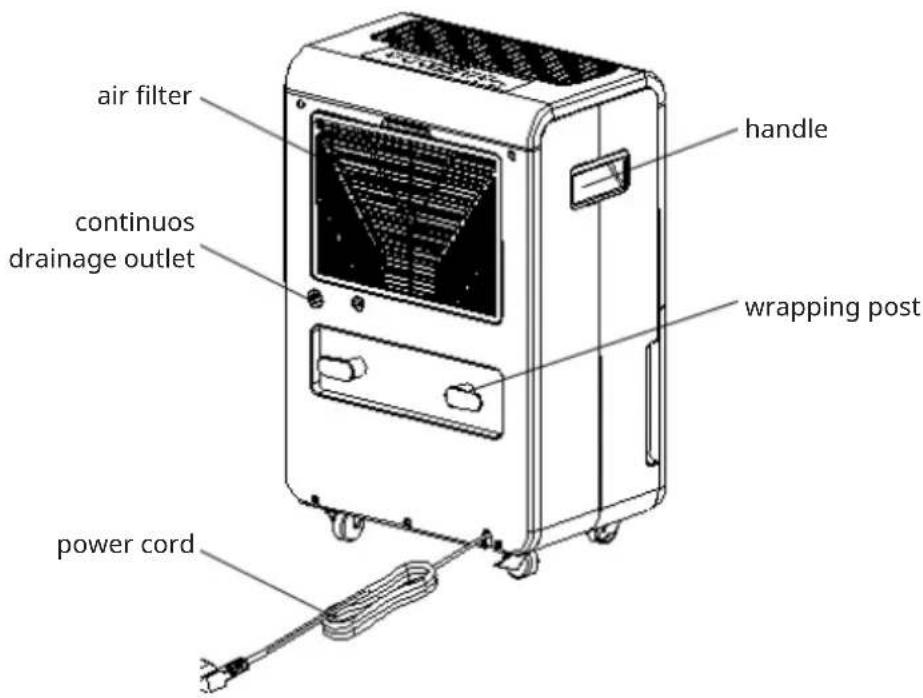
Back
OPERATING INSTRUCTIONS
Control panel

Button function & indicator lights
| POWER | Power button and indicator light The Power indicator light will turn on in green when the unit is plugged in, regardless of whether the unit is operating or not. |
| Timer button and indicator light Press this button to program the time when the unit turns on and turns off. If you want to cancel the timer programming, press the button to adjust the time at 00. | |
| LO H H | Fan speed button and indicator light The left fan speed indication light “LO” will turn on in green when you program the unit to run in the low fan speed. The right fan indication light “HI” will turn on in red when you program the unit to run in the high fan speed. |
| Automatically dehumidifying button and indicator light Press this button to program the unit to automatically dehumidifying mode, the humidity can be adjusted manually, and the fan speed will be adjusted automatically. | |
| Add button Press this button to add the humidity and time; the humidity setting-up procedure is 50%-55%-60%-65%-70%-75%-80%-85%-90%-95%. | |
| Minus button Press this button to reduce the humidity and time; the humidity setting-up procedure is 50%-45%-40%-35%-30%-25%-20%. | |
| CONT | Continuously dehumidifying mode button and indication light Press this button to program into continuously dehumidifying mode, the indication light will turn green, the default RH is 20% and the fan speed can be adjusted manually. |
| FULL | Tank full indicator light The tank full indication light will turn on in red when the drain-age tank is full. If light is on, empty the water out of the drainage tank and make sure the tank is positioned properly. |
Humidity Level & Timer digit display
The digits indicator features 11 functions:
- When the unit is plugged in, it will show --, the machine will be in standby state.
- When press the power button, it will indicate the room humidity level.
- When you set the humidity, it will indicate the humidity that you have selected.
- When you program the time for the unit to turn on and off, it will show the hours.
- Long press the timer button for about 5 seconds to start the network configuration, the WIFI indicator flashes.
- When the room temperature < 5^ C , it will show "TL".
- When the room temperature >38^ , it will show "TH".
- When the room humidity < 20% RH , it will show "LO".
- When the room humidity >92% RH , it will show "HI".
- If the temperature sensor got failure, it will show "E1".
- If the humidity sensor got failure, it will show "E2".
OPERATION
- Turning the unit On:
When the unit is plugged in, a buzzer will beep and the humidity indicator show the default humidity level at 50% with a low fan speed. Press POWER button to start operation.
- Stop operation. Press the POWER button to stop dehumidification:
Note: Never stop the unit by unplugging the supply cord.
Draining the collected water
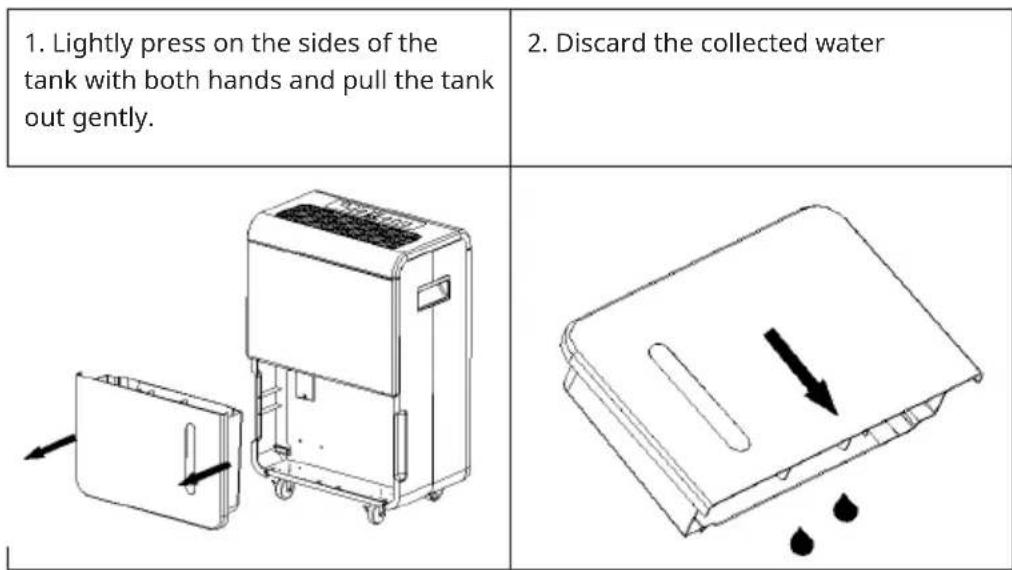
When the drainage tank is full, the tank full indicator light will turn on, the operation will stop automatically and the buzzer will beep 15 times to alert the user that the water needs to be emptied from the drainage tank.
Emptying the drainage tank
Notes
- Do not remove the float from the water tank. The water full sensor will no longer be able to detect the water level correctly without the float and water may leak from the water tank.
- If the drainage tank is dirty, wash it with cold or lukewarm water. Do not use detergent, scouring pads, chemically treated dust cloths, gasoline, benzene, thinner, or other solvents, as these can scratch and damage the tank and cause water leakage
- When replacing the drainage tank, press the tank firmly into place with both hands. If the tank is not positioned properly, the "TANK FULL" sensor will be activated, and the dehumidifier will not operate.
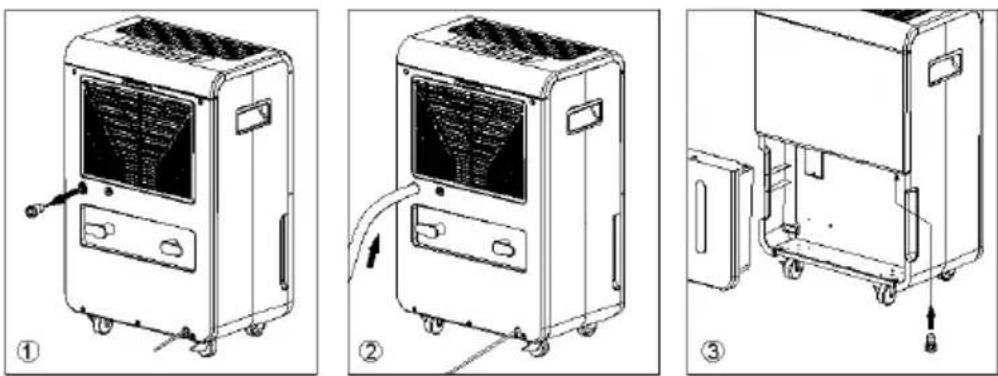
Continuous water Drainage
The unit features a continuous drainage port. Using a plastic pipe (with an inner diameter of 11mm ); the water in the drainage tank can be continuously drained out from the continuous port on the unit.
DEVICE CONTROL BY SMARTPHONE
If you integrate the device into your home WiFi, you can conveniently operate it via the associated Klarstein app. The app not only allows you to remotely control the device via your smartphone, but also gives you access to recipes and additional information.
Follow these steps to connect your smartphone to your Klarstein device:
1 Download the Klarstein app first by scanning the QR code with your smartphone (see below), or download it directly from App Store or Google Play.
2 Make sure your smartphone is connected to the same WiFi network that your Klarstein device is to be connected to.
3 Open the Klarstein app.
4 Sign in to your account. If you do not have an account, sign up in the Klarstein app.
5 Follow the instructions from the app.
App Download
Use the scan function of your smartphone to scan the QR code and save the app on your smartphone.
Note: The app provides further information on how to use the app and help on how to connect to your device as soon as you open it for the first time.

iOS Android

Troubleshooting connection problems
If your Klarstein device cannot be found in the WLAN, check the following:
1 The device is not plugged in. Make sure that your device is plugged into an electric socket.
2 The device is not in pairing mode. Make sure that the WiFi indicator (LED) on the smart device control panel is blinking as described in the 'Reset WiFi settings' instruction of your smart device (instructions are usually available on device connection process).
3 The WiFi access point does not operate on 2.4 GHz. Make sure that your access point operates on 2.4 GHz band and you have a separate SSID on 2.4 GHz band. If you are not sure about the operating band of your access point, please contact your internet provider company.
Important: please note that if your WiFi router is dual band - operating on both 2.4 GHz and 5 GHz band - you need to separate the SSIDs for each band and use the 2.4 GHz SSID for connection.
4 Firewall settings of your WiFi network; the firewall setting of yourWiFi network may not allow the Klarstein app to configure theWiFi settings on your smart device. Please make sure that you are not using a publicWiFi network, e.g. airports,dormitories, companies,etc.
5 Different credentials used in smartphone and the app. Make sure that the WiFi credentials entered in the Klarstein app are the same as the ones that your smartphone is connected to.
Following the above mentioned points, if your smart device still fails to connect to the app, please contact us via email for support:
appsupport@go-bbg.com
MAINTENANCE
EN
To clean the body
Wipe it with a soft damp cloth.
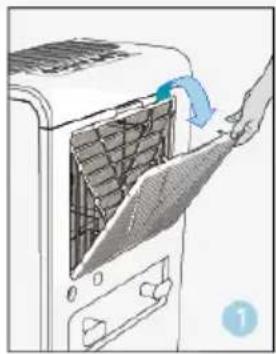
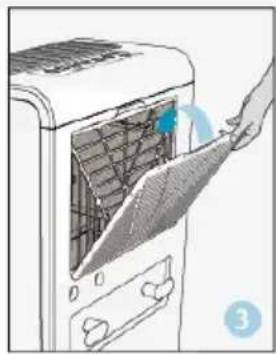
- Remove the air filter
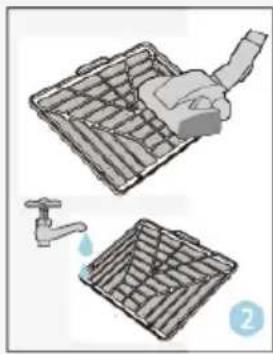
- Clean the air filter
Run a vacuum cleaner lightly over the surface of the air filter to remove dirt. If the air filter is exceptionally dirty, wash it with warm water and a mild cleanser and dry thoroughly.
- Attach the air filter
Insert the filter into the unit in smoothly.
Storing the dehumidifier
When the unit is not being used for a long period of time and you want to store it.
Note the following steps:
- Empty any water left in the drainage tank
- Fold up the power supply cord.
- Clean the air filter
- Discard in a cool and dry place.
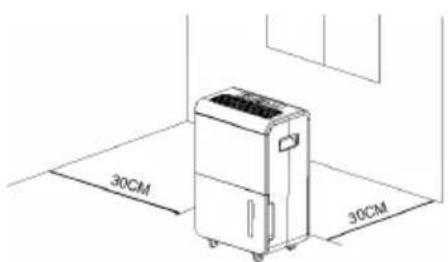
Clearance
TROUBLESHOOTING
| Problem Possible Cause | Solution | |
| The unit doesn't operate. | Has the power cord been disconnected? | Plug the power cord into the outlet. |
| Is the tank full indication lamp blinking? (The tank is full or in a wrong position.) | Empty the water in the drainage tank and then reposition the tank. | |
| Is the temperature of the room above 35 °C or below 5 °C? | The protection device is activated and the unit cannot be started. | |
| The dehumidifying function doesn't work. | Is the air filter clogged? Clean the air filter as instructed under "Cleaning the dehumidifier". | |
| Is the intake duct or discharge duct obstructed? | Remove the obstruction from the discharge duct or intake duct. | |
| No air is discharged. Is the air filter clogged? Clean the air filter as instructed under "Cleaning the dehumidifier". | ||
| Operation is noisy. Is the unit tilted or unsteady? | Move the unit to a stable, sturdy location. | |
| Is the air filter clogged? Clean the air filter as instructed under "Cleaning the dehumidifier". | ||
SAFETY PRECAUTIOS ON SERVICING
Please follow these warnings when to undertake the following when servicing a dehumidifier with R290.
1 Checks to the area
Prior to beginning work on systems containing flammable refrigerants, safety checks are necessary to ensure that the risk of ignition is minimized. For repair to the refrigerating system, the following precautions shall be complied with prior to conducting work on the system.
2 Work procedure
Work shall be undertaken under a controlled procedure so as to minimize the risk of a flammable gas or vapor being present while the work is being performed.
3 General work area
All maintenance staff and others working in the local area shall be instructed on the nature of work being carried out. Work in confined spaces shall be avoided. The area around the workspace shall be sectioned off. Ensure that the conditions within the area have been made safe by control of flammable material.
4 Checking for presence of refrigerant
The area shall be checked with an appropriate refrigerant detector prior to and during work, to ensure the technician is aware of potentially flammable atmospheres. Ensure that the leak detection equipment being used is suitable for use with flammable refrigerants, i.e. no sparking, adequately sealed or intrinsically safe.
5 Presence of fire extinguisher
If any hot work is to be conducted on the refrigeration equipment or any associated parts, appropriate fire extinguishing equipment shall be available to hand. Have a dry powder or CO_2 fire extinguisher adjacent to the charging area.
6 No ignition sources
No person carrying out work in relation to a refrigeration system which involves exposing any pipe work that contains or has contained flammable refrigerant shall use any sources of ignition in such a manner that it may lead to the risk of fire or explosion. All possible ignition sources, including cigarette smoking, should be kept sufficiently far away from the site of installation, repairing, removing and disposal, during which flammable refrigerant can possibly be released to the surrounding space. Prior to work taking place, the area around the equipment is to be surveyed to make sure that there are no flammable hazards or ignition risks. "No Smoking" signs shall be displayed.
7 Ventilated area
Ensure that the area is in the open or that it is adequately ventilated before breaking into the system or conducting any hot work. A degree of ventilation shall continue during the period that the work is carried out. The ventilation should
safely disperse any released refrigerant and preferably expel it externally into the atmosphere.
8 Checks to the refrigeration equipment
Where electrical components are being changed, they shall be fit for the purpose and to the correct specification. At all times the manufacturer's maintenance and service guidelines shall be followed. If in doubt consult the manufacturer's technical department for assistance.
The following checks shall be applied to installations using flammable refrigerants:
- The charge size is in accordance with the room size within which the refrigerant containing parts are installed;
- The ventilation machinery and outlets are operating adequately and are not obstructed;
- If an indirect refrigerating circuit is being used, the secondary circuit shall be checked for the presence of refrigerant;
- Marking to the equipment continues to be visible and legible. Markings and signs that are illegible shall be corrected;
- refrigeration pipe or components are installed in a position where they are unlikely to be exposed to any substance which may corrode refrigerant containing components, unless the components are constructed of materials which are inherently resistant to being corroded or are suitably protected against being so corroded.
9 Checks to electrical devices
Repair and maintenance to electrical components shall include initial safety checks and component inspection procedures. If a fault exists that could compromise safety, then no electrical supply shall be connected to the circuit until it is satisfactorily dealt with. If the fault cannot be corrected immediately but it is necessary to continue operation, an adequate temporary solution shall be used. This shall be reported to the owner of the equipment so all parties are advised.
Initial safety checks shall include:
- those capacitors are discharged: this shall be done in a safe manner to avoid possibility of sparking.
- that there no live electrical components and wiring are exposed while charging, recovering or purging the system.
- that there is continuity of earth bonding
DISPOSAL CONSIDERATIONS
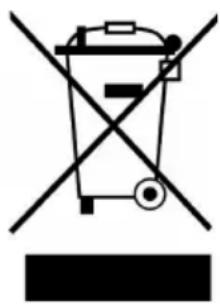
If there is a legal regulation for the disposal of electrical and electronic devices in your country, this symbol on the product or on the packaging indicates that this product must not be disposed of with household waste. Instead, it must be taken to a collection point for the recycling of electrical and electronic equipment. By disposing of it in accordance with the rules, you are protecting the environment and the health of your fellow human beings from negative consequences. For information about the recycling and disposal of this product, please contact your local authority or your household waste disposal service.
This product contains batteries. If there is a legal regulation for the disposal of batteries in your country, the batteries must not be disposed of with household waste. Find out about local regulations for disposing of batteries. By disposing of them in accordance with the rules, you are protecting the environment and the health of your fellow human beings from negative consequences.
DECLARATION OF CONFORMITY

Manufacturer:
Chal-Tec GmbH, Wallstrasse 16, 10179 Berlin, Germany.
Importer for Great Britain:
Berlin Brands Group UK Limited
PO Box 42
272 Kensington High Street
London, W8 6ND
United Kingdom
Hereby, Chal-Tec GmbH declares that the radio equipment type Grand Smart 55/70 is in compliance with Directive 2014/53/EU. The full text of the EU declaration of conformity is available at the following internet address: use. Berlin/10045544
For Great Britain: Hereby, Chal-Tec GmbH declares that the radio equipment type Grand Smart 55/70 is in compliance with the relevant statutory requirements. The full text of the declaration of conformity is available at the following internet address: use.berlin/10045544
Cher client, chere clientele,
Berlin Brands Group UK Limited
PO Box 42
272 Kensington High Street
London, W8 6ND
United Kingdom
Berlin Brands Group UK Limited
PO Box 42
272 Kensington High Street
London, W8 6ND
United Kingdom
Berlin Brands Group UK Limited PO Box 42
272 Kensington High Street
London, W8 6ND
United Kingdom

- CONTENTS
- TECHNICAL DATA
- SAFETY INSTRUCTIONS
- Before you begin
- The following should always be observed for safety
- FAILURE TO ABIDE BY THIS WARNING COULD RESULT IN AN EXPLOSION, DEATH, INJURY AND PROPERTY DAMAGE
- For your safety
- Operational precautions
- WARNING Risk of explosion, injury or death
- OPERATING INSTRUCTIONS
- Humidity Level & Timer digit display
- OPERATION
- Draining the collected water
- Emptying the drainage tank
- Notes
- Continuous water Drainage
- DEVICE CONTROL BY SMARTPHONE
- App Download
- Troubleshooting connection problems
- MAINTENANCE
- To clean the body
- Storing the dehumidifier
- Clearance
- TROUBLESHOOTING
- SAFETY PRECAUTIOS ON SERVICING
- Checks to the area
- Work procedure
- General work area
- Checking for presence of refrigerant
- Presence of fire extinguisher
- No ignition sources
- Ventilated area
- Checks to the refrigeration equipment
- Checks to electrical devices
- DISPOSAL CONSIDERATIONS
- DECLARATION OF CONFORMITY
- Manufacturer:
- Importer for Great Britain:
Brand : Klarstein
Model : DryFy Grand Smart 70
Category : Air purifier