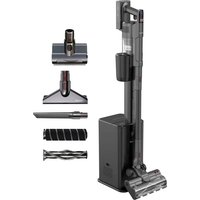
VP6310 - Robot vacuum Concept - Free user manual and instructions
Find the device manual for free VP6310 Concept in PDF.


| Product type | Cordless stick vacuum |
| Brand | Concept |
| Model | VP6310 |
| Battery voltage | DC 25.9 V |
| Power | 420 W |
| Noise level | ≤82 dB |
| Battery type | Li-ion, 2200 mAh |
| Maximum runtime | 50 min (at minimum power) |
| Full charge time | 2.5 to 3.5 h |
| Standby power | 0.01 W |
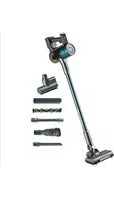
| Package contents | Handheld unit, telescopic tube, large turbo brush, small turbo brush, flat nozzle, upholstery nozzle, hard floor brush, carpet brush, charging station, charging adapter, dust bag |
| Dust bin capacity | Not specified (estimated 0.6 L) |
| Filtration | Washable HEPA filter |
| Status indicators | Battery level, brush blocked, suction obstructed, power setting |
| Special features | Charging station with automatic dust bin emptying, power adjustment (3 levels), variable rotating brush speed (2 levels) |
| Maintenance | Water-washable filters, removable dust bin, removable brush for cleaning |
| Safety | Automatic shutdown in case of blockage, do not leave unattended, overload protection, compatible with standard outlets |
| Approximate weight | 2.5 kg |
| Approximate dimensions | 25 x 20 x 100 cm (mounted) |
Frequently Asked Questions - VP6310 Concept
User questions about VP6310 Concept
0 question about this device. Answer the ones you know or ask your own.
Ask a new question about this device
Download the instructions for your Robot vacuum in PDF format for free! Find your manual VP6310 - Concept and take your electronic device back in hand. On this page are published all the documents necessary for the use of your device. VP6310 by Concept.
USER MANUAL VP6310 Concept
Rod and hand-held cordless vacuum cleaner
Thank you for purchasing a Concept product. We wish you much joy with your new appliance every day you use it. Please read the instruction manual carefully before initial use. To refer to this manual any time you need to, we recommend you to keep it in a safe place. And please pass it to any future owner of the appliance.
| Technical specifications | |
| Battery voltage DC 25,9 V | |
| Input 420 W | |
| Sound level ≤82 dB | |
| Battery 2200 mAh Li-ion | |
| Max. operating time at MIN power 50 min | |
| Full charging time 2,5 - 3,5 hrs. | |
| Standby power 0.01 W | |
The appliance is in standby mode when connected to the mains.
IMPORTANT SAFETY PRECAUTIONS
- Do not use the appliance in any other way than as described in this manual.
- Make sure the mains voltage and current protection correspond to the values on the rating plate of the charging station.
- Do not leave the appliance without supervision when it is switched on.
- When disconnecting the unit from the wall outlet, never pull the power cord, grasp the charger and disconnect it by removing it from the receptacle.
- Do not allow children or unauthorized people to handle the appliance, use it out of their reach.
- Pay extra attention if the appliance is used near children.
- Do not use the appliance as a toy.
- Do not use any accessories other than those recommended by the manufacturer.
- Do not use a charger with a damaged cord or plug and have it repaired immediately by an authorized service centre.
- Do not use the charging adapter to charge other appliances.
- When storing the adapter, do not wrap the cable around the adapter.
-
Make sure that the power cord does not touch hot surfaces or sharp objects.
-
Keep the appliance away from heat sources such as radiators, ovens and other, protect it from direct sunlight and humidity.
- Do not touch the appliance with wet hands.
- Do not insert any objects into the openings. Do not use the appliance if any of the openings is clogged.
Take extra caution when vacuuming on stairs. - If the appliance intake is clogged, switch off the appliance and remove the dirt before switching on again.
- When attaching accessories during cleaning or in the event of a malfunction, switch off the appliance and disconnect the charger from wall socket.
- The appliance is only suitable for home use and is not intended for commercial use.
- Do not use, store or charge the appliance outdoors.
- Do not vacuum anything burning like cigarettes, matches or hot ash.
- Do not use the appliance in damp rooms, do not vacuum wet items or liquids, glass and sharp objects, cement and construction dust, do not vacuum flammable liquids (such as gasoline), and do not use the appliance in areas where these substances may be present.
- Never vacuum without vacuum cleaner filters. Every time you use the appliance, make sure the vacuum cleaner filters are properly installed.
- Do not immerse the power cord or the charger in water or any other liquid.
- Check the appliance and the charger cord for damage regularly.
- Never switch on a damaged appliance.
- Before cleaning and after use of the appliance, switch off the appliance and allow it to cool down. Make sure the charging station/adapter plug is unplugged from the mains socket before cleaning and maintaining the appliance.
- Before vacuuming, remove all large or sharp objects from the surface intended for vacuum cleaning, such objects may damage the vacuum cleaner filter.
- Do not use the appliance with dirty filters.
- Wipe the surface of the appliance with a dry cloth, never clean with water or polishes!
- Do not put the battery in fire or expose it to temperatures above 40^ .
EN
concept
concept
EN
- Do not touch the moving parts of the appliance during operation. Keep hair, fingers and loose clothing well away from moving parts of the appliance.
- Do not repair the appliance yourself. Contact an authorized service centre.
- This appliance can be used by children aged from 8 years and above and persons with reduced physical, sensory or mental capabilities or lack of experience and knowledge if they have been given supervision or instruction concerning the use of the appliance in a safe way and understand the hazards involved. Cleaning and maintenance performed by the user must not be carried out by children unless they are at least 8 years old and under supervision.
- Children aged under 8 years of age must be kept away from the appliance and its power cord. Do not let children play with the appliance.
Damages from failure to follow the manufacturer's instructions are not covered by the warranty.
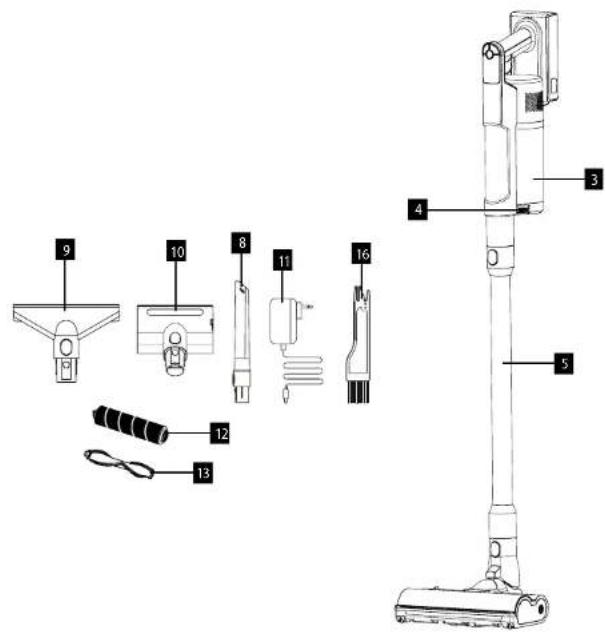
PRODUCT DESCRIPTION
1 Appliance body
2 Battery
3 Dust container
4 Button to release the dust container
5 Telescopic tube
6 Big turbo brush
7 Battery release button
8 Crevice nozzle
9 Upholstery nozzle
- Small turbo brush
- Charging adapte
12 Hardflox brush - Carpet brush
14 On/off button
15 Display
16 Cleaning brush
EN
concept
concept
EN
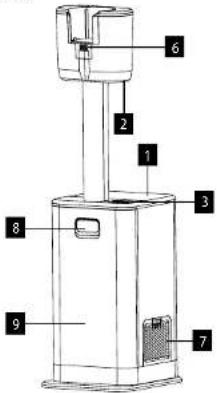
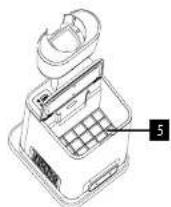
DESCRIPTION OF THE CHARGING STATION
- Dust container lid
- Accessory holder hole
- Display
- Display
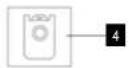
- Best bag 1. Portion
- Dust container filter
- Charging contacts
- Outlet HEPA filter
- Front cover release button
- Front cover
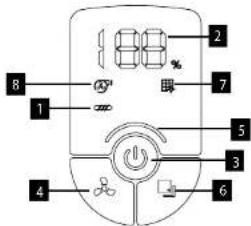
DISPLAY DESCRIPTION
- Blocked brush indicator
- Battery status
- ON/OFF button
- Power change button (low/medium/high)
- Power setting indicators
- Rotary brush speed power change button
- Rotary brush higher speed power indicator
- Clogged suction indicator
DESCRIPTION OF THE CHARGING STATION DISPLAY
1.AUTO/MANUAL button
2.Indicator for missing dust bag
2. Indicator for windbag 3. Full dust bag indicator
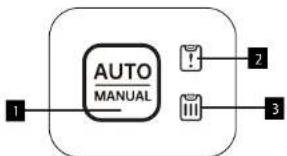
Note: If button 2 or 3 lights up red - open the dust container lid and insert/replace the dust bag.
OPERATING INSTRUCTIONS
ASSEMBLING THE VACUUM CLEANER
Always keep the vacuum cleaner switched off and the charging adapter unplugged from the power outlet before assembling or removing accessories.
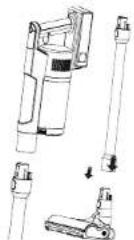
- Insert the suction tube into the handheld unit of the vacuum cleaner, you will hear a click. To remove the tube from the handheld unit, press the lock button and pull to disconnect.
- Insert the turbo brush into the suction tube, you will hear a click. To remove the Turbo Brush from the extension tube, press the lock button and pull to disengage. The turbo brush can be connected to the handheld unit in the same way.
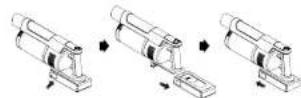
INSTALLING THE BATTERY
Insert the battery into the body of the handheld unit and install to prevent it from coming loose. If an audible signal sounds, the battery has been successfully installed. To release the battery, press the release button and pull to disconnect.
Note: To extend battery life, keep the battery charge between 20% and 80%. Do not store or charge the appliance in a place where the temperature is below 0 °C or above 40 °C.
Otherwise you could damage the device. During charging, the temperature of the appliance may rise, this is normal. If you do not use the vacuum cleaner for more than 3 months, leave it to charge for 12 hours. Then place the vacuum cleaner in a dry and cool place.
USE
Insert the battery and check that it is charged before use.
- Press the on/off button to switch on the appliance.
- When switched on, the vacuum cleaner will start on medium power.
-
Use the power button to change the suction power:
Low power (the indicator on the display is blue) -
Medium power (indicator lights pink)
High power (indicator lights red)
- Use the rotary brush speed change button to change the power:
- 1st stage (starts automatically when the vacuum cleaner is switched on)
- 2nd stage (the rotary brush speed is increased from 1650 to 2350 RPM, the indicator appears on the display and the intensity of the LED light on the turbo brush is increased)
- Press the on/off button again to switch the vacuum cleaner off.
Note:The maximum power of the handheld unit is recommended for heavily soiled areas or for carpets with medium or high pile.
INSTALLING THE CHARGING STATION
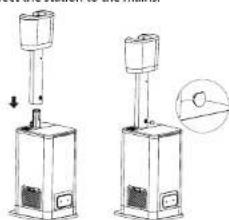
- Place the vacuum cleaner holder on the station, top to bottom, and secure the holder with the included plastic lock.
Connect the station to the mains.

EN
concept
concept
EN
USING THE CHARGING STATION
AUTO/MANUAL button:
- If the button indicator is off, the dust cup is emptied every time the vacuum cleaner is inserted into the station.
- If the button indicator is lit, the station will not vacuum the dust cup of the vacuum cleaner. If the button is pressed, you will manually turn on vacuuming of the dust cup.
- The vacuum cleaner will always start charging when inserted into the station (it does not affect whether the AUTO/MANUAL button is lit or off).
ACCESSIONS
Select the accessories according to the nature of the area to be cleaned. Connect small accessories to the handheld unit.
Small turbo brush - suitable for bed linen, fabric, sofas, etc.
Upholstery nozzle - suitable for upholstered surfaces, sofas, chairs, etc.
Crevicne nozzle -Suitable for wall corners, car upholstery, radiators, etc.
Hardfloor brush suitable for hard floors. Carpet brush - suitable for carpets.
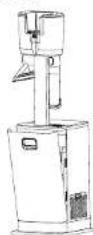
ACCESSORY STORAGE
- Insert into accessory holder.
- In station storage (press front cover release button and flip cover out).
REMOVING THE DUST CUP
Press the dust cup release button and move down and away from the appliance to remove the dust cup.
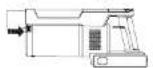
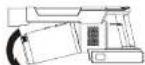
FILTER DISASSEMBLY
Turn the filter assembly counterclockwise. Remove the filters by pulling upwards. Remove the fabric filter. The filters can be rinsed in water. Allow the filters to dry before placing them back in the dust container.
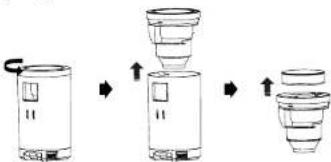
Note: To reassemble, repeat the procedure in reverse order.
DISASSEMBLING THE CHARGING STATION FILTERS
If the filters are very dirty, clean them. Press the button on the side of the station to release the HEPA outlet filter and pull the filter outwards. Remove the dust bag and then the dust container filter facing upwards. Clean the filters, the filters can be washed under water. After washing, allow the filters to dry for 24 hours.
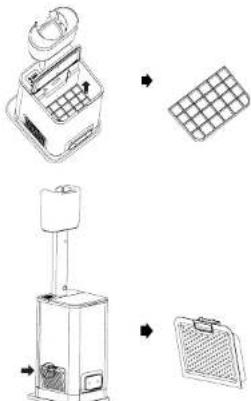
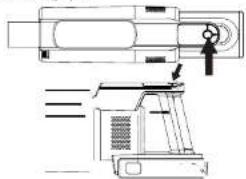
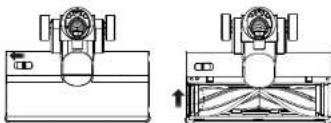
REMOVING THE BRUSH
On the top of the Turbo Brush there is a button to release the cover, slide the button to release the cover, then the brush can be removed.
CHARGING THE APPLIANCE
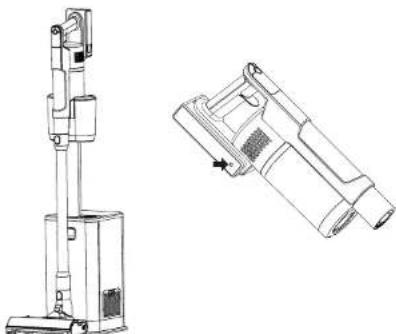
- In the charging station: Insert the vacuum cleaner into the charging station connected to the mains, the vacuum cleaner will start charging automatically.
- Use the charging adapter: Plug the adapter into the battery charging port, then connect the adapter to the mains.
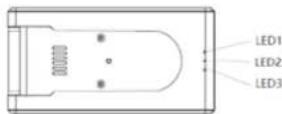
- If only 1 of the 3 LEDs on the battery pack is lit, charge the vacuum cleaner.
- A blinking LED indicates charging.
If all 3 LEDs are lit, the vacuum cleaner is fully charged.
concept
concept
| Problem Solution | |
| Bad suction, clogged suction indicator lights up | 1/ Empty the dust container. 2/ Check the appliance for blockages. 3/ Check the filters and clean if necessary.4/ Check the brush in the turbo brush. |
| Appliance not working | 1/ Charge the battery. 2/ Check that the appliance is not clogged.3/ Check the brush in the turbo brush. |
| The battery is not charging | 1/ Check that the adapter is properly connected.2/ Check the mains voltage. 3/ Check the adapter for damage. |
| Blocked brush indicator lights up Clean the brush in the turbo brush. | |
| Station does not suck in dust container | 1/ Check the vacuuming mode (automatic/manual).2/ Check if the missing/full dust bag indicator is red and insert/replace the bag. |
SERVICE
Extensive maintenance or repair, which requires access to internal parts of the product, has to be performed by a qualified service centre.
ENVIRONMENTAL CONCERNS
Packaging materials and old appliances should be recycled. Packaging materials may be disposed of as part of a recycling process.
- Dispose the plastic bags made of polyethylene (PE) of as sorted waste.
Recycling of the appliance at the end of its lifespan

This appliance is labelled in accordance with European Directive 2012/19/EU concerning used electrical and electronic appliances (Waste Electrical and Electronic Equipment - WEEE). The symbol on the product or on its packaging indicates that this product may not be treated as household waste. Instead, it should be taken to the appropriate collection point for the recycling of electrical and electronic equipment. By ensuring this product is disposed of correctly, you will help prevent potential negative consequences for the environment and human health, which could otherwise be caused by inappropriate waste handling of this product. The disposal of such material has to be done according to the recycling regulations. For more detailed information about recycling of this appliance see the authorized local office or service for household waste disposal or the shop, where you purchased the appliance.

The product meets all the necessary requirements of the EU directives applicable to the specific product.
Changes in text, design, and technical specifications are subject to change without notice and we reserve the right to change them.
DANKSAGUNG
RANGEMENT D'ACCESSIONS
- IMPORTANT SAFETY PRECAUTIONS
- EN
- concept
- PRODUCT DESCRIPTION
- DESCRIPTION OF THE CHARGING STATION
- DISPLAY DESCRIPTION
- DESCRIPTION OF THE CHARGING STATION DISPLAY
- OPERATING INSTRUCTIONS
- ASSEMBLING THE VACUUM CLEANER
- INSTALLING THE BATTERY
- USE
- INSTALLING THE CHARGING STATION
- USING THE CHARGING STATION
- ACCESSIONS
- ACCESSORY STORAGE
- REMOVING THE DUST CUP
- FILTER DISASSEMBLY
- DISASSEMBLING THE CHARGING STATION FILTERS
- REMOVING THE BRUSH
- CHARGING THE APPLIANCE
- SERVICE
- ENVIRONMENTAL CONCERNS
- Recycling of the appliance at the end of its lifespan
- DANKSAGUNG
- RANGEMENT D'ACCESSIONS
Brand : Concept
Model : VP6310
Category : Robot vacuum