
TS156A - Detector Vevor - Free user manual and instructions
Find the device manual for free TS156A Vevor in PDF.



| Product Type | Metal Detector |
| Brand | Vevor |
| Model | TS156A |
| Detection Modes | All Metals and Discrimination |
| Sensitivity | Adjustable (SENS knob) |
| Volume | Adjustable (POWER/VOLUME knob) |
| Audio Alarm | Dual frequency: 660 Hz (ferrous metals) and 2000 Hz (non-ferrous metals) |
| Low Battery Indicator | Yes (indicator light) |
| Power Supply | 6 AA batteries (1.5 V each) |
| Operating Current | 80 mA |
| Headphone Jack | 3.5 mm jack |
| Ground Balance | Automatic |
| Meter | Detection intensity indicator needle |
| Included Accessories | User manual, headphones, digging shovel, carrying bag, 6 batteries |
| Adjustable Length | Yes (adjustable arm cuff height) |
| Maintenance | Protect the control box from water and humidity. Do not expose to high temperatures. Do not alter internal circuit. Handle with care, do not pull on coil cable. |
| Safety | Do not use near buried power lines or pipelines. Observe local laws when detecting. Do not use headphones near traffic. |
| Support and Warranty | Technical support: ServiceClient@vevor.com. Electronic warranty certificate: www.vevor.com/support |
Frequently Asked Questions - TS156A Vevor
User questions about TS156A Vevor
0 question about this device. Answer the ones you know or ask your own.
Ask a new question about this device
Download the instructions for your Detector in PDF format for free! Find your manual TS156A - Vevor and take your electronic device back in hand. On this page are published all the documents necessary for the use of your device. TS156A by Vevor.
USER MANUAL TS156A Vevor
Technical Support and E-Warranty Certificate www.vevor.com/support
METAL DETECTOR
MODEL:TS156A
We continue to be committed to provide you with tools at competitive prices. "Save Half", "Half Price" or any other similar expressions used by us only represent an estimate of savings you might benefit from buying certain tools with us compared to top brands and do not necessarily mean to cover all categories of tools offered. We kindly remind you to verify carefully when placing an order with us to ensure you are actually saving half in comparison with the top major brands.
MODEL:TS156A
NEED HELP? CONTACT US!
Have product questions? Need technical support? Please feel free to contact us:

CustomerService@vevor.com
This is the original instruction. Please read all manual instructions carefully before operating. VEVOR reserves a clear interpretation of the user manual. The appearance of the product shall be subject to the product you received. Please forgive us that we won't inform you of any technology or software updates on our product.
| FC | This device complies with Part 15 of the FCC Rules. Operat subject to the following two conditions:(1)This device may not harmful interference, and (2)this device must accept any inter received, including interference that may cause undesired oper |
 | This product is subject to the provision of European Directive 2012/19/EC. The symbol showing a wheelie bin crossed through indicates that the product requires separate refuse collection in European Union. This applies to the product and all accesso marked with this symbol. Products marked as such may not discarded with normal domestic waste, but must be taken to collection point for recycling electrical and electronic devices |
INTRODUCTION
This metal detector is designed using the latest technology. It features lightweight construction and is easy to operate. It has two detection modes, which are ALL METALS and DISCRIMINATION mode, and you can select a desired mode between them.
Features:
- Two detection modes - ALL METALS mode and DISCRIMINATION mode
- Adjustable sensitivity
- Two kinds of alarm tones
- Adjustable volume • Auto ground balance
- Audio alarm
- Current meter used to indicate metal detection intensity
- Low battery indication •3.5mm earphone jack
Overall Structure: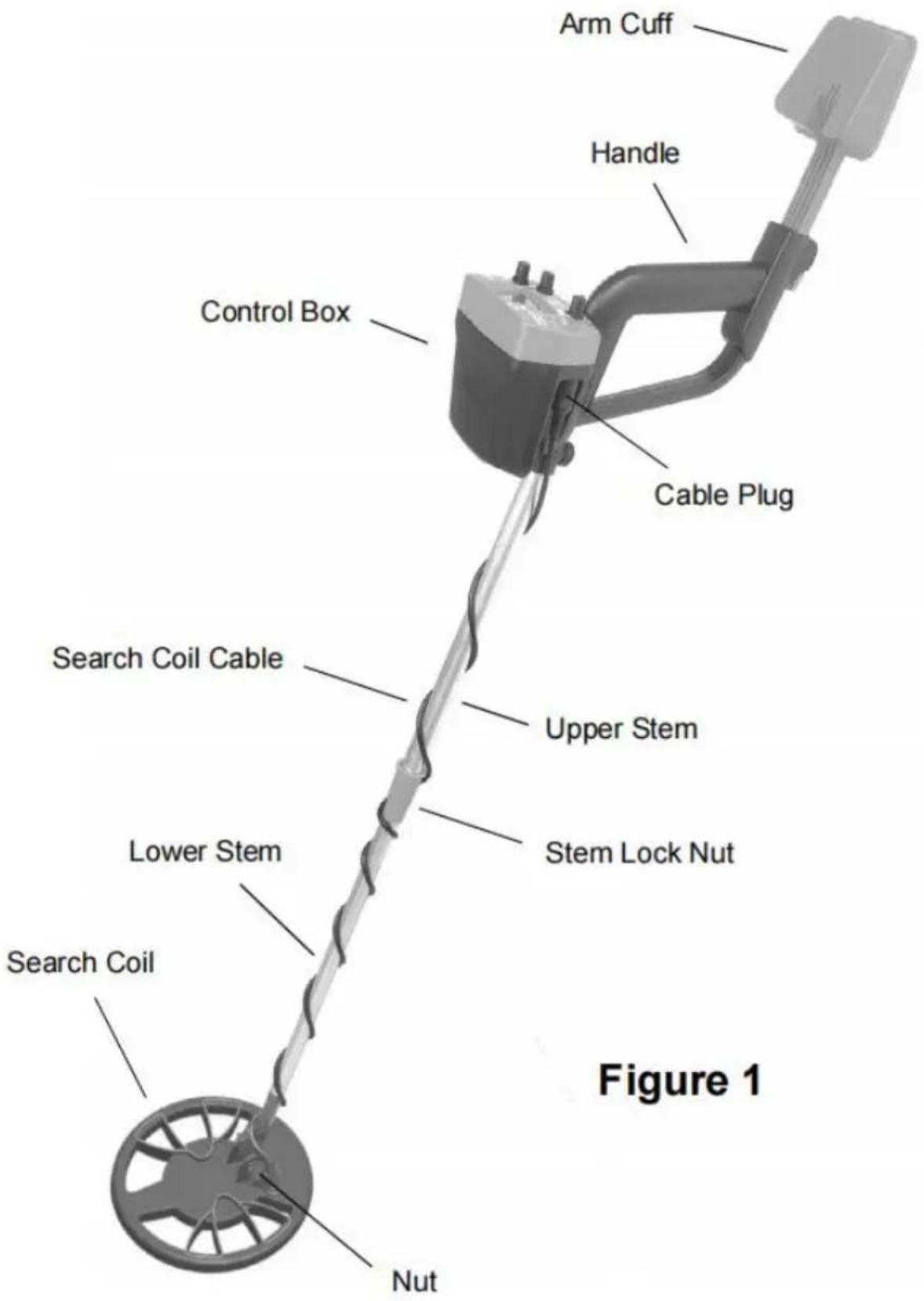
Upper Part Structure:
Tip:
You can slide the battery cover downwards to remove it.
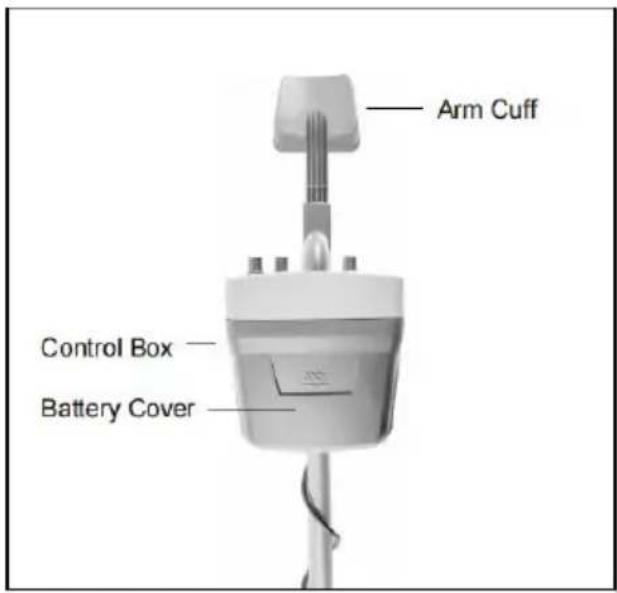
Figure 2. Front View of the Upper Part of the Detector
Tip:
After you gently pull up the end of the arm cuff lock by 90°, you can adjust the height of the arm cuff. After you finish the adjustment, pull down the end of the arm cuff lock to lock the arm cuff.
To remove the control box from the upper stem, counterclockwise turn the bolt that holds the control box to remove the bolt. Then move the control box upwards to remove it from the upper stem.
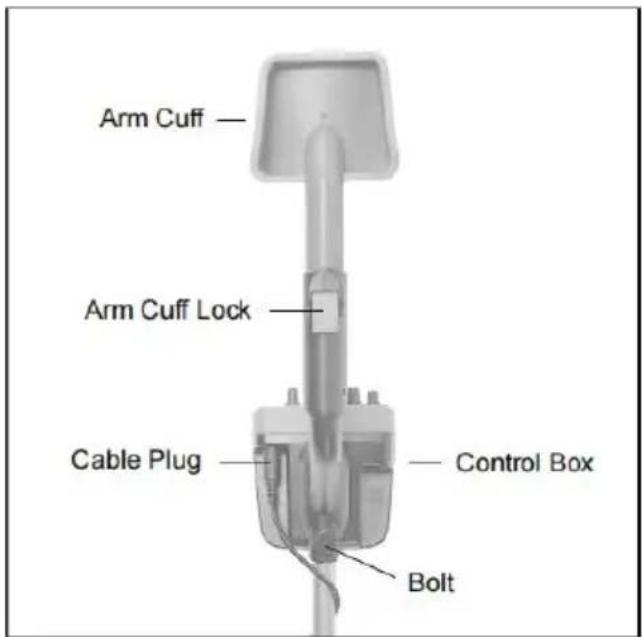
Figure 3. Back View of the Upper Part of the Detector
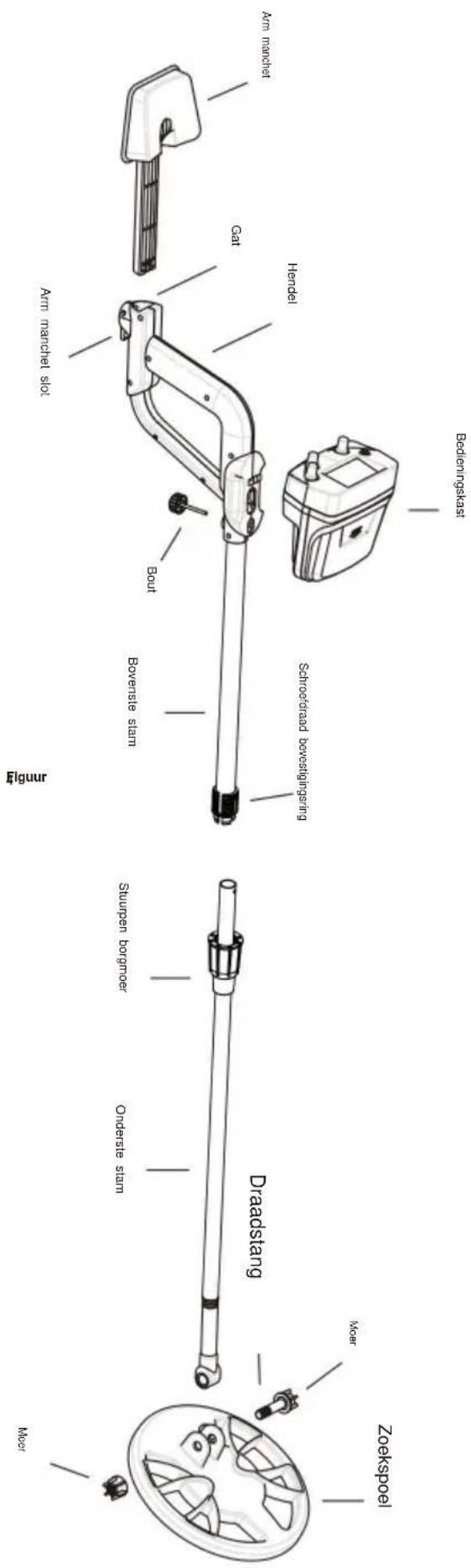
Assembly Drawing
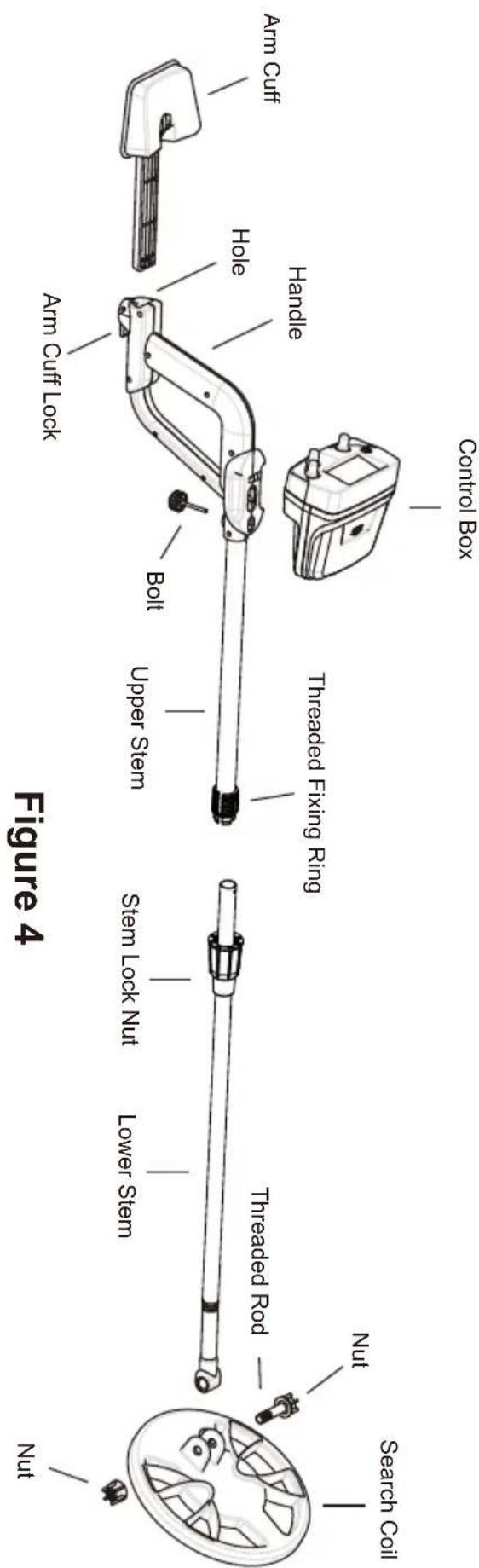
Note:
- See the above figure, the fixing ring is placed around the lower stem and its flat side faces the upper stem.
- The two protrusions on the inner surface of the threaded ring must align with the two holes near the lower end of the upper stem.
- If you want to use the arm cuff, insert it into the corresponding slot beside the handle to a desired depth and then pull down the end of the cuff lock to lock the arm cuff. Once inserted, the arm cuff cannot be disconnected from the upper stem.
- To avoid damage, do not pull the search coil cable with force. When connecting the cable to the socket on the rear of the control box or disconnecting the cable from the socket, hold the cable plug instead of the cable.
PANEL OF THE CONTROL BOX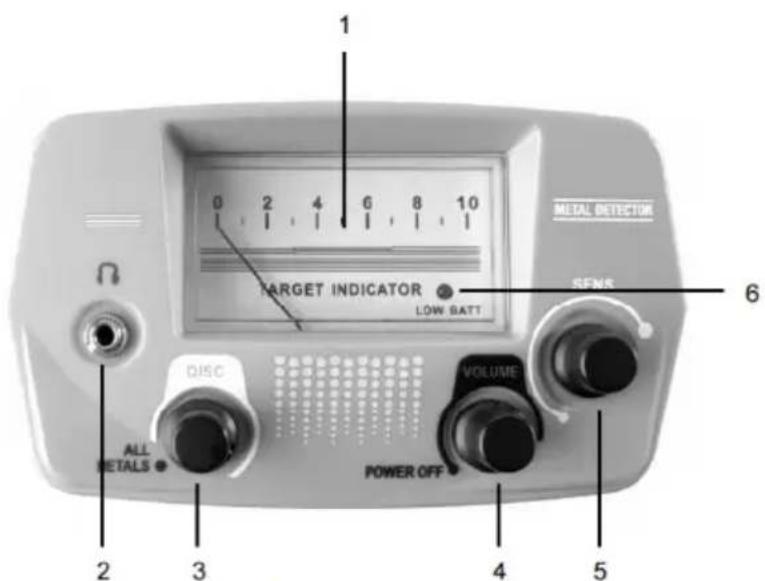
Figure 5
1. Meter
Used to indicate the operating status of the detector.
2. Earphone Jack
3. ALL METALS/DISC Knob
Counterclockwise turn this ALL METALS/DISC knob to the "ALL METALS" position. The knob clicks and the detector stays in the ALL METALS detection mode.
When this knob is in the "ALL METALS" position, clockwise turn it and, after clicks, the detector is in the DISCRIMINATION (DISC) mode.
4. POWER/VOLUME Knob
Used to turn on or off the detector or select a desired alarm volume.
To turn on the detector, clockwise turn this POWER/VOLUME knob until it clicks. Continue to clockwise turn this knob to increase the alarm volume.
To decrease the alarm volume, turn this knob counterclockwise. To turn off the detector, turn this knob counterclockwise until it clicks.
5. SENS Knob
Used to adjust the sensitivity of the detector.
You can turn the SENS knob clockwise to increase sensitivity, or counterclockwise to decrease sensitivity.
6. Low Battery Indicator
When the batteries are not sufficiently charged, this low battery indicator will light up to alert you, and you must replace the batteries immediately; otherwise, the detector's detecting ability will decrease or the detector will not be able to work normally.
Preparation prior to metal detection
Before beginning an outside search, test the detector with the following metal samples:
• An iron nail • A five-cent coin (nickel) • A one-cent penny (zinc coin, after 1982) • A 25-cent silver quarter
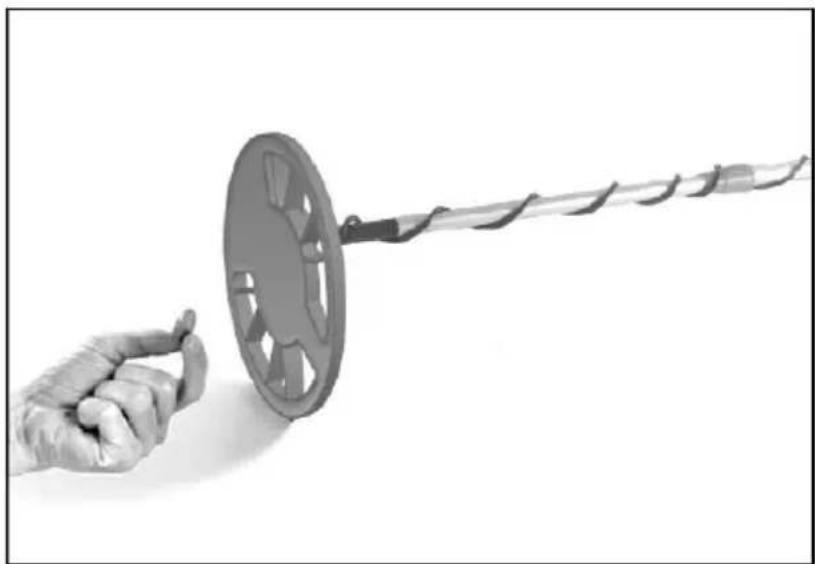
Figure 6
Place the metal detector on a wooden or plastic table with the search coil perpendicular to the table surface (see Figure 6). Make sure the table is away from TVs, computers, or any device that can cause electromagnetic interference.
Note: To avoid interference, remove any watches, rings, or other metal objects from your fingers and hands.
Testing the detector in the ALL METALS mode
Turn the ALL METALS/DISC knob counterclockwise until it clicks. Now the detector is in the ALL METALS mode. Gently turn the SENS knob completely clockwise until it reaches the end.
Now the detection sensitivity is at the highest level. Refer to Figure 6, and pass the metal samples (the iron nail and 3 coins) across the search coil at a distance of 5 cm to 8 cm. When any of the metal samples passes across the coil, the detector should beep and the meter pointer should deflect rightwards. When the detector stops sounding, the meter pointer should return to its original position quickly.
The ALL METALS mode allows the detector to achieve the maximum detection depth possible.
Note: During test, the metal sample which you are using must be in motion; otherwise the detector will not respond to this metal sample.
Testing the detector in the DISCRIMINATION mode
Note:
The Figure 7 on the right shows the knob positions for some often encountered metals. If the ALL METALS/DIS knob is in one of these positions, the corresponding metal will be ignored during scanning. The specifications or descriptions on the figure are not accurate and are for non-critical reference only.
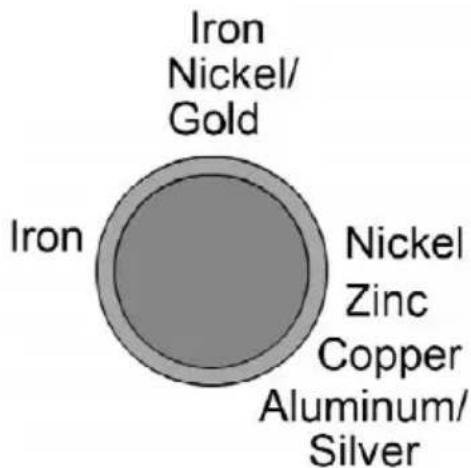
Figure 7. The ALL METALS/DISC Knob
Make sure that the ALL METALS/DISC knob is in the "ALL METALS" position, then turn the knob clockwise until it clicks. Now the detector is already in the DISCRIMINATION mode. In this mode, you can use the ALL METALS/DISC knob to search for specific metals by having it ignore other kinds of metals. At the present knob position, where the knob just clicked, the detector will respond to ANY metal object and the meter pointer will swing to the right when the detector beeps.
- To adjust the settings to prevent the metal detector from detecting iron, set both the VOLUME knob and SENS knob at midpoint (or a higher setting).
- Then set the ALL METALS/DISC knob to about "12 o'clock". See Figure 8.
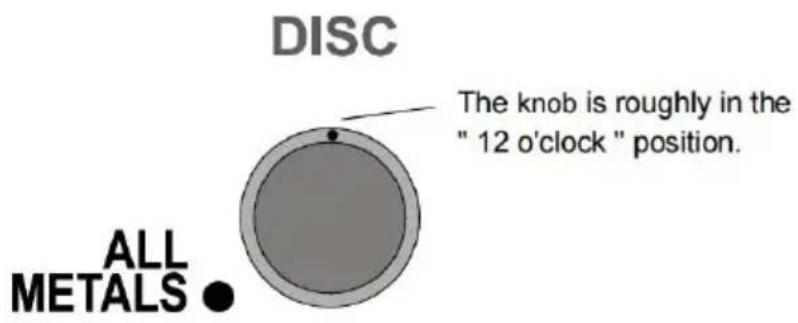
Figure 8. The ALL METALS/DISC Knob
- As a test, sweep the iron nail sample across the search coil at a distance of about 5 cm to 7.5 cm. The detector will not beep and the metal pointer will not move, but the other metal samples (the three coins) will cause the detector to beep and the meter pointer to deflect rightwards when they are respectively swept across the search coil.
- To have the metal detector ignore nickel metals, set the ALL METALS/DISC knob to about "3 o'clock" (see Figure 9). Sweep the nickel across the search coil at a distance of about 5 cm to 7.5 cm; the metal detector will not respond to nickel or the iron nail. But it will respond to the other samples.
DISC

Figure 9. The ALL METALS/DISC Knob
- To prevent the zinc penny from being detected, set the ALL METALS/DISC knob to about "5 o'clock" (see Figure 10). By now, only the 25-cent coins should be detected.
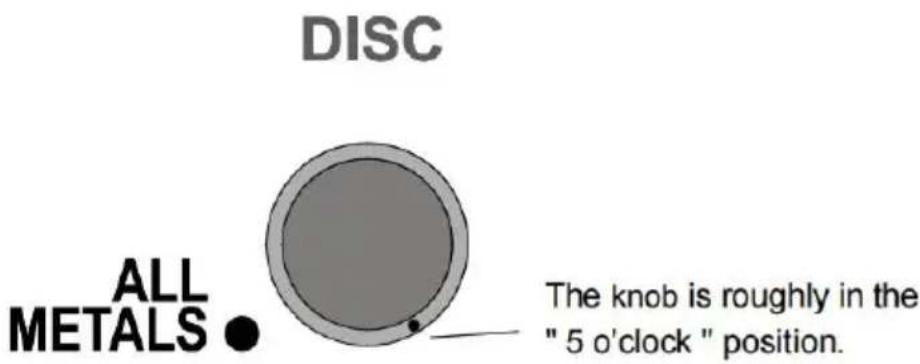
Figure 10. The ALL METALS/DISC Knob
Note: The discrimination position of aluminum is similar to that of silver. So these metals will be detected at the same time. The discrimination position of gold is similar to the nickel setting.
Through the above tests, you can quickly know the performance of the detector and know how to use the detector.
Tip: During testing, the metal sample which you are using must be in motion.
Detecting metallic objects with the detector
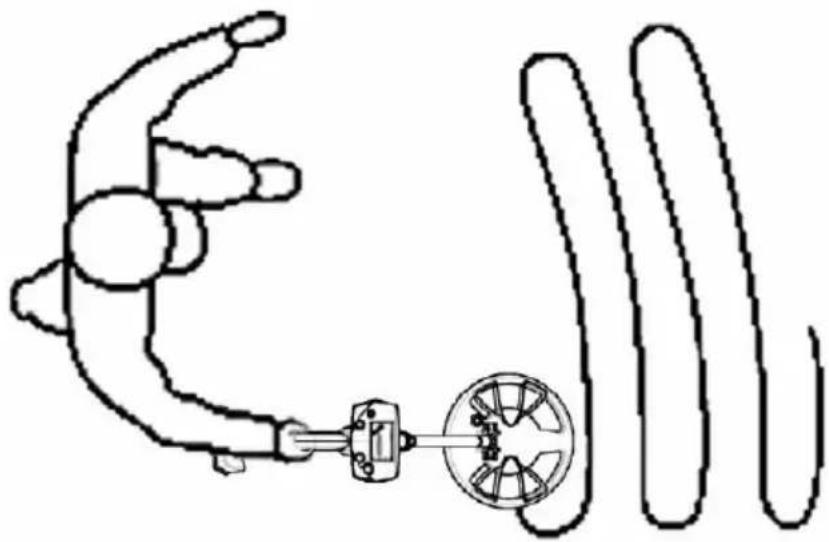
Figure 11. Detecting Metallic Object
After you finish all the tests mentioned above and have set the detector to your need, you can start to detect metallic objects.
Turn on the detector, and set it in the ALL METALS mode. Adjust the SENS to a desired sensitivity setting, and be far away from any external interference source.
During detection, keep the search coil height approximately 3 cm to 5 cm above ground and parallel to the ground at all times for best detection results. Walk as you scan slowly, moving the search coil in a straight line from side to side.
When you detect a metallic object, you can use the DISCRIMINATION mode for further identification or discrimination, if necessary.
Metal detection is a careful, difficult job. Because there may be iron nails, metal oxides, and metal scraps in soil, it may be necessary to perform detection multiple times in the same location to get an accurate result, especially in an area where the soil contains complex mineral substances.
Note:
- Because many factors (degree of oxidation of metallic object, metal impurities
in soil, soil moisture content, etc.) can affect metal detection/identification. In DISCRIMINATION mode, the results of metal identification/discrimination are not guaranteed to be correct.
- During detection, the search coil must be in motion. If the search coil is stationary, the detector cannot detect metal normally.
- The detector can work with the earphone (optional). To use the earphone, insert the plug of the earphone into the earphone jack on the control box; the loudspeaker in the control box will be disabled automatically.
For safety, do not use earphone near traffic.
To avoid hearing loss, do not use earphone if using it makes you feel uncomfortable.
To avoid hearing loss, do not use earphones if they make you feel uncomfortable.
The detector has a dual-frequency audio alarm function. When it detects a ferrous metal object, it emits a tone of 660Hz audio signal, and when it detects a non-ferrous metal object, it emits a tone of 2000Hz audio signal.
The detector has a dual-frequency audio alarm function. When it detects a ferrous metal object, it emits a 660Hz audio signal, and when it detects a non-ferrous metal object, it emits a 2000Hz audio signal.
When the low battery indicator lights, the batteries are not high enough and should be replaced immediately.
When the low battery indicator lights, the batteries are not sufficiently charged and must be replaced immediately.
To replace the batteries, turn off the detector first. Then slide the battery compartment (see Figure 2) downwards to remove it. Replace the old batteries with new ones of the same type, making sure that the polarity connections are correct (see the polarity indications at the bottom of the battery compartment). Reinstall the cover.
To preserve battery life, turn off the detector when not in use.
- To preserve battery life, turn off the detector when not in use.
- If the detector cannot operate normally, a possible cause is that the batteries are exhausted.
- Protect the plug of the search coil cable from dampness; otherwise, the detector may lose its detecting ability. Dry the plug as needed.
- The control box is not waterproof. Protect the control box from water, and do not use the detector in the rain.
- Do not place the detector in any high-temperature environment.
- Do not tamper with the circuit of the detector.
- Do not pull the search coil cable with force.
- Handle the detector gently. Do not bump, drop, or abuse the detector.
- When turning a knob, do not apply excessive force.
WARNING
Any metal detector may discover underground power lines, explosives, or other items which, when struck, could cause personal injury. When searching for metal, observe these precautions:
- Do not search in an area where you believe there may be shallowly buried underground electric lines or pipes.
- Avoid striking any line known to be or suspected of carrying electrical current.
- Do not disturb any pipeline, particularly if it could be carrying flammable liquid.
- Use reasonable caution when digging toward any target, particularly in areas where you are uncertain of underground conditions.
- Observe all national, state, and local laws while detecting.
TECHNICAL SPECIFICATION
Operating Current: 80mA
Battery: 1.5V battery, AA or equivalent, 6 pieces
DECLARATION
- This manual is subject to change without notice.
- Our company will not take any other responsibilities for any loss.
- The content of this manual cannot be used as the reason to use the detector for any special application.
ACCESSORIES
Manual: 1 piece
Earphone: 1 piece
Handbag: 1 piece
Digging shovel: 1 piece
Earphone plug: 1 piece
Battery: 6 pieces
Address: Shuangchenglu 803 nong 11 hao 1602A-1609 shi, Baoshanqu, Shanghai 200000 CN.
Imported to AUS: SIHAO PTY LTD, 1 ROKEVA STREET, EASTWOOD NSW 2122 Australia
Imported to USA: Sanven Technology Ltd, Suite 250, 9166 Anaheim Place, Rancho Cucamonga, CA 91730
| REPE |
E-CrossStu GmbH.
Mainzer Landstr.69, 60329 Frankfurt am Main.
| REPU |
YH CONSULTING LIMITED.
K/O YH Consulting Limited Office 147, Centurion House, London Road, Staines-upon-Thames, Surrey, TW18 4AX
Made in China
VEVOR®
TOUGH TOOLS, HALF PRICE
Technical Support and E-Warranty Certificate
www.vevor.com/support
VEVOR®
TOUGH TOOLS, HALF PRICE
NEED HELP? CONTACT US!
Figure 2. Front View of the Upper Part of the Detector
Tip:
Figure 3. Back View of the Upper Part of the Detector
Assembly drawing
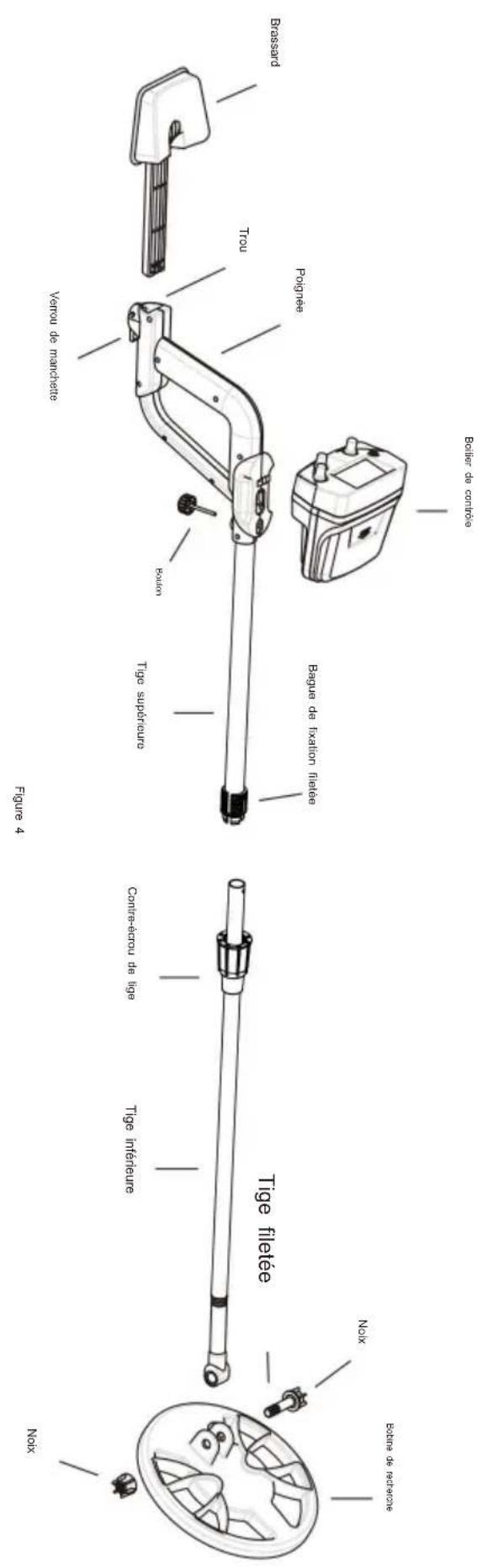
Note:
Figure 6
Figure 7. The ALL METALS/DISC Knob
Figure 8. The ALL METALS/DISC Knob
Figure 9. The ALL METALS/DISC Knob
Figure 10. The ALL METALS/DISC Knob
Figure 11. Detecting Metallic Object
A/S YH Consulting Limited Bureau 147, Centurion House, London Road, Staines-upon-Thames, Surrey, TW18 4AX
Made in China
VEVOR®
TOUGH TOOLS, HALF PRICE
Kundenservice@vevor.com
Upper part assembly:
Tip:
Figure 2. Front View of the Upper Part of the Detector
Tip:
Figure 3. Back View of the Upper Part of the Detector
Assembly drawing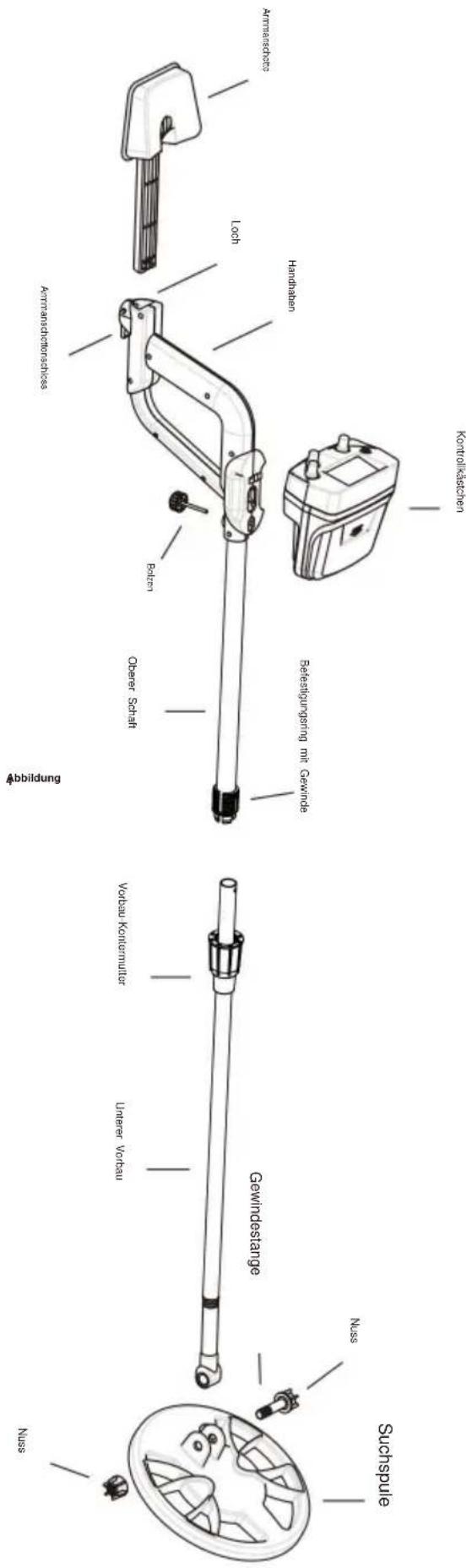
Figure 6
Figure 7. The ALL METALS/DISC Knob
Figure 8. The ALL METALS/DISC Knob
Figure 9. The ALL METALS/DISC Knob
Figure 10. The ALL METALS/DISC Knob
Figure 11. Detecting Metallic Object
C/O YH Consulting Limited Office 147, Centurion House, London Road, Staines-upon-Thames, Surrey, TW18 4AX
www.vevor.com/support
VEVOR®
TOUGH TOOLS, HALF PRICE
Figure 2. Front View of the Upper Part of the Detector
Handle:
Figure 3. Back View of the Upper Part of the Detector
4. ON/VOLUME knob
Figure 6
Figure 7. The ALL METALS/DISC Knob
Figure 8. The ALL METALS/DISC Knob
Figure 9. The ALL METALS/DISC Knob
Figure 10. The ALL METALS/DISC Knob
Figure 11. Detecting Metallic Object
Imported into AUS: SIHAO PTY LTD, 1 ROKEVA STREET EASTWOOD
New South Wales 2122 Australia
C/O YH Consulting Limited Office 147, Centurion House, London Road, Staines-upon-Thames, Surrey, TW18 4AX
Made in China
VEVOR®
TOUGH TOOLS, HALF PRICE
electronics www.vevor.com/support
VEVOR®
TOUGH TOOLS, HALF PRICE
•Adjustable volume •Balance
Figure 2. Front View of the Upper Part of the Detector
Tip:
Figure 3. Back View of the Upper Part of the Detector
Assembly drawing
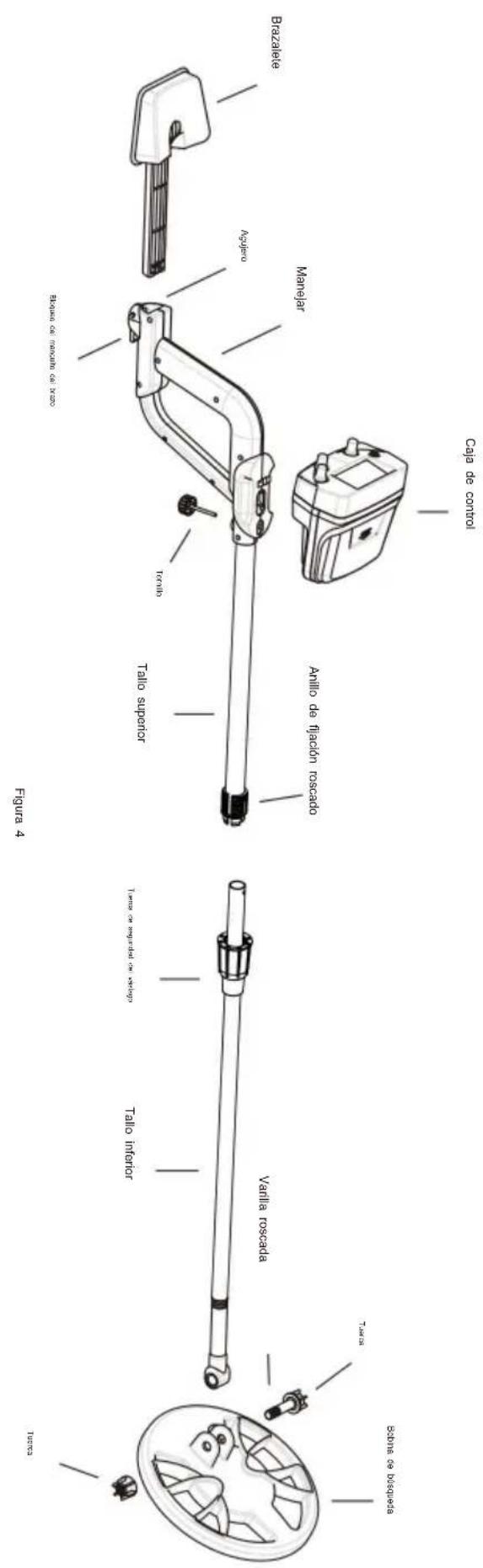
Note:
Figure 6
Figure 7. The ALL METALS/DISC Knob
Figure 8. The ALL METALS/DISC Knob
Figure 9. The ALL METALS/DISC Knob
Figure 10. The ALL METALS/DISC Knob
Figure 11. Detecting Metallic Object
C/O YH Consulting Limited, Office 147, Centurion House,
London Road, Staines-upon-Thames, Surrey, TW18 4AX
Made in China
VEVOR®
TOUGH TOOLS, HALF PRICE
NEED HELP? CONTACT US!
Figure 2. Front View of the Upper Part of the Detector
Indicator:
Figure 3. Back View of the Upper Part of the Detector
Assembly drawing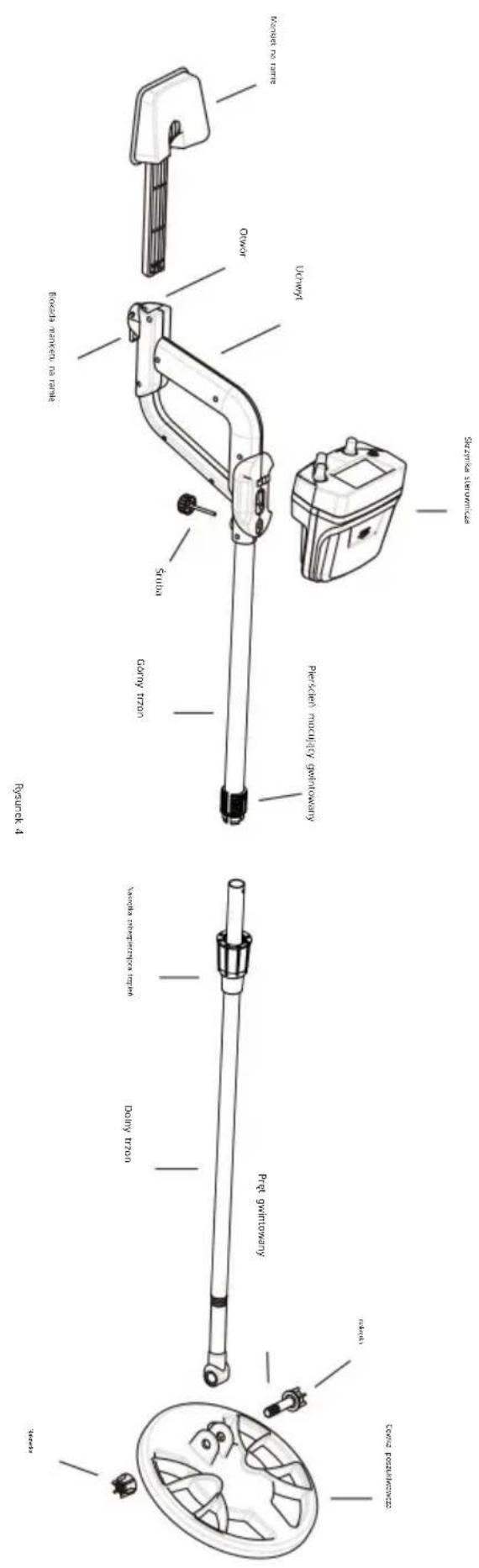
Note:
Figure 6
Figure 7. The ALL METALS/DISC Knob
Figure 8. The ALL METALS/DISC Knob
Figure 9. The ALL METALS/DISC Knob
Figure 10. The ALL METALS/DISC Knob
Figure 11. Detecting Metallic Object
Imported into AUS: SIHAO PTY LTD, 1 ROKEVA STREET EASTWOOD NSW 2122 Australia
C/O YH Consulting Limited Office 147, Centurion House, London Road, Staines-upon-Thames, Surrey, TW18 4AX
NEED HELP? CONTACT US!
CustomerService@vevor.com
Figure 2. Front View of the Upper Part of the Detector
Tip:
Figure 3. Back View of the Upper Part of the Detector
Assembly Drawing
Note:
Figure 6
Figure 7. The ALL METALS/DISC Knob
Figure 8. The ALL METALS/DISC Knob
Figure 9. The ALL METALS/DISC Knob
Figure 10. The ALL METALS/DISC Knob
Figure 11. Detecting Metallic Object
C/O YH Consulting Limited, Kantoor 147, Centurion House, London Road, Staines-upon-Thames, Surrey, TW18 4AX
Made in China
VEVOR®
TOUGH TOOLS, HALF PRICE
Warranty certificate www.vevor.com/support
VEVOR®
TOUGH TOOLS, HALF PRICE
NEED HELP? CONTACT US!
Upper part structure:
Tips:
Figure 2. Front View of the Upper Part of the Detector
Instructions:
Figure 3. Back View of the Upper Part of the Detector
3. ALL METALS/DISC knob
Turn this ALL METALS/DISC knob counterclockwise to the "ALL METALS" position.
Figure 6
Figure 7. The ALL METALS/DISC Knob
Figure 8. The ALL METALS/DISC Knob
Figure 9. The ALL METALS/DISC Knob
Figure 10. The ALL METALS/DISC Knob
Figure 11. Detecting Metallic Object
Made in China
VEVOR®
TOUGH TOOLS, HALF PRICE
www.vevor.com/support
- METAL DETECTOR
- MODEL:TS156A
- NEED HELP? CONTACT US
- INTRODUCTION
- FEATURES
- UPPER PART STRUCTURE
- ASSEMBLY DRAWING
- NOTE
- METER
- EARPHONE JACK
- ALL METALS/DISC KNOB
- POWER/VOLUME KNOB
- SENS KNOB
- LOW BATTERY INDICATOR
- PREPARATION PRIOR TO METAL DETECTION
- TESTING THE DETECTOR IN THE ALL METALS MODE
- TESTING THE DETECTOR IN THE DISCRIMINATION MODE
- DISC
- DETECTING METALLIC OBJECTS WITH THE DETECTOR
- FOR SAFETY, DO NOT USE EARPHONE NEAR TRAFFIC
- THE DETECTOR HAS A DUAL-FREQUENCY AUDIO ALARM FUNCTION. WHEN IT DETECTS A FERROUS METAL OBJECT, IT EMITS A TONE OF 660HZ AUDIO SIGNAL, AND WHEN IT DETECTS A NON-FERROUS METAL OBJECT, IT EMITS A TONE OF 2000HZ AUDIO SIGNAL
- WHEN THE LOW BATTERY INDICATOR LIGHTS, THE BATTERIES ARE NOT HIGH ENOUGH AND SHOULD BE REPLACED IMMEDIATELY
- TO PRESERVE BATTERY LIFE, TURN OFF THE DETECTOR WHEN NOT IN USE
- WARNING
- TECHNICAL SPECIFICATION
- DECLARATION
- ACCESSORIES
- VEVOR®
- TOUGH TOOLS, HALF PRICE
- KUNDENSERVICE@VEVOR.COM
- UPPER PART ASSEMBLY
- ON/VOLUME KNOB
Brand : Vevor
Model : TS156A
Category : Detector