
S0J-FE17-10 - Rotary tool Vevor - Free user manual and instructions
Find the device manual for free S0J-FE17-10 Vevor in PDF.
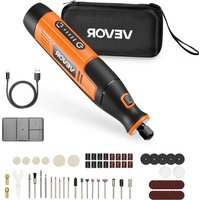


| Product Type | Cordless rechargeable rotary tool |
| Brand | Vevor |
| Model | S0J-FE17-10 |
| Power Supply | Built-in Li-ion battery 4 V, 2000 mAh |
| Charging Voltage | USB 5V DC (Type-C cable included) |
| Charging Time | Approximately 1.5 to 2.5 hours |
| No-load Speed | 7000 / 10000 / 13000 / 16000 / 20000 RPM (5 levels) |
| Collet Sizes | 2.3 mm (3/32") and 3.2 mm (1/8") |
| Main Functions | Grinding, sanding, brushing, polishing, carving, cutting, drilling |
| Built-in Protection | Overheat protection and intelligent speed memory |
| Spindle Lock | Yes, for easy accessory change |
| Battery Indicator | 5 white LEDs indicating charge level |
| Charger Type | USB Type-C port (charger not included) |
| Included Accessories | Collets, wrench, mandrels, sanding bands, grinding wheels, cutting discs, brushes, felt discs, etc. |
| Maintenance and Cleaning | Clean with a damp cloth and mild soap; do not use solvents |
| Safety | Wear protective goggles; do not use in wet or explosive environments |
Frequently Asked Questions - S0J-FE17-10 Vevor
User questions about S0J-FE17-10 Vevor
0 question about this device. Answer the ones you know or ask your own.
Ask a new question about this device
Download the instructions for your Rotary tool in PDF format for free! Find your manual S0J-FE17-10 - Vevor and take your electronic device back in hand. On this page are published all the documents necessary for the use of your device. S0J-FE17-10 by Vevor.
USER MANUAL S0J-FE17-10 Vevor
Rotary Tool
Model: S0J-FE17-10
Model: S0J-FE17-10
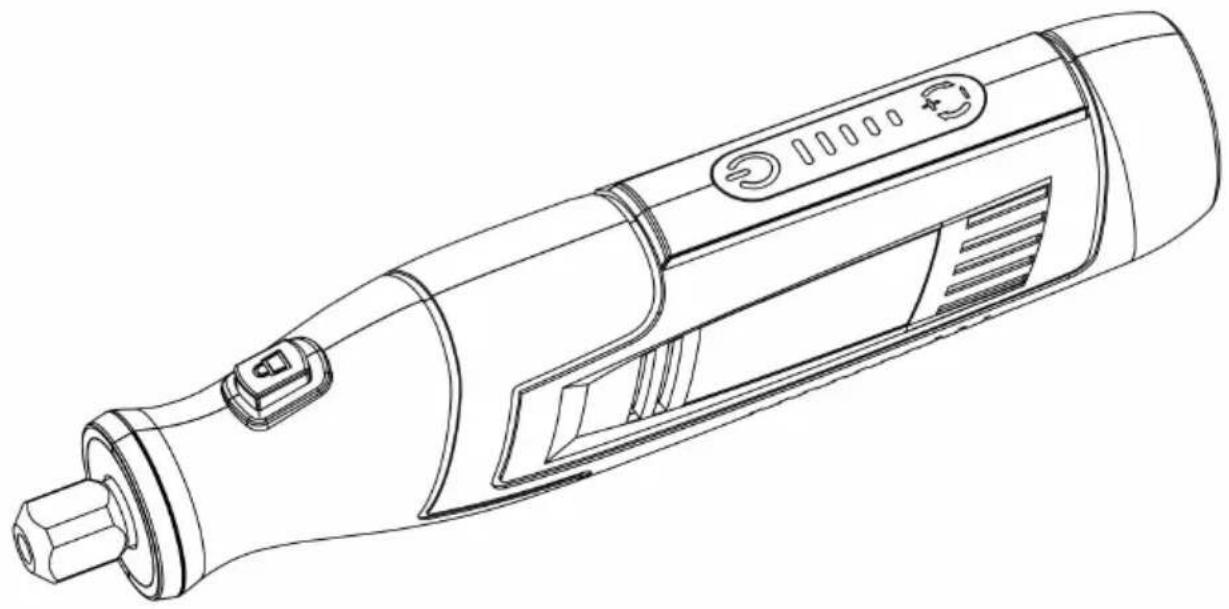
This is the original instruction. Please read all manual instructions carefully before operating. VEVOR reserves a clear interpretation of our user manual. The appearance of the product shall be subject to the product received. Please forgive us that we won't inform you again if there are technology or software updates on our product.
 | Warning-To reduce the risk of injury, user must read instructions manual carefully. |
 | Warning-marking concerning risk of Eye Injury |
| Warning-marking concerning Risk of Hearing Loss | |
 | CORRECT DISPOSALThis product is subject to the provision of european D 2012/19/EU. The symbol showing a wheelie bin crossed through indicates that the product requires separate refu collection in the European Union. This applies to the p and all accessories marked with this symbol. Products as such may not be discarded with normal domestic w must be taken to acollection point for recycling electrica electronic devices. |
 | To preserve natural resources, please recycle or dispos the battery properly. This battery pack contains Li-ion batteries. Consult your local waste autho information regarding available recycling and/or disposal options. Discharge your battery operating your tool, then remove the battery pack from the tool housing and cover the batte connections with heavy-duty adhesive tape to prevent shortcircuit and energy discharge. Do r attempt to open or remove any of the components. |
Safety Notes
Please do not press the spindle lock while the machine is running to avoid damage to the machine or safety accident.
Safety Instructions
Warning: Read all safety warnings and all instructions. Failure to follow the warnings and instructions may result in electric shock, fire and/or serious injury. Save all warnings and instructions for future reference.
1) Work Area Safety
a) Keep work area clean and well lit. Cluttered or dark areas invite accidents. b) Do not operate power tools in explosive atmospheres, such as in the presence of flammable liquids, gases or dust. Power tools create sparks which may ignite the dust or fumes. c) Keep children and bystanders away while operating a power tool. Distractions can cause you to lose control.
2) Electrical Safety
a) Power tool plugs must match the outlet. Never modify the plug in any way, and do not use any adapter plugs with earthed (grounded) power tools. Unmodified plugs and matching outlets will reduce risk of electric shock. b) Avoid body contact with earthed or grounded surfaces such as pipes, radiators, ranges and refrigerators. There is an increased risk of electric shock if your body is earthed or grounded. c) Do not expose power tools to rain or wet conditions. Water entering a power tool will increase the risk of electric shock. d) Do not abuse the cord. Never use the cord for carrying, pulling or unplugging the power tool. Keep cord away from heat, oil, sharp edges or moving parts. Damaged or entangled cords increase the risk of electric shock. e) When operating a power tool outdoors, use an extension cord suitable for outdoor use. Use of a cord suitable for outdoor use reduces the risk of electric shock.
3) Personal Safety
a) Stay alert, watch what you are doing and use common sense when operating a power tool. Do not use a power tool while you are tired or under the influence of drugs, alcohol or medication. A moment of inattention while operating power tools may result in serious personal injury. b) Use personal protective equipment. Always wear eye protection.
Protective equipment such as dust mask, nonskid safety shoes, hard hat, or hearing protection used for appropriate conditions will reduce personal injuries.
c) Prevent unintentional starting. Ensure the switch is in the off-position before connecting to power source and/or battery pack, picking up or carrying the tool.
Carrying power tools with your finger on the switch or energising power tools that have the switch on invites accidents.
d) Remove any adjusting key or wrench before turning the power tool on. A wrench or a key left attached to a rotating part of the power tool may result in personal injury. e) Do not overreach. Keep proper footing and balance at all times. This enables better control of the power tool in unexpected situations. f) Dress properly. Do not wear loose clothing or jewellery. Keep your hair, clothing and gloves away from moving parts. Loose clothes, jewellery or long hair can be caught in moving parts. g) If devices are provided for the connection of dust extraction and collection facilities, ensure these are connected and properly used. Use of these devices can reduce dust-related hazards.
4) Battery tool use and care
a) Ensure the switch is in the off position before inserting battery pack. Inserting the battery pack into power tools that have the switch on invites accidents. b) Recharge only with the charger specified by the manufacturer. A charger that is suitable for one type of battery pack may create a risk of fire when used with another battery pack. c) Use power tools only with specifically designated battery packs. Use of any other battery packs may create a risk of injury and fire. d) When battery pack is not in use, keep it away from other metal objects, like paper clips, coins, keys, nails, screws or other small metal objects that can make a connection from one terminal to another. Shorting the battery terminals together may cause burns or fire. e) Under abusive conditions, liquid may be ejected from the battery; avoid contact. If contact accidentally occurs, flush with water. If liquid contacts eyes, additionally seek medical help. Liquid ejected from the battery may cause irritation or burns.
5) Safety instructions for all operations
Safety warnings common for grinding, sanding, wire brushing, polishing, carving and abrasive cutting-off operations:
a) This power tool is intended to function as a grinder, sander, wire brush,
carving or cut-off tool. Read all safety warnings, instructions, illustrations and specifications provided with this power tool. Failure to follow all instructions listed below may result in electric shock, fire and/or serious injury.
Note! List only those operations that are applicable.
b) Do not use accessories which are not specifically designed and recommended by the tool manufacturer. Just because the accessory can be attached to your power tool, it does not assure safe operation. Accessories running faster than their rated speed can break and fly apart.
d) The outside diameter and the thickness of your accessory must be within the capacity rating of your power tool. Incorrectly sized accessories cannot be adequately controlled.
e) The arbor size of wheels, sanding drums, or any other accessory must properly fit the spindle or collet of the power tool. Accessories that do not match the mounting hardware of the power tool will run out of balance, vibrate excessively, and may cause loss of control.
f) Mandrel-mounted wheels, sanding drums, cutters, or other accessories must be fully inserted into the collet or chuck. If the mandrel is insufficiently held and the overhang of the wheel is too long, the mounted wheel may become loose and be ejected at high velocity.
g) Do not use a damaged accessory. Before each use, inspect the accessory, such as abrasive wheels for chips and cracks, sanding drums for cracks or excess wear, and wire brushes for loose or cracked wires.
If the power tool or accessory is dropped, inspect for damage or install an undamaged accessory. After inspecting and installing an accessory, position yourself and bystanders away from the plane of the rotating accessory and run the power tool at maximum no-load speed for one minute. Damaged accessories will normally break apart during this test time.
h) Wear personal protective equipment. Depending on the application, use a face shield, safety goggles, or safety glasses. As appropriate, wear a dust mask, hearing protectors, gloves, and a workshop apron capable of stopping small abrasive or workpiece fragments. The eye protection must be capable of stopping flying debris generated by various operations. The dust mask or respirator must be capable of filtering particles generated by your operation.
Prolonged exposure to high-intensity noise may cause hearing loss.
i) Keep bystanders a safe distance away from the work area. Anyone entering the work area must wear personal protective equipment. Fragments of the workpiece or a broken accessory may fly away and cause injury beyond the immediate area of operation.
c) The rated speed of the grinding accessories must be at least equal to the maximum speed marked on the power tool. Grinding accessories
j) Hold the power tool by insulated gripping surfaces only when performing an operation where the cutting accessory may contact hidden wiring or its own cord. Cutting accessory contacting a "live" wire may make exposed metal parts of the power tool "live" and could give the operator an electric shock. k) Always hold the tool firmly in your hand(s) during start-up. The reaction torque of the motor, as it accelerates to full speed, can cause the tool to twist.
l) Use clamps to support the workpiece whenever practical. Never hold a small workpiece in one hand and the tool in the other hand while in use. Clamping a small workpiece allows you to use your hand(s) to control the tool. Round materials such as dowel rods, pipes, or tubing have a tendency to roll while being cut, which may cause the bit to bind or jump toward you.
m) Position the cord clear of the spinning accessory. If you lose control, the cord may be cut or snagged, and your hand or arm may be pulled into the spinning accessory.
n) Never lay the power tool down until the accessory has come to a complete stop. The spinning accessory may grab the surface and pull the power tool out of control.
o) After changing the bits or making any adjustments, make sure the collet, chuck, or any other adjustment devices are securely tightened.
Loose adjustment devices can unexpectedly shift, causing loss of control; loose rotating components will be violently thrown.
p) Do not run the power tool while carrying it at your side. Accidental contact with the spinning accessory could snag your clothing, pulling the accessory into your body.
q) Regularly clean the power tool's air vents. The motor's fan will draw dust inside the housing, and excessive accumulation of powdered metal may cause electrical hazards.
r) Do not operate the power tool near flammable materials. Sparks could ignite these materials. s) Do not use accessories that require liquid coolants. Using water or other coolants may result in electrocution or shock.
6) Further safety instructions for all operations
Kickback and related warnings:
Kickback is a sudden reaction to a pinched or snagged rotating wheel, sanding band, brush, or any other accessory. Pinching or snagging causes rapid stalling of the rotating accessory, which in turn causes the uncontrolled power tool to be forced in the direction opposite of the accessory's rotation. For example, if an abrasive wheel is snagged or pinched by the workpiece, the edge of the wheel that is entering into the pinch point can dig into the surface of the material, causing the wheel to climb out or kick out. The wheel may either jump toward or away from the operator, depending on the direction of the wheel's movement at the point of pinching. Abrasive wheels may also break under these conditions. Kickback is a result of power tool misuse and/or incorrect operating procedures or conditions and can be avoided by taking proper precautions as given below.
a) Maintain a firm grip on the power tool and position your body and arm to allow you to resist kickback forces. The operator can control kickback forces, if proper precautions are taken. b) Use special care when working corners, sharp edges, etc. Avoid bouncing and snagging the accessory. Corners, sharp edges, or bouncing have a tendency to snag the rotating accessory and cause loss of control or kickback. c) When attaching a toothed saw blade, since such blades create frequent kickback, make sure to maintain a firm grip on the rotary tool and position your body and arm to allow you to resist kickback forces. d) Always feed the bit into the material in the same direction as the cutting edge is exiting from the material (which is the same direction as the chips are thrown). Feeding the tool in the wrong direction causes the cutting edge of the bit to climb out of the work and pull the tool in the direction of this feed. e) When using rotary files, cut-off wheels, high-speed cutters, or tungsten carbide cutters, always have the work securely clamped. These wheels will grab if they become slightly canted in the groove, and can kickback.
When a cut-off wheel grabs, the wheel itself usually breaks. When a rotary high-speed cutter or tungsten carbide cutter grabs, it may jump from the groove and you could lose control of the tool.
6) Additional safety instructions for grinding and cutting-off operations
Safety warnings specific for grinding and abrasive cutting-off operations:
a) Use only wheel types that are recommended for your power tool and only for recommended applications. For example: do not grind with the side of a cut-off wheel. Abrasive cut-off wheels are intended for peripheral grinding; side forces applied to these wheels may cause them to shatter.
b) For threaded abrasive cones and plugs, use only undamaged wheel mandrels with an unrelieved shoulder flange that are of correct size and length. Proper mandrels will reduce the possibility of breakage.
c) Do not "jam" a cut-off wheel or apply excessive pressure. Do not attempt to make an excessive depth of cut. Overstressing the wheel increases the load and susceptibility to twisting or snagging of the wheel in the cut and the possibility of kickback or wheel breakage.
d) Do not position your hand in line with and behind the rotating wheel. When the wheel, at the point of operation, is moving away from your hand, the possible kickback may propel the spinning wheel and the power tool directly at you.
e) When the wheel is pinched, snagged, or when interrupting a cut for any reason, switch off the power tool and hold the power tool motionless until the wheel comes to a complete stop. Never attempt to remove the cut-off wheel from the cut while the wheel is in motion; otherwise
kickback may occur. Investigate and take corrective action to eliminate the cause of wheel pinching or snagging.
f) Do not restart the cutting operation in the workpiece. Let the wheel reach full speed and carefully re-enter the cut. The wheel may bind, walk up, or kickback if the power tool is restarted in the workpiece.
g) Support panels or any oversized workpiece to minimize the risk of wheel pinching and kickback. Large workpieces tend to sag under their own weight. Supports must be placed under the workpiece near the line of cut and near the edge of the workpiece on both sides of the wheel.
h) Use extra caution when making a "pocket cut" into existing walls or other areas. The protruding wheel may cut gas or water pipes, electrical wiring, or
objects that can cause kickback.
Product Description and Specifications

Read all safety warnings and all instructions. Failure to follow the warnings and instructions may result in electric shock, fire and/or serious injury.
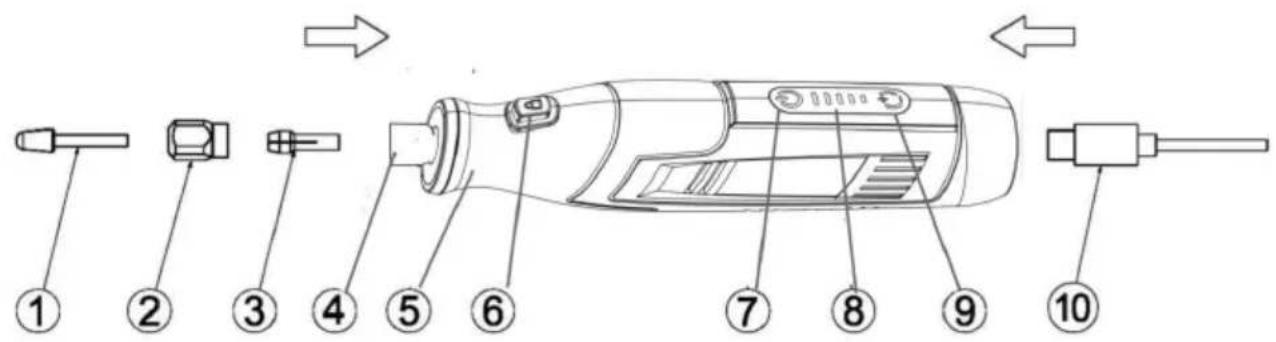
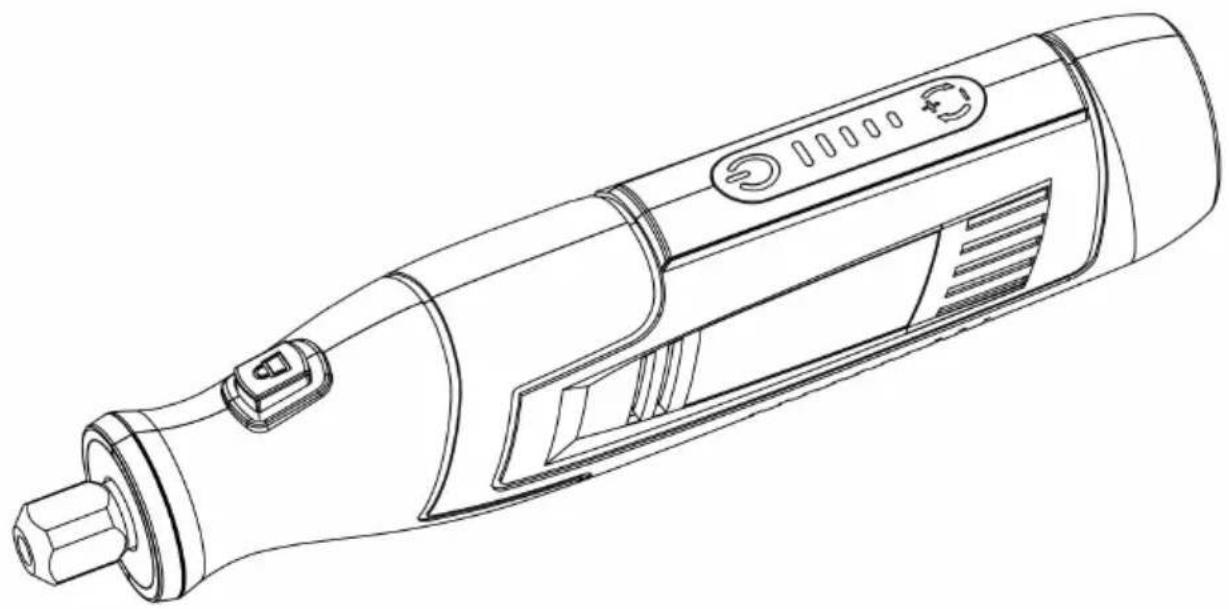
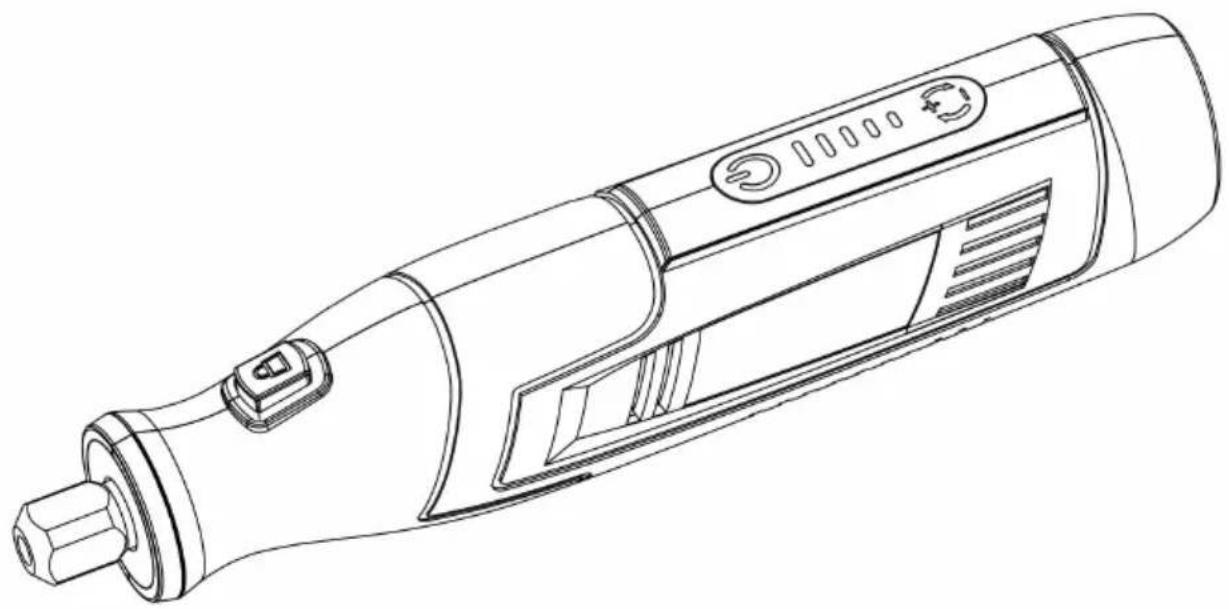
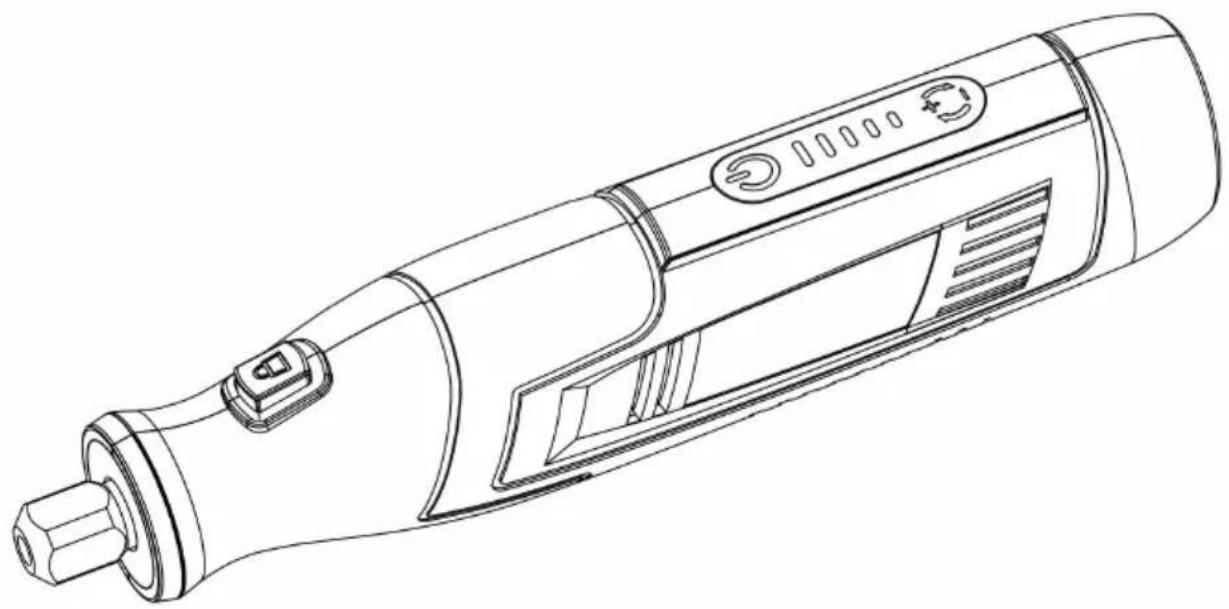
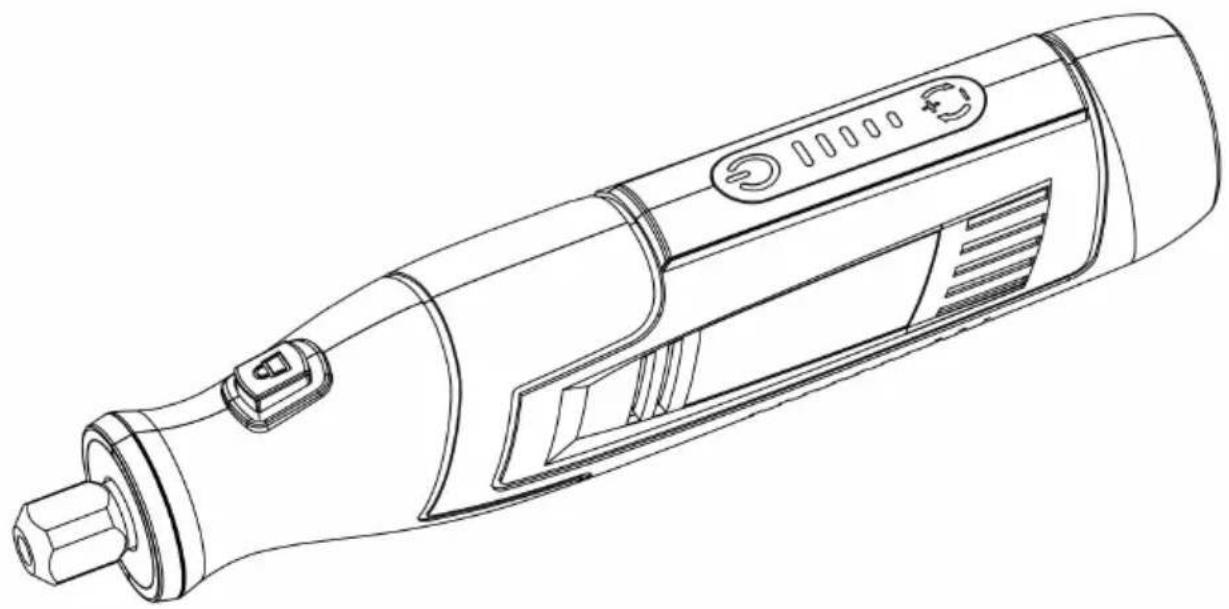
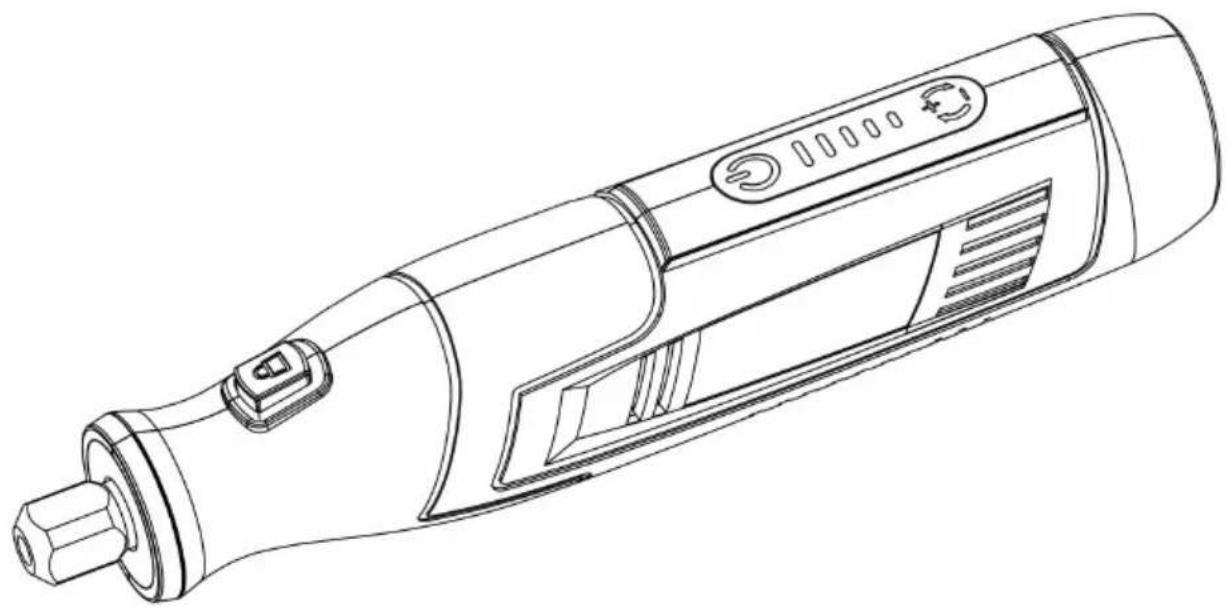
- Accessory
- Locking Collar/Nut
- Collet
- Output Shaft
- Handle
- Spindle Lock Button
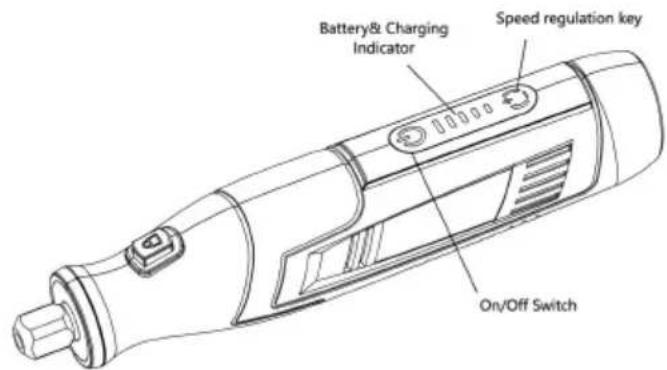
- On/Off Switch
- Screen for Speed Level
- Speed regulation key
- Type C USB Wire
NOTE: This product does not come with a charger.
Technical Data
| Rechargeable battery: | 4V Li-ion 2000mAh |
| Charging voltage: | USB 5V DC |
| Charging cord: | Type C USB wire |
| Battery charging time: | about 1.5- 2.5hours |
| No load speed: | 7000(1)/10000(2)/13000(3)/16000(4)/20000(5)RPM |
| Collet size: | 2.3mm (3/32") / 3.2mm(1/8") |
Operation
Charging the tool
Note! The Mini Grinder does not come completely charged from the factory. Be sure to charge the tool prior to initial use.
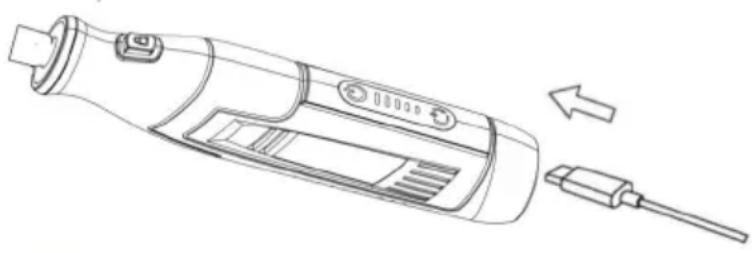
Connect the power supply (DC5V output). Insert the Type C USB wire into the machine's charging socket. The white LED lights located on the top side of the housing will illuminate and start scrolling rear/front to signal that the battery is receiving a charge. When all the white LED lights are always on, charging is complete. Charging will automatically stop when the tool is fully charged. It is okay to leave it on the charger continually.
Battery Status Indicator
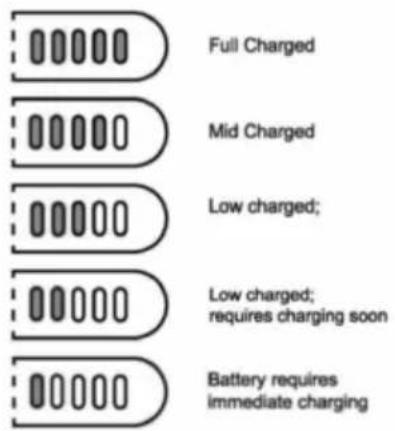
This tool is equipped with a battery status indicator that tells you how much battery you have. Turn on the tool and see which white LED lights up to gauge the status. When five white lights are always on, the battery is full. As the battery capacity decreases, the white lights go out one by one. When the battery is depleted, the tool will turn off automatically. The white lights will all go out.
Turn On/Off the Tool and Setting the Speed Range
To select the right speed for each job, use a practice piece of material.
Turn On/Off the Tool
The switch button is located on the top side of the motor housing. Press the button for 0.5 second, the tool will be turned on and start working. Then on speed setting, if you press the switch button 0.5 second directly, the tool will be turned off.
Setting the Speed Range
After turning on the tool, the screen located in the front of the switch button shows the number of speed level. The number can be adjusted during operation by quickly pressing the switch button one time, the tool speed will be changed accordingly. The tool has 5 speed levels, the number will start scrolling circle from 1 to 5 level when continues quickly pressing the switch button, and the speed will be changed from 7000(1)/10000(2)/13000(3)/16000(4)/20000(5) RPM. Select the expected speed for your application.
Intelligent speed memory function
The tool has Intelligent speed memory function, it can remember the speed level
setting in 5 minutes, you do not have to constantly adjust the speed during intervals of stop working to check the effect or rest. After 5 minutes, it will return to the default medium level at 3 speed (13000rpm).
Overheat Protection
Note! This tool is a Mini Grinder for light-duty applications, do not abuse it for heavy duty or continuously for long time working.
The tool is designed as one of the most powerful tools on the same level. It is for light-duty DIY & crafting, and also can be used for short time working for cutting, or routing, but not recommended for continuously long time working or heavy duty since it is still a mini grinder for light-duty applications. To avoid the user damaging the tool, it is built in an overheat protection function. Once the tool is overused and caused the quickly heating up, the overheat protection function will shut off the tool to avoid damage. After the tool rests and cools down to the normal temperature, restart it for your work.
Installing or changing the accessory
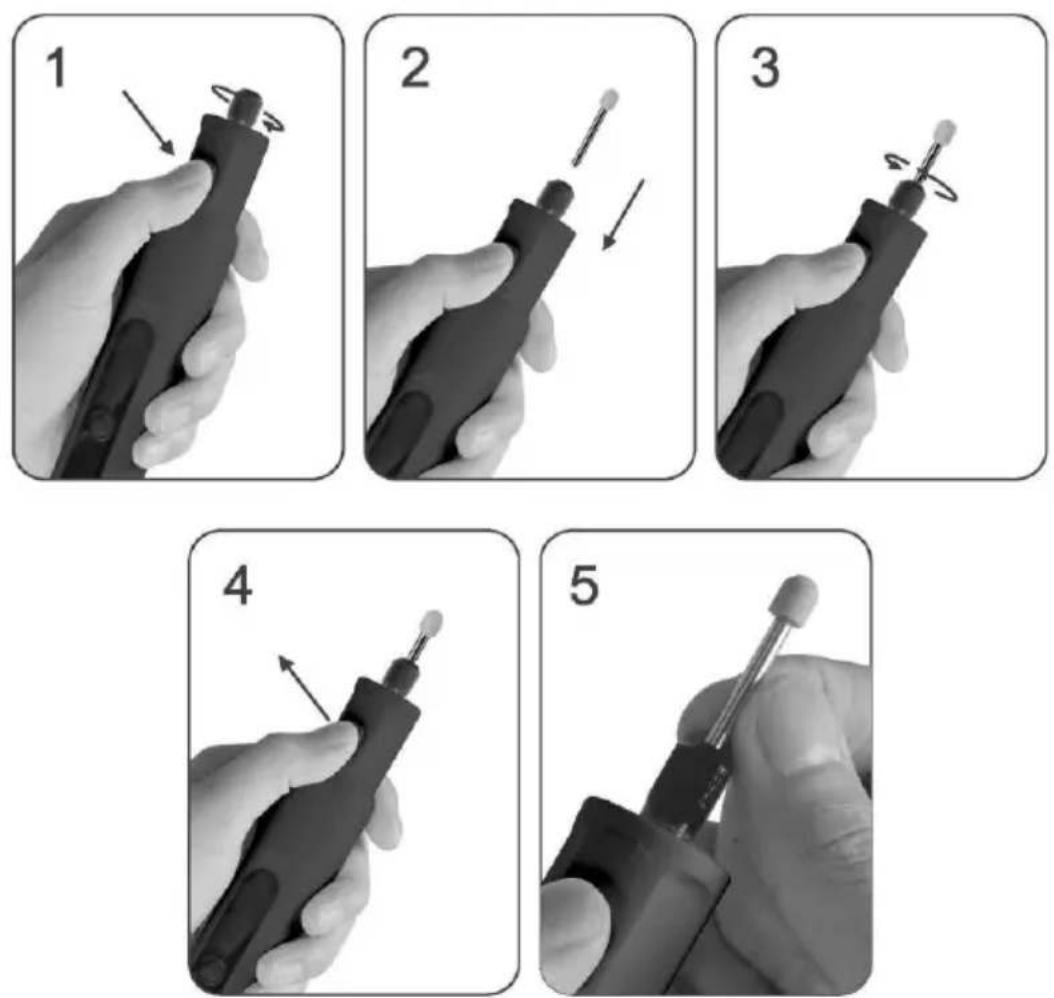
Note! Turn the tool off and ensure that the rotating part is stopped before taking the next step.
- Press down the spindle lock button and turn the chuck until the button is fully engaged, then unscrew the locking collar.
- After the locking collar loosens the collet, insert or change the accessory you want into the collet.
- Press down the spindle lock button again and screw the locking collar onto the collet to firmly tighten the accessory rod.
- Finally, release the spindle lock button and it is ready to use.
- Advice: Uninstall and remove the accessory when finished working, and always use a tissue to handle the accessory to protect your hand.
Warning!
- Before using the tool, ensure that it is ready and safe to use!
- Do not use in wet conditions or environments!
- Never use the tool near flammable gas or liquids.
- Wear glasses while using the tool.
- Do not touch the drill/grinding tip during operation (even if it is at low speed), because it can cause injury!
- Do not force the device to operate when it slows down or stops; turn it off and finish the work process.
- Do not overtighten the locking collar with too much force to avoid damaging the machine components while installing the accessory, because this is a mini-tool without too much strength.
Operating Instructions for Using the Rotary Tool
The first step in learning to use the rotary tool is to get the "feel" of it. Hold it in your hand and feel its weight and balance. Feel the taper of the
Always hold the tool away from your face. Accessories
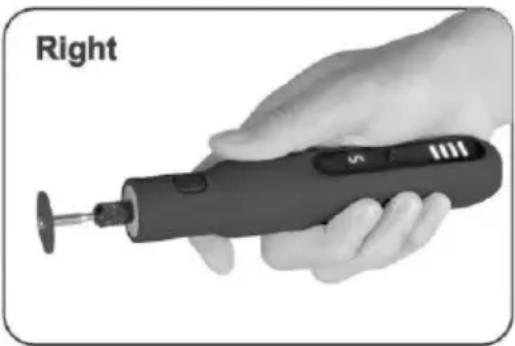
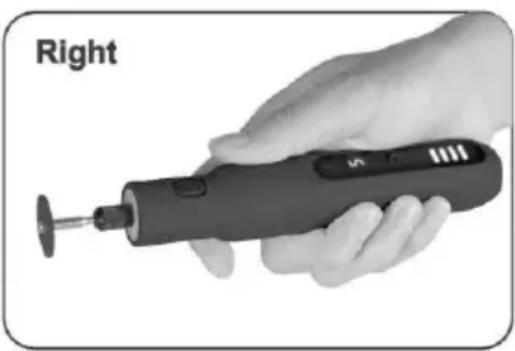
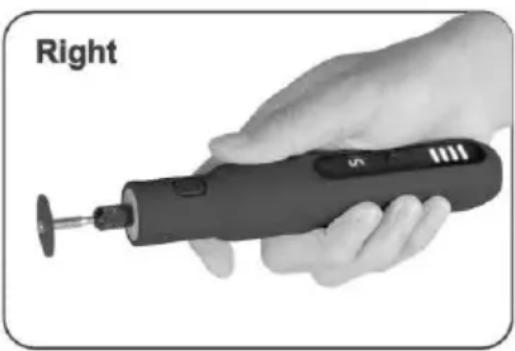
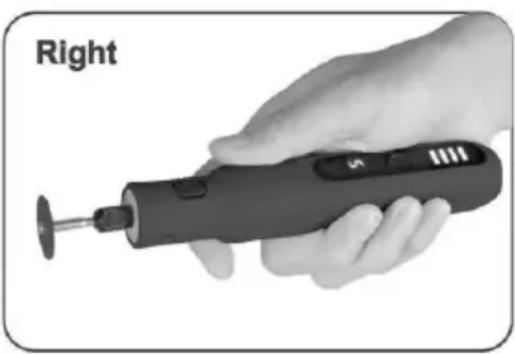
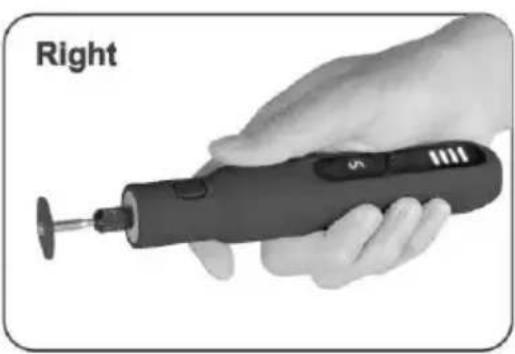
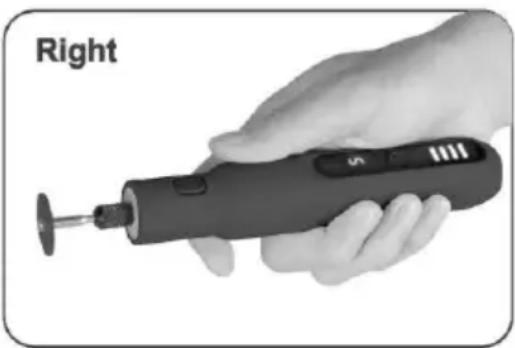
can be damaged during handling, and can fly apart as they come up to speed. This is not common, but it does happen. Whenever you hold the tool, be careful not to cover the air vents with your hand. This blocks the airflow and causes the tool to overheat. For best control in close work, grip the rotary tool like a pencil between your thumb and four fingers.
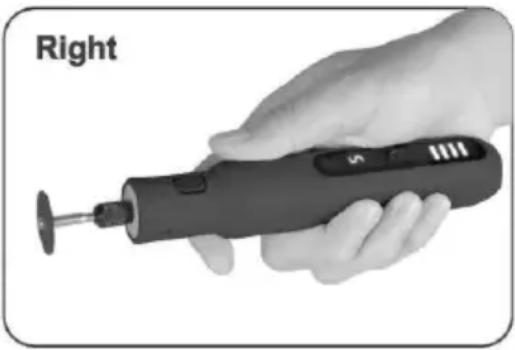
(See Figure Left). The "Golf Grip" method of holding the tool can be used for aggressive operations such as grinding a flat surface or using cutoff wheels.
Figure Right)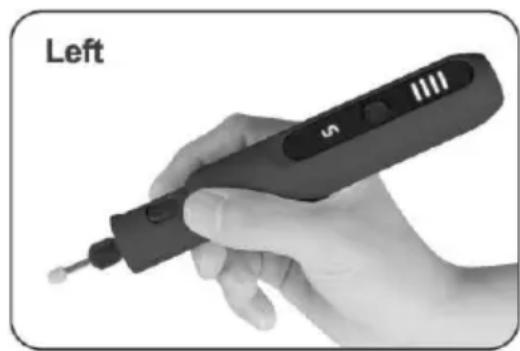
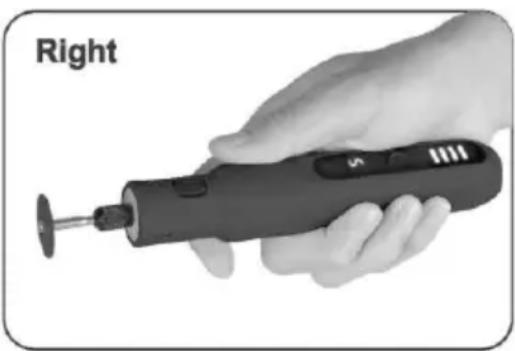
Practice on scrap materials first to see how the Rotary Tool's high-speed action performs. Keep in mind that the work is done by the speed of the tool and accessory in the collet. You should not lean on or push the tool during use. Lower the spinning accessory lightly to the work and allow it to touch the point where you want cutting (or sanding or etching, etc.) to begin. Concentrate on guiding the tool over the work using very little pressure from your hand. Allow the accessory to do the work. Usually, it is best to make a series of passes with the tool rather than attempt to do all the work in one pass. To make a cut, pass the tool back and forth over the work, much as you would a small paintbrush. Cut a little material on each pass until you reach the desired depth. For more control, the gentle touch is best. With it, you have the best control, are less likely to make errors, and will get the most efficient work out of the accessory.
Speed Setting for Accessories:
Warning! Recommended maximum pet grooming speed not over 12000rpm (speed level 3).
Note! Please check the reference list and select the right speed for each job using items appropriately. The number of speed level is from 1 to 5, the speed
from 5k to 20k rpm accordingly.
Reminder! The following table is only a description of the use method of all accessories that may be used for this tool, such as application scenarios, processing materials, recommended speed selection, etc. It does not mean that the sales package contains all these accessories. The actual accessories that the package included, please refer to the description of the sales link.
| Functions | Images | Accessory Description | Cork | Hardwood | Plastic | Steel | Aluminum, brass, etc. | Shell, stone | Ceramic | Glass |
| Sanding | Sanding paper | Speed 2-4 RPM8-16k | Speed 2-4 RPM8-16k | Speed 2-4 RPM8-16k | Speed 2-4 RPM8-16k | Speed 2-4 RPM8-16k | — | — | — | |
| Sanding bands | Speed 1-4 RPM 5-16k | Speed 1-4 RPM 5-16k | Speed 1-4 RPM 5-16k | Speed 1-4 RPM 5-16k | Speed 1-4 RPM 5-16k | Speed 1-4 RPM 5-16k | Speed 1-4 RPM 5-16k | — | ||
| Cutting | Cutting blade | Speed 4-5 RPM16-20k | Speed 4-5 RPM16-20k | Speed 4-5 RPM16-20k | — | — | — | — | — | |
| Cut off wheels fiberglass | Speed 4-5 RPM16-20k | Speed 4-5 RPM16-20k | Speed 4-5 RPM16-20k | Speed 4-5 RPM16-20k | Speed 4-5 RPM16-20k | — | — | — | ||
| Grinding/ Sharpening | Silicon carbide grinding wheels with shank | — | — | — | Speed 3-5 RPM12-20k | Speed 3-5 RPM12-20k | Speed 3-5 RPM12-20k | Speed 3-5 RPM12-20k | — | |
| Aluminum oxid e Grinding wheels with shank | — | — | Speed 3-5 RPM12-20k | Speed 3-5 RPM12-20k | Speed 3-5 RPM12-20k | Speed 3-5 RPM12-20k | Speed 3-5 RPM12-20k | — | ||
| Rubber grinder with shank | — | — | — | Speed 3-5 RPM12-20k | Speed 3-5 RPM12-20k | — | — | Speed 3-5 RPM12-20k | ||
| Carving/ Engraving | Diamond grinding needle | Speed 3-5 RPM12-20k | Speed 3-5 RPM12-20k | Speed 3-5 RPM12-20k | Speed 3-5 RPM12-20k | Speed 3-5 RPM12-20k | Speed 3-5 RPM12-20k | Speed 3-5 RPM12-20k | Speed 3-5 RPM12-20k | |
| HSS cutter | Speed 3-5 RPM12-20k | Speed 3-5 RPM12-20k | Speed 3-5 RPM12-20k | — | — | — | — | — | ||
| Drilling | HSS drill bit | Speed 4-5 RPM16-20k | Speed 4-5 RPM16-20k | Speed 4-5 RPM16-20k | — | — | — | — | — | |
| Cleaning/ Polishing | Brushes | Speed 2-4 RPM8-16k | Speed 2-4 RPM8-16k | Speed 2-4 RPM8-16k | Speed 2-4 RPM8-16k | Speed 2-4 RPM8-16k | Speed 2-4 RPM8-16k | Speed 2-4 RPM8-16k | Speed 2-4 RPM8-16k | |
| Felt wheels / Mandrel | Speed 3-5 RPM12-20k | Speed 3-5 RPM12-20k | Speed 3-5 RPM12-20k | Speed 3-5 RPM12-20k | Speed 3-5 RPM12-20k | Speed 3-5 RPM12-20k | Speed 3-5 RPM12-20k | Speed 3-5 RPM112-20k | ||
| Accessories | Collets | To clamp accessories | ||||||||
| Wrench | For replacing the accessories | |||||||||
| Mandrel for cut off wheel | To link Rubber emery wheel/ Sanding paper / Diamond wheel/cut off wheels/ Grinding wheels | |||||||||
| Sanding shank | Mandrel drum for sanding bands installation | |||||||||
Accessories
Sanding bands & shank: Use to grind pet nail or work-pieces made of metal, wood, stone and plastic. Need to assemble them together before use.
Sanding paper: Use for detail sanding or polishing work-pieces made of metal, wood, stone and plastic. Need to assemble it on the mandrels with screw before use.
Grinding stones: Use for surface treatment of metal parts, cast-metal parts, welding seams and for the removal of rust. Different shapes are available.
Diamond bits: For fine detail work, engraving, carving, touch-up and finishing. Use on wood, jade, ceramic, glass, hardened steel, semi precious stones and other hard materials. Bits are covered with diamond particles.
Multipurpose cutting bit: Ideal for shaping, hollowing, grooving, slotting, inlaying and making tapered holes in soft metals, plastics and woods especially on cut surfaces.
Drill bits: Use for drilling holes in work-pieces made of plastic, wood or stone. Wool polishing and felt wheel: Use to polish work-pieces made of metal and plastic. Need to assemble the felt wheel on the mandrels with threaded head before use.
Rubber wheel with shank: Polishing for various, metal, iron, jade, agate, gla stone and pet nail etc.
Bristle brush: For work-pieces cleaning.
Mandrels: Shafts with screw or threaded head, which are designed for retaining grinding and polishing wheels.
Diamond pet nail grinder wheel: For pet claw grooming, nail grinding, sanding. Recommended maximum pet grooming speed not over 12000rpm (speed level 3).
Cleaning & maintenance
Always pull out the mains power plug before starting any cleaning work.
Cleaning
Keep all safety devices, air vents and the motor housing free of dirt and as far as possible.
Wipe the equipment with a clean cloth or blow it with compressed air at low pressure.
We recommend that you clean the device immediately each time you have finished using it.
Clean the equipment regularly with a moist cloth and some soft soap. Do not use cleaning agents or solvents; these could attack the plastic parts of the equipment. Ensure that no water can seep into the device.
Maintenance
There are no parts inside the equipment which require additional maintenance.
Manufacturer: Shanghai Muxin Muye Youxian Gongsi
Address: Shuangcheng Road 803, Lane 11, Room 1602A-1609, Baoshan District, Shanghai 200000 CN.
Imported to AUS: SIHAO PTY LTD. 1 ROKEVA STREET, EASTWOOD NSW 2122 Australia
Imported to USA: Sanven Technology Ltd. Suite 250, 9166 Anaheim Place, Rancho Cucamonga, CA 91730
| UK | REP |
YH CONSULTING LIMITED.
C/O YH Consulting Limited Office 147,
Centurion House, London Road,
Staines-upon-Thames, Surrey, TW18 4AX
| EC | REP |
E-CrossStu GmbH
Mainzer Landstr. 69,
60329 Frankfurt am Main.

VEVOR
Affordable. Reliable. Home Improvement.
Rotary tool
Product Description and Specifications

C/O YH Consulting Limited Office 147,
Centurion House, London Road,
Staines-upon-Thames, Surrey, TW18 4AX
| EC | REP |
E-CrossStu GmbH
Mainzer Landstr.69,
60329 Frankfurt am Main.

VEVOR
Affordable. Reliable. Home Improvement.
Rotary tool
Model: S0J-FE17-10
Model: S0J-FE17-10
Product Description and Specifications

C/O YH Consulting Limited Office 147,
Centurion House, London Road,
Staines-upon-Thames, Surrey, TW18 4AX
| EC | REP |
E-CrossStu GmbH
Mainzer Landstr.69,
60329 Frankfurt am Main.

VEVOR
Affordable. Reliable. Home Improvement.
Rotary tool
Model: S0J-FE17-10
Model: S0J-FE17-10
Product Description and Specifications

Imported into AUS: SIHAO PTY LTD. 1 ROKEVA STREETEASTWOOD NSW 2122 Australia
Imported into USA: Sanven Technology Ltd. Suite 250, 9166 Anaheim Place, Rancho Cucamonga, CA 91730
| UK | REP |
YH CONSULTING LIMITED.
C/O YH Consulting Limited Office 147,
Centurion House, London Road,
Staines-upon-Thames, Surrey, TW18 4AX
| EC | REP |
E-CrossStu GmbH
Mainzer Landstr.69,
60329 Frankfurt am Main.

VEVOR
Affordable. Reliable. Home Improvement.
Product Description and Specifications

C/O YH Consulting Limited Office 147,
Centurion House, London Road,
Staines-upon-Thames, Surrey, TW18 4AX
| EC | REP |
E-CrossStu GmbH
Mainzer Landstr.69,
60329 Frankfurt am Main.

VEVOR
Rotary tool
Model: S0J-FE17-10
Model: S0J-FE17-10
Product Description and Specifications

C/O YH Consulting Limited Office 147,
Centurion House, London Road,
Staines-upon-Thames, Surrey, TW18 4AX
| EC | REP |
E-CrossStu GmbH
Mainzer Landstr.69,
60329 Frankfurt am Main.

VEVOR
Rotary tool
Model: S0J-FE17-10
Model: S0J-FE17-10
Product Description and Specifications

C/O YH Consulting Limited Office 147,
Centurion House, London Road,
Staines-upon-Thames, Surrey, TW18 4AX
| EC | REP |
E-CrossStu GmbH
Mainzer Landstr.69,
60329 Frankfurt am Main.

VEVOR
Affordable. Reliable. Home Improvement.
Rotary tool
Model: S0J-FE17-10
Model: S0J-FE17-10
Product Description and Specifications

C/O YH Consulting Limited Office 147,
Centurion House, London Road,
Staines-upon-Thames, Surrey, TW18 4AX
| EC | REP |
E-CrossStu GmbH
Mainzer Landstr.69,
60329 Frankfurt am Main.


- SAFETY NOTES
- SAFETY INSTRUCTIONS
- WORK AREA SAFETY
- ELECTRICAL SAFETY
- PERSONAL SAFETY
- BATTERY TOOL USE AND CARE
- SAFETY INSTRUCTIONS FOR ALL OPERATIONS
- FURTHER SAFETY INSTRUCTIONS FOR ALL OPERATIONS
- PRODUCT DESCRIPTION AND SPECIFICATIONS
- TECHNICAL DATA
- OPERATION
- CHARGING THE TOOL
- BATTERY STATUS INDICATOR
- TURN ON/OFF THE TOOL AND SETTING THE SPEED RANGE
- TURN ON/OFF THE TOOL
- SETTING THE SPEED RANGE
- INTELLIGENT SPEED MEMORY FUNCTION
- OVERHEAT PROTECTION
- INSTALLING OR CHANGING THE ACCESSORY
- WARNING
- OPERATING INSTRUCTIONS FOR USING THE ROTARY TOOL
- SPEED SETTING FOR ACCESSORIES
- ACCESSORIES
- CLEANING & MAINTENANCE
- CLEANING
- MAINTENANCE
- VEVOR
- ROTARY TOOL
Brand : Vevor
Model : S0J-FE17-10
Category : Rotary tool