
704-48205-P1 - Remote control Vevor - Free user manual and instructions
Find the device manual for free 704-48205-P1 Vevor in PDF.
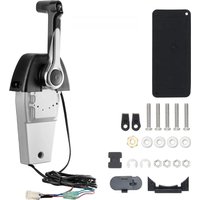


| Product Type | Remote control box for outboard motor |
| Brand | Vevor |
| Model | 704-48205-P1 |
| Dimensions (approx.) | 200 x 150 x 100 mm |
| Weight (approx.) | 1.5 kg |
| Power Supply | Mechanical (control cables); 12 V DC for trim/tilt (if equipped) |
| Number of Compatible Engines | Single or dual (depending on version) |
| Main Functions | Throttle control, gear shifting (forward, neutral, reverse), electric trim and tilt (if equipped), free accelerator |
| Throttle Control Type | Push-to-open or pull-to-open (configurable) |
| Lever Travel Angle | 35° for gear, 67° to 100° for throttle |
| Safety | Start-in-gear protection device (neutral required) |
| Friction Adjustment | Throttle friction screw at the back of the box |
| Housing Material | Reinforced plastic |
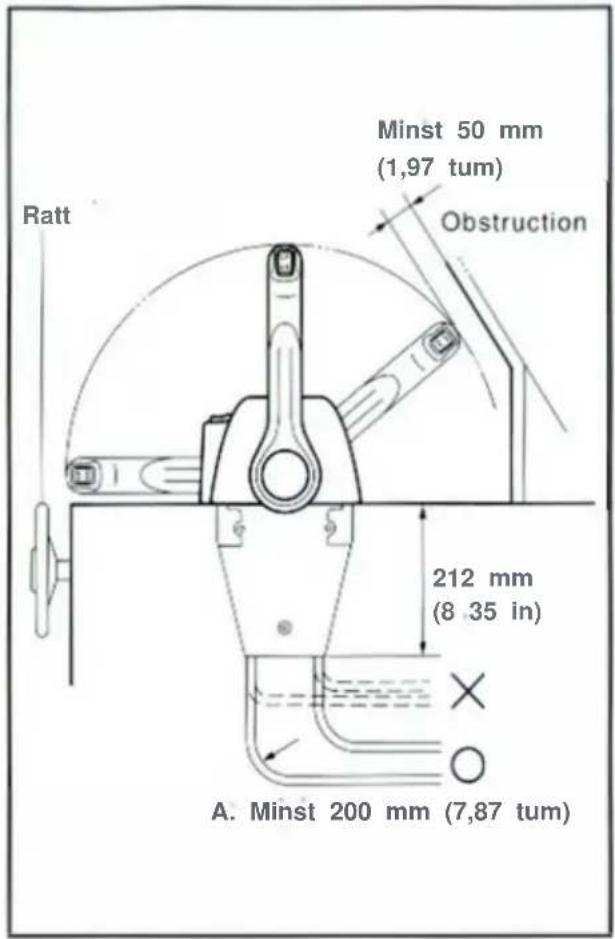
| Cable Bend Radius | Greater than 200 mm (7.87 in) |
| Maintenance and Cleaning | Apply water-resistant grease (Yamaha Grease A) to moving surfaces; clean with a soft cloth |
| Spare Parts Included | Circlips, cable seals, grommets, washers, nuts, screws, packaging, manual, copper nut, plastic mounting blocks |
| Repairability | Spare parts available from the manufacturer; throttle type conversion procedure described in the manual |
| General Information | Compliant with EU Directive 2012/19/EU (WEEE); technical support and warranty at www.vevor.com/support; imported by various entities depending on region |
Frequently Asked Questions - 704-48205-P1 Vevor
User questions about 704-48205-P1 Vevor
0 question about this device. Answer the ones you know or ask your own.
Ask a new question about this device
Download the instructions for your Remote control in PDF format for free! Find your manual 704-48205-P1 - Vevor and take your electronic device back in hand. On this page are published all the documents necessary for the use of your device. 704-48205-P1 by Vevor.
USER MANUAL 704-48205-P1 Vevor
OUTBOARD REMOTE CONTROL BOX
MODEL: 704-48205-P1
We continue to be committed to providing you with tools at competitive prices. "Save Half", "Half Price", or any other similar expressions used by us only represent an estimate of savings you might benefit from buying certain tools with us compared to the major top brands and do not necessarily mean to cover all categories of tools offered by us. You are kindly reminded to verify carefully when placing an order with us if you are actually saving half in comparison with the top major brands.
VEVOR®
TOUGH TOOLS, HALF PRICE
OUTBOARD REMOTE CONTROL BOX
OUTBOARD REMOTE CONTROL BOX
NEED HELP? CONTACT US!
Have product questions? Need technical support? Please feel free to contact us:
Technical Support and E-Warranty Certification
www.vevor.com/support
This is the original instruction. Please read all manual instructions carefully before operating. VEVOR reserves a clear interpretation of the user manual. The appearance of the product shall be subject to the product you received. Please forgive us that we won't inform you again if there are any technology or software updates on our product.
NOTICE
This remote control box is so designed that both shift and throttle can be actuated by operating a remote control lever. For correct operation and installation of the remote control box, please read this manual carefully and thoroughly. Explanations will be made based on a push-to-open throttle type equipped with the power trim and tilt switch.
Particularly important information is distinguished in this manual by the following notations.

The Safety Alert Symbol means ATTENTION! BECOME ALERT! YOUR SAFETY IS INVOLVED!
AWARNING
Failure to follow WARNING instructions could result in severe injury or death to the machine operator, a bystander, or a person inspecting or repairing the remote control box.
The twin remote control box is used as a base for the explanations and illustrations in this manual. Therefore, some items may not apply to every model.
CAUTION:
A CAUTION indicates special precautions that must be taken to avoid damage to the remote control box.
NOTE:
A NOTE provides key information to make procedures easier or clearer.
Specifications given in this manual may be subject to change without notice.
MAIN COMPONENTS OF SINGLE ENGINE TYPE
Remote control box for single engine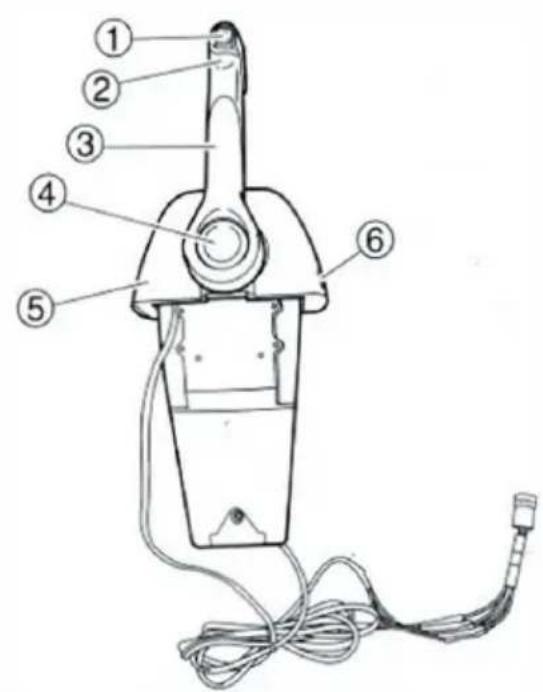
STANDARD
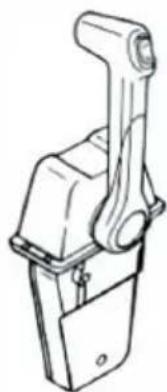
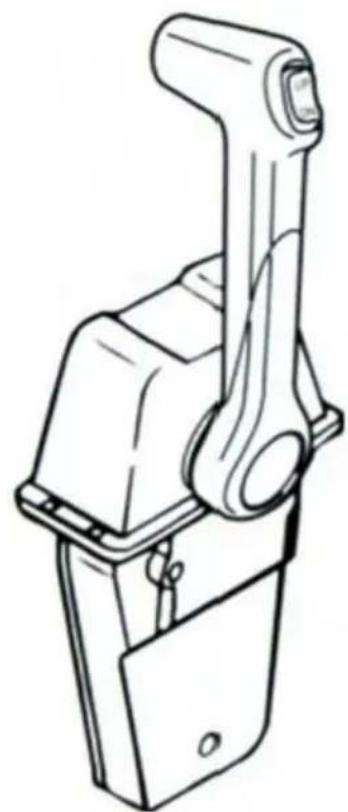
① Power trim and tilt switch ② Grip ③ Control lever ④ Free accelerator button ⑤ Cover ⑥ Throttle friction adjuster
NOTE:
Depending on the specification, some models are not equipped with the power trim and tilt switch.
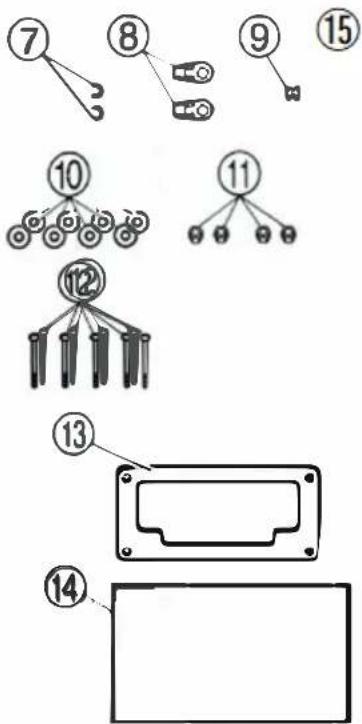
Part list
| No | Components | Picture | Qty |
| 7 | Circlip | 2 | |
| 8 | Cable Joint |  | 2 |
| 9 | Grommet |  | 1 |
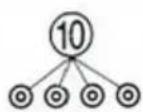
| 10 | Washer(6) | 4 | |
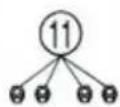
| 11 | Nut(M5) | 4 | |
| 12 | Screw(M5*30) |  | 5 |
| 13 | Packing |  | 1 |
| 14 | Manual | 1 | |
| 15 | Copper Nut(M5) | 1 | |
| 16 | Plastic mounting block 1 | 1 | |
| 17 | Plastic mounting block 2 | 1 |
NOTE:
Depending on the specification, some models are not equipped with the power trim and tilt switch.
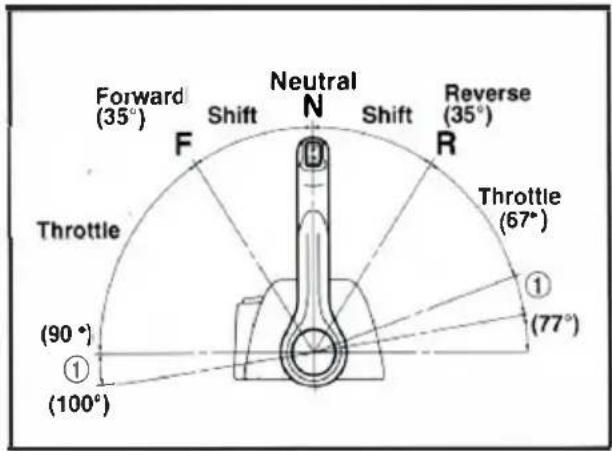
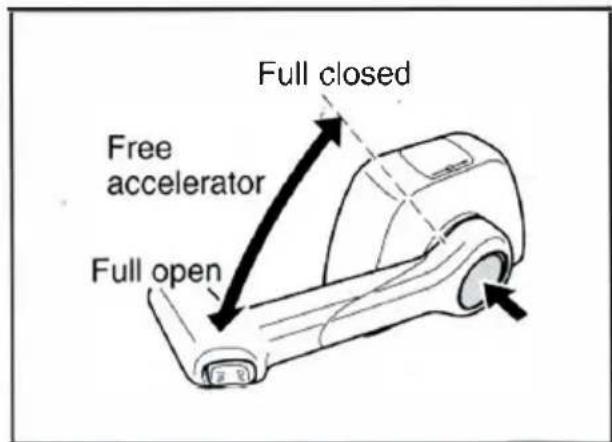
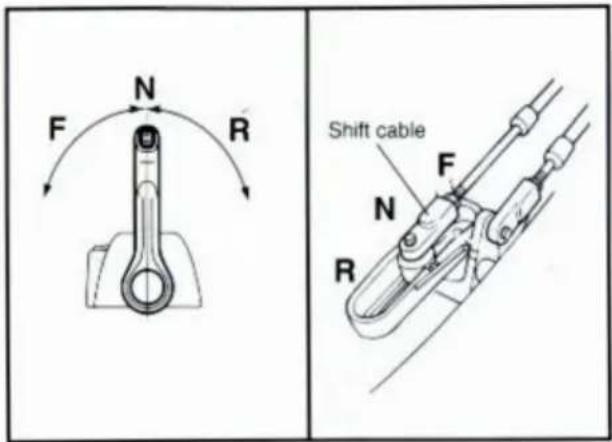
Forward and reverse
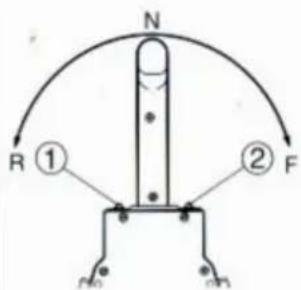
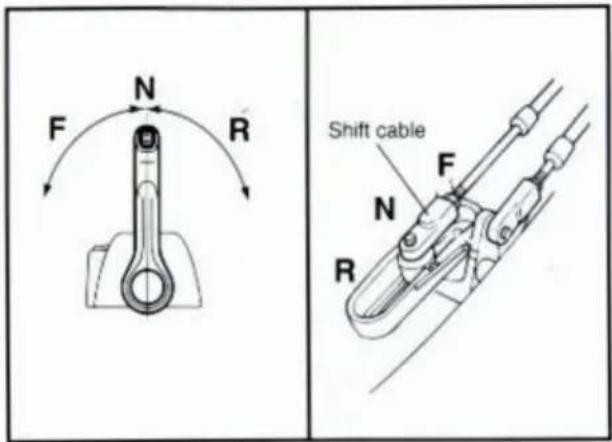
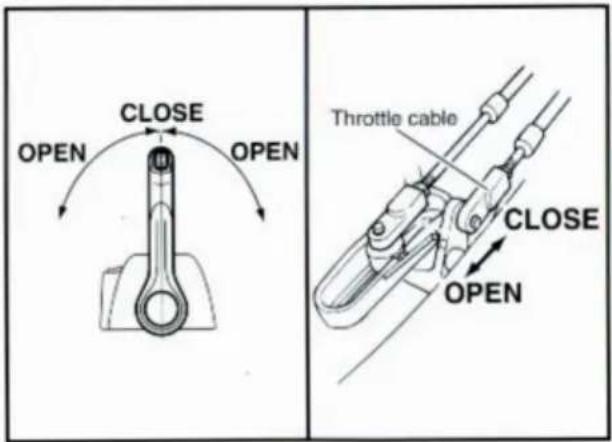
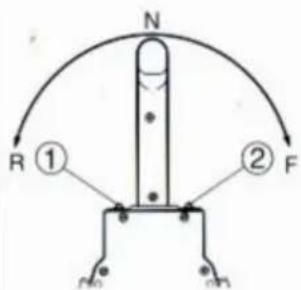
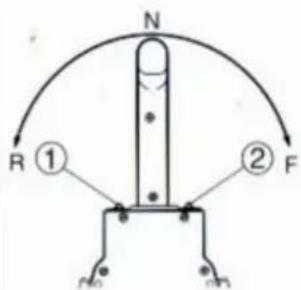
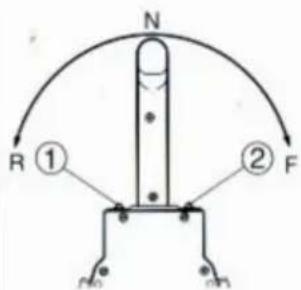
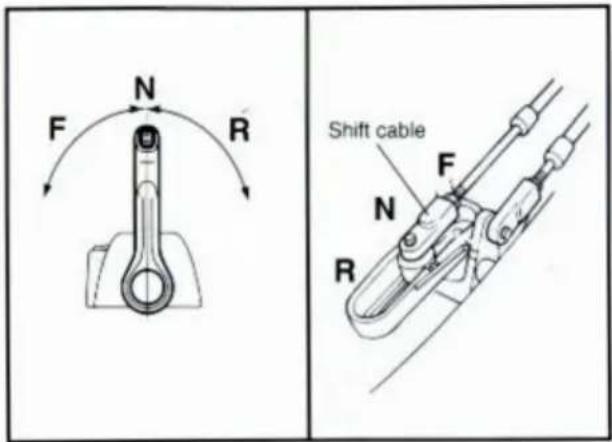
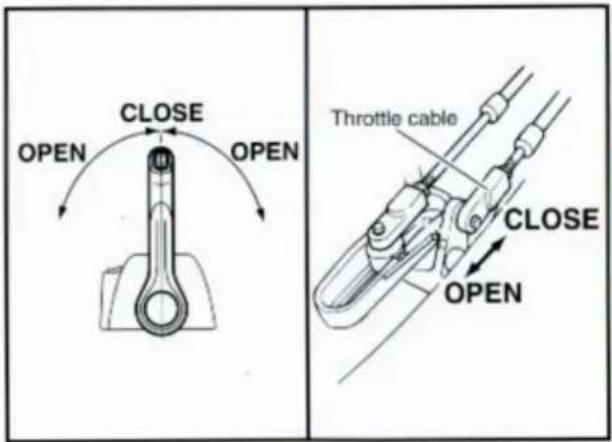
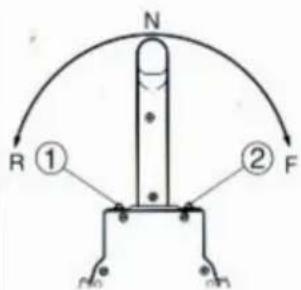
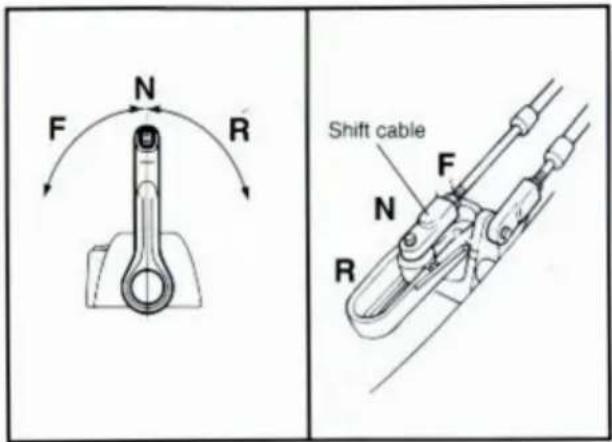
To shift into forward and reverse, rotate the control lever downward about 35° (detent position) to the F side and R side, respectively. When the control lever is further rotated downward, the throttle opens.
① Throttle adjustable range
Free accelerator
Set the control lever to neutral (N) and while pushing the free accelerator button, rotate the control lever. The throttle can be opened without shifting into any gear.
NOTE:
The control lever must be rotated more than 35° from neutral; otherwise, the throttle cannot be opened.
CAUTION:
- It is impossible to operate the free accelerator button unless the control lever is in neutral.
- After operating the free accelerator button, set the control lever to neutral (N), and the free accelerator button will move automatically to its set position so that it can be freely turned to forward and reverse.
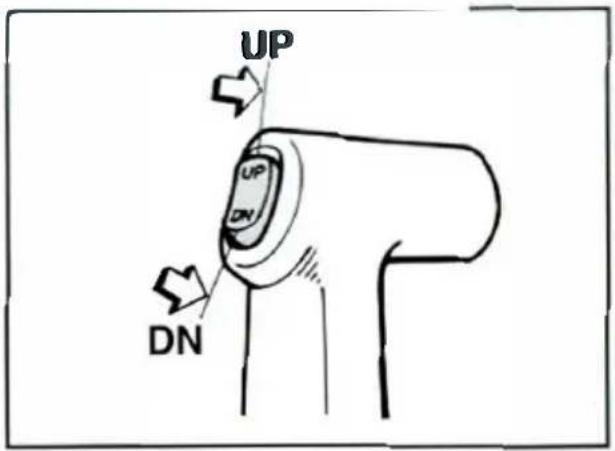
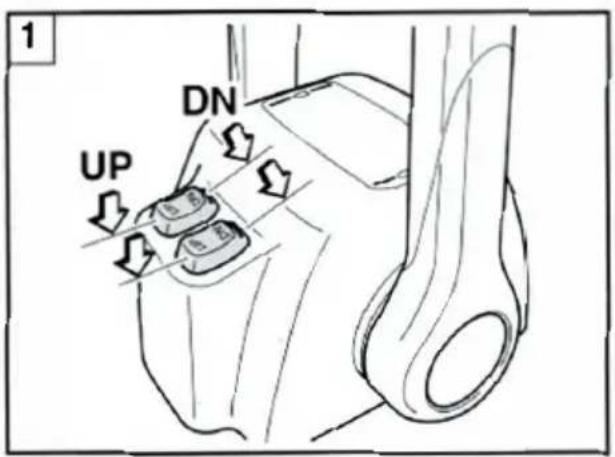
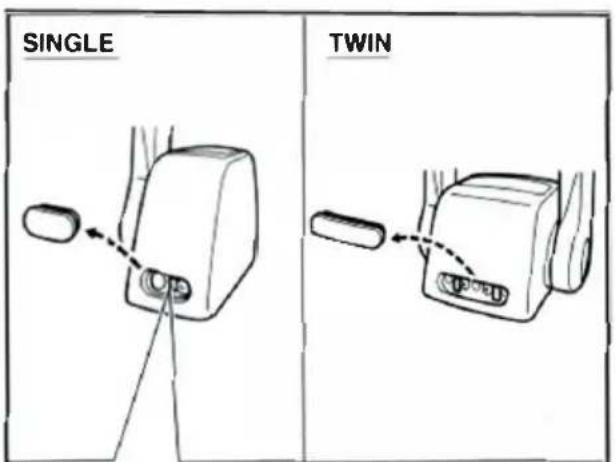
Power trim and tilt switch
The power trim and tilt switch is attached to the control lever grip and twin cover. Pushing it UP trims up and tilts up the engine, and pushing it DOWN trims down and tilts down the engine.
NOTE:
- When operating the remote control boxes for twin engines, the power trim and tilt switch on the control lever grip is interlocked with both engines.
- While the switch button is being pressed, the trim/tilt motor turns and adjusts the engine mounting angle. When the switch button is released, the engine will stop in its position.
1 Remote control box for twin-engine
Start-in-gear protection device
WARNING
This control will provide start-in-gear protection meeting U.S.C.G requirements of CFR 183, SUBPART L.
WARNING
Ensure shift controls in neutral before starting motor.
This feature permits the engine to be started only when it is in neutral. Always select neutral before starting the engine.
Control lever friction adjustment
On this remote control box, control lever friction is adjustable in the following manner:
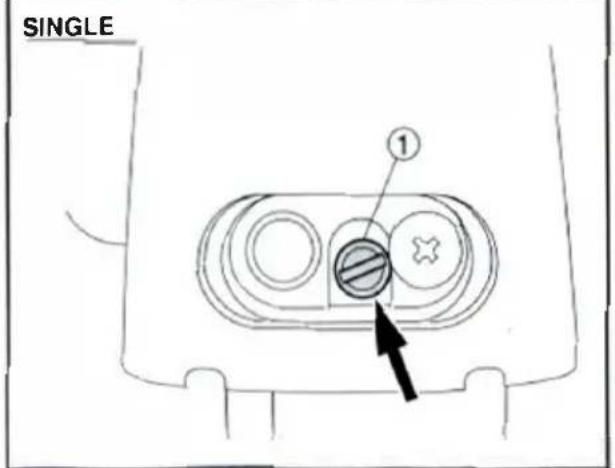
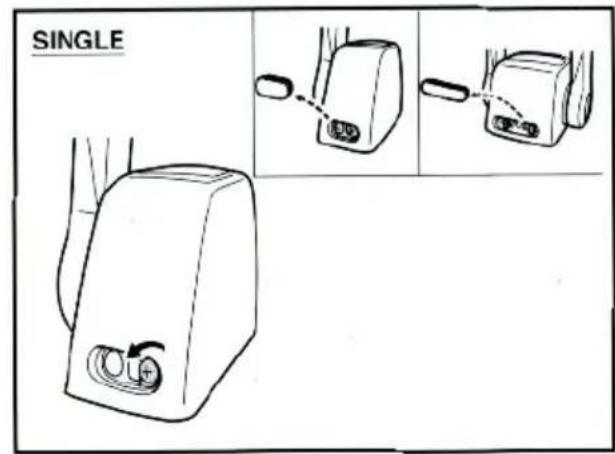
- By turning in or out the throttle friction screw at the rear of the remote control box, the stiffness of the control lever can be adjusted. Turning the adjusting screw to the right makes the control lever stiff to turn, and turning it to the left makes the lever easier to turn.
① Adjusting screw
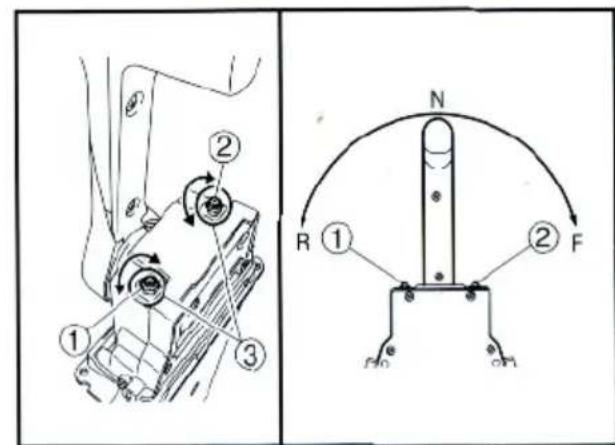
Throttle opening adjustment
The remote control box is capable of adjusting the throttle opening in the following manner:
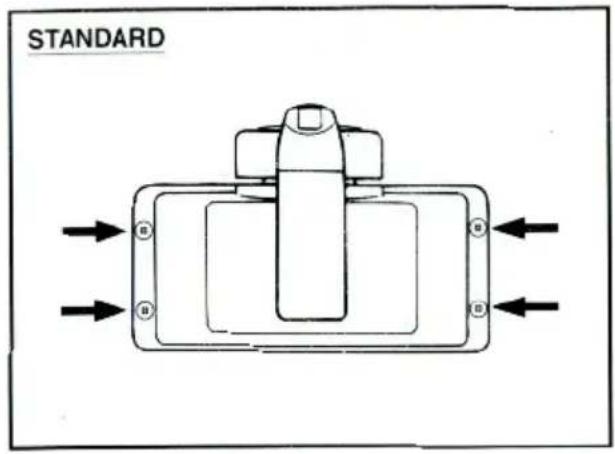
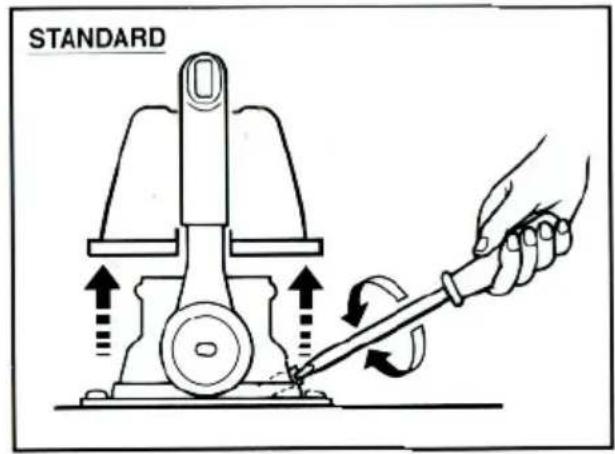
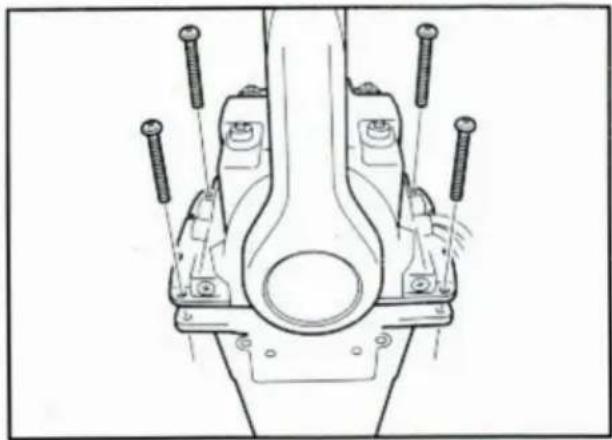
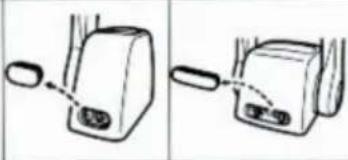
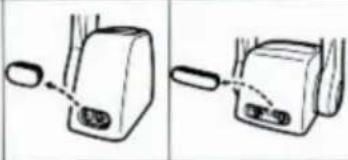
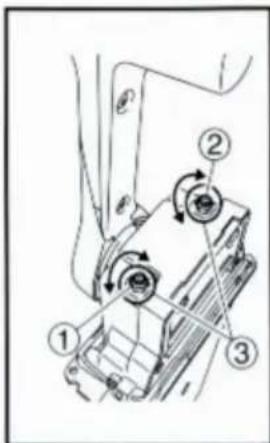
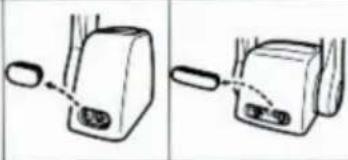
- Loosen the screws securing the cover and remove it from the body.
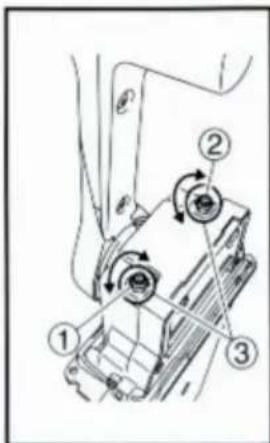
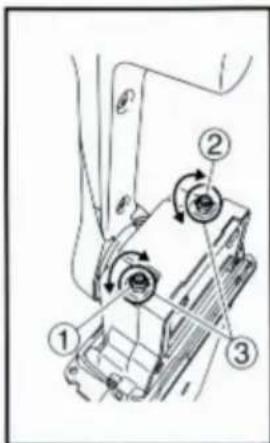
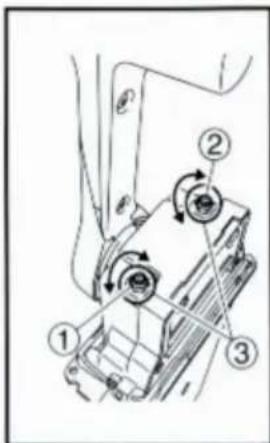
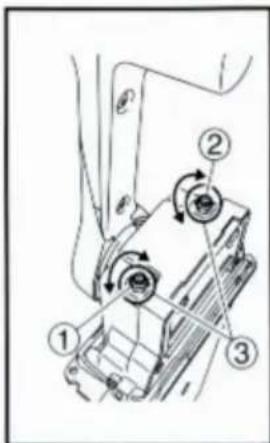
- Loosen the locknut, and adjust the throttle opening by turning the stopper bolt. Turning the bolt clockwise decreases the throttle opening.
Turning the bolt counterclockwise increases the throttle opening.
① Stopper bolt on the reverse side ② Stopper bolt on the forward side ③ Lock nut
CAUTION:
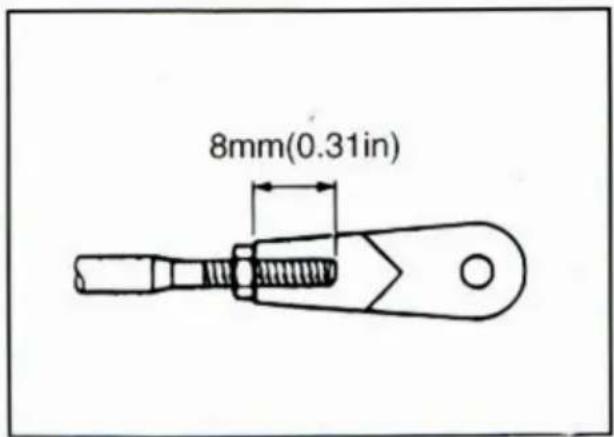
Do not allow the stopper bolt to project 8 mm (0.3 in) or more from the nut surface. Otherwise, the stopper contacts the cover.
- After adjusting, tighten the locknut.
TIGHTENING TORQUE:
5-8 Nm (50-80 kgf·cm, 3.6-5.8 ft·lb)
- Secure the cover to the body with the screws.
WARNING
Incorrect selection or installation of a remote control may result in sudden and unexpected loss of control, thus resulting in a serious accident. Please consult your Yamaha dealer.
Remote control box position
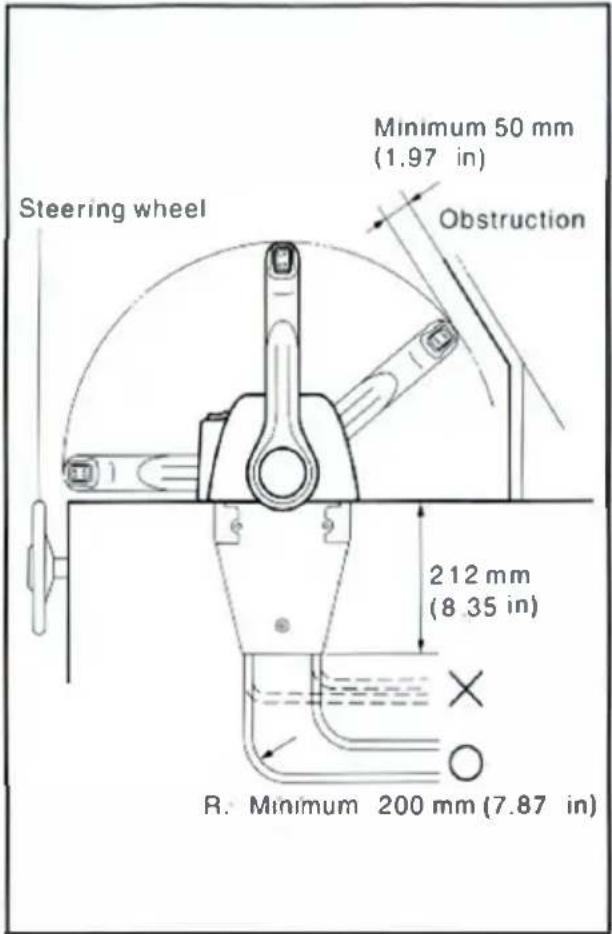
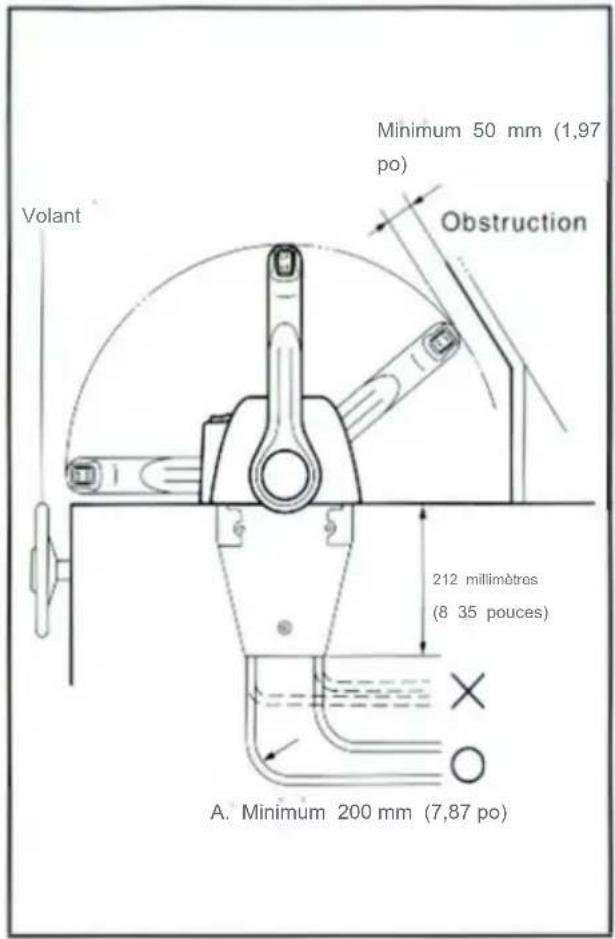
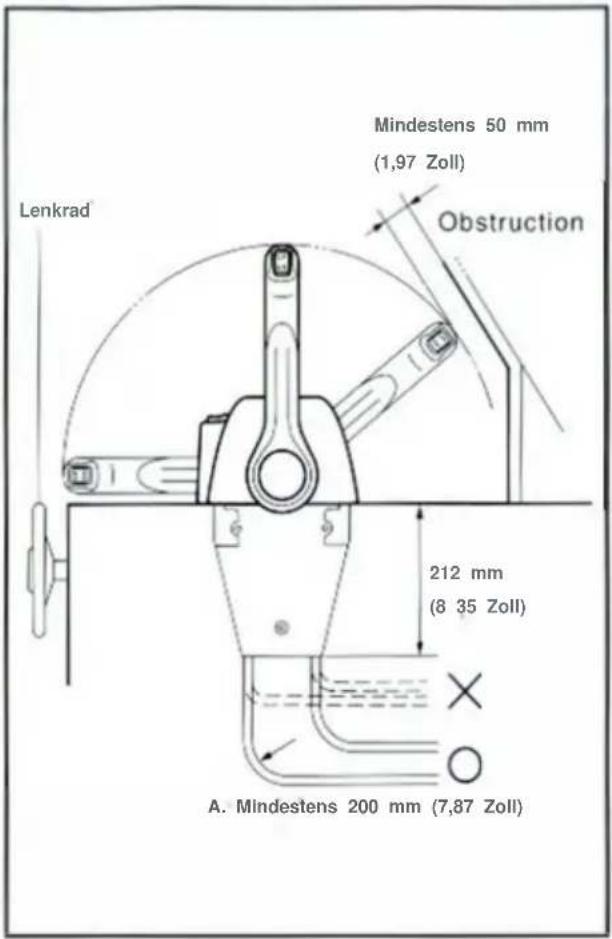
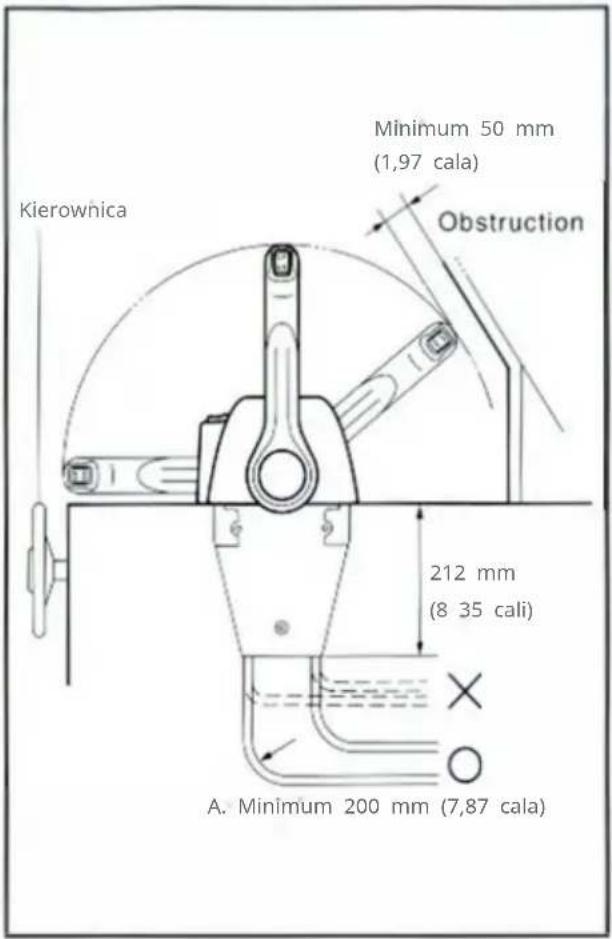
Select the proper position for the remote control box, and stick the template on the selected position, then drill hole through it. When selecting the control box position, keep the following in mind:
- The remote control box should be set in a position in which it does not obstruct the operations of the control lever and switches. Make sure there is no obstruction on the path of the remote control cables.
- Provide a space so that the bottom of the remote control box does not contact any other parts.
- Provide a space so that the remote control cables can be routed without bending sharply. The radius of a cable bend should be more than 200 mm (7.87 in).
CAUTION:
Sharp bends (less than 200 mm (7.87 in) in radius) of the cables will obstruct a smooth movement of the cables and shorten cable life.
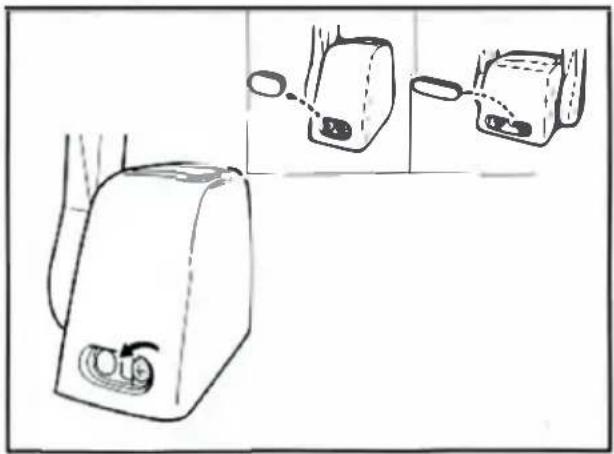
Installing the remote control cables
CAUTION:
Cable connection should be started first from the remote control box side. If started from the engine side, cable adjustment will be impossible in some cases.
NOTE:
Use the genuine YAMAHA cables.
- Loosen the screws securing the cover and remove it from the body.
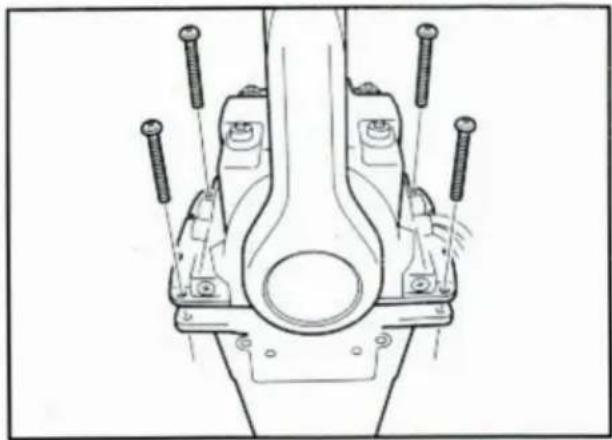
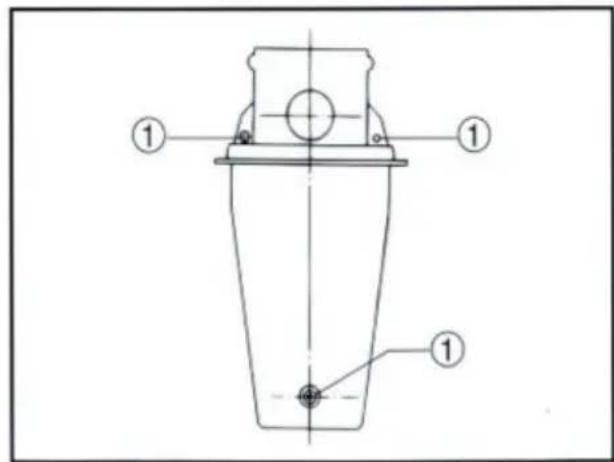
- Loosen the three screws securing the two remote control boxes and put the remote control boxes apart.
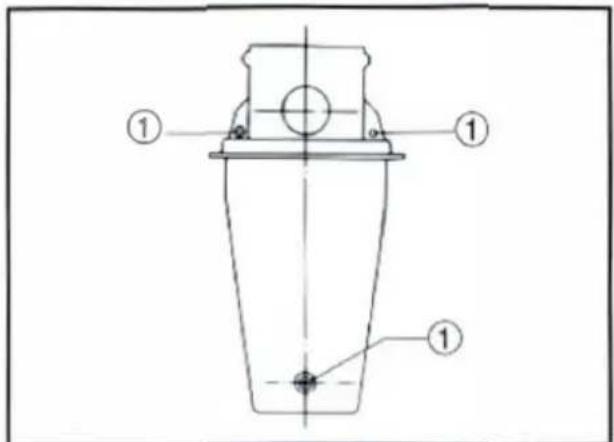
① Screw
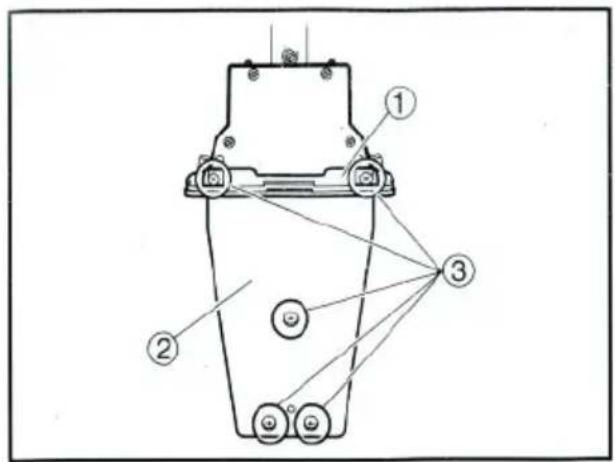
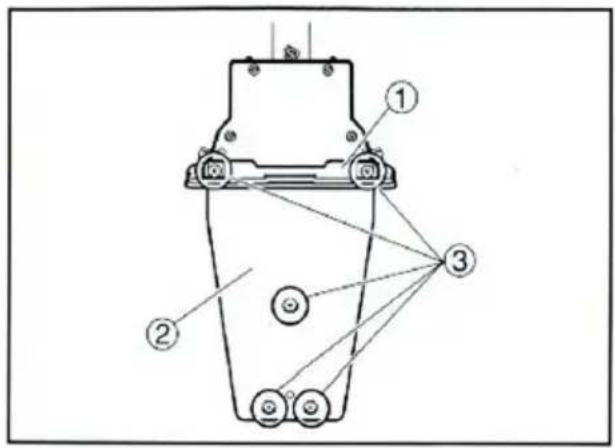
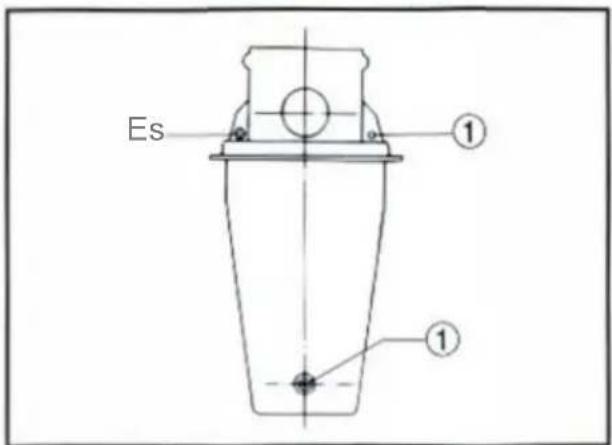
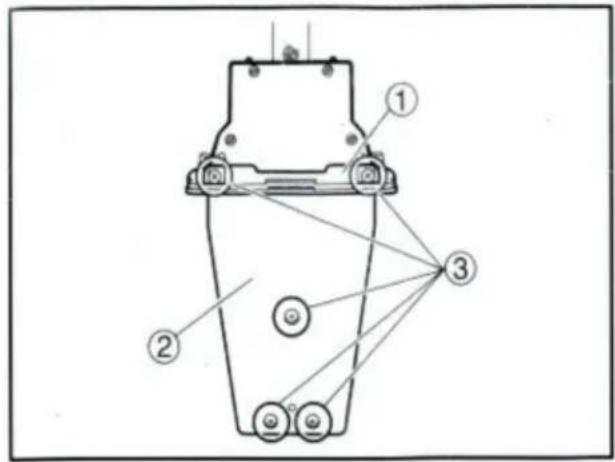
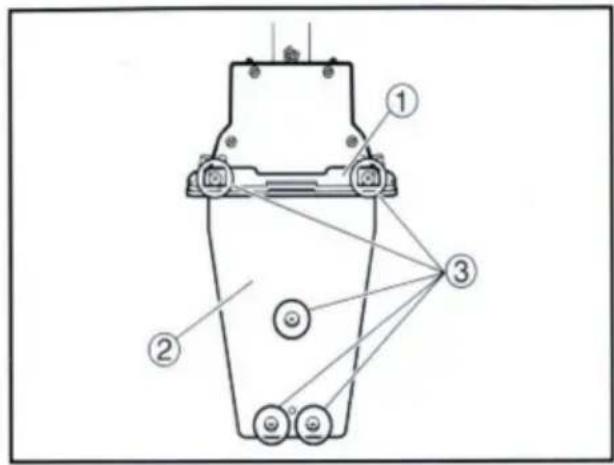
- Loosen the five screws and remove the mounting flange, packing, and back plate.
NOTE:
The mounting flange on the back plate side should be removed.
① Mounting flange ② Back plate ③ Screws

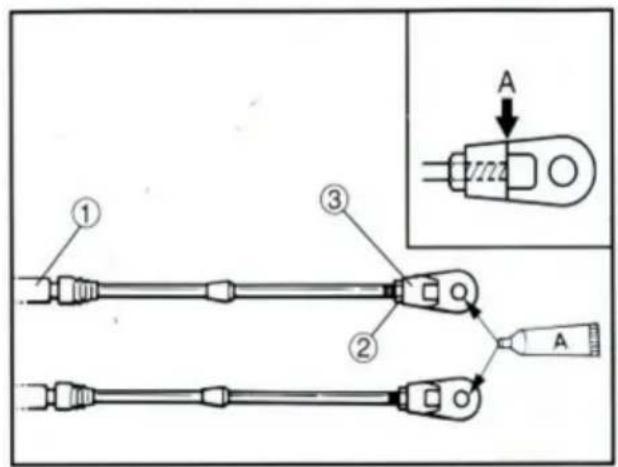
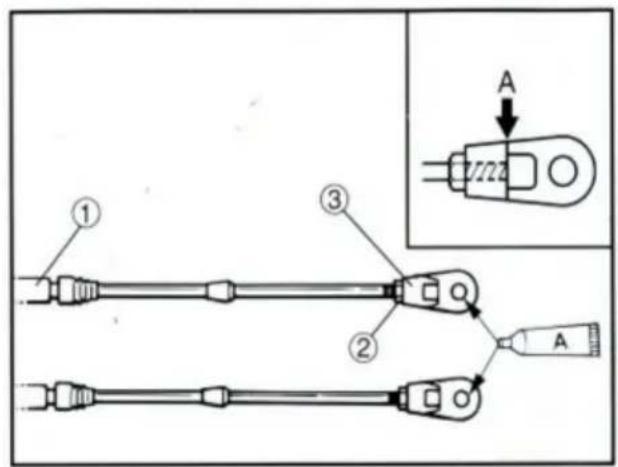
- Screw the cable joint onto the remote control cable up to point "A" (11mm), and tighten the lock nuts. Before installing the cable joints, apply water-resistant grease (Yamaha Grease A) to the threaded holes in the cable joints.
① Remote control cable ② Lock nut ③ Cable joint
TIGHTENING TORQUE:
1.5–1.8 Nm (15–18 kgf·cm, 1.1–1.3 ft·lb)
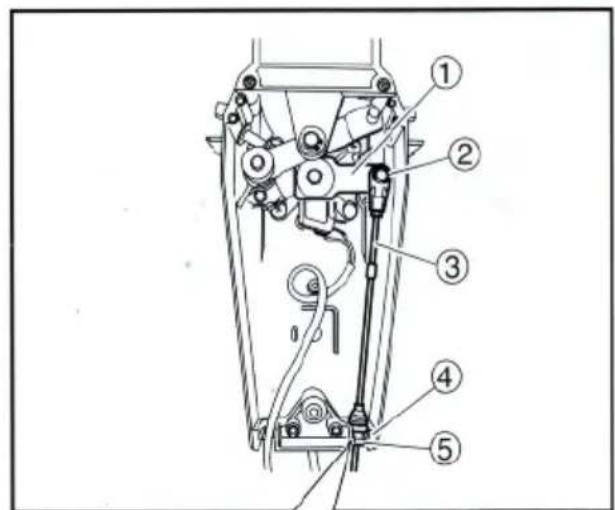
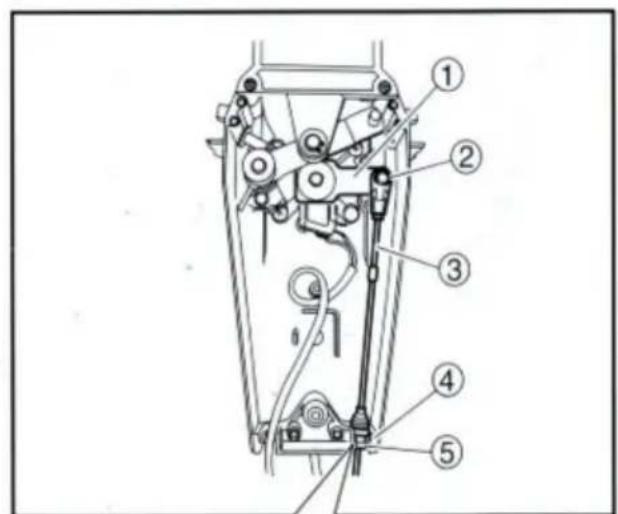
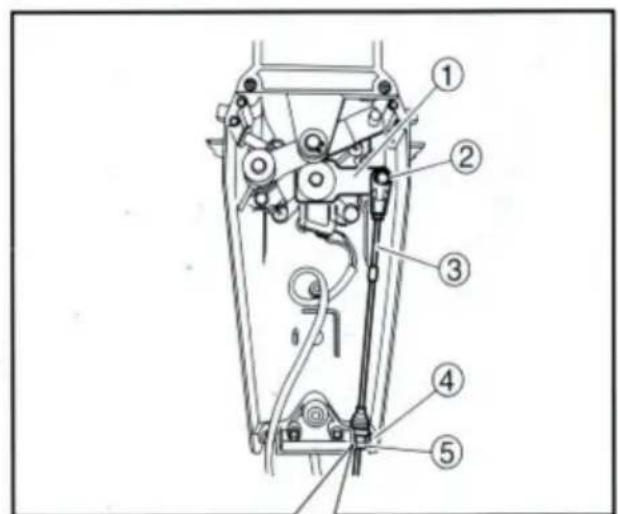
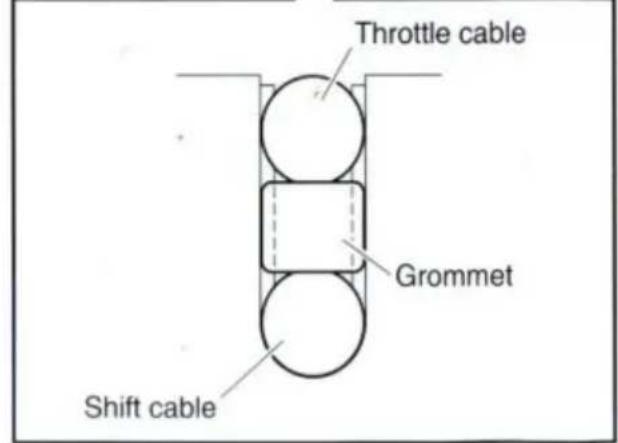
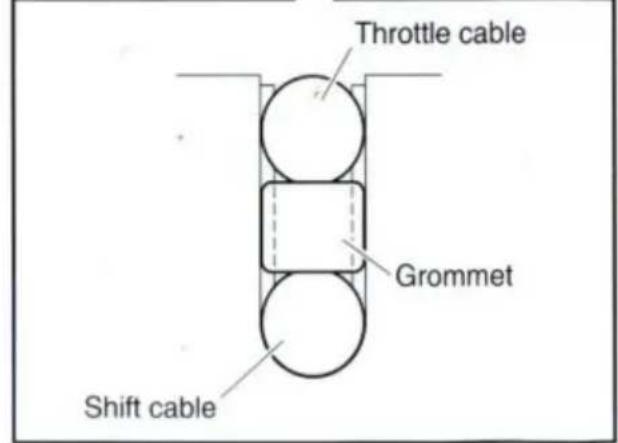
- Insert the shift cable into the housing clamp so that the groove on its end fits over the ridge in the clamp. Fit the cable joint over the pin on the end of the shift arm, and lock it with the circlip.
① Shift arm ② Circlip ③ Shift cable ④ Clamp groove ⑤ Grommet
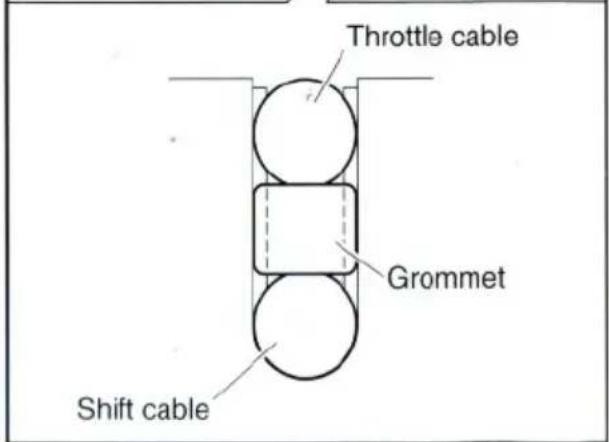
- Fit the grommet in the clamp groove.

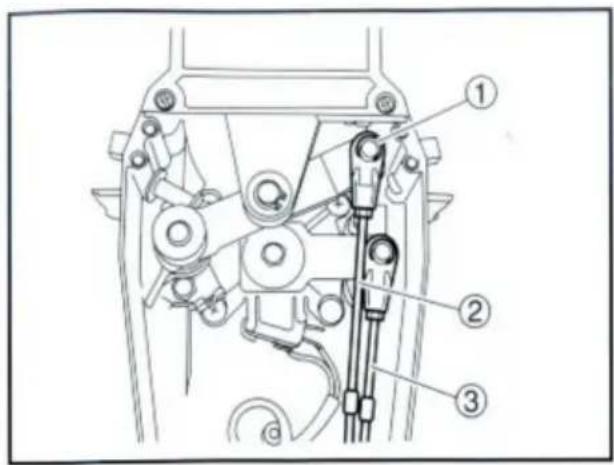
- Connect the throttle cable to the throttle arm in the same manner.
① Circlip ② Throttle cable ③ Shift cable
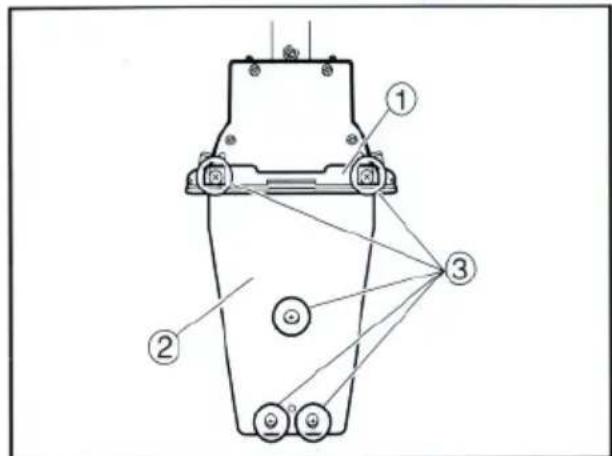
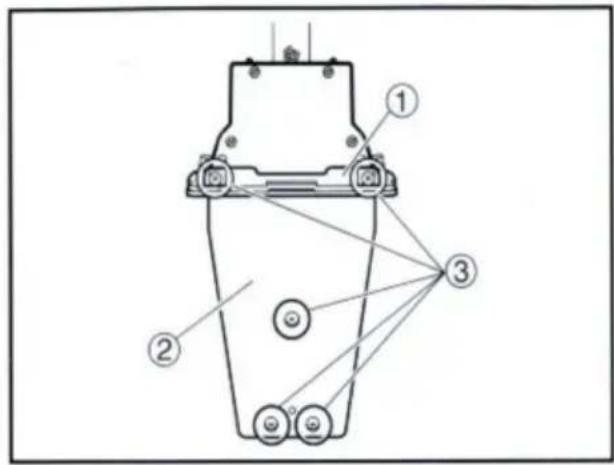
- Hold the back plate and mounting flange firmly with the five screws, and fit the packing in place.
① Mounting flange ② Back plate ③ Screws
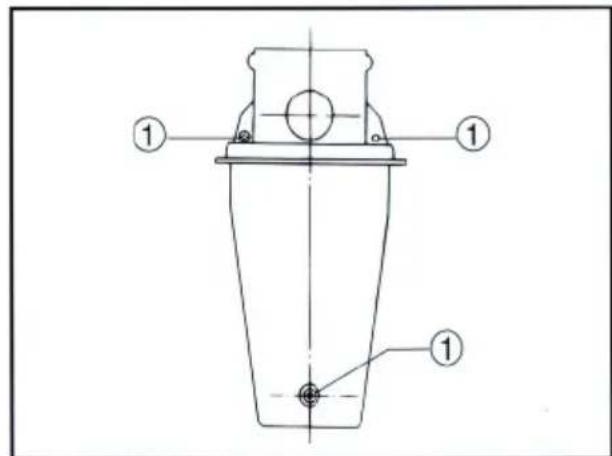
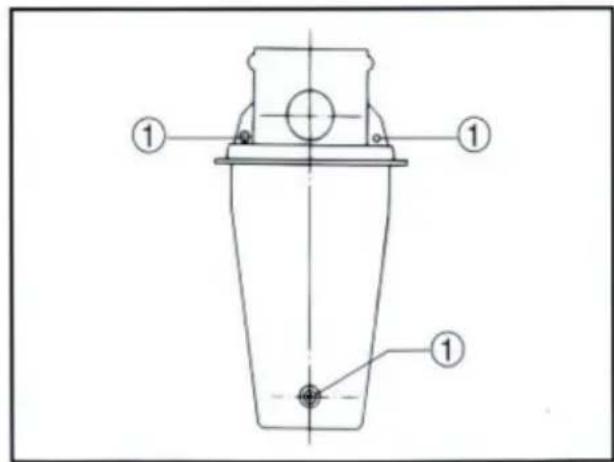
- Secure the two remote control boxes with the three screws.
① Screw
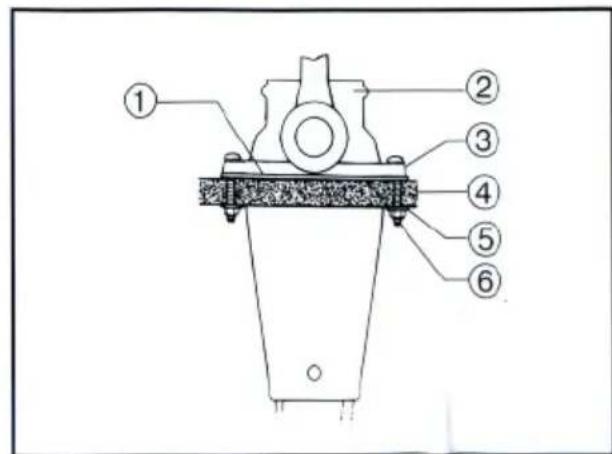
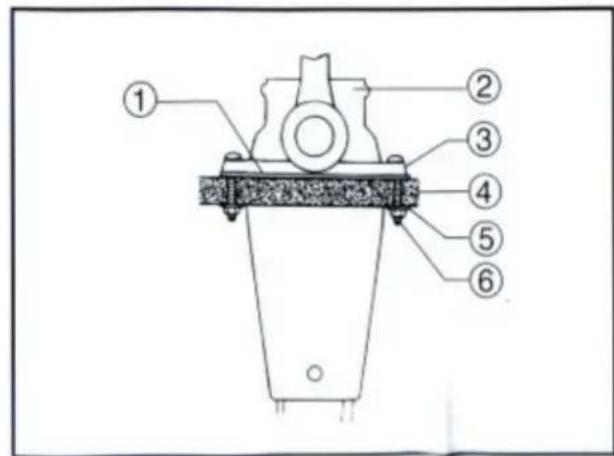
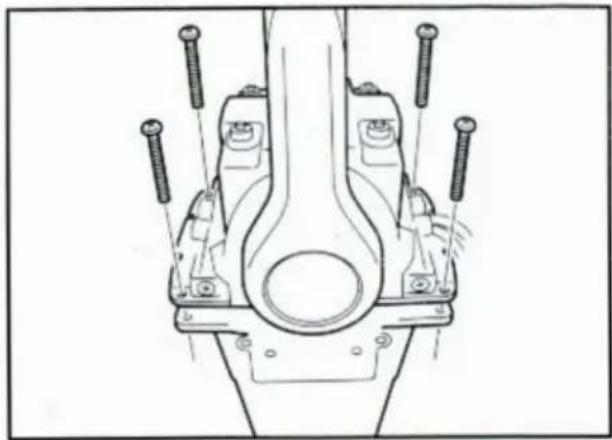
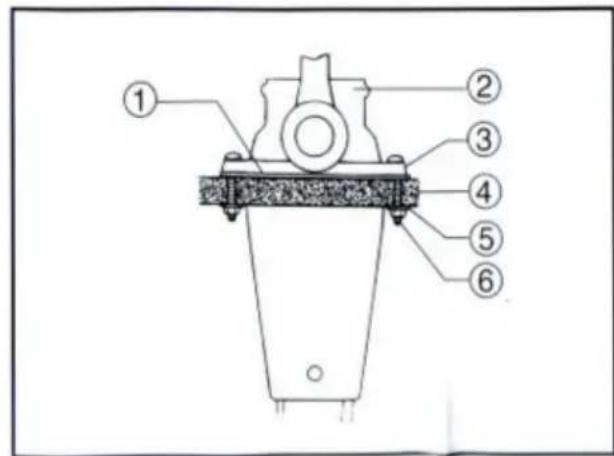
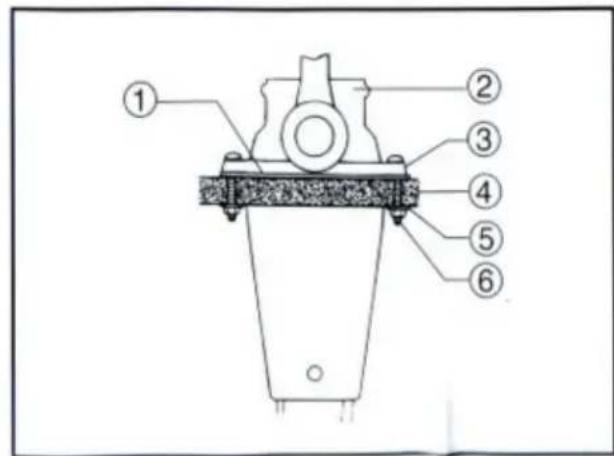
- After installing the remote control cables, temporarily secure the remote control boxes to the predetermined position with the screws and nuts.
① Packing ② Remote control box ③ Screw ④ Hull ⑤ Washer ⑥ Nut
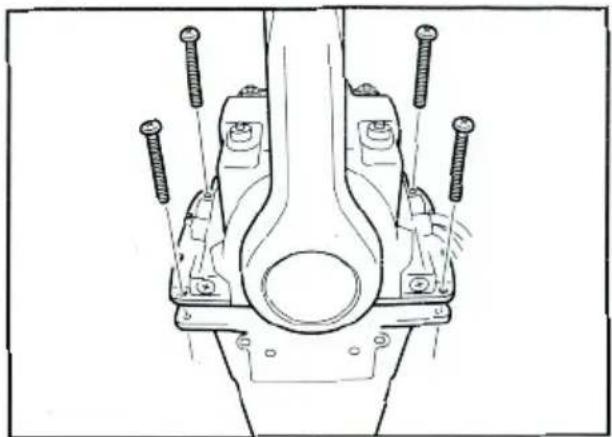
- Peel the paper off the back of the packing, and adhere the packing to the boat hull so that the holes in the packing align with the remote control box mounting screw holes in the hull.
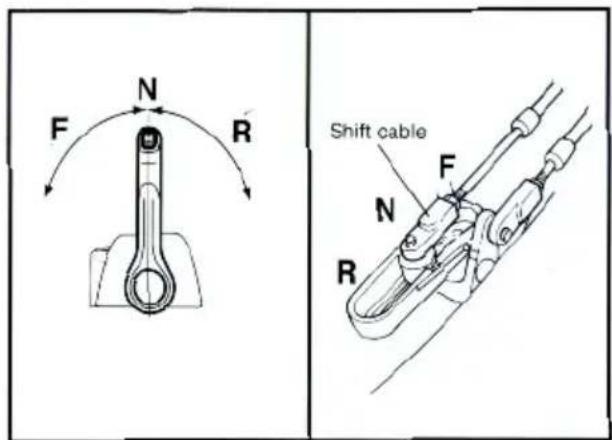
CONNECTING THE REMOTE CONTROL CABLE TO THE ENGINE
Checkpoints of cable joint
Shift:
Operate the control lever a few times and check to see that the shift lever on the engine side moves correctly.
Throttle:
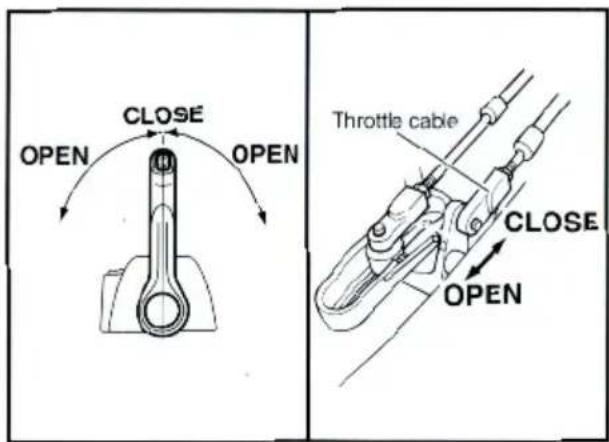
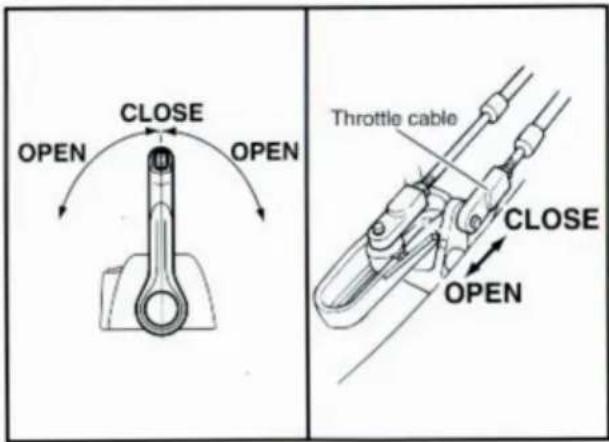
Operate the control lever a few times and make sure that when it is returned to the neutral position the throttle lever on the engine side is set to the full-closed position.
Free accelerator:
Push the free accelerator button, and turn the control lever downward until it stops, then make sure that when it is returned to the neutral position, the free accelerator button is automatically reset.
Adjustment of cable joint
Adjust the cable joints on the engine side when the above checkpoints do not operate correctly.
CAUTION:
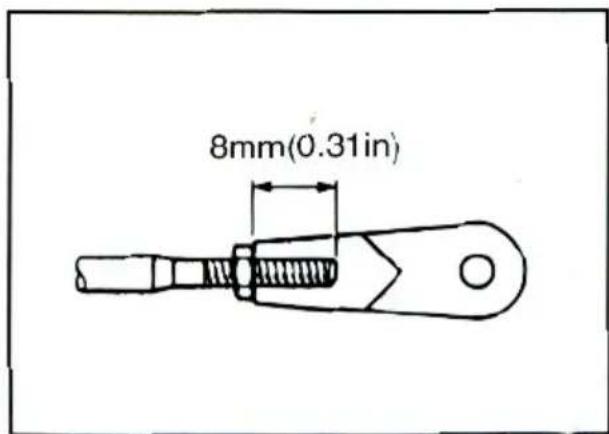
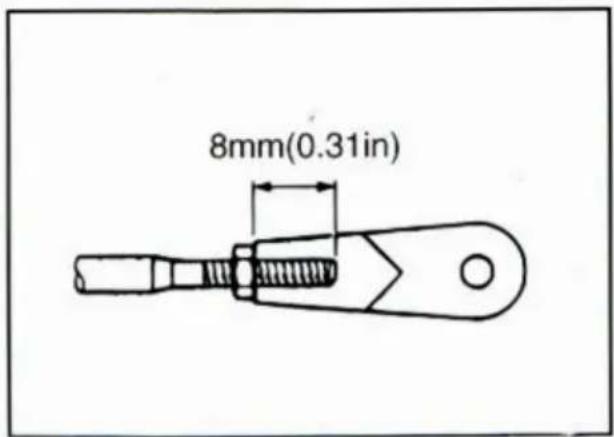
The cable joints on the engine side must be screwed onto the remote control cables at least 8 mm (0.3 in).
Adjust the cable joint on the remote control side if the adjustment cannot be made only on the engine side.
- After connecting the cables to the engine, move the control lever from lock to lock several times and check for good operation of the engine and remote control box.
- Firmly secure the remote control box (which is temporarily held with the screws) to the hull.
CAUTION:
Check that the cables are not sharply bent (less than 200 mm (7.87 in) in radius) or unnecessarily bent. (The number of bends should be minimized.) Also, check that no portions of the cables are clamped so hard as to deform the cable outers.
- Secure the cover to the body with the screws.
CHANGE FROM THE PUSH-TO-OPEN THROTTLE TYPE TO THE PULL-TO-OPEN THROTTLE TYPE
The remote control box permits the change from the push-to-open throttle type to the pull-to-open type by changing some of the parts positions.
This manual discusses the procedure for changing from the push-to-open throttle type to the pull-to-open type.
Therefore, if it has to be changed from the pull-to-open type to the push-to-open type, simply reverse the procedure.
CAUTION:
When reinstalling parts, apply the water-resistant grease (Yamaha Grease A) to moving paths and contact surfaces of parts.
- Remove the cover from the body.
- Loosen the five screws and remove the mounting flange, packing and back plate.
① Mounting flange ② Back plate ③ Screws
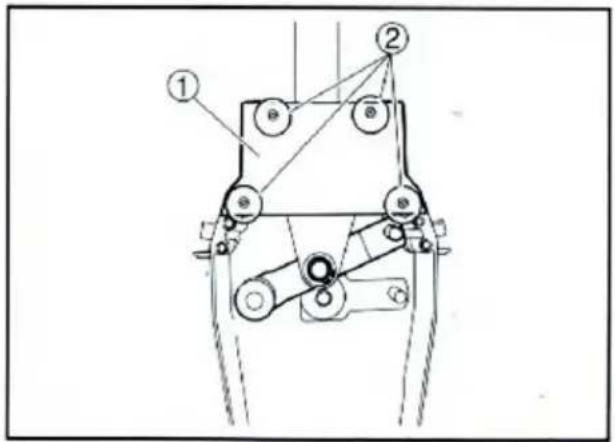
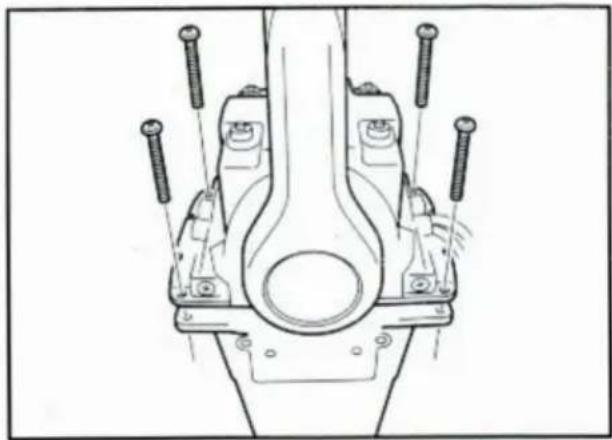
- Remove the four screws and remove the dwell plate retainer.
① Dwell plate retainer ② Screws
- Remove the circlips and remove the dwell plate. Position the throttle arm assembly so that it turns downward.
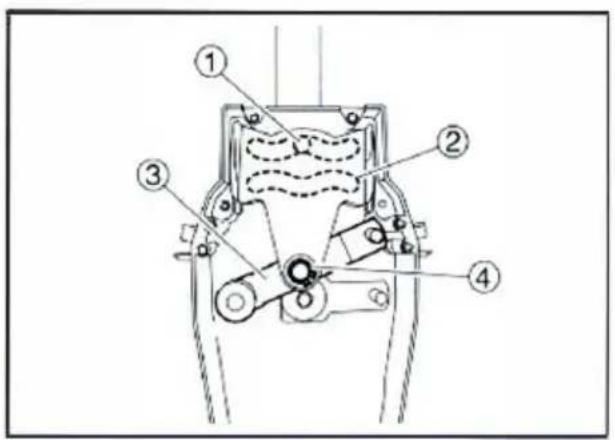
① Roller ② Dwell plate ③ Throttle arm assembly ④ Circlip
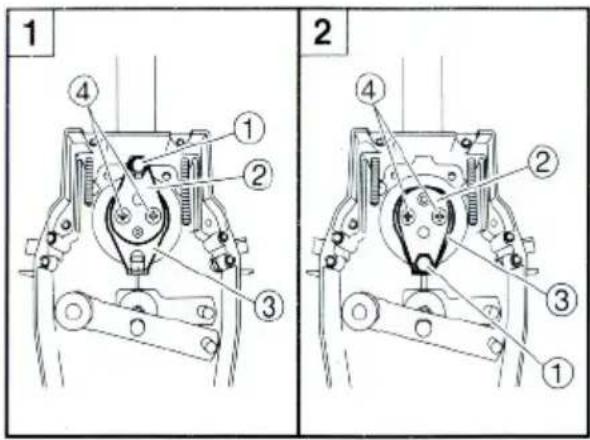
- Remove the two screws and remove the throttle lever assembly. Position the throttle lever assembly so that it faces downward and secure it with the two screws.
TIGHTENING TORQUE: 5–8 Nm (50–80 kgf·cm, 3.6–5.8 ft·lb)
1 Push-to-open throttle type 2 Pull-to-open throttle type
① Roller ② Throttle lever assembly ③ Stopper ④ Screws
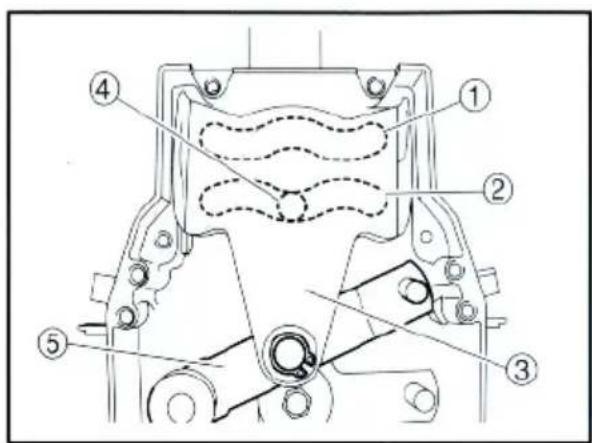
- Align both the cam groove (for pull-to-open) in the dwell plate and the roller in the throttle lever assembly with the specific position, and lock the throttle arm assembly and dwell plate with the circlip.
NOTE: ____ Make sure the circlip are correctly fitted in place.
① Groove for push-to-open ② Groove for pull-to-open ③ Dwell plate ④ Roller ⑤ Throttle arm assembly
- Secure the dwell plate retainer with the four screws.
- Install the mounting flange and back plate with the five screws.
NOTE: When installing the back plate, use care so that the wire harness is not pinched.
- Install the cover on the body.
VERIFYING CORRECT OPERATION
Be sure to verify that the remote control box operates correctly after installation.
- Follow the procedure for starting the engine and verify that the engine starts properly.
- Pull the lanyard to remove the lock plate from the engine stop lanyard switch and verify that the engine stops.
NOTE: If the remote control box fails to operate correctly, verify that the installation procedure was followed properly.
To ensure a longer life of the remote control box, be sure to take the following steps when storing it for a long period of time.
- Remove the cable joints and apply water-resistant grease (Yamaha grease A) to the thread portion of the inner cable.
- Also apply water-resistant grease (Yamaha grease A) to inner parts of the remote control box, particularly to contact surfaces of moving parts. If any rust is found, remove it and apply the grease.
- Avoid bending the cables into a loop as much as possible. But if they have to be looped, the loop diameter should be more than one meter (40 in).
- Select a dry place for storage.
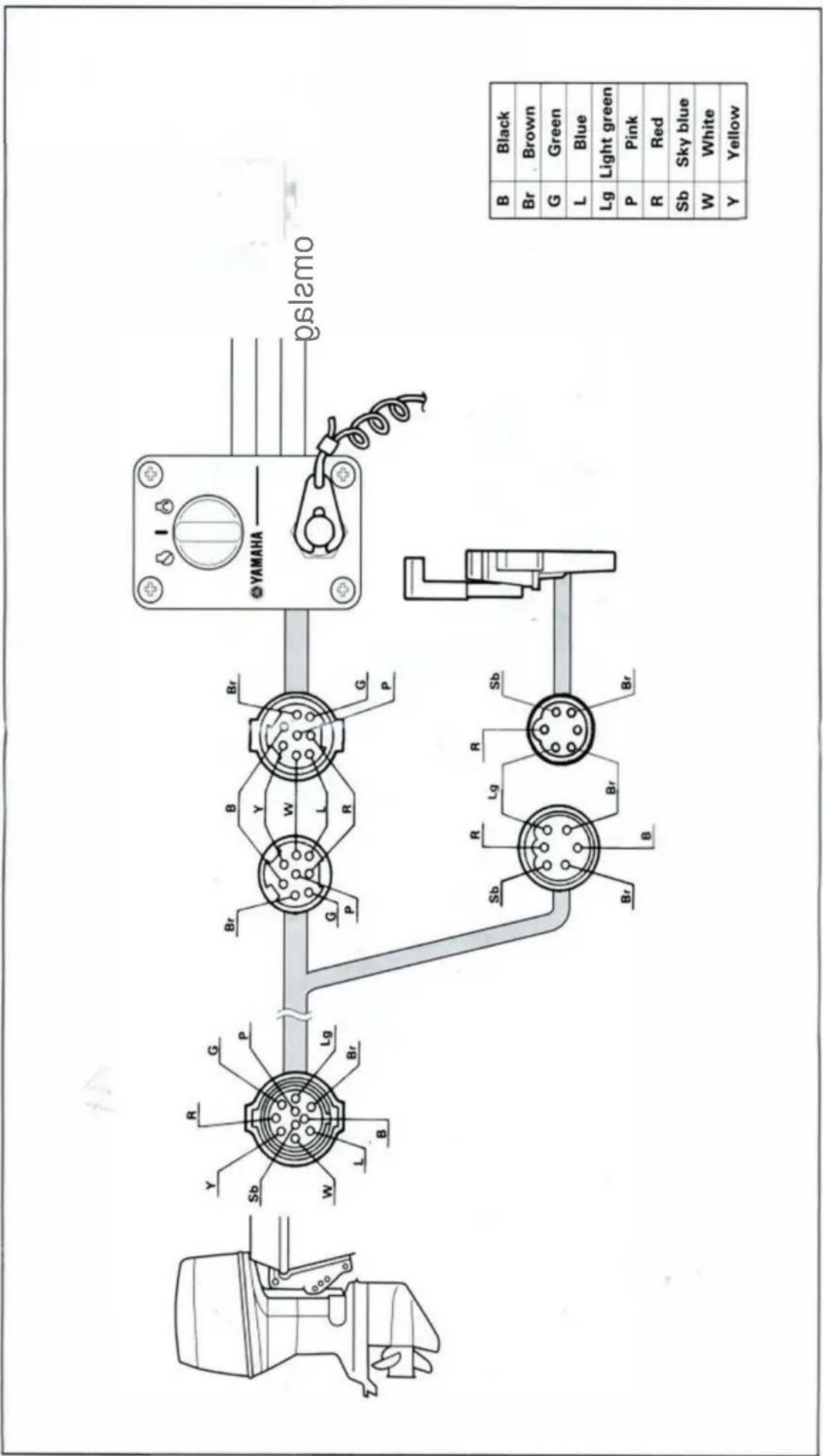
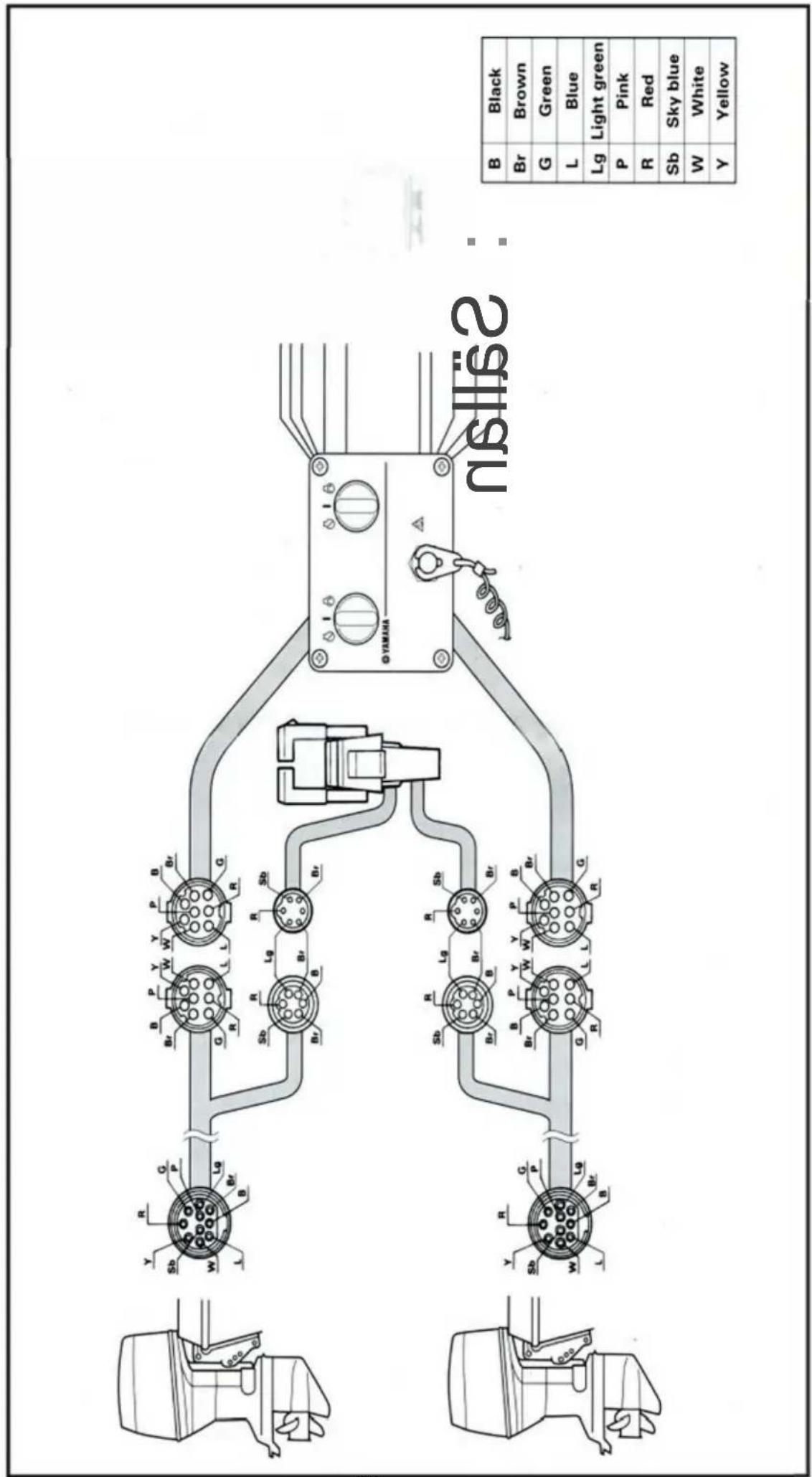
SWITCH PANEL MOUNTING

WARNING
When installing or removing electrical parts, be sure to disconnect the battery wires from the battery terminals. When connecting the battery wires to the battery terminals, be sure to turn off the main switch and remove the switch key. Otherwise you may receive an electric shock, or sparks may ignite the fuel causing an explosion.
CAUTION:
Install the switch panel onto the dashboard. Select a location allowing easy access from the helmsman's seat. If the boat has no dashboard, the switch panel should be installed in a location protected from water spray.
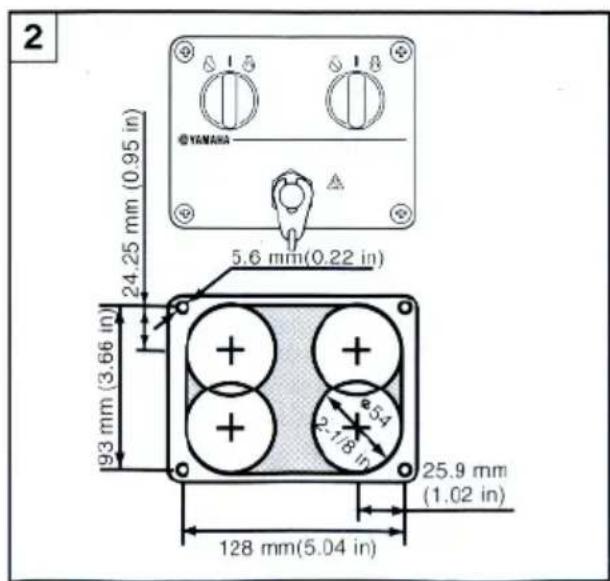
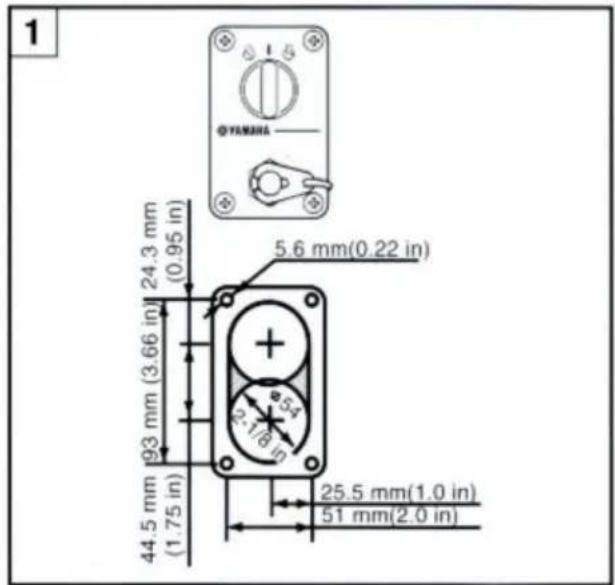
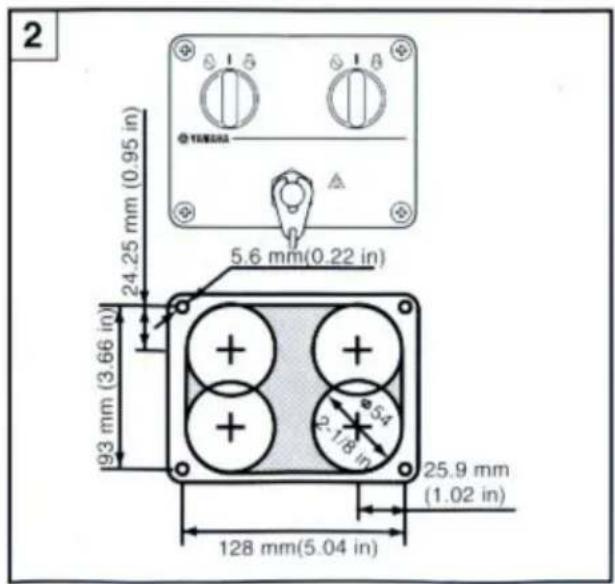
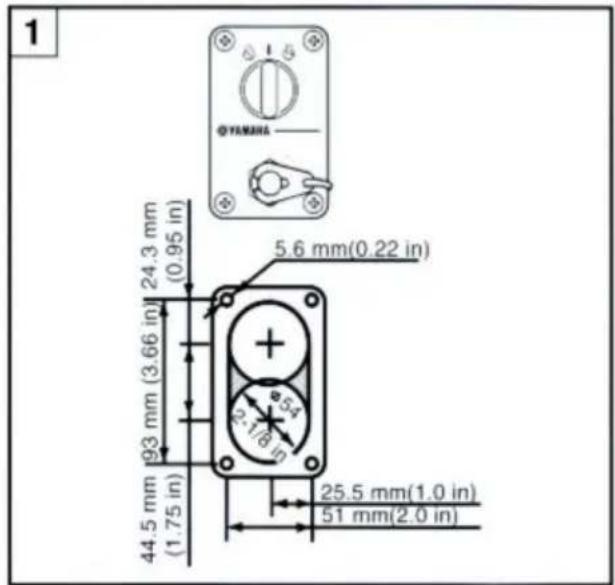
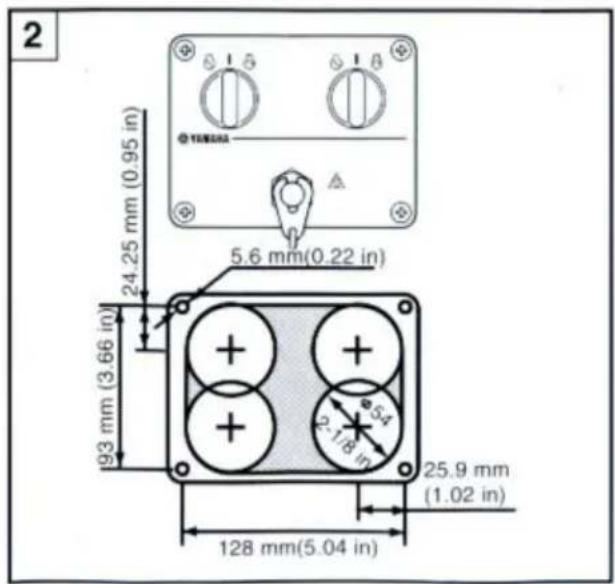
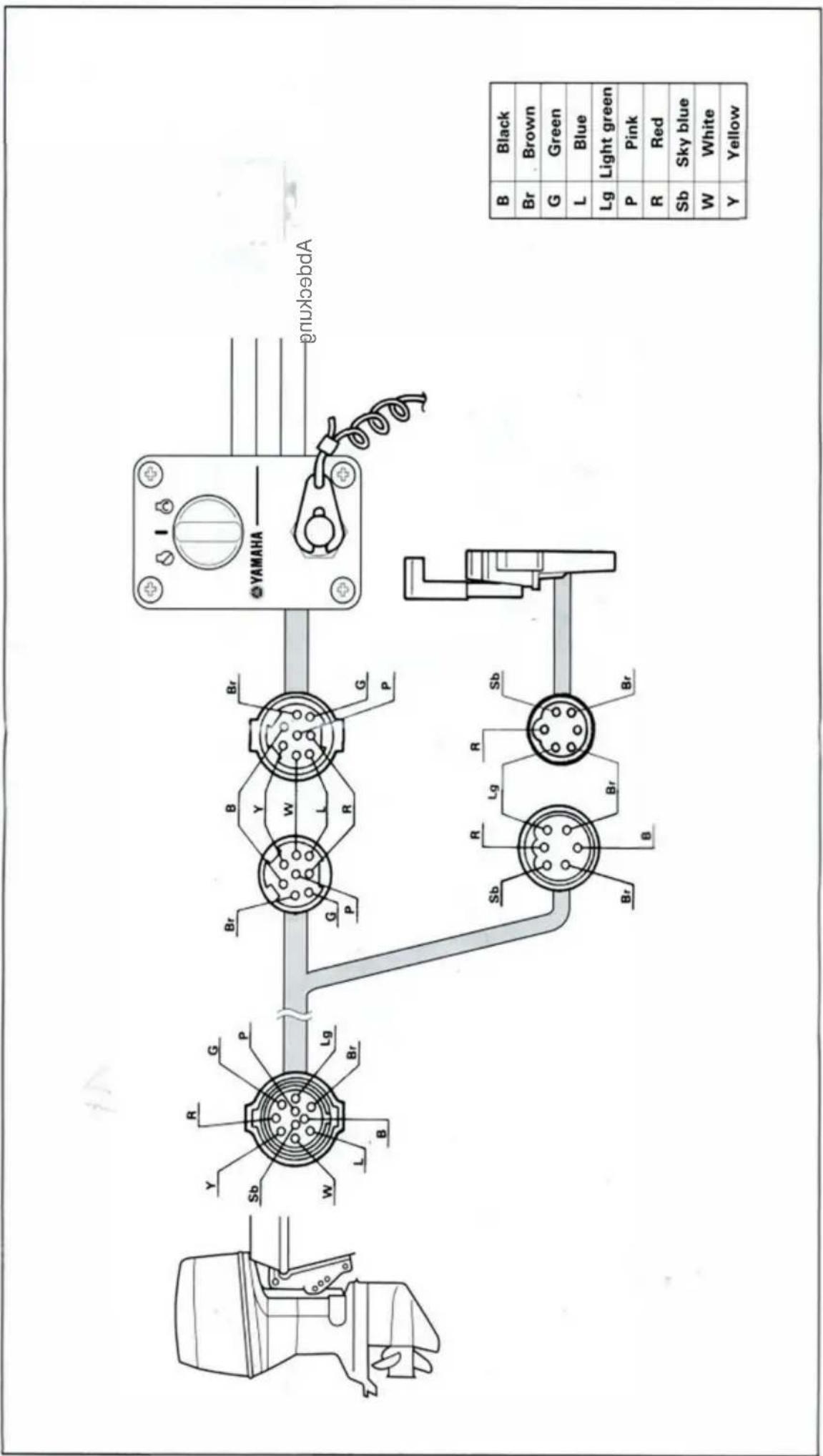
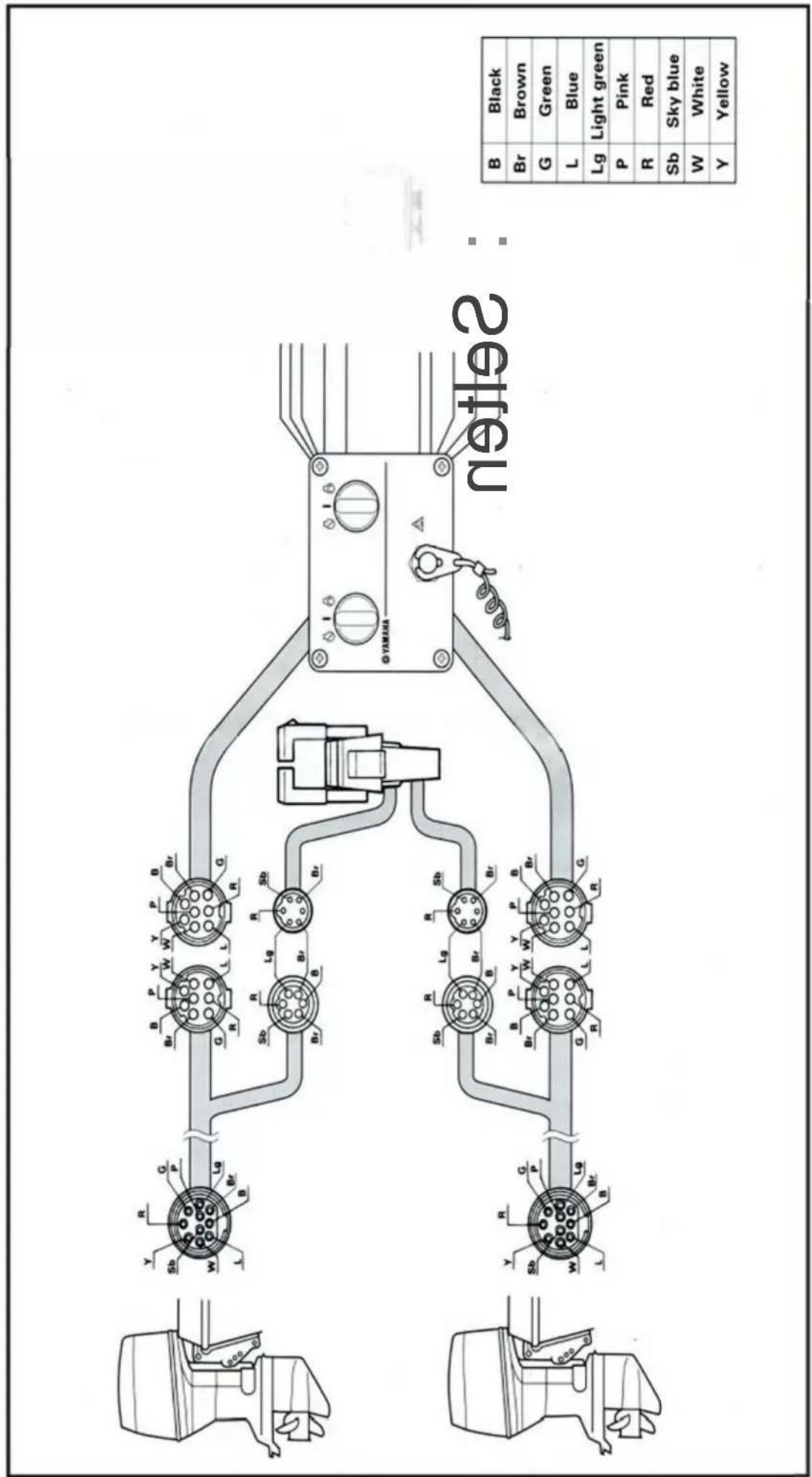
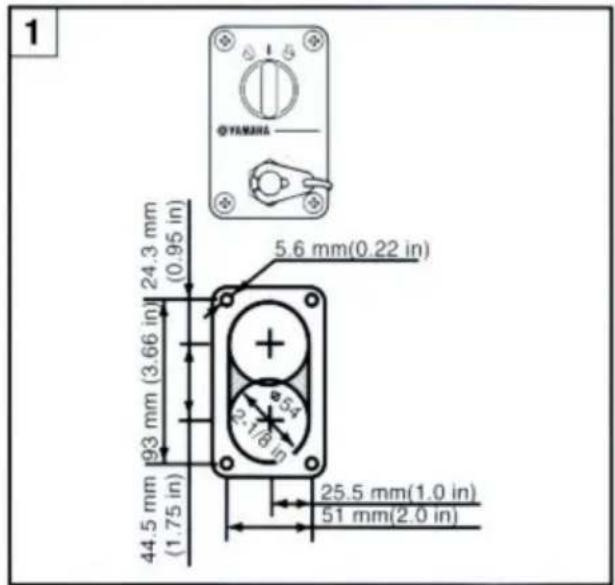
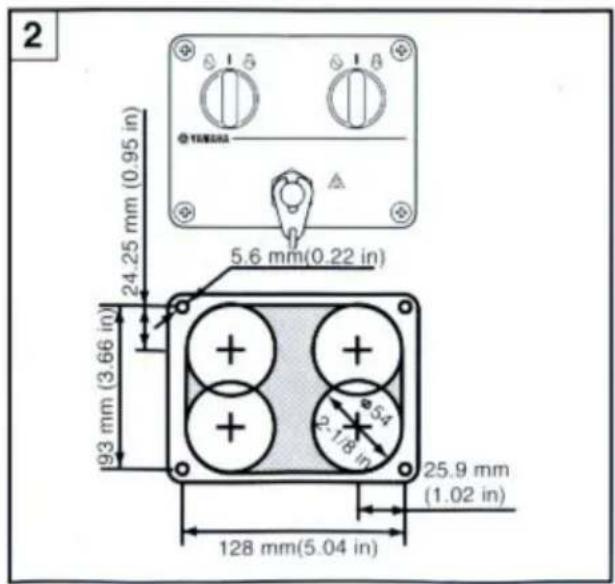
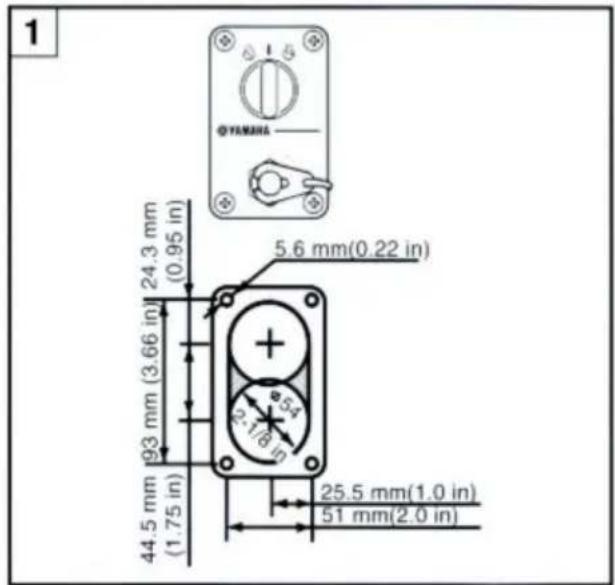
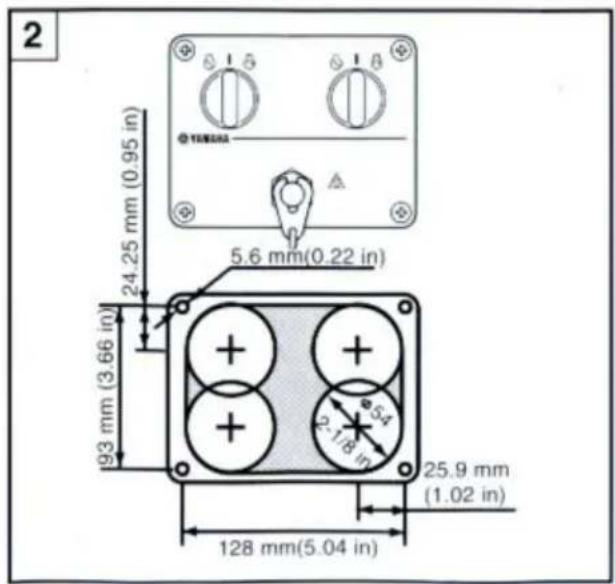
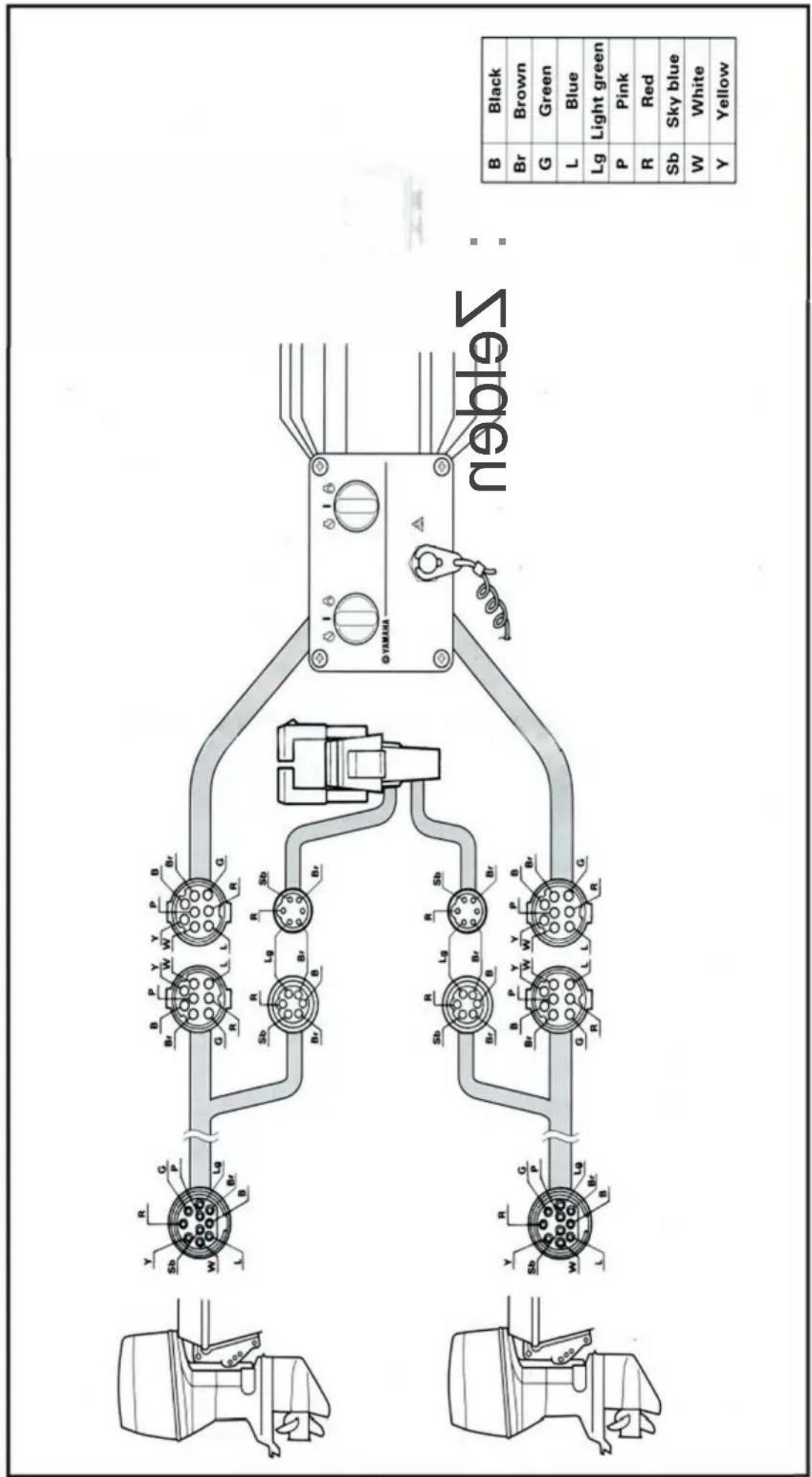
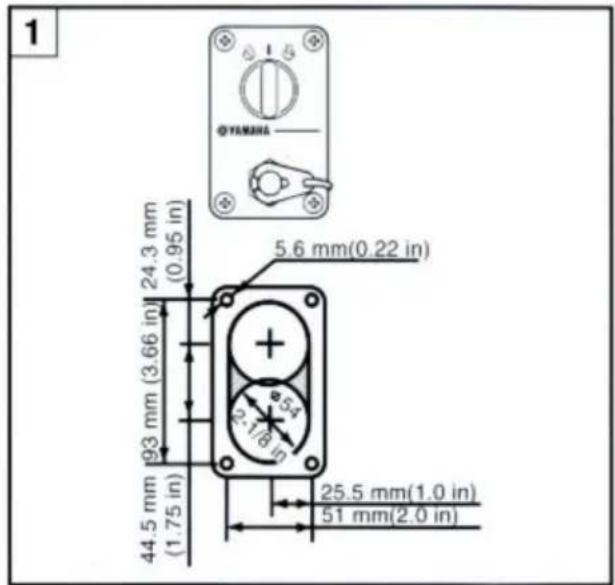
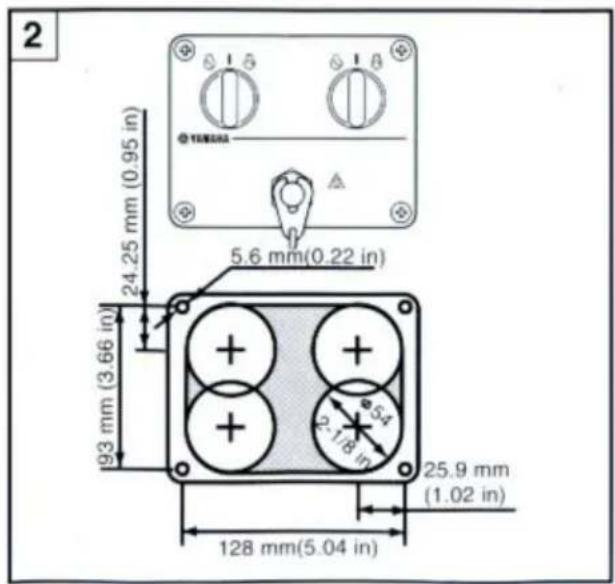
1 Switch panel for single engine 2 Switch panel for twin engine
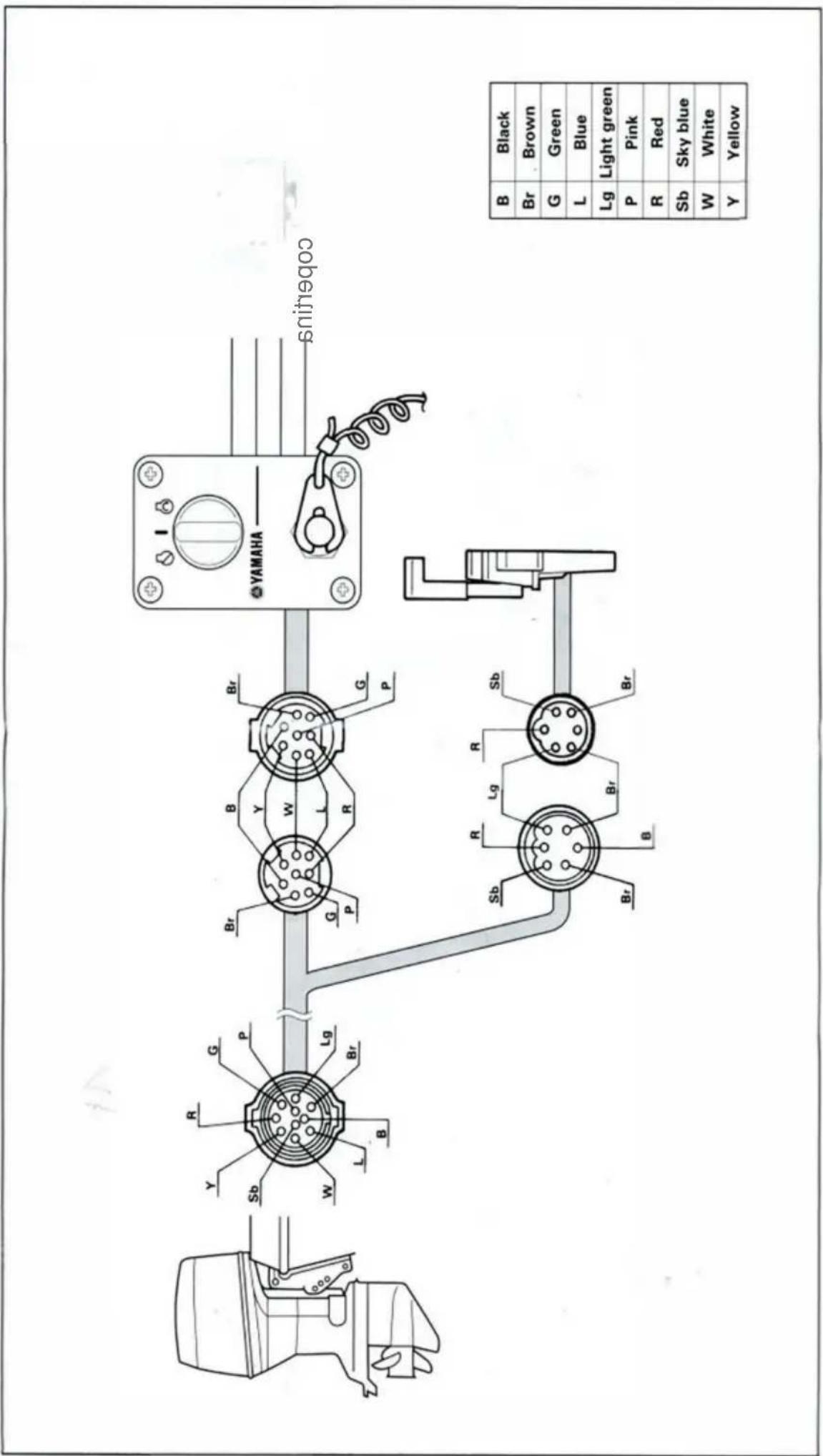
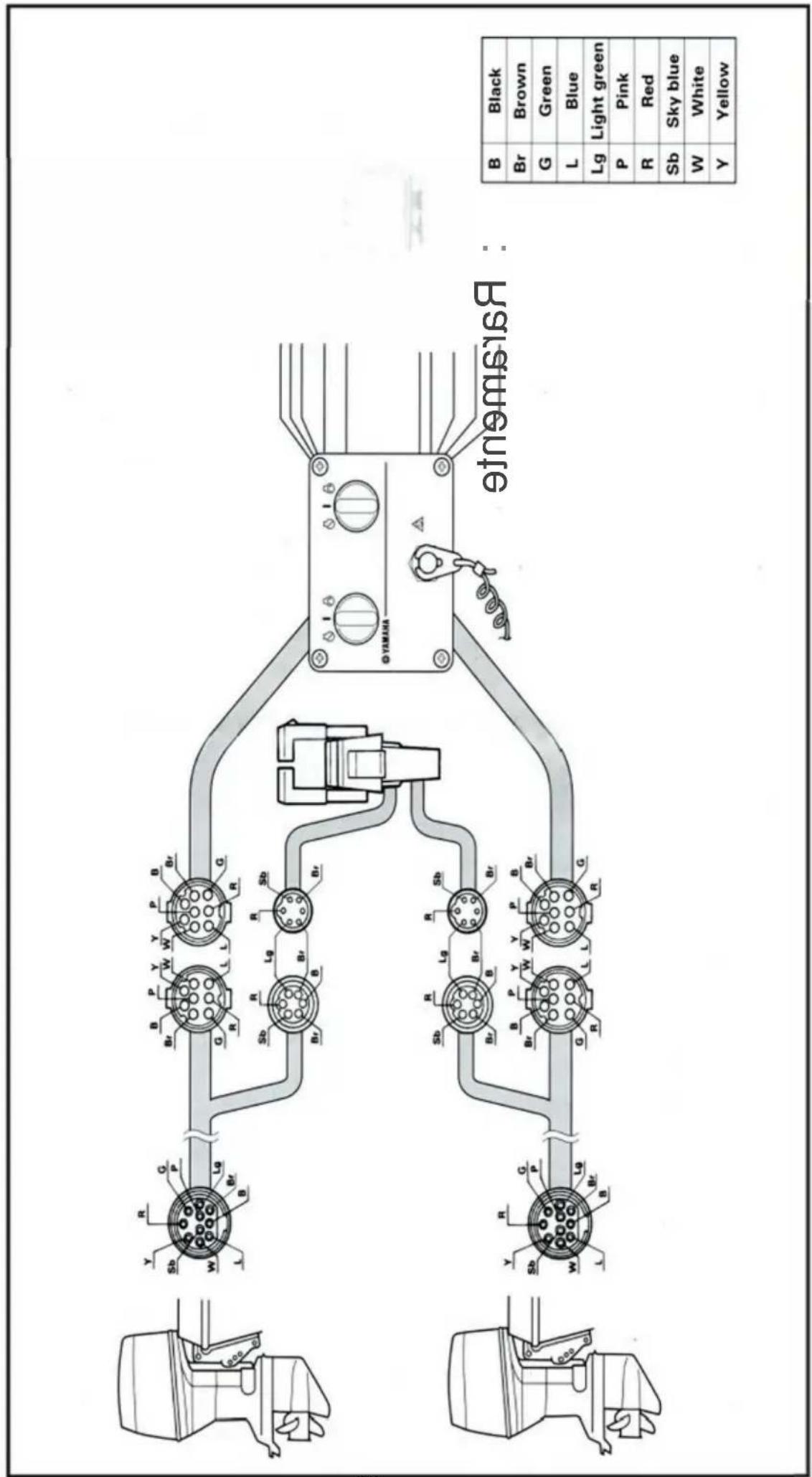
- Cut a hole in the instrument panel as indicated in this mounting diagram. Using a 2-1/16-inch hole saw, make holes and then cut out the center portion as shown.
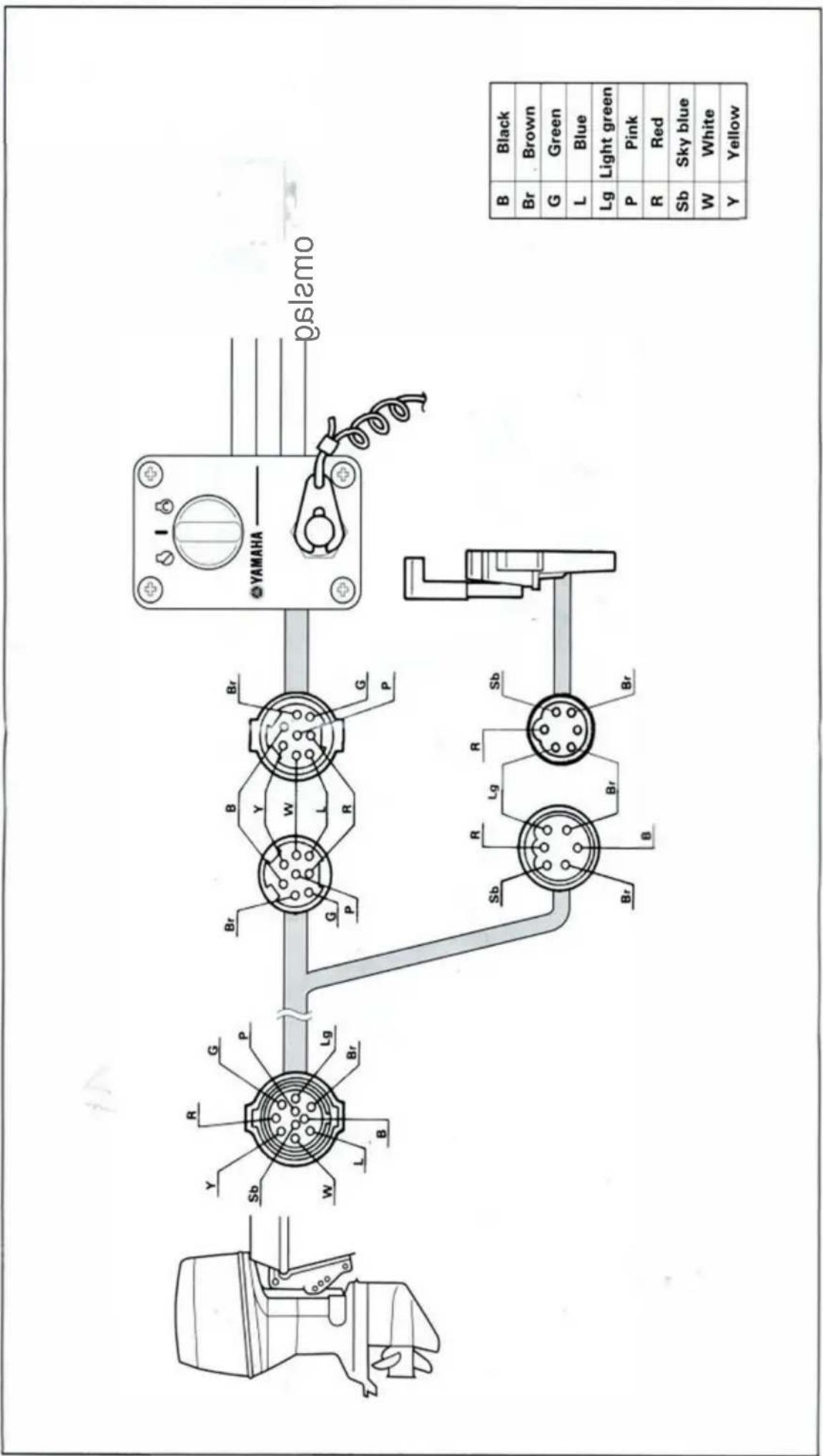
- Connect the wire harness to the switch panel assembly, and pass it back through the hole.
- Secure the switch panel assembly to the instrument panel with the bind screws, washers and nuts.
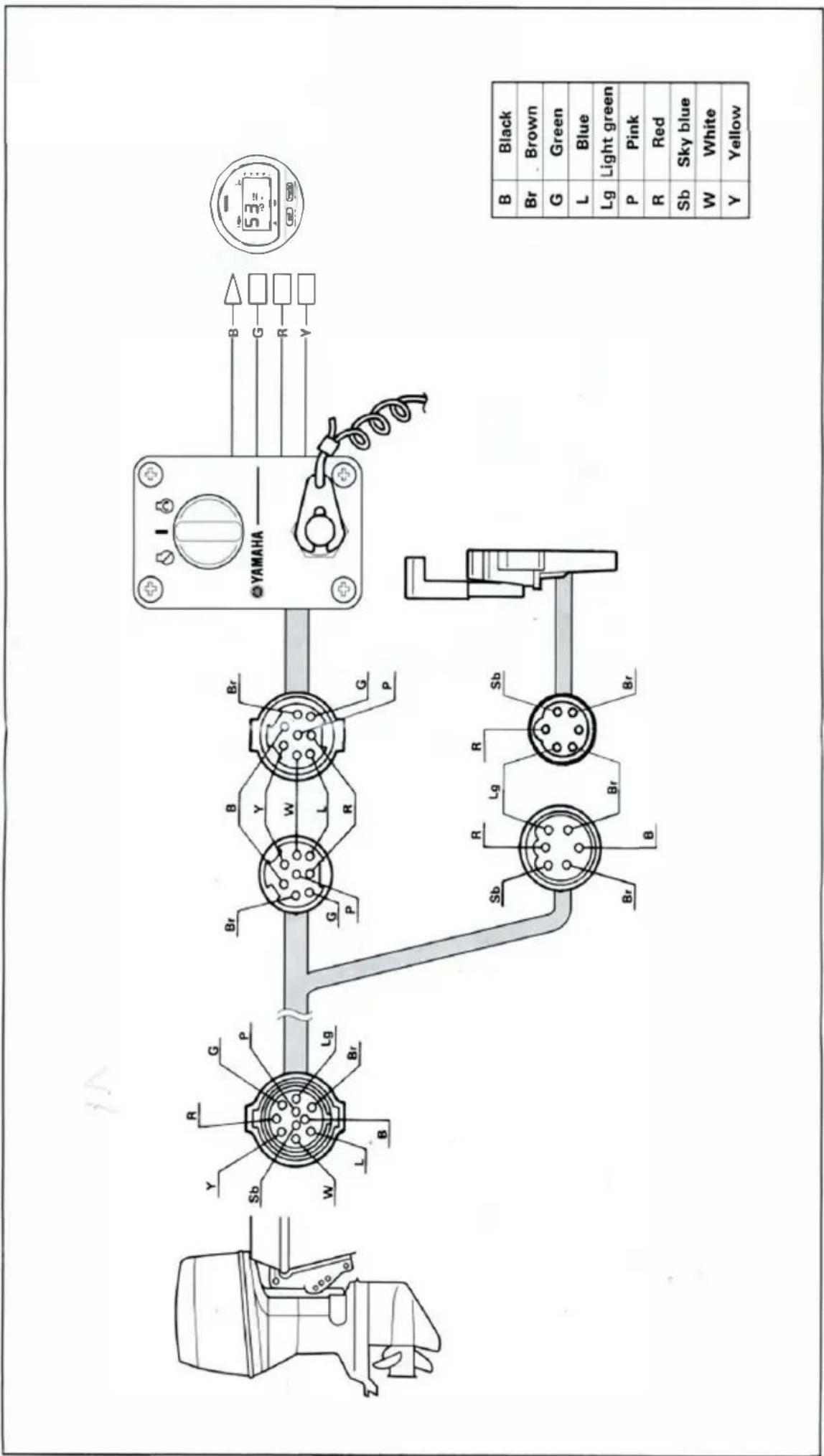
Twin engine without choke switch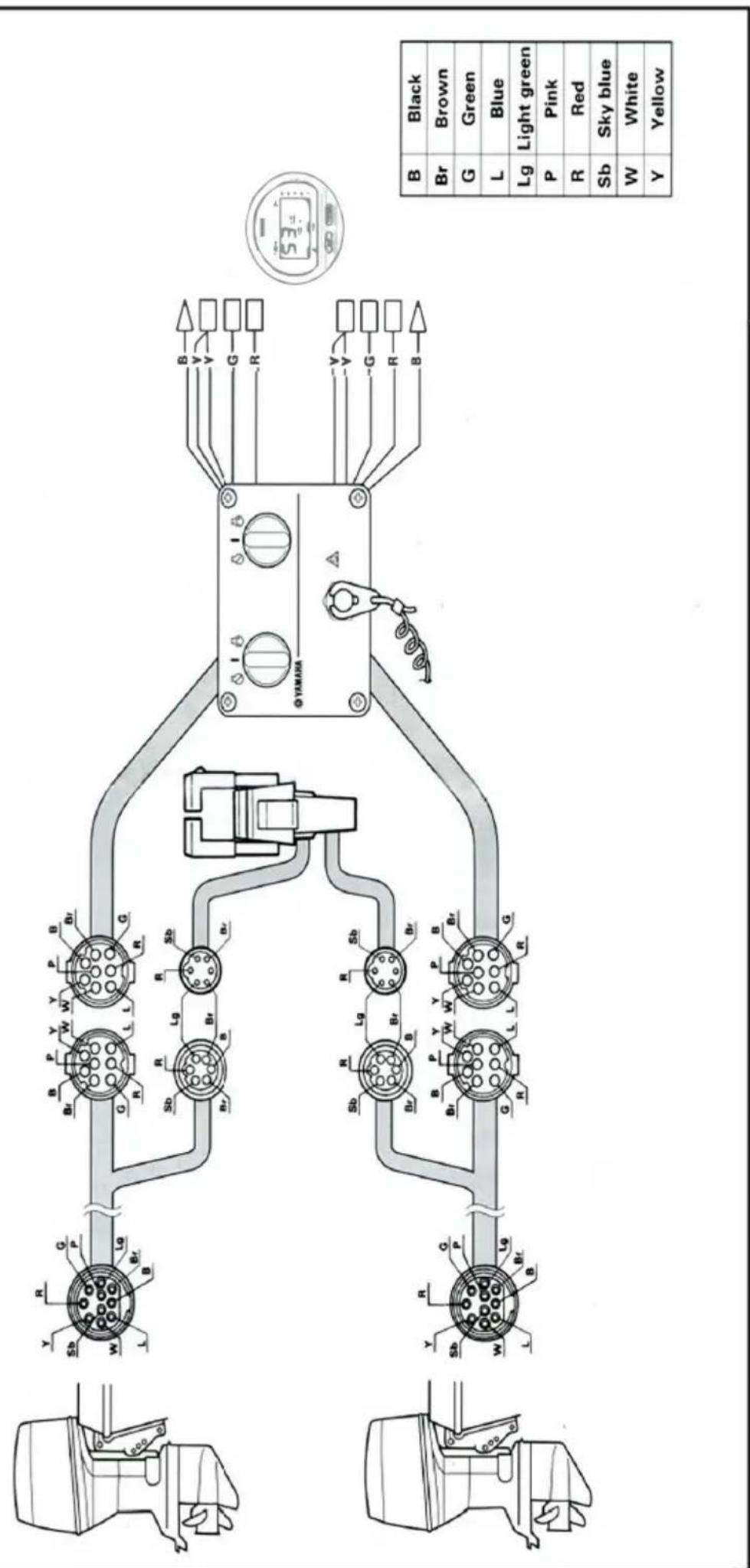
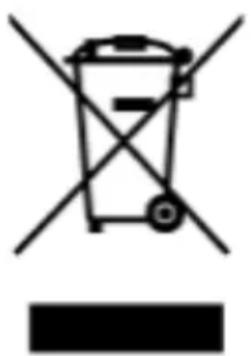
CORRECT DISPOSAL
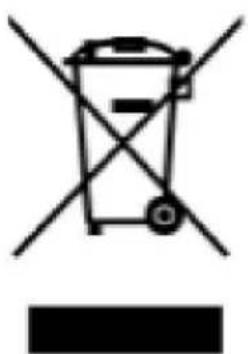
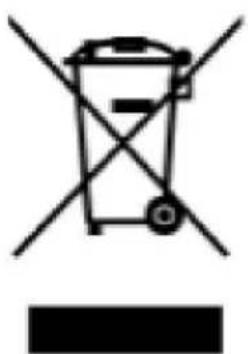
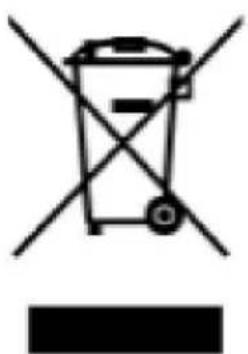
This product is subject to the provision of European Directive 2012/19/EU. The symbol showing a wheelie bin crossed through indicates that the product requires separate refuse collection in the European Union. This applies to the product and all accessories marked with this symbol. Products marked as such may not be discarded with normal domestic waste, but must be taken to a collection point for recycling electrical and electronic devices.
Address: Baoshanqu Shuangchenglu 803long 11hao 1602A-1609shi Shanghai Imported to AUS: SIHAO PTY LTD. 1 ROKEVA STREET EASTWOOD NSW 2122
Australia Imported to USA: Sanven Technology Ltd. Suite 250, 9166 Anaheim Place, Rancho Cucamonga, CA 91730
EC REP : SHUNSHUN GmbH.
Römeräcker 9 Z2021, 76351 Linkenheim-Hochstetten, Germany
Tel: +49 1727041930 euvertreter@gmail.com
UK REP: Pooledas Group Ltd
Unit 5 Albert Edward House, The Pavilions Preston, United Kingdom
Tel: 01772418127 pooledas123@gmail.com
VEVOR®
TOUGH TOOLS, HALF PRICE
Technical Support and E-Warranty Certificate
www.vevor.com/support
VEVOR®
TOUGH TOOLS, HALF PRICE
OR ALSO CONTROL BOX
CONTROL BOX
MODEL: 704-48205-P1
NEED HELP? WITH TACTUS!


Kunji]
STANDARD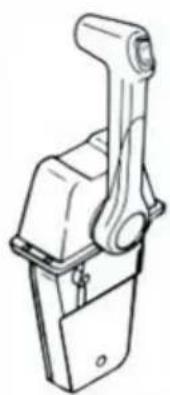
STANDARD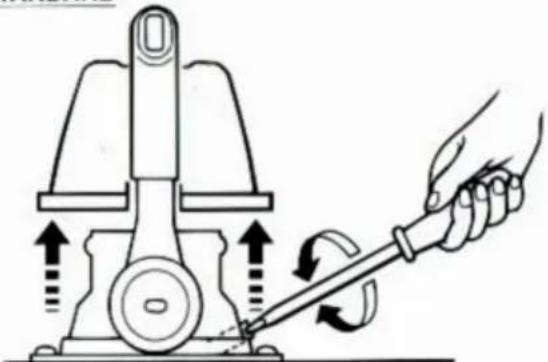
SINGLE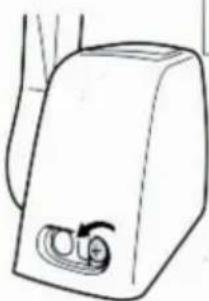
Throttle opening adjustment
The remote control box is capable of adjusting the throttle opening in the following manner:
- Loosen the screws securing the cover and remove it from the body.
- Loosen the locknut, and adjust the throttle opening by turning the stopper bolt. Turning the bolt clockwise decreases the throttle opening. Turning the bolt counterclockwise increases the throttle opening. ① Stopper bolt on the reverse side ② Stopper bolt on the forward side ③ Lock nut
CAUTION:
Do not allow the stopper bolt to project 8 mm (0.3 in) or more from the nut surface. Otherwise, the stopper contacts the cover.
- After adjusting, tighten the locknut.
TIGHTENING TORQUE:
5–8 Nm (50–80 kgf·cm, 3.6–5.8 ft·lb)
Secure the cover to the body with the screws.
INSTALLATION OF THE REMOTE CONTROL BOX
- Loosen the five screws and remove the mounting flange, packing, and back plate.
NOTE:
The mounting flange on the back plate side should be removed.
① Mounting flange ② Back plate ③ Screws
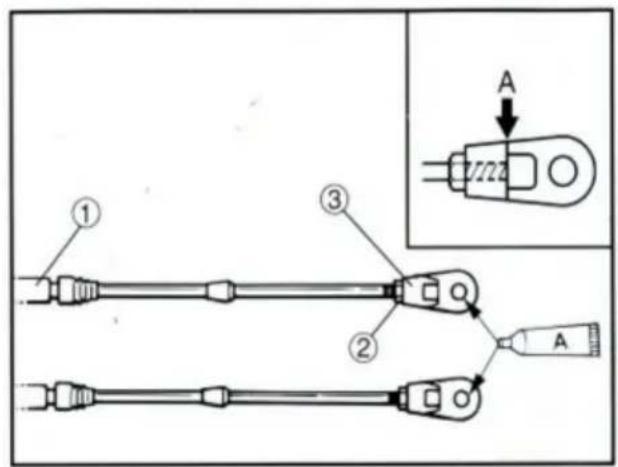
- Screw the cable joint on to the remote control cable up to point "A" (11mm), and tighten the lock nuts. Before installing the cable joints, apply the water-resistant grease (Yamaha Grease A) to the threaded holes in the cable joints.
① Remote control cable ② Lock nut ③ Cable joint
TIGHTENING TORQUE:
1.5–1.8 Nm (15–18 kgf·cm, 1.1–1.3 ft·lb)
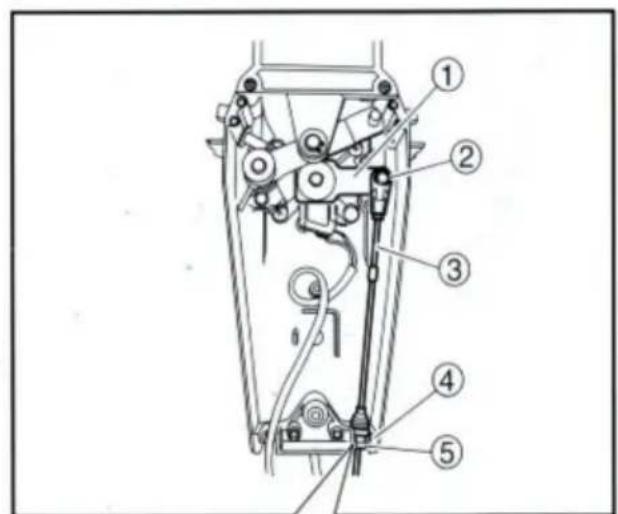
- Insert the shift cable into the housing clamp so that the groove on its end fits over the ridge in the clamp. Fit the cable joint over the pin on the end of the shift arm, and lock it with the circlip.
① Shift arm ② Circlip ③ Shift cable ④ Clamp groove ⑤ Grommet
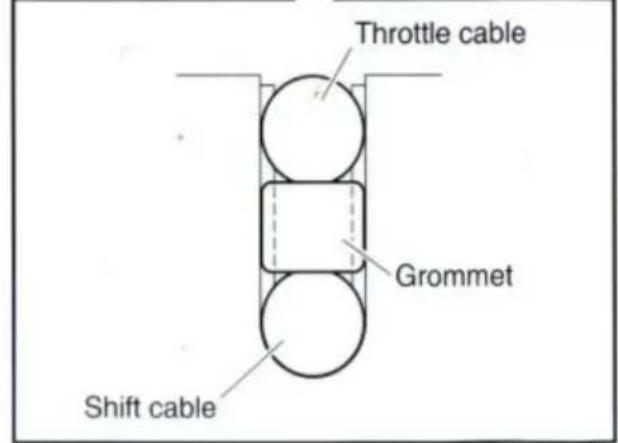
- Fit the grommet in the clamp groove.
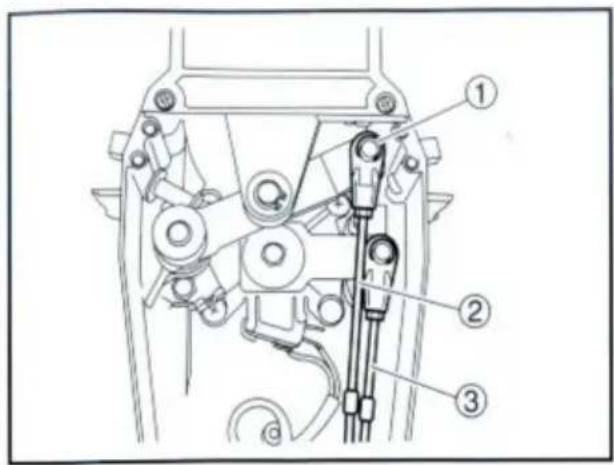
- Connect the throttle cable to the throttle arm in the same manner.
① Circlip ② Throttle cable ③ Shift cable
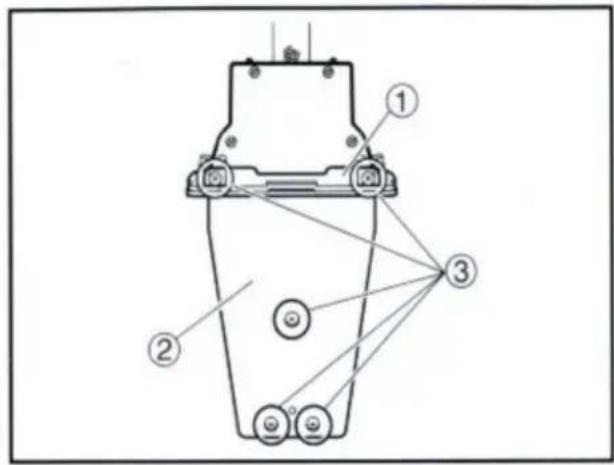
- Hold the back plate and mounting flange firmly with the five screws, and fit the packing in place.
① Mounting flange ② Back plate ③ Screws
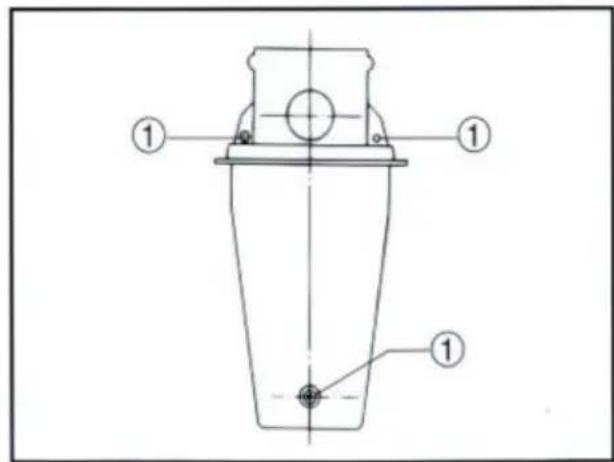
- Secure the two remote control boxes with the three screws.
① Screw
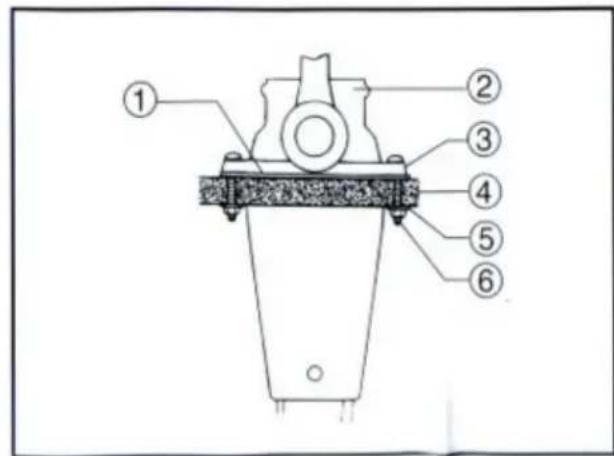
- After installing the remote control cables, temporarily secure the remote control boxes to the predetermined position with the screws and nuts.
① Packing ② Remote control box ③ Screw ④ Hull ⑤ Washer ⑥ Nut
INSTALLING THE REMOTE CONTROL BOX
- Peel the paper off the back of the packing, and adhere the packing to the boat hull so that the holes in the packing align with the remote control box mounting screw holes in the hull.
CONNECTING THE REMOTE CONTROL CABLE TO THE ENGINE
Checkpoints of cable joint
Shift:
Operate the control lever a few times and check to see that the shift lever on the engine side moves correctly.
Throttle:
Operate the control lever a few times and make sure that when it is returned to the neutral position the throttle lever on the engine side is set to the full-closed position.
Free accelerator:
Push the free accelerator button, and turn the control lever downward until it stops, then make sure that when it is returned to the neutral position, the free accelerator button is automatically reset.
Adjustment of cable joint
Adjust the cable joints on the engine side when the above checkpoints do not operate correctly.
CAUTION:
The cable joints on the engine side must be screwed onto the remote control cables at least 8 mm (0.3 in).
Adjust the cable joint on the remote control side if the adjustment cannot be made only on the engine side.
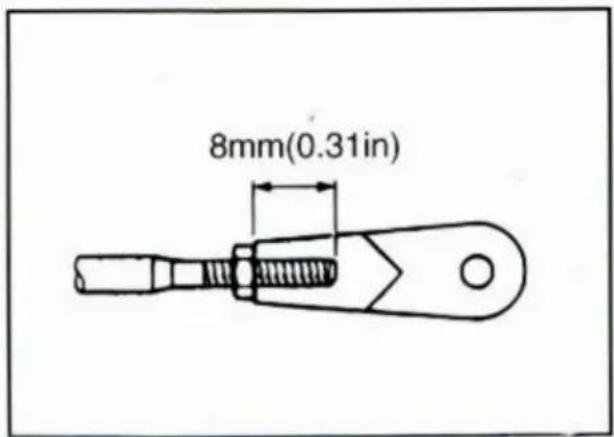
- After connecting the cables to the engine, move the control lever from lock to lock several times and check for good operation of the engine and remote control box.
- Firmly secure the remote control box (which is temporarily held with the screws) to the hull.
CAUTION:
Check that the cables are not sharply bent (less than 200 mm (7.87 in) in radius) or unnecessarily bent. (The number of bends should be minimized.) Also, check that no portions of the cables are clamped so hard as to deform the cable outers.
- Secure the cover to the body with the screws.
CHANGING THE THROTTLE LEVER FROM PUSH-TO-OPEN TYPE TO PULL-TO-OPEN TYPE
- Remove the two screws and remove the throttle lever assembly. Position the throttle lever assembly so that it faces downward and secure it with the two screws.
TIGHTENING TORQUE: 5–8 Nm (50–80 kgf·cm, 3.6–5.8 ft·lb)
1 Push-to-open throttle type 2 Pull-to-open throttle type
① Roller ② Throttle lever assembly ③ Stopper ④ Screws
- Align both the cam groove (for pull-to-open) in the dwell plate and the roller in the throttle lever assembly with the specific position, and lock the throttle arm assembly and dwell plate with the circlip.
NOTE:
Make sure the circlips are correctly fitted in place.
① Groove for push-to-open ② Groove for pull-to-open ③ Dwell plate ④ Roller ⑤ Throttle arm assembly
- Secure the dwell plate retainer with the four screws.
- Install the mounting flange and back plate with the five screws.
NOTE:
When installing the back plate, use care so that the wire harness is not pinched.
- Install the cover on the body.
VERIFYING CORRECT OPERATION
Be sure to verify that the remote control box operates correctly after installation.
- Follow the procedure for starting the engine and verify that the engine starts properly.
- Pull the lanyard to remove the lock plate from the engine stop lanyard switch and verify that the engine stops.
NOTE:
If the remote control box fails to operate correctly, verify that the installation procedure was followed properly.
NOTES ON STORAGE
To ensure a longer life of the remote control box, be sure to take the following steps when storing it for a long period of time.
- Remove the cable joints and apply water-resistant grease (Yamaha grease A) to the thread portion of the inner cable.
- Also apply water-resistant grease (Yamaha grease A) to inner parts of the remote control box, particularly to contact surfaces of moving parts. If any rust is found, remove it and apply the grease.
- Avoid bending the cables into a loop as much as possible. But if they have to be looped, the loop diameter should be more than one meter (40 in).
- Select a dry place for storage.
SWITCH PANEL MOUNTING
WARNING
When installing or removing electrical parts, be sure to disconnect the battery wires from the battery terminals. When connecting the battery wires to the battery terminals, be sure to turn off the main switch and remove the switch key. Otherwise you may receive an electric shock, or sparks may ignite the fuel causing an explosion.
CAUTION:
Install the switch panel onto the dashboard. Select a location allowing easy access from the helmsman's seat. If the boat has no dashboard, the switch panel should be installed in a location protected from water spray.
1 Switch panel for single engine 2 Switch panel for twin engine
- Cut a hole in the instrument panel as indicated in this mounting diagram. Using a 2-1/16-inch hole saw, make holes and then cut out the center portion as shown.
- Connect the wire harness to the switch panel assembly, and pass it back through the hole.
- Secure the switch panel assembly to the instrument panel with the bind screws, washers and nuts.

NEED HELP? WITH TACTUS!
12 :two
Kunji]
STANDARD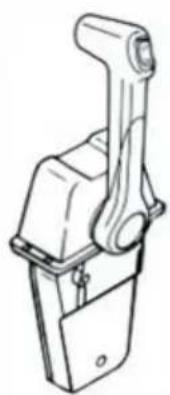
STANDARD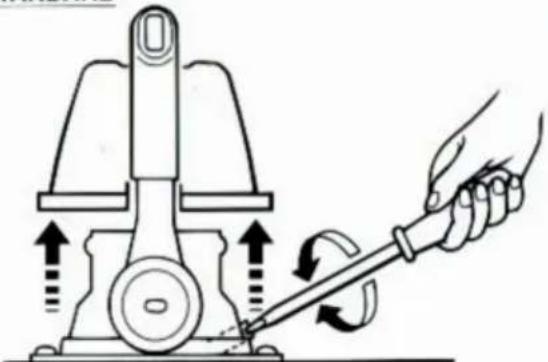
SINGLE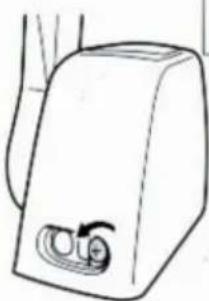
Throttle opening adjustment
The remote control box is capable of adjusting the throttle opening in the following manner:
- Loosen the screws securing the cover and remove it from the body.
- Loosen the locknut, and adjust the throttle opening by turning the stopper bolt. Turning the bolt clockwise decreases the throttle opening. Turning the bolt counterclockwise increases the throttle opening. ① Stopper bolt on the reverse side ② Stopper bolt on the forward side ③ Lock nut
CAUTION:
Do not allow the stopper bolt to project 8 mm (0.3 in) or more from the nut surface. Otherwise, the stopper contacts the cover.
- After adjusting, tighten the locknut.
TIGHTENING TORQUE:
5–8 Nm (50–80 kgf·cm, 3.6–5.8 ft·lb)
Secure the cover to the body with the screws.
INSTALLATION OF THE REMOTE CONTROL BOX
From 1-11, step i
- Loosen the five screws and remove the mounting flange, packing, and back plate.
NOTE:
The mounting flange on the back plate side should be removed.
① Mounting flange ② Back plate ③ Screws
- Screw the cable joint on to the remote control cable up to point "A" (11mm), and tighten the lock nuts. Before installing the cable joints, apply the water-resistant grease (Yamaha Grease A) to the threaded holes in the cable joints.
① Remote control cable ② Lock nut ③ Cable joint
TIGHTENING TORQUE:
1.5–1.8 Nm (15–18 kgf·cm, 1.1–1.3 ft·lb)
- Insert the shift cable into the housing clamp so that the groove on its end fits over the ridge in the clamp. Fit the cable joint over the pin on the end of the shift arm, and lock it with the circlip.
① Shift arm ② Circlip ③ Shift cable ④ Clamp groove ⑤ Grommet
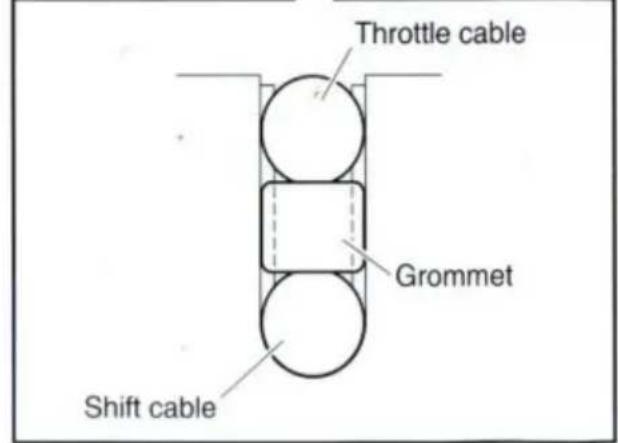
- Fit the grommet in the clamp groove.
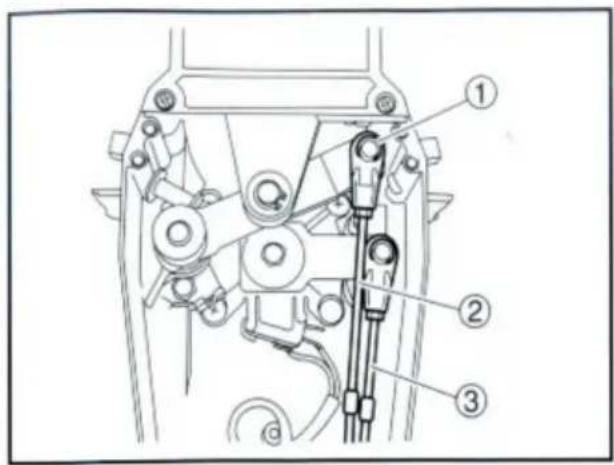
- Connect the throttle cable to the throttle arm in the same manner.
① Circlip ② Throttle cable ③ Shift cable
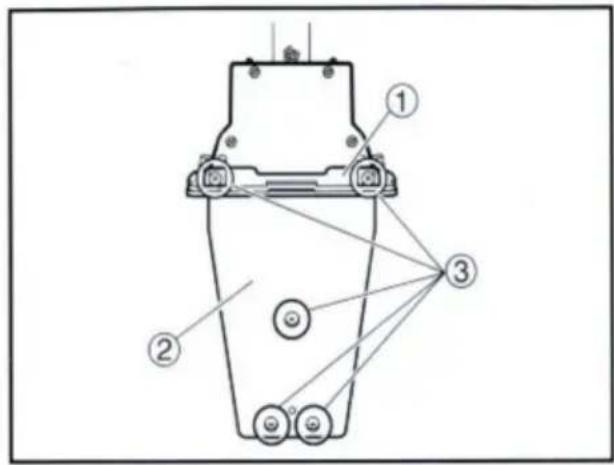
- Hold the back plate and mounting flange firmly with the five screws, and fit the packing in place.
① Mounting flange ② Back plate ③ Screws
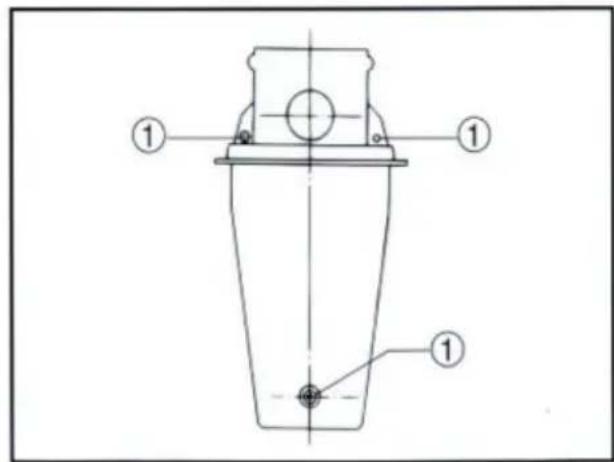
- Secure the two remote control boxes with the three screws.
① Screw
- After installing the remote control cables, temporarily secure the remote control boxes to the predetermined position with the screws and nuts.
① Packing ② Remote control box ③ Screw ④ Hull ⑤ Washer ⑥ Nut
INSTALLING THE REMOTE CONTROL BOX
- Peel the paper off the back of packing, and adhere the packing to the boat hull so that the holes in the packing align with the remote control box mounting screw holes in the hull.
CONNECTING THE REMOTE CONTROL CABLE TO THE ENGINE
Checkpoints of cable joint
Shift:
Operate the control lever a few times and check to see that the shift lever on the engine side moves correctly.
Throttle:
Operate the control lever a few times and make sure that when it is returned to the neutral position, the throttle lever on the engine side is set to the full-closed position.
Free accelerator:
Push the free accelerator button, and turn the control lever downward until it stops, then make sure that when it is returned to the neutral position, the free accelerator button is automatically reset.
Adjustment of cable joint
Adjust the cable joints on the engine side when the above checkpoints do not operate correctly.
CAUTION:
The cable joints on the engine side must be screwed onto the remote control cables at least 8 mm (0.3 in).
Adjust the cable joint on the remote control side if the adjustment cannot be made only on the engine side.

- After connecting the cables to the engine, move the control lever from lock to lock several times and check for good operation of the engine and remote control box.
- Firmly secure the remote control box (which is temporarily held with the screws) to the hull.
CAUTION:
Check that the cables are not sharply bent (less than 200 mm (7.87 in) in radius) or unnecessarily bent. (The number of bends should be minimized.) Also, check that no portions of the cables are clamped so hard as to deform the cable outers.
- Secure the cover to the body with the screws.
- Remove the two screws and remove the throttle lever assembly. Position the throttle lever assembly so that it faces downward and secure it with the two screws.
TIGHTENING TORQUE: 5–8 Nm (50–80 kgf·cm, 3.6–5.8 ft·lb)
1 Push-to-open throttle type 2 Pull-to-open throttle type
① Roller ② Throttle lever assembly ③ Stopper ④ Screws
- Align both the cam groove (for pull-to-open) in the dwell plate and the roller in the throttle lever assembly with the specific position, and lock the throttle arm assembly and dwell plate with the circlip.
NOTE:
Make sure the circlip are correctly fitted in place.
① Groove for push-to-open ② Groove for pull-to-open ③ Dwell plate ④ Roller ⑤ Throttle arm assembly
- Secure the dwell plate retainer with the four screws.
- Install the mounting flange, back plate with the five screws.
NOTE: ______
When installing the back plate, use care so that the wire harness is not pinched.
- Install the cover on the body.
VERIFYING CORRECT OPERATION
Be sure to verify that the remote control box operates correctly after installation.
- Follow the procedure for starting the engine and verify that the engine starts properly.
- Pull the lanyard to remove the lock plate from the engine stop lanyard switch and verify that the engine stops.
NOTE: ____
If the remote control box fails to operate correctly, verify that the installation procedure was followed properly.
NOTES ON STORAGE
To ensure a longer life of the remote control box, be sure to take the following steps when storing it for a long period of time.
- Remove the cable joints and apply water-resistant grease (Yamaha grease A) to the thread portion of the inner cable.
- Also apply water-resistant grease (Yamaha grease A) to inner parts of the remote control box, particularly to contact surfaces of moving parts. If any rust is found, remove it and apply the grease.
- Avoid bending the cables into a loop as much as possible. But if they have to be looped, the loop diameter should be more than one meter (40 in).
- Select a dry place for storage.
SWITCH PANEL MOUNTING
WARNING
When installing or removing electrical parts, be sure to disconnect the battery wires from the battery terminals. When connecting the battery wires to the battery terminals, be sure to turn off the main switch and remove the switch key. Otherwise you may receive an electric shock, or sparks may ignite the fuel causing an explosion.
CAUTION:
Install the switch panel onto the dashboard. Select a location allowing easy access from the helmsman's seat. If the boat has no dashboard, the switch panel should be installed in a location protected from water spray.
1 Switch panel for single engine 2 Switch panel for twin engine
- Cut a hole in the instrument panel as indicated in this mounting diagram. Using a 2-1/16-inch hole saw, make holes and then cut out the center portion as shown.
- Connect the wire harness to the switch panel assembly, and pass it back through the hole.
- Secure the switch panel assembly to the instrument panel with the bind screws, washers and nuts.
CORRECT DISPOSAL
REP: Pooledas Group Ltd
NEED HELP? CONTACT US!
10 11
12 .due
Kunji]
STANDARD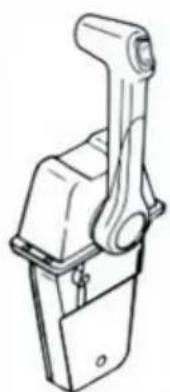
(J) Power Trim and switch lltt
®Grip
STANDARD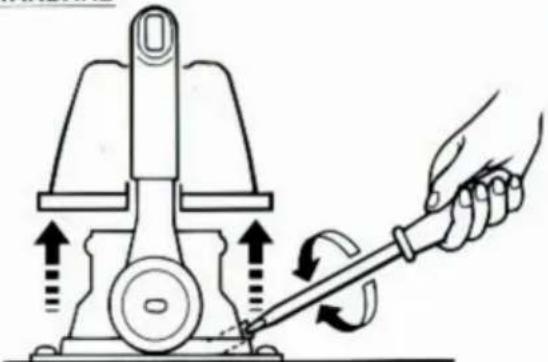
SINGLE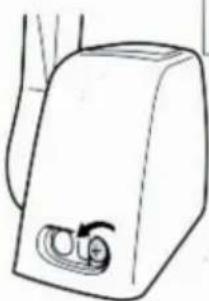
Throttle opening adjustment
The remote control box is capable of adjusting the throttle opening in the following manner:
- Loosen the screws securing the cover and remove it from the body.
- Loosen the locknut, and adjust the throttle opening by turning the stopper bolt. Turning the bolt clockwise decreases the throttle opening. Turning the bolt counterclockwise increases the throttle opening. ① Stopper bolt on the reverse side ② Stopper bolt on the forward side ③ Lock nut
CAUTION:
Do not allow the stopper bolt to project 8 mm (0.3 in) or more from the nut surface. Otherwise, the stopper contacts the cover.
- After adjusting, tighten the locknut.
TIGHTENING TORQUE:
5–8 Nm (50–80 kgf·cm, 3.6–5.8 ft·lb)
Secure the cover to the body with the screws.
- Loosen the five screws and remove the mounting flange, packing, and back plate.
NOTE:
The mounting flange on the back plate side should be removed.
① Mounting flange ② Back plate ③ Screws
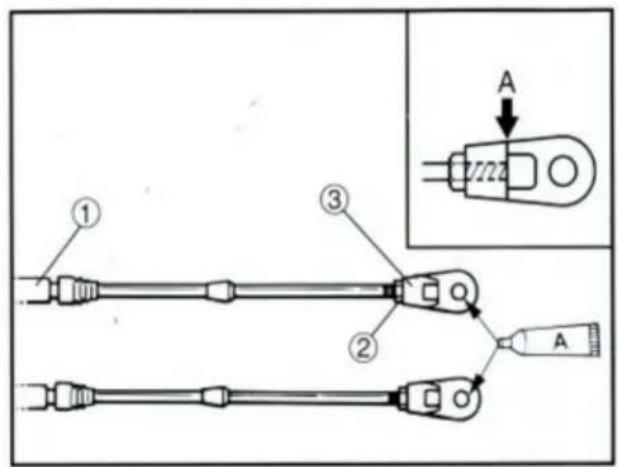
- Screw the cable joint onto the remote control cable up to point "A" (11 mm), and tighten the lock nuts. Before installing the cable joints, apply water-resistant grease (Yamaha Grease A) to the threaded holes in the cable joints.
① Remote control cable ② Lock nut ③ Cable joint
TIGHTENING TORQUE:
1.5–1.8 Nm (15–18 kgf·cm, 1.1–1.3 ft·lb)
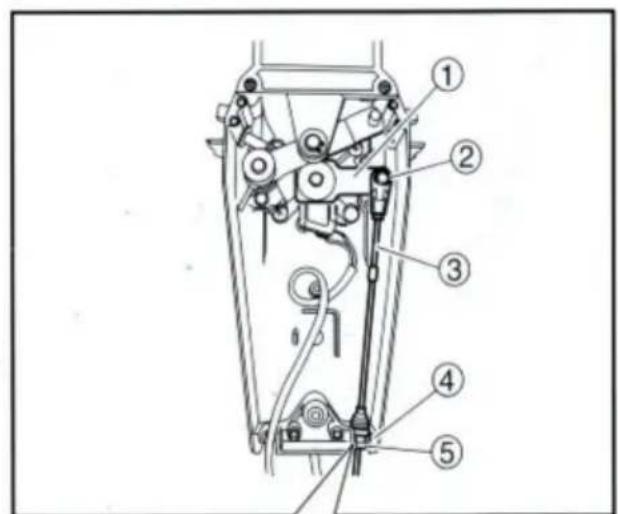
- Insert the shift cable into the housing clamp so that the groove on its end fits over the ridge in the clamp. Fit the cable joint over the pin on the end of the shift arm, and lock it with the circlip.
① Shift arm ② Circlip ③ Shift cable ④ Clamp groove ⑤ Grommet
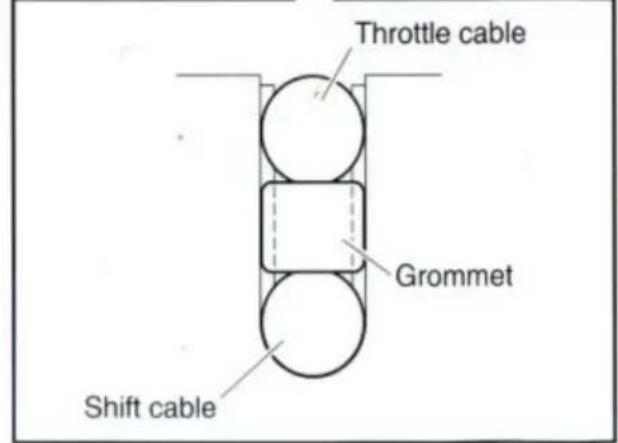
- Fit the grommet in the clamp groove.
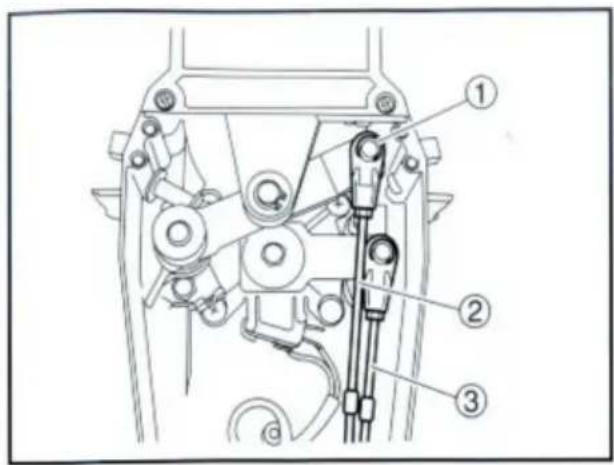
- Connect the throttle cable to the throttle arm in the same manner.
① Circlip ② Throttle cable ③ Shift cable
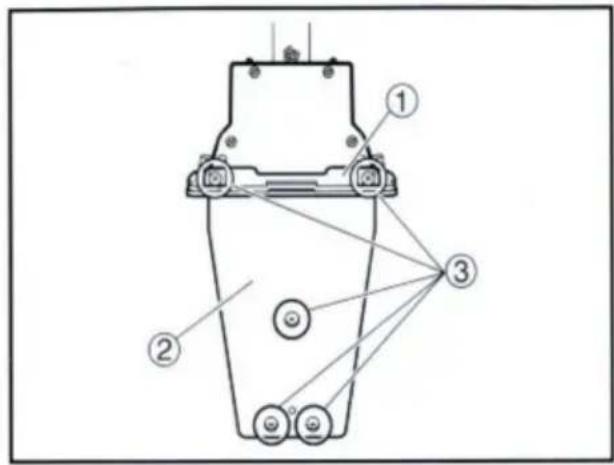
- Hold the back plate and mounting flange firmly with the five screws, and fit the packing in place.
① Mounting flange ② Back plate ③ Screws
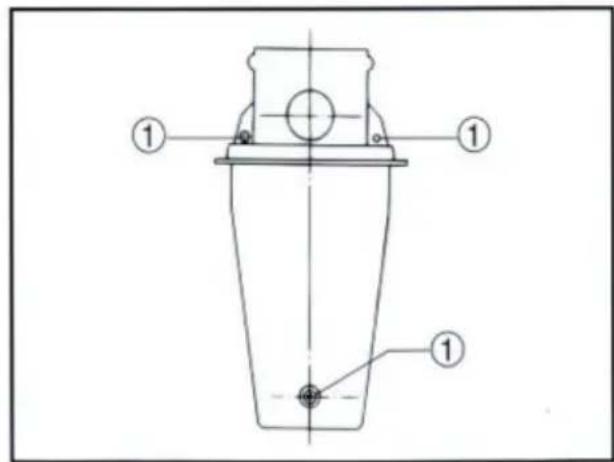
- Secure the two remote control boxes with the three screws.
① Screw
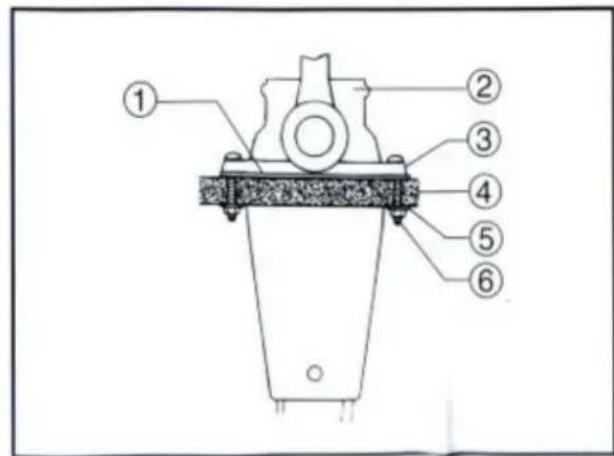
- After installing the remote control cables, temporarily secure the remote control boxes to the predetermined position with the screws and nuts.
① Packing ② Remote control box ③ Screw ④ Hull ⑤ Washer ⑥ Nut
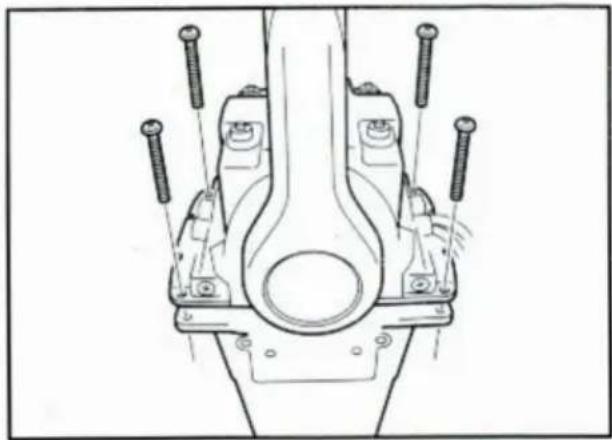
INSTALLING THE REMOTE CONTROL BOX
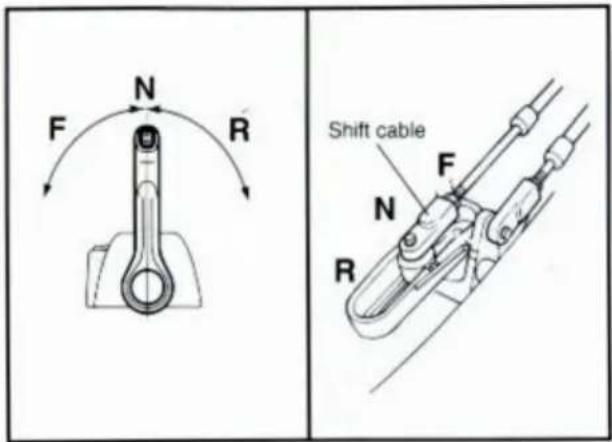
- Peel the paper off the back of the packing, and adhere the packing to the boat hull so that the holes in the packing align with the remote control box mounting screw holes in the hull.
CONNECTING THE REMOTE CONTROL CABLE TO THE ENGINE
Checkpoints of cable joint
Shift:
Operate the control lever a few times and check to see that the shift lever on the engine side moves correctly.
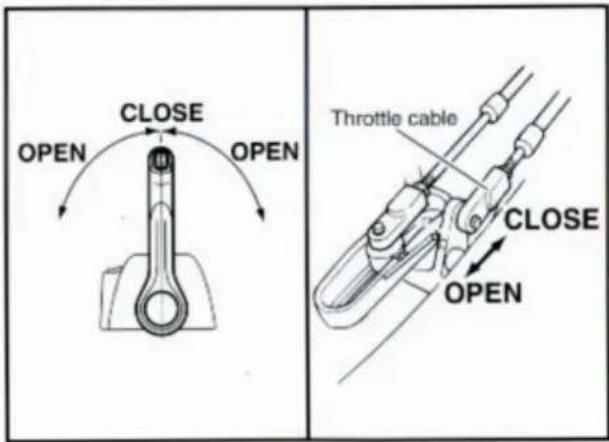
Throttle:
Operate the control lever a few times and make sure that when it is returned to the neutral position, the throttle lever on the engine side is set to the full-closed position.
Free accelerator:
Push the free accelerator button, and turn the control lever downward until it stops, then make sure that when it is returned to the neutral position, the free accelerator button is automatically reset.
Adjustment of cable joint
Adjust the cable joints on the engine side when the above checkpoints do not operate correctly.
CAUTION:
The cable joints on the engine side must be screwed onto the remote control cables at least 8 mm (0.3 in).
Adjust the cable joint on the remote control side if the adjustment cannot be made only on the engine side.
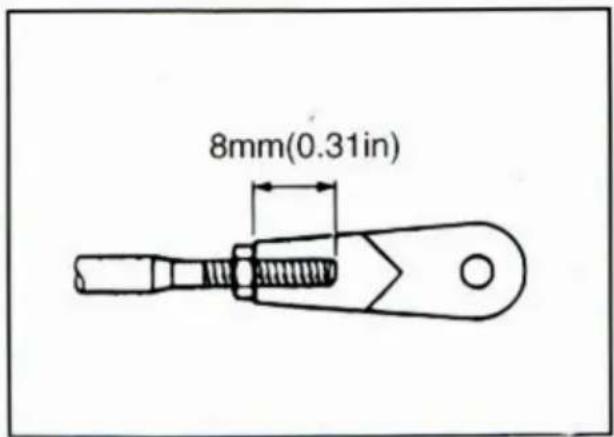
- After connecting the cables to the engine, move the control lever from lock to lock several times and check for good operation of the engine and remote control box.
- Firmly secure the remote control box (which is temporarily held with the screws) to the hull.
CAUTION:
Check that the cables are not sharply bent (less than 200 mm (7.87 in) in radius) or unnecessarily bent. (The number of bends should be minimized.) Also, check that no portions of the cables are clamped so hard as to deform the cable outers.
- Secure the cover to the body with the screws.
CHANGE FROM PUSH-TO-OPEN ACCELERATOR TYPE TO PULL-TO-OPEN ACCELERATOR TYPE
- Remove the two screws and remove the throttle lever assembly. Position the throttle lever assembly so that it faces downward and secure it with the two screws.
TIGHTENING TORQUE: 5–8 Nm (50–80 kgf·cm, 3.6–5.8 ft·lb)
1 Push-to-open throttle type 2 Pull-to-open throttle type
① Roller ② Throttle lever assembly ③ Stopper ④ Screws
- Align both the cam groove (for pull-to-open) in the dwell plate and the roller in the throttle lever assembly with the specific position, and lock the throttle arm assembly and dwell plate with the circlip.
NOTE:
Make sure the circlip are correctly fitted in place.
① Groove for push-to-open ② Groove for pull-to-open ③ Dwell plate ④ Roller ⑤ Throttle arm assembly
- Secure the dwell plate retainer with the four screws.
- Install the mounting flange, back plate with the five screws.
NOTE: ______
When installing the back plate, use care so that the wire harness is not pinched.
- Install the cover on the body.
VERIFYING CORRECT OPERATION
Be sure to verify that the remote control box operates correctly after installation.
- Follow the procedure for starting the engine and verify that the engine starts properly.
- Pull the lanyard to remove the lock plate from the engine stop lanyard switch and verify that the engine stops.
NOTE: ______
If the remote control box fails to operate correctly, verify that the installation procedure was followed properly.
NOTES ON STORAGE
To ensure a longer life of the remote control box, be sure to take the following steps when storing it for a long period of time.
- Remove the cable joints and apply water-resistant grease (Yamaha grease A) to the thread portion of the inner cable.
- Also apply water-resistant grease (Yamaha grease A) to inner parts of the remote control box, particularly to contact surfaces of moving parts. If any rust is found, remove it and apply the grease.
- Avoid bending the cables into a loop as much as possible. But if they have to be looped, the loop diameter should be more than one meter (40 in).
- Select a dry place for storage.
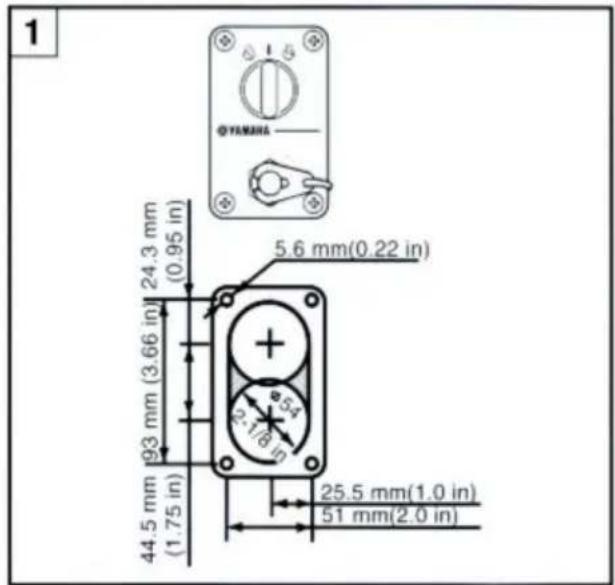
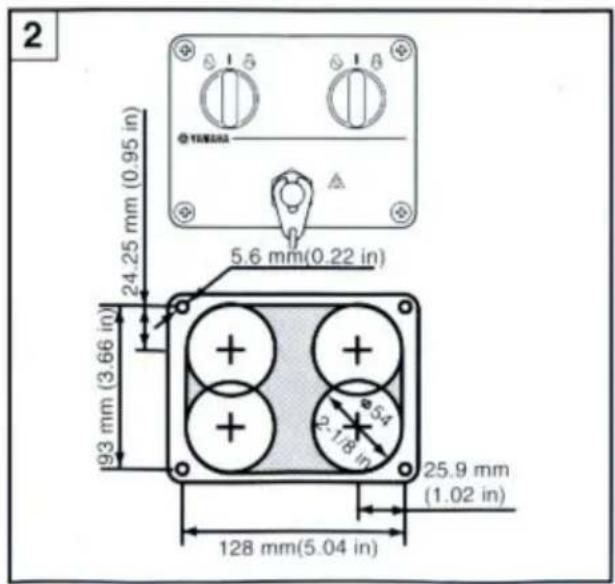
SWITCH PANEL MOUNTING
WARNING
When installing or removing electrical parts, be sure to disconnect the battery wires from the battery terminals. When connecting the battery wires to the battery terminals, be sure to turn off the main switch and remove the switch key. Otherwise you may receive an electric shock, or sparks may ignite the fuel causing an explosion.
CAUTION:
Install the switch panel onto the dashboard. Select a location allowing easy access from the helmsman's seat. If the boat has no dashboard, the switch panel should be installed in a location protected from water spray.
1 Switch panel for single engine 2 Switch panel for twin engine
- Cut a hole in the instrument panel as indicated in this mounting diagram. Using a 2-1/16-inch hole saw, make holes and then cut out the center portion as shown.
- Connect the wire harness to the switch panel assembly, and pass it back through the hole.
- Secure the switch panel assembly to the instrument panel with the bind screws, washers and nuts.

REP UK: Pooledas Group Ltd



Kunji]
STANDARD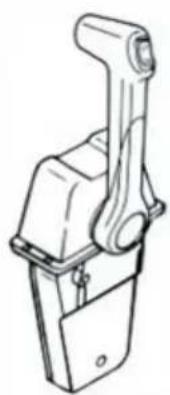
STANDARD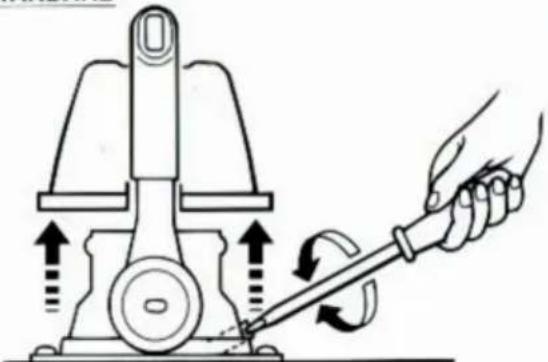
SINGLE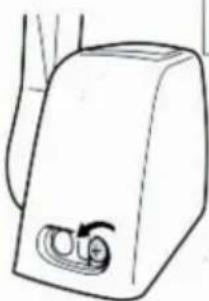
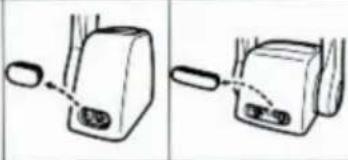
Throttle opening adjustment
The remote control box is capable of adjusting the throttle opening in the following manner:
- Loosen the screws securing the cover and remove it from the body.
- Loosen the locknut, and adjust the throttle opening by turning the stopper bolt. Turning the bolt clockwise decreases the throttle opening. Turning the bolt counterclockwise increases the throttle opening. ① Stopper bolt on the reverse side ② Stopper bolt on the forward side ③ Lock nut
CAUTION:
Do not allow the stopper bolt to project 8 mm (0.3 in) or more from the nut surface. Otherwise, the stopper contacts the cover.
- After adjusting, tighten the locknut.
TIGHTENING TORQUE:
5–8 Nm (50–80 kgf·cm, 3.6–5.8 ft·lb)
Secure the cover to the body with the screws.
- Loosen the five screws and remove the mounting flange, packing, and back plate.
NOTE:
The mounting flange on the back plate side should be removed.
① Mounting flange ② Back plate ③ Screws
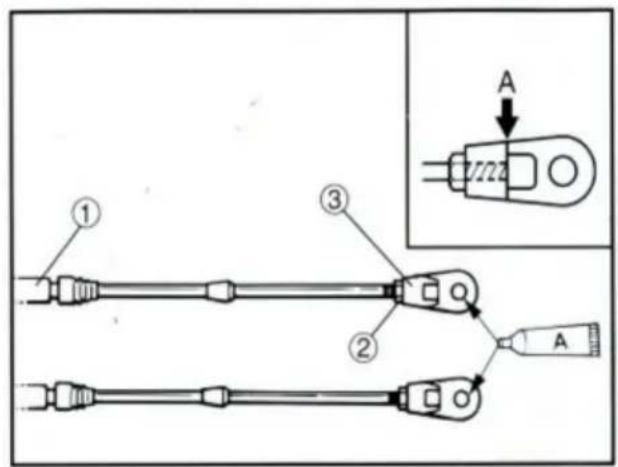
- Screw the cable joint onto the remote control cable up to point "A" (11mm), and tighten the lock nuts. Before installing the cable joints, apply water-resistant grease (Yamaha Grease A) to the threaded holes in the cable joints.
① Remote control cable ② Lock nut ③ Cable joint
TIGHTENING TORQUE:
1.5–1.8 Nm (15–18 kgf·cm, 1.1–1.3 ft·lb)
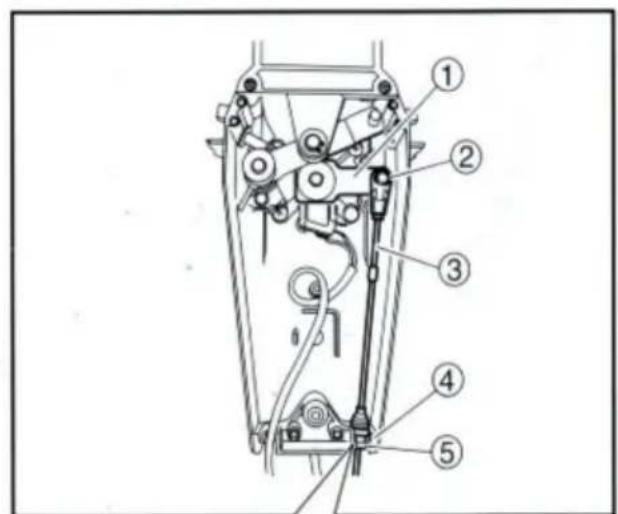
- Insert the shift cable into the housing clamp so that the groove on its end fits over the ridge in the clamp. Fit the cable joint over the pin on the end of the shift arm, and lock it with the circlip.
① Shift arm ② Circlip ③ Shift cable ④ Clamp groove ⑤ Grommet
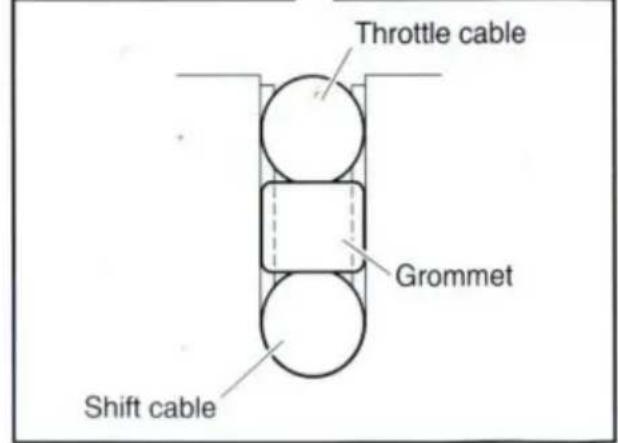
- Fit the grommet in the clamp groove.
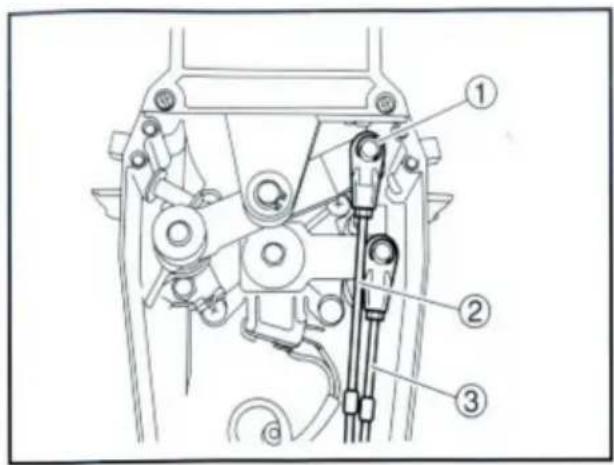
- Connect the throttle cable to the throttle arm in the same manner.
① Circlip ② Throttle cable ③ Shift cable
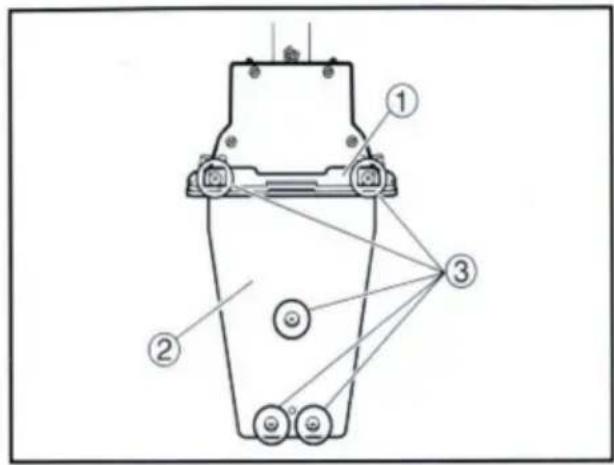
- Hold the back plate and mounting flange firmly with the five screws, and fit the packing in place.
① Mounting flange ② Back plate ③ Screws
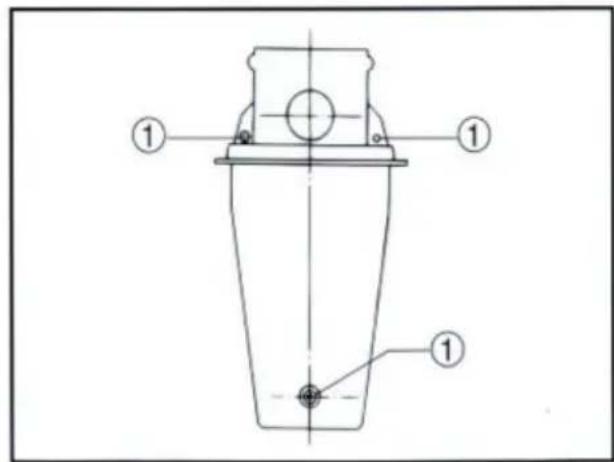
- Secure the two remote control boxes with the three screws.
① Screw
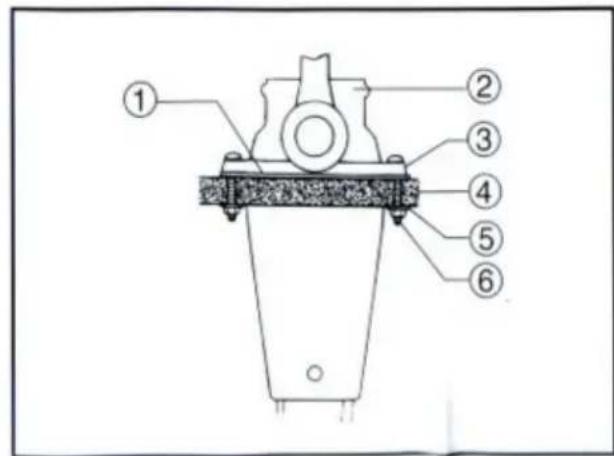
- After installing the remote control cables, temporarily secure the remote control boxes to the predetermined position with the screws and nuts.
① Packing ② Remote control box ③ Screw ④ Hull ⑤ Washer ⑥ Nut
INSTALLING THE REMOTE CONTROL BOX
- Peel the paper off the back of packing, and adhere the packing to the boat hull so that the holes in the packing align with the remote control box mounting screw holes in the hull.
CONNECTING THE REMOTE CONTROL CABLE TO THE ENGINE
Checkpoints of cable joint
Shift:
Operate the control lever a few times and check to see that the shift lever on the engine side moves correctly.
Throttle:
Operate the control lever a few times and make sure that when it is returned to the neutral position the throttle lever on the engine side is set to the full-closed position.
Free accelerator:
Push the free accelerator button, and turn the control lever downward until it stops, then make sure that when it is returned to the neutral position, the free accelerator button is automatically reset.
Adjustment of cable joint
Adjust the cable joints on the engine side when the above checkpoints do not operate correctly.
CAUTION:
The cable joints on the engine side must be screwed onto the remote control cables at least 8 mm (0.3 in).
Adjust the cable joint on the remote control side if the adjustment cannot be made only on the engine side.
- After connecting the cables to the engine, move the control lever from lock to lock several times and check for good operation of the engine and remote control box.
- Firmly secure the remote control box (which is temporarily held with the screws) to the hull.
CAUTION:
Check that the cables are not sharply bent (less than 200 mm (7.87 in) in radius) or unnecessarily bent. (The number of bends should be minimized.) Also, check that no portions of the cables are clamped so hard as to deform the cable outers.
- Secure the cover to the body with the screws.
- Remove the two screws and remove the throttle lever assembly. Position the throttle lever assembly so that it faces downward and secure it with the two screws.
TIGHTENING TORQUE: 5–8 Nm (50–80 kgf·cm, 3.6–5.8 ft·lb)
1 Push-to-open throttle type 2 Pull-to-open throttle type
① Roller ② Throttle lever assembly ③ Stopper ④ Screws
- Align both the cam groove (for pull-to-open) in the dwell plate and the roller in the throttle lever assembly with the specific position, and lock the throttle arm assembly and dwell plate with the circlip.
NOTE:
Make sure the circlip are correctly fitted in place.
① Groove for push-to-open ② Groove for pull-to-open ③ Dwell plate ④ Roller ⑤ Throttle arm assembly
- Secure the dwell plate retainer with the four screws.
- Install the mounting flange, back plate with the five screws.
NOTE: ___
When installing the back plate, use care so that the wire harness is not pinched.
- Install the cover on the body.
VERIFYING CORRECT OPERATION
Be sure to verify that the remote control box operates correctly after installation.
- Follow the procedure for starting the engine and verify that the engine starts properly.
- Pull the lanyard to remove the lock plate from the engine stop lanyard switch and verify that the engine stops.
NOTE: ___
If the remote control box fails to operate correctly, verify that the installation procedure was followed properly.
NOTES ON STORAGE
To ensure a longer life of the remote control box, be sure to take the following steps when storing it for a long period of time.
- Remove the cable joints and apply water-resistant grease (Yamaha grease A) to the thread portion of the inner cable.
- Also apply water-resistant grease (Yamaha grease A) to inner parts of the remote control box, particularly to contact surfaces of moving parts. If any rust is found, remove it and apply the grease.
- Avoid bending the cables into a loop as much as possible. But if they have to be looped, the loop diameter should be more than one meter (40 in).
- Select a dry place for storage.
SWITCH PANEL MOUNTING
WARNING
When installing or removing electrical parts, be sure to disconnect the battery wires from the battery terminals. When connecting the battery wires to the battery terminals, be sure to turn off the main switch and remove the switch key. Otherwise you may receive an electric shock, or sparks may ignite the fuel causing an explosion.
CAUTION:
Install the switch panel onto the dashboard. Select a location allowing easy access from the helmsman's seat. If the boat has no dashboard, the switch panel should be installed in a location protected from water spray.
1 Switch panel for single engine 2 Switch panel for twin engine
- Cut a hole in the instrument panel as indicated in this mounting diagram. Using a 2-1/16-inch hole saw, make holes and then cut out the center portion as shown.
- Connect the wire harness to the switch panel assembly, and pass it back through the hole.
- Secure the switch panel assembly to the instrument panel with the bind screws, washers and nuts.

Place, Rancho Cucamonga, CA 91730
REPRESENTANTE CE:SHUNSHUN GmbH.
Römeräcker 9 Z2021,76351 Linkenheim-Hochstetten, Alemania
Tel: +49 1727041930 euvertreter@gmail.com REPRESENTATIVE
UNITED KINGDOM REPRESENTATIVE: Pooledas Group Ltd
Unit 5 Albert Edward House, The Pavilions Preston, United Kingdom
Tel: 01772418127 pooledas123@gmail.com

VEVOR®
TOUGH TOOLS, HALF PRICE
Machine Translated by Google

ANNOUNCEMENT

Kunji]
STANDARD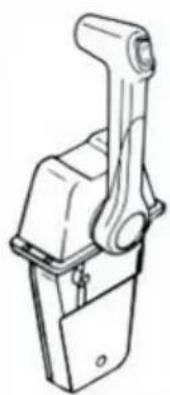
ri◆ four return dishes
STANDARD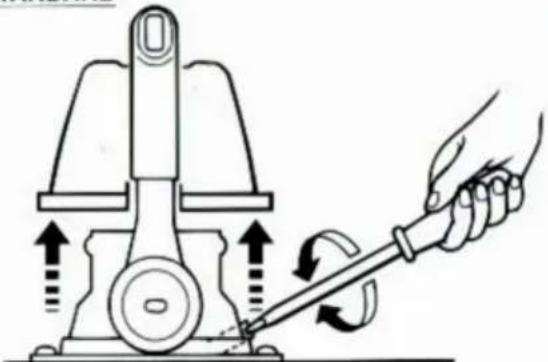
SINGLE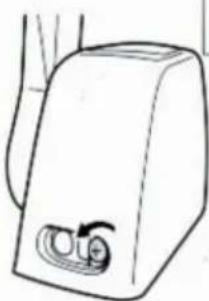
Throttle opening adjustment
The remote control box is capable of adjusting the throttle opening in the following manner:
- Loosen the screws securing the cover and remove it from the body.
- Loosen the locknut, and adjust the throttle opening by turning the stopper bolt. Turning the bolt clockwise decreases the throttle opening. Turning the bolt counterclockwise increases the throttle opening. ① Stopper bolt on the reverse side ② Stopper bolt on the forward side ③ Lock nut
CAUTION:
Do not allow the stopper bolt to project 8 mm (0.3 in) or more from the nut surface. Otherwise, the stopper contacts the cover.
- After adjusting, tighten the locknut.
TIGHTENING TORQUE:
5–8 Nm (50–80 kgf·cm, 3.6–5.8 ft·lb)
Secure the cover to the body with the screws.
INSTALLATION OF THE REMOTE CONTROL BOX
Installing the pilot cables
CAUTION:
- Loosen the five screws and remove the mounting flange, packing, and back plate.
NOTE:
The mounting flange on the back plate side should be removed.
① Mounting flange ② Back plate ③ Screws
- Screw the cable joint onto the remote control cable up to point "A" (11 mm), and tighten the lock nuts. Before installing the cable joints, apply water-resistant grease (Yamaha Grease A) to the threaded holes in the cable joints.
① Remote control cable ② Lock nut ③ Cable joint
TIGHTENING TORQUE:
1.5–1.8 Nm (15–18 kgf·cm, 1.1–1.3 ft·lb)
- Insert the shift cable into the housing clamp so that the groove on its end fits over the ridge in the clamp. Fit the cable joint over the pin on the end of the shift arm, and lock it with the circlip.
① Shift arm ② Circlip ③ Shift cable ④ Clamp groove ⑤ Grommet
- Fit the grommet in the clamp groove.
- Connect the throttle cable to the throttle arm in the same manner.
① Circlip ② Throttle cable ③ Shift cable
- Hold the back plate and mounting flange firmly with the five screws, and fit the packing in place.
① Mounting flange ② Back plate ③ Screws
- Secure the two remote control boxes with the three screws.
① Screw
- After installing the remote control cables, temporarily secure the remote control boxes to the predetermined position with the screws and nuts.
① Packing ② Remote control box ③ Screw ④ Hull ⑤ Washer ⑥ Nut
INSTALLING THE REMOTE CONTROL BOX
- Peel the paper off the back of the packing, and adhere the packing to the boat hull so that the holes in the packing align with the remote control box mounting screw holes in the hull.
CONNECTING THE REMOTE CONTROL CABLE TO THE ENGINE
Checkpoints of cable joint
Shift:
Operate the control lever a few times and check to see that the shift lever on the engine side moves correctly.
Throttle:
Operate the control lever a few times and make sure that when it is returned to the neutral position, the throttle lever on the engine side is set to the full-closed position.
Free accelerator:
Push the free accelerator button, and turn the control lever downward until it stops, then make sure that when it is returned to the neutral position, the free accelerator button is automatically reset.
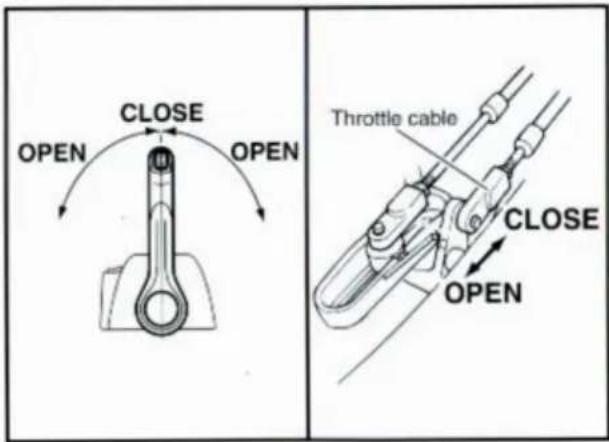
Adjustment of cable joint
Adjust the cable joints on the engine side when the above checkpoints do not operate correctly.
CAUTION:
The cable joints on the engine side must be screwed onto the remote control cables at least 8 mm (0.3 in).
Adjust the cable joint on the remote control side if the adjustment cannot be made only on the engine side.
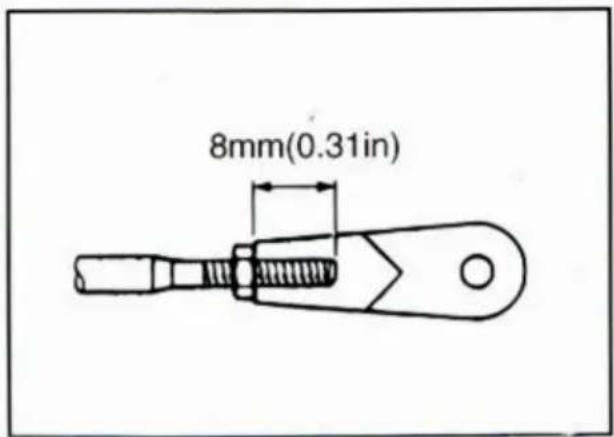
- After connecting the cables to the engine, move the control lever from lock to lock several times and check for good operation of the engine and remote control box.
- Firmly secure the remote control box (which is temporarily held with the screws) to the hull.
CAUTION:
Check that the cables are not sharply bent (less than 200 mm (7.87 in) in radius) or unnecessarily bent. (The number of bends should be minimized.) Also, check that no portions of the cables are clamped so hard as to deform the cable outers.
- Secure the cover to the body with the screws.
- Remove the two screws and remove the throttle lever assembly. Position the throttle lever assembly so that it faces downward and secure it with the two screws.
TIGHTENING TORQUE: 5–8 Nm (50–80 kgf·cm, 3.6–5.8 ft·lb)
1 Push-to-open throttle type 2 Pull-to-open throttle type
① Roller ② Throttle lever assembly ③ Stopper ④ Screws
- Align both the cam groove (for pull-to-open) in the dwell plate and the roller in the throttle lever assembly with the specific position, and lock the throttle arm assembly and dwell plate with the circlip.
NOTE:
Make sure the circlip are correctly fitted in place.
① Groove for push-to-open ② Groove for pull-to-open ③ Dwell plate ④ Roller ⑤ Throttle arm assembly
- Secure the dwell plate retainer with the four screws.
- Install the mounting flange, back plate with the five screws.
NOTE: ______
When installing the back plate, use care so that the wire harness is not pinched.
- Install the cover on the body.
VERIFYING CORRECT OPERATION
Be sure to verify that the remote control box operates correctly after installation.
- Follow the procedure for starting the engine and verify that the engine starts properly.
- Pull the lanyard to remove the lock plate from the engine stop lanyard switch and verify that the engine stops.
NOTE: ______
If the remote control box fails to operate correctly, verify that the installation procedure was followed properly.
NOTES ON STORAGE
To ensure a longer life of the remote control box, be sure to take the following steps when storing it for a long period of time.
- Remove the cable joints and apply water-resistant grease (Yamaha grease A) to the thread portion of the inner cable.
- Also apply water-resistant grease (Yamaha grease A) to inner parts of the remote control box, particularly to contact surfaces of moving parts. If any rust is found, remove it and apply the grease.
- Avoid bending the cables into a loop as much as possible. But if they have to be looped, the loop diameter should be more than one meter (40 in).
- Select a dry place for storage.
SWITCH PANEL MOUNTING
WARNING
When installing or removing electrical parts, be sure to disconnect the battery wires from the battery terminals. When connecting the battery wires to the battery terminals, be sure to turn off the main switch and remove the switch key. Otherwise you may receive an electric shock, or sparks may ignite the fuel causing an explosion.
CAUTION:
Install the switch panel onto the dashboard. Select a location allowing easy access from the helmsman's seat. If the boat has no dashboard, the switch panel should be installed in a location protected from water spray.
1 Switch panel for single engine 2 Switch panel for twin engine
- Cut a hole in the instrument panel as indicated in this mounting diagram. Using a 2-1/16-inch hole saw, make holes and then cut out the center portion as shown.
- Connect the wire harness to the switch panel assembly, and pass it back through the hole.
- Secure the switch panel assembly to the instrument panel with the bind screws, washers and nuts.
STANDARD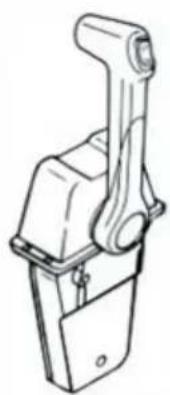
STANDARD
SINGLE
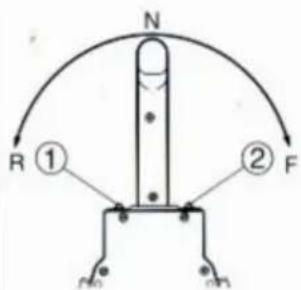
Throttle opening adjustment
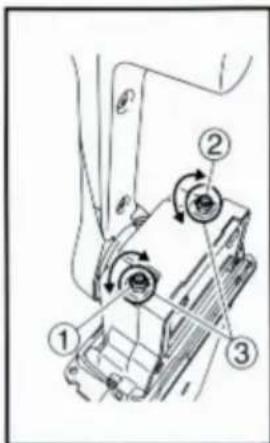
The remote control box is capable of adjusting the throttle opening in the following manner:
- Loosen the screws securing the cover and remove it from the body.
- Loosen the locknut, and adjust the throttle opening by turning the stopper bolt. Turning the bolt clockwise decreases the throttle opening. Turning the bolt counterclockwise increases the throttle opening. ① Stopper bolt on the reverse side ② Stopper bolt on the forward side ③ Lock nut
CAUTION:
Do not allow the stopper bolt to project 8 mm (0.3 in) or more from the nut surface. Otherwise, the stopper contacts the cover.
- After adjusting, tighten the locknut.
TIGHTENING TORQUE:
5–8 Nm (50–80 kgf·cm, 3.6–5.8 ft·lb)
Secure the cover to the body with the screws.
INSTALLING THE REMOTE CONTROL BOX
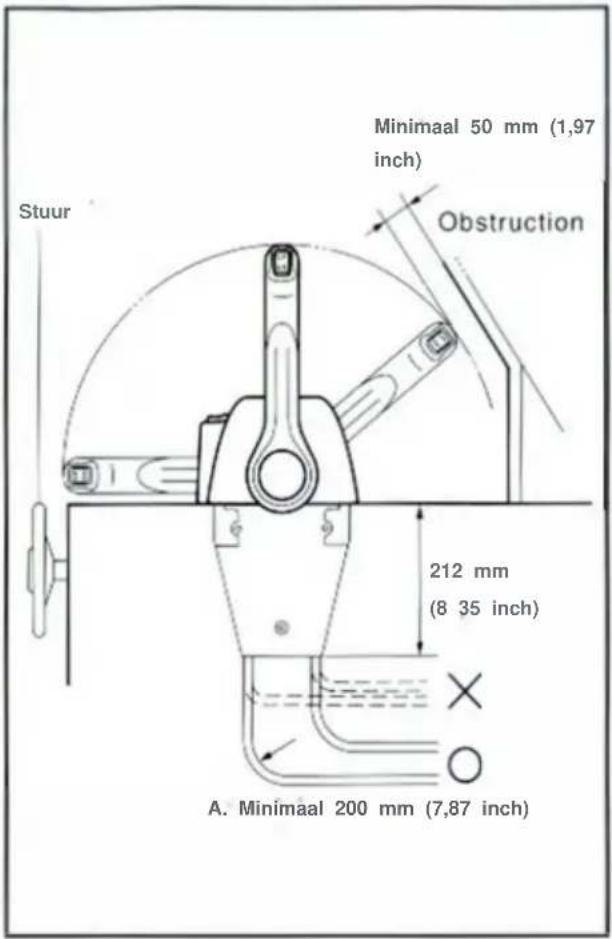
- Loosen the five screws and remove the mounting flange, packing, and back plate.
NOTE:
The mounting flange on the back plate side should be removed.
① Mounting flange ② Back plate ③ Screws
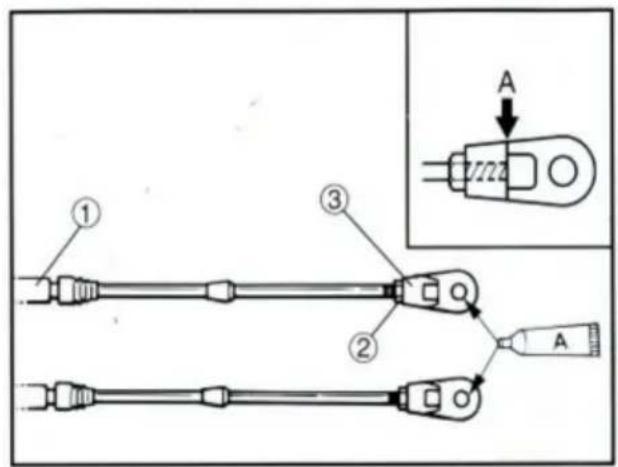
- Screw the cable joint on to the remote control cable up to point "A" (11mm), and tighten the lock nuts. Before installing the cable joints, apply the water-resistant grease (Yamaha Grease A) to the threaded holes in the cable joints.
① Remote control cable ② Lock nut ③ Cable joint
TIGHTENING TORQUE:
1.5–1.8 Nm (15–18 kgf·cm, 1.1–1.3 ft·lb)
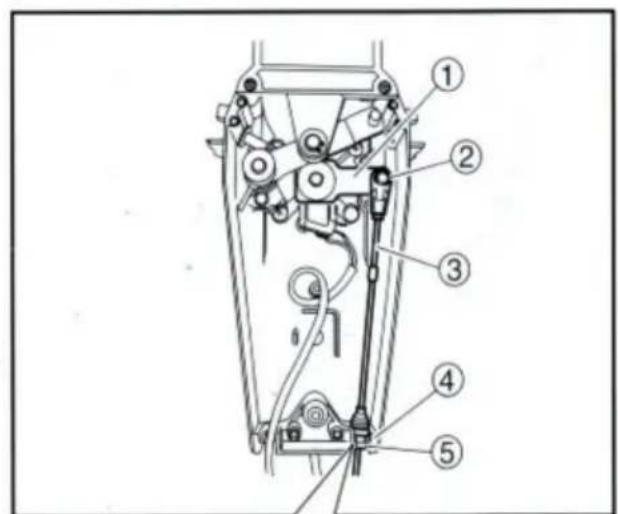
- Insert the shift cable into the housing clamp so that the groove on its end fits over the ridge in the clamp. Fit the cable joint over the pin on the end of the shift arm, and lock it with the circlip.
① Shift arm ② Circlip ③ Shift cable ④ Clamp groove ⑤ Grommet
- Fit the grommet in the clamp groove.

- Connect the throttle cable to the throttle arm in the same manner.
① Circlip ② Throttle cable ③ Shift cable
- Hold the back plate and mounting flange firmly with the five screws, and fit the packing in place.
① Mounting flange ② Back plate ③ Screws
- Secure the two remote control boxes with the three screws.
① Screw
- After installing the remote control cables, temporarily secure the remote control boxes to the predetermined position with the screws and nuts.
① Packing ② Remote control box ③ Screw ④ Hull ⑤ Washer ⑥ Nut
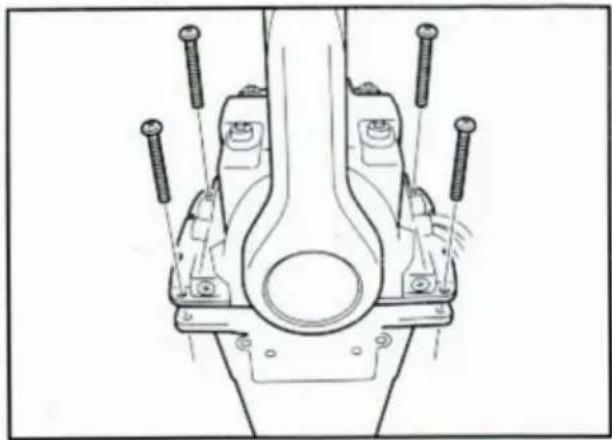
INSTALLING THE REMOTE CONTROL BOX
- Peel the paper off the back of the packing, and adhere the packing to the boat hull so that the holes in the packing align with the remote control box mounting screw holes in the hull.
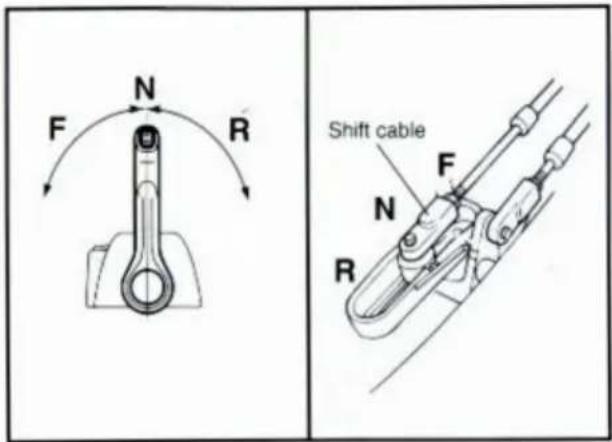
CONNECTING THE REMOTE CONTROL CABLE TO THE ENGINE
Checkpoints of cable joint
Shift:
Operate the control lever a few times and check to see that the shift lever on the engine side moves correctly.
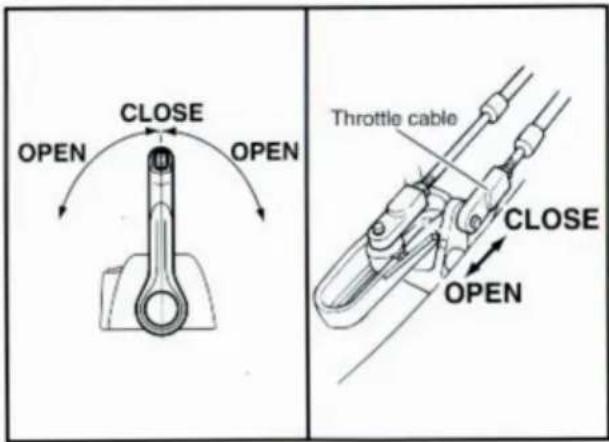
Throttle:
Operate the control lever a few times and make sure that when it is returned to the neutral position the throttle lever on the engine side is set to the full-closed position.
Free accelerator:
Push the free accelerator button, and turn the control lever downward until it stops, then make sure that when it is returned to the neutral position, the free accelerator button is automatically reset.
Adjustment of cable joint
Adjust the cable joints on the engine side when the above checkpoints do not operate correctly.
CAUTION:
The cable joints on the engine side must be screwed onto the remote control cables at least 8 mm (0.3 in).
Adjust the cable joint on the remote control side if the adjustment cannot be made only on the engine side.
- After connecting the cables to the engine, move the control lever from lock to lock several times and check for good operation of the engine and remote control box.
- Firmly secure the remote control box (which is temporarily held with the screws) to the hull.
CAUTION:
Check that the cables are not sharply bent (less than 200 mm (7.87 in) in radius) or unnecessarily bent. (The number of bends should be minimized.) Also, check that no portions of the cables are clamped so hard as to deform the cable outers.
- Secure the cover to the body with the screws.
CHANGING FROM PUSH-TO-OPEN GAS TYPE TO PULL-TO-OPEN GAS TYPE
- Remove the two screws and remove the throttle lever assembly. Position the throttle lever assembly so that it faces downward and secure it with the two screws.
TIGHTENING TORQUE: 5–8 Nm (50–80 kgf·cm, 3.6–5.8 ft·lb)
1 Push-to-open throttle type 2 Pull-to-open throttle type
① Roller ② Throttle lever assembly ③ Stopper ④ Screws
- Align both the cam groove (for pull-to-open) in the dwell plate and the roller in the throttle lever assembly with the specific position, and lock the throttle arm assembly and dwell plate with the circlip.
NOTE:
Make sure the circlip are correctly fitted in place.
① Groove for push-to-open ② Groove for pull-to-open ③ Dwell plate ④ Roller ⑤ Throttle arm assembly
- Secure the dwell plate retainer with the four screws.
- Install the mounting flange, back plate with the five screws.
NOTE: ____
When installing the back plate, use care so that the wire harness is not pinched.
- Install the cover on the body.
VERIFYING CORRECT OPERATION
Be sure to verify that the remote control box operates correctly after installation.
- Follow the procedure for starting the engine and verify that the engine starts properly.
- Pull the lanyard to remove the lock plate from the engine stop lanyard switch and verify that the engine stops.
NOTE: _____
If the remote control box fails to operate correctly, verify that the installation procedure was followed properly.
NOTES ON STORAGE
To ensure a longer life of the remote control box, be sure to take the following steps when storing it for a long period of time.
- Remove the cable joints and apply water-resistant grease (Yamaha grease A) to the thread portion of the inner cable.
- Also apply water-resistant grease (Yamaha grease A) to inner parts of the remote control box, particularly to contact surfaces of moving parts. If any rust is found, remove it and apply the grease.
- Avoid bending the cables into a loop as much as possible. But if they have to be looped, the loop diameter should be more than one meter (40 in).
- Select a dry place for storage.
SWITCH PANEL MOUNTING
WARNING
When installing or removing electrical parts, be sure to disconnect the battery wires from the battery terminals. When connecting the battery wires to the battery terminals, be sure to turn off the main switch and remove the switch key. Otherwise you may receive an electric shock, or sparks may ignite the fuel causing an explosion.
CAUTION:
Install the switch panel onto the dashboard. Select a location allowing easy access from the helmsman's seat. If the boat has no dashboard, the switch panel should be installed in a location protected from water spray.
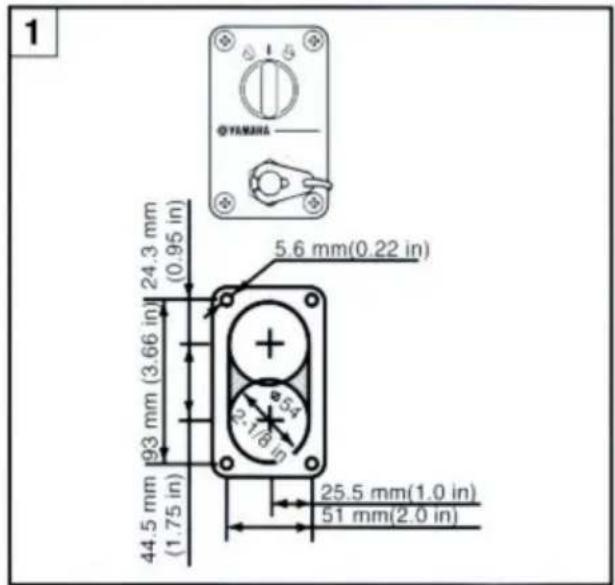
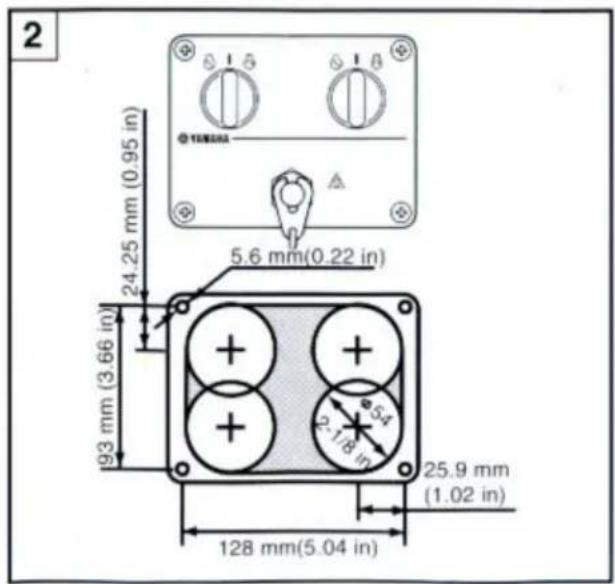
1 Switch panel for single engine 2 Switch panel for twin engine
- Cut a hole in the instrument panel as indicated in this mounting diagram. Using a 2-1/16-inch hole saw, make holes and then cut out the center portion as shown.
- Connect the wire harness to the switch panel assembly, and pass it back through the hole.
- Secure the switch panel assembly to the instrument panel with the bind screws, washers and nuts.

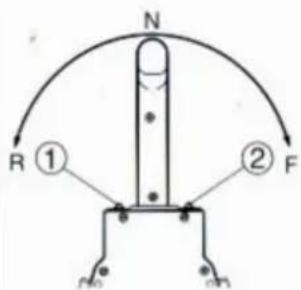
Throttle opening adjustment
The remote control box is capable of adjusting the throttle opening in the following manner:
- Loosen the screws securing the cover and remove it from the body.
- Loosen the locknut, and adjust the throttle opening by turning the stopper bolt. Turning the bolt clockwise decreases the throttle opening. Turning the bolt counterclockwise increases the throttle opening. ① Stopper bolt on the reverse side ② Stopper bolt on the forward side ③ Lock nut
CAUTION:
Do not allow the stopper bolt to project 8 mm (0.3 in) or more from the nut surface. Otherwise, the stopper contacts the cover.
- After adjusting, tighten the locknut.
TIGHTENING TORQUE:
5–8 Nm (50–80 kgf·cm, 3.6–5.8 ft·lb)
Secure the cover to the body with the screws.
INSTALL THE REMOTE CONTROL BOX
- Loosen the five screws and remove the mounting flange, packing, and back plate.
NOTE:
The mounting flange on the back plate side should be removed.
① Mounting flange ② Back plate ③ Screws
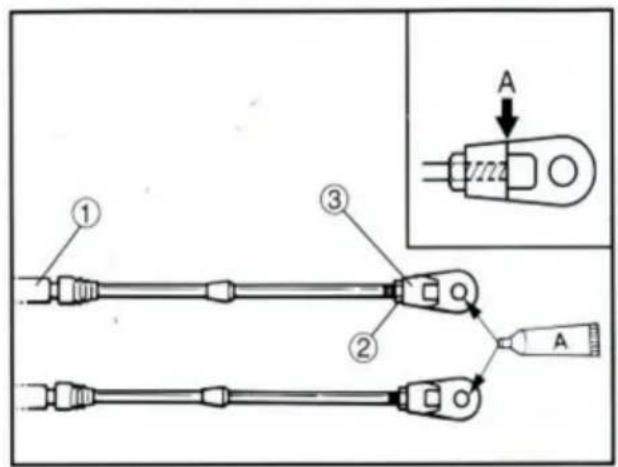
- Screw the cable joint on to the remote control cable up to point "A" (11mm), and tighten the lock nuts. Before installing the cable joints, apply the water-resistant grease (Yamaha Grease A) to the threaded holes in the cable joints.
① Remote control cable ② Lock nut ③ Cable joint
TIGHTENING TORQUE:
1.5–1.8 Nm (15–18 kgf·cm, 1.1–1.3 ft·lb)
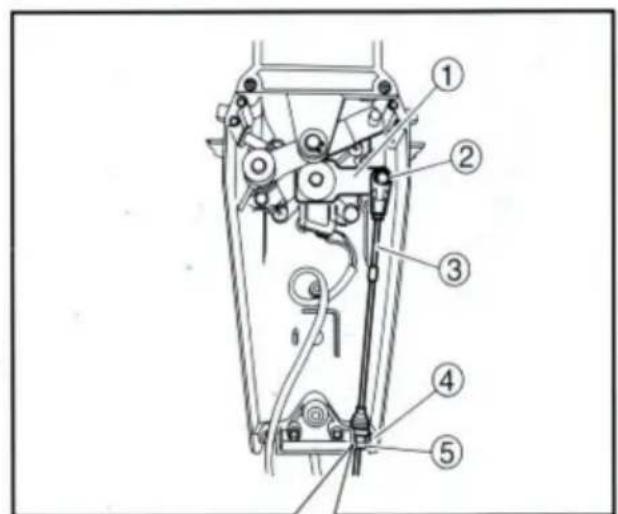
- Insert the shift cable into the housing clamp so that the groove on its end fits over the ridge in the clamp. Fit the cable joint over the pin on the end of the shift arm, and lock it with the circlip.
① Shift arm ② Circlip ③ Shift cable ④ Clamp groove ⑤ Grommet

- Fit the grommet in the clamp groove.
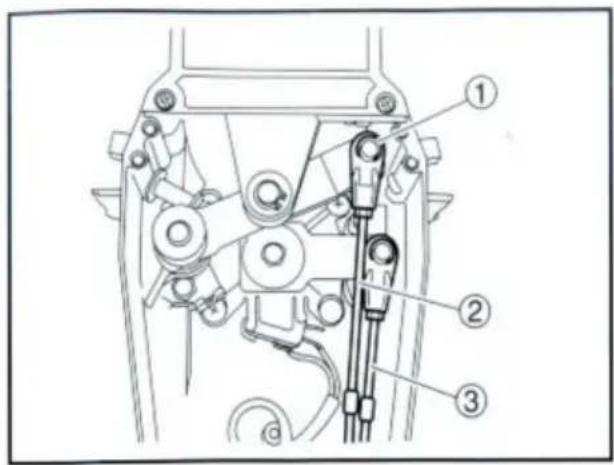
- Connect the throttle cable to the throttle arm in the same manner.
① Circlip ② Throttle cable ③ Shift cable
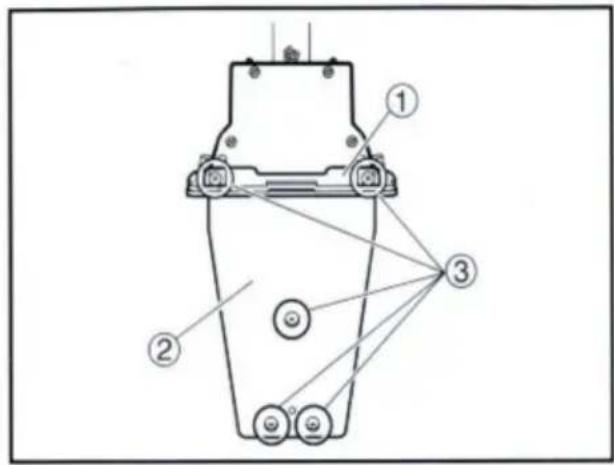
- Hold the back plate and mounting flange firmly with the five screws, and fit the packing in place.
① Mounting flange ② Back plate ③ Screws
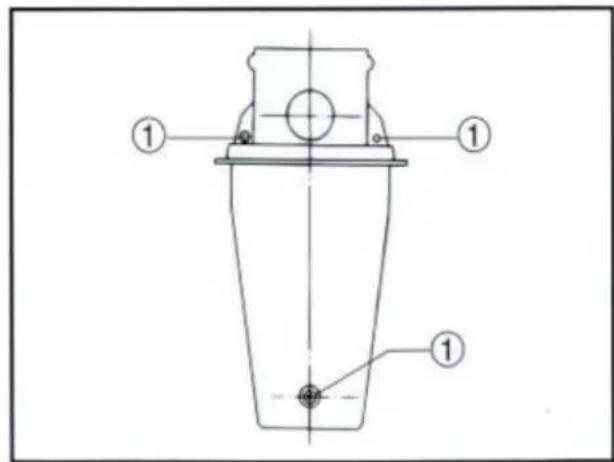
- Secure the two remote control boxes with the three screws.
① Screw
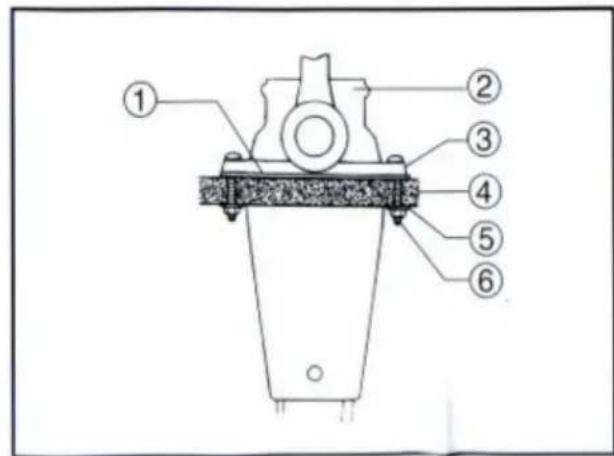
- After installing the remote control cables, temporarily secure the remote control boxes to the predetermined position with the screws and nuts.
① Packing ② Remote control box ③ Screw ④ Hull ⑤ Washer ⑥ Nut
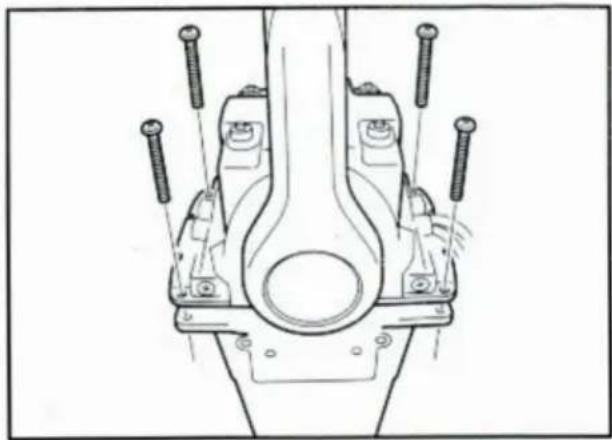
INSTALLING THE REMOTE CONTROL BOX
- Peel the paper off the back of packing, and adhere the packing to the boat hull so that the holes in the packing align with the remote control box mounting screw holes in the hull.
CONNECTING THE REMOTE CONTROL CABLE TO THE ENGINE
Checkpoints of cable joint
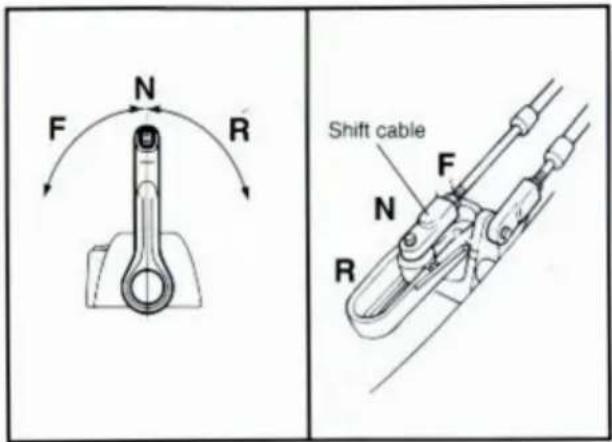
Shift:
Operate the control lever a few times and check to see that the shift lever on the engine side moves correctly.
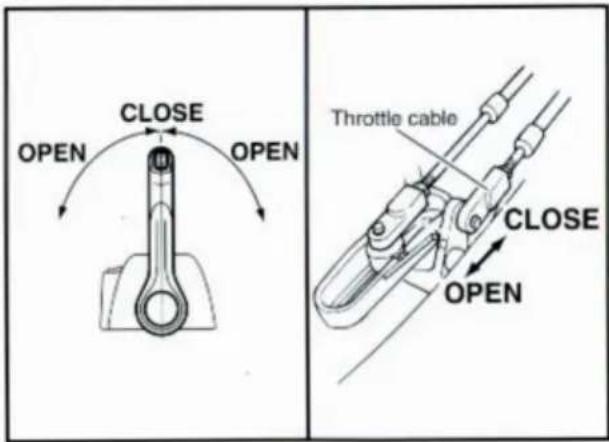
Throttle:
Operate the control lever a few times and make sure that when it is returned to the neutral position the throttle lever on the engine side is set to the full-closed position.
Free accelerator:
Push the free accelerator button, and turn the control lever downward until it stops, then make sure that when it is returned to the neutral position, the free accelerator button is automatically reset.
Adjustment of cable joint
Adjust the cable joints on the engine side when the above checkpoints do not operate correctly.
CAUTION:
The cable joints on the engine side must be screwed onto the remote control cables at least 8 mm (0.3 in).
Adjust the cable joint on the remote control side if the adjustment cannot be made only on the engine side.
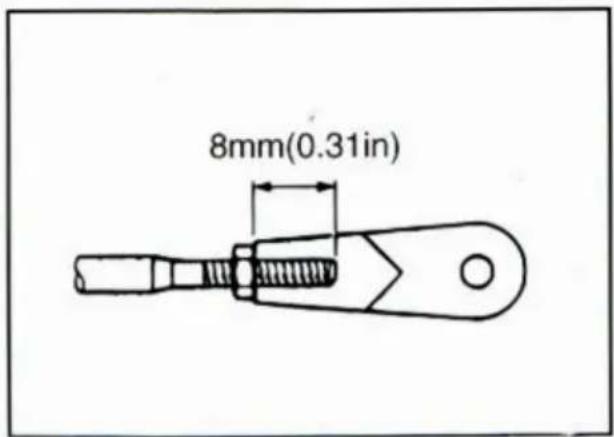
- After connecting the cables to the engine, move the control lever from lock to lock several times and check for good operation of the engine and remote control box.
- Firmly secure the remote control box (which is temporarily held with the screws) to the hull.
CAUTION:
Check that the cables are not sharply bent (less than 200 mm (7.87 in) in radius) or unnecessarily bent. (The number of bends should be minimized.) Also, check that no portions of the cables are clamped so hard as to deform the cable outers.
- Secure the cover to the body with the screws.
- Remove the two screws and remove the throttle lever assembly. Position the throttle lever assembly so that it faces downward and secure it with the two screws.
TIGHTENING TORQUE: 5–8 Nm (50–80 kgf·cm, 3.6–5.8 ft·lb)
1 Push-to-open throttle type 2 Pull-to-open throttle type
① Roller ② Throttle lever assembly ③ Stopper ④ Screws
- Align both the cam groove (for pull-to-open) in the dwell plate and the roller in the throttle lever assembly with the specific position, and lock the throttle arm assembly and dwell plate with the circlip.
NOTE:
Make sure the circlip are correctly fitted in place.
① Groove for push-to-open ② Groove for pull-to-open ③ Dwell plate ④ Roller ⑤ Throttle arm assembly
- Secure the dwell plate retainer with the four screws.
- Install the mounting flange, back plate with the five screws.
NOTE: ______
When installing the back plate, use care so that the wire harness is not pinched.
- Install the cover on the body.
VERIFYING CORRECT OPERATION
Be sure to verify that the remote control box operates correctly after installation.
- Follow the procedure for starting the engine and verify that the engine starts properly.
- Pull the lanyard to remove the lock plate from the engine stop lanyard switch and verify that the engine stops.
NOTE: ___
If the remote control box fails to operate correctly, verify that the installation procedure was followed properly.
NOTES ON STORAGE
To ensure a longer life of the remote control box, be sure to take the following steps when storing it for a long period of time.
- Remove the cable joints and apply water-resistant grease (Yamaha grease A) to the thread portion of the inner cable.
- Also apply water-resistant grease (Yamaha grease A) to inner parts of the remote control box, particularly to contact surfaces of moving parts. If any rust is found, remove it and apply the grease.
- Avoid bending the cables into a loop as much as possible. But if they have to be looped, the loop diameter should be more than one meter (40 in).
- Select a dry place for storage.
SWITCH PANEL MOUNTING
WARNING
When installing or removing electrical parts, be sure to disconnect the battery wires from the battery terminals. When connecting the battery wires to the battery terminals, be sure to turn off the main switch and remove the switch key. Otherwise you may receive an electric shock, or sparks may ignite the fuel causing an explosion.
CAUTION:
Install the switch panel onto the dashboard. Select a location allowing easy access from the helmsman's seat. If the boat has no dashboard, the switch panel should be installed in a location protected from water spray.
1 Switch panel for single engine 2 Switch panel for twin engine
- Cut a hole in the instrument panel as indicated in this mounting diagram. Using a 2-1/16-inch hole saw, make holes and then cut out the center portion as shown.
- Connect the wire harness to the switch panel assembly, and pass it back through the hole.
- Secure the switch panel assembly to the instrument panel with the bind screws, washers and nuts.
CORRECT DISPOSAL OF THIS PRODUCT
UK REP: Pooledas Group Ltd
Unit 5 Albert Edward House, The Pavilions Preston, United Kingdom
Tel: 01772418127 pooledas123@gmail.com

VEVOR®
TOUGH TOOLS, HALF PRICE
- OUTBOARD REMOTE CONTROL BOX
- VEVOR®
- NEED HELP? CONTACT US
- NOTICE
- AWARNING
- CAUTION
- NOTE
- MAIN COMPONENTS OF SINGLE ENGINE TYPE
- PART LIST
- FORWARD AND REVERSE
- FREE ACCELERATOR
- POWER TRIM AND TILT SWITCH
- START-IN-GEAR PROTECTION DEVICE
- WARNING
- CONTROL LEVER FRICTION ADJUSTMENT
- THROTTLE OPENING ADJUSTMENT
- REMOTE CONTROL BOX POSITION
- TIGHTENING TORQUE
- CONNECTING THE REMOTE CONTROL CABLE TO THE ENGINE
- CHECKPOINTS OF CABLE JOINT
- SHIFT
- THROTTLE
- ADJUSTMENT OF CABLE JOINT
- CHANGE FROM THE PUSH-TO-OPEN THROTTLE TYPE TO THE PULL-TO-OPEN THROTTLE TYPE
- VERIFYING CORRECT OPERATION
- SWITCH PANEL MOUNTING
- CORRECT DISPOSAL
- TOUGH TOOLS, HALF PRICE
- INSTALLATION OF THE REMOTE CONTROL BOX
- INSTALLING THE REMOTE CONTROL BOX
- CHANGING THE THROTTLE LEVER FROM PUSH-TO-OPEN TYPE TO PULL-TO-OPEN TYPE
- NOTES ON STORAGE
- NEED HELP? WITH TACTUS
- CHANGE FROM PUSH-TO-OPEN ACCELERATOR TYPE TO PULL-TO-OPEN ACCELERATOR TYPE
- MACHINE TRANSLATED BY GOOGLE
- ANNOUNCEMENT
- INSTALLING THE PILOT CABLES
- CHANGING FROM PUSH-TO-OPEN GAS TYPE TO PULL-TO-OPEN GAS TYPE
- INSTALL THE REMOTE CONTROL BOX
- CORRECT DISPOSAL OF THIS PRODUCT
Brand : Vevor
Model : 704-48205-P1
Category : Remote control