
SWT508-JE - Cable stripping machine Vevor - Free user manual and instructions
Find the device manual for free SWT508-JE Vevor in PDF.
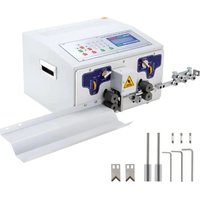


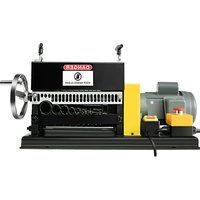
| Product Type | Wire Stripping and Cutting Machine |
| Brand | Vevor |
| Model | SWT508-JE |
| Approximate Dimensions | 330 x 220 x 250 mm |
| Approximate Weight | 10 kg |
| Power Supply | 220 V, 50/60 Hz |
| Display | LCD 192 x 64 pixels |
| Control Panel | 23 Function Keys |
| Main Functions | Front and rear stripping, cutting, wire twisting, multi-segment stripping |
| Number of Working Modes | 6 modes: line, long, short, multi-segment, twisting, etc. |
| Cutting Capacity | Copper wire up to 12 AWG (3 mm²) approximately |
| Adjustable Stripping Length | Yes, configurable via the panel |
| Cutting Depth Adjustment | By "knife" parameter (value from 0 to 99) |
| Adjustable Knife Retraction | Yes, "retreat" parameter (value from 00 to 10) |
| Adjustable Working Speed | Cutting speed, feed speed, stripping speed, pause time |
| Communication | RS485 for external control (PLC/PC) |
| Emergency Stop Function | Yes, emergency stop button |
| Piece Counter | Yes, with reset |
| Manual/Automatic Mode | Switch to manual mode for testing |
| Maintenance | Regular cleaning of rollers, lubrication of moving parts |
| Spare Parts | Knife blades, fuses (5A), rubber rollers |
| Repairability | User replaceable blades and fuses |
| Warranty | Technical support and electronic warranty |
Frequently Asked Questions - SWT508-JE Vevor
User questions about SWT508-JE Vevor
0 question about this device. Answer the ones you know or ask your own.
Ask a new question about this device
Download the instructions for your Cable stripping machine in PDF format for free! Find your manual SWT508-JE - Vevor and take your electronic device back in hand. On this page are published all the documents necessary for the use of your device. SWT508-JE by Vevor.
USER MANUAL SWT508-JE Vevor
Technical Support and E-Warranty Certificate
www.vevor.com/support
WIRE STRIPPING MACHINE
MODEL: SWT508-SD/SWT508-E/SWT508-JE
We continue to be committed to provide you tools with competitive price. "Save Half", "Half Price" or any other similar expressions used by us only represents an estimate of savings you might benefit from buying certain tools with us compared to the major top brands and does not necessarily mean to cover all categories of tools offered by us. You are kindly reminded to verify carefully when you are placing an order with us if you are actually saving half in comparison with the top major brands.
VEVOR®
TOUGH TOOLS, HALF PRICE
WIRE STRIPPING MACHINE
MODEL: SWT508-SD/SWT508-E/SWT508-JE
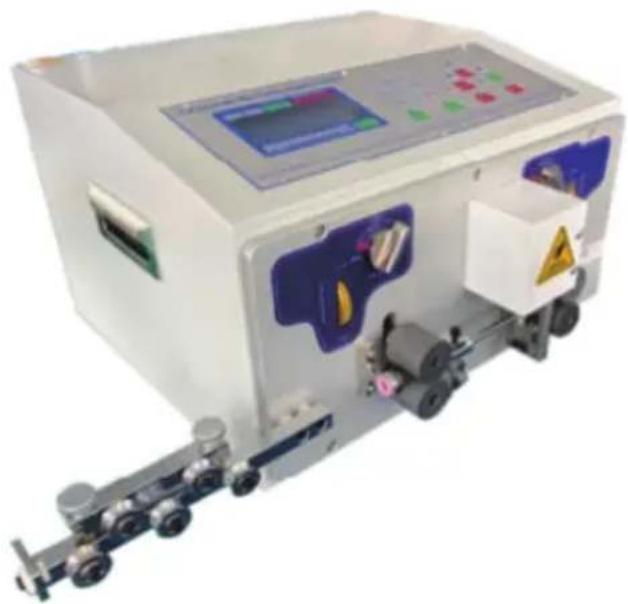
NEED HELP? CONTACT US!
Have product questions? Need technical support? Please feel free to contact us:
Technical Support and E-Warranty Certificate www.vevor.com/support
This is the original instruction, please read all manual instructions carefully before operating. VEVOR reserves a clear interpretation of our user manual. The appearance of the product shall be subject to the product you received. Please forgive us that we won't inform you again if there are any technology or software updates on our product.
Fast operation example
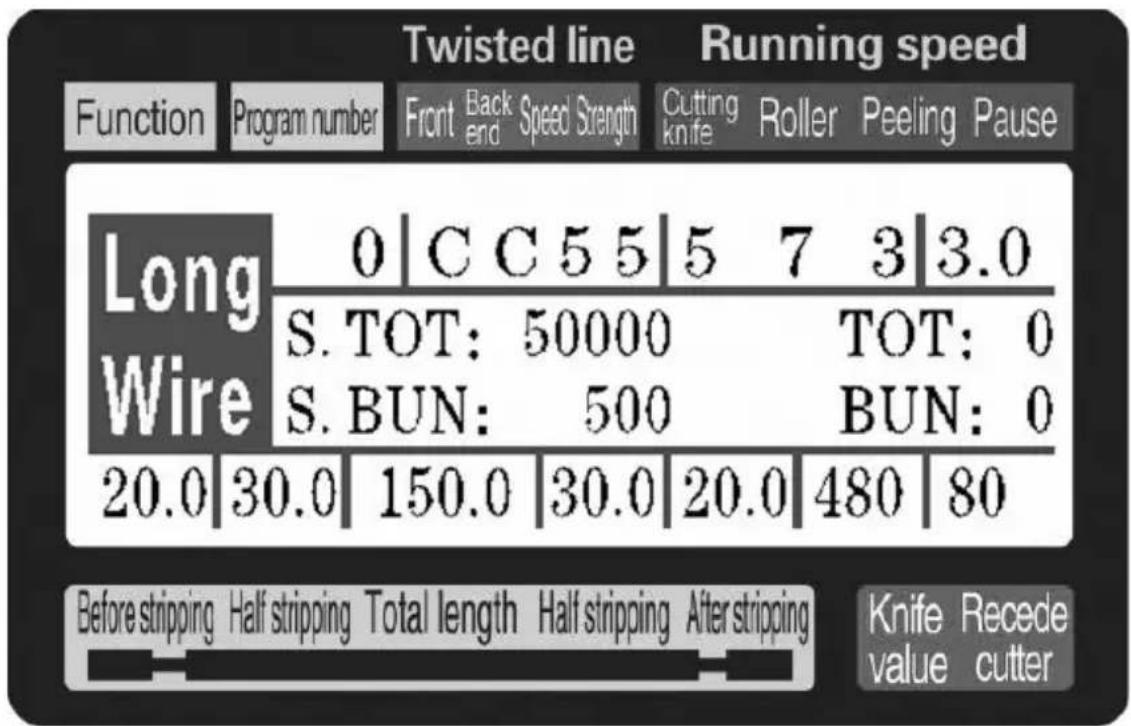
Note: The smaller the knife value, the deeper the cutting; the thicker the wire, the larger the knife retreat value should be. The following table is the reference parameter data for the set-up of knife value and knife retreat value:
Operating instructions
Drawing of control panel
Full Automatic Wire Cutting and Stripping Machine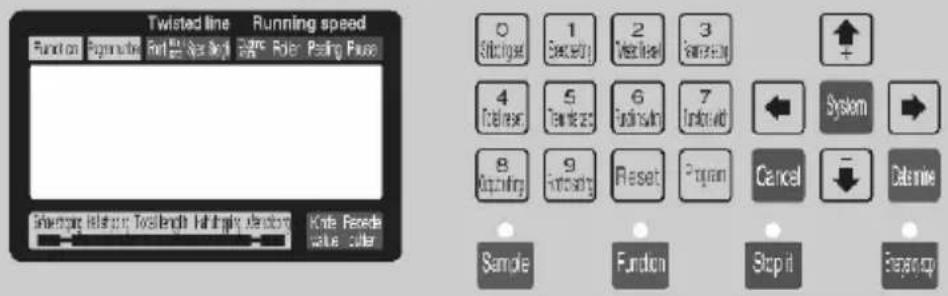
0 1 2 3 4 5 6 7 8 9 10 11 12 13 14 15 16 17 18 19 20 21 22 23 24 25 26 27 28 29 30 31 32 33
The system interface is composed of 23 keys and a 192 × 64 dot matrix LCD display. The following will introduce each key function.
Sample
: In standby mode, each short press once, the machine performs a single-step, cyclic action; if you press and hold for more than about 3 seconds, the machine will automatically run a loop. This button has a significant effect on machine control.
Function
: In standby mode, press this button to start the machine working.
Stop
: In working state, press this button to stop the machine after it finishes the current operation.
Emergency stop
: In standby mode, press this button to perform a reset action; in working state, press this button to shut down the machine and then perform a reset action.
machine to shut down, after the implementation of the reset action;
0 Stripping set
In a data input state, press this key to enter the number 0; in the standby state, press this button to enter the stripping parameter setup state.
1 Speed set
In a data input state, press this key to enter the number 1; in the standby state, press this button to enter the speed parameter setup state.
2 Twisted set
In a data input state, press this key to enter the number 2; in the standby state, press this button to enter the twisting parameter setup state.
3 Parameter set
In a data input state, press this key to enter the number 3; in the standby state, press this button to enter the setting picture corresponding to the current function.
4 Total zero
In a data input state, press this key to enter the number 4; in the standby state, press this button to reset the total count to zero.
5 Bun reset
In a data input state, press this key to enter the number 5; in the standby state, press this key to reset the count to zero.
In a data input state, press this key to enter the number 6; in the standby state, press this button to switch the machine working mode.
In a data input state, press this key to enter the number 7; in the standby state, press this button to switch the machine working mode.
In a data input state, press this key to enter the number 8; in the standby state, press this button to enter the output settings.
In a data input state, press this key to enter the number 9; in the standby state, press this button to enter the function setting picture.
In a data input state, press this key to remove the input data; in the standby state, press this key to clear the total output and the number of full clear to 0.

In the standby state, press this button to enter the program settings.

In the parameter settings, pressing this key increases the set parameter by 1; in a parameter setting state, pressing this button increases the knife value by 1.

In the parameter settings, pressing this key decreases the set parameter by 1; in a parameter setting state, pressing this button decreases the knife value by 1.
In the parameter settings, pressing this key discards the modified data and returns to the last data as the modified object.

In the parameter settings, pressing this key discards the modified data and moves to the next data as the modified object.

In the parameter set state, pressing this key saves the modified data and writes it to the EEPROM, and then moves to the next data as the modified object.
In the parameter set state, pressing this key exits the parameter setup state; on the function setting screen, segmental stripping setting screen, or system setup screen, pressing this key returns to the work picture.
On the standby screen, pressing this key enters the system arrangement picture; you need to enter the password before entering. In a setting screen (function, multistage peeling setting picture, or system settings), pressing this key enters the parameter setup state.
Work screen
Once the machine is powered on, the screen displays the boot screen; after about three seconds, this picture will be displayed. The machine begins to run when this picture is on the screen; otherwise, the machine could not start.
![graph TD A["Function"] --> B["Program number"] B --> C["Speed"] C --> D["Knife Roller Stripper Pause"] D --> E["The set amount"] E --> F["Actual capacity"] F --> G["The number"] G --> H["Set the single to"] H --> I["Tool return"] subgraph Function display area: J["This machine has: long-term, short-…](/content/2026/04/736569/images/3c1fb1bde4befdcd3310c091eb5aa76cb125a00f5a1ce10db6084793cea2ca6f.jpg)
Stripping parameter setting: When the machine is in standby mode, press
Stripping set; the front length parameter begins to flicker. At this time, you can directly enter the number. If the input is incorrect, press Reset to clear the input digital input
again; then press save, and a parameter flickers, until the front end length, front half stripping, total length, rear half stripping end length, cutter, and knife back all have the input completion value. The smaller the knife value, the deeper the cutting is; the thicker the wire is,
the larger the knife retreat value should be. Parameter setting press

flashes forward a parameter; press

after the removal of a

blinking parameters; at any time by parameters, back to the standby state;
withdraw from the set of
Stripping speed settings:
The machine when in standby mode press
; cutter speed parameter started flashing at this time can directly
enter the number, if the input error, press
clear input digital input
Determine
again; Then press
preservation, and a parameter flicker, until the
cutting speed, feeding speed, stripping speed, pause time all input to

complete; Parameter setting; press
flashes forward a parameter;
Press

after the removal of a blinking parameter; at any time by

withdraw from the set of parameters, back to the standby state;
Output settings:
When the machine is in standby mode, press set;
The gross parameter set begins to flicker, at this time you can directly enter the
number. If the input is incorrect, press
clear the input and enter the number again;
Determine
Then press
to save, and a parameter flickers, until the set, the
total number of all inputs is complete; Parameter setting; press


flashes forward a parameter; press
after the removal of a

blinking parameter; at any time by parameters, back to the standby state;
withdraw from the set of
Twisted line set: The machine when in standby mode press


Front twist mode scintillation, this time press
switching,

Then press
preservation, and a parameter flicker, until the front
twist, twist wire mode input mode is completed, then by previous methods input torsion line speed, twisting strength; Parameter setting;
press

flashes forward a parameter; press

after the
removal of a blinking parameters; at any time by the set of parameters, back to the standby state;

withdraw from
Program number set:
The machine when in standby mode, press
Program
; program arguments begin to flicker, at this time you can directly enter
the number. If you input an error, press

clear to input the number again;
then press
Determine
to save and return to standby state;
Work mode switch: When the machine is in standby mode, press and hold Shift to

switch work modes;
Work mode explanation
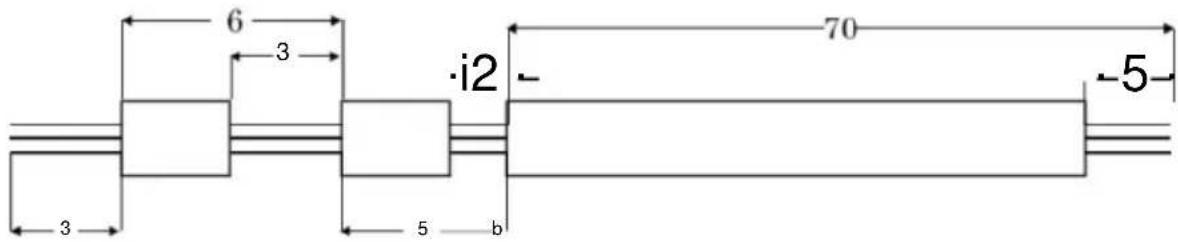
This machine is a multifunctional wire cutting machine, with a total of 6 kinds of wire cutting and stripping procedures. The following pictures describe them:
Line mode:
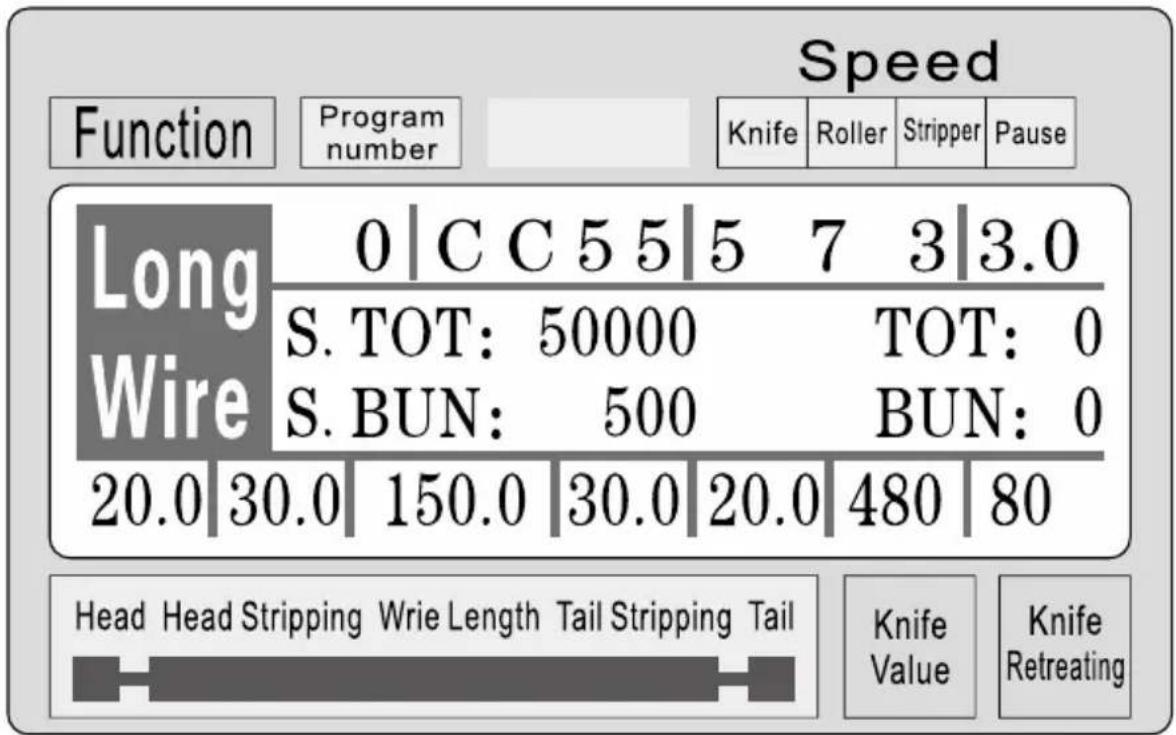
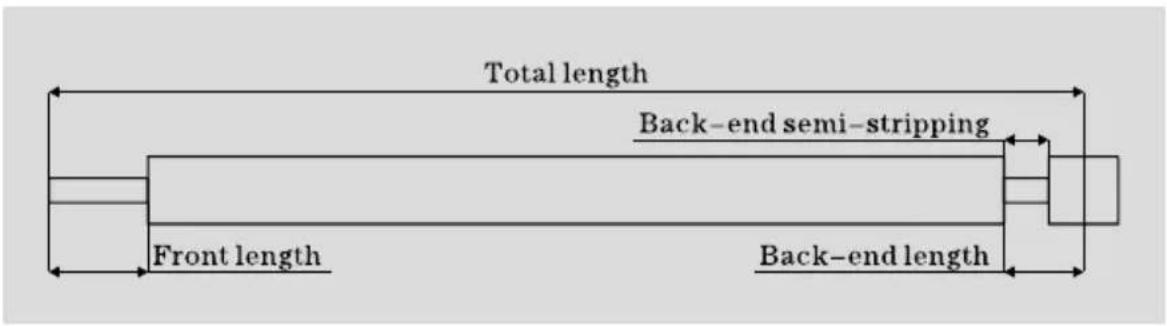
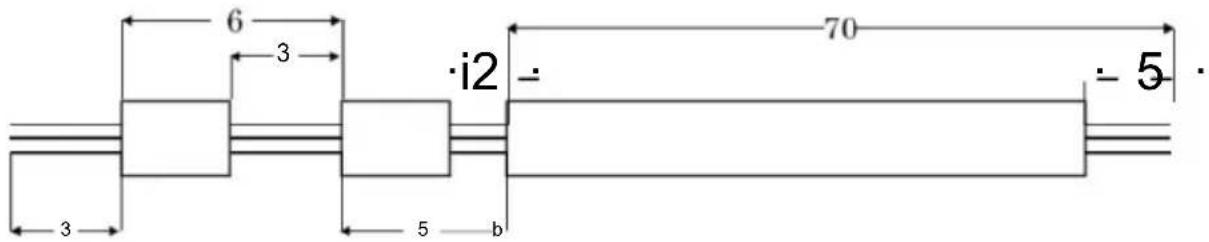
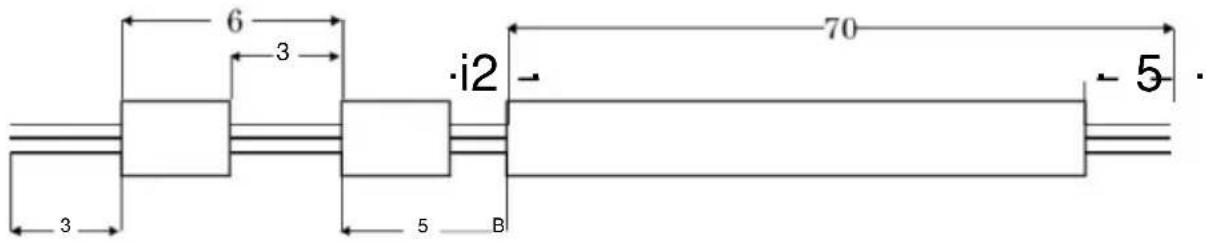
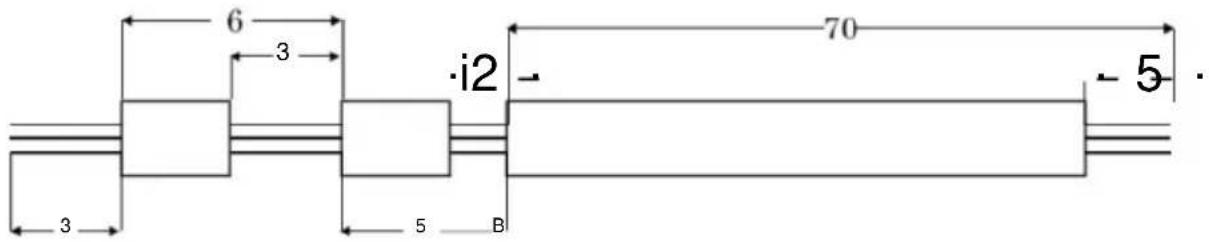
This mode has the same function as the traditional 220 wire cutting machine. It can be equipped with a wire twisting device to increase twisted wire. The wire length is as shown. Only input the desired
size according to the above method. In this mode, the 3-parameter set function is not available;
Short-term mode:
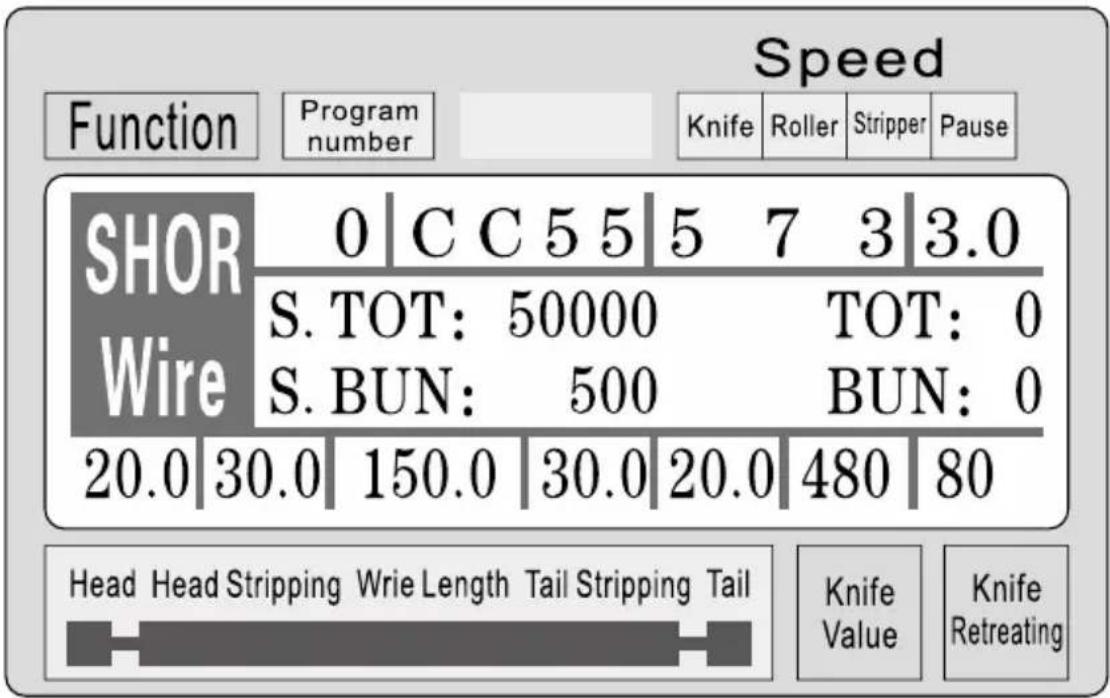
This mode is basically the same as the long-term mode, except that the stripping action of the machine is different, and there is no wire twisting function; at
This mode 3 parameter set function is not available.

This mode does not have the twisting line function. Press Parameter set to enter the following cable function setting screen:
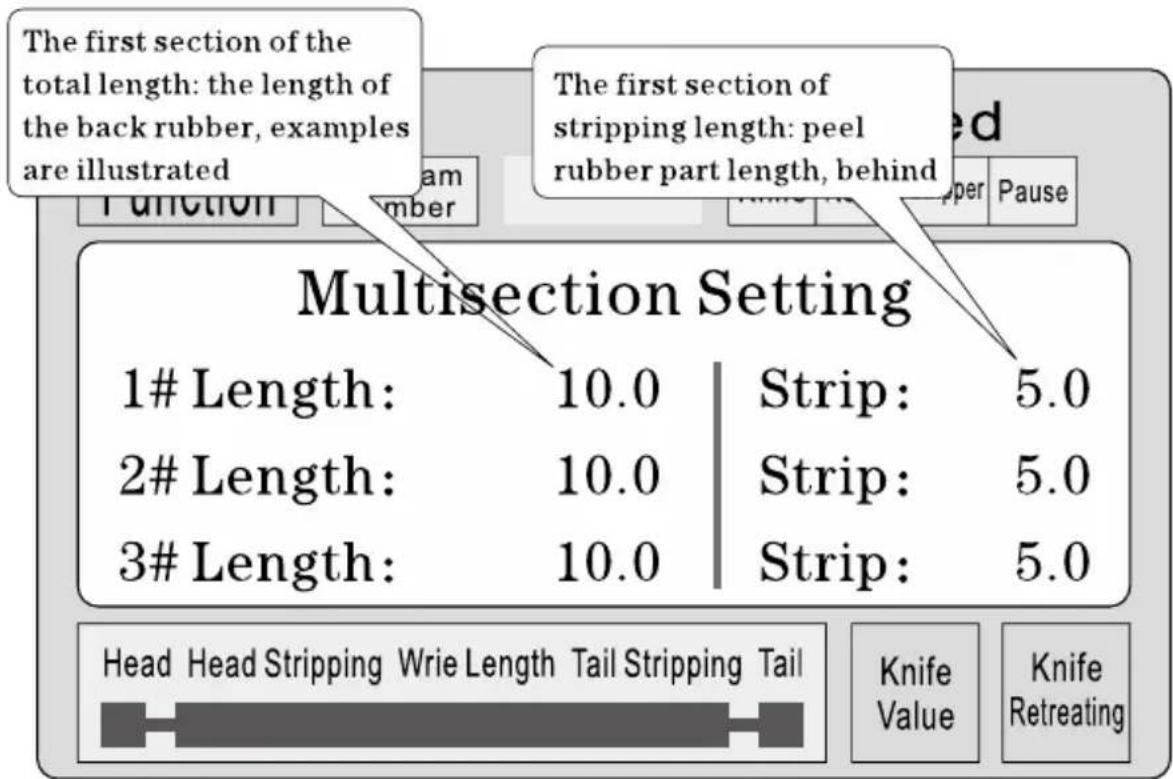
In a parameter setting condition, press the + or - button to view
the 1-12 segment set parameters. Press Parameter until all parameters are input completely.
Set
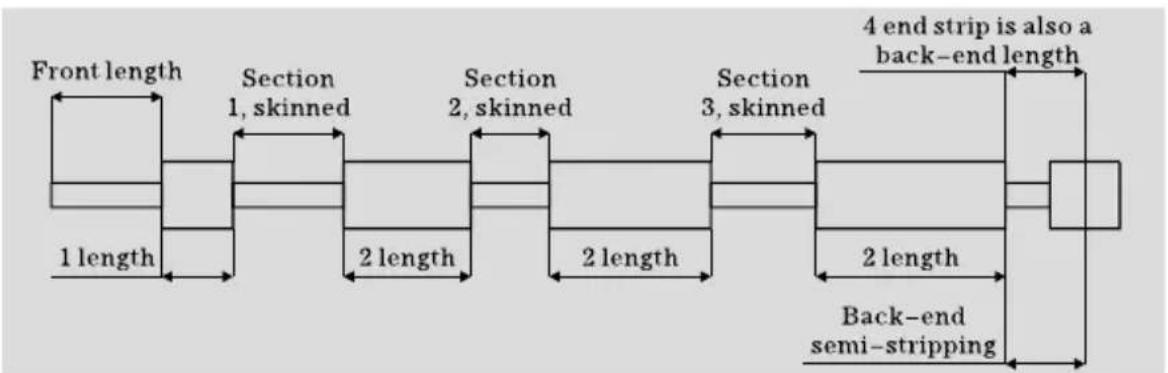
Note: In a multistage model, the total length is equal to the sum of each wire length plus the front end length. The procedures have been calculated automatically and highlighted, so when setting the total length, the whole length does not include the end length. The end length is the final end length! Also, there is no need to set it up. When the required length is arranged and completed, set it to 0.
Function setting screen
In the standby state, press 9 Function zero to enter this screen. In the picture display, the machine does not start the work. Press Cancel to return to the work screen.
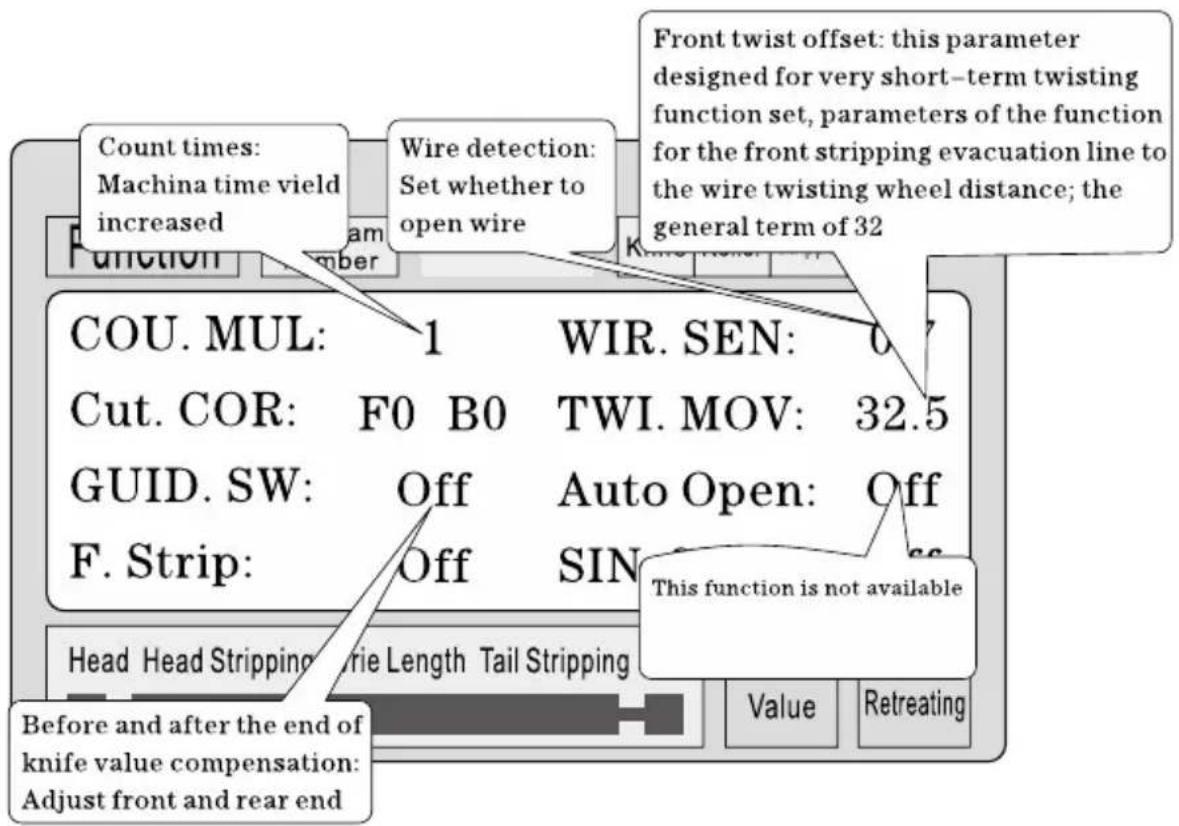
Parameter setting: Press System start settings until all parameters are input completely.
System setup screen: In standby state, press System to enter this screen. Input password (10010011) to enter this screen. Display the picture, the machine does not start the work. Press Cancel to return to the work screen.
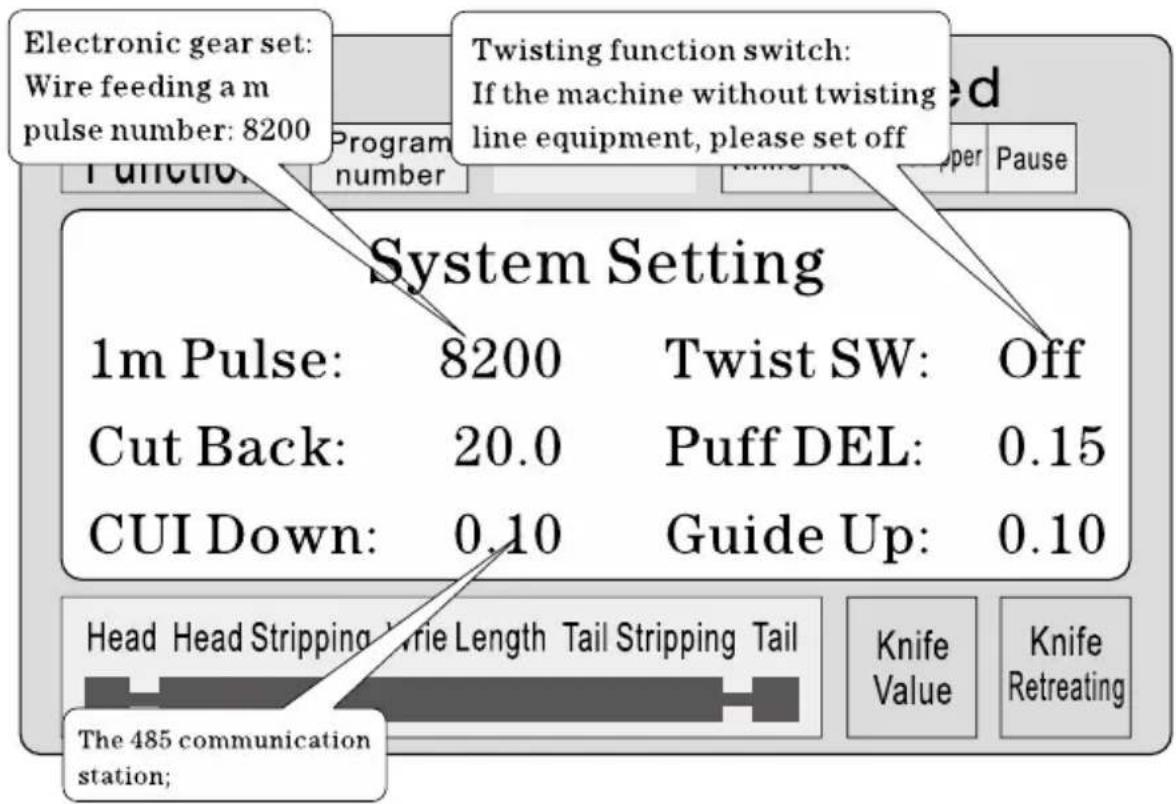
Parameter setting: Press System start settings until all parameters are input completely.
Stripping set precautions
1. For a number of stripping parameters, the total length must be greater than the front end length plus the back-end length; otherwise, the machine will not work. 2. When using communication control of the machine, ensure that the machine is in the display screen work state and not in parameter setup state; otherwise, the communication control is invalid. 3. Use the appropriate speed operation. 4. In the screen work state and not in parameter settings, you can directly press

the cutter set value without stopping.
5. If the four running indicator lights flash, it indicates that the setting parameters are ready, and you can start the machine.
6. Twisting line setting: The first torsional offset parameter is designed for the short-term twisting function set, meaning when the machine is off your front, wire feeding after twisting wheel distance; sometimes can be fitted to the short-term blade after twisting wheel, then the parameter set small, reach short-term torsion a line function; general line is set to 32, no need to change; short-term according to the blade and the wire twisting wheel actual distance adjustment; (can single-step operation mode to the step, if the wire feeding more than wire twisting wheel, can reduce the parameter can be increased, and vice versa;)
Six, Introduction of communication protocol
The machine is equipped with a standard RS485 communication function, the user can through the host computer (PLC, PC) to directly control the machine; communication hardware specifications for 38400, 8,
1, N
The following is the machine accepts commands in detail
1. The emergency stop command: PC issued three byte hexadecimal number 16 01, 66, 99; wherein the first 01 is the station number, can set up a system screen to change, the machine successfully received
the order will return received the three bytes of data, this machine has received notice of the command;
2. Stop command: PC issued three byte hexadecimal number 16 01, 77, 88; wherein the first 01 is the station number, can set up a system screen to change, the machine successfully received the order will return received the three bytes of data, this machine has received notice of the command; 3. Stop command: PC issued three byte hexadecimal number 16 01, 88, 77; wherein the first 01 is the station number, can set up a system screen to change, the machine successfully received the order will return received the three bytes of data, this machine has received notice of the command;
Seven, Wire cutting example
(1) long pattern

1. The wire is placed in a roller intermediate, adjust the rool gap to have just come into contact with the wire and then down 2 big; 2. Set size:
(1) Enter setup mode: Standby mode press (2) Set the front stripping length (3) Set the first half stripping length (4) Total length (5) Set the last half stripping length (6) Set back length (7) The cutter set value: (Reference) (8) Set back the knife: (Reference) (9) Set line mode:





press
Set line mode;
3. Press more than 1 seconds, the machine will stop automatically after carrying a line, have a look whether the value of the
right knife, direct press


correction; until satisfied;
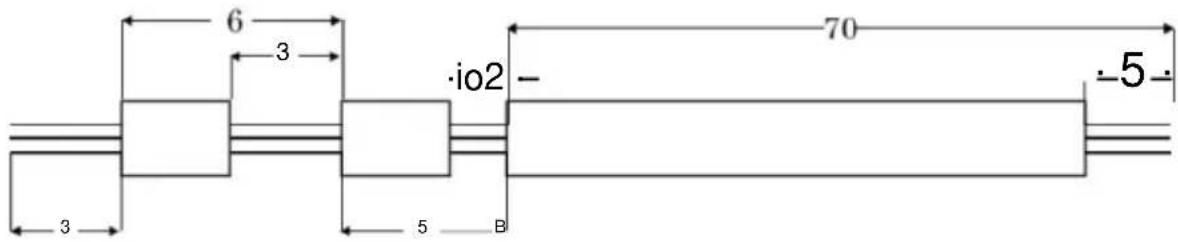
(2) Multi-segment peeling
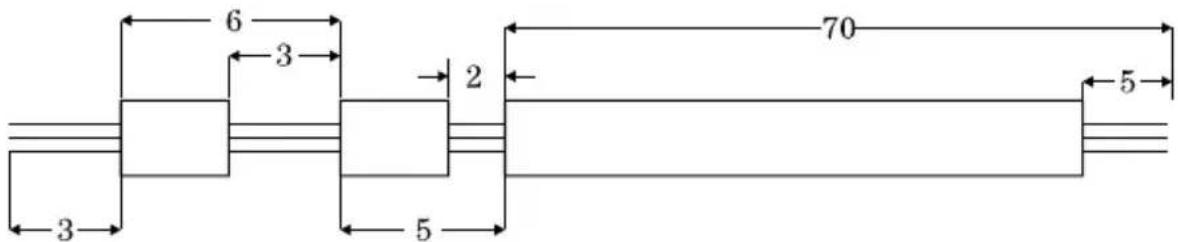
1. Place the wire in a roller intermediate, adjust the roll gap to just come into contact with the wire, then lower it by 2 big.
2. Setting size:
(1) Enter setup mode: In standby mode, press (2) Set the front stripping length (3) Exit strip, parameter setting (4) Set multistage mode: segment model; press set to multi


(5) Enter the number of segments: press footage;
(6) Set the first segment length of leaving skin
(7) Set the first segment peeling
(8) Set second leaving skin length
(9) Set second




(10) Set third leaving skin length (11) Set third leaving skin length (12) Set fourth as the length (13) Return to work picture

(14) Press more than 1 second, the machine will stop automatically after carrying a line, have a look whether the value of the
right knife, direct press + or - correction; until satisfied;
Explain
1. If the third set is set to 0, then the program that you just cut is divided into two, and so on; if you want to peel the 12th section, set the 12th section to the length of the whole set. 2. In multiple stripping mode, the twisting line function is invalid.
Adjustment of knife cutting position
- Start the machine.
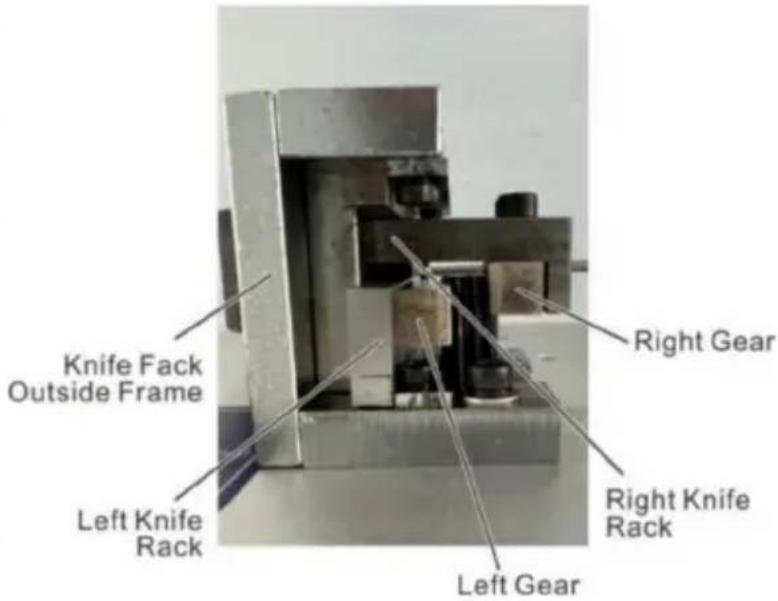
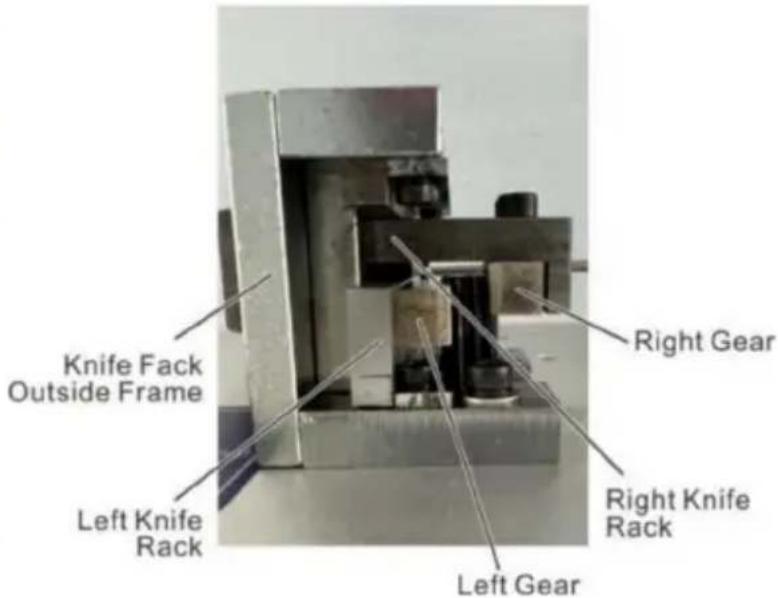
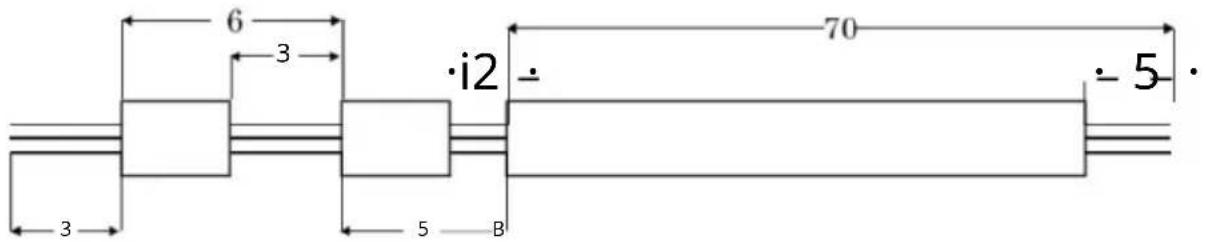
- Adjustment of MAX2 knife position: the distance between two knife blades' noses should be around 8-10mm while the distance between two blades' V shape bottom points should be around 34mm. (See Picture A)
- Key points of attention for changing knife blades:
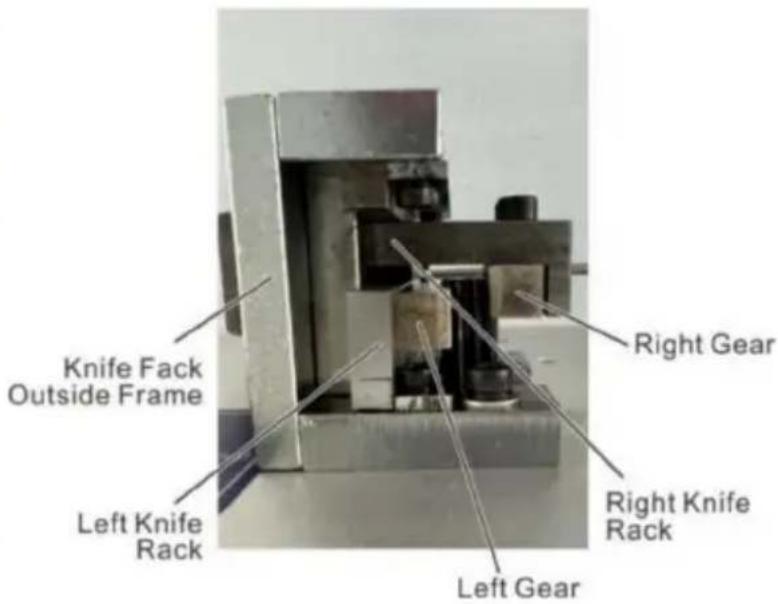
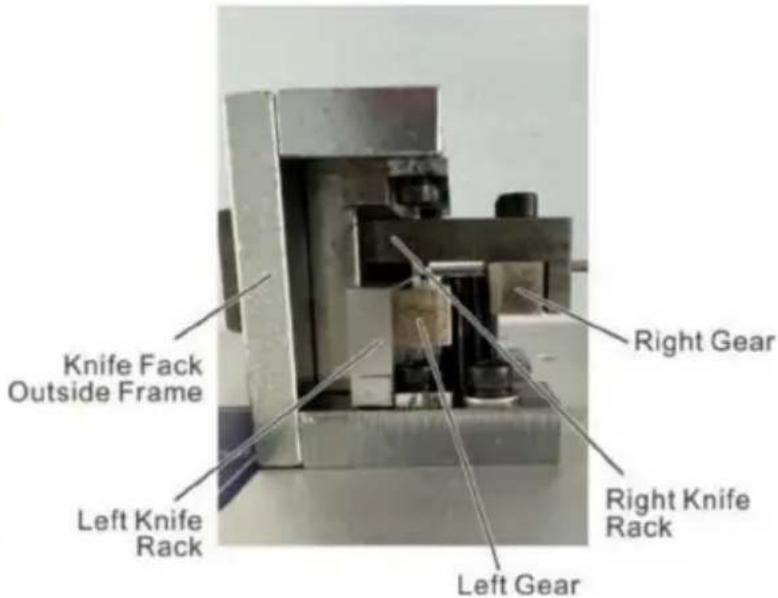
- The up plane of inner left knife rack should be below right knife rack plane with 19mm which also should be lower than knife rack outside frame with 4mm as shown by picture B.
- Left gear should be higher than middle gear with 1 gear height while the right gear should be higher than middle gear with 6 gear heights. (See picture B)
- Normally, the distance between two knife blades' noses should be around 8-10mm while the distance between two blades' V shape bottom points should be around 34mm. (See picture A)
- After adjustment, insert both sides of knife rack gears into middle axil tooth and fix the screws of both sides knife rack.
- Restart the machine and adjust the knife value if the cutting depth is changed.
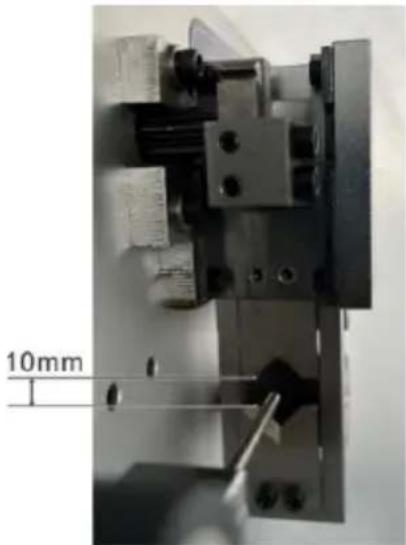
(Picture A)

(Picture B)
Eight, Phenomenon and exclusion
| The emergence of the phenomenon | Processing method |
| Thread stripping without | 1、check the thread cutting depth, cutting marks too shallow for regulating “diameter” smaller.2、the line wheel pressure is not enough, need to adjust the “into the line wheel pressure regulating knob”, the line wheel pressure.3、the line wheel clearance is too large, need to adjust the “into the line wheel clearance adjustment knob”, the line wheel clearance is reduced to a proper position.4、stripping the first set is greater than or equal to 3.5、the line wheel if there is dirt, required to be cleaned.6、retreat knife set may be too large, should be appropriate to reduce the retracting parameter (reference value 00-10).7、the next tool misalignment, please refer to chapter seventh section 2 test chart 7-7 alignment condition. |
| Wire stripping without tail | 1、check line tail cutting depth, cutting marks too shallow for regulating “diameter” smaller.2、wire wheel, the pressure is not enough, need to adjust the “round round pressure regulating knob”, the line wheel pressure.3、wire wheel clearance is too large, is required for the regulation of “round round gap adjustment knob”, make the pulley gap is reduced to a proper position.4、stripping the first set is greater than or equal to 3.5、pulley if there is dirt, required to be cleaned.6、retreat knife set may be too large, should be appropriate to reduce the retracting parameter (reference value 00-10).7、the next tool misalignment, please refer to chapter seventh section 2 test chart 7-7 alignment condition. |
| Wire skin of severe barotrauma | 1、first judge barotrauma from inlet wheel or pulley, wheel pressing force to be small.2、contact with my company, the purchase of rubber tire. |
| Thrum peel line core cut of several root | The “diameter” tone in 1 or 2, retry until notto hurt the line core. |
| Length of line, there is greater than or equal to the set length | 1、the line wheel pressure is not enough, and sometimes thread stripping without phenomenon, thread stripping on line is greater than a predetermined length, regulating “into the line wheel pressure regulating knio”, so the line wheel pressure.2、dirt, pulley, required to be cleaned.A wire inlet wheel clearance is too large, to adjust the “into the line wheel clearance adjustment knob”, and a wire feeding wheel gap smaller. |
| Length of line, there is less than or equal to the set length | 1、the wire itself line thickness a.2、a rolling wheel with dirt, required to be cleaned. The conductor surface wax, lead into, wire wheels slip with sticky wax, wire brush, and gasoline cleaning four rolling wheel.3、take out wire, level “00” air operation phenomenon, be excluded.4、the wire laying frame having card hysteresis phenomenon, leading to poor conveying wire. |
| Head and tail cut or no cut | 1、check the head or tail of sevred, wire diameter is too small, should adjust the “wire” bigger. (a reference value 30-90)2、Checking thread tail no cut marks, wire diameter is too lare, should adjust the “wire” smaller. (a reference value 30-90) |
| Sometimes the head or tail was cut off | 1、wire wheel, the pressure is not enough, please check and regulation of “round round pressure regulating knob”, make the pulley pressure becomes great.2、the line wheel clearance is too large, need to adjust the “into the line wheel clearance adjustment knob”, the line wheel clearance reduction. |
| There are several strands of wire long thread | 1、wire diameter is too small, the cut wire, strip with a copper wire, to increase the diameter of 1-2, try again.2、retreat knife set too small, it should be increased the retracting parameters (00-10) |
| Sometimes the conducting wires together no knife broken | 1、the edge parts activities with the ordinary oil, try again (usually 8 hours filling a).2、the speed is slow.3、check the wire specifications in AWG12# line (3 square).4、the blade is blunt, flat grinding, or replacement.5、according to the seventh part of the third inspection. |
| Press run after shutdown can only cut a, screen appears “short line or knot” | 1、no line of automatic shutdown function, belongs to the normal.2、setting the length should be greater than 32 mm (except for the 98 procedures).3、wire wheel clearance is too large, is required for the regulation of “round round gap adjustment knob” make the pulley reduced gap. |
| When the power is switched on the fan to work normally, screen normal, but according to “run” after the machine can not move | 1、because of the voltage instability or illegal operation of the circuit board in the insurance pipe burn, need to replace the fuse (open the case cover, visible in the circuit board has two 5A insurance tube).2、such as changing insurance tube, continue to burn out, and my company customer service service department or office contact. |
| Incision inclined tangent | 1、wire itself is too curved, the purchase of a straightening device.2、a lead mouth without facing edge center.3、a tail tilts, inspect the wire pipe is leaning against the tool too close. |
Manufacturer: Shanghai Muxin Muye Youxian Gongsi
Address: Shuangcheng Road 803, Lane 11, Room 1602A-1609, Baoshan District, Shanghai 200000 CN.
Imported to AUS: SIHAO PTY LTD, 1 ROKEVA STREET, EASTWOOD NSW 2122 Australia
Imported to USA: Sanven Technology Ltd., Suite 250, 9166 Anaheim Place, Rancho Cucamonga, CA 91730
| REPE |
E-CrossStu GmbH
Mainzer Landstr. 69, 60329 Frankfurt am Main.
| REPU |
YH CONSULTING LIMITED.
K/O YH Consulting Limited, Office 147, Centurion House, London Road, Staines-upon-Thames, Surrey, TW18 4AX
VEVOR®
TOUGH TOOLS, HALF PRICE
Technical Support and E-Warranty Certificate
www.vevor.com/support
VEVOR®
TOUGH TOOLS, HALF PRICE
Technical Support and E-Warranty Certificate www.vevor.com/support
WIRE STRIPPING MACHINE
MODEL: SWT508-SD/SWT508-E/SWT508-JE
We continue to be committed to provide you tools with competitive price. "Save Half", "Half Price" or any other similar expressions used by us only represents an estimate of savings you might benefit from buying certain tools with us compared to the major top brands and does not necessarily mean to cover all categories of tools offered by us. You are kindly reminded to verify carefully when you are placing an order with us if you are actually saving half in comparison with the top major brands.
VEVOR®
TOUGH TOOLS, HALF PRICE
WIRE STRIPPING MACHINE
MODEL: SWT508-SD/SWT508-E/SWT508-JE
NEED HELP? CONTACT US!
Have product questions? Need technical support? Please feel free to contact us:
Technical Support and E-Warranty Certificate www.vevor.com/support
This is the original instruction, please read all manual instructions carefully before operating. VEVOR reserves a clear interpretation of our user manual. The appearance of the product shall be subject to the product you received. Please forgive us that we won't inform you again if there are any technology or software updates on our product.
![graph TD A["Function display area: This machine has: long-term, short-term, sheath, cable, multiple, high speed 6 working modes"] --> B["Fonction"] B --> C["Program number"] C --> D["twisting function area: As follows: front twist; rear torsion"] D --> E["speed display area: Turn: the knife seat spe…](/content/2026/04/736569/images/c67718b869523716f0073a1cdc530aefc7612bce770e784bbe8e01da58a1b42d.jpg)
(2) Multisegment peeling
(image A)
(image B)
A/S YH Consulting Limited Bureau 147, Centurion House, London Road,
Staines-upon-Thames, Surrey, TW18 4AX
VEVOR®
TOUGH TOOLS, HALF PRICE
www.vevor.com/support
VEVOR®
TOUGH TOOLS, HALF PRICE
Technical Support and E-Warranty Certificate www.vevor.com/support
WIRE STRIPPING MACHINE
MODEL: SWT508-SD/SWT508-E/SWT508-JE
We continue to be committed to providing you tools with competitive prices. "Save Half", "Half Price" or any other similar expressions used by us only represent an estimate of savings you might benefit from buying certain tools with us compared to the major top brands and do not necessarily mean to cover all categories of tools offered by us. You are kindly reminded to verify carefully when you are placing an order with us if you are actually saving half in comparison with the top major brands.
VEVOR®
TOUGH TOOLS, HALF PRICE
WIRE STRIPPING MACHINE
MODEL: SWT508-SD/SWT508-E/SWT508-JE
NEED HELP? CONTACT US!
Have product questions? Need technical support? Please feel free to contact us:
Technical Support and E-Warranty Certificate www.vevor.com/support
This is the original instruction. Please read all manual instructions carefully before operating. VEVOR reserves a clear interpretation of our user manual. The appearance of the product shall be subject to the product you received. Please forgive us that we won't inform you again if there are any technology or software updates on our product.

(Image A)
(Image B)
C/O YH Consulting Limited Office 147, Centurion House,
London Road, Staines-upon-Thames, Surrey, TW18 4AX
VEVOR®
TOUGH TOOLS, HALF PRICE
www.vevor.com/support
VEVOR®
TOUGH TOOLS, HALF PRICE
Technical Support and E-Warranty Certificate www.vevor.com/support
WIRE STRIPPING MACHINE
MODEL: SWT508-SD/SWT508-E/SWT508-JE
We continue to be committed to provide you tools with competitive price. "Save Half", "Half Price" or any other similar expressions used by us only represents an estimate of savings you might benefit from buying certain tools with us compared to the major top brands and does not necessarily mean to cover all categories of tools offered by us. You are kindly reminded to verify carefully when you are placing an order with us if you are actually saving half in comparison with the top major brands.
VEVOR®
TOUGH TOOLS, HALF PRICE
WIRE STRIPPING MACHINE
MODEL: SWT508-SD/SWT508-E/SWT508-JE
NEED HELP? CONTACT US!
Have product questions? Need technical support? Please feel free to contact us:
Technical Support and E-Warranty Certificate www.vevor.com/support
This is the original instruction. Please read all manual instructions carefully before operating. VEVOR reserves a clear interpretation of our user manual. The appearance of the product shall be subject to the product you received. Please forgive us that we won't inform you again if there are any technology or software updates on our product.
![graph TD A["Function display area: This machine has: long-term, short-term, sheath, cable, multiple, high speed 6 working modes"] --> B["Parameter number: Save 0–99 signal parameters"] B --> C["Twisting function area: As follows: front twist; rear torsion"] C --> D["Speed display area: Turn: the kni…](/content/2026/04/736569/images/cbbc6f22652644886b1576e1b558a6f0ab4ac928b03147908f476962158a1e4f.jpg)
(image A)
(image B)
Imported in AUS: SIHAO PTY LTD, 1 ROKEVA STREETEASTWOOD NSW 2122 Australia
Imported in USA: Sanven Technology Ltd., Suite 250, 9166 Anaheim Place, Rancho Cucamonga, CA 91730
C/O YH Consulting Limited, Office 147, Centurion House, London Road, Staines-upon-Thames, Surrey, TW18 4AX
VEVOR®
TOUGH TOOLS, HALF PRICE
www.vevor.com/support
VEVOR®
TOUGH TOOLS, HALF PRICE
Technical Support and E-Warranty Certificate www.vevor.com/support
WIRE STRIPPING MACHINE
MODEL: SWT508-SD/SWT508-E/SWT508-JE
We continue to be committed to providing you with tools at competitive prices. "Save Half", "Half Price", or any other similar expressions used by us only represent an estimate of savings you might benefit from buying certain tools with us compared to the major top brands and do not necessarily mean to cover all categories of tools offered by us. You are kindly reminded to verify carefully when placing an order with us if you are actually saving half in comparison with the top major brands.
VEVOR®
TOUGH TOOLS, HALF PRICE
WIRE STRIPPING MACHINE
MODEL: SWT508-SD/SWT508-E/SWT508-JE
NEED HELP? CONTACT US!
Have product questions? Need technical support? Please feel free to contact us:
Technical Support and E-Warranty Certificate www.vevor.com/support
This is the original instruction, please read all manual instructions carefully before operating. VEVOR reserves a clear interpretation of our user manual. The appearance of the product shall be subject to the product you received. Please forgive us that we won't inform you again if there are any technology or software updates on our product.

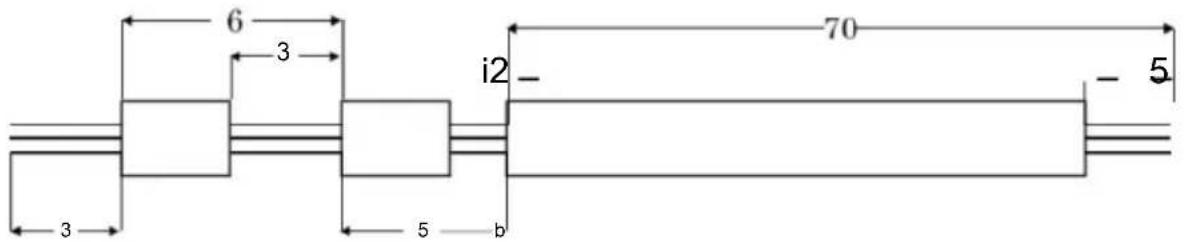
(image A)
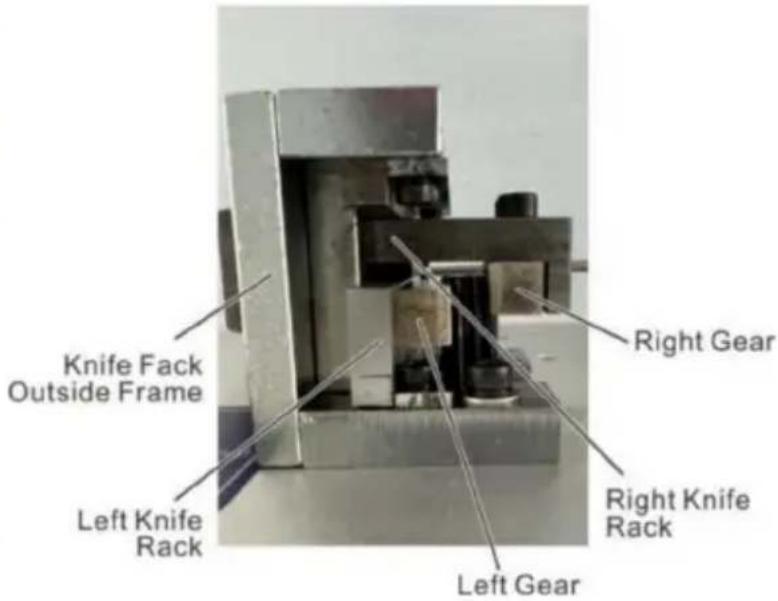
(image B)
Imported to Australia: SIHAO PTY LTD, 1 ROKEVA STREETEASTWOOD NSW 2122 Australia
Imported to the USA: Sanven Technology Ltd., Suite 250, 9166 Anaheim Place, Rancho Cucamonga, CA 91730
E-CrossStu GmbH
C/O YH Consulting Limited Office 147, Centurion House,
London Road, Staines-upon-Thames, Surrey, TW18 4AX
VEVOR®
TOUGH TOOLS, HALF PRICE
www.vevor.com/support
VEVOR®
TOUGH TOOLS, HALF PRICE
Technical Support and E-Warranty Certificate www.vevor.com/support
WIRE STRIPPING MACHINE
MODEL: SWT508-SD/SWT508-E/SWT508-JE
We continue to be committed to provide you tools with competitive price. "Save Half", "Half Price" or any other similar expressions used by us only represents an estimate of savings you might benefit from buying certain tools with us compared to the major top brands and does not necessarily mean to cover all categories of tools offered by us. You are kindly reminded to verify carefully when you are placing an order with us if you are actually saving half in comparison with the top major brands.
VEVOR®
TOUGH TOOLS, HALF PRICE
WIRE STRIPPING MACHINE
MODEL: SWT508-SD/SWT508-E/SWT508-JE
NEED HELP? CONTACT US!
Have product questions? Need technical support? Please feel free to contact us:
Technical Support and E-Warranty Certificate www.vevor.com/support
This is the original instruction. Please read all manual instructions carefully before operating. VEVOR reserves a clear interpretation of our user manual. The appearance of the product shall be subject to the product you received. Please forgive us that we won't inform you again if there are any technology or software updates on our product.
6

(Figure A)
(Figure B)
Imported to AUS: SIHAO PTY LTD, 1 ROKEVA STREETEASTWOOD NSW 2122 Australia
Imported to USA: Sanven Technology Ltd., Suite 250, 9166 Anaheim Place, Rancho Cucamonga, CA 91730
C/O YH Consulting Limited Office 147, Centurion House, London Road, Staines-upon-Thames, Surrey, TW18 4AX
VEVOR®
TOUGH TOOLS, HALF PRICE
Technical Support and E-Warranty Certificate www.vevor.com/support
WIRE STRIPPING MACHINE
MODEL: SWT508-SD/SWT508-E/SWT508-JE
We continue to be committed to provide you tools with competitive price. "Save Half", "Half Price" or any other similar expressions used by us only represents an estimate of savings you might benefit from buying certain tools with us compared to the major top brands and does not necessarily mean to cover all categories of tools offered by us. You are kindly reminded to verify carefully when you are placing an order with us if you are actually saving half in comparison with the top major brands.
VEVOR®
TOUGH TOOLS, HALF PRICE
WIRE STRIPPING MACHINE
MODEL: SWT508-SD/SWT508-E/SWT508-JE
NEED HELP? CONTACT US!
Have product questions? Need technical support? Please feel free to contact us:
Technical Support and E-Warranty Certificate www.vevor.com/support
This is the original instruction, please read all manual instructions carefully before operating. VEVOR reserves a clear interpretation of our user manual. The appearance of the product shall be subject to the product you received. Please forgive us that we won't inform you again if there are any technology or software updates on our product.
![graph TD A["Parameter number: Save 0–99 signal parameters"] --> B["Function display area: This machine has: long-term, short-term, sheath, cable, multiple, high speed 6 working modes"] B --> C["Function display area: Twisting function area: As follows: front twist; rear torsion"] C --> D["Function d…](/content/2026/04/736569/images/9c7587ef2990fc26fc151ee55c1ed756a6a36d18023cfc764beda38f2d52092d.jpg)
withdraw from set f
(2) Multi-segment stripping
VEVOR®
TOUGH TOOLS, HALF PRICE
www.vevor.com/support
VEVOR®
TOUGH TOOLS, HALF PRICE
Technical Support and E-Warranty Certificate www.vevor.com/support
WIRE STRIPPING MACHINE
MODEL: SWT508-SD/SWT508-E/SWT508-JE
We continue to be committed to provide you tools with competitive price. "Save Half", "Half Price" or any other similar expressions used by us only represents an estimate of savings you might benefit from buying certain tools with us compared to the major top brands and does not necessarily mean to cover all categories of tools offered by us. You are kindly reminded to verify carefully when you are placing an order with us if you are actually saving half in comparison with the top major brands.
VEVOR®
TOUGH TOOLS, HALF PRICE
WIRE STRIPPING MACHINE
MODEL: SWT508-SD/SWT508-E/SWT508-JE
NEED HELP? CONTACT US!
Have product questions? Need technical support? Please feel free to contact us:
Technical Support and E-Warranty Certificate www.vevor.com/support
This is the original instruction. Please read all manual instructions carefully before operating. VEVOR reserves a clear interpretation of our user manual. The appearance of the product shall be subject to the product you received. Please forgive us that we won't inform you again if there are any technology or software updates on our product.
C/O YH Consulting Limited Office 147, Centurion House, London Road, Staines-upon-Thames, Surrey, TW18 4AX
VEVOR®
TOUGH TOOLS, HALF PRICE
www.vevor.com/support
- WIRE STRIPPING MACHINE
- VEVOR®
- NEED HELP? CONTACT US
- FAST OPERATION EXAMPLE
- OPERATING INSTRUCTIONS
- SAMPLE
- FUNCTION
- STOP
- EMERGENCY STOP
- STRIPPING SET
- SPEED SET
- TWISTED SET
- PARAMETER SET
- TOTAL ZERO
- BUN RESET
- WORK SCREEN
- DETERMINE
- WORK MODE EXPLANATION
- LINE MODE
- SHORT-TERM MODE
- FUNCTION SETTING SCREEN
- STRIPPING SET PRECAUTIONS
- SIX, INTRODUCTION OF COMMUNICATION PROTOCOL
- THE FOLLOWING IS THE MACHINE ACCEPTS COMMANDS IN DETAIL
- SEVEN, WIRE CUTTING EXAMPLE
- EXPLAIN
- ADJUSTMENT OF KNIFE CUTTING POSITION
- TOUGH TOOLS, HALF PRICE
Brand : Vevor
Model : SWT508-JE
Category : Cable stripping machine