
SC1402 - Vehicle accessory Vevor - Free user manual and instructions
Find the device manual for free SC1402 Vevor in PDF.
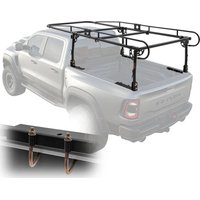


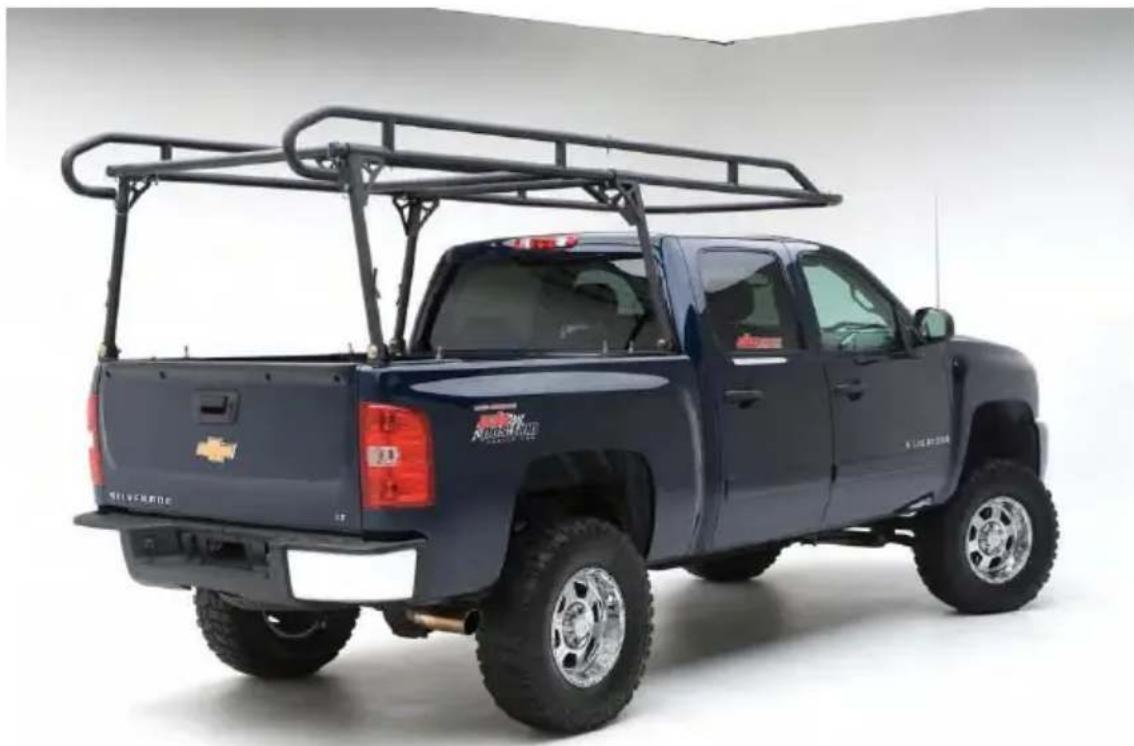
| Product Type | Truck Cab-Height Rack |
| Brand | Vevor |
| Model | SC1402 |
| Material | Steel |
| Color | Black |
| Maximum Load | 454 kg (1 000 lb) |
| Installation Width Range | 1 100 ~ 1 600 mm |
| Installation Length Range | 1 600 ~ 1 900 mm |
| Number of Pieces | Complete set with bars, frames, legs, hardware (bolts, nuts, washers) |
| Main Functions | Truck cab load carrier; adjustable in length and width; facilitates transport of long or bulky goods |
| Maintenance and Cleaning | Clean with a soft cloth and mild soap; touch up paint if metal is exposed to prevent rust |
| Safety | Do not exceed load of 454 kg; use tie-down straps; ensure the rack does not touch the cab; regularly tighten nuts and bolts |
| Spare Parts and Repairability | Replacement hardware included (bolt sets, J-hooks); parts can be ordered via technical support; do not modify the product |
| Installation | Assembly recommended with a helper; may require drilling for bolt-on installation; use J-hooks or direct bolting |
| Warranty | Electronic warranty via www.vevor.com/support |
| General Information | Manual in French, German, English, Italian, Dutch, Polish, Swedish; technical support available online |
Frequently Asked Questions - SC1402 Vevor
User questions about SC1402 Vevor
0 question about this device. Answer the ones you know or ask your own.
Ask a new question about this device
Download the instructions for your Vehicle accessory in PDF format for free! Find your manual SC1402 - Vevor and take your electronic device back in hand. On this page are published all the documents necessary for the use of your device. SC1402 by Vevor.
USER MANUAL SC1402 Vevor
OVER-CAB TRUCK RACK
MODEL: SC1402
We continue to be committed to providing you with tools at competitive prices. "Save Half," "Half Price," or any other similar expressions used by us only represent an estimate of savings you might benefit from buying certain tools with us compared to top brands, and do not necessarily mean to cover all categories of tools offered. We kindly remind you to verify carefully when placing an order with us that you are actually saving half in comparison with the top major brands.
MODEL: SC1402
NEED HELP? CONTACT US!
Have product questions? Need technical support? Please feel free to contact us:
This is the original instruction. Please read all manual instructions carefully before operating. VEVOR reserves the right to interpret the user manual. The appearance of the product shall be subject to the product you received. Please forgive us that we won't inform you of any technology or software updates on our product.
IMPORTANT SAFEGUARDS

WARNING: Read and understand this entire manual before operating or servicing this product. Failure to follow these warnings and instructions can cause personal injury or damage to valuable property.
- Avoid children using the product. This product is not a toy. Do not allow children to play with it.
- It is highly recommended to go to a professional auto repair shop for replacement installation.
Assembly precautions
- Assemble only according to these instructions. Improper assembly can create hazards.
- Wear ANSI-approved safety goggles and heavy-duty work gloves during assembly and use.
- Keep the assembly area clean and well-lit.
- Keep bystanders out of the area during assembly.
- Do not assemble when tired or when under the influence of alcohol, drugs, or medication.
- Product capabilities apply to properly and completely assembled product only.
- For additional information regarding the parts listed in the following pages, please refer to the Assembly Diagram of this manual. Unwrap and separate parts in a clean work area. Please keep small spare parts out of children's reach.
- Inspect the product before use to ensure it is assembled properly and all parts are in safe working order and free of defects.
- Never modify this product in any way.
- All circumstances cannot be addressed in these instructions. Please use common sense and practice general safety measures when using this product.
SAVE THESE INSTRUCTIONS
SAFETY AND USE
- Do not exceed the carrying capacity of 1000 lbs. Doing so could result in property damage or personal injury.
- The truck rack adds more weight to your vehicle and raises the center of gravity when loaded. Use caution when making sharp turns to prevent product damage, cargo loss, or the vehicle from rolling over.
- Ensure the cab hoop does not come in contact with the truck cab to prevent property damage.
- Use sufficient tie-down straps when transporting cargo on the truck rack (this product does not contain them).
- Be sure all nuts and bolts are tight on a regular basis and no foreign oil are preventing the rack from sitting or working properly.
- Scratches and dents should be inspected to ensure full usability and exposed metal should be touched up/painted to deter rusting.
SPECIFICATION
| Model | SC1402 |
| Material | Steel |
| Max Load | 1000lbs/454kg |
| Installation Width Range | 1100~1600mm |
| Installation Length Range | 1600-1900mm |
| Color | Black |
PACKAGE LIST
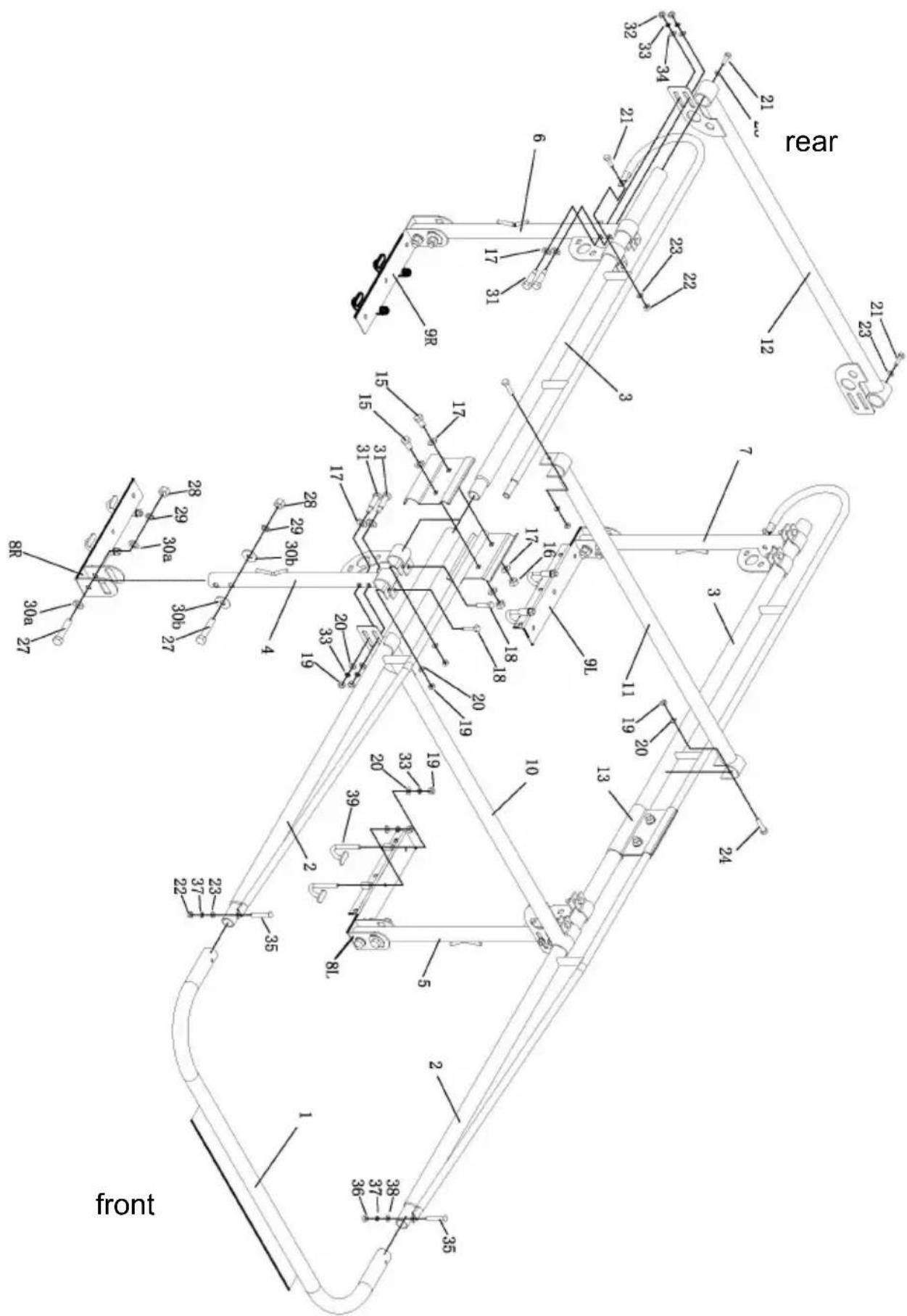
Fig.A
| Table 1 | ||||||
| No. | Name | QTY | No. | Name | QTY | |
| 1 | Cab Bar | 1 | 23 | Flat Washer:φ10 | 6 | |
| 2 | Front Side Frames | 2 | 24 | Bolt:M12*75 | 2 | |
| 3 | Back Side Frames | 2 | 27 | Bolt:M18*90 | 8 | |
| 4 | front right leg Stand | 1 | 28 | Nut:M18 | 8 | |
| 5 | front left leg Stand | 1 | 29 | Spring Washer:φ18 | 8 | |
| 6 | Rear right leg Stand (with welded tip) | 1 | 30a | Flat Washer:φ18 | 8 | |
| 7 | Rear left leg Stand (with welded tip) | 1 | 30b | Flat Washer:φ18 | 8 | |
| 8L,8R | Front Mounting Feet | 2 | 31 | Bolt:M12*70 | 8 | |
| 9L,9R | Rear Mounting Feet | 2 | 33 | Spring Washer:φ12 | 16 | |
| 10 | Front Bar | 1 | 35 | Bolt:M10*70 | 2 | |
| 11 | Center Bar | 1 | 37 | Spring Washer:φ10 | 2 | |
| 12 | Rear Cross Bar | 1 | 39 | J-Hook (M12) | 8 | |
| 13 | Clamps | 4 | ||||
| 15 | Bolt:M16*30 | 4 | ||||
| 16 | Nut:M16 | 4 | ||||
| 17 | Flat Washer:φ16 | 16 | ||||
| 18 | Bolt:M12*50 | 8 | ||||
| 19 | Nut:M12 | 26 | ||||
| 20 | Flat Washer:φ12 | 26 | ||||
| 21 | Bolt:M10*30 | 4 | ||||
| 22 | Nut:M10 | 4 | ||||
Accessory bolts are configured as components for easy use. See Table 2 and
| Table 2 | |||
| No. | Specification | QTY | Correspond to the numbers in Tab |
| A | Bolt:M16*30 | 4 | #15 |
| Nut:M16 | 4 | #16 | |
| Flat Washer:φ16 | 8 | #17 | |
| B | Bolt:M12*50 | 8 | #18 |
| Nut:M12 | 8 | #19 | |
| Flat Washer:φ12 | 8 | #20 | |
| C | Bolt:M10*30 | 2 | #21 |
| Flat Washer:φ10 | 2 | #23 | |
| D | Bolt:M10*30 | 2 | #21 |
| Nut:M10 | 2 | #22 | |
| Flat Washer:φ10 | 2 | #23 | |
| E | Bolt:M12*75 | 2 | #24 |
| Nut:M12 | 2 | #19 | |
| Flat Washer:φ12 | 2 | #20 | |
| F1/F2 | Bolt:M18*90 | 8 | #27 |
| Nut:M18 | 8 | #28 | |
| Spring Washer:φ18 | 8 | #29 | |
| Flat Washer:φ18 | 16 | #30a/#30b | |
| G | Bolt:M12*70 | 8 | #31 |
| Nut:M12 | 8 | #19 | |
| Spring Washer:φ12 | 8 | #33 | |
| Flat Washer:φ12 | 8 | #20 | |
| Flat Washer:φ16 | 8 | #17 | |
| H | Carry Bolt:M10*70 | 2 | #35 |
| Nut:M10 | 2 | #22 | |
| Spring Washer:φ10 | 2 | #37 | |
| Flat Washer:φ10 | 2 | #23 | |
| J | “J” Hook(M12) | 8 | #39 |
| Nut:M12 | 8 | #19 | |
| Spring Washer:φ12 | 8 | #33 | |
| Flat Washer:φ12 | 8 | #20 | |
Fig.B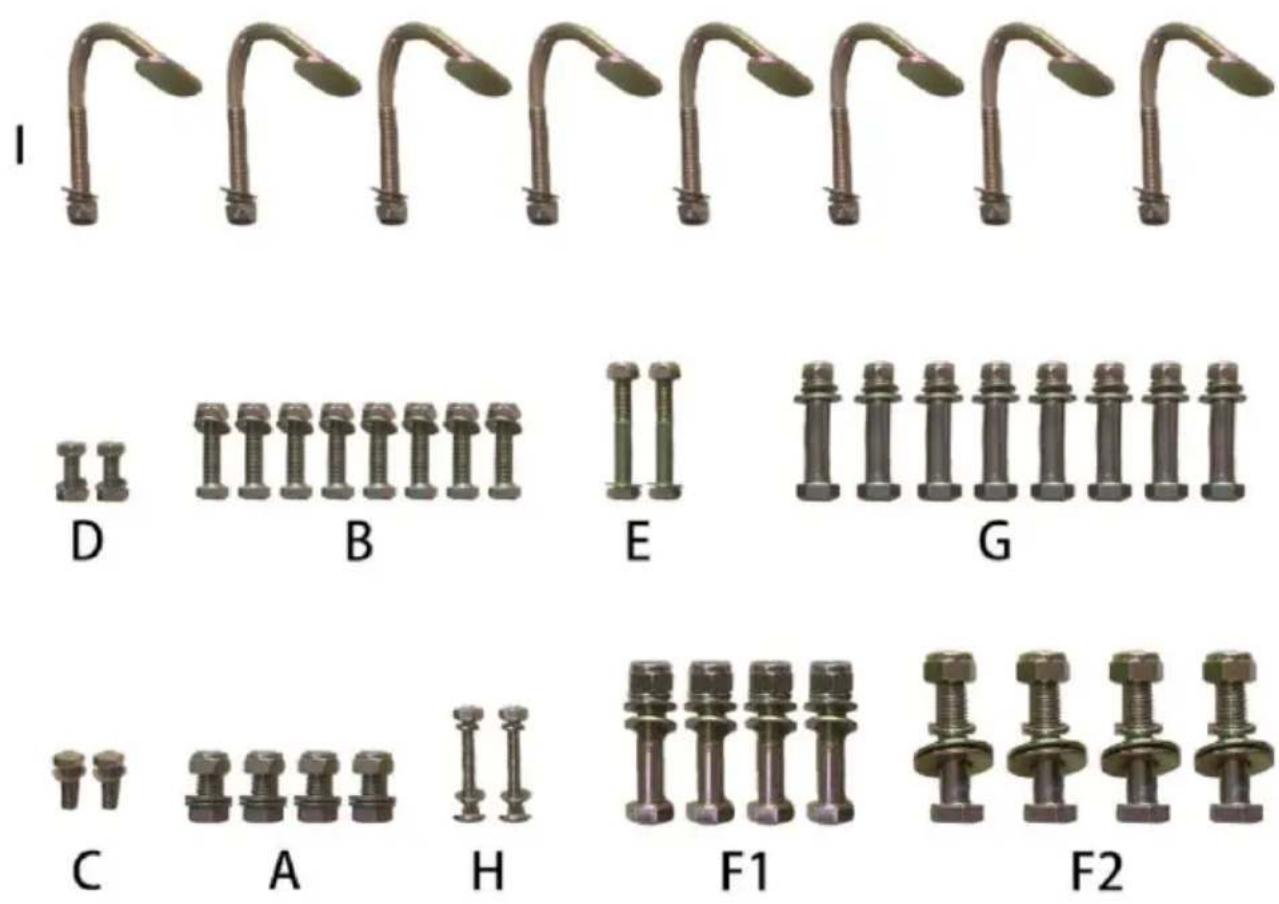
ASSEMBLY
NOTE: It is recommended to have an assistant while assembling and installing this product.
STEP 1:
Slide the Rear Left leg Stand (#7) onto the Back Side Frames (#3), then slide rear cross bar (#12) over the end of the Back Side Frames. (Fig. 1)
Attach using the 2-M12x70 bolts (#31), flat washer(17)(20), spring washer(33), Nut(19) (see the Accessory bolt set "G"). Tighten snug but not completely.
Attach using the 2-M12x50 bolts(#18), flat washer(20) and Nut(19) (see the Accessory bolt set "B"). Tighten snug but not completely.
Attach using the M10x35 bolts(#21), flat washer(23) (see the Accessory bolt set). Tighten snug but not completely. (Fig.2)
Repeat same steps for rear right side. (Fig.3)
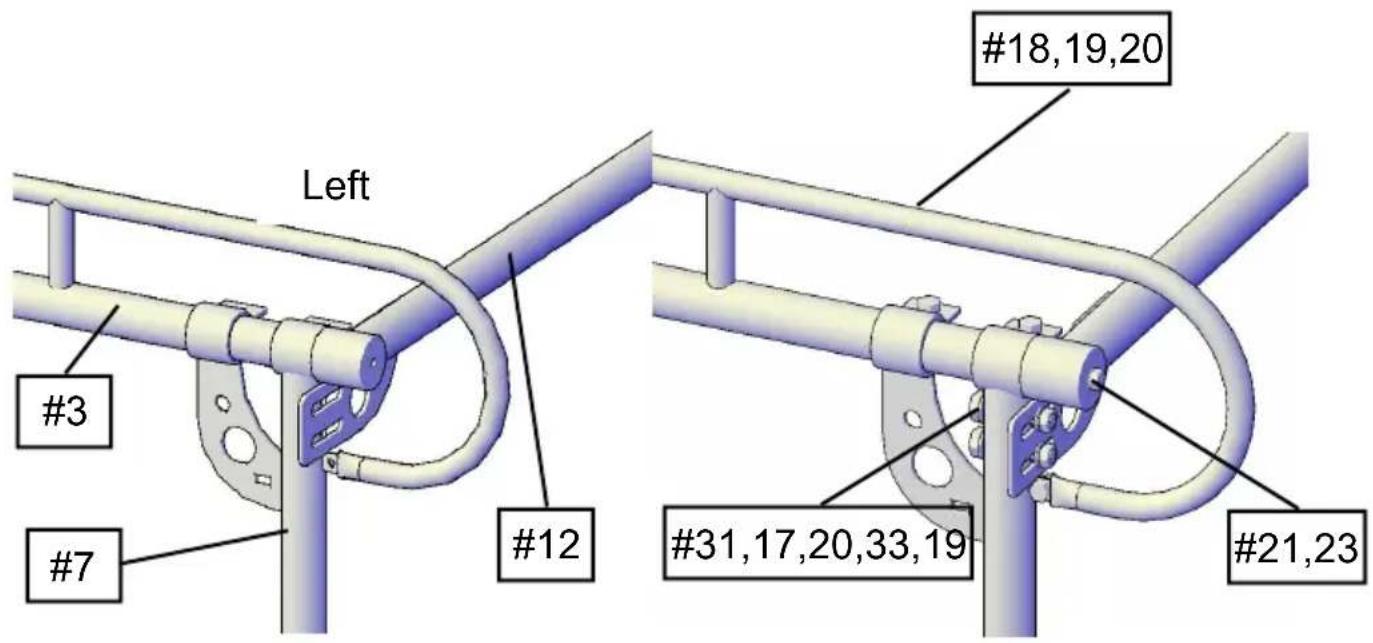
Fig.1 Fig.2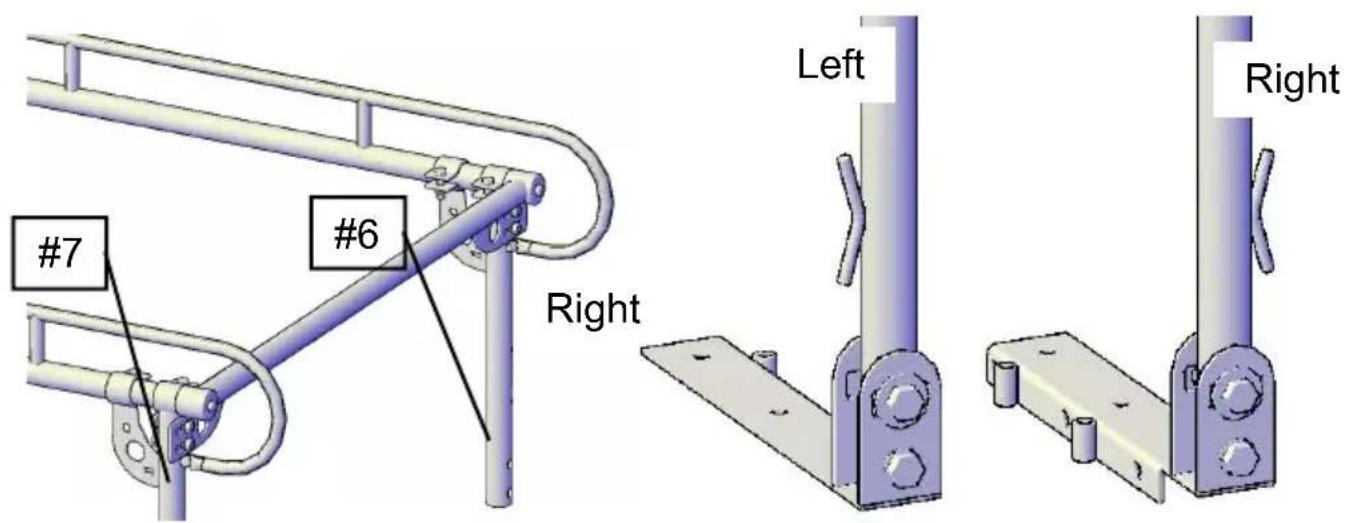
Fig.3 Fig.4
STEP 2: Install rear mounting feet
Attach the Left side rear mounting feet (#9) to the bottom of the Rear Left Stand.
Using one M18x90 bolt set. (Fig.4) Tighten snug, but not completely.
Repeat the same step for the rear right side.
(NOTE: The left side front and right side rear mounting feet is the same the right side front and left side rear)
You are now down assembling the rear section (Fig.5)
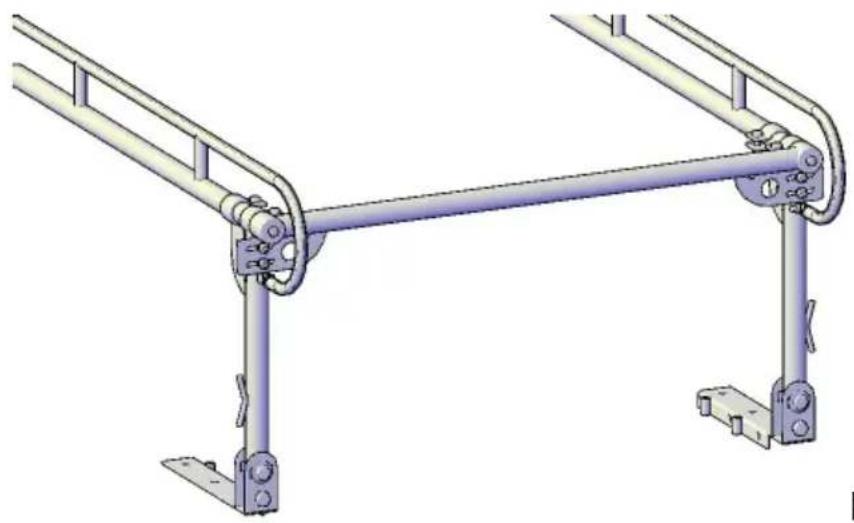
Fig.5
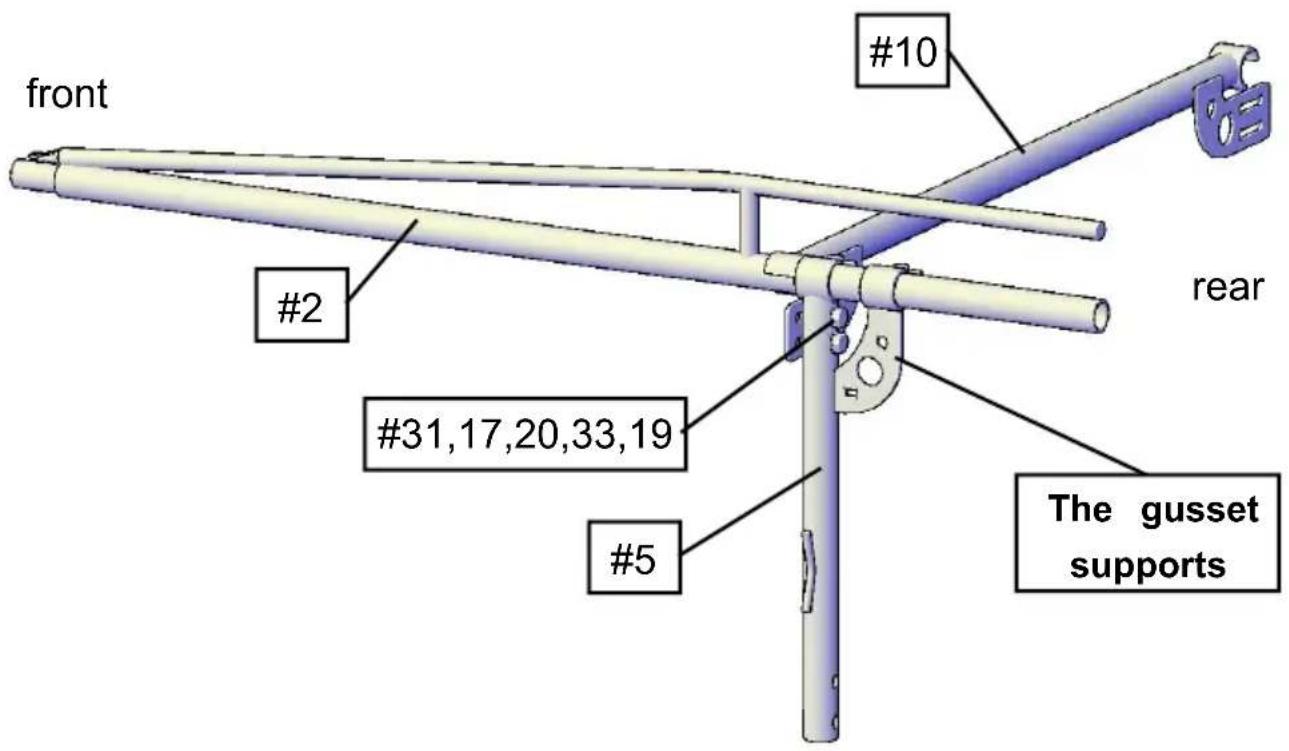
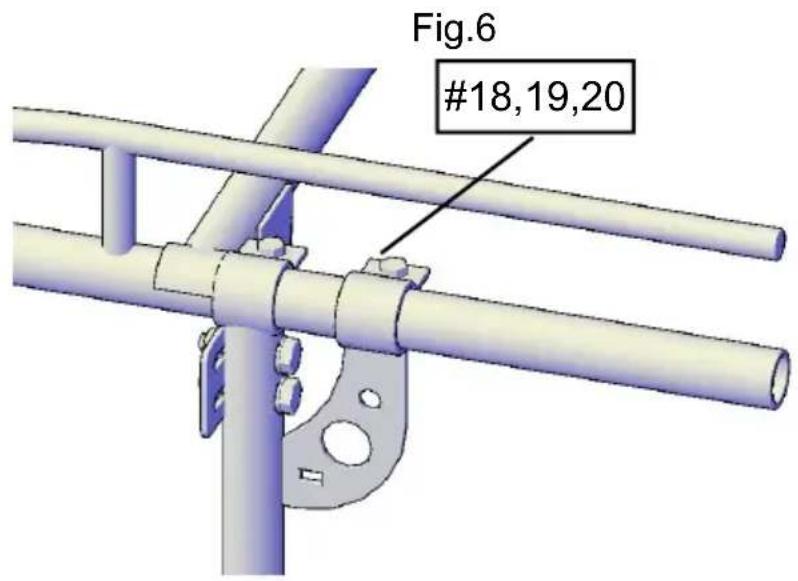
Fig.7
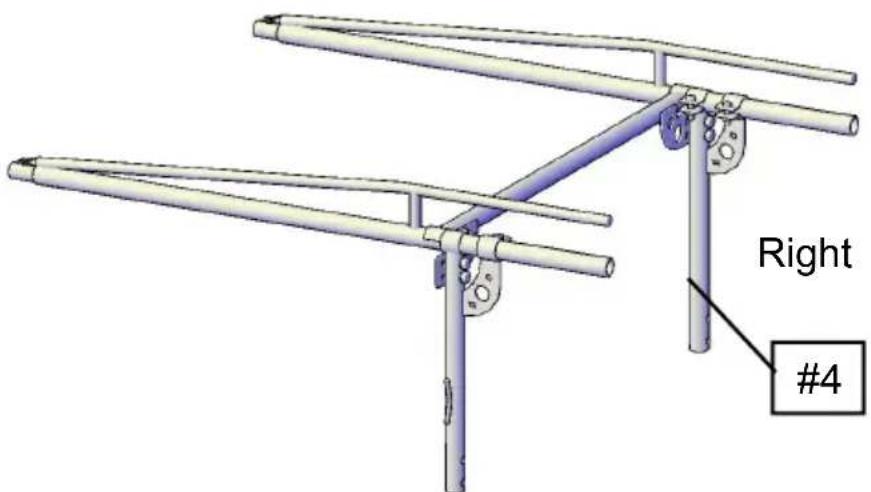
Fig.8
STEP 3:
Slide the front side frames (#2) over the front left leg Stand (#5) .
(NOTE: The gusset supports on the front left leg Stand will be facing to the rear).
Attach using the 2-M12x70 bolts (#31), flat washer (17) (20), spring washer and Nut (19) (see the Accessory bolt set"G") Tighten snug but not completely (Fig.6)
Attach using the 2-M12x50 bolts (#18), flat washers (#20), and nuts (#19) (see the accessory bolt set "B"). Tighten snug but not completely. (Fig. 7)
Repeat this for the opposite side using the front right leg stand (#4). (Fig. 8)
STEP 4: Install front mounting feet
Attach the left side rear mounting feet (#8) to the bottom of the front left stand. Using one M18x90 bolt set. (Fig. 9) Tighten snug, but not completely. Repeat the same step for the front right side.
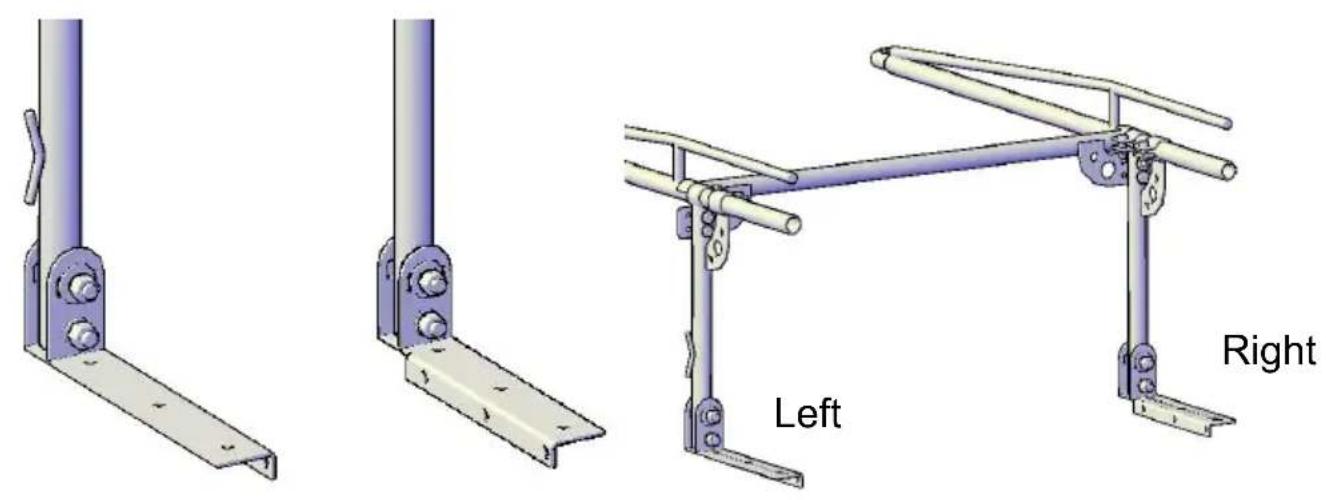
Fig. 9
STEP 5:
Slide the front section into the rear section. (NOTE: You may need assistance with this step).
Secure the two side frames together with clamps (#13) and M16x30 bolts (#15), washers (#17), and nuts (#16). You may tighten completely.
Repeat step for right side. (Fig. 10, 11)
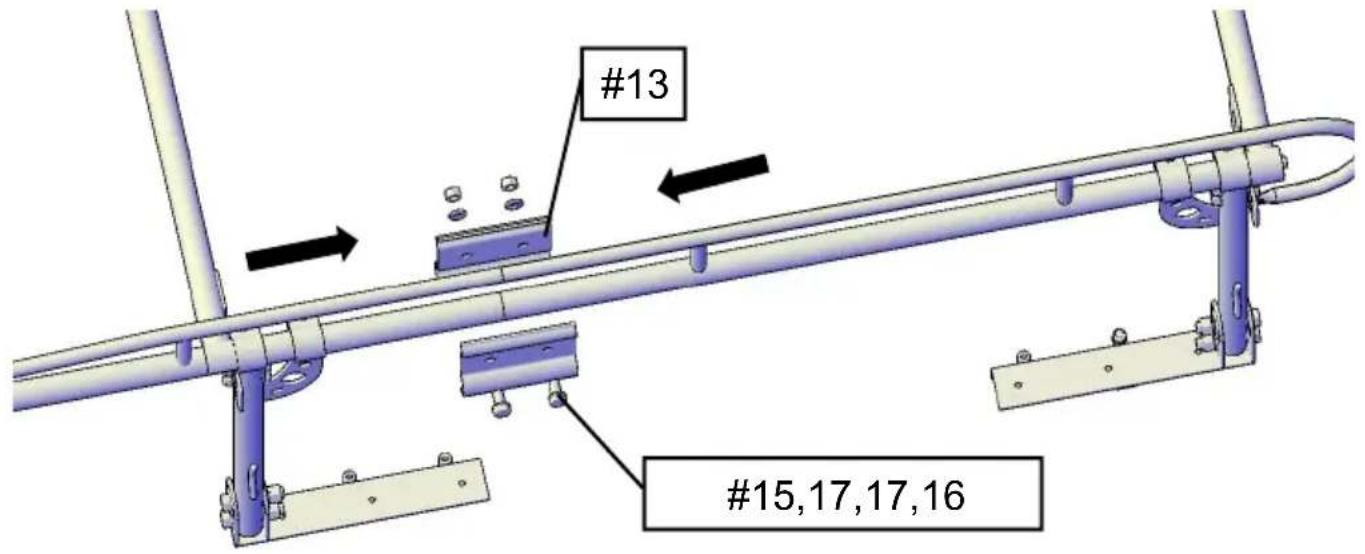
Fig. 10
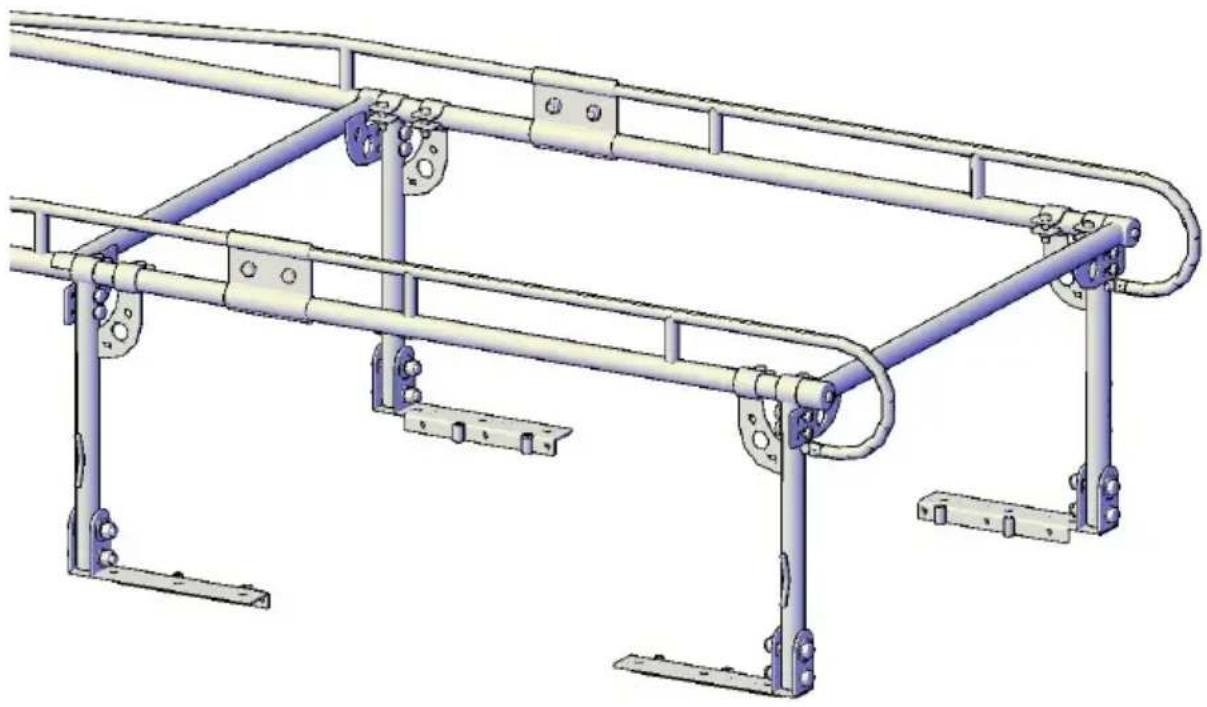
Fig. 11
STEP 6:
Install center bar (#11) to the rear frame using 2-M12x75 bolt sets (#24, #19, #20) (Fig. 12). Tighten snug but not completely.
This bar can always be moved around.
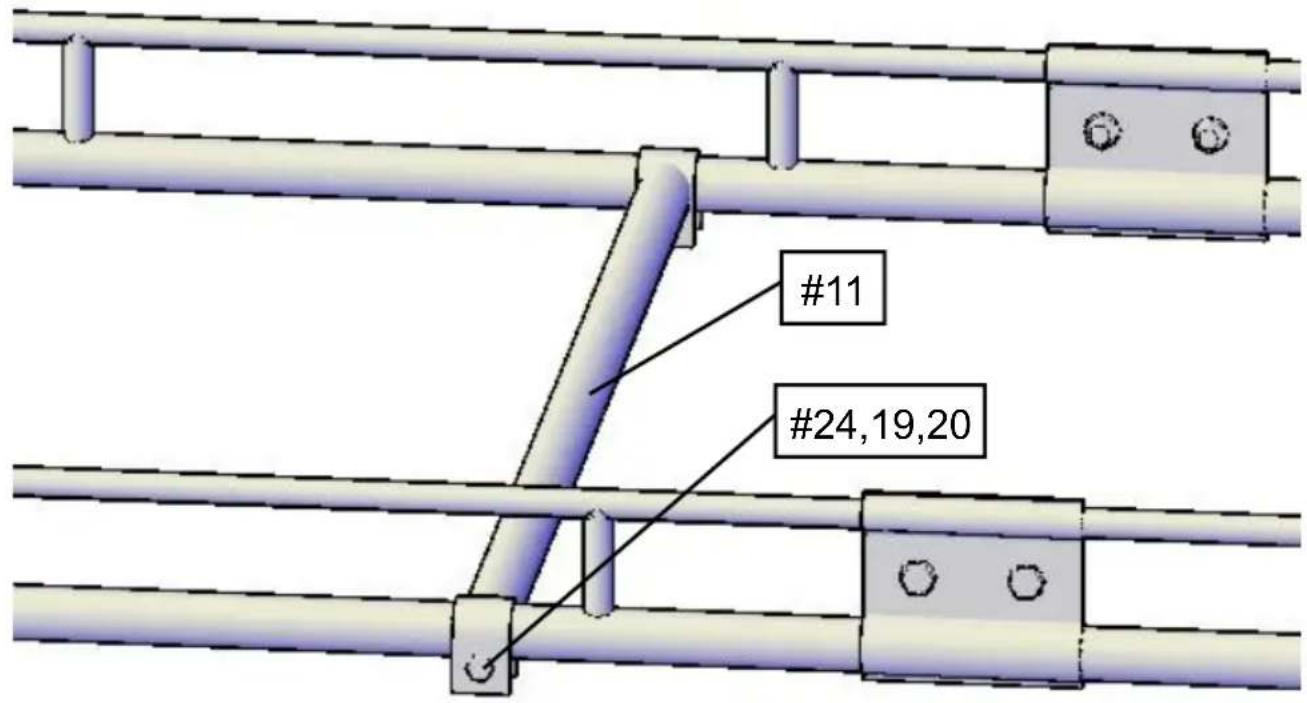
Fig. 12
STEP 7:
Install the Cab bar (#1) to the front frame using M10x70 bolt sets (#35, 22, 37) (Fig. 13).
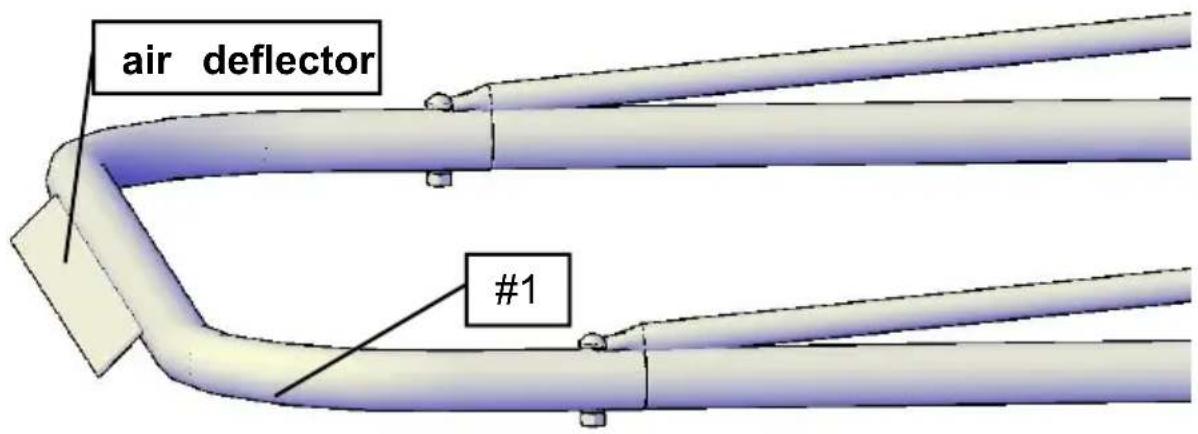
Fig. 13
(Make sure the air deflector is pointing down.) You may tighten completely at this time.
STEP 8:
General assembly is now complete. It is time to size the rack now. (Fig. 14)
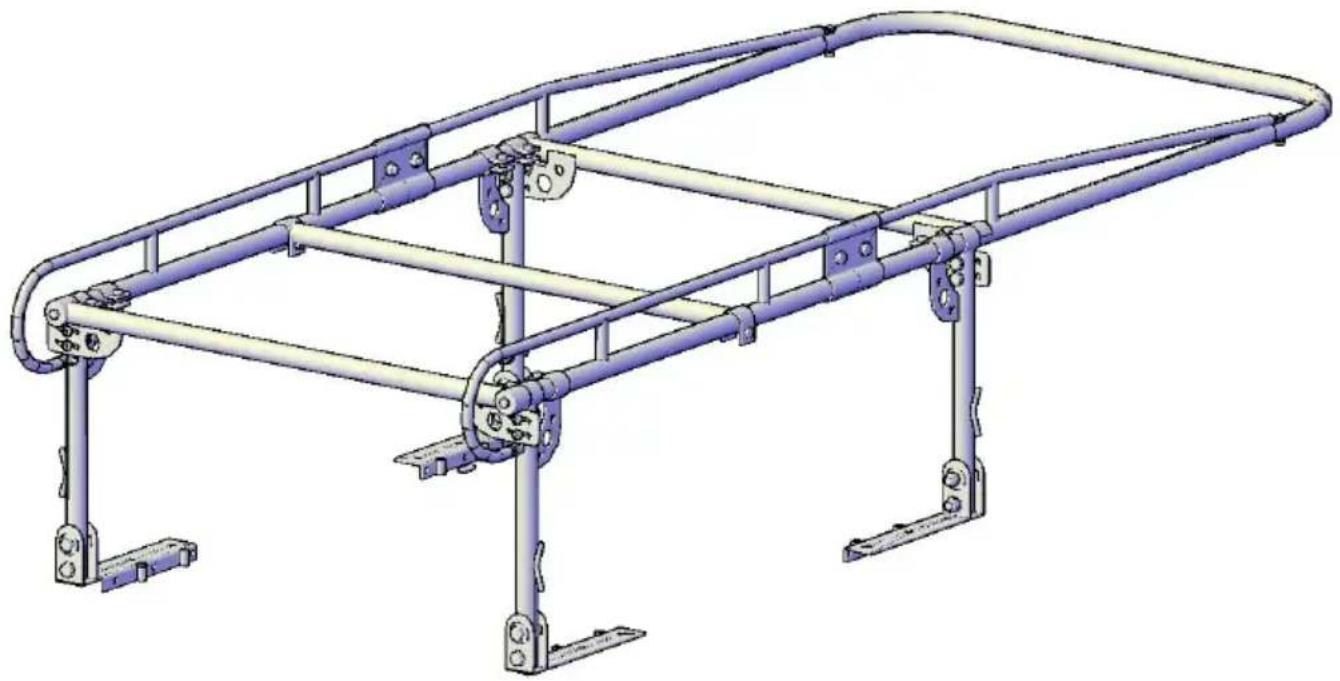
Fig. 14
STEP 9:
Measure the length of the top rail on your truck bed with the tailgate closed. Subtract 3-1/2" from this measurement; this gives you the approximate spacing needed between the front and rear leg stands.
Adjust your front leg stands by sliding them forward or backward to match the measurement. (Fig. 15) Once the position is correct, tighten bolts snug, but not completely.
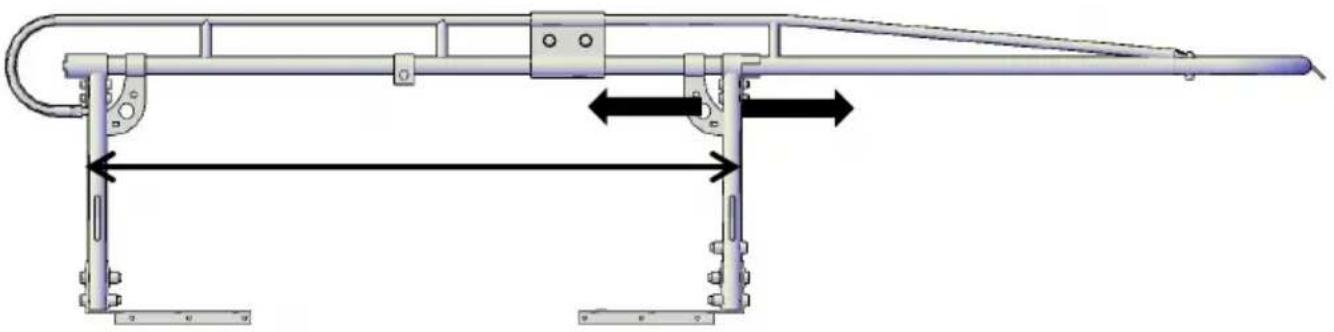
Fig. 15
STEP 10:
Your rack is now ready to be installed on your vehicle.
Carefully lift the rack onto the side bed rails of your vehicle, aligning the MC plates as close as possible to the corners of the bed rail. (Fig. 16)
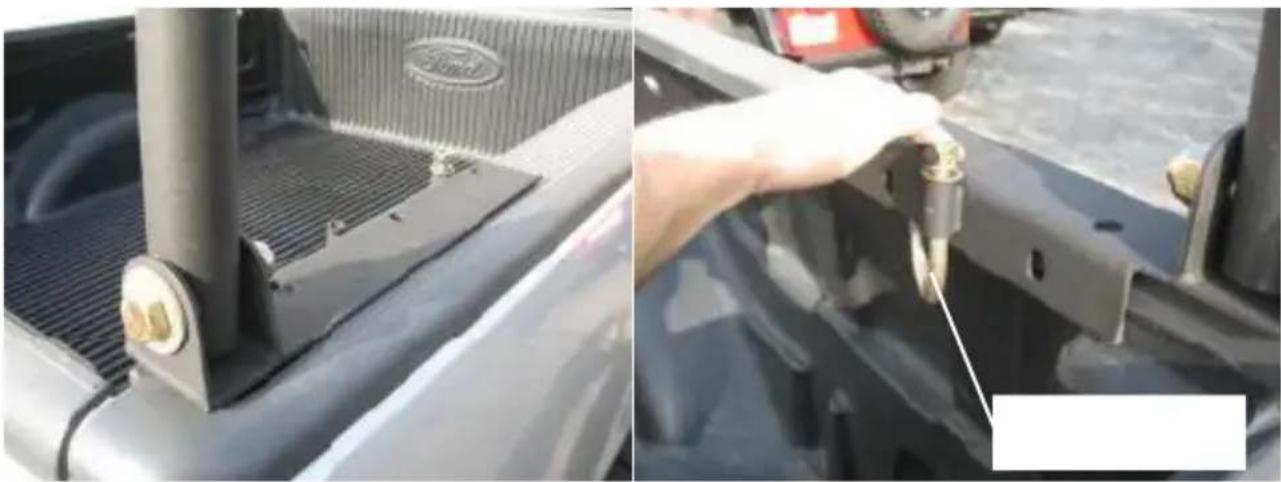
Fig. 16 Fig. 17
The leg stands and mounting feet can be adjusted while the rack is resting on the vehicle's bed rail.
STEP 11:
Once the desired location of the rack has been decided, you can secure the mounting plates on the bed rail. This can be done two different ways: using hooks (#39) or bolting it down.
- Slide the "J" hook up through the sleeve in the mounting plate and secure with washer and nut.
Make sure the plate on the end of the "J" hook is resting flush underneath the rail. (Fig.17)
- Use the mounting feet as a template to mark and drill 17/32" holes through the bed rail. Be sure to check the underside for any obstructions. Measure the total thickness of the mounting foot and bed rail, select the M12 bolt of the appropriate length, and then lock the mounting foot and bed rail.
Secure mounting plates to bed rail completely at this time.
STEP 12:
Standing in front of the vehicle, check the horizontal alignment of the front in relation to the top of the vehicle. Have an assistant push or pull the rack side in order to have the front hoop become parallel with the top of the vehicle. (Fig.18)
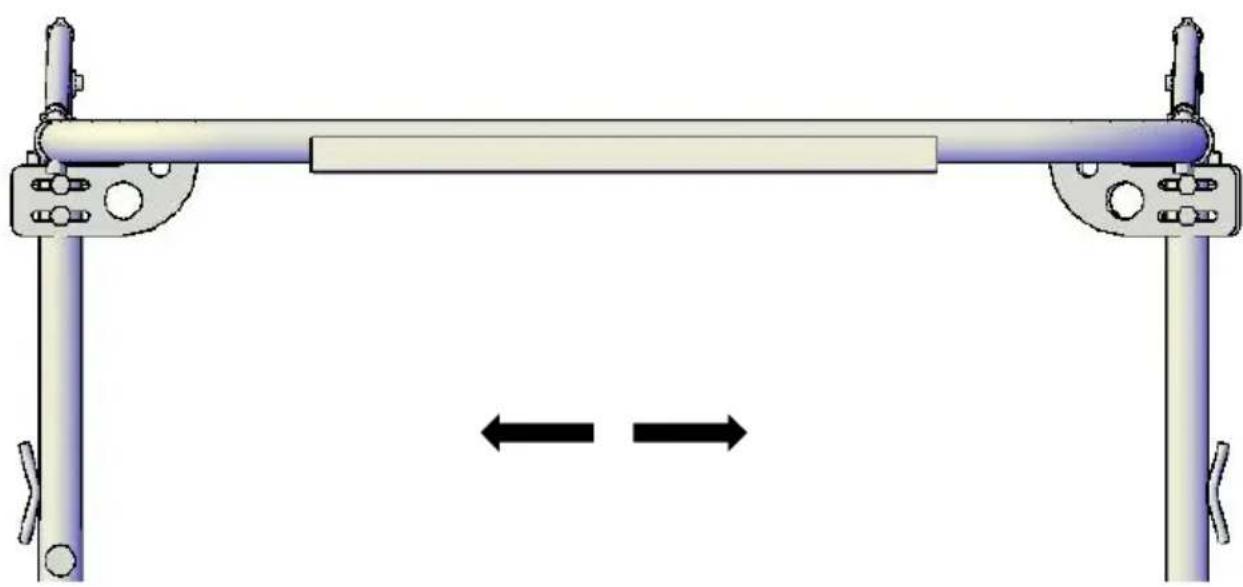
Fig.18
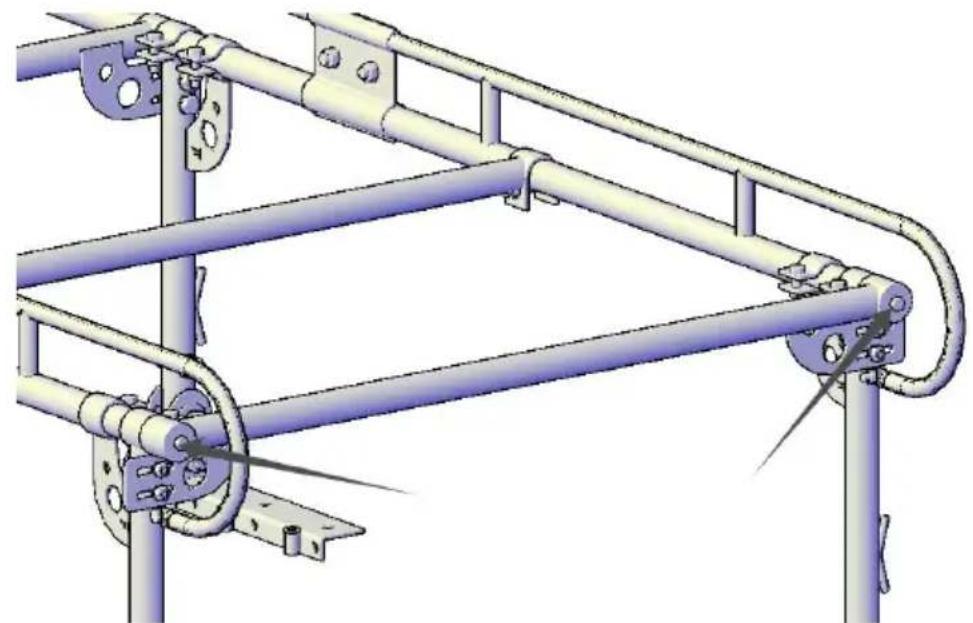
Fig.19
STEP 13:
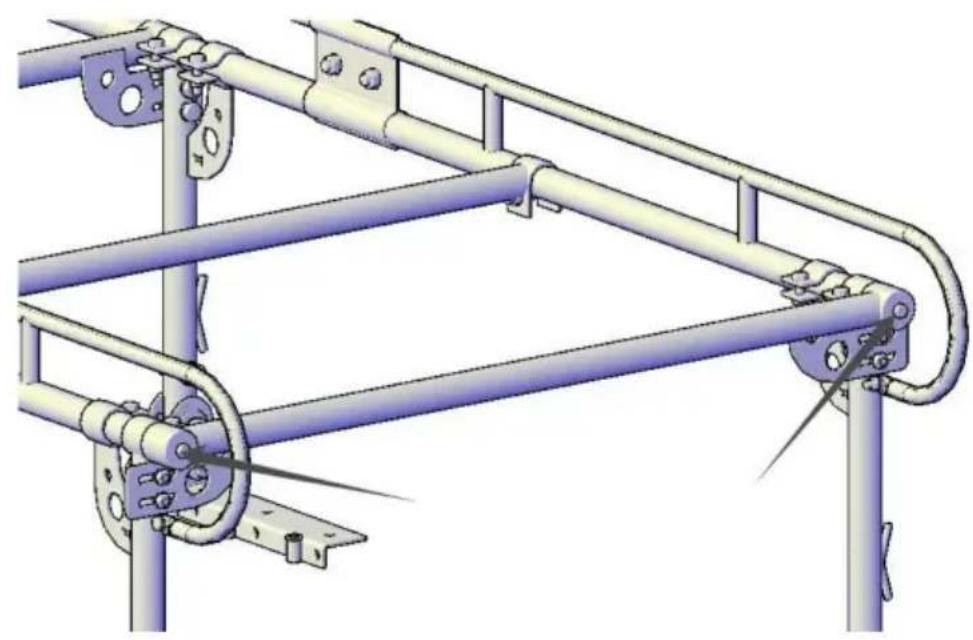
When you are satisfied with the alignment of the rack, proceed to securely tighten all four bolts that hold the legs to the mounting feet. (Fig.16) Now proceed to securely tighten the two M12x50 bolts that hold the legs to the side frames. (Fig.2)
CHECK TO MAKE SURE ALL HARDWARE IS COMPLETELY TIGHT AT THIS TIME. (Bolts as shown in Fig.20)
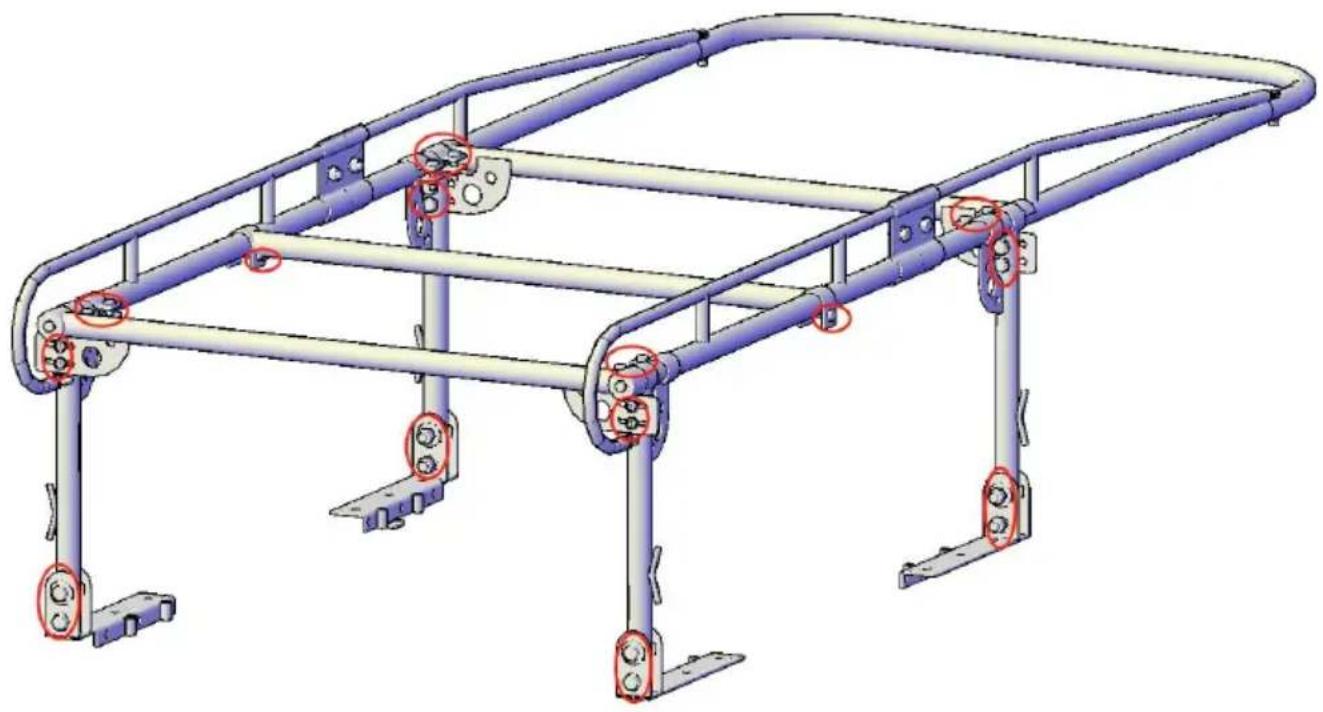
Fig.20
INSTALLATION IS NOW COMPLETE
NOTE: In order to load tall items, you may remove the rear cross bar by simply removing the bolt. (Fig. 19) Be sure to re-attach the rear cross bar and fasten it after loading.
DO NOT CARRY LOAD WITHOUT REAR BAR
CLEANING
To keep your rack finish looking good, you can simply wash it with a soft rag and mild soap.
WARNING
Rollover and other types of vehicle accidents may result in serious injury or death to you, your passengers, and others sharing the road. VEVOR accessories are decorative and are not intended to reduce or avoid injury or damage in an accident. The weight and location of VEVOR accessories may affect your vehicle's handling, stability, and performance, creating an increased risk of accident or rollover. Before installing any accessory, check state laws and assure that the accessory will not obscure any lights or interfere with proper operation of your vehicle's safety equipment. Consult your owner's manual and the VEVOR instructions for additional safety information. VEVOR products and the warnings contained herein are not a substitute for safe driving. Don't drink and drive; always use seat belts; and don't drive faster than conditions permit.
VEVOR®
TOUGH TOOLS, HALF PRICE
Technical Support and E-Warranty Certificate
www.vevor.com/support
VEVOR®
TOUGH TOOLS, HALF PRICE
NEED HELP? CONTACT US!
Figure 2 Fig. 1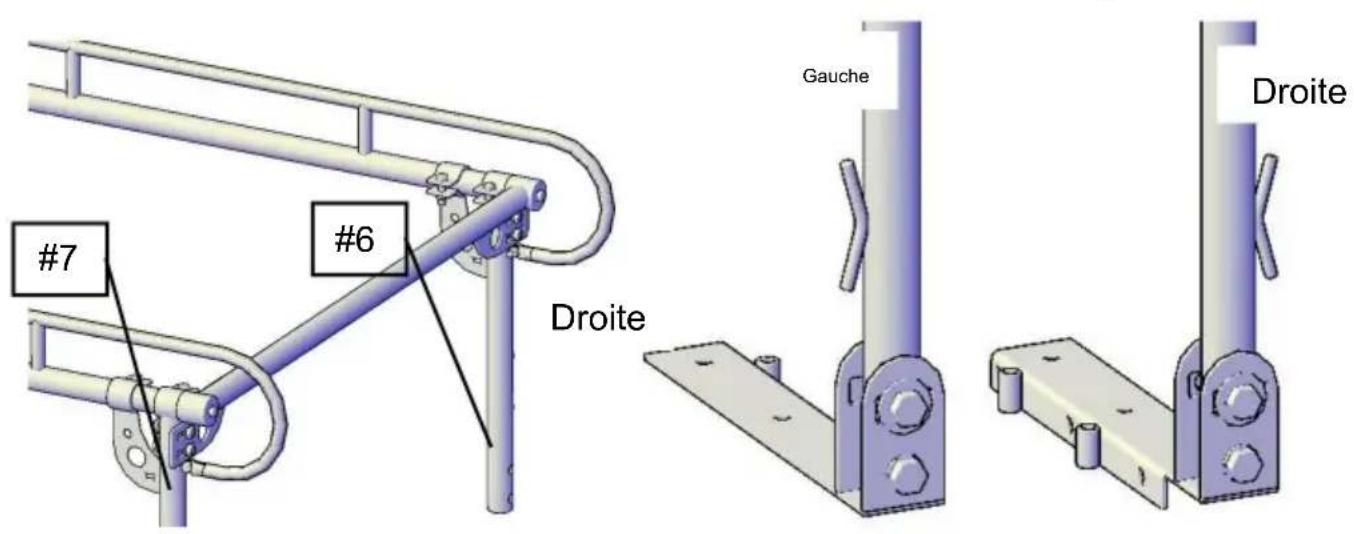
Figure 3 Figure 4
Figure 5
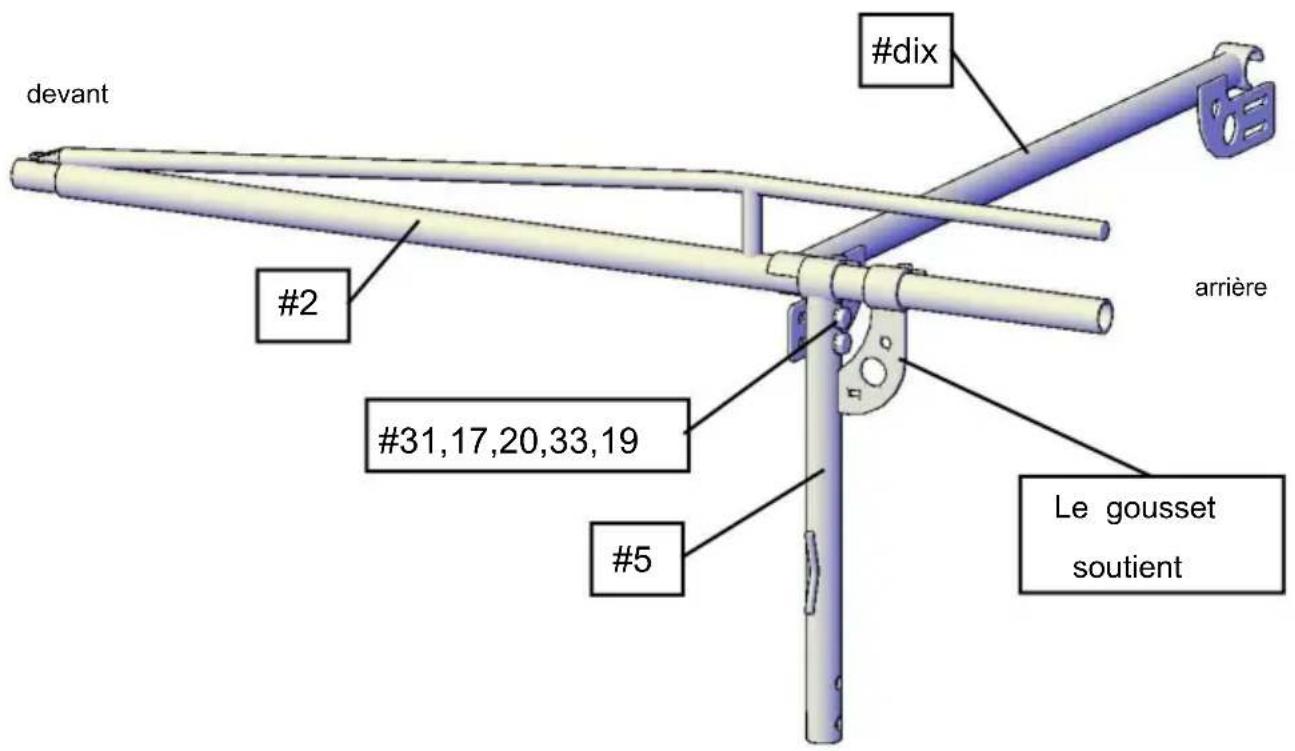
Figure 6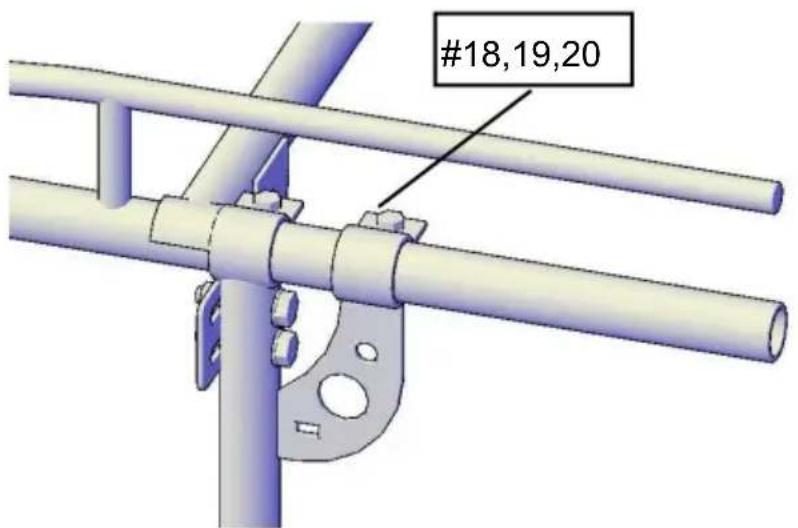
Figure 7
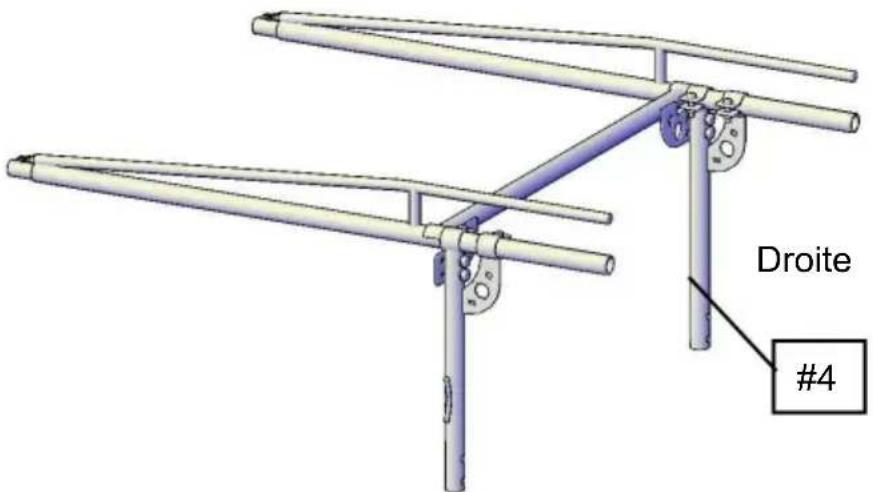
Figure 8
STEP 3:
Figure 9
STEP 5:
Figure 11
STEP 6:
Figure 12
STEP 7:
Figure 14
STEP 9:
Figure 15
STEP 10:
Figure 16 Figure 17
Figure 18
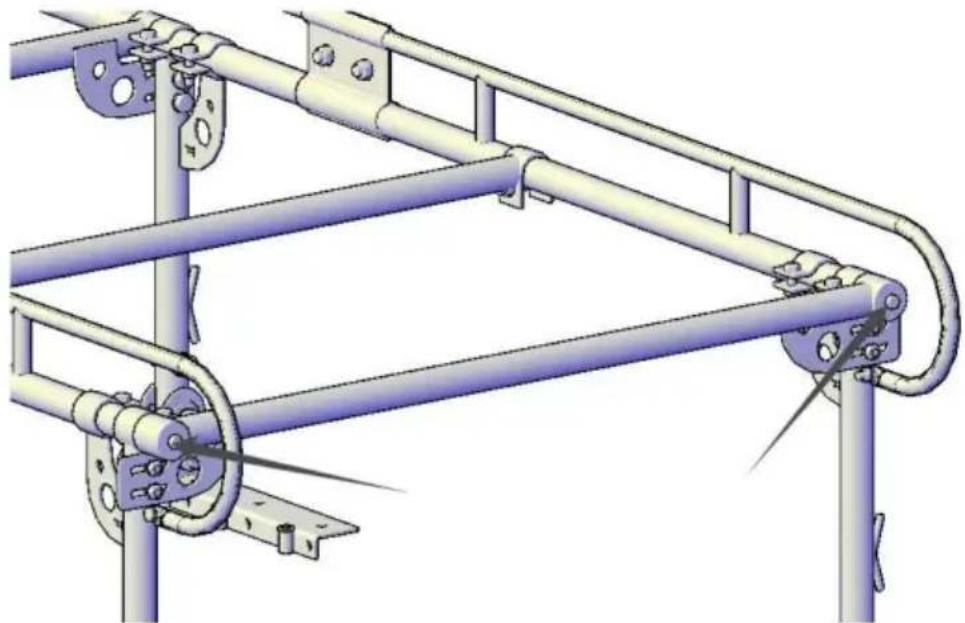
Figure 19
STEP 13:
Figure 20
THE INSTALLATION IS NOW COMPLETE
Fig.1 Fig.2
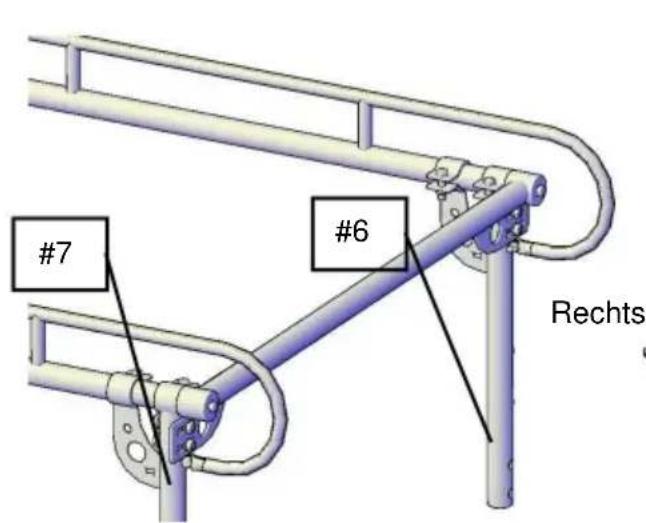
Fig. 3
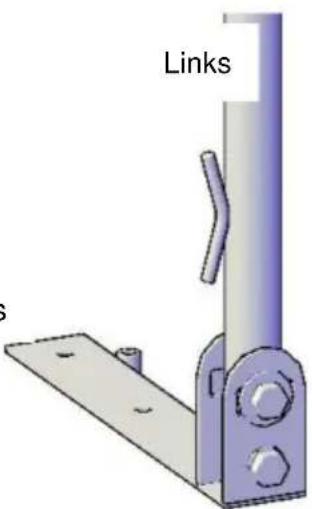
Fig.4
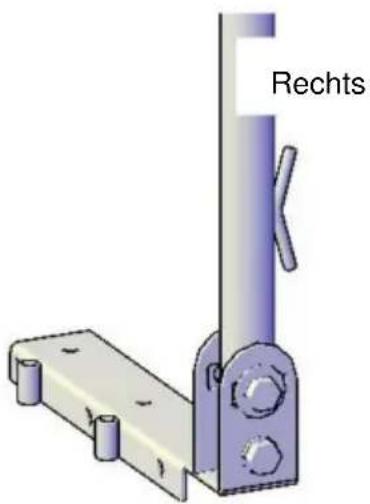
Fig.11
STEP 6:
Fig.12
STEP 7:
Fig.14
STEP 9:
Fig. 15
STEP 10:
Fig. 18
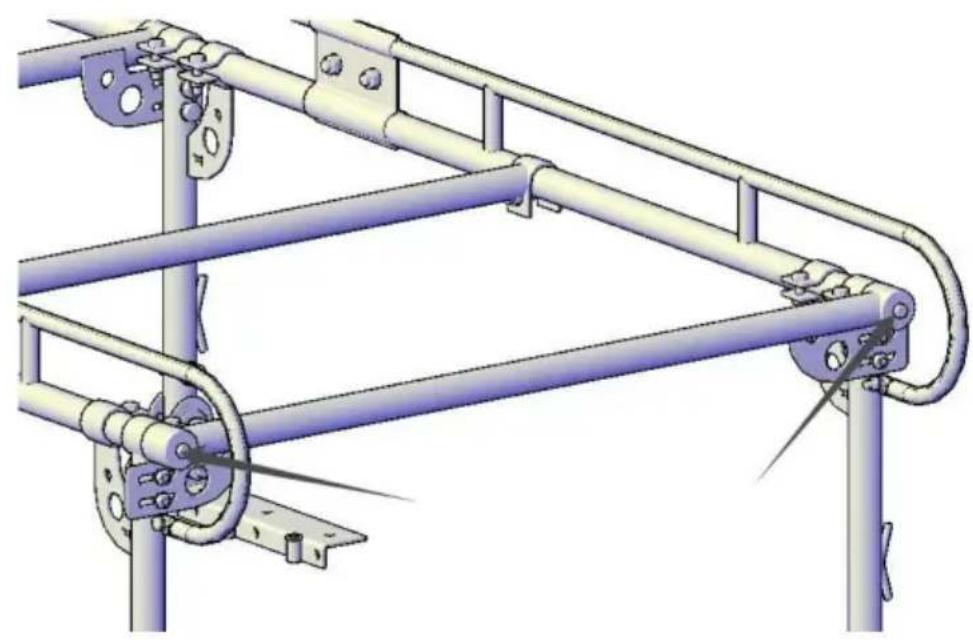
Fig. 19
STEP
Fig. 20
THE INSTALLATION IS NOW COMPLETE
www.vevor.com/support
VEVOR®
TOUGH TOOLS, HALF PRICE
NEED HELP? CONTACT US!
Fig. 5
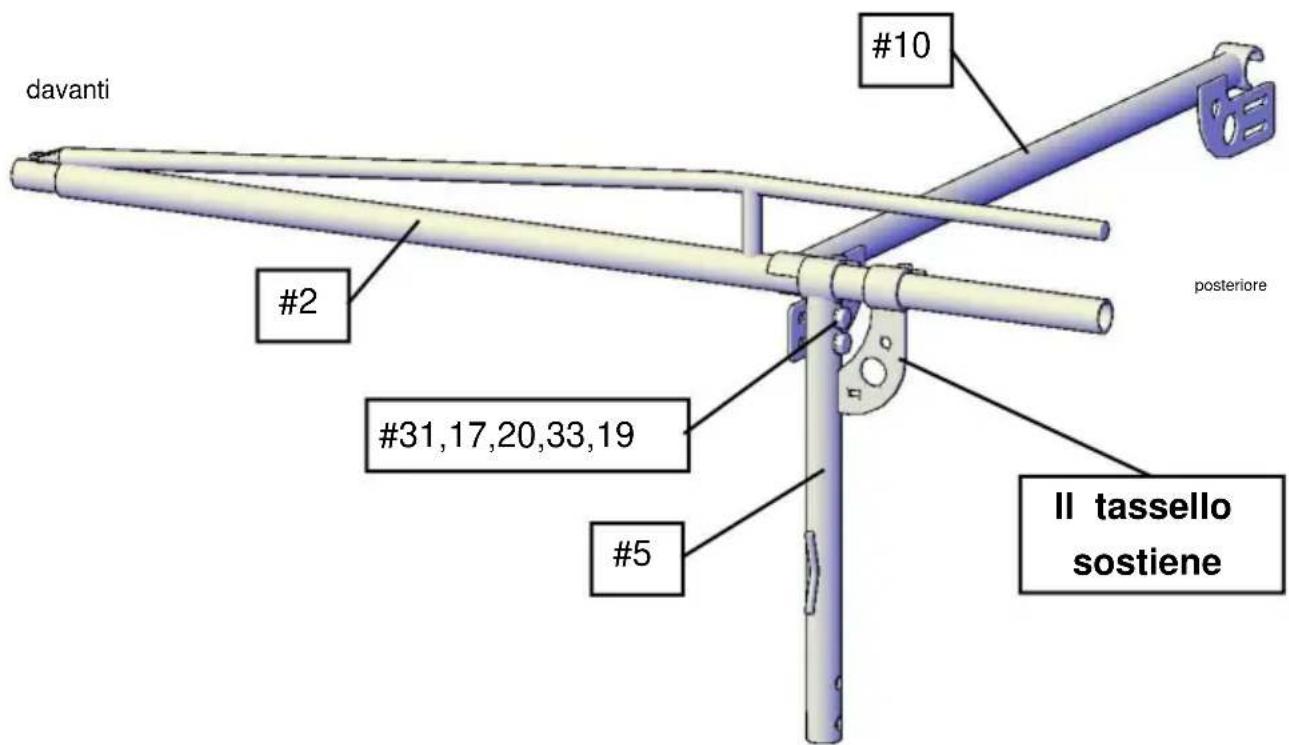
Fig. 6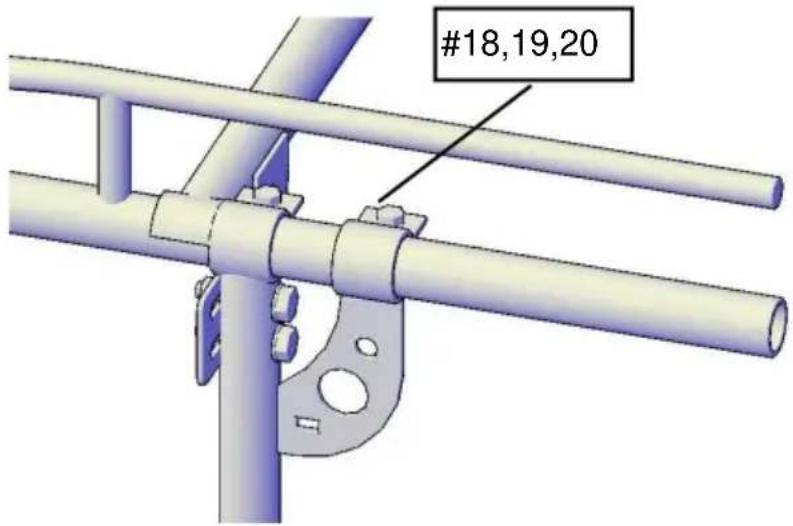
Fig. 7
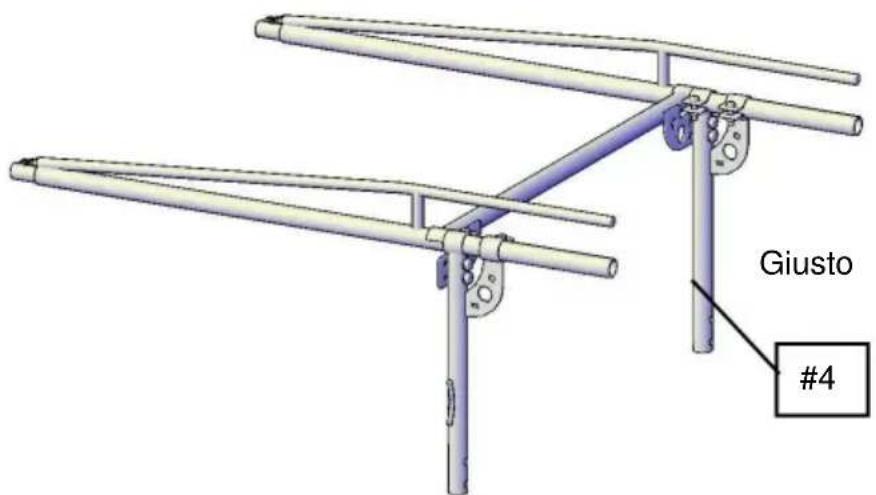
Fig.8
STEP 3:
Fig.11
STEP 6:
Fig.12
STEP 7:
Fig.14
STEP 9:
Fig.15
STEP 10:
Fig.16
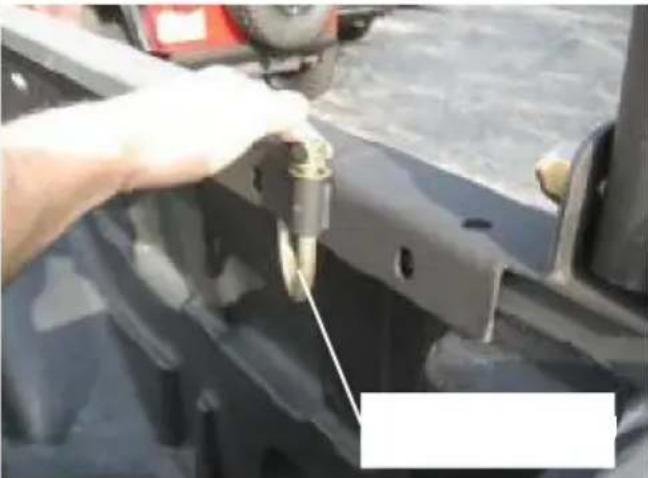
Fig.17
Fig.18
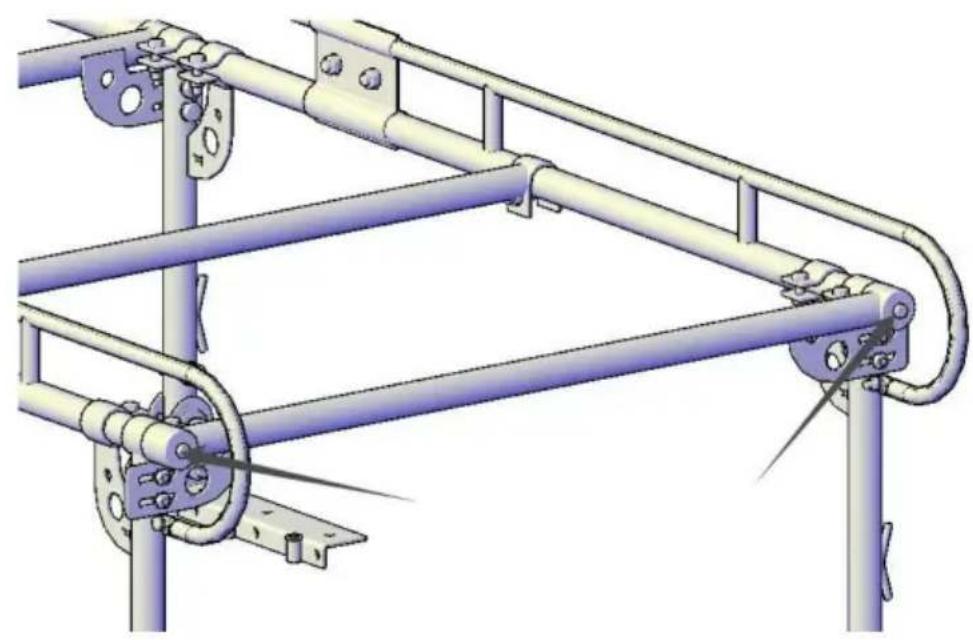
Fig.19
STEP 13:
Fig.20
electronics www.vevor.com/support
VEVOR®
TOUGH TOOLS, HALF PRICE
Fig. 3
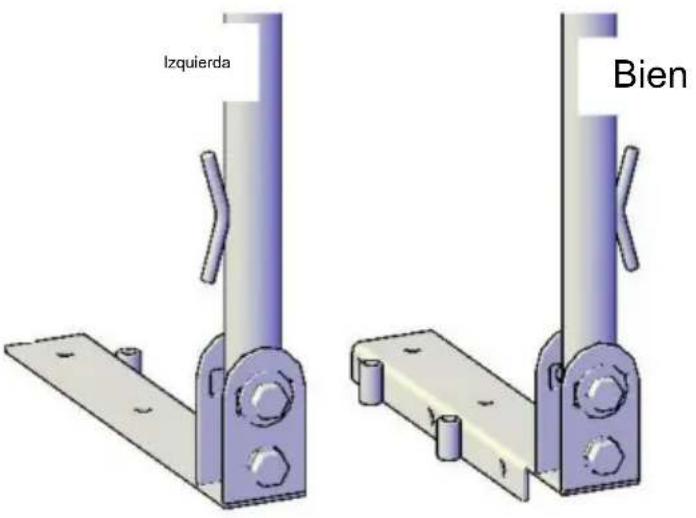
Fig.4
Fig.5
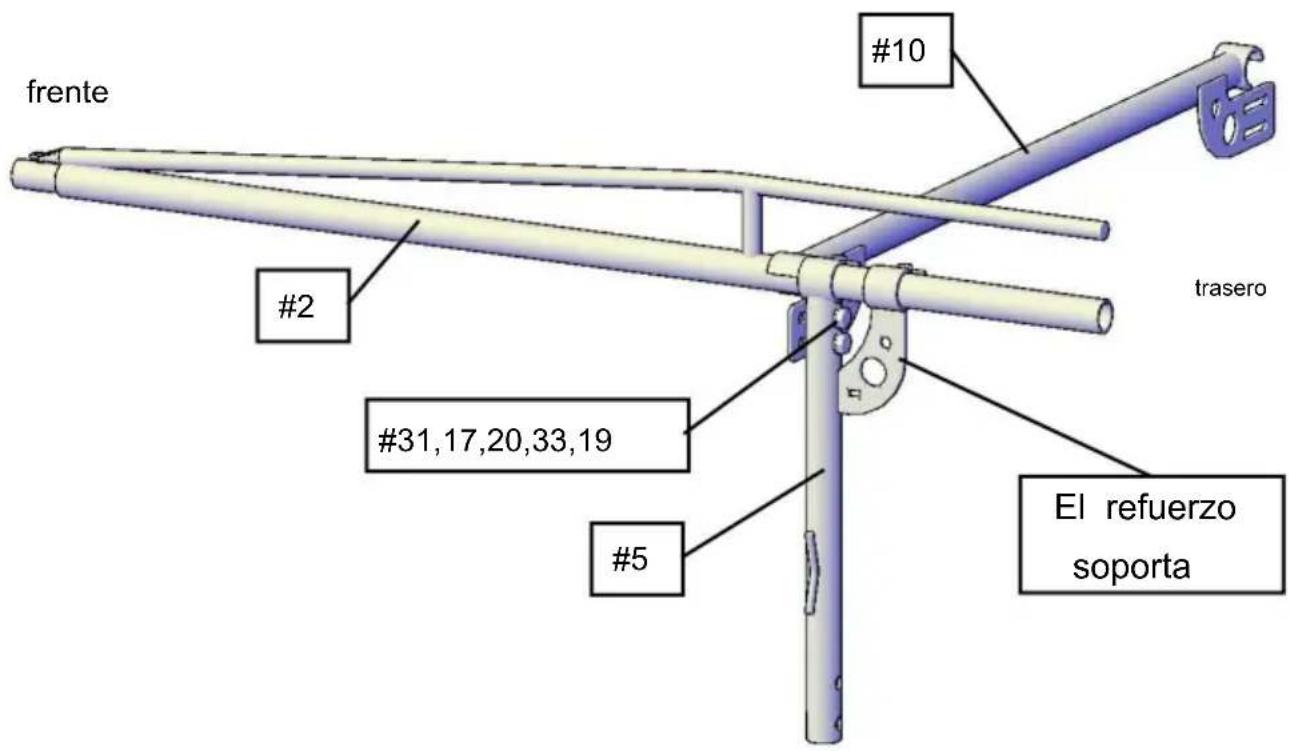
Fig.6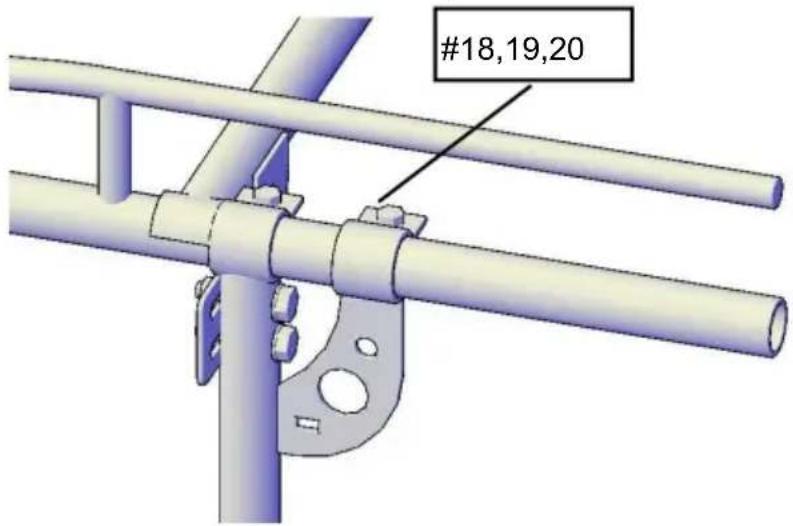
Fig.7
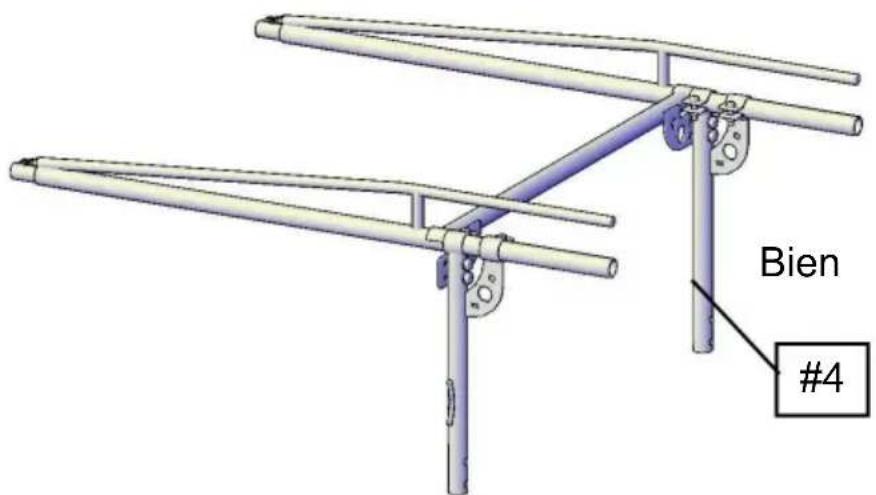
Fig.8
STEP 3:
Fig.9
STEP 5:
Fig.11
STEP 6:
Fig.12
STEP 7:
Fig.14
STEP 9:
Fig.15
STEP 10:
Fig.16 Fig.17
Fig.18
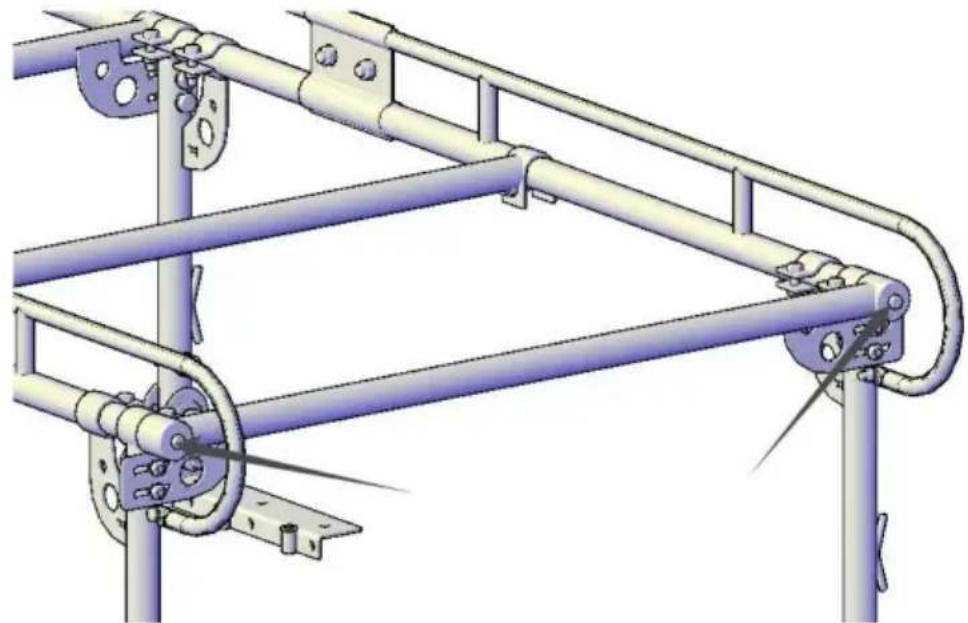
Fig.19
STEP 13:
Fig.20
NEED HELP? CONTACT US!
Fig.2 Fig.1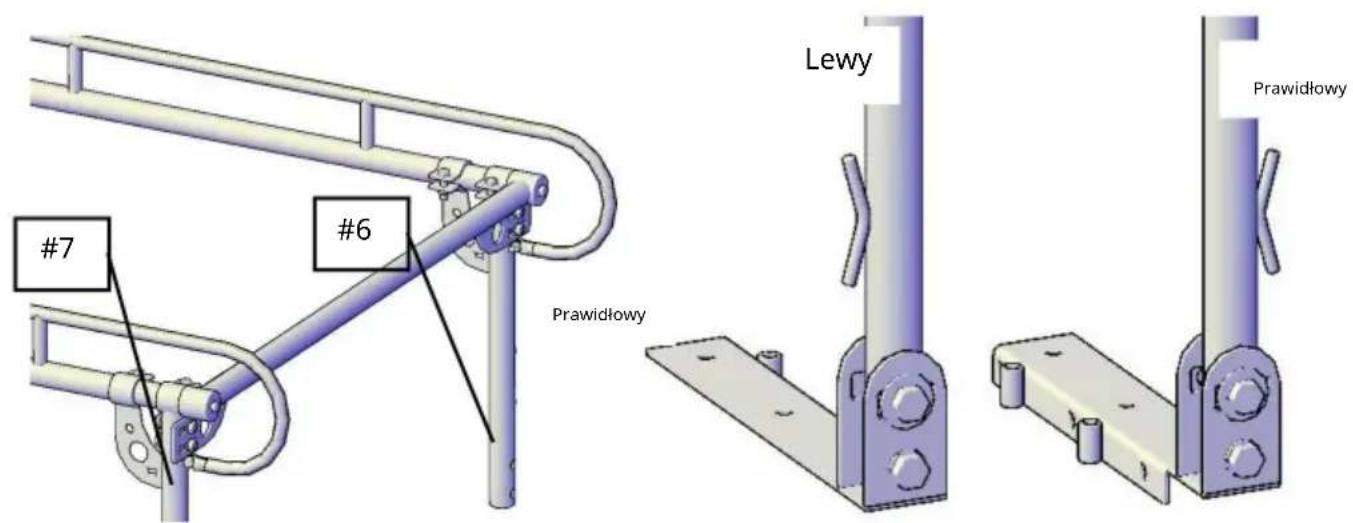
Fig.11
STEP 6:
STEP 7:
STEP 9:
STEP 10:
STEP 13:
INSTALLATION IS NOW COMPLETE
www.vevor.com/support
VEVOR®
TOUGH TOOLS, HALF PRICE
Technical support and e-warranty certificate www.vevor.com/support
TRUCK RACK FOR OVER CAB
MODEL: SC1402
NEED HELP? CONTACT US!
Figure 1 Fig. 2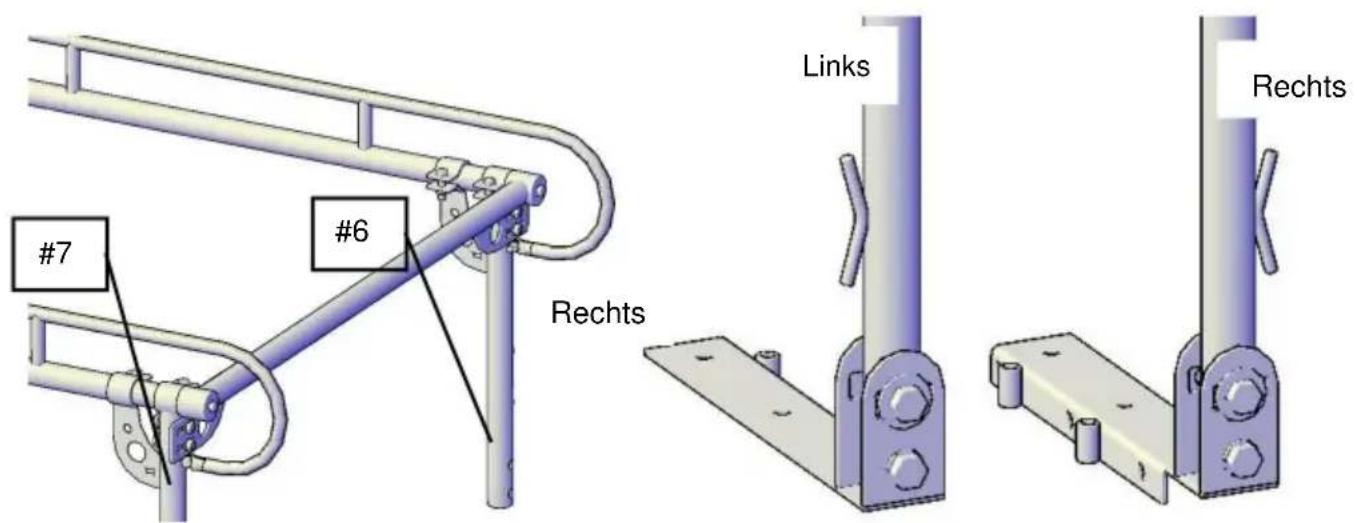
Fig. 4 Fig. 3
Fig. 11
STEP 6:
Fig. 12
STEP 7:
Fig. 14
STEP 9:
Fig. 15
STEP 10:
Fig. 16 Fig. 17
Fig. 18
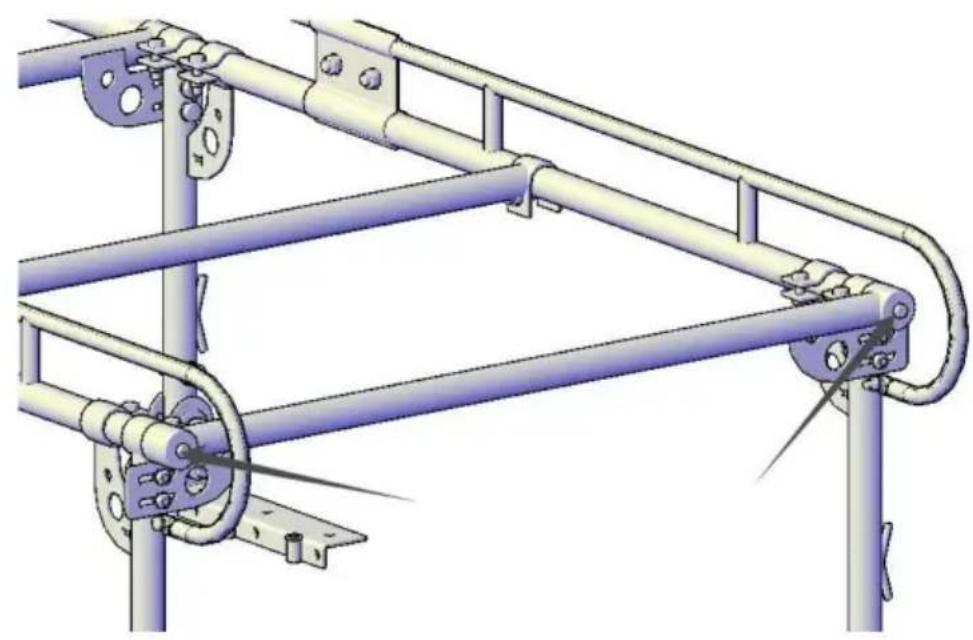
Fig. 19
STEP 13:
Fig. 20
THE INSTALLATION IS NOW COMPLETE
warranty certificate www.vevor.com/support
VEVOR®
TOUGH TOOLS, HALF PRICE
NEED HELP? CONTACT US!
Fig. 7
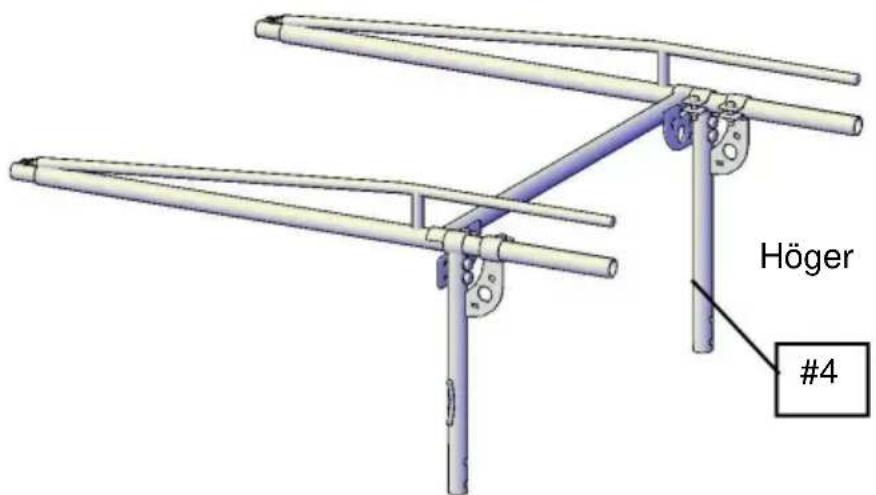
Fig. 8
STEP 3:
Fig. 11
STEP 6:
Install the Center Bar (#11) on the rear frame using 2-M12x75 bolt sets (#24,19,20).
Fig. 12
STEP 7:
Fig. 14
STEP 9:
Fig. 15
STEP 10:
Fig. 16
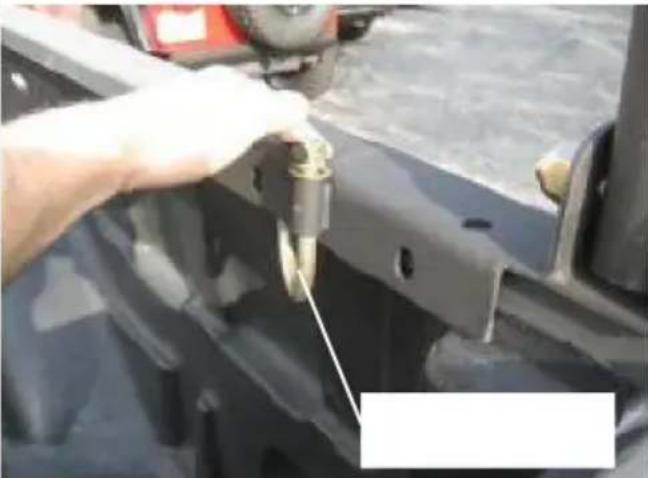
Fig. 17
Fig. 18
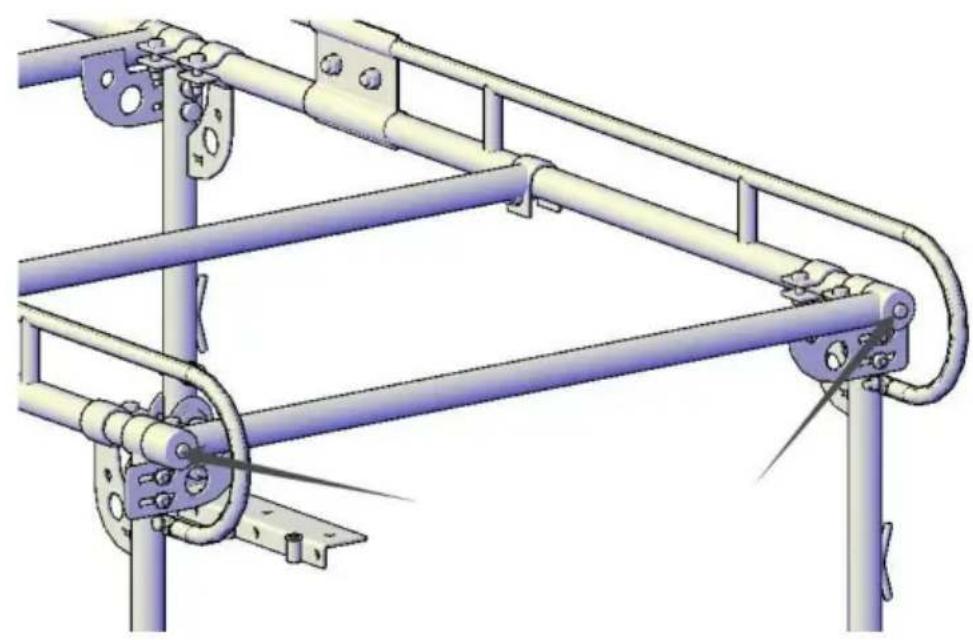
Fig. 19
STEP 13:
Fig. 20
INSTALLATION IS NOW COMPLETE
www.vevor.com/support
- OVER-CAB TRUCK RACK
- MODEL: SC
- NEED HELP? CONTACT US
- IMPORTANT SAFEGUARDS
- ASSEMBLY PRECAUTIONS
- SAVE THESE INSTRUCTIONS
- SAFETY AND USE
- PACKAGE LIST
- ASSEMBLY
- STEP
- STEP 2: INSTALL REAR MOUNTING FEET
- STEP 4: INSTALL FRONT MOUNTING FEET
- INSTALLATION IS NOW COMPLETE
- CLEANING
- WARNING
- VEVOR®
- TOUGH TOOLS, HALF PRICE
- THE INSTALLATION IS NOW COMPLETE
- TRUCK RACK FOR OVER CAB
Brand : Vevor
Model : SC1402
Category : Vehicle accessory