
H-3000 - Welding machine Vevor - Free user manual and instructions
Find the device manual for free H-3000 Vevor in PDF.
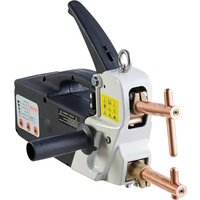


| Product Type | Spot Welder |
| Brand | Vevor |
| Model | H-3000 |
| Supply Voltage | 230 V ~ ±10% / 50 Hz or 400 V ~ ±10% / 50 Hz |
| Power at 50% Duty Cycle | 2.5 kVA |
| Maximum Welding Power | 14 kVA |
| No-Load Voltage | 2.5 V |
| Maximum Short-Circuit Current | 6.3 kA |
| Maximum Spot Weld Thickness | 2 + 2 mm |
| Minimum Rest Period | 20 seconds |
| Maximum Clamping Force | 120 kg |
| Arm Reach | 120 mm |
| Required Power Supply | 30 amps, industrial plug recommended |
| Thermal Protection | Yes, shut-off at 95 °C |
| Electrode Pressure Adjustment | By adjusting screw, graduated indicator |
| Welding Modes | Normal and Pulsed |
| Control Panel | Time, thickness and welding mode adjustment |
| Mains Power Supply | Power cable with connector to wire |
| Maintenance | Clean with compressed air, brush electronic circuits, check connections |
| Warranty | Electronic warranty certificate, contact support |
| Safety | Safety goggles, gloves, protective clothing mandatory; unplug before maintenance |
Frequently Asked Questions - H-3000 Vevor
User questions about H-3000 Vevor
0 question about this device. Answer the ones you know or ask your own.
Ask a new question about this device
Download the instructions for your Welding machine in PDF format for free! Find your manual H-3000 - Vevor and take your electronic device back in hand. On this page are published all the documents necessary for the use of your device. H-3000 by Vevor.
USER MANUAL H-3000 Vevor
Technical Support and E-Warranty Certificate www.vevor.com/support
SPOT WELDER
MODEL: H-3000
We continue to be committed to providing you with tools at competitive prices. "Save Half", "Half Price", or any other similar expressions used by us only represent savings you might benefit from buying certain tools with us compared to top brands and do not necessarily mean to cover all categories of tools offered. We kindly remind you to verify carefully when placing an order with us to ensure you are actually saving half in comparison with the top major brands.
VEVOR®
TOUGH TOOLS, HALF PRICE
SPOT WELDER
MODEL: H-3000
NEED HELP? CONTACT US!
Have product questions? Need technical support? Please feel free to contact us:
Technical Support and E-Warranty Certificate www.vevor.com/support
This is the original instruction. Please read all manual instructions carefully before operating. VEVOR reserves a clear interpretation of the user manual. The appearance of the product shall be subject to the product you received. Please forgive us that we won't inform you again if there are any technology or software updates on our product.
 | Warning-To reduce the risk of injury, user must read instructions manual carefully. |
 | This product is subject to the provision of European Directive 2012/19/EC. The symbol showing a wheelie bin crossed through indicates that the product requires separate refuse collection in the European Union. This applies to the product and all accessories marked with this symbol. Products marked as such may not be discarded with normal domestic waste, but must be taken to a collection point for recycling electrical and electronic devices |
1. SAFETY INSTRUCTIONS
1.1. ELECTRICAL SAFETY.
- WARNING! It is the user's responsibility to read, understand, and comply with the following:
You must check all electrical equipment and appliances to ensure they are safe before using. You must inspect power supply leads, plugs, and all electrical connections for wear and damage. You must ensure the risk of electric shock is minimized by the installation of appropriate safety devices. An RCCB (Residual Current Circuit Breaker) should be incorporated in the main distribution board. We also recommend that an RCD (Residual Current Device) is used with all electrical products. It is particularly important to use an RCD with portable products that are plugged into an electrical supply not protected by an RCCB. If in doubt, consult a qualified electrician. You may obtain a Residual Current Device by contacting your dealer. You must also read and understand the following instructions concerning electrical safety.
1.1.1 The Electricity At Work Act 1989 requires all portable electrical appliances, if used on business premises, to be tested by a qualified electrician, using a Portable Appliance Tester (PAT), at least once a year.
1.1.2 The Health & Safety at Work Act 1974 makes owners of electrical
appliances responsible for the safe condition of the appliance and the safety of the appliance operator. If in any doubt about electrical safety, contact a qualified electrician.
1.1.3. Ensure the insulation on all cables and the product itself is safe before connecting to the mains power supply. See 1.1.1. & 1.1.2. above and use a Portable Appliance Tester (PAT). 1.1.4. Ensure that cables are always protected against short circuit and overload. 1.1.5. Regularly inspect power supply leads, plugs for wear and damage, and electrical connections
to ensure that none is loose.
1.1.6. Important: Ensure the voltage marked on the product is the same as the electrical power supply to be used and check that the supply is correctly fused, see rating at right.
- 1.1.7. DO NOT pull or carry the powered appliance by its power supply lead. 1.1.8. DO NOT pull power plugs from sockets by the power cable. 1.1.9. DO NOT use worn or damaged leads, plugs, or connections.
Replace or have repaired by a qualified electrician.
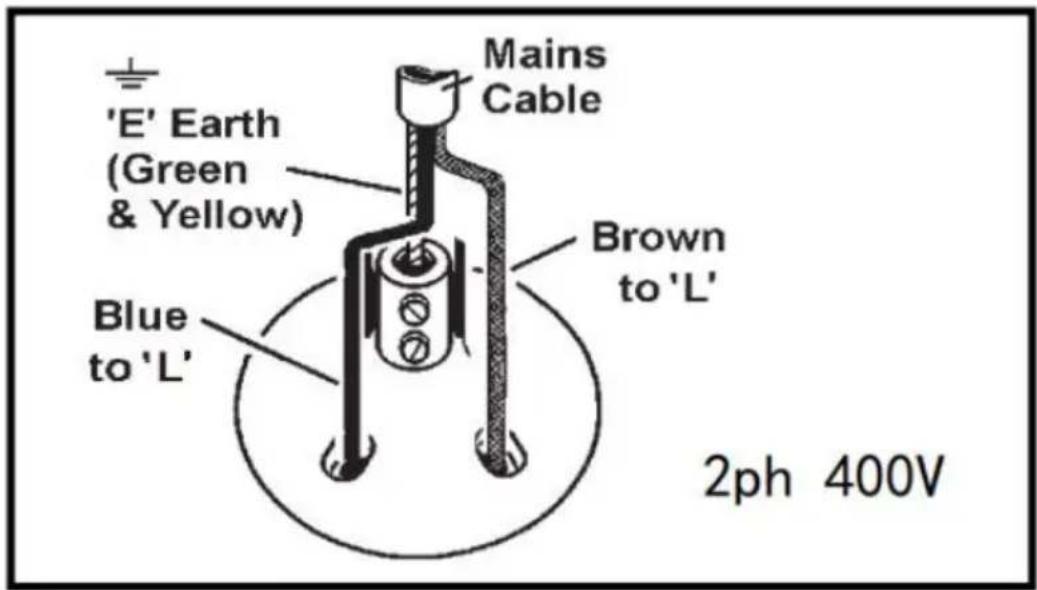
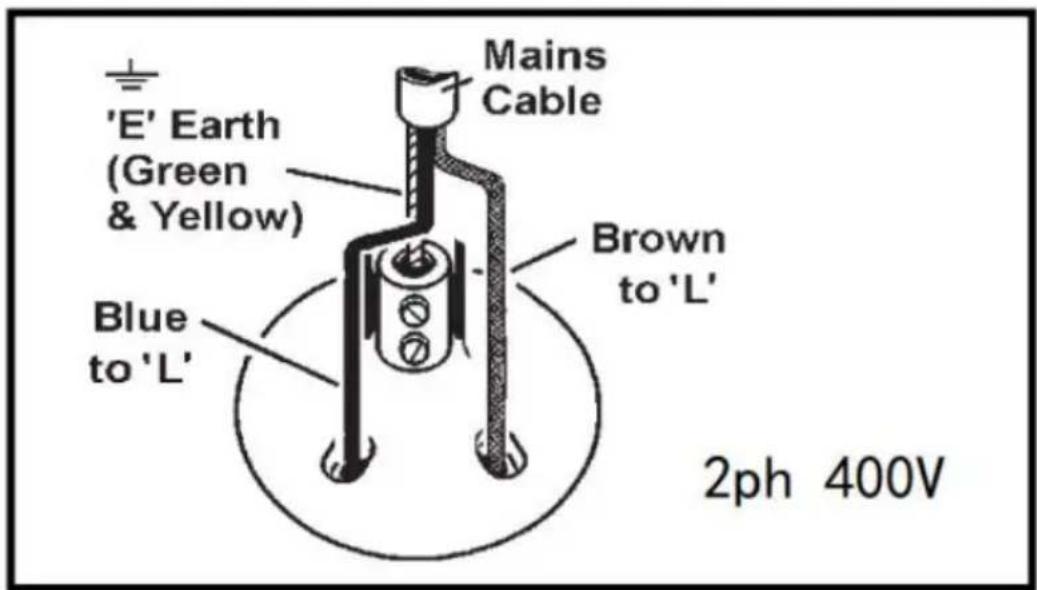
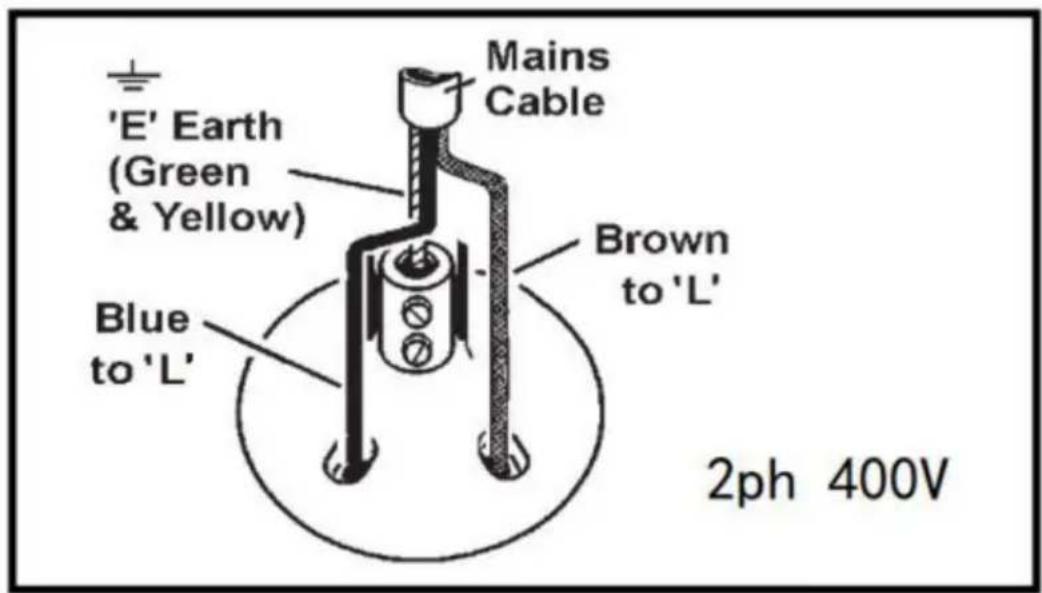
1.1.10. This product requires a 30 amp supply and NO plug is fitted. You may ask a qualified electrician to ensure a 30 amp supply is available. We recommend the installation of an industrial round pin plug and socket with your electrician. Plug -
Ensure the unit is correctly wired and earthed.
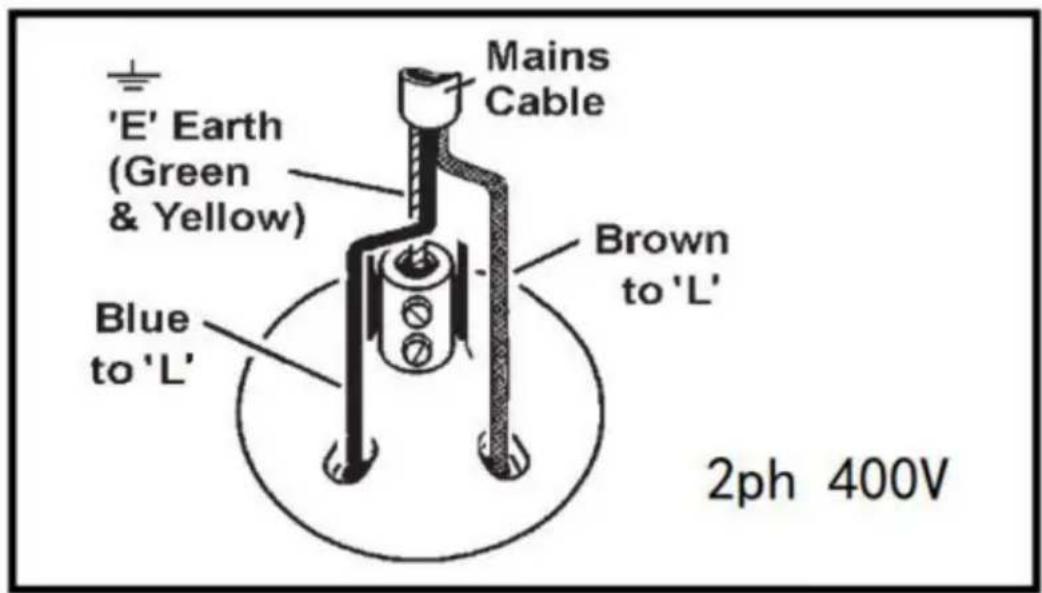
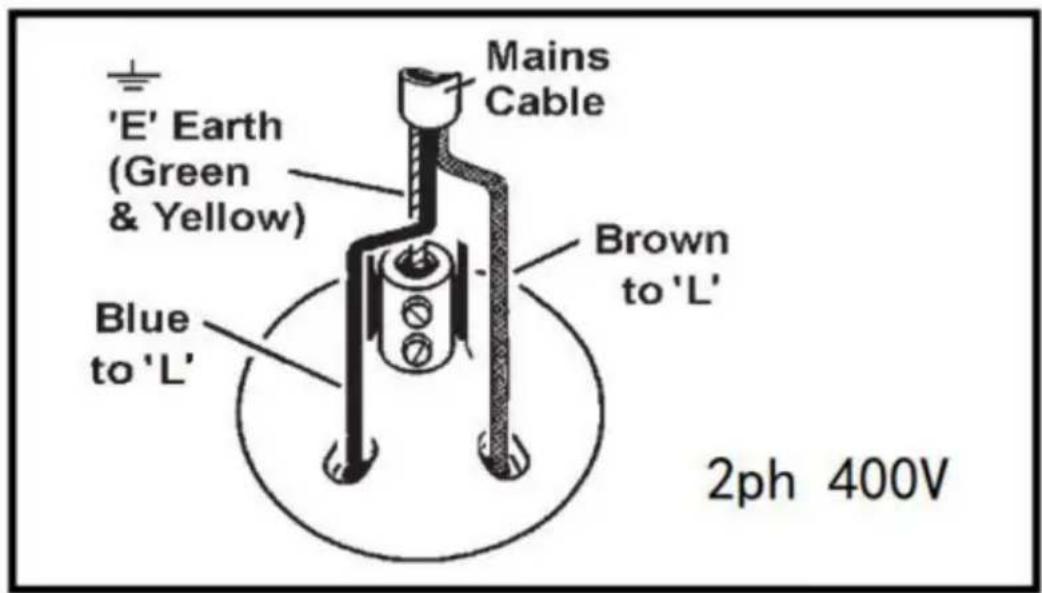
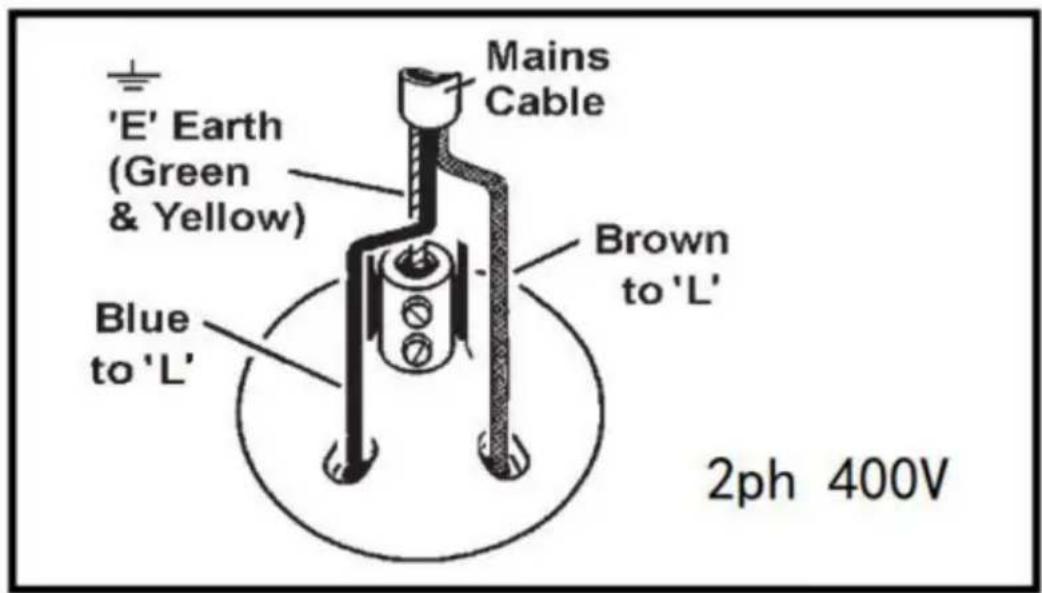
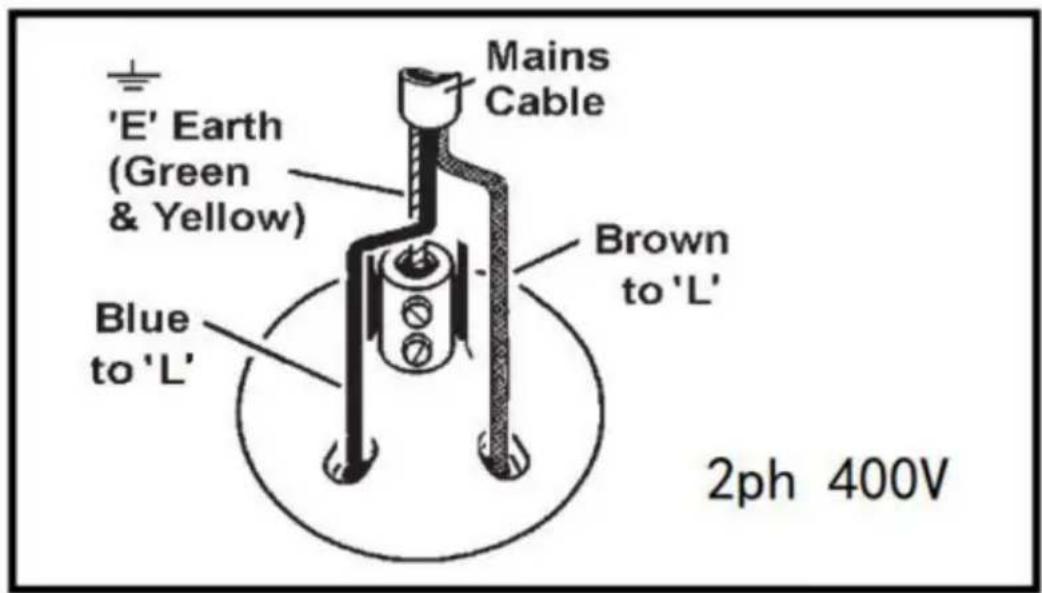
a) Connect the GREEN/YELLOW earth wire to the earth terminal 'E'. b) Connect the BROWN live wire to live terminal 'L'. c) Connect the BLUE neutral wire to the neutral terminal 'N'. d) After wiring, check there are no bare wires, that all wires have been correctly connected, that cable outer insulation extends beyond the cable grip and that the grip is tight.
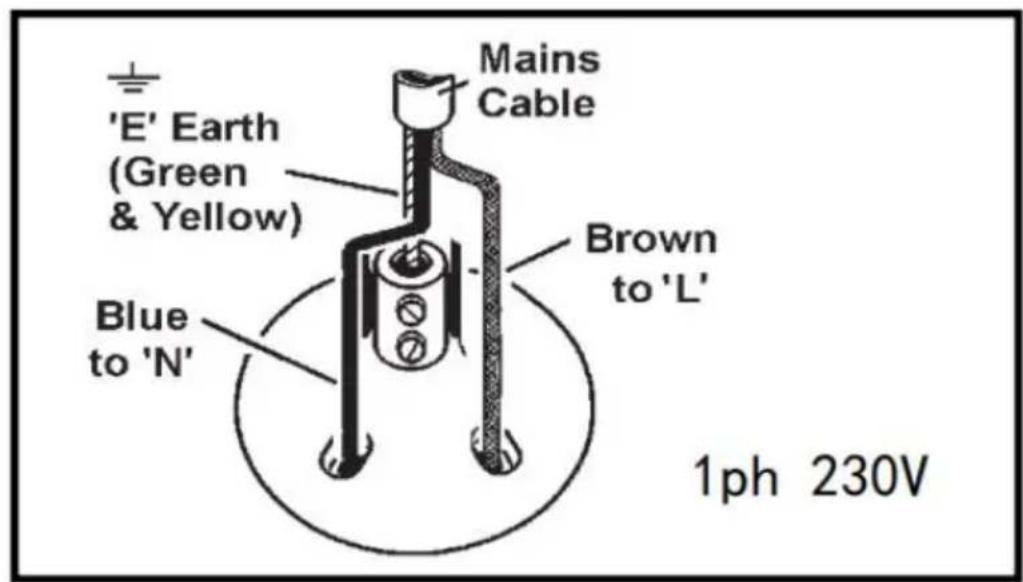
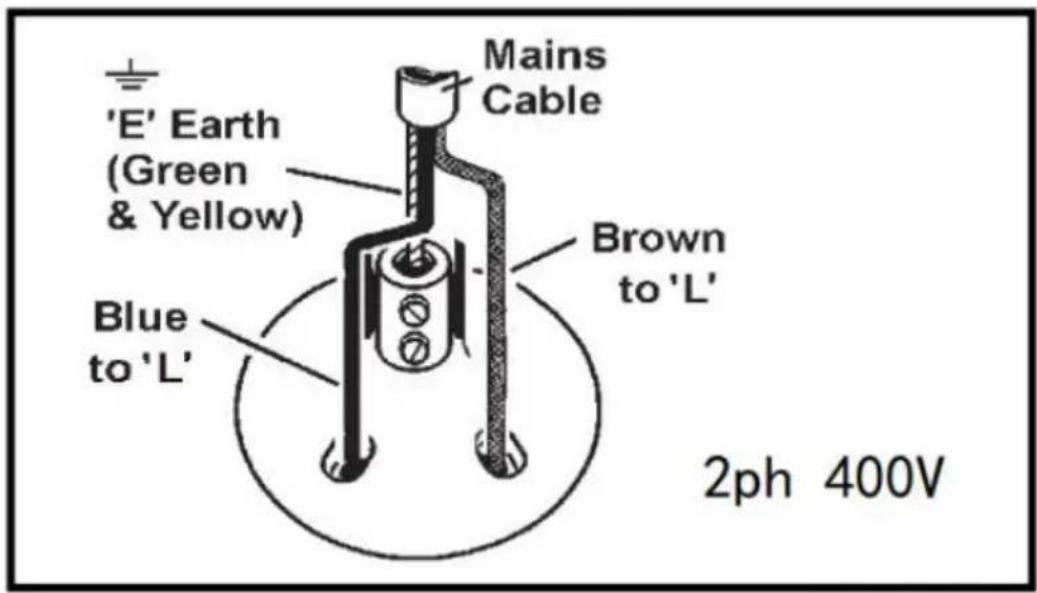
FUSE RATINGS REFER TO THE TECHNICAL SPECIFICATION IN SECTION 3.
1.1.12. Cable extension reels. When a cable extension reel is used, it should be fully unwound before connection. A cable reel with an RCD fitted is recommended, since any product which is plugged into the cable reel will be protected. The section of the cores of the cable is important. The minimum section of cable required for these welders is 2.5 mm².
1.2 GENERAL SAFETY
- WARNING: Unplug from the mains power supply before performing maintenance or service.
Ensure the welder and all cables are in sound condition and in good working order.
- Replace or repair damaged parts. Use recommended parts only. Unauthorised parts may be dangerous and will invalidate the warranty.
- Keep the welder clean for best and safest performance.
- Use the welder in a suitable working area. Keep the area clean and tidy, free from unrelated materials, and ensure there is adequate lighting.
- The welder should be operated by one person only.
- WARNING! Wear safety goggles, protective clothing, and welding gauntlets.
- Wear a headset if noise levels exceed 85 dB.
- Check you have good ventilation and that air can flow freely around the welder.
- Ensure there are no flammable or combustible materials near the work area.
- Clean workpieces to avoid production of unwanted gases from coatings such as varnish, galvanising, or lubricants.
- Keep children and unauthorised persons away from the work area.
- Remove ill-fitting clothing, remove ties, watches, rings, and other loose jewellery, and contain long hair.
- DANGER! Welder creates magnetic fields that can interfere with watches, metallic prostheses, magnetic cards, instrumentation, data transmission devices, and local telephone lines. If you have a pacemaker, consult a doctor before welding or approaching a spot welding area.
- DO NOT wear any clothing with metal accessories. Ensure there are no metallic articles in your pockets.
- DO NOT use the welder for any purpose other than that for which it is designed.
- DO NOT get the welder wet or use the welder in damp or wet locations.
- DANGER! DO NOT weld near inflammable materials - solids, liquids or gases.
Do not weld on containers or other fitments that contain or have contained fuel or gas fuels.
- DO NOT operate welder while under the influence of drugs, alcohol or intoxicating medication, or if fatigued.
- DO NOT operate the welder if it, or the cable, is damaged.
• DO NOT allow untrained persons to operate the welder.
- DO NOT use outside, welder is for inside use only.
- When not in use remove plug from power supply and store in a dry, child-safe location.
2. INTRODUCTION
With welding transformer 220V/380V power into low pressure, the instantaneous high power source, the output is low voltage high current, make the welding workpiece with high temperature resistance and add the upsetting force to welding. The large welding thickness of 2.0 + 2.0mm
One click select welding mode, weldment thickness and
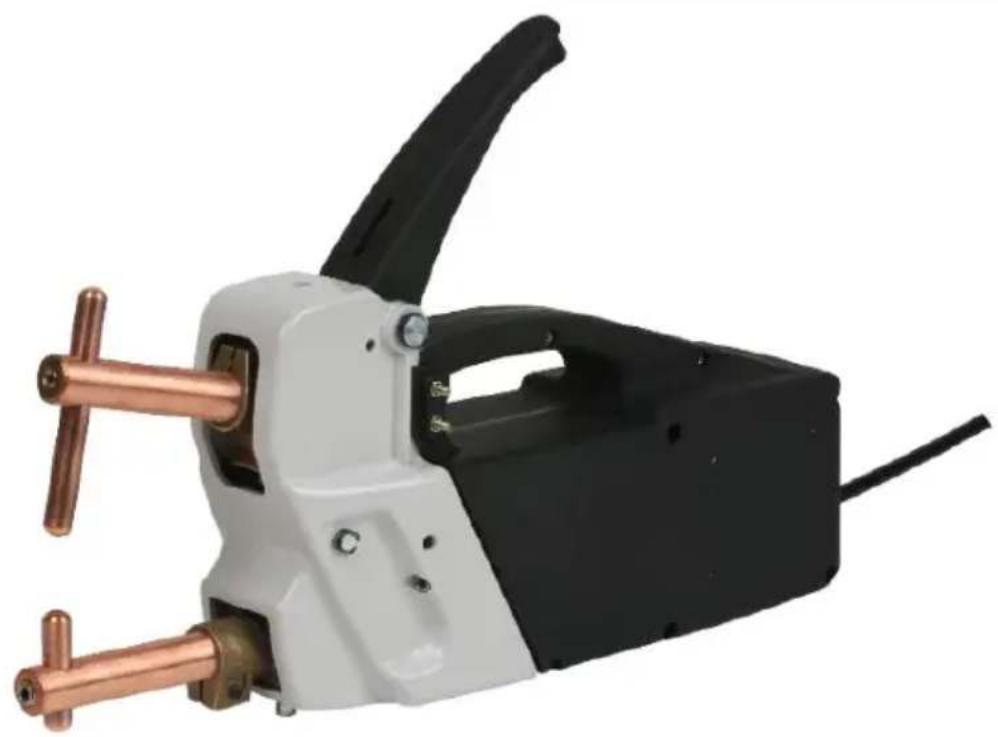
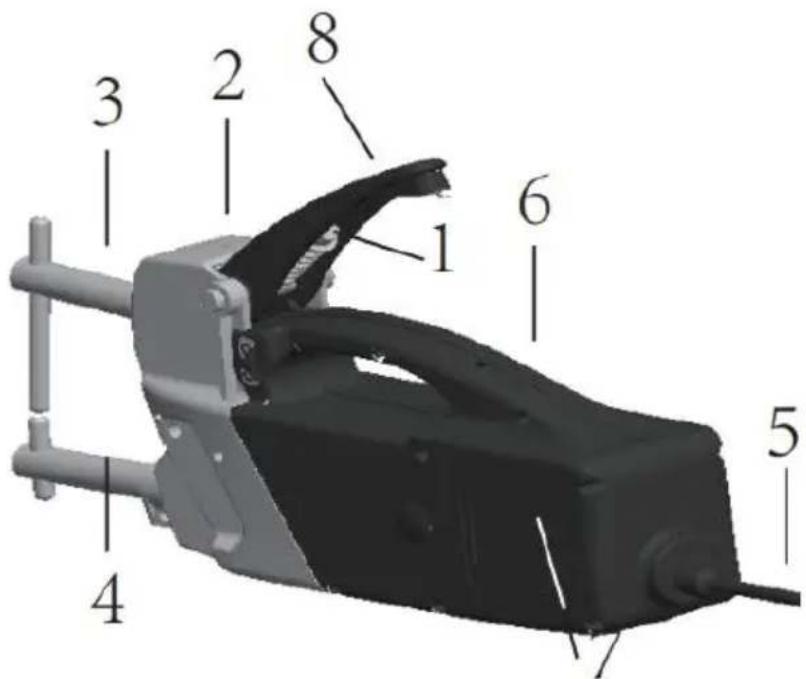
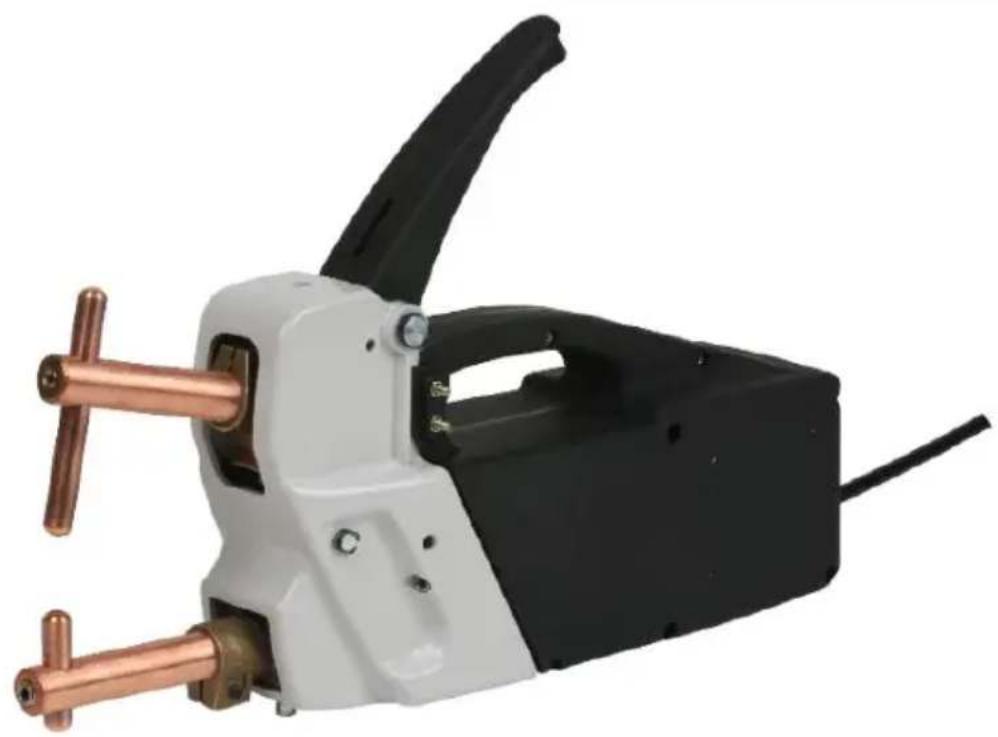
MAIN FEATURES
- Electrode pressure adjustment screw
- Position for eye bolt. (Eye bolt not supplied.)
- Moving welding arm.
- Fixed welding arm.
- Power supply cable.
- Micro switch.
- Control panel.
- Right / left handgrip. (Handgrip not supplied.)
3. TECHNICAL SPECIFICATION
| Model H-3000 H-3000 | ||
| Voltage | 230V~ ±10% /50Hz | 400V~±10%/50Hz |
| Power at 50% 2.5kVA 2.5kVA | ||
| Max. welding power 14kVA | 14kVA | |
| No Load Voltage. 2.5V 2.5V | ||
| Max. short circuit current | 6.3kA | 6.3kA |
| Max spot weld thickness | 2+2mm | 2+2mm |
| Min.rest period between welds | 20seconds | 20seconds |
| Maximum clamping force | 120kg | 120kg |
| Projection of arms | 120mm | 120mm |
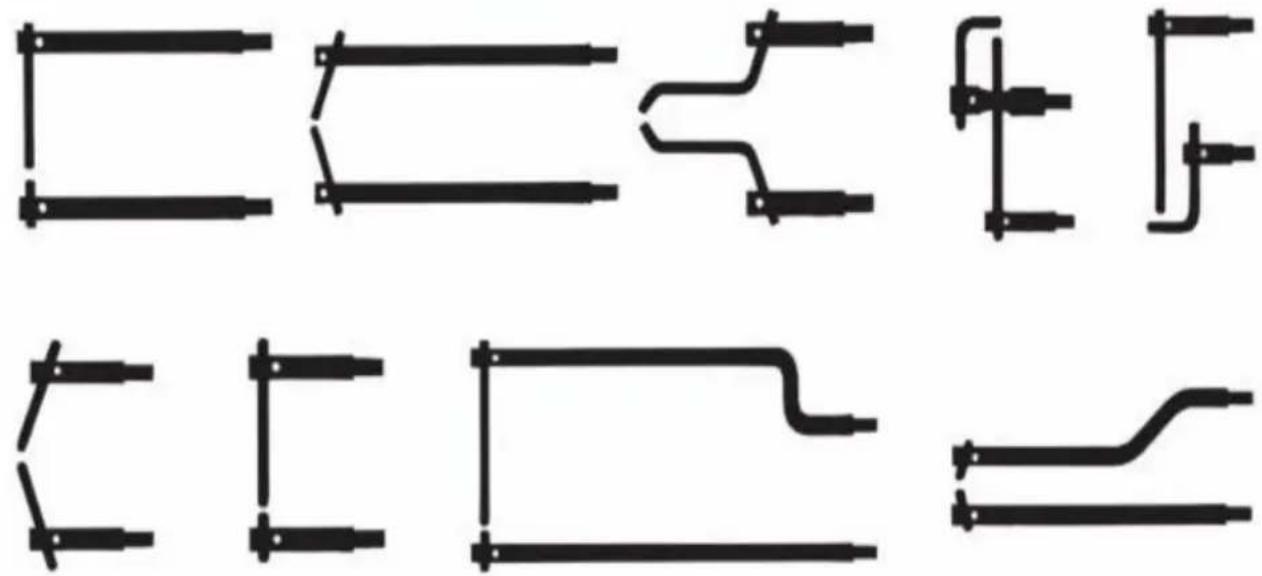
A FULL RANGE OF ARMS AND ELECTRODES IS AVAILABLE.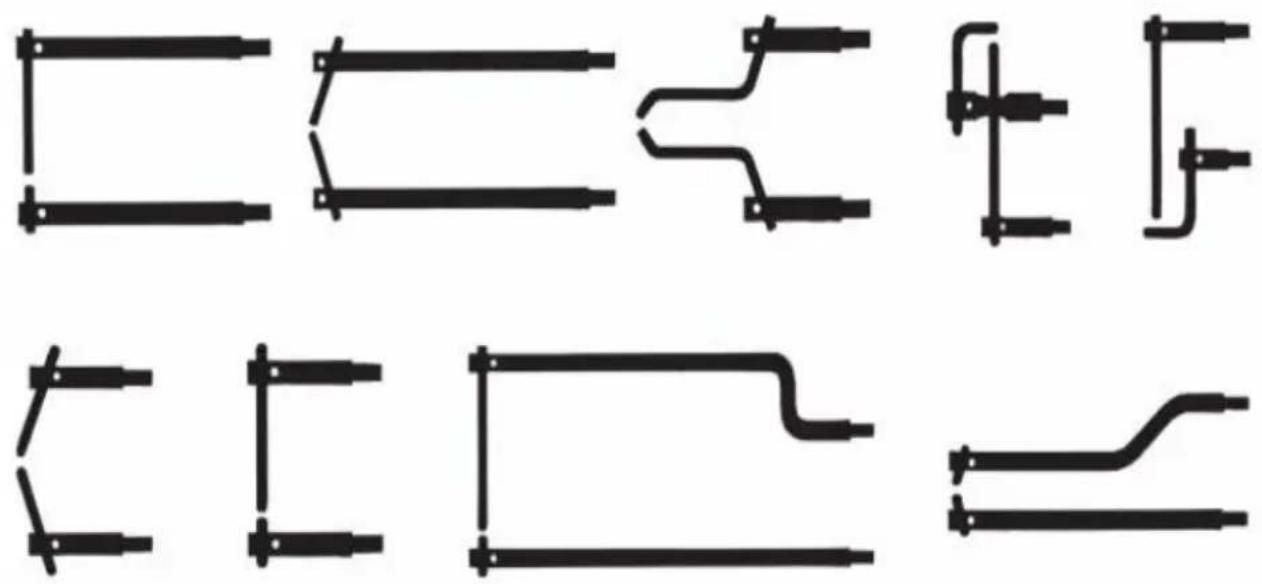
4. ELECTRICAL CONNECTIONS
- WARNING! Ensure that you read and understand the safety instructions in Section 1.
4.1. Connection to mains power supply.
Before making any electrical connections check that the voltage of the available power supply is suitable for the spot welder model that you purchased. (See specification above.)
4.2 The spot welder model requires a 30amp supply and is suitable for either single phase or three phase connection. 4.3 The spot welder model requires a 32 amp plug. If connecting to a 30amp supply, wire the plug as shown on
5. SETTING UP TO WELD
- WARNING! Ensure that you read and understand the safety instructions in Section 1.
Before carrying out any spot welding operations, the following series of checks and controls must be carried out with the welder disconnected from the power supply.
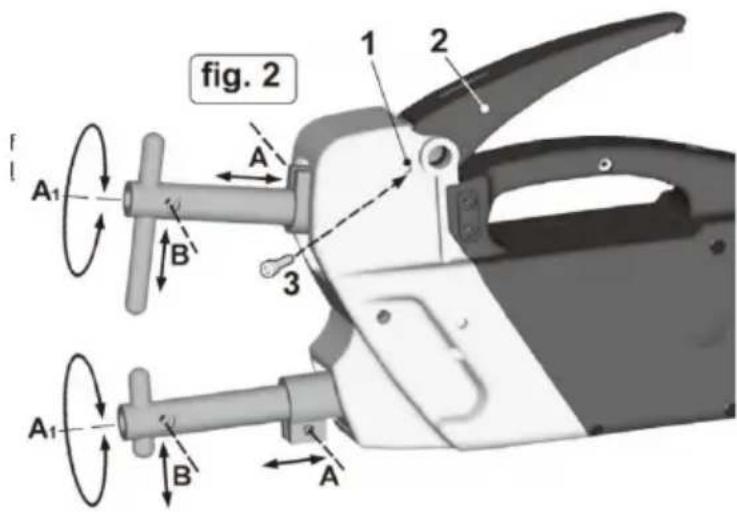
5.1 Setting up and adjusting the arms. (Refer to fig. 2) Obtain samples of the metal to be welded and place a double thickness of the sheet onto the lower electrode. Depress the welding lever until the upper electrode makes contact with the upper face of the sheet metal. At this point the axis of the electrodes is aligned in both planes. Make any necessary adjustments by loosening the arm
locking screws at (A) and sliding the arms in or out of their clamps until the electrodes are aligned when viewed from the side. Before tightening the clamp again, view the electrodes from the front and if necessary rotate the arms in the clamps until the electrodes are aligned. (See A1). When satisfied with the alignment, retighten the screws.
5.2 Setting up and adjusting the electrodes. (Refer to fig. 2) To adjust the electrodes correctly, the handle should be locked in a special position approximately halfway through its travel. To do this, insert the M6 socket cap bolt provided into the threaded hole indicated (1). Turn the bolt clockwise with fingers until it stops against the handle, and then unscrew it 1/4 turn. Depress the handle through approximately half its travel and turn the screw clockwise again by another 2 or 3 turns so that it engages the locking notch. You may have to adjust the position of the handle slightly up or down to get the lock aligned with the notch. Loosen the clamp bolt at (B) on the lower arm and adjust the electrode up or down to the desired position and tighten securely again. Loosen the clamp bolt at (B) on the upper arm and allow the electrode to slide downwards to rest on the lower electrode. Slide two sample
thicknesses of the sheet metal to be welded between the electrode tips, allow the upper electrode to rise, and retighten the upper electrode clamp bolt. Then
tighten the locking bolt.
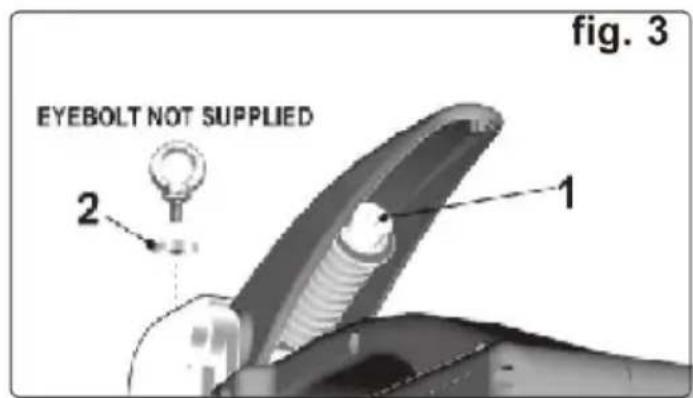
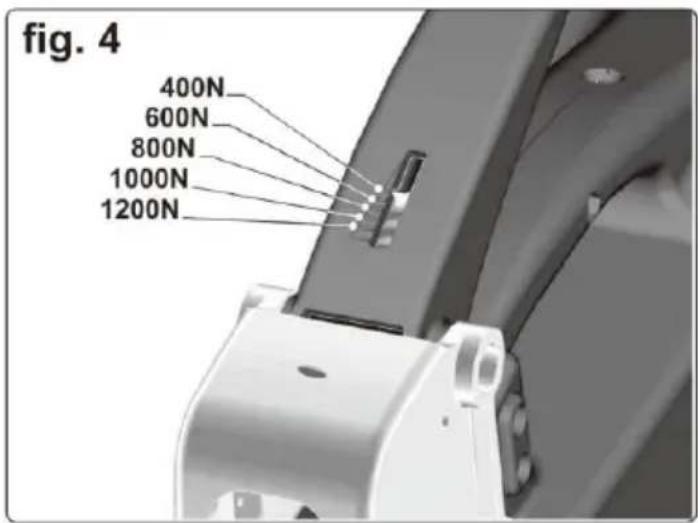
5.4 Adjusting the pressure exerted by the electrodes. (Refer to figs. 3 & 4) The pressure exerted by the electrodes onto the workpiece can be adjusted by altering the spring pressure adjuster underneath and within the handle using the 6mm Hex key provided (fig. 3-1). To increase the pressure, turn the adjuster clockwise. To decrease the pressure, turn the adjuster anticlockwise. On the face of the handle there is a graduated indicator which shows the pressure using the standard 120mm arms. Refer to fig. 4 to see the values allocated to graduations. Refer to the chart below to see how the pressure decreases when longer welding arms are used. Once the electrodes make contact with the sheet metal, the downward movement of the handle firstly clamps the workpiece and then makes contact with a micro switch to turn on the current. If the pressure you have set begins to limit the action of the handle, you must decrease the pressure to allow the handle to travel down to activate the micro switch.
| ARM LENGTH | FORCE / PRESSURE EXERTED ON WORKPIECE (NEWTONS / KILOGRAMS) | ||||
| 120 | 1200 / 122.3 | 1000 / 101.9 | 800 / 81.5 | 600 / 61.2 | 400 / 40.8 |
| 250 | 770 / 78.5 | 550 / 56.0 | 430 / 43.8 | 320 / 32.6 | 230 / 23.4 |
| 350 | 470 / 47.9 | 380 / 38.7 | 330 / 33.6 | 230 / 23.4 | |
| 500 | 280 / 28.5 | 250 / 25.5 | 180 / 18.3 | ||
An eyebolt and spacer can be ordered to enable the unit to be suspended on a production line, etc. The eyebolt must not be fitted without the spacer. See fig. 3-2.
6. OPERATING INSTRUCTIONS
6.1 Use the control panel on the side unit to set the main parameters for welding (See fig. 5, right).
1) WELDING TIME: Use button (1) to increase or decrease the welding time in relation to the factory default setting. 2) WELDING THICKNESS: Use button (2) to select the thickness of sheet metal to be welded.
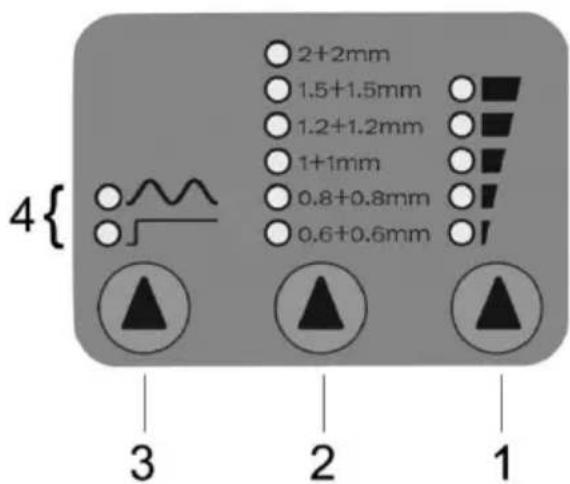
3) WELDING MODE: Use button (3) to select the welding mode.
Normal Spot Welding: The lower LED adjacent to the straight line symbol selects the normal continuous spot welding mode. Pulse Spot Welding: The upper LED selects a pulsating welding current which improves welding capacity on sheets with high yield points or on sheets with special protective films. The pulsation period is set automatically and does not require adjustment.
6.2 Thermostatic protection LED indicator.
When all the LEDs on the control panel go off and the two welding mode LEDs (See fig. 5-4) begin to flash alternately, this indicates that the transformer is beginning to overheat and the thermal cut out has operated.
Allow the welder to cool for at least 5 minutes before attempting to weld again.
6.3 SPOT WELDING PROCEDURE.
- WARNING! Ensure that you read and understand the safety instructions in Section 1.
Use welder in a suitable working area. Keep area clean and tidy, free from unrelated materials and ensure there is adequate lighting. DO NOT allow untrained persons to operate the welder.
6.3.1 Ensure that you are fully prepared with all workpieces securely held and presented ready for spot welding.
6.3.2 Ensure that the welding arms and electrodes are correctly set up for the thickness you intend to weld. (See Sections 5.1 & 5.2)
6.3.3 Ensure that you have correctly set the clamping pressure for the thickness you intend to weld. (See Section 5.3)
6.3.4 Turn on the mains power supply.
6.3.5 On the model, set the welding time, welding thickness, and welding mode required using the control panel on the side of the unit. (See Section 6.1)
6.3.6 Manoeuvre the unit so that the workpiece is between the arms. Allow the electrode to bear on the underside of the sheets to be welded.
Depress the welding lever until the upper electrode makes contact with the workpiece. Pause and check that the electrodes are positioned where the weld is required. If satisfied, continue to depress the lever to clamp the sheets together until the lever reaches the end of its travel and operates the micro switch which turns on the welding current.
6.3.7 Do not release the clamp lever immediately but pause for a few moments first. This will give the weld improved mechanical characteristics. 6.3.8 When all welds are completed, turn off the mains power supply. Disconnect the unit and clean it. Store in a dry and safe environment until next required.
(The effectiveness of spot welds should occasionally be tested to ensure you are using the right settings. When two spot welded sheets are separated, the area of the spot weld itself should not tear apart but remain attached to one of the sheets, indicating that the weld is stronger than the surrounding sheet.)
7. MAINTENANCE
- WARNING: Unplug from the mains power supply before performing maintenance or service.
7.1 Ensure the welder and cable are in sound condition and good working order. 7.2 We recommend that you have your welder serviced on a regular basis by an authorised service agent.
During any inspection of the inside of the machine for repairs or cleaning, the following checks should be made.
7.2.1 Remove dust and metallic particles deposited on the transformer and/or internal walls etc., using a jet of dry compressed air (max 10 bar). Do not direct the jet of compressed air onto the electronic circuit boards; clean them with a very soft brush if necessary. 7.2.2 Check the wiring for insulation damage or loosened/oxidised connections. 7.2.3 Check that the screws connecting the flexible element to the transformer and to the upper arm supports are tightened up and there are no signs of oxidation or overheating. 7.2.4 Replace or repair damaged parts. Use recommended parts only; unauthorised parts may be dangerous and will invalidate the warranty. 7.3 Keep the welder clean for best and safest performance. Do not clean with water, strong solvents, paint thinners or gasoline. 7.4 If welding performance is poor, make the following preliminary checks.
7.4.1 When the welding/clamp lever is depressed, make sure that the spigot at the end of the handle on the underside actually touches and presses the micro switch, thus turning on the welding current.
7.4.2 Check the security and condition of the arm holder clamps and screws, and the electrode clamps and screws. If these are loose or oxidised, it will affect the efficiency of the welder.
7.4.3 Check that the welding parameters are correct in terms of welding time, electrode pressure, and diameter.
7.4.4 If these checks do not reveal the source of the problem, take the weld to an authorized service agent.
8. OPERATION INSTRUCTIONS
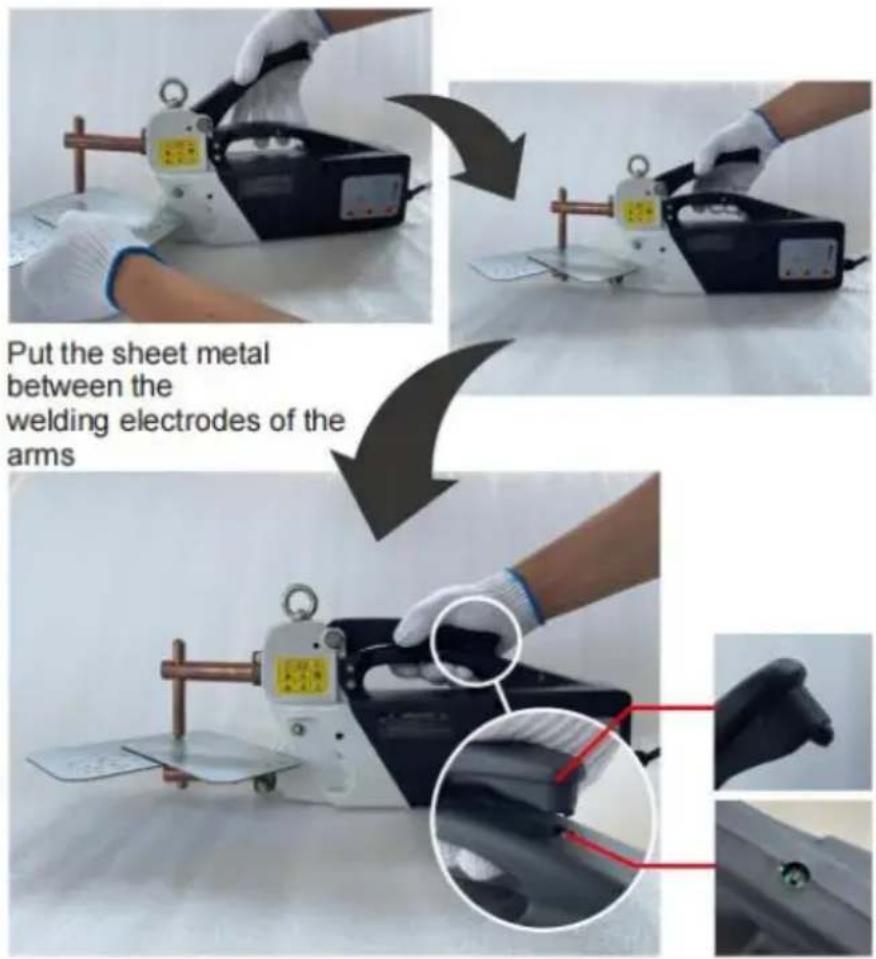
Press down the handle to make the welding electrodes clamp the sheet metal.
Use the tip on the handle to activate the trigger.
Press down the handle hard to activate the welding trigger.
Note:
- The thermal will activate to stop working when the transformer temperature reaches 95°C. It can be used again 15-20 minutes later. 2. Please do use the sheet metal thickness less than 2mm when trying the metal. When the metal thickness is more than 2mm, it cannot work.
Made In China
VEVOR®
TOUGH TOOLS, HALF PRICE
Technical Support and E-Warranty Certificate www.vevor.com/support
VEVOR®
TOUGH TOOLS, HALF PRICE
We continue to be committed to provide you tools with competitive price. "Save Half", "Half Price" or any other similar expressions used by us only represents an estimate of savings you might benefit from buying certain tools with us compared to the major top brands and does not necessarily mean to cover all categories of tools offered by us. You are kindly reminded to verify carefully when you are placing an order with us if you are actually saving half in comparison with the top major brands.
VEVOR®
TOUGH TOOLS, HALF PRICE
SPOT WELDER
MODEL: H-3000
NEED HELP? CONTACT US!
Have product questions? Need technical support? Please feel free to contact us:
Technical Support and E-Warranty Certificate www.vevor.com/support
This is the original instruction. Please read all manual instructions carefully before operating. VEVOR reserves a clear interpretation of the user manual. The appearance of the product shall be subject to the product you received. Please forgive us that we won't inform you again if there are any technology or software updates on our product.
1. SAFETY INSTRUCTIONS
1.1. ELECTRICAL SAFETY.
FUSE RATINGS REFER TO THE TECHNICAL SPECIFICATION IN SECTION 3.
- TECHNICAL SPECIFICATION
5. SETTING UP TO WELD
Press down the handle to make the welding electrodes clamp the sheet metal.
Use the tip on the handle to activate the trigger.
We continue to be committed to provide you tools with competitive price. "Save Half", "Half Price" or any other similar expressions used by us only represents an estimate of savings you might benefit from buying certain tools with us compared to the major top brands and does not necessarily mean to cover all categories of tools offered by us. You are kindly reminded to verify carefully when you are placing an order with us if you are actually saving half in comparison with the top major brands.
VEVOR®
TOUGH TOOLS, HALF PRICE
SPOT WELDER
MODEL: H-3000
NEED HELP? CONTACT US!
Have product questions? Need technical support? Please feel free to contact us:
Technical Support and E-Warranty Certificate www.vevor.com/support
This is the original instruction, please read all manual instructions carefully before operating. VEVOR reserves a clear interpretation of the user manual. The appearance of the product shall be subject to the product you received. Please forgive us that we won't inform you again if there are any technology or software updates on our product.
1. SAFETY INSTRUCTIONS
FUSE RATINGS REFER TO THE TECHNICAL SPECIFICATION IN SECTION 3.
- TECHNICAL SPECIFICATION
5. SETTING UP TO WELD
to be welded.
Press down the handle to make the welding electrodes clamp the sheet metal
Use the tip on the handle to activate the trigger.
NEED HELP? CONTACT US!
FUSE RATINGS REFER TO THE TECHNICAL SPECIFICATION IN SECTION 3.
4. ELECTRICAL CONNECTIONS
FUSE RATINGS REFER TO THE TECHNICAL SPECIFICATION IN SECTION 3.
4. ELECTRICAL CONNECTIONS
NEED HELP? CONTACT US!
FUSE RATINGS REFER TO THE TECHNICAL SPECIFICATION IN SECTION 3.
www.vevor.com/support
VEVOR®
TOUGH TOOLS, HALF PRICE
Technical support and e-warranty certificate www.vevor.com/support
SPOT WELDING MACHINE
MODEL: H-3000
NEED HELP? CONTACT US!
FUSE RATINGS REFER TO THE TECHNICAL SPECIFICATION IN SECTION 3.
NEED HELP? CONTACT US!
FUSE RATINGS REFER TO THE TECHNICAL SPECIFICATION IN SECTION 3.
3. TECHNICAL SPECIFICATION
| Modell | H-3000 | H-3000 |
| Spänning | 230V~ ±10% /50Hz 400V~±10%/50Hz | |
| Effekt på 50 % | 2,5kVA | 2,5kVA |
| Max. svetskraft | 14kVA | 14kVA |
| Ingen belastningsspänning. | 2,5V | 2,5V |
| Max. kortslutning ström | 6,3 kA | 6,3 kA |
| Max punktsvetstjocklek | 2+2mm | 2+2mm |
| Min.viloperiod mellan svetsarna 20 sekunder | 20 sekunder | |
| Maximal spännkraft | 120 kg | 120 kg |
| Projektion av armar | 120 mm | 120 mm |
A FULL RANGE OF ARMS AND ELECTRODES IS AVAILABLE.
4. ELECTRICAL CONNECTIONS
www.vevor.com/support
- SPOT WELDER
- MODEL: H
- VEVOR®
- NEED HELP? CONTACT US
- SAFETY INSTRUCTIONS
- ELECTRICAL SAFETY
- FUSE RATINGS REFER TO THE TECHNICAL SPECIFICATION IN SECTION
- GENERAL SAFETY
- INTRODUCTION
- MAIN FEATURES
- TECHNICAL SPECIFICATION
- ELECTRICAL CONNECTIONS
- SETTING UP TO WELD
- OPERATING INSTRUCTIONS
- THERMOSTATIC PROTECTION LED INDICATOR
- SPOT WELDING PROCEDURE
- MAINTENANCE
- OPERATION INSTRUCTIONS
- NOTE
- MADE IN CHINA
- TOUGH TOOLS, HALF PRICE
- SPOT WELDING MACHINE
Brand : Vevor
Model : H-3000
Category : Welding machine