
HD-10 - Welding tool Vevor - Free user manual and instructions
Find the device manual for free HD-10 Vevor in PDF.
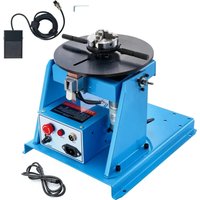


| Product type | Welding positioner |
| Brand | Vevor |
| Model | HD-10 |
| Category | Welding tool |
| Input voltage | AC 120V/60Hz or AC 230V/50Hz depending on version |
| Horizontal load capacity | 10 kg |
| Vertical load capacity | 5 kg |
| Work table diameter | 205 mm |
| Work table height | 220 mm |
| Tilt angle | 0 to 90° |
| Rotation speed | 1 to 12 rpm |
| Rated welding current | 80 A |
| Drive motor | 20 W |
| Compatible chuck | K01-63 |
| Included accessories | 1 pedal, 1 power cord, 1 manual, 2 chuck keys |
| Main functions | Forward/reverse rotation, tilt, variable speed control |
| Maintenance and cleaning | Clean regularly with a dry cloth, check connections, store in a dry and dust-free place |
| Safety | Read the manual before use, wear protective equipment, do not use outdoors in wet conditions, comply with FCC and WEEE directives |
| Spare parts and repairability | Fuse, motor, control board, potentiometer, switch, pedal available via technical support |
| General information | Electronic warranty, technical support at www.vevor.com/support, made in China |
| Approximate dimensions (L x W x H) | 300 x 300 x 400 mm |
| Estimated net weight | 12 kg |
Frequently Asked Questions - HD-10 Vevor
User questions about HD-10 Vevor
0 question about this device. Answer the ones you know or ask your own.
Ask a new question about this device
Download the instructions for your Welding tool in PDF format for free! Find your manual HD-10 - Vevor and take your electronic device back in hand. On this page are published all the documents necessary for the use of your device. HD-10 by Vevor.
USER MANUAL HD-10 Vevor
WELDING POSITIONER
MODEL: HD-10
We continue to be committed to providing you with tools at competitive prices. "Save Half", "Half Price", or any other similar expressions used represent an estimate of savings you might benefit from buying tools with us compared to the major top brands and does not mean to cover all categories of tools offered by us. You are reminded to verify carefully when placing an order to ensure you are actually saving half in comparison with the top major brands.
MODEL: HD-10
NEED HELP? CONTACT US!
Have product questions? Need technical support? Please feel free to contact us:
This is the original instruction. Please read all manual instructions carefully before operating. VEVOR reserves the right to interpret the user manual. The appearance of the product shall be subject to the product you received. Please forgive us that we won't inform you of any technology or software updates on our product.
 | Warning-To reduce the risk of injury, user must read instructic manual carefully. |
 | This device complies with Part 15 of the FCC Rules. Operati subject to the following two conditions:(1)This device may not harmful interference, and (2)this device must accept any interfere received, including interference that may cause undesired opera |
 | This product is subject to the provision of European Directive 2012/19/EC. The symbol showing a wheelie bin crossed through indicates that the product requires separate refuse collection in European Union. This applies to the product and all accessor marked with this symbol. Products marked as such may not discarded with normal domestic waste, but must be taken to collection point for recycling electrical and electronic devices |
INSTRUCTIONS

WARNING: A procedure, which, if not properly followed, may cause injury to the operator or others in the operating area.
Equipment Identification
The identification number, specification or model, and serial number of this unit usually appear on a nameplate attached to the control panel. Record these numbers for future reference.
Receipt of Equipment
When you receive the equipment, check it against the shipping documents. Make sure it is complete and inspect the equipment for possible damage during shipping. If there is any damage, notify the carrier immediately to file a claim.
Furnish complete information concerning damage claims or mistake(s) in shipment to Machinery Co., Ltd's. Include the equipment identification number along with description of the parts in question.
Move the equipment to the installation site before uncrating the unit. Use care to avoid damaging the equipment when using bars, hammers, etc. to uncrate the unit.
SPECIFICATION
| Model | HD-10 | HD-10 |
| Input voltage | AC120V/60Hz | AC230V/50Hz |
| Horizontal loading capacity | 10kg | 10kg |
| Vertical loading capacity | 5kg | 5kg |
| Working table diameter | 205mm | 205mm |
| Working table height | 220mm | 220mm |
| Working table tilting angle | 0-90° | 0-90° |
| Working table speed | 1-12Rpm | 1-12Rpm |
| Rated welding current | 80A | 80A |
| Drive motor | 20W | 20W |
| Applicable chuck | K01-63 | K01-63 |
| Holding area/holding area | 2-58/22-50 | 2-58/22-50 |
| Accessories | 1x foot pedal;1x power line;1x Manual;2xchuck wrench | 1x foot pedal;1x power line;1x Manual;2xchuck wrench |
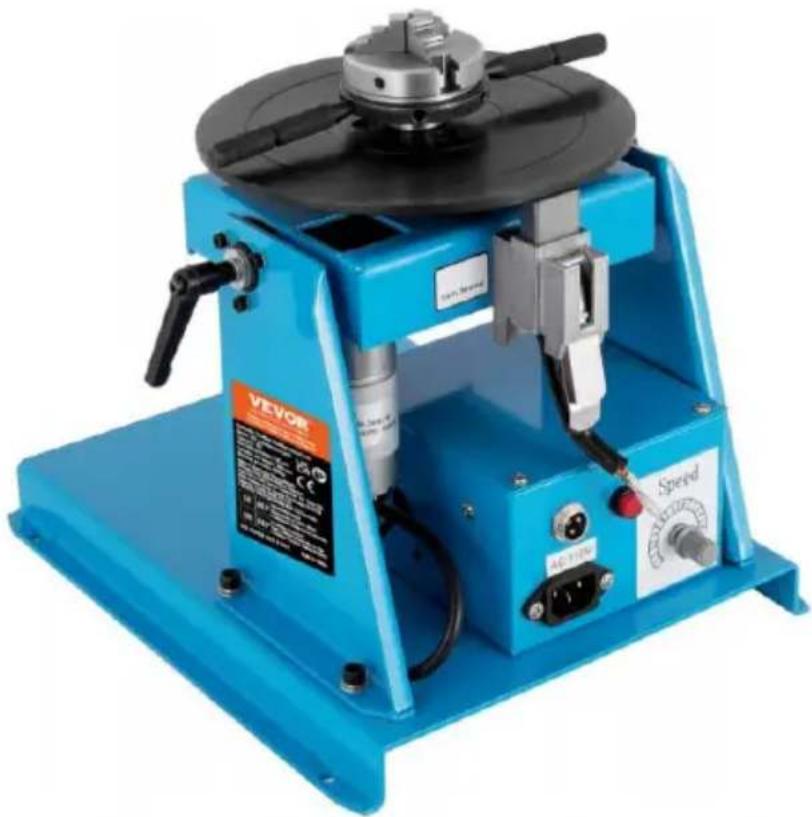
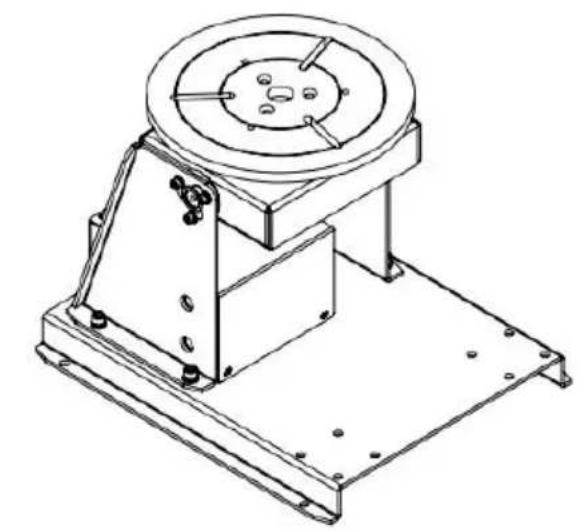
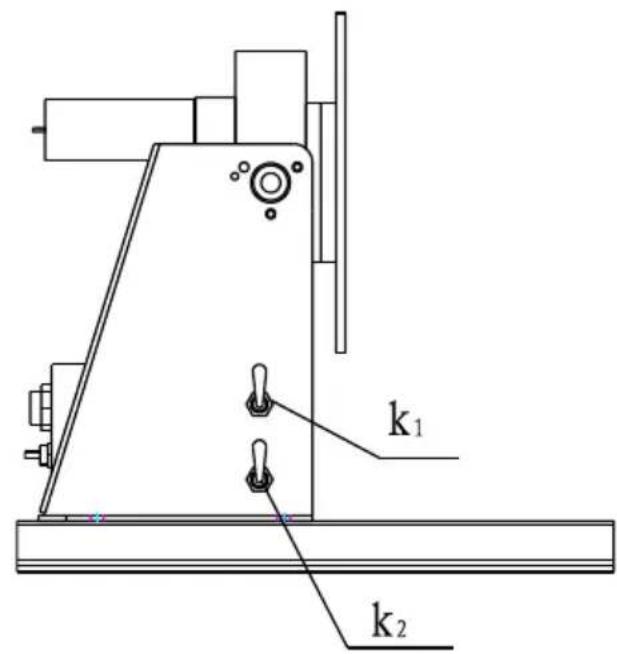
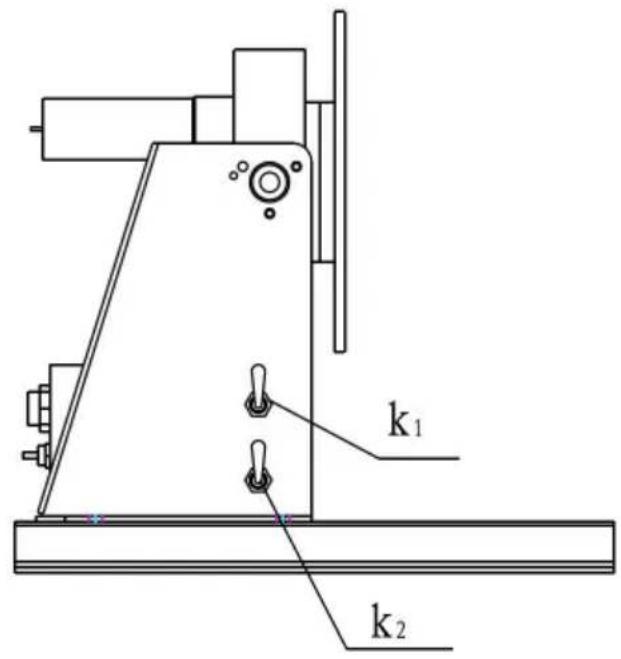
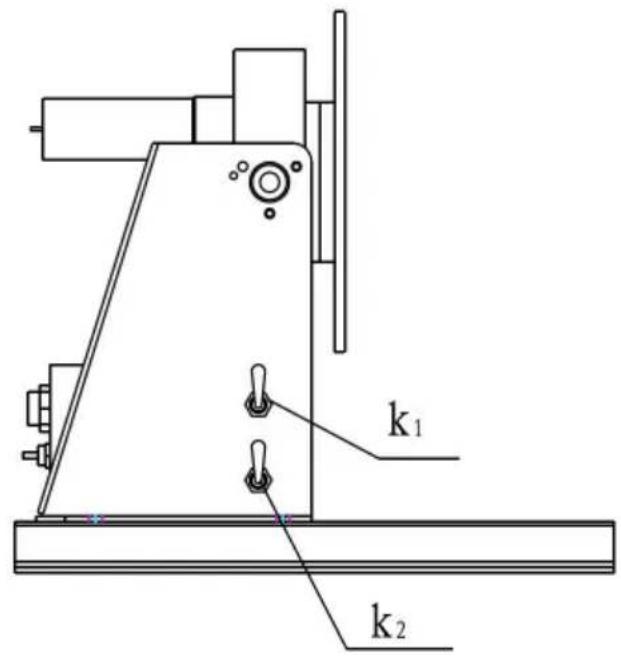
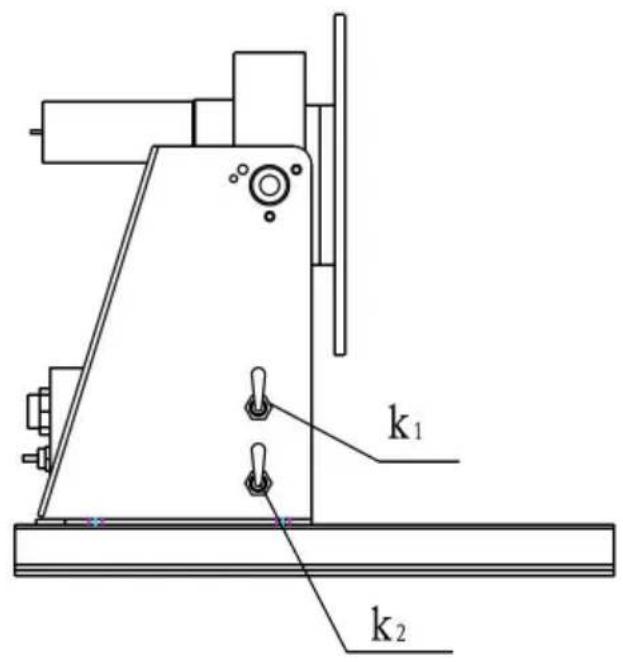
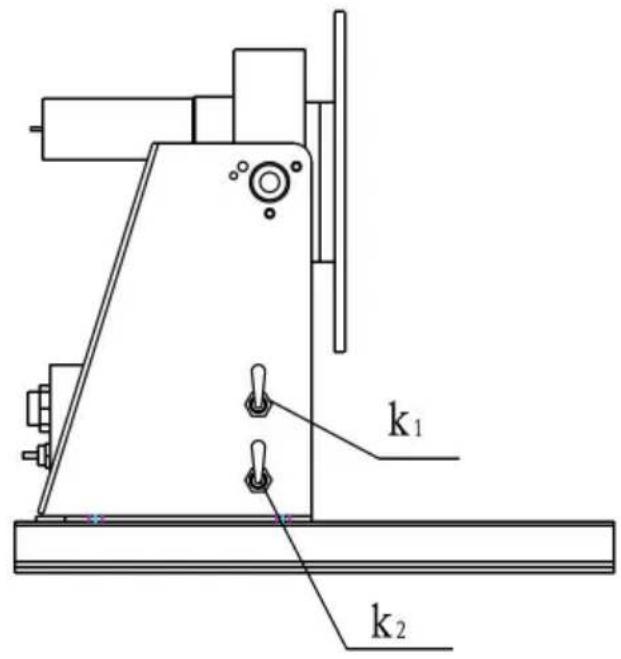
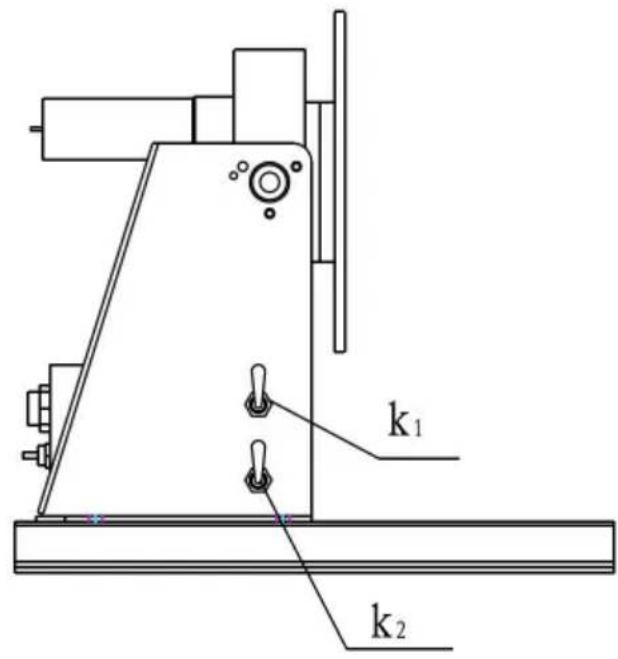
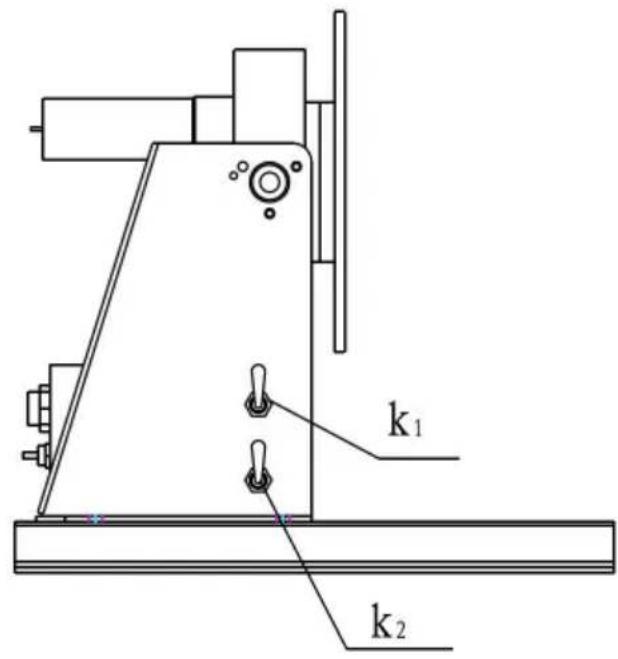
1. Primary Panel
K1: Power ON/OFF Switch K2: Forward/Reverse Switch
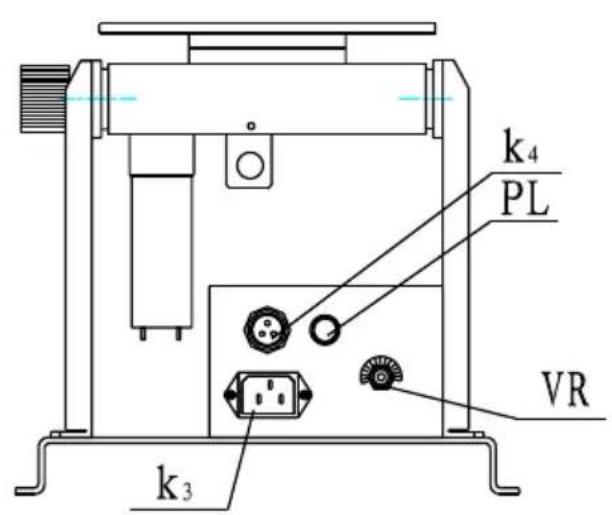
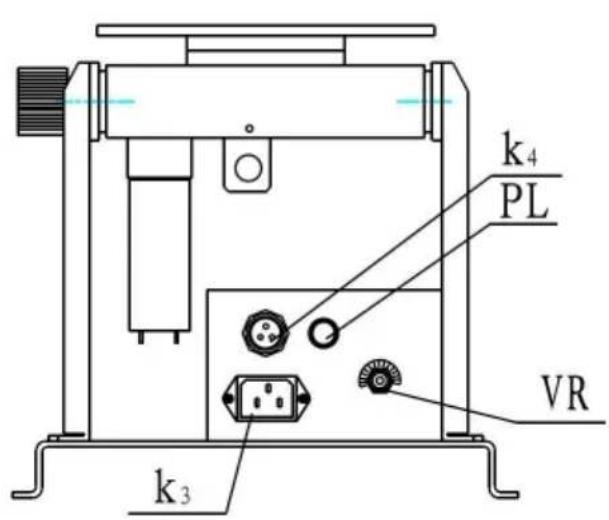
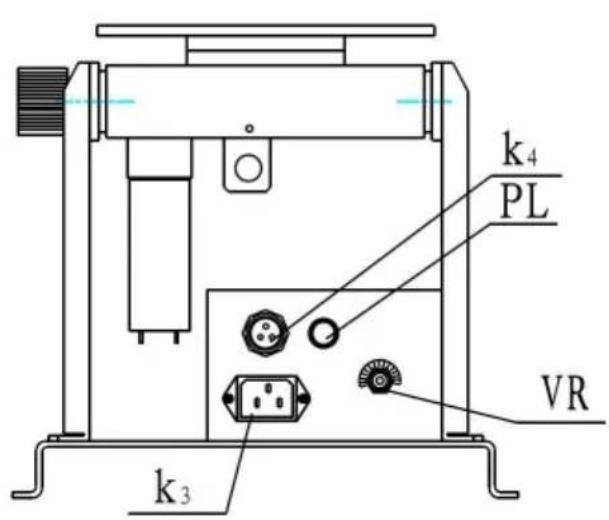
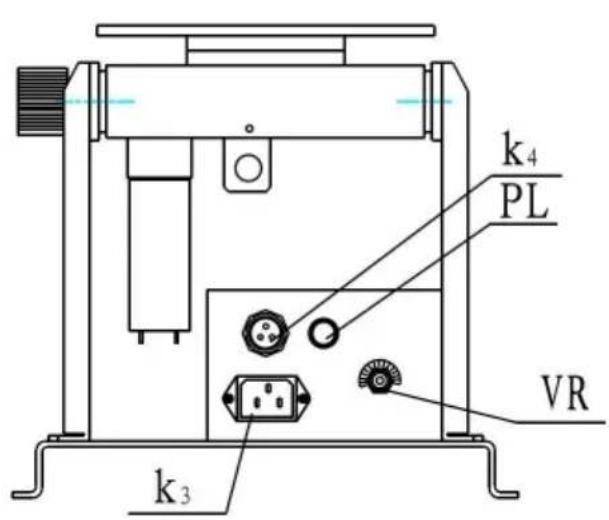
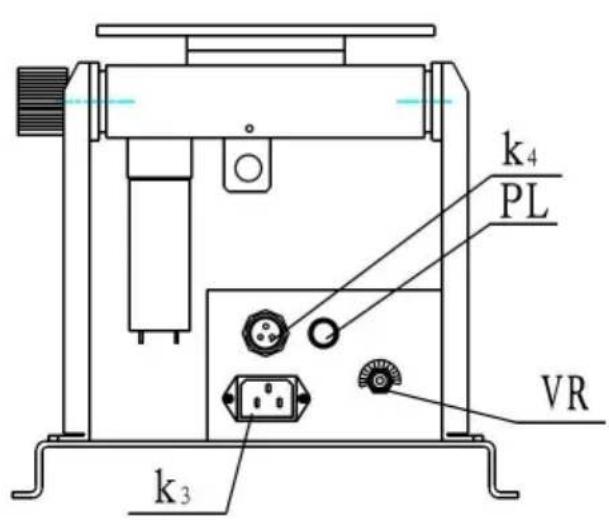
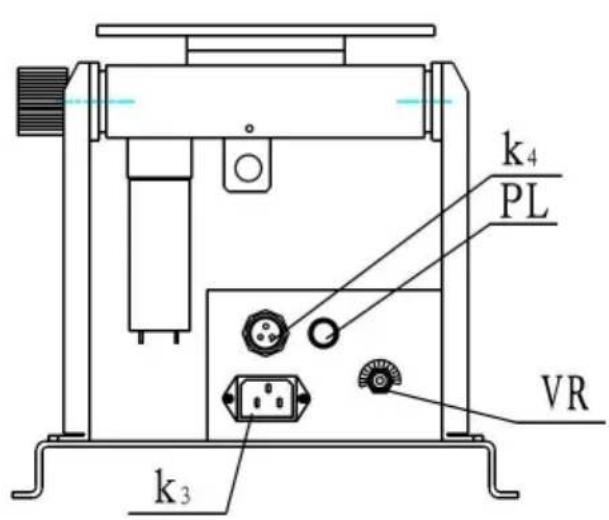
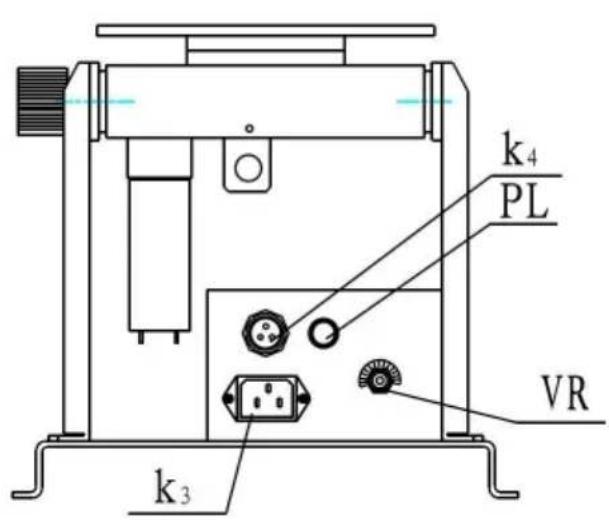
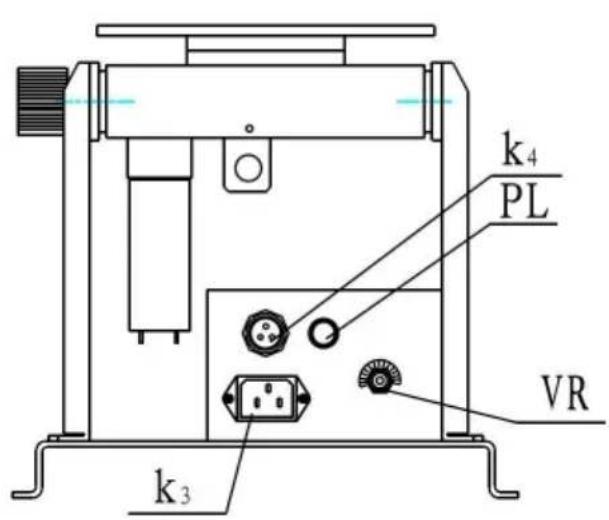
2. Rear Panel
PL: Power Pilot VR: Speed Adjustment
K3: Input Power Connector K4: Foot Switch Connector (3Pin)
| No. | SYMPTOM | POSSIBLE CAUSE | REMEDY |
| 1 | Power pilot does not lit | Power fuse is burnt.LED burnt.Power switch is burr.No power input. | Replace a new fuse.Replace LED.Replace switch.Check the switch or replace. |
| 2 | Speed Adjustment no Motion. | Damaged potentiometer.Motor control PCB output. | Check if potentiometer is 10KΩ, otherwise replacReplace a new motor control PCB. |
| 3 | Foot switch no motion | Foot switch is damaged | Check the foot switch or replace. |
| 4 | Forward / Reverse no output | Forward/Reverse switch is damaged. | Check the switch or replace. |
| 5 | Motor no motion | Motor has power input but no motion.Motor control PCB h no power input.Motor control PCB is damaged. | Replace a new motor.Check the transformer or replace.Replace control PCB. |
Made In China
VEVOR®
TOUGH TOOLS, HALF PRICE
Technical Support and E-Warranty Certificate www.vevor.com/support
VEVOR®
TOUGH TOOLS, HALF PRICE
NEED HELP? CONTACT US!
TROUBLESHOOTING GUIDE
NEED HELP? CONTACT US!
NEED HELP? CONTACT US!

TROUBLESHOOTING GUIDE
TROUBLESHOOTING GUIDE
NEED HELP? CONTACT US!
TROUBLESHOOTING GUIDE
www.vevor.com/support
VEVOR®
TOUGH TOOLS, HALF PRICE
Technical support and e-warranty certificate www.vevor.com/support
LASER POSITIONS
MODEL: HD-10
NEED HELP? CONTACT US!
K1: ON/OFF switch
K2: Forward/reverse switch
2. Control panel
PL: Powerpilot
TROUBLESHOOTING GUIDE
NEED HELP? CONTACT US!
TROUBLESHOOTING GUIDE
Brand : Vevor
Model : HD-10
Category : Welding tool