
DS-16 - Packaging machine Vevor - Free user manual and instructions
Find the device manual for free DS-16 Vevor in PDF.
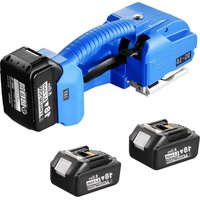


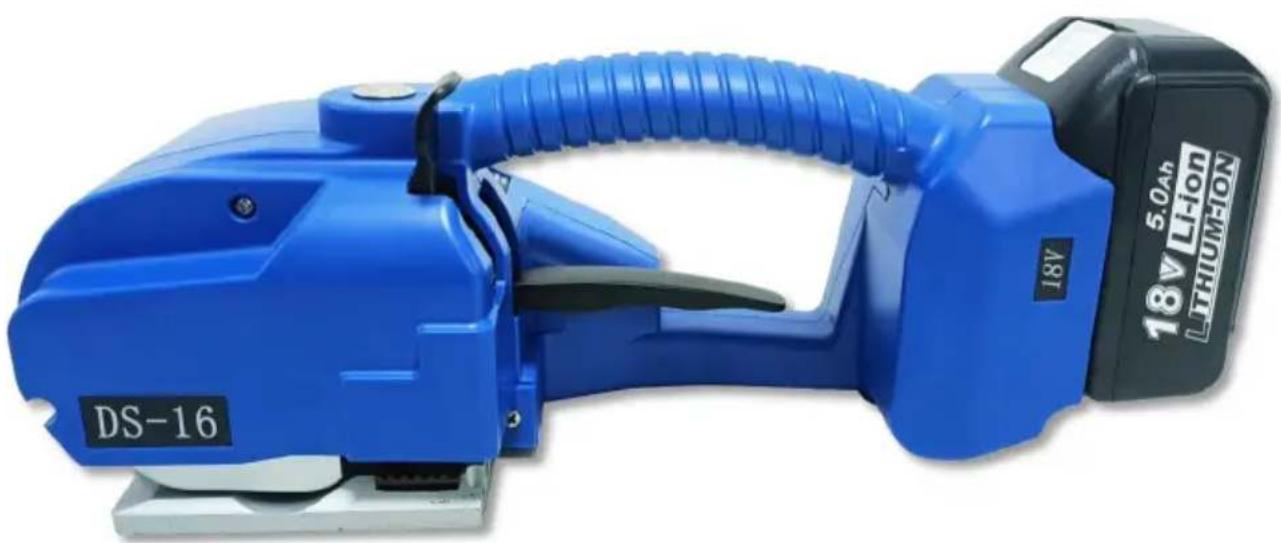
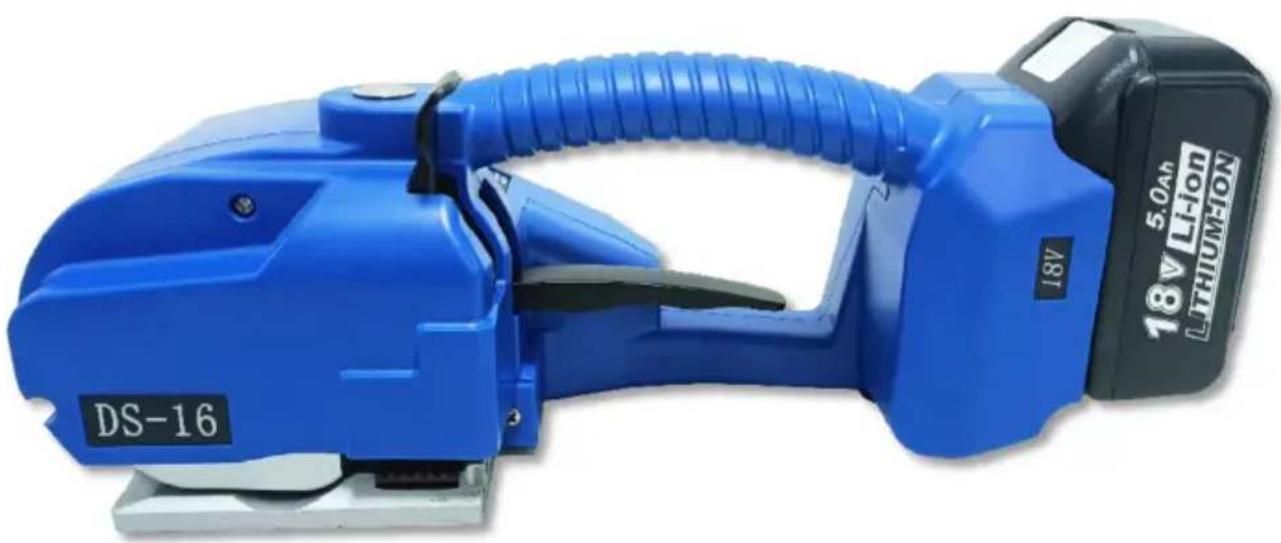
| Product type | Portable strapping machine |
| Brand | Vevor |
| Model | DS-16 |
| Dimensions (L x W x H) | 360 x 130 x 140 mm |
| Power supply | Lithium-ion battery 18 V, 5000 mAh |
| Charger | Input AC 100-240 V, output 21 V / 2.5 A, charging time approx. 90 minutes |
| Compatible strapping materials | PET and PP straps, width 9-16 mm, thickness 0.4-1.2 mm |
| Max tension force | 3200 N (adjustable from 600 to 3200 N in 9 levels) |
| Strap feeding speed | 50-150 mm/s |
| Operating modes | Semi-automatic (continuous press) and automatic (one-touch) |
| Cycles per charge | Up to 600 cycles (depending on use) |
| Operating temperature | 5 to 45 °C (optimal 15-25 °C) |
| Main functions | Tensioning, friction welding, automatic cutting |
| Safety | Automatic stop in case of jamming, overload protection |
| Replaceable wear parts | Knife, lower toothed plate, tension wheel, lower friction piece |
| Maintenance | Regularly check wear parts, replace if damaged |
| Warranty | Electronic warranty certificate, technical support at www.vevor.com/support |
Frequently Asked Questions - DS-16 Vevor
User questions about DS-16 Vevor
0 question about this device. Answer the ones you know or ask your own.
Ask a new question about this device
Download the instructions for your Packaging machine in PDF format for free! Find your manual DS-16 - Vevor and take your electronic device back in hand. On this page are published all the documents necessary for the use of your device. DS-16 by Vevor.
USER MANUAL DS-16 Vevor
Technical Support and E-Warranty Certificate
www.vevor.com/support
Strapping Machine
MODEL: DS-16
We continue to be committed to providing you with tools at competitive prices. "Save Half", "Half Price", or any other similar expressions used by us only represent the savings you might benefit from buying certain tools with us compared to top brands and do not necessarily mean to cover all categories of tools offered. We kindly remind you to verify carefully when placing an order with us that you are actually saving half in comparison with the top major brands.
Model: DS-16
NEED HELP? CONTACT US!
Have product questions? Need technical support? Please feel free to contact us:
Technical Support and E-Warranty Certificate www.vevor.com/support
This is the original instruction. Please read all manual instructions carefully before operating. VEVOR reserves a clear interpretation of the user manual. The appearance of the product shall be subject to the product you received. Please forgive us that we won't inform you of any technology or software updates on our product.
INSTRUCTIONS
Thank you very much for choosing this Strapping Machine. Please read all of the instructions before using it. The information will help you achieve the best possible results.
The products carried in this catalog may differ in color from the item.
1. Safety instructions
Correct training is required. Personnel who are not properly trained are not allowed to operate the strapping machine. Incorrect operation may result in equipment damage or personal injury.
1.1 Battery operation
Environmental protection
Please do not throw used batteries into household garbage or wastewater. Do not hit or burn used batteries.
Short circuit hazard
Do not store batteries with other metal objects. Do not disassemble batteries yourself. Store them in a dry, frost-resistant room. The ambient temperature must not exceed 50 degrees.
Do not charge used batteries. Replace them when they are damaged or unusable.
1.2 Eye injury hazards
Wear eye protection to prevent damage to your eyes when using this product.
1.3 Operation
Read the instructions carefully and train properly before using. Persons who have not been properly trained are not allowed to operate the baler. Before tightening the straps, if the instructions are not followed, the strapping may be loaded unreasonably, which can lead to breakage of the strap or machine failure. Do not put your hands on the binding area, the
area, or the cutting area of the cutter until you are familiar with the baler. Place your hand on the binding area, the gluing area, and the cutter cut-out.
1.4 Friction welding area
Check the condition of the friction welding area and familiarize yourself with the control and adjustment of the friction time and tightening time. Irregular friction time may result in poor bonding and serious damage. Do not ship or transport boxes that have not been properly packed and handled.
1.5 Packing straps distribution
Use the specially designed belt tray carriage to dispense straps. When not in use, secure the end of the straps in the strapping opening.
1.6 Straps warning
Do not use straps to drag or lift loads as this may result in injury to objects or personal injury.
1.7 Hazards of strap breakage
Improper operation, excessive tightening, or not using the strapping as required will cause the tension force to be lost or the strapping to break, which may eventually cause the box/cargoes to be damaged and the object to be broken, the operator to lose balance and fall, or the strapping machine and the strapping to fly rapidly into the operator's face, causing injury.
Note:

* If the load is packed with sharp edges, please add edge protection.
* Wrap the straps around the appropriate area to be strapped.
* The operator should not be in the same straight line position as the strapping machine during tightening and friction to prevent the baler and the straps from tipping over into the operator's face. And remind or ask bystanders to stay away from the operating area during operation. Please also use the strapping with the recommended width and strength specifications, which will help to improve the quality and efficiency of
packaging, as unsuitable strapping may cause the strapping to break or the box to come loose during transportation.
1.8 Cutting straps
When cutting the straps, please use the appropriate cutting tool, keep a safe distance from people, not in the same line as the strap, and away from the loose direction of the strapping. Please use tools specifically designed for cutting straps, not hammers, pliers, axes, hacksaws, etc.
1.9 Slip and fall hazards
Please keep the strapping area clean and tidy, as untidy work areas can cause accidents and falls can occur if you do not land with balance before tension, especially in small work areas such as stairwells. Try to keep your balance when handling. Both feet must be flat on a firm surface at the same time. Do not operate the device if you are unwell or in a difficult physical condition.
Please note the precautions mentioned specifically for the work area.
1.10 Dangers of the baler
* Good maintenance of the baler is very necessary.
* Check the baler parts regularly, if there is wear or damage, do not continue to use the baler until the parts are replaced.
* Do not use the baler without the straps.
* Do not modify the baler as this may cause personal injury.
2. Technical parameters
2.1 Description of the battery strapping tool
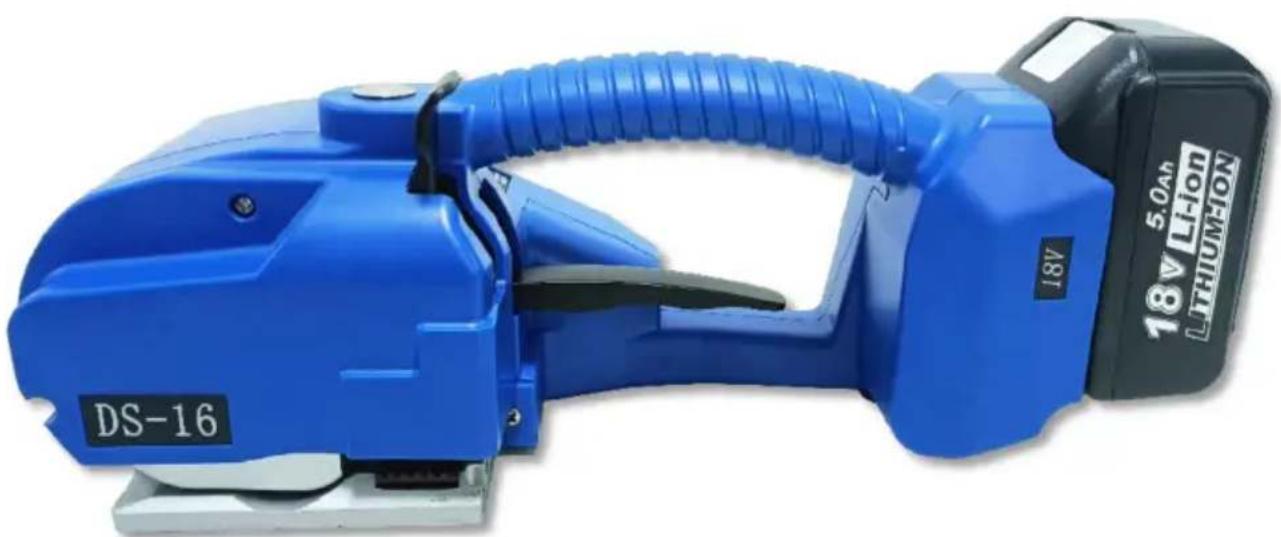
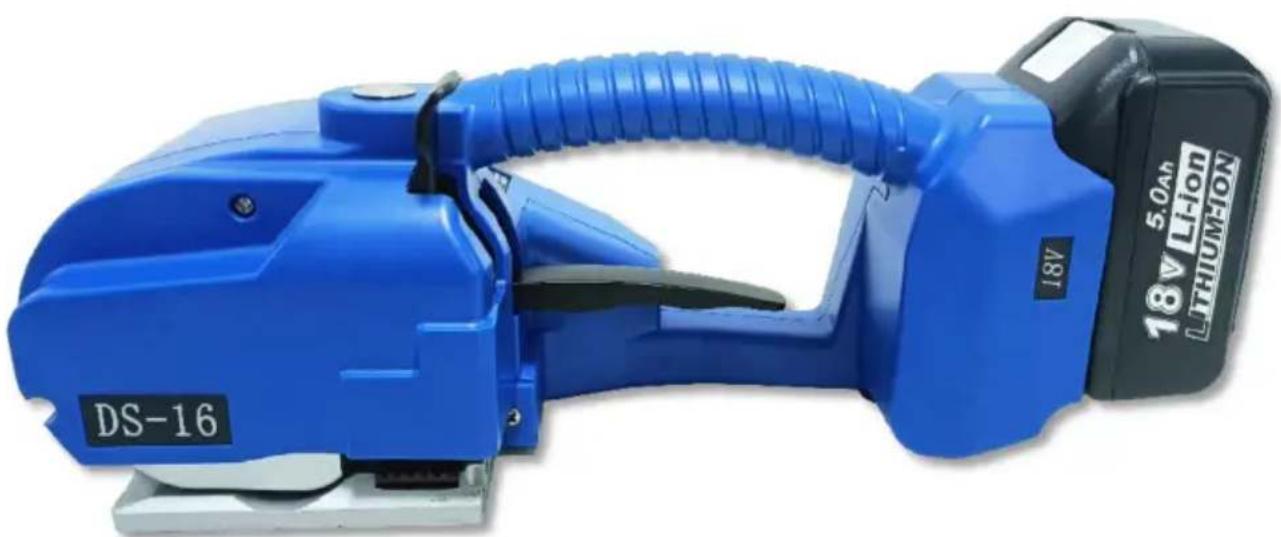
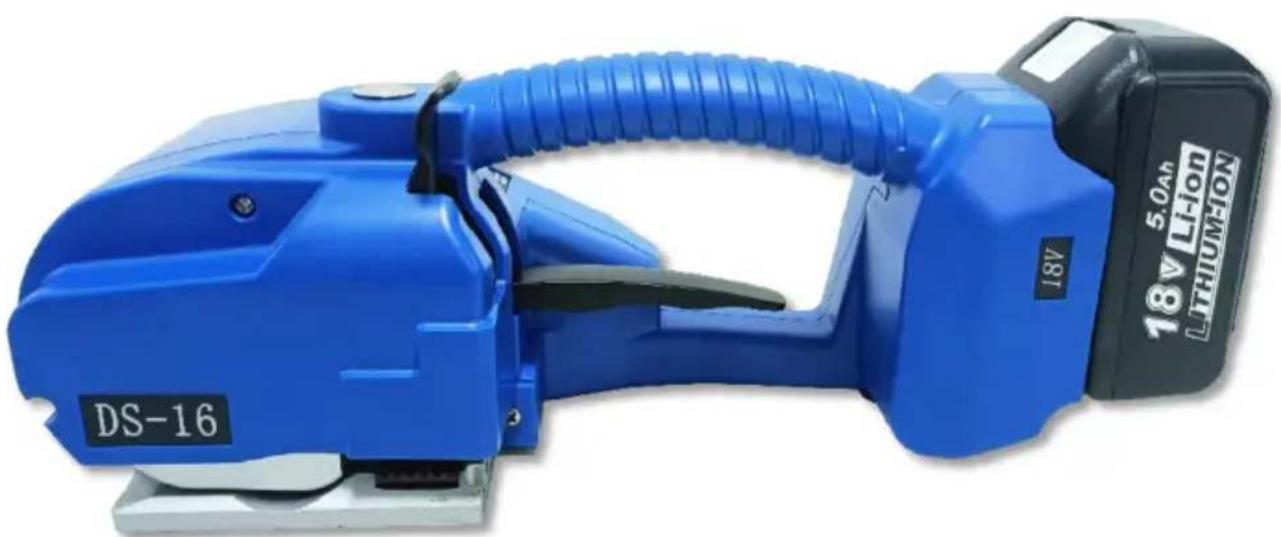
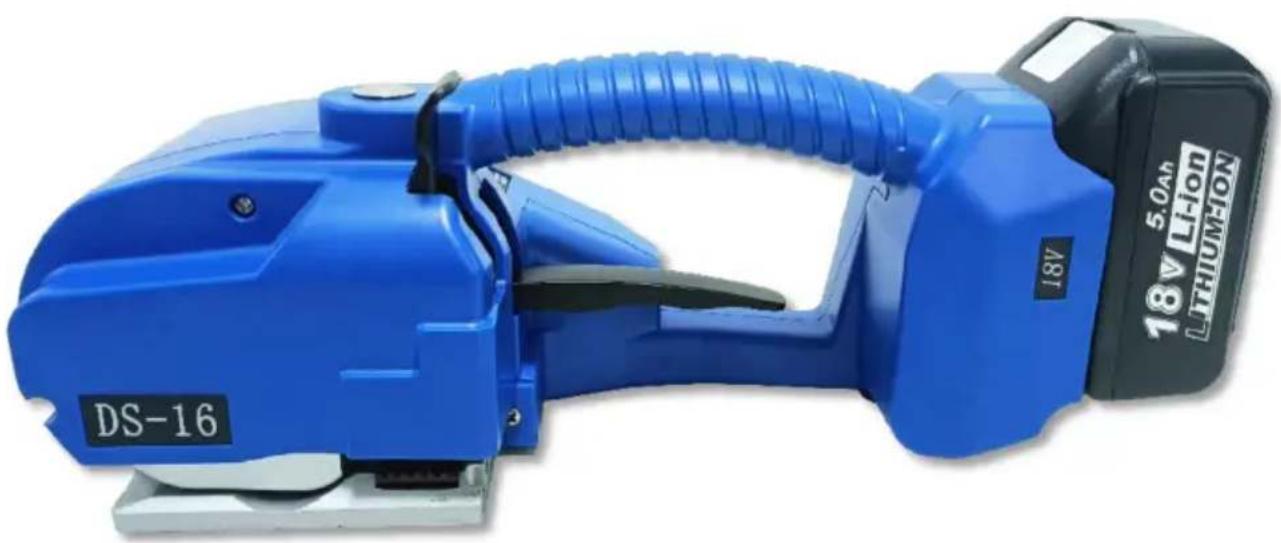
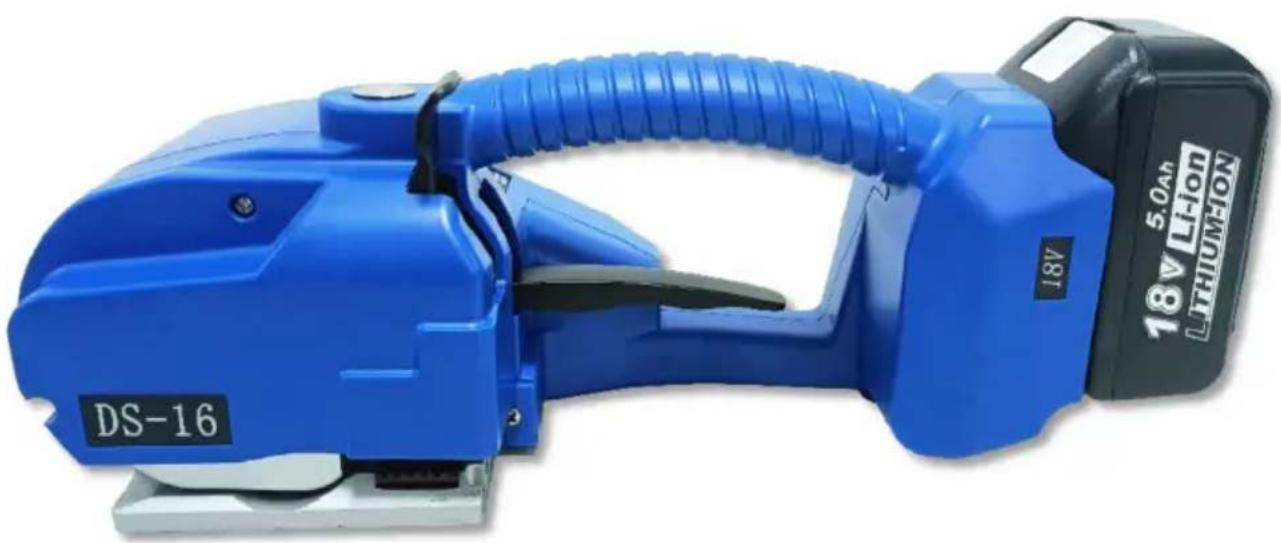
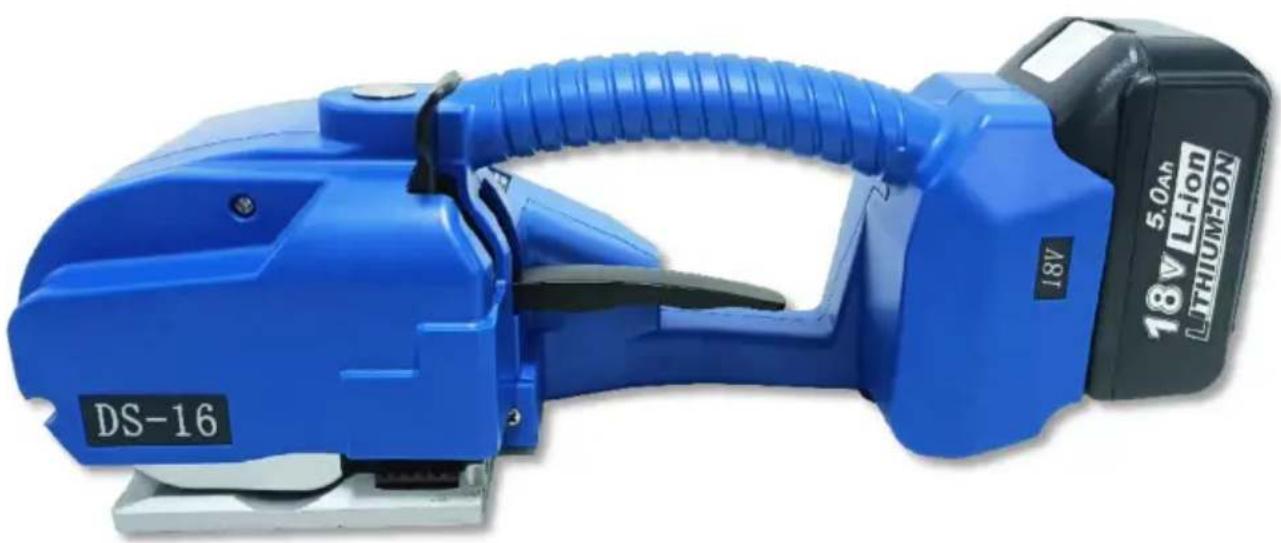
The DS-16 battery strapping tool comes with perfect sealing performance. It allows users to enjoy an efficient strapping method. The DS has a maximum tension power of 2500N and 9 adjustable grades via digital display operation. It is powered by a high-capacity 6000mAh lithium battery, which enables it to work 600 cycles per full charge. One of its selling points is that it is economical compared to similar products on the market.
It is a good product for dealers to explore and grasp the market. The DS-16 is such a powerful tool and can be widely used in most industries.
2.2 Baler dimensions
Length: 360mm
Width: 130mm
Height: 140mm
2.3 Strapping materials
Strap material: PET (polyester) and PP (polypropylene) tape with flat or embossed surface.
Strap specifications: width 9-16mm, thickness 0.4-1.2mm.
Please choose the straps of the appropriate size according to the baler you buy.
2.4 Straps strength
Stretching force: adjustable from 600 to 3200 N, maximum value determined by the material of the straps.
Strap feeding speed: 50-150MM/S. Friction strength: approx. 7 of the strength value of the straps.
2.5 Working environment
The ambient temperature for operation is 5-45°C, with an optimal working temperature of 15-25°C.
Use or store with care to protect against water and moisture.
3.Accessories

Note: Please use the attachments or accessories mentioned in the manual, the usage of other attachments may cause damage to equipment or may cause personal injury.
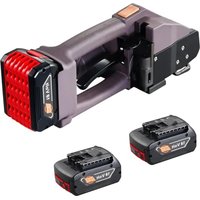
3.1 Rechargeable portable baler
As the baler uses nickel-cadmium (Nicd) nickel-metal hydride (NiMH) batteries, please purchase the batteries separately according to the following parameters.
Type: Lithium Battery
Voltage: 18V
Capacity: 5000MAH
3.2 Battery charger
Direct charging (optional)
Charger input voltage: AC100-240V
Output voltage: 21V, 2.5A
Charging time: about 90 minutes.
4. Operations
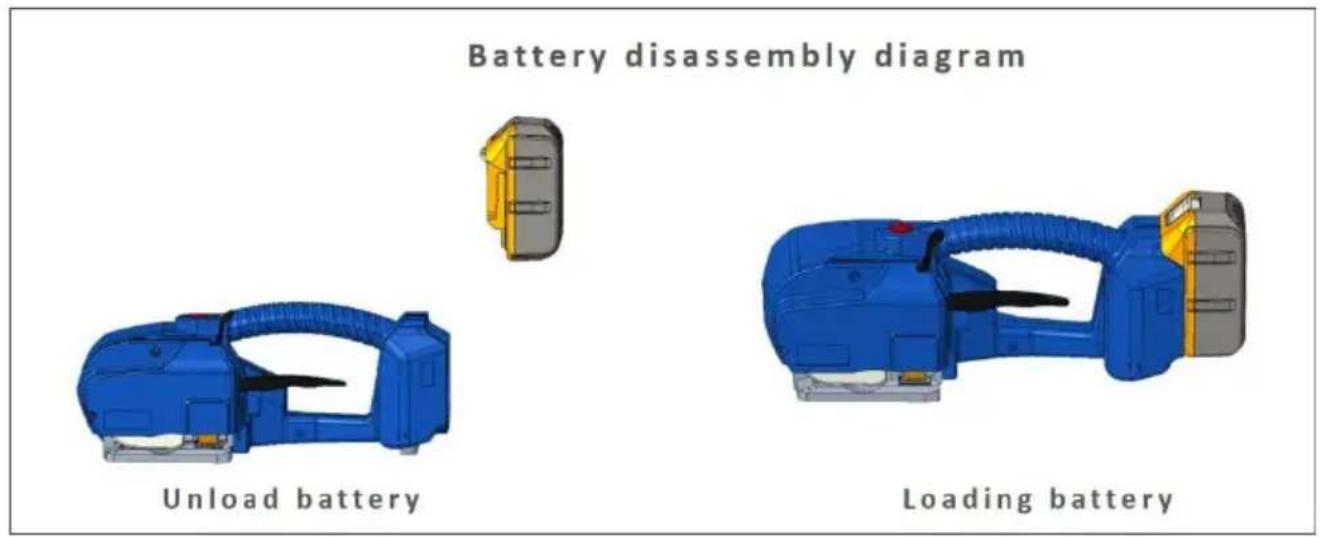
4.1 Battery installation
* Do not leave baler batteries in the rain or water. * For safety reasons the battery is delivered uncharged and separated from the device, please follow the instructions for assembly. * Remove the battery by pressing the battery Clip Snap with your thumb and extracting it upwards or by releasing the Clip Snap after the battery. * The indicator light is red when the battery is low, the indicator red when charging, and the charging indicator light is green when charging is complete.
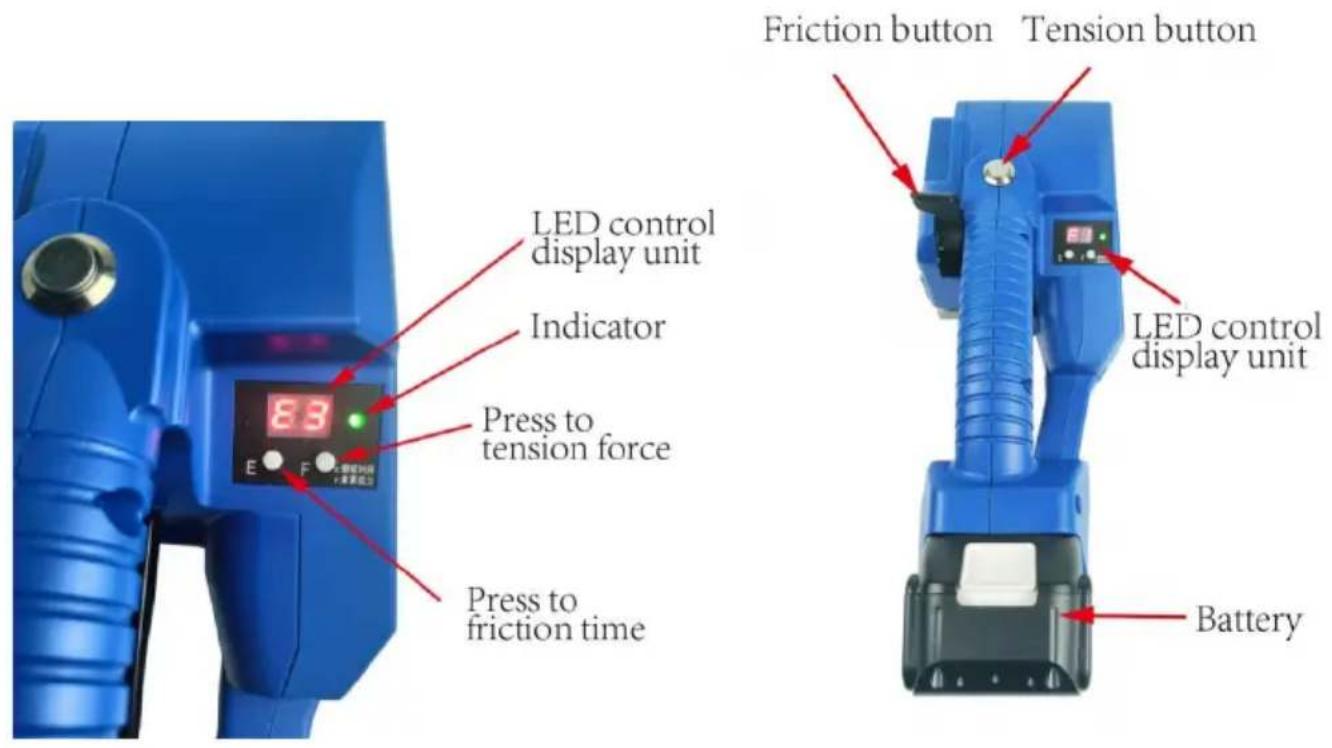
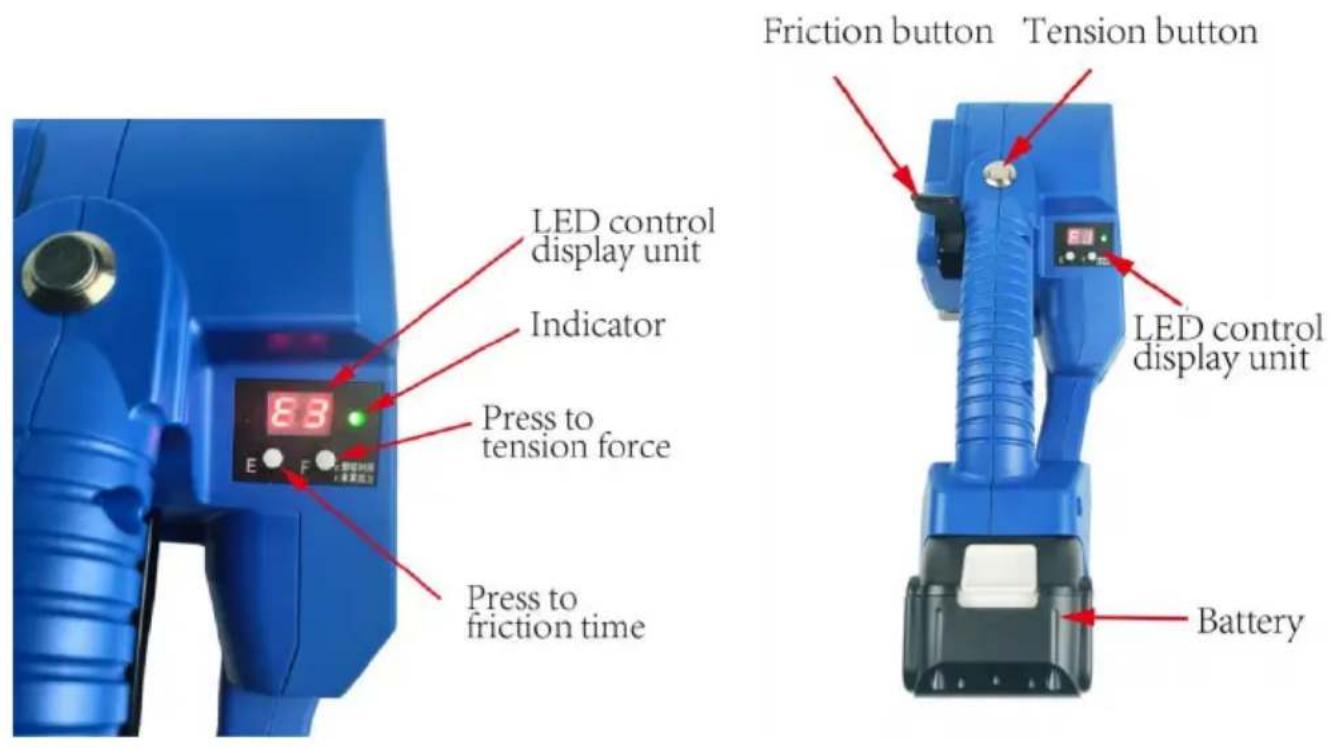
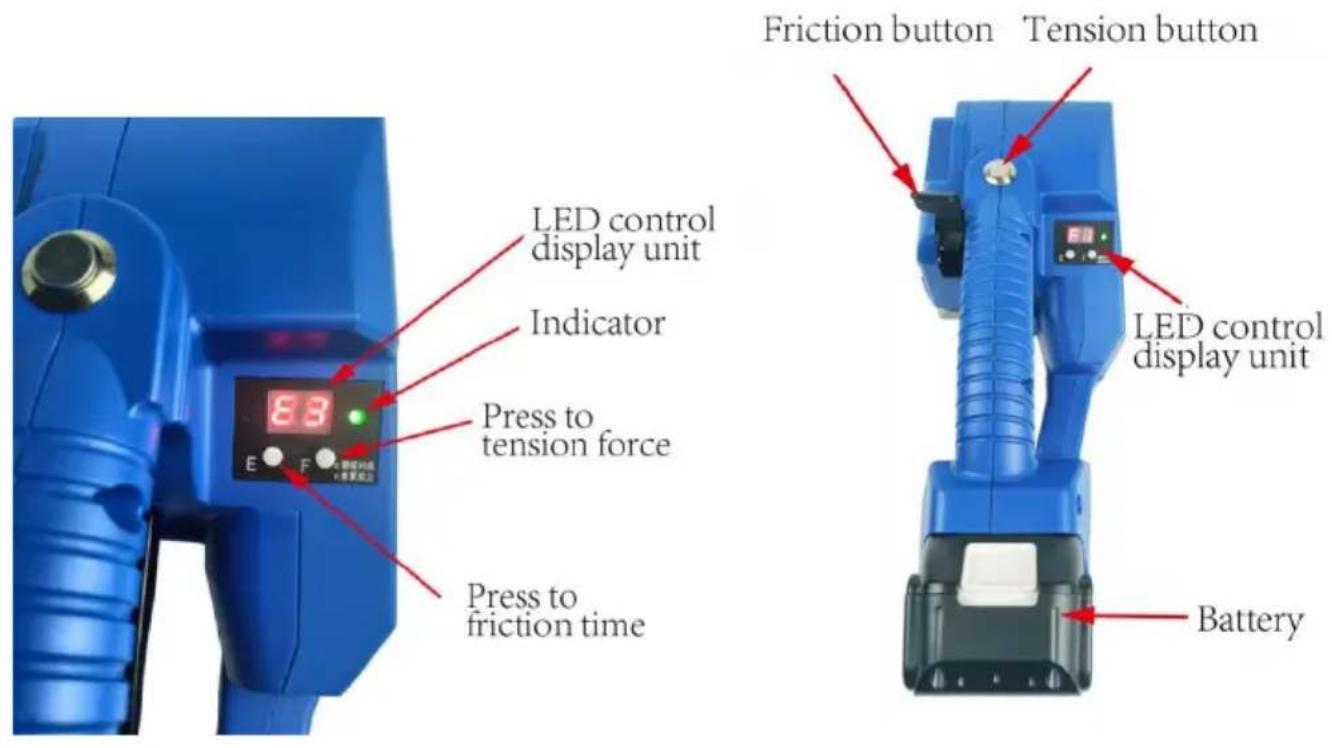
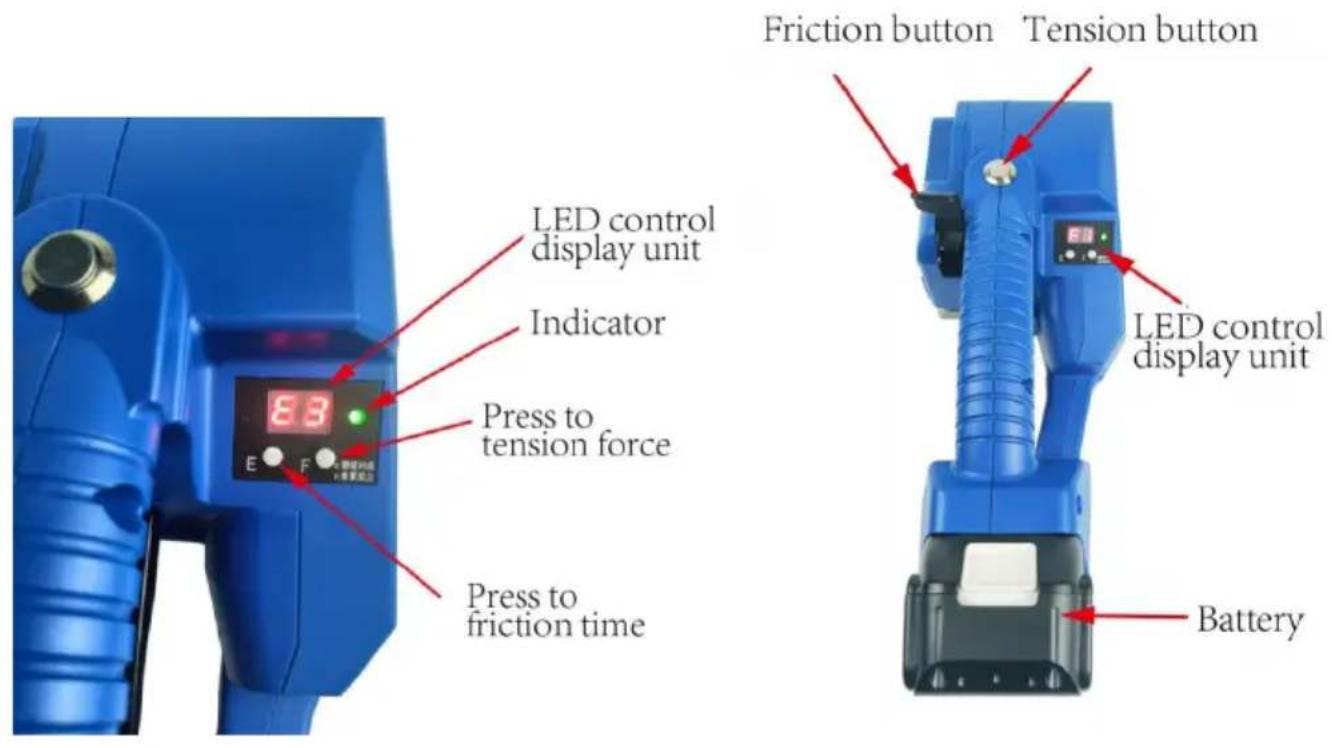
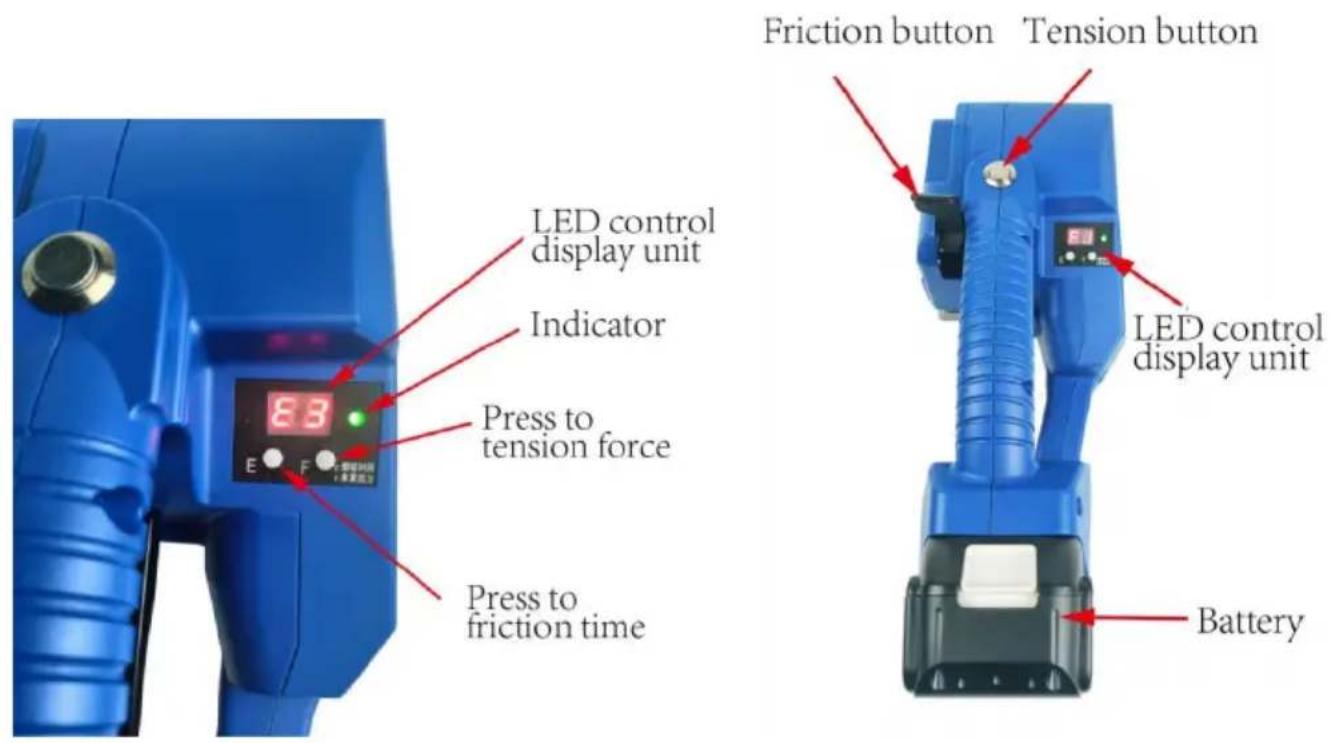
4.2 Operating elements
4.3 Semi-auto mode and auto mode
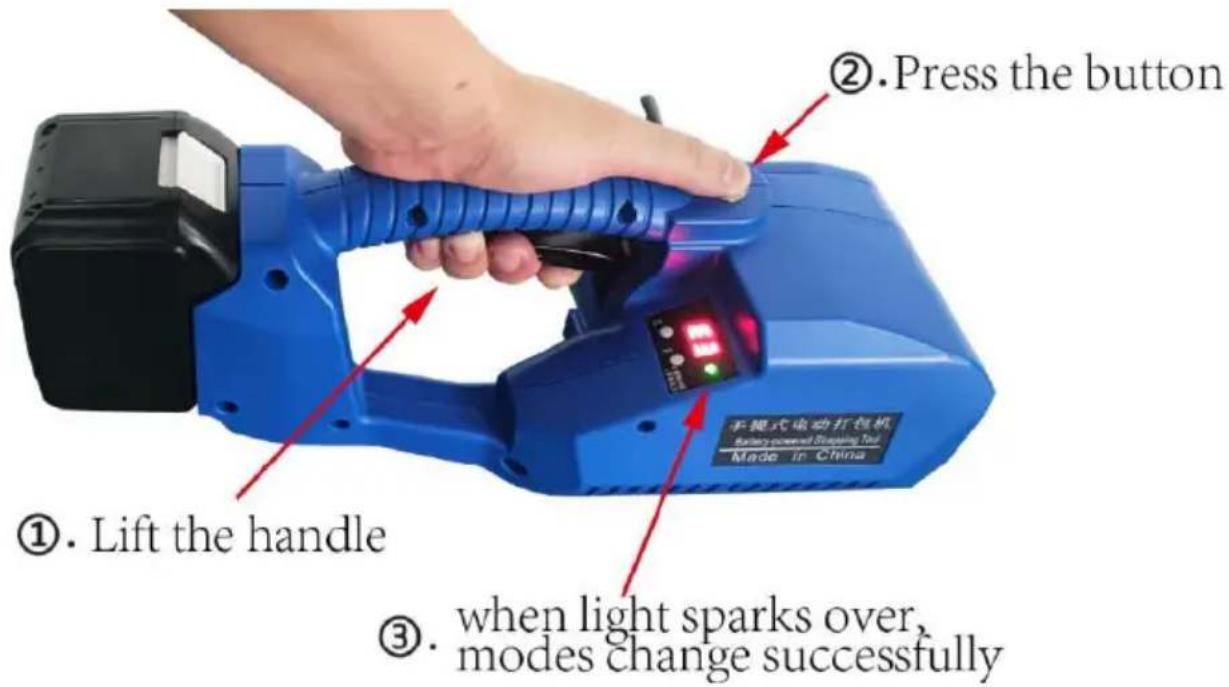
L-16 has 2 tension modes: one touch to tension and press button continuously to tension. How to make mode conversion? Just press the tension button and lift the handle at one time and when the indicator flashes alternately, the mode conversion is done.
4.4 Baler operations
*Semi-auto tension mode (press button continuously to tension)
Step 1 Wrap and stack the straps
Please wrap the straps in the way as shown and do not allow them to get wet with oil or other debris at any time.
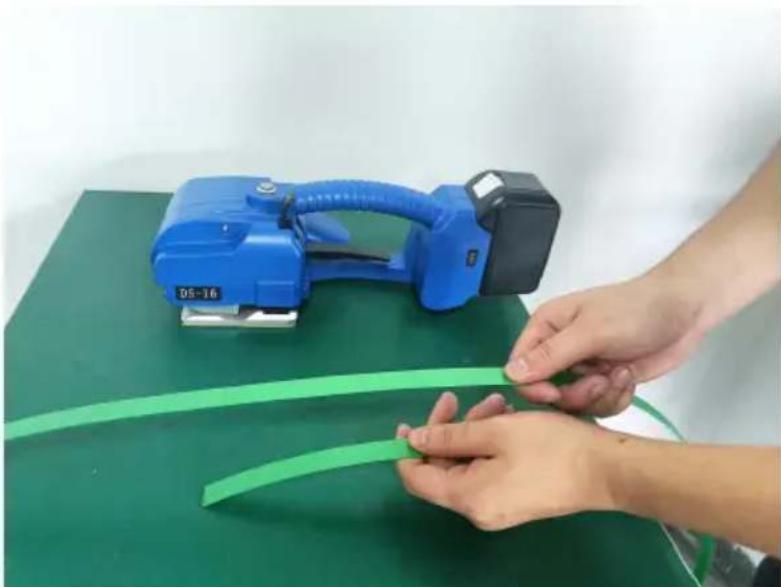
Step 2 inserts the straps into baler
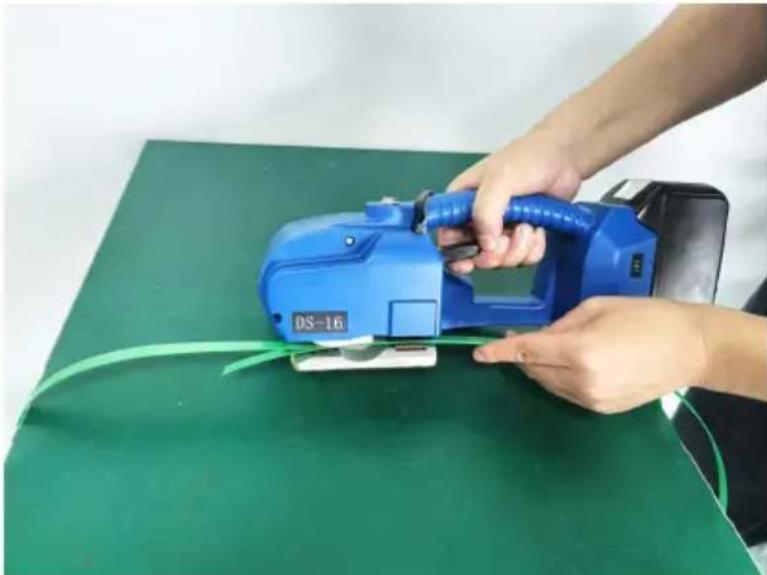
When inserting the straps, the straps in the direction of tension must be stacked at the top end, the bottom strapping should be stretched to the bottom of the feeding wheel to cover the front of the tooth plate.
5-10MM longer, when inserting the straps, please lift the handle with your right hand, insert the straps with your left hand, the upper and lower of straps must be stacked parallel to each other after releasing the handle.
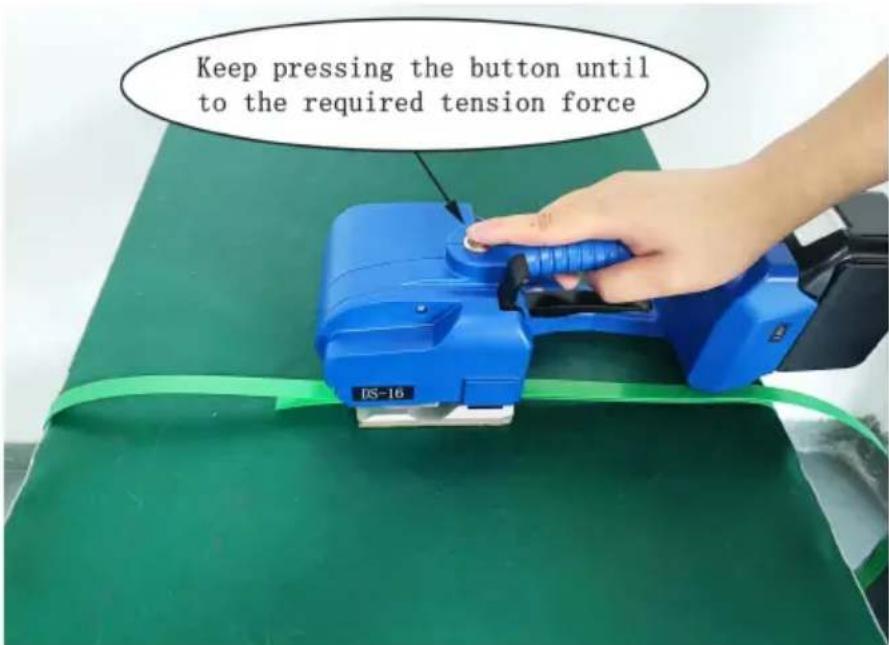
Step 3 Tighten or feed in the straps
When you press the tension button and release it, the baler will use the default preset tightening time. When the tightness is not enough or too tight, just increase or decrease the tension power grade appropriately until it is appropriate. When tightening, keep the baler moving in parallel and the forward direction of the baler free of sundries.
Step 4 Weld the straps
After pressing the friction button, the baler automatically seals and
cuts the straps (the time is preset by the system and can be increased or decreased to adjust the friction time grade).
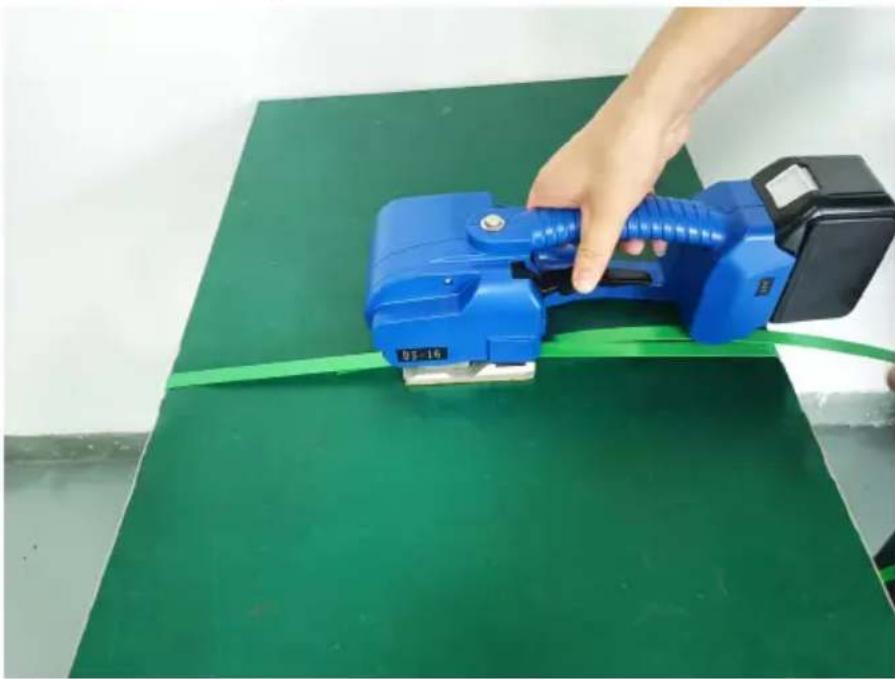
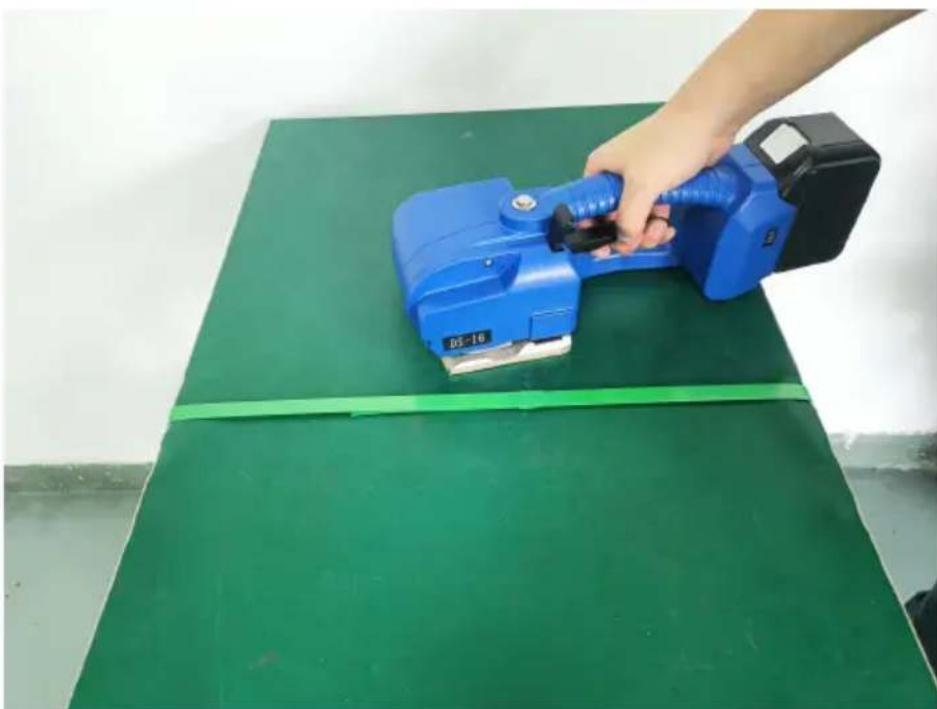
Step 5 Move the baler away
When the bonding operation is complete, lift the handle and the feeding wheel runs reversely to loosen the straps accordingly and then move the baler away.
*One touch to tension mode
Step 1 Wrap and stack the straps
Please wrap the straps in the way as shown and do not allow
straps to get wet with oil or other debris at any time.
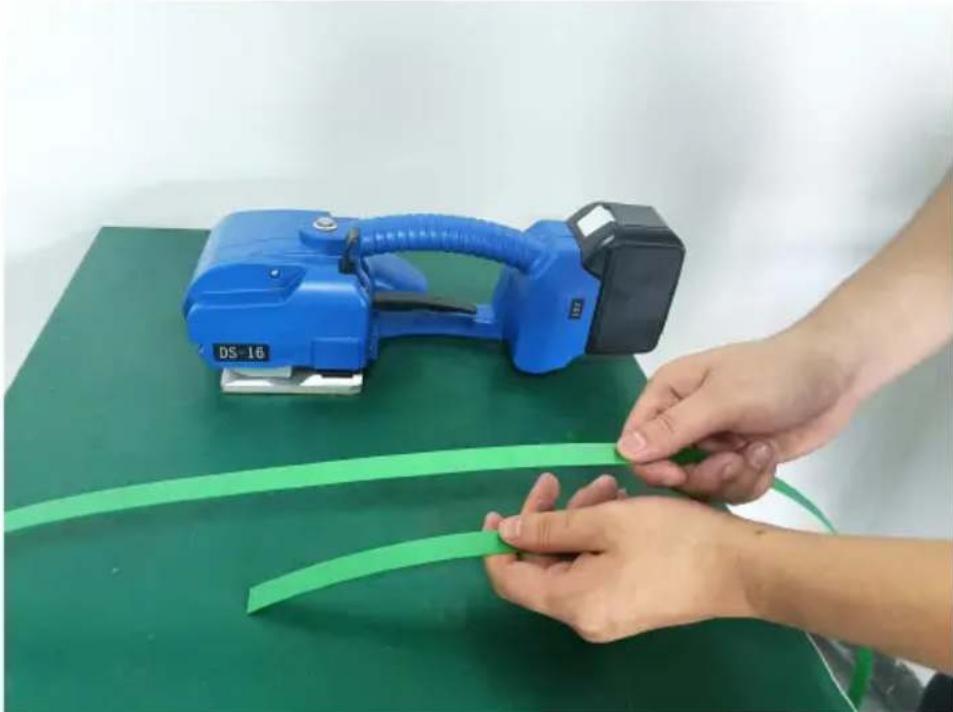
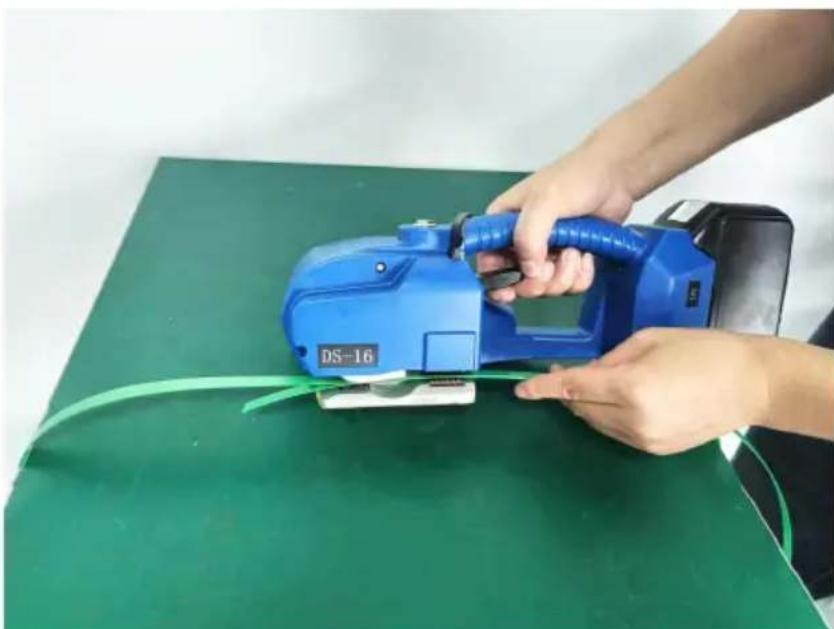
Step 2 Insert the straps into the baler
When inserting the straps, the straps in the direction of tension must be stacked at the top end, the bottom strapping should be stretched to the bottom of the feeding wheel to cover the front of the tooth plate 5-10MM longer. When inserting the straps, please lift the handle with your right hand, insert the straps with your left hand, the upper and lower of straps must be stacked parallel to each other after releasing the handle.
Step 3 Tighten straps
When you press the tension button and release it, the baler automatically tightens the straps.
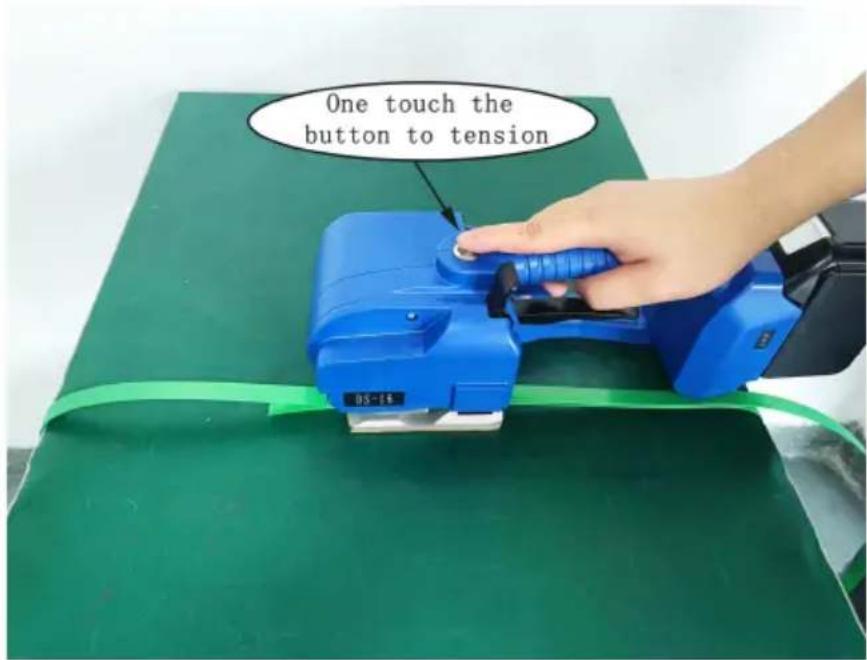
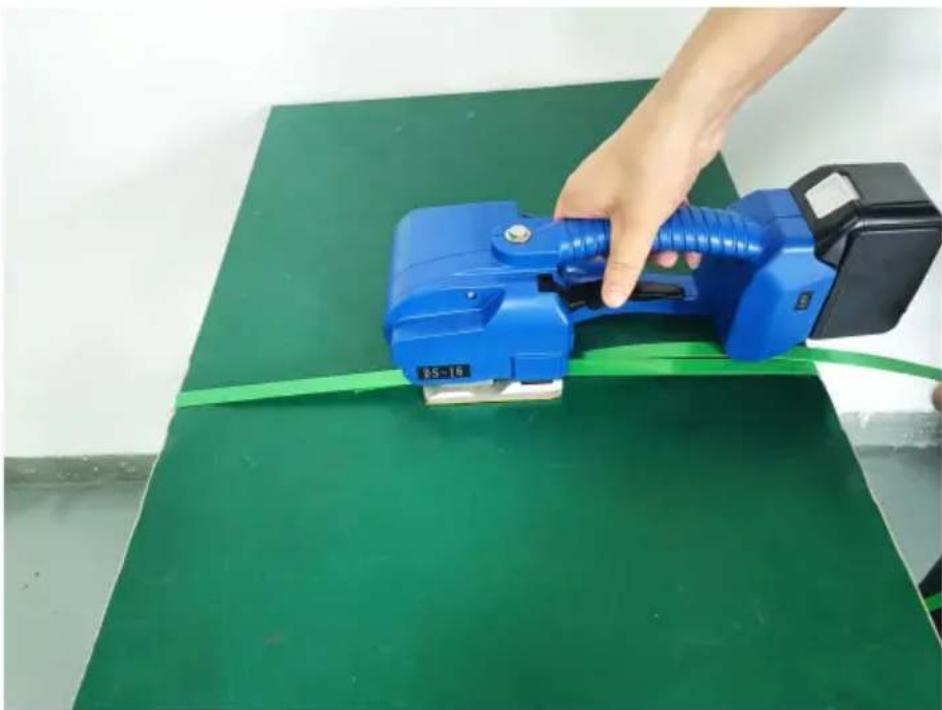
Step 4 Weld the straps
After pressing the friction button, the baler automatically seals and cuts the straps (the time is preset by the system and can be increased or decreased to adjust the friction time grade).
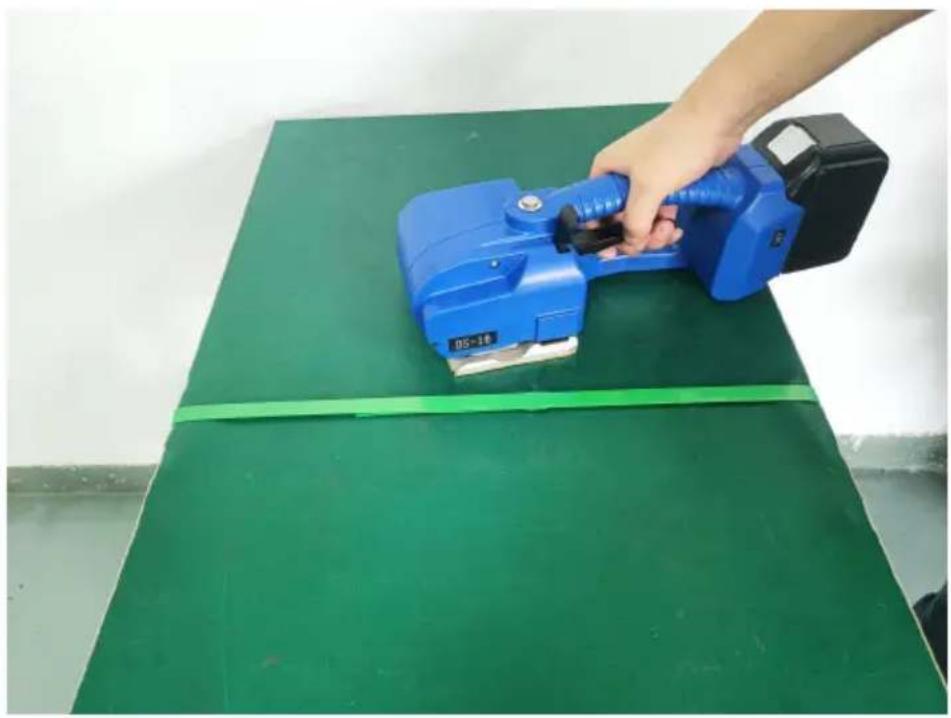
Step 5 Move the baler away
When the bonding operation is complete, lift the handle and the feel wheel runs reversely to loosen the straps accordingly, then move
the baler.
- Electrical connections
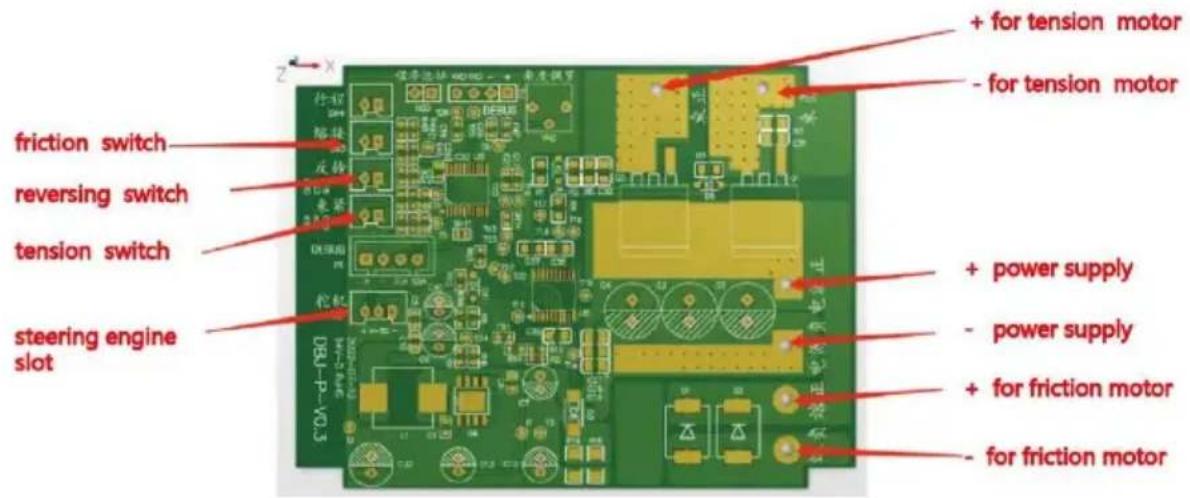
6. Wear parts replacement & bonding state adjustment
Note: Please disconnect the power switch and remove the battery before each service.
6.1 Wear parts replacement
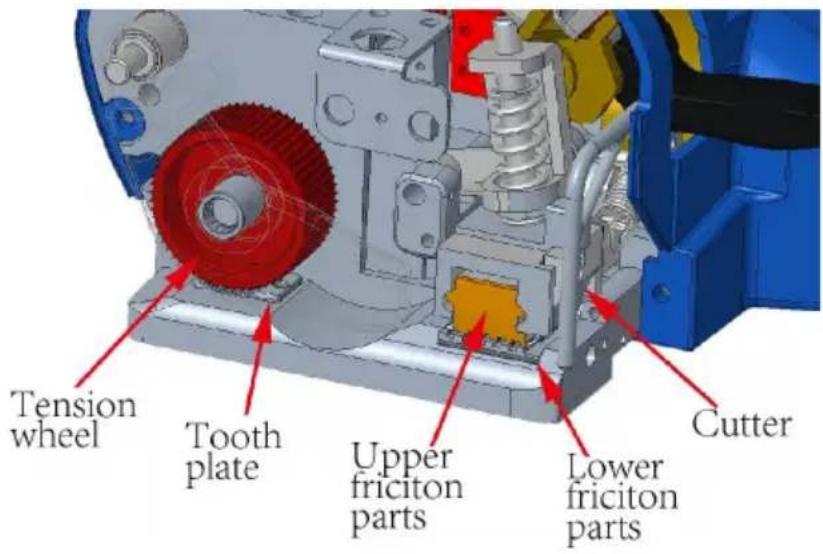
Cutter (JD-PSE-G016): First loosen the screw on the left cover plate (JD-L16-G01) and remove it, then remove the screw on the cutter and remove the cutter for replacement. After installing the cutter, install in reverse order.
Lower toothed plate (JD-PSE-G011): First remove the screws on the toothed plate and remove it, then replace the ejected toothed plate. After replacement, assemble it in reverse order.
Tension wheel (JD-PSE-G012): Remove the left cover plate as described above, remove the nut fixed on the connecting shaft (JD-L16-G021), remove the tension wheel cover (JD-L16-G007), replace the restraining wheel, and replace it in reverse order.
Lower friction part (JD-PSE-G013): First loosen and remove the headless screws fixed on the shaft of the lower friction part, push out the lower friction part from the bottom for replacement, and then replace it in reverse order.
6.2 Tightening, bonding and cutting adjustments
1. If the tightening slips, loosen the screws fixed on the tooth and install the tooth plate gasket (JD-PSE-G028) to raise the tooth plate, or replace the tooth plate.
2. When using different packing belts with a thickness of 0.4-1.2MM, timely adjust the gap between the upper friction part (JD-PSE-G008) and the lower friction part, otherwise poor welding will occur. When adjusting the clearance between the upper and lower friction parts, first remove the left cover plate, then loosen the remove sealing button (JD-PSE-G005), fix the lower compression shaft of the bonding plate (JD-PSE-G022) with a slotted screwdriver, and then turn the nut on the connecting shaft clockwise or counterclockwise. When rotating clockwise, the clearance between the upper and lower friction parts becomes larger, and when rotating counterclockwise, the clearance becomes smaller.
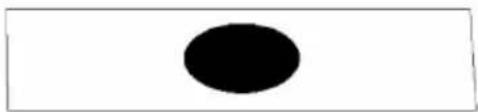
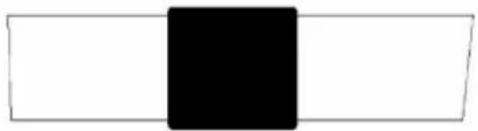
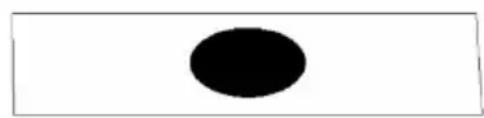
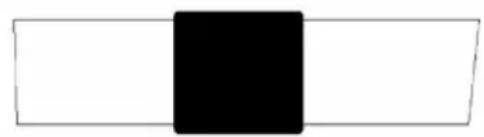
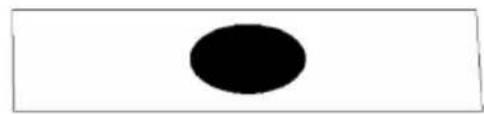
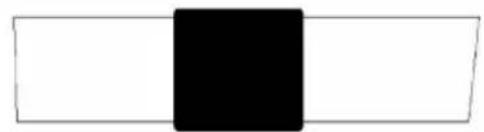
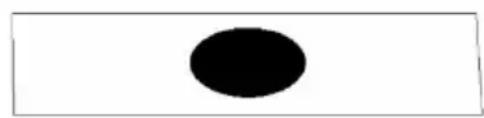
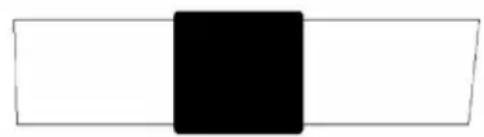
3. The bonding time and the tightening force are adjusted through the digital display windows E and F on the right cover. Key E adjusts the time, and key F adjusts the tightening force, increasing from grade 1 to grade 9. 4. Refer to the following chart for wear part replacement and bonding & welding time (effect) adjustment.

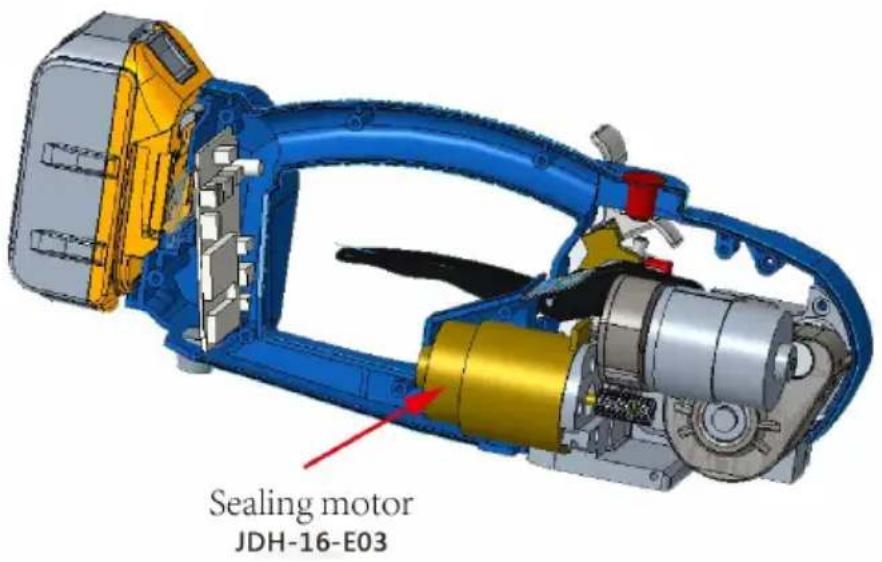
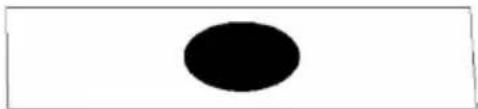
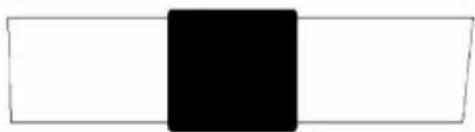
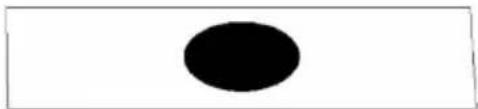
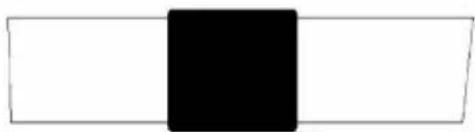
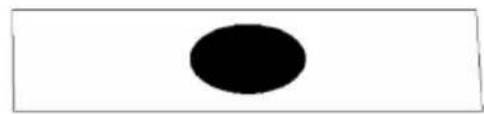
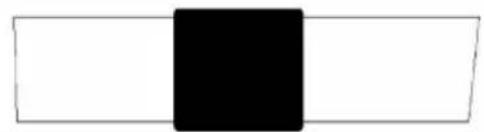
Diagram of welding & bonding effect

Perfect friction time
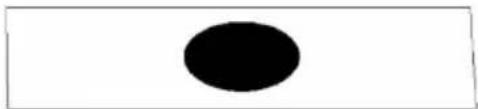
Friction time is too short
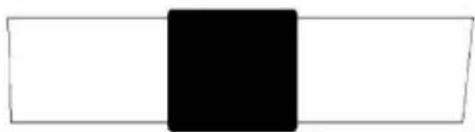
Friction time is too long
7. Common electrical faults
In the process of use, the baler tool suddenly jammed and LED sh when the baling belt stuck in the machine can not be taken out, please immediately turn power off, cut off the straps to remove the straps from the tool, promptly charge the battery or replace the battery. When confirming the battery has power and the fault is not eliminated, you remove the left and right plastic covers after removing the battery from the tool, such as checking the switches or the wiring on each switch motors has not fallen off, or replace the micro switch or replace the sealing motor.
8. Product exploded view and parts list
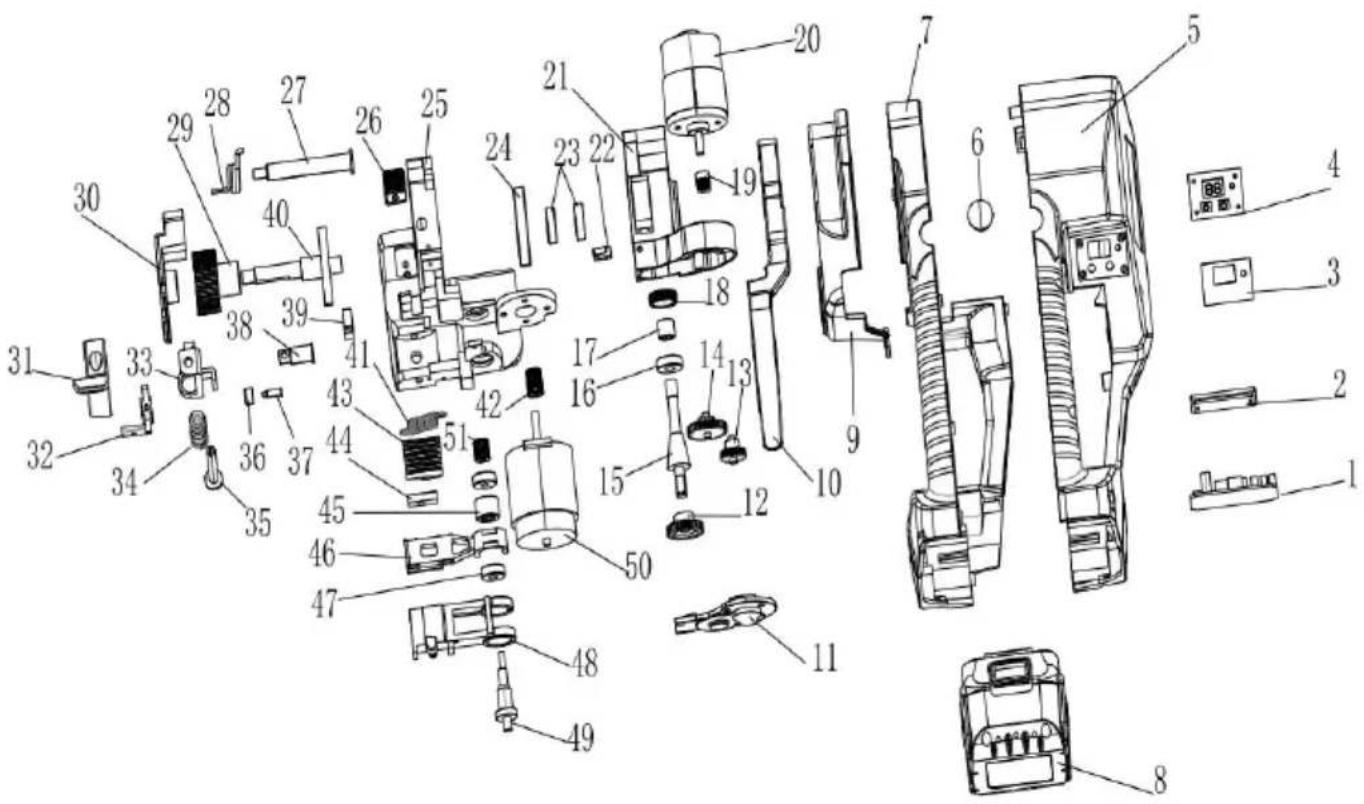
| Item | Part name | Specification | Material code | Qty. |
| 1 | PCB | JD-A16-E019 | 1 | |
| 2 | Battery adapter slot | JD-L16-G06 | 1 | |
| 3 | PVC sticker | JD-L16-G07 | 1 | |
| 4 | LED display unit | JD-L16-G05 | 1 | |
| 5 | Right house | JD-L16-G03 | 1 | |
| 6 | Tension button | OD16 | JD-PSE-E039 | 1 |
| 7 | Left house | JD-L16-G02 | 1 | |
| 8 | Battery | 18V, 5.0A | JD-PSE-E051 | 1 |
| 9 | Left side cover | JD-L16-G01 | 1 | |
| 10 | Lift | JD-L16-G004 | 1 | |
| 11 | Reducer cover plate | JD-L16-G003 | 1 | |
| 12 | Connect-gear for worm | JD-PSE-G033 | 1 | |
| 13 | Variable speed gear D | JD-L16-G036 | 1 | |
| 14 | Double gear | JD-PSE-G031 | 1 | |
| 15 | Worm gear | JD-PSE-G030 | 1 | |
| 16 | Bearing 607 | JD-PSE-E012 | 1 | |
| 17 | Bearing BK0810 | JD-PSE-E015 | 1 | |
| 18 | Gear box tooth sleeve | JD-L16-04 | 1 | |
| 19 | gear B | JD-PSE-G032 | 1 | |
| 20 | Tension motor | JD-L16-E01 | 1 | |
| 21 | Reduction gear box | JD-L16-G002 | 1 | |
| 22 | Switch B | JD-PSE-E007 | 1 | |
| 23 | Ball bearing A 6900 | JD-PSE-E010 | 2 | |
| 24 | Reducer cover | JD-PSE-G015 | 1 | |
| 25 | Body | JD-L16-G001 | 1 | |
| 26 | Tooth plate | JD-PSE-G011 | 1 | |
| 27 | M6 boss pivot pin | JD-L16-G021 | 1 | |
| 28 | Reset torsion spring | JD-PSE-G019 | 1 | |
| 29 | Tension wheel DB-009 | JD-PSE-G012 | 1 | |
| 30 | Tension wheel cover | JD-L16-G007 | 1 | |
| 31 | Sealing button | JD-PSE-G005 | 1 | |
| 32 | Cam unit | JD-PSE-G014 | 1 | |
| 33 | Spring cavity DB-021 | JD-PSE-G010 | 1 | |
| 34 | Compression spring | JD-PSE-G020 | 1 |
| Item | Part name | Specification | Material code | Qty. |
| 35 | Shaft | JD-PSE-G022 | 1 | |
| 36 | Cam driver | JD-PSE-G038 | 1 | |
| 37 | 4*12.5 pin | JD-PSE-E022 | 1 | |
| 38 | Shaft pin | JD-PSE-G023 | 1 | |
| 39 | Sealing switch A | JD-PSE-E006 | 1 | |
| 40 | Curved umbrella tooth | JD-PSE-G029 | 1 | |
| 41 | Drag spring | JD-PSE-G017-2 | 1 | |
| 42 | Synchronous wheel A | JD-PSE-G034 | 1 | |
| 43 | Lower friction parts | JD-PSE-G013 | 1 | |
| 44 | Cutter | JD-PSE-G016 | 1 | |
| 45 | Bearing A 101712 | JD-PSE-E014-1 | 1 | |
| 46 | Upper friction parts | JD-PSE-G008 | 1 | |
| 47 | Bearing B 606 | JD-PSE-E011 | 2 | |
| 48 | Friciton part bracket | JD-PSE-G009 | 1 | |
| 49 | Eccentric shaft | JD-PSE-G024 | 1 | |
| 50 | Sealing motor | JDH-16-E03 | 1 | |
| 51 | Synchronous wheel B | JD-PSE-G035 | 1 |
Address: Shuangchenglu 803nong11hao1602A-1609shi, baoshanqu, shanghai 200000 CN.
Imported to AUS: SIHAO PTY LTD, 1 ROKEVA STREETEASTWOOD NS 2122 Australia
Imported to USA: Sanven Technology Ltd., Suite 250, 9166 Anaheim Pla Rancho Cucamonga, CA 91730
| EC | REP |
E-CrossStu GmbH
Mainzer Landstr. 69, 60329 Frankfurt am Main
| UK | REP |
YH CONSULTING LIMITED.
C/O YH Consulting Limited Office 147, Centurion House
London Road, Staines-upon-Thames, Surrey, TW18 4
VEVOR®
TOUGH TOOLS, HALF PRICE
Technical Support and E-Warranty Certificate
www.vevor.com/support
VEVOR®
TOUGH TOOLS, HALF PRICE
We continue to be committed to providing you with tools at competitive prices. "Save Half", "Half Price", or any other similar expressions used by us only represent an estimate of savings you might benefit from buying certain tools with us compared to top brands and does not necessarily mean to cover all categories of tools offered. We kindly remind you to verify carefully when placing an order with us whether you are actually saving half in comparison with the top major brands.
Model: DS-16
NEED HELP? CONTACT US!
Have product questions? Need technical support? Please feel free to contact us:
Technical Support and E-Warranty Certificate www.vevor.com/support
This is the original instruction, please read all manual instructions carefully before operating. VEVOR reserves a clear interpretation of the user manual. The appearance of the product shall be subject to the product you received. Please forgive us that we won't inform you of any technology or software updates on our product.
INSTRUCTIONS
Perfect friction time
Friction time is too short
Friction time is too long
| Item | Part name | Specification | Material code | Qty. |
| 1 | PCB | JD-A16-E019 | 1 | |
| 2 | Battery adapter slot | JD-L16-G06 | 1 | |
| 3 | PVC sticker | JD-L16-G07 | 1 | |
| 4 | LED display unit | JD-L16-G05 | 1 | |
| 5 | Right house | JD-L16-G03 | 1 | |
| 6 | Tension button | OD16 | JD-PSE-E039 | 1 |
| 7 | Left house | JD-L16-G02 | 1 | |
| 8 | Battery | 18V, 5.0A | JD-PSE-E051 | 1 |
| 9 | Left side cover | JD-L16-G01 | 1 | |
| 10 | Lift | JD-L16-G004 | 1 | |
| 11 | Reducer cover plate | JD-L16-G003 | 1 | |
| 12 | Connect-gear for worm | JD-PSE-G033 | 1 | |
| 13 | Variable speed gear D | JD-L16-G036 | 1 | |
| 14 | Double gear | JD-PSE-G031 | 1 | |
| 15 | Worm gear | JD-PSE-G030 | 1 | |
| 16 | Bearing 607 | JD-PSE-E012 | 1 | |
| 17 | Bearing BK0810 | JD-PSE-E015 | 1 |
| Item | Part name | Specification | Material code | Qty. |
| 18 | Gear box tooth sleeve | JD-L16-04 | 1 | |
| 19 | gear B | JD-PSE-G032 | 1 | |
| 20 | Tension motor | JD-L16-E01 | 1 | |
| 21 | Reduction gear box | JD-L16-G002 | 1 | |
| 22 | Switch B | JD-PSE-E007 | 1 | |
| 23 | Ball bearing A 6900 | JD-PSE-E010 | 2 | |
| 24 | Reducer cover | JD-PSE-G015 | 1 | |
| 25 | Body | JD-L16-G001 | 1 | |
| 26 | Tooth plate | JD-PSE-G011 | 1 | |
| 27 | M6 boss pivot pin | JD-L16-G021 | 1 | |
| 28 | Reset torsion spring | JD-PSE-G019 | 1 | |
| 29 | Tension wheel DB-009 | JD-PSE-G012 | 1 | |
| 30 | Tension wheel cover | JD-L16-G007 | 1 | |
| 31 | Sealing button | JD-PSE-G005 | 1 | |
| 32 | Cam unit | JD-PSE-G014 | 1 | |
| 33 | Spring cavity DB-021 | JD-PSE-G010 | 1 | |
| 34 | Compression spring | JD-PSE-G020 | 1 | |
| 35 | Shaft | JD-PSE-G022 | 1 | |
| 36 | Cam driver | JD-PSE-G038 | 1 | |
| 37 | 4*12.5 pin | JD-PSE-E022 | 1 | |
| 38 | Shaft pin | JD-PSE-G023 | 1 | |
| 39 | Sealing switch A | JD-PSE-E006 | 1 | |
| 40 | Curved umbrella tooth | JD-PSE-G029 | 1 | |
| 41 | Drag spring | JD-PSE-G017-2 | 1 | |
| 42 | Synchronous wheel A | JD-PSE-G034 | 1 | |
| 43 | Lower friction parts | JD-PSE-G013 | 1 | |
| 44 | Cutter | JD-PSE-G016 | 1 | |
| 45 | Bearing A 101712 | JD-PSE-E014-1 | 1 | |
| 46 | Upper friction parts | JD-PSE-G008 | 1 | |
| 47 | Bearing B 606 | JD-PSE-E011 | 2 | |
| 48 | Friciton part bracket | JD-PSE-G009 | 1 | |
| 49 | Eccentric shaft | JD-PSE-G024 | 1 | |
| 50 | Sealing motor | JDH-16-E03 | 1 | |
| 51 | Synchronous wheel B | JD-PSE-G035 | 1 |
Address: Shuangchenglu 803nong11hao1602A-1609shi, Baoshanqu, Shanghai 200000 CN.
Imported in Australia: SIHAO PTY LTD, 1 ROKEVA STREET, ASTWOOD NSW 2122 Australia
C/O YH Consulting Limited Office 147, Centurion H, London Road, Staines-upon-Thames, Surrey, TW18 2
VEVOR®
TOUGH TOOLS, HALF PRICE
We continue to be committed to providing you with tools at competitive prices. "Save Half", "Half Price" or any other similar expressions used by us only represent an estimate of savings you might benefit from buying certain tools with us compared to top brands and does not necessarily mean to cover all categories of tools offered. We kindly remind you to verify carefully when placing an order with us that you are actually saving half in comparison with the top major brands.
Model: DS-16
NEED HELP? CONTACT US!
Have product questions? Need technical support? Please feel free to contact us:
Technical Support and E-Warranty Certificate www.vevor.com/support
This is the original instruction. Please read all manual instructions carefully before operating. VEVOR reserves a clear interpretation of the user manual. The appearance of the product shall be subject to the product you received. Please forgive us that we won't inform you of any technology or software updates on our product.
INSTRUCTIONS
4.2 Controls
Perfect friction time
Friction time is too short
Friction time is too long
| Item | Part name | Specification | Material code | Qty. |
| 1 | PCB | JD-A16-E019 | 1 | |
| 2 | Battery adapter slot | JD-L16-G06 | 1 | |
| 3 | PVC sticker | JD-L16-G07 | 1 | |
| 4 | LED display unit | JD-L16-G05 | 1 | |
| 5 | Right house | JD-L16-G03 | 1 | |
| 6 | Tension button | OD16 | JD-PSE-E039 | 1 |
| 7 | Left house | JD-L16-G02 | 1 | |
| 8 | Battery | 18V, 5.0A | JD-PSE-E051 | 1 |
| 9 | Left side cover | JD-L16-G01 | 1 | |
| 10 | Lift | JD-L16-G004 | 1 | |
| 11 | Reducer cover plate | JD-L16-G003 | 1 | |
| 12 | Connect-gear for worm | JD-PSE-G033 | 1 | |
| 13 | Variable speed gear D | JD-L16-G036 | 1 | |
| 14 | Double gear | JD-PSE-G031 | 1 | |
| 15 | Worm gear | JD-PSE-G030 | 1 | |
| 16 | Bearing 607 | JD-PSE-E012 | 1 | |
| 17 | Bearing BK0810 | JD-PSE-E015 | 1 |
| Item | Part name | Specification | Material code | Qty. |
| 18 | Gear box tooth sleeve | JD-L16-04 | 1 | |
| 19 | gear B | JD-PSE-G032 | 1 | |
| 20 | Tension motor | JD-L16-E01 | 1 | |
| 21 | Reduction gear box | JD-L16-G002 | 1 | |
| 22 | Switch B | JD-PSE-E007 | 1 | |
| 23 | Ball bearing A 6900 | JD-PSE-E010 | 2 | |
| 24 | Reducer cover | JD-PSE-G015 | 1 | |
| 25 | Body | JD-L16-G001 | 1 | |
| 26 | Tooth plate | JD-PSE-G011 | 1 | |
| 27 | M6 boss pivot pin | JD-L16-G021 | 1 | |
| 28 | Reset torsion spring | JD-PSE-G019 | 1 | |
| 29 | Tension wheel DB-009 | JD-PSE-G012 | 1 | |
| 30 | Tension wheel cover | JD-L16-G007 | 1 | |
| 31 | Sealing button | JD-PSE-G005 | 1 | |
| 32 | Cam unit | JD-PSE-G014 | 1 | |
| 33 | Spring cavity DB-021 | JD-PSE-G010 | 1 | |
| 34 | Compression spring | JD-PSE-G020 | 1 | |
| 35 | Shaft | JD-PSE-G022 | 1 | |
| 36 | Cam driver | JD-PSE-G038 | 1 | |
| 37 | 4*12.5 pin | JD-PSE-E022 | 1 | |
| 38 | Shaft pin | JD-PSE-G023 | 1 | |
| 39 | Sealing switch A | JD-PSE-E006 | 1 | |
| 40 | Curved umbrella tooth | JD-PSE-G029 | 1 | |
| 41 | Drag spring | JD-PSE-G017-2 | 1 | |
| 42 | Synchronous wheel A | JD-PSE-G034 | 1 | |
| 43 | Lower friction parts | JD-PSE-G013 | 1 | |
| 44 | Cutter | JD-PSE-G016 | 1 | |
| 45 | Bearing A 101712 | JD-PSE-E014-1 | 1 | |
| 46 | Upper friction parts | JD-PSE-G008 | 1 | |
| 47 | Bearing B 606 | JD-PSE-E011 | 2 | |
| 48 | Friciton part bracket | JD-PSE-G009 | 1 | |
| 49 | Eccentric shaft | JD-PSE-G024 | 1 | |
| 50 | Sealing motor | JDH-16-E03 | 1 | |
| 51 | Synchronous wheel B | JD-PSE-G035 | 1 |
Address: Shuangchenglu 803nong11hao1602A-1609shi, Baoshanqu, Shanghai 200000 CN.
C/O YH Consulting Limited Office 147, Centurion H, London Road, Staines-upon-Thames, Surrey, TW18 2
VEVOR®
TOUGH TOOLS, HALF PRICE
We continue to be committed to providing you with tools at competitive prices. "Save Half", "Half Price" or any other similar expressions used by us only represent savings you might benefit from buying certain tools with us compared to top brands and does not necessarily mean to cover all categories of tools offered. We kindly remind you to verify carefully when placing an order with us that you are actually saving half in comparison with the top major brands.
Model: DS-16
NEED HELP? CONTACT US!
Have product questions? Need technical support? Please feel free to contact us:
Technical Support and E-Warranty Certificate www.vevor.com/support
This is the original instruction. Please read all manual instructions carefully before operating. VEVOR reserves a clear interpretation of the user manual. The appearance of the product shall be subject to the product you received. Please forgive us that we won't inform you of any technology or software updates on our product.
INSTRUCTIONS
Perfect friction time
Friction time is too short
Friction time is too long
| Item | Part name | Specification | Material code | Qty. |
| 1 | PCB | JD-A16-E019 | 1 | |
| 2 | Battery adapter slot | JD-L16-G06 | 1 | |
| 3 | PVC sticker | JD-L16-G07 | 1 | |
| 4 | LED display unit | JD-L16-G05 | 1 | |
| 5 | Right house | JD-L16-G03 | 1 | |
| 6 | Tension button | OD16 | JD-PSE-E039 | 1 |
| 7 | Left house | JD-L16-G02 | 1 | |
| 8 | Battery | 18V, 5.0A | JD-PSE-E051 | 1 |
| 9 | Left side cover | JD-L16-G01 | 1 | |
| 10 | Lift | JD-L16-G004 | 1 | |
| 11 | Reducer cover plate | JD-L16-G003 | 1 | |
| 12 | Connect-gear for worm | JD-PSE-G033 | 1 | |
| 13 | Variable speed gear D | JD-L16-G036 | 1 | |
| 14 | Double gear | JD-PSE-G031 | 1 | |
| 15 | Worm gear | JD-PSE-G030 | 1 | |
| 16 | Bearing 607 | JD-PSE-E012 | 1 | |
| 17 | Bearing BK0810 | JD-PSE-E015 | 1 | |
| 18 | Gear box tooth sleeve | JD-L16-04 | 1 | |
| 19 | gear B | JD-PSE-G032 | 1 | |
| 20 | Tension motor | JD-L16-E01 | 1 | |
| 21 | Reduction gear box | JD-L16-G002 | 1 | |
| 22 | Switch B | JD-PSE-E007 | 1 | |
| 23 | Ball bearing A 6900 | JD-PSE-E010 | 2 | |
| 24 | Reducer cover | JD-PSE-G015 | 1 | |
| 25 | Body | JD-L16-G001 | 1 | |
| 26 | Tooth plate | JD-PSE-G011 | 1 | |
| 27 | M6 boss pivot pin | JD-L16-G021 | 1 | |
| 28 | Reset torsion spring | JD-PSE-G019 | 1 | |
| 29 | Tension wheel DB-009 | JD-PSE-G012 | 1 | |
| 30 | Tension wheel cover | JD-L16-G007 | 1 | |
| 31 | Sealing button | JD-PSE-G005 | 1 | |
| 32 | Cam unit | JD-PSE-G014 | 1 | |
| 33 | Spring cavity DB-021 | JD-PSE-G010 | 1 | |
| 34 | Compression spring | JD-PSE-G020 | 1 |
| Item | Part name | Specification | Material code | Qty. |
| 35 | Shaft | JD-PSE-G022 | 1 | |
| 36 | Cam driver | JD-PSE-G038 | 1 | |
| 37 | 4*12.5 pin | JD-PSE-E022 | 1 | |
| 38 | Shaft pin | JD-PSE-G023 | 1 | |
| 39 | Sealing switch A | JD-PSE-E006 | 1 | |
| 40 | Curved umbrella tooth | JD-PSE-G029 | 1 | |
| 41 | Drag spring | JD-PSE-G017-2 | 1 | |
| 42 | Synchronous wheel A | JD-PSE-G034 | 1 | |
| 43 | Lower friction parts | JD-PSE-G013 | 1 | |
| 44 | Cutter | JD-PSE-G016 | 1 | |
| 45 | Bearing A 101712 | JD-PSE-E014-1 | 1 | |
| 46 | Upper friction parts | JD-PSE-G008 | 1 | |
| 47 | Bearing B 606 | JD-PSE-E011 | 2 | |
| 48 | Friciton part bracket | JD-PSE-G009 | 1 | |
| 49 | Eccentric shaft | JD-PSE-G024 | 1 | |
| 50 | Sealing motor | JDH-16-E03 | 1 | |
| 51 | Synchronous wheel B | JD-PSE-G035 | 1 |
Address: Shuangchenglu 803, Nong 11, Hao 1602A-1609 Shi, Baoshan Qu, Shanghai 200000 CN.
Imported in AUS: SIHAO PTY LTD, 1 ROKEVA STREET, EASTWOOD NSW 2122 Australia
C/O YH Consulting Limited Office 147, Centurion H
London Road, Staines-upon-Thames, Surrey, TW18 4
VEVOR®
TOUGH TOOLS, HALF PRICE
www.vevor.com/support
VEVOR®
TOUGH TOOLS, HALF PRICE
We continue to be committed to providing you with tools at competitive prices. "Save Half", "Half Price" or any other similar expressions used by us only represent an estimate of savings you might benefit from buying certain tools with us compared to top brands and does not necessarily mean to cover all categories of tools offered. We kindly remind you to verify carefully when placing an order with us that you are actually saving half in comparison with the top major brands.
Model: DS-16
NEED HELP? CONTACT US!
Have product questions? Need technical support? Please feel free to contact us:
Technical Support and E-Warranty Certificate www.vevor.com/support
This is the original instruction, please read all manual instructions carefully before operating. VEVOR reserves a clear interpretation of the user manual. The appearance of the product shall be subject to the product you received. Please forgive us that we won't inform you of any technology or software updates on our product.
INSTRUCTIONS
4.2 Operating elements
Step 3 Tighten or insert the straps
Perfect friction time
Friction time is too short
Friction time is too long
| Item | Part name | Specification | Material code | Qty. |
| 1 | PCB | JD-A16-E019 | 1 | |
| 2 | Battery adapter slot | JD-L16-G06 | 1 | |
| 3 | PVC sticker | JD-L16-G07 | 1 | |
| 4 | LED display unit | JD-L16-G05 | 1 | |
| 5 | Right house | JD-L16-G03 | 1 | |
| 6 | Tension button | OD16 | JD-PSE-E039 | 1 |
| 7 | Left house | JD-L16-G02 | 1 | |
| 8 | Battery | 18V, 5.0A | JD-PSE-E051 | 1 |
| 9 | Left side cover | JD-L16-G01 | 1 | |
| 10 | Lift | JD-L16-G004 | 1 | |
| 11 | Reducer cover plate | JD-L16-G003 | 1 | |
| 12 | Connect-gear for worm | JD-PSE-G033 | 1 | |
| 13 | Variable speed gear D | JD-L16-G036 | 1 | |
| 14 | Double gear | JD-PSE-G031 | 1 | |
| 15 | Worm gear | JD-PSE-G030 | 1 | |
| 16 | Bearing 607 | JD-PSE-E012 | 1 | |
| 17 | Bearing BK0810 | JD-PSE-E015 | 1 |
| Item | Part name | Specification | Material code | Qty. |
| 18 | Gear box tooth sleeve | JD-L16-04 | 1 | |
| 19 | gear B | JD-PSE-G032 | 1 | |
| 20 | Tension motor | JD-L16-E01 | 1 | |
| 21 | Reduction gear box | JD-L16-G002 | 1 | |
| 22 | Switch B | JD-PSE-E007 | 1 | |
| 23 | Ball bearing A 6900 | JD-PSE-E010 | 2 | |
| 24 | Reducer cover | JD-PSE-G015 | 1 | |
| 25 | Body | JD-L16-G001 | 1 | |
| 26 | Tooth plate | JD-PSE-G011 | 1 | |
| 27 | M6 boss pivot pin | JD-L16-G021 | 1 | |
| 28 | Reset torsion spring | JD-PSE-G019 | 1 | |
| 29 | Tension wheel DB-009 | JD-PSE-G012 | 1 | |
| 30 | Tension wheel cover | JD-L16-G007 | 1 | |
| 31 | Sealing button | JD-PSE-G005 | 1 | |
| 32 | Cam unit | JD-PSE-G014 | 1 | |
| 33 | Spring cavity DB-021 | JD-PSE-G010 | 1 | |
| 34 | Compression spring | JD-PSE-G020 | 1 | |
| 35 | Shaft | JD-PSE-G022 | 1 | |
| 36 | Cam driver | JD-PSE-G038 | 1 | |
| 37 | 4*12.5 pin | JD-PSE-E022 | 1 | |
| 38 | Shaft pin | JD-PSE-G023 | 1 | |
| 39 | Sealing switch A | JD-PSE-E006 | 1 | |
| 40 | Curved umbrella tooth | JD-PSE-G029 | 1 | |
| 41 | Drag spring | JD-PSE-G017-2 | 1 | |
| 42 | Synchronous wheel A | JD-PSE-G034 | 1 | |
| 43 | Lower friction parts | JD-PSE-G013 | 1 | |
| 44 | Cutter | JD-PSE-G016 | 1 | |
| 45 | Bearing A 101712 | JD-PSE-E014-1 | 1 | |
| 46 | Upper friction parts | JD-PSE-G008 | 1 | |
| 47 | Bearing B 606 | JD-PSE-E011 | 2 | |
| 48 | Friciton part bracket | JD-PSE-G009 | 1 | |
| 49 | Eccentric shaft | JD-PSE-G024 | 1 | |
| 50 | Sealing motor | JDH-16-E03 | 1 | |
| 51 | Synchronous wheel B | JD-PSE-G035 | 1 |
Address: Shuangchenglu 803nong11hao1602A-1609shi, baoshanqu, shanghai 200000 CN.
Imported to AUS: SIHAO PTY LTD, 1 ROKEVA STREETEASTWOOD NS 2122 Australia
Imported to USA: Sanven Technology Ltd., Suite 250, 9166 Anaheim Place, Rancho Cucamonga, CA 91730
| EC | REP |
E-CrossStu GmbH
Mainzer Landstr.69, 60329 Frankfurt am Main
| UK | REP |
YH CONSULTING LIMITED.
C/O YH Consulting Limited Office 147, Centurion House, London Road, Staines-upon-Thames, Surrey, TW18 4AX
VEVOR®
TOUGH TOOLS, HALF PRICE
www.vevor.com/support
Strapping Machine
MODEL: DS-16
We continue to be committed to provide you tools with competitive price. "Save Half", "Half Price" or any other similar expressions used by us only represent the savings you might benefit from buying certain tools with us compared to top brands and does not necessarily mean to cover all categories of tools offered. We kindly remind you to verify carefully when placing an order with us to ensure you are actually saving half in comparison with the top major brands.
Model: DS-16
NEED HELP? CONTACT US!
Have product questions? Need technical support? Please feel free to contact us:
Technical Support and E-Warranty Certificate www.vevor.com/support
This is the original instruction. Please read all manual instructions carefully before operating. VEVOR reserves the right to interpret the user manual. The appearance of the product shall be subject to the product you received. Please forgive us that we won't inform you of any technology or software updates on our product.
INSTRUCTIONS
4.4 Press operations
Step 5 Move the press away
Step 5 Move the press away
Perfect friction time
Friction time is too short
Friction time is too long
| Item | Part name | Specification | Material code | Qty. |
| 1 | PCB | JD-A16-E019 | 1 | |
| 2 | Battery adapter slot | JD-L16-G06 | 1 | |
| 3 | PVC sticker | JD-L16-G07 | 1 | |
| 4 | LED display unit | JD-L16-G05 | 1 | |
| 5 | Right house | JD-L16-G03 | 1 | |
| 6 | Tension button | OD16 | JD-PSE-E039 | 1 |
| 7 | Left house | JD-L16-G02 | 1 | |
| 8 | Battery | 18V, 5.0A | JD-PSE-E051 | 1 |
| 9 | Left side cover | JD-L16-G01 | 1 | |
| 10 | Lift | JD-L16-G004 | 1 | |
| 11 | Reducer cover plate | JD-L16-G003 | 1 | |
| 12 | Connect-gear for worm | JD-PSE-G033 | 1 | |
| 13 | Variable speed gear D | JD-L16-G036 | 1 | |
| 14 | Double gear | JD-PSE-G031 | 1 | |
| 15 | Worm gear | JD-PSE-G030 | 1 | |
| 16 | Bearing 607 | JD-PSE-E012 | 1 | |
| 17 | Bearing BK0810 | JD-PSE-E015 | 1 | |
| 18 | Gear box tooth sleeve | JD-L16-04 | 1 | |
| 19 | gear B | JD-PSE-G032 | 1 | |
| 20 | Tension motor | JD-L16-E01 | 1 | |
| 21 | Reduction gear box | JD-L16-G002 | 1 | |
| 22 | Switch B | JD-PSE-E007 | 1 | |
| 23 | Ball bearing A 6900 | JD-PSE-E010 | 2 | |
| 24 | Reducer cover | JD-PSE-G015 | 1 | |
| 25 | Body | JD-L16-G001 | 1 | |
| 26 | Tooth plate | JD-PSE-G011 | 1 | |
| 27 | M6 boss pivot pin | JD-L16-G021 | 1 | |
| 28 | Reset torsion spring | JD-PSE-G019 | 1 | |
| 29 | Tension wheel DB-009 | JD-PSE-G012 | 1 | |
| 30 | Tension wheel cover | JD-L16-G007 | 1 | |
| 31 | Sealing button | JD-PSE-G005 | 1 | |
| 32 | Cam unit | JD-PSE-G014 | 1 | |
| 33 | Spring cavity DB-021 | JD-PSE-G010 | 1 | |
| 34 | Compression spring | JD-PSE-G020 | 1 |
| Item | Part name | Specification | Material code | Qty. |
| 35 | Shaft | JD-PSE-G022 | 1 | |
| 36 | Cam driver | JD-PSE-G038 | 1 | |
| 37 | 4*12.5 pin | JD-PSE-E022 | 1 | |
| 38 | Shaft pin | JD-PSE-G023 | 1 | |
| 39 | Sealing switch A | JD-PSE-E006 | 1 | |
| 40 | Curved umbrella tooth | JD-PSE-G029 | 1 | |
| 41 | Drag spring | JD-PSE-G017-2 | 1 | |
| 42 | Synchronous wheel A | JD-PSE-G034 | 1 | |
| 43 | Lower friction parts | JD-PSE-G013 | 1 | |
| 44 | Cutter | JD-PSE-G016 | 1 | |
| 45 | Bearing A 101712 | JD-PSE-E014-1 | 1 | |
| 46 | Upper friction parts | JD-PSE-G008 | 1 | |
| 47 | Bearing B 606 | JD-PSE-E011 | 2 | |
| 48 | Friciton part bracket | JD-PSE-G009 | 1 | |
| 49 | Eccentric shaft | JD-PSE-G024 | 1 | |
| 50 | Sealing motor | JDH-16-E03 | 1 | |
| 51 | Synchronous wheel B | JD-PSE-G035 | 1 |
Address: Shuangchenglu 803nong11hao1602A-1609shi, Baoshan District, Shanghai 200000 CN.
Importer for Australia: SIHAO PTY LTD, 1 ROKEVA STREET, EASTWOOD NSW 2122 Australia
Importer for USA: Sanven Technology Ltd., Suite 250, 9166 Anaheim Place, Rancho Cucamonga, CA 91730
| EC | REP |
E-CrossStu GmbH
Mainzer Landstr.69, 60329 Frankfurt am Main
| UK | REP |
YH CONSULTING LIMITED.
C/O YH Consulting Limited Office 147, Centurion House
London Road, Staines-upon-Thames, Surrey, TW18 4
www.vevor.com/support
VEVOR®
TOUGH TOOLS, HALF PRICE
Technical support and e-warranty certificate www.vevor.com/support
Strapping machine
MODEL: DS-16
We continue to be committed to provide you tools with competitive price. "Save Half", "Half Price" or any other similar expressions used by us only represent savings you might benefit from buying certain tools with us compared to top brands and does not necessarily mean to cover all categories of tools offered. We kindly remind you to verify carefully when placing an order with us that you are actually saving half in comparison with the top major brands.
Model: DS-16
NEED HELP? CONTACT US!
Have product questions? Need technical support? Please feel free to contact us:
Technical Support and E-Warranty Certificate www.vevor.com/support
This is the original instruction. Please read all manual instructions carefully before operating. VEVOR reserves a clear interpretation of the user manual. The appearance of the product shall be subject to the product you received. Please forgive us that we won't inform you of any technology or software updates on our product.
INSTRUCTIONS
4.2 Controls
Step 3: Tighten the straps
Perfect friction time
Friction time is too short
Friction time is too long
| Item | Part name | Specification | Material code | Qty. |
| 1 | PCB | JD-A16-E019 | 1 | |
| 2 | Battery adapter slot | JD-L16-G06 | 1 | |
| 3 | PVC sticker | JD-L16-G07 | 1 | |
| 4 | LED display unit | JD-L16-G05 | 1 | |
| 5 | Right house | JD-L16-G03 | 1 | |
| 6 | Tension button | OD16 | JD-PSE-E039 | 1 |
| 7 | Left house | JD-L16-G02 | 1 | |
| 8 | Battery | 18V, 5.0A | JD-PSE-E051 | 1 |
| 9 | Left side cover | JD-L16-G01 | 1 | |
| 10 | Lift | JD-L16-G004 | 1 | |
| 11 | Reducer cover plate | JD-L16-G003 | 1 | |
| 12 | Connect-gear for worm | JD-PSE-G033 | 1 | |
| 13 | Variable speed gear D | JD-L16-G036 | 1 | |
| 14 | Double gear | JD-PSE-G031 | 1 | |
| 15 | Worm gear | JD-PSE-G030 | 1 | |
| 16 | Bearing 607 | JD-PSE-E012 | 1 | |
| 17 | Bearing BK0810 | JD-PSE-E015 | 1 |
| Item | Part name | Specification | Material code | Qty. |
| 18 | Gear box tooth sleeve | JD-L16-04 | 1 | |
| 19 | gear B | JD-PSE-G032 | 1 | |
| 20 | Tension motor | JD-L16-E01 | 1 | |
| 21 | Reduction gear box | JD-L16-G002 | 1 | |
| 22 | Switch B | JD-PSE-E007 | 1 | |
| 23 | Ball bearing A 6900 | JD-PSE-E010 | 2 | |
| 24 | Reducer cover | JD-PSE-G015 | 1 | |
| 25 | Body | JD-L16-G001 | 1 | |
| 26 | Tooth plate | JD-PSE-G011 | 1 | |
| 27 | M6 boss pivot pin | JD-L16-G021 | 1 | |
| 28 | Reset torsion spring | JD-PSE-G019 | 1 | |
| 29 | Tension wheel DB-009 | JD-PSE-G012 | 1 | |
| 30 | Tension wheel cover | JD-L16-G007 | 1 | |
| 31 | Sealing button | JD-PSE-G005 | 1 | |
| 32 | Cam unit | JD-PSE-G014 | 1 | |
| 33 | Spring cavity DB-021 | JD-PSE-G010 | 1 | |
| 34 | Compression spring | JD-PSE-G020 | 1 | |
| 35 | Shaft | JD-PSE-G022 | 1 | |
| 36 | Cam driver | JD-PSE-G038 | 1 | |
| 37 | 4*12.5 pin | JD-PSE-E022 | 1 | |
| 38 | Shaft pin | JD-PSE-G023 | 1 | |
| 39 | Sealing switch A | JD-PSE-E006 | 1 | |
| 40 | Curved umbrella tooth | JD-PSE-G029 | 1 | |
| 41 | Drag spring | JD-PSE-G017-2 | 1 | |
| 42 | Synchronous wheel A | JD-PSE-G034 | 1 | |
| 43 | Lower friction parts | JD-PSE-G013 | 1 | |
| 44 | Cutter | JD-PSE-G016 | 1 | |
| 45 | Bearing A 101712 | JD-PSE-E014-1 | 1 | |
| 46 | Upper friction parts | JD-PSE-G008 | 1 | |
| 47 | Bearing B 606 | JD-PSE-E011 | 2 | |
| 48 | Friciton part bracket | JD-PSE-G009 | 1 | |
| 49 | Eccentric shaft | JD-PSE-G024 | 1 | |
| 50 | Sealing motor | JDH-16-E03 | 1 | |
| 51 | Synchronous wheel B | JD-PSE-G035 | 1 |
Address: Room 1602A-1609, No. 803 Nong, Shuangcheng Road, Baoshan District, Shanghai 200000, CN.
Anaheim Place, Rancho Cucamonga, CA 91730
| EC | REP |
E-CrossStu GmbH
Mainzer Landstr. 69, 60329 Frankfurt am Main
| UK | REP |
YH CONSULTING LIMITED.
C/O YH Consulting Limited Office 147, Centurion House
London Road, Staines-upon-Thames, Surrey, TW18 4
VEVOR®
TOUGH TOOLS, HALF PRICE
Technical support and e-warranty certificate www.vevor.com/support
VEVOR®
TOUGH TOOLS, HALF PRICE
www.vevor.com/support
Bandning Machine
MODEL: DS-16
We continue to be committed to provide you tools with competitive price. "Save Half", "Half Price" or any other similar expressions used by us only represent of savings you might benefit from buying certain tools with us compared to top brands and does not necessarily mean to cover all categories of tools offered. We kindly remind you to verify carefully when you are placing an order with us to ensure you are actually saving half in comparison with the top major brands.
Model: DS-16
NEED HELP? CONTACT US!
Have product questions? Need technical support? Please feel free to contact us:
Technical Support and E-Warranty Certificate www.vevor.com/support
This is the original instruction. Please read all manual instructions carefully before operating. VEVOR reserves a clear interpretation of the user manual. The appearance of the product shall be subject to the product you received. Please forgive us that we won't inform you of any technology or software updates on our product.
INSTRUCTIONS
Battery disassembly diagram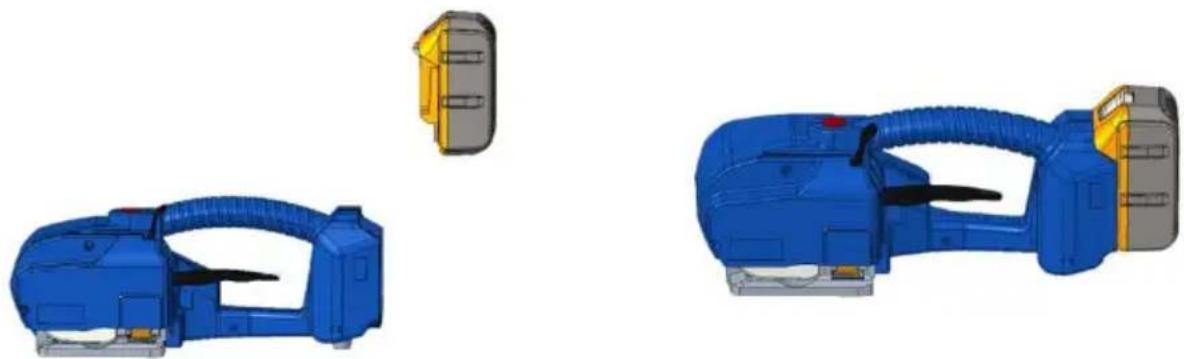
Unload battery Loading battery
Step 4 Weld the straps
Step 5 Move the baler away
Perfect friction time
Friction time is too short
Friction time is too long
7. Common electrical faults
| Item | Part name | Specification | Material code | Qty. |
| 1 | PCB | JD-A16-E019 | 1 | |
| 2 | Battery adapter slot | JD-L16-G06 | 1 | |
| 3 | PVC sticker | JD-L16-G07 | 1 | |
| 4 | LED display unit | JD-L16-G05 | 1 | |
| 5 | Right house | JD-L16-G03 | 1 | |
| 6 | Tension button | OD16 | JD-PSE-E039 | 1 |
| 7 | Left house | JD-L16-G02 | 1 | |
| 8 | Battery | 18V, 5.0A | JD-PSE-E051 | 1 |
| 9 | Left side cover | JD-L16-G01 | 1 | |
| 10 | Lift | JD-L16-G004 | 1 | |
| 11 | Reducer cover plate | JD-L16-G003 | 1 | |
| 12 | Connect-gear for worm | JD-PSE-G033 | 1 | |
| 13 | Variable speed gear D | JD-L16-G036 | 1 | |
| 14 | Double gear | JD-PSE-G031 | 1 | |
| 15 | Worm gear | JD-PSE-G030 | 1 | |
| 16 | Bearing 607 | JD-PSE-E012 | 1 | |
| 17 | Bearing BK0810 | JD-PSE-E015 | 1 | |
| 18 | Gear box tooth sleeve | JD-L16-04 | 1 | |
| 19 | gear B | JD-PSE-G032 | 1 | |
| 20 | Tension motor | JD-L16-E01 | 1 | |
| 21 | Reduction gear box | JD-L16-G002 | 1 | |
| 22 | Switch B | JD-PSE-E007 | 1 | |
| 23 | Ball bearing A 6900 | JD-PSE-E010 | 2 | |
| 24 | Reducer cover | JD-PSE-G015 | 1 | |
| 25 | Body | JD-L16-G001 | 1 | |
| 26 | Tooth plate | JD-PSE-G011 | 1 | |
| 27 | M6 boss pivot pin | JD-L16-G021 | 1 | |
| 28 | Reset torsion spring | JD-PSE-G019 | 1 | |
| 29 | Tension wheel DB-009 | JD-PSE-G012 | 1 | |
| 30 | Tension wheel cover | JD-L16-G007 | 1 | |
| 31 | Sealing button | JD-PSE-G005 | 1 | |
| 32 | Cam unit | JD-PSE-G014 | 1 | |
| 33 | Spring cavity DB-021 | JD-PSE-G010 | 1 | |
| 34 | Compression spring | JD-PSE-G020 | 1 |
| Item | Part name | Specification | Material code | Qty. |
| 35 | Shaft | JD-PSE-G022 | 1 | |
| 36 | Cam driver | JD-PSE-G038 | 1 | |
| 37 | 4*12.5 pin | JD-PSE-E022 | 1 | |
| 38 | Shaft pin | JD-PSE-G023 | 1 | |
| 39 | Sealing switch A | JD-PSE-E006 | 1 | |
| 40 | Curved umbrella tooth | JD-PSE-G029 | 1 | |
| 41 | Drag spring | JD-PSE-G017-2 | 1 | |
| 42 | Synchronous wheel A | JD-PSE-G034 | 1 | |
| 43 | Lower friction parts | JD-PSE-G013 | 1 | |
| 44 | Cutter | JD-PSE-G016 | 1 | |
| 45 | Bearing A 101712 | JD-PSE-E014-1 | 1 | |
| 46 | Upper friction parts | JD-PSE-G008 | 1 | |
| 47 | Bearing B 606 | JD-PSE-E011 | 2 | |
| 48 | Friciton part bracket | JD-PSE-G009 | 1 | |
| 49 | Eccentric shaft | JD-PSE-G024 | 1 | |
| 50 | Sealing motor | JDH-16-E03 | 1 | |
| 51 | Synchronous wheel B | JD-PSE-G035 | 1 |
Address: Shuangchenglu 803nong11hao1602A-1609shi, Baoshan District, Shanghai 200000 CN.
Imported to AUS: SIHAO PTY LTD, 1 ROKEVA STREET EASTWOOD NSW 2122 Australia
Imported to USA: Sanven Technology Ltd., Suite 250, 9166 Anaheim Place, Rancho Cucamonga, CA 91730
| EC | REP |
E-CrossStu GmbH
Mainzer Landstr.69, 60329 Frankfurt am Main
| UK | REP |
YH CONSULTING LIMITED.
C/O YH Consulting Limited Office 147, Centurion House
London Road, Staines-upon-Thames, Surrey, TW18 4
- STRAPPING MACHINE
- NEED HELP? CONTACT US
- INSTRUCTIONS
- SAFETY INSTRUCTIONS
- BATTERY OPERATION
- EYE INJURY HAZARDS
- OPERATION
- FRICTION WELDING AREA
- PACKING STRAPS DISTRIBUTION
- STRAPS WARNING
- HAZARDS OF STRAP BREAKAGE
- NOTE
- CUTTING STRAPS
- SLIP AND FALL HAZARDS
- DANGERS OF THE BALER
- TECHNICAL PARAMETERS
- DESCRIPTION OF THE BATTERY STRAPPING TOOL
- BALER DIMENSIONS
- STRAPPING MATERIALS
- STRAPS STRENGTH
- WORKING ENVIRONMENT
- ACCESSORIES
- RECHARGEABLE PORTABLE BALER
- BATTERY CHARGER
- OPERATIONS
- BATTERY INSTALLATION
- OPERATING ELEMENTS
- SEMI-AUTO MODE AND AUTO MODE
- BALER OPERATIONS
- STEP 5 MOVE THE BALER AWAY
- ONE TOUCH TO TENSION MODE
- STEP 1 WRAP AND STACK THE STRAPS
- STEP 2 INSERT THE STRAPS INTO THE BALER
- STEP 3 TIGHTEN STRAPS
- STEP 4 WELD THE STRAPS
- WEAR PARTS REPLACEMENT & BONDING STATE ADJUSTMENT
- WEAR PARTS REPLACEMENT
- TIGHTENING, BONDING AND CUTTING ADJUSTMENTS
- DIAGRAM OF WELDING & BONDING EFFECT
- COMMON ELECTRICAL FAULTS
- PRODUCT EXPLODED VIEW AND PARTS LIST
- VEVOR®
- TOUGH TOOLS, HALF PRICE
- CONTROLS
- PRESS OPERATIONS
- STEP 5 MOVE THE PRESS AWAY
- BANDNING MACHINE
Brand : Vevor
Model : DS-16
Category : Packaging machine