
AM877D+ - Hot air soldering station Vevor - Free user manual and instructions
Find the device manual for free AM877D+ Vevor in PDF.
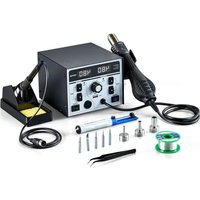


| Product Type | 2-in-1 Hot Air Soldering Station |
| Brand | Vevor |
| Model | AM877D+ |
| Dimensions (L x W x H) | 280 x 260 x 160 mm |
| Net Weight | Approximately 2.95 kg |
| Input Voltage | 230 VAC ±10% 50 Hz (selectable 120 VAC ±10% 60 Hz) |
| Total Power | 820 W |
| Hot Air Station Power | 750 W |
| Soldering Station Power | 70 W |
| Hot Air Temperature Range | 100 °C to 500 °C (212 °F to 932 °F) |
| Soldering Iron Temperature Range | 150 °C to 480 °C (302 °F to 896 °F) |
| Maximum Airflow | 120 L/min |
| Air Volume Adjustment | F1 to F20 |
| Hot Air Handle Cable Length | 95 cm |
| Soldering Iron Handle Cable Length | 120 cm |
| USB Output | DC 5 V / 1 A |
| Main Functions | Hot air soldering and desoldering, soldering iron, standby and sleep mode, temperature calibration, °C/°F unit conversion |
| Package Contents | 2-in-1 rework station, soldering iron handle, stand with sponge, 3 nozzles (5, 8, 12 mm), desoldering pump, tweezers, 5 soldering tips, 30g solder wire, manual, gun stand with screws |
| Maintenance and Cleaning | Regular tip cleaning, applying new solder, replacing heating element if necessary, periodic calibration |
| Safety | Ventilation stop at 100 °C, do not direct towards people or animals, use on fireproof surface, unplug before maintenance |
| Spare Parts and Repairability | Replaceable heating element and tips, one-year limited warranty (excluding consumables) |
| General Information | Manufacturer: Shanghaimuxinmuyeyouxiangongsi, Shanghai. Imported into the USA by Sanven Technology Ltd. Support: www.vevor.com/support |
Frequently Asked Questions - AM877D+ Vevor
User questions about AM877D+ Vevor
0 question about this device. Answer the ones you know or ask your own.
Ask a new question about this device
Download the instructions for your Hot air soldering station in PDF format for free! Find your manual AM877D+ - Vevor and take your electronic device back in hand. On this page are published all the documents necessary for the use of your device. AM877D+ by Vevor.
USER MANUAL AM877D+ Vevor
Technical Support and E-Warranty Certificate www.vevor.com/support
Two-in-One Hot Air Rework Station Model: AM877D+
We continue to be committed to providing you with tools at competitive prices. "Save Half", "Half Price", or any other similar expressions used by us only represent an estimate of savings you might benefit from buying certain tools with us compared to the major top brands and do not necessarily mean to cover all categories of tools offered by us. You are kindly reminded to verify carefully when placing an order with us if you are actually saving half in comparison with the top major brands.
Model: AM877D+
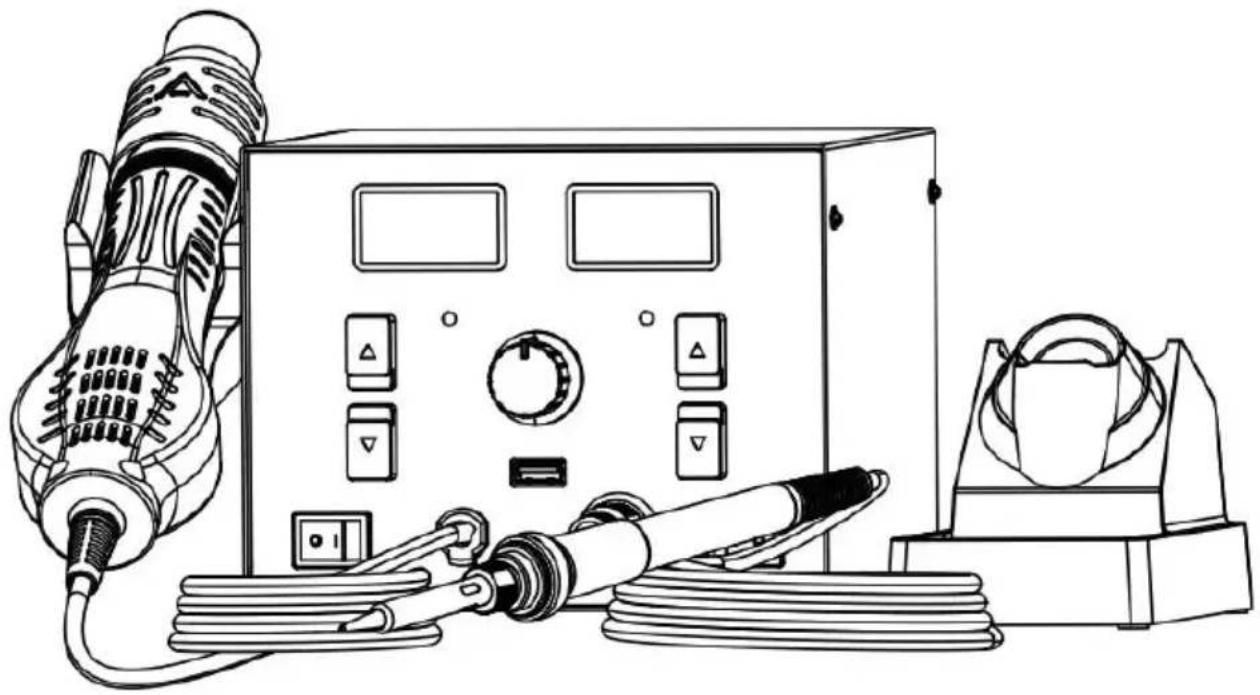
NEED HELP? CONTACT US!
Have product questions? Need technical support? Please feel free to contact us:
Technical Support and E-Warranty Certificate www.vevor.com/support
This is the original instruction. Please read all manual instructions carefully before operating. VEVOR reserves a clear interpretation of the user manual. The appearance of the product shall be subject to the product you received. Please forgive us that we won't inform you of any technology or software updates on our product.
PACKING LIST
Two-in-one rework station (with air gun): 1 pc
Soldering iron handle: 1 pc
Iron stand (provided with cleaning sponge): 1 pc
Nozzle (Φ5 mm, Φ8 mm, Φ12 mm): 3 pcs
Desoldering pump: 1 pc
Tweezer: 1 pc
Soldering tip: 5pcs
30g lead-free solder wire: 1pc
User manual: 1pc
Air gun holder: 1pc with 2 screws
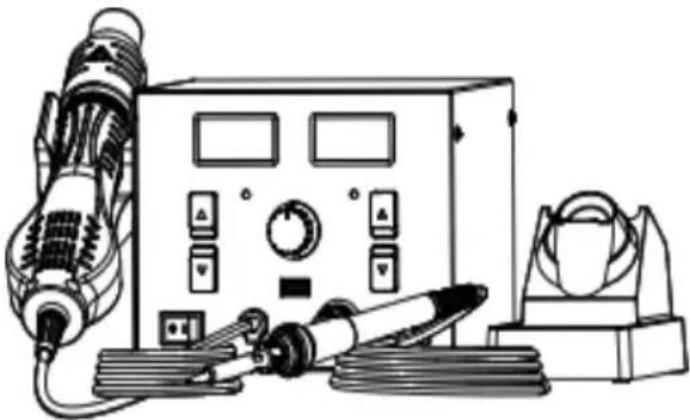
SAFETY AND PRECAUTIONS
The precautions in this manual are divided into the following [warning] and [attention].
Warning: misuse may cause death or serious injury to the user
Note: misuse may cause injury to users or substantial damage to objects
For your own safety, please strictly abide by the following precautions
| Warning |
| As the ambient temperature of nozzle is up to 500°C, if it is imp used ,it might hurt people and cause fire and other accidents. The please abide by the following precautions: |
| Don't aim the nozzle of hot air rework station at people or animals, the hot air rework station as a hair dryer in any case,and don't touch heating tube or use the air duct of hot air rework station to blow ski Don't put the hot air rework station nearby inflammable gas or otherinflammable substances immediately after use.The power switch should be turned off after use,and the main powe be turned off only when the temperature of hot air rework station is n 100 °C .Please use the hot air rework station carefully,don't drop or violently the machine,don't put heavy objects onto the equipment,and don't opera machine buttons or keys roughly.Don't use the hot air rework station when your hand is wet or the air rework station is wet,in order to avoid short circuit or electric shockDon't allow children to touch the product.Please use the nozzle provided by the manufacturer and don't alterThe temperature of nozzles of different models is different,which is normal,rather than quality problem with the equipment.Please notice the specification of input power when using the hot a station.The manufacturer can provide hot air rework stations of different power supplies,and please select carefully.Please don't play when using the equipment,which might hurt you or people. |
PRODUCT SPECIFICATION
| Input voltage | 230VAC±10% 50HZ (selectable within 120VAC±10% 60HZ) | |
| Total Power | 820W | |
| USB Output | DC 5V/1A | |
| Hot air rework station | Soldering station | |
| Power | 750W | 70W |
| Temperature range | 100°C~500°C (212~932 °F) | 150°C~480°C (302~896°F) |
| Handle wire length | 95cm (L) | 120cm (L) |
| Air volume gear | F1-F20 | |
| Air supply mode | Turbofan air supply | |
| Air flom rate | 120L/min (MAX) | |
| Machine Size | 280(L) x 2 60(W) x 160(H) |
| Net weight | About 2.95kg |
USING METHOD
1. Operation and display instructions
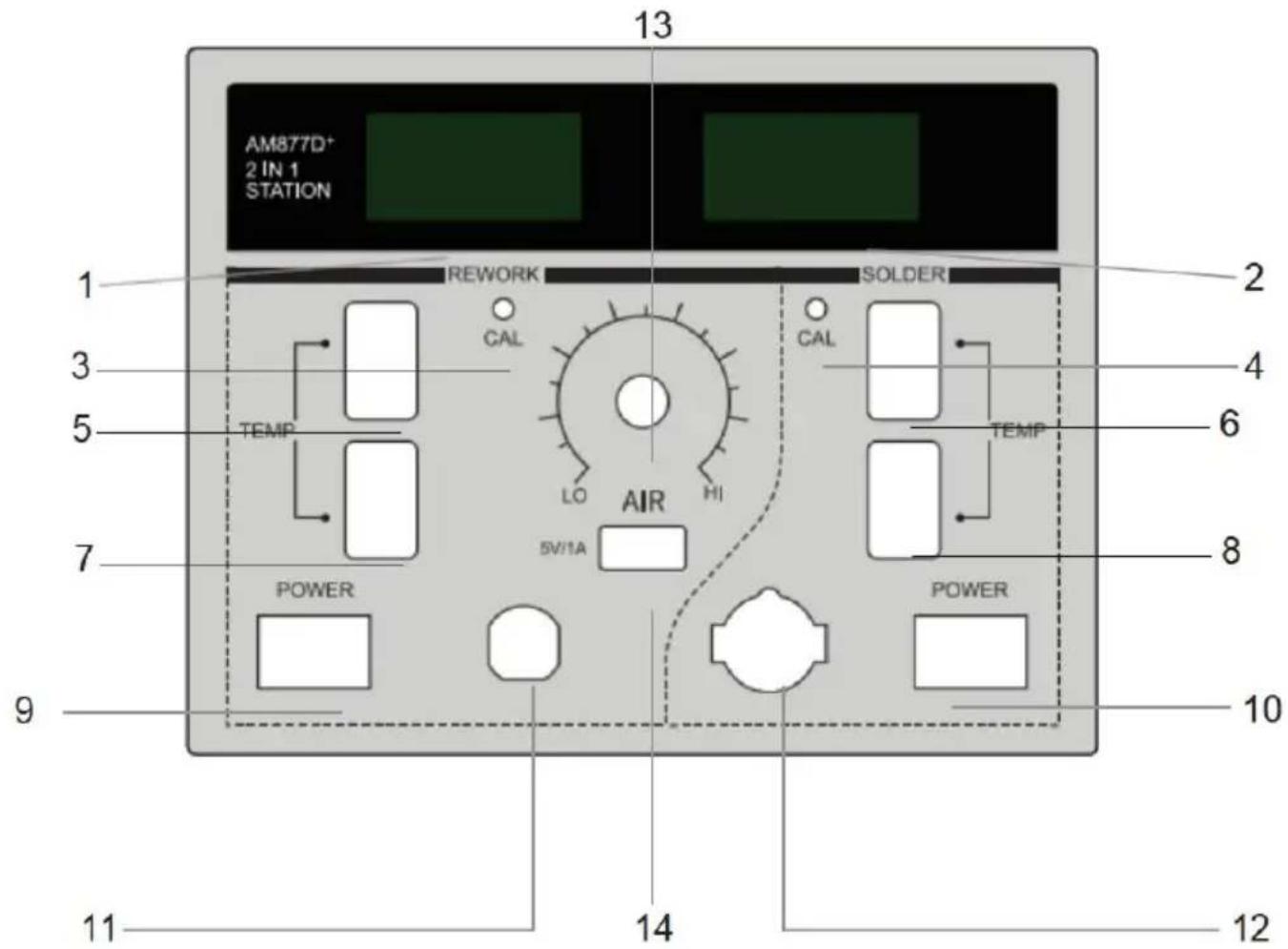
- Hot blast temperature 2. Soldering station temperature
- Hot-air calibration hole 4. Soldering iron calibration hole
- Hot blast temperature + 6. Soldering station temperature +
- Hot blast temperature - 8. Soldering station temperature -
- Hot air switch 10. Soldering station switch
- Hot air rework station handle interface
- Soldering station handle interface
- Regulating air volume 14. DC 5V/1A USB port
2. Power-on
2.1 Electrify the machine and turn on the power switch on the back. (Before turning on the power switch, reconfirm that the power supply meets the product requirements.) 2.2 Turn on the hot air rework station power switch or soldering station power switch to enable the corresponding function. 2.3 Turn on the power switch. The LED will light up and display for 1 second, followed by the temperature unit or for 1 second. It will enter working mode and display the set temperature for 1 second.
3. Hot air rework station operation
When the hot air rework station is in normal working state, put the handle into a bracket of the machine, and the hot air rework station will stop heating. It will first start to supply air for cooling, and when the temperature is reduced to 100°C, it will be displayed, and the hot air rework station will stop working. Remove the handle from the bracket and the hot air rework station will return to normal working.
4. Hot air rework station temperature setting
The temperature range is 0/100-500°C (212-932°F). Adjust the set temperature by up and down buttons. When the setting is at 0, the hot air desoldering station blows air without heating, and temperatures below 100°C during continuous cooling will display "----".
5. Hot air rework station air volume setting
Adjust the air volume knob to set the air volume of the air nozzle; the maximum volume is 120L/min, the digital display shows gear F1-F20, and the smaller the value, the smaller the air volume.
6. Soldering station temperature setting
The temperature range is 100-500°C (212-932°F); adjust the set temperature using the up and down buttons.
7. Soldering station Standby & Sleep function
When the standby function is turned on, the soldering station will enter standby mode after not being used for 10 minutes.
1) In standby mode, the LED segment display shows the temperature drops to 250°C (482°F). 2) When an operation is detected, such as using the soldering iron, adjusting the knob, or pressing the function key, it will return to work mode.
3) During standby mode, if no further operation is detected for another 10 minutes, it will enter sleep mode. Press the up or down key to return to working mode.
8. Temperature unit conversion
After shutdown, press and hold the "up key" of the hot air rework station or soldering station, and then turn on the power switch, to switch the temperature unit of the corresponding functional equipment (°C/°F).
9. Shutdown
9.1 When operation is finished or the hot air rework station is not used, please put the handle into the handle bracket. When needing to shut down, turn off the front panel switch only when the temperature is reduced to 100°C, finally turn off the main power on the rear panel of the machine. 9.2 After use, please clean the soldering iron tip and apply new solder on it.
Disclaimer
- The company will not take responsibility for any personal injury or property damage arising from the use of this product due to the user's failure to follow related instructions, natural disasters or other force majeure, individual behavior, or other reasons rather than unqualified product quality.
- This instruction was arranged, compiled, and released by VEVOR according to the latest product characteristics. The product and the instruction will be subject to subsequent improvement without further notice.
Routine Maintenance
1. Temperature Calibration by User
1) Adjust the set temperature of hot air rework station or soldering station to 350°C (662°F) by key and wait for 2 minutes to stabilize the temperature. 2) Use a thermometer to measure the temperature of the soldering iron tip. 3) Use a cross screwdriver to adjust the corresponding "CAL" hole to make displayed temperature value equal to the measured value. For example, if the measured value is 340°C, adjust calibration hole to reduce display temperature 350°C to 340°C, make the display temperature match the measured value.
Note: such operation can be performed when the temperature is found not accurate after the heating core or soldering iron tip is replaced.
2. Fault Display
a) Fault symbol S-E means open circuit of heating core sensor. b) Fault symbol H-E means open circuit of heating wire, or short circuit of se c) Fault symbol F-E means failure of the fan.
Note
- Don't damage the earth wire on steel pipe when replacing the heating bo
- Don't damage the connecting wires of fan when replacing.
- When installing back the handle shell 1, the fixing pole on handle shell s be installed in fixing hole of steel pipe.
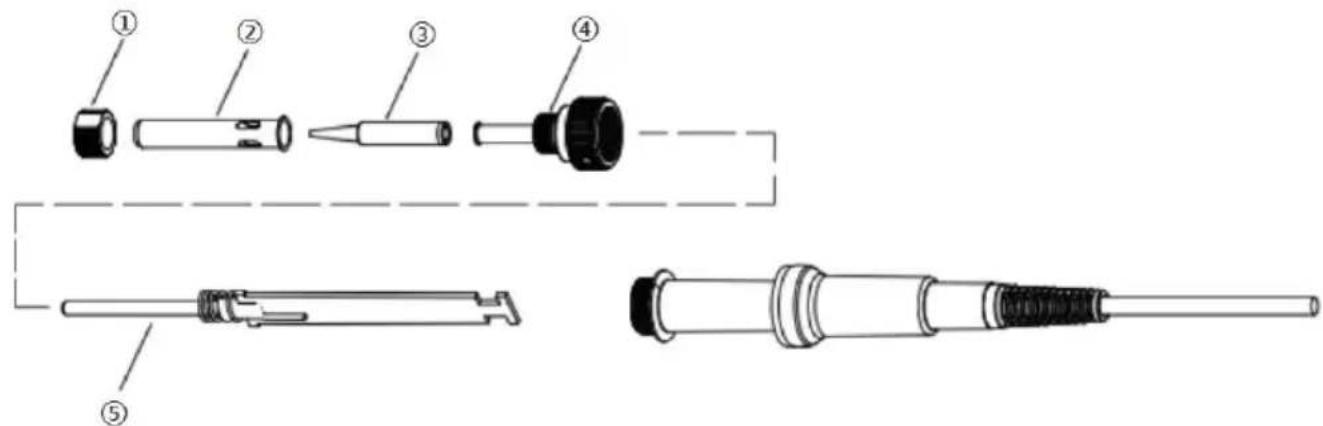
Replacement for Heating Body of Soldering Station
- The heating body of soldering station can be replaced only after unplugged disconnected from the power supply.
- As shown in the figure below, after unscrewing the nut ① , remove the steel jacket ② and soldering iron tip ③, then unscrew the fixing base ④ and de-solder the heating body ⑤ . • Install the handles according to the reverse procedure of dismantling.
Replacement for Heating Body of Hot Air Rework Station
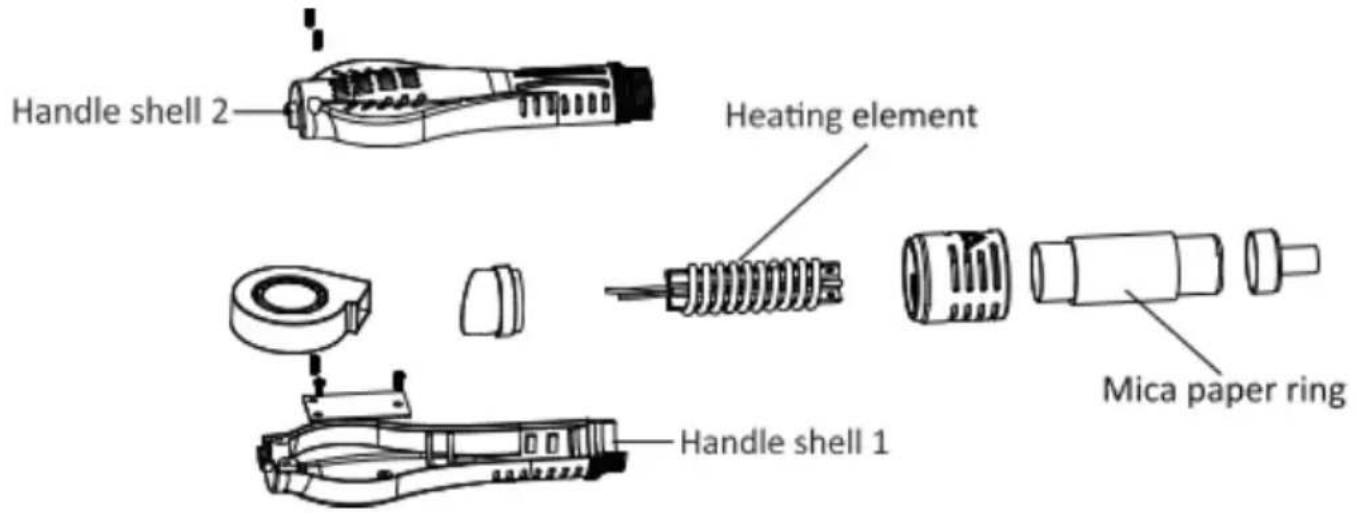
- The heating element can be replaced when it is cool and the power wire disconnected
- As shown in the figure, loosen the two fixing screws on the handle.
- Unscrew handle shell 1, then remove handle shell 2.
- Gently remove the fan, then take out the fixing screws of the terminal block.
- Turn over the terminal block, disconnect the connecting wires of the heating element on the terminal block, and note the position of its connecting wires.
- Take out the heating element and the mica paper ring wrapping the heating element from the steel pipe, and do not break the earth wire on the steel pipe.
- Wrap the new heating element with the mica paper ring, insert it into the steel pipe, and ensure the heating element is installed in place.
- Connect the connecting wires of the heating element according to the original positions. Install the handles following the reverse procedure of dismantling.
WARRANTY TERMS
- We offer a one-year limited warranty for this machine (excluding consumables such as soldering tips and heating elements).
- The warranty covers materials and manufacturing defects from the factory shipment or collection date and includes both replacement parts and labor.
- The warranty becomes void if the damage is caused by improper use or if the equipment has been altered or repaired by unauthorized personnel.
MAINTENANCE
To ensure the durability of this product, please maintain it regularly. The lifespan of this product depends on the operating temperature, quality of solder wire and soldering paste, frequency of use, etc. Please repair and maintain it according to specific usage conditions.
| Warning |
| Please pay close attention when the soldering station is in use at h temperature, turn off the power and unplug the power cord after us |
Soldering iron tip maintenance
- Set the temperature to 250 °C (480 °F).
- After the temperature is stable, clean the soldering iron tip with a brass wool and check its condition.
- If black oxide is attached to it, please apply new solder (including flux) and rub it repeatedly with a brass wool until it's clean, then apply some new solder.
- If the soldering iron tip has been deformed, perforated, or worn out, please replace it with a new one.
Description of Common Signs
Thank you for purchasing the product. Before using it, please read this manual carefully and pay attention to the warnings and precautions mentioned herein.
 | Warn you to prevent possible electric shock. |
 | Warn you to prevent possible personal injury. |
Requirements for Users
Users should possess basic knowledge of life and basic knowledge about electrical operations before using this product. Minors should use this product under the guidance of professionals or their guardians.
[Note]: To avoid damaging the machine and maintain the safety of the environment, please read this instruction carefully before using and keep it properly for future reference.
900M-T SERIES SOLDERING TIPS (AM877D+)
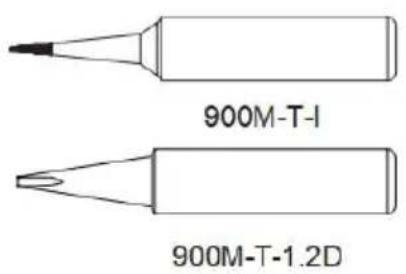
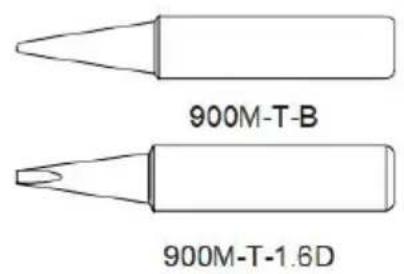
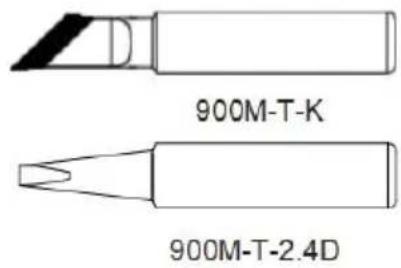
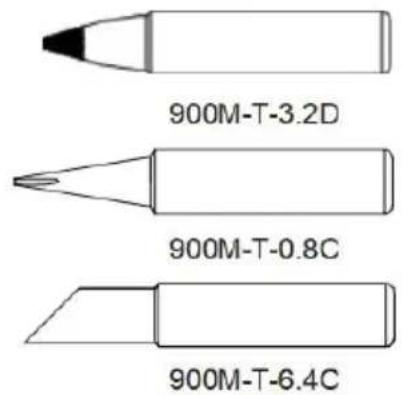
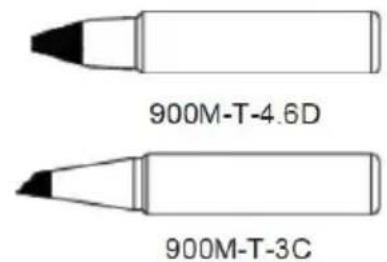
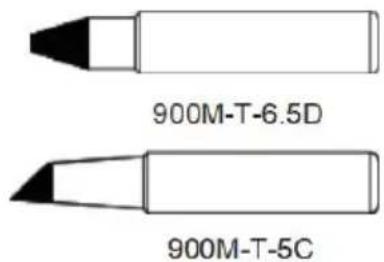
(For more soldering tips information, please contact us)
FCC Information
CAUTION: Changes or modifications not expressly approved by the party responsible for compliance could void the user's authority to operate the equipment!
This device complies with Part 15 of the FCC Rules. Operation is subject to the following two conditions:
1) This product may cause harmful interference. 2) This product must accept any interference received, including interference that may cause undesired operation.
WARNING: Changes or modifications to this product not expressly approved by the party responsible for compliance could void the user's authority to operate the product.
Note: This product has been tested and found to comply with the limits for a Class B digital device, pursuant to Part 15 of the FCC Rules. These limits are designed to provide reasonable protection against harmful interference in a residential installation.
This product generates, uses and can radiate radio frequency energy, and if not installed and used in accordance with the instructions, may cause harmful interference to radio communications. However, there is no guarantee that interference will not occur in a particular installation. If this product does cause harmful interference to radio or television reception, which can be determined by turning the product off and on, the user is encouraged to try to correct the interference by one or more of the following measures.
- Reorient or relocate the receiving antenna.
- Increase the distance between the product and the receiver.
- Connect the product to an outlet on a circuit different from that to which the receiver is connected.
- Consult the dealer or an experienced radio/TV technician for assistance.
CORRECT DISPOSAL
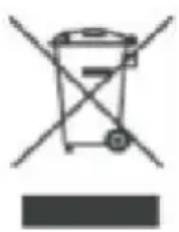
This product is subject to the provisions of European Directive 2012/19/EU. The symbol showing a wheelie bin crossed through indicates that the product requires separate refuse collection in the European Union. This applies to the product and all accessories marked with this symbol. Products marked as such may not be
discarded with normal domestic waste, but must be taken to a collection point for recycling electrical and electronic devices.
Manufacturer: Shanghai Muxin Muye Youxian Gongsi
Address: Shuangchenglu 803nong11hao1602A-1609shi, Baoshanqu, Shanghai 200000 CN.
Imported to AUS: SIHAO PTY LTD. 1 ROKEVA STREET EASTWOOD NSW 2122 Australia
Imported to USA: Sanven Technology Ltd. Suite 250, 9166 Anaheim Place, Rancho Cucamonga, CA 91730
| UK | REP |
YH CONSULTING LIMITED. C/O YH Consulting Limited Office 147, Centurion House, London Road, Staines-upon-Thames, Surrey, TW18 4AX
| EC | REP |
Technical Support and E-Warranty Certificate
www.vevor.com/support
VEVOR®
TOUGH TOOLS, HALF PRICE
NEED HELP? CONTACT US!
PRODUCT FEATURES
WARRANTY CONDITIONS
(For more soldering tips information, please contact us)
FCC Information
YH CONSULTING LIMITED. C/O YH Consulting Limited Office 147, Centurion House, London Road, Staines-upon-Thames, Surrey, TW18 4AX
| REPRÉSENTANT | DE LA CE |
E-CrossStu GmbH
Mainzer Landstr.69,
WARRANTY CONDITIONS
(For more soldering tips information, please contact us)
FCC Information
YH CONSULTING LIMITED. C/O YH Consulting Limited Office 147, Centurion House, London Road, Staines-upon-Thames, Surrey, TW18 4AX
www.vevor.com/support
VEVOR®
TOUGH TOOLS, HALF PRICE
SAFETY AND PRECAUTIONS
WARRANTY TERMS
(For more soldering tips information, please contact us)
FCC Information
Imported into AUS: SIHAO PTY LTD. 1 ROKEVA STREETEASTWOOD NSW 2122 Australia
Imported into USA: Sanven Technology Ltd. Suite 250, 9166 Anaheim Place, Rancho Cucamonga, CA 91730
YH CONSULTING LIMITED. C/O YH Consulting Limited Office 147, Centurion House, London Road, Staines-upon-Thames, Surrey, TW18 4AX
Electronics www.vevor.com/support
VEVOR®
TOUGH TOOLS, HALF PRICE
SAFETY AND PRECAUTIONS
WARRANTY TERMS
(For more soldering tips information, please contact us)
NEED HELP? CONTACT US!
SAFETY AND PRECAUTIONS
WARRANTY TERMS
(For more soldering tips information, please contact us)
FCC Information
YH CONSULTING LIMITED. C/O YH Consulting Limited Office 147, Centurion House, London Road, Staines-upon-Thames, Surrey, TW18 4AX
| Przedstaw ciel UE |
E-CrossStu GmbH
Mainzer Landstr.69,
60329 Frankfurt am Main.
VEVOR®
TOUGH TOOLS, HALF PRICE
NEED HELP? CONTACT US!
Soldering iron handle: 1st
WARRANTY TERMS
(For more soldering tips information, please contact us)
FCC Information
YH CONSULTING LIMITED. C/O YH Consulting Limited Office 147, Centurion House, London Road, Staines-upon-Thames, Surrey, TW18 4AX
E-CrossStu GmbH
Mainzer Landstr.69,
60329 Frankfurt am Main.
VEVOR®
TOUGH TOOLS, HALF PRICE
Warranty certificate www.vevor.com/support
VEVOR®
TOUGH TOOLS, HALF PRICE
NEED HELP? CONTACT US!
SAFETY AND PRECAUTIONS
WARRANTY TERMS
(For more soldering tips information, please contact us)
FCC Information
YH CONSULTING LIMITED. C/O YH Consulting Limited Office 147, Centurion House, London Road, Staines-upon-Thames, Surrey, TW18 4AX
| EC | REP |
E-CrossStu GmbH
Mainzer Landstr.69,
60329 Frankfurt am Main.
VEVOR®
TOUGH TOOLS, HALF PRICE
www.vevor.com/support
- TWO-IN-ONE HOT AIR REWORK STATION MODEL: AM877D
- MODEL: AM877D
- NEED HELP? CONTACT US
- PACKING LIST
- SAFETY AND PRECAUTIONS
- FOR YOUR OWN SAFETY, PLEASE STRICTLY ABIDE BY THE FOLLOWING PRECAUTIONS
- USING METHOD
- OPERATION AND DISPLAY INSTRUCTIONS
- POWER-ON
- HOT AIR REWORK STATION OPERATION
- HOT AIR REWORK STATION TEMPERATURE SETTING
- HOT AIR REWORK STATION AIR VOLUME SETTING
- SOLDERING STATION TEMPERATURE SETTING
- SOLDERING STATION STANDBY & SLEEP FUNCTION
- TEMPERATURE UNIT CONVERSION
- SHUTDOWN
- DISCLAIMER
- ROUTINE MAINTENANCE
- TEMPERATURE CALIBRATION BY USER
- FAULT DISPLAY
- NOTE
- REPLACEMENT FOR HEATING BODY OF SOLDERING STATION
- REPLACEMENT FOR HEATING BODY OF HOT AIR REWORK STATION
- WARRANTY TERMS
- MAINTENANCE
- SOLDERING IRON TIP MAINTENANCE
- DESCRIPTION OF COMMON SIGNS
- REQUIREMENTS FOR USERS
- M-T SERIES SOLDERING TIPS (AM877D+)
- FCC INFORMATION
- CORRECT DISPOSAL
- VEVOR®
- TOUGH TOOLS, HALF PRICE
- WARRANTY CONDITIONS
- (FOR MORE SOLDERING TIPS INFORMATION, PLEASE CONTACT US)
Brand : Vevor
Model : AM877D+
Category : Hot air soldering station