
SH-C20 - Refrigerator Vevor - Free user manual and instructions
Find the device manual for free SH-C20 Vevor in PDF.
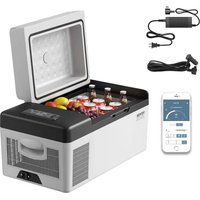


| Product Type | Portable Refrigerator-Freezer |
| Brand | Vevor |
| Model | SH-C20 |
| Capacity | 20 L |
| Dimensions (L x W x H) | Approx. 50 x 30 x 30 cm |
| Weight | Approx. 15 kg |
| Power Supply | 12/24 V DC (cigarette lighter) or 100-240 V AC (with adapter) |
| Power Consumption | Variable depending on mode, voltage |
| Temperature Range | -20 °C to +20 °C (refrigerator/freezer) |
| Electronic Control | Touch panel with digital display |
| Connectivity | Bluetooth via "CAR FRIDGE FREEZER" app (iOS/Android) |
| Cooling Modes | ECO (energy saving) and MAX (fast cooling) |
| Battery Protection | Three levels (Low/Medium/High) for 12 V and 24 V |
| Compressor Type | DC compressor, silent |
| Battery Compatibility | Optional removable battery (models FSAK-002/003/004) |
| Maintenance & Cleaning | Disconnect, clean with soft cloth and soapy water, dry before storage |
| Defrosting | Manual, do not use sharp tools |
| Safety | Child lock, overvoltage protection, automatic shut-off in case of low voltage |
| Included Accessories | AC adapter, cigarette lighter cable, user manual |
| Country of Origin | China |
| Warranty & Support | www.vevor.com/support |
Frequently Asked Questions - SH-C20 Vevor
User questions about SH-C20 Vevor
0 question about this device. Answer the ones you know or ask your own.
Ask a new question about this device
Download the instructions for your Refrigerator in PDF format for free! Find your manual SH-C20 - Vevor and take your electronic device back in hand. On this page are published all the documents necessary for the use of your device. SH-C20 by Vevor.
USER MANUAL SH-C20 Vevor
Technical Support and E-Warranty Certificate www.vevor.com/support
PORTABLE FRIDGE FREEZER MANUAL
We continue to be committed to provide you tools with competitive price. "Save Half", "Half Price" or any other similar expressions used by us only represents an estimate of savings you might benefit from buying certain tools with us compared to the major top brands and does not necessarily mean to cover all categories of tools offered by us. You are kindly reminded to verify carefully when you are placing an order with us if you are actually saving half in comparison with the top major brands.
SMART CONTROL - FRIDGE APP INSTRUCTIONS
First Step: Turn on the Bluetooth on your smart device; start the APP and click "Search" to find nearby fridges.
Second Step: Click fridge icon for Bluetooth pairing (the APP will prompt you to pair the fridge by pressing the set button ⚙ on the fridge's control panel when connecting the fridge for the first time). After pairing, the APP will switch to the main interface allowing you to control the fridge.
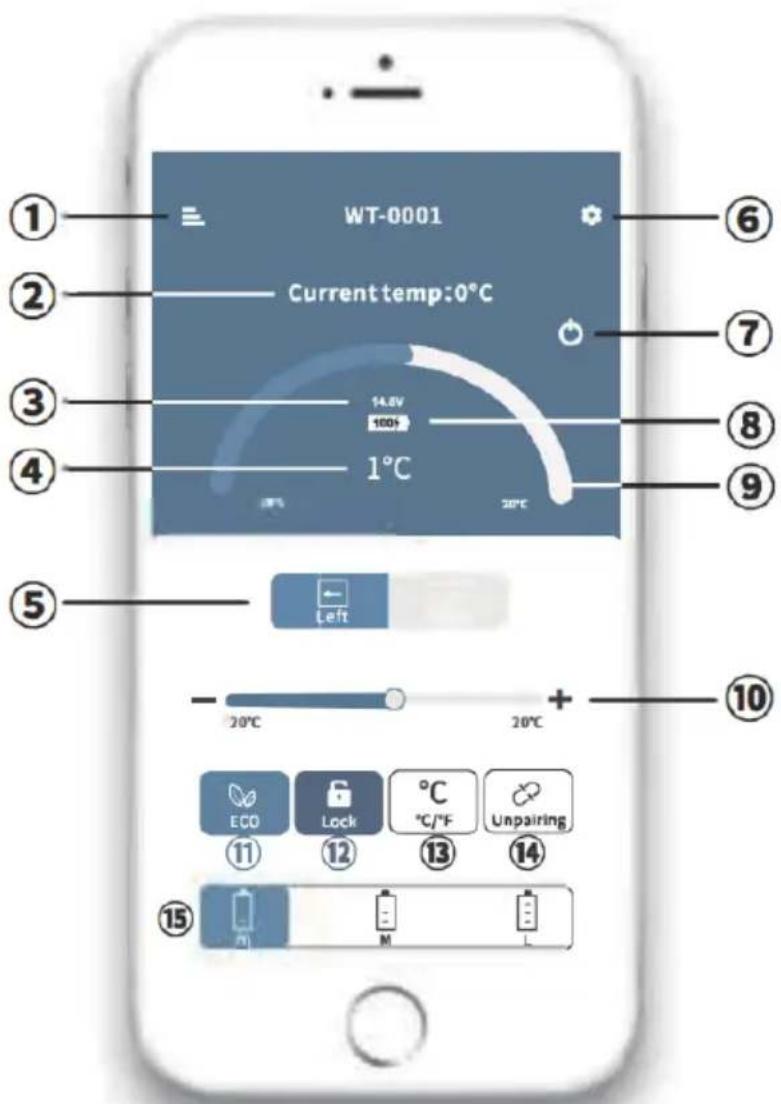
①MENU ②Current temperature ③Current voltage ④Target temperature ⑤Switch Left/Right compartment ⑥SET ⑦ON/OFF ⑧Current battery ⑨⑩Temperature control ⑪ ECO(Energy-saving) / MAX(Fast-cooling) ⑫Lock / Unlock ⑬Celsius / Fahrenheit ⑭Unpairing the device and return to search ⑮Battery protection mode: High / Medium / Low
Note:
*Click the lock icon 🖼 on the APP to lock/unlock the control panel on the fridge. If locked, the fridge can only be controlled by the APP.
Downloading the "CAR FRIDGE FREEZER" Application
IOS

Android
Scan the QR code on the left or search for the "CAR FRIDGE FREEZER" APP in the APP Store (for Apple devices) or Google Store (for Android devices).
VEVOR®
TOUGH TOOLS, HALF PRICE
PORTABLE FRIDGE FREEZER
NEED HELP? CONTACT US!
Have product questions? Need technical support? Please feel free to contact us:
Technical Support and E-Warranty Certificate
www.vevor.com/support
This is the original instruction. Please read all manual instructions carefully before operating. VEVOR reserves clear interpretation of our user manual. The appearance of the product shall be subject to the product you received. Please forgive us that we won't inform you again if there is any technology or software updates on our product.
General guidelines
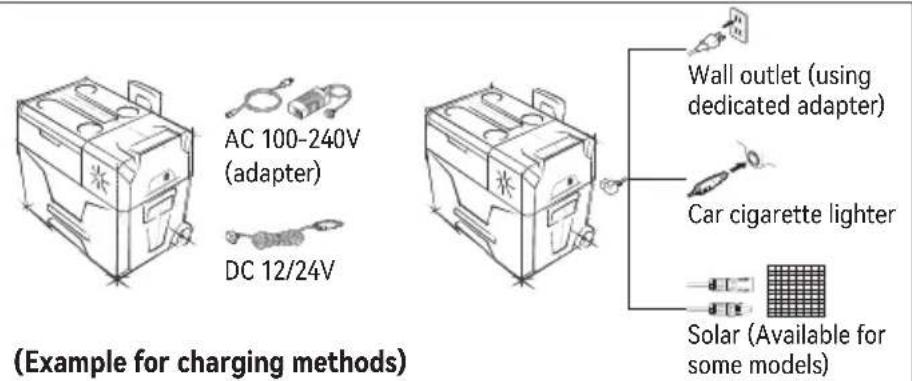
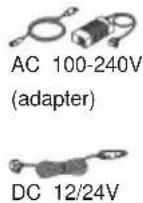
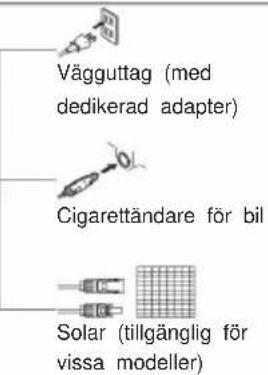
- Power Supply: connect to DC 12V/24V or AC 100-240V power (using dedicated adapter) or solar (12-50V, available for some models).
- The adapter and power-supply cord are subject to particular models.
- Built-in battery type control button ⏻: "-" means ON, "o" means OFF.
Notice: general operation applies to most models. For particular models, please refer to the corresponding instructions according to the type of panel.
- Function Unlock: for models with lock icon 📁 in 2, long press 🔊 for 3 seconds to unlock.
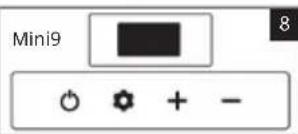
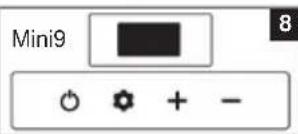
- Power ON/OFF: short press ⬆ to switch ON/OFF. (For models with touch control panel, press ⬆ to switch ON, LONG PRESS ⬆ to switch OFF: B22/C22/G22/FC15/Mini9/K series/MK series/T series/TW/TWW/TA/TAW/TS/TSW/TD/TDW series.)
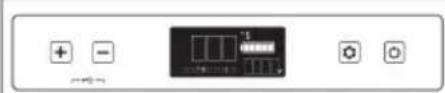
- Temperature Setting: press + or - for temperature setting. (ARC series 3, C105; for models with two compartments in 4911, the right compartment is on the side where the compressor is.)
- Cooling Mode Setting: under running state, press to switch MAX (Fast-cooling) or ECO (Energy-saving). For Mini 98, the panel shows HH (Fast-cooling) or EE (Energy-saving) (*Factory setting is fast-cooling mode). BD/BCD4, C15T~C75T/CL series/X series6. ARC series and C10 do not have this setting.
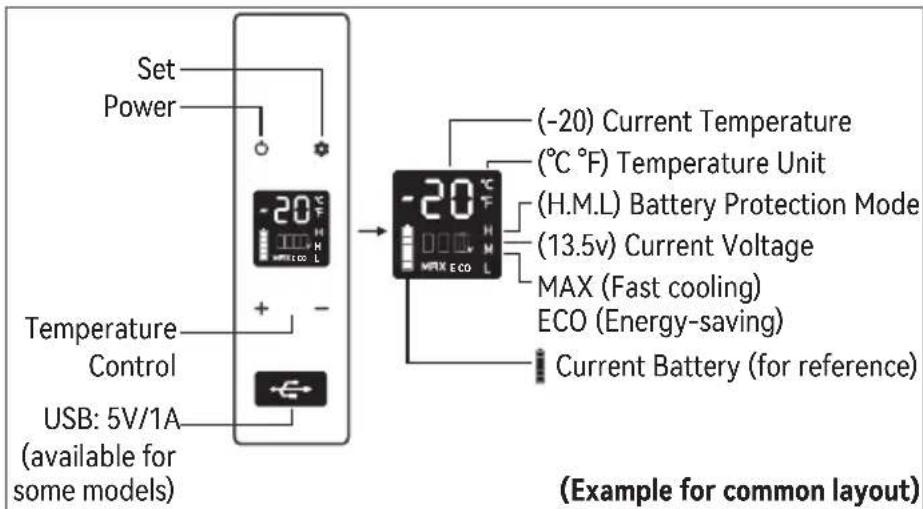
Battery Protection Mode: under running state, long press until the screen flashes, then switch H(High), M(Medium) or L(Low) mode by pressing again. (*Factory setting is High). ARC series 3, BD/BCD 4, C10 5, C15T~C75T/CL series/X series 6.
Voltage Reference:
| MODE CUT OUT OUTCUT IN CUT IN | DC 24VINPUT DC 12V | |||
| Low 8.5V | 10.9V | 21.3V 22.7V | ||
| Medium 10.1V | 11.4V | 22.3V 23.7V | ||
| High 11.1V | 12.4V | 24.3V 25.7V | ||
*The voltage is theoretical value, there may be a deviation in different scenarios.
- M or H should be set when the product is connected to car power, and L should be set when it is connected to a portable battery or other back-up battery.
- Temperature Unit Setting: switch off the fridge, long press until displays E1, and switch to E5 by pressing again, then press + or - to switch Celsius or Fahrenheit. B22/C22/G22/FC15/Mini9/K series/MK series, ARC series, BD/BCD4.
*Except E5 setting, other settings are only for factory maintenance.
Panel & specific operations of different models (Photos are for reference only)

ARC22/ARC35


- Fridge/Freezer temperature setting: under running state, press ▲▼ at the same time to switch fridge/freezer temperature setting. Fridge: 0~8°C(32~46°F), Freezer: -12~-20°C(10~-4°F).
- Battery protection mode: under running state, long press ▲▼ at the same time for 3 seconds until the screen flashes, then press ▲or▼ to switch battery protection mode: ____ ____ ____ from left to right: Low/Medium/High
- Temperature unit setting: switch off the fridge, long press ▲▼ at the same time for 3 seconds until displays E1, and switch to E5 by pressing ▲▼ at the same time again, then press ▲or▼ to switch Celsius or Fahrenheit.
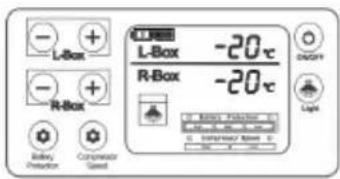
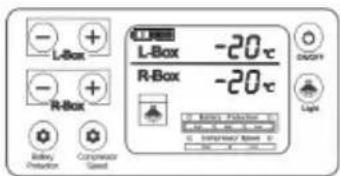
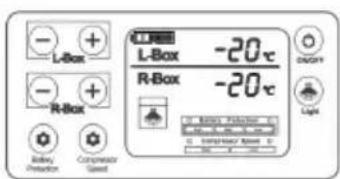
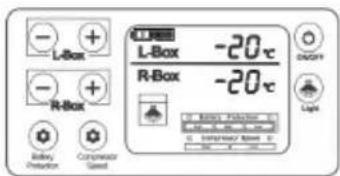
BD45/BD60/BD65/BD75/BD85/BD110/BD135/BCD80/BCD100/BCD125
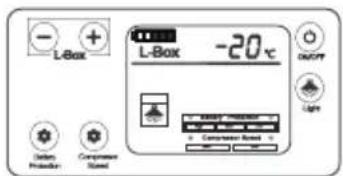
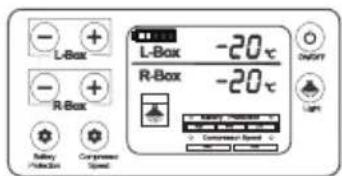
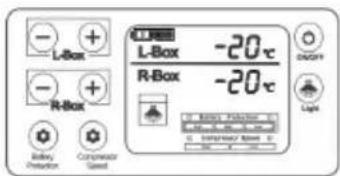
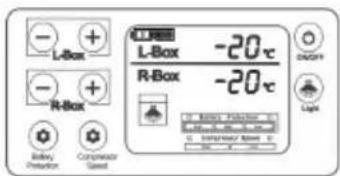
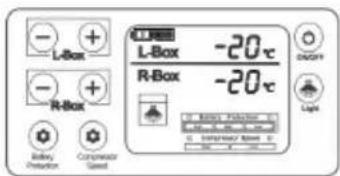
- Light icon ⬆ Left: L-Box ; Right: R-Box
- Press + or -of L-Box or R-Box to adjust the temperature.
- Cooling mode setting: press Compressor Speed button to switch MAX (fast-cooling)/ECO(energy-saving).
- Battery protection mode: press Battery Protection button to switch High/Medium/Low mode;
- Temperature unit setting: switch off the fridge, long press Compressor Speed button until displays E1, and switch to E5 by pressing again, then press + or - to switch Celsius or Fahrenheit. * The panels shown on the left is LCD display of the BD/BCD series, LED display is slightly different.
C10

4
- Cooling/Heating setting: long press Cool/Stop button ✝ to switch on/off the cooling mode. In cooling mode, the hot/stop button ✝ is inoperable; Switch off the cooling mode, long press Hot/Stop button ✝ to switch on/off the heating mode; In heating mode, the cool/stop button ✝ and + - are inoperable. Cooling: -20°C-+20°C; Heating can only be set to: +50°C.
- Battery protection mode: in standby mode, long press + - at the same time for 5 seconds until the screen flashes, then press + or - to switch battery protection mode: ____ ____ ____ from left to right: Low/Medium/High
5
C15T/C25T/C30T/C40T/C50T/C75T/CL30/CL40/CL50/X30/X40/X50
6
- Cooling mode setting: under running state, press to switch Eco(Energy-saving, Eco/Max light in green) or HH(Fast-cooling, Eco/Max light in red). * Power light in red: compressor shutdown or delay start; Power light in green: compressor is working.
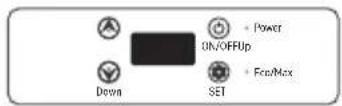
- Battery protection mode: under running state, long press ⚙ until the screen flashes, then switch H3(High),H2(Medium), H1(Low) by pressing ⚙ again.
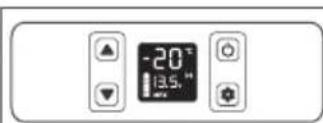
CF35/CF45/CF55 NCF35/NCF45/NCF55
7

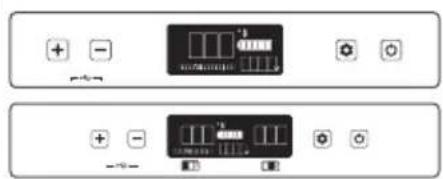
TS40/TS50/TS60/TS80/TS100/TS120 /TSW40/TSW50/TSW60/TSW80/ TSW100/TSW120
TW35/TW45/TW55/TWW35/TWW45/TWW55
TA35/TA45/TA55/TAW35/TAW45/
TAW55/TW75/TW95/TW115/TWW75/TWW95/TWW115/TD80/TD100/TD120/TDW80/TDW100/TDW120
* E75/E95/AL42/TW series/TWW series with dual compartments: - Left/Right compartment ON/OFF: under running state, long press + at
9
E60
E75/E95/AL42(AL42 without USB)


the same time for 3 seconds to switch on/off the left compartment, long press -☆at the same time for 3 seconds to switch on/off the right compartment. Don't switch off both simultaneously.
- Temperature setting: when both left and right are switched on, press + or - to enter the left compartment setting, the screen will flash, then press to switch left/right temperature setting. When the screen flashes, press + or - to adjust the temperature. * TD series/TDW series with removable divider: when put in the divider, under running state, long press + ☆ at the same time for 3 seconds to switch on/off the left compartment. When both left and right are switched on, press + or - to enter the left compartment setting, the screen will flash, then press to ☆ switch left/right temperature setting. When the screen flashes, press + or - to adjust the temperature. When remove the divider, the screen only shows one temperature, operate as the general operation.
Detachable Battery
- FSAK-002: CF15/EC15/EC20/P8/P15/ECX series/ENX series/NXA42/TW series/TWW series /TS series/TSW series/TD series/TDW series; FSAK-003 /004: E60/E75/E95;
- Battery ON/OFF: long press the power button on the battery to switch ON/OFF.
- Battery Charging: connect the refrigerator to DC/AC/Solar, and place the battery into the case, the battery will be charged automatically. But the power supply will mainly power the compressor when the refrigerator is running, which will cause the battery to charge slowly. If you want to charge the battery quickly, please turn off the refrigerator. (The refrigerator can only be charged via the detachable battery when using solar)
Notice: contact the manufacturer if you need to charge the battery separately. The battery should be disposed of safely.
T36/T50/T60
The set temperature of the left compartment shall not be lower than that of the right compartment, and the right compartment cannot be switched off separately.
Dual screen: when put in the divider, long press + and - at the same time for 3 seconds to switch ON/OFF the left compartment. When removing the
divider, the lower screen will be switched off, and the temperature can only be adjusted through the upper screen.
☐ Left compartment; ☐ Right compartment
Single screen: when put in the divider, under running state, long press + and ☆ at the same time for 3 seconds to switch on/off the left compartment. When both left and right are switched on, press + or - to enter the left compartment setting, the screen will flash, then press ☆ to switch left/right temperature setting. When the screen flashes, press + or - to adjust the temperature.
When removing the divider, the screen only shows one temperature, operate as the general operation.
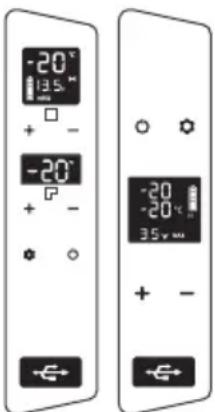
(Dual screen) (Single screen)
Troubleshooting
| Issues Cause/Suggestions | |
| Refrigerator does not work | ·Check if the switch is on.·Check if the plug and socket are connected well.·Check if the fuse has been burnt.·Check if the power supply is malfunctioned.·Switching on/off the fridge frequently may cause start.·delay of the compressor. |
| Refrigerator compartments are too warm | ·The door is opened frequently.·A large amount of warm or hot food was stored recently.·The refrigerator has been disconnected for a long time. |
| Food is frozen · The temperature was set too low. | |
| There is “water flow” noise from inside the refrigeratorThere are waterdrops around the refrigerator casing or door gap | ·It's a normal phenomenon, caused by the flow of refrigerant.·It's a normal phenomenon, the moisture will condense to water when it touches a cold surface of the refrigerator. |
| The compressor is slightly noisy when starting | ·It's a normal phenomenon, the noise will be reduced after the compressor works stably. |
| Code F1 displayed | ·Possible cause: low voltage to fridge.Adjust the battery protection from High to Medium or from Medium to Low. |
| Code F2 displayed | ·Possible cause: condenser fan is overloaded.Disconnect power to fridge for 5 minutes & re-start.If the code shows again, contact manufacturer for service. |
| Code F3 displayed | ·Possible cause: the compressor starts too frequently.Disconnect power to fridge for 5 minutes & re-start.If the code shows again, contact manufacturer for service. |
| Code F4 displayed | ·Possible cause: compressor not kicking in.Disconnect power to fridge for 5 minutes & re-start.If the code shows again, contact manufacturer for service. |
| Code F5 displayed | ·Possible cause: overheating of the compressor & electronics. Disconnect power to fridge for 5 minutes& re-start. If the code shows again, contact manufacturer for service. |
| Code F6 displayed | ·Possible cause: no parameter can be detected by the controller. Disconnect power to fridge for 5 minutes & re-start. If the code shows again, contact manufacturer for service. |
| Code F7 or F8 displayed | ·Possible cause: temperature sensor is faulty. Contact manufacturer for service. |
| *For models with FSAK-002 detachable battery, if code F1 displayed, unplug or turn off the battery, or connect to DC12/24V/AC100-240V (using the adapter) power supply to power the compressor and battery in time to avoid long-term micro-current draining the battery. | |
Safety Instructions
WARNING!
- Do not operate the appliance if it is visibly damaged.
- Do not block the gaps of the fridge with things like pins, wires, etc.
- Do not expose the appliance to rain or soak it in water.
- Do not place the appliance near naked flames or other heat sources (heaters, direct sunlight, gas ovens, etc.)
- Do not store any explosive substances like spray cans with a flammable propellant.
- Ensure the supply cord is dry and not trapped or damaged. Do not locate multiple portable socket-outlets or portable power supplies at the rear of the appliance.
- Check that the voltage specification on the type plate corresponds to that of the energy supply. The appliance is only to be used with the power supply unit provided with the appliance.
- Do not use electrical appliances inside the food storage compartments of the appliance, unless they are of the type recommended by the manufacturer.
- Once unpacked and before turning on, the appliance must be placed on a level surface for more than 6 hours.
- Make sure that the appliance stays horizontal when it is running. The tilt angle must be less than 5 degrees for long time running and less than 45 degrees for short time running.
- Keep the ventilation openings in the unit casing or in the built-in structure free of obstacles.
- Keep the appliance stable on the ground or in the car; do not drain upside down.
CAUTION!
- Repairs may only be carried out by qualified personnel. Incorrect repair may cause danger. The lamp and supply cord must be replaced by the manufacturer or qualified persons.
- The installation of DC power in the boat must be handled by qualified electricians.
- The appliance can only use our dedicated rechargeable batteries; non-rechargeable batteries are prohibited, otherwise there may be a danger of fire and explosion. And the battery can only be charged with the charger provided by the manufacturer.
- In use or during storage, if the battery is found to have high fever, leakage, odor, distortion, or other anomalies, please stop using it immediately and stay away from the battery.
- At the end of battery life, it should be immediately removed from the equipment. Please properly handle spent batteries securely; do not put them into fire or water.
- Children shall not play with the appliance. Cleaning and user maintenance shall not be made by children without supervision.
- The appliance can be used by children aged from 8 years and above and persons with reduced physical, sensory, or mental capabilities or lack of experience and knowledge if they have been given supervision or instruction concerning use of the device in a safe way and understand the hazards.
NOTICE!
- Disconnect the power supply before each cleaning and maintenance and after every use.
- Do not use sharp tools to defrost; do not damage the refrigerant circuit.
- Risk of child entrapment. Before you throw away your old refrigerator or freezer: take off the doors; leave the shelves in place so that children may not easily climb inside.
- Check if the cooling capacity of the appliance is suitable for storing the food or medicine.
Food may only be stored in its original packaging or in suitable containers.
- If the appliance is left empty for long periods, switch off, defrost, clean, dry, and leave the door open to prevent mould developing within the appliance.
- The appliance is intended to be used in household and similar applications such as:
- Staff kitchen areas in shops, offices and other working environments;
- Camping, farm houses and by clients in hotels, motels and other residential environments;
- Bed and breakfast type environments;
- Catering and similar non-retail applications.

Please follow local regulations regarding disposal of the appliance for its flammable refrigerant and blowing gas.
Manufacturer: Shanghaimuxinmuyeyouxiangongsi
Address: Shuangchenglu 803nong11hao1602A-1609shi, baoshanqu, shanghai 200000 CN.
Imported to AUS: SIHAO PTY LTD. 1 ROKEVA STREETEASTWOOD NSW 2122 Australia
Imported to USA: Sanven Technology Ltd. Suite 250, 9166 Anaheim Place, Rancho Cucamonga, CA 91730
YH CONSULTING LIMITED. C/O YH
Consulting Limited Office 147, Centurion House, London
Road, Staines-upon-Thames, Surrey, TW18 4AX
VEVOR®
TOUGH TOOLS, HALF PRICE
Technical Support and E-Warranty Certificate
www.vevor.com/support
VEVOR®
TOUGH TOOLS, HALF PRICE
Machine Translated by Google
IOS

Android
NEED HELP? CONTACT US!
C15T/C25T/C30T/C40T/C50T/C75T/CL30/CL40/CL50/X30/X40/X50
6
E60
E75/E95/AL42 (AL42 without USB)


TS40/TS50/TS60/TS80/TS100/TS120/TSW40/TSW50/TSW60/TSW80/TSW100/TSW120

TW35/TW45/TW55/TWW35/TWW45/TWW55
TA35/TA45/TA55/TAW35/TAW45/
TAW55/TW75/TW95/TW115/TWW75/TWW95/TWW115/TD80/TD100/TD120/TDW80/TDW100/TDW120
YH CONSULTING LIMITED. C/O YH
Consulting Limited Office 147, Centurion House, London
Road, Staines-upon-Thames, Surrey, TW18 4AX
VEVOR®
TOUGH TOOLS, HALF PRICE
iOS

Android
www.vevor.com/support
C15T/C25T/C30T/C40T/C50T/C75T/CL30/CL40/CL50/X30/X40/X50
E60
E75/E95/AL42 (AL42 without USB)


TS40/TS50/TS60/TS80/TS100/TS120
/TSW40/TSW50/TSW60/TSW80/
TSW100/TSW120
TW35/TW45/TW55/TWW35/TWW45
/TWW55
TA35/TA45/TA55/TAW35/TAW45/
TAW55/TW75/TW95/TW115/TWW75/TWW95/TWW115/TD80/TD100/
TD120/TDW80/TDW100/TDW120
YH CONSULTING LIMITED. C/O YH
| GmbH EC REP Mainzer Landstr.69, 60329 Frankfurt am Main. | CONSULTING LIMITED Office 147, UK REPCenturion House, London Road, Staines-upon-Thames, Surrey, | |
TW18 4AX
VEVOR®
TOUGH TOOLS, HALF PRICE
iOS

Android
Electronics www.vevor.com/support
4
C15T/C25T/C30T/C40T/C50T/C75T/CL30/CL40/CL50/X30/X40/X50
6
E60
Model TD120/TDW80/TDW100/TDW120
Imported in AUS: SIHAO PTY LTD. 1 ROKEVA STREET EASTWOOD NSW 2122 Australia Imported
in the USA: Sanven Technology Ltd. Suite 250, 9166 Anaheim Place, Rancho Cucamonga, CA 91730
YH CONSULTING LIMITED. C/O
E-CrossStu GmbH nzer Landstr.69, 60329 Frankfurt am Main.
YH Consulting Limited Office EP Centurion House,
London Road, Staines-upon-Thames, Surrey, TW18 4AX
VEVOR®
TOUGH TOOLS, HALF PRICE
Machine Translated by Google
iOS

Android
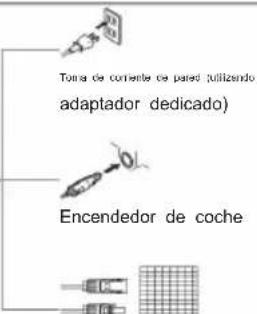
AC 100-240 V
(adapter) DC 12/24 V
C15T/C25T/C30T/C40T/C50T/C75T/CL30/CL40/CL50/X30/X40/X50
6
E60
E75/E95/AL42 (AL42 without USB)


TS40/TS50/TS60/TS80/TS100/TS120 /TSW40/TSW50/TSW60/TSW80/ TSW100/TSW120

TW35/TW45/TW55/TWW35/TWW45/TWW55
TA35/TA45/TA55/TAW35/TAW45/
TAW55/TW75/TW95/TW115/TWW75/TWW95/TWW115/TD80/TD100/TD120/TDW80/TDW100/TDW120
YH CONSULTING LIMITED. C/O YH
E-CrossStu
REP Mainzer
Landstr.69, 60329 Frankfurt
Consulting Limited Oficina 147, ino Unido Centurion House,
London Road, Staines-upon-Thames, Surrey, TW18 4AX
VEVOR®
TOUGH TOOLS, HALF PRICE
Machine Translated by Google
Machine Translated by Google
Note:
iOS

Android
NEED HELP? CONTACT US
www.vevor.com/support
C15T/C25T/C30T/C40T/C50T/C75T/CL30/CL40/CL50/X30/X40/X50
5
Models CF35 and CF45 NCF35/NCF45/NCF55
7
E60
E75/E95/AL42 (AL42 without USB)


TS40/TS50/TS60/TS80/TS100/TS120
/TSW40/TSW50/TSW60/TSW80/
TSW100/TSW120
TW35/TW45/TW55/TWW35/TWW45
/TWW55
TA35/TA45/TA55/TAW35/TAW45/
TAW55/TW75/TW95/TW115/TWW75/TWW95/TWW115/TD80/TD100/
TD120/TDW80/TDW100/TDW120
* E75/E95/AL42/TW series and TWW series with two chambers:
| UK REP Centurion House, London Road,Staines-upon-Thames, Surrey,TW18 4AX |
VEVOR®
TOUGH TOOLS, HALF PRICE
Technical support and e-warranty certificate www.vevor.com/support
PORTABLE REFRIGERATOR FREEZER MANUAL
iOS

Android
NEED HELP? CONTACT US!
warranty certificate www.vevor.com/support
C15T/C25T/C30T/C40T/C50T/C75T/CL30/CL40/CL50/X30/X40/X50
6
E60
9
E75/E95/AL42 (AL42 without USB)


TS40/TS50/TS60/TS80/TS100/TS120 /TSW40/TSW50/TSW60/TSW80/TSW100/TSW120

TW35/TW45/TW55/TWW35/TWW45/TWW55
TA35/TA45/TA55/TAW35/TAW45/
TAW55/TW75/TW95/TW115/TWW75/TWW95/TWW115/TD80/TD100/TD120/TDW80/TDW100/TDW120
Left compartment; Right compartment
YH Consulting Limited Kantoor EP Centurion House, London
Road, Staines-upon-Thames, Surrey, TW18 4AX
VEVOR®
TOUGH TOOLS, HALF PRICE
www.vevor.com/support
PORTABLE FREEZER
FREEZER HANDBOOK
IOS

Android
NEED HELP? CONTACT US!
www.vevor.com/support
3
4
C15T/C25T/C30T/C40T/C50T/C75T/CL30/CL40/CL50/X30/X40/X50
CF35/CF45/CF55 NCF35/NCF45/NCF55
7
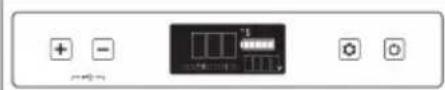
E60
E75/E95/AL42 (AL42 without USB)


TS40/TS50/TS60/TS80/TS100/TS120 /TSW40/TSW50/TSW60/TSW80/ TSW100/TSW120
TW35/TW45/TW55/TWW35/TWW45/TWW55

TA35/TA45/TA55/TAW35/TAW45/
TAW55/TW75/TW95/TW115/TWW75/TWW95/TWW115/TD80/TD100/TD120/TDW80/TDW100/TDW120
YH Consulting Limited Office EP Centurion House,
London Road, Staines-upon-Thames, Surrey, TW18 4AX

- PORTABLE FRIDGE FREEZER MANUAL
- SMART CONTROL - FRIDGE APP INSTRUCTIONS
- NOTE
- VEVOR®
- PORTABLE FRIDGE FREEZER
- NEED HELP? CONTACT US
- GENERAL GUIDELINES
- VOLTAGE REFERENCE
- PANEL & SPECIFIC OPERATIONS OF DIFFERENT MODELS (PHOTOS ARE FOR REFERENCE ONLY)
- ARC22/ARC
- C
- DETACHABLE BATTERY
- T36/T50/T
- ☐ LEFT COMPARTMENT; ☐ RIGHT COMPARTMENT
- TROUBLESHOOTING
- SAFETY INSTRUCTIONS
- WARNING
- CAUTION
- NOTICE
- MACHINE TRANSLATED BY GOOGLE
- C15T/C25T/C30T/C40T/C50T/C75T/CL30/CL40/CL50/X30/X40/X
- TOUGH TOOLS, HALF PRICE
- PORTABLE REFRIGERATOR FREEZER MANUAL
- LEFT COMPARTMENT; RIGHT COMPARTMENT
- PORTABLE FREEZER
- FREEZER HANDBOOK
- E
Brand : Vevor
Model : SH-C20
Category : Refrigerator