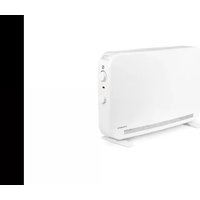
THOMSON HR15-T16 - Heating

HR15-T16 - Heating THOMSON - Free user manual and instructions

Find the device manual for free HR15-T16 THOMSON in PDF.

📄 202 pages English EN Download 💬 AI Question
Notice THOMSON HR15-T16 - page 30
Pick your language and provide your email: we'll send you a specifically translated version.

User questions about HR15-T16 THOMSON

0 question about this device. Answer the ones you know or ask your own.

Ask a new question about this device

The email remains private: it is only used to notify you if someone responds to your question.

No questions yet. Be the first to ask one.

Download the instructions for your Heating in PDF format for free! Find your manual HR15-T16 - THOMSON and take your electronic device back in hand. On this page are published all the documents necessary for the use of your device. HR15-T16 by THOMSON.

USER MANUAL HR15-T16 THOMSON

MANUEL D'INSTRUCTIONS MILLA

natural_image Blank white image with no visible content, text, or symbols
text_image THOMSON 19.0 °C
text_image QR code with central red logo containing a white 't' and signal icon

THOMSON HR15-T16 - MANUEL D'INSTRUCTIONS MILLA - 1

text_image t TuyaSmart
text_image Register User Agreement and Privacy Policy Privacy Policy and Specific Security under the importance of privacy attrition, so fully prevent our collection and use of social information, we have correction "Privacy Policy", "Security Policy" and Local This Policy Information sharing Can be tested in an application with the user's own and legal bodies. Please be under the age of 18, always able to to help your questions read for "Children's Privacy Policy Statement" together, and with their website and guidance before you can use products and sell your personal information. Please read through the following terms and conditions before you are not products used in services (collectively referred to as) Privacy Policy User Interview Children's Privacy Policy and Child Care Information Blogs Ltd. Register Monthly Version/Email Enter Verification Code Verifiatic code has been sent to your mobile phone: Demand Only! Didn't get a code? Enter Verification Code Set Password Password: USE BY: www.iges.com & 0.6% of https://www.edc.com/ Log In Please enter the account Discount I Agree You/Video User Statement Children's Privacy Policy and Child Care Information. Blogs Ltd. Target Password
text_image Add Device Enter Wi-Fi Information Choose Wi-Fi and enter password. WiFi name: 123 Password: 0 Add Device 1 person(s) being added Pulse heater Dend of phone! Add Manually Checkful Reset LSPN Plug (Auto) Subset (Auto) Subset (Auto) Control LSPN (Auto) Subset (Auto) Subset (Auto) Small Padding up Power Drop Next
text_image Ajouter un apparel!

Add to your app at home

HEATER - 617-2400W

Add to your app at home

Remove

Notes :

text_image QR code with a blue home icon in the center, likely linking to a digital service or application.

THOMSON HR15-T16 - Notes : - 1

natural_image Blue square icon with a white house and wireless signal symbol (no text or numbers)
text_image Register User Agreement and Privacy Policy Privacy Policy and Service Terminate understand the importance of privacy protection. To fully prevent our permission and use of your personal information, we have reviewed our "Privacy Policy," "Service Terminate" and "Use of Third-Party Information Sharing List" in detail in accordance with this ideal level order regulations. If you are under the legal of IT, please be sure to notify your guarantee to need us "Children's Privacy Protection Statement" together, and we want their transactions and access before you use our products and useful personal information. Please read through the following terms and conditions before you use our products and/or services collected/ referred to as Privacy Policy Use Assessment Clients' Privacy Statement and third-party information SIGNING LIST Agree Disagree Register Enter Verification Code Set Password Log In Mobile Number/Email □ Agree/Create Policy User Agreement Children's Privacy Statement and Third- Party Information Sharing List Verification code has been sent to your mobile channel. Please check out Don't get a code? Password Use it on Charlotte with a user of https and http Password □ Agree/Create Policy User Agreements Children's Privacy Statement and Third- Party Information Sharing List Forgot Password
text_image Closed out to "√" plans to switch to answer this your job... Answer
text_image Add Device Searching for newly devices. Makes your device has entered accounts made. Discovering devices... Add Enter Wi-Fi Information Choose Wi-Fi and enter password Password Add Manually Elevator Lighter Specimen Long time Accessories Short Time Accessories None Next
text_image Add Device Select 2.4 GHz Wi-Fi Network and enter password. Reset the device Press and hold the RESET Button for 5 seconds until the indicator times (subject to the user manual). Reset the device Press and hold the RESET Button for 5 seconds until the indicator times (subject to the user manual). Select the status of the indicator light or hear the beep. Connecting Device Press on the device 01:58 Add Device Print Panel/Indicator Series Connected
text_image Function Window detector function Keyboard lock Time calibration Electricity consumption Temperature Calibration

THOMSON HR15-T16 - Notes : - 2

line | Period | Average daily electricity (%) | | ------------ | ------------------------------ | | Jan | 0 | | Feb | 100 | | Mar | 100 | | Apr | 100 | | May | 100 | | Jun | 100 | | Jul | 100 | | Aug | 100 |

5. EN CAS DE PROBLÈMES

5.1. Dépannage

text_image QR code with a red 'T' logo in the center, likely linking to a digital resource or website.

INSTRUCTION MANUAL MILLA

Models : HR10-T17W, HR15-T17W, HR20-T17W

THOMSON HR15-T16 - INSTRUCTION MANUAL MILLA - 1

natural_image Blank white image with a faint horizontal line and the word 'THOMSON' in the bottom right corner (no other text or symbols)

Original version

THOMSON HR15-T16 - INSTRUCTION MANUAL MILLA - 2

text_image CERTIFIÉ PAR LCIE NF ELECTRICITE

CE

THOMSON HR15-T16 - INSTRUCTION MANUAL MILLA - 3

  1. SAFETY INSTRUCTIONS .... 3

  2. INSTALLATION....4

2.1.FIXTURE 5
2.2. INSTALLATION IN THE BATHROOM 6
2.3.ELECTRICAL CONNECTION 6

  1. USING THE HEATER 7

3.1. LCD display....7
3.2. Control panel....8

  1. OPERATION....9

4.1. Temperature Adjustment 9
4.2. Operating Mode Selection ....9
4.3. Settings Menu - M....11
4.4.Time Setting (td) 11
4.5. Custom Program (PRG) Settings 12
4.6. Temperature Calibration Setting 12
4.7. ECO Mode Setpoint Adjustment 13
4.8. Window Open Detection Function ......13
4.9. Heating icon....13
4.10. Child lock....13
4.11. Energy Behavior Indicator....14
4.12. Auto Screen Dimming Function....15
4.13. Connect WiFi by TuyaSmart....15
4.14. Connect WiFi by Smart Life 17
4.15. Electricity consommation function....19

  1. IN CASE OF PROBLEMS ...... 19

5.1. Troubleshooting....19
5.2. Reset....21
5.3. In case of power failure....21
5.4. Thermostat Replacement 21

  1. TECHNICAL SPECIFICATIONS....21
  2. CARE AND CLEANING 25
  3. RECYCLING (DISPOSAL OF THE PRODUCT AT THE END OF ITS LIFE) 25

1. SAFETY INSTRUCTIONS

WARNINGS

  • A means of disconnection must be incorporated in the wiring attachment according to the wiring rules.
  • A means of disconnection from the power supply having a contact oper distance of all poles must be included in the fixed wiring in accordance with the installation requirements.

THOMSON HR15-T16 - WARNINGS - 1

- WARNING: To avoid overheating, do not cover the heater.

- The appliance should not be placed immediately below a socket.

- The unit must not be exposed to dripping or splashing water.

- The appliance must not be used in the volume 0 or 1 of a bathroom. (S the paragraph INSTALLATION IN THE BATHROOM)

- The device must not be used outdoors.

- The device should not be removed to avoid the risk of electric shock.

- The device is only intended for domestic use.

- Do not apply pressure to the front of the unit or on the sides or on top.

- If the power cord is damaged, it must be replaced by the manufacturer service agent or similarly qualified persons in order to avoid a hazard.

- Move away the appliance from infants and people with physical, mental sensory impaired. The device should not be used by these people.

- Place the unit at a minimum safe distance of one meter from any flammable materials (curtains, furniture ...).

- Do not install the unit near a stove, oven, gas flame or flammable liquids

- Clean the unit with a slightly damp cloth after disconnecting the circuit

breaker that supplies power.

- Do not use chemical solvents or abrasives to clean the surface of the appliance may scratch, damaged or even deformed.

-Children under 3 years must be kept away unless constantly monitored.

-Children aged between 3 and 8 years must only turn on or off the unit provided it has placed or installed in its normal operating position expected and were trained and supervised in instructions for using the machine safely and understand the potential hazards.

-Children aged between 3 and 8 years must not connect, adjust or clean heater or perform user maintenance.

WARNING - Some parts of this product may become hot and cause b Particular attention must pay in presence of children and vulnerable peo

- The heater must be installed so that switches and other control devices can not be touched by a person in the bath or shower.

-The appliance must be supplied through a residual current device (RCD) having a rated residual operating current not exceeding 30 mA.

-This product has the European EU conformity being compliant EN60335-1, EN60335-2-30 and Directive 2014/30/EU limiting radio interference.

-Regarding the instructions for the heater intended to be fixed by screws of the method of fixing and how to install the appliance, thanks to refer to the section "INSTALLATION".

-This appliance can be used by children aged from 8 years and above ar persons with reduced physical, sensory or mental capabilities or lack of experience and knowledge if they have been given supervision or instruction concerning use of the appliance in a safe way and understand the hazard involved.

-Children shall not play with the appliance.

-Cleaning and user maintenance shall not be made by children without supervision.

2. INSTALLATION

RECOMMENDATIONS IMPORTANT READ BEFORE INSTALLATION

- Do not install the unit directly below a socket.

- Do not install the unit in a damp room or near a water source.

- Do not use the appliance outdoors.

  • Do not install the unit in an air current that could disrupt its regulation.
  • Do not place the unit near a barrier limiting the airflow around it.
  • Attach the heater vertically to the wall as described below.
  • Choose screws and plugs suitable for the wall material and weight of the unit.

2.1. FIXTURE
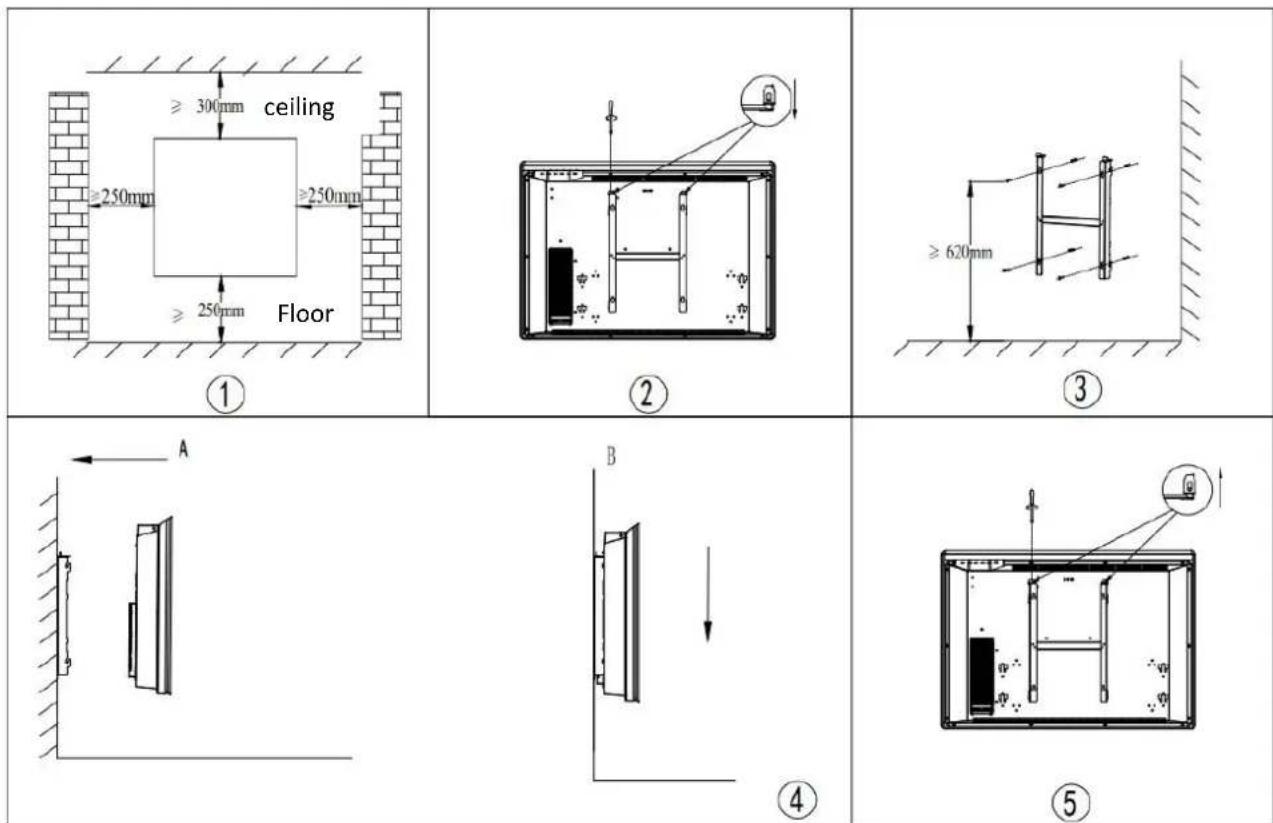
THOMSON HR15-T16 - FIXTURE - 1

  1. Choose a suitable installation location for the heater. (Fig 1)
  2. Disassemble the wall bracket by loosening the screw (do not remove, only loosen) or pulling the metal plates out of the holes. Take out the bracket by pulling down. (Fig 2)
  3. Verify that the bracket is horizontal with a spirit level and mark the location of 4 holes in the wall. Drill 4 holes in the wall using a drill adapted to the diameter of wall plug. Inside wall plug into the holes, then screw securely wall mount bracket
    onto the wall. (Fig 3)

  4. Place the heater against bracket (Fig 4):

A : Align the heater on 4 hooks

B : Pull the heater down.

  1. Push the metal plates into the holes, and fasten the screws to lock the wall mount bracket. (Fig 5)

2.2. INSTALLATION IN THE BATHROOM

Warning: This appliance must be only installed in the volume 2 or out of volume of the bathroom, as stated in the French standard NF C 15-100 for electrical installation inside the house.
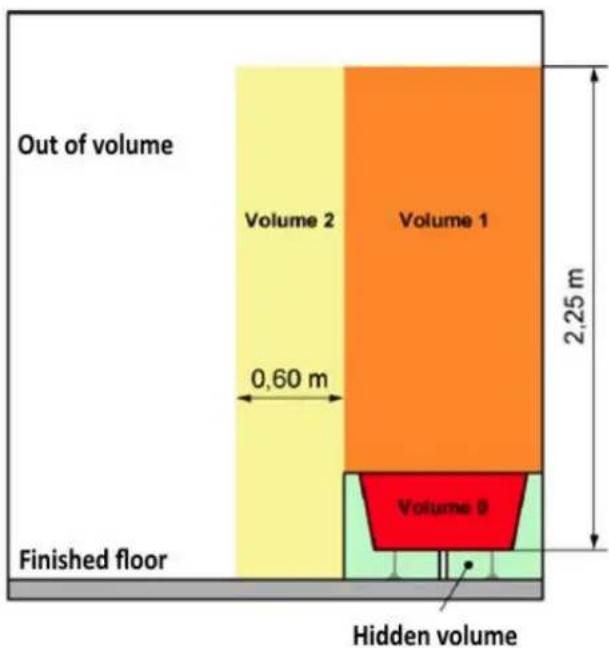
THOMSON HR15-T16 - INSTALLATION IN THE BATHROOM - 1

text_image Out of volume Volume 2 Volume 1 0,60 m 2,25 m Finished floor Volume 3 Hidden volume

Note: The drawing is for reference only.

We suggest that you to contact a professional electrician for assistance.

2.3. ELECTRICAL CONNECTION

CAUTION: Before working, turn off the electricity at the main circuit bre

- The installation must be carried out in the rules of the art and meet the standards in force in the country (NF C15-100 in France).

- The unit must be connected to a standard wall box placed at least 25 c from the floor.

- The appliance must not be connected to an outlet with a power plug. -In the case of residential premises, premises receiving a bathtub or shower and electrical outlets less than or equal to 32 A the corresponding circuit is protected by a residual current device (RCD) less than or equal to 30n - The appliance must not be connected to the earth wire (yellow and gre wire).

ELECTRICAL CONNECTION

Blue or light gray wire connect to Neutral (230V)

Brown or red wire connect to Phase (230V)

Black wire connect to pilot wire. Optional function to use in case of control pilot wire box (do not connect to ground).

- In the absence of pilot wire, insulate the bare end of the black wire to prevent electrical contact with the other wires or ground.

3. USING THE HEATER

3.1. LCD display
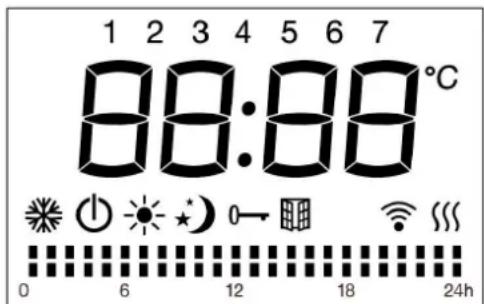
THOMSON HR15-T16 - LCD display - 1

text_image 1 2 3 4 5 6 7 88:88°C 0 6 12 18 24h
SymbolFunction
Stand-by mode (the appliance will not work but will receive power)
Anti-freeze mode (the appliance maintains a temperature of around 7°C)
Comfort mode (desired set temperature)
ECO mode: The device maintains a temperature 3°C (default) lowe than the temperature of the Comfort mode, you can change the point to 2°C or 4°C.
Pilot wire mode (to set the programs via pilot wire programmer)
Window detector function
Child lock
Wifi
Heating indicator (When appliance is heating up, this icon will be displayed at the screen. The icon will disappear when the room temperature reaches the selected temperature)
°CTemperature (centigrade)
Weekly personalized modes
Mode Comfort active
Mode ECO active

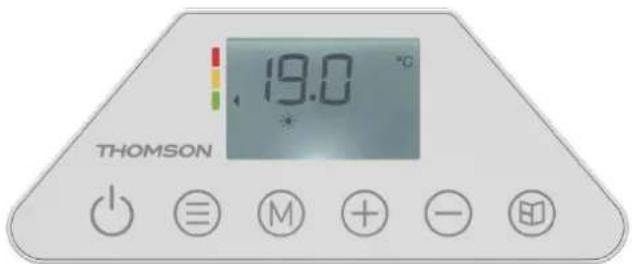
3.2. Control panel

THOMSON HR15-T16 - Control panel - 1

text_image THOMSON 19.0 °C *
SymbolFunction
THOMSON HR15-T16 - Control panel - 2Stand-by
THOMSON HR15-T16 - Control panel - 3Button for validationorSelect from the following modes:Comfort ModeEco ModeFrost Protection ModeP1/P2/P3/PRG(Custom Program)/Pilot Wire Mode
THOMSON HR15-T16 - Control panel - 4Window detector function
THOMSON HR15-T16 - Control panel - 5Enter the settings menu to adjust time (td), customize Custom Program (Pr), calibrate temperature(C), or modify the ECO setpoint (EC).
Touche THOMSON HR15-T16 - Control panel - 6Adjust time, day of the week, temperatureChoose between Comfort or Eco Mode during custom program settings.Set temperature from 7°C to 32°C, increasing/decreas by 0.5°C per press.

4. OPERATION

Upon initial power-on, please configure the time as prompted by the system to properly use the P1/P2/P3/PRG modes. The time-setting method is detailed in the "Time Adjustmer section below. If no action is taken within 10 seconds, the default factory time (Monda) 12:00) will be automatically confirmed.

During the first power-on, the device automatically initializes in Comfort Mode with a default temperature of 19^ C.

In case of a power outage, after power is restored, the heater will resume operation in same mode and temperature set before the interruption.

4.1. Temperature Adjustment

In Comfort or ECO mode (excluding Anti-Freeze mode), the temperature is adjustable. Press the "+" or "-" buttons to select the desired temperature between 7°C and 32°C in Comfort mode, in 0.5°C increments. The default temperature difference between ECO mode and Comfort mode is 3°C, and the default temperature range for ECO mode is to 29°C. Press any other button besides "+" or "-" to confirm the setting; otherwise, the device will automatically save the changes after 5 seconds. When the room temperature exceeds the set temperature, the heater stops heating.

4.2. Operating Mode Selection

Briefly press the button to cycle through the following modes:

Comfort Mode / Eco Mode / Frost Protection Mode / P1 / P2 / P3 / PRG (Custom Progs / Pilot Wire Mode P. After blinking for 5 seconds, the display will show the set temperat (except in P mode).

COMFORT MODE: The icon will light up, and the display will show the set temperature. Briefly press "+" or "-" to adjust the temperature.

ECO MODE: The icon will light up, and the display will show the set temperature. Briefly press "+" or "-" to adjust the temperature.

Anti-freeze mode: The icon will light up, and the device will maintain a temperature of approximately 7°C.

P1/P2/P3 MODES: Default programs are listed below.

3 Predefined Programs (P1/P2/P3)

PROGRAM P1HOURMODE
MONDAY TO FRIDAY0:00-6:006:00-9:00ECOCOMFORT
9:00-16:00ECO
16:00-23:00COMFORT
23:00-0:00ECO
SATURDAY AND SUNDAY0:00-7:00ECO
7:00-23:00COMFORT
23:00-0:00ECO
PROGRAM P2HOURMODE
MONDAY TO SUNDAY0:00-7:00ECO
7:00-23:00COMFORT
23:00-0:00ECO
PROGRAM P3HOURMODE
MONDAY TO FRIDAY0:00-6:00ECO
6:00-9:00COMFORT
9:00-13:00ECO
13:00-23:00COMFORT
23:00-0:00ECO
SATURDAY AND SUNDAY0:00-7:00ECO
7:00-23:00COMFORT
23:00-0:00ECO

The time slots for P1/P2/P3 programs are fixed (non-adjustable) — only the setpoint temperature can be modified.

Eco Mode maintains a temperature 3^ C lower than Comfort Mode by default.

To customize the temperature difference between Comfort/Eco, refer to the "4.5 Custom Program (PRG) Settings". If you wish to define specific time slots, use the Custom Program (PRG).

PRG MODE

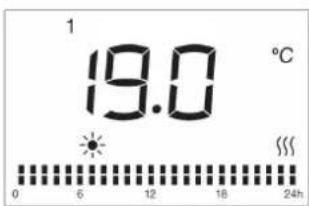
PRG mode is a freely customizable weekly program.

When the PRG mode is selected, the icon lights up on the screen, and the current temperature value is displayed in the center.
THOMSON HR15-T16 - PRG MODE - 1

text_image 1 19.0 °C 0 6 12 18 24h

The PRG mode is configured by default to operate 24/7 in Comfort mode (predefined comfort temperature). During PRG mode operation, the screen displays the icon corresponding to the current mode: Comfort mode and ECO mode.

PILOT WIRE MODE P:

In Pilot Wire Mode P, heating is controlled by an external timer. When the external process is set to another mode, the display will show the corresponding mode icon as follows:

External Mode SettingIcon Displayed
COMFORT MODEP
COMFORT MODE -1P-1
COMFORT MODE -2P-2
Eco ModeP
Anti-freeze modeP
Stand by ModeP

4.3. Settings Menu - M

Press and hold the "M" button to enter or exit the settings menu. The settings menu displays the device's functional options :

td : Time setting

Pr : Weekly custom program

C : Temperature calibration

EC : Eco mode temperature differential setting

Use the "+" button to scroll through options (td → Pr → C → EC) clockwise, or "-" to go backward (counterclockwise). The selected icon will blink.

4.4. Time Setting (td)

After entering the settings menu, press "+" or "-" to select "td", then briefly press "☐" to enter the time-setting interface.

Adjust the hour (00-23) using "+" / "-" then press " " to confirm and proceed to minute setting (00-59).

Set the minutes (00-59) with "+" / "-" , then press "≡" to confirm and proceed to day of the week (1-7).

Press "+" / "-" to set the day of week (choose from d1 to d7, d1=Monday, d7=Sunday). Press ☑ to finalize. If no action is taken within 10 seconds, the device will auto-save ar return to the main interface.

Note: You must set the time/day before accessing other settings.

4.5. Custom Program (PRG) Settings
THOMSON HR15-T16 - Custom Program (PRG) Settings - 1

text_image Day of the week 1 19.0 °C 0 6 12 18 24h Hour

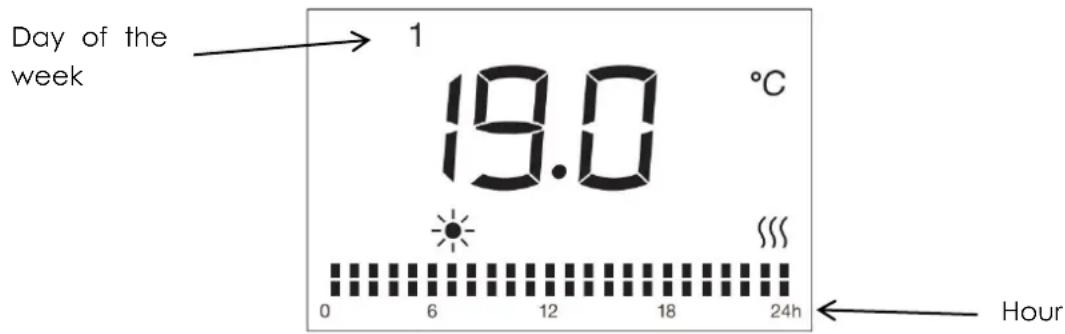
In the setting menu, press «+» or «-» to select « Pr », and briefly press « » to enter the weekly program adjustment interface (the modifiable program).

The default setting icon lights up, and the number representing the day of the week « 1 » (1=Monday) flashes.

Adjust the day of the week using the button (1=MONDAY, 2=TUESDAY,... 7=SUNDAY), then validate by pressing the button.

Press «+» to select the hour (1-24). For each hour, there are 2 alternate modes: Comfort mode and ECO mode The Custom Program mode icon for the hour will flash.

Press «-» to choose between Comfort mode and ECO mode .

To validate the selected program for day 1 (MONDAY): press the 📄 button .

To complete the adjustment up to day 7 (SUNDAY): repeat the same operation multiple times.

Press the M button to confirm after all adjustments; otherwise, the device will automatic save the settings after 30 seconds and return to the operational interface.

With this mode, you can customize your heating programs according to your preference

4.6. Temperature Calibration Setting

In the settings menu, press "+" or "-" to select "C", then briefly press "☐" to enter the temperature calibration setting interface. "0" will be displayed on the screen by default.

Press "+" / "-" to adjust the temperature compensation within ±5

For example, if your radiator's set temperature is 24^ C but your thermometer shows only 22^ C, select a calibration value of -2^ C.

4.7. ECO Mode Setpoint Adjustment

The default temperature difference between COMFORT and ECO modes is 3^ C. You can change the setpoint to 2^ C or 4^ C, in 1^ C increments.

Press the button M to enter the settings menu interface, then press +/- to select "Ec". Press the button to enter the parameter setting interface.

Press +/- to adjust the setpoint. Press the button to confirm, otherwise the device will automatically save after 5 seconds and return to the operational interface.

4.8. Window Open Detection Function

Press access the window open detection setting with " " blinking. The screen will display "on" or "oF". Press "+" or "-" to select.

If "on" is selected, the window open detection is activated (icon " " will display). When 5°C temperature drop is detected, the device switches to Anti-freeze mode (screen displays 7°C with " " blinking). It returns to the previous mode when temperature rises by 2°C. If the temperature does not rise by more than 2 °C, press any button to exit Anti-mode. Default factory setting is "oF" (disabled).

4.9. Heating icon

  1. When it is detected that the ambient temperature is lower than the set temperature the heater needs to start working, the heating icon will light up. If the ambient temperature is detected to be higher than the set temperature, the heating icon will turn off.
  2. In standby state, the heating icon is not displayed.

4.10. Child lock

Activation :

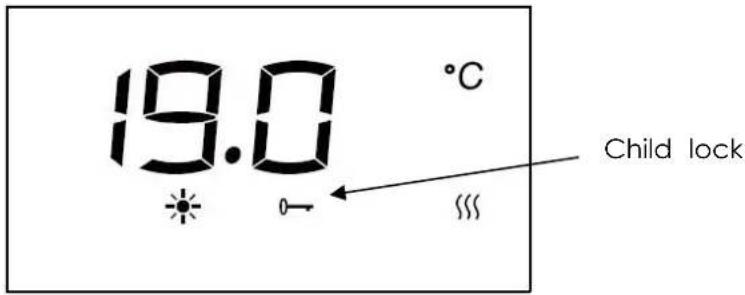
Press and hold the "and" "button simultaneously for 5 seconds until the display show"--. Input the 3-digit preset password (025) to activate child lock function.

Press the "+"/"-" to select the first digit 0 and press " " to confirm;

Press the "+"/"-" to select the second digit 2 and press " " to confirm;

Press the "+"/"-" to select the third digit 5 and press "≡" to finalize. The lock icon "0→" will illuminate, indicating activation.

Deactivation :

Repeat the process : Hold the " " key and " " for 5 seconds to enter PINLOCK mode. Re-enter the matching 3-digit password (025) using the "+"/"-" and " " keys.

Press ⓞ to confirm deactivation. The lock icon " " will turn off.

Notes:

The 3-digit password (025) is unchangeable.

The keypad lock does not disable the standby button, which remains functional when locked.

The lock automatically deactivates when the appliance suffers power disconnection. To re-enable, press "M" and "≡" for 5 seconds and repeat the activation steps after power restoration.
THOMSON HR15-T16 - Notes: - 1

text_image 19.0 °C Child lock

4.11. Energy Behavior Indicator

In all operating modes:

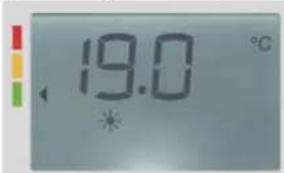
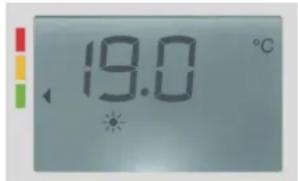
1) Temperature setting ≤19°C: Green label is displayed.
2) Temperature setting 19°C < T ≤24°C: Orange label is displayed.
3) Temperature setting >24°C: Red label is displayed.
THOMSON HR15-T16 - Energy Behavior Indicator - 1

text_image 19.0 °C

The recommended temperature by ADEME (French Agency for Ecological Transition) is 19°C. This indication serves as a preventive measure for the user.

Higher setpoint temperatures will result in increased energy consumption.

Notes:

1) Standby Mode: No energy-saving indication is displayed when the device is in standb
2) Submenu Navigation: Energy-saving indications are not shown in Setting Menu.

4.12. Auto Screen Dimming Function

After 1 minute of inactivity, the screen backlight will automatically turn off. Press any key reactivate the display backlight at full 100% brightness.

4.13. Connect WiFi by TuyaSmart 1) Download APP

You can download the app by searching for "TuyaSmart" App in your app store or by scanning the following QR code.


THOMSON HR15-T16 - Connect WiFi by TuyaSmart 1) Download APP - 1

text_image QR code with central red logo containing a white 't' and signal icon

THOMSON HR15-T16 - Connect WiFi by TuyaSmart 1) Download APP - 2

text_image t TuyaSmart

(successfully installed)

2) Registration

Open the "TuyaSmart" App, register an account: you can use either phone no. or email address to register. You will get a verification code. Enter the verification code and then set your own password. Use your password to log in.
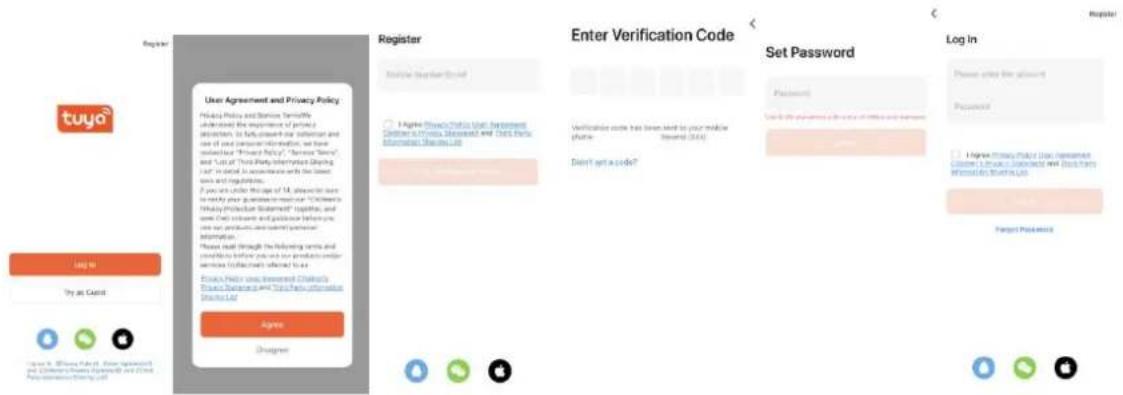
THOMSON HR15-T16 - 2) Registration - 1

text_image Register User Agreement and Privacy Policy Privacy Policy and Service Services underbrace the importance of privacy admissions. In fully aware our submission and use of and support information, we have selected "Privacy Policy", "Service Service" and "List" of "You-Party Information Sharing List" in detail. In accordance with the user's own regulations. If you are under the scope of 14, please visit to to notify your questions or more for Children's Privacy Protection Statement® (Logistic, and more than) software and guidance information. you can use products or service personal information. Please read through the following words and conditions before you and your product or other service (if applicable) referred to as: Policy Policy using Document Channels Policy Statement AND You Help Information Share List Register Start Your Email Course Enter Verification Code A Agree Privacy Policy User Recommendation Children's Privacy Recommendation and Check Policy Description Shares List Verification code has been sent to your mobile chatier. Switch (USB) Don't get a code? Set Password Log In Password Use the password to access any of the items and services I Agree Privacy Policy User Recommendation Children's Privacy Recommendation and Check Policy Description Shares List Target Password

3) Add and connect device

Insert the power plug and turn on the power switch. Choose "Stand by" mode by push the "💡" button until the "Stand by" symbol is displayed. Keep pressing " " for more than 5 seconds and the icon " " will flash.

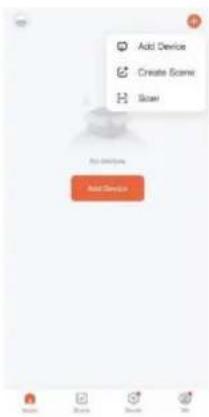
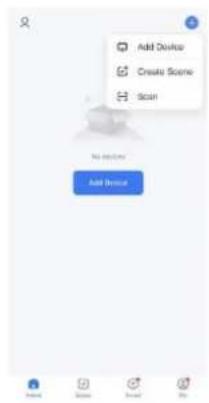
Press "+" icon on right top page or the "Add Device" button in the middle page to st adding device.

THOMSON HR15-T16 - 3) Add and connect device - 1

text_image Add Device Create Scene Scan Add Device

There are 2 methods to connect the service:

Method 1: Press "Add" button in the middle page. Then enter the Wi-Fi password. Pre "next" to start connecting. (In this case, you need to keep your phone bluetooth on ar Wi-Fi on, please also noted that for now only 2.4G Wi-Fi is supported. Please make sure Wi-Fi is 2.4.)
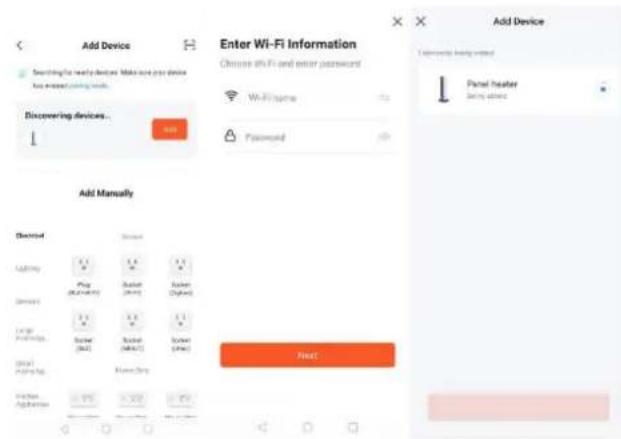
THOMSON HR15-T16 - There are 2 methods to connect the service: - 1

text_image Add Device Searching the next devices. Make sure you device to increase your device. Discovering devices... Add Enter Wi-Fi Information Choose 6% Fi and enter passwords Wi-Fi name Password Add Device User manual to bring notes Panel heater using notes Add Manually Device System Adoption Play (M-1/4/8/1) Batter (M-2/4/1) Sunder (M-3/4/1) System (M-4/5/1) System (M-5/5/1) System (M-6/5/1) System (M-7/5/1) System (M-8/5/1) System (M-9/5/1) System (M-10/5/1) System (M-11/5/1) System (M-12/5/1) System (M-13/5/1) System (M-14/5/1) System (M-15/5/1) System (M-16/5/1) System (M-17/5/1) System (M-18/5/1) System (M-19/5/1) System (M-20/5/1) System (M-21/5/1) System (M-22/5/1) System (M-23/5/1) System (M-24/5/1) System (M-25/5/1) System (M-26/5/1) System (M-27/5/1) System (M-28/5/1) System (M-29/5/1) System (M-30/5/1) System (M-31/5/1) System (M-32/5/1) System (M-33/5/1) System (M-34/5/1) System (M-35/5/1) System (M-36/5/1) System (M-37/5/1) System (M-38/5/1) System (M-39/5/1) System (M-40/5/1) System (M-41/5/1) System (M-42/5/1) System (M-43/5/1) System (M-44/5/1) System (M-45/5/1) System (M-46/5/1) System (M-47/5/1) System (M-48/5/1) System (M-49/5/1) System (M-50/5/1) System (M-51/5/1) System (M-52/5/1) System (M-53/5/1) System (M-54/5/1) System (M-55/5/1) System (M-56/5/1) System (M-57/5/1) System (M-58/5/1) System (M-59/5/1) System (M-60/5/1) System (M-61/5/1) System (M-62/5/1) System (M-63/5/1) System (M-64/5/1) System (M-65/5/1) System (M-66/5/1) System (M-67/5/1) System (M-68/5/1) System (M-69/5/1) System (M-70/5/1) System (M-71/5/1) System (M-72/5/1) System (M-73/5/1) System (M-74/5/1) System (M-75/5/1) System (M-76/5/1) System (M-77/5/1) System (M-78/5/1) System (M-79/5/1) System (M-80/5/1) System (M-81/5/1) System (M-82/5/1) System (M-83/5/1) System (M-84/5/1) System (M-85/5/1) System (M-86/5/1) System (M-87/5/1) System (M-88/5/1) System (M-89/5/1) System (M-90/5/1) System (M-91/5/1) System (M-92/5/1) System (M-93/5/1) System (M-94/5/1) System (M-95/5/1) System (M-96/5/1) System (M-97/5/1) System (M-98/5/1) System (M-99/5/1)

Method 2: Choose "Small Home appliance" under "Add Manually" and then choose "Heater". Then enter the Wi-Fi password. Press "next" to and choose your preferred indicator status to the start connecting. (In this case, you need to keep your phone bluetooth on and Wi-Fi on, please also noted that for now only 2.4G Wi-Fi is supported. Please make sure your Wi-Fi is 2.4.)
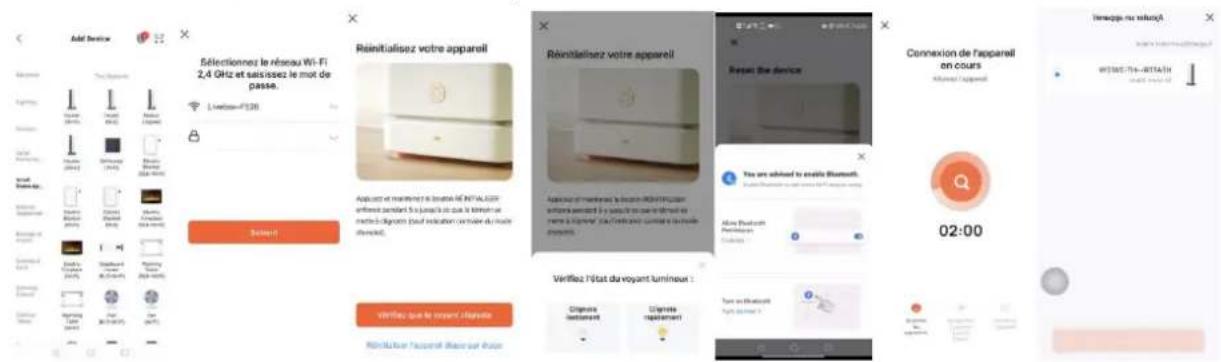
THOMSON HR15-T16 - There are 2 methods to connect the service: - 2

4) Connect successfully

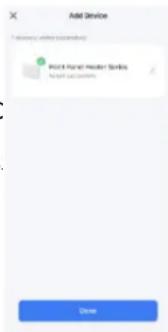
When it's successfully connected, the Wi-Fi icon will stop flashing and ke (including Stand by mode). And the App will show "Device added successfully".

Press "done" to start your operation for the appliance over your phone
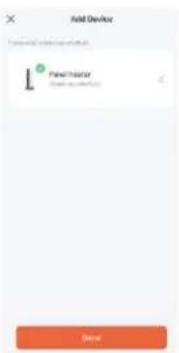
THOMSON HR15-T16 - 4) Connect successfully - 1

text_image Add Device Panel Factor (Add to Excel) Done

Notes:

If there is no operation in 3 minutes after pressing “ ” for more than 5 seconds, then the WiFi function will stop flashing and disappear from the screen.

If you need to re-connect your WiFi for the appliance, repeat step 3.

4.14. Connect WiFi by Smart Life

1) Download APP

You can download the app by searching for "Smart Life" App in your app store or by scanning the following QR code.

THOMSON HR15-T16 - 1) Download APP - 1

text_image QR code with a blue home icon in the center, likely linking to a smart home or app interface.

THOMSON HR15-T16 - 1) Download APP - 2

natural_image Blue square icon with a white house and wireless signal symbol (no text or numbers)

(successfully installed)

2) Registration

Open the "Smart Life" App, register an account: you can use either phone no. or email address to register. You will get a verification code. Enter the verification code and then set your own password. Use your password to log in.

THOMSON HR15-T16 - 2) Registration - 1

text_image Register Log In Try as Quest! Login to Email/Review (Main Agreement) Children's Privacy Statement 1. Child Policy Information Manager Agree 30 seconds User Agreement and Privacy Policy Privacy Policy and Service Termable Understand the importance of privacy protection. To fully present our refraction and use of your personal information, we have reminded by Privacy Policy, "Service Termes, and List of Third Party Information Sharing L&T in default in accordance with the United Year and Regulation. If you are under the age of 14, there is sure to address your questions to read out "Child's Privacy Promotion Statement" together, and set their content and guided further to use our products and submit sensitive information. Please read through the following terms and considerance before you do not produce useful services (relevant from) referred to as Privacy Policy Use: Assessment Children's Privacy Statement and Third Party information Microsoft Ltd Register Mobile Number/Email Enter Verification Code Verificemen code has been sent to your mobile chat-in Don't get a password Set Password Password Use 5.0 characters with a non-certain or unknown Password Log In Please enter the account Password • Agreements that use Agreements Children's Privacy Statement and Third Party Information Sharing Inc. Forgot Password

EN 17

3) Add and connect device

Insert the power plug and turn on the power switch. Choose "Stan mode by pushing the ⏻" button until the "Stand by" symbol is displayed. Keep pressing ⏻" for more than 5 seconds and the ic® will flash.

Press "+" icon on right top page or the "Add Device" button in the page to start adding device.

THOMSON HR15-T16 - 3) Add and connect device - 1

text_image Add Device Create Scene Scan Add Device

There are 2 methods to connect the service:

Method 1: Press "Add" button in the middle page. Then enter the Wi-Fi password. Pi "next" to start connecting. (In this case, you need to keep your phone bluetooth on ar Wi-Fi on, Now only 2.4G Wi-Fi is supported. Please make sure your Wi-Fi is 2.4.)
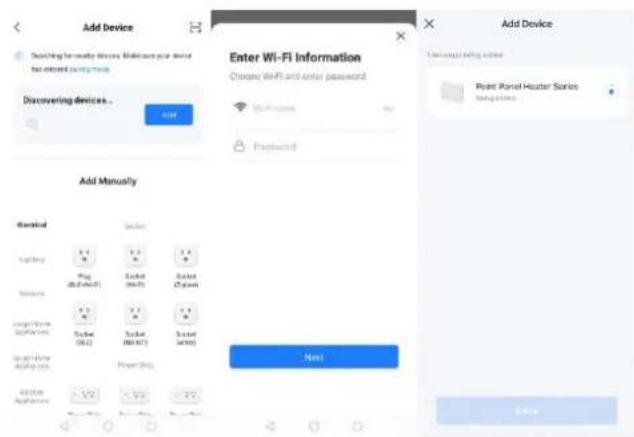
THOMSON HR15-T16 - There are 2 methods to connect the service: - 1

text_image Add Device Switching manually devices Make your device for access to account Discovering devices... Add Enter Wi-Fi Information Choose Wi-Fi and enter password Wi-Fi Password Add Manually Manual Lighting Plug (Off/Off) Socket (Mo/Off) Socket (Gave) Length Time Appliances Socket (RL) Socket (Mo/Off) Socket (Gave) Length Time Appliances Power Ship Add Add Device Please click adding items Point Panel Hyster Series Missing items Next Add Item

Method 2: Choose "Small Home appliance" under "Add Manually" and then choose "Heater". Then enter the Wi-Fi password. Press "next" to and choose your preferred indicator status to the start connecting. (In this case, you need to keep your phone bluetooth on and Wi-Fi on, please also noted that for now only 2.4G Wi-Fi is supported. Please make sure your Wi-Fi is 2.4.)
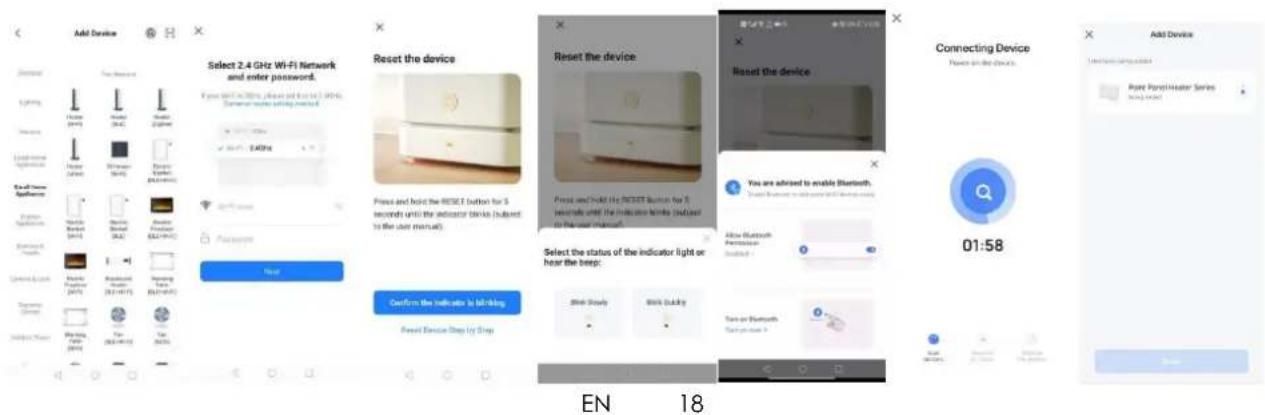
THOMSON HR15-T16 - There are 2 methods to connect the service: - 2

text_image Add Device Select 2.4 GHz Wi-Fi Network and enter password. Reset the device Press and hold the RESET button for 3 seconds until the indicator lights (adjusted to the user manual). Reset the device Press and hold the RESET button for 5 seconds until the indicator lights (adjusted to the user manual). Select the status of the indicator light or hear the beep: Reset Device Shop by Step EN 18 Connecting Device Power on the device. Add Device Connecting Device Point Panel/Marker Series Using Open 01:58

4) Connect successfully

When it's successfully connected, the Wi-Fi icon will stop flashing and keep (including Stand by mode). And the App will show "Device added success. Press "done" to start your operation for the appliance over your phone.

THOMSON HR15-T16 - 4) Connect successfully - 1

text_image Add Device 1. Add user (add user) Printed Panel Header Serials Add user serials Close

Notes:

If there is no operation in 3 minutes after pressing “ ” for more than 5 seconds, then the WiFi function will stop flashing and disappear from the screen.

If you need to re-connect your WiFi for the appliance, repeat step 3.

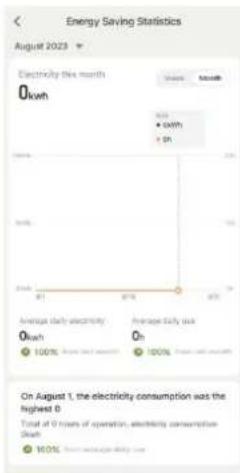
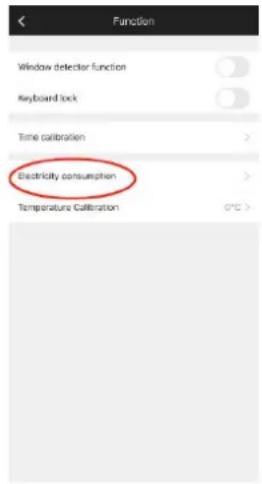
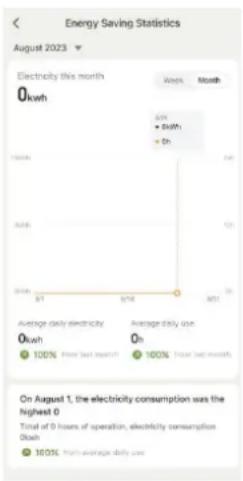
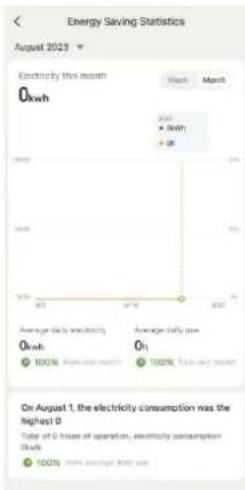
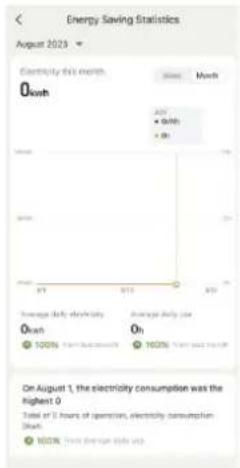
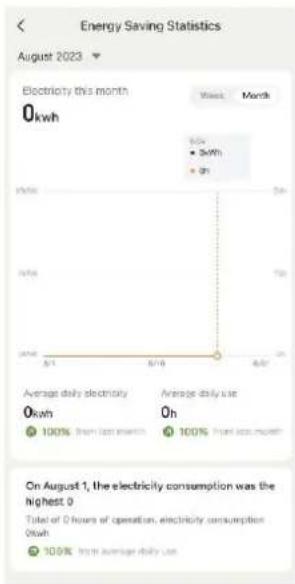
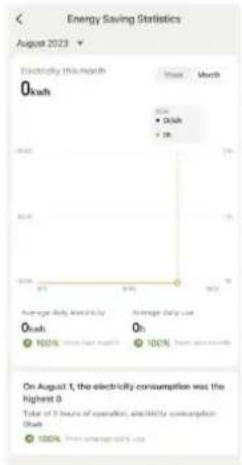
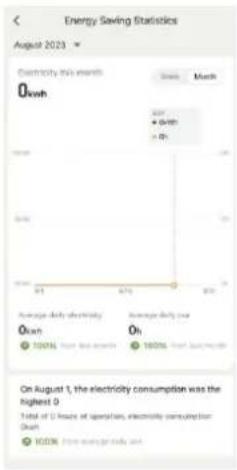
4.15. Electricity consommation function

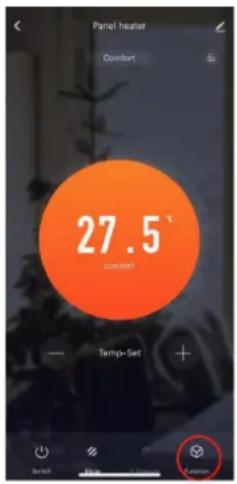
You can check energy consumption and heating time from APP.

THOMSON HR15-T16 - Electricity consommation function - 1

text_image Panel heater Comfort 27.5 ° Temperature Temp-Set + Balance 100% 100% 100% 100% 100% 100% 100% 100% 100% 100% 100% 100% 100% 100% 100% 100% 100% 100% 100% 100% 100% Refresh Update OK Cancel

THOMSON HR15-T16 - Electricity consommation function - 2

text_image Function Window detector function Keyboard lock Time calibration > Electricity consumption > Temperature Calibration 0°C >

THOMSON HR15-T16 - Electricity consommation function - 3

line | Month | Average daily electricity | |-------|--------------------------| | Jan | 0 kWh | | Feb | 0 kWh | | Mar | 0 h | | Apr | 0 h | | May | 0 h | | Jun | 0 h | | Jul | 0 h | | Aug | 0 h | | Sep | 0 h | | Oct | 0 h | | Nov | 0 h | | Dec | 0 h |

5. IN CASE OF PROBLEMS

5.1. Troubleshooting

The device does not heat· Ensure the device is properly connected to the mains electricity and powered on.· Check the position of the main installation switch.· Increase the set temperature on the regulator.· Make sure no clothing is covering the control unit.· If the problem persists, contact an authorized dealer o qualified professional.
The device heats continuously·Lower the programmed temperature on the device's regulator.·Verify that no clothing is covering the command device.·If it continues to heat, contact the seller or a qualified professional.·You can adjust the compensation settings by ±5°C; for details, refer to "Adjustment of the Set Temperature Point (C)".
The room remains co·Ensure the device's power matches the room size.·During initial use: Allow approximately 2 hours to reach programmed temperature (maximum setting does not accelerate heating).
Device does not respond correctly to commands from the Pilot Wire box·Disconnect the device.·Ensure the connection is correct and the box is function properly.·Contact a qualified professional.
Device continues heating even though the window is open with "Open Window" mode active·A few minutes may be required for the function to activate.·The temperature difference between outside and inside may be insufficient for the function to work.·Verify no obstacles are around the Command Unit and device.·If the problem persists, contact the seller or a qualified professional.
Device does not rest after closing the window with "Open Window" mode active·A few minutes may be required for the sensor to detect window closure.·The temperature probe is damaged. Turn off the device and contact your seller.·Verify no obstacles are around the Command Unit and device.·Disable and reactivate the function.·If the function's response delay is excessive, you can manually restart the device.·If the problem persists, contact the seller or a qualified professional.

5.2. Reset

After powering on:

Within 10 seconds, press “+” and “M” simultaneously for more than 2 seconds. The target temperature will revert to factory settings (19°C). All programs and custom modifications will be permanently deleted.

5.3. In case of power failure

All the above settings for temperature / time / date of the week / programs remain vc until the power is removed.

After a power failure, when power is restored, the device will revert to the mode and temperature that were selected prior to the power failure.

In the event of a power failure, the device only retains the following parameters:

temperature and operating mode. Upon power restoration, the date and time must be reset in order to ensure the proper functioning of the various programs.

Note: For safety reasons, the device will automatically shut off after 300 consecutive days of operation.

5.4. Thermostat Replacement

Disconnect the heating system before replacing the thermostat.

  1. TECHNICAL SPECIFICATIONS
ModelHR10-T17WHR15-T17WHR20-T17W
Voltage230 V ~230 V ~230 V ~
Frequency50 Hz50 Hz50 Hz
Rated power1000 W1500 W2000W
Protection classIIIIII
IP ProtectionIP24IP24IP24
Pilot wire6 orders6 orders6 orders

Operating frequency: WiFi 2.4GHz (2412-2472MHz)

Max. radio-frequency power transmitted: 17.91 dBm

Information requirements for electric local space heaters

Model identifier(s): HR10-T17W
ItemSymbolValueUnitItemValue
Heat outputType of heat output/room temperature cor(select one)
Nominal heat outputP nom1.000kWSingle stage heat output and room temperature controlNo
Minimum heat output (indicative)P minN/AkWTwo or more manual stages, no room temperature controlNo
Maximum continuous heat outputP max,c1.000kWWith mechanic thermostat room temperature controlNo
Power consumptionWith electronic room temperature controlNo
In off modeP o0.00WElectronic room temperature control plus day timerNo
In standby modePsm0.49WElectronic room temperature control plus week timerYes
In idle modeP idle0.91WOther control options (multiple selections possible)
In network standbyP nsm0.91WRoom temperature control, with presence detectionNo
Standby mode with display of information or statusYesRoom temperature control, with open window detectionYes
Seasonal space heating energy efficiency in active modeη S,on94.0%Distance control optionYes
Adaptive start controlNo
Working time limitationNo
Black bulb sensorNo
Self-learning functionalityNo
Control accuracyNo
Contact detailsHOM'Y SAS,GREEN PARK - Bat A, 61 rue de la cimaise, 59650 Villeneuve, d'Ascq, FRA
Model identifier(s): HR15-T17W
ItemSymbolValueUnitItemValue
Heat outputType of heat output/room temperature cor (select one)
Nominal heat outputP nom1.500kWSingle stage heat output and n room temperature controlNo
Minimum heat output (indicative)P minN/AkWTwo or more manual stages, no room temperature controlNo
Maximum continuous heat outputP max.c1.500kWWith mechanic thermostat room temperature controlNo
Power consumptionWith electronic room temperature controlNo
In off modeP o0.00WElectronic room temperature control plus day timerNo
In standby modePsm0.49WElectronic room temperature control plus week timerYes
In idle modeP idle0.91WOther control options (multiple selections possible)
In network standbP nsm0.91WRoom temperature control, with presence detectionNo
Standby mode with display of information or statusYesRoom temperature control, with open window detectionYes
Seasonal space heating energy efficiency in active modeη S,on94.0%Distance control optionYes
Adaptive start controlNo
Working time limitationNo
Black bulb sensorNo
Self-learning functionalityNo
Control accuracyNo
Contact detailsHOM'Y SAS,GREEN PARK - Bat A, 61 rue de la cimaise, 59650 Villeneuve, d'Ascq, FRA
Model identifier(s): HR20-T17W
ItemSymbolValueUnitItemValue
Heat outputType of heat output/room temperature con(select one)
Nominal heat outputP nom2.000kWSingle stage heat output and n room temperature controlNo
Minimum heat output (indicative)P minN/AkWTwo or more manual stages, no room temperature controlNo
Maximum continuous heat outputP max,c2.000kWWith mechanic thermostat room temperature controlNo
Power consumptionWith electronic room temperature controlNo
In off modeP o0.00WElectronic room temperature control plus day timerNo
In standby modePsm0.49WElectronic room temperature control plus week timerYes
In idle modeP idle0.91WOther control options (multiple selections possible)
In network standbyP nsm0.91WRoom temperature control, with presence detectionNo
Standby mode with display of information or statusYesRoom temperature control, with open window detectionYes
Seasonal space heating energy efficiency in active modeη S,on94.0%Distance control optionYes
Adaptive start controlNo
Working time limitationNo
Black bulb sensorNo
Self-learning functionalityNo
Control accuracyNo
Contact detailsHOM'Y SAS, GREEN PARK - Bat A, 61 rue de la cimaise, 59650 Villeneuve, d'Ascq, FRA

7. CARE AND CLEANING

  1. Before cleaning the appliance, switch off the appliance from the power supply and wait until it is completely cold.
  2. Use a damp cloth to clean the casing of the device.
  3. Clean grill and air outlet regularly. Never immerse the appliance in water or allow water to enter the appliance.

8. RECYCLING (DISPOSAL OF THE PRODUCT AT THE

OF ITS LIFE)

THOMSON HR15-T16 - OF ITS LIFE) - 1

The crossed-out wheeled bin symbol indicates that the item should be disposed of separately from household waste. The item should be handed in for recycling in accordance with local environmental regulations for waste disposal. By separating a marked item from household waste, you will help

reduce the volume of waste sent to incinerators or landfill and minimize any potential

negative impact on human health and the environment.

This product has been manufactured and distributed under the responsibility of Hom'y. THOMSON and the THOMSON logo are trademarks licensed to Hom'y. For further details, visit www.thomson-brand.com or scan the QR code to check our video on Youtube.

THOMSON HR15-T16 - OF ITS LIFE) - 2

text_image QR code with a red logo in the center, likely linking to a digital resource or website.

All other products, services, companies, trademarks, trade or product names, and logos referenced herein remain the exclusive property of their respective owners.


THOMSON HR15-T16 - OF ITS LIFE) - 3

THOMSON HR15-T16 - OF ITS LIFE) - 4

text_image LE TRI + FACILE BAC DE TRI

Imported by: HOM'Y SAS

natural_image Blank white image with no visible content, text, or symbols
text_image THOMSON 19.0 °C

3 Predefined Programs (P1/P2/P3)

Programa P1HoraModo
Lun-Vie0:00-6:00ECO
6:00-9:00CONFORT
9:00-16:00ECO
16:00-23:00CONFORT
23:00-0:00ECO
Sáb-Dom0:00-7:00ECO
7:00-23:00CONFORT
23:00-0:00ECO
Programa P2HoraModo
Lun - Dom0:00-7:00ECO
7:00-23:00CONFORT
23:00-0:00ECO
Programa P3HoraModo
Lun-Vie0:00-6:00ECO
6:00-9:00CONFORT
9:00-13:00ECO
13:00-23:00CONFORT
23:00-0:00ECO
Sáb-Dom0:00-7:00ECO
7:00-23:00CONFORT
23:00-0:00ECO

The recommended temperature by ADEME (French Agency for Ecological Transition) is 19°C. This indication serves as a preventive measure for the user.

Higher setpoint temperatures will result in increased energy consumption.
THOMSON HR15-T16 - OF ITS LIFE) - 5

text_image 19.0 °C
text_image QR code with central red logo containing a white 't' and signal icon

THOMSON HR15-T16 - OF ITS LIFE) - 6

text_image t TuyaSmart
text_image Register User Agreement and Privacy Policy Privacy Policy and Service Services underlined the importance of privacy detected, it fully present our information and use of your services information, we have residuals. "Privacy Policy" - Service Terms and "Use of Very Policy Information Sharing List to be found in accordance with the used uses and regulations. If you are under Review of 14, please note to notify your questions host our Children's Privacy Protection Statement® together, and we use your products and submit personal information. Please read through the following terms and functions before you use your products or services (if otherwise allowed to use) Privacy Policy user agreement (Children's Privacy Statement and TV Data Information Registration List) Agree Disagree Enter Verification Code Set Password Log In Password: Please note the service of Password I Agree Privacy Policy for Agreement Children's Privacy Statement and TV Data Wednesday Subscription List Target Password
text_image Add Device Create Scene Scan Add Device
text_image Add Device Starting for newly devices. Make sure your device has interested in your device. Discovering devices... Add Enter Wi-Fi Information Choose Wi-Fi and enter password Wi-Fi name Password Add Device I recommend every person Panel Heater During the next Add Manually Device Lighting Plug (80Ω/16V) Solder (300V) Solder (200V) Solder (100V) Solder (50V) Solder (30V) Solder (100V) Solder (50V) Solder (30V) Solder (100V) Solder (50V) Solder (30V) Solder (100V) Solder (50V) Solder (30V) Solder (100V) Solder (50V) Solder (30V) Solder (100V) Add Manually Next
text_image Add Device Form local added website Form local Add website Add Add

Notas:

text_image QR code with a blue home icon in the center, likely linking to a digital service or application.

THOMSON HR15-T16 - Notas: - 1

natural_image Blue square icon with a white house and wireless signal symbol (no text or numbers)
text_image Register Log In Try as Guest Cyberly (Privacy Policy) User Agreement Cyberly Privacy Statement & Child Party Information Meeting List Agree Disagree User Agreement and Privacy Policy Privacy Policy and Service Termable understand the importance of privacy protection. To fully present our collection and use of your personnel information, we have closed by "Privacy Policy", "Service Termy" and "List of Third Party Information Sharing L&T" in detail in accordance with the latest file and guidelines. If you are under the age of 34, please be sure to notify your question to read on "Children's Privacy Protection Statement" together, and write their content and guided before you use our products and submit personal information. Please read through the following terms and conditions before you use our products within services (all listed) referred to as Other Policy Use Agreement Database Privacy Statement and Child Care Information Biosks list Register Mobile Number/Email Enter Verification Code Verification code has been sent to your mobile service. Research ID:662 Didn't get a code? Set Password Password Use ID, ID characters with a name of letters and members Log In Prepare user the accounts Password I Agree Privacy Policy Use Agreement Cyberly Privacy Statement and Child Party Information Sharing List Forget Password
text_image Add Device Create Scene Scan Add Scene
text_image Add Device Searching for newly devices. Make new your device Not entered using mode. Discovering devices... Add Enter Wi-Fi Information Choose Wi-Fi and enter password WiFi home Password Add Manually Readwind Lighting Support Language Application Social (SL) Social (MS-67) Social (S400) Text Add Manually Text Play Play (20:45:41) Play (20:45:41) Play (20:45:41) Play (20:45:41) Play (20:45:41) Play (20:45:41) Play (20:45:41) Play (20:45:41) Play (20:45:41) Play (20:45:41) Filet Add Device 1 Devently being added Point Panel Header Series Adding added Next
text_image Add Device Select 2.4 GHz Wi-Fi Network and enter password. Reset the device Press and hold the RESET button for 3 seconds until the indicator (open) (subset) in the order manual) Reset the device Press and hold the RESET button for 3 seconds until the indicator (open) (subset) in the order manual) Select the status of the indicator light or hear the lamp) Confirm the indicator is M-Linking. Reset Device Drop by Drop 01:58 Connecting Device Power on the device Add Device Next Parachexter Service Connected 01:58

4) Conexión exitosa

text_image Add Device Point Panel Heater Series Done

Notas:

text_image Function Window detector function Keyboard lock Time calibration Electricity consumption Temperature Calibration 0°C

THOMSON HR15-T16 - Notas: - 1

line | Metric | Value | | --- | --- | | Average daily electricity | 0.0kWh | | Average daily use | 0.01 | | Average daily consumption | 100% | | On August 1, the electricity consumption was the highest 0 | 100% |

5. EN CASO DE PROBLEMAS

text_image QR code with a red 'T' logo in the center, likely linking to a digital resource or website.
text_image THOMSON 19.0 °C
text_image QR code with central red logo containing a white 't' and signal icon

THOMSON HR15-T16 - EN CASO DE PROBLEMAS - 1

text_image t TuyaSmart
text_image Register User Agreement and Privacy Policy Privacy Policy and Privacy Policy is allowed to understand the importance of privacy protection. To fully prevent our collection and use of your personal information, we have sufficient "Privacy Policy", "Privacy Terms" and "List of Third Policy Information Using List" to ensure it is available with the best daily and regularized. If you are under the range of 10, please call us to notify your questions about that "Children's Privacy Protection Statement" together, and seek their current and guidance upon you use new products and saved personal information. Please read through marketing links and directories before you use new product or online services. If you are already referred to at the Privacy Policy Client Agreement Clients' Privacy Policy and This Policy Information (Data) Ltd. Register Mobile http://www.tuya.com I Agree Privacy Policy User Agreement Clients in Privacy Policy and This Policy Information (Data) Ltd. Enter Verification Code Use location code that you want to your mobile phone (hased: 364) Did not get a code? Set Password Passions Log In Please enter the account Password I Agree Privacy Policy User Agreement Clients in Privacy Policy and This Policy Information (Data) Ltd. Target Password
text_image Add Device Create Scene Scan For remote Add Devices
text_image Add Device Searching by wifi devices. Make sure your device has almost saving edges. Discovering devices... Add Enter Wi-Fi Information Choose Wi-Fi and enter password. Wi-Fi name: 52 Password: 39 Add Manually Device Smart Lightning Plug (RGB+400) Dialled (800) Slider (High) Scales 1.0 2.0 3.0 4.0 5.0 6.0 7.0 8.0 9.0 None Home Appliance: 100% Add Device Panel header Saving edgey
text_image Add Device Punei Nuslar dashed software Drive

Hinweise:

text_image QR code with a blue home icon in the center, likely linking to a digital service or application.

THOMSON HR15-T16 - Hinweise: - 1

natural_image Blue square icon with a white house and wireless signal symbol (no text or numbers)
text_image Register Log In Try as Guard □ I signed (Privacy Policy) (3. Other Agreements) (Children Privacy Statement) (4. Children Privacy Information Exchange List) Agree Disagree User Agreement and Privacy Policy Privacy Policy and Service Services understand the importance of privacy information. To fully present our collection and Use of your services information, we have remind our Privacy Policy, "Service Terms" and "List of Third Party Information Banking List" in detail in accordance with the latest Text and Regulations. If you are under the age of 16, above you come to verify your questions to read is "Children's Privacy Protection Statement" together, and seek their content and updates before you use our products and install paymental information. Please beat through the following terms and conditions before you and turn products within services (collectively referred to as Private Policy User Consumption Children's Privacy Statement and Day Info Alternative Apache List) Register Enter Verification Code Set Password Login In Please mean the account... Password □ I signed Privacy Policy Unit Agreement (Children Privacy Statement and Third Voice Information Banking List) Forgot Password
text_image Add Device Create Scene Scan Add Device Add Device
text_image Add Device Select 2.4 GHz Wi-Fi Network and enter password. Reset the device Press and hold the RESET button for 5 seconds until the indicator lights (subject to the user manual). Reset the device Press and hold the RESET button for 5 seconds until the indicator lights (subject to the user manual). Select the status of the indicator light or hear the beep. Connecting Device Press to the client's air. Add Device Referent (only available) Point Power-Heater Series Airway device 01:58
text_image Add Device Point Panel Header Series name: name@point.org Name

Hinweise:

text_image Function Window defector function Keyboard lock Time calibration Electricity consumption Temperature Calibration

THOMSON HR15-T16 - Hinweise: - 1

line | Month | Electricity consumption (%) | |-------|------------------------------| | Jan | 100% | | Feb | 100% | | Mar | 100% | | Apr | 100% | | May | 100% | | Jun | 100% | | Jul | 100% | | Aug | 100% | | Sep | 100% | | Oct | 100% | | Nov | 100% | | Dec | 100% |

5. IM FALLE VON PROBLEME

5.1. Fehlerbehebung

text_image QR code with a red logo in the center, likely linking to a digital resource or website.
text_image THOMSON 19.0 °C
text_image QR code with central red logo containing white 't' and signal icon

THOMSON HR15-T16 - Fehlerbehebung - 1

text_image t TuyaSmart
text_image Register User Agreement and Privacy Policy Privacy Policy and Service Services understand the importance of privacy protection. To My own our collection and use of past personal information, we have individual "Privacy Policy", "Service Terms" and to your "This Privacy Interpretation" sharing Lia's to be able to understand with the shared terms and regulations. If you are under the use of 14, please be sure to identify your questions to read "Children's Privacy Protection Statement" together, and see your content and updates between one just user products and submit personal information. Please need through downloading terms and conditions before you and your products copy services accordingly referred to at Privacy Policy User Research Candidates Power Research and Only Buy Information Bridging List Agree Disagree Enter Verification Code Set Password Password Use your passwords to access your passwords Log In Private Egypt the account Enrollment • Agree Privacy Policy User Agreement, Children's Privacy Research and Stock hands Molecular Review List Target Password
text_image Add Device Create Scene Scan Add Devices Add Devices
text_image Add Device Enter Wi-Fi Information Choose Wi-Fi and enter password Wi-Fi name Password Add Device 1 password being added Packet header Only added Discovering devices... Add Manually Device Switch Linker Play (0x2-0x4) Screw (0x4) Screw (0x6) Screw (0x8) Screw (0x9) Screw (0x10) Screw (0x11) Screw (0x12) Screw (0x13) Screw (0x14) Screw (0x15) Screw (0x16) Screw (0x17) Screw (0x18) Screw (0x19) Screw (0x20) Screw (0x21) Screw (0x22) Screw (0x23) Screw (0x24) Screw (0x25) Screw (0x26) Screw (0x27) Screw (0x28) Screw (0x29) Screw (0x30) Screw (0x31) Screw (0x32) Screw (0x33) Screw (0x34) Screw (0x35) Screw (0x36) Screw (0x37) Screw (0x38) Screw (0x39) Screw (0x40) Screw (0x41) Screw (0x42) Screw (0x43) Screw (0x44) Screw (0x45) Screw (0x46) Screw (0x47) Screw (0x48) Screw (0x49) Screw (0x50) Screw (0x51) Screw (0x52) Screw (0x53) Screw (0x54) Screw (0x55) Screw (0x56) Screw (0x57) Screw (0x58) Screw (0x59) Screw (0x60) Screw (0x61) Screw (0x62) Screw (0x63) Screw (0x64) Screw (0x65) Screw (0x66) Screw (0x67) Screw (0x68) Screw (0x69) Screw (0x70) Screw (0x71) Screw (0x72) Screw (0x73) Screw (0x74) Screw (0x75) Screw (0x76) Screw (0x77) Screw (0x78) Screw (0x79) Screw (0x80) Screw (0x81) Screw (0x82) Screw (0x83) Screw (0x84) Screw (0x85) Screw (0x86) Screw (0x87) Screw (0x88) Screw (0x89) Screw (0x90) Screw (0x91) Screw (0x92) Screw (0x93) Screw (0x94) Screw (0x95) Screw (0x96) Screw (0x97) Screw (0x98) Screw (0x99) Screw (1.2.1.1.1.1.1.1.1.1.1.1.1.1.1.1.1.1.1.1.1.1.1.1.1.1.1.1.1.1.1.1.1.1.1.1.1.1.1.1.1.1.1.1.1.1.1.1.1.1.1.1. Add Manualy Next
text_image Add Device 1 Faster Tool or Faster hardware OK

Avvertenze:

text_image QR code with a blue home icon in the center, likely linking to a digital service or application.

THOMSON HR15-T16 - Avvertenze: - 1

natural_image Blue square icon with a white house and wireless signal symbol (no text or numbers)
text_image Register Log In Try as Guest □ Log In (My eag/My eag). Other Agreement 1 Windows Privacy Statement - Windows Privacy Statement (One) Agree Disagree User Agreement and Privacy Policy Privacy Policy and Service Policy understand the importance of privacy protection. To fully present our selected and use of your personal information, we have removed our "Privacy Policy", "Service Terms", and "List of Third Policy Information Sharing List" in detail in accordance with the ideal list and regulations. If you are under the age of 18, please to save to notify your guardian to read out "Children's Privacy Policy Statement" together, and meet their content and pulse before you use our products and submit personal information. Please Next Through the following terms and conditions before you do not produce; smaller serviziary (all information) referred to as Privacy Index User Recommendation Statement's Privacy Statement and Third Policy Information Share List Register Enter Verification Code Set Password Password Use 0.00 characters with any other online and further Don't get a code? Log In Please enter the account. Password □ I Agree Privacy Policy Unit Agreement Children Privacy Statement and Third Policy Information Sharing List Forget Password
text_image Add Device Create Scene Icon Add Scene
text_image Add Device Departing manually devices. Make your device has entered passing mode. Discovering devices... Add Manually Received Lighting Peg (RD/40/2) Bucket (MU/2) Bucket (Cp/row) Length of Applications Double (RL/2) Bucket (MD/40/2) Bucket (W/row) Power Ship Add Manually Add Device Enter Wi-Fi Information Choose Wi-Fi and enter password Password Point Panel Hyster Series using user Add Add
text_image Add Device Select 2.4 GHz Wi-Fi Network and enter password. Reset the device Press and hold the RESET button for 5 seconds until the indicator lights (select to the user manual). Reset the device Press and hold the RESET button for 5 seconds until the indicator lights (select to the user manual). Select the status of the indicator light or hear the beep. Connecting Device Press on the device 01:58 Add Device Point Personal Series Serving system
text_image Add Device Point Power/Hi/Neutral Series Add Sub-Neutral Name

Avvertenze:

text_image Function Window detector function Keyboard lock Time calibration Electricity consumption Temperature Calibration 0°C >

THOMSON HR15-T16 - Avvertenze: - 1

line | Date | Average daily electricity (kWh) | Average daily use (h) | | ---------- | ------------------------------- | --------------------- | | August 1 | 0 | 100% | | August 2 | 0 | 100% |

5. IN CASO DI PROBLEMI

text_image QR code with a red logo in the center, likely linking to a digital resource or website.
text_image THOMSON 19.0 °C
text_image QR code with a red square logo containing the letter 't' in the center.

THOMSON HR15-T16 - IN CASO DI PROBLEMI - 1

text_image TuyaSmart
text_image Register Enter Verification Code Set Password Log In Please order the account Password I agree Privacy Policy User Agreements <|vision_start|> user's Privacy Policy User Agreements and User Safety Authentication Tools List Login Log In Try as Guest Agree Designs
text_image Add Device Create Scene Beam Add Items Add Items
text_image Add Device Enter Wi-Fi Information Choose Wi-Fi and enter password. Wi-Fi name Password Add Device 1. Don't always being saved Panel Heater Don't always Discovering devices... Add Manually Devind Ginger Ginger Long Shorting Small Highing Up Power Shop Real
text_image QR code with a blue home icon in the center, likely linking to a digital service or application.

THOMSON HR15-T16 - IN CASO DI PROBLEMI - 2

natural_image Blue square icon with a white house and wireless signal symbol (no text or numbers)
text_image Register Log In Try as Guest □ Agree to (Copyright) (2. Other Agreements) Children Privacy Statement - Children Privacy Statement (Shared List) Agree Disagree User Agreement and Privacy Policy Privacy Policy and Service Policy understand the importance of privacy protection. To fully present our selection and use of your services information, we have removed our Privacy Policy, "Service Policy", and "List of Third Party Information Sharing List" in detail in accordance with the latest next and regularly. If you are under the age of 16, above to care to verify your questions to read is a "Children's Privacy Protection Statement" together, and seek their consent and updates before you use our products and install paymental information. Please beat through the following terms and conditions before you and not products within services (collectively referred to as Private Files User Registration Children's Privacy Statement and Third Party information Shares List) Register Enter Verification Code Set Password Login In Please enter the account... Password □ Agree/Choose Policy Unit Agreement Children Privacy Statement and Third Party Information Sharing List Forgot Password
text_image Add Device Create Scene Scan Add Devices Add Devices
text_image Add Device Searching for randomly stores. Make your device has stored in my mode. Discovering devices... Add Enter Wi-Fi Information Choose Wi-Fi and enter password. Password Add Manually Electrol Lighting Ranery Long time Accessories Total time Accessories Add Manually Next Point Portal Heater Series Singing server
text_image Add Device Select 2.4 GHz Wi-Fi Network and enter password. Reset the device Press and hold the RESET button for 5 seconds until the indicator blank (if not to the own manual). Reset the device Press and hold the RESET button for 5 seconds until the indicator blank (if not to the own manual). Reset the device You are advised to enable Bluetooth. Select the status of the indicator light or hear the beep. Connecting Device Please go on the device 01:58 Add Device Close to being added! Post Penetrillator Series Serving video Add Device

4) Succesvol verbonden

text_image Add Device Please click your account. Point Portal Headset Series Show to add the product.

Opmerkingen:

text_image Function Window defactor function Keyboard lock Time calibration Electricity consumption Temperature Calibration 0°C

THOMSON HR15-T16 - Opmerkingen: - 1

line Energy Saving Statistics | Metric | Value | |---|---| | Average daily consumption by kWh | 100% | | Average daily use of electricity | 100% | | On August 1, the electricity consumption was the highest 0. | Total of 3 hours of operation, electricity consumption (kWh) | 100% | | Average daily consumption by kWh | 100% | | Average daily use of electricity (kWh) | 100% | | Average daily consumption by Month | Month | | Electricity consumption (kWh) | 0.48 | | Average daily use of electricity (kWh) | 1.56 | | Average daily consumption by Month | 1.79 | | Average daily use of electricity (kWh) | 1.84 | | Average daily consumption by Month | 1.84 | The chart displays a single line graph representing the average daily consumption over time. The legend indicates 'On August 1, the electricity consumption was the highest 0'.

5. Bij problemen

5.1. Probleemoplossing

text_image QR code with a red logo in the center, likely linking to a digital resource or website.
  1. W PRZYPADKU PROBLEMÓW 19

2.2. INSTALACJA W ŁAZIENCE

text_image THOMSON 19.0 °C *

3 Predefined Programs (P1/P2/P3)

text_image QR code with central red logo containing stylized 't' and Wi-Fi symbol

THOMSON HR15-T16 - INSTALACJA W ŁAZIENCE - 1

text_image t TuyaSmart
text_image Register User Agreement and Privacy Policy Privacy Policy and Service Security discontinued the importance of privacy description, to fully provide our collection and use of your personal information, we have discontinued "Privacy Policy", "Service Security", and "List of Third Policy Intermediate Sharing Out" to recall in accordance with the last years and regulations. If you are under the use of 14, you need to to help your group members visit "Children's Privacy Protection Statement" together, and use first practice and guidance between us use your products and submit personal information. Please read through the following terms and stand here before you say your product or partner services collected allowed to as Prizes their usage environment (Controls Privacy Subscription and TV Pack Information Registration List) Agree Status: Registered User I Agree Privacy Policy Level. Agreement Copyright in Privacy Statement and TV Pack Copyright in Advertising List Enter Verification Code Debt not used code? Set Password Password Use your ID card with all of these and other • I Agree Privacy Policy Use Agreement Copyright in Privacy Statement and TV Pack RECOMMENDED SOFTWARE.LAT Log In Please enter the account Password. Target Password
text_image Add Device Craata Scene Scan Hot disks Add devices
text_image Add Device Searching for healthy devices. Make sure your device Has extended using mini. Discovering devices... Add Enter Wi-Fi Information Choose Wi-Fi and enter password Wi-Fi name: Password: Add Device I have only very useful Panel heater using mini- Add Mostlyly Electrical Lighting Primary High Home Ap. Small Home Ap. Kitchen appliances Electric Electric Lighting Primary Primary High Home Ap. Small Home Ap. Power Drop Add Next
text_image Add Device Forming, added components Panel header Added components Add

Uwagi:

4.14. Connect WiFi by Smart Life

text_image QR code with a blue home icon in the center, likely linking to a smart home application.

THOMSON HR15-T16 - Connect WiFi by Smart Life - 1

natural_image Blue square icon with a white house and wireless signal symbol (no text or numbers)
text_image Register User Agreement and Privacy Policy Privacy Policy and Service, Personal understand the importance of privacy protection. You fully passed our selection and use of your personal information, see book, remind our "Privacy Policy", "Service Policy", and "List of Third Party Information Sharing List" in detail in accordance with the used lease and regulations. If you are under the scope of it, please be sent it verify your questions to read our "Third Party Privacy Implementation Statement" together and send their content and guide before you use our products and submit personal information. Please visit through the following terms and conditions before you use your products useful service effectively referred to as Privacy Policy and Assessment Dictionary, Privacy Statement and Third Party information Registration List Agree Choose Register Enter Verification Code Mobile Number/Email □ AgreeThous Privacy User Agreement Chinese Privacy Statement and Third Party Information Sharing List Verification code has been sent to your mobile phone. Reward Code Didn't get a colour? Set Password Password one to 0% characters with an children's name or name. Log In Please enter the account. Password □ AgreeThous Privacy User Agreement Chinese Privacy Statement and Third Party Information Sharing List Forget Password
text_image Add Devices Create Scene Scan Add Scene
text_image Add Device Desiring locally devices. Make sure your device has entered using key Discovering devices... Add Enter Wi-Fi Information Choose Wi-Fi and enter password Password Add Manually Device Lighting Wire 20 (40-61) Audio (95-13) Audio (45-61) Audio (45-61) Audio (45-61) Audio (45-61) Audio (45-61) Audio (45-61) Audio (45-61) Audio (45-61) Audio (45-61) Audio (45-61) Audio (45-61) Audio (45-61)
text_image Add Device Select 2.4 GHz Wi-Fi Network and enter password. Reset the device Press and hold the RESET button for 5 seconds until the indicator blinks (subused to the next manual). Reset the device Press and hold the RESET button for 5 seconds until the indicator blinks (subused to the next manual). Select the status of the Indicator light or hear the beep. Reset Device Step by Stop Connecting Device Power on the device 01:58 Add Device Point Penetrification Devices Buy info 01:58
text_image Add Device Point Panel Hidifier Series Delete

Uwagi:

text_image Function Window defactor function Keyboard lock Time calibration Electricity consumption Temperature Calibration

THOMSON HR15-T16 - Uwagi: - 1

line Energy Saving Statistics | Date | Average daily electricity (kWh) | Average daily use (kWh) | |---|---|---| | Aug 1 | 100% | 100% | | Aug 2 | 100% | 100% | | Aug 3 | 100% | 100% | | Aug 4 | 100% | 100% | | Aug 5 | 100% | 100% | | Aug 6 | 100% | 100% | | Aug 7 | 100% | 100% | | Aug 8 | 100% | 100% | | Aug 9 | 100% | 100% | | Aug 10 | 100% | 100% | | Aug 11 | 100% | 100% | | Aug 12 | 100% | 100% | The chart displays a single line graph representing electricity consumption over time from August 1 to August 9. The values are labeled as 'On August 1' and 'On August 2'. The chart is annotated with 'Average daily electricity' and 'Average daily use'.

5. W PRZYPADKU PROBLEMÓW

text_image QR code with a red 'T' logo in the center, likely linking to a digital resource or website.
natural_image Blank white image with no visible content, text, or symbols
text_image THOMSON 19.0 °C

For example, if your radiator's set temperature is 24^ C but your thermometer shows only 22^ C, select a calibration value of -2^ C.

text_image QR code with central red logo containing white 't' and signal icon

THOMSON HR15-T16 - W PRZYPADKU PROBLEMÓW - 1

text_image t TuyaSmart

(instalado)

2) Registo

text_image Register User Agreement and Privacy Policy Privacy Policy and Service Temporary announced the appointment of printed petition, to fully present our collection and use of your personal information, or has investigated "Privacy Policy", "Service" service, and /List of "Your Party Information Sharing User" to detail in accordance with the based they and regulations. Please call order the order of 10, please to scan to help your questions need our "Children's Privacy Protection Stakeholders" together, and use their payments and guidance otherwise are not products and your personal attention. Please read through the following terms and conditions before you use our products in online services (Collectively referred to at Private Private Student-Generated Communities Privacy Supporters and Your Family Information Shareholder Ltd. Agree Disagree Register Enter Verification Code Enter Password Set Password Log In Password Please enter the account Password I Agree Privacy Policy User Agreement Choose Privacy Supporters and Data Traffic Information Security Ltd. Target Password
text_image Add Device Create Scene Scan Add Scene Add Scene
text_image Add Device Entering for many devices. Make sure your device has already coming much. Discovering devices... Add Enter Wi-Fi Information Choose Wi-Fi and enter passworded Wi-Fi name Password Add Device Previously being tested Panel header Boring details Add Manually Device Lighting Plug (W/2-w/1) Gasket (W/2) Socket (Gasket) Large (W/2-w/1) Solder (W/2) Screen (W/2) Small (W/2) Power Drop Next Red Box 100% < 50% < 20% < 10%
text_image Add Device Panel Freezer Please click OK Show

Notas:

Table of contents Click a title to access it
Manual assistant
Powered by Anthropic
Waiting for your message
Product information

Brand : THOMSON

Model : HR15-T16

Category : Heating