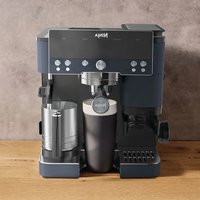
NINJA Luxe Café Premier ES601 - Coffee machine

Luxe Café Premier ES601 - Coffee machine NINJA - Free user manual and instructions

Find the device manual for free Luxe Café Premier ES601 NINJA in PDF.

English EN Download 💬 AI Question 10 questions ⚙️ Specs
📄

Document temporarily unavailable

The manual is currently being transferred to our new server. It will be accessible again in a few hours. Thank you for your patience.

Pick your language and provide your email: we'll send you a specifically translated version.
Brand Ninja
Model Luxe Café Premier ES601
Product type Espresso coffee machine with built-in grinder
Power supply 220-240 V, 50-60 Hz
Water tank capacity 2 L
Bean hopper capacity Approximately 280 g
Grinder Conical grinder with grind settings (25 levels)
Pressure Professional pump (not specified, estimated 15 bar)
Main functions Espresso, drip coffee, Americano, cold brew, hot water, steam and cold milk froth
Included baskets Single, double, Luxe (depending on model)
Included accessories Portafilter, funnel, assisted tamper, milk pitcher with whisk, cleaning disc, brush, descaling tablets, water filter, hardness test strip
Maintenance and cleaning Automatic descaling (DESCALE indicator), cleaning cycle (CLEAN indicator), dishwasher-safe parts (funnel, whisk, tank, hopper, drip tray)
Safety Automatic shut-off after 20 min, burn protection, child safety (hopper lock)
Spare parts and repairability Available on ninjakitchen.eu, customer service at +33 800 908874
Warranty 2 years (subject to registration within 28 days)
Dimensions (W x D x H) Approximately 35 x 40 x 45 cm (estimation)
Weight Approximately 12 kg (estimation)

Frequently Asked Questions - Luxe Café Premier ES601 NINJA

Why isn't my espresso flowing?
Check that the water tank is sufficiently filled (min. 50 cl for a Luxe basket) and properly attached. Make sure the grind is not too fine; use the recommended setting. If the problem persists, run a descaling cycle.
Why is the espresso flowing slowly?
Grind that is too fine or excessive tamping can slow the flow. Use the recommended grind setting and tamp until the tamper touches the funnel. Clean the basket holes and descale the machine if necessary.
Why is there no crema on my espresso?
Crema depends on bean freshness (use beans roasted less than 20 days ago) and grind. Make sure the grind is not too coarse and the basket is clean. Proper tamping improves crema.
How to descale the machine?
The DESCALE indicator lights up. Empty the drip tray, dissolve the Ninja descaling powder in 1 L of water (or use 500 ml of white vinegar + water up to the Descale line). Insert the double basket into the portafilter, place the pitcher under the steam wand, then press DESCALE and confirm. The cycle lasts about 90 minutes. Then rinse with clean water.
How to clean the steam wand?
After each use, wipe the wand with a damp cloth. For deep cleaning, remove the tip with the hex key from the cleaning brush and use the needle to unclog residues. Make sure the rubber seal is clean.
Why is my drink not hot enough?
Preheat the cup and portafilter with hot water. Adjust the brew temperature via the settings menu (hold SIZE for 3 s, select h06, then LO/M/HI). Use a thin, appropriately sized cup. If the problem persists, descale the machine.
How to change coffee beans?
Unlock the hopper by turning the handle counterclockwise, remove it and empty remaining beans. Put the empty hopper back in place, lock it, then insert the portafilter with funnel into the grinding cradle. Press and hold START GRIND to purge residues, then add new beans.
What if the grinder does not grind?
Check that the hopper contains beans and is properly installed. Make sure the portafilter with funnel is inserted correctly into the grinding cradle. If the ADD BEANS notification appears despite beans, unplug the machine and gently push beans toward the burrs. Clean the grinding cradle with the brush.
How to adjust the milk froth temperature?
Hold the SIZE button for 3 seconds to enter the settings menu. Select h07 (Froth Temperature) with the center button, then choose LO (low), M (medium), or HI (high). Confirm and exit the menu. Note that the Cold Foam mode does not heat.
Why does the drip tray fill up quickly?
This is normal: the machine purges water from the steam wand after each frothing and releases a little water during brewing to maintain pressure. The tray can hold residual water from about 6 cappuccinos. Empty it when the orange indicator appears.

User questions about Luxe Café Premier ES601 NINJA

0 question about this device. Answer the ones you know or ask your own.

Ask a new question about this device

The email remains private: it is only used to notify you if someone responds to your question.

No questions yet. Be the first to ask one.

Download the instructions for your Coffee machine in PDF format for free! Find your manual Luxe Café Premier ES601 - NINJA and take your electronic device back in hand. On this page are published all the documents necessary for the use of your device. Luxe Café Premier ES601 by NINJA.
USER MANUAL Luxe Café Premier ES601 NINJA

Manual assistant
Powered by Anthropic
Waiting for your message
Product information

Brand : NINJA

Model : Luxe Café Premier ES601

Category : Coffee machine